



Facebook’s new feature drop has an option to facelift the energy of your text posts. Instead of using standard background templates for your posts, you can choose animated backdrops. These backdrops add a dose of flair and personality to your posts. Facebook has mentioned that it will add more seasonal backgrounds in future. Here’s how you can add animated backdrops to your Facebook posts.
Read Also: Here is when iPhone 17e is likely to make its debut
In This Article
What’s new on Facebook?
Facebook’s new feature drop is all about animated effects. Users can choose to animate their existing profile pictures using Meta AI. There are several preset templates to choose from. Once an effect is selected, it adds a small motion animation to the picture.
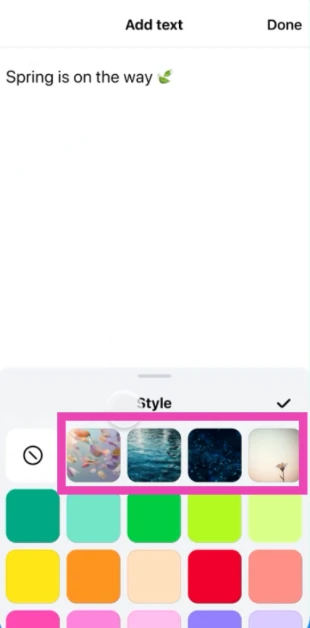
The animated backdrops make the background of your text posts come to life with unique effects. Users can select something like falling leaves or ocean waves for their posts. Festive and seasonal backdrops will soon be added to the platform.
Lastly, the ‘Restyle’ tool lets users transform the aesthetic of their Stories or Memories using preset options or text-based prompts. This feature also relies on Meta AI to bring the images to life. There are plenty of options to choose from, including Styles (like anime or illustrated), Moods (like glowy), Lighting (like ethereal), Colours (like cool or pink), and Backdrops (like beach or cityscape).
Add animated backdrops to Facebook text posts
- Launch the Facebook app on your phone.
- Tap the text box at the top of the screen.
- Type a post.

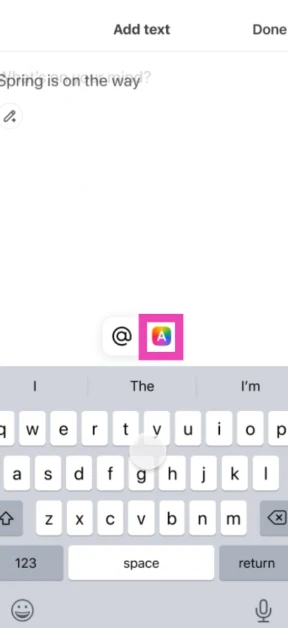
- Hit the A icon.
- Select an animated backdrop from the list.

- Tap on Done.

- Hit Post.



Frequently Asked Questions (FAQs)
Why can’t I view animated Facebook backdrops?
Facebook is rolling this feature out in a phased manner. It may take time to reach your device. Make sure the Facebook app on your phone is updated to the latest version.
How do I add an animated background to my Facebook post?
Launch the Facebook app, tap the ‘What’s on my mind’ text box, type your post, hit the ‘A’ icon, select an animated backdrop, tap on ‘Done’, and hit ‘Post’.
How do I create an animated profile picture on Facebook?
Go to your profile, tap the display picture, select ‘Animate profile picture’, select an effect, tap on ‘Next’, and hit ‘Done’.
How do I add music to my Facebook profile?
Go to your Facebook profile, tap the cloud icon on top of your profile picture, hit the music note icon, search and select a song, and hit ‘Done’.
How do I disable Memories on Facebook?
Launch the Facebook app on your phone and tap your profile icon. Go to Memories, hit the gear icon, and select ‘None’ under notifications. Additionally, turn on the toggle switch next to ‘Hide memory suggestions’.
Read Also: Top 10 smartphones under Rs 20,000 (February 2026)
Final Thoughts
Since Facebook is rolling this feature out in phases, it will take some time to reach all users. More animated backdrops will be added to the platform in the coming months. If you have any questions, let us know in the comments!


