



Embarking on a long journey without having something to watch on the way is a recipe for boredom. You can always stream something on the spot, but watching offline content is always the better choice as it saves your mobile data and ensures minimal battery drain. Downloading content beforehand may be a no-brainer, but it comes with its own set of issues. Sometimes, users report that the titles they’re downloading do not move past the 0% mark. If your Netflix app can’t download movies or TV shows either, here are 12 quick fixes that will help you resolve the issue.
Read Also: Oppo K14x 5G 4GB RAM with 64GB storage variant launched in India: Pricing and Availability
In This Article
What’s causing this issue?
Before we dive into the fixes, let’s take a look at what could be causing this issue on your device. Here are some of the usual suspects.
- Corrupted cache.
- Insufficient storage capacity.
- Incompatible device.
- Outdated device OS.
- Outdated app version.
- Faulty internet connection.
- Netflix’s servers are down.
- The licence holder hasn’t made the content available for download.
- You have reached the download limit for the title.
- You have reached the download limit for your Netflix plan.
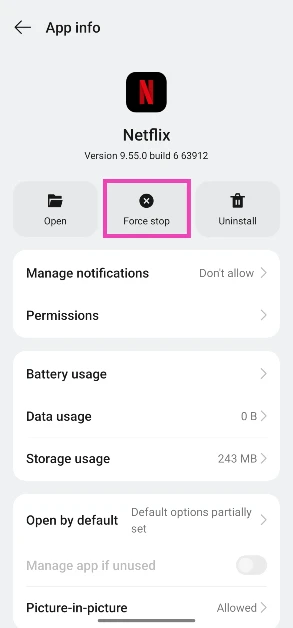
Force-stop and restart Netflix
- Go to Settings.
- Tap on Apps.

- Select App management.

- Scroll down and select Netflix.

- Hit Force stop.
- Go to the app drawer and relaunch Netflix.


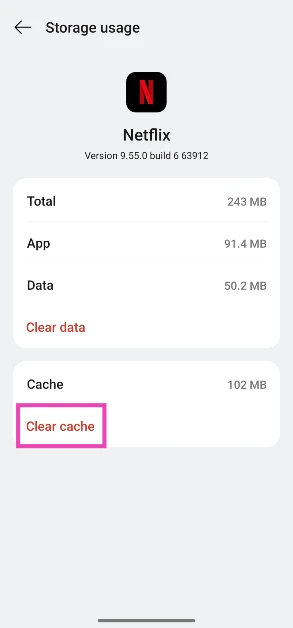
Clear the app cache
- Go to Settings.
- Tap on Apps.
- Select App management.
- Scroll down and select Netflix.
- Tap on Storage.

- Hit Clear cache.

Check the storage capacity
If your phone’s internal storage is fully occupied, Netflix won’t be able to download your desired titles. You can check the internal storage capacity of your phone by going to Settings>Storage. Alternatively, you can go to the Netflix app, navigate to app settings, and scroll down to view how much free storage is available on your device.
Is the title available to download?

Some Netflix titles are not available for offline viewing. The decision to make a title available for download lies with the production studio that owns the content. This also applies to Netflix Originals that are made in partnership with another studio.
Have you reached the download limit for the title?

Some license operators have a limit on how many times their titles can be downloaded by a user on Netflix. This limit can be anywhere from 2 to 20 downloads per year. Downloading a title on multiple devices using the same account counts as multiple downloads.
Check if you have reached your Netflix plan’s download limit

If you have reached your maximum download limit, you won’t be able to save more titles for offline viewing. Ad-supported plans allow 15 monthly downloads per device for 2 total devices. This limit resets at the end of each month. You can switch to a more premium plan to increase the monthly limit.
Check if your device is compatible with Netflix downloads

Netflix does not support downloads on Smart TVs, MacBooks, and Windows PCs/laptops. Here is the list of supported devices:
- Android phone or tablet
- iPhone or iPad
- Amazon Fire tablet
- Google Chromebook (with Google Play Store installed)
Update the app version
Older versions of the Netflix app may not support downloads. You can update the app by going to the Google Play Store/App Store, searching for Netflix, and hitting the Update button on the official app page.
Update your phone/tablet
Older OS versions may not allow Netflix to download content on your device. If you’re using Android 10 or an older OS, allow Netflix to use your device’s storage.
- Go to Settings and select Software update.

- Tap on Download and install.
- Select Install now.



Sign out and sign back in
It is possible that an account-related issue is keeping Netflix from downloading your desired titles. This issue can be resolved by signing out of Netflix and then signing back in. Hit the hamburger menu in the top right corner of the home page and select ‘Sign Out’ from the pop-up menu. Once you’re signed out, use your login credentials to sign back in.
Check if Netflix’s servers are down
If Netflix is experiencing a server outage, you won’t be able to browse and download titles on the platform. You can use DownDetector to find out if other users are going through the same issue. If there is a spike in recent user reports, it means that Netflix is down.
Check your internet connection
It is possible that the issue lies not with Netflix, but with your internet connection. Perform a quick speed test to confirm whether this is the case. If you notice poor speeds and weak signal strength, switch to a different WiFi connection.
Frequently Asked Questions (FAQs)
How do I download a movie on Netflix?
Open the movie title on Netflix and hit the Download button to save it for offline viewing. On mobile apps, the Download button is positioned just below the Play button.
How do I find downloaded content on Netflix?
You can find your downloaded movies and TV shows on Netflix by tapping the arrow icon at the top of the screen. Alternatively, go to My Netflix>Downloads to view the saved content.
Can I download Netflix movies on my Windows PC?
No, the Netflix app on Windows and Mac devices does not support downloads for offline viewing.
Why am I not able to download a movie on Netflix?
Some licence holders impose download limits on their content. This limit can range from 2 to 40 downloads. Netflix also has a download limit of its own, depending on the subscription plan. Ad-supported plans allow only 15 monthly downloads per device for 2 total devices.
Why are some movies and TV shows not available for download on Netflix?
Some production studios do not allow their titles to be downloaded on Netflix. In some cases, this also applies to Netflix Originals made in partnership with other studios.
Read Also: Xiaomi Pad 8, powered by the Snapdragon 8s Gen 4 SoC, launched in India
Final Thoughts
Some downloaded titles expire after 48 hours of being played. The countdown starts as soon as you hit play on a download. The ‘My Downloads’ page lets you know how much time you have left. Once expired, the title can be renewed easily. If you have any questions related to this issue, let us know in the comments!


