


Automatic scrolling for Reels has been one of the most-requested Instagram features for a while. The developers have finally heard the masses and added it to the app’s arsenal. When this feature is turned on, you don’t need to swipe up to go to the next Reel. The content flows smoothly without requiring any gesture. The next Reel plays automatically when the current one ends. Here’s how you can auto-scroll Instagram Reels.
Read Also: Meta will no longer use end-to-end encryption (E2EE) for Instagram DMs
In This Article
Before you begin
The auto-scroll feature has been in the incubator since last year. Initially available exclusively to creators, the tool was later rolled out in selected regions. The current rollout for wider audiences has been going on since December. Now that automatic scrolling can be carried out natively, you don’t need to rely on third-party apps for the task. This is a huge plus, as these apps require invasive screen overlay permissions to function.
Auto-scroll is disabled by default. You need to enable it from the Reels section to create an endless scroll of video content. The only downside to this feature is that it autoscrolls static images that show up in the Reels feed as well. You can pause a post by long-pressing anywhere on the screen.
Auto-scroll Instagram Reels
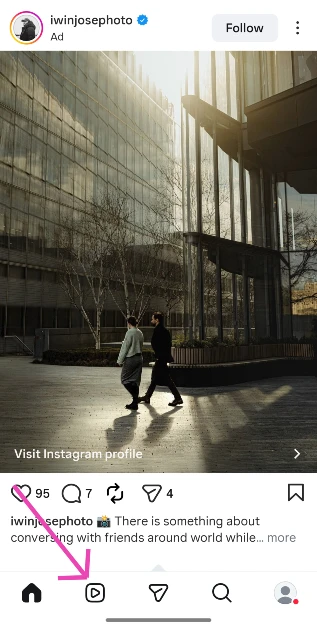
- Launch the Instagram app on your phone.
- Switch to the Reels tab.

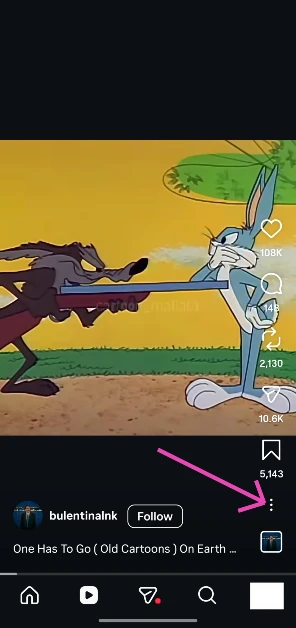
- Hit the ellipses in the bottom right corner of the screen.

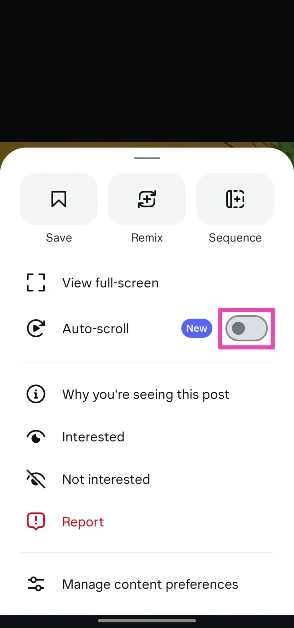
- Turn on the toggle switch next to Auto-scroll.

Frequently Asked Questions (FAQs)
Can you scroll automatically to the next Reel on Instagram?
Yes, Instagram has a feature that lets you scroll automatically to the next Reel without swiping up. You can enable it by hitting the ellipses in the bottom right corner of any Reel and turning on the toggle switch next to ‘Auto-scroll’.
Can I turn off Instagram auto-scroll?
You can disable auto-scroll by tapping the ellipses on a Reel and turning off its toggle switch.
How do I voice translate Instagram Reels?
Tap the ‘Translated with Meta AI’ on a Reel and select your preferred language to switch to the translated audio.
Can I hide my likes on Instagram?
To hide your likes, go to Profile>Settings and activity>Activity in Friends tab and select ‘No one’.
How do I check my watch history on Instagram?
Launch Instagram, go to your profile, and hit the menu icon. Go to Your activity>Watch history to see your recently viewed Reels.
Read Also: Optoma UHR90DV triple-laser RGB home theatre projector launched in India
Final Thoughts
If you can’t find this feature on your device, make sure the Instagram app is updated to its latest version. Since Meta is rolling this feature out in a phased manner, it may take some time to reach your device. If you have any questions, let us know in the comments!


