


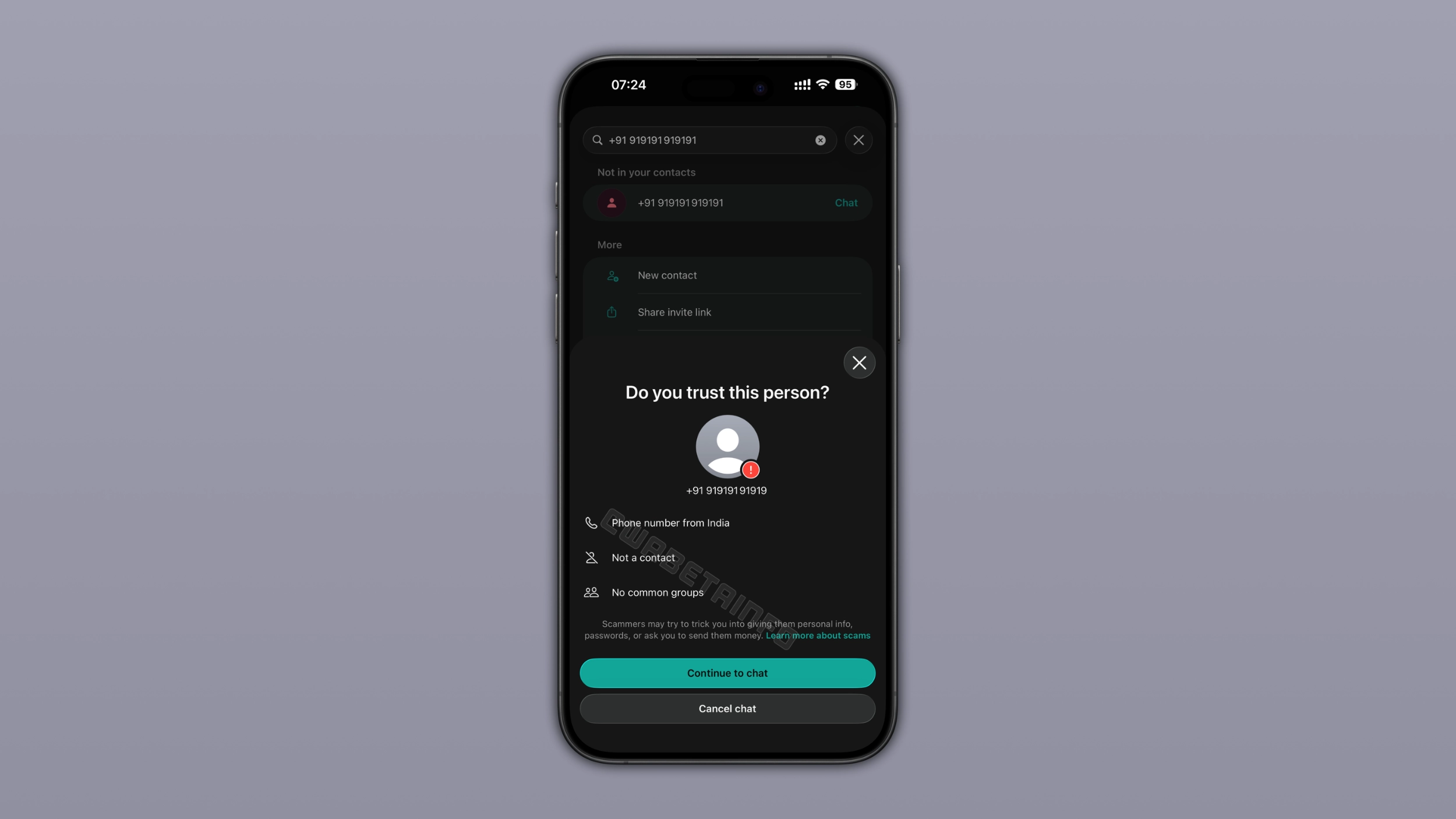
WhatsApp is introducing a new trust warning feature to enhance user safety for chats from unknown numbers. This functionality is currently being pushed out on both iOS and Android. When opening chats from unknown contacts, users will be greeted with a warning window with a message about the potential threats. Importantly, if the user heeds the warning and opens the chat, the sender of the message will remain uninformed. The move is in line with WhatsApp’s efforts to protect users’ chats and increase awareness of unknown contacts.
WhatsApp will now alert users when they engage in a chat with a stranger to prevent device linking, according to a recent report by WABetaInfo. Those clueless about device linking scammers target WhatsApp users by using misleading approaches that induce people to enter a code on their mobile devices. Victims are usually convinced that the code is associated with legitimate activity, but in fact, it allows a scammer’s device to be connected to their WhatsApp account.
Although WhatsApp has implemented a warning system to detect and notify users of suspicious linking requests, these alerts are only sent after a scam attempt has begun, showing a lack of proactive efforts to safeguard users from possible fraud.
So now before opening a new chat received from a stranger, the app will check whether the given phone number is from a trusted contact. If the number is not trusted, users get a popup to affirm the trustworthiness of the contact. The warning page displays important details, such as the registration details of the phone number, the status of the contact, and common group memberships. Users can choose to continue chatting by clicking on the button “Continue” or terminate the conversation. The latter can be done discretely and without informing the receiver.
Also Read: Wordle #1833 Hints and Clues: Today’s Wordle Answer for Friday, June 26
If a contact’s phone number shows up with a different country code, users should be careful and check if it’s genuine. Users are advised to go through the warning information carefully and not to rush into initiating the conversation. If you recognise the contact, then it is better to reach them via another way, such as their old phone number. It is also advisable to consult a common friend to verify the legitimacy of the contact. Users are advised to end any unusual chats in suspicion and prevent potential risks at no cost.
Availability
The WhatsApp trust warning is being extended to iOS and Android users, the report said.


