



Google has unveiled Gmail Q&A, a new AI tool powered by Gemini, for Workspace users. With the use of this tool, users can search their inboxes by instructing Gemini to find particular information within emails. The app’s Gemini icon allows users to activate the AI capability. The functionality was first made available on the web, and it is currently being made available on the Android app. An iOS version of the app will be released soon.
Google officially announced that the Gmail Q&A feature is currently available on Android smartphones and will soon be available on iOS devices. Gmail Q&A provides features that are similar to the web side panel. A few months back, the company announced the general availability of Gemini in the side panel of Gmail. With Gemini, users can ask questions and summarise and suggest responses to email threads in Gmail on the web. For example, you can ask Gemini to search your inbox for things like “What was the PO number for my agency?”, “How much did the company spend on the last marketing event?”, or “Catch me up on the emails about quarterly planning.”
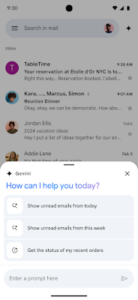
With the Gmail Q&A tool on Android, users may ask Gemini questions about their inbox or ask Gemini to perform tasks like finding specific information in their emails, displaying unread messages, allowing you to look at messages from a particular sender or summarising emails related to a specific topic.
Also Read: New range of Samsung’s Bespoke AI Double Door Refrigerator series launched in India
Users must enable personalisation and smart features in order to access Gmail Q&A on an Android device. Through the Admin panel, administrators can enable default personalisation for their users. For end users, open Gemini in the Gmail app by selecting a “summarise this email” chip or by tapping the black Gemini star in the upper right corner of the app. Gmail Q&A can first gather data from your inbox. It will have the capability to retrieve data from your Drive in the future.
“To start, Gmail Q&A can find information from your inbox. In the future, it will be able to find information from your Drive as well,” the blog post stated.


