



One of the most fun features in Facebook’s new drop is the option to animate your profile picture with dynamic effects. The social media platform uses Meta AI to edit your profile picture and transform it with motion effects. As of now, the effects are limited to a handful of preset animations. Facebook will add more to the list as the year goes on. Here’s how you can animate your Facebook profile with fun effects.
Read Also: How to stop MacBook from sleeping when its lid is closed
In This Article
Before you begin
The AI effects don’t work evenly across all pictures. The quality of the final product depends on the source image. Here are some tips to make sure your profile picture adheres to the basic standards.
- The picture should have a clear subject.
- It is ideal if the subject is alone in the shot.
- The subject should be facing the camera.
- The subject should not be holding any objects.
- A clear background is ideal.
Here are some of the basic animated templates offered by Facebook.
- Natural
- Confetti
- Wave
- Heart
- Headphones
- Party hat
Animate your profile picture on Facebook
- Launch the Facebook app on your phone.
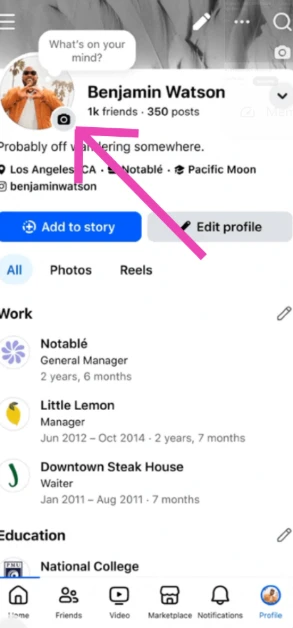
- Go to your profile.
- Tap your profile picture.

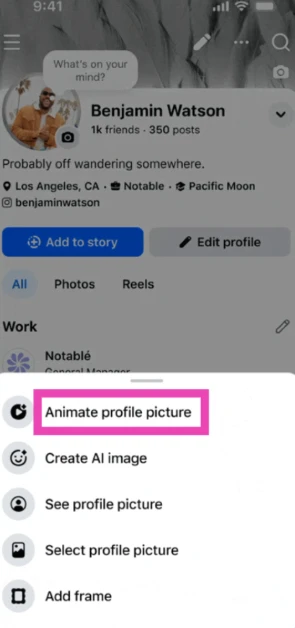
- Select Animate profile picture.

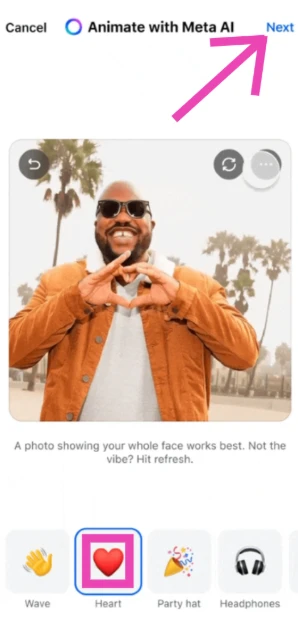
- Choose an effect.

- Hit Next.
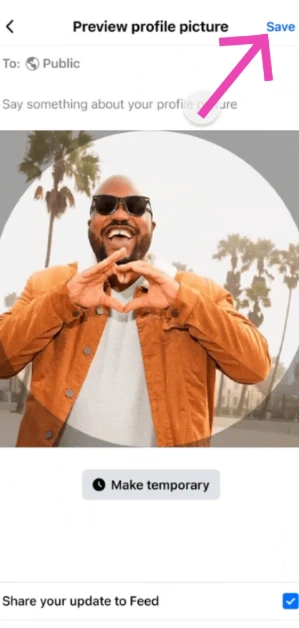
- Hit Save.

Frequently Asked Questions (FAQs)
What does animating my Facebook profile picture do?
When you animate your profile picture, Meta AI adds dynamic motion effects to it. Upon choosing the animate option, Facebook presents you with a list of effects.
How do I anime my profile picture on Facebook?
Go to your profile, tap your profile picture, select ‘Animate profile picture’, choose an effect from the list, tap on ‘Next’, and hit ‘Save’.
How do I lock my Facebook profile?
Go to your Facebook profile, hit the ellipses, and select ‘Lock profile’.
How do I restyle my Facebook story?
Go to your Story/Memory, tap on Restyle, choose a template or post a prompt, and hit ‘Done’.
How do I add an animated background to my text posts on Facebook?
Hit the text box on the home page, type a text post, hit the ‘A’ icon, choose an animated effect, and hit ‘Done’.
Read Also: Chromebook touchpad not working? Here are 8 fixes
Final Thoughts
If you don’t want other people to share or save your profile picture, turn on the profile picture guard on Facebook. To ensure your posts don’t reach people you don’t know, lock your Facebook profile. If you have any questions, let us know in the comments!


