


WhatsApp has added a new option to forward video notes to multiple chats. This saves users the hassle of recording the same video note for multiple conversations. Apart from the forwarding feature, a new ‘Video Note’ tab has also been added to the camera interface on WhatsApp, allowing easier access to the feature. Here’s how you can use it.
In This Article
What’s new on WhatsApp?
WhatsApp is making crucial changes to its video note feature. In its 2.24.9.30 beta update, the instant messaging platform is offering the option to forward video notes to multiple chats at once. This feature has already been rolled out on some devices. The 2.24.14.14 beta version of the app has added a handy ‘video note’ tab to the camera interface within the app. This will give users easy access to the feature.
WhatsApp is also testing AI characters for the platform. Once it comes into effect, users will be able to create hyperrealistic avatars of themselves using Meta AI. This will require feeding a set of pictures to the AI bot. Once your avatar has been created, you can use Meta AI to generate pictures with your avatar in them.
Forward video notes on WhatsApp
Step 1: Launch WhatsApp and open a chat thread.
Step 2: Long press the camera icon at the bottom right corner of the screen to record a video note.
Step 3: Alternatively, you can tap the camera icon and switch to the Video Note tab to record one.

Step 4: Once the video note has been sent, long-press it in the chat.
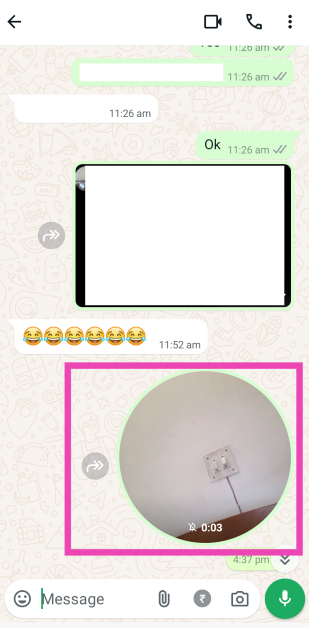
Step 5: Hit the forward icon at the top of the screen.
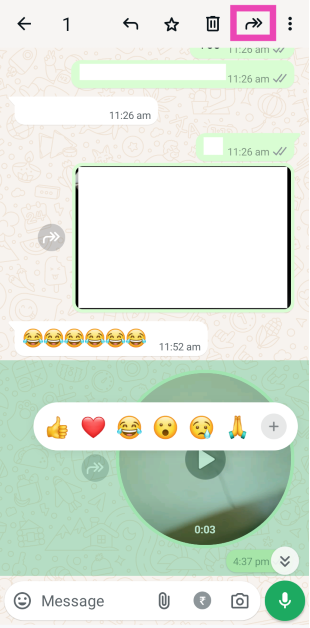
Step 6: Select the destination. You can choose multiple chats at once.
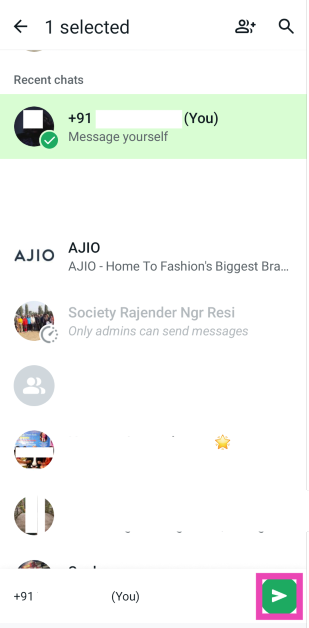
Step 7: Hit the green arrow icon to forward the video note.
Frequently Asked Questions (FAQs)
How do I send a video note on WhatsApp?
Open a chat, long-press the camera icon at the bottom right corner of the screen, record a video note, and release the icon to send it. Alternatively, you can tap the camera icon and switch to the ‘Video Note’ tab to record one.
How do I forward a video note?
Tap the video note in the chat, hit the forward arrow icon at the top of the screen, select a chat, and hit the green arrow.
What is the duration limit for video notes on WhatsApp?
The duration limit for video notes on WhatsApp is 60 seconds.
Read Also: WhatsApp will soon allow users to forward messages and media to their channels: Here’s how
Conclusion
This is how you can forward video notes on WhatsApp to multiple chats. The instant messaging platform has also added the option to forward messages and media to channels. You can read more about it here.


