


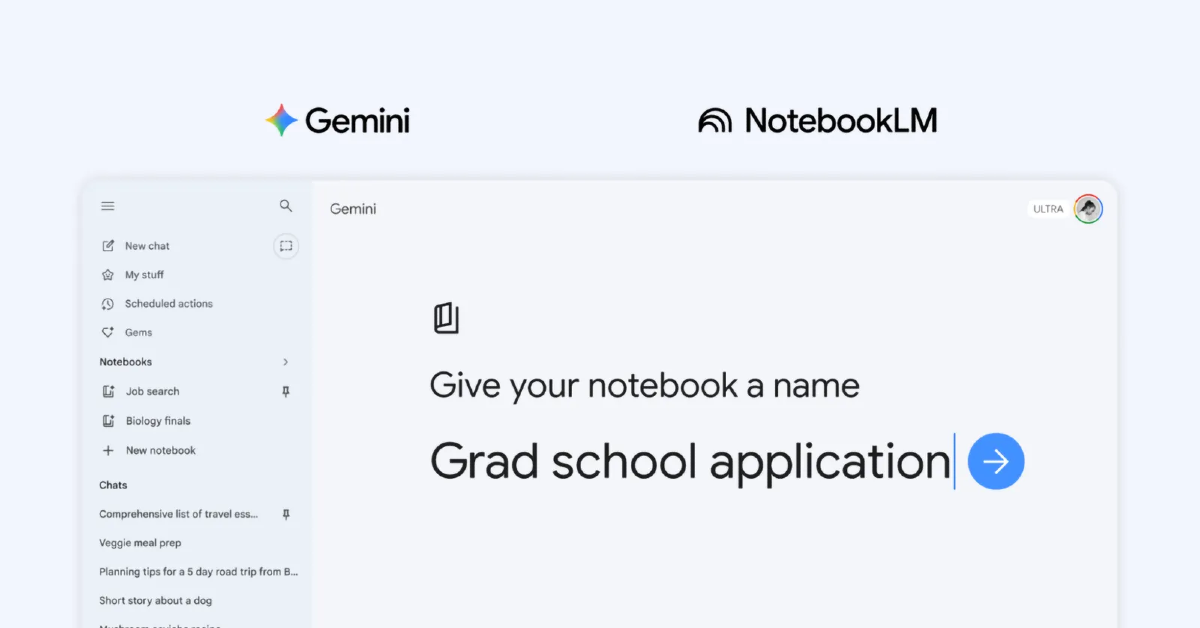
Google’s Gemini app now includes Notebooks, which are aimed at helping users easily organise continuous conversations, files, and research projects. This new feature enables users to start fresh conversations and move current ones into personalised Notebooks, improving the user experience for managing information. Notebooks effortlessly sync data across different devices and are integrated with NotebookLM, an AI-powered research assistant that makes learning and working more efficient. Looking forward, Google intends to increase mobile support and provide free-tier access to improve the Notebooks feature’s accessibility and usability, making it a vital component for users working on complex tasks in the Gemini app.
According to the blog post, notebooks allow users to systematically organise their chats and files in a separate place while also synchronising with NotebookLM, resulting in increased workflow efficiency.
Also Read: Garena Free Fire Max Redeem Codes Today 10 April 2026: Here is how to claim them
Notebooks in Gemini is currently available for Google AI Ultra, Pro, and Plus subscribers on the web, with the rollout beginning this week. In the following weeks, access will be expanded to include mobile users, additional European nations, and free users. This first rollout represents the start of the introduction of new capabilities for notebooks in Gemini, which are scheduled to be released later.
Notebooks in the Gemini app provide an organised approach to facilitating focused conversations on various topics. Users may create a new notebook by clicking the “New notebook” option on the side panel. Furthermore, individuals may transfer prior chats into these notebooks, improving continuity and relevance. Custom instructions may also be added to improve the user experience even more.
Also Read: Amazon Quiz Answers Today 10 April 2026: Participate to win Up To Rs 500 Amazon Pay Balance
Furthermore, users can improve their notebooks by adding relevant files, such as documents and PDFs, to give further context for the conversations. This grouping of sources into notebooks enables Gemini to create more exact and customised solutions by utilising its toolkit and online search capabilities, increasing the overall interactive experience.
Notebooks provide expanded access to numerous sources based on subscription options, allowing users to perform bigger tasks and carry out more elaborate projects. The combination of the Gemini app and NotebookLM allows for smooth synchronisation, guaranteeing that any sources added in one application are easily accessible in the other. Furthermore, users may benefit from the unique capabilities that each app provides; for example, NotebookLM has tools like Video Overviews and Infographics, which can be used regardless of the notebook’s origin.
Also Read: NYT Wordle Answer and Hints Today (April 10) #1756
One example of this feature is when a student takes class notes in a notebook, then uses NotebookLM to produce a Cinematic Video Overview, and then employs the Gemini app to generate an essay outline based on that information. This workflow exhibits the two applications’ adaptability and collaborative potential to assist academic pursuits.


