


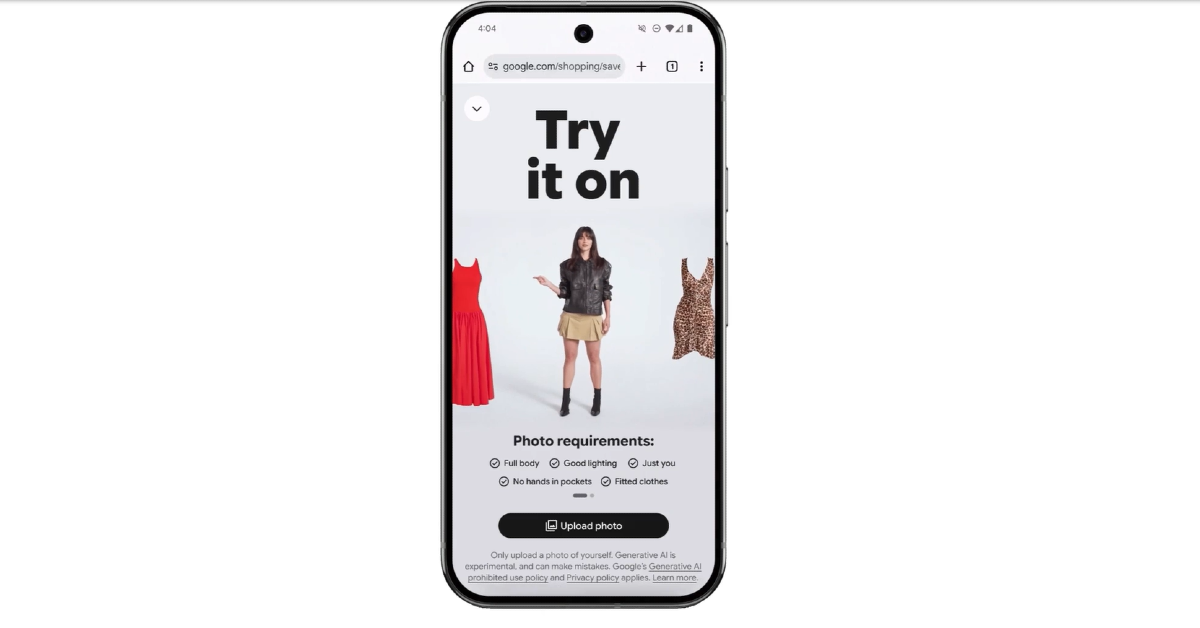
Finally, Google’s virtual try-on feature—a tool driven by artificial intelligence (AI) that lets users visualise how they might appear in an outfit—will be available in India. The Mountain View-based tech behemoth revealed the feature’s extension on Wednesday, emphasising that users in the nation can now locate a new “try it on” icon throughout Google. Before making a purchase, consumers may access the tool by tapping the button to determine whether or not they like the appearance. Interestingly, it is included in the company’s Shopping Graph product line.
During the holiday season, Indian online buyers may virtually try on billions of clothing products by only uploading a picture of themselves.
Google recently announced in a blog post that Indian consumers would now have access to its AI-powered shopping functionality. This function, which was first shown at Google I/O in May and made accessible to a limited number of people in July, lets users virtually try on billions of clothing items that are listed on the company’s Shopping Graph. This capability is available to users via AI Mode, Google Shopping, Google Images product results, and other listings. Customers may use this function by clicking the “try it on” icon on Google product listings for clothing, which allows them to experiment with different styles and share their looks with others, therefore replicating the fitting room experience virtually.
Also Read: YouTube Recap 2025 is rolling out in India this week
By enabling users to preview how clothes like shirts, bottoms, dresses, coats, and shoes would look on them, this cutting-edge technology improves the buying experience. The application shows how clothes fold, stretch, and drape on various body forms using a unique AI model that understands human anatomy and the intricacies of different clothing materials.
Also Read: Oppo Find X9 Pro Review: A true flagship
Here is how to use virtual try-ons for clothing using personal photos in four easy steps:
1) Browse styles by tapping the “try it on” icon on product listings when browsing for clothing.
2) Uploading a full-length photo with proper lighting and fitting clothing for accurate results.
3) See how the chosen outfit looks on the user.
4) Save or share the chosen look with others, and shop for comparable designs straight on the site.


