


Many people keep several tabs open throughout the day—checking messages, watching videos, researching topics, tracking packages, or reading articles. For students, remote workers, and gamers alike, the browser often becomes the main workspace.
But juggling dozens of tabs can quickly become messy and inefficient. Tabs get lost, systems slow down, and switching between windows interrupts workflow.
Some browsers now attempt to simplify this experience by building productivity tools directly into the browser environment. One example is Wave Browser, which combines multitasking tools with an environmental mission tied to ocean cleanup.
In this guide, we’ll look at how to use Wave Browser to manage multiple tasks more efficiently while browsing.
In This Article
What Is Wave Browser?
Wave Browser is a web browser with an environmental mission baked into it’s DNA: to remove plastic and trash from our ocean, rivers, and coastlines. A portion of revenue supports global cleanup efforts, powered by our users. Browse as you always do—and leave our ocean better than you found it.
Wave Browser is designed to organise everyday browsing tasks inside a single workspace.
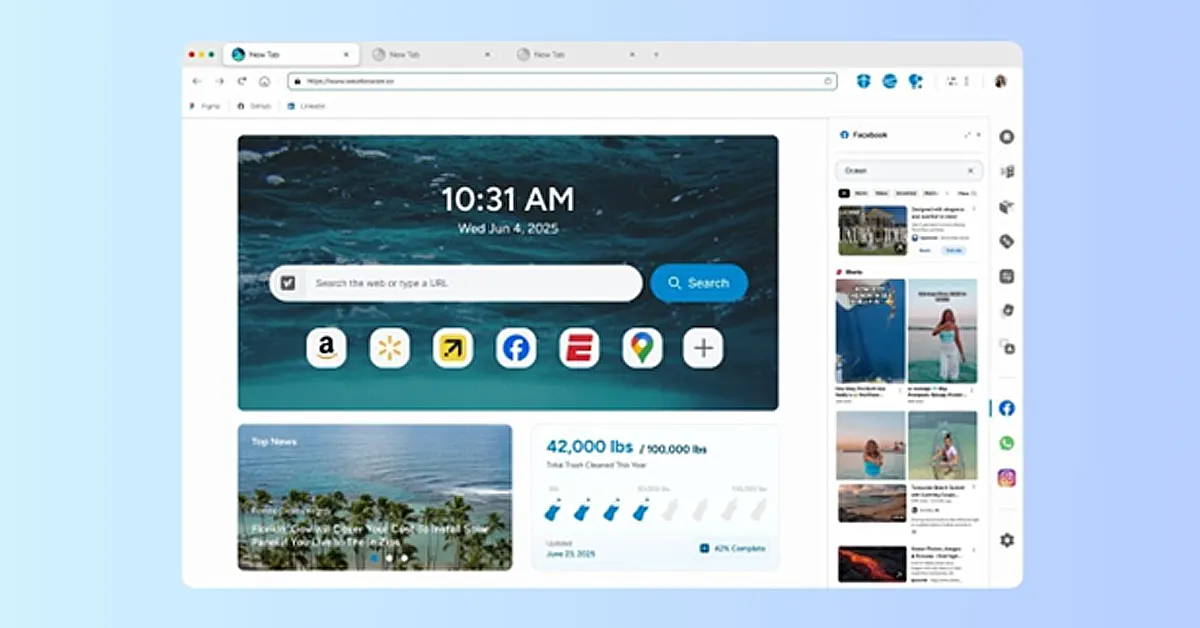
Like most modern browsers, it supports common web standards, extensions, and normal navigation. However, the browser also includes a set of built-in tools intended to reduce the need for multiple browser extensions.
These tools include tab organisation features, quick-access sidebars, and utilities such as translation tools, reading lists, and content notifications.
The idea is to keep frequently used tools accessible without requiring users to install additional add-ons.
Beyond productivity features, Wave Browser also connects its platform to an environmental program that funds ocean cleanup operations through a partnership with 4ocean.
How to Multitask More Efficiently with Wave Browser
If you frequently keep multiple tabs open, a few built-in tools can help simplify your workflow.
Here are several ways Wave Browser can help organise everyday browsing tasks.
1. Use the Sidebar to Keep Tools Within Reach
One of the easiest ways to reduce tab switching is to keep frequently used tools and sites easily accessible.
Wave Browser includes a built-in sidebar that allows quick access to commonly used sites and services without opening additional tabs.
This can be helpful when:
- Reading instructions while completing a task online
- Watching tutorials while practising a skill
- Checking messages while browsing
- Accessing frequently used sites without interrupting your workflow
Instead of constantly switching between tabs, the sidebar keeps useful tools within reach while you continue working in your main browsing window.
2. Organise Research with Tab Groups and Reading Lists
When browsing research, articles, or product information, tabs can accumulate quickly.
Wave Browser offers several tools to help manage large browsing sessions:
- Tab groups allow related pages to be organised together. For example, research for one project can be grouped separately from general browsing tabs.
- Reading lists allow users to save pages they want to revisit later without leaving dozens of tabs open.
This helps reduce clutter while keeping important content accessible.
3. Use Picture-in-Picture to Keep Videos Visible
Video tutorials and livestreams are common parts of modern browsing.
Wave Browser supports picture-in-picture mode, which allows videos to remain visible in a small floating window while navigating other pages.
This can be useful when:
- Following a tutorial while completing steps on another site
- Watching live events while browsing news or social media
- Listening to educational content while researching
The video continues playing while the rest of the browser remains usable.
4. Reduce Resource Usage with Memory Saver
Heavy browsing sessions can slow down devices, especially when many tabs remain open.
Wave Browser includes a Memory Saver mode designed to reduce the system resources used by inactive tabs.
Instead of running fully in the background, unused tabs consume fewer resources while remaining available for quick access.
For users who frequently keep large numbers of tabs open, this can help maintain smoother device performance.
5. Use Built-In Tools Instead of Extensions
Many browser extensions perform simple tasks like translating pages or converting units.
Wave Browser includes several of these functions directly inside the browser interface, including:
- Translation tools
- Unit and file converters
- Package tracking tools
- Price tracking features
- Content notifications
Having these tools built into the browser can reduce the number of extensions users need to install.
Fewer extensions can also mean fewer background processes running in the browser.
Understanding Wave Browser’s Environmental Model
Wave Browser also integrates an environmental purpose into its ecosystem.
Wave Browser works with 4ocean, a global cleanup organisation that removes plastic and trash from our ocean and waterways. Through a Certified Cleanup Partnership, Wave Browser helps fund the resources used by cleanup crews working in several parts of the world.
Those operations currently take place in Bali, Indonesia; the Dominican Republic; and Florida in the United States.
Wave Browser has outlined a long-term goal of helping fund the removal of 3,00,000 pounds of plastic and trash from our ocean, rivers, and coastlines by 2028. In 2025 alone, more than 70,000 pounds have already been removed with Wave’s support.
Users can track this progress directly inside the browser through a live impact dashboard, which highlights both cleanup milestones and current project locations.
Safety Standards and Software Transparency
When installing new software, many users want to understand how an application behaves once it is on their device. Independent standards organisations often review software products to evaluate whether they follow transparent installation and distribution practices.
Wave Browser is reviewed under the AppEsteem certification program, which assesses software vendors against consumer protection guidelines designed to promote responsible software behaviour.
These evaluations look at factors such as how clearly installation steps are presented, whether the application behaves transparently after installation, and whether users can easily remove the software if they choose to do so.
Programs like AppEsteem are designed to help establish accountability standards for software developers while giving users clearer insight into how applications are distributed and maintained.
Simplifying Your Daily Browsing Workflow
As internet use becomes more complex, browsers are evolving from simple navigation tools into full digital workspaces.
Managing research, communication, video content, and everyday tasks all inside the browser has become the norm.
Wave Browser approaches this challenge by combining built-in multitasking tools with a broader environmental initiative tied to ocean cleanup.
For users who spend large portions of their day online, the browser is often the centre of their digital activity. Tools that simplify multitasking—while also connecting browsing to real-world environmental programs—reflect how browsers are continuing to evolve.


