


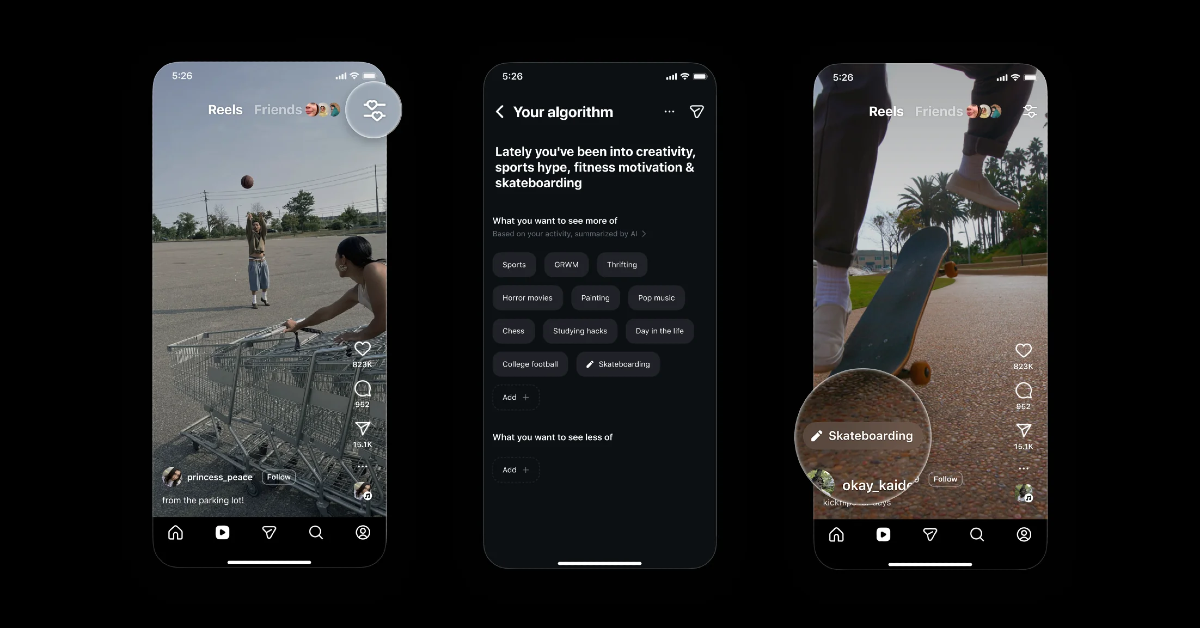
Instagram has unveiled the ‘Your Algorithm’ feature to give users more control over the content displayed in the Reels tab. This feature enables users to go over and customise the topics that influence their reel feed, allowing AI to provide more personalised suggestions. The tool will first be available in the United States before expanding to an English-speaking worldwide audience in the following weeks, with plans for further integration into the Explore tab and other app sections.
While announcing the feature, the company said, “Today, we’re excited to announce a new way to control your Instagram experience, starting with the Reels tab. Your interests change – and now using AI, your algorithm can change with you.”
“Instagram has always been a place to dive deep into your interests and connect with friends. As your interests evolve over time, we want to give you more meaningful ways to control what you see on Instagram, starting with Reels. Using AI, you can now more easily view and personalise the topics that shape your Reels, making recommendations feel even more tailored to you,” further added.
Also Read: Now experience Sneaky Sasquatch at the Apple Store this holiday season: Details
The new ‘Your Algorithm’ feature on Instagram lets users personalise their Reels feed. During viewing, an icon with two lines with hearts shows in the top-right corner, displaying subjects that are relevant to your interests. This tool allows you to get a summary of your top interests, change your content visibility options, and even put your algorithm on your Story, allowing users to share their interests with their friends and followers.
Tapping it brings up the panel, which displays categories that Instagram says users are interested in, such as sports, horror movies, and food. Users may also specify which topics they want to see more or less of, customising their reels accordingly.
Also Read: OnePlus 15 Review: Back with a bang
This functionality will first be available in the Reels tab, with plans to expand to the Explore and Home sections of the app in the near future. Furthermore, the feature is already being pushed out in the United States and will be available globally in English soon.


