NYT Wordle Answer and Hints Today (March 30) #1745

Are you looking for today’s Wordle answer for March 30, 2026? The problem is difficult to solve, so if you need assistance, we’ve included hints and the clue to today’s Wordle Quiz. Below, we have made it simple for everyone to understand how to get to the Wordle Answer today.

Hints and Answers for Today’s Wordle March 30

Before answering directly, please check the Wordle Hints first. Hint 1: Today’s Wordle answer includes two vowels. Hint 2: The answer for today has no repeating letters. Hint 3: Meaning- an object in space that looks like a bright star with a tail and that moves around the sun

What word does today’s Wordle begin with?

Do you need help with today’s Wordle answer’s initial letter? The first letter in today’s Wordle is “C”

Today’s Wordle Answer 

The answer to Wordle #1745 on March 30, 2026, is — COMET

Also Read: Samsung Galaxy S26 Ultra featuring Privacy Display unveiled: Pricing and Availability

What is Wordle?

Wordle: A Five-Letter Word Guessing Game • The game allows six guesses of a five-letter word. • Provide feedback on the guessed letters’ placement in the puzzle. • The New York Times purchased the game in 2022. • Created by Josh Wardle for his partner, narrowing down 12,000 English words to 2,500. • Named after the word “word.”

How To Play Wordle?

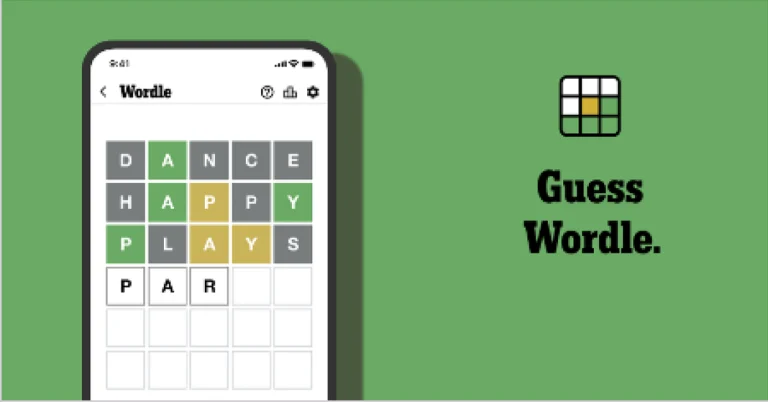
Wordle is a New York Times word puzzle game that allows users to guess a five-letter word in six attempts. The letters are highlighted in Yellow and Green, indicating whether the word is present in the answer or not, and Green letters indicate the correct guess. Also Read: Samsung Galaxy S26, Galaxy S26+ Launched: Pricing and Availability
Wordle Tips and Tricks
  • Select a powerful starting word: Avoid using unusual words, as they frequently do not match common letters. A good opening word has plenty of benefits.
  • Repeating letters: Don’t be afraid of repeating letters; they appear frequently in words. The answer may contain one or two repeated letters.
  • Use the Wordlebot: The NYT’s Wordlebot analyses and compares replies to itself. This challenge can assist you in enhancing your guessing skills and highlighting areas for development.

Racket Rivals Codes (March 2026)

Occupying one of the top spots in the trending charts, Racket Rivals is one of the most popular games on Roblox right now. This 3v3 game is a combination of badminton, squash, tennis, and volleyball. Getting one over your opponents requires skill and teamwork. Luckily, the game has super accessible controls that don’t take a long time to get used to. The game also offers some special codes that can be redeemed for free rewards. Here are all the Racket Rivals codes available in March 2026. Read Also: TECNO Spark 50 5G with military grade durability, 120Hz display launched in India

List of active codes (March 2026)

  • ESLASGIFT: Spins, Yen.
  • PAWFEST: Spins, Yen.
  • NEWSHUTTLE: Spins, Yen.
  • REDENVELOPE: Spins, Yen.
  • UPDATE15: Spins, Yen.
  • UPDATE14V1: Spins, Yen.
  • COMPETE: Spins, Yen.
  • UPDATE14: Spins, Yen.
  • 300MVISITS: Spins, Yen.
  • UPDATE13V1: Spins, Yen.
  • FLEXURPACK: Spins, Yen.
  • UPDATE13: Spins, Yen.
  • RACKETSEEKER: Spins, Yen.
  • UPDATE12: Spins, Yen.
  • REFINE: Spins, Yen.
  • MERRYCHRISTMAS: Spins, Yen.
  • SANTAISHERE: Spins, Yen.
  • UPDATE10: Spins, Yen.
  • MECHAWK: Spins, Yen.
  • UPDATE9: Spins, Yen.
  • RUBYCLASH: Spins, Yen.
  • UPDATE8: Spins, Yen.
  • SECRETSHRED: Spins, Yen.
  • UPDATE7: Spins, Yen.
  • CREATECLUB: Spins, Yen.
  • UPDATE6: Spins, Yen.
  • FREEJIN: Spins, Yen.
  • TASK80: Spins, Yen.
  • UPDATE5: Spins, Yen.
  • TIDEWALL: Spins, Yen.
  • UPDATE4: Spins, Yen.
  • RANKEDSOLO: Spins, Yen.
  • UPDATETHREE: Spins, Yen.
  • SPOOKYLORD: Spins, Yen.
  • UPDATETWO: Spins, Yen.
  • SorryRanked: Spins, Yen.
  • BIGRANKED: Spins, Yen.
  • UPDATEONE: Spins, Yen.
  • NOWAYFIFTYK: Spins, Yen.
  • mistaworldwide: 100 Yen.
  • USEMATCHMAKING: 1 Lucky Spin.
  • FREEADMIN: 1 Lucky Spin.
  • sorryreboot: 1 Lucky Spin.
  • SL3EPY: 1 Awakening Spin.

List of expired codes

Currently, this title does not have any expired codes.

How to redeem a code in this game

How to redeem a code in this game
  1. Launch Racket Rivals on Roblox. 
  2. Hit the Shop icon at the bottom of the screen.
  3. Hit the Codes button at the top of the screen.
  4. Enter your code in the text field.
  5. Hit Submit.

Frequently Asked Questions (FAQs)

Why is my code not working?

If you can’t get your code to work, check it for typos and make sure its letters are in upper case.

How do I get free Spins and Yen in this game?

Use codes ESLASGIFT, PAWFEST, and NEWSHUTTLE to get free Spins and Yen in this game.

How do I redeem a code in this game?

Launch Racket Rivals on Roblox, go to Shop>Codes, enter your code in the text field, and hit ‘Submit’.

Why am I not able to redeem my code in this game?

If your code has expired, it can no longer be redeemed in Roblox.

Where can I find the newest Roblox codes?

Keep checking the Gadget Bridge home page for the latest Roblox code drops. Read Also: Nothing Phone (4a) Review: Smart design, smarter performance

Final Thoughts

For more tennis action, we highly recommend checking out Neo Tennis on Roblox. While you’re here, take a look at the latest Re:Rangers X codes. If you have any questions, let us know in the comments!

How to import your ChatGPT memory and chat history to Gemini

0
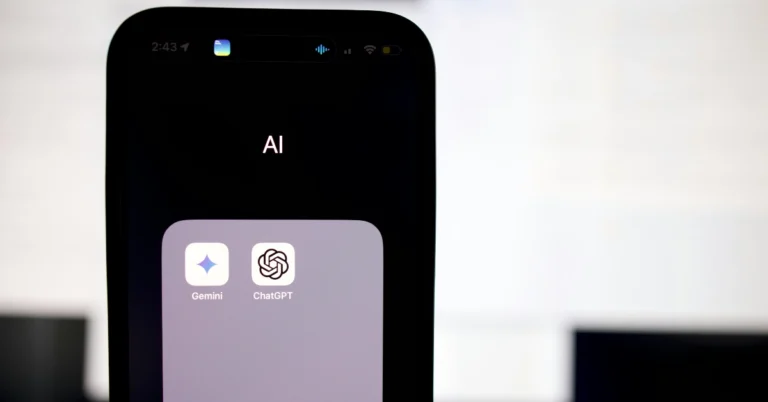
Google has made it easier to move to Gemini from any other AI assistant. In its latest update, Gemini has been equipped with switching tools that can transfer your memories, context, and chat history from other AI apps. If the sheer volume of past conversations and personalised preferences has been keeping you from moving to Google’s AI assistant, now you can make the switch in just a few minutes. Here’s how you can import your ChatGPT memory and chat history to Gemini. Read Also: TECNO Spark 50 5G with military grade durability, 120Hz display launched in India

Before you begin

Starting over from scratch is the biggest hurdle when switching to a new AI assistant. If you’ve spent a significant amount of time with your current AI app, it is very likely versed with your preferences, relationships, interests, work projects, and other kinds of personal information. Priming a new AI assistant to suit your requirements can be a time-consuming task. This is where Gemini’s new switching tool comes in. It gives you 2 import options – Memory and Chat history. The former simply extracts key information about you from your current AI assistant. This includes demographic information, interests and preferences, dated events, explicit rules and instructions, and more. Meanwhile, the latter imports all of your chat history in its entirety for a more comprehensive switch.

Import your ChatGPT memory to Gemini

  1. Go to Gemini’s web page and log in to your account.
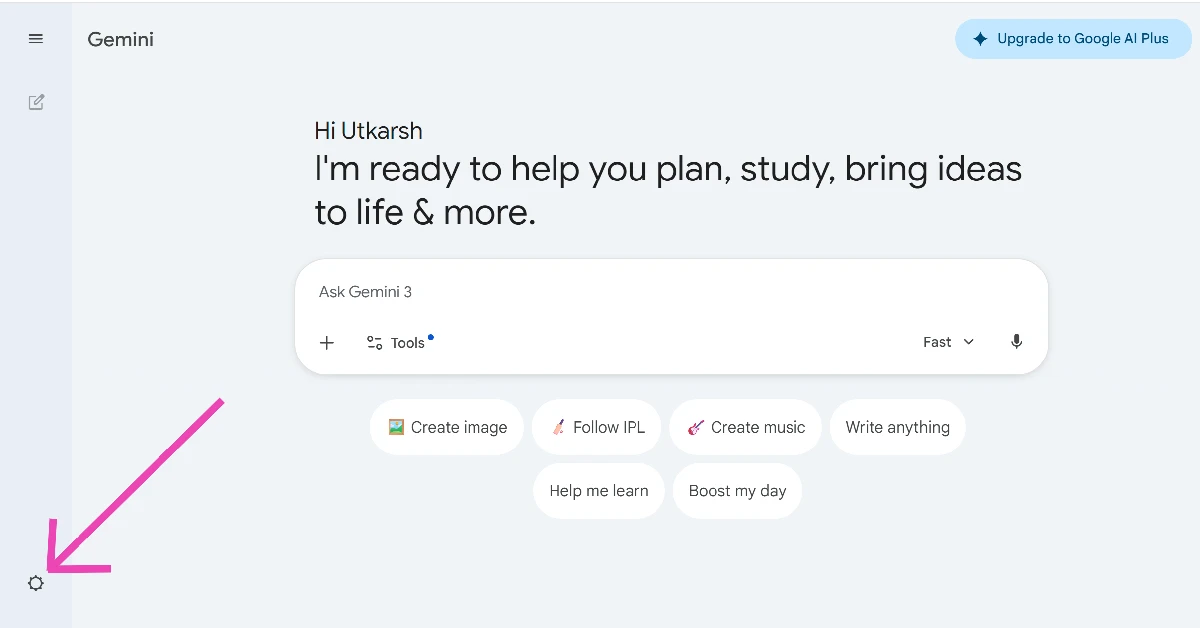
  2. Click the cog wheel icon in the bottom left corner of the screen. Click the cog wheel icon in the bottom left corner of the screen.
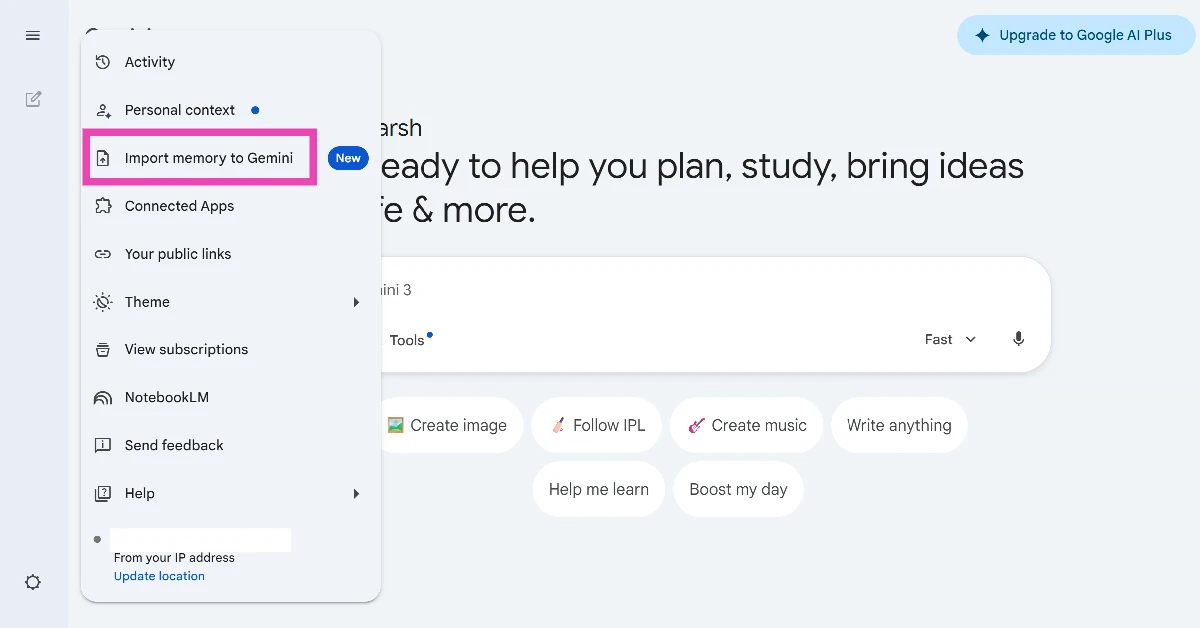
  3. Click on Import memory to Gemini. Click on Import memory to Gemini.
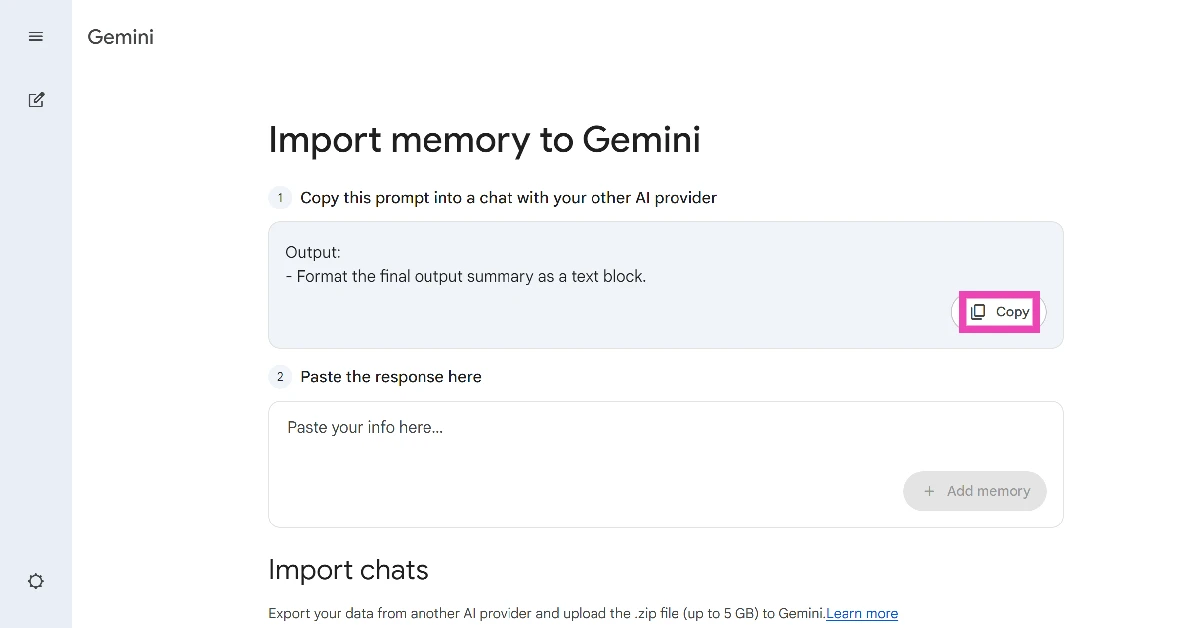
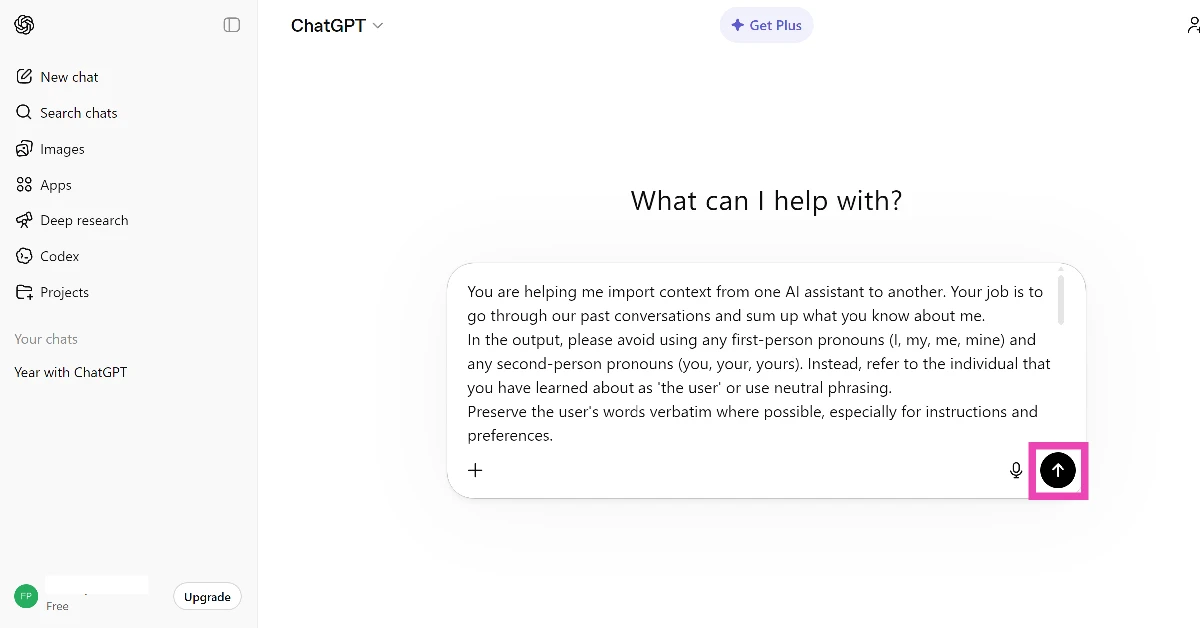
  4. Copy the prompt suggested by Gemini. Copy the prompt suggested by Gemini.
  5. Send the prompt to ChatGPT. Send the prompt to ChatGPT.
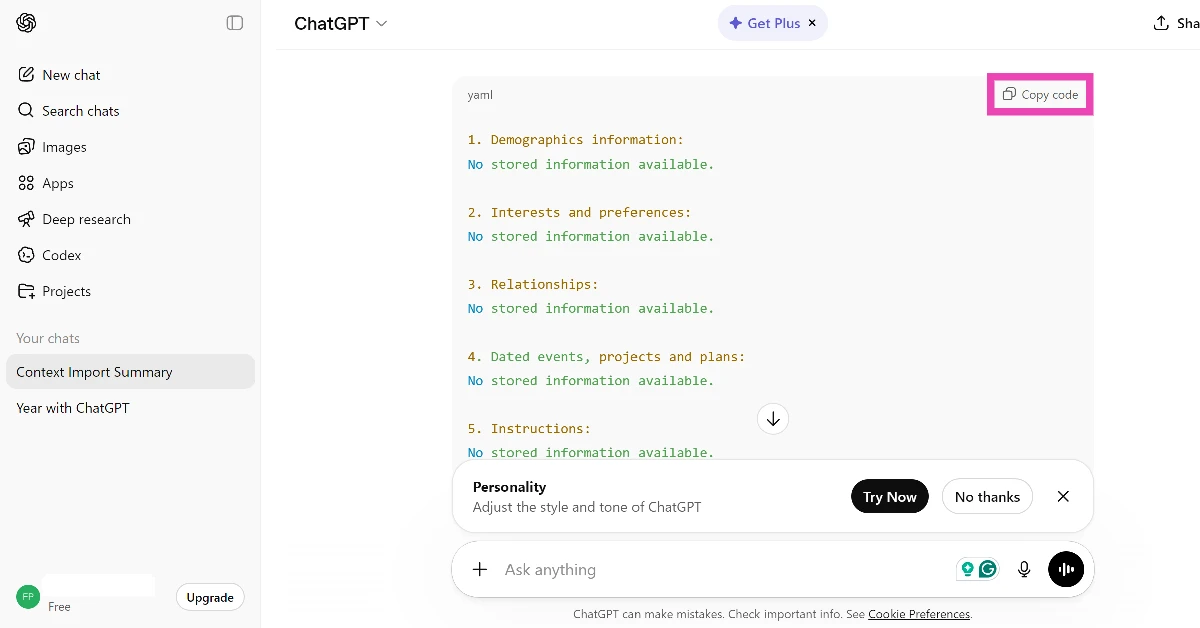
  6. Copy the response from the chatbot. Copy the response from the chatbot.
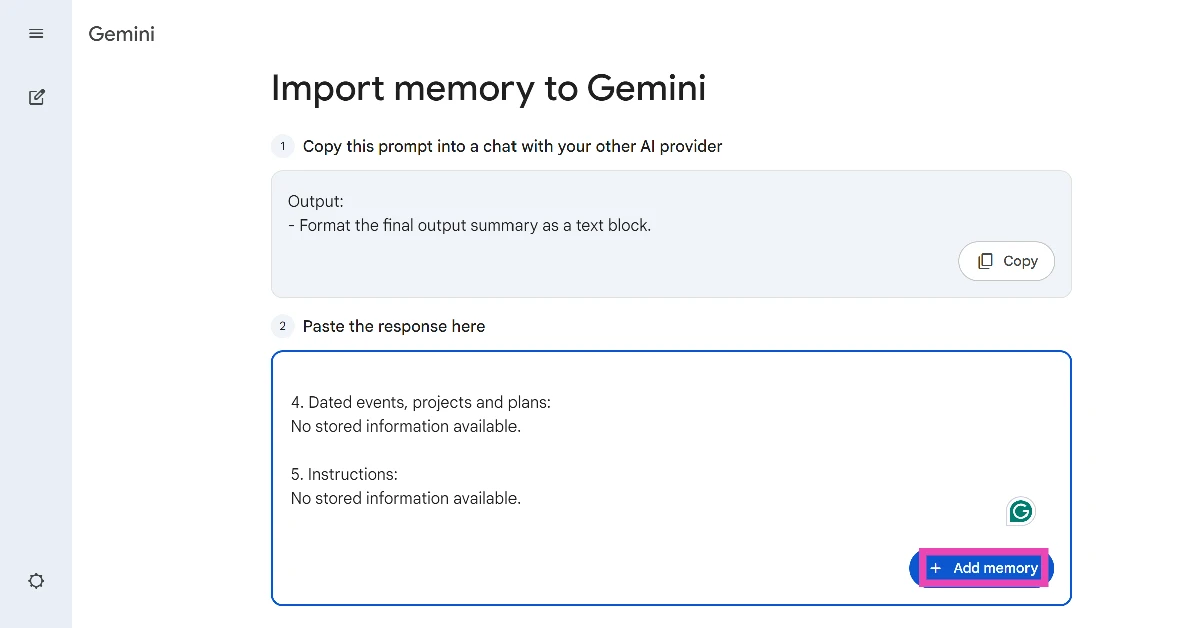
  7. Go back to Gemini and paste the response in the text field. Go back to Gemini and paste the response in the text field.
  8. Hit Add memory.

Import your ChatGPT chat history to Gemini

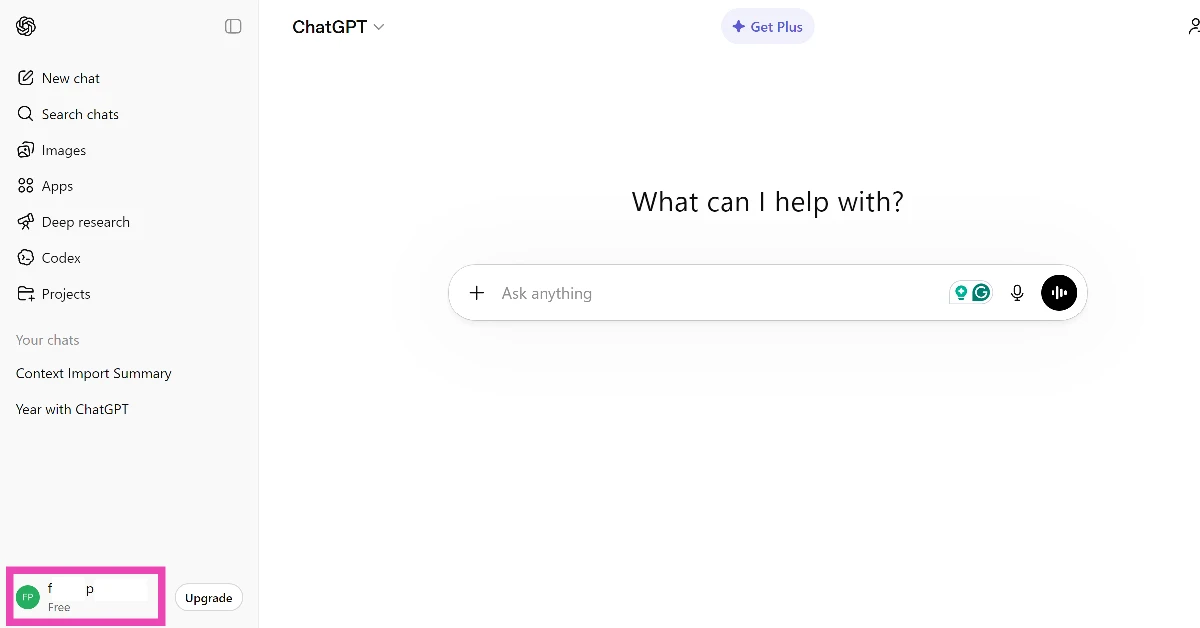
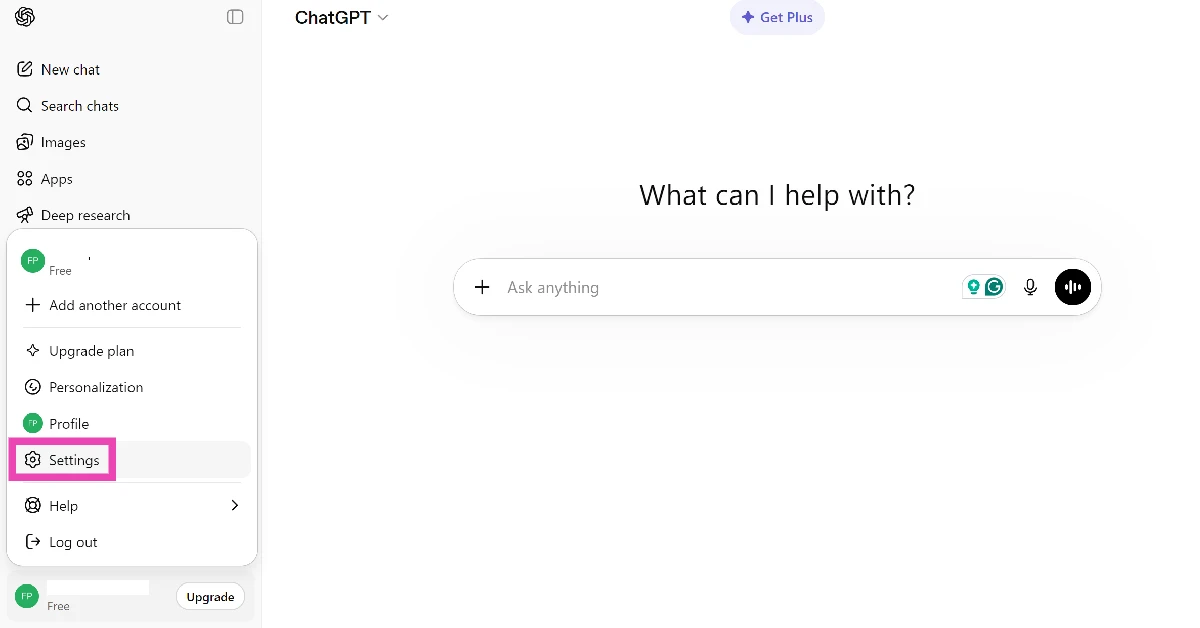
  1. Go to ChatGPT’s web page and click your screen name in the bottom left corner of the screen. Click on Settings.
  2. Click on Settings.Click on Settings.
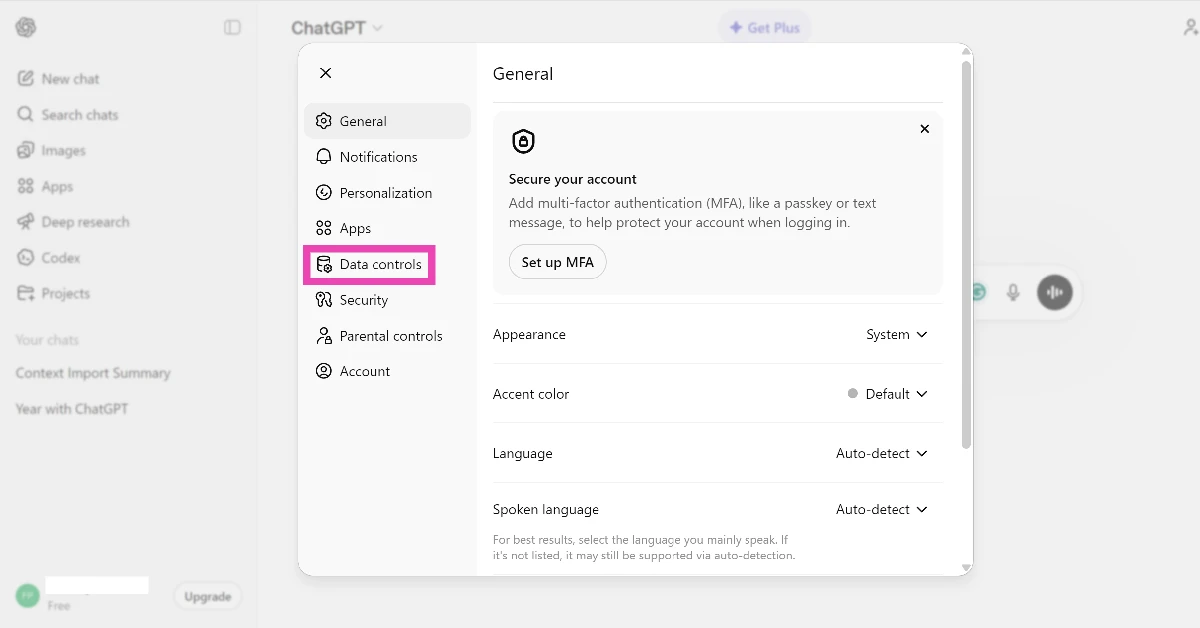
  3. Switch to the Data controls tab. Switch to the Data controls tab.
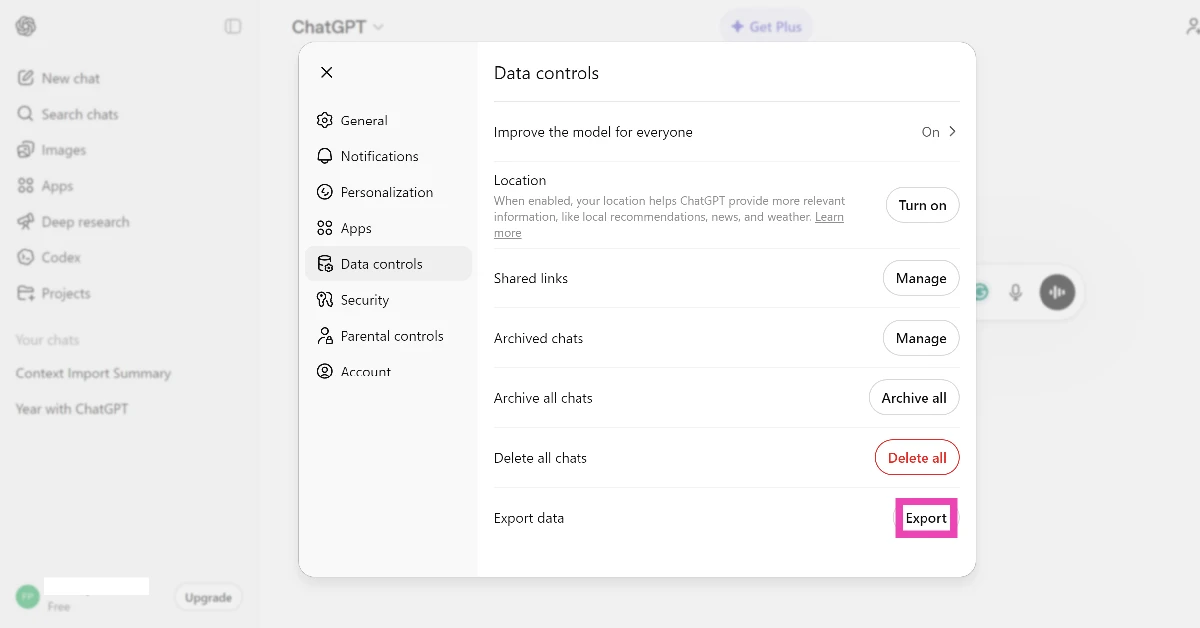
  4. Hit Export next to Export data. Hit Export next to Export data. How to import your ChatGPT memory and chat history to Gemini
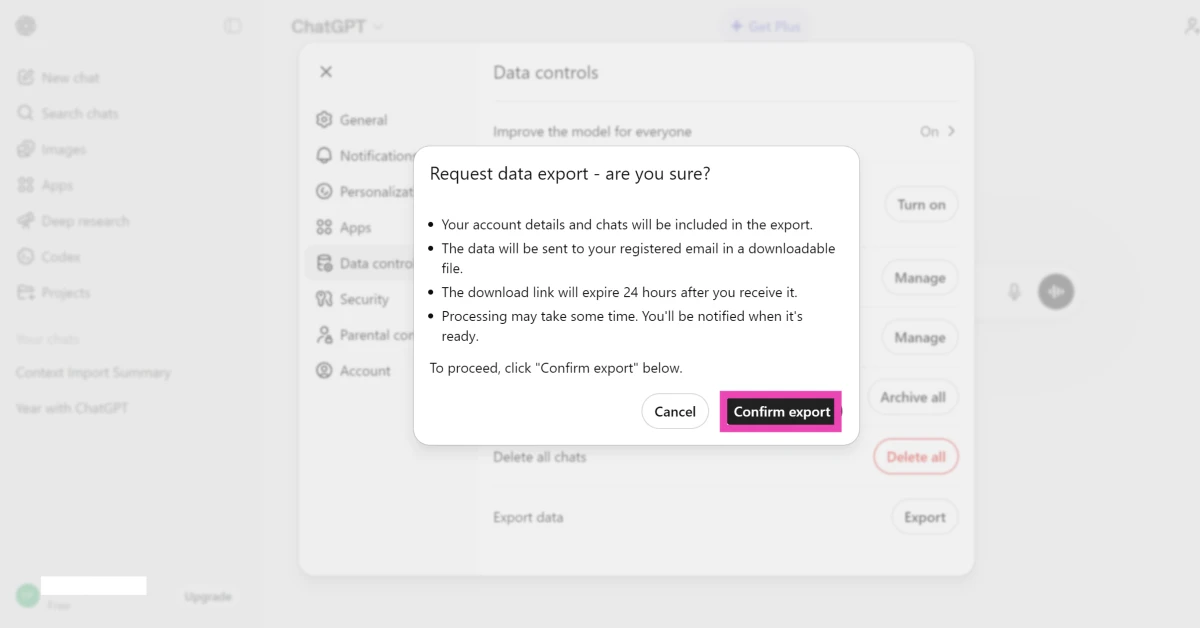
  5. Click on Confirm export. Click on Confirm export. How to import your ChatGPT memory and chat history to Gemini
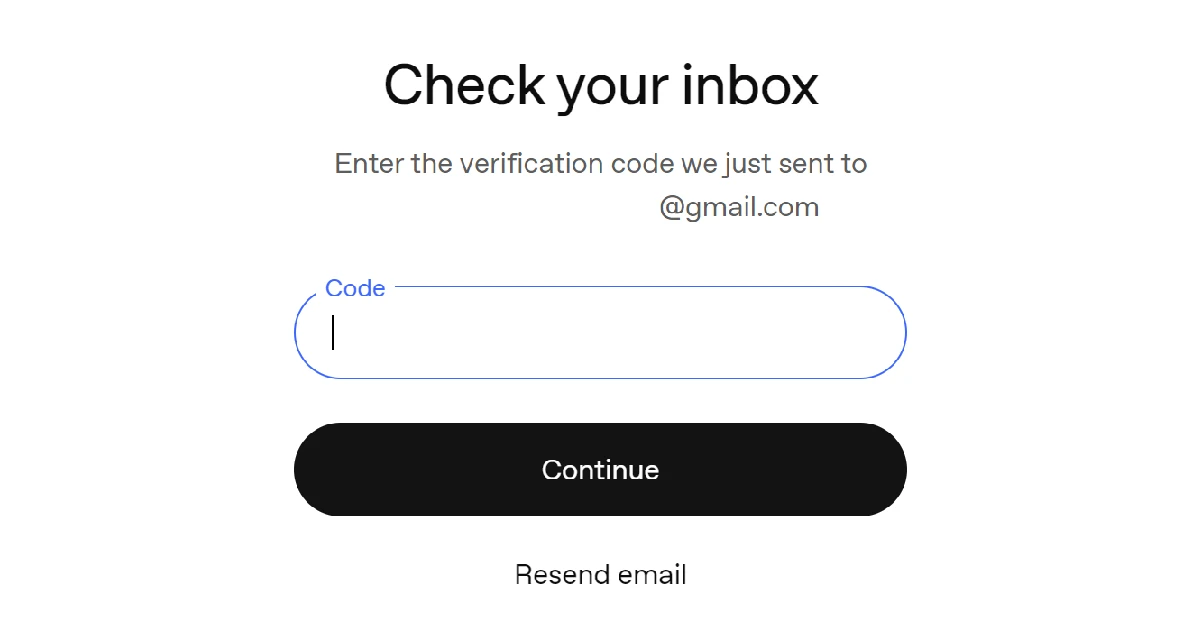
  6. Go to your registered email’s inbox and copy the verification code sent by ChatGPT.
  7. Enter the verification code in the text field and hit Continue. Go to your registered email’s inbox and copy the verification code sent by ChatGPT. How to import your ChatGPT memory and chat history to Gemini
  8. The data will be sent to your email in a downloadable ZIP file. Download the file.
  9. Go to Gemini’s web page and log in to your account.
  10. Click the cog wheel icon in the bottom left corner of the screen. Click the cog wheel icon in the bottom left corner of the screen. How to import your ChatGPT memory and chat history to Gemini
  11. Click on Import memory to Gemini. Click on Import memory to Gemini. How to import your ChatGPT memory and chat history to Gemini
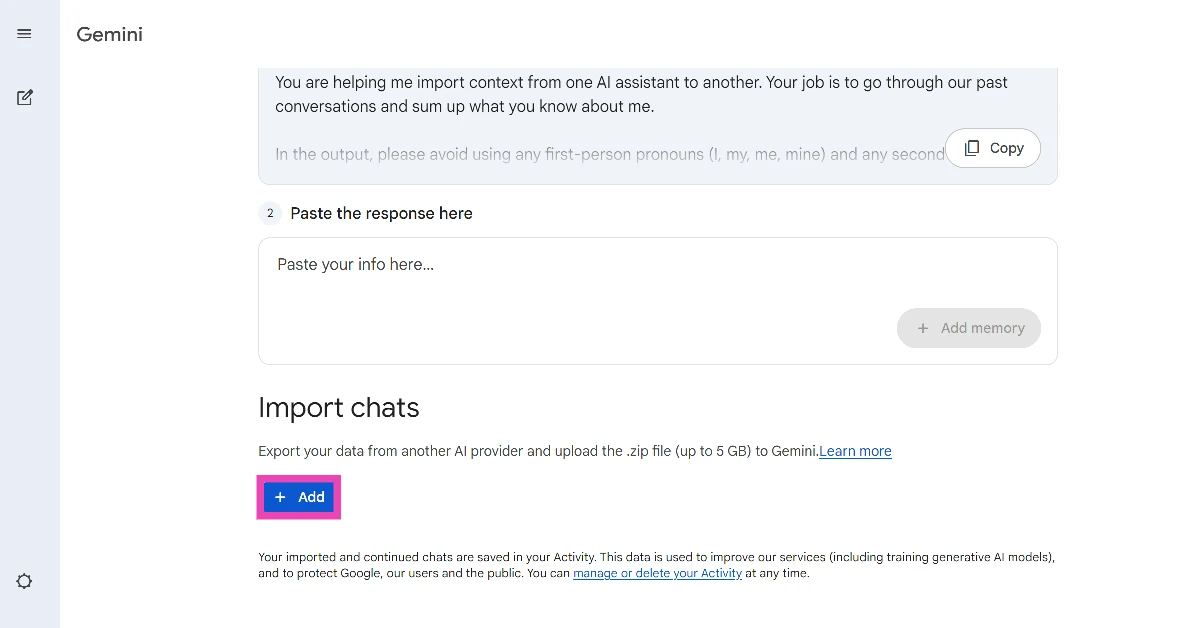
  12. Hit the Add button under Import chats. Hit the Add button under Import chats. How to import your ChatGPT memory and chat history to Gemini
  13. Select the ZIP file sent by ChatGPT. The file size should not exceed 5GB.
  14. Once your chat history has been uploaded to Gemini, you can continue with your conversations.

Frequently Asked Questions (FAQs)

Can I move my ChatGPT data to Gemini?

Gemini allows you to import your memory and chat history from ChatGPT and other AI chatbots.

How do I move my ChatGPT memory to Gemini?

Go to Gemini>Settings>Import memory to Gemini, copy the prompt on the screen and send it to ChatGPT, then paste the response in Gemini. Hit ‘Add memory’.

How do I transfer my entire chat history from ChatGPT to Gemini?

Go to ChatGPT>Settings>Data control>Export and request your chat history file. Go to Gemini>Settings>Input memory to Gemini>Import Chats>Add and upload the file.

How do I open a temporary chat in Gemini?

Go to Gemini, expand the sidebar, and click the hollow chat bubble icon next to ‘New chat’ to open a temporary chat.

How do I switch to Google Assistant from Gemini on my phone?

Launch the Gemini app, tap your profile picture in the top right corner of the screen, and tap on ‘Switch to Google Assistant’. Read Also: Nothing Phone (4a) Review: Smart design, smarter performance

Final Thoughts

In order to import your chat history from ChatGPT, you will need to turn on the ‘Past chats’ settings in Gemini. Once your history has been transferred, you can pick up where you left off on ChatGPT. If you have any questions, let us know in the comments!

How to enable Lockdown Mode on iPhone and Mac

0
Apple’s devices are known for their state-of-the-art security features. But what if standard security measures don’t suffice in your use case? The ‘Lockdown Mode’ on iPhone and Mac answers this question. Intended for a specific category of users who are more susceptible to cyber attacks, this feature kicks up the protective measures to safeguard the device against sophisticated digital threats. Apple says that since this feature has been introduced, there have been no reports of a ‘successful mercenary spyware attack against a Lockdown Mode-enabled Apple device’. Let’s take a look at how you can enable Lockdown Mode on your iPhone and Mac. Read Also: Weak Legacy 2 Codes (March 2026)

What is Lockdown Mode?

In its essence, Lockdown Mode is a collection of high-end security features and safeguards that protect the most vulnerable areas of your device. For regular users, these measures are a bit of overkill. However, for journalists, activists, political leaders, and other public-facing figures, enabling this feature is highly recommended. Here’s how Lockdown Mode protects your device. Messages
  • Blocks most attachments.
  • Links and link previews are disabled.
Web browsing
  • Certain complex web technologies are blocked, leading to websites loading slowly.
  • Some web fonts and images may not be displayed.
FaceTime
  • Incoming FaceTime calls are blocked unless you have called the person in the last 30 days.
  • SharePlay and Live Photos are unavailable.
Apple Services
  • Game Centre is disabled.
  • Incoming invitations for Apple services are blocked unless you have previously invited the user.
Photos
  • Location is excluded while sharing photos.
  • Shared Albums are removed from the Photos app.
  • New Shared Album invitations are blocked.
Connections and Network
  • Your device needs to be unlocked in order to connect with an accessory.
  • Your device won’t automatically join a non-secure WiFi network.
  • 2G and 3G mobile support is turned off.
Connection Profiles
  • Configuration profiles can’t be installed.
  • Devie can’t be enrolled in Mobile Device Management or device supervision.

Enable Lockdown Mode on iPhone

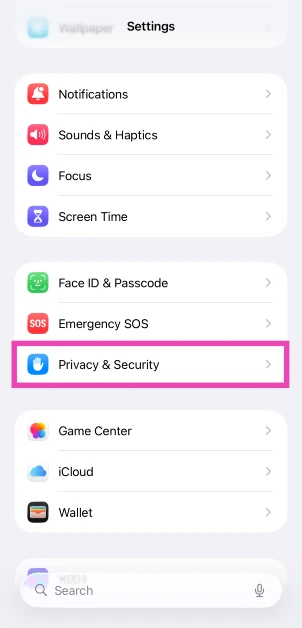
  1. Go to Settings.
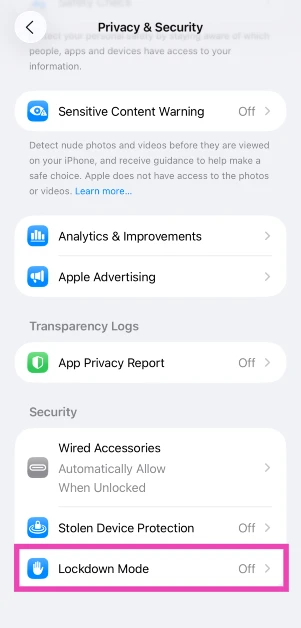
  2. Tap on Privacy & Security. Tap on Privacy & Security.
  3. Scroll down and select Lockdown Mode in the Security section. Scroll down and select Lockdown Mode in the Security section.
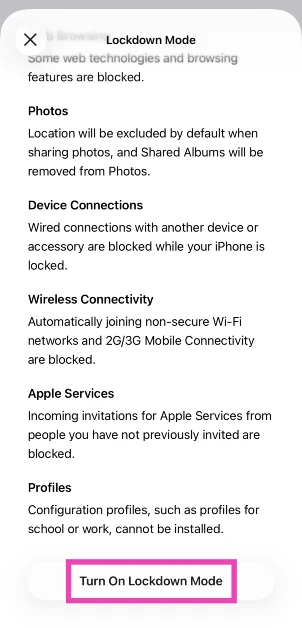
  4. Tap on Turn On Lockdown Mode. Tap on Turn On Lockdown Mode.
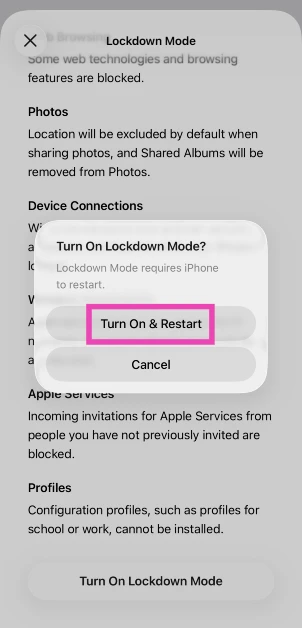
  5. Hit Turn On & Restart. Hit Turn On & Restart.

Enable Lockdown Mode on Mac

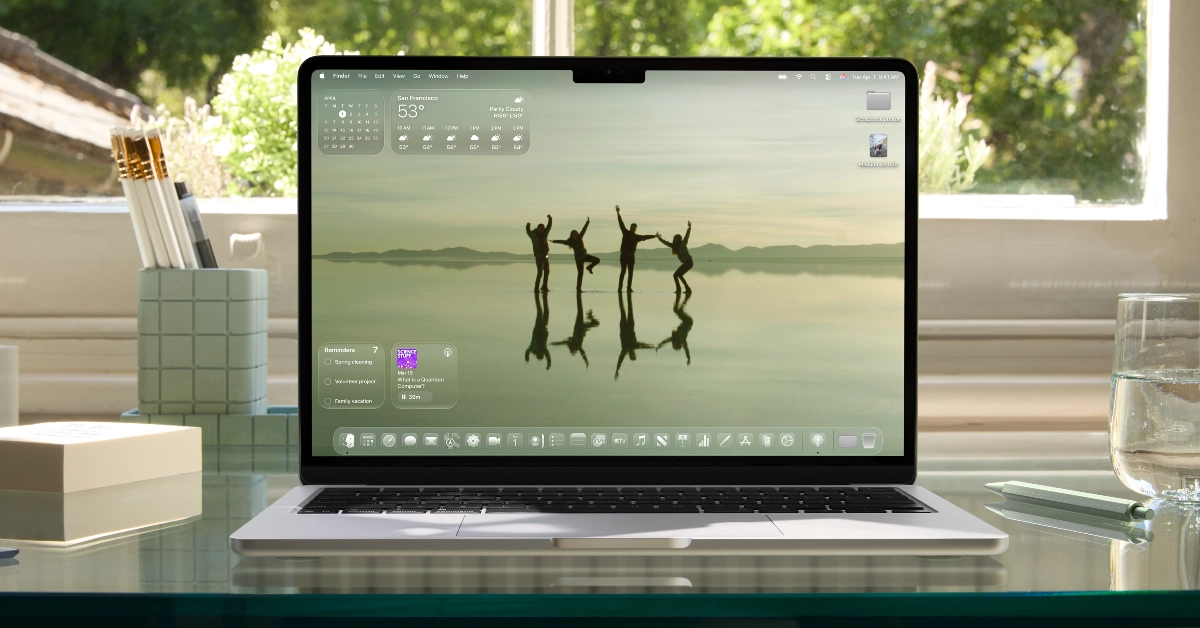
wwdc 2025
  1. Go to System Settings.
  2. Switch to the Privacy & Security tab in the sidebar.
  3. Scroll down to the Security section and click on Lockdown Mode.
  4. Click on Turn On Lockdown Mode.
  5. Hit Turn on & Restart.

Frequently Asked Questions (FAQs)

Can I exclude a website from Lockdown Mode?

You can exclude a website from Lockdown Mode by opening it in Safari, tapping the menu button, followed by the ellipses, and turning off the toggle switch next to Lockdown Mode.

How do I exclude an app from Lockdown Mode?

Go to Settings>Privacy & Security>Lockdown Mode>Configure Web Browsing, and turn off the app you wish to exclude.

Does Android have a Lockdown Mode?

Android 16 does have a Lockdown Mode, but it goes by ‘Advanced Protection’. You can enable it by going to Settings>Security and privacy>Advanced Protection and turning on the toggle switch next to ‘Device protection’.

How do I enable Lockdown Mode on my Mac?

Go to System Settings>Privacy & Security>Lockdown Mode and click ‘Turn On Lockdown Mode’.

How do I disable Lockdown Mode?

Go to Settings>Security & Privacy>Lockdown Mode and turn off its toggle switch. Read Also: Nothing Phone (4a) Review: Smart design, smarter performance

Final Thoughts

Your iPhone and Mac need to be running iOS 16 and macOS Sonoma (or above) in order to use this feature. If you’re an Android user, you should check out Advanced Protection for a similar set of security features. Got any questions? Let us know in the comments!

Upcoming smartphones in April 2026

While most smartphone manufacturers may be done with their flagship releases, they still have some midrange offerings lined up in April. With a busy month ahead, big names like OnePlus and Vivo will expand their midrange series with smartphones that offer big value for money. At the same time, they will put out compact phones that will give flagship devices a run for their money. Here are all the upcoming smartphones in April 2026. Read Also: TECNO Spark 50 5G with military grade durability, 120Hz display launched in India

Vivo V70 FE

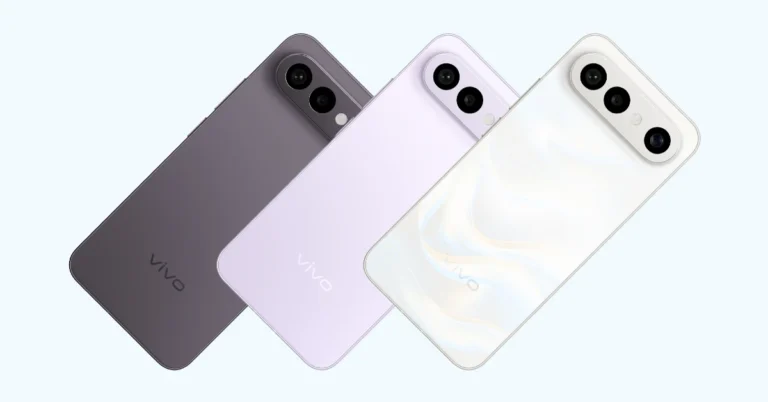
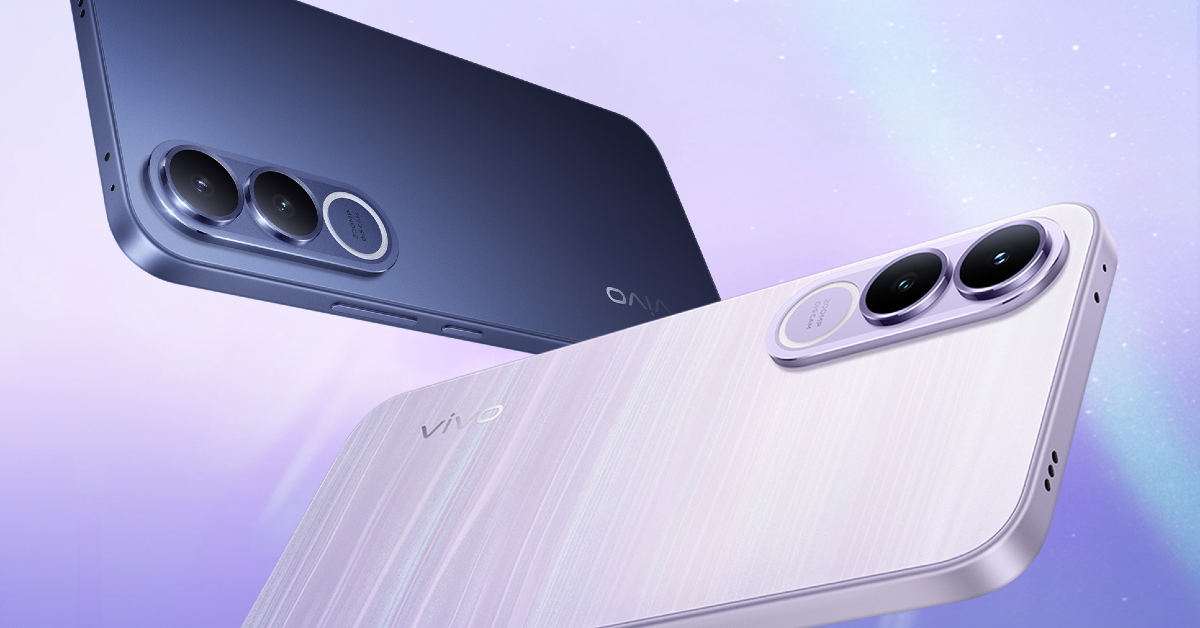
Vivo V70 FE with a 7,000mAh battery is launching in India next month: Launch date revealed Vivo’s camera-centric V series is getting a ‘Fan Edition’ model this year. The V70 FE will feature a 200MP primary shooter and an 8MP ultrawide lens as a part of its rear camera array. Its 6.83-inch AMOLED display will have a 120Hz refresh rate while being able to reach 1,900 nits in High Brightness Mode. The smartphone will be powered by the MediaTek Dimensity 7360 Turbo chipset. It will run the Android 16-based OriginOS 6 out of the box. The 7,000mAh battery pack will support 90W wired charging. There will be IP68/IP69 protection on board. Launch Date: April 2

Realme 16

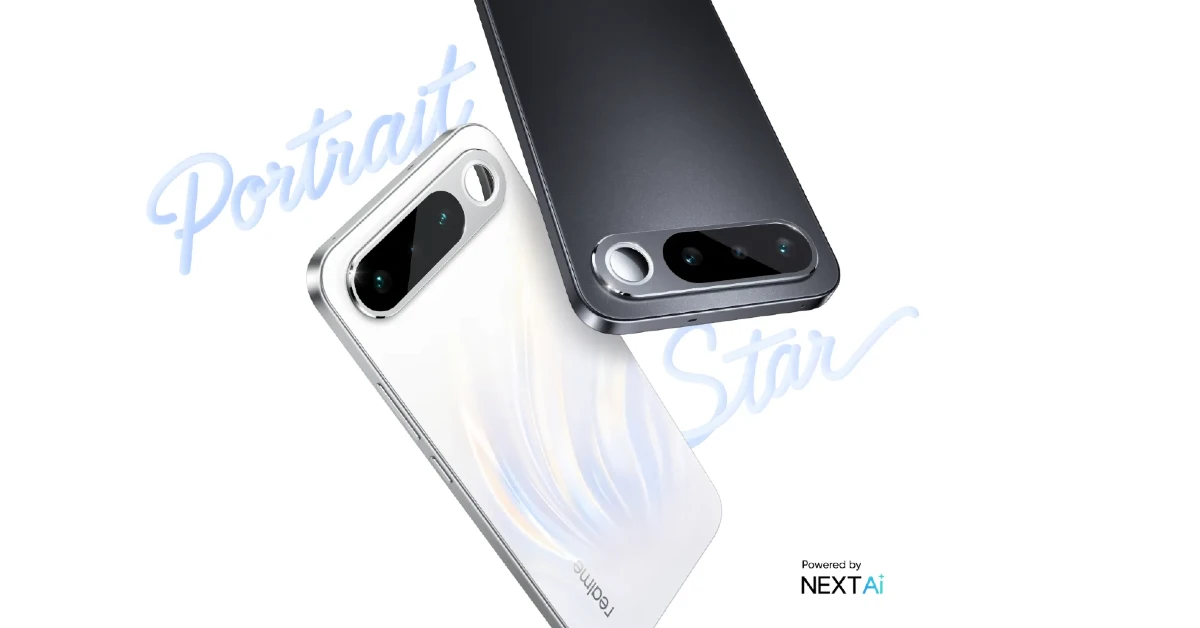
Realme 16 Realme’s numbered series will get a base variant this month. At the heart of the Realme 16 will lie the MediaTek Dimensity 6400 Turbo chipset. Software duties will be handled by the Android 16-based Realme UI 7. The 6.57-inch AMOLED display will have a 120Hz refresh rate and a peak brightness of 5,000 nits. The camera bar on the back panel will house a 50MP primary shooter, an auxiliary lens, and a selfie mirror. Up front, a 50MP selfie camera will be positioned in a punch-hole cutout. The 7,000mAh battery pack will support 60W wired charging. Launch Date: April 2

OnePlus Nord 6 Series

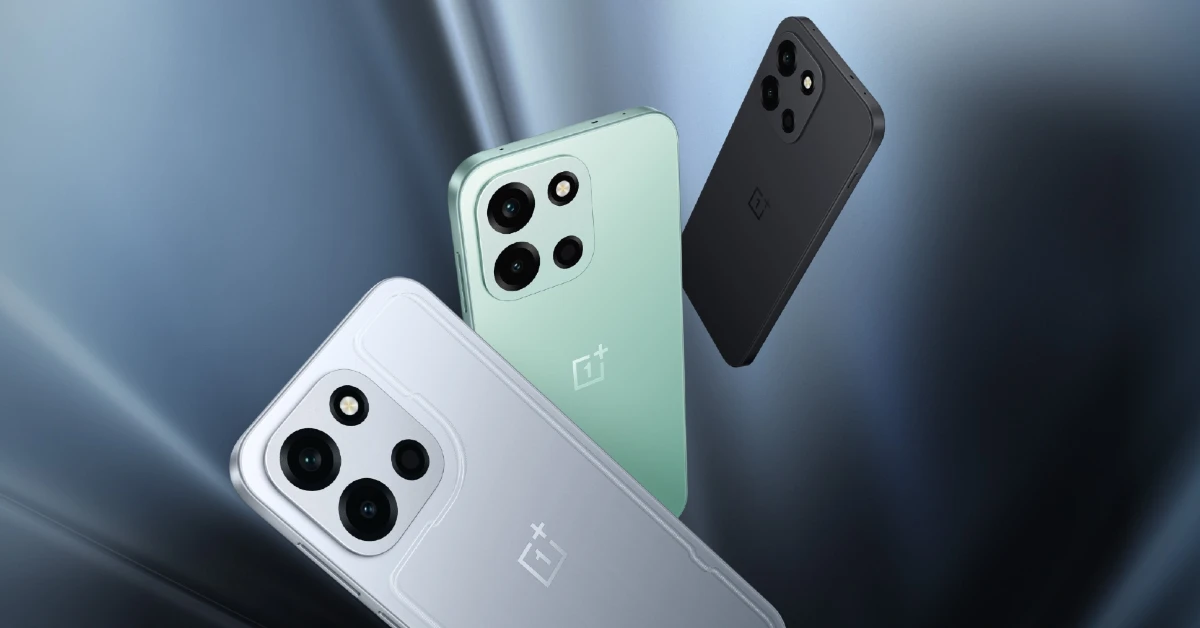
OnePlus Nord 6 Series OnePlus’s midrange ‘Nord’ series is hugely popular in India. This month, the Chinese brand will put out the Nord 6 and Nord CE6. The former will be powered by the Snapdragon 8s Gen 4 SoC. It will flaunt a 6.78-inch AMOLED display with a 165Hz refresh rate and a peak brightness of 1,800 nits. Software duties will be handled by the Android 16-based OxygenOS 16. The rear camera panel will house a 50MP primary shooter and an 8MP ultrawide lens. The smartphone will reportedly pack a 9,000mAh battery pack with support for 80W wired charging. Not much is known about the Nord CE6 so far, but OnePlus will reveal more information as we get closer to launch. Launch Date: April 7

iQOO Neo 11

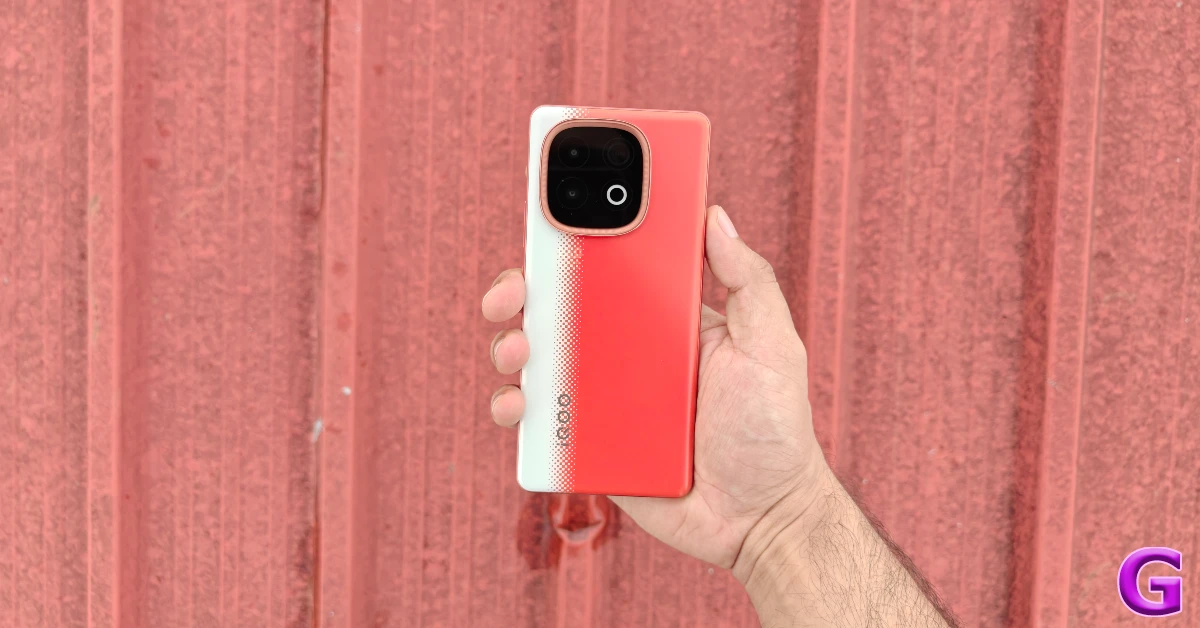
iQOO Neo 10 Review: Design and Display Upcoming smartphones in April 2026
iQOO Neo 10
The new iteration in the iQOO Neo series will shake up the midrange gaming smartphone. The Neo 11 will reportedly be powered by Qualcomm’s flagship chipset from last year — Snapdragon 8 Elite. It will flaunt a 6.82-inch LTPO AMOLED display with a 144Hz refresh rate. There will be IP68/IP69 protection on board. It is also reported that the smartphone will be drop-resistant up to 1.2m. The rear camera panel will house a 50MP primary shooter and an 8MP telephoto lens. The 7,500mAh battery pack will support 100W wired charging.  Expected Launch: Mid-April

Vivo X300 FE

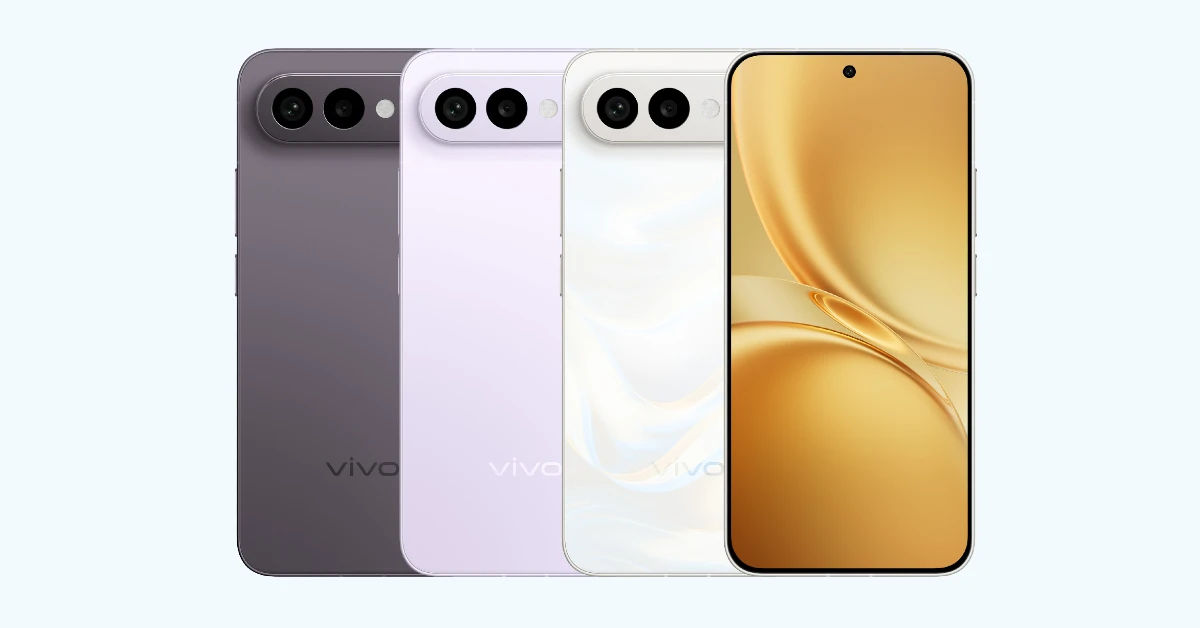
Vivo X300 FE Upcoming smartphones in April 2026 Essentially a rebadged version of the Vivo S50 Pro Mini, the Vivo X300 FE is expected to go on sale this month. The Russia-spec version of the phone is powered by the Snapdragon 8 Gen 5 SoC. Its 6.31-inch LTPO AMOLED display has a 120Hz refresh rate and can reach a peak brightness of 5,000 nits. Software duties are handled by the Android 16-based OriginOS 6. The iPhone Air-esque camera bar on the back panel houses a 50MP primary shooter, an 8MP ultrawide lens, and a 50MP telephoto lens with 3x optical zoom. The 6,500mAh battery pack supports 90W wired and 40W wireless charging. The device is rated IP68/IP69 for dust and water resistance. Expected Launch: Late April

Oppo Find X9 Ultra

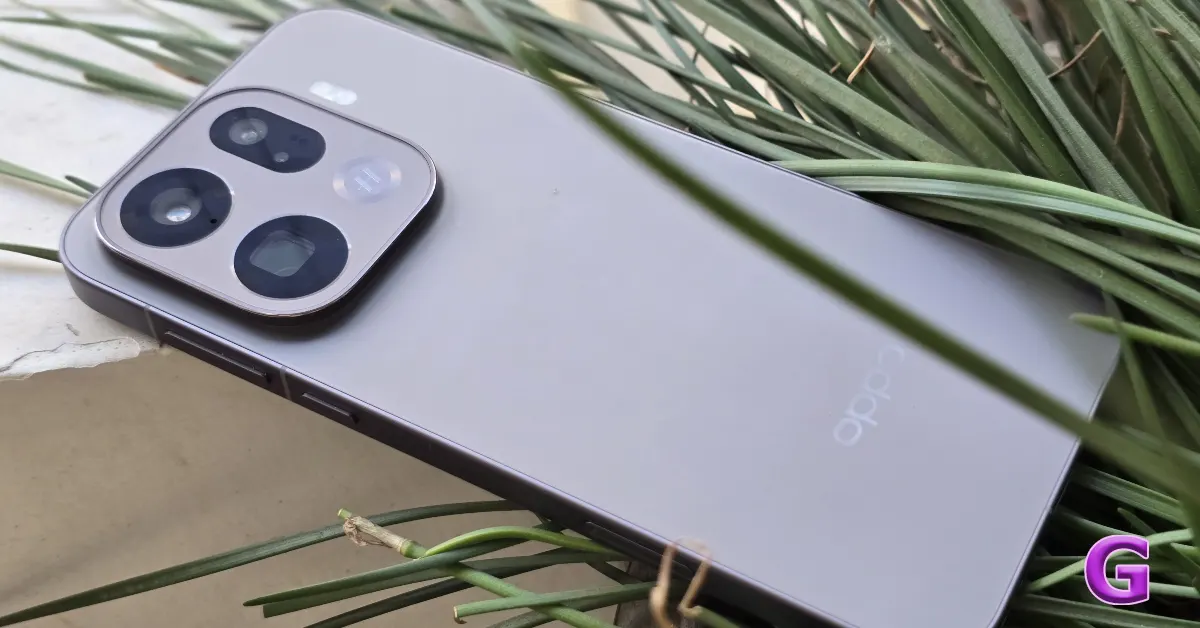
Oppo Find X9 Pro Review: A true flagship Upcoming smartphones in April 2026
Oppo Find X9 Pro
Oppo’s flagship Find X9 series will get an Ultra variant this month. The highlight of this Ultra model will be the 50MP periscope telephoto lens with 10x optical zoom. Joining this sensor will be a 50MP ultrawide lens, a 200MP primary shooter, and a 200MP periscope telephoto lens with 3x optical zoom. The Find X9 Ultra will be powered by the Snapdragon 8 Elite Gen 5 SoC. Its 6.82-inch LTPO AMOLED display will have a 144Hz refresh rate and a peak brightness of 3,600 nits. The 7,050mAh battery pack will support 100W wired and 50W wireless charging. Expected Launch: Mid-April.

OnePlus 15s

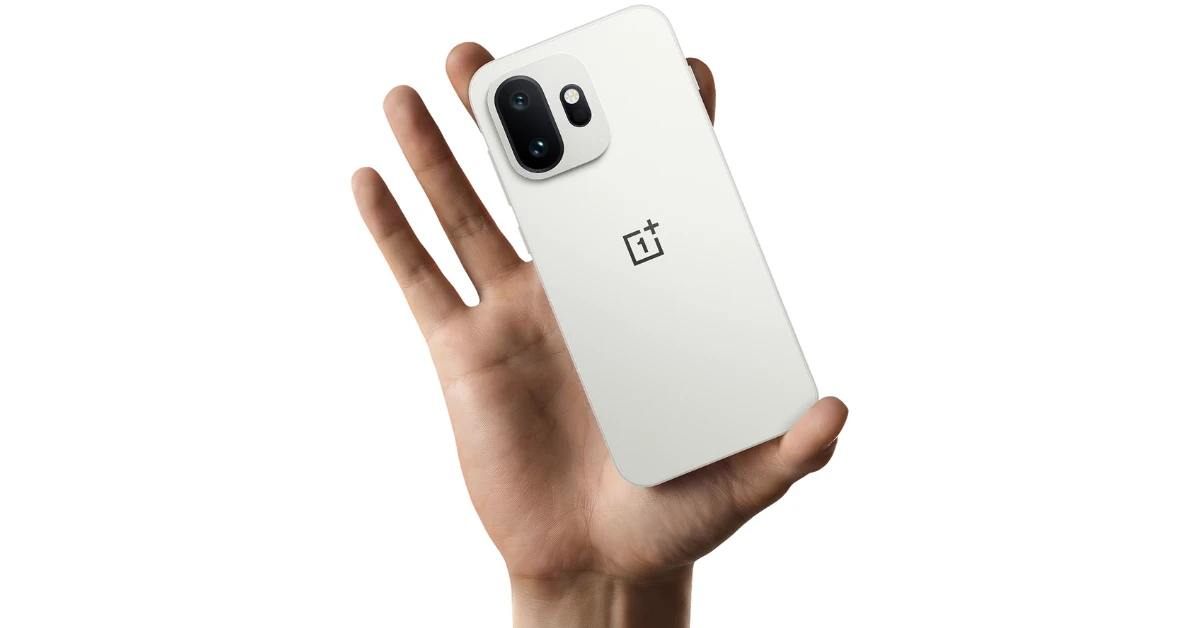
OnePlus 15s Upcoming smartphones in April 2026
OnePlus 15T
OnePlus’s next compact flagship has already gone on sale in China as the OnePlus 15T. In India, it will be launched as the OnePlus 13s. The smartphone will be powered by the Snapdragon 8 Elite Gen 5 chipset. Its 6.32-inch AMOLED display will have a 165Hz refresh rate and a peak brightness of 3,600 nits. The rear camera panel will house a 50MP primary shooter and a 50MP telephoto lens with 3.5x optical zoom. The 7,500mAh Si/C battery pack will support 100W wired and 50W wireless charging. Expected Launch: Late April Read Also: Nothing Phone (4a) Review: Smart design, smarter performance

Final Thoughts

These are all the upcoming smartphones that we’re most excited for in April 2026. If you can’t wait to get your hands on a premium phone, check out our top 10 flagship phone picks that you can buy right now. Got any questions? Let us know in the comments!

Amazon Quiz Answers Today 28 March 2026: Participate to win Up To Rs 500 Amazon Pay Balance

Amazon Quiz 28 March 2026: The New Daily Quiz is now available. Customers from different parts of the country are participating in the daily quiz. The quiz starts at midnight today and will be live until 11:59 PM tonight. By successfully answering every question, participants in the quiz have the chance to win wonderful rewards. Up to Rs 500 Amazon Pay Balance is up for grabs for participants today. One wrong answer could eliminate you from the quiz. You have a chance to win up to Rs 500 Amazon Pay Balance if you successfully answer every question. Users of the app only have the opportunity to take the quiz. Check Out the 28 March 2026 Quiz.

Are you not able to find Amazon FunZone? Click below and participate.

Click here to enter the Amazon FunZone Quiz and play today. Today’s Prize: Rs 500 Amazon Pay Balance Quiz Date: 28 March 2026 Daily Timing: 12 AM to 11:59 PM Previous Winners Announcement: Today 12 PM Noon

Amazon Daily Quiz Answers Today: Win Up To ₹ 500 Amazon Pay Balance

Question 1: Who became the first Indian woman to score 50 international goals in 2024? Answer: Bala Devi Question 2: Which of these is a large language model developed by Meta? Answer: Llama Question 3: At the 2024 Ballon d’Or, Emiliano Martinez of which club was named the world’s best goalkeeper for the second year in a row? Answer: Aston Villa Question 4: This site was dominated by which civilisation? Answer: Mayans Question 5: The character of Ron Weasley in this book belongs to which house? Answer: Gryffindor Also Read: OnePlus Nord 6 India launch imminent; upcoming launch teased

How To Play Amazon Daily Quiz Today

Only app users are eligible to play the Amazon quiz every morning from 12 AM to 11:59 PM. The quiz is not available on the desktop. For those who are unaware of how to play the Amazon quiz, below are the steps you can follow to take the quiz.
  • First, download the Amazon app from the Google Play Store or App Store or go here to download the Amazon App
  • Now fill in the required information through the Sign-Up option.
  • To find the Amazon Daily Quiz banner, log in to the Amazon app and scroll down to the home screen.
  • Tap on the banner and tap on the Start button to start the Quiz.
  • Now you will get 5 questions, and you need to answer them correctly. One wrong answer will eliminate you from the Quiz.
  • After answering all the questions correctly, you are now eligible for a Lucky Draw.
  • The previous winner’s name will be announced today at 12 PM.

Amazon Daily Quiz Answers from the previous few days.

Here are all the answers from the previous 5 days of the Amazon Daily Quiz and Contest.

27 March 2026

Question 1: What name is given to the world’s fastest humanoid robot developed by the Chinese company Robot Era? Answer: Star1 Question 2: As of February 2025, which cricketer holds the record for most Player of the Match awards in T20I cricket? Answer: Sikandar Raza Question 3: Who is the first player from Manchester City to win the Ballon d’Or? Answer: Rodri Question 4: This sport is the national game of which country? Answer: Japan Question 5: What is this instrument made up of? Answer: Brass

26 March 2026

Question 1: “Semper Supra,” meaning “Always Above,” is the motto of which US Armed Force? Answer: Space Force Question 2: Which is the host country for the FIFA World Cup 2034? Answer: Saudi Arabia Question 3: According to legend, George Crum invented which food item at Moon Lake Lodge in Saratoga Springs, New York? Answer: Potato chips Question 4: This fictional character works for which intelligence agency? Answer: Mi6 Question 5: Which dynasty built this temple? Answer: Chalukya

25 March 2026

Question 1: The 2009 Fair Pay Act in the USA is named after which former Goodyear employee who sued for pay discrimination? Answer: Lilly Ledbetter Question 2: At what event in 2024 did Elon Musk unveil long-anticipated prototypes of the Cybercab? Answer: We, Robot Question 3: Black Ops 6 is the 2024 edition of which popular video game series? Answer: Call of Duty Question 4: Which actor plays this character in the Marvel universe? Answer: Ryan Reynolds Question 5: Which movie is based on his reign? Answer: Valkyrie

23 March 2026

Question 1: The latest venue in Test cricket is the Civil Service Cricket Ground in which city? Answer: Belfast Question 2: Nitanshi Goel stars as the lead character of Phool Kumari in which movie was produced by Aamir Khan? Answer: Laapataa Ladies Question 3: Vinod Khosla and Bill Joy were two of the founders of which famous technology company headquartered currently in Santa Clara? Answer: Sun Microsystems Question 4: This is the ancient Roman theatre of Kom El Deka in Alexandria, in which country? Answer: Egypt Question 5: Which famous singer is shown here? Answer: Bruce Springsteen

22 March 2026

Question 1: Which famous badminton player is one of India’s flagbearers for the 2024 Paris Olympics? Answer: PV Sindhu Question 2: What is the latest edition of the ‘Bad Boys’ movie franchise? Answer: Bad Boys: Ride or Die Question 3: Nobel Prize winner Ernest Rutherford was born in which country? Answer: New Zealand Question 4: This is the Taj-ul-Masajid in which city? Answer: Bhopal Question 5: This is a bust of which famous ruler from history? Answer: Alexander the Great

21 March 2026

Question 1: Which of these batters scored a century during India’s recent 5 match T20I series against Zimbabwe? Answer: Abhishek Sharma Question 2: In May 2025. the ___ edition of the Mission Impossible movie franchise is going to be released. Fill in the blanks Answer: 8th Question 3: In which present day Indian state was the Battle of Buxar, which saw the East India Company emerge victorious fought? Answer: Bihar Question 4: This is a view of the City Palace in which Indian city? Answer: Jaipur Question 5: Valletta is the capital of which country, whose flag is shown here? Answer: Malta

20 March 2026

Question 1: Which of these sportspeople would be one of the flagbearers for the USA at the 2024 Paris Olympics? Answer: Coco Gauff Question 2: The upcoming Bollywood movie ‘Deva’ stars Pooja Hegde along with which famous actor? Answer: Shahid Kapoor Question 3: Alcazar, Exter, Palisade and Tucson are car models from which brand? Answer: Hyundai Question 4: This is a statue of which saint in Belfast, associated with a day that is a holiday in some places? Answer: St. Patrick Question 5: What is the musical instrument shown here Answer: Pan Flute

19 March 2026

Question 1: What is the name of the mascot of the 2024 Paris Olympics? Answer: Phryge Question 2: Who is playing the character of Harley Quinn in the movie ‘Joker: Folie a Deux/ Joker 2’? Answer: Lady Gaga Question 3: Who succeeded the 19th Mughal emperor Akbar Shah II to the throne? Answer: Bahadur Shah Zafar Question 4: Which Nobel laureate is shown here? Answer: Marie Curie Question 5: The flag of which country is shown here? Answer: Armenia Also Read: WhatsApp testing guest chats feature on Android, iOS, and Web: Report

Frequently Asked Questions (FAQs)

Where can I check the previous winners? Did I win? How to check?

You can head over to this link on your mobile or desktop to check the winners of the Amazon Daily Quiz Contest.

How to Play Amazon Daily Quiz or Contest?

We have written an explainer above; you can refer to that.

When are the winners of the Quiz and contest announced or declared?

The announcement of today’s quiz winner will take place Tomorrow. As for the Special Quiz and “Spin & Win” Contest, the winners will be declared once the Quiz Contest comes to an end. To find out who the lucky winner is, you can refer to the Winners List or visit the Amazon Winners tab in the Amazon App.

How to participate in the Daily Amazon Quiz?

That is very easy, just got to the Amazon app and scroll to the bottom of the page and you will find the Quiz section. Click on it (usually it is called the fun zone) and you can enter the Amazon Today Quiz Contest. 

Are there any other quizzes or contests running on Amazon daily?

Yes, there are many running daily. These range from spinning the wheel to answering the questions correctly. All are located in the Fun Zone. 

What are the criteria for selecting a winner in the Daily Amazon Quiz?

When a qualified player submits correct answers to all the questions, they will automatically be entered into a lucky draw. This draw will include all participants who answered all the questions correctly. Amazon randomly selects the final winners from the pool of eligible participants who gave the right answers.

Which Types of Questions are asked within the Amazon Daily Quiz?

These are very simple and straightforward questions. These are mainly related to general knowledge. 

Where should I look for Amazon Daily Quiz answers?

You can bookmark our website www.gadgetbridge.com as we will help you every day with the Amazon Daily Quiz. We bring you fresh answers every day for the Amazon Daily Quiz and Contest. 

What time does Amazon announce previous winners?

The previous winner’s name will be announced today at 12 PM (noon).

NYT Wordle Answer and Hints Today (March 28) #1743

Are you looking for today’s Wordle answer for March 28, 2026? The problem is difficult to solve, so if you need assistance, we’ve included hints and the clue to today’s Wordle Quiz. Below, we have made it simple for everyone to understand how to get to the Wordle Answer today.

Hints and Answers for Today’s Wordle March 28

Before answering directly, please check the Wordle Hints first. Hint 1: Today’s Wordle answer includes two vowels. Hint 2: The answer for today has a repeating letters. Hint 3: Meaning- being planned or prepared

What word does today’s Wordle begin with?

Do you need help with today’s Wordle answer’s initial letter? The first letter in today’s Wordle is “A”

Today’s Wordle Answer 

The answer to Wordle #1743 on March 28, 2026, is — AFOOT

Also Read: Samsung Galaxy S26 Ultra featuring Privacy Display unveiled: Pricing and Availability

What is Wordle?

Wordle: A Five-Letter Word Guessing Game • The game allows six guesses of a five-letter word. • Provide feedback on the guessed letters’ placement in the puzzle. • The New York Times purchased the game in 2022. • Created by Josh Wardle for his partner, narrowing down 12,000 English words to 2,500. • Named after the word “word.”

How To Play Wordle?

Wordle is a New York Times word puzzle game that allows users to guess a five-letter word in six attempts. The letters are highlighted in Yellow and Green, indicating whether the word is present in the answer or not, and Green letters indicate the correct guess. Also Read: Samsung Galaxy S26, Galaxy S26+ Launched: Pricing and Availability
Wordle Tips and Tricks
  • Select a powerful starting word: Avoid using unusual words, as they frequently do not match common letters. A good opening word has plenty of benefits.
  • Repeating letters: Don’t be afraid of repeating letters; they appear frequently in words. The answer may contain one or two repeated letters.
  • Use the Wordlebot: The NYT’s Wordlebot analyses and compares replies to itself. This challenge can assist you in enhancing your guessing skills and highlighting areas for development.

Re:Rangers X Codes (March 2026)

Previously known as Anime Rangers X, Re:Rangers X is one of the finest anime-based tower defence games on Roblox. This game lets you build your troop of anime characters and use them to invade enemy bases. Meanwhile, you need to make sure that your base is strong enough to ward off incoming attacks. To help you along the way, the game offers some special codes. Here are all the Re:Rangers X codes available in March 2026. Read Also: Vivo V70 FE with a 7,000mAh battery is launching in India next month: Launch date revealed

List of active codes (March 2026)

  • ThanksFor50KCCU!: 50 Trait Rerolls, 5,000 Gems.
  • UNLIMITED: 25 Trait Rerolls, 50,000 Gold, 2,500 Gems.
  • BOSSATTACK: 25 Trait Rerolls, 12 Soul Fragments, 1,000 Gems.
  • LEADERBOARDS: 25 Trait Rerolls, 10 Dr Megga Punks, 5 Stat Boosters.
  • LATOM: 50 Trait Rerolls, 50,000 Gold, 2,500 Gems, 50,000 Sol Tokens.
  • RANGERRERELEASE: 25 Trait Rerolls, 12 Soul Fragments, 1,000 Gems, 20,000 Sol Tokens.
  • SERIALIZED: 25 Trait Rerolls, 10 Dr Megga Punks, 10,000 Sol Tokens.
  • ThanksFor30KCCU!: 30 Trait Rerolls, 3,000 Gems, 30,000 Gold.
  • CALAMITY: 12 Soul Fragments, 25 Trait Rerolls, 25 Cursed Scrolls.
  • JJKUPD!: 50 Trait Rerolls, 75 Cursed Scrolls, 10 Vega Punks.
  • RAIDSAREBACK: 25 Trait Rerolls, 2,500 Gems.
  • SorryAboutEvo: 20,000 Gold, 20 Ranger Crystals.
  • OOPSRAMEN: 3,000 Gems.
  • SORRYFORBUGS!: 3,000 Gems, 10 Ranger Crystals.
  • RERELEASE!!!: 5 Dr Megga Punks, 25 Stats Key, 10 Cursed Finger, 50 Trait Rerolls, 5,000 Gold.
  • GHOULHUNT: 5 Dr Megga Punks, 25 Stats Key, 10 Cursed Finger, 50 Trait Rerolls, 5,000 Gold.
  • SORRYFORDELAYS: 25 Stats Key, 5 Cursed Finger, 50 Trait Rerolls, 5,000 Gold.

List of expired codes

These codes can no longer be redeemed.
  • SorryForTheDelay!
  • RuptureHero!
  • HolyGrailReword!
  • BugFixes10.5
  • MoreQoL!
  • SorryForCodes!
  • DraculaQuestPatch
  • ThankYouFor7KCCU!
  • HappyExtraLateHalloween!
  • KoromuBossEvent
  • SorryForDelays!!
  • DraculaIsHere
  • OverlordIsHere
  • YggDrasilRaid
  • RebalanceOverhaul!
  • TonsOfFixes
  • DivineRRFix!?
  • 8.5HYPE!
  • WeAreSorrySoSorry
  • HalloweenSoon!
  • NewQOLGamepass!
  • DivineEventUpdate!
  • HalloweenSoon??
  • GoodbyeSwarm!
  • NewTraits!?
  • JoJoUpdate7.6!
  • NewRarity!
  • WAdamAndThePlanners
  • SuperSorryForDelayedPeak!
  • OneMoreWeek!
  • FinallyFate!
  • Update7!!
  • Goodbye6.7Update
  • FollowUpTheIG!!!
  • FreeCylopsSoul
  • SorryForShutdownBlameZaru
  • NewGearMode?!
  • SneakyUpdate!
  • FollowUpTheIg!?
  • First6.7Update!
  • CyclopsSoulMine!
  • CelestialMageOp67
  • FairyPatch67
  • FairyTalePeak!
  • 6.5UpdateIsReal!!!
  • FallPart2!?!
  • Sorry4Delay
  • ReallySorry4Delay
  • FollowUpTheInsta!
  • FixPatchSJW!
  • SorryForPassiveDelay!
  • SoloPeakLeveling!
  • NewRaidAndEvos?!
  • IgrisIsMetaAgain!!
  • SorryForAllTheIssues!
  • TYFORTHE SUPPORT!?
  • FallEvent?!
  • SorryForLate!
  • NewRangerUnit!
  • PityOnRanger?!
  • NewCode!?
  • BeserkUpdate?!
  • SorryForLate!
  • NewDivineTrials!
  • UpgradeInFieldFix!
  • Shutdown2!
  • DBZUpdate!
  • NewPortals?!
  • GTBossEvent!!
  • SorryForDelayz!
  • LBreset!
  • MinorChanges!
  • Dungeons!
  • SAOUpd!
  • RiftMode!
  • EzSoulFrags
  • CraftingFix!
  • SmartRejoin
  • S3Battlepass!
  • StatBoosters!
  • GraveyardRaid!
  • ChainsawUpd!
  • SneakCode!
  • 3xALLMODES!!
  • YOUTUBEBACK!!
  • BRANDONTHEBEST!
  • TYBW2!
  • QOL2!
  • ARXBLEACH!
  • Srry4Shutdown
  • SmallFixs
  • !FixBossRushShop
  • !TYBW
  • !MattLovesARX2
  • !RaitoLovesARX
  • !BrandonTheBest
  • Sorry4AutoTraitRoll
  • Sorry4EvoUnits
  • SorryDelay!!!
  • SummerEvent!
  • 2xWeekEnd!
  • Sorry4Quest
  • SorryRaid
  • BOSSTAKEOVER
  • RAIDS
  • BizzareUpdate2!
  • Sorry4Delays
  • JoJo Part 1
  • NewLobby
  • Instant Trait
  • HBDTanny
  • PortalsFix
  • UPDATE 1.5
  • THANKYOU4PATIENCE
  • MInstaGroupOnTop!
  • Weloveroblox!
  • SuperSuperSorry!
  • CODEISREAL
  • ragebait
  • DAILY FIX
  • SORRY4BUGS
  • UPDATE 1
  • GHOUL!
  • LiveLike
  • 10KFollowers
  • CongratsFor1M
  • 100K CCU
  • 125M
  • Visits
  • Easter Egg 2025!
  • SorryForIssues
  • Im Back
  • Sorry For Easter Event!
  • Sorry For Event Bug
  • EASTER FAILING
  • EASTER UNIT LOST
  • 99% Gift Fixed
  • 20K Favorite
  • Real Last Shutdown
  • 55K CCU
  • 50K CCU
  • 40K Likes!
  • 45K CCU
  • 10K Favorites
  • 15K Likes
  • SRY FOR SHUTDOWN
  • ROAD TO 1M VISIT
  • THX FOR 20K CCU
  • Happy birthday to those born today ARX Release
  • ARX Release!!!
  • 1K Favorites

How to redeem a code in this game

Anime Rangers X Codes (October 2025)
  1. Join the official ARX Team community.
  2. Reach Level 5 in the game.
  3. Launch Re:Rangers X on Roblox.
  4. Hit the Code button on the home page.
  5. Enter your code in the text box.
  6. Hit Redeem.

Frequently Asked Questions (FAQs)

Why is my code not working in this game?

If you can’t get your code to work, check it for typos and make sure its letters are in the correct case.

How do I get free gold in this game?

Use codes UNLIMITED, LATOM, and ThanksFor30KCCU! to get free gold in Re:Rangers X.

How do I redeem a code in this game?

Launch Re:Rangers X, tap the Code icon, paste the code into the text box, and hit ‘Redeem’.

Why am I not able to redeem my code?

If your code has expired, it can no longer be redeemed in Roblox. Additionally, you need to be a member of the Team ARX community and reach Level 5 in the game to redeem a code.

Where can I find the newest Roblox codes?

Keep checking the Gadget Bridge home page for the latest Roblox code drops. Read Also: SHARP Ryohu (Inverter) and Ryohu-FS (Fixed Speed) ACs for high ambient cooling up to 52°C launched in India

Final Thoughts

For more anime action on Roblox, we highly recommend giving Attack on Titan Revolution and Anime Story a shot. While you’re here, take a look at the latest Weak Legacy 2 codes. If you have any questions, let us know in the comments!

Weak Legacy 2 Codes (March 2026)

Weak Legacy 2 is one of the finest game adaptations of the anime Demon Slayer on Roblox. This game puts you in the anime’s universe and lets you play as a human or a demon. With every battle, your opponents get harder to beat. The game offers some special codes to give you the edge in these battles. Here are all the Weak Legacy 2 codes available in March 2026. Read Also: SHARP Ryohu (Inverter) and Ryohu-FS (Fixed Speed) ACs for high ambient cooling up to 52°C launched in India

List of active codes (March 2026)

  • ENTDISTRICTWHEN?: 25 Normal Spins, Reset Breathing Potion, Reset Race Potion.
  • sorry4bugs!: 10x Fate Rerolls.
  • isbeastbreathingreal: 1 Reset Breathing or Art Potion.
  • sorrylorndidnttoldmetomakeitsouneedtohavenobreathingtogetthebeastbreathing: 67k Yen.
  • 2weekupdate: 10x Mystery Ores.

List of active codes

These codes can no longer be redeemed.
  • 2026Hype
  • XMASHYPE
  • SerpentTime
  • SnakeSnake
  • Sorry4Delay
  • SoundRework
  • DUNGEONREWORK
  • 450KLIKESRESETRACE
  • 25SPINSANNIVERSARY
  • ANNIVERSARYRESETBREATING
  • ANNIVERSARYRESETRACE
  • 25SPINSSICKLES
  • SICKLESRESETBREATHINGORART
  • SICKLESRESETRACE
  • 400KLIKESRESETRACE
  • 25SPINSSORRYFORTHEBUGS
  • FLAMEV2RESETBREATHINGORART
  • 25SPINSFLAMEV2
  • FLAMERESETRACE
  • 25SPINSSORRYFORDELAY
  • 15SPINS350KLIKES
  • MUGENRESETBREATHINGORART
  • 25SPINSMUGEN
  • MUGENERESETRACE
  • 25SPINS300KLIKES
  • MISTUPDRESETBREATHINGORART
  • 25SPINSMISTUPD
  • MISTUPDERESETRACE
  • 25SPINS250KLIKES
  • 15SPINS200KLIKES
  • 75SPINS150KLIKESANDSORRYFORTHEBUGS
  • RESETRACE115KLIKES
  • INSECTUPDERESETRACE
  • INSECTUPDRESETBREATHINGORART
  • 25SPINSINSECTUPD
  • 25SPINS85KLIKES
  • 75SPINS100KLIKES
  • 25SPINS75KLIKES
  • 75SPINSSORRYFORBUGS
  • UPD5RESETBREATHINGORART
  • UPD5ERESETRACE
  • 25SPINSUPD5
  • 65KLIKES25PINS
  • 60KLIKESRESETRACE
  • MOONUPDATERESETRACE
  • 25SPINSMOONUPDATE
  • MOONUPDATERESETBREATHINGORART
  • 40KLIKESRESETBREATHINGORART
  • 1KLIKES25AURASPINS
  • 25SPINS50KLIKES
  • UPDATE2RESETBREATHINGORART
  • UPDATE2RESETRACE
  • 50SPINSPATCHUPDATE
  • 25SPINSPATCH2UPDATE
  • 50SPINSHALLOWEENEVENT
  • 45KLIKESRESETBREATHINGORART
  • UPDATE3RESETBREATHINGORART
  • 25SPINSUPDATE
  • UPDATE3RESETRACE
  • 50SPINSUPDATE1.5
  • 3KRESETRACE
  • UPDATE1CRYSTALESSENCE
  • RELEASE50SPINS
  • UPDATE1RESETBREATHINGORART
  • 1MVISITS50SPINS
  • 40KLIKESRESETBREATHINGORART
  • RELEASERESETBREATHINGORART
  • RELEASERESETRACE
  • 20KLIKES25SPINS
  • FIXES15SPINS
  • UPDATE1RESETRACE
  • 35KLIKES25SPINS
  • 35KFAVORITESRESETRACE
  • 50SPINSUPDATE1
  • 25SPINS5KFOLLOWERS
  • 2KLIKES20SPINS
  • 5KLIKESRESETBREATHINGORART
  • 10KLIKESRESETRACE

How to redeem a code in this game

How to redeem a code in Weak Legacy 2
  1. Launch Weak Legacy 2 in Roblox.
  2. Press M to open the Menu.
  3. Go to the Code category and enter your code in the text field.
  4. Hit Redeem.

Frequently Asked Questions (FAQs)

Why is my code not working in this game?

If you can’t get your code to work, check it for typos and make sure its letters are in the correct case.

How do I get free Fate Rerolls in this game?

Use code sorry4bugs! to get free Fate Rerolls in Weak Legacy 2.

How do I redeem a code in this game?

Launch Weak Legacy 2 in Roblox, press ‘M’ to access the menu, go to the ‘Code’ category, enter the code in the text field, and hit ‘Redeem’.

Why am I not able to redeem my code?

If your code has expired, it can no longer be redeemed in Roblox.

Where can I find the newest Roblox codes?

Keep checking the Gadget Bridge home page for the latest Roblox code drops. Read Also: Google Search Live goes global, and India gets more languages

Final Thoughts

Demon Slayer superfans must also check out Project Slayers and Demon Soul Simulator on Roblox. While you’re here, take a look at the latest Untitled Boxing Game codes. If you have any questions, let us know in the comments!

TECNO Spark 50 5G with military grade durability, 120Hz display launched in India

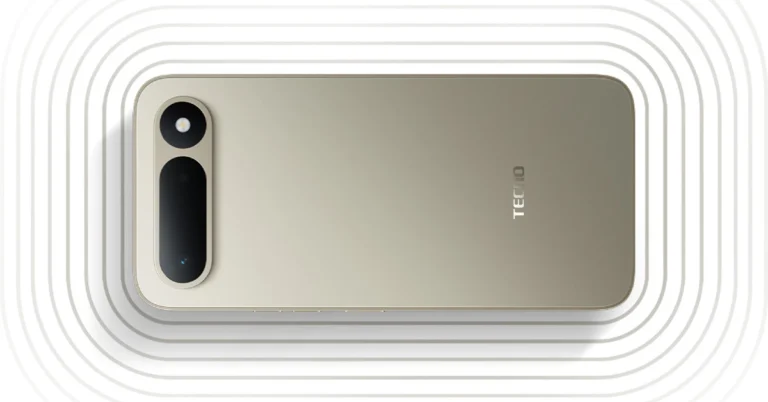
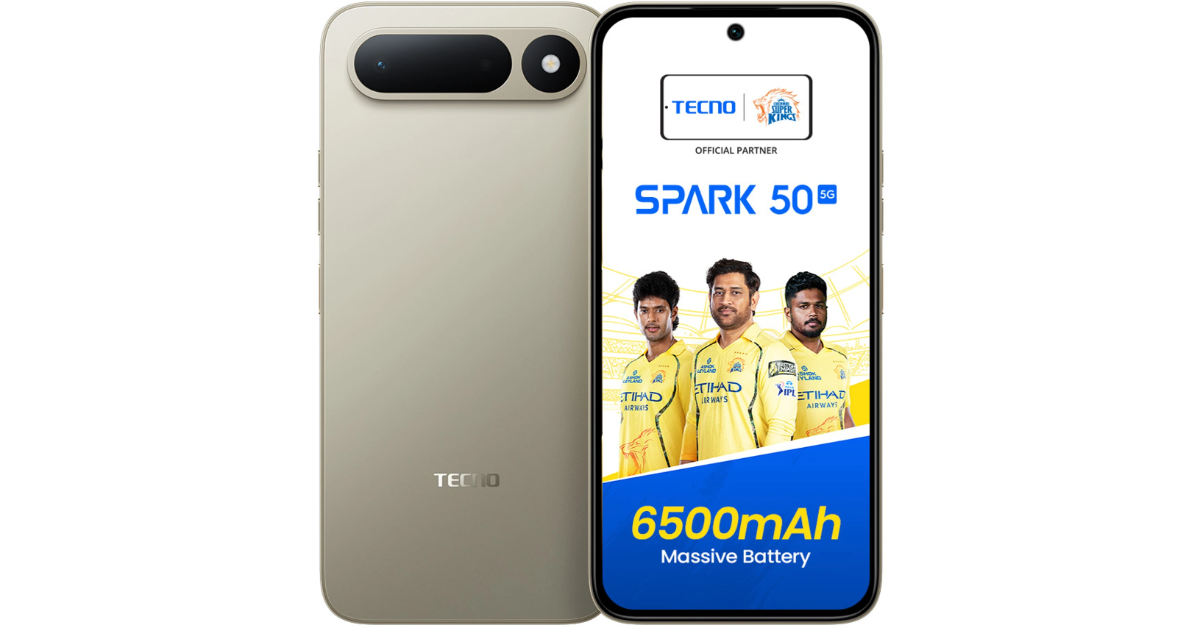
TECNO Spark 50 5G made its debut in the Indian market today. The new handset packs a 6.78-inch HD+ display with a 120Hz refresh rate. The device is powered by a MediaTek Dimensity 6400 processor. Camera features include a 50MP rear camera and an 8MP front camera. The device supports dual SIM and is powered by a 6500mAh battery with 45W fast charging.

Price in India, Availability

  • The TECNO Spark 50 5G is priced at ₹16,999 for 4GB + 128GB and ₹18,999 for 6GB + 128GB.
  • The product will be available on April 3rd via both online and offline retail channels.
  • No-cost EMI options are available for up to 8 months.
  • The product is available in four colour variations: Fantasy Purple, Mint Green, Champagne Gold, and Ink Black.

Specifications and features

TECNO Spark 50 5G with military grade durability, 120Hz display launched in India The TECNO Spark 50 5G has a big 6.78-inch HD+ screen with a resolution of 720 x 1576 pixels. It has a refresh rate of 120Hz and a touch sampling rate of 240Hz, so you can interact with it smoothly. It also brightens to 560 nits. The HiOS 16 interface runs on Android 16. Includes Active Noise Cancellation, an AI WhatsApp Assistant, an Ella Alarm Announcement, an AI Writing Assistant, and an AI Eraser 2.0. It has a 120Hz display for better interactions and comes with AI Image Extender and Ella-powered utilities. The MediaTek Dimensity 6400 CPU, which is designed on a 6nm architecture, powers it. It has two high-performance Cortex-A76 cores that run at 2.5GHz and six energy-efficient Cortex-A55 cores that run at 2GHz. It also has an Arm Mali-G57 MC2 GPU. Users may choose between 4GB and 6GB of LPDDR4x RAM, and they also get 128GB of UFS 2.2 storage that can be expanded to 2TB with a microSD card. Also Read: Samsung Browser for Windows with Agentic AI features announced The phone has a 50MP back camera with an f/1.85 aperture and an LED light, as well as an 8MP front-facing camera with an f/2.0 aperture for taking selfies and making video calls. The dual SIM feature lets you use two nano SIMs and one microSD card. The Spark 50 5 has a fingerprint sensor on the side for biometric security and is rated IP64 for water and dust protection. A 3.5mm audio jack helps with the sound experience. Also Read: Vivo V70 FE with a 7,000mAh battery is launching in India next month: Launch date revealed The smartphone is 167.9 x 79.3 x 8.18 mm in size and weighs 210 grams. It can connect to 5G networks using multiple bands, including n1, n3, n5, n8, n28B, n38, n40, n41, n48, n77, and n78. It also has dual 4G VoLTE; Wi-Fi 802.11ac (which works on both 2.4GHz and 5GHz); Bluetooth 5.3; GPS, GLONASS, Galileo, and QZSS; and a USB Type-C connector. Lastly, the TECNO Spark 50 5G has a huge 6500mAh battery that lasts a long time and supports 45W fast charging.