Apple has brought out the iOS 26.4 update for the iPhone. One of the most intriguing new features is the Playlist Playground in Apple Music, which lets users create playlists based on their prompts. iOS 26.4 also adds a full-screen album background option to Apple Music that looks great. There are eight new emojis, better accessibility features, and offline music recognition may now work without an internet connection.The iOS 26.4 update introduces several key features designed to enhance Apple Music. One new tool that stands out is the concerts discovery function. It helps users locate live performances nearby and suggests new artists based on what they want to listen to.Apple Music has also included the Playlist Playground, a new tool that is still in beta. It uses AI to make playlists based on user-defined cues about emotions, situations, or themes. This update also adds an ambient music widget that lets you instantly access selected tracks that are meant to help you relax, be more productive, and feel better overall on the Home Screen.The Offline Music Recognition feature, which can now be found in the Control Centre, is another big improvement. Users can identify music even when they’re offline and view the results later.Also Read:Apple Business, a new platform for organisations to manage their devices, reach customers, and collaborateUsers may now have a more immersive experience with the inclusion of full-screen backgrounds for album and playlist pages. This makes the Apple Music interface seem better. Overall, the changes to iOS 26.4 make Apple Music work much better and get more people to use it.In its most recent update, Apple made several changes to make the user experience better. The “Reduce Bright Effects” option is a useful tool that helps cut down on distracting flashes during interactions. The update also makes it easier for users to access and customise subtitles and captions by giving them better controls. There has also been an improvement to the “Reduce Motion” option, which reduces animations in the Liquid Glass interface. This feature is probably for those who are sensitive to motion effects.There are now eight additional emojis in the system, including an orca, a trombone, a ballet dancer, a landslide, and an awkward face. This addition adds to the visual language that users may use to express themselves. It is worth noting that Freeform has added new tools to make it easier to create and edit images, which makes the platform more creative.Also Read:Xiaomi 17 Ultra Review: A camera phone that shoots like a DSLRThe upgrade also improves keyboard precision, which is especially helpful for fast typists. This shows that the system is dedicated to improving how users enter information.Finally, users may now mark reminders as urgent, which adds another level of priority control. The Smart Lists feature now provides better filtering options, which makes it easier for people to organise their daily tasks.
Garena Free Fire (GFF) Max is a battle royale game with regular awards and tournaments to keep players interested. If you play GFF, you should be aware of the redeem codes that are released on a daily basis. However, because the battle royale game is banned in India, players from other countries can use theFree Fire Redeem codes daily. If you’re unfamiliar with the codes or don’t know how to get them, we’ve put together a step-by-step guide to help youredeem them. Check out Garena Free Fire Max Redeem Codes for 25 March 2026.
These codes are a great way to get free items in the game. The 12-digit codes contain letters and numbers, as well as an expiration date and time. Because the Garena FF redeem codes cannot be used more than once, you should hurry to the redemption page to claim your free reward before someone else does. To get a free reward, all you have to do is go toreward.ff.garena.com/en, which is the official redemption page. Also, keep an eye on this space for daily updates on Gadget Bridge on GFF Max redemption codes and rewards.Also Read: Amazon Quiz Answers Today 3 February 2026: Participate to win Up To Rs 500 Amazon Pay Balance
FA3S7D5F1G9H
UPQ7X5NMJ64V
FF6YH3BFD7VT
6KWMFJVMQQYG
FFDMNSW9KG2
BR43FMAPYEZZ
FA3S7D5F1G9H6J4K
NPTF2FWSPXN9
FPSTQ7MXNPY5
4N8M2XL9R1G3
FFR4G3HM5YJN
FU1I5O3P7A9S
B1RK7C5ZL8YT
FFMAXAB12CD34
FK3J9H5G1F7D
FFSKTXVQF2NR
F7F9A3B2K6G8
FFRSX4CYHLLQ
FM6N1B8V3C4X
4ST1ZTBZBRP9
FF2026REDEEM01
FFCBRAXQTS9S
FZ5X1C7V9B2N
S9QK2L6VP3MR
FFSGT7KNFQ2X
FP9O1I5U3Y2T
H8YC4TN6VKQ9
FQ9W2E1R7T5Y3U6I
FT4E9Y5U1I3O
Also Read: Gemini arrives in Google Maps for walking and cycling navigation
Amazon Quiz 25 March 2026: The New Daily Quiz is now available. Customers from different parts of the country are participating in the daily quiz. The quiz starts at midnight today and will be live until 11:59 PM tonight. By successfully answering every question, participants in the quiz have the chance to win wonderful rewards. Up to Rs 500 Amazon Pay Balance is up for grabs for participants today.One wrong answer could eliminate you from the quiz. You have a chance to win up to Rs 500 Amazon Pay Balance if you successfully answer every question. Users of the app only have the opportunity to take the quiz. Check Out the 25 March 2026 Quiz.
Are you not able to find Amazon FunZone? Click below and participate.
Click here to enter the Amazon FunZone Quiz and play today.Today’s Prize: Rs 500 Amazon Pay BalanceQuiz Date: 25 March 2026Daily Timing: 12 AM to 11:59 PMPrevious Winners Announcement: Today 12 PM Noon
Amazon Daily Quiz Answers Today: Win Up To ₹ 500 Amazon Pay Balance
Question 1: The 2009 Fair Pay Act in the USA is named after which former Goodyear employee who sued for pay discrimination?
Answer: Lilly Ledbetter
Question 2: At what event in 2024 did Elon Musk unveil long-anticipated prototypes of the Cybercab?
Answer: We, Robot
Question 3: Black Ops 6 is the 2024 edition of which popular video game series?
Answer: Call of Duty
Question 4: Which actor plays this character in the Marvel universe?
Answer: Ryan Reynolds
Question 5: Which movie is based on his reign?
Answer: ValkyrieAlso Read:OnePlus Nord 6 India launch imminent; upcoming launch teased
Now fill in the required information through the Sign-Up option.
To find the Amazon Daily Quiz banner, log in to the Amazon app and scroll down to the home screen.
Tap on the banner and tap on the Start button to start the Quiz.
Now you will get 5 questions, and you need to answer them correctly. One wrong answer will eliminate you from the Quiz.
After answering all the questions correctly, you are now eligible for a Lucky Draw.
The previous winner’s name will be announced today at 12 PM.
Amazon Daily Quiz Answers from the previous few days.
Here are all the answers from the previous 5 days of the Amazon Daily Quiz and Contest.
23 March 2026
Question 1: The latest venue in Test cricket is the Civil Service Cricket Ground in which city?
Answer: Belfast
Question 2: Nitanshi Goel stars as the lead character of Phool Kumari in which movie was produced by Aamir Khan?
Answer: Laapataa Ladies
Question 3: Vinod Khosla and Bill Joy were two of the founders of which famous technology company headquartered currently in Santa Clara?
Answer: Sun Microsystems
Question 4: This is the ancient Roman theatre of Kom El Deka in Alexandria, in which country?
Answer: Egypt
Question 5: Which famous singer is shown here?
Answer: Bruce Springsteen
22 March 2026
Question 1: Which famous badminton player is one of India’s flagbearers for the 2024 Paris Olympics?
Answer: PV Sindhu
Question 2: What is the latest edition of the ‘Bad Boys’ movie franchise?
Answer: Bad Boys: Ride or Die
Question 3: Nobel Prize winner Ernest Rutherford was born in which country?
Answer: New Zealand
Question 4: This is the Taj-ul-Masajid in which city?
Answer: Bhopal
Question 5: This is a bust of which famous ruler from history?
Answer: Alexander the Great
21 March 2026
Question 1: Which of these batters scored a century during India’s recent 5 match T20I series against Zimbabwe?
Answer: Abhishek Sharma
Question 2: In May 2025. the ___ edition of the Mission Impossible movie franchise is going to be released. Fill in the blanks
Answer: 8th
Question 3: In which present day Indian state was the Battle of Buxar, which saw the East India Company emerge victorious fought?
Answer: Bihar
Question 4: This is a view of the City Palace in which Indian city?
Answer: Jaipur
Question 5: Valletta is the capital of which country, whose flag is shown here?
Answer: Malta
20 March 2026
Question 1: Which of these sportspeople would be one of the flagbearers for the USA at the 2024 Paris Olympics?
Answer: Coco Gauff
Question 2: The upcoming Bollywood movie ‘Deva’ stars Pooja Hegde along with which famous actor?
Answer: Shahid Kapoor
Question 3: Alcazar, Exter, Palisade and Tucson are car models from which brand?
Answer: Hyundai
Question 4: This is a statue of which saint in Belfast, associated with a day that is a holiday in some places?
Answer: St. Patrick
Question 5: What is the musical instrument shown here
Answer: Pan Flute
19 March 2026
Question 1: What is the name of the mascot of the 2024 Paris Olympics?
Answer: Phryge
Question 2: Who is playing the character of Harley Quinn in the movie ‘Joker: Folie a Deux/ Joker 2’?
Answer: Lady Gaga
Question 3: Who succeeded the 19th Mughal emperor Akbar Shah II to the throne?
Answer: Bahadur Shah Zafar
Question 4: Which Nobel laureate is shown here?
Answer: Marie Curie
Question 5: The flag of which country is shown here?
Answer: Armenia
Also Read:WhatsApp testing guest chats feature on Android, iOS, and Web: Report
Frequently Asked Questions (FAQs)
Where can I check the previous winners? Did I win? How to check?
We have written an explainer above; you can refer to that.
When are the winners of the Quiz and contest announced or declared?
The announcement of today’s quiz winner will take place Tomorrow. As for the Special Quiz and “Spin & Win” Contest, the winners will be declared once the Quiz Contest comes to an end. To find out who the lucky winner is, you can refer to the Winners List or visit the Amazon Winners tab in the Amazon App.
How to participate in the Daily Amazon Quiz?
That is very easy, just got to the Amazon app and scroll to the bottom of the page and you will find the Quiz section. Click on it (usually it is called the fun zone) and you can enter the Amazon Today Quiz Contest.
Are there any other quizzes or contests running on Amazon daily?
Yes, there are many running daily. These range from spinning the wheel to answering the questions correctly. All are located in the Fun Zone.
What are the criteria for selecting a winner in the Daily Amazon Quiz?
When a qualified player submits correct answers to all the questions, they will automatically be entered into a lucky draw. This draw will include all participants who answered all the questions correctly. Amazon randomly selects the final winners from the pool of eligible participants who gave the right answers.
Which Types of Questions are asked within the Amazon Daily Quiz?
These are very simple and straightforward questions. These are mainly related to general knowledge.
Where should I look for Amazon Daily Quiz answers?
You can bookmark our website www.gadgetbridge.com as we will help you every day with the Amazon Daily Quiz. We bring you fresh answers every day for the Amazon Daily Quiz and Contest.
What time does Amazon announce previous winners?
The previous winner’s name will be announced today at 12 PM (noon).
Are you looking for today’s Wordle answer for March 25, 2026? The problem is difficult to solve, so if you need assistance, we’ve included hints and the clue to today’s Wordle Quiz. Below, we have made it simple for everyone to understand how to get to the Wordle Answer today.
Hints and Answers for Today’s Wordle March 25
Before answering directly, please check the Wordle Hints first.Hint 1: Today’s Wordle answer includes two vowels.Hint 2: The answer for today has no repeating letters.Hint 3: Meaning- having knowledge or experience to make good and sensible decisions and judgements
What word does today’s Wordle begin with?
Do you need help with today’s Wordle answer’s initial letter?The first letter in today’s Wordle is “W”
Today’s Wordle Answer
The answer to Wordle #1740 on March25, 2026, is — WISER
Wordle: A Five-Letter Word Guessing Game• The game allows six guesses of a five-letter word.• Provide feedback on the guessed letters’ placement in the puzzle.• The New York Times purchased the game in 2022.• Created by Josh Wardle for his partner, narrowing down 12,000 English words to 2,500.• Named after the word “word.”
How To Play Wordle?
Wordle is a New York Times word puzzle game that allows users to guess a five-letter word in six attempts. The letters are highlighted in Yellow and Green, indicating whether the word is present in the answer or not, and Green letters indicate the correct guess.Also Read:Samsung Galaxy S26, Galaxy S26+ Launched: Pricing and Availability
Wordle Tips and Tricks
Select a powerful starting word: Avoid using unusual words, as they frequently do not match common letters. A good opening word has plenty of benefits.
Repeating letters: Don’t be afraid of repeating letters; they appear frequently in words. The answer may contain one or two repeated letters.
Use the Wordlebot: The NYT’s Wordlebot analyses and compares replies to itself. This challenge can assist you in enhancing your guessing skills and highlighting areas for development.
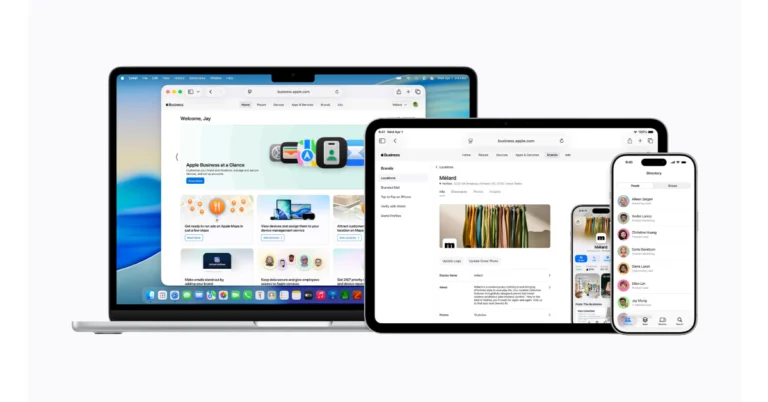
Apple has launched Apple Business, a new platform for organisations of all sizes. This single platform makes it easier to manage devices, reach out to customers, and work together with other users. Key features include built-in mobile device management, the ability to send and receive corporate emails, calendar services, and support for custom domains. The goal of the programme is to make corporate operations easier and more efficient by giving them a variety of useful tools.
Apple has released Apple Business, a whole new platform that helps businesses manage their devices, apps, and support services more effectively. This platform has built-in mobile device management (MDM), which lets organisations use blueprints to set up employee groups, change security settings, and control apps.
The main purpose of Apple Business is to help companies reach more customers using various Apple services, such as Apple Maps, Mail, Wallet, and Siri. This service will start on April 14 and will be available in over 200 different countries and regions. The platform is effortless to use, and it is especially helpful for small companies since it gives them a complete picture of all their Apple devices and how they are set up.
Apple Business offers enhanced services, such as more iCloud storage and AppleCare+ for Business. Employees can now easily manage work apps, get in touch with coworkers, and ask for help using a new companion app. Managed Apple accounts help keep data safe and separate work and personal information. Employee Management lets you make user groups and custom roles. App Distribution makes it easy to get and share apps. The Admin API makes it easy to manage devices, users, and audit data.
Apple Business provides integrated email, calendar, and directory services, which make it easier for companies to communicate and collaborate. This service lets you choose your domain name, which makes new enterprises seem more professional. Calendar delegation and a full corporate directory are two of the features that stand out, making it simpler for workers to get in touch with each other.
Also Read:Xiaomi 17 Ultra Review: A camera phone that shoots like a DSLR
Apple Business Connect has also added brand management features to the Apple Business platform, making it easier to maintain brand profiles. Businesses can manage important things, like their name, logo, and other important information, across a number of Apple services, such as Wallet and Maps. Rich place cards let companies add images, location information, hours of operation, and more to their profiles, making them more visible to prospective clients.
Also Read:Vivo V70 FE to launch in India soon, listed on Amazon
Apple offers showcases and custom actions to let companies promote their deals and products on Maps directly. Location insights provide useful data on consumer interactions, including search and engagement metrics that are crucial for business research.
Furthermore, branded communications are supported in both Mail and iCloud, increasing overall brand visibility and recognition. The “Tap to Pay on iPhone” function integrates brand information into payment transactions, reinforcing the company’s branding across several customer touchpoints.
Many people keep several tabs open throughout the day—checking messages, watching videos, researching topics, tracking packages, or reading articles. For students, remote workers, and gamers alike, the browser often becomes the main workspace.
But juggling dozens of tabs can quickly become messy and inefficient. Tabs get lost, systems slow down, and switching between windows interrupts workflow.
Some browsers now attempt to simplify this experience by building productivity tools directly into the browser environment. One example is Wave Browser, which combines multitasking tools with an environmental mission tied to ocean cleanup.
In this guide, we’ll look at how to use Wave Browser to manage multiple tasks more efficiently while browsing.
What Is Wave Browser?
Wave Browser is a web browser with an environmental mission baked into it’s DNA: to remove plastic and trash from our ocean, rivers, and coastlines. A portion of revenue supports global cleanup efforts, powered by our users. Browse as you always do—and leave our ocean better than you found it.
Wave Browser is designed to organise everyday browsing tasks inside a single workspace.
Like most modern browsers, it supports common web standards, extensions, and normal navigation. However, the browser also includes a set of built-in tools intended to reduce the need for multiple browser extensions.
These tools include tab organisation features, quick-access sidebars, and utilities such as translation tools, reading lists, and content notifications.
The idea is to keep frequently used tools accessible without requiring users to install additional add-ons.
Beyond productivity features, Wave Browser also connects its platform to an environmental program that funds ocean cleanup operations through a partnership with 4ocean.
How to Multitask More Efficiently with Wave Browser
If you frequently keep multiple tabs open, a few built-in tools can help simplify your workflow.
Here are several ways Wave Browser can help organise everyday browsing tasks.
1. Use the Sidebar to Keep Tools Within Reach
One of the easiest ways to reduce tab switching is to keep frequently used tools and sites easily accessible.
Wave Browser includes a built-in sidebar that allows quick access to commonly used sites and services without opening additional tabs.
This can be helpful when:
Reading instructions while completing a task online
Watching tutorials while practising a skill
Checking messages while browsing
Accessing frequently used sites without interrupting your workflow
Instead of constantly switching between tabs, the sidebar keeps useful tools within reach while you continue working in your main browsing window.
2. Organise Research with Tab Groups and Reading Lists
When browsing research, articles, or product information, tabs can accumulate quickly.
Wave Browser offers several tools to help manage large browsing sessions:
Tab groups allow related pages to be organised together. For example, research for one project can be grouped separately from general browsing tabs.
Reading lists allow users to save pages they want to revisit later without leaving dozens of tabs open.
This helps reduce clutter while keeping important content accessible.
3. Use Picture-in-Picture to Keep Videos Visible
Video tutorials and livestreams are common parts of modern browsing.
Wave Browser supports picture-in-picture mode, which allows videos to remain visible in a small floating window while navigating other pages.
This can be useful when:
Following a tutorial while completing steps on another site
Watching live events while browsing news or social media
Listening to educational content while researching
The video continues playing while the rest of the browser remains usable.
4. Reduce Resource Usage with Memory Saver
Heavy browsing sessions can slow down devices, especially when many tabs remain open.
Wave Browser includes a Memory Saver mode designed to reduce the system resources used by inactive tabs.
Instead of running fully in the background, unused tabs consume fewer resources while remaining available for quick access.
For users who frequently keep large numbers of tabs open, this can help maintain smoother device performance.
5. Use Built-In Tools Instead of Extensions
Many browser extensions perform simple tasks like translating pages or converting units.
Wave Browser includes several of these functions directly inside the browser interface, including:
Translation tools
Unit and file converters
Package tracking tools
Price tracking features
Content notifications
Having these tools built into the browser can reduce the number of extensions users need to install.
Fewer extensions can also mean fewer background processes running in the browser.
Understanding Wave Browser’s Environmental Model
Wave Browser also integrates an environmental purpose into its ecosystem.
Wave Browser works with 4ocean, a global cleanup organisation that removes plastic and trash from our ocean and waterways. Through a Certified Cleanup Partnership, Wave Browser helps fund the resources used by cleanup crews working in several parts of the world.
Those operations currently take place in Bali, Indonesia; the Dominican Republic; and Florida in the United States.
Wave Browser has outlined a long-term goal of helping fund the removal of 3,00,000 pounds of plastic and trash from our ocean, rivers, and coastlines by 2028. In 2025 alone, more than 70,000 pounds have already been removed with Wave’s support.
Users can track this progress directly inside the browser through a live impact dashboard, which highlights both cleanup milestones and current project locations.
Safety Standards and Software Transparency
When installing new software, many users want to understand how an application behaves once it is on their device. Independent standards organisations often review software products to evaluate whether they follow transparent installation and distribution practices.
Wave Browser is reviewed under the AppEsteem certification program, which assesses software vendors against consumer protection guidelines designed to promote responsible software behaviour.
These evaluations look at factors such as how clearly installation steps are presented, whether the application behaves transparently after installation, and whether users can easily remove the software if they choose to do so.
Programs like AppEsteem are designed to help establish accountability standards for software developers while giving users clearer insight into how applications are distributed and maintained.
Simplifying Your Daily Browsing Workflow
As internet use becomes more complex, browsers are evolving from simple navigation tools into full digital workspaces.
Managing research, communication, video content, and everyday tasks all inside the browser has become the norm.
Wave Browser approaches this challenge by combining built-in multitasking tools with a broader environmental initiative tied to ocean cleanup.
For users who spend large portions of their day online, the browser is often the centre of their digital activity. Tools that simplify multitasking—while also connecting browsing to real-world environmental programs—reflect how browsers are continuing to evolve.
Spear Training is one of the top trending games on Roblox right now. A new spin on javelin throwing, this game lets you hone your skills by building strength and using crafty potions. You can also collect eggs and hatch them for pets that will help you with your throws. To help you in this quest, the game offers some special codes that can be redeemed for useful items. Here are all the Spear Training codes that are up for grabs in March 2026.Read Also: OnePlus Nord 6 launch confirmed for April 7 with 165 FPS gaming and a 9000mAh battery
List of active codes (March 2026)
morepotions: Free Potions.
superspins: 10 Pins.
potions: 3x Potions.
upd: 10,000 Power.
release: 2,500 Cash.
List of expired codes
Currently, this title does not have any expired codes.
Need more games with the digital pets experience? We recommend giving Catch and Tame and Creatures of Sonaria a shot. While you’re here, take a look at the latest Combat Arena codes. If you have any questions, let us know in the comments!
Combat Arena is one of our favourite Counter-Strike adaptations on Roblox. Its gameplay is simple – you’re put in a map along with a bunch of opponents, with the last one standing winning the round. To give you the edge, the game offers some special codes that can be redeemed for useful items. Here are all the Combat Arena codes that are up for grabs in March 2026.Read Also:Realme Narzo Power Review: Enough juice for 2 days!
Apart from Combat Arena, fans of Counter-Strike should check out BloxStrike on Roblox. While you’re here, take a look at the latest Catch and Tame codes. If you have any questions, let us know in the comments!
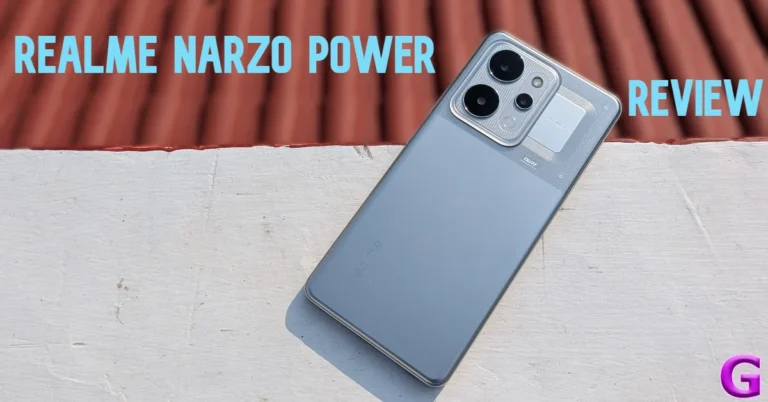
The introduction of Si/C batteries has given smartphone manufacturers a lot of room (figuratively and literally) to work large batteries into their devices. In 2025, we saw OnePlus, Xiaomi, and Oppo incorporate 7,000-7,500mAh battery packs into their flagship phones. This year, Realme has shattered the ceiling with its midrange Narzo Power. This smartphone packs a colossal 10,001mAh battery under its hood. If you’re the kind of user who is always left wanting more charge at the end of the day, this is your guy. We used the smartphone for a week and put it through a series of rigorous tests. Here is our in-depth review of the Realme Narzo Power.Read Also:Xiaomi 17 Ultra Review: A camera phone that shoots like a DSLR
Realme Narzo Power Review: Design and Display
Box contents
Smartphone
80W power adapter
USB-A to USB-C cable
Clear plastic cover
SIM ejector
Seal stickers
Quick guide
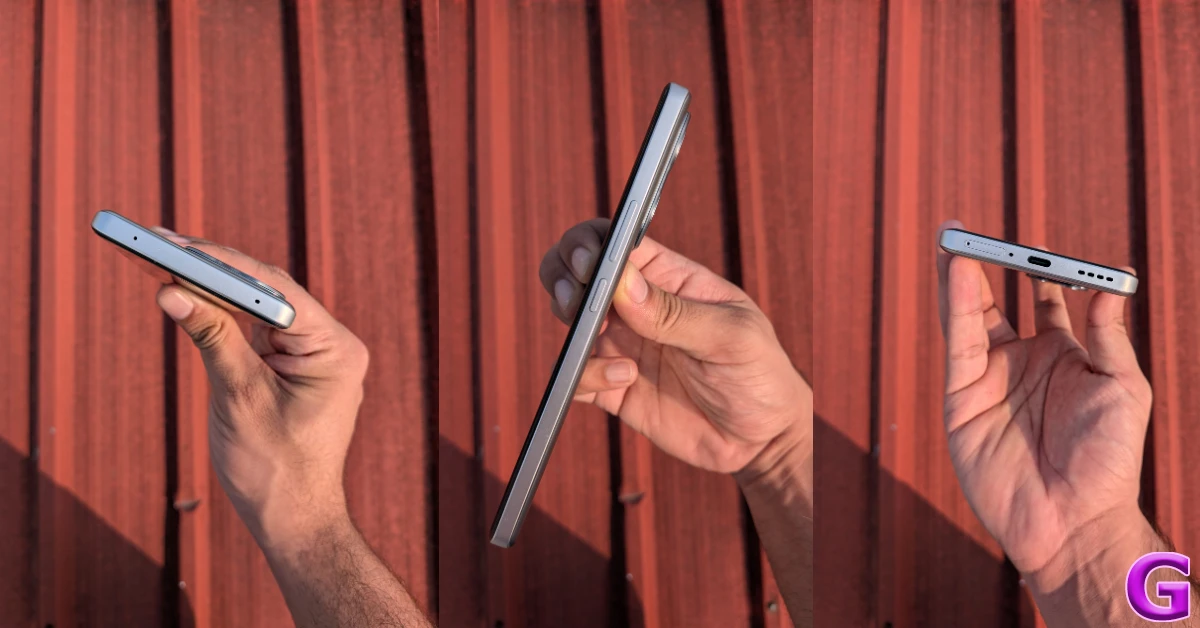
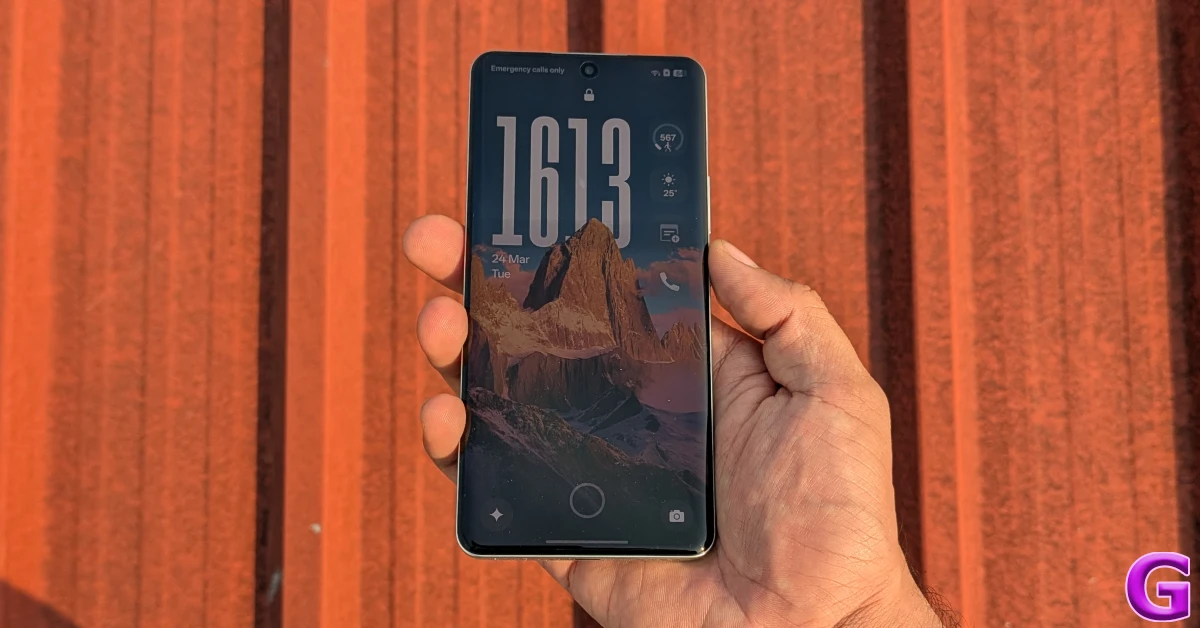
The Narzo Power makes its presence felt as soon as you hold it. Tipping the scales at 219g, it is 5 grams heavier than the Galaxy S26 Ultra. Thankfully, the weight is evenly distributed, and the phone does not feel top-heavy. The two-step camera panel has a small bump, but it does not cause a whole lot of wobble. The section next to the camera island has perforation and coil graphics, which leads you to believe that there’s an NFC coil in that area, but the smartphone surprisingly lacks that feature.The plastic back panel has a smooth finish and tends to register fingerprints and smudges over a period of time. The build quality feels strong and premium. The smartphone is compliant with MIL-STD-810H durability standards. It is rated IP68/IP69 for protection against dust and water. This means it can survive exposure to high-pressure water jets. The plastic frame holds the volume rocker and the side button on its right edge. The bottom edge houses the SIM tray, primary microphone, USB-C port, and speaker grille. Up top lies the secondary microphone.The 6.8-inch curved AMOLED display can reach a peak brightness of 6,500 nits while playing HDR content. In bright outdoor conditions, it can hit 1,800 nits in High Brightness Mode, maintaining optimum legibility. On paper, this display can reach a maximum refresh rate of 144Hz, but in practical use, it is limited to 120Hz. The touch response is smooth and enjoyable. The under-display fingerprint sensor is snappy and accurate.During the review period, we used the Realme Narzo Power to stream TV and movie titles across major platforms like Netflix, JioHostar, and Prime Video. The 1.5k AMOLED display was able to relay detailed HDR visuals with rich colours and tasteful contrast. The wide range of viewing angles made sure that we didn’t spend a lot of time finding the right angle to prop the phone while watching a video. The lone bottom-firing speaker produced a decent audio output, but we would’ve preferred a stereo speaker setup in this price range.
Realme Narzo Power Review: Performance and Cameras
At the heart of the Realme Narzo Power lies the MediaTek Dimensity 7400 SoC. Working alongside this chipset is Realme’s in-house Hyper Vision+ AI chip. The smartphone is equipped with 8GB LPDDR4X RAM and comes in 2 UFS 3.1 storage variants:
128GB: Rs 26,499
256GB: Rs 28,499
We ran a couple of benchmark tests on the device. Here’s how it performed.
The Narzo Power puts up a decent display in everyday use. While it may not generate ludicrous power, it is able to handle routine tasks like calling, instant messaging, web browsing, and media streaming without a hiccup. The LPDDR4X and UFS 3.1 configurations for RAM and storage aren’t the fastest in the segment either, but they do just enough to ensure that you don’t feel any lag while opening and juggling apps. The haptic feedback is slightly on the blunt side and needs a bit of tuning.The Hyper Vision+ AI chip allows the Realme Narzo Power to run BGMI at 90fps. The smartphone is able to sustain this frame rate across an average session. Limiting the graphics to medium settings, we did not come across any major lag or stutter while gaming. The back panel started to warm up after 15 minutes of gameplay, but we did not experience any thermal throttling even after crossing the 30-minute mark. Support for Bypass Charging ensures that you can play games while charging the phone without worrying about excessive heating.The Android 16-based Realme UI 7 is well optimised to get the best out of the MediaTek Dimensity 7400 chipset powering this smartphone. The app animations are snappy, the transitions feel slick, and the background app management is top-notch. The Flux themes for the lockscreen dazzle with their depth effect and neat widget array. The transition from the Always On Display to the lockscreen feels very smooth and pleasing.The NEXT AI suite contains handy tools like AI Suggest, AI Writer, AI Translate, AI Camera, AI Gaming Coach, and AI Smart Loop. The AI Editor in the native Photos app has useful editing tools like AI Eraser, AI Ultra Clarity, AI Perfect Shot, Unblur, Reflection Remover, and more. The AI Edit Genie lets you edit your images through vocal and text prompts.Being a midrange smartphone, the Realme Narzo Power contains a fair bit of bloatware. Thankfully, these apps can be completely removed from the device. Realme has promised 3 major OS upgrades and 4 years of security patches for this device.Now, let’s talk about the biggest highlight of this phone – the 10,0001mAh battery pack. With that big a battery, you’re practically walking around with a power bank in your pocket. This comparison makes more sense when you notice that Realme has equipped this smartphone with 27W reverse wired charging, in case your friends need to top up their devices. The brand claims that the smartphone can retain 80% of its battery health after 8 years. This claim can only be proven with time, but we will take Realme’s word for now.It goes without saying that the Narzo Power keeps battery anxiety at bay. We found it nearly impossible to drain its battery in a day without running continuous stress tests on it. On regular usage, the smartphone didn’t fall below the 50% charge level. This is easily a 2-day smartphone. With more conservative usage, you can push its battery life beyond that period, too. Realme claims that the smartphone can stay in standby for 48.4 hours with just 5% charge left in the tank. The 80W power adapter can replenish the battery pack to 50% in 36 minutes. A full charge takes over an hour.The rear camera panel of the Narzo Power houses a 50MP primary shooter and an 8MP ultrawide lens. The 16MP front-facing camera is nestled in a punch-hole cutout on the display.The 50MP primary shooter captures good shots in outdoor daylight conditions. The images showcase vibrant colours and sharp details. The contrast and dynamic range leave no room for complaints, either. In limited lighting conditions, the camera relies on Night Mode to light up the subject. These images are passable, but a bit grainy.Pictures taken with the 8MP ultrawide camera have a slight tonal shift. The images are a tad softer and have cooler tones compared to the ones taken with the primary lens. The gap in detail becomes more apparent when you pixel peep. In limited lighting conditions, the Night Mode does a decent job of lighting up the subject, but the images look notably grainy.Ultrawide lensUltrawide lensNight Mode: Primary v UltrawidePortraits taken with the Narzo Power are well-focused, but the smartphone tends to blur the edges of the subject. We would have preferred a slightly more intense background blur, too. The front-facing camera takes bright and clear selfies without messing with the skin tone and texture too much. The selfie camera and ultrawide lens can record 1,080p videos at 30fps. Meanwhile, the primary shooter can record 4K footage at 30fps.Portraits: 1x v 2xRead Also: Apple schedules WWDC 2026 for June: details inside
Verdict
The best way to describe the Realme Narzo Power is a power bank with a phone tacked on top. This doesn’t mean that the ‘phone’ part is an afterthought. The MediaTek Dimensity 7400 processor ensures that you’re never left wanting more power for routine tasks. The Hyper Vision+ AI chip lets you play BGMI at 90fps. Furthermore, the Realme UI 7 is equipped with vibrant themes and AI features to make the everyday usage experience more fun. Casual users can easily get a 2-day battery life out of this device. If you’re embarking on a weekend getaway, you don’t need to pack your charger if you’ve got this phone in your pocket. The camera performance may be a bit flat, but it is a tradeoff that a lot of users will be willing to make for a stellar battery life.Buy on Amazon for Rs 26,499
Xiaomi is well-liked in India due to its competitively priced products. It recently launched the Xiaomi 17 Ultra, a flagship phone also called a phone with a built-in DSLR camera. This device is mainly designed for photography, featuring the world’s first Leica 1-inch sensor with LOFIC technology and the first 200MP continuous optical zoom, with the lens moving inside the phone like a DSLR. It is powered by a Snapdragon 8 Elite Gen 5 processor and includes a large 6,000mAh battery with 100W fast charging. We’ve used it as our daily driver for weeks, and its other features are equally impressive. If you’re interested in a smartphone focused on photography, this review will help you decide if the Xiaomi 17 Ultra is worth buying. While it appears to have excellent specifications, we’ll first examine its design and display performance.
Design and Display
We got the White variant of the Xiaomi 17 Ultra for the review. The White variant is the most visually appealing option in the series since it highlights the all-flat design more than any other colour. The choice of this colour enhances the visibility of the camera module’s intricacies, ensuring they are easily recognised. The black version of the gadget, on the other hand, tends to blend the camera module details with the body, making them less noticeable and harder to identify.The white version is made of solid-colour composite fibreglass, which gives it a very deep, milky ceramic look. Compared to real ceramic, this stuff is much lighter and less prone to damage. The finish is matte and doesn’t reflect light, which makes it appear like polished stone. The white matte surface is also designed to prevent noticeable smudges, so it will seem clean and new all day long.The Leica Camera Island has a distinctive high-contrast panda look that sets it apart from other camera designs. The nickel-anodised aluminium camera ring on the white model makes it look more attractive and also improves light reflection. Pairing it with a white body creates a look reminiscent of a professional Leica M-series lens, imparting a sophisticated and elegant appeal. Furthermore, the red highlights, including the gold-etched aperture details, stand out against the white backdrop. The colour makes these features more visible than they would be on darker camera models.Also Read:Vivo X200T Review: The Best of Both WorldsThe white version features a natural silver frame made from 6M42 aluminium alloy. Its shiny silver finish gives the product a slimmer appearance, despite being 8.29 mm thick. The power button on the left side is positioned for easy thumb access and has a textured, curved surface for a comfortable grip. Two distinct circular buttons labelled “+” and “-‘ provide intuitive volume control, differing from the typical long bar design. These volume buttons stand out with a mirror-like polished finish, contrasting sharply with the brushed silver frame.The bottom of the phone serves as its command centre, featuring a USB-C 3.2 Gen 2 port that can handle data transfer speeds of up to 10 Gbps, a 90W wired HyperCharge connection for quick charging, and a DisplayPort output to connect to external displays. There’s also a primary speaker grille with precisely drilled holes to enhance the sound quality of the stereo speakers. Plus, it includes a dual SIM slot that can hold two nano-SIM cards and supports dual eSIM technology, offering great flexibility for your connectivity needs.There are no visible cutouts for the IR blaster or additional speaker on the top edge of the gadget. The infrared sensor is discreetly hidden within the camera island, so it can work with the Mi Remote app without ruining the clean look. Similarly, the secondary speaker employs Sound-on-Display technology, emerging from a micro-slit on the display, eliminating the need for a visible speaker grille while preserving audio quality for media consumption.The company additionally provided the Xiaomi 17 Ultra with a black leather photography kit that gives it a high-contrast, professional style that is similar to that of a limited-edition white Leica M-series with a black leather grip.When you insert the phone into the kit, it transforms into a specialised photography setup with a total battery capacity of 6,000mAh plus an additional 2,000mAh. The Pro kit features high-quality, slip-resistant Black PU leather that not only looks professional but also offers a more polished experience. Its ergonomic hump design makes one-handed operation safe and comfortable, perfect for street photography. Instead of Bluetooth, the kit connects directly via a USB-C connector. This is especially helpful for street photography in India, as it eliminates shutter lag, allowing your 50MP 1-inch sensor to respond instantly when you press the button.The 17 Ultra smartphone has an IP69 certification, which is higher than the regular IP68 rating. This rating highlights that the phone is quite resilient, able to handle powerful water jets under high pressure and temperature better than many others. It’s especially handy during bad weather, like heavy rain, and makes cleaning dust a breeze. Plus, with Shield Glass 3.0, it’s well protected against micro-scratches, even from rough materials like pocket sand, giving you extra peace of mind. These features help the phone last longer and be smoother to use overall.The Xiaomi 17 Ultra features a custom HyperRGB OLED display that significantly outperforms earlier models. It has a 6.9-inch flat screen with a resolution of 1.5K+ (2,608×1,200), a peak brightness of 3500 nits, a 12-bit colour depth allowing it to display up to 68 billion colours, and is protected by Xiaomi Shield Glass 3.0.HyperRGB technology really boosts visual quality by improving sub-pixel clarity. This makes 4K animated videos and high-bitrate streams look even better. It helps textures appear more natural, so tiny details like skin pores and fabric weaves are easier to see. Overall, it creates a richer and more immersive viewing experience for everyone.The Xiaomi 17 Ultra is great for outdoor use since its true RGB subpixel arrangement makes text easier to see. The screen also has an anti-reflective quality that cuts down on glare.The display can easily dim down to just 1 nit for those relaxing low-light moments, helping you see clearly at night without harsh glare. Plus, it’s TÜV Rheinland-approved for hardware-level DC dimming, which means you’ll enjoy flicker-free, more comfortable viewing.Also Read:Redmi Note 15 Pro+ Full Review: Built like a tankThe gadget can display 68.7 billion colours, which assists in combating colour banding in photos. The Original Color PRO option keeps colours true for those who love photography.The refresh rate adaptability is enhanced with 1-120Hz LTPO technology, which dynamically adjusts the refresh rate according to the content, providing ultra-smooth visuals. Furthermore, a touch sampling rate of 300Hz guarantees that touch interactions, which are critical for photographic operations, are fast and lag-free. The wet touch technology improves usability by enabling the phone to distinguish between touch inputs and water drops, which is useful in monsoon conditions.To better serve the Indian streaming market, Xiaomi has added software optimisations for popular services such as Netflix, Prime Video, and Disney+ Hotstar. Key elements of these optimisations include adaptive HDR, which automatically changes tone mapping based on ambient lighting conditions to preserve shadow details.
Performance and Camera
At the core of this phone is the impressive Snapdragon 8 Elite Gen 5 CPU, built with the latest 3nm manufacturing technology. It features a unique “2+6” core design, combining two high-performance Prime cores with six efficiency cores, enabling clock speeds of up to 4.6GHz. This offers some of the best smartphone performance available in India. Plus, with 16GB of LPDDR5X RAM, you can enjoy smooth multitasking and seamless app switching, so your favourite applications run effortlessly without any lag, making your experience truly enjoyable.The gadget has UFS 4.1 storage, which is better than the UFS 4.0 standard that most flagship devices have. UFS 4.1 technology makes read/write speed faster, which is important for quickly moving big files. This is especially important for transferring 8K video files and high-resolution Leica RAW images using a USB-C 3.2 Gen 2 connector, ensuring that transfers occur without delays.The Xiaomi 17 Ultra is built for the best performance, especially in India’s climate. It has a new 3D Dual-Channel IceLoop capillary cooling system that improves thermal performance. This new cooling system is designed only for the camera module and chipset, which prevents them from getting hot enough to touch.If you’re multitasking frequently, consider increasing your virtual RAM from 8GB to 16GB. While 16GB of physical RAM is generally sufficient, having more virtual memory can enhance performance during resource-intensive AI-driven photo edits in the gallery, enabling faster processing and smoother handling of large image files and complex editing tasks.The Snapdragon 8 Elite Gen 5 chipset really shines in the Xiaomi 17 Ultra, especially when it comes to gaming. It can run AAA games at 120 frames per second thanks to the Adreno GPU, and it stays smooth at 60 frames per second on the highest settings in Genshin Impact. It works best at 90 and 120 frames per second for games like BGMI and COD Mobile. The 300Hz touch sampling rate makes it even more responsive.The device has HyperOS 3.0’s Game Turbo features, such as AI Resource Allocation, which speeds up the CPU in heavy frame situations to cut down on micro-stutters, and game-specific visuals like a Bright FPS filter that makes things easier to see in competitive settings. There is also a voice changer and many performance modes, such as Wild mode, which uses more battery power to get the most performance from the CPU.Notably, the machine doesn’t show excessive throttling and keeps the screen brightness stable over long gaming sessions, ensuring clear visibility throughout gaming sessions.Geekbench scores:Single-core- 3561Multi-core- 10706The hardware on the device is excellent, but it is the software that truly makes it function. This is especially true with the use of HyperOS 3.0, which is based on Android 16 and the Liquid Glass design concept. The gadget has a smooth, rounded look, and the Super Island feature displays live activities like delivery statuses, music controls, and timers at the top of the screen.Bloatware is a big problem for Xiaomi in India. But especially for the 17 Ultra model, which costs Rs 1,39,999, this model has a premium user experience, with features like GetApps notifications and the Glance lock screen turned off by default. It still has a few pre-installed applications, including Facebook and LinkedIn, but you can remove 95% of them. The Ultra series also aims to provide a distraction-free user experience by not including system-level advertisements. This approach means that there are no recommended app folders or ads in the file manager, which helps to create a Pro user experience.The series has HyperAI features, such as the Circle to Search via Google integration and the AI Writing/Summarisation functions in the Notes app and Gmail.Xiaomi’s 17 series has a comprehensive update policy, which means that users will receive 6 years of HyperOS upgrades, which are expected to last until around 2032. Furthermore, throughout this period, security updates will be provided every 90 days.HyperOS 3.0 makes a lot of visual improvements, especially to the lock screen. The AI Cinematic Lock Screen feature uses the Snapdragon 8 Elite’s NPU to create a multi-layered image effect that makes the lock screen seem more appealing. This feature smartly separates subjects from backgrounds in wallpapers, which lets lock screen widgets use parallax technology to make things seem 3D. Users may also customise their experience by using different style filters to make things look better.The Indian version features workstation capabilities, allowing you to use it like a desktop PC when connected to a 4K monitor. The user interface, powered by the Snapdragon 8 Elite Gen 5, includes a desktop-style taskbar and resizable windows. This ensures that everything runs smoothly without any latency. Xiaomi Interconnect also enables you to connect your Xiaomi devices effortlessly. As a result, transferring files to larger displays is easy, and the system scales appropriately to 4K at 60Hz, significantly improving display quality compared to older versions.Now comes our favourite part of the review – the camera.The camera’s 50MP primary sensor uses LOFIC technology, which gives it performance that’s on par with professional mirrorless cameras. The photos taken in daylight have an organic quality, with smooth textures and rich, true colours. They deliberately avoid the over-sharpened look that is common in other brands like iPhone or Samsung.The camera also has two distinct Leica modes: Leica Authentic, which gives photos a traditional, sombre look with a little vignette, and Leica Vibrant, which is meant for eye-catching social media photos that still seem true to life. We mostly took pictures in the Leica Authentic setting since we liked how unique the pictures looked.The camera is very good in low light, producing deep blacks and bright highlights while keeping the picture clean and free of grainy noise. This is why it is called the emperor of night photography.The gadget features a 200 MP, 5x Samsung HPE periscope telephoto camera that employs a mechanical system to adjust internal lenses. It offers an optical zoom from 75mm (3.2x) to 100mm (4.3x), with moving glass elements to maintain excellent image quality at both zoom levels. The camera excels at portrait photography. The 75mm setting produces a natural bokeh effect that softly blurs the background, highlighting the subject, similar to traditional cameras. This makes it one of the top choices for smartphone portrait shots.With a 50MP resolution and a 14mm focal length, the ultrawide lens has a wide 115° field of view. This lens is great for taking pictures of vast scenes like buildings and groups of people in confined areas. It also makes sure that the colours match those of the main lens.The new telephoto lens requires a minimum distance of around 30 cm to get a sharp focus, making it suited for most photography needs. In comparison, the ultrawide lens is more versatile, letting users snap photographs as close as 5 cm.The Xiaomi 17 Ultra is designed for mobile videography, and it is especially useful for professionals who need a lot of freedom in post-production. It can record in 8K at 30 frames per second (fps) and 4K at 120 fps. This means that users may clip an 8K video to 4K without sacrificing detail. The 4K 120fps recording with Dolby Vision improves slow motion and colour depth for amazing video quality. It lets you edit video in log format up to 4K 120 fps and gives you the most flexibility over colour grading with the Academy Colour Encoding System (ACES).Selfies taken indoors (primary vs portrait)The device has specific video modes, including ShootSteady (2.8K at 60fps), which uses super-stabilisation like a gimbal but decreases the resolution to improve stabilisation. It also has Night Video (4K at 24fps) for good performance in low light while keeping a cinematic frame rate. The device offers a stunning 1080p resolution at 1920 fps for ultra-slow motion, allowing you to capture even the tiniest details with ease. Its audio capabilities are equally impressive, featuring a 4-mic array that pinpoints sound from a particular direction and follows the source, making your field recordings much clearer and more professional.The Photography Kit Pro makes photography much more enjoyable by adding additional functions that make the camera easier to use and more useful. The kit comes with a grip that connects to the White 17 Ultra via USB-C. This gets rid of Bluetooth latency and makes it seem like you’re using a high-end point-and-shoot camera. The kit comes with physical controls, such as a two-stage shutter button for focusing with a half-press and shooting with a full press, a dedicated video button, and a customisable dial that gives you more control over different photographic settings.This physical grip also supports your video recording by providing a stable hold for smooth panning shots and allowing you to effortlessly adjust the focus or exposure manually with the convenient custom dial. It helps reduce the jitter that often occurs when you tap to focus on the screen, making your filming experience smoother and more enjoyable.The Pro Kit also comes with a 2,000 mAh battery that powers the kit and charges the phone while users are taking pictures for long periods of time. This feature means that users may keep taking pictures without worrying about running out of juice. The kit is compatible with 67mm filters, so users can attach different kinds of filters, like neutral density (ND) filters for smooth, flowing water effects or circular polarisers (CPLs) for reducing reflections. This gives users the same flexibility as using a dedicated camera lens.The Xiaomi 17 Ultra has significantly enhanced its selfie camera. It now has a high-performance 50MP sensor with dedicated autofocus (AF) instead of a 32MP fixed-focus sensor. This improvement changes the role of the front-facing camera from a simple tool to a useful production tool for content creators.Selfies taken outdoors (primary vs portrait)We’ve found that the new selfie camera does a wonderful job capturing realistic textures and better light, showing natural skin features without needing filters to smooth the skin. The sample photos clearly show the autofocus works smoothly, keeping everything in focus at various distances, including those tiny details like flyaway hairs. Plus, the improved edge detection in portrait mode creates a more natural bokeh effect and makes small details, like strands of hair, easier to see.Videography features have also become a lot better. The front-facing camera can now shoot video at 4K 60fps in Dolby Vision, making it easy to integrate high-quality B-roll footage. The video teleprompter tool helps users maintain eye contact while reading from a script. Furthermore, advanced noise reduction technology utilises four microphones to make voices stand out against background noise. The front camera can now record 1080p slow motion at 120 frames per second and 4K time-lapse videos.The phone has a powerful 6000mAh battery that will last a long time. The smartphone provides 8 to 9 hours of screen time. During an average workday, users can expect to have 30-40% battery life left, making it basically a day-and-a-half gadget.Also Read:OnePlus 15R Review: Performance JuggernautThis grip acts as a backup battery and turns on automatically when the phone’s battery level drops below 20%. As a result, this new setup lets users film constantly at 4K quality and 120 frames per second without worrying about battery life.The smartphone features 90W wired HyperCharge technology, which includes Surge P3 and Surge G3 processors designed to prevent overheating during charging. This allows the device to charge from 0% to 100% in approximately 45-50 minutes. Additionally, the phone supports 50W wireless charging, renowned for its speed while prioritising safety, even in high ambient temperatures. It also offers reverse charging, with 22.5W reverse wired charging via USB-C and 10W reverse wireless charging for compatible accessories such as earphones and smartwatches.
Verdict
The Xiaomi 17 Ultra is primarily branded for its photography capabilities, but its gaming performance is better than that of many dedicated gaming phones. This model truly highlights its strength and versatility, especially when tackling demanding gaming tasks. Thanks to the innovative 3D Dual-Channel IceLoop technology, it performs so much better, even in India’s warm temperatures, which can challenge electronic devices. It’s a fantastic setup that ensures you get the best gaming experience no matter the conditions. The Snapdragon 8 Elite Gen 5, the best cooling system on the market, and the Photography Kit Pro’s tactile precision make this one of the most versatile flagships on the Indian market right now.
Pros
The HyperRGB M10 panel is hitting a peak brightness of 3,500 nits.






 Apple Business offers enhanced services, such as more iCloud storage and AppleCare+ for Business. Employees can now easily manage work apps, get in touch with coworkers, and ask for help using a new companion app. Managed Apple accounts help keep data safe and separate work and personal information. Employee Management lets you make user groups and custom roles. App Distribution makes it easy to get and share apps. The Admin API makes it easy to manage devices, users, and audit data.
Apple Business provides integrated email, calendar, and directory services, which make it easier for companies to communicate and collaborate. This service lets you choose your domain name, which makes new enterprises seem more professional. Calendar delegation and a full corporate directory are two of the features that stand out, making it simpler for workers to get in touch with each other.
Also Read: Xiaomi 17 Ultra Review: A camera phone that shoots like a DSLR
Apple Business Connect has also added brand management features to the Apple Business platform, making it easier to maintain brand profiles. Businesses can manage important things, like their name, logo, and other important information, across a number of Apple services, such as Wallet and Maps. Rich place cards let companies add images, location information, hours of operation, and more to their profiles, making them more visible to prospective clients.
Also Read: Vivo V70 FE to launch in India soon, listed on Amazon
Apple offers showcases and custom actions to let companies promote their deals and products on Maps directly. Location insights provide useful data on consumer interactions, including search and engagement metrics that are crucial for business research.
Furthermore, branded communications are supported in both Mail and iCloud, increasing overall brand visibility and recognition. The “Tap to Pay on iPhone” function integrates brand information into payment transactions, reinforcing the company’s branding across several customer touchpoints.
Apple Business offers enhanced services, such as more iCloud storage and AppleCare+ for Business. Employees can now easily manage work apps, get in touch with coworkers, and ask for help using a new companion app. Managed Apple accounts help keep data safe and separate work and personal information. Employee Management lets you make user groups and custom roles. App Distribution makes it easy to get and share apps. The Admin API makes it easy to manage devices, users, and audit data.
Apple Business provides integrated email, calendar, and directory services, which make it easier for companies to communicate and collaborate. This service lets you choose your domain name, which makes new enterprises seem more professional. Calendar delegation and a full corporate directory are two of the features that stand out, making it simpler for workers to get in touch with each other.
Also Read: Xiaomi 17 Ultra Review: A camera phone that shoots like a DSLR
Apple Business Connect has also added brand management features to the Apple Business platform, making it easier to maintain brand profiles. Businesses can manage important things, like their name, logo, and other important information, across a number of Apple services, such as Wallet and Maps. Rich place cards let companies add images, location information, hours of operation, and more to their profiles, making them more visible to prospective clients.
Also Read: Vivo V70 FE to launch in India soon, listed on Amazon
Apple offers showcases and custom actions to let companies promote their deals and products on Maps directly. Location insights provide useful data on consumer interactions, including search and engagement metrics that are crucial for business research.
Furthermore, branded communications are supported in both Mail and iCloud, increasing overall brand visibility and recognition. The “Tap to Pay on iPhone” function integrates brand information into payment transactions, reinforcing the company’s branding across several customer touchpoints. 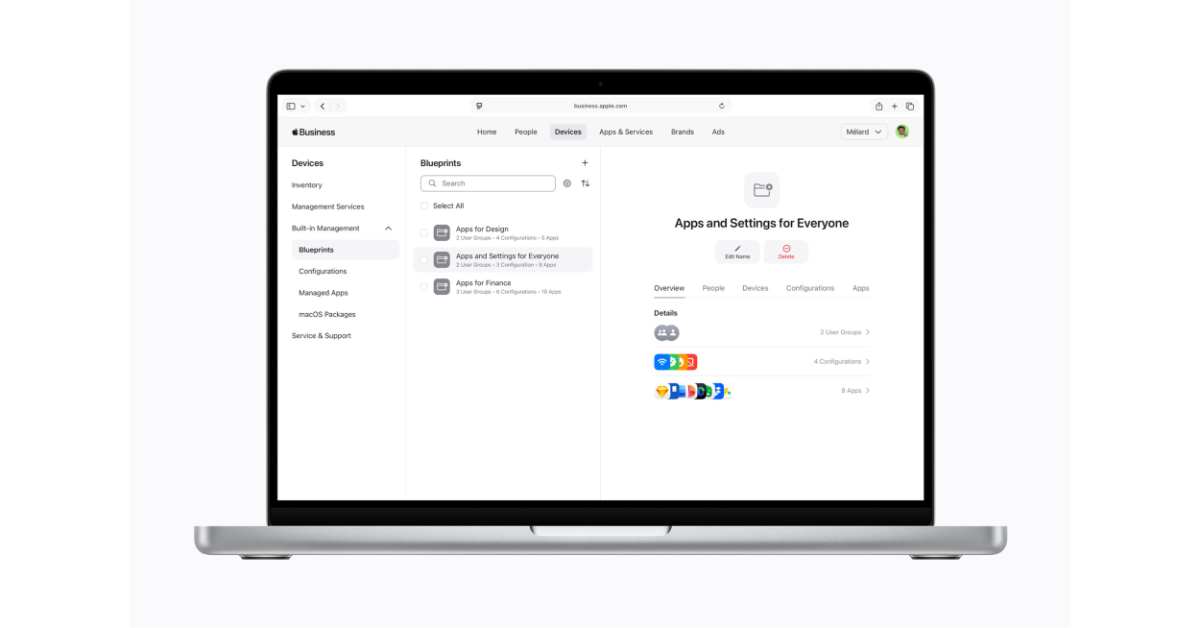 Apple Business offers enhanced services, such as more iCloud storage and AppleCare+ for Business. Employees can now easily manage work apps, get in touch with coworkers, and ask for help using a new companion app. Managed Apple accounts help keep data safe and separate work and personal information. Employee Management lets you make user groups and custom roles. App Distribution makes it easy to get and share apps. The Admin API makes it easy to manage devices, users, and audit data.
Apple Business provides integrated email, calendar, and directory services, which make it easier for companies to communicate and collaborate. This service lets you choose your domain name, which makes new enterprises seem more professional. Calendar delegation and a full corporate directory are two of the features that stand out, making it simpler for workers to get in touch with each other.
Also Read: Xiaomi 17 Ultra Review: A camera phone that shoots like a DSLR
Apple Business Connect has also added brand management features to the Apple Business platform, making it easier to maintain brand profiles. Businesses can manage important things, like their name, logo, and other important information, across a number of Apple services, such as Wallet and Maps. Rich place cards let companies add images, location information, hours of operation, and more to their profiles, making them more visible to prospective clients.
Also Read: Vivo V70 FE to launch in India soon, listed on Amazon
Apple offers showcases and custom actions to let companies promote their deals and products on Maps directly. Location insights provide useful data on consumer interactions, including search and engagement metrics that are crucial for business research.
Furthermore, branded communications are supported in both Mail and iCloud, increasing overall brand visibility and recognition. The “Tap to Pay on iPhone” function integrates brand information into payment transactions, reinforcing the company’s branding across several customer touchpoints.
Apple Business offers enhanced services, such as more iCloud storage and AppleCare+ for Business. Employees can now easily manage work apps, get in touch with coworkers, and ask for help using a new companion app. Managed Apple accounts help keep data safe and separate work and personal information. Employee Management lets you make user groups and custom roles. App Distribution makes it easy to get and share apps. The Admin API makes it easy to manage devices, users, and audit data.
Apple Business provides integrated email, calendar, and directory services, which make it easier for companies to communicate and collaborate. This service lets you choose your domain name, which makes new enterprises seem more professional. Calendar delegation and a full corporate directory are two of the features that stand out, making it simpler for workers to get in touch with each other.
Also Read: Xiaomi 17 Ultra Review: A camera phone that shoots like a DSLR
Apple Business Connect has also added brand management features to the Apple Business platform, making it easier to maintain brand profiles. Businesses can manage important things, like their name, logo, and other important information, across a number of Apple services, such as Wallet and Maps. Rich place cards let companies add images, location information, hours of operation, and more to their profiles, making them more visible to prospective clients.
Also Read: Vivo V70 FE to launch in India soon, listed on Amazon
Apple offers showcases and custom actions to let companies promote their deals and products on Maps directly. Location insights provide useful data on consumer interactions, including search and engagement metrics that are crucial for business research.
Furthermore, branded communications are supported in both Mail and iCloud, increasing overall brand visibility and recognition. The “Tap to Pay on iPhone” function integrates brand information into payment transactions, reinforcing the company’s branding across several customer touchpoints. 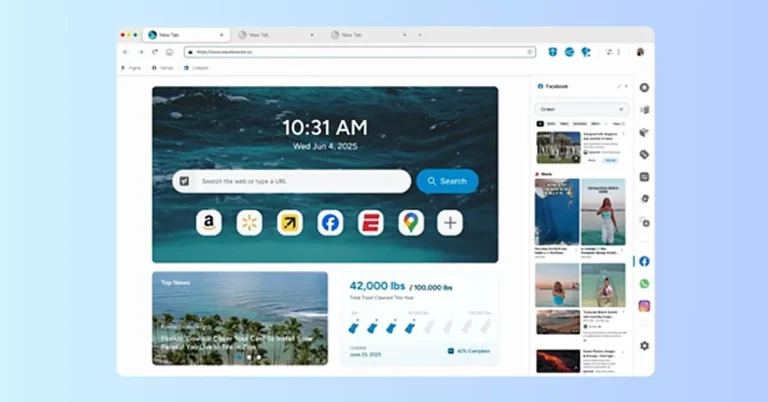
 Wave Browser is a web browser with an environmental mission baked into it’s DNA: to remove plastic and trash from our ocean, rivers, and coastlines. A portion of revenue supports global cleanup efforts, powered by our users. Browse as you always do—and leave our ocean better than you found it.
Wave Browser is designed to organise everyday browsing tasks inside a single workspace.
Like most modern browsers, it supports common web standards, extensions, and normal navigation. However, the browser also includes a set of built-in tools intended to reduce the need for multiple browser extensions.
These tools include tab organisation features, quick-access sidebars, and utilities such as translation tools, reading lists, and content notifications.
The idea is to keep frequently used tools accessible without requiring users to install additional add-ons.
Beyond productivity features, Wave Browser also connects its platform to an environmental program that funds ocean cleanup operations through a partnership with 4ocean.
Wave Browser is a web browser with an environmental mission baked into it’s DNA: to remove plastic and trash from our ocean, rivers, and coastlines. A portion of revenue supports global cleanup efforts, powered by our users. Browse as you always do—and leave our ocean better than you found it.
Wave Browser is designed to organise everyday browsing tasks inside a single workspace.
Like most modern browsers, it supports common web standards, extensions, and normal navigation. However, the browser also includes a set of built-in tools intended to reduce the need for multiple browser extensions.
These tools include tab organisation features, quick-access sidebars, and utilities such as translation tools, reading lists, and content notifications.
The idea is to keep frequently used tools accessible without requiring users to install additional add-ons.
Beyond productivity features, Wave Browser also connects its platform to an environmental program that funds ocean cleanup operations through a partnership with 4ocean.
 Wave Browser is a web browser with an environmental mission baked into it’s DNA: to remove plastic and trash from our ocean, rivers, and coastlines. A portion of revenue supports global cleanup efforts, powered by our users. Browse as you always do—and leave our ocean better than you found it.
Wave Browser is designed to organise everyday browsing tasks inside a single workspace.
Like most modern browsers, it supports common web standards, extensions, and normal navigation. However, the browser also includes a set of built-in tools intended to reduce the need for multiple browser extensions.
These tools include tab organisation features, quick-access sidebars, and utilities such as translation tools, reading lists, and content notifications.
The idea is to keep frequently used tools accessible without requiring users to install additional add-ons.
Beyond productivity features, Wave Browser also connects its platform to an environmental program that funds ocean cleanup operations through a partnership with 4ocean.
Wave Browser is a web browser with an environmental mission baked into it’s DNA: to remove plastic and trash from our ocean, rivers, and coastlines. A portion of revenue supports global cleanup efforts, powered by our users. Browse as you always do—and leave our ocean better than you found it.
Wave Browser is designed to organise everyday browsing tasks inside a single workspace.
Like most modern browsers, it supports common web standards, extensions, and normal navigation. However, the browser also includes a set of built-in tools intended to reduce the need for multiple browser extensions.
These tools include tab organisation features, quick-access sidebars, and utilities such as translation tools, reading lists, and content notifications.
The idea is to keep frequently used tools accessible without requiring users to install additional add-ons.
Beyond productivity features, Wave Browser also connects its platform to an environmental program that funds ocean cleanup operations through a partnership with 4ocean.
 Wave Browser also integrates an environmental purpose into its ecosystem.
Wave Browser works with 4ocean, a global cleanup organisation that removes plastic and trash from our ocean and waterways. Through a Certified Cleanup Partnership, Wave Browser helps fund the resources used by cleanup crews working in several parts of the world.
Those operations currently take place in Bali, Indonesia; the Dominican Republic; and Florida in the United States.
Wave Browser has outlined a long-term goal of helping fund the removal of 3,00,000 pounds of plastic and trash from our ocean, rivers, and coastlines by 2028. In 2025 alone, more than 70,000 pounds have already been removed with Wave’s support.
Users can track this progress directly inside the browser through a live impact dashboard, which highlights both cleanup milestones and current project locations.
Wave Browser also integrates an environmental purpose into its ecosystem.
Wave Browser works with 4ocean, a global cleanup organisation that removes plastic and trash from our ocean and waterways. Through a Certified Cleanup Partnership, Wave Browser helps fund the resources used by cleanup crews working in several parts of the world.
Those operations currently take place in Bali, Indonesia; the Dominican Republic; and Florida in the United States.
Wave Browser has outlined a long-term goal of helping fund the removal of 3,00,000 pounds of plastic and trash from our ocean, rivers, and coastlines by 2028. In 2025 alone, more than 70,000 pounds have already been removed with Wave’s support.
Users can track this progress directly inside the browser through a live impact dashboard, which highlights both cleanup milestones and current project locations.
 When installing new software, many users want to understand how an application behaves once it is on their device. Independent standards organisations often review software products to evaluate whether they follow transparent installation and distribution practices.
Wave Browser is reviewed under the AppEsteem certification program, which assesses software vendors against consumer protection guidelines designed to promote responsible software behaviour.
These evaluations look at factors such as how clearly installation steps are presented, whether the application behaves transparently after installation, and whether users can easily remove the software if they choose to do so.
Programs like AppEsteem are designed to help establish accountability standards for software developers while giving users clearer insight into how applications are distributed and maintained.
When installing new software, many users want to understand how an application behaves once it is on their device. Independent standards organisations often review software products to evaluate whether they follow transparent installation and distribution practices.
Wave Browser is reviewed under the AppEsteem certification program, which assesses software vendors against consumer protection guidelines designed to promote responsible software behaviour.
These evaluations look at factors such as how clearly installation steps are presented, whether the application behaves transparently after installation, and whether users can easily remove the software if they choose to do so.
Programs like AppEsteem are designed to help establish accountability standards for software developers while giving users clearer insight into how applications are distributed and maintained.




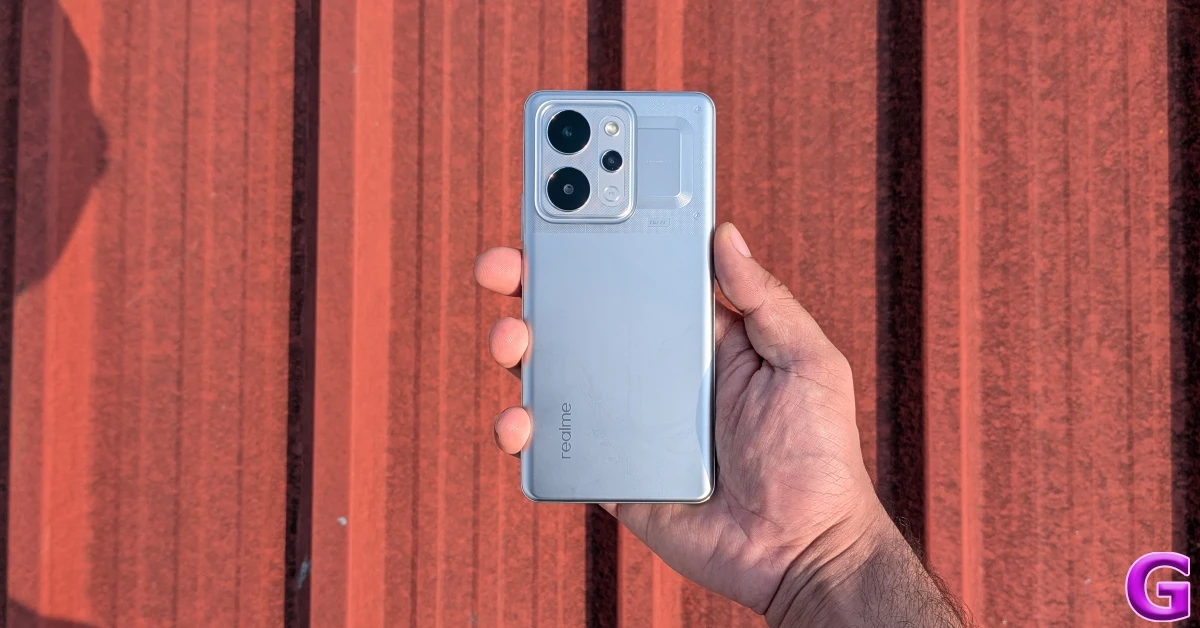 The plastic back panel has a smooth finish and tends to register fingerprints and smudges over a period of time. The build quality feels strong and premium. The smartphone is compliant with MIL-STD-810H durability standards. It is rated IP68/IP69 for protection against dust and water. This means it can survive exposure to high-pressure water jets. The plastic frame holds the volume rocker and the side button on its right edge. The bottom edge houses the SIM tray, primary microphone, USB-C port, and speaker grille. Up top lies the secondary microphone.
 The 6.8-inch curved AMOLED display can reach a peak brightness of 6,500 nits while playing HDR content. In bright outdoor conditions, it can hit 1,800 nits in High Brightness Mode, maintaining optimum legibility. On paper, this display can reach a maximum refresh rate of 144Hz, but in practical use, it is limited to 120Hz. The touch response is smooth and enjoyable. The under-display fingerprint sensor is snappy and accurate.
 During the review period, we used the Realme Narzo Power to stream TV and movie titles across major platforms like Netflix, JioHostar, and Prime Video. The 1.5k AMOLED display was able to relay detailed HDR visuals with rich colours and tasteful contrast. The wide range of viewing angles made sure that we didn’t spend a lot of time finding the right angle to prop the phone while watching a video. The lone bottom-firing speaker produced a decent audio output, but we would’ve preferred a stereo speaker setup in this price range.
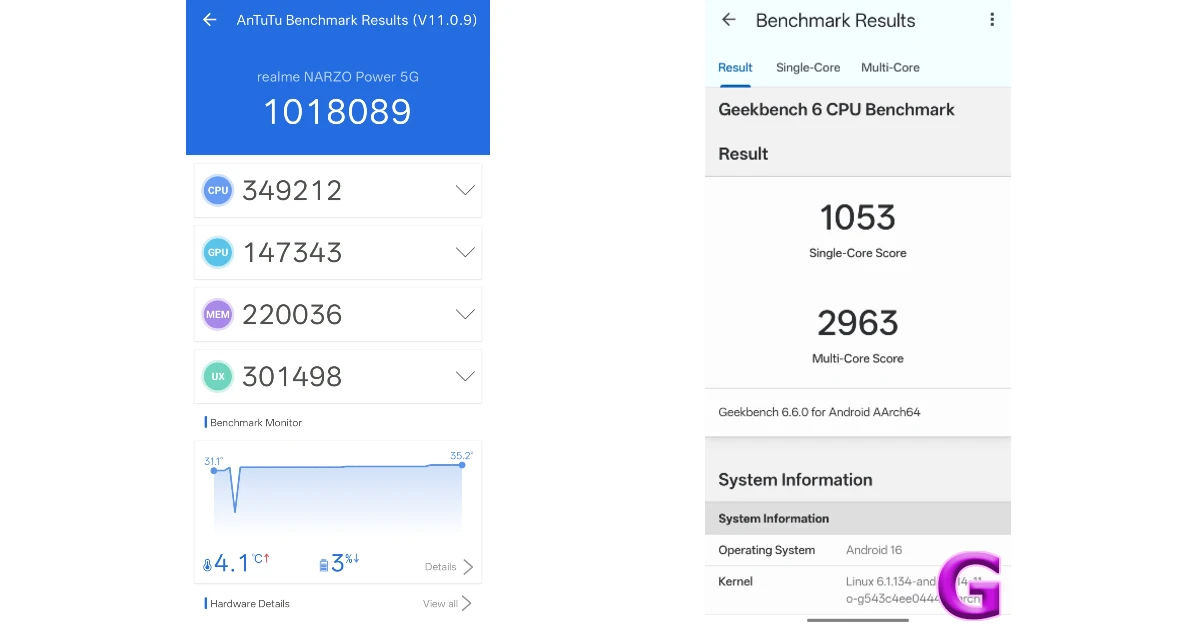 The Narzo Power puts up a decent display in everyday use. While it may not generate ludicrous power, it is able to handle routine tasks like calling, instant messaging, web browsing, and media streaming without a hiccup. The LPDDR4X and UFS 3.1 configurations for RAM and storage aren’t the fastest in the segment either, but they do just enough to ensure that you don’t feel any lag while opening and juggling apps. The haptic feedback is slightly on the blunt side and needs a bit of tuning.
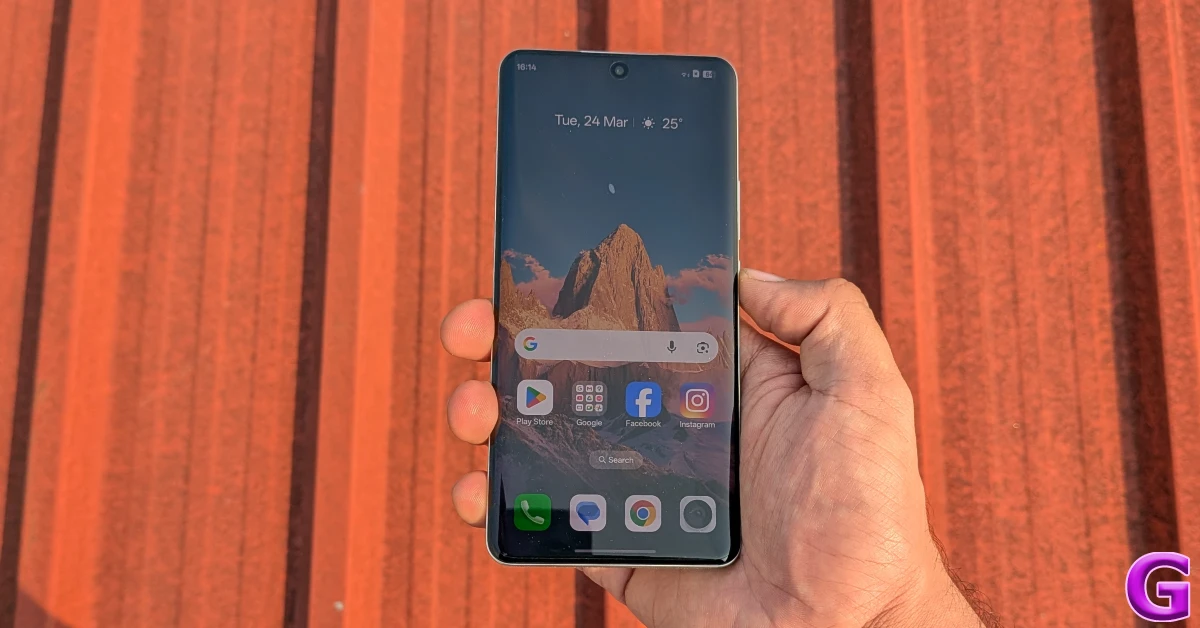 The Hyper Vision+ AI chip allows the Realme Narzo Power to run BGMI at 90fps. The smartphone is able to sustain this frame rate across an average session. Limiting the graphics to medium settings, we did not come across any major lag or stutter while gaming. The back panel started to warm up after 15 minutes of gameplay, but we did not experience any thermal throttling even after crossing the 30-minute mark. Support for Bypass Charging ensures that you can play games while charging the phone without worrying about excessive heating.
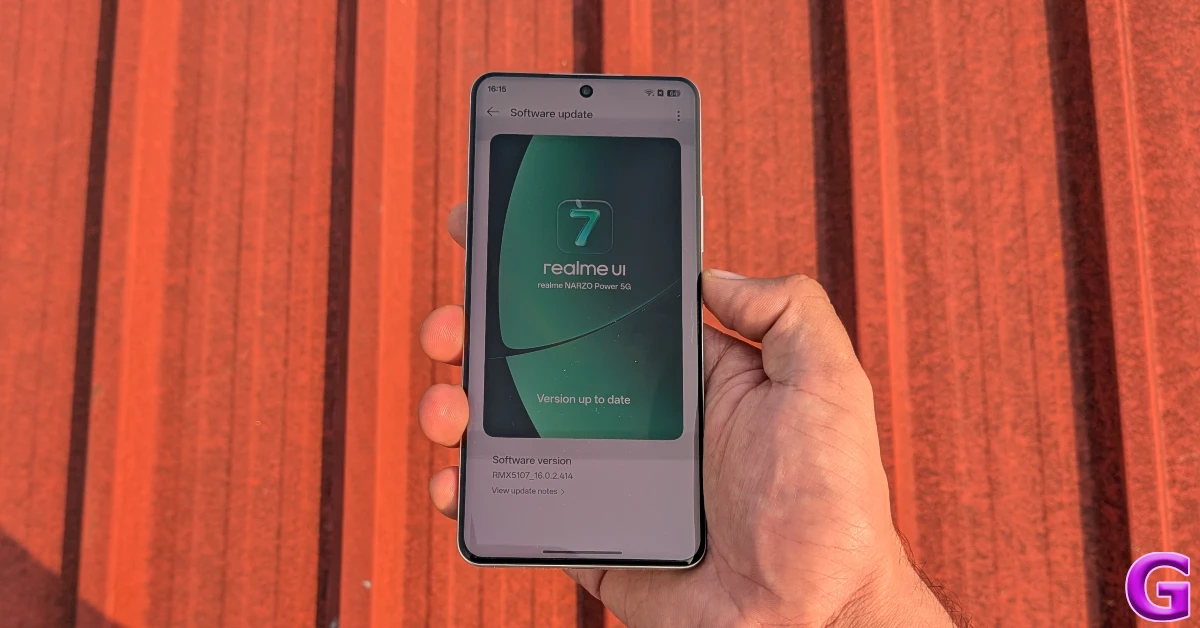 The Android 16-based Realme UI 7 is well optimised to get the best out of the MediaTek Dimensity 7400 chipset powering this smartphone. The app animations are snappy, the transitions feel slick, and the background app management is top-notch. The Flux themes for the lockscreen dazzle with their depth effect and neat widget array. The transition from the Always On Display to the lockscreen feels very smooth and pleasing.
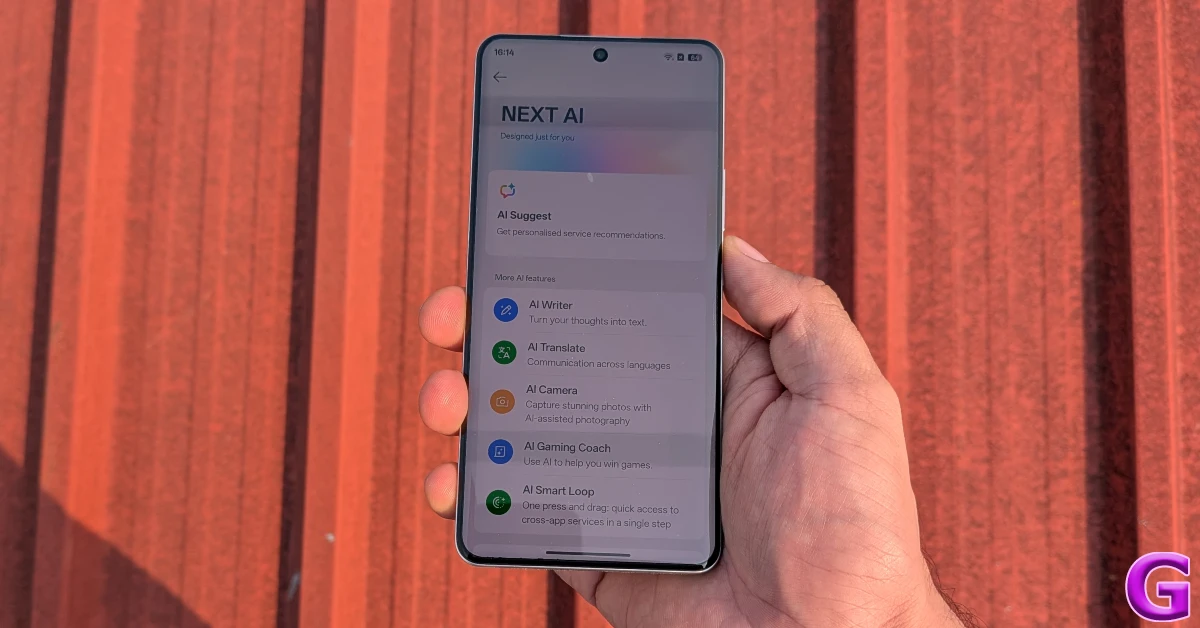 The NEXT AI suite contains handy tools like AI Suggest, AI Writer, AI Translate, AI Camera, AI Gaming Coach, and AI Smart Loop. The AI Editor in the native Photos app has useful editing tools like AI Eraser, AI Ultra Clarity, AI Perfect Shot, Unblur, Reflection Remover, and more. The AI Edit Genie lets you edit your images through vocal and text prompts.
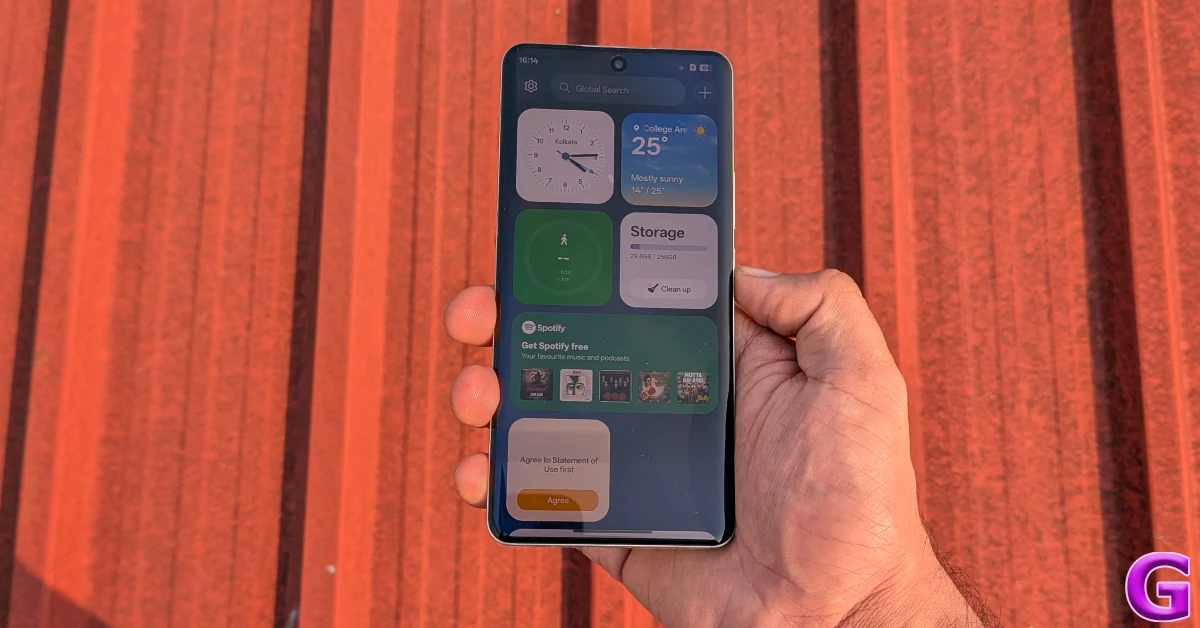 Being a midrange smartphone, the Realme Narzo Power contains a fair bit of bloatware. Thankfully, these apps can be completely removed from the device. Realme has promised 3 major OS upgrades and 4 years of security patches for this device.
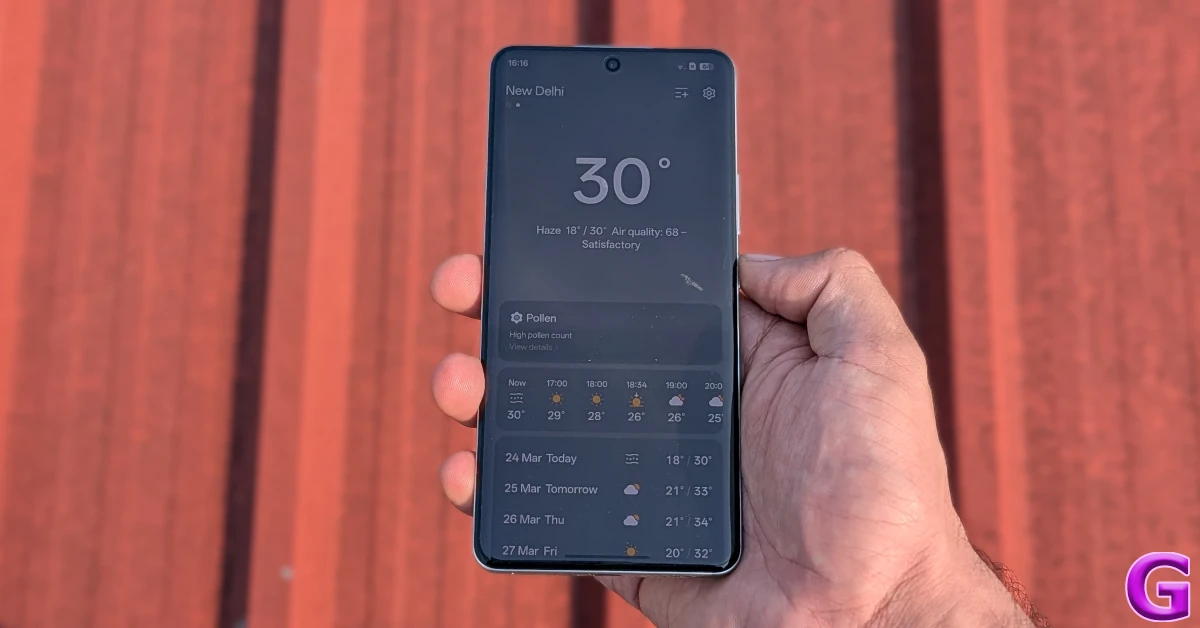 Now, let’s talk about the biggest highlight of this phone – the 10,0001mAh battery pack. With that big a battery, you’re practically walking around with a power bank in your pocket. This comparison makes more sense when you notice that Realme has equipped this smartphone with 27W reverse wired charging, in case your friends need to top up their devices. The brand claims that the smartphone can retain 80% of its battery health after 8 years. This claim can only be proven with time, but we will take Realme’s word for now.
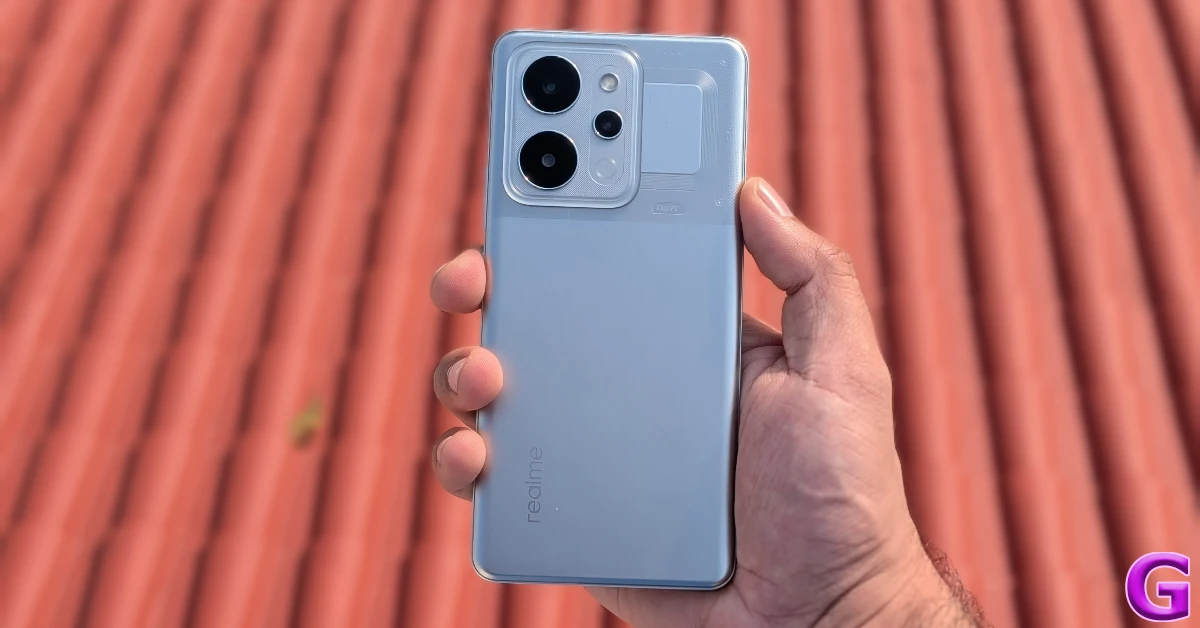 It goes without saying that the Narzo Power keeps battery anxiety at bay. We found it nearly impossible to drain its battery in a day without running continuous stress tests on it. On regular usage, the smartphone didn’t fall below the 50% charge level. This is easily a 2-day smartphone. With more conservative usage, you can push its battery life beyond that period, too. Realme claims that the smartphone can stay in standby for 48.4 hours with just 5% charge left in the tank. The 80W power adapter can replenish the battery pack to 50% in 36 minutes. A full charge takes over an hour.
The rear camera panel of the Narzo Power houses a 50MP primary shooter and an 8MP ultrawide lens. The 16MP front-facing camera is nestled in a punch-hole cutout on the display.
It goes without saying that the Narzo Power keeps battery anxiety at bay. We found it nearly impossible to drain its battery in a day without running continuous stress tests on it. On regular usage, the smartphone didn’t fall below the 50% charge level. This is easily a 2-day smartphone. With more conservative usage, you can push its battery life beyond that period, too. Realme claims that the smartphone can stay in standby for 48.4 hours with just 5% charge left in the tank. The 80W power adapter can replenish the battery pack to 50% in 36 minutes. A full charge takes over an hour.
The rear camera panel of the Narzo Power houses a 50MP primary shooter and an 8MP ultrawide lens. The 16MP front-facing camera is nestled in a punch-hole cutout on the display.
 The 50MP primary shooter captures good shots in outdoor daylight conditions. The images showcase vibrant colours and sharp details. The contrast and dynamic range leave no room for complaints, either. In limited lighting conditions, the camera relies on Night Mode to light up the subject. These images are passable, but a bit grainy.

 Pictures taken with the 8MP ultrawide camera have a slight tonal shift. The images are a tad softer and have cooler tones compared to the ones taken with the primary lens. The gap in detail becomes more apparent when you pixel peep. In limited lighting conditions, the Night Mode does a decent job of lighting up the subject, but the images look notably grainy.




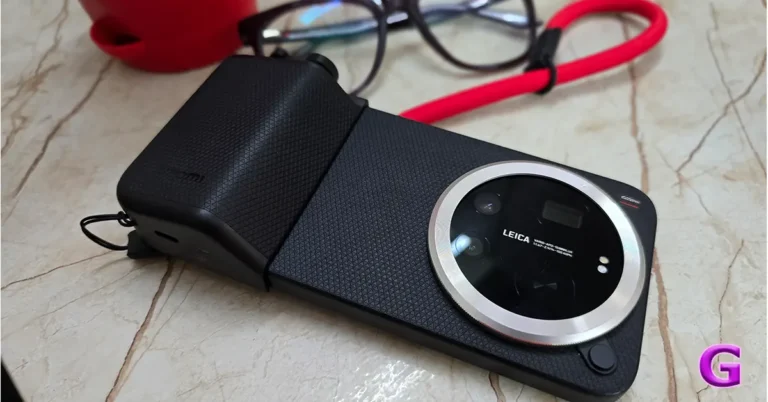
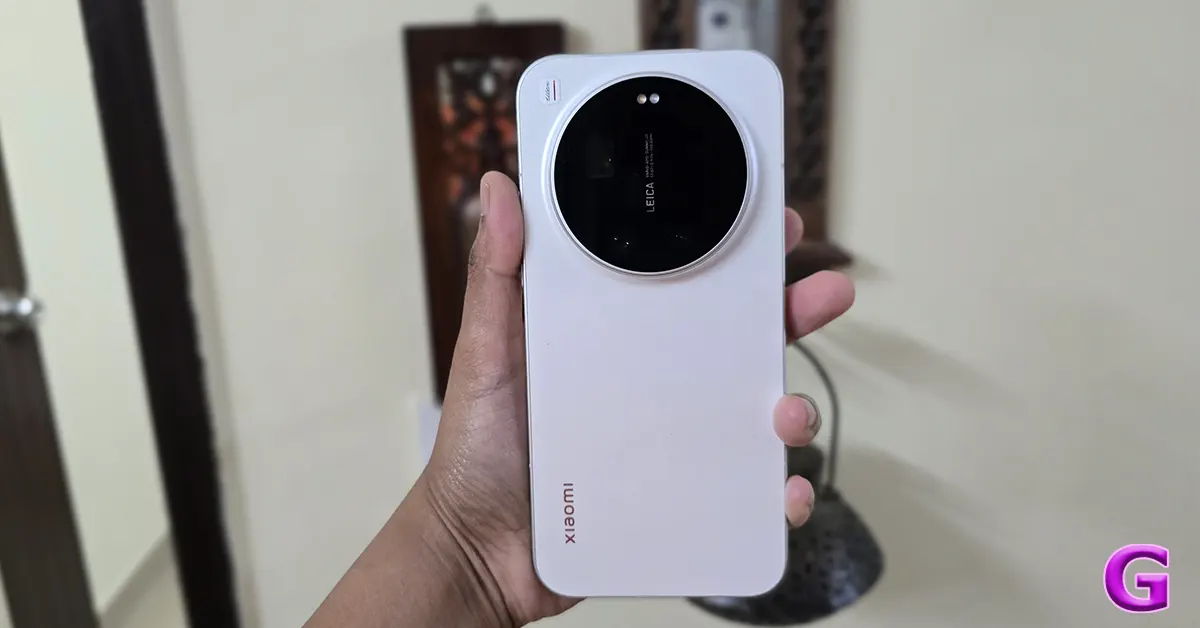 We got the White variant of the Xiaomi 17 Ultra for the review. The White variant is the most visually appealing option in the series since it highlights the all-flat design more than any other colour. The choice of this colour enhances the visibility of the camera module’s intricacies, ensuring they are easily recognised. The black version of the gadget, on the other hand, tends to blend the camera module details with the body, making them less noticeable and harder to identify.
The white version is made of solid-colour composite fibreglass, which gives it a very deep, milky ceramic look. Compared to real ceramic, this stuff is much lighter and less prone to damage. The finish is matte and doesn’t reflect light, which makes it appear like polished stone. The white matte surface is also designed to prevent noticeable smudges, so it will seem clean and new all day long.
The Leica Camera Island has a distinctive high-contrast panda look that sets it apart from other camera designs. The nickel-anodised aluminium camera ring on the white model makes it look more attractive and also improves light reflection. Pairing it with a white body creates a look reminiscent of a professional Leica M-series lens, imparting a sophisticated and elegant appeal. Furthermore, the red highlights, including the gold-etched aperture details, stand out against the white backdrop. The colour makes these features more visible than they would be on darker camera models.
Also Read: Vivo X200T Review: The Best of Both Worlds
The white version features a natural silver frame made from 6M42 aluminium alloy. Its shiny silver finish gives the product a slimmer appearance, despite being 8.29 mm thick. The power button on the left side is positioned for easy thumb access and has a textured, curved surface for a comfortable grip. Two distinct circular buttons labelled “+” and “-‘ provide intuitive volume control, differing from the typical long bar design. These volume buttons stand out with a mirror-like polished finish, contrasting sharply with the brushed silver frame.
We got the White variant of the Xiaomi 17 Ultra for the review. The White variant is the most visually appealing option in the series since it highlights the all-flat design more than any other colour. The choice of this colour enhances the visibility of the camera module’s intricacies, ensuring they are easily recognised. The black version of the gadget, on the other hand, tends to blend the camera module details with the body, making them less noticeable and harder to identify.
The white version is made of solid-colour composite fibreglass, which gives it a very deep, milky ceramic look. Compared to real ceramic, this stuff is much lighter and less prone to damage. The finish is matte and doesn’t reflect light, which makes it appear like polished stone. The white matte surface is also designed to prevent noticeable smudges, so it will seem clean and new all day long.
The Leica Camera Island has a distinctive high-contrast panda look that sets it apart from other camera designs. The nickel-anodised aluminium camera ring on the white model makes it look more attractive and also improves light reflection. Pairing it with a white body creates a look reminiscent of a professional Leica M-series lens, imparting a sophisticated and elegant appeal. Furthermore, the red highlights, including the gold-etched aperture details, stand out against the white backdrop. The colour makes these features more visible than they would be on darker camera models.
Also Read: Vivo X200T Review: The Best of Both Worlds
The white version features a natural silver frame made from 6M42 aluminium alloy. Its shiny silver finish gives the product a slimmer appearance, despite being 8.29 mm thick. The power button on the left side is positioned for easy thumb access and has a textured, curved surface for a comfortable grip. Two distinct circular buttons labelled “+” and “-‘ provide intuitive volume control, differing from the typical long bar design. These volume buttons stand out with a mirror-like polished finish, contrasting sharply with the brushed silver frame.
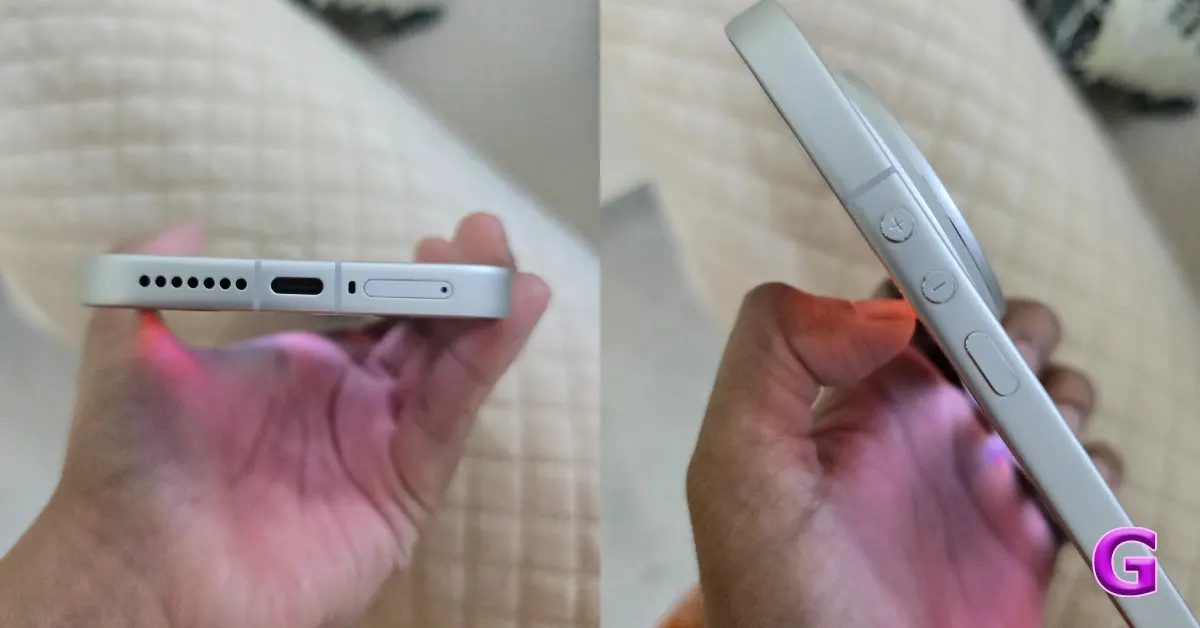 The bottom of the phone serves as its command centre, featuring a USB-C 3.2 Gen 2 port that can handle data transfer speeds of up to 10 Gbps, a 90W wired HyperCharge connection for quick charging, and a DisplayPort output to connect to external displays. There’s also a primary speaker grille with precisely drilled holes to enhance the sound quality of the stereo speakers. Plus, it includes a dual SIM slot that can hold two nano-SIM cards and supports dual eSIM technology, offering great flexibility for your connectivity needs.
There are no visible cutouts for the IR blaster or additional speaker on the top edge of the gadget. The infrared sensor is discreetly hidden within the camera island, so it can work with the Mi Remote app without ruining the clean look. Similarly, the secondary speaker employs Sound-on-Display technology, emerging from a micro-slit on the display, eliminating the need for a visible speaker grille while preserving audio quality for media consumption.
The bottom of the phone serves as its command centre, featuring a USB-C 3.2 Gen 2 port that can handle data transfer speeds of up to 10 Gbps, a 90W wired HyperCharge connection for quick charging, and a DisplayPort output to connect to external displays. There’s also a primary speaker grille with precisely drilled holes to enhance the sound quality of the stereo speakers. Plus, it includes a dual SIM slot that can hold two nano-SIM cards and supports dual eSIM technology, offering great flexibility for your connectivity needs.
There are no visible cutouts for the IR blaster or additional speaker on the top edge of the gadget. The infrared sensor is discreetly hidden within the camera island, so it can work with the Mi Remote app without ruining the clean look. Similarly, the secondary speaker employs Sound-on-Display technology, emerging from a micro-slit on the display, eliminating the need for a visible speaker grille while preserving audio quality for media consumption.
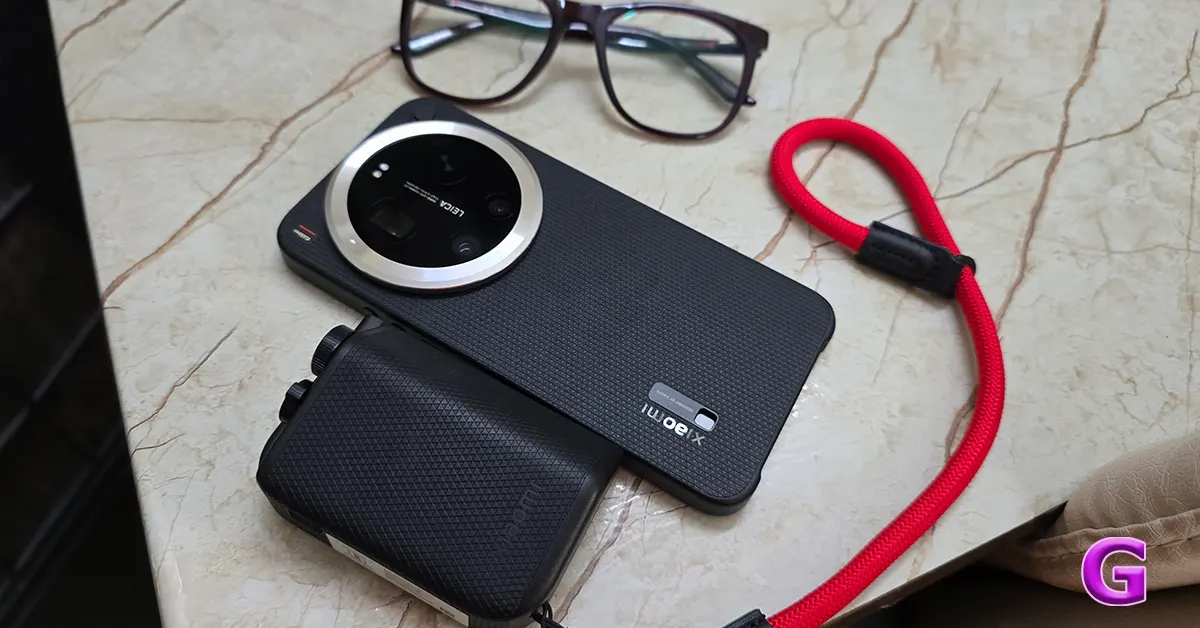 The company additionally provided the Xiaomi 17 Ultra with a black leather photography kit that gives it a high-contrast, professional style that is similar to that of a limited-edition white Leica M-series with a black leather grip.
When you insert the phone into the kit, it transforms into a specialised photography setup with a total battery capacity of 6,000mAh plus an additional 2,000mAh. The Pro kit features high-quality, slip-resistant Black PU leather that not only looks professional but also offers a more polished experience. Its ergonomic hump design makes one-handed operation safe and comfortable, perfect for street photography. Instead of Bluetooth, the kit connects directly via a USB-C connector. This is especially helpful for street photography in India, as it eliminates shutter lag, allowing your 50MP 1-inch sensor to respond instantly when you press the button.
The company additionally provided the Xiaomi 17 Ultra with a black leather photography kit that gives it a high-contrast, professional style that is similar to that of a limited-edition white Leica M-series with a black leather grip.
When you insert the phone into the kit, it transforms into a specialised photography setup with a total battery capacity of 6,000mAh plus an additional 2,000mAh. The Pro kit features high-quality, slip-resistant Black PU leather that not only looks professional but also offers a more polished experience. Its ergonomic hump design makes one-handed operation safe and comfortable, perfect for street photography. Instead of Bluetooth, the kit connects directly via a USB-C connector. This is especially helpful for street photography in India, as it eliminates shutter lag, allowing your 50MP 1-inch sensor to respond instantly when you press the button.
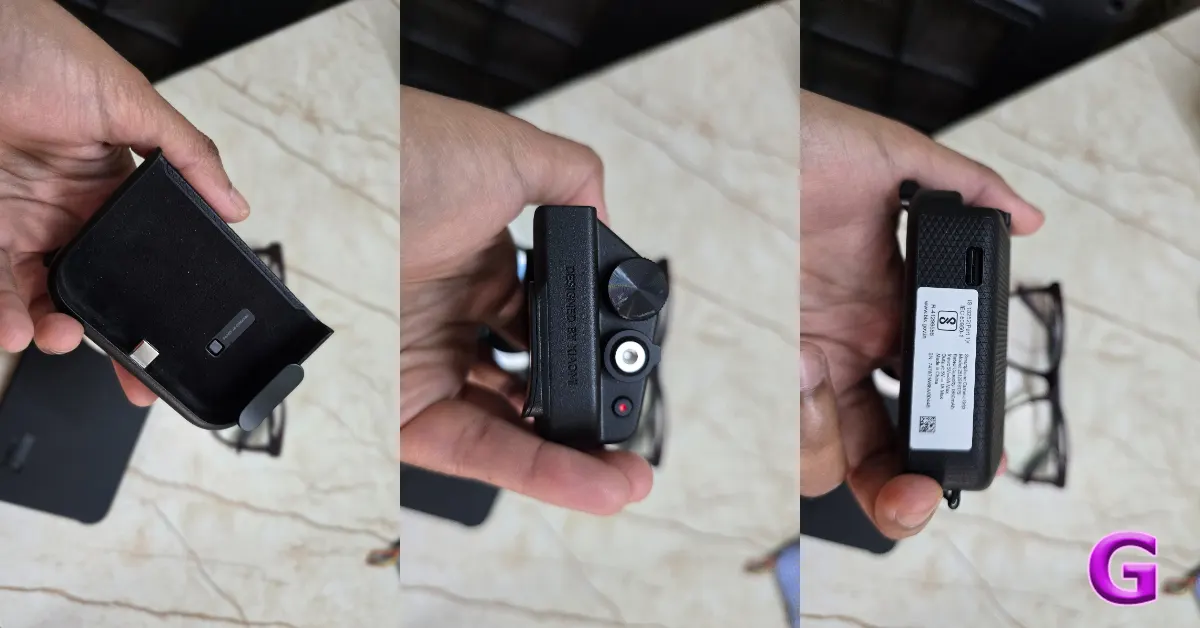 The 17 Ultra smartphone has an IP69 certification, which is higher than the regular IP68 rating. This rating highlights that the phone is quite resilient, able to handle powerful water jets under high pressure and temperature better than many others. It’s especially handy during bad weather, like heavy rain, and makes cleaning dust a breeze. Plus, with Shield Glass 3.0, it’s well protected against micro-scratches, even from rough materials like pocket sand, giving you extra peace of mind. These features help the phone last longer and be smoother to use overall.
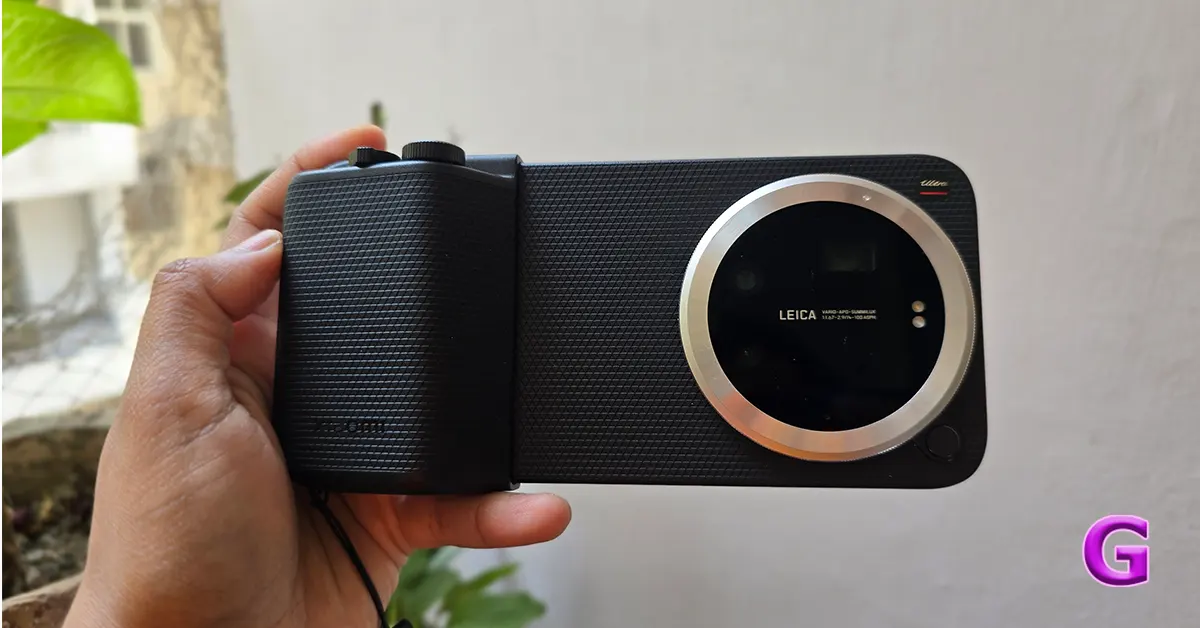 The Xiaomi 17 Ultra features a custom HyperRGB OLED display that significantly outperforms earlier models. It has a 6.9-inch flat screen with a resolution of 1.5K+ (2,608×1,200), a peak brightness of 3500 nits, a 12-bit colour depth allowing it to display up to 68 billion colours, and is protected by Xiaomi Shield Glass 3.0.
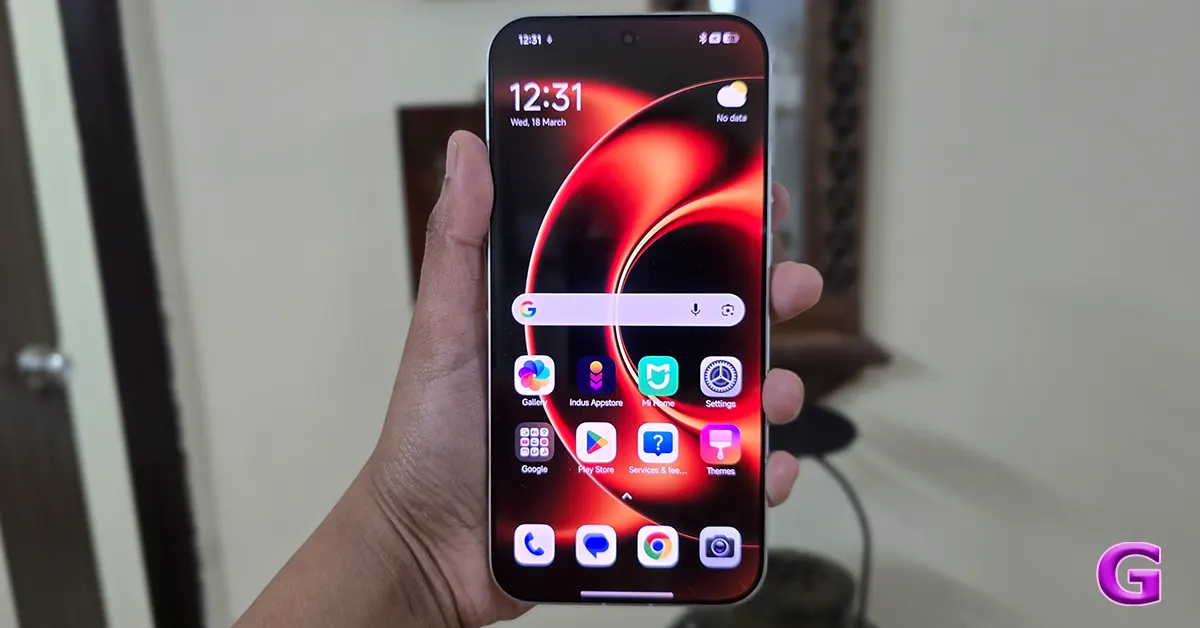 HyperRGB technology really boosts visual quality by improving sub-pixel clarity. This makes 4K animated videos and high-bitrate streams look even better. It helps textures appear more natural, so tiny details like skin pores and fabric weaves are easier to see. Overall, it creates a richer and more immersive viewing experience for everyone.
The Xiaomi 17 Ultra is great for outdoor use since its true RGB subpixel arrangement makes text easier to see. The screen also has an anti-reflective quality that cuts down on glare.
The display can easily dim down to just 1 nit for those relaxing low-light moments, helping you see clearly at night without harsh glare. Plus, it’s TÜV Rheinland-approved for hardware-level DC dimming, which means you’ll enjoy flicker-free, more comfortable viewing.
Also Read: Redmi Note 15 Pro+ Full Review: Built like a tank
The gadget can display 68.7 billion colours, which assists in combating colour banding in photos. The Original Color PRO option keeps colours true for those who love photography.
The refresh rate adaptability is enhanced with 1-120Hz LTPO technology, which dynamically adjusts the refresh rate according to the content, providing ultra-smooth visuals. Furthermore, a touch sampling rate of 300Hz guarantees that touch interactions, which are critical for photographic operations, are fast and lag-free. The wet touch technology improves usability by enabling the phone to distinguish between touch inputs and water drops, which is useful in monsoon conditions.
To better serve the Indian streaming market, Xiaomi has added software optimisations for popular services such as Netflix, Prime Video, and Disney+ Hotstar. Key elements of these optimisations include adaptive HDR, which automatically changes tone mapping based on ambient lighting conditions to preserve shadow details.
HyperRGB technology really boosts visual quality by improving sub-pixel clarity. This makes 4K animated videos and high-bitrate streams look even better. It helps textures appear more natural, so tiny details like skin pores and fabric weaves are easier to see. Overall, it creates a richer and more immersive viewing experience for everyone.
The Xiaomi 17 Ultra is great for outdoor use since its true RGB subpixel arrangement makes text easier to see. The screen also has an anti-reflective quality that cuts down on glare.
The display can easily dim down to just 1 nit for those relaxing low-light moments, helping you see clearly at night without harsh glare. Plus, it’s TÜV Rheinland-approved for hardware-level DC dimming, which means you’ll enjoy flicker-free, more comfortable viewing.
Also Read: Redmi Note 15 Pro+ Full Review: Built like a tank
The gadget can display 68.7 billion colours, which assists in combating colour banding in photos. The Original Color PRO option keeps colours true for those who love photography.
The refresh rate adaptability is enhanced with 1-120Hz LTPO technology, which dynamically adjusts the refresh rate according to the content, providing ultra-smooth visuals. Furthermore, a touch sampling rate of 300Hz guarantees that touch interactions, which are critical for photographic operations, are fast and lag-free. The wet touch technology improves usability by enabling the phone to distinguish between touch inputs and water drops, which is useful in monsoon conditions.
To better serve the Indian streaming market, Xiaomi has added software optimisations for popular services such as Netflix, Prime Video, and Disney+ Hotstar. Key elements of these optimisations include adaptive HDR, which automatically changes tone mapping based on ambient lighting conditions to preserve shadow details.
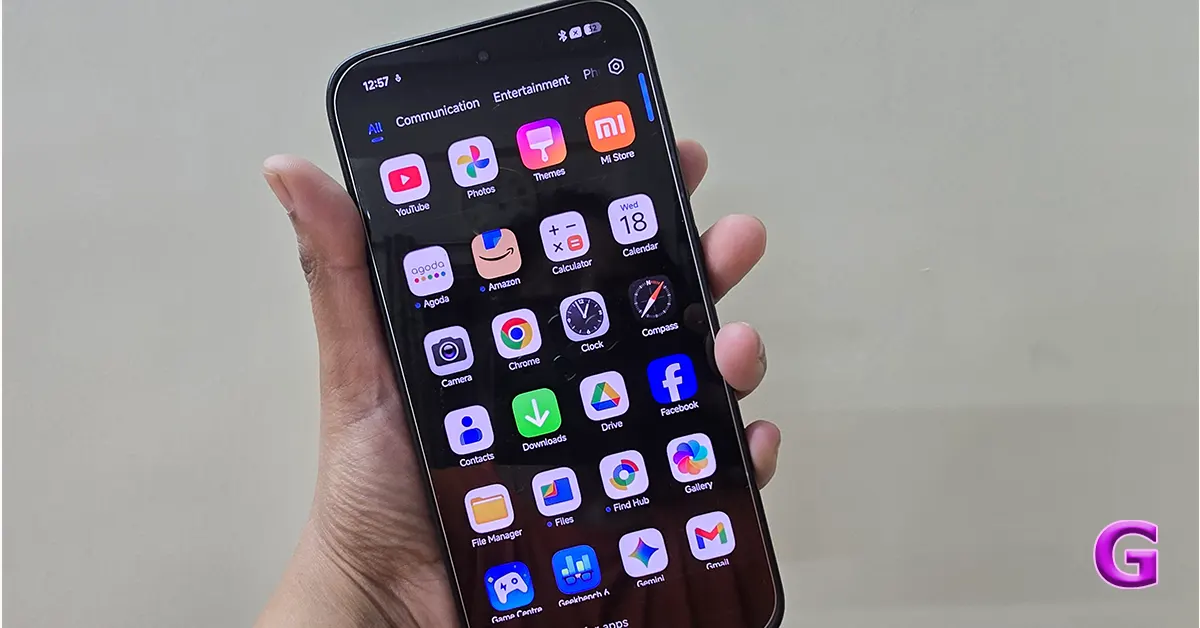 The device has HyperOS 3.0’s Game Turbo features, such as AI Resource Allocation, which speeds up the CPU in heavy frame situations to cut down on micro-stutters, and game-specific visuals like a Bright FPS filter that makes things easier to see in competitive settings. There is also a voice changer and many performance modes, such as Wild mode, which uses more battery power to get the most performance from the CPU.
Notably, the machine doesn’t show excessive throttling and keeps the screen brightness stable over long gaming sessions, ensuring clear visibility throughout gaming sessions.
Geekbench scores:
Single-core- 3561
Multi-core- 10706
The hardware on the device is excellent, but it is the software that truly makes it function. This is especially true with the use of HyperOS 3.0, which is based on Android 16 and the Liquid Glass design concept. The gadget has a smooth, rounded look, and the Super Island feature displays live activities like delivery statuses, music controls, and timers at the top of the screen.
Bloatware is a big problem for Xiaomi in India. But especially for the 17 Ultra model, which costs Rs 1,39,999, this model has a premium user experience, with features like GetApps notifications and the Glance lock screen turned off by default. It still has a few pre-installed applications, including Facebook and LinkedIn, but you can remove 95% of them. The Ultra series also aims to provide a distraction-free user experience by not including system-level advertisements. This approach means that there are no recommended app folders or ads in the file manager, which helps to create a Pro user experience.
The series has HyperAI features, such as the Circle to Search via Google integration and the AI Writing/Summarisation functions in the Notes app and Gmail.
Xiaomi’s 17 series has a comprehensive update policy, which means that users will receive 6 years of HyperOS upgrades, which are expected to last until around 2032. Furthermore, throughout this period, security updates will be provided every 90 days.
HyperOS 3.0 makes a lot of visual improvements, especially to the lock screen. The AI Cinematic Lock Screen feature uses the Snapdragon 8 Elite’s NPU to create a multi-layered image effect that makes the lock screen seem more appealing. This feature smartly separates subjects from backgrounds in wallpapers, which lets lock screen widgets use parallax technology to make things seem 3D. Users may also customise their experience by using different style filters to make things look better.
The Indian version features workstation capabilities, allowing you to use it like a desktop PC when connected to a 4K monitor. The user interface, powered by the Snapdragon 8 Elite Gen 5, includes a desktop-style taskbar and resizable windows. This ensures that everything runs smoothly without any latency. Xiaomi Interconnect also enables you to connect your Xiaomi devices effortlessly. As a result, transferring files to larger displays is easy, and the system scales appropriately to 4K at 60Hz, significantly improving display quality compared to older versions.
The device has HyperOS 3.0’s Game Turbo features, such as AI Resource Allocation, which speeds up the CPU in heavy frame situations to cut down on micro-stutters, and game-specific visuals like a Bright FPS filter that makes things easier to see in competitive settings. There is also a voice changer and many performance modes, such as Wild mode, which uses more battery power to get the most performance from the CPU.
Notably, the machine doesn’t show excessive throttling and keeps the screen brightness stable over long gaming sessions, ensuring clear visibility throughout gaming sessions.
Geekbench scores:
Single-core- 3561
Multi-core- 10706
The hardware on the device is excellent, but it is the software that truly makes it function. This is especially true with the use of HyperOS 3.0, which is based on Android 16 and the Liquid Glass design concept. The gadget has a smooth, rounded look, and the Super Island feature displays live activities like delivery statuses, music controls, and timers at the top of the screen.
Bloatware is a big problem for Xiaomi in India. But especially for the 17 Ultra model, which costs Rs 1,39,999, this model has a premium user experience, with features like GetApps notifications and the Glance lock screen turned off by default. It still has a few pre-installed applications, including Facebook and LinkedIn, but you can remove 95% of them. The Ultra series also aims to provide a distraction-free user experience by not including system-level advertisements. This approach means that there are no recommended app folders or ads in the file manager, which helps to create a Pro user experience.
The series has HyperAI features, such as the Circle to Search via Google integration and the AI Writing/Summarisation functions in the Notes app and Gmail.
Xiaomi’s 17 series has a comprehensive update policy, which means that users will receive 6 years of HyperOS upgrades, which are expected to last until around 2032. Furthermore, throughout this period, security updates will be provided every 90 days.
HyperOS 3.0 makes a lot of visual improvements, especially to the lock screen. The AI Cinematic Lock Screen feature uses the Snapdragon 8 Elite’s NPU to create a multi-layered image effect that makes the lock screen seem more appealing. This feature smartly separates subjects from backgrounds in wallpapers, which lets lock screen widgets use parallax technology to make things seem 3D. Users may also customise their experience by using different style filters to make things look better.
The Indian version features workstation capabilities, allowing you to use it like a desktop PC when connected to a 4K monitor. The user interface, powered by the Snapdragon 8 Elite Gen 5, includes a desktop-style taskbar and resizable windows. This ensures that everything runs smoothly without any latency. Xiaomi Interconnect also enables you to connect your Xiaomi devices effortlessly. As a result, transferring files to larger displays is easy, and the system scales appropriately to 4K at 60Hz, significantly improving display quality compared to older versions.
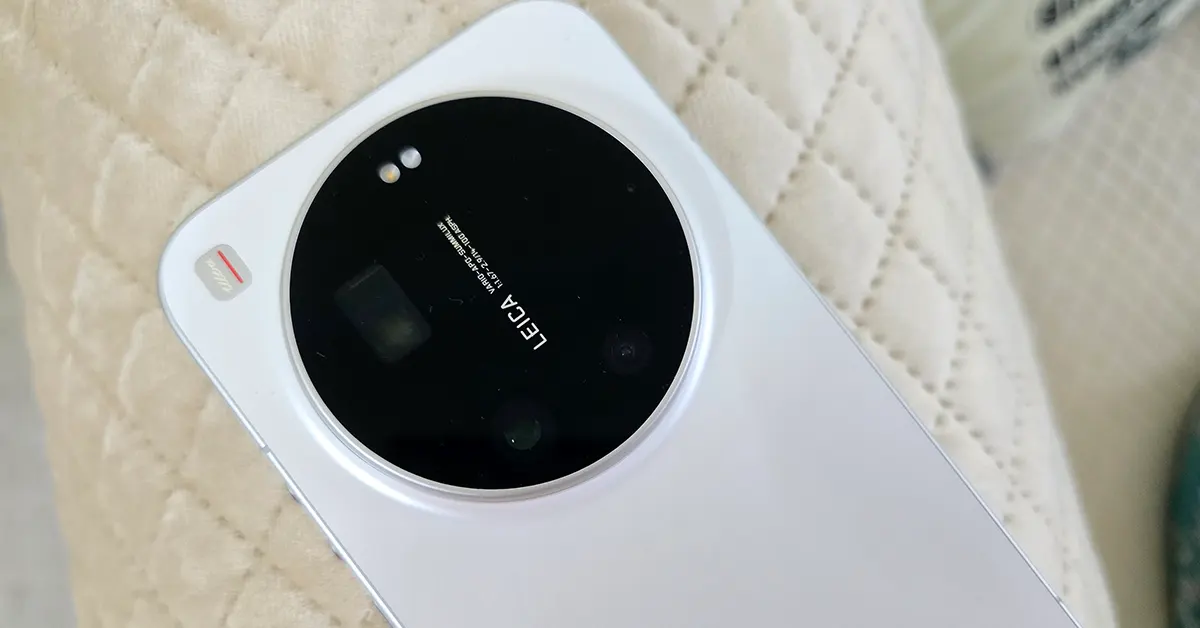 Now comes our favourite part of the review – the camera.
The camera’s 50MP primary sensor uses LOFIC technology, which gives it performance that’s on par with professional mirrorless cameras. The photos taken in daylight have an organic quality, with smooth textures and rich, true colours. They deliberately avoid the over-sharpened look that is common in other brands like iPhone or Samsung.
Now comes our favourite part of the review – the camera.
The camera’s 50MP primary sensor uses LOFIC technology, which gives it performance that’s on par with professional mirrorless cameras. The photos taken in daylight have an organic quality, with smooth textures and rich, true colours. They deliberately avoid the over-sharpened look that is common in other brands like iPhone or Samsung.
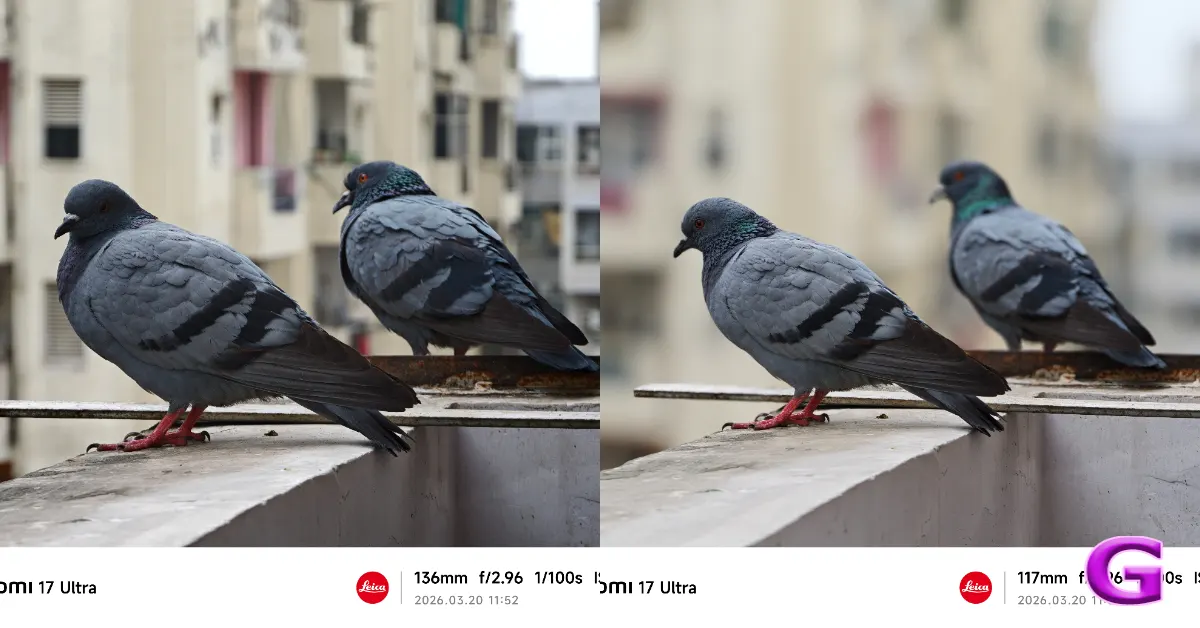 The camera also has two distinct Leica modes: Leica Authentic, which gives photos a traditional, sombre look with a little vignette, and Leica Vibrant, which is meant for eye-catching social media photos that still seem true to life. We mostly took pictures in the Leica Authentic setting since we liked how unique the pictures looked.
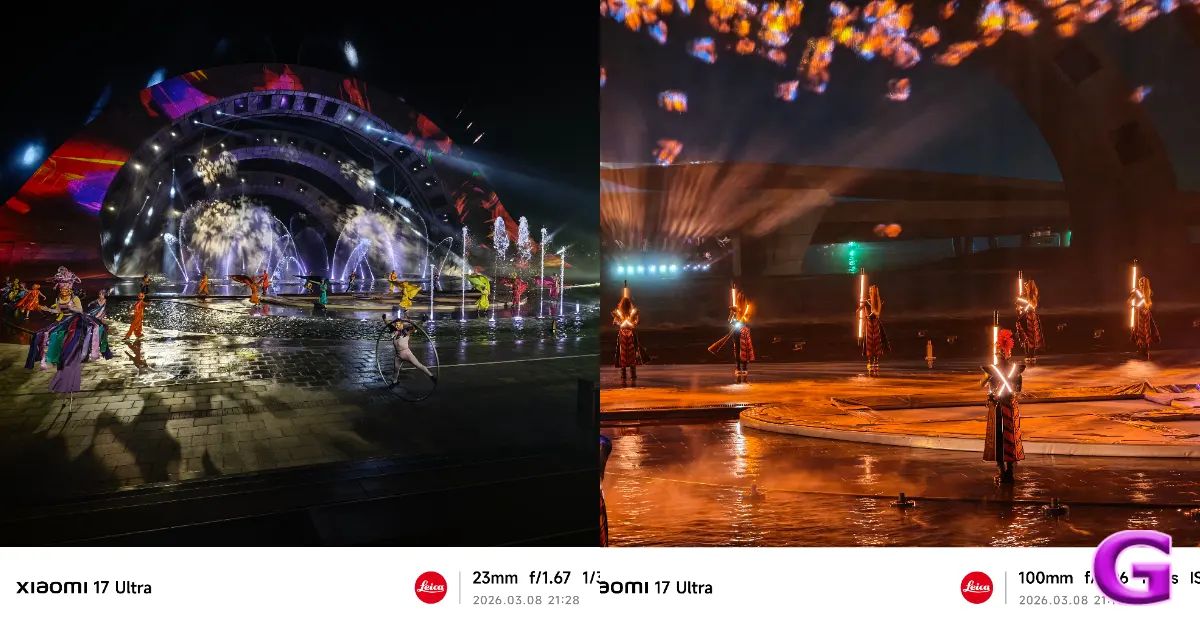 The camera is very good in low light, producing deep blacks and bright highlights while keeping the picture clean and free of grainy noise. This is why it is called the emperor of night photography.
The gadget features a 200 MP, 5x Samsung HPE periscope telephoto camera that employs a mechanical system to adjust internal lenses. It offers an optical zoom from 75mm (3.2x) to 100mm (4.3x), with moving glass elements to maintain excellent image quality at both zoom levels. The camera excels at portrait photography. The 75mm setting produces a natural bokeh effect that softly blurs the background, highlighting the subject, similar to traditional cameras. This makes it one of the top choices for smartphone portrait shots.
The camera is very good in low light, producing deep blacks and bright highlights while keeping the picture clean and free of grainy noise. This is why it is called the emperor of night photography.
The gadget features a 200 MP, 5x Samsung HPE periscope telephoto camera that employs a mechanical system to adjust internal lenses. It offers an optical zoom from 75mm (3.2x) to 100mm (4.3x), with moving glass elements to maintain excellent image quality at both zoom levels. The camera excels at portrait photography. The 75mm setting produces a natural bokeh effect that softly blurs the background, highlighting the subject, similar to traditional cameras. This makes it one of the top choices for smartphone portrait shots.
 With a 50MP resolution and a 14mm focal length, the ultrawide lens has a wide 115° field of view. This lens is great for taking pictures of vast scenes like buildings and groups of people in confined areas. It also makes sure that the colours match those of the main lens.
The new telephoto lens requires a minimum distance of around 30 cm to get a sharp focus, making it suited for most photography needs. In comparison, the ultrawide lens is more versatile, letting users snap photographs as close as 5 cm.
With a 50MP resolution and a 14mm focal length, the ultrawide lens has a wide 115° field of view. This lens is great for taking pictures of vast scenes like buildings and groups of people in confined areas. It also makes sure that the colours match those of the main lens.
The new telephoto lens requires a minimum distance of around 30 cm to get a sharp focus, making it suited for most photography needs. In comparison, the ultrawide lens is more versatile, letting users snap photographs as close as 5 cm.
 The Xiaomi 17 Ultra is designed for mobile videography, and it is especially useful for professionals who need a lot of freedom in post-production. It can record in 8K at 30 frames per second (fps) and 4K at 120 fps. This means that users may clip an 8K video to 4K without sacrificing detail. The 4K 120fps recording with Dolby Vision improves slow motion and colour depth for amazing video quality. It lets you edit video in log format up to 4K 120 fps and gives you the most flexibility over colour grading with the Academy Colour Encoding System (ACES).

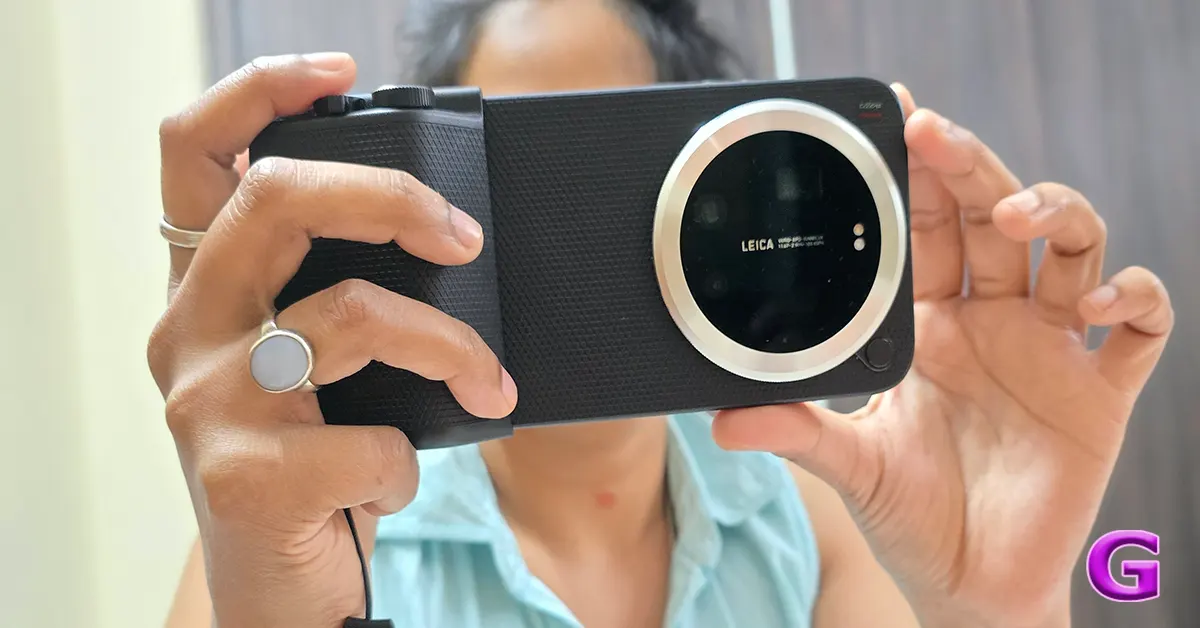 This physical grip also supports your video recording by providing a stable hold for smooth panning shots and allowing you to effortlessly adjust the focus or exposure manually with the convenient custom dial. It helps reduce the jitter that often occurs when you tap to focus on the screen, making your filming experience smoother and more enjoyable.
The Pro Kit also comes with a 2,000 mAh battery that powers the kit and charges the phone while users are taking pictures for long periods of time. This feature means that users may keep taking pictures without worrying about running out of juice.
The kit is compatible with 67mm filters, so users can attach different kinds of filters, like neutral density (ND) filters for smooth, flowing water effects or circular polarisers (CPLs) for reducing reflections. This gives users the same flexibility as using a dedicated camera lens.
This physical grip also supports your video recording by providing a stable hold for smooth panning shots and allowing you to effortlessly adjust the focus or exposure manually with the convenient custom dial. It helps reduce the jitter that often occurs when you tap to focus on the screen, making your filming experience smoother and more enjoyable.
The Pro Kit also comes with a 2,000 mAh battery that powers the kit and charges the phone while users are taking pictures for long periods of time. This feature means that users may keep taking pictures without worrying about running out of juice.
The kit is compatible with 67mm filters, so users can attach different kinds of filters, like neutral density (ND) filters for smooth, flowing water effects or circular polarisers (CPLs) for reducing reflections. This gives users the same flexibility as using a dedicated camera lens.
 The Xiaomi 17 Ultra has significantly enhanced its selfie camera. It now has a high-performance 50MP sensor with dedicated autofocus (AF) instead of a 32MP fixed-focus sensor. This improvement changes the role of the front-facing camera from a simple tool to a useful production tool for content creators.

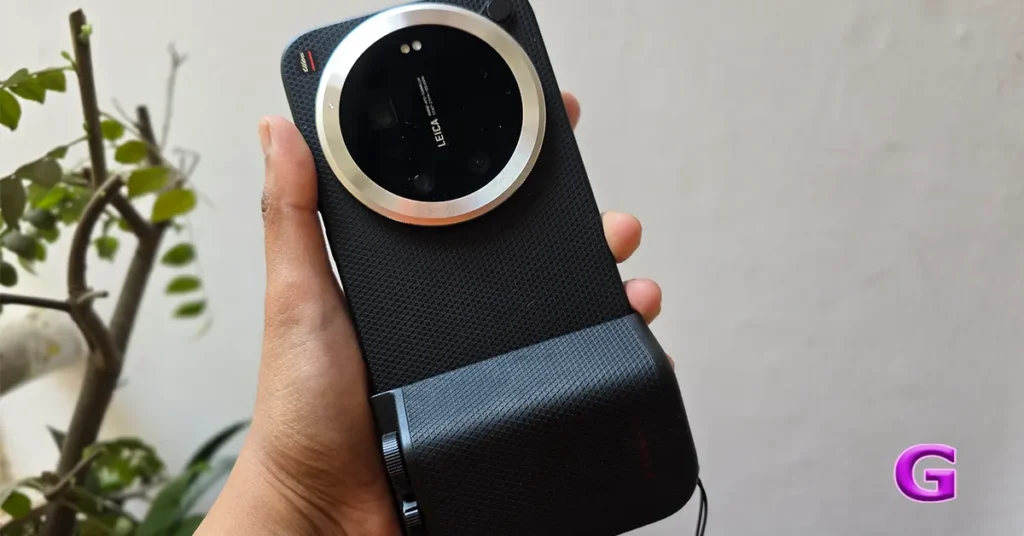 The smartphone features 90W wired HyperCharge technology, which includes Surge P3 and Surge G3 processors designed to prevent overheating during charging. This allows the device to charge from 0% to 100% in approximately 45-50 minutes. Additionally, the phone supports 50W wireless charging, renowned for its speed while prioritising safety, even in high ambient temperatures. It also offers reverse charging, with 22.5W reverse wired charging via USB-C and 10W reverse wireless charging for compatible accessories such as earphones and smartwatches.