


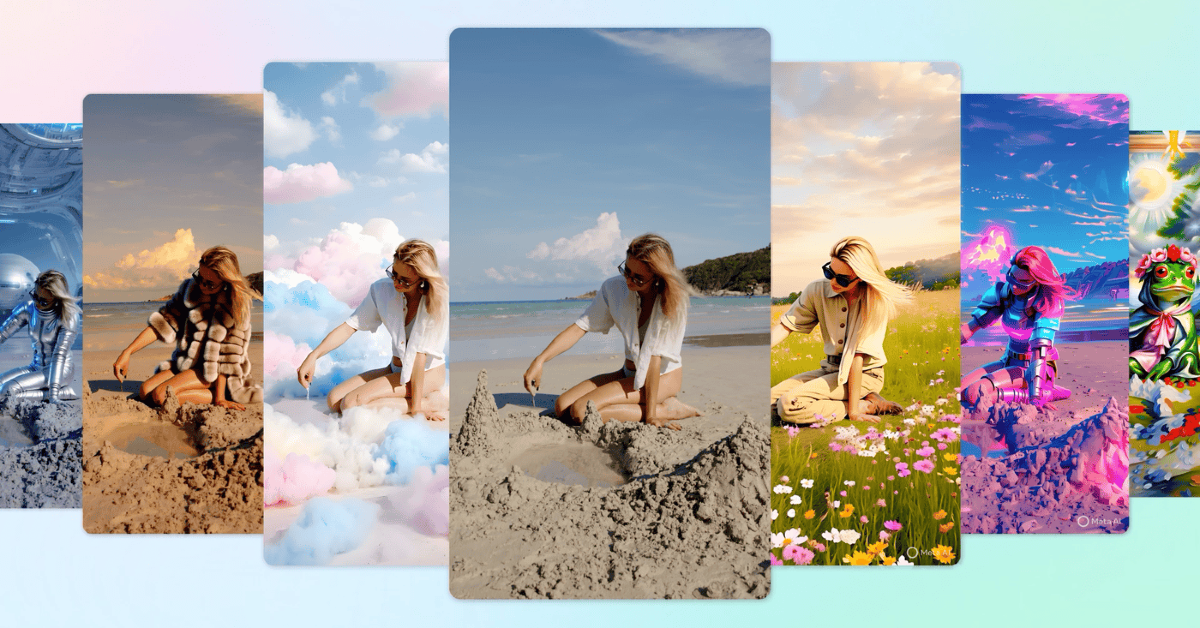

Meta has introduced a generative AI video editing capability that allows users to create short-form videos using pre-defined templates. The tool is free for a short time and may be shared via Facebook, Instagram, and the Discover feed. AI templates can change the backdrop, the subject effects, and the attire of individuals. The tool is free in certain regions, and Meta intends to offer more capabilities later this year.
Meta is launching a generative AI video editing tool in its Meta AI app, website, and Edits app, allowing users to utilise preset prompts to change costumes, locations, lighting, and more, as well as share or upload edited videos. The capability, inspired by Movie Gen models, enables users to generate and modify AI video content in their applications and products. Later this year, Meta AI will allow users to produce video edits with their own text prompts.
Also Read: World Music Day Campaign: Sony audio products are getting massive discounts for a limited period
The company via blog post said, “Today, we’re launching a generative AI video editing feature across the Meta AI app, the Meta.AI website and the Edits app to help you bring your creative ideas to life. You’ll now be able to easily edit your short-form videos using a variety of preset AI prompts that can transform your outfit, location, style and more. It’s available in the US and more than a dozen countries around the world.”
Meta has launched a new AI video generation system, combining Make-A-Scene models in 2022 for image, audio, video, and 3D animation creation. The Llama Image foundation models enable higher-quality images and video generation, and instruction-based editing. Last year, Movie Gen combined these modalities to produce custom videos and edit existing ones based on text inputs.
Meta’s latest generative AI video editing tool enables anybody to create high-quality edits without prior video editing experience. Users may upload a video to the Meta AI app, website, or Edits app and choose one of over 50 editing prompts to edit 10 seconds for free. According to the business, Meta AI then changes the video to match the chosen scenario, such as converting a video into a graphic book, transforming a gloomy day into a dreamy ambiance, or converting a movie into a video game with neon lights and combat attire.
Also Read: Flipkart Bonanza Sale: Kodak and Blaupunkt’s Smart TVs starting at Rs 5,999
The Meta AI app and Meta.AI site now allow users to share edited videos straight to Facebook, Instagram, and the Discover feed. This tool encourages creative experimentation and the creation of engaging videos for friends, family, and followers. The software also promises to change the way producers generate content on platforms by recognising cues that are relevant to their followers. The video editing tool is integrated into the Edits app, making it a natural extension of the creative process.


