



A good ring light can immediately elevate the quality of your video calls. Its soft and even illumination gets rid of harsh shadows and brings consistency to your visual feed. In limited lighting conditions, it can be a lifesaver. However, if you don’t have a ring light, you don’t need to worry. Your MacBook’s new ‘Edge Light’ feature can mimic its functions fairly well. It doesn’t require any external accessory; the magic takes place in the display itself. Here’s how you can use your MacBook’s display as a ring light.
Read Also: Stuffcool launched the Nomad Pro PD 3.1 140W GaN Charger in India
In This Article
Before you begin
For Edge Light to work on your Mac, it needs to be powered by Apple silicon and running macOS Tahoe 26.2 or later. The automatic functionality is only reserved for Macs released in 2024 or later. This feature requires access to your Mac’s camera. If you’re using Continuity Camera for calls, you will need to grant access to the external camera.
When it is turned on, Edge Light creates a halo-like effect on your Mac’s display. The borders get illuminated, exuding the effect you would get from a ring light. You can change the thickness of the lighting and adjust its temperature. Even with this effect turned on, you don’t lose access to content on the edges of your screen. Moving the cursor on the illuminated area makes the content behind it visible.
Enable ‘Edge Light’ to use your MacBook’s display as a ring light
Step 1: Launch the Photo Booth app or go to your ongoing FaceTime call.
Step 2: Click the green camera icon in the menu bar.
Step 3: Hit Edge Light to enable it.
Step 4: Hit the arrow icon next to Edge Light to view additional controls.
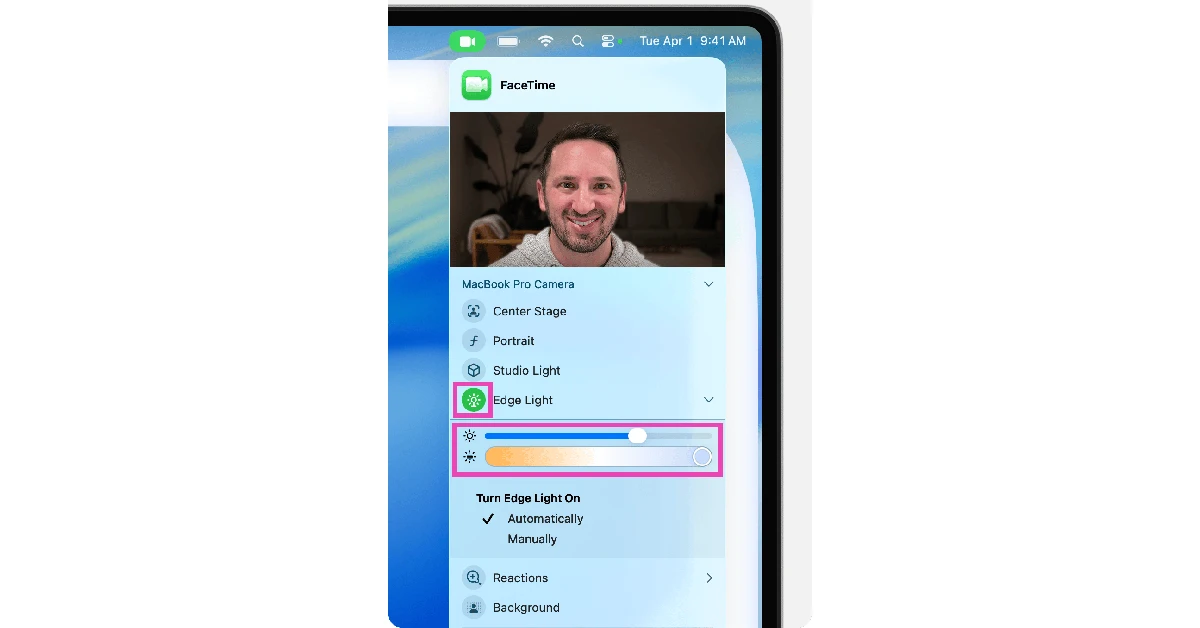
Step 5: Use the sliders in the dropdown to adjust the size and colour temperature of the ring light.
Step 6: If you want the ring light to kick in by itself whenever you’re in dimly lit surroundings, select Automatic. This feature only works on Mac models released after 2024.
Frequently Asked Questions (FAQs)
Can I get the Edge Light on my MacBook if I’m using Continuity Camera?
While using Continuity Camera, the Edge Light option appears on the menu of the main display.
How do I get Edge Light on my MacBook?
Go to the FaceTime call or launch the Photo Booth app on your Mac. Hit the green camera icon at the top of the screen and select ‘Edge Light’ to enable it.
Can I use Edge Light on a multi-display setup?
Yes, you can use Edge Light on a setup with multiple displays. This feature appears on the display with the menu bar.
How do I change the size of the ring light on my Mac?
Hit the arrow icon next to Edge Light and use the first slider to adjust its size.
How do I change the colour of the ring light on my Mac?
Once you’ve enabled Edge Light, you can adjust its colour temperature from cold to warm. Hit the arrow icon and use the second slider in the drop-down menu to adjust the temperature.
Read Also: Samsung announces the Galaxy Days sale on Flipkart: Details
Final Thoughts
While the Edge Light on your Mac may not completely replace your physical ring light, it comes in clutch when you’re calling someone from a place with limited lighting. What are your thoughts on this feature? Let us know in the comments!


