




Key Takeaways
- Meta will soon roll out usernames for WhatsApp.
- You can reserve your username before the feature rolls out for your device.
- WhatsApp lets you change or delete your username.
Meta is finally rolling out usernames for WhatsApp. If you don’t feel comfortable giving your phone number to someone you’ve just met, you can still connect with them on WhatsApp by handing out your username. This feature is being rolled out in a phased manner. It will take a few months to reach everyone. In the meantime, Meta is allowing users to reserve usernames. Here’s how you can reserve your WhatsApp username right now.
Read Also: Infinix Note 60 Pro Pininfarina Edition sale begins in India
In This Article
Before you begin
The ubiquity of WhatsApp is a blessing and a curse. While you don’t need another app to communicate with people, it also means you will have to share your phone number with people you don’t fully know yet. Being a part of WhatsApp groups means giving strangers who are a part of the group access to your phone number.
With the introduction of usernames, you won’t need to take this risk anymore. You can join groups using your unique username and concealing your phone number. Facebook and Instagram users can keep the same username across all three platforms by linking them in Meta’s Account Centre. You can choose to delete or change your username any time you want. Once deleted, WhatsApp waits for 14 days before making it available to other users.
Guidelines you need to keep in mind while coming up with a WhatsApp username
- Your username must be between 3 and 35 characters long.
- It can contain lowercase letters, numbers, underscores, and periods.
- It cannot contain only numbers.
- It must be unique. No two people can have the same username.
- It cannot contain restricted words or phrases.
Reserve your WhatsApp username
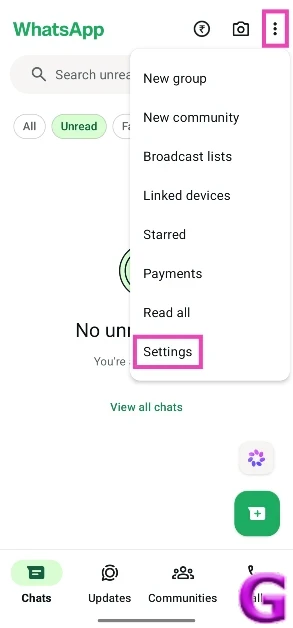
- Launch WhatsApp and tap the ellipses in the top right corner of the screen.
- Go to Settings.

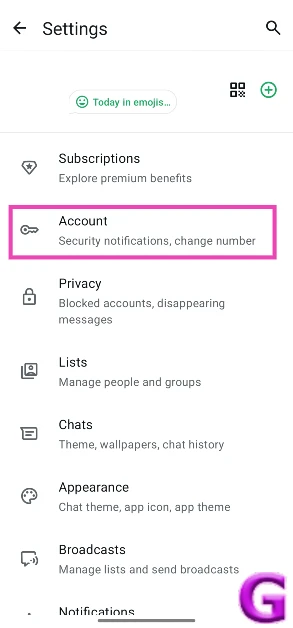
- Tap on Account.
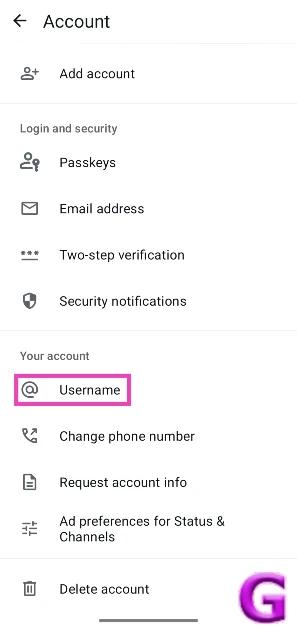
- Tap on Username.

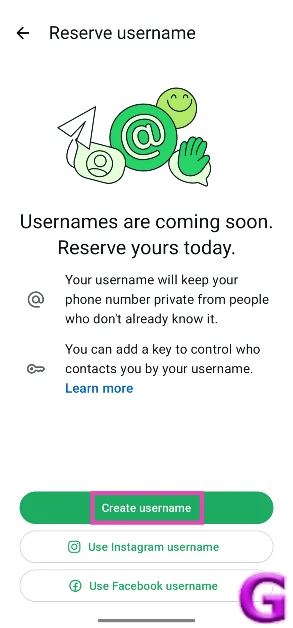
- Tap on Create username. You can also choose to use your Instagram or Facebook username.
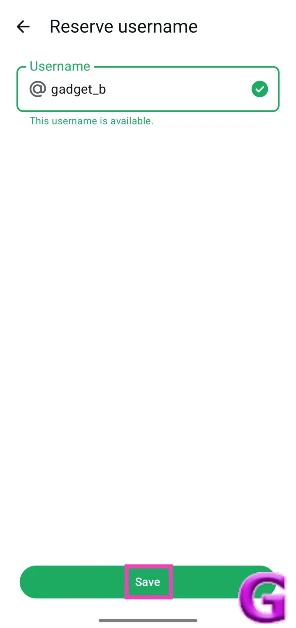
- Enter the username you want in the text box. If it’s available, hit Save.

- You can also set your Facebook or Instagram handle as your WhatsApp username. Simply enter it in the text box, hit Next, and link the two accounts.
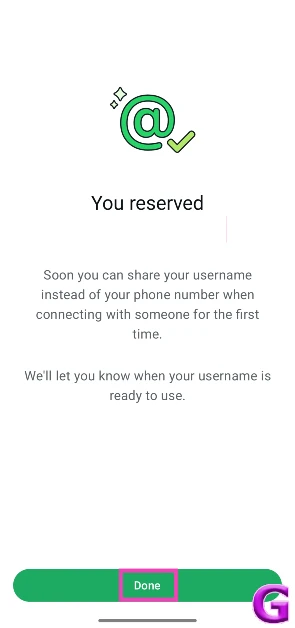
- Hit Done when you’ve set up your username.

Change your WhatsApp username
- Launch WhatsApp and tap the ellipses in the top right corner of the screen.
- Go to Settings.
- Tap on Account.
- Tap on Username.
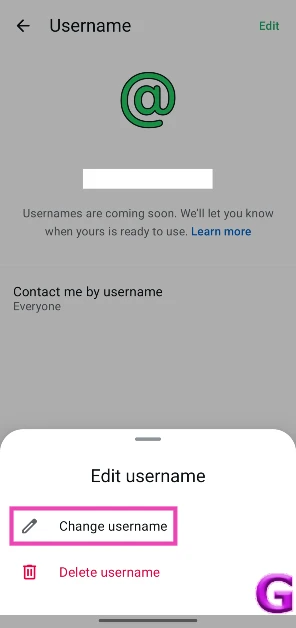
- Hit Edit in the top right corner of the screen.
- Tap on Change username.
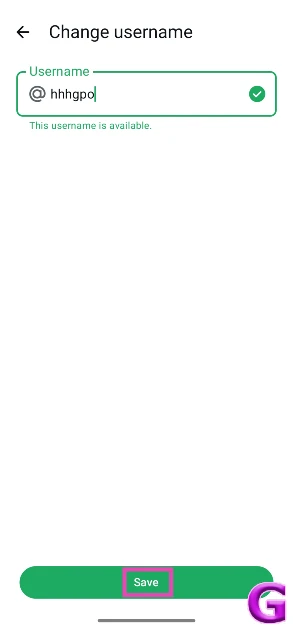
- Enter your new username.
- Hit Save.

Frequently Asked Questions (FAQs)
What does the username do in WhatsApp?
Once you’ve set up a unique username, you can use it to communicate with other people without needing to share your phone number with them.
How do I reserve my WhatsApp username?
Launch WhatsApp, go to Settings>Account>Username, enter your preferred username in the text box, and hit ‘Save’.
Can I change my WhatsApp username?
Yes, WA lets you change your username once you’ve reserved it. Go to Settings>Account>Username>Edit>Change username, type your new username and hit ‘Save’.
Is it mandatory to create a WA username?
No, it is not mandatory to create a WA username. You can continue using the messenger with your phone number as your ID.
Can I have the same WhatsApp username as my Instagram handle?
Yes, you can have the same WhatsApp username as your Instagram handle once you’ve linked the two profiles in Meta’s Account Centre.
Read Also: Motorola Razr Fold Review: Clean, Functional, and AI-Ready
Final Thoughts
As we mentioned earlier, WhatsApp usernames are being rolled out in a phased manner. It may take a few months to reach all users. Make sure the WhatsApp app on your phone is updated to its latest version so you can get the feature at its scheduled time.


