




Key Takeaways
- The new multi-caption feature enhances user engagement by enabling distinct captions for each image in a carousel, ideal for vacation dumps or tutorial posts.
- Instagram also recently added the ability to reorder posts on a profile grid, offering more control over the visual presentation of their feed.
- If the multiple caption feature is not available, users should ensure their Instagram app is updated to the latest version.
Instagram has been on a roll recently, adding features that users have requested for ages. Users can now add multiple captions to a single carousel post instead of dumping all the information in a long paragraph. Apart from providing the right context at the right moment, this feature also helps disabled users who rely on screen readers. Let’s take a look at how you can add multiple captions to an Instagram carousel post.
Read Also: GTA 6 Pre-Orders Start June 25 As Rockstar Reveals Official Cover Art
In This Article
What’s new on Instagram?
Instagram’s new set of features gives users greater control over what they post and how it is presented to their audience. Earlier this month, Meta introduced the option to reorder your Instagram profile grid. Instead of a chronological feed, you can drag and drop posts anywhere you like. This comes in clutch while creating banner posts or trying out a new aesthetic.
The new feature for carousel posts helps users engage better with their audience. You can post your vacation picture dump with a different caption for each image. If you’re unable to come up with something unique for each picture, you can choose to leave some blank. Users who post tutorials will also get a huge boost as they can furnish each image with related information instead of posting a wall of text.
Add multiple captions to your Instagram carousel post
- Launch the Instagram app and create a carousel post.
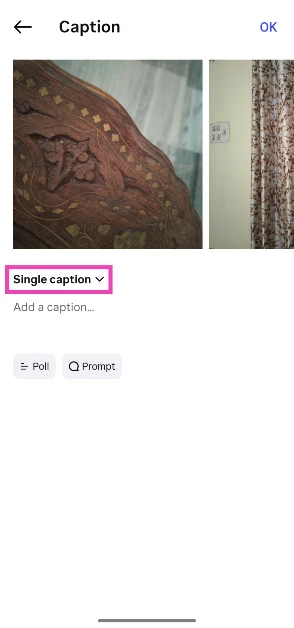
- Tap on Add a caption.

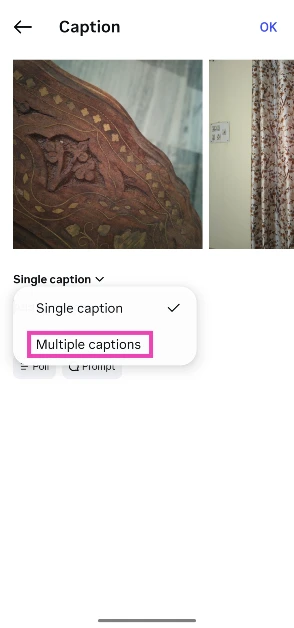
- Tap on Single caption to reveal the drop-down menu.

- Select Multiple captions.
- Type a caption for the first picture, then swipe left to move to the next picture.
- Each picture will have a blank caption field. You can choose to leave it blank.
- Hit OK when you’re done.

- Hit Share.



Frequently Asked Questions (FAQs)
What is an Instagram carousel?
A carousel is a stack of photos uploaded in a single Instagram post.
How many photos can I post in a single carousel?
Instagram lets you post up to 20 pictures in one carousel.
Can I post different captions for different pictures in my carousel?
Yes, you can post different captions for the different pictures in your carousel. While you’re on the post creation page, tap on the caption field, then tap on ‘Single caption’ and select ‘Multiple captions’ from the dropdown menu. Flick through the photos and add captions wherever you want.
Can I add multiple songs to my Instagram carousel?
No, Instagram does not let you add more than 1 song to your carousel post.
How do I reorder the pictures on my Instagram profile grid?
Go to your Instagram profile, tap on ‘Edit profile’, select ‘Reorder grid’, and drag and drop posts to rearrange them.
Final Thoughts
If you’re unable to access this feature on your account, update your Instagram app to its latest version. Meta is rolling out this feature in a phased manner, so it may take some time to reach your device. Got any Instagram-related questions? Let us know in the comments!


