



Key Takeaways
- Meta has introduced premium subscription packages for Instagram, Facebook, and WhatsApp, targeting power users with exclusive features and customizations.
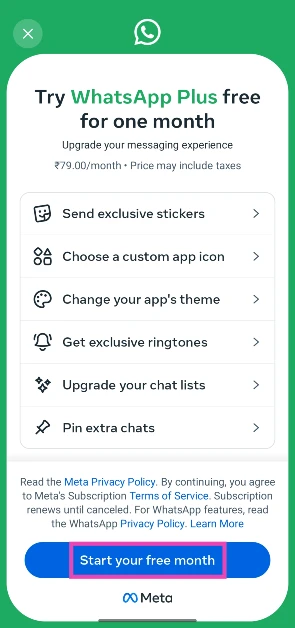
- WhatsApp Plus offers enhanced features such as premium stickers, a wider selection of app themes and icons, customisable list options with unique ringtones and alerts, and the ability to pin more than three chats.
- Meta is yet to announce the price of WhasApp Plus in India
Meta has launched premium subscriptions for Instagram, Facebook, and WhatsApp. Designed for power users who want more than the standard experience, these packages include sought-after features that have been requested by users for a long time (like a story-viewer counter on Instagram), additional perks, and customisations. Instagram Plus costs Rs 49 per month. Prices for the WhatsApp and Facebook packages have not been revealed in India yet, although they cost $2.99 and $3.99 in the USA. If you’re thinking of getting WhatsApp Plus, it’s a good idea to tally the benefits and figure out the mileage you will get out of them in your daily usage. Here’s a look at all the perks.
Read Also: OnePlus Nord CE6 Review: Goes on and on
In This Article
WhatsApp Plus Benefits and Features
Meta’s premium package for WhatsApp comprises a diverse range of features that touch upon the utilitarian and aesthetic aspects of the app. If you’re someone who cares about themes, stickers, and niche customisations, you will get some value out of this package. Here is the complete list of features that are currently available with WhatsApp Plus.
- Premium Stickers: WhatsApp already has a thriving collection of stickers that can be accessed by tapping the emoji icon in any chat box. You can also create personalised stickers using the images in your phone’s gallery. The Plus subscription expands the messenger’s native library with more stickers. You can access them by going to Settings>Subscriptions>WhatsApp Plus>Send premium stickers. Hit the plus icon next to a pack you like and select ‘Add to my stickers’.
- App Themes and Icons: Like stickers, WhatsApp has a respectable theme library with several options catering to light and dark mode users. You can even customise the chat bubble colour and the background wallpaper. With the new Plus subscription, you will get access to a more extensive theme library along with a completely new set of app icons. The latter changes the look of the WhatsApp icon on your home page and app drawer.
- List Options: WhatsApp Plus lets you customise your lists. You can set custom ringtones, alerts, and themes for different lists. This feature is very useful if you’re a power user who uses lists to section off different friend circles and family members. Depending on the ringtone or alert you’ve assigned to a list, you can decide whether it deserves your immediate attention without picking up your phone.
- Premium Ringtones: WhatsApp’s standard package already lets you customise ringtones and message alert tones for individual contacts. The Plus subscription adds new native tones to the messenger’s library.
- Pin Extra Chats: This one is pretty self-explanatory. The premium package removes the 3-chat limit for pinning.
What we’d like to see in WhatsApp Plus
As you can tell by now, the WhatsApp Plus package improves upon existing features instead of introducing something truly game-changing that gets users to rush to their payment apps right away. Here are some of the features we’d like to see in WhatsApp Plus in the future.
- Scheduled messages
- Automatic replies
- Option to hide the typing indicator
- Separate spam folder
- Custom cloud storage
How to subscribe to WhatsApp Plus
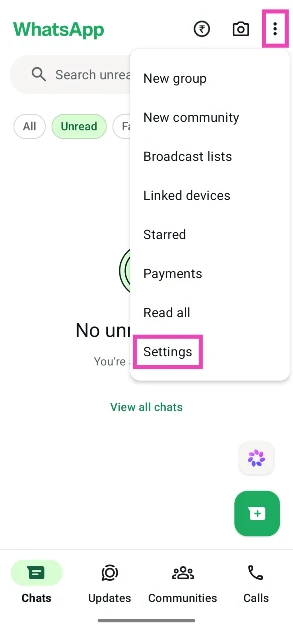
- Launch WhatsApp Messenger on your phone and hit the ellipses in the top right corner of the screen.
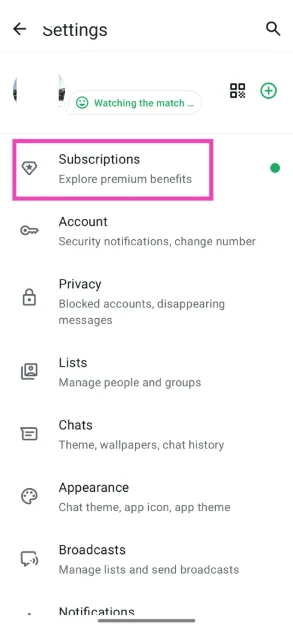
- Tap on Settings.

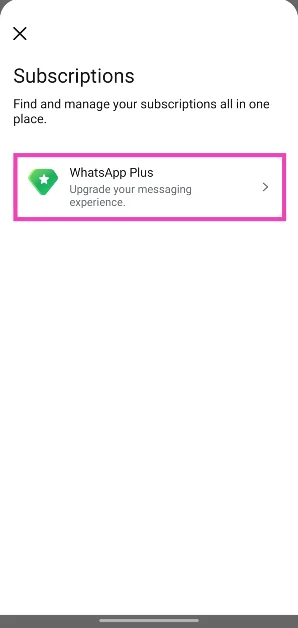
- Go to Subscriptions.
- Select WhatsApp Plus.

- If this is your first time subscribing to WhatsApp Plus, you can get the first month of the service for free. Tap on Start your first month to go ahead.

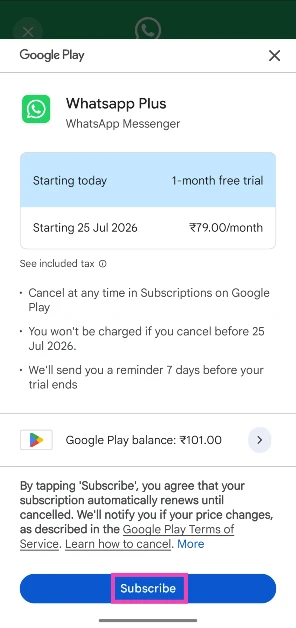
- You will be redirected to a Google Pay payment window. Hit Subscribe. The Rs 79 subscription fee will be deducted from your account once the trial month ends.

Frequently Asked Questions (FAQs)
How much does WhatsApp Plus cost?
Meta has priced the WhatsApp Plus subscription at $2.99 in the USA. It has not revealed the pricing in India yet.
How do I get WhatsApp Plus?
Launch WhatsApp on your phone, go to Settings>Subscriptions>WhatsApp Plus, and make the payment through the Google Play Store/App Store.
What do I get with WhatsApp Plus?
Currently, WhatsApp Plus gives you access to premium stickers, app themes and icons, ringtones, alert tones, and lets you pin extra chats. Meta has said that more features will be added to the premium package in future.
Does Meta auto-renew my WhatsApp Plus subscription?
Yes, your WhatsApp Plus subscription auto-renews every month. When you cancel the payment, you can still access the benefits until the billing cycle ends.
How much does Instagram Plus cost?
The Instagram Plus package costs Rs 99 per month in India. As part of the introductory offer, it is available for Rs 49 per month for the first 6 months.
Read Also: GTA 6 Fans Have Already Built a 3D Map of Vice City and It Looks Absolutely Massive
Should you get WhatsApp Plus?
At the moment, WhatsApp’s premium package does not offer anything that’s completely new to the app. Most of its features can be accessed in the standard version of the app, too. You can set up custom themes and personalised ringtones for individual chats. However, if you’re a power user who dabbles in lists and stickers, we’d say it is worth giving a shot.


