



Key Takeaways
- Instagram users have long requested the ability to rearrange their profile grid, and this feature is now being gradually rolled out.
- This new feature allows users to change their profile layout without deleting or archiving existing posts, enabling new aesthetic possibilities beyond chronological order.
- The ability to reorder posts offers flexibility in creating custom grid layouts, such as grouping posts by occasion or creating visual banner effects.
The option to rearrange the profile grid was highly requested by Instagram users over the last several years. Last year, Instagram announced that it would allow users to change the layout of their profile without deleting or archiving old posts. This feature is now being rolled out in a phased manner. You can use it to create a new aesthetic that doesn’t have to adhere to the chronological order. Here’s how you can reorder the posts on your Instagram profile grid.
Read Also: Garena Free Fire MAX Redeem Codes Today, June 9: Claim Free Fire Kickoff Rewards and Weapon Skins
In This Article
Can’t find the feature? Here’s what you can do
As mentioned earlier, this feature is being rolled out in a phased manner. It will take a few weeks to reach all Instagram users. In the meantime, here’s what you can do to get it on your device.
- Make sure the Instagram app on your phone is updated to the latest version.
- Log out and log into your profile.
- Use Instagram on a different phone.
- Use Instagram on your PC.
Reorder your Instagram profile grid
- Launch the Instagram app on your phone and go to your profile.
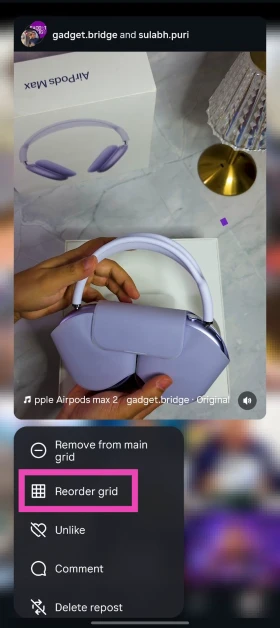
- Long-press a post on the grid.
- Tap on Reorder grid. Alternatively, tap on Edit profile and select Reorder grid.

- Drag a post and drop it in your preferred position.

- Go back to save the changes. Hit the Undo button in the top right corner of the screen to go back to the original layout.

Frequently Asked Questions (FAQs)
Can I change the layout of my Instagram profile?
Yes, Instagram now lets you rearrange your posts in a non-chronological order without deleting or archiving old posts.
How do I reorder the posts on my Instagram profile?
Go to your Instagram profile, tap on ‘Edit profile’, select ‘Reorder grid’, and drag and drop posts to rearrange them.
Can I change my Instagram grid back to squares?
To restore the square grid, you will need to alter individual posts on your profile. Long-press a post, tap on ‘Adjust preview’, and select ‘Fit’.
How do I disable Instants in Instagram?
While you can’t fully disable Instants, you can hide them by going to ‘Content preferences’ in settings and turning on the toggle switch next to ‘Hide instants in inbox’.
How do I auto-scroll Reels?
Hit the ellipses in the bottom right corner of any Reel and turn on the toggle switch next to ‘Auto-scroll’.
Read Also: Xiaomi Pad 8 price increased by Rs 2,000 in India: Details
Final Thoughts
With the option of reordering the posts on your Instagram profile, you can finally create exciting grid layouts without deleting or archiving old posts. You can clump posts from a specific occasion together, create unique banners where the posts flow into each other, and a whole lot more.


