


Keeping up with new messages on WhatsApp can be quite the chore, especially if you’re a part of several active group chats. The instant messaging platform has finally come out with an option to summarise unread messages. If you’re in a hurry and need to bring yourself up to date with what’s going on in a group chat, this feature will come in quite handy. It is possibly one of the best uses of Meta AI in WhatsApp yet. Let’s take a look at how you can summarise unread WhatsApp messages using Meta AI.
Read Also: Lava Bold N1 Pro Review: Delivers where it matters
In This Article
What does this mean for privacy?
Any use of AI in instant messaging apps rightfully raises concerns about the privacy aspect of it all. More so when the AI model can be summoned to scan the private messages. Meta maintains that your WhatsApp messages are still end-to-end encrypted. This means, only you and the other member(s) in the conversation can read the contents of the chat.
So, how is Meta AI able to summarise unread messages without reading them? Meta says that its AI model uses something called ‘Private Processing’ to ensure end-to-end encryption. Your summarisation requests are handled in a safe cloud environment. The fundamental criteria for private processing include verifiable transparency, enforceable guarantees, and secrecy.
Summarise unread WhatsApp messages
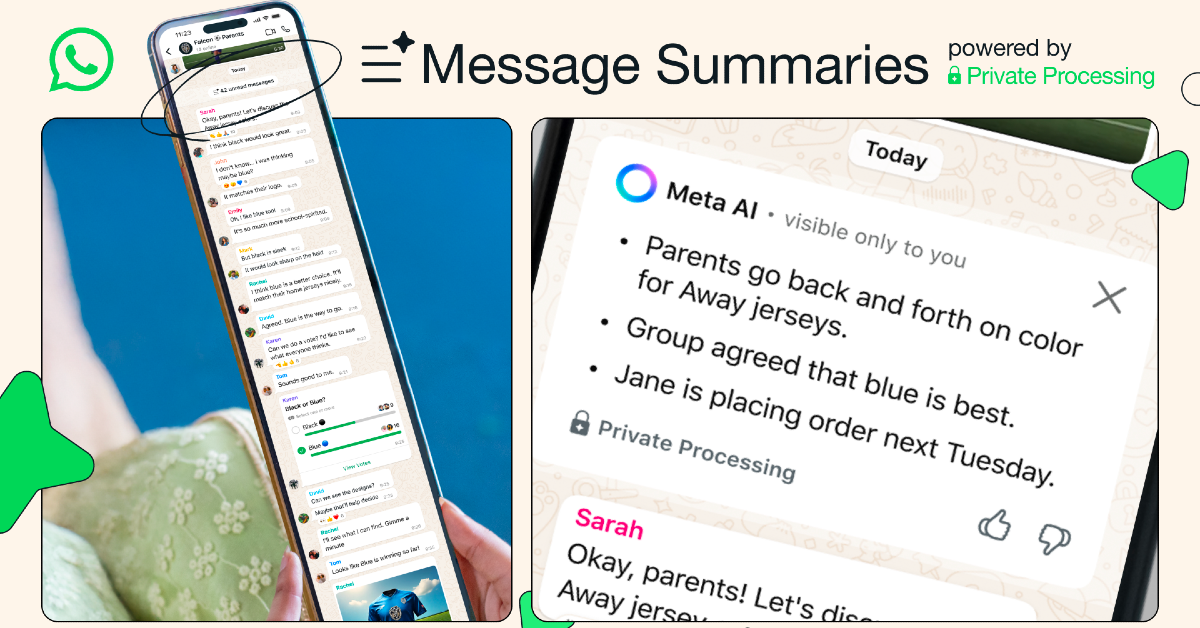
Step 1: Launch the WhatsApp app on your phone.
Step 2: Open a conversation with unread messages.
Step 3: Tap the ‘… unread messages’ indicator on the screen.
Step 4: Meta AI will privately scan the messages and produce a summary on the screen.
Frequently Asked Questions (FAQs)
How do I summarise unread messages on WhatsApp?
Tap the ‘unread messages’ indicator in a chat to summarise them. WhatsApp uses Meta AI for this process.
Does Meta AI view my WhatsApp messages while summarising them?
WhatsApp maintains that all messages on the platform are end-to-end encrypted – meaning only the sender and receiver can view them. Meta AI uses private processing to summarise unread messages.
How do I transcribe voice notes on WhatsApp?
Go to Settings>Chats and turn on the toggle switch for ‘Voice Message Transcripts’. Once that’s done, tap and hold a voice note and hit ‘Transcribe’ to convert it to text.
Does WhatsApp use AI to transcribe voice notes?
No, WhatsApp does not rely on Meta AI to transcribe voice notes. It uses an on-device language pack to carry out the task.
Can I translate messages on WhatsApp?
WhatsApp does not have a native message translation feature yet. However, you can translate texts using your smartphone’s AI suite.
Read Also: Samsung Galaxy M36 5G with 120Hz AMOLED display launched in India
Final Thoughts
This is how you can summarise unread WhatsApp messages using Meta AI. While you’re here, check out how you can upload a song as your status on WhatsApp. If you have any questions, let us know in the comments!


