Gadget Bridge
HomeHow ToHow to turn off Audio Emojis on your Android smartphone

How to turn off Audio Emojis on your Android smartphone

Check out how you can disable the quirky sound bites for good.

Google’s newest feature for its dialer app has received a lukewarm reception from the audience. ‘Audio Emoji’ gives the user an option to play an emotive sound effect on call. All call participants can hear this sound effect. Since this feature is accessible on the call screen, it is easy to accidentally trigger it while holding the phone against your face. Accidentally playing an inappropriate audio emoji on an important work call can be very mortifying. So, here’s how you can turn off Audio Emojis on your Android smartphone.

Read Also: How to reframe your pictures using Google Pixel 9’s Magic Editor

What sound effects do the audio emojis create?

As of now, there are six audio emojis available on the Googe Phone app. Here’s what they do.

Clapping Hands emoji – Applause

Face with Tears of Joy – Jovial laughter

Party Popper – Cheerful noise

- Advertisement -

Crying Face – Womp Womp sound effect

Pile of Poo – Fart sound

Drum – Ba Dum Tss

Turn off Audio Emojis on Android

Step 1: Launch the Phone app from Google.

Step 2: Hit the ellipses at the top right corner of the screen.
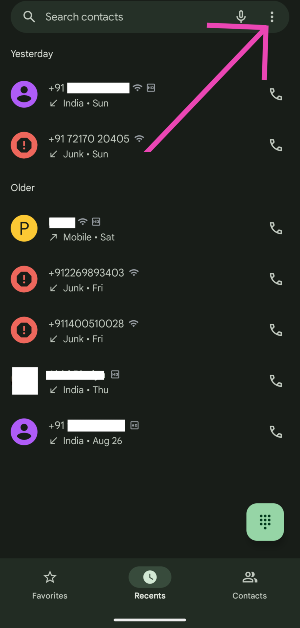
Step 2: Hit the ellipses at the top right corner of the screen.

Step 3: Tap on Settings.
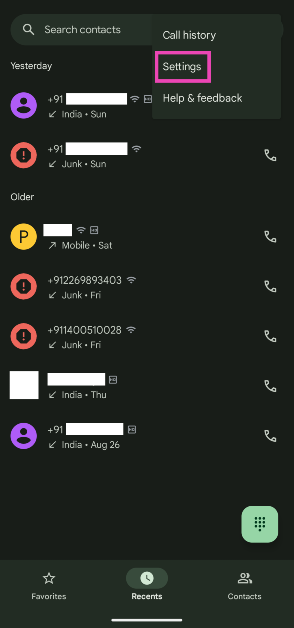
Step 3: Tap on Settings.

Step 4: Select Audio Emoji.
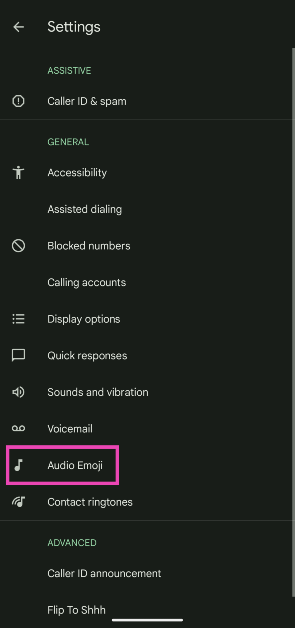
Step 4: Select Audio Emoji. Here is how you can turn off or disable Audio Emojis on your Android smartphone.

Step 5: Turn off the toggle switch next to Audio Emoji.
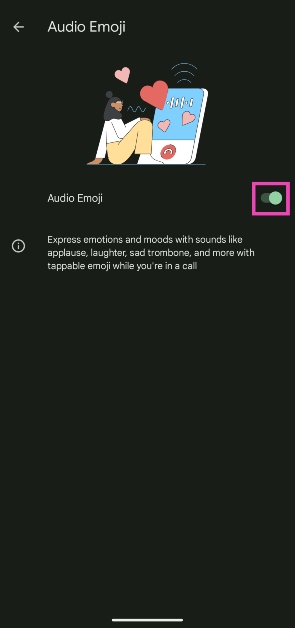
Step 5: Turn off the toggle switch next to Audio Emoji. Here is how you can turn off or disable Audio Emojis on your Android smartphone.

Frequently Asked Questions (FAQs)

What are Audio Emojis on Android?

Audio Emojis are a new feature introduced by Google on its native dialer app. These emojis play an emotive sound bite while you’re on call.

Does the Phone app notify the callers who played the Audio Emoji?

The Phone/Dialer app does not display who played the audio emoji on the call.

How do I disable Audio Emojis?

Go to Phone>Settings>Audio Emoji and turn off the toggle switch.

Read Also: OnePlus 13 could arrive earlier, launch timeline leaked

Conclusion

This is how you can disable Audio Emojis on your Android smartphone. This feature is exclusively available on the native Phone app designed by Google. It is being rolled out in phases on Android devices across different OEMs. If you have any questions related to Audio Emoji, let us know in the comments!

Support Us

We are a humble media site trying to survive! As you know we are not placing any article, even the feature stories behind any paywall or subscription model. Help us stay afloat, support with whatever you can!

Support us
- Advertisement -
Utkarsh Joshi
Utkarsh Joshihttps://www.gadgetbridge.com/
Utkarsh is a seasoned writer who seeks to simplify complex concepts and bring the latest in technology to a broader audience. You can catch his exhaustive 'How to' guides, deep-dive feature articles, cutting edge news stories, and comprehensive tech reviews on Gadgetbridge.com. Apart from dabbling in all things tech, Utkarsh also enjoys watching club football, adding to his TBR pile of books, and making Spotify playlists. Automobile enthusiasts and motorheads can also catch his articles on Motorbridge.com.
- Advertisement -

LEAVE A REPLY

Please enter your comment!
Please enter your name here

- Advertisement -

Latest From Gadget Bridge

Lava Probuds Wave 931 is now available for purchase

Lava recently released its new ANC neckband, the Probuds Wave 931, in India. The device is now available...
- Advertisement -

Latest Reviews

Moto G57 Power Review: A lot of phone for Rs 15,000!

Motorola’s new budget beast in the sub-Rs 15,000 price bracket is the first smartphone in the world to...
- Advertisement -

Tech How To

How to enable Expanded Dark Mode on Android

Nothing feels more annoying than coming across a bright white page while browsing your phone in Dark Mode....
- Advertisement -