


Snapchat’s new feature takes location-sharing to the next level. Instead of tracking your friend’s location until they’ve reached home, you can put your phone down and get a ping when they arrive at their destination. Arrival notifications are easy to set up and use. You can save up to 10 locations at one time. Snapchat lets you decide whether you want to send these alerts to just one friend or the entirety of your contact list. Here’s how you can enable arrival notifications on Snapchat.
Read Also: Heroes World Codes (February 2026)
In This Article
Before you begin
Arrival notifications require constant access to your device’s location. Before you enable this feature, go to Settings>App>Snapchat>Permissions>Location and select ‘Allowed all the time’. Additionally, set up your ‘Home’ location in Snapchat if you want to use this feature to alert friends when you’ve safely reached home. Enabling Ghost Mode on Snapchat automatically stops arrival notifications from being sent to the selected contacts.
If you’re on the receiving end of these notifications, you can choose to stop them at any given time. This requires going to the chat, tapping the name of the destination, and disabling the notifications. The user will not be notified once you execute this step. However, the notifications will be turned off on their end, too.
Enable Arrival Notifications on Snapchat
- Launch the Snapchat app on your phone.
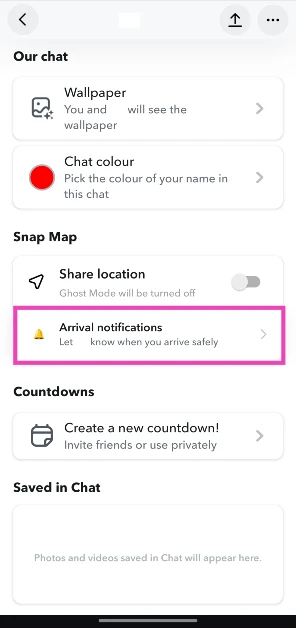
- Switch to the Chats tab and go to a friend’s profile.
- Tap on Arrival notifications.

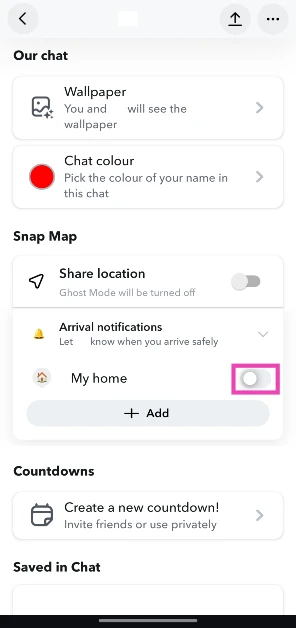
- Turn on the toggle switch next to My home.
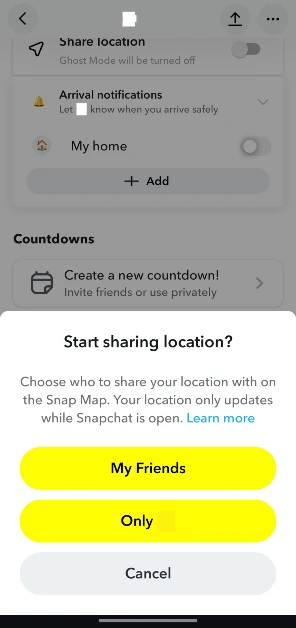
- Choose whether you want to share your location with all of your friends or only the one you’ve selected.
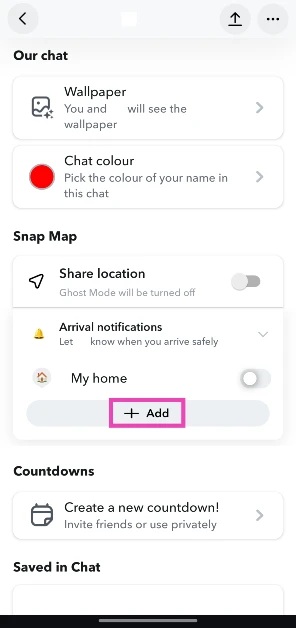
- If you want to choose another location, hit Add.
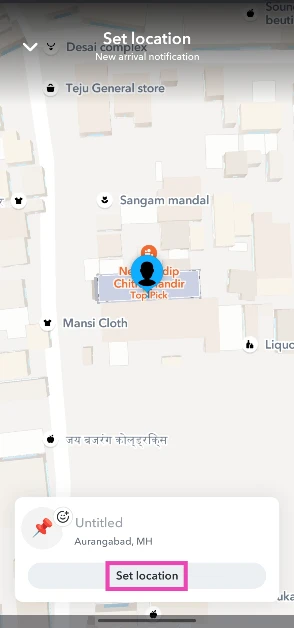
- Select your destination on the map.
- Hit Set location.

- Turn on the toggle switch next to the location’s name.
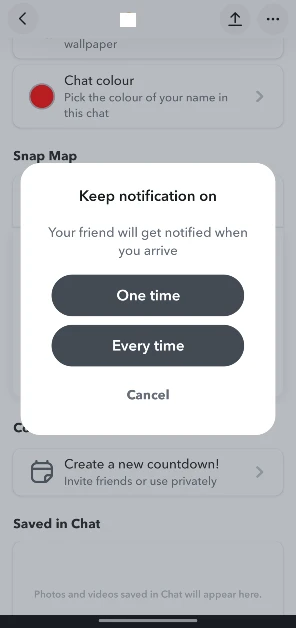
- Choose whether you want to send the arrival notification one time or every time you reach the destination.
Frequently Asked Questions (FAQs)
What are arrival notifications on Snapchat?
Arrival notifications alert your friends that you’ve reached your destination. You can set them for your home or any other location on the Snap map.
How do I enable arrival notifications for a friend?
Go to your friend’s Snapchat profile, tap on ‘Arrival notifications’, and turn on the toggle switch next to Home or your preferred destination.
Can I set up arrival notifications for multiple places?
Yes, Snapchat lets you enable arrival notifications for multiple locations. You can let a user know when you’ve arrived at your home, workplace, or school without sending individual alerts. Simply go to the arrival notifications section in the user’s profile and hit ‘Add’. Choose a location from the map. Once a location has been selected, turn on the toggle switch next to its name.
How many places can I send arrival notifications for?
You can save up to 10 locations in arrival notifications.
How do I stop receiving arrival notifications from a friend?
Open your chat with the friend, tap the name of the location, hit the ellipses, and select ‘Stop receiving this notification’.
Read Also: Samsung Galaxy Unpacked Event 2026 Date Announced: Pre-Reservations Open Now
Final Thoughts
If you’re not a fan of location-sharing on Snapchat, you can always use WhatsApp to share your live location with your friends. However, WhatsApp does not have arrival reminders yet. If you’re done with Snap map for good, make sure you wipe your location record by going to Settings>Privacy control>Map and selecting ‘Delete location history’.


