


The most recent version of Google Photos for the web is available. The new Google Photos update brings the ability for everyone and Google One users to access a variety of advanced editing tools with the help of redesigned web editor right in their web browser. Preset colour options and granular image adjustments are just a couple of the new features added to Google Photos. Note that with the exception of the Dynamic option, which is only accessible to Google One subscribers, the improved web editor is now available to all users.
Google is currently rolling out new editing features for Google Photos users. However, some of the features are exclusive to Google One members only. Interestingly now Android users can use these editing tools on their PCs, earlier this was only possible on the phone. Also, you get the revamped web editor with a new ‘suggestions tab’ offering a total of four preset settings.
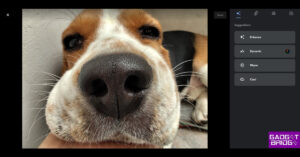
Out of four three Enhance, Warm, and Cool are available to everyone while the Dynamic option can only be accessed by Google One members. In addition to this Google One members will get some additional features like portrait light, Blur, Sky, Color, and HDR.
One can easily adjust the lighting placement in portraits, background blur and adjust the colour and contrast of the sky. Moreover, users can also do background desaturation as well as adjust HDR brightness and contrast.
Keep a look out for the new editing capabilities if you’re a Google One subscriber because they should be available soon.

These features were first spotted by 9to5Google. Users will now have access to preset ratios under the ‘Aspect Ratio tab’, making it simpler to crop photographs for various platforms and purposes. You can choose from the following aspect ratio options rather than launching a fullscreen crop tool: Free, Original, Square, 16:9 (9:16), 5:4 (4:5), 4:3 (3:4), and 3:2 (2:3). Compared to the traditional dropdown menu method, these settings are simpler to access. After that, you can drag to modify, and at the bottom, rotation controls and Reset are visible. The image can be altered in more detail on the following tab, which includes controls for brightness, contrast, highlights, saturation, and other features.

The ‘Adjust now’ tab is the third on the list in Google Photos, however, displays all sliders at once rather than grouping them by Light, Colour, and Pop.

Each has a corresponding Android or iOS app icon. Note that the first tab ‘Filters’ is now the last tab on the list.
For the latest gadget and tech news, and gadget reviews, follow us on Twitter, Facebook and Instagram. For newest tech & gadget videos subscribe to our YouTube Channel. You can also stay up to date using the Gadget Bridge Android App. You can find the latest car and bike news here.


