How to generate AI images using Copilot on Windows 11

0
Creating an image for an assignment or a presentation has never been easier. The integration of Copilot into Windows 11 allows you to summon the chatbot whenever you want and bring your ideas into reality. The image generation process is quick, taking no longer than a few seconds. If you don’t like what you see, you can always get Copilot to redo the image. So, without further ado, here’s how you can generate AI images using Copilot in Windows 11. Read Also: Apple AirTag 2nd-gen tracker with Precision Finding and louder speaker launched

Some tips to get the best out of Copilot

The images generated by Copilot can only be as good as your prompts. A well-defined prompt that addresses all the important aspects of image generation can lead to drastically different results than a simple one-line request. Here are some tips to keep in mind while coming up with a prompt.
  • Focus on the subject: The subject of the image is the star of the show. For best results, you should clearly define its attributes, paying special attention to its positioning within the image, the movement you want to capture, and the general style.
  • Fill up the image with context: Once you’ve taken care of the subject, you need to think about the context. This includes the background, the setting, the purpose of the subject in the image, and the general mood of the shot.
  • Small details are important: The subject and the background form the basic structure of the prompt. If you want your image to stand out from the rest, supplement your prompt with as many details as you can. Remember, the little details matter. Visualise the image in your head and think about the minute stuff that would make it more realistic.
  • Style: Last but not least, you need to decide the aesthetic you want for your image. You can choose to generate an oil painting, a hyperrealistic photograph, a popart image – the possibilities are endless.

Generate AI images using the Copilot app

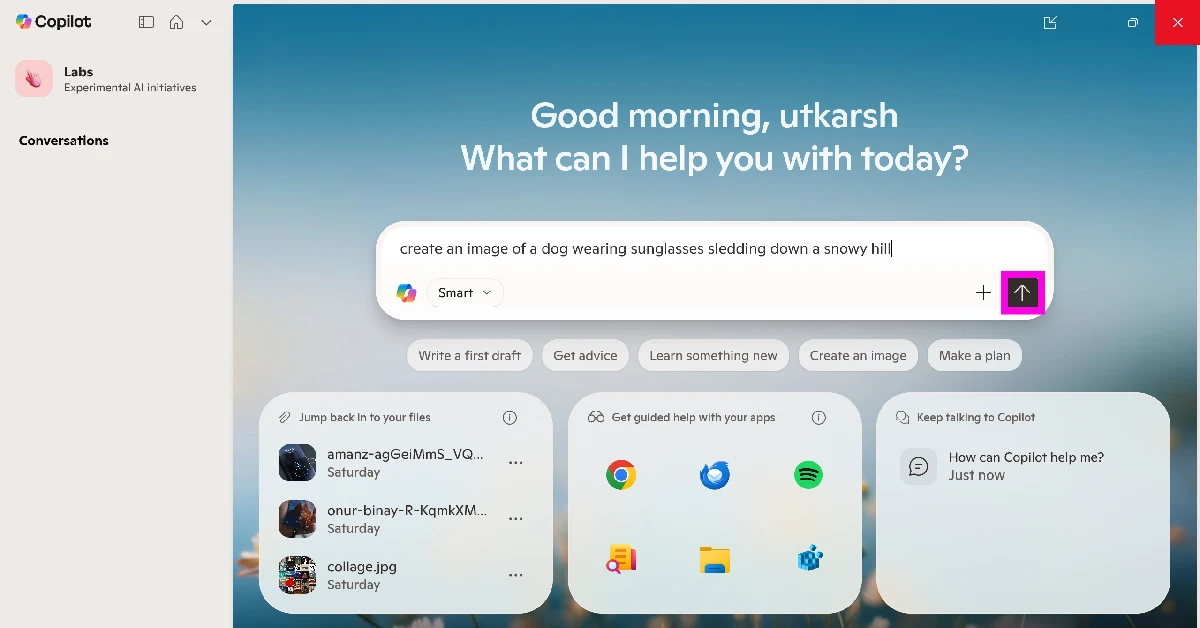
  1. Launch the Copilot app on your PC.
  2. Enter a prompt for your image in the text box. Make sure the prompt is prefixed with ‘Create an image’ or something similar. Enter a prompt for your image in the text box. Make sure the prompt is prefixed with ‘Create an image’ or something similar.
  3. Hit the Send button.
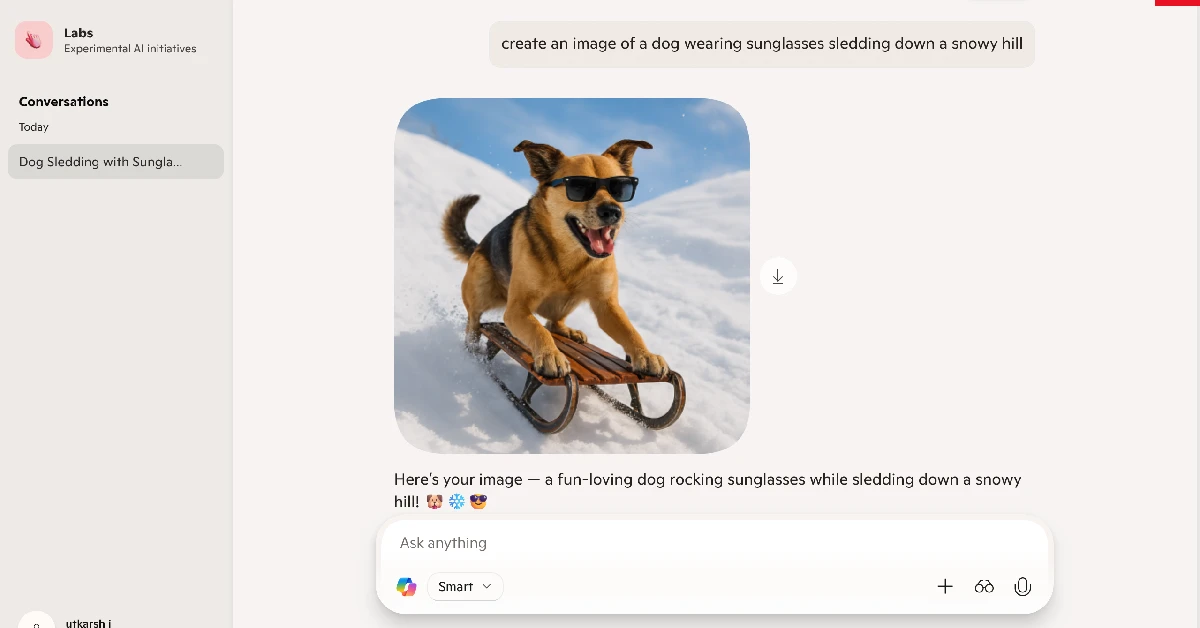
  4. Copilot will start creating an image based on your prompt. This process will take a few seconds. Copilot will start creating an image based on your prompt. This process will take a few seconds.
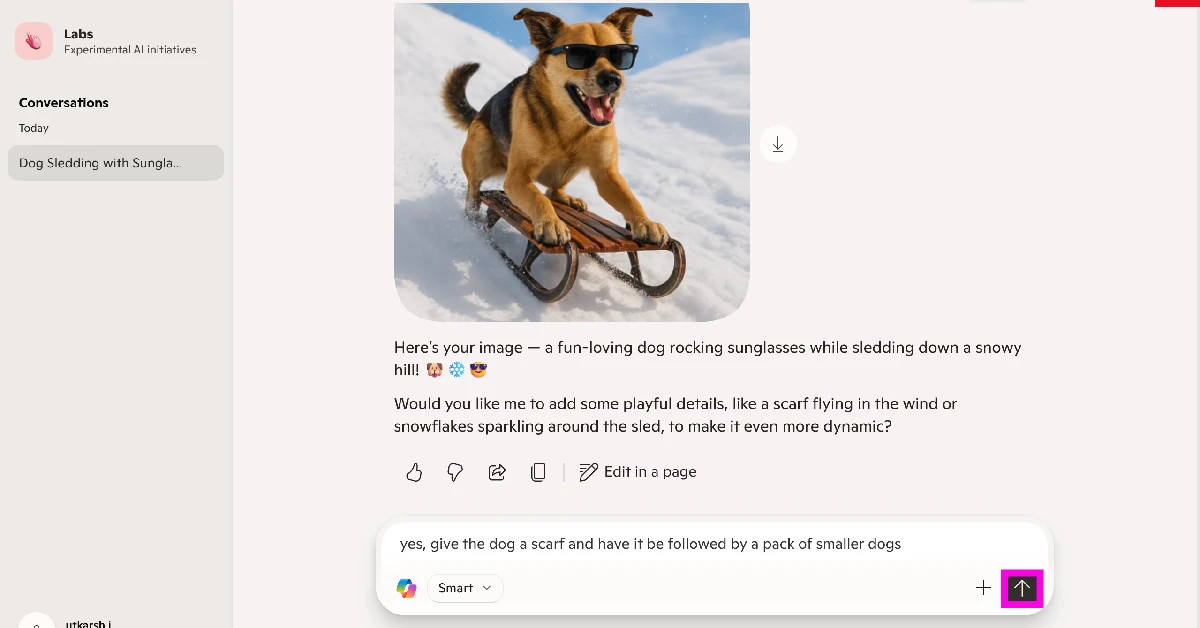
  5. Once the image has been generated, click on it to expand it. You can send a follow-up prompt to add more stuff or make changes to the image. Once the image has been generated, click on it to expand it. You can send a follow-up prompt to add more stuff or make changes to the image.
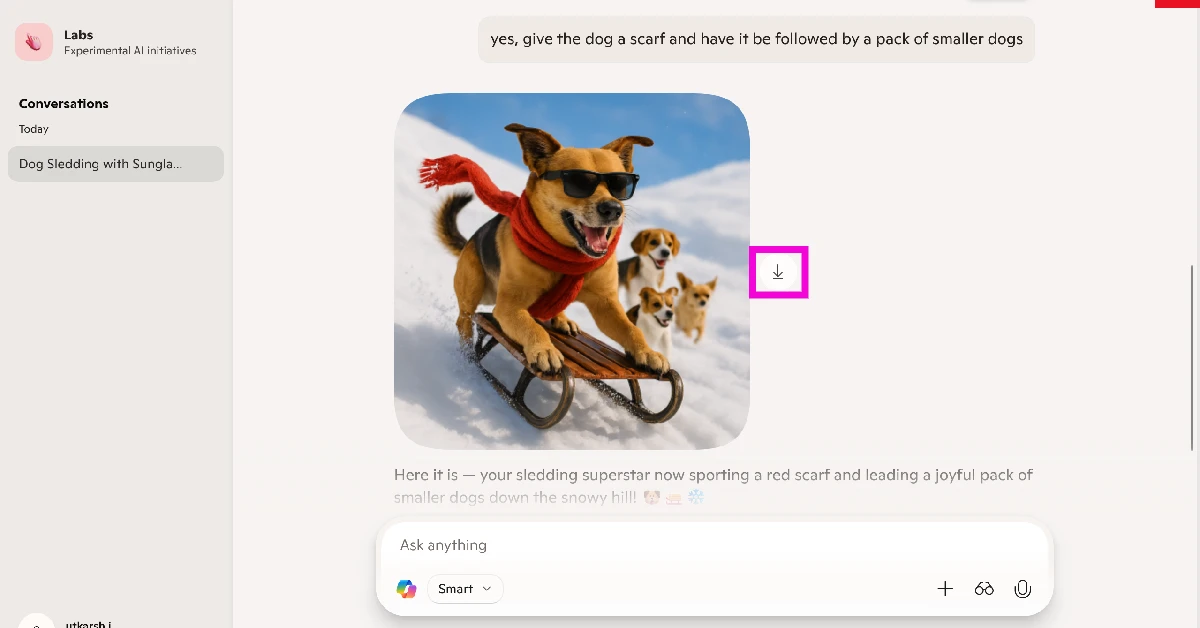
  6. Hit the arrow icon to download the image on your PC. Hit the arrow icon to download the image on your PC.

Generate AI images using Copilot in Microsoft Word

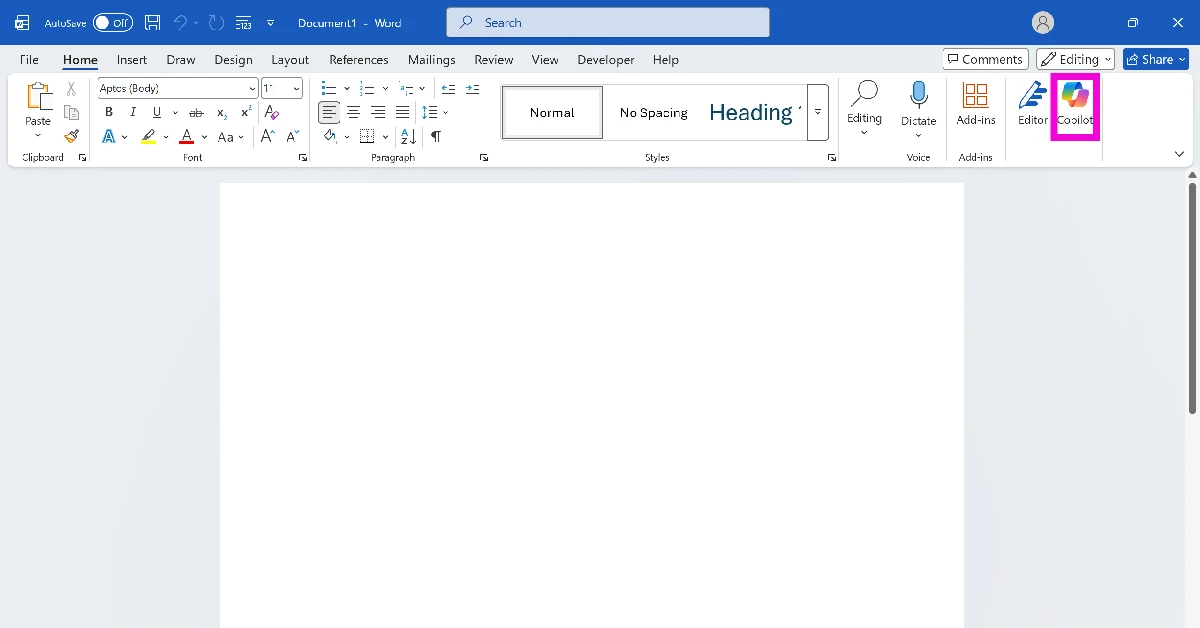
  1. Launch Microsoft Word on your PC.
  2. Open a document.
  3. Move your cursor to the place where you want to insert the image.
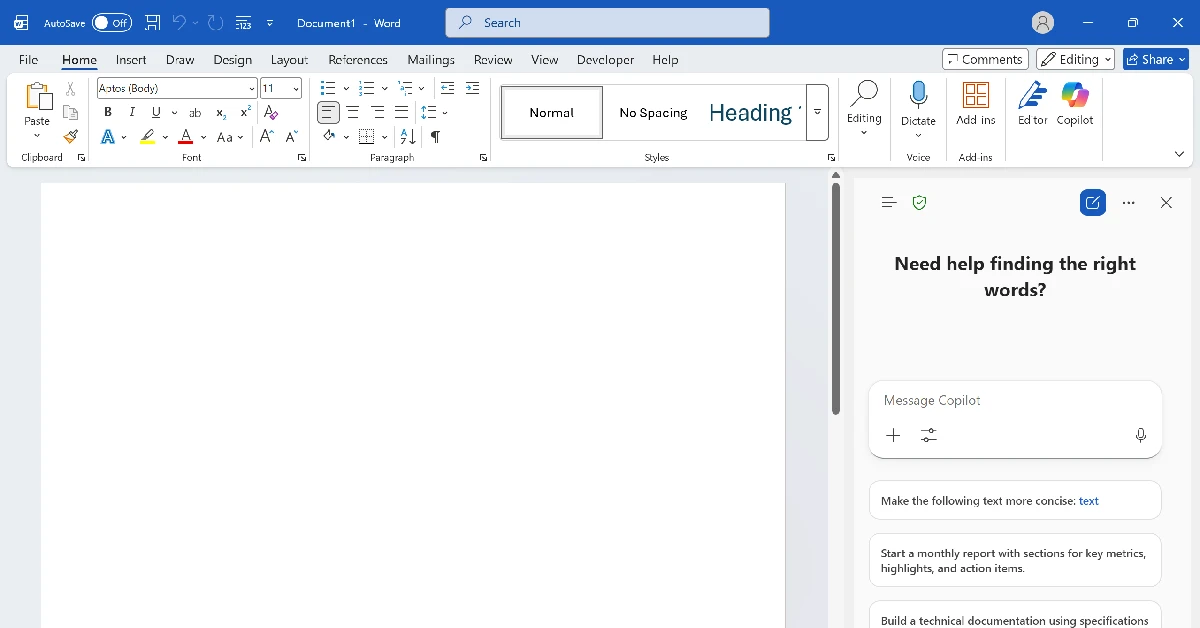
  4. Select Copilot from the toolbar at the top. Select Copilot from the toolbar at the top.
  5. Copilot will open in a pane on the right side of the screen. Copilot will open in a pane on the right side of the screen.
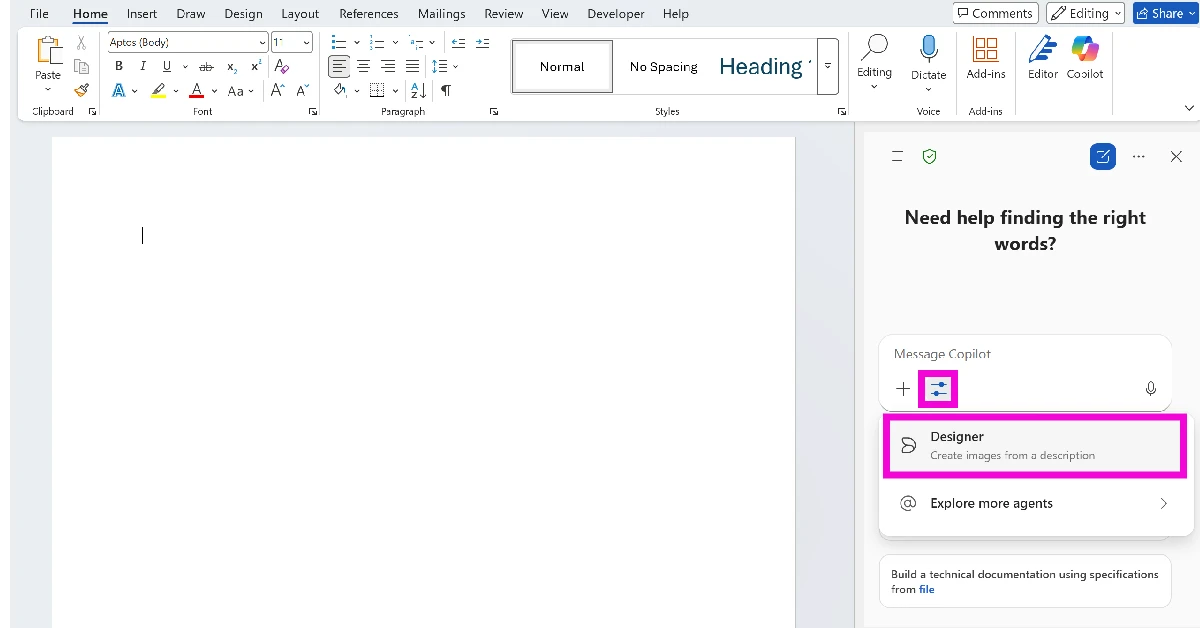
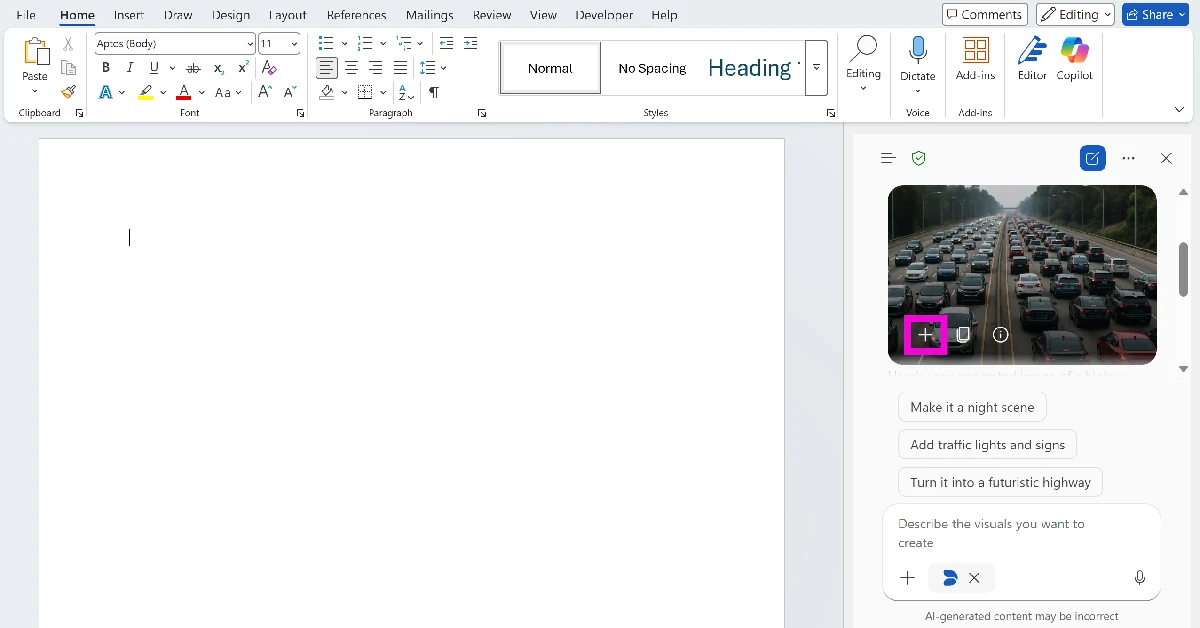
  6. Hit the filter icon below the text box and select Designer. Hit the filter icon below the text box and select Designer.
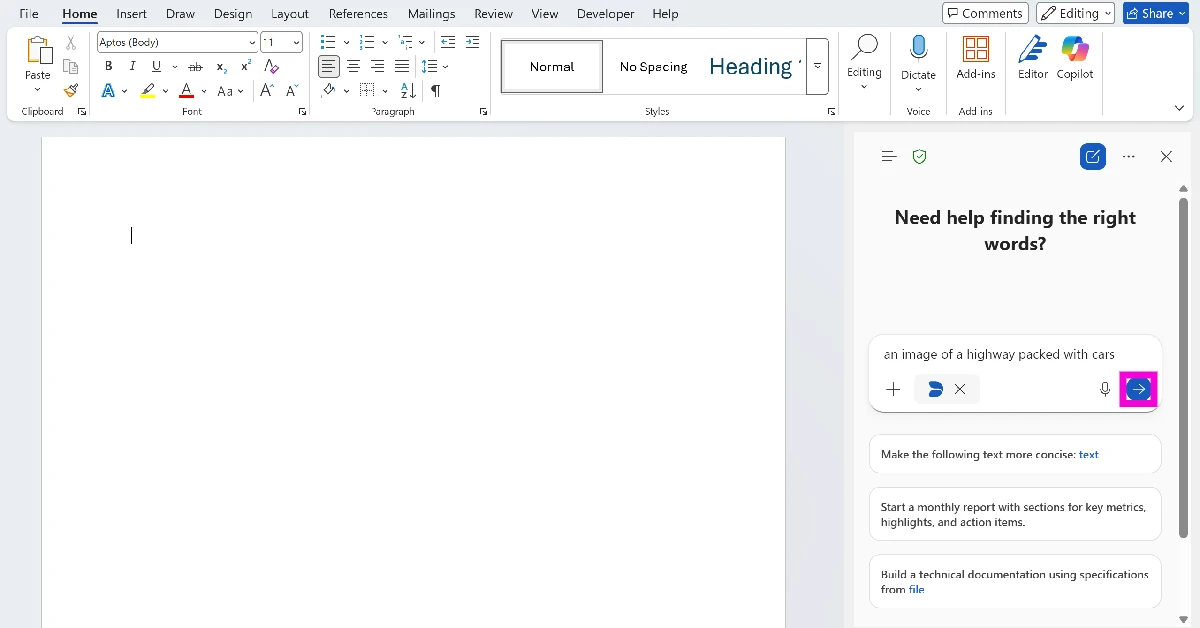
  7. Type a prompt for your image and hit Enter. Type a prompt for your image and hit Enter.
  8. Once the image has been generated, click the plus icon to insert it into the document. Once the image has been generated, click the plus icon to insert it into the document.

Frequently Asked Questions (FAQs)

How do I generate an image in Copilot?

Launch the Copilot app, type ‘Create an image…’ followed by your prompt in the text box and hit Enter. Once the image is generated, you can add a follow-up prompt to tweak it or add new stuff to it. Hit the arrow icon to download it on your device.

Can Copilot create images in Word?

Yes, the Copilot plugin can generate images in Word. Select it from the toolbar at the top, then hit the filter icon and select ‘Designer’. Type the prompt for the image in the text box and hit Enter. Once the image has generated, click the plus icon to insert it into the document.

How do I enable the ‘Hey Copilot’ voice command on my PC?

Launch the Copilot app, open the sidebar, click your profile picture, and go to settings. Scroll down to Voice Mode and turn on the toggle switch next to ‘Listen for ‘Hey, Copilot’ to start a conversation’.

How do I get Copilot to summarise a document?

Launch the Copilot app, hit the plus icon, click on upload, and select the document. Once the document has been uploaded, type ‘Summarise this file’ in the text box and hit Enter.

How do I remove Copilot from my PC?

Go to Settings>Apps>Installed apps, scroll down to Copilot, hit the ellipses, and select ‘Uninstall’. Read Also: Top 7 ways to fix ‘Phone not charging at full speed’

Final Thoughts

If you don’t like the images generated by Copilot, you can use other AI tools like Google’s Nano Banana Pro, Midjourney, and ChatGPT. Don’t like Copilot in Word? Check out how you can remove it. If you have any questions, let us know in the comments!

vivo X200T Launches in India with ZEISS Cameras, Dimensity 9400+, and a 6200mAh Battery

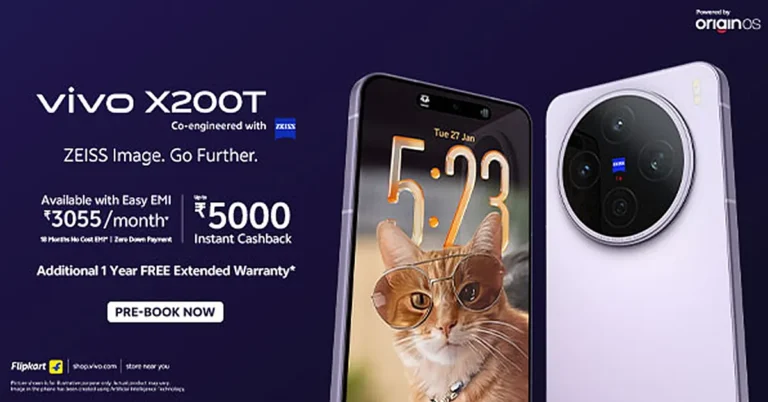
vivo has launched the X200T in India, and yes, the first question many people will ask is simple: vivo X200T price in India and details, plus what you actually get for crossing the Rs 50K line. The phone is being positioned as an “everyday flagship,” meaning it is built for the kind of work-and-weekend usage that mixes calls, camera, commute, and a little doomscrolling without begging for a charger by evening.

vivo X200T India price, colours, and sale date

The vivo X200T comes in Stellar Black and Seaside Lilac.

  • 12GB + 256GB: Rs 59,999 (inclusive of taxes)

  • 12GB + 512GB: Rs 69,999

Sale starts: February 3
Availability: vivo official website, Flipkart, and leading retail partners across India.

Launch offers at a glance

vivo is bundling typical launch-day sweeteners, split between online and mainline channels:

Online offers

  • Rs 5,000 instant cashback or exchange bonus up to Rs 5,000

  • Up to 18 months no-cost EMI

  • Free 1-year extended warranty

Mainline offers

  • Rs 5,000 instant cashback with up to 18 months no-cost EMI (selected partners)
    or

  • Upgrade bonus up to Rs 5,000

  • Free 1-year extended warranty

Additional benefits mentioned include:

  • Up to 18-month Jio Gemini Pro offer

  • Up to 40% off on V-shield screen damage protection plan

  • Up to 70% assured buyback at Rs 599

  • Bank and UPI eligibility includes SBI, Kotak Mahindra, Amex, DBS, HSBC, and IDFC First Bank (terms apply)

ZEISS-led camera setup: the telephoto is the headline act

The X200T is built around a zoom-first idea, tuned for the most-used real-world range: 3x to 10x. That matters because most people do not live at 0.6x or 100x. They live in the “let me zoom a bit” zone.

Read Also: Top 7 ways to fix ‘Phone not charging at full speed’

Rear cameras

  • 50MP ZEISS Super Telephoto Camera (IMX882, 70mm equivalent, f/2.57)

    • 3x to 10x optimized zoom

    • Multi-Focal HD Portrait

    • ZEISS Portrait Lens Package

    • Enhanced Motion Freeze capability

    • 100x HyperZoom

    • Telephoto Macro up to 20x

  • 50MP ZEISS Main Camera (IMX921, f/1.57)

    • Optical Image Stabilization

    • ZEISS T* coating

    • vivo Camera-Bionic Spectrum Technology 2.0

    • CIPA 4.5 professional-grade behave-like-a-tripod stabilisation for steadier shots

  • 50MP ZEISS Ultra Wide-Angle Camera (15mm equivalent)

    • Autofocus for easier close-ups and quick refocus

    • Built for group shots, architecture, and travel frames

Front camera

  • 32MP selfie camera (KD1 sensor, 1/3.44-inch sensor size)

Portraits and AI effects: style without turning faces into plastic

vivo says its ZEISS Style Portrait approach focuses on realistic skin tones and texture, avoiding the over-smoothed look that still shows up in many phones at this price. There is also a long list of creative options aimed at quick social-ready outputs:

  • Film-Style Live Photo Portrait

  • Classic Negative Film Style

  • AI Weather Filters

  • AI Landscape Master

  • AI Holi Effect for festive portraits with subject detection and colour-forward styling

Performance and thermals: Dimensity 9400+ plus serious cooling

Under the hood, the vivo X200T runs on the MediaTek Dimensity 9400+ chipset. It is paired with LPDDR5X Ultra RAM and UFS 4.1 storage, which should translate into quicker app loads, smoother switching, and less waiting around for big game assets or large camera files.

To keep performance steady during long gaming sessions or extended 4K-ish camera habits, the phone includes a 4,500mm² liquid cooling vapour chamber for thermal management.

OriginOS 6: productivity features that try to earn their keep

The X200T ships with OriginOS 6, and the focus here is speed plus practical workflow tools:

  • Office Kit for smarter document handling and content recognition

  • Cross-app file extraction and quicker task flow

  • Origin Island, drag-and-go interactions, and Flip Cards for multitasking

  • System-level tuning via Ultra-core Computing, Memory Fusion, and Origin Smooth Engine

  • Security features positioned for everyday peace of mind

vivo also says the X200T will receive five years of OS upgrades and seven years of security updates, which is a big trust signal for buyers who keep phones longer and want fewer “your device is no longer supported” surprises.

Read Also: Microsoft Authenticator showing wrong location on your PC? Try these 5 fixes

Battery and charging: a big number, plus wireless too

The phone packs a 6200mAh battery, paired with:

  • 90W FlashCharge

  • 40W Wireless FlashCharge

If you are the kind of person who forgets to charge until the last minute, fast top-ups matter. If you are the kind who hates cables, wireless charging at this wattage is a nice premium add-on in this segment.

Design and display: flat screen, metal frame, modern finish

vivo is going with a 6.67-inch flat display (16.94cm), a metal frame with vertical sides, and a finish that includes a sand-blasted nano coating and a slimmer decorative ring around the camera module. The intent is clear: make it look premium, feel grippy, and survive daily use without feeling like a fragile museum piece.

Made in India, aimed at Indian usage

The vivo X200T is manufactured at vivo India’s Greater Noida facility, with the company highlighting local production and quality control for devices built for Indian users and networks.

If your camera roll is mostly people, streets, food, and weekend trips, a telephoto-led setup that is genuinely tuned for 3x to 10x could be the X200T’s smartest move. The pricing is firmly premium, but the mix of a big battery, long update promise, and a feature-heavy camera stack makes it feel like a phone that is trying to win daily life, not just spec sheets.

Apple AirTag 2nd-gen tracker with Precision Finding and louder speaker launched

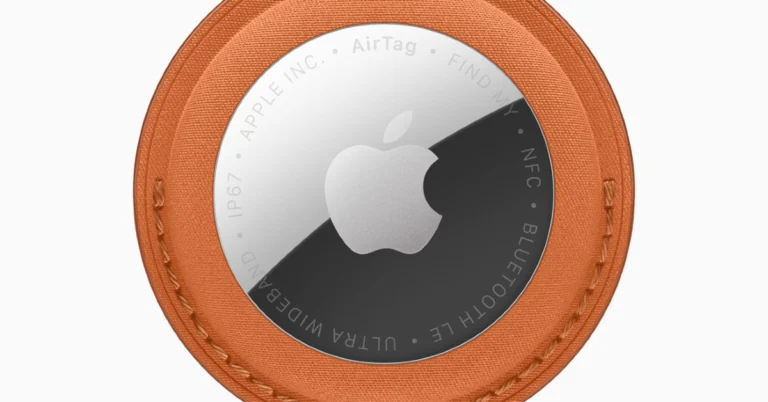
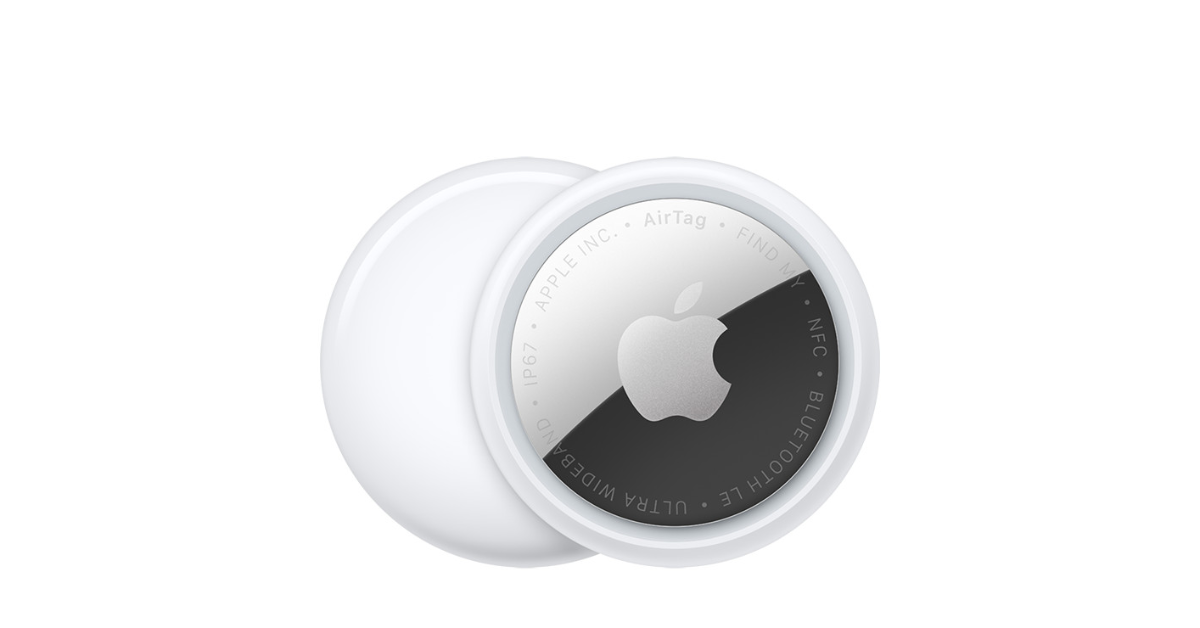
Apple has released a second-generation AirTag that features a new Ultra Wideband chip that makes it easier to use and track through the Find My network. People can use this to find a lot of misplaced things, such as luggage and musical equipment. Also, changes to the internal design have made the sound quality of the speakers better. This Bluetooth tracker still works with a coin cell battery and is still rated IP67 for water and dust resistance. It also comes with the Unity Connection Braided Solo Loop, which highlights how far Apple has come in making products. Apple AirTag 2nd-gen tracker with Precision Finding and louder speaker launched Apple recently introduced a new AirTag that runs on its second-generation Ultra Wideband chip. This chip is also found in the iPhone 17, iPhone Air, Apple Watch Ultra 3, and Apple Watch Series 11. This chip improves the Precision Finding feature, letting people find lost things from 50% farther away than the last model. The new Bluetooth chip makes it possible to find things even farther away. Precision Finding is now available on Apple Watch Series 9 or later and Apple Watch Ultra 2 or later for the first time. It is now 50% louder, which means it can be heard twice as far away. The AirTag makes it easier to find essentials like keys or wallets by adding new functionality and a unique chime. Also Read: LG MAGNIT Micro LED display with new Line-to-Dot (LTD) technology announced Find My is an app that lets people keep track of AirTags and Apple gadgets, as well as other devices that work with them, all while keeping their privacy protected. When the AirTag is out of range of its linked iPhone, it uses the Find My network, which is a crowdsourced system of Apple devices that uses Bluetooth to find and send the approximate location of a lost item back to its owner. The new AirTag also works with Share Item Location, which lets consumers temporarily and securely share the location of their belongings with trusted people, like more than 50 partnered airlines, to help them find their lost or delayed bags. With Share Item Location, users may tell an airline’s customer support team where they lost something. SITA says that this service has cut down on baggage delays by 26% and lost luggage incidents by 90%. Only authorised people can access it using secure authentication. Sharing your location stops automatically when the item is picked up, can be stopped by the owner, and expires after seven days. Also Read: Realme 16 Pro vs OnePlus Nord 5: Specs Compared The new AirTag prioritises privacy and security by not keeping location data on the device and utilising end-to-end encryption inside the Find My network, ensuring that only the owner can access location information. It protects against unauthorised tracking using unique Bluetooth IDs. The AirTag is eco-friendly, made of 85% recycled plastic, 100% recycled rare earth elements, and gold plating. Its packaging is likewise recyclable, and it remains compatible with existing accessories. In India, a single Apple AirTag 2nd Gen costs Rs 3,790, while a four-pack costs Rs 12,900. When you buy it through Apple.com or the Apple Store app, you can get free engraving.
LG MAGNIT Micro LED display with new Line-to-Dot (LTD) technology announced

At ISE 2026, LG Electronics revealed the LG MAGNIT Micro LED display. The ultra-high-definition display has outstanding picture quality, can be set up in different ways, and has features like New Line-to-Dot technology and a proprietary front-access alignment mechanism that make it more reliable and easier to install. It can be installed across long distances and is more durable, which makes it more efficient for B2B customers. The LG MAGNIT display has very high resolution and screen configurations that can be customised, so it can be used in many different business settings, such as huge halls, auditoriums, conference rooms, retail stores, broadcast studios, and control rooms. The LG MAGNIT Micro LED display also has new Line-to-Dot (LTD) technology, which solves a frequent problem with regular LED displays: when one pixel fails, it affects the whole line. The LTD technology keeps pixel flaws to single dots, which makes the viewing experience better by making installation, operation, and maintenance easier and decreasing visual interruptions. Also Read: Realme 16 Pro vs OnePlus Nord 5: Specs Compared LG MAGNIT has a black coating on the front of the display that makes the blacks deeper than on most LED displays. This improves picture quality and makes the display last longer. This coating makes the contrast as high as possible and the colours as precise as possible for LED elements, which helps make the picture quality better. It also protects against moisture, dust, and impacts from outside, which makes it last longer. The MAGNIT is easier to install because its design can be scaled up or down infinitely, and the LED cabinets connect easily. The new model is thinner and has technology that makes it easy and accurate to make alignment changes. LG MAGNIT uses unique front-access alignment technology, which is different from past methods where installers would modify cabinet alignment from the back and check it from the front. This new feature lets you make small modifications to the alignment right from the front of the display, which cuts down on the time it takes to install huge panels by a lot. Also Read: Samsung to soon launch AI-powered Bespoke WindFree air conditioners in India LGMAGNIT lets you set up LED cabinets and controllers up to 10 km apart using optical fibre connections. This arrangement lets you operate and manage several commercial displays from one place, like a remote control room. The display will be on display at Integrated Systems Europe in Barcelona from February 3–6, 2026.

Garena Free Fire Max Redeem Codes Today 27 January 2026: Here is how to claim them

Garena Free Fire (GFF) Max is a battle royale game with regular awards and tournaments to keep players interested. If you play GFF, you should be aware of the redeem codes that are released on a daily basis. However, because the battle royale game is banned in India, players from other countries can use the Free Fire Redeem codes daily. If you’re unfamiliar with the codes or don’t know how to get them, we’ve put together a step-by-step guide to help you redeem them. Check out Garena Free Fire Max Redeem Codes for 27 January 2026. These codes are a great way to get free items in the game. The 12-digit codes contain letters and numbers, as well as an expiration date and time. Because the Garena FF redeem codes cannot be used more than once, you should hurry to the redemption page to claim your free reward before someone else does. To get a free reward, all you have to do is go to reward.ff.garena.com/en, which is the official redemption page. Also, keep an eye on this space for daily updates on Gadget Bridge on GFF Max redemption codes and rewards. Also Read: Amazon Quiz Answers Today 27 November 2025: Participate to win Up To Rs 500 Amazon Pay Balance

Garena Free Fire Max Redeem Codes Today 

Updating soon…

Also Read: OnePlus 15R confirmed to be powered by Snapdragon 8 Gen 5 SoC

How to Get Free Fire Max Redeem Keys for Garena?

  • Visit the game’s official website at reward.ff.garena.com.
  • Use your Facebook, Google, VK, Apple ID, Huawei ID, or Twitter account to log in.
  • You’ll be taken to a valid redemption code (s)
  • Copy and paste the 12-digit redemption code into the text box.
  • On the screen, a dialogue box will appear.
  • ‘Ok’ should be selected.

Amazon Quiz Answers Today 27 January 2026: Participate to win Up To Rs 500 Amazon Pay Balance

Amazon Quiz 27 January 2026: The New Daily Quiz is now available. Customers from different parts of the country are participating in the daily quiz. The quiz starts at midnight today and will be live until 11:59 PM tonight. By successfully answering every question, participants in the quiz have the chance to win wonderful rewards. Up to Rs 500 Amazon Pay Balance is up for grabs for participants today. One wrong answer could eliminate you from the quiz. You have a chance to win up to Rs 500 Amazon Pay Balance if you successfully answer every question. Users of the app only have the opportunity to take the quiz. Check Out the 27 January 2026 Quiz.

Are you not able to find Amazon FunZone? Click below and participate.

Click here to enter the Amazon FunZone Quiz and play today. Today’s Prize: Rs 500 Amazon Pay Balance Quiz Date: 27 January 2026 Daily Timing: 12 AM to 11:59 PM Previous Winners Announcement: Today 12 PM Noon

Amazon Daily Quiz Answers Today: Win Up To ₹ 500 Amazon Pay Balance

Question 1: The iconic Air India building at Nariman Point was handed over to which state government? Answer: Maharashtra Question 2: Which country topped the list of the UN’s Human Development Index? Answer: Switzerland Question 3:Which Hollywood superstar portrays the role of MMA legend Matt Kerr in the biopic ‘The Smashing Machine’? Answer: Dwayne Johnson Question 4: Which sport first appeared in the Winter Olympics in 1936? Answer: Alpine skiing Question 5: This brand is the largest sportswear manufacturer in which continent? Answer: Europe Also Read: iQOO 15, equipped with Snapdragon 8 Elite Gen 5 SoC, launched in India

How To Play Amazon Daily Quiz Today

Only app users are eligible to play the Amazon quiz every morning from 12 AM to 11:59 PM. The quiz is not available on the desktop. For those who are unaware of how to play the Amazon quiz, below are the steps you can follow to take the quiz.
  • First, download the Amazon app from the Google Play Store or App Store or go here to download the Amazon App
  • Now fill in the required information through the Sign-Up option.
  • To find the Amazon Daily Quiz banner, log in to the Amazon app and scroll down to the home screen.
  • Tap on the banner and tap on the Start button to start the Quiz.
  • Now you will get 5 questions and you need to answer them correctly. One wrong answer will eliminate you from the Quiz.
  • After answering all the questions correctly, you are now eligible for a Lucky Draw.
  • The previous winner’s name will be announced today at 12 PM.

Amazon Daily Quiz Answers from the previous few days.

Here are all the answers from the previous 5 days of the Amazon Daily Quiz and Contest.

23 January 2026

Question 1: Who scored a half century in just 15 balls in a losing effort against Sunrisers Hyderabad in IPL 2024 for Delhi Capitals? Answer: Jake Fraser- Mcgurk Question 2: The Amazon Prime series- ‘A Gentleman in Moscow’ stars which famous actor in the lead role of Alexander Rostov? Answer: Ewan McGregor Question 3: The Achyutraya temple, the Virupaksha temple and the Vithala temple are located in which UNESCO World Heritage Site? Answer: Hampi Question 4: This is the logo of a famous automobile company headquartered in which country? Answer: France Question 5: This visual shows which dwarf planet as seen from the New Horizons spacecraft in 2015? Answer: Pluto

22 January 2026

Question 1: Which team did Real Madrid beat on penalties in the quarter finals of the 2023-24 UEFA Champions League? Answer: Manchester City Question 2: The series ‘Mayor of Kingstown’ stars which of these actors famous for his role in Marvel movies? Answer: Jeremy Renner Question 3: The Gaur, the Ruby Throated Yellow Bulbul and the Matti are the state animal, bird and tree, respectively of which state? Answer: Goa Question 4: This picture is taken in the capital city of which European country? Answer: Poland Question 5: By what name are these flowers popularly known? Answer: Cherry Blossom

21 January 2026

Question 1: Which Indian won the silver medal in the FIDE women’s candidates 2024? Answer: Koneru Humpy Question 2: Which of these actresses is the executive producer of the Amazon Prime series ‘Poacher’? Answer: Alia Bhatt Question 3: Which of these is a traditional, flat-bottomed Venetian rowing boat? Answer: Gondola Question 4: The man in the picture is cosplaying a character from which famous children’s book? Answer: Alice in Wonderland Question 5: This is the Adalaj Ni Vav, a stepwell located in which state? Answer: Gujarat

20 January 2026

Question 1: Which team recently set the record for the highest chase in Indian Premier League history by successfully chasing a target of 262? Answer: Punjab Kings Question 2: The comedy movie ‘Ricky Stanicky’ stars which of these actors, also a big star in sports entertainment? Answer: John Cena Question 3: The famous monument, Humayun’s Tomb, was built in which century? Answer: 16th century Question 4: This is the famous Rathaus, located in which famous European capital? Answer: Vienna Question 5: Which of these famous guitarists was part of this iconic band? Answer: Slash

19 January 2026

Question 1: Which of these recently played ATP events has a court named after the legendary tennis player Rafael Nadal? Answer: Barcelona Open Question 2: The movie Road House sees Jake Gyllenhaal play the role of an ex-UFC fighter. Which of these famous sportspeople also acts in the movie? Answer: Conor McGregor Question 3: What is the other name given to the swamp deer, the state animal of Madhya Pradesh? Answer: Barasingha Question 4: In which of these cities in the USA is this famous museum located? Answer: New York Question 5: Which of these famous architects designed this iconic monument in India? Answer: Edwin Lutyens

17 January 2026

Question 1: Against which team did Sunrisers Hyderabad set a new record, scoring 287 in an IPL match? Answer: Royal Challengers Bengaluru Question 2: Who plays the role of soldier Arun Katyal in the recently released movie ‘Yodha’? Answer: Sidharth Malhotra Question 3: Which of these famous rulers was born in the Shivneri Fort in Maharashtra in the 17th century? Answer: Shivaji Question 4: Name this famous church located in Europe Answer: St. Peter’s Basilica Question 5: This is the flag of which Caribbean country? Answer: Barbados

15 January 2026

Question 1: National Rifle Association of India is associated with which sport? Answer: Shooting Question 2: Paul Di’Anno, who passed away in 2024, was the lead vocalist for which band from 1978 to 1981? Answer: Iron Maiden Question 3: M.A. Yusuff Ali founded which business group that started with a hypermarket in Abu Dhabi in 1990? Answer: LuLu Group Question 4: This cathedral is located in which region? Answer: Helsinki Question 5: This cathedral is located in which region? Answer: Barcelona

14 January 2026

Question 1: Which of these players retired from tennis after the 2024 Vienna Open? Answer: Dominic Thiem Question 2: Jensen Huang is the president and chief executive officer of the world’s largest semiconductor company. Name the company. Answer: Nvidia Question 3: Aitana Bonmati won which award in the women’s category for the second year in a row? Answer: Ballon d’Or Question 4: The paragliding capital of India is located in which state? Answer: Himachal Pradesh Question 5: Who is the founder of this garden in Chandigarh? Answer: Nek Chand Also Read: Samsung Galaxy M17 5G Review: Budget Bombshell

Frequently Asked Questions (FAQs)

Where can I check the previous winners? Did I win? How to check?

You can head over to this link on your mobile or desktop to check the winners of the Amazon Daily Quiz Contest.

How to Play Amazon Daily Quiz or Contest?

We have written an explainer above; you can refer to that.

When are the winners of the Quiz and contest announced or declared?

The announcement of today’s quiz winner will take place Tomorrow. As for the Special Quiz and “Spin & Win” Contest, the winners will be declared once the Quiz Contest comes to an end. To find out who the lucky winner is, you can refer to the Winners List or visit the Amazon Winners tab in the Amazon App.

How to participate in the Daily Amazon Quiz?

That is very easy, just got to the Amazon app and scroll to the bottom of the page and you will find the Quiz section. Click on it (usually it is called the fun zone) and you can enter the Amazon Today Quiz Contest. 

Are there any other quizzes or contests running on Amazon daily?

Yes, there are many running daily. These range from spinning the wheel to answering the questions correctly. All are located in the Fun Zone. 

What are the criteria for selecting a winner in the Daily Amazon Quiz?

When a qualified player submits correct answers to all the questions, they will automatically be entered into a lucky draw. This draw will include all participants who answered all the questions correctly. Amazon randomly selects the final winners from the pool of eligible participants who gave the right answers.

Which Types of Questions are asked within the Amazon Daily Quiz?

These are very simple and straightforward questions. These are mainly related to general knowledge. 

Where should I look for Amazon Daily Quiz answers?

You can bookmark our website www.gadgetbridge.com as we will help you every day with the Amazon Daily Quiz. We bring you fresh answers every day for the Amazon Daily Quiz and Contest. 

What time does Amazon announce previous winners?

The previous winner’s name will be announced today at 12 PM (noon).

NYT Wordle Answer and Hints Today (January 27) #1683

Are you looking for today’s Wordle answer for January 27, 2026? The problem is difficult to solve, so if you need assistance, we’ve included hints and the clue to today’s Wordle Quiz. Below, we have made it simple for everyone to understand how to get to the Wordle Answer today.

Hints and Answers for Today’s Wordle January 27

Before answering directly, please check the Wordle Hints first. Hint 1: Today’s Wordle answer includes a vowel. Hint 2: The answer for today has no repeating letter. Hint 3: Meaning- somewhat dark in colour; specifically: having dark skin.

What word does today’s Wordle begin with?

Do you need help with today’s Wordle answer’s initial letter? The first letter in today’s Wordle is “D”

Today’s Wordle Answer 

The answer to Wordle #1683 on January 27, 2026, is — DUSKY

Also Read: Dyson Republic Day Deals Unveiled: Massive discount on beauty, cleaning and audio products

What is Wordle?

Wordle: A Five-Letter Word Guessing Game • The game allows six guesses of a five-letter word. • Provide feedback on the guessed letters’ placement in the puzzle. • The New York Times purchased the game in 2022. • Created by Josh Wardle for his partner, narrowing down 12,000 English words to 2,500. • Named after the word “word.”

How To Play Wordle?

Wordle is a New York Times word puzzle game that allows users to guess a five-letter word in six attempts. The letters are highlighted in Yellow and Green, indicating whether the word is present in the answer or not, and Green letters indicate the correct guess. Also Read: Lava Blaze Duo 3 with dual-AMOLED screen launched in India
Wordle Tips and Tricks
  • Select a powerful starting word: Avoid using unusual words, as they frequently do not match common letters. A good opening word has plenty of benefits.
  • Repeating letters: Don’t be afraid of repeating letters; they appear frequently in words. The answer may contain one or two repeated letters.
  • Use the Wordlebot: The NYT’s Wordlebot analyses and compares replies to itself. This challenge can assist you in enhancing your guessing skills and highlighting areas for development.

Drift 36 Codes (January 2026)

Drift 36 is quickly climbing the Roblox charts, currently occupying one of the top positions in the ‘Trending’ section. It has all the core components of a racing game. You can take out exciting cars on a spin and work on them in the garage to make them even more powerful on the track. Of course, you will need some cash to get the necessary upgrades. Luckily, the game offers some special codes to help you with that. Here are all the Drift 36 codes available in January 2026. Read Also: CMF Headphone Pro Review: Another CMF masterclass!

List of active codes (January 2026)

  • 60KLIKES: 20k Cash.

List of expired codes

These codes can no longer be redeemed.
  • 5KACTIVE
  • FASTANDRIDERS
  • NEWYEAR
  • NEWBODYKITS
  • THANKSFOR15K
  • DRAGRACE
  • THANKYOU2K
  • 992GT3
  • NEWRACES
  • 600KVISIT
  • NEWCARS
  • 300KVISIT
  • 150KVISIT
  • NEWUPDATE
  • THANKYOU2K
  • 992GT3
  • NEWRACES
  • 600KVISIT
  • NEWCARS
  • 300KVISIT
  • 150KVISIT
  • NEWUPDATE
  • 20KVISIT
  • 50KVISIT

How to redeem a code in this game

How to redeem a code in this game
  1. Launch Drift 36 on Roblox.
  2. Hit the arrow icon in the top-left corner of the screen.
  3. Click on Codes.
  4. Enter your code in the text box.
  5. Hit Redeem Code.

Frequently Asked Questions (FAQs)

Why is my code not working in this game?

If you can’t get your code to work, check it for typos and make sure it is in uppercase.

How do I get free cash in this game?

Use code 60KLIKES to get 20k cash for free in Drift 36.

How do I redeem my code in this game?

Launch Drift 36, hit the arrow icon, go to Codes, paste your code into the text box, and hit ‘Redeem Code’.

Why am I not able to redeem my code in this game?

If your code has expired, it can no longer be redeemed.

Where can I find the newest Roblox codes?

Keep checking the Gadget Bridge home page for the latest Roblox code drops. Read Also: BenQ MOBIUZ 4th Gen QD-OLED EX271UZ gaming monitor launched in India

Final Thoughts

If you’re interested in more racing action, we highly recommend giving Midnight Chasers and MotoRush a shot. While you’re here, check out the latest Creatures of Sonaria codes as well. If you have any questions, let us know in the comments!

Top 7 ways to fix ‘Phone not charging at full speed’

0
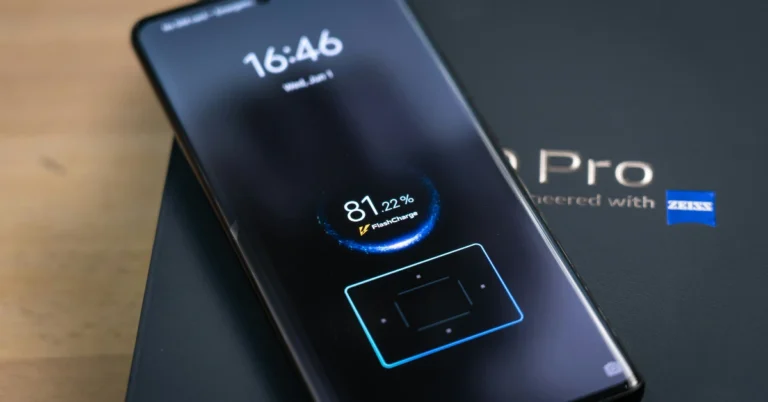
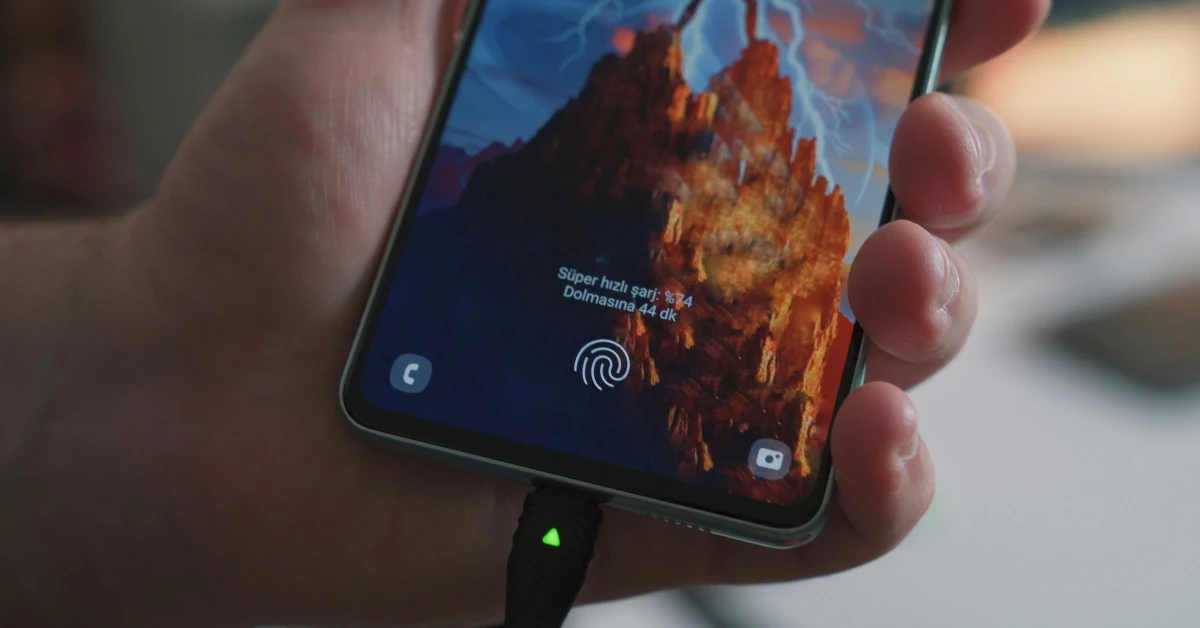
Fast charging is one of the biggest perks of buying an upper-midrange or flagship smartphone. Brands like Xiaomi, Oppo, OnePlus, and more have mastered fast charging tech that can replenish the battery pack to 100% in just a few minutes. If your phone is charging slowly, something weird must be afoot. Here are the top 7 ways to fix the ‘phone not charging at full speed’ issue. Read Also: Microsoft Authenticator showing wrong location on your PC? Try these 5 fixes

Before you begin, take a look at the common culprits

Here are some of the common factors that impede your phone’s charging speed
  • Slow power adapter
  • Damaged cable
  • Fast charging is disabled in settings
  • Low voltage
  • Issues with the charging port
  • Lots of apps running in the background
  • Worn-out battery pack

Use the proper power adapter

OnePlus 10T review: Super fast speed at an attractive price, should you buy it? Different smartphones support different charging speeds. If you own a device with fast-charging support, you’ll need to use an adapter that is able to deliver those speeds. Naturally, a 20W charger won’t be able to deliver the current at a rate that an 80W adapter can. For best results, use the charging brick that came with your smartphone.

Use a wall outlet

Use a wall outlet to charge the Fitbit Versa Your phone will hit its maximum charging speed only when its charger is connected to a wall outlet. If you’re charging it through a laptop, the speed will be throttled. This is the case with most power banks as well. This is why it is important to check the power delivery speed of a power bank before making the purchase.

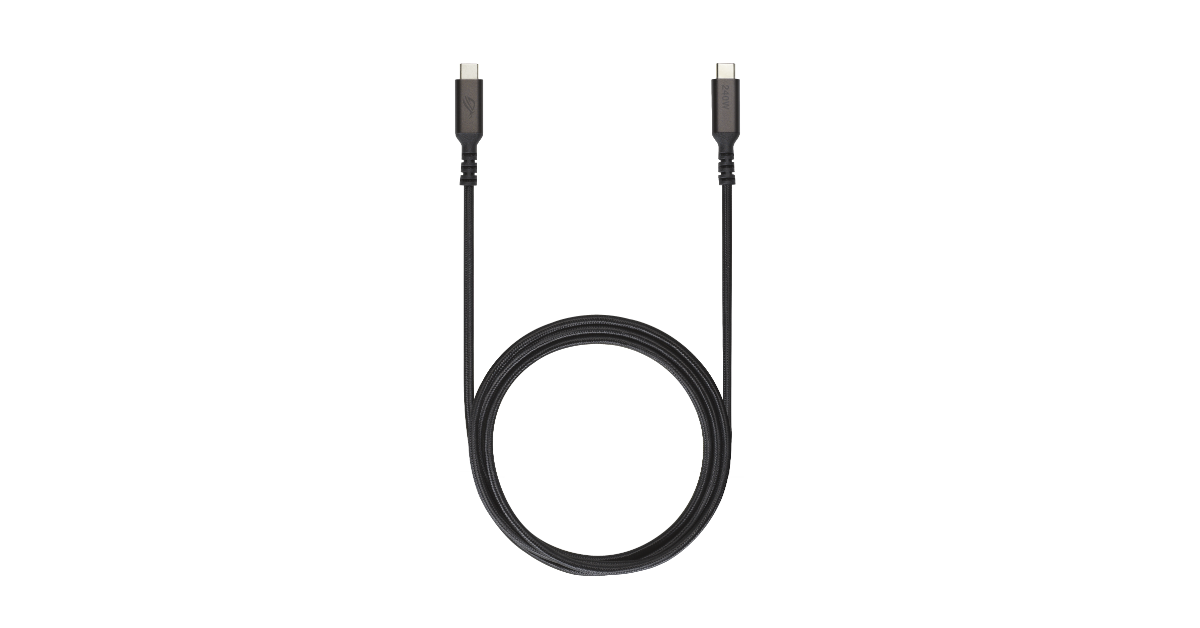
Check the USB cable for damage

If the charging cable is damaged, it won’t be able to deliver the current at a fast speed. Check the cable for frayed ends. If you don’t notice any physical damage, the pins might be at fault. Charge another device using the cable to confirm whether it is at fault.

Clean your phone’s charging port

  Clean your phone’s charging port A dirty USB-C port is bound to throttle the charging speed. Over time, dust and grime can collect on the port and cause all sorts of issues. We recommend dipping a small Q-tip in isopropyl alcohol and scrubbing it around the affected area. Give your phone a few taps to dislodge the dirt particles.

Enable Airplane Mode

Turn on the Airplane Mode Old batteries discharge a lot quicker than new ones. If your phone’s battery has worn out, it can still discharge while it is plugged into the charger. This often results in a very low charge increment even after hours of charging. While there is no ‘fix’ to this situation (apart from buying a new phone or replacing the battery), turning on the Airplane Mode can give the charging speed a small boost.

Shut down background apps

Top 5 Ways To Remove Apps That Android Won't Let You Uninstall (2024) If your phone is running several apps in the background, it won’t charge as fast as you want it to. Go to the app switcher and clear all the apps before plugging in the charger. You will notice a visible rise in charging speed. You may also want to use device settings to check which app is draining the battery the most.

Turn off the phone

Restart Your Phone If you notice that your phone starts overheating when you put it on charge, you should consider turning it off. Sometimes, even the most basic background tasks, like network reception, can cause the internal temperature to rise while charging. This issue is more common on older phones. Turn off your phone before plugging in the charger to boost the speed and keep the heating issues in check.

Frequently Asked Questions (FAQs)

Why is my smartphone not charging faster?

Damaged cables, faulty adapters, low voltage, and worn-out batteries can cause your smartphone to charge at a slower pace.

How do I restore the charging speed of my phone?

Make sure the charger isn’t damaged and turn off your phone to charge it at a fast speed.

What is the 80/20 rule of charging?

The 80/20 rule applies to Li-ion smartphone batteries. It suggests that keeping the battery’s charge level between 20-80% is good for it in the long term. This means you need to plug out the charger when the phone hits an 80% charge and plug it back in when the battery level drops below 20%.

How do I check my phone’s charging speed?

Download the AccuBattery app, go to the Charging tab, and check the reading next to ‘Charge current’ to view the charging speed.

How do I enable fast charging on my phone?

Go to Settings>Battery and turn on the toggle switch next to ‘Fast charging’. Read Also: Google Photos now lets you create memes of yourself: Here’s how

Final Thoughts

It is a good idea to check your battery’s health from device settings to accurately gauge the status of your device. If the health isn’t optimum, there isn’t much you can do to enhance the charging speed of your phone. If you have any questions, let us know in the comments!

Microsoft Authenticator showing wrong location on your PC? Try these 5 fixes

0
If you’re very particular about keeping your accounts secured with 2-factor verification, Microsoft Authenticator is one app you must have in your arsenal. This app allows you to go passwordless, giving you the option to approve sign-in requests to different apps, websites, and services. You also get to view the location of the device requesting to sign into your account. Sometimes, this location can be a bit off. Here are the top 5 ways to fix the ‘Microsoft Authenticator is showing the wrong location’ error on your PC. Read Also: Google Photos now lets you create memes of yourself: Here’s how

What’s causing this error?

If you’re trying to sign into an account on your PC, but notice a different location on the Authenticator app, any hesitation in approving the sign-in request is valid. Before we move on to the fixes, let’s take a look at some of the reasons behind the app displaying the wrong location.
  • Your PC is connected to a VPN server.
  • The location services are turned off.
  • Microsoft Authenticator does not have access to your PC’s location.
  • Your PC’s date and time settings are incorrect.
  • Faulty internet connection.
  • Glitchy app or corrupted cache.
Try these common fixes before moving on to the main methods:
  • Restart your PC.
  • Make sure you are connected to the internet.
  • Force close and restart the Microsoft Authenticator app.
  • Update the Authenticator app to the latest version
  • Update your PC to the latest OS version.

Disable VPN and proxy

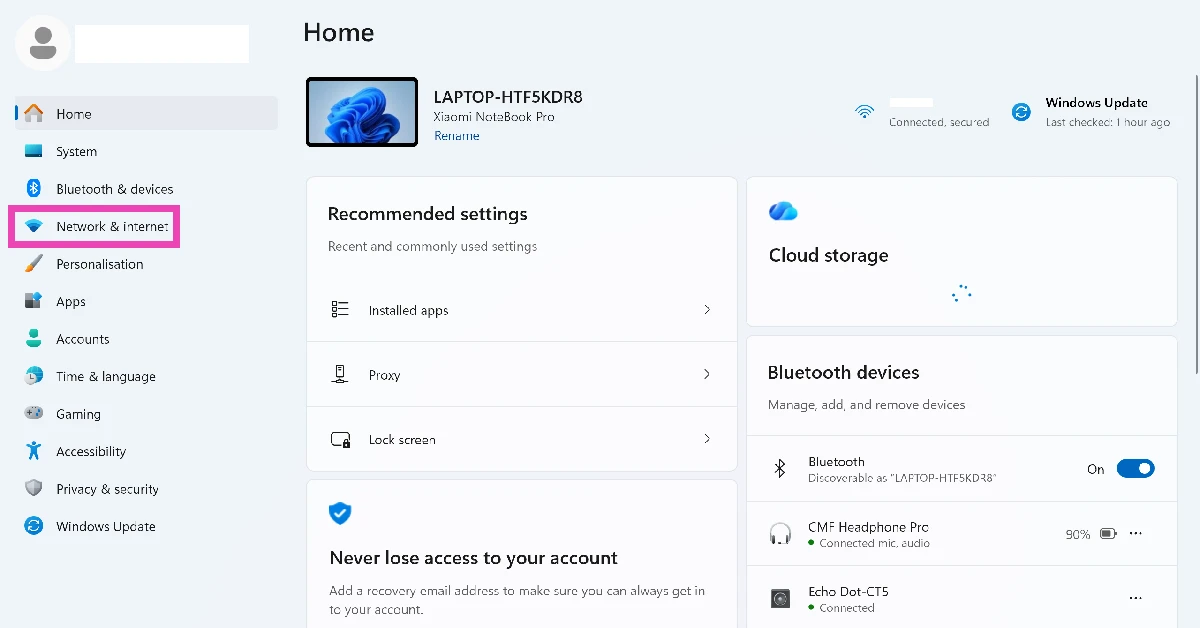
  1. Go to Settings.
  2. Select Network & internet from the sidebar. network and internet
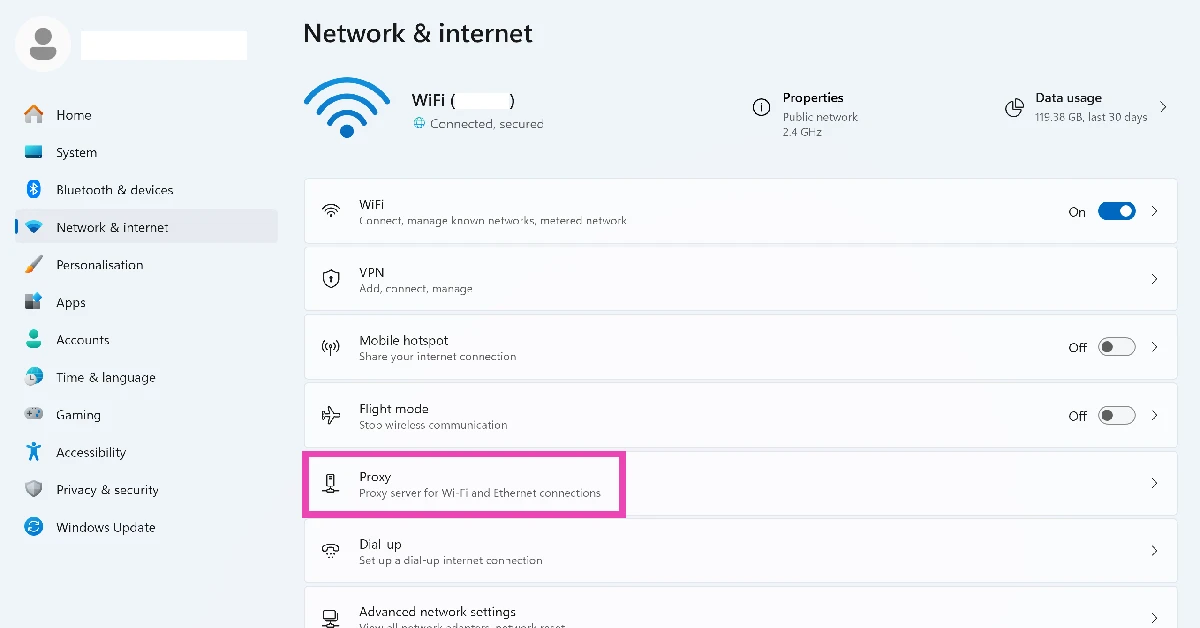
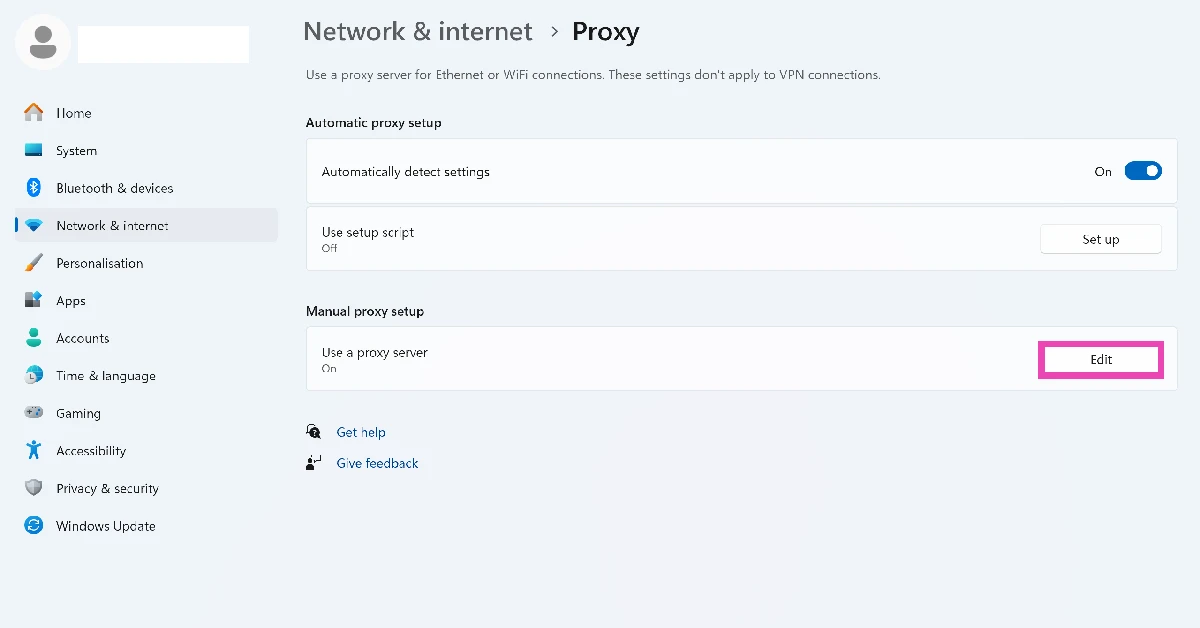
  3. Click on Proxy. Click on Proxy.
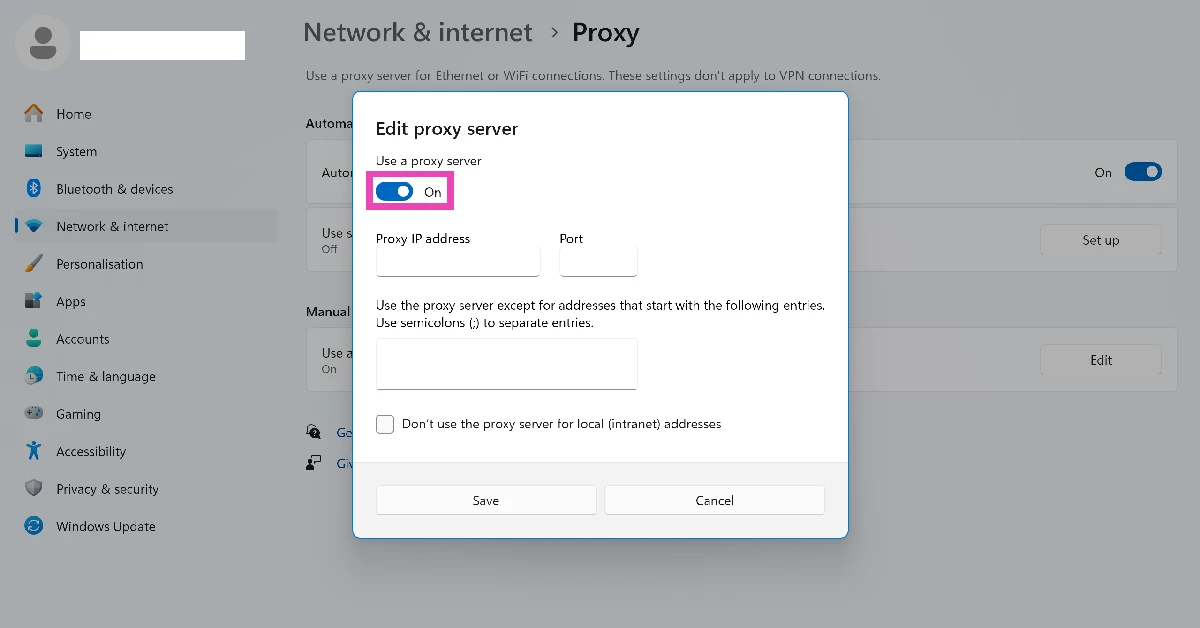
  4. Hit Edit next to Use a proxy server. Hit Edit next to Use a proxy server.
  5. Turn off the toggle switch. Turn off the toggle switch.

Make sure the time zone settings are correct

  1. Go to Settings.
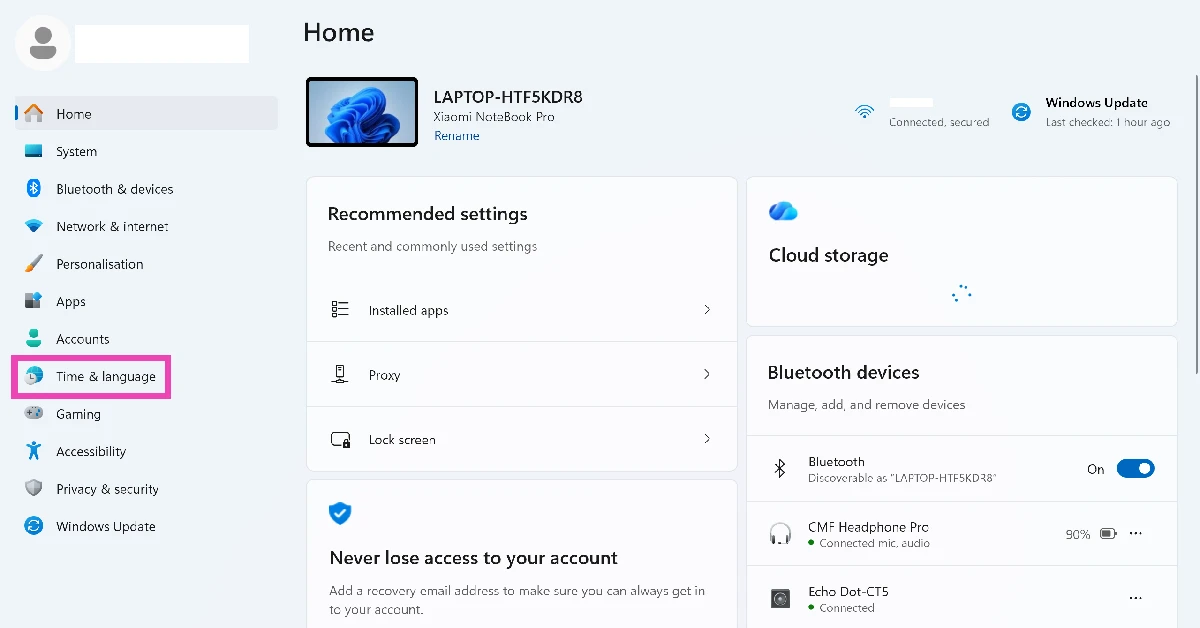
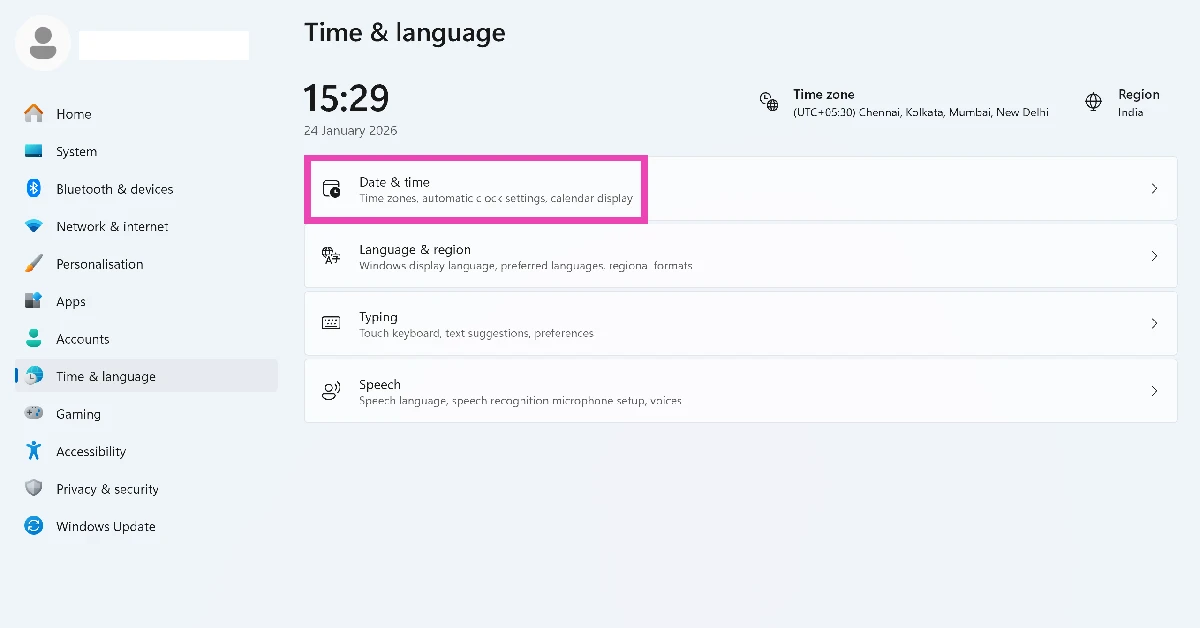
  2. Select Time & language from the sidebar. Select Time & language from the sidebar.
  3. Click on Date & time. Click on Date & time.
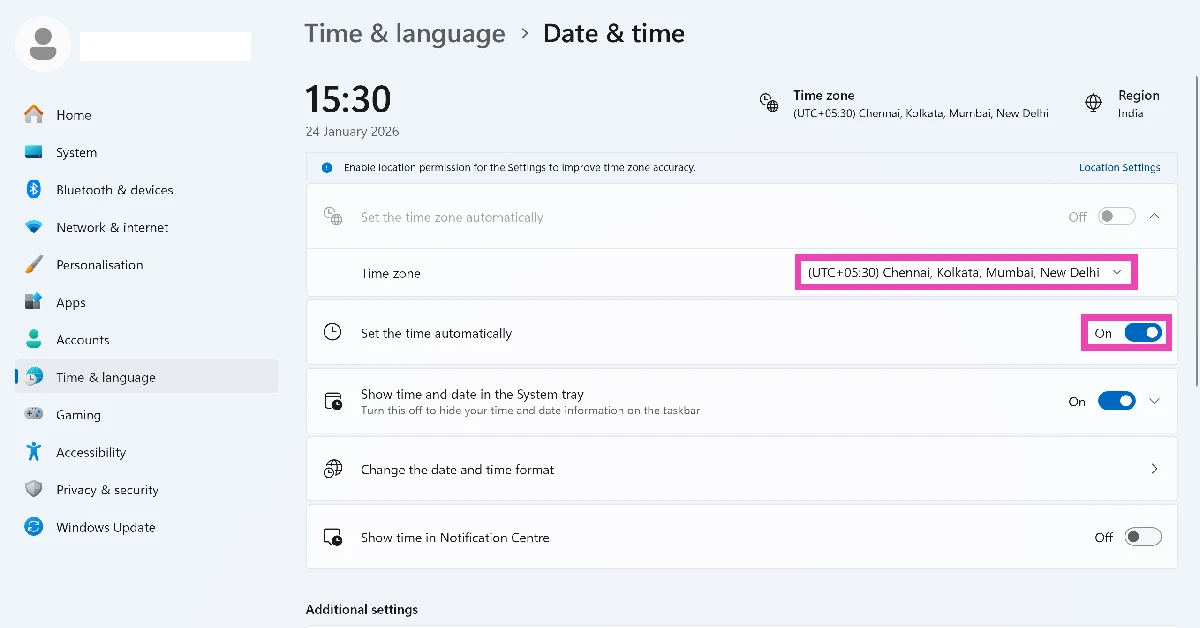
  4. Click the dropdown menu next to Time zone and select the appropriate option. Click the dropdown menu next to Time zone and select the appropriate option.
  5. If you don’t want to go the manual route, turn off the toggle switch next to Set the time automatically.

Enable location services

  1. Go to Settings.
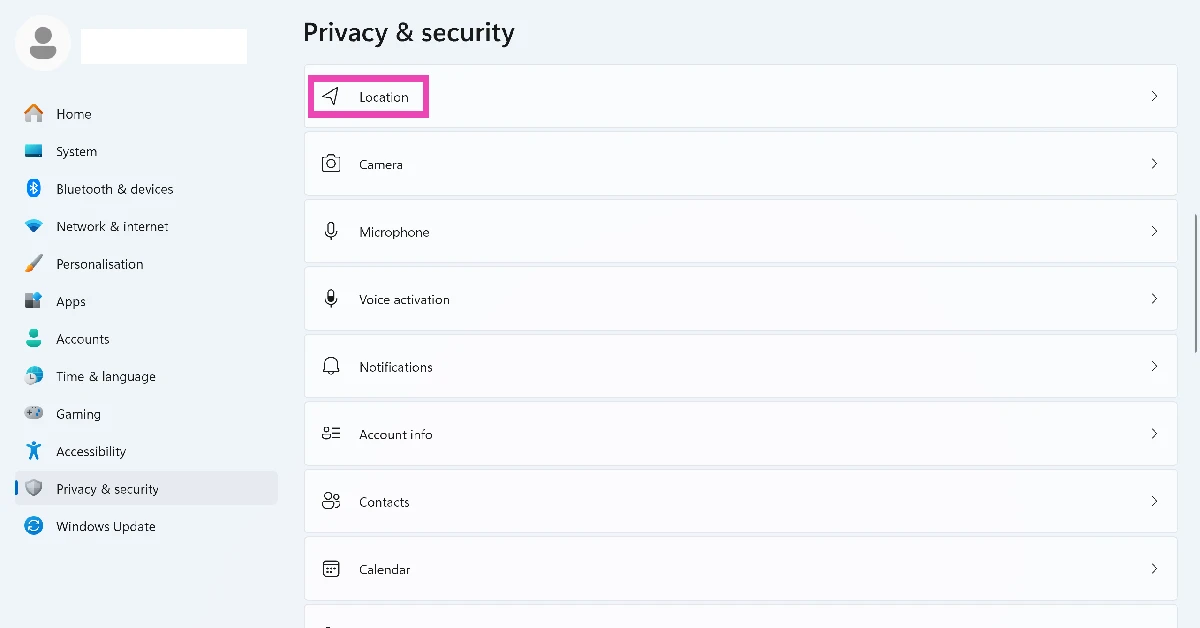
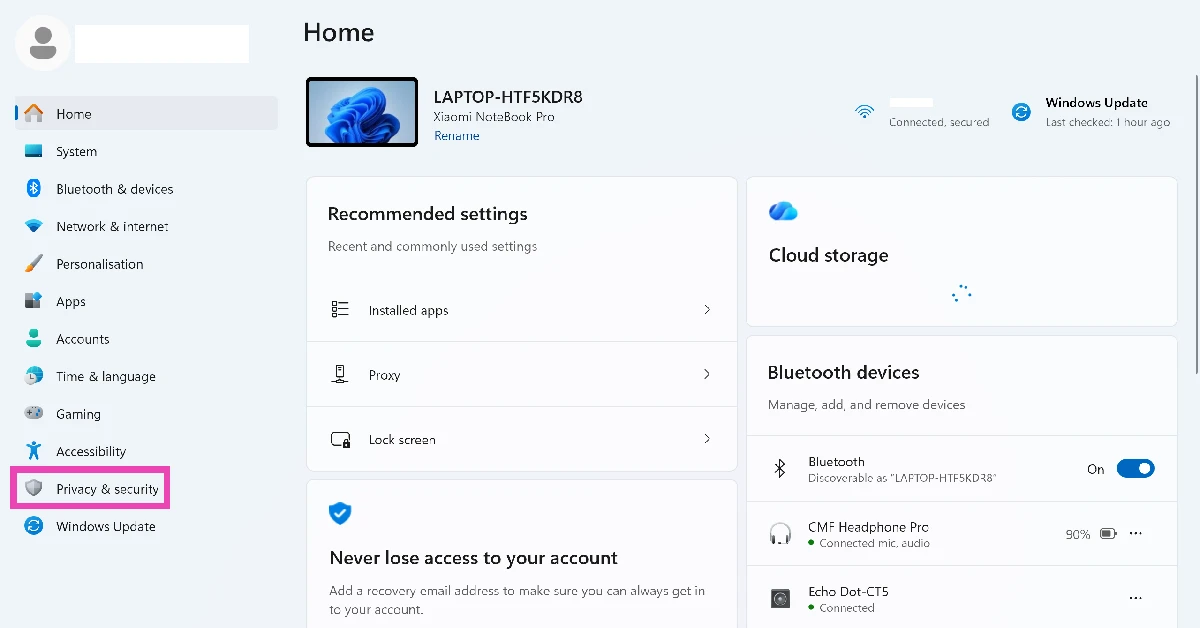
  2. Select Privacy & security from the sidebar. Select Network & internet from the sidebar.
  3. Click on Location. Click on Location services. Microsoft Authenticator showing wrong location on your PC? Try these 5 fixes
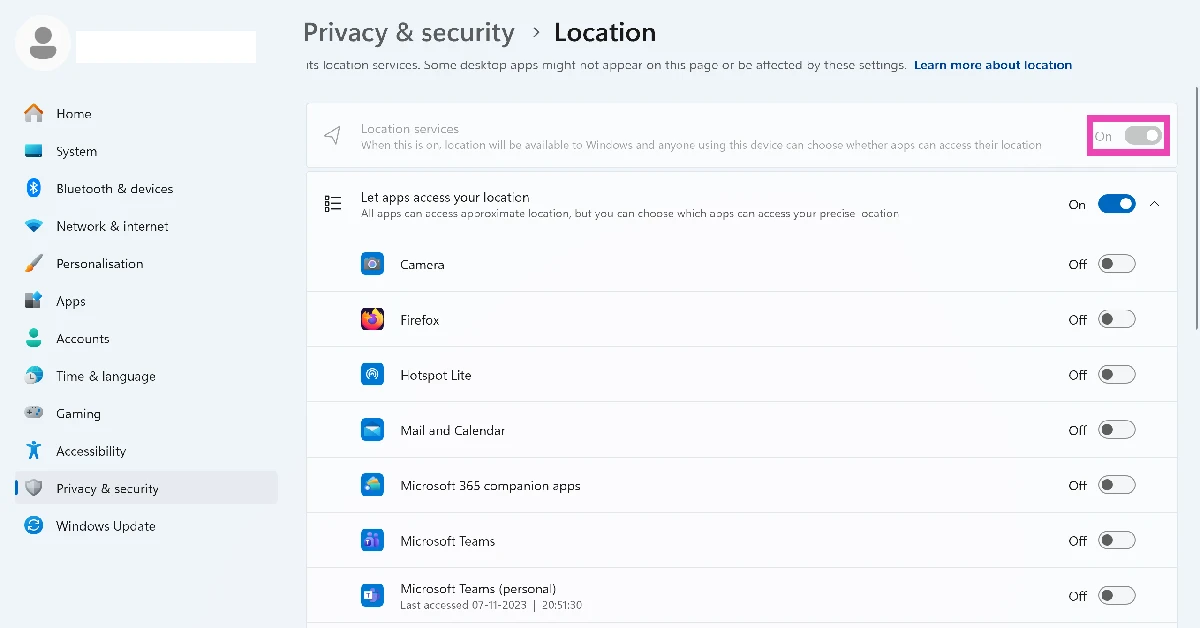
  4. Make sure the toggle switch next to Location services is turned on. Make sure the toggle switch next to ‘Location services’ is turned on. Microsoft Authenticator showing wrong location on your PC? Try these 5 fixes
  5. Additionally, scroll down and turn on the toggle switch next to Microsoft Authenticator.

Switch your internet connection

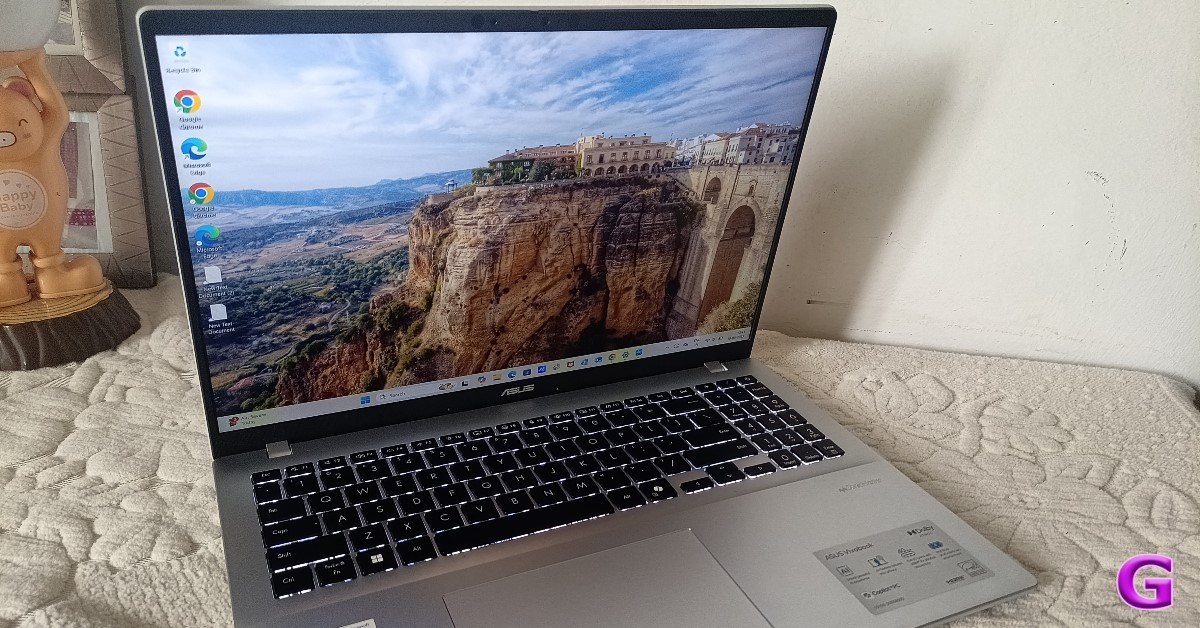
ASUS VivoBook 1607QA Review: A good AI laptop under Rs 65k A faulty internet connection often throws a location error in Microsoft Authenticator. The easiest way to fix this is by switching to a different WiFi network. If you don’t have access to another network, create a personal hotspot on your smartphone. Connect to the hotspot from your PC and use the mobile data to use the Authenticator app.

Repair the Microsoft Authenticator App

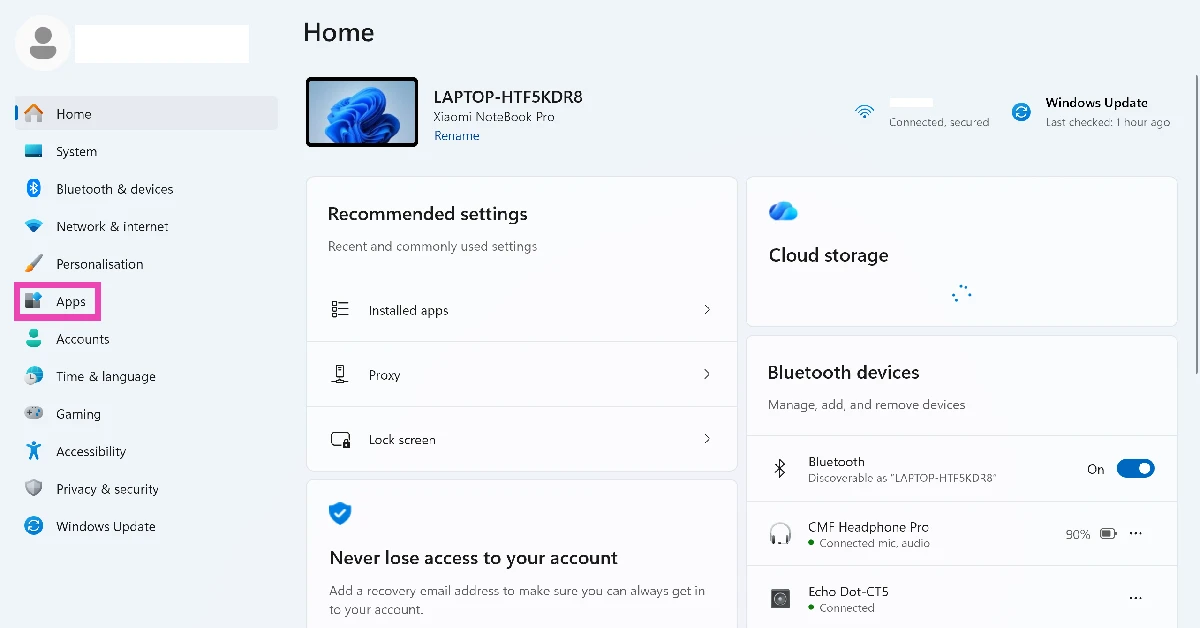
  1. Go to Settings.
  2. Select Apps from the sidebar. Select Apps from the sidebar. Microsoft Authenticator showing wrong location on your PC? Try these 5 fixes
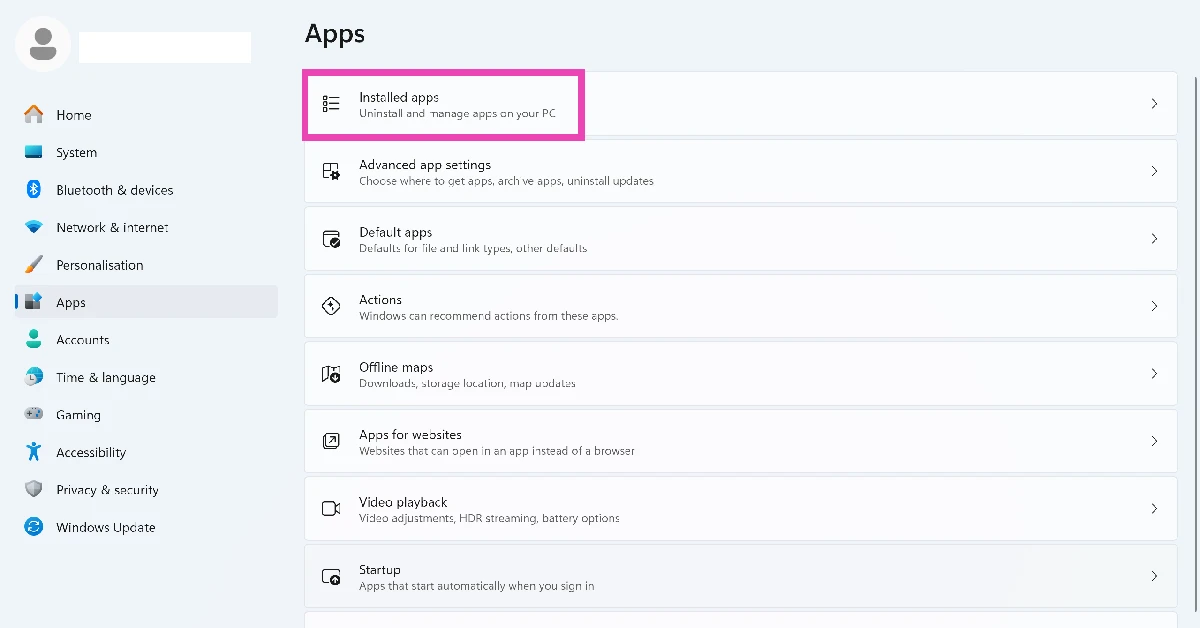
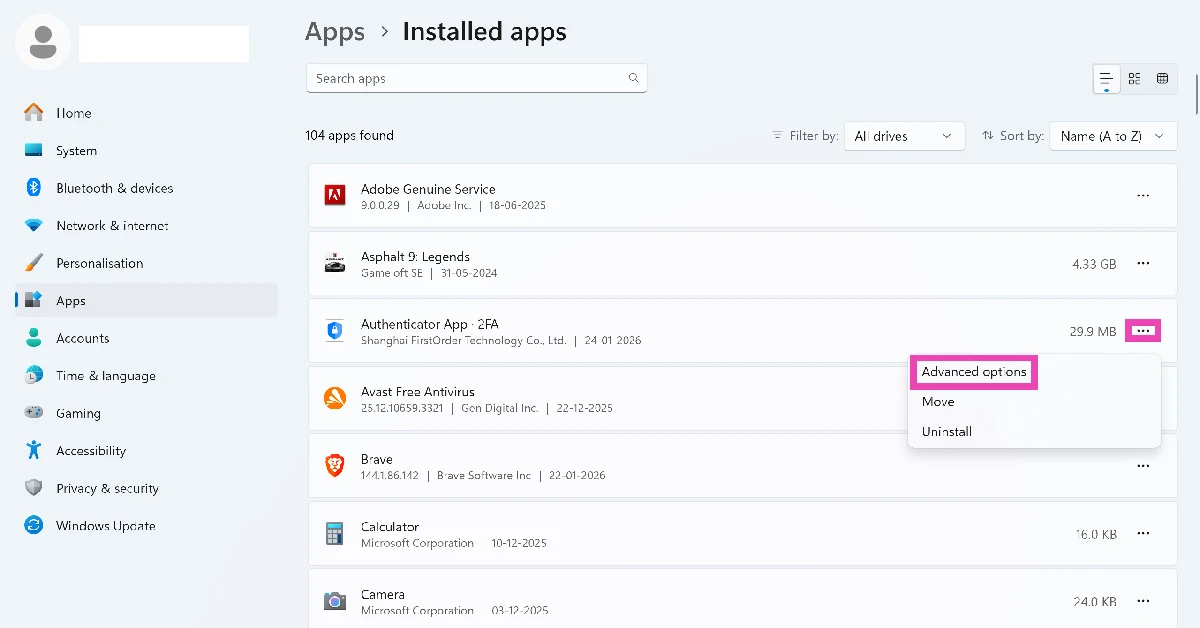
  3. Select Installed apps. Select Installed apps. Microsoft Authenticator showing wrong location on your PC? Try these 5 fixes
  4. Click ellipses next to Authenticator. Click ellipses next to Authenticator.
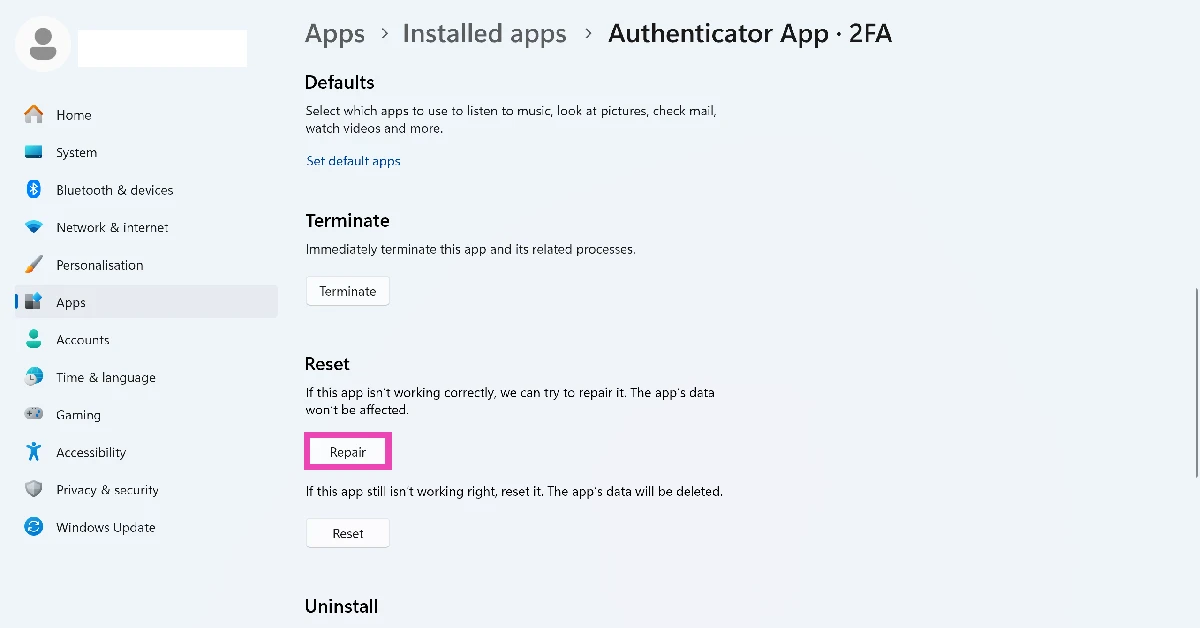
  5. Go to Advanced options. Microsoft Authenticator showing wrong location on your PC? Try these 5 fixes
  6. Hit Repair.

Frequently Asked Questions (FAQs)

How does Microsoft Authenticator determine the location of my device?

The Authenticator app pulls the data from location services, time zone settings, and the internet connection to determine the location of your device.

Why does Microsoft Authenticator need my location?

Some IT admins require you to share your location before accessing certain resources. In this scenario, the Authenticator app verifies your location once every hour.

Why is the Microsoft Authenticator app on my PC showing the wrong location?

The Authenticator app on your PC might show the wrong location if you’re using a VPN or have your time zone set to a different place.

Is there any way to fix the ‘wrong location’ issue on the Microsoft Authenticator app?

Disable your VPN, enable location services, switch to your current time zone, and use a different WiFi network to resolve the ‘wrong location’ error in the Authenticator app.

How do I disable VPN on my PC?

Go to Settings>Network & internet>VPN and turn off the toggle switch. Read Also: CMF Headphone Pro Review: Another CMF masterclass!

Final Thoughts

If these fixes didn’t work out for you, you might want to restart your PC in Safe Mode to check whether another third-party app is causing this issue. If you have any questions, feel free to ask in the comments!