


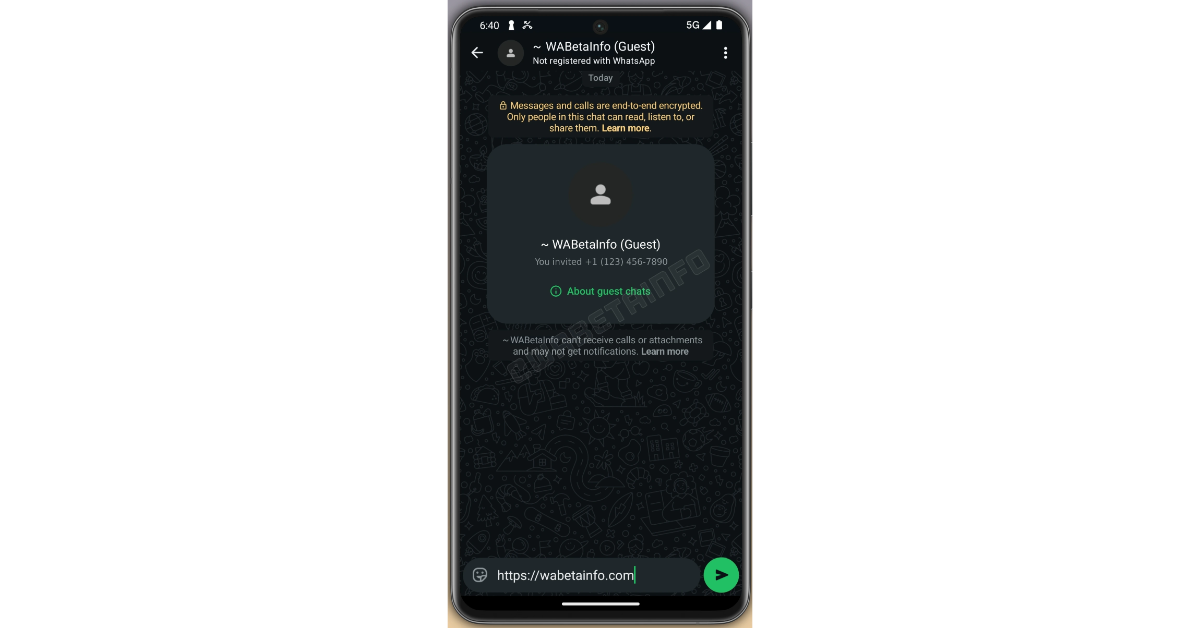

WhatsApp is introducing a new feature called Guest Chats, which allows users to communicate with others who do not have a WhatsApp account. This facility provides basic messaging options and is intended to be temporary, with chats disappearing after 10 days of inactivity. Guest Chats are now being sent out to beta users on Android and iOS devices. Non-WhatsApp users may view these chats using a secure web link that does not need a WhatsApp account. Guest Chats also include a unique identity for encryption, guaranteeing end-to-end encryption comparable to regular WhatsApp discussions.
WhatsApp has added a Guest Chat function, according to WABetaInfo. The most recent beta release for Android and iOS includes this functionality. Guest chats on WhatsApp are intended to ease engagement for non-users by enabling them to participate without the need for a separate application or account. This functionality is presently being tested with a restricted set of beta users on both the Android and iOS platforms. Its goal is to bring new users to the WhatsApp interface and perhaps increase account sign-ups. By permitting guest chats, this feature affects connection dynamics, allowing users to interact with people outside of the regular WhatsApp user base, making it easier to reach out to new contacts who have yet to join the platform.
Also Read: Meta will no longer use end-to-end encryption (E2EE) for Instagram DMs
According to the report, the guest chat function lets users ask others to join chats via a secure connection. This link enables non-WhatsApp users to see conversations by clicking on it in their browser. Users can create the invitation link under the “Invite a friend” section or at the bottom of their contacts list. The URL may be shared by SMS, email, or other communications platforms. Recipients may access the link on their desktop or mobile devices, with the option to download the WhatsApp app or remain as guests. Choosing to continue as a guest will bring them to a WhatsApp Web conversation.
WhatsApp Web assigns a unique identification to guest users, which is used to generate an end-to-end encryption key, protecting the security of message content from WhatsApp. Users may check the encryption of messages by scanning a QR code or comparing security codes. By continuing as a guest, users agree to WhatsApp’s terms of service and get access to the sender’s phone number. After the encryption key is generated, users may choose a recognisable name; however, WhatsApp does not verify them, which might lead to security problems. The invite link could be hacked, enabling unauthorised users to join the guest chat, particularly if the intended receiver changes their phone number. As a result, users are recommended to verify the authenticity of those with whom they are exchanging guest chat links.
Also Read: Optoma UHR90DV triple-laser RGB home theatre projector launched in India
At this stage, Guests may initiate WhatsApp chats using a shared chat invite link provided by a registered user. When a guest chat is started, “Guest” displays in the app bar, indicating that the person has not registered. This function assists in recognising guest responses, resulting in easier communication. Guest chats have restricted capability for temporary interactions, excluding group conversations; media sharing; attachments such as images, videos, documents, and GIFs; as well as voice and video calls.
Guest chats have a limited duration, ending after 10 days of inactivity and requiring a fresh invite link to continue talks. Guests may not get notifications of new messages; thus, users must actively check their messages. Users can control their active conversations and ban visitors in the same way they do regular account users. To block a guest, users must tap on the guest’s name in the chat and select “Block“, which effectively prevents further communications from that person. In addition, only guests who got the initial invite link may contact the inviter; those invited by others are unable to do so.


