


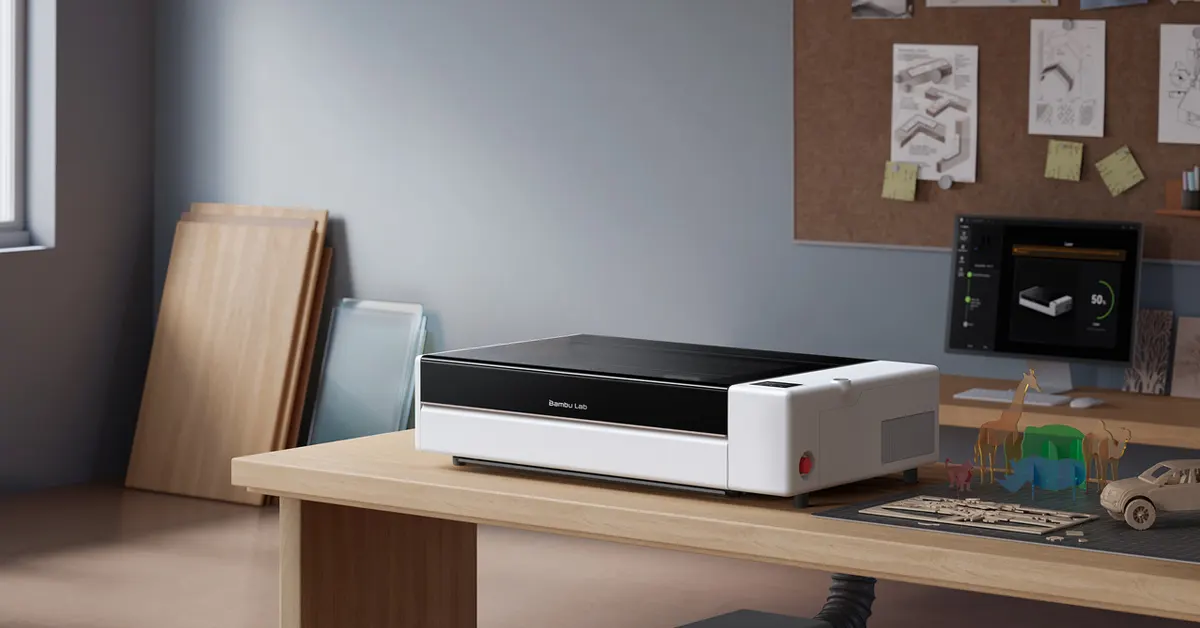

Setting up a CO2 laser cutter has traditionally involved thermal paper, a lot of squinting at burn marks and roughly the patience of a bomb disposal technician. Bambu Lab, which made 3D printing feel almost boring in its simplicity, is betting it can pull off the same trick with lasers. Its first standalone laser machine, the Bambu Lab R1 laser cutter, opened pre-orders on September 22, and the feature getting the most attention is not what it cuts. It is the fact that the machine finds and fixes its own optical alignment in about a minute, a chore that usually eats the first hour of owning any CO2 laser.
In This Article
More materials than a diode laser can touch
The R1 runs a 55W CO2 laser rather than the diode lasers common in cheaper home machines. That distinction matters more than it sounds. A diode beam passes straight through clear acrylic and glass, so it cannot cut or engrave either. A CO2 beam can, which is why this counts as a proper laser cutter for clear acrylic and glass alike, alongside wood, leather, paper and fabric, plus engraving on stone and coated metal.
Read Also: Bambu Lab A2L Review: The 3D Printer That Finally Stopped
Being a CO2 laser also lets the R1 push through thicker stock. Bambu Lab rates it for up to 18mm black walnut plywood and 20mm acrylic, cut faster and with less charring than a diode laser typically leaves behind. That makes it a genuine CO2 laser engraver for wood projects that go beyond thin plywood ornaments. The working bed is 600 by 300mm, and the optional Conveyor accessory feeds stock up to three metres long through the machine, useful for anyone building furniture-scale pieces rather than coasters. It can also engrave on curved surfaces such as bottles and bowls.
The part every laser owner dreads, automated
On any CO2 laser, the beam bounces off a series of mirrors before it reaches the lens. If those mirrors drift even slightly, cutting power and accuracy both suffer, and in bad cases the machine barely functions. Keeping them aligned is usually a manual ritual: tape down thermal paper, fire a test shot, read the burn mark, nudge the mirror, repeat, mirror by mirror, and do it again whenever things drift.
Bambu Lab’s answer is Auto Laser Alignment. A small sensor plate with a crosshair mounts on the toolhead, reads where the beam is actually landing, and corrects it using motorized mirror actuators, no paper or screwdriver required. The company says the whole process takes about a minute, which would make the R1 an auto-aligning laser cutter in a category where that job has never been automated before.
Cameras and lasers doing the thinking before the cutting starts
Before it fires, the R1 has to work out where the material sits, how tall it is, and how the toolhead is tracking across it. Bambu Lab calls this the TriSense System, and it leans on a wide-angle camera for the whole bed, a toolhead camera for close-up positioning, a laser that marks the exact cutting spot, a second laser that measures surface height for autofocus, and encoders that report toolhead position in real time. Put together, it is meant to let the machine engrave evenly across a curved bowl or trace a printed sticker outline and cut along it with accuracy under 0.2mm, without the user manually squaring up the material first.
Read Also: Bambu Lab kicks off the 2026 School Ambassador Program
The motion software borrows directly from Bambu Lab’s 3D printer line, retuned for a laser. Vibration compensation is meant to keep engraved lines crisp through sharp direction changes, and a speed-synced power system adjusts laser output as the head speeds up or slows down, so tone stays even instead of burning darker in the slow corners.
Built for a home workshop, with one important caveat
In its standard enclosed configuration, the R1 carries a Class 1 laser safety rating under IEC 60825-1, the safest consumer tier, which means no goggles or dedicated room are required. It also uses crossflow ventilation to pull smoke out steadily, and it cuts power the moment the lid opens mid-job, alongside a flame sensor and emergency stop.
That safety picture changes with two of the optional accessories. Attaching the Riser Base or Conveyor breaks the sealed enclosure, and Bambu Lab reclassifies the machine as Class 4 in that configuration, meaning it requires laser safety eyewear and is intended for trained, professional use rather than casual home cutting. Anyone buying those add-ons should treat that as a genuine change in how the machine needs to be operated, not a footnote.
Where the R1 lands in an already crowded market
Bambu Lab is not the first company to sell a 55W desktop CO2 laser. xTool’s P2S sits in a similar power class and typically lists north of $2,700, while Glowforge’s comparable CO2 machines start around $2,999 before its newer HD tiers climb well past that. A side-by-side look at Bambu Lab R1 vs xTool pricing puts the R1 at a lower entry cost for similar cutting power, though buyers should note the base $2,499 price includes only a short-focus lens. The Riser Base, Conveyor, rotary attachment, extra lenses, Vision Encoder calibration tool, air purifier and fire suppression system are all sold separately, so a fully kitted-out bench setup will cost meaningfully more.
There is also history worth knowing here. Bambu Lab teased the R1 back in mid-August, and its own community forum spent weeks debating whether it would even be a CO2 laser or another diode module like the one built into its H2D combo printer, a feature some owners had criticised for a fiddly cleaning routine every time they switched between printing and lasering. The R1 sidesteps that specific complaint simply by being a dedicated machine rather than a shared one.
Who Bambu Lab is actually chasing
Going by the target use cases Bambu Lab has outlined, the R1 is aimed less at total beginners and more at makers looking to add a second process to an existing bench. That includes existing 3D printer owners who want to add cut wood, acrylic and leather parts to their prints, small workshops that need unattended reliability for production runs, woodworkers who want long boards fed through in one pass, and designers doing personalised engraving on glass, stone and curved objects.
Pre-orders for the R1 opened September 22 through Bambu Lab’s official store, with shipping scheduled to begin in October. It runs on the same MakerWorld platform, Bambu account and Bambu Suite software that existing printer owners already use, so anyone already in that ecosystem will not need to learn a separate workflow.
Whether any of this holds up outside a spec sheet will only become clear once real units land on benches in October and start filling workshops with sawdust and acrylic fumes. Self-aligning optics and camera-guided cutting sound great in a press release. What actually matters is whether that promise survives a few hundred hours of daily use, the same test Bambu Lab’s printers eventually passed. For now, the R1 is the first machine in its price bracket that promises to spare buyers the genuinely tedious ritual of tuning mirrors by hand, and for anyone who has ever done that by hand, that alone is worth paying attention to.


