



Azure Latch is one of the finest football games on Roblox, closely trailing behind Blue Lock Rivals. It lets you showcase your tricks and skills in competitive matches, promising loads of fun. The goals are followed by fun effects that add massively to the experience. If you’re new to the game, you can use some special codes to get your hands on useful items. Here are all the Azure Latch codes that are up for grabs in October 2026.
Read Also: Nothing OS 5.0 introduced with 80+ updates and AI features: Availability details
In This Article
List of Working Azure Latch Codes (October 2026)
| Code | Reward(s) |
| TIMOTHYSAYSRINISCOMINGSOON | Rewards (NEW) |
| TIMOTHYISHEREFORNAGI | Rewards |
| SEALSARETHEBEST | Rewards |
| ELGOALBOXCHANGE | Rewards |
| TIMOTHYSAYSHI | Rewards |
| NELMASTERY | Rewards |
| MKAISERISBALANCEDNOW | Rewards |
| MASTERYKAISER | Yen |
| SORRYFORLATERELEASE | Explosion |
| KAISERISNEXTWEEKNOWORRIES | Rewards |
| PINGOVERHAUL | Rewards |
| SORRYFORSHUTDOWN | Aizen |
| LATE60KCCUCODE | SSJ4 MVP |
| AIKUANDGOALKEEPERCHANGES |
2.5k Style Coins, 3.4k Yen
|
| TIMOTHYTHESEAL |
2.5k Style Coins, 3.4k Yen
|
Style Coins can be used to spin for new character styles and goal effects. Meanwhile, Yen is the in-game currency for making purchases and updates.
List of Expired Codes
These can no longer be redeemed in this game.
- ITSONEOFTHOSESTUPIDEMOTESAGAIN
- MAYBE
- BAROUTSPECIAL
- WOWTHISSUCKSIMSORRY
- EVILBALL
- RIPVERA
- IMLEGALLYBLINDICANTSEE
- RANKEDANDBACHIRA
- CHEMISFINALLYHERE
- SORRYFORMISTAKEONMAINTENANCE
- DOUBLEASSASSINSTAKE2
- DOUBLEASSASSINS
- SORRYFORDELAYAGAIN
- HAPPYMOTHERSDAY
- SOCCERISTHISSERIOUSBTW
- CLUBTOGETHER
- BLACKWIND
- SAFETYFIRST
- CHEMSOON
- SORRYFORDELAY
- KIYORAUPDATE
- ADDITIONALTIME
- THOSEWHOSPIN
- ULTRASADIST
- HIORIUPDATE
- NELISAGIREVAMP
- MYANIMEFANSMAN
- BROTHERNOAH
- TheAceEater
- GambleShot
- LetsGoUbers
- WINTERUPDATE2025
- AJOLLYDAYISCOMING
- QUIET
- GIMMEDINERO
- WELLTHATSVERYNICE
- ANOTHERPATCHNOTE
- DoubleConversion
- CALLMETHECHAMELEON
- happythanksgiving
- OOPS!
- illbeatyouup
- THATSNOTSUPPOSEDTOHAPPEN
- imtakingthisgametothenextlevel
- CHOMPCHOMP!
- FeelingSharky
- WaiterWaiterMoreOnionRings
- almostkuronatime
- merrychristmas2025nov
- happylatehalloween2025
- waiterwaitermorenelisagichanges
- RankedRelease
- 11v11Comeback
- MoreOnionRings
- Oops
- SleepingGenius
- RightOnTheMoney
- ChemicalReaction
- GimmeOnionRings
- 11v11Preparation
- NoMorePest
- Sorry4RandomShutdownAgain
- StillHalfBaked
- PartTwoOfTwo
- JumpAllMyCells
- TheProdigyRefreshed
- PartOneOfTwo
- BeautifulDestruction
- PieceOfStrategy
- DUO_EMOTES
- HEROSINSTINCT
- MASTERYQUEST
- MetaGenius!
- TheGeniusOfAdaptability
- sorry4rollback
- PSChanges
- CompensationForTheShutdown
- ThankYouForBeingPatient
- KunigamiRework!
- RevivalPatch
- ThankYouForStayingWithUs
- WeAppreciateYouAll
- SorryForTheBugs
- SorryForTheInconvenience
- KunigamiUpdate
- NextUpdateSoon
- ThanksForBeingPatient
- SorryForInconvenience
- YukimiyaUpdate
- WeeklyUpdate
- ThanksForBeingPatient
- FollowDastOnRoblox
- FollowDCJToo
- FollowVoaj77
- SorryForLongWait
- ChigiriUpdate
- 100kInterested
- QOLbroQOL
- GAGAMARUPUNCH
- TheMonster
- DelayLatch
- Jakethesnake
- TheKing
- AMMISTHEOWNERNOTLEFTRIGHTTH
- ACEEATER
- THXFOR2M
- THXFORFOLLOWERS
- FOLLOWCHIBA
- follow4mmeie
- FOLLOWWENDY
- FOLLOWJX
- FOLLOWMERCY
- FOLLOWCHAPTER
- FOLLOWAVA
- FOLLOWOLLY
- FOLLOWDAST
- FOLLOWDASS
- FOLLOWERT
- RINRELEASE
- sorryfordelay
- RINSOONTRUSTME
- SorryForRollback
- SAEREWORK3TIME
- sorryforlatency
How to redeem a code in this game
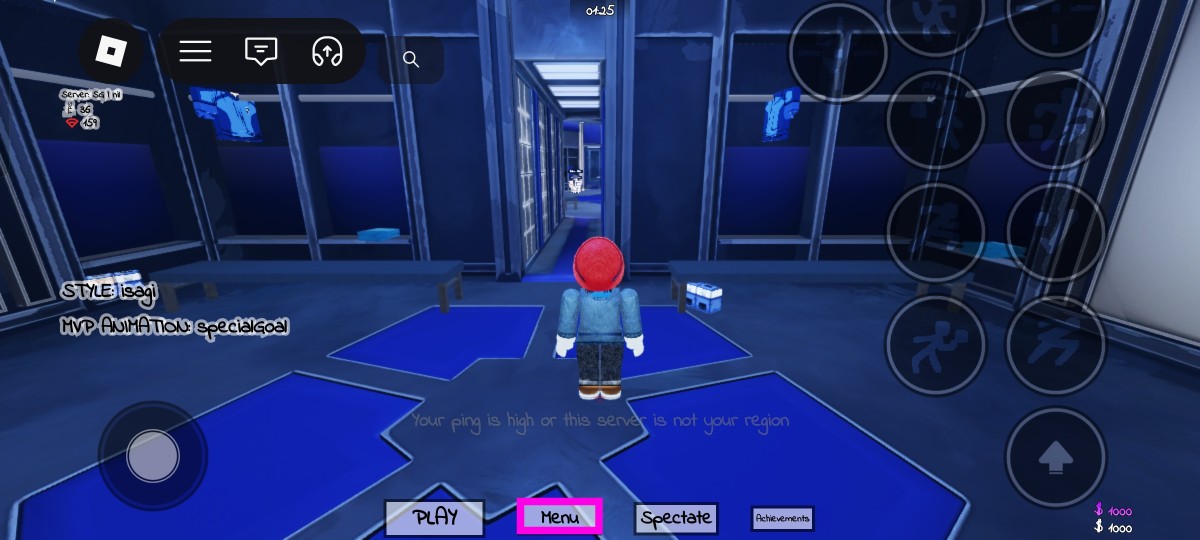
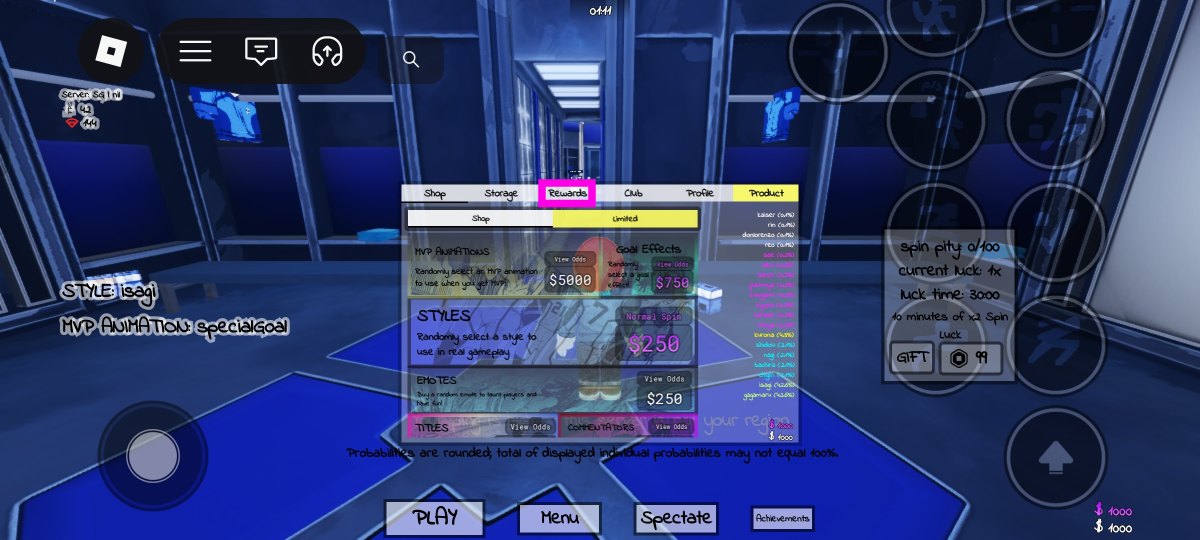
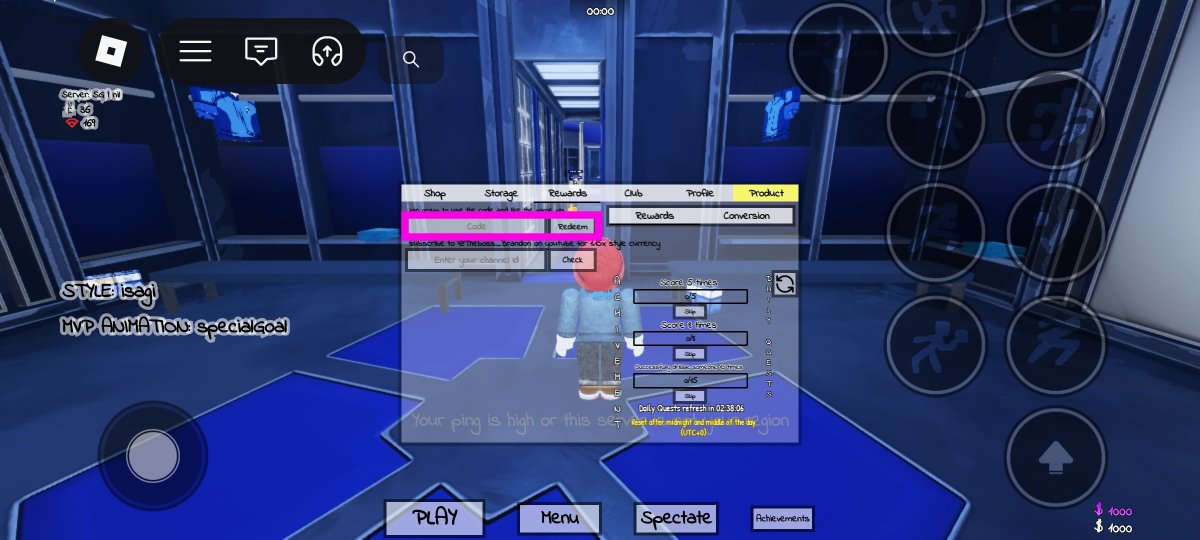
In order to redeem a code, you need to join Azure Latch’s Roblox community and like its page. Once that’s done, follow the steps mentioned below.
- Launch Azure Latch on Roblox.
- Hit the Menu button at the bottom of the screen.

- Go to the Rewards tab.
- Enter your code in the text box.
- Hit Redeem.
Frequently Asked Questions (FAQs)
Why is my code not working?
If you can’t get your code to work, check it for typos and make sure its letters are in uppercase.
How do I redeem my code?
Like Azure Latch’s Roblox page and join its Roblox community. Then, launch the game, go to Menu>Rewards, enter your code in the text box, and hit ‘Redeem’.
How do I get free Yen in this game?
Use codes ‘MASTERYKAISER’, ‘AIKUANDGOALKEEPERCHANGES’, and ‘TIMOTHYTHESEAL’ to get free Yen in Azure Latch.
Why am I not able to redeem my code in Azure Latch?
You need to like the game’s Roblox page and join its community before redeeming a code. Furthermore, if your code has expired, it can’t be redeemed.
Where can I find the latest Roblox codes?
Visit the Gaming section on our website for the latest codes from major Roblox titles.
Read Also: New Mac mini models with M6 and M5 Pro CPUs launched: Pricing Details
Final Thoughts
Need more sports-themed games? Check out NFL Universe Football and Basketball Zero on Roblox. While you’re here, take a look at the latest Adopt Me! codes too.
Bookmark this page to get the latest Azure Latch codes as soon as they are released. Go to the Gaming section on our website for more Roblox codes and daily NYT word game guides.


