Are you looking for today’s Wordle for October 23, 2024? The problem is difficult to solve, so if you need assistance, we’ve included hints and the answer to the October 23 Wordle.
In This Article
Hints and Answers for Today’s Wordle October 23
Before answering directly, please check the October 23 Wordle Hints first.
Today’s Wordle answer consists of a vowel, a repeating letter, and can be synonymised with silly and futile.
Hint 1: Today’s Wordle answer includes one vowel. Hint 2: The answer for today has a repeating letter. Hint 3: being ridiculous or mildly ludicrous : silly
What word does today’s Wordle begin with?
Do you need help with today’s Wordle answer’s initial letter?
The first letter in today’s Wordle is “G”
Today’s Wordle Answer October 23
The answer to Wordle on October 23, 2024, is — GOOFY
Wordle: A Five-Letter Word Guessing Game • The game allows six guesses of a five-letter word. • Provide feedback on guessed letters’ placement in the puzzle. • TheNew York Times purchased the game in 2022. • Created by Josh Wardle for his partner, narrowing down 12,000 English words to 2,500. • Named after the word “word.”
How To Play Wordle?
Wordle is a New York Times word puzzle game that allows users to guess a five-letter word in six attempts. The letters are highlighted in Yellow and Green, indicating whether the word is present in the answer or not, and Green letters indicate the correct guess.
Select a powerful starting word: Avoid using unusual words, as they frequently do not match common letters. A good opening word has plenty of benefits.
Repeating letters: Don’t be afraid of repeating letters; they appear frequently in words. The answer may contain one or two repeated letters.
Use the Wordlebot: The NYT’s Wordlebot analyses and compares replies to itself. This challenge can assist you enhance guessing skills and highlight areas for development.
23 October 2024: New Amazon Quiz is now available. Customers from different parts of the country are participating in the daily quiz. The quiz starts at midnight today and will be live until 11:59 PM tonight. By successfully answering every question, participants in the quiz have the chance to win wonderful rewards. A Rs 500Amazon Pay Balance is up for grabs to participants today.
One wrong answer could eliminate you from the quiz. You have a chance to win Rs 500 Amazon Pay Balance if you successfully answer everyquestion. Users of the app only have the opportunity to take the quiz. Check Out 23 October 2024 Amazon Quiz Answers.
Onlyapp users are eligible to play the Amazon quiz every morning from 12 AM to 11:59 PM. The quiz is not available on the desktop. For those who are unaware of how to play the Amazon quiz, below are the steps, you can follow to take the quiz.
We have written an explainer above, you can refer to that.
When are the winners of the Amazon Quiz and contest announced or declared?
The announcement of today’s Amazon quiz winner will take place Tomorrow. As for the Special Quiz and “Spin & Win” Contest, thewinners will be declared once the Quiz Contest comes to an end. To find out who the lucky winner is, you can refer to the Amazon Quiz Winners List or visit the Amazon Winners tab in the Amazon App.
How to participate in the Daily Amazon Quiz?
That is very easy, just got to the Amazon app and scroll to the bottom of the page and you will find the Quiz section. Click on it (usually it is called the fun zone) and you can enter the Amazon Today Quiz Contest.
Are there any other quizzes or contests running on Amazon daily?
Yes, there are many running on a daily basis. These range from spinning the wheel to answering the questions correctly. All are located in the Fun Zone.
What are the criteria for selecting a winner in the Daily Amazon Quiz?
When a qualified player submits correct answers to all the questions, they will automatically be entered into a lucky draw. This draw will include all participants who answered all the questions correctly.Amazon randomly selects the final winners from the pool of eligible participants who gave the right answers.
Which Types of Questions are asked within Amazon Daily Quiz?
These are very simple and straightforward questions. These are mainly related to general knowledge.
Where should I look for Amazon Daily Quiz answers?
You canbookmark this page as we will help you every day with the Amazon Daily Quiz. We bring you fresh answers every day for the Amazon Daily Quiz and Contest.
What time does Amazon Announce previous winners?
The previous winner’s name will be announced today at 12 PM (noon).
Garena Free Fire Max is a battle royale game with regular awards and tournaments to keep players interested. If you play Garena Free Fire, you should be aware of the redeem codes that are released on a daily basis. However, because the battle royale game is banned in India, players from other countries can use the Free Fire Redeem codes daily. If you’re unfamiliar with the Garena Free Fire redeem codes or don’t know how to get them, we’ve put together a step-by-step guide to help you redeem them. Check out Garena Free Fire Max Redeem Codes for 23 October 2024.
The Free Fire Max redeem codes are a great way to get free stuff. These are 12-digit codes that contain alphabets and numbers, as well as an expiration date and time. Because the Garena FF redeem codes cannot be used more than once, you should hurry to the redemption page to claim your free reward before someone else does. To get a free reward, all you have to do is go to reward.ff.garena.com/en, which is the official redemption page. Also, keep an eye on this space for daily updates on Garena Free Fire Max redemption codes and rewards.
Your Android smartphone imposes several geographic restrictions across several apps. Some of these restrictions can be easily bypassed with a VPN. Geo-locked YouTube videos fall in this category. Things get a little trickier if you want to install Play Store apps that are not available in your location. If you’re not too keen on using third-party app marketplaces, you can always change your country or region in the Google Play Store to bypass the restriction. Here’s how you can go about it.
There are a few things you need to keep in mind before changing your country in the Google Play Store. For starters, your Play Store account must be at least one year old in order to change your location. Secondly, you will need a valid IP address based in the country that you’re going to set in your Play Store profile. You can use a VPN app for this task. Lastly, you will need a valid payment method from the country you’re about to set in your profile.
Once you change your payment method, your old payment method will become dysfunctional. You won’t be able to use your Google Play balance upon changing the location. However, once you revert to your initial location, you will be able to redeem the Play Points again. You can change your location in the Play Store only once per year.
Change your country in Google Play Store (Android)
Step 1: Use a VPN app to set your server to your desired country.
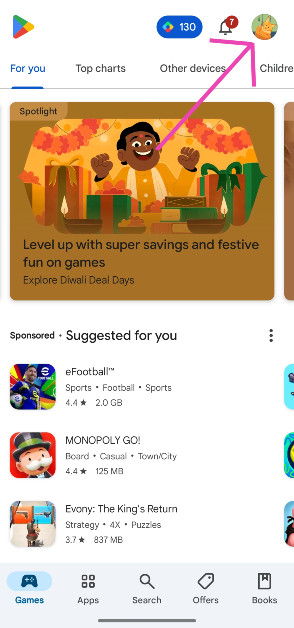
Step 2: Launch the Google Play Store on your smartphone and tap your profile picture in the top right corner of the screen.
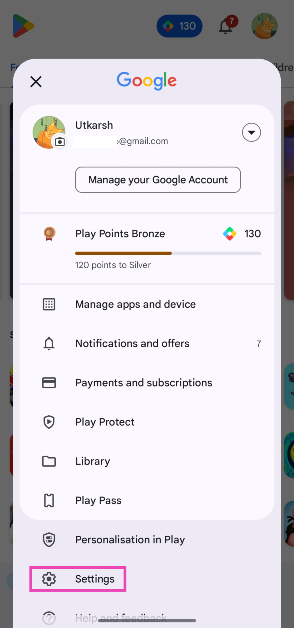
Step 3: Tap on Settings.
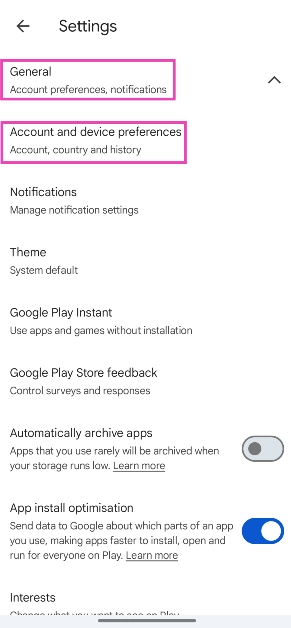
Step 4: Tap on General and select Account and device preferences.
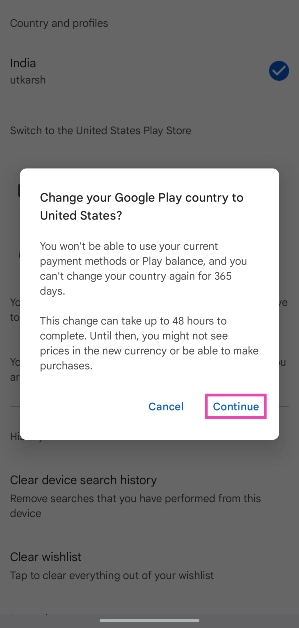
Step 5: Tap the payment method under the ‘Switch to [country] Play Store‘ category.
Step 6: Hit Continue.
Step 7: Follow the onscreen instructions to set up a payment method.
Once you’ve changed your country on the app, it will take up to 48 hours for the changes to reflect on your profile.
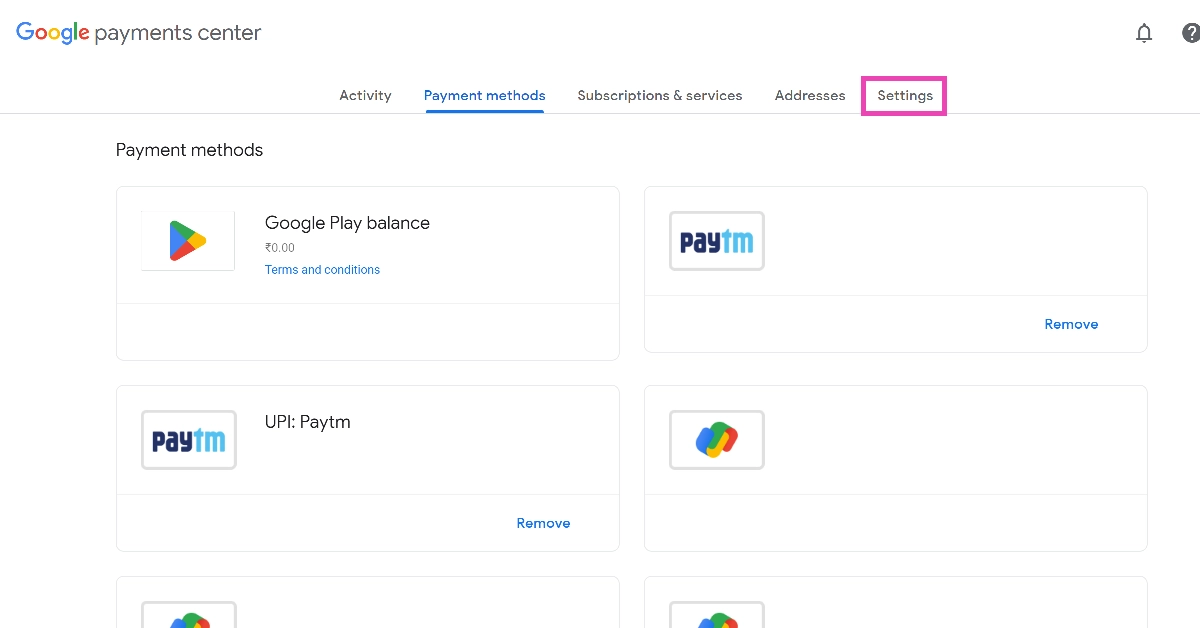
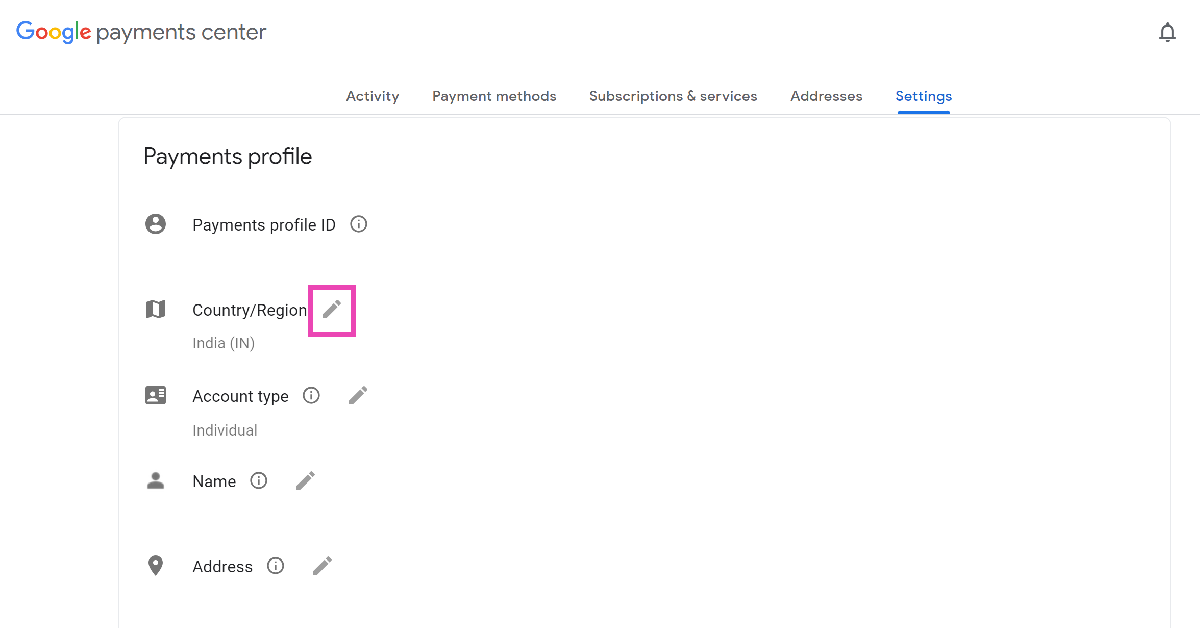
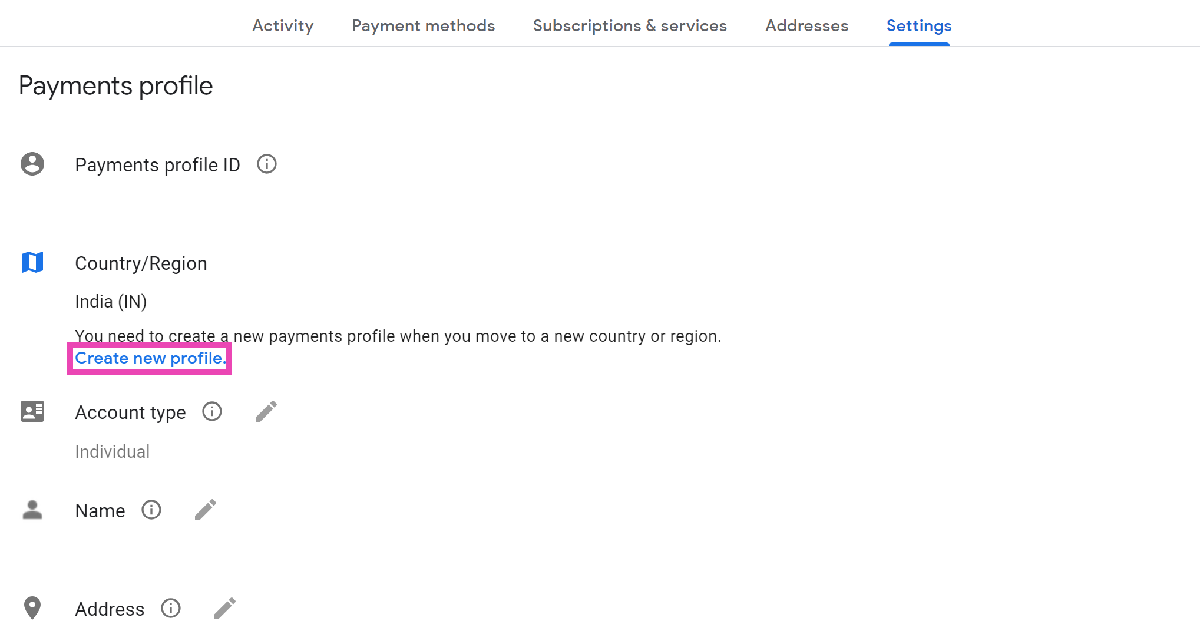
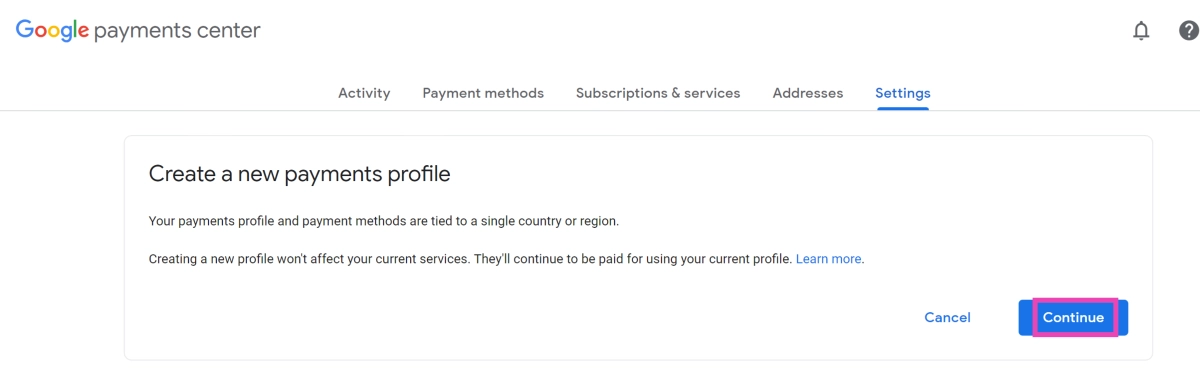
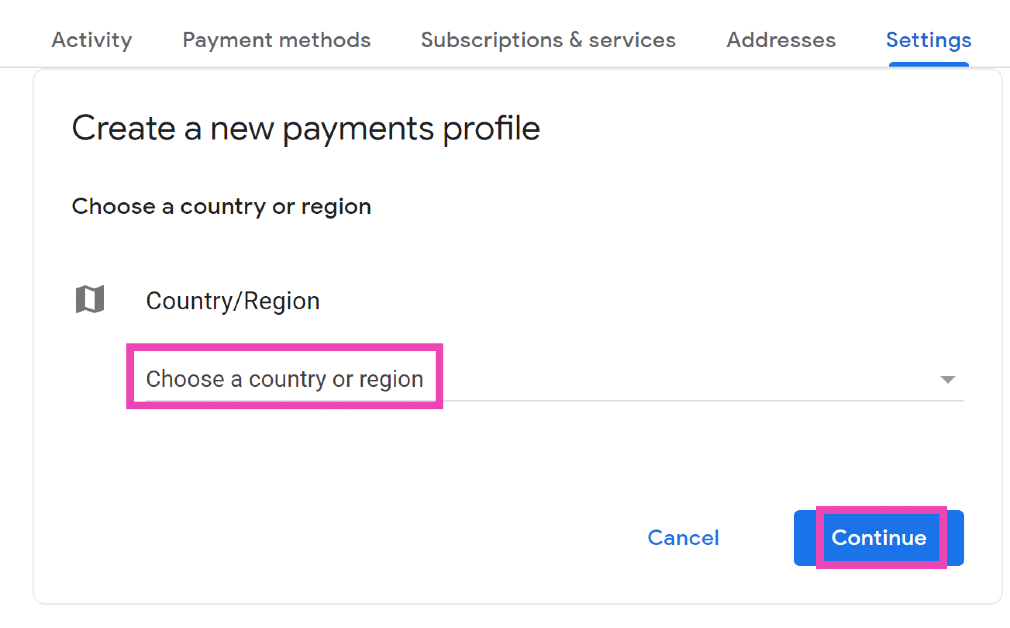
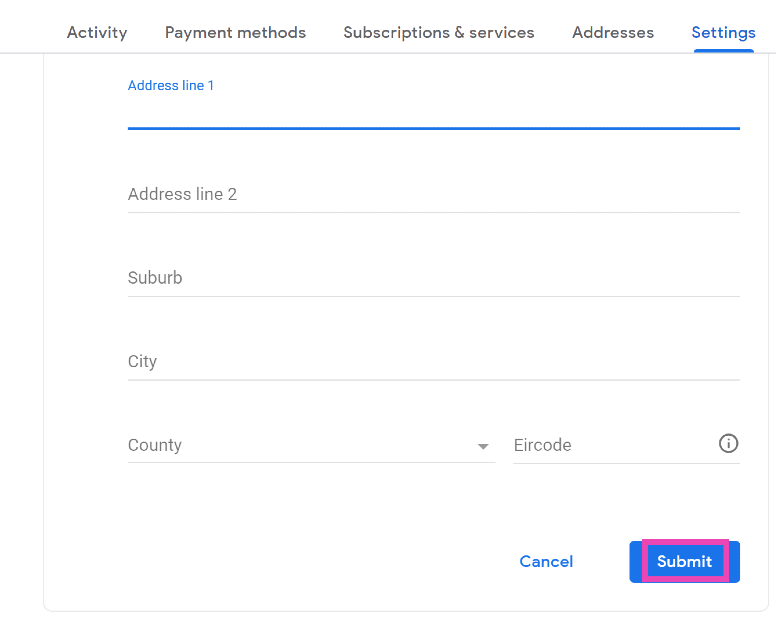
Change your country in Google Play Store (PC)
Step 1: Use a VPN service to set your server to your desired country.
This is how you can change your country or region in the Google Play Store. If you don’t want to go through this arduous process, simply use a third-party app marketplace to install the geo-locked app on your device. If you have any questions, let us know in the comments!
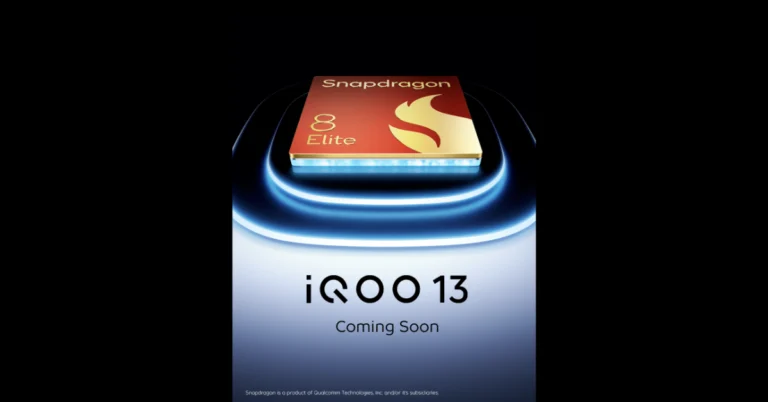
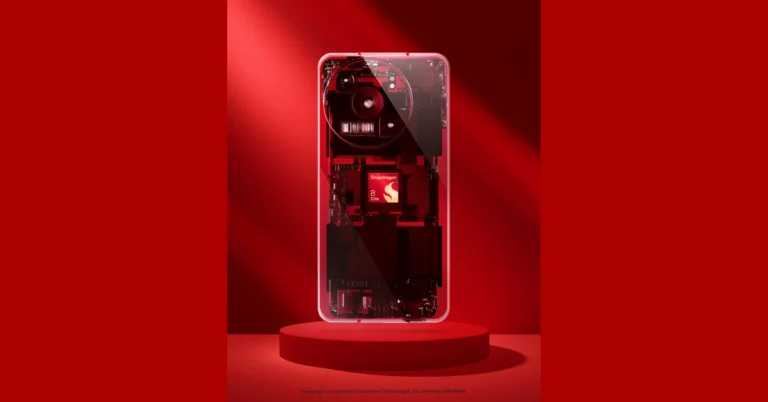
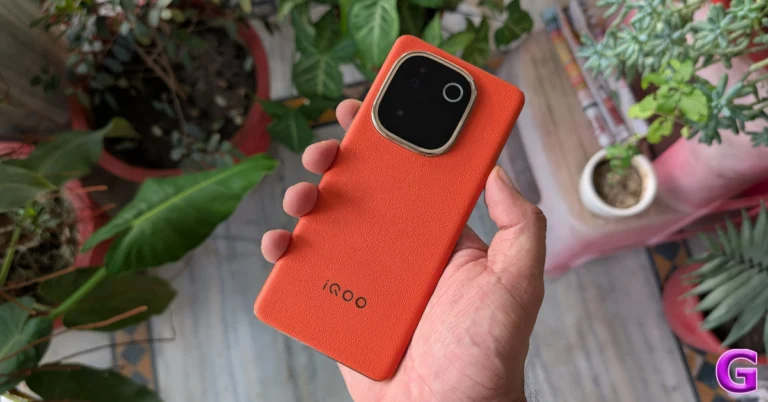
The iQOO 13 will be available in China later this month, powered by Qualcomm’s newest octa-core Snapdragon 8 Elite SoC. The launch date for India has not yet been disclosed, but the company has already published Indian availability data, indicating the impending debut. The phone will also be available in India, through Amazon and the official website. The iQOO 13 will be powered by a 6,150mAh battery with 120W charging capabilities. It will have a Q10 OLED display.
The iQOO 13, which comes in four colour options—black, green, grey, and white—will launch in China on October 30 at 4 or 1:30 PM IST. After being hinted at by Nipun Marya, the country head, the iQOO 13 phone will now be sold in India via Amazon and the iQOO India website.
A number of significant features have been unveiled in advance of the iQOO 13’s launch, including a Snapdragon 8 Elite SoC, a Q2 gaming chipset, and a Q10 OLED display.
The design of the phone is similar to that of the previous iQOO 12, with a power button and volume rocker on the right edge and a square camera unit on the back panel. The front camera was shown in a hole-punch slot atop thin, symmetrical bezels in earlier teases.
With a 6,150mAh battery and 120W wired fast charging, the iQOO 13 will run Android 15-based OriginOS 5 in China and Funtouch OS 15 in India and other countries.
About Qualcomm Snapdragon 8 Elite Mobile Platform
Qualcomm Technologies has released the Snapdragon 8 Elite Mobile Platform, the world’s fastest mobile system-on-chip. The platform includes the Qualcomm Oryon CPU, Qualcomm Adreno GPU, and upgraded Qualcomm Hexagon NPU, which offer game-changing performance improvements. The Qualcomm Oryon CPU enhances on-device AI capabilities, allowing for fast and effective interactions with camera live view and responding to voice, text, and picture cues. The Qualcomm Adreno GPU powers realistic mobile gaming and supports gaming, AI-ISP, camera capabilities, and lightning-fast online surfing.
The Qualcomm Hexagon NPU merges with the new AI ISP, providing advanced camera functions and real-time skin and sky modifications for natural colour and lighting. The platform also offers Unreal Engine 5’s Nanite solution and Chaos Physics Engine for realistic item interactions and high-quality 3D settings. The Snapdragon Sound Technology Suite with Qualcomm aptX Lossless Technology offers 24-bit 48kHz Bluetooth music streaming and 24-bit 96kHz Wi-Fi music streaming. The Snapdragon X80 5G Modem-RF System provides 30% more precise location positioning and multi-gigabit 5G speeds.
Qualcomm announced the Snapdragon 8 Elite, the world’s fastest mobile CPU, which will enable a new age of on-device generative AI. The platform is intended to tackle multimodal AI difficulties while prioritising privacy. It also supports AI-powered 5G and Wi-Fi 7, enabling on-the-go entertainment and productivity.
Qualcomm Technologies released the Snapdragon 8 Elite Mobile Platform, the world’s fastest mobile system-on-chip. The platform includes the Qualcomm Oryon CPU, Qualcomm Adreno GPU, and upgraded Qualcomm Hexagon NPU, which provide game-changing performance increases.
The Qualcomm Oryon CPU improves on-device AI capabilities by providing fast and effective interactions. It can see what you see with your camera’s live view and respond to voice, text, and picture cues. With its vast bandwidth and unbroken audio, the Qualcomm Adreno GPU powers realistic mobile gaming. Additionally, the platform supports gaming, AI-ISP, camera capabilities, and lightning-fast online surfing.
According to the company, Qualcomm Hexagon NPU is merged with the new AI ISP, which provides advanced camera functions including on-device video object eraser, unlimited Semantic Segmentation at 4K resolution, and real-time skin and sky modifications for natural colour and lighting in unpredictable situations.
The Qualcomm Adreno GPU increases efficiency by 40%, while the Qualcomm Oryon CPU boosts speed by 45%, increases power economy by 44%, and boasts the biggest shared data cache in the mobile market. Mobile games will now be able to use Unreal Engine 5’s Nanite solution and Chaos Physics Engine, which enable realistic item interactions and high-quality 3D settings.
While Qualcomm Expanded Personal Area Network (XPAN) technology delivers whole-building untethered audio coverage, the Snapdragon Sound Technology Suite with Qualcomm aptX Lossless Technology offers 24-bit 48kHz Bluetooth music streaming and 24-bit 96kHz Wi-Fi music streaming.
With its AI tensor accelerator, the Snapdragon X80 5G Modem-RF System provides 30% more precise location positioning and multi-gigabit 5G speeds. The 40% more efficient Qualcomm FastConnect 7900 Mobile Connectivity System combines Bluetooth wireless technology, Wi-Fi range, and UWB proximity technologies for building access management and object tracking.
Leading OEMs and smartphone brands, including ASUS, Honor, iQOO, OnePlus, OPPO, RealMe, Samsung, Vivo, and Xiaomi, are set to launch devices powered by the Snapdragon 8 Elite.
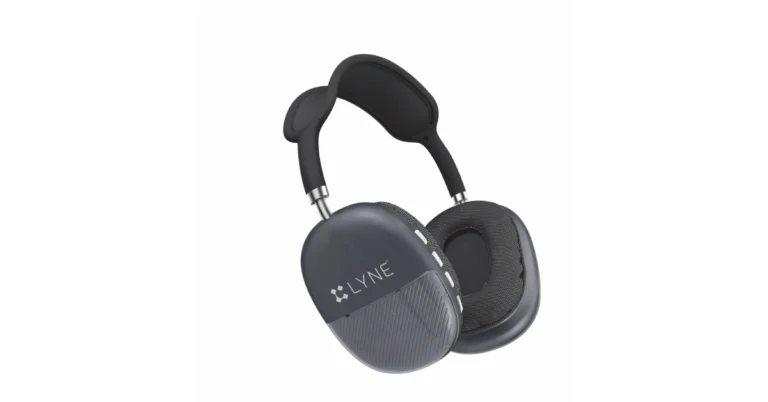
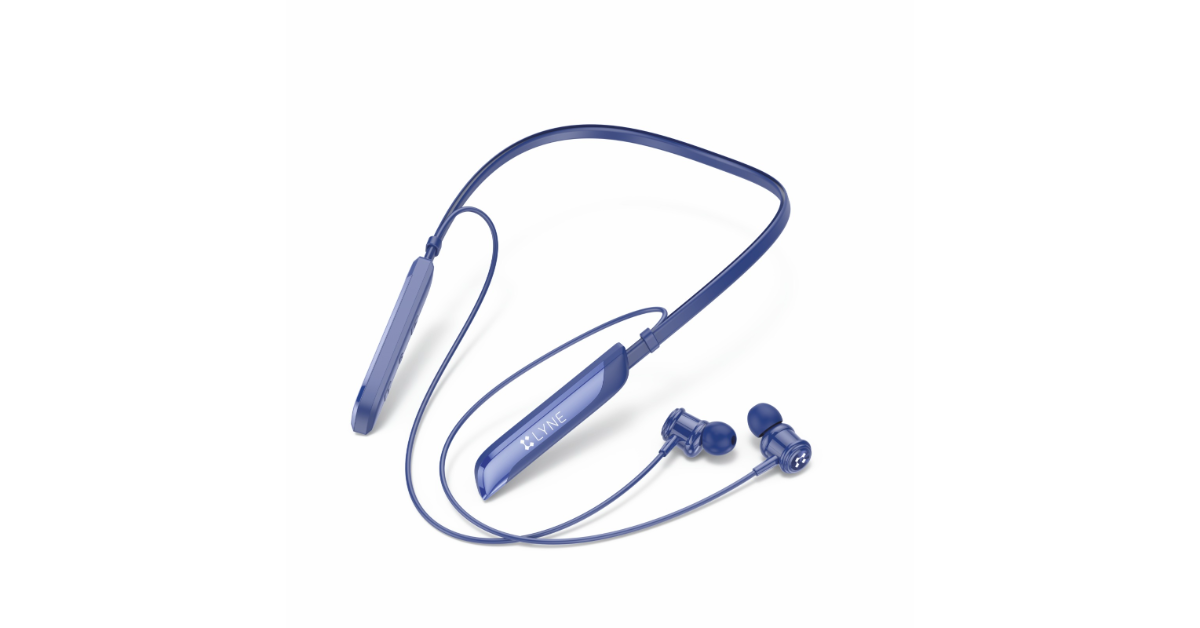
For music lovers and professionals, Lyne Originals, a manufacturer of smart accessories and audio equipment, unveiled the Rover 24 Wireless Neckband and Hydro 6 Gaming Wireless Headsets.
In This Article
Price and Availability
The Lyne Hydro 6 and Rover 24 Audio Wearables are currently offered on Flipkart.com and in stores nationwide for INR 2,899 and INR 1,699, respectively. The product will soon be accessible on Amazon.in and Lyneoriginals.com, the company’s official website.
Lyne Hydro 6 Gaming Wireless Headsets
The Lyne Hydro 6 Gaming Wireless Headset has the latest Bluetooth V5.4 chipset for strong audio and lag-free connectivity up to 10 metres. It has 40mm dynamic speakers that provide deep bass and sharp treble, making it ideal for gaming, music, and movie fans. The headset’s sweat-resistant, plush ear cushions and lightweight over-the-ear design for all-day comfort. It also has a built-in FM radio, MP3 player, and TF card slot so you can listen to music without using a smartphone or computer. With a 400mAh battery, it may last for up to a month with three hours of use every day.
The Lyne Rover 24 Wireless Neckband is a stylish and lightweight option that features a Bluetooth V5.3 chipset and 11mm drivers. It produces robust sound with deep bass and clean highs, making it excellent for music, movies, and phone conversations. The neckband is made of tangle-free cables and lightweight ABS materials, with built-in HD microphones for improved speech quality. It has a 130mAh battery that can last 35 hours continuously and 450 hours on standby. It can be recharged in less than two hours using USB Type-C. Colours available include blue, black, and grey.
Deciphering error codes on Android apps is a tricky task. Oftentimes, developers add a small message along with the error code, explaining what caused the app to trigger it. If that’s not the case, Googling the code is your next best option. If searching the web for the C14A error code on Snapchat has led you to this page, we have a few fixes for you. These quick fixes will resolve this error in no time and give you access to your Snapchat account.
The ‘C14A’ error code is typically associated with login-related issues on Snapchat. C16A, SS14A-D01, and SS14A-D02 are similar error codes that are displayed when the app prevents you from accessing your account. This could be due to a number of reasons.
Your internet connection is not working
The Snapchat app on your device is out of date
Your phone’s time and date are set incorrectly
Your Snapchat account was suspended
Snapchat’s servers are down
Set the correct date and time on your phone
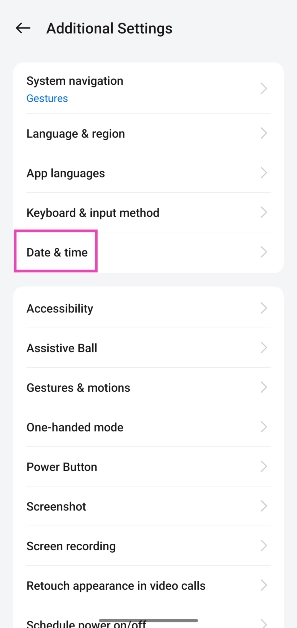
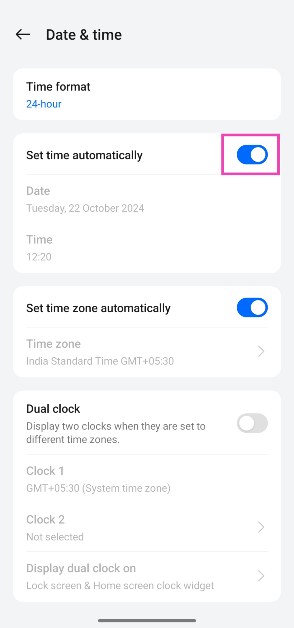
The Snapchat app on your phone won’t let you log into your account and throw the ‘C14A’ error if the date and time are set incorrectly on your device. You can fix this by letting your phone set the date and time automatically using the web. Here’s how.
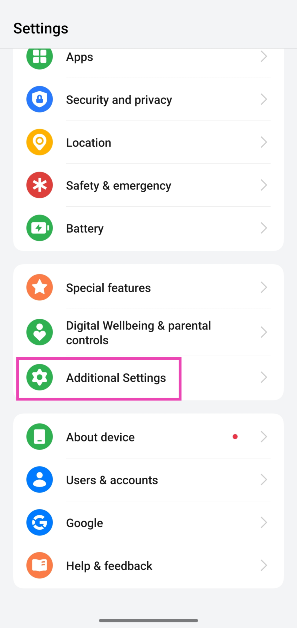
Step 1: Go to Settings and tap on Additional settings.
Step 2: Select Date and time.
Step 3: Turn on the toggle switch next to Set time automatically.
Restart your phone
A quick restart can easily resolve the background issues that may be causing Snapchat to throw the C14A error your way. Long-press the side button on your phone and hit Restart in the power menu. If the side button is programmed to summon the voice assistant, press it along with the volume up key to access the power menu. Once you’re in the menu, hit Restart.
Clear Snapchat’s app cache
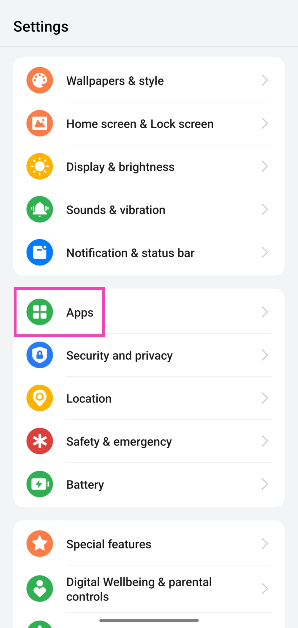
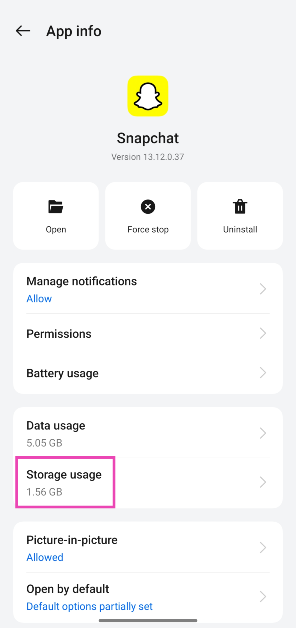
Step 1: Go to Settings and select Apps.
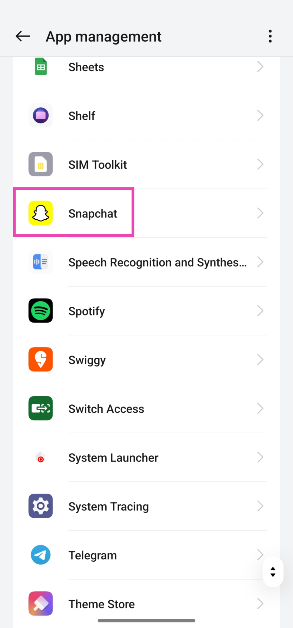
Step 2: Tap on Snapchat.
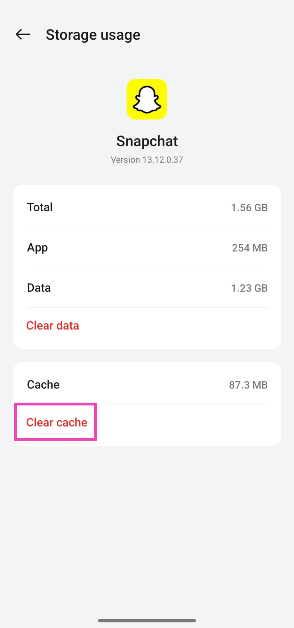
Step 3: Select Storage usage.
Step 4: Tap on Clear cache.
Alternatively, you can clear Snapchat’s cache by going to account settings within the app and selecting ‘Clear cache’.
Reboot the Snapchat app
A quick reboot of the Snapchat app can fix the background issues causing the C14A error. If you don’t know how to force stop an app on your phone, here’s how you can go about it.
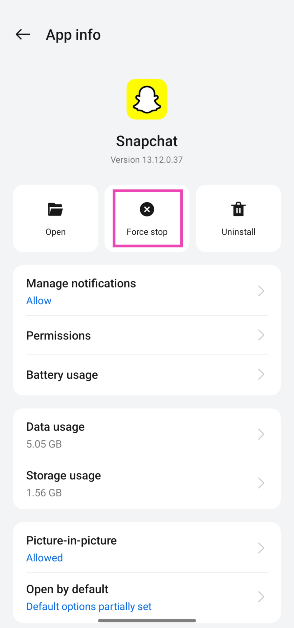
Step 1: Go to Settings and select Apps.
Step 2: Tap on Snapchat.
Step 3: Hit the Force stop tile.
Step 4: Go to the app drawer and tap on Snapchat to restart the app.
Update Snapchat
If you’re using an older version of Snapchat, chances are that the C14A error is being caused by a bug that has been fixed with a newer update. Go to the Google Play Store, search for Snapchat, and hit the Update button on the app’s page. Once Snapchat has been updated, restart it to see if the error has resolved.
Check if your account was suspended
If Snapchat suspended your account due to a violation of the Terms of Service (ToS), you will be shown the C14A error while trying to log into the app. You can contest your suspension by putting in an unlock request. Go to https://accounts.snapchat.com/accounts/v2/login, login, and hit ‘Unlock’. Alternatively, you can log into the Snapchat app on your phone and submit an appeal regarding your suspension.
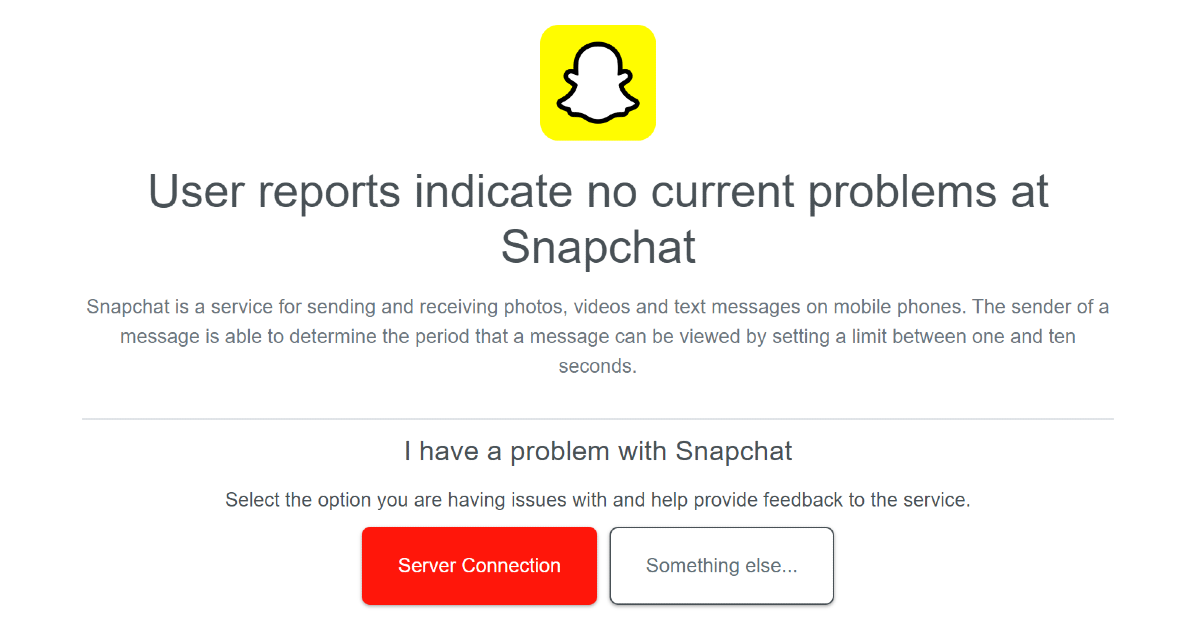
Check if Snapchat is down
If Snapchat is experiencing a server outage, you will encounter the C14A error while trying to log into the app. You can confirm this by going to DownDetector.in and searching for Snapchat. If you see a spike in current user reports, it means that Snapchat’s servers are down. The only thing you can do in this situation is wait for the servers to be restored.
Update your phone’s OS
Step 1: Go to Settings and select Software update.
Step 2: Tap on Download and install.
Step 3: Select Install now.
Frequently Asked Questions (FAQs)
What does the C14A error code mean on Snapchat?
The C14A error on Snapchat means that the app is unable to sign you into your account. This could be due to connection, cache, or ToS-related issues.
How do I resolve the C14A error on Snapchat?
Make sure your phone is showing the correct date and time, clear Snapchat’s cache, update the app, and check if your account has been suspended.
How long does a Snapchat suspension last?
If you are a first-time offender, your suspension will last 48 hours. Repeat offenders are often handed permanent bans. If you try making multiple accounts to get around the ban, Snapchat may block your device entirely.
How do I clear Snapchat’s cache?
Go to Settings>Apps>App management>Snapchat>Manage storage and hit ‘Clear cache’.
How do I restart Snapchat?
Go to Settings>Apps>App management>Snapchat and hit ‘Force stop’. Once the app has stopped, relaunch it from the home page or app drawer.
This is how you can fix the C14A error on Snapchat. If you feel like your phone is the culprit behind this error, you can always use Snapchat for Web. Snapchat Web is incredibly easy to use and has all the essential features of the mobile app. If you have any questions, let us know in the comments!
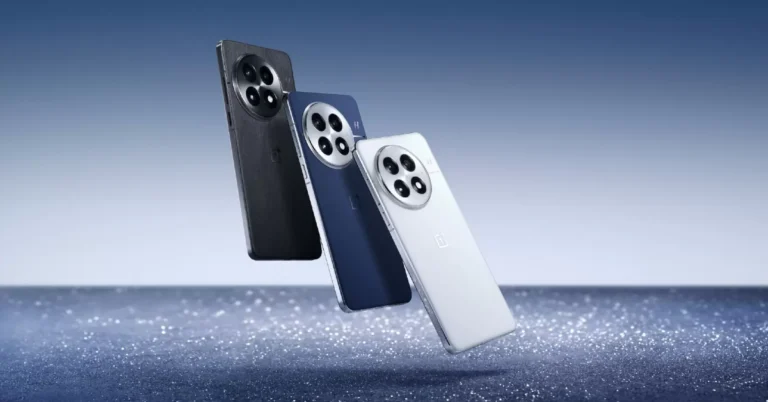
After months of speculation, the OnePlus 13 will be arriving in China later this month. To align with the impending release of the Qualcomm Snapdragon 8 Elite chipset, the OnePlus 13 is scheduled to ship one month ahead of the OnePlus 12. The successor to 2023’s OnePlus 12, will feature a 6.82-inch 2K LTPO screen and is expected to be available in black, blue, and white colourways. The gadget was allegedly seen during a Chinese esports event. It is anticipated that the debut will be a noteworthy occasion in the Chinese market.
OnePlus is set to launch its flagship smartphone in China on October 31 or on November 1 at 1:30 PM (IST). The OnePlus 13 will be available in three colours: blue, black, and white, with the blue colourway featuring a dual-tone aspect with a white camera island.
The camera module of the OnePlus 13 has been transformed, moving from the smartphone’s frame to a noticeable circle on the left. A metallic ring with the ‘H’ logo for Hasselblad-tuned cameras will extend to the right corner once the circular ring is removed from the side frame. The rest of the design is still reminiscent of its predecessor.
Weibo users have reported seeing the OnePlus 13 in the hands of e-sports competitors during the Peacekeeper Elite 2024 competition in China, prior to the device’s formal launch on October 31. The Hasselblad photography system and the second-generation BOE X2 display are two industry-first features of the OnePlus 13, which was unveiled by OnePlus China President Louis Jie as a “Super Pro” smartphone.
A 6.8-inch BOE X2 LTPO AMOLED screen with a maximum brightness of 6,000 nits and a high brightness setting of 1,600 nits is anticipated for the OnePlus 13. It is believed that the smartphone will have IP68/69 water resistance. A 6,000mAh battery, 100W rapid charging, and 50W magnetic wireless charging are among the anticipated features.
According to leaks, the OnePlus 13 may be the first phone to come with Qualcomm’s Snapdragon 8 Gen 4/8 Elite chipset, which is capable of surpassing the A18 Pro in some tests.
It is anticipated that the OnePlus 13 will use an ultrasonic fingerprint sensor, which is said to be quicker and more secure than the optical sensor on its predecessor. Like the optical fingerprint sensors, this function works with damp or soiled fingertips.
A Chinese social media leak suggests that the OnePlus 13 will be launched at a price of CNY 5,299 for the 16GB RAM/512GB storage variant, a 10.4% increase from the previous price of CNY 4,799 for the OnePlus 12.
Are you looking for today’s Wordle for October 22, 2024? The problem is difficult to solve, so if you need assistance, we’ve included hints and the answer to the October 22 Wordle.
In This Article
Hints and Answers for Today’s Wordle October 22
Before answering directly, please check the October 22 Wordle Hints first.
Today’s Wordle answer consists of two vowels, no repeating letter, and can be synonymised with fog and smog.
Hint 1: Today’s Wordle answer includes two vowels. Hint 2: The answer for today has no repeating letter. Hint 3: opposite of whisper.
What word does today’s Wordle begin with?
Do you need help with today’s Wordle answer’s initial letter?
The first letter in today’s Wordle is “S”
Today’s Wordle Answer October 22
The answer to Wordle on October 22, 2024, is — SHOUT
Wordle: A Five-Letter Word Guessing Game • The game allows six guesses of a five-letter word. • Provide feedback on guessed letters’ placement in the puzzle. • TheNew York Times purchased the game in 2022. • Created by Josh Wardle for his partner, narrowing down 12,000 English words to 2,500. • Named after the word “word.”
How To Play Wordle?
Wordle is a New York Times word puzzle game that allows users to guess a five-letter word in six attempts. The letters are highlighted in Yellow and Green, indicating whether the word is present in the answer or not, and Green letters indicate the correct guess.
Select a powerful starting word: Avoid using unusual words, as they frequently do not match common letters. A good opening word has plenty of benefits.
Repeating letters: Don’t be afraid of repeating letters; they appear frequently in words. The answer may contain one or two repeated letters.
Use the Wordlebot: The NYT’s Wordlebot analyses and compares replies to itself. This challenge can assist you enhance guessing skills and highlight areas for development.
Garena Free Fire Max is a battle royale game with regular awards and tournaments to keep players interested. If you play Garena Free Fire, you should be aware of the redeem codes that are released on a daily basis. However, because the battle royale game is banned in India, players from other countries can use the Free Fire Redeem codes daily. If you’re unfamiliar with the Garena Free Fire redeem codes or don’t know how to get them, we’ve put together a step-by-step guide to help you redeem them. Check out Garena Free Fire Max Redeem Codes for 22 October 2024.
The Free Fire Max redeem codes are a great way to get free stuff. These are 12-digit codes that contain alphabets and numbers, as well as an expiration date and time. Because the Garena FF redeem codes cannot be used more than once, you should hurry to the redemption page to claim your free reward before someone else does. To get a free reward, all you have to do is go to reward.ff.garena.com/en, which is the official redemption page. Also, keep an eye on this space for daily updates on Garena Free Fire Max redemption codes and rewards.
22 October 2024: New Amazon Quiz is now available. Customers from different parts of the country are participating in the daily quiz. The quiz starts at midnight today and will be live until 11:59 PM tonight. By successfully answering every question, participants in the quiz have the chance to win wonderful rewards. A Rs 500Amazon Pay Balance is up for grabs to participants today.
One wrong answer could eliminate you from the quiz. You have a chance to win Rs 500 Amazon Pay Balance if you successfully answer everyquestion. Users of the app only have the opportunity to take the quiz. Check Out 22 October 2024 Amazon Quiz Answers.
Onlyapp users are eligible to play the Amazon quiz every morning from 12 AM to 11:59 PM. The quiz is not available on the desktop. For those who are unaware of how to play the Amazon quiz, below are the steps, you can follow to take the quiz.
We have written an explainer above, you can refer to that.
When are the winners of the Amazon Quiz and contest announced or declared?
The announcement of today’s Amazon quiz winner will take place Tomorrow. As for the Special Quiz and “Spin & Win” Contest, thewinners will be declared once the Quiz Contest comes to an end. To find out who the lucky winner is, you can refer to the Amazon Quiz Winners List or visit the Amazon Winners tab in the Amazon App.
How to participate in the Daily Amazon Quiz?
That is very easy, just got to the Amazon app and scroll to the bottom of the page and you will find the Quiz section. Click on it (usually it is called the fun zone) and you can enter the Amazon Today Quiz Contest.
Are there any other quizzes or contests running on Amazon daily?
Yes, there are many running on a daily basis. These range from spinning the wheel to answering the questions correctly. All are located in the Fun Zone.
What are the criteria for selecting a winner in the Daily Amazon Quiz?
When a qualified player submits correct answers to all the questions, they will automatically be entered into a lucky draw. This draw will include all participants who answered all the questions correctly.Amazon randomly selects the final winners from the pool of eligible participants who gave the right answers.
Which Types of Questions are asked within Amazon Daily Quiz?
These are very simple and straightforward questions. These are mainly related to general knowledge.
Where should I look for Amazon Daily Quiz answers?
You canbookmark this page as we will help you every day with the Amazon Daily Quiz. We bring you fresh answers every day for the Amazon Daily Quiz and Contest.
What time does Amazon Announce previous winners?
The previous winner’s name will be announced today at 12 PM (noon).
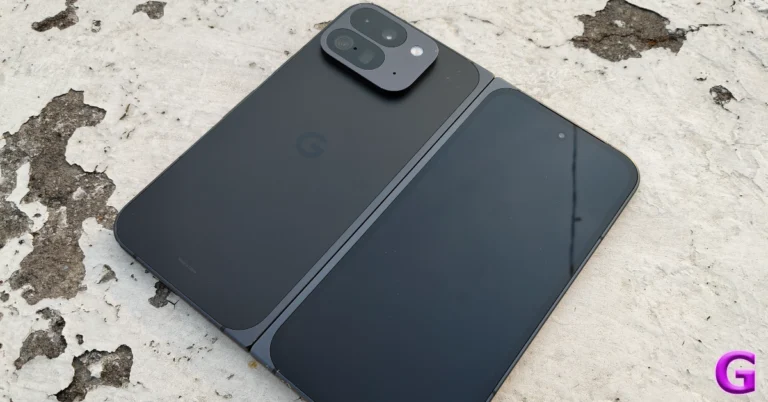
Google’s first-generation foldable which was launched last year showed a lot of promise but slightly paled in comparison to its direct rivals – Samsung Galaxy Z Fold 5 and OnePlus Open. With the second-generation Pixel 9 Pro Fold, it feels like Google’s foldable has finally arrived. The tech giant has ditched the passport-style design and opted for a book-like form factor for the foldable. Its inner display spans 8 inches from edge to edge and is considerably brighter than its predecessor. When we got our hands on the Pixel 9 Pro Fold earlier this month, we were curious to see if its software could get the most out of its screen real estate. The right utilities can make a foldable greater than the sum of its parts. After using this foldable for almost a month, we have some thoughts on this matter. Let’s dive into our review of the Google Pixel 9 Pro Fold and see if it is worth the Rs 1,72,999 price tag.
Google Pixel 9 Pro Fold Review: Design and Display
Here’s what you get inside the Google Pixel 9 Pro Fold retail box:
Smartphone
USB Type-C cable
SIM ejector
Safety guide
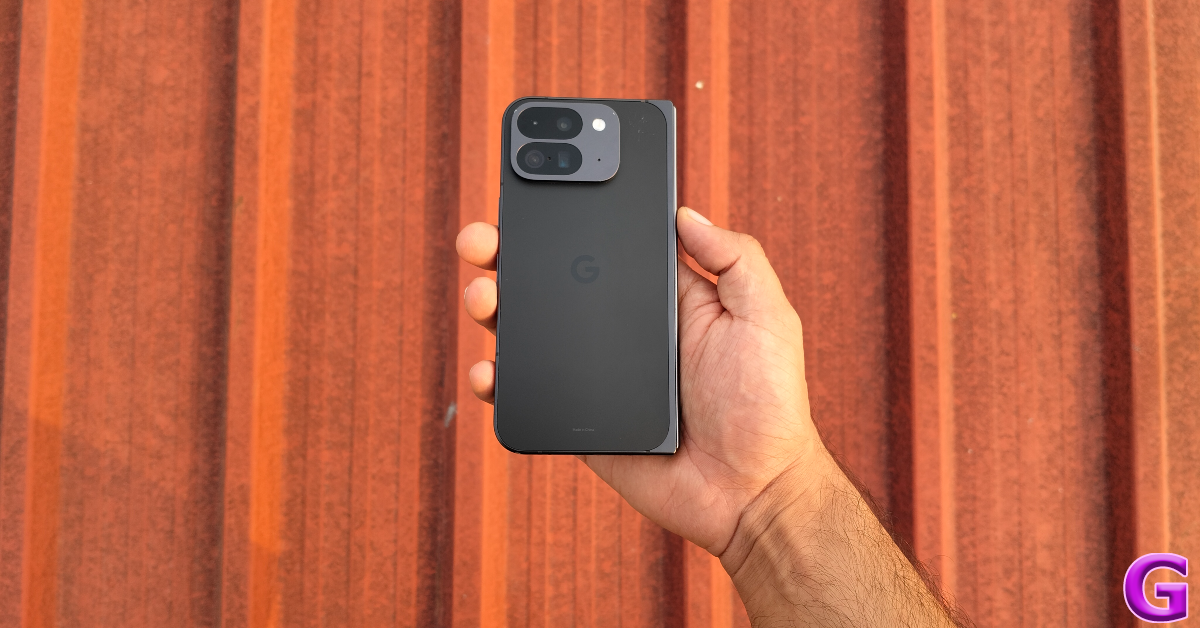
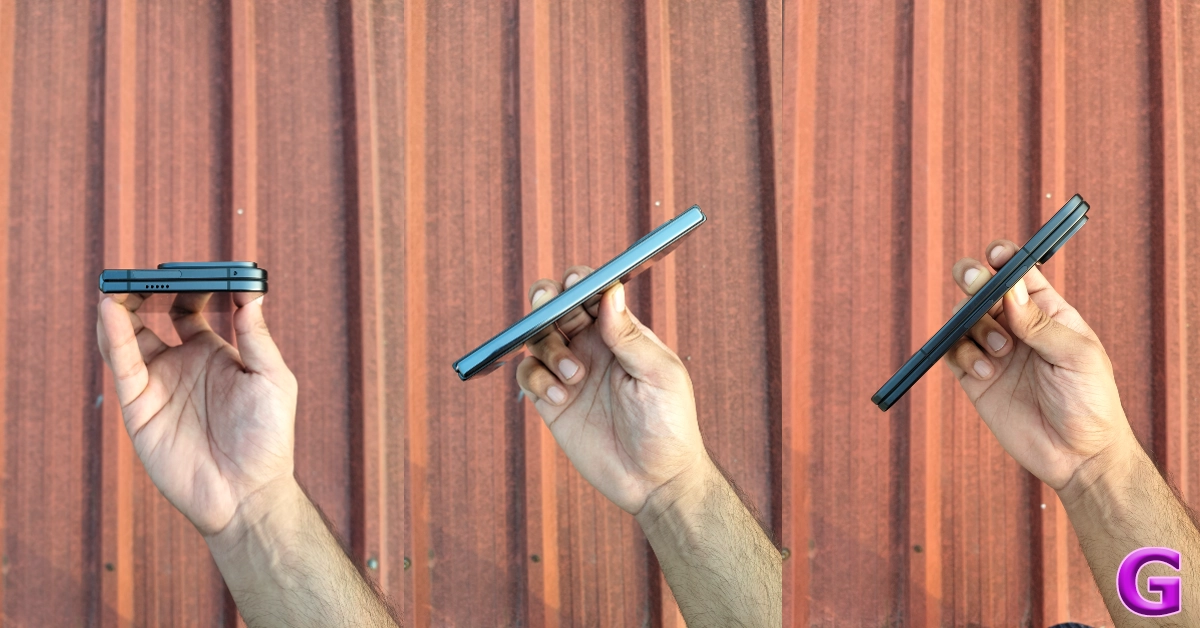
If the first-generation Pixel Fold’s design kept you on the fence, you will like what Google has in store for you this year. The Pixel 9 Pro Fold has a taller, book-like form factor and a slimmer profile. In its folded form, the smartphone is just 10.5mm thick. While regular smartphones fall between 8-9mm in thickness, the Pixel 9 Pro Fold does not feel bulky or excessive. It weighs 257g, making it 36g heavier than the Pixel 9 Pro XL. We did not face any trouble fitting it into our pockets and walking around with it.
The Pixel 9 Pro Fold borrows some design elements from its Pro XL sibling. It has a glass back with a matte finish and glossy metal rails. The aluminium frame is rounded along the right edges and has pointed corners on the side of the hinge. The hinge has a glossy finish as well. The square-ish camera panel is different from the rectangular bars we’re used to seeing on Pixels. While it isn’t a complete eyesore, we would’ve preferred the classic visor on this foldable.
The bottom edge of the aluminium frame houses two microphones, a SIM tray, a speaker grille, and a USB Type-C port. The top edge contains another speaker grille, a secondary microphone, and a 5G band. The volume rocker keys and the side button lie on the left edge of the frame. The side button doubles as the fingerprint scanner.
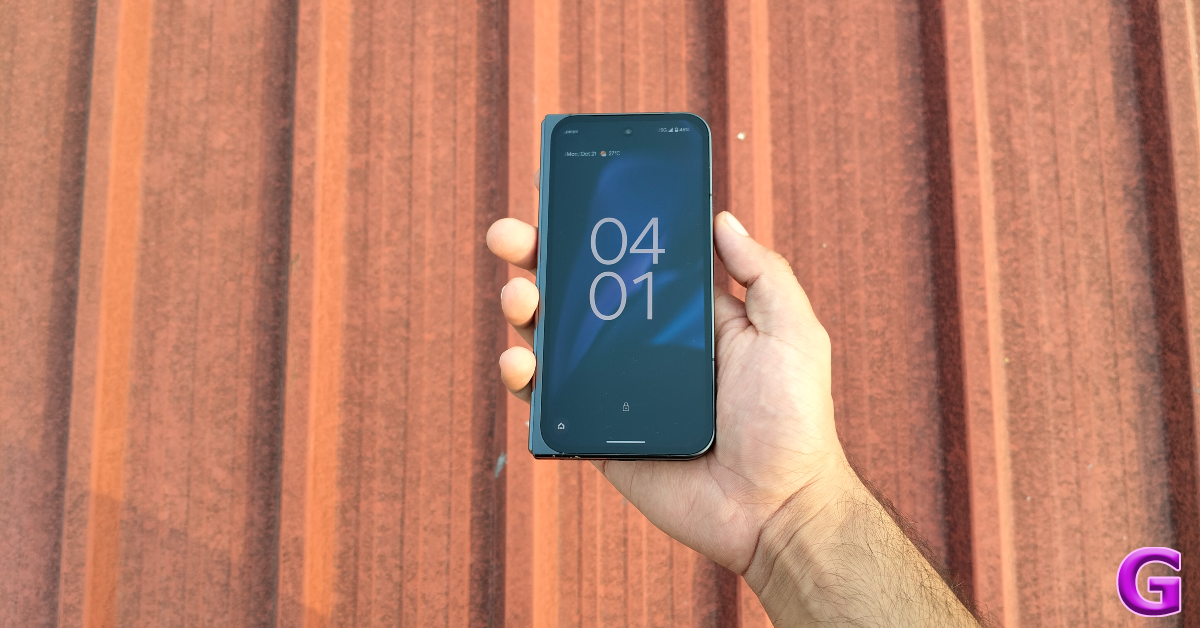
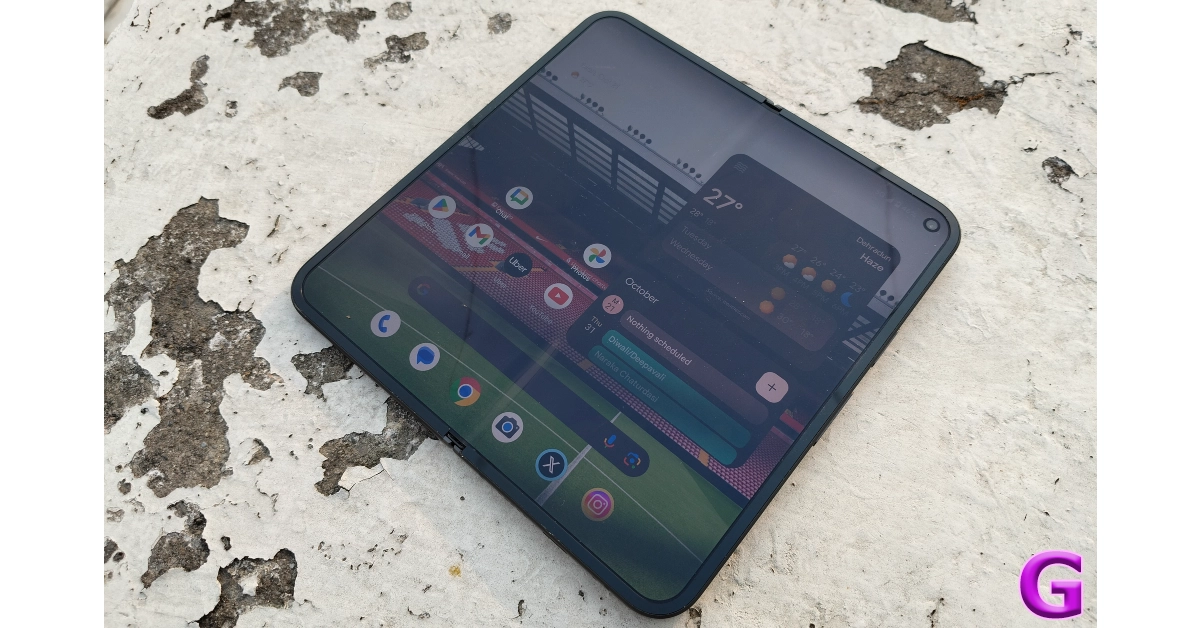
The 6.3-inch OLED cover display has a 120Hz refresh rate and can hit a peak brightness of 2,700 nits. This display is protected by Gorilla Glass Victus 2. The uniform bezels around this display are slightly thicker than what we’re used to seeing in flagship smartphones. The left edge has an additional metal casing that is attached to the hinge. The touch sensitivity and response rate of this display are top-notch, leaving no room for complaints. 70-80% of our daily usage required the cover display and it perfectly rose to the occasion.
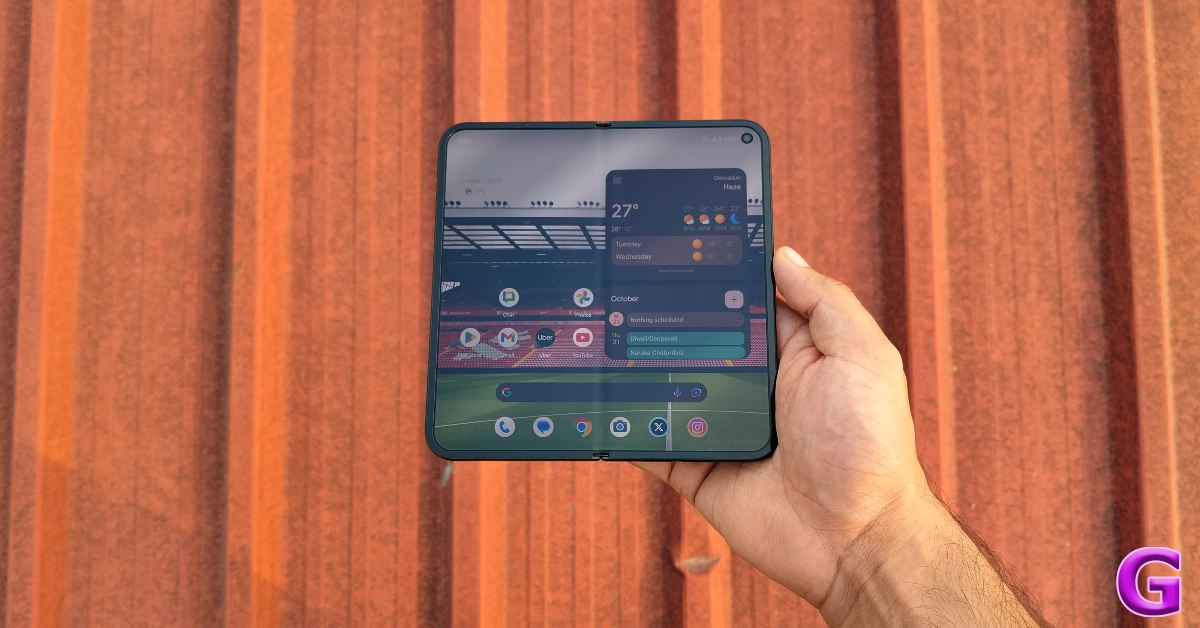
It takes both hands to unfold the smartphone. A faint ‘crack’ sound escapes the device every time it is unfolded. It never fails to make us nervous – even after a month of using the device. The 8-inch inner OLED display has a similar refresh rate and peak brightness as the cover unit. However, this panel lacks Gorilla Glass Victus 2 protection as its plastic material makes it more conducive for folding purposes. This means that the inner display is more susceptible to scratches. The plastic bezels around the inner panel have been trimmed down to a more suitable size. These bezels reduce accidental touches by a considerable factor.
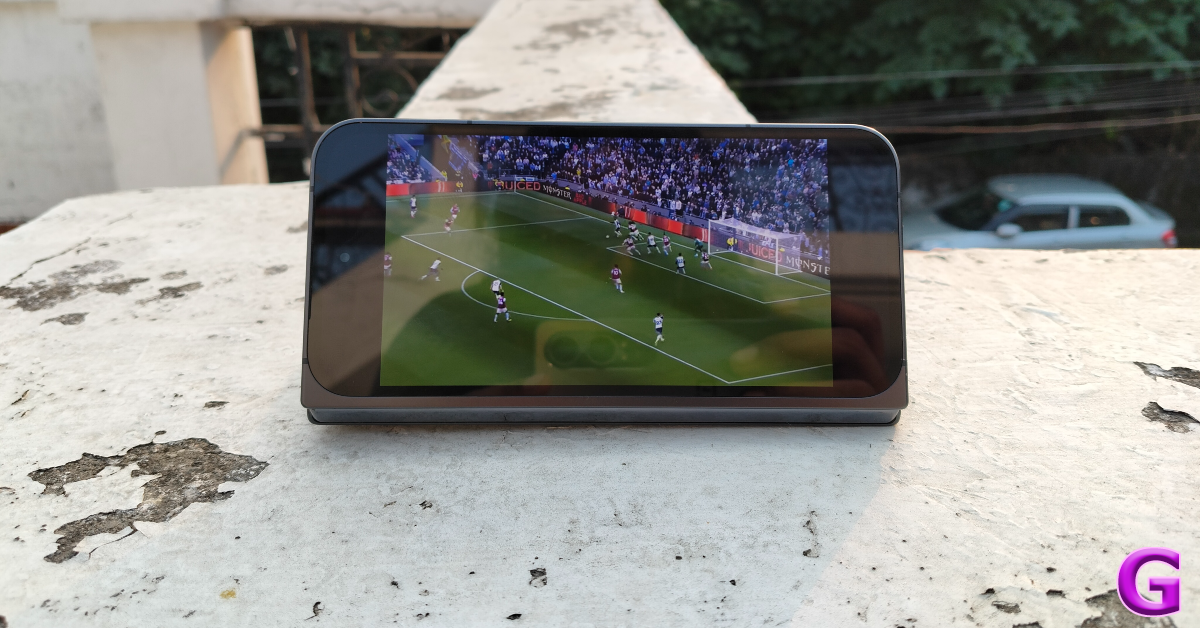
Foldable smartphones are a game changer when it comes to consuming media. Not only is the larger inner display more favourable for watching videos, but the folding form factor allows you to prop up the smartphone in a tabletop position. The Pixel 9 Pro Fold does this quite well. The camera panel causes it to bump against the rest surface, but it wasn’t a considerable issue for us. The image quality across the two screens was rich and detailed. The OLED panels bring out the deep blacks, leading to a high-quality viewing experience. The only drawback of this fine viewing experience lies with the audio output. Despite having two speaker grilles, the intensity of the audio output is quite low. We hope Google fixes this in the next iteration of the foldable.
Google Pixel 9 Pro Fold Review: Performance and Cameras
The Google Pixel 9 Pro Fold draws power from the Tensor G4 chipset under its hood. Google’s in-house Tensor G4 SoC powers the rest of the Pixel 9 lineup as well. The foldable Pixel is available in a single RAM + storage configuration – 16GB + 256GB. It remains to be seen whether Google will introduce a 512GB variant in India later.
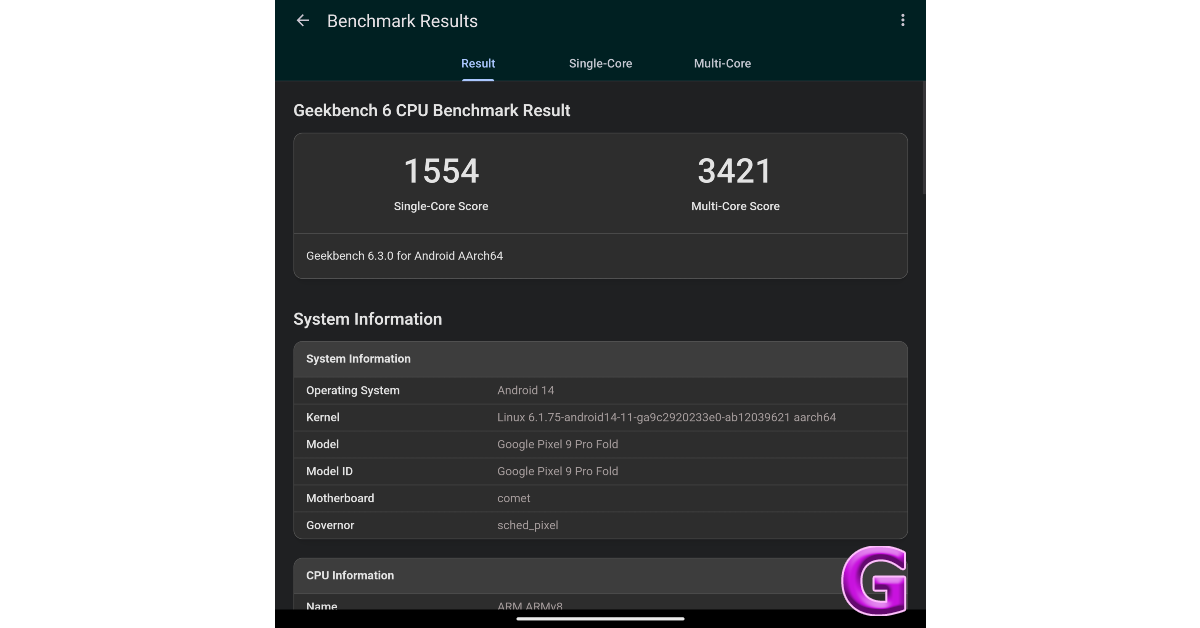
On the Geekbench 6 app, the Google Pixel 9 Pro Fold scored 1,554 points in the single-core test and 3,421 points in the multi-core test. These numbers are remarkably lower when compared to Snapdragon 8 Gen 3-powered smartphones, but the Pixel 9 Pro Fold’s general performance does not reflect the gap at all. Our daily usage experience with this smartphone was smooth and jitter-free. Apps did not take any time to load on the screen and switching between the two displays did not produce any glitches. It was smooth sailing for us all the way through – even while running two apps at the same time on the larger display. The smartphone didn’t feel the need to shift from the first gear.
However, the gap in benchmark numbers becomes apparent while gaming on this device. The smartphone runs a little warm while playing titles like Call of Duty Mobile and Asphalt Legends Unite with high graphics and maximum frame rate. This is a common issue across all Pixel 9 smartphones. Google should look into fixing its flagship smartphone offerings with a state-of-the-art cooling system.
As is the case with all foldable smartphones, the gaming experience is heavily dependent on the title you’re playing. Games with refined tablet apps showcase fine graphics and optimised controls. Others are just stretched versions of the standard mobile apps. We’d like to see gaming developers tweak their apps for the foldable form factor by assigning the controls to the bottom screen in ‘handheld’ mode. So far, Disney Speedstorm is the only app that does this.
Google’s decision to launch the Pixel 9 Series earlier in the year means that they ship with Android 14 out of the box instead of Android 15. And while the new Android version is now out, our Google Pixel 9 Pro Fold review unit did not receive it at the time of writing this review. Google has promised 7 years of major OS upgrades for this foldable, but it remains to be seen whether Android 15 will be included in this cycle.
The Pixel 9 Pro Fold gets new AI features like Gemini Assistant, Pixel Studio, and Reimagine along with the new Weather and Screenshots apps. We talked about this aspect extensively in our review of the Google Pixel 9 Pro XL so we suggest you give it a read. In this review, we’ll focus on the software elements that are exclusive to the Pixel 9 Pro Fold.
The option to use the primary camera sensor for selfies is something we really like about foldable smartphones. Using the cover display as a viewfinder, we were able to take superior selfies and portraits using the rear camera array. While taking pictures of other subjects, you can display the image preview in the outer panel. The ‘Made You Look’ feature plays attention-grabbing animations on the cover panel, which makes your pets and kids focus on the camera as you click a quick picture.
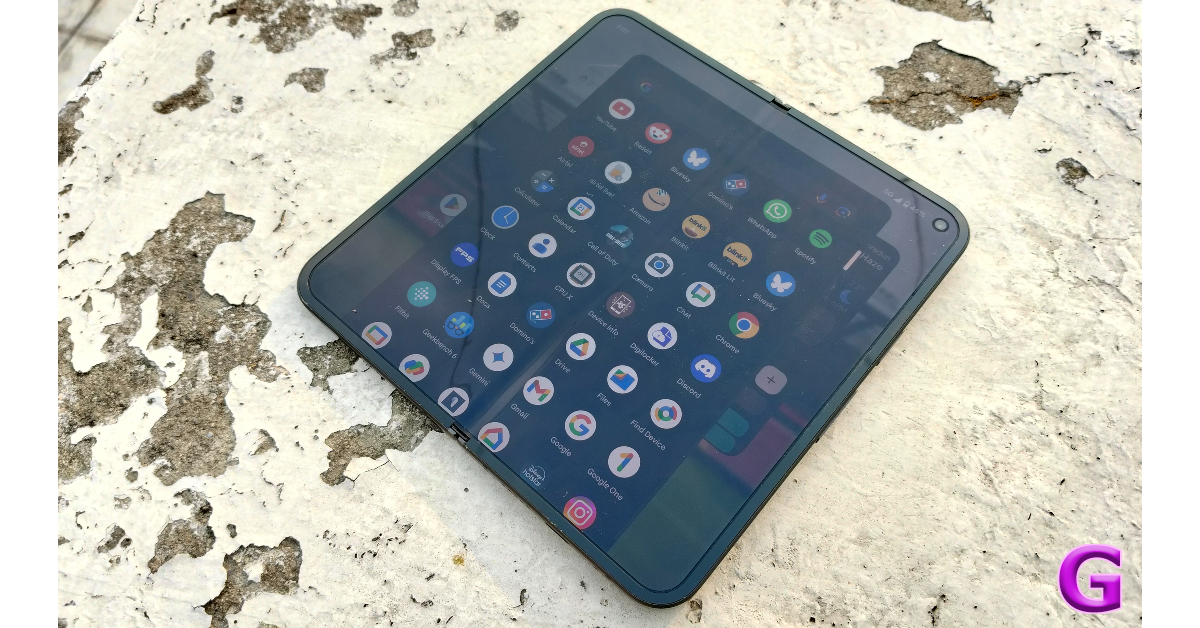
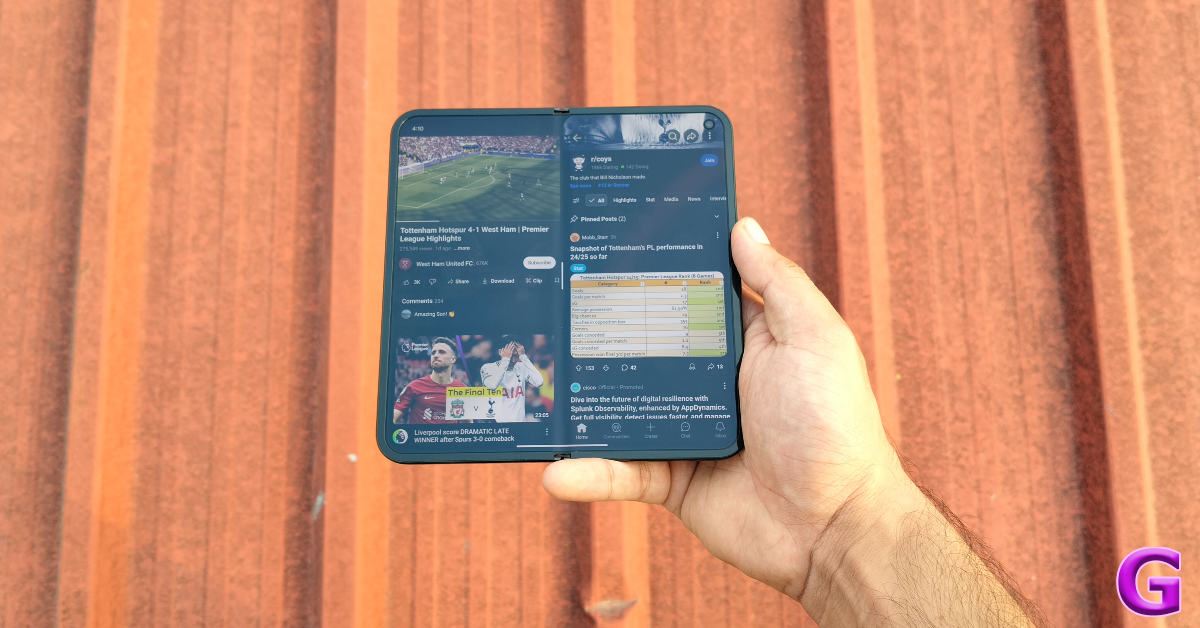
Google’s app bar for the inner display is pivotal in maximizing productivity on this smartphone. You can drag any app from this bar and drop it on the screen to open it in split-screen mode. If you want to browse Twitter while watching a video on YouTube, the Pixel 9 Pro Fold makes the task very easy. On top of that, you can save app pairings and access them from the app switches any time you want.
The third-party apps resort to their tablet layouts for the inner display. You can take video calls on the larger display and prop it up in a tabletop position to go hands-free. Google’s app suite adheres perfectly to the aspect ratio and allows the user to do more on the larger display. However, as far as email clients go, Microsoft Outlook’s app for foldable phones is still ahead of its peers.
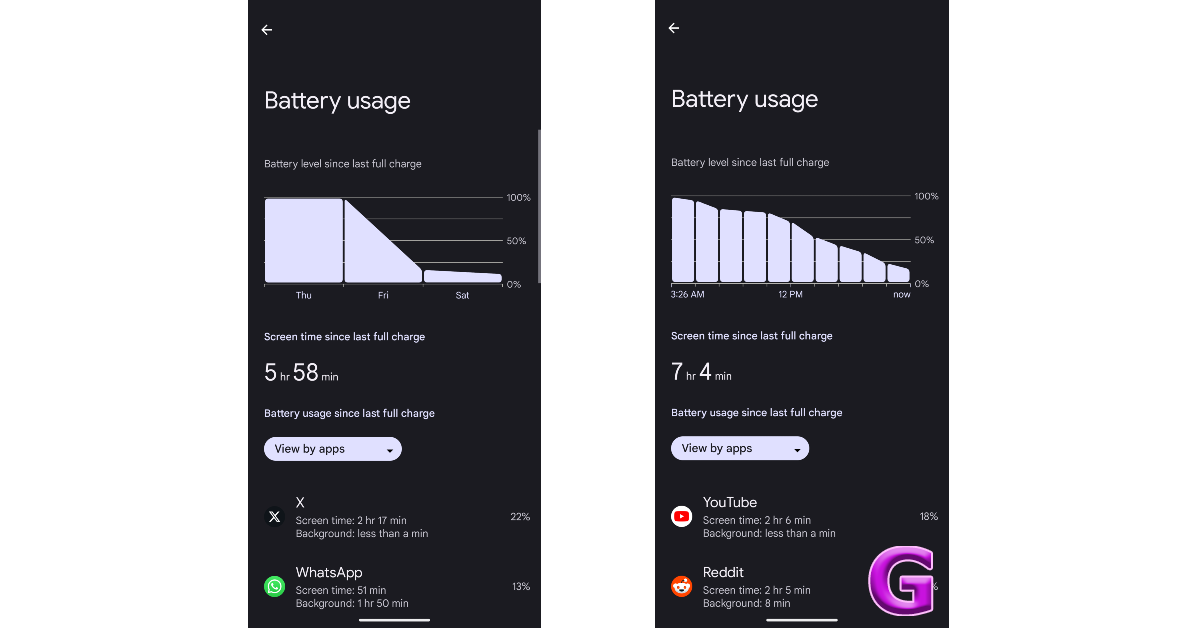
The 4,650mAh battery pack on this smartphone easily lasts an entire on a full charge. We were able to rack up 6-7 hours of screen time on the device before needing to plug in the charger. Our daily tasks on the Google Pixel 9 Pro Fold during the review period included video calling, emailing, social media browsing, navigation, gaming, and media viewing. You can maximise the battery life by limiting the inner display usage. The 21W charging speed of this smartphone leaves more to be desired. It took us 1 hour and 45 minutes to fully charge the Pixel 9 Pro Fold.
Interestingly, the Google Pixel 9 Pro Fold does not rock the same camera specs as the rest of the series. Its rear camera panel features a 48MP primary shooter, a 10.8MP telephoto lens (with 5x optical zoom), and a 10.5MP telephoto lens. This is the same camera system as 2023’s Pixel Fold. The cover and inner displays have been updated with 10MP selfie shooters. In comparison, the Pixel 9 Pro XL has a 50MP + 48MP + 48MP rear camera setup along with a 42MP selfie camera.
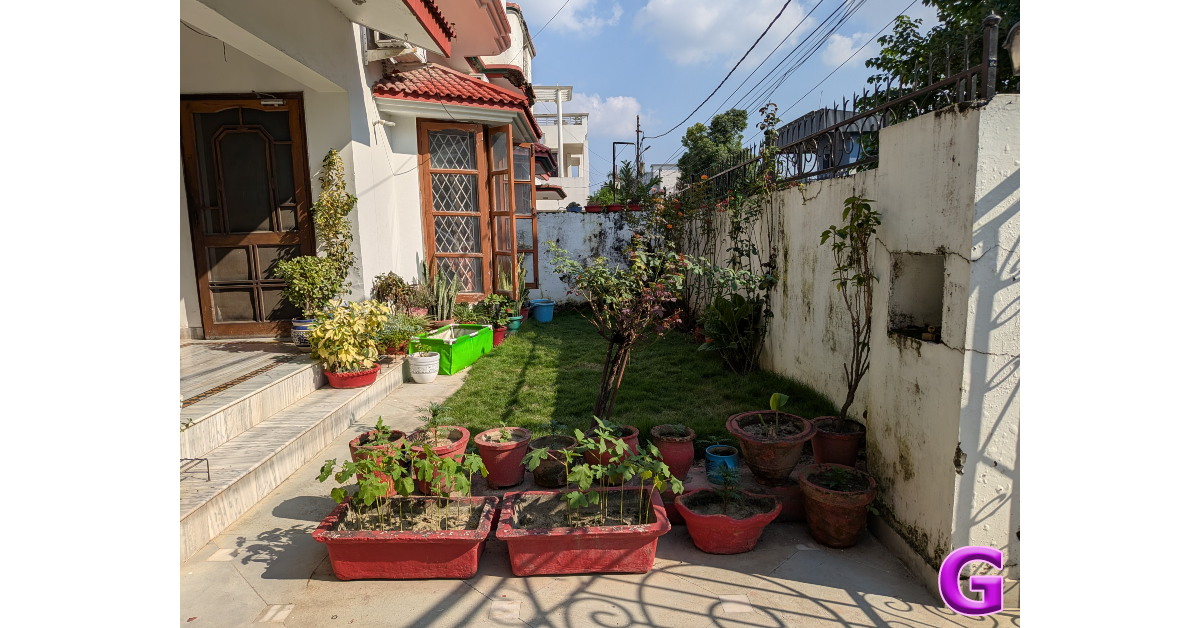
The 48MP primary sensor takes delightful images in outdoor daylight conditions. These images are packed with vivid colours and cutting-edge details. The dynamic range and contrast level are ideal as well. Overall, the pictures are warm and showcase a rich colour palette.
1x v 2x
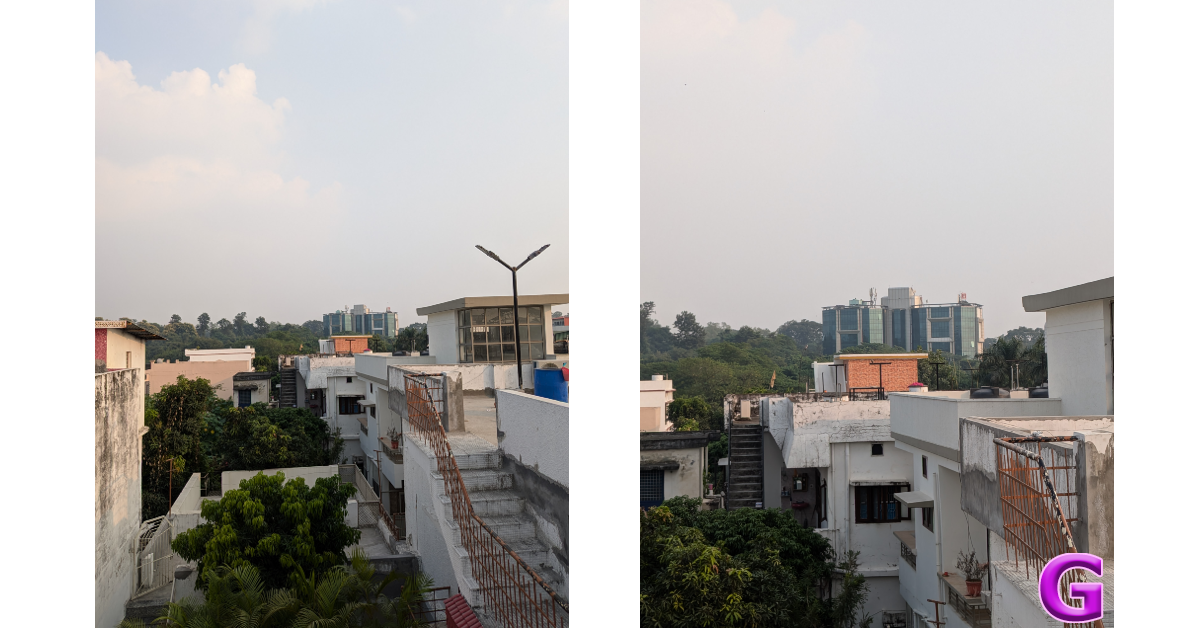
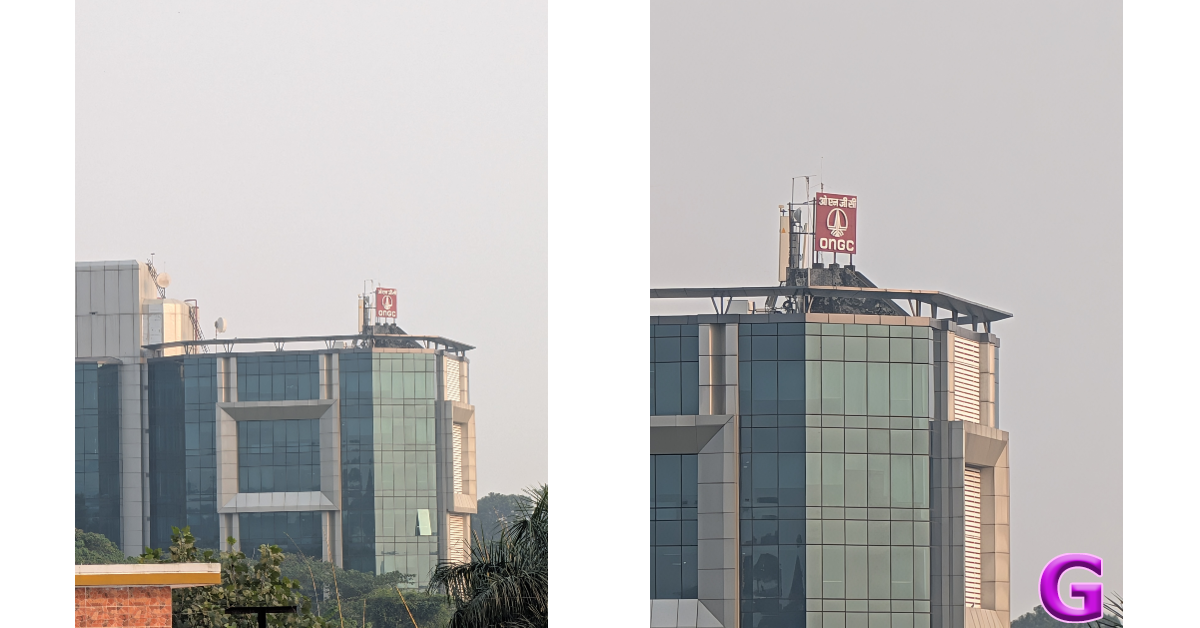
The 10.5MP telephoto lens offers 5x optical zoom. The images taken with this camera are notably softer when you compare them with the results from the 48MP unit on the Pixel 9 Pro XL. Having said that, Google’s photo processing skills do a good job of restoring the composition of the image even at the maximum 20x zoom.
10x v 20x
The 10.5MP ultrawide lens covers a good field of view and produces life-like colours in outdoor daylight conditions. We would have preferred a higher contrast in these images. Since this is a smaller lens, the results are a tad softer compared to the Pixel 9 Pro XL. Having said that, as far as foldables go, this lens puts up a good performance.
Ultrawide lensUltrawide lens
The native camera resorts to Night Mode in limited lighting conditions. You can select Night Sight to further delay the shutter speed and allow the camera to let in more light. The primary shooter performs decently in these conditions. It lights up the subject and minimises the grain in the images. The ultrawide lens, however, lets in a fair bit of noise that leads to visibly softer images.
Night Sight: Primary shooter v Ultrawide lensPortrait Shots: 1.5x v 3x
The portraits taken with the Pixel 9 Pro Fold showcased rich colours and intelligent subject-background separation. We were happy with the background blur that the smartphone applied to the final results. The 10MP selfie cameras on the cover and inner displays take good pictures and keep skin tone correction to a minimum. These sensors can record 4K videos as well.
The Google Pixel 9 Pro Fold is as close to the perfect foldable a smartphone can get. Its refined design and sleek profile make it easy to carry around inside your pocket. The stunning outer and inner displays are extremely responsive and showcase incredible colours. Google’s software magic brings the most out of the two displays. The Pixel 9 Pro Fold is more than a smartphone and tablet jammed together in one device. Having said that, there is no getting around the fact that the Pixel 9 Pro Fold’s camera system is a step down from the rest of the lineup. It can still hang with the best foldables in its segment, but it doesn’t hit the levels set by its Pixel 9 Pro XL sibling.
Google Pixel 9 Pro Fold: Pros
Sleek profile
Clean design
AI features
Bright displays
Google Pixel 9 Pro Fold: Cons
Limited audio output
Camera performance does not match the rest of the lineup
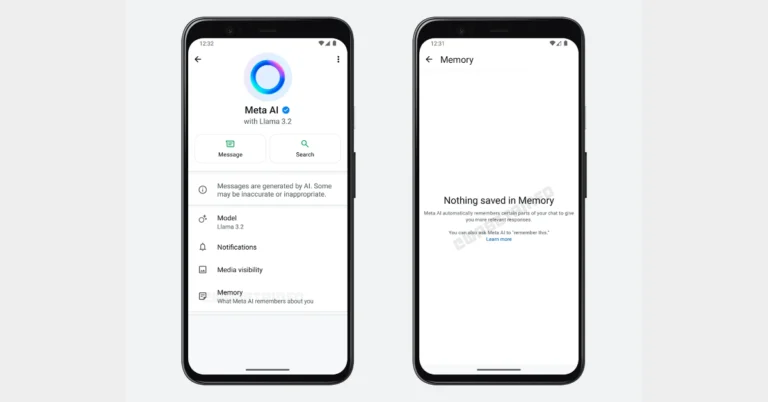
WhatsApp’s AI chatbot, Meta AI, is about to get a chat memory feature for Android. The chatbot may be made to recall certain personal information by users, which enables it to tailor its answers. Although beta testers are unable to use this functionality at this time, it was observed in the most recent beta version of the application. A similar function named Memory is also offered by Meta AI on ChatGPT. We anticipate that the chat memory function will improve the user experience.
According to WabetaInfo, WhatsApp is working on a new character memory function. It is releasing a new update via the Google Play Beta Program, update version 2.24.22.9. The new chat memory function for Meta AI is expected to be released in a future update since the feature is still under development and not ready for beta testing.
According to the report, WhatsApp intends to further personalise the experience with Meta AI, offering users more targeted responses to their wants and questions. According to the shared screenshot, the new functionality would allow Meta AI to automatically recall prior chatbot data, allowing users to receive more relevant and personalised replies. The function will remember personal information such as vegan status, birthdate, and chat style preferences. Meta AI may also remember allergies and personal hobbies, such as book selections, films, and podcasts. This feature is scheduled to be provided in a future version.
Meta AI’s memory capability is anticipated to improve personalisation in interactions by making personalised recommendations and guidance. This enables Meta AI to avoid proposing foods that consumers have hated or were allergic to, resulting in a more engaging and natural experience. Users have control over what Meta AI remembers, as they may edit or delete specific information at any moment. This makes Meta AI feel like a personal assistant.
WhatsApp makes it easy to let your friends and family know your current location. If you’re in a moving vehicle, the instant messaging app lets you share your live location so others can track your movement. This can be a double-edged sword, as you may not always want to share your coordinates with other people. Luckily, there is a way you can work around that. If you’re not comfortable with letting others know about your whereabouts, there is a way to send them a fake location on WhatsApp.
WhatsApp does not have a native location-spoofing tool. It is unlikely that Meta will add one in future. Modded apps like GB WhatsApp also fail to accomplish this task. However, using the right third-party apps, you can change the location of your device. Once that’s done, you can share the fake location with WhatsApp contacts.
There are a bunch of third-party apps to choose from. In this tutorial, we’ll show you how to change your phone’s location using Fake GPS. You can also use apps like GPS Emulator, Location Changer, and Mock Locations. These apps are not too far apart in the way that they function. Before you use these apps on your device, it is essential that you enable Developer Options.
Step 2: Enable Developer Options on your device. Read this article to learn how to go about it.
Step 3: Enable location services from the Quick Settings Menu.
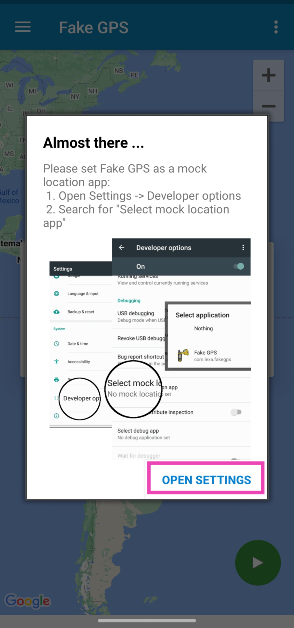
Step 4: Launch the app and hit Open Settings.
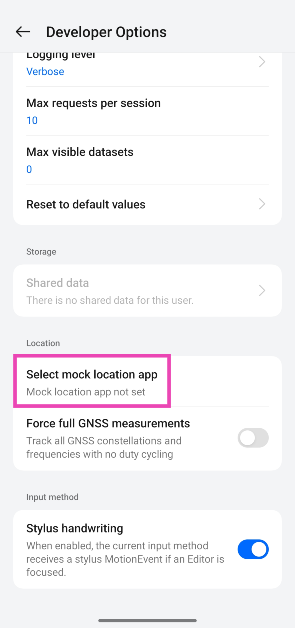
Step 5: Scroll down to the bottom and tap on Select mock location app.
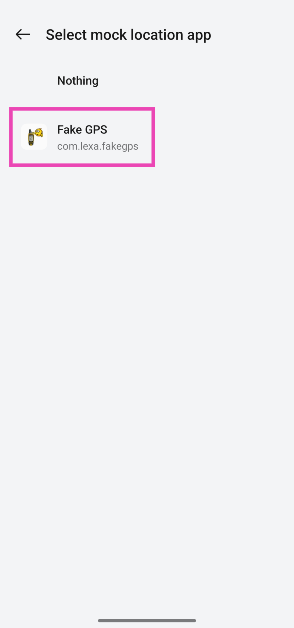
Step 6: Select Fake GPS.
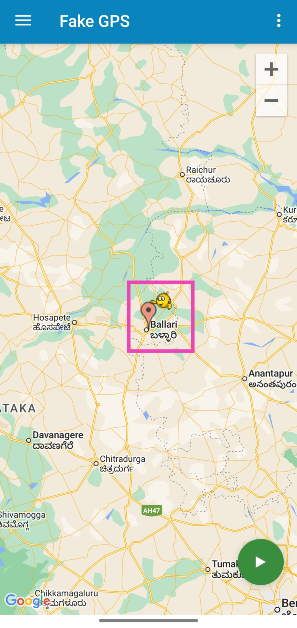
Step 7: Go back to the app and drop the pin on the location you want to share on WhatsApp.
Step 8: Hit the green icon in the bottom right corner of the screen.
Step 9: Once your device’s location has been changed, launch WhatsApp and select the contact with whom you want to share your location.
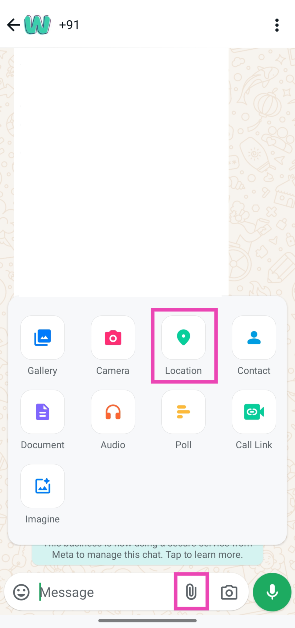
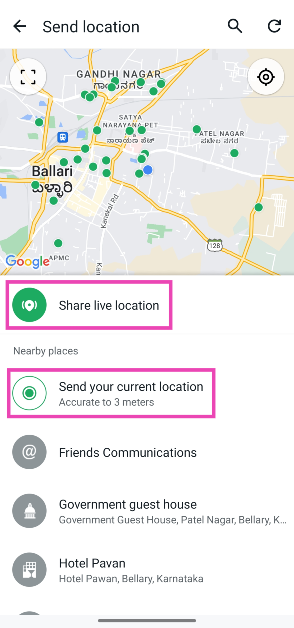
Step 10: Hit the attachments icon and select Location.
Step 11: Select Share live location or Send your current location. The fake location will be shared with the contact.
Frequently Asked Questions (FAQs)
How do I share my live location on WhatsApp?
Open your chat with a WhatsApp contact, hit the attachments icon, tap on Location, and select ‘Send your live location’. You can decide the time period for which you want to share your live location.
Can I send a fake location on WhatsApp?
You can send a fake location to someone on WhatsApp by faking the location of your device. This can be done by using apps like Fake GPS and GPS Emulator.
Do I need to root my Android phone to fake its location?
You don’t need root access to fake your phone’s location. However, you will need to enable Developer Options on the device before using location-spoofing apps like Fake GPS.
This is how you can send a fake live and current location to someone on WhatsApp. When you spoof the location of your smartphone, it will reflect on every app that requires location access. Apps like Ola, Uber, Zomato, Swiggy, and Google Maps will also be affected. If you have any questions, let us know in the comments!
HMD has now hinted at the release of a limited-edition HMD Fusion model in association with Marvel’s forthcoming Venom: The Last Dance film. During IFA 2024, the HMD Fusion was introduced. There is a 50-megapixel selfie camera included with IP52 certification. The standard variant is powered by Snapdragon 4 Gen 2 SoC.
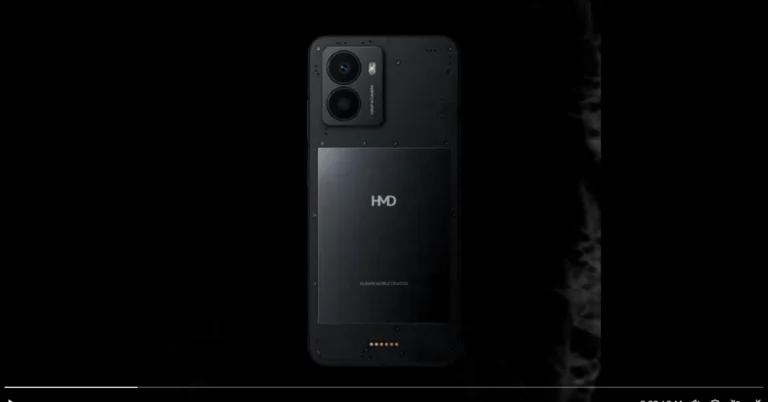
HMD Global has officially announced its upcoming phone HMD Fusion Venom edition. The company took to X.com to make the announcement. It has teased the special edition Fusion phone in collaboration with Marvel’s Venom: The Last Dance, titled “the Ultimate Symbiotic Phone.” While the Venom edition’s features and specs are mostly the same as those of the current version, it is anticipated that it will have design aspects influenced by the movie.
Given that the Fusion phone is already available in a dark grey colour, the teaser video on X illustrates Venom covering it, which might lead to a darker version.
Rumour has it that the HMD Fusion Venom edition will include modular design features like a torch, a 5W wireless charging module, and casings that can be customised. It will also have an open-source hardware-software kit and Gen2 repairability, which would make changing components simple.
HMD Fusion specs
The 6.56-inch HD+ display on the HMD Fusion has a resolution of 720 x 1,612 pixels. The panel comes with Android 14 and has a refresh rate of 90 Hz. A Snapdragon 4 Gen 2 SoC, up to 8GB of RAM, and up to 256GB of internal storage power the phone. A microSD card may be used to increase the storage capacity to 1TB.
HMD Fusion can be modified with the IP68-rated Rugged Outfit, which has an emergency button and wireless charging compatibility, or Smart Outfits, which provide extra functions such as a built-in ring light for mood management.
The HMD Fusion has a dual rear camera with a 108-megapixel primary sensor and a 2-megapixel depth sensor, and a 50-megapixel front camera. It has a 5,000mAh battery, 33W wired fast charging, and connectivity options like Bluetooth 5.2, GPS/AGPS, GLONASS, BDS, Galileo, OTG, USB Type-C port, and WiFi.
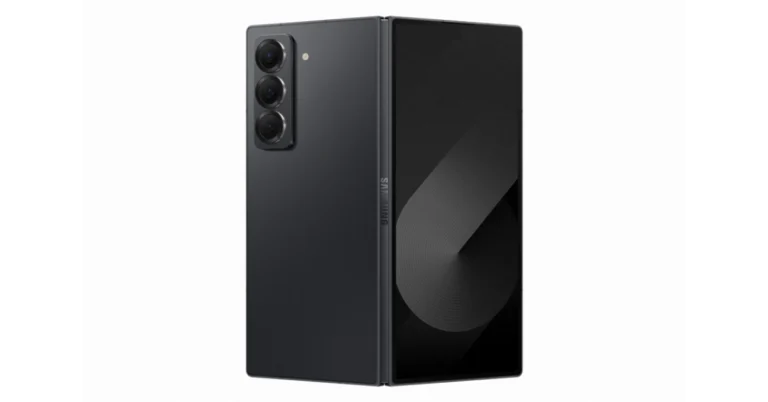
Samsung has announced the launch of the Galaxy Z Fold 6 Special Edition, an improved version of the foldable phone. With Qualcomm’s Snapdragon 8 Gen 3 CPU and an improved 200-megapixel wide-angle lens, the foldable gadget will only be sold in South Korea.
In This Article
Samsung Galaxy Z Fold 6 Special Edition Pricing and Availability
In South Korea, the starting price for the Samsung Galaxy Z Fold 6 Special Edition is KRW 2,789,600, or around Rs 1,70,000 for the single 16GB RAM with 512GB storage option. It will come in a Black Shadow colour. Beginning on October 25, the device will be available for purchase on the company website as well as through other online retailers including T Direct Shop, KT.com, and U+.
Customers who buy and activate products before December 31st will receive discount vouchers for the Galaxy Ring, Galaxy Watch Ultra, Galaxy Buds 3 Pro, and Galaxy Tab S10 Ultra.
The Samsung Galaxy Z Fold 6 in India is priced at Rs 1,64,999 for the base model with 12GB RAM and 256GB storage, with 12GB RAM with 512GB storage and 12GB RAM with 1TB storage variants priced at Rs 1,76,999 and Rs 2,00,999 respectively. The models are available in Navy, Pink, and Silver Shadow colours, while the 1TB model is available in Silver Shadow.
Samsung Galaxy Z Fold 6 Special Edition Specifications
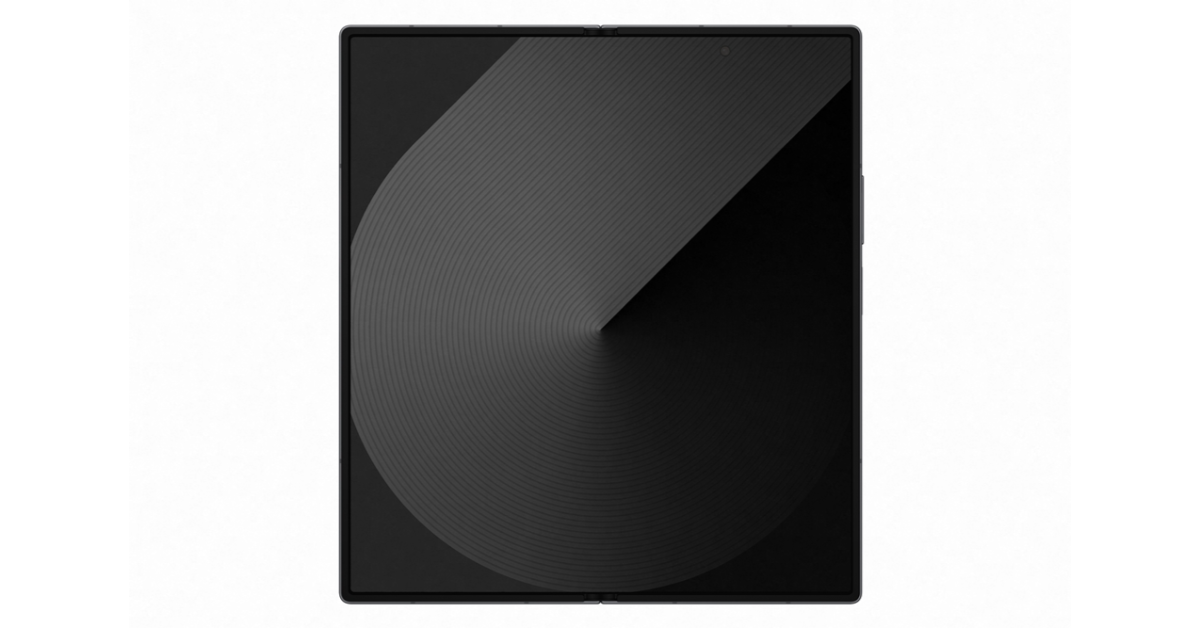
The Galaxy Z Fold Special Edition is 10.6mm thick and weighs 236g; it is 1.5mm slimmer and 3g lighter than the ordinary Galaxy Z Fold 6. When unfolded, the primary screen has a 203.1mm (8.0-inch) display with a 20:18 ratio, making it the Galaxy Z Fold series’ biggest screen. The foldable cover screen has a 164.8mm (6.5-inch) display with a 21:9 ratio. In addition to this, it has a striped pattern and metal/glass materials.
The Z Fold 6 Special Edition features a 200 million-pixel wide-angle camera that captures more vibrant and crisp photographs and movies. The AP (Application Processor) is powered by Qualcomm’s ‘Snapdragon 8 Gen 3 Mobile Platform for Galaxy’, which enables high performance and AI processing optimisation. It also offers 16GB of RAM and a ‘Galaxy AI’ experience tailored for foldable devices.
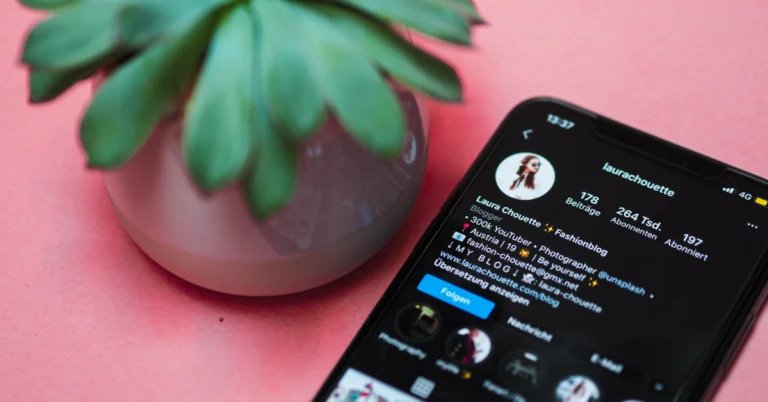
Instagram has introduced ‘profile cards’ for users to share their profiles with people outside the platform. Users can decide what gets displayed on their profile cards and change design elements like the colour and background image. If you go to your profile, you’ll see a notification about your profile card. If you missed this notification, here’s how you can find and share your Instagram profile card.
Think of an Instagram profile card as a business card with all the essential details listed on it. Previously, Instagram used to have a similar ‘QR code’ card for every account. This card was stashed away in account settings and did not display much information apart from the username and QR code (linking to the profile).
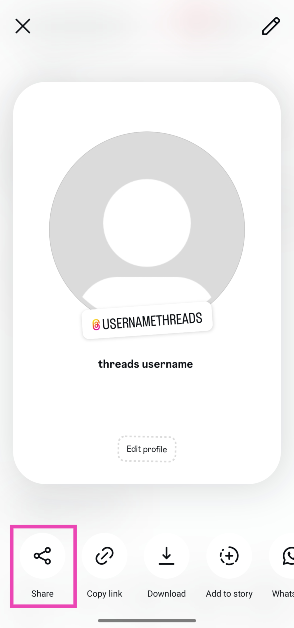
The new profile card has two sides. Its front side resembles its predecessor, displaying the QR code and username. The other side of the card contains additional information like your bio, profile picture, profile name, and music. You can choose to share either side of the card.
Find and share your Instagram profile card
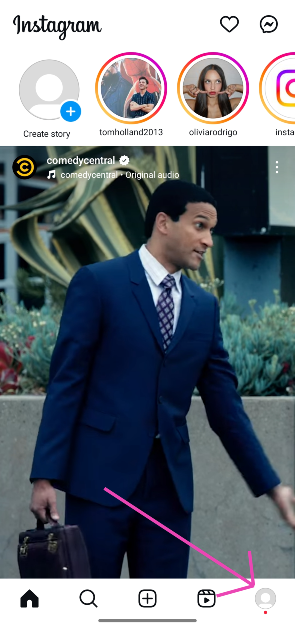
Step 1:Launch the Instagram app on your smartphone and tap your profile picture in the bottom right corner of the screen.
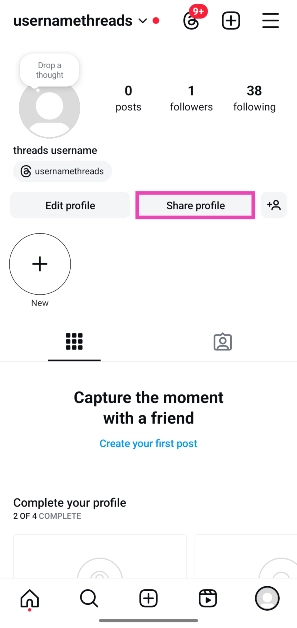
Step 2: Tap on Share profile. Your profile card will appear on the screen.
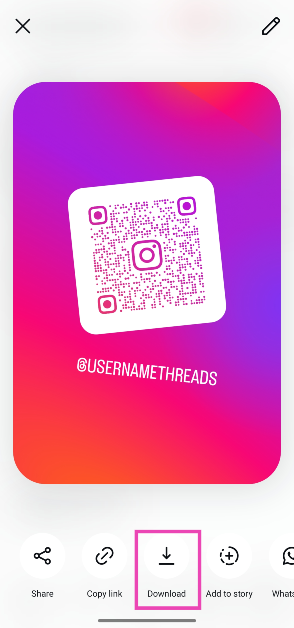
Step 3: The profile card has two sides. One contains a QR code linking to your profile along with your username and the other contains your profile info. Hit Download and select which side you want to save on your phone.
Step 4: To send your profile card to a contact, hit Share in the bottom left corner of the screen. If you want to share it on WhatsApp, Snapchat, Threads, or Messenger, tap the relevant app icon at the bottom of the screen.
Step 5: Hit the pencil icon in the top right corner of the screen to customise your profile card. You can change the background image, and card colour, and edit the profile details.
Frequently Asked Questions (FAQs)
How do I find my Instagram profile card?
To view your profile card, tap your profile picture in the bottom right corner of the screen and hit ‘Share profile’. Hit ‘Download’ to save it on your phone.
Can I customise my Instagram profile card?
Instagram allows you to change the colour and the background image of your profile card. Hit the pencil icon in the top right corner of the screen to carry out these changes.
Is my profile picture visible on my Instagram profile card?
One side of the card displays the QR code to your profile and your username. The other side displays your profile picture, username, profile name, music, and bio.
This is how you can find and share your Instagram profile card. Your profile card does not display personal information like the email and phone number registered with your profile. To view someone else’s card, go to their profile, tap on their profile picture, and select ‘Share profile’.
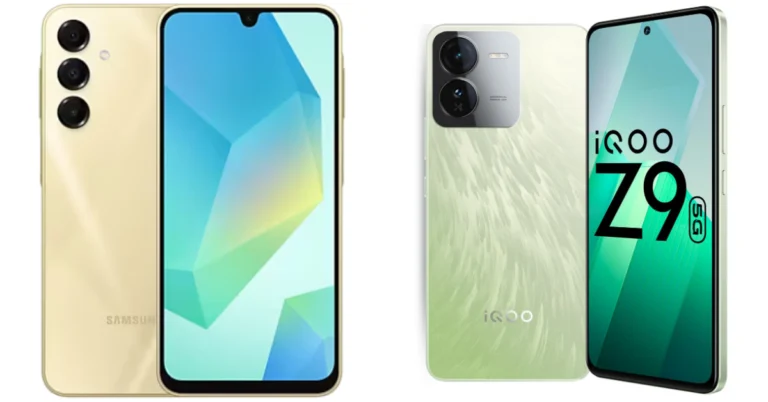
The Samsung Galaxy A16 5G, which replaces the Galaxy A15 5G, has been introduced in India. The gadget will go up against phones that cost about Rs 20,000, such as the iQOO Z9 5G, which shares features with the A-series phone. The Galaxy A16 5G and iQOO Z9 5G are compared in this article to see which is a superior smartphone for less than Rs 20,000.
Samsung Galaxy A16 5G: Triple rear camera setup includes a 50MP main camera, 5MP ultra-wide-angle sensor and a 2MP macro sensor iQOO Z9: Dual rear camera unit includes 50MP Sony IMX882 primary camera and 2MP bokeh sensor
Selfie camera
Samsung Galaxy A16 5G: 13MP iQOO Z9: 16MP
RAM and storage
Samsung Galaxy A16 5G: 8GB+128GB and 8GB+256GB iQOO Z9: 8GB+128GB and 8GB+256GB
The iQOO Z9 5G and Samsung Galaxy A16 5G are two smartphones with distinct photography features. The iQoo Z9 5G boasts two cameras and a punch-hole screen, while the A16 5G has three rear cameras and a waterdrop notch for selfies. For improved speed, efficiency, and gaming, the iQoo employs the MediaTek Dimensity 7200 processor, whereas the Samsung phone uses the MediaTek Dimensity 6300. The iQoo Z9 5G does not feature an ultra-wide sensor, although both have 50MP primary sensors. Both feature a 5,000mAh battery, however, the Samsung Galaxy A16 5G supports 25W wired fast charging while the iQoo Z9 5G has 44W. Both devices are running Android 14, however, the iQoo Z9 only gets two years of upgrades, while the A16 5G gets six.
Are you looking for today’s Wordle for October 21, 2024? The problem is difficult to solve, so if you need assistance, we’ve included hints and the answer to the October 11 Wordle.
In This Article
Hints and Answers for Today’s Wordle October 21
Before answering directly, please check the October 21 Wordle Hints first.
Today’s Wordle answer consists of two vowels, no repeating letter, and can be synonymised with fog and smog.
Hint 1: Today’s Wordle answer includes one vowel. Hint 2: The answer for today has a repeating letter. Hint 3: A utensil with a round end and a long handle that you use for eating, mixing or serving food
What word does today’s Wordle begin with?
Do you need help with today’s Wordle answer’s initial letter?
The first letter in today’s Wordle is “G”
Today’s Wordle Answer October 21 #1220
The answer to Wordle #1220 on October 21, 2024, is — SPOON
Wordle: A Five-Letter Word Guessing Game • The game allows six guesses of a five-letter word. • Provide feedback on guessed letters’ placement in the puzzle. • TheNew York Times purchased the game in 2022. • Created by Josh Wardle for his partner, narrowing down 12,000 English words to 2,500. • Named after the word “word.”
How To Play Wordle?
Wordle is a New York Times word puzzle game that allows users to guess a five-letter word in six attempts. The letters are highlighted in Yellow and Green, indicating whether the word is present in the answer or not, and Green letters indicate the correct guess.
Select a powerful starting word: Avoid using unusual words, as they frequently do not match common letters. A good opening word has plenty of benefits.
Repeating letters: Don’t be afraid of repeating letters; they appear frequently in words. The answer may contain one or two repeated letters.
Use the Wordlebot: The NYT’s Wordlebot analyses and compares replies to itself. This challenge can assist you enhance guessing skills and highlight areas for development.
Garena Free Fire Max is a battle royale game with regular awards and tournaments to keep players interested. If you play Garena Free Fire, you should be aware of the redeem codes that are released on a daily basis. However, because the battle royale game is banned in India, players from other countries can use the Free Fire Redeem codes daily. If you’re unfamiliar with the Garena Free Fire redeem codes or don’t know how to get them, we’ve put together a step-by-step guide to help you redeem them. Check out Garena Free Fire Max Redeem Codes for 21 October 2024.
The Free Fire Max redeem codes are a great way to get free stuff. These are 12-digit codes that contain alphabets and numbers, as well as an expiration date and time. Because the Garena FF redeem codes cannot be used more than once, you should hurry to the redemption page to claim your free reward before someone else does. To get a free reward, all you have to do is go to reward.ff.garena.com/en, which is the official redemption page. Also, keep an eye on this space for daily updates on Garena Free Fire Max redemption codes and rewards.
21 October 2024: New Amazon Quiz is now available. Customers from different parts of the country are participating in the daily quiz. The quiz starts at midnight today and will be live until 11:59 PM tonight. By successfully answering every question, participants in the quiz have the chance to win wonderful rewards. A Rs 500Amazon Pay Balance is up for grabs to participants today.
One wrong answer could eliminate you from the quiz. You have a chance to win Rs 500 Amazon Pay Balance if you successfully answer everyquestion. Users of the app only have the opportunity to take the quiz. Check Out 21 October 2024 Amazon Quiz Answers.
Onlyapp users are eligible to play the Amazon quiz every morning from 12 AM to 11:59 PM. The quiz is not available on the desktop. For those who are unaware of how to play the Amazon quiz, below are the steps, you can follow to take the quiz.
We have written an explainer above, you can refer to that.
When are the winners of the Amazon Quiz and contest announced or declared?
The announcement of today’s Amazon quiz winner will take place Tomorrow. As for the Special Quiz and “Spin & Win” Contest, thewinners will be declared once the Quiz Contest comes to an end. To find out who the lucky winner is, you can refer to the Amazon Quiz Winners List or visit the Amazon Winners tab in the Amazon App.
How to participate in the Daily Amazon Quiz?
That is very easy, just got to the Amazon app and scroll to the bottom of the page and you will find the Quiz section. Click on it (usually it is called the fun zone) and you can enter the Amazon Today Quiz Contest.
Are there any other quizzes or contests running on Amazon daily?
Yes, there are many running on a daily basis. These range from spinning the wheel to answering the questions correctly. All are located in the Fun Zone.
What are the criteria for selecting a winner in the Daily Amazon Quiz?
When a qualified player submits correct answers to all the questions, they will automatically be entered into a lucky draw. This draw will include all participants who answered all the questions correctly.Amazon randomly selects the final winners from the pool of eligible participants who gave the right answers.
Which Types of Questions are asked within Amazon Daily Quiz?
These are very simple and straightforward questions. These are mainly related to general knowledge.
Where should I look for Amazon Daily Quiz answers?
You canbookmark this page as we will help you every day with the Amazon Daily Quiz. We bring you fresh answers every day for the Amazon Daily Quiz and Contest.
What time does Amazon Announce previous winners?
The previous winner’s name will be announced today at 12 PM (noon).
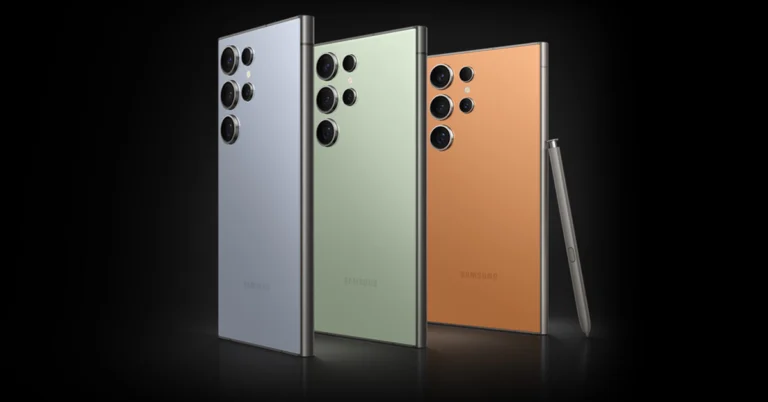
Samsung’s upcoming flagship, the Samsung Galaxy S25 Ultra, has been stirring up the tech community with a slew of leaks and rumours. The latest buzz suggests that the Galaxy S25 Ultra will be available in a selection of colours including Black, Blue, Green, and an intriguing new Titanium option. This information comes from the usually reliable tipster @UniverseIce, who has a solid track record when it comes to Samsung leaks.
In This Article
Leaked Color Options
While the standard Black, Green, and Blue are familiar hues for Samsung enthusiasts, the addition of Titanium is particularly noteworthy. This Titanium variant seems to replace the traditional white option and might be Samsung’s attempt to replicate the sleek metallic aesthetic that competitors have been boasting about—most notably since the iPhone 15’s release. It’s also anticipated that Samsung will offer more exclusive colours through its website, continuing its trend of providing unique options for online shoppers.
The use of the word “Titanium” in the colour lineup has raised some questions. Given that Samsung is expected to use titanium as the main frame material for the Galaxy S25 Ultra, the Titanium colour may be a natural metallic finish. This could mean that while all the colour options utilize a titanium frame, only the Titanium variant showcases the material’s natural look. If this is the case, it would align with the industry’s move toward more premium and durable materials in flagship smartphones.
BREAKING!
The Galaxy S25 Ultra will debut in four color options:
Black, Green, Blue, TitaniumI
I don’t know the online color scheme yet. pic.twitter.com/KNHZTC6lma
Leaked renders of the Galaxy S25 Ultra suggest that Samsung is making some subtle yet significant design changes. The upcoming model appears to have a more rounded frame and even thinner bezels than its predecessor. There’s also talk of Samsung tweaking the camera ring design to more closely match the aesthetic of the Galaxy Z Fold 6. With these updates, choosing the Titanium option could result in a device that looks surprisingly similar to the latest iPhone models, especially with the rounded edges and metallic finish.
Performance Expectations
Under the hood, the Galaxy S25 Ultra is expected to offer solid performance gains. Rumours point to an increase to 16GB of RAM and the complete ditching of Exynos chips due to Samsung Foundry’s ongoing yield problems. This means that all models might come equipped with Qualcomm processors, potentially leading to better performance and efficiency. However, aside from these improvements, there might not be massive upgrades over last year’s flagship.
Despite the anticipated enhancements, some analysts believe that the Galaxy S25 Ultra may not offer enough to warrant an upgrade from the S24 series. With other big-name phones like the Pixel 9 entering the market, consumers might find more innovative features elsewhere. The real excitement might come when Samsung achieves its goal of developing 1.4 nm chipsets by 2027, although current yield issues cast some doubt on that timeline.
In the ever-evolving smartphone landscape, the Samsung Galaxy S25 Ultra seems to be a solid, if not groundbreaking, addition to the lineup. The new Titanium colour and design tweaks are interesting developments, but whether they’re enough to entice current users to upgrade remains to be seen. Perhaps the real innovation lies in Samsung’s future endeavours, such as collaborating with Google and Qualcomm on an XR device. Only time will tell if the Galaxy S25 Ultra will stand out in a crowded market or blend in with the competition.
If you don’t believe in charging your phone overnight, you must ensure that it has enough charge before you go to bed to get you through the next day. Sometimes, users report a big fall in battery level even when their device isn’t in use. This is called ‘background battery drain’ and it is more noticeable when it happens overnight. The good thing is that you can limit this drain by adopting a few easy practices. Today, we bring you the top 8 ways to fix overnight battery drain on your Android phone.
What causes your phone’s battery to drain overnight?
Your phone needs power to carry out vital background tasks even when you’re not actively using it. These tasks include receiving the network signal, displaying incoming notifications, and keeping certain apps running in the background. As a result, its battery level can drop by a small factor by the time you’re up. A drain of around 5-10% is considered normal. However, if you notice a bigger drain (~15-20%), it is a cause for concern.
Older phones are more susceptible to a bigger battery drain due to their worn-out battery units. An old battery is poor at sustaining a charge even when it is not being used actively. However, if you’re experiencing this issue on a new phone, it could be due to a rogue app or some background glitch. Let’s take a look at how you can fix it.
Turn off Always On Display
Having Always On Display turned on while you’re asleep does not serve any purpose. Instead, it drains your phone’s battery overnight. You can either schedule it to turn off at a certain time or disable it entirely from settings. Here’s how.
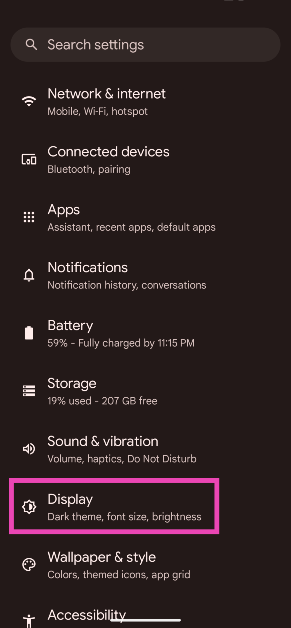
Step 1: Go to Settings and select Display.
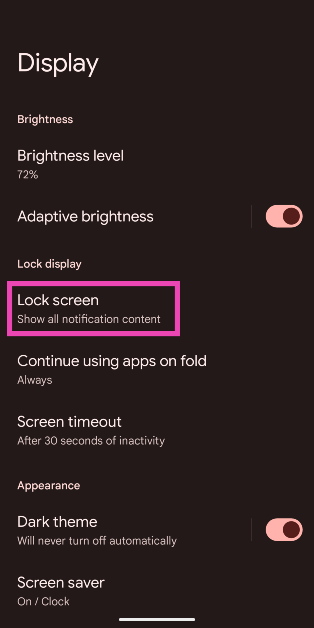
Step 2: Tap on Lock screen.
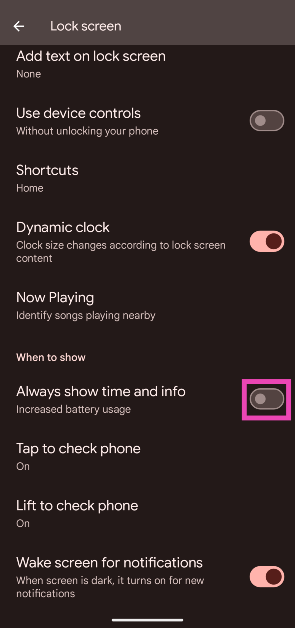
Step 3: Turn off the toggle switch next to Always show time and info.
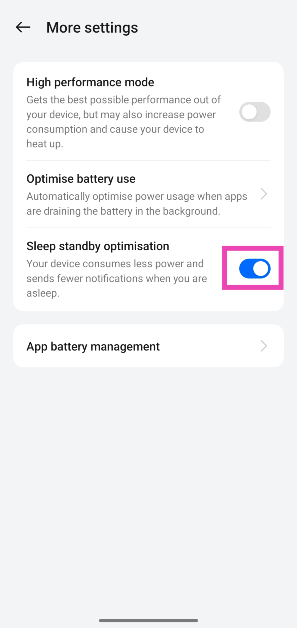
Turn on Sleep Standby Optimisation
Some smartphones have a battery feature that reduces the overnight battery drain by sending you fewer notifications while you’re asleep. Here’s how you can turn it on.
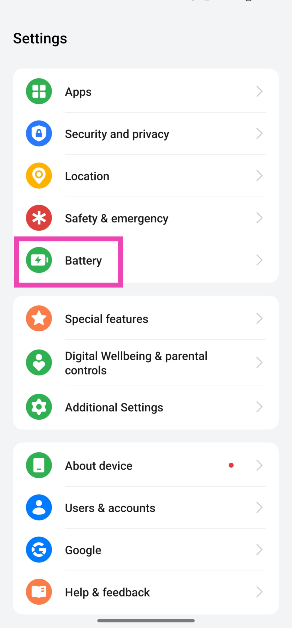
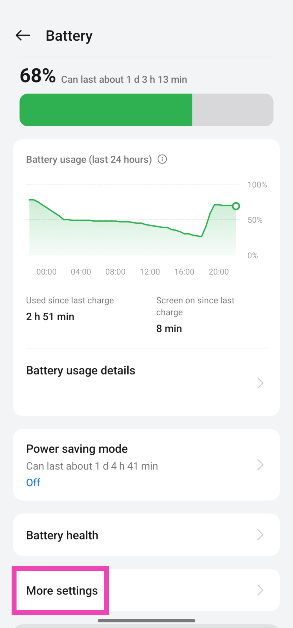
Step 1: Go to Settings and select Battery.
Step 2: Tap on More settings.
Step 3: Turn on the toggle switch next to Sleep standby optimisation.
Turn on Flight Mode
Putting your phone in flight mode can extend its battery life as it suspends certain functions that consume a lot of power. Your phone will switch off Bluetooth and WiFi and stop receiving network signals. If you don’t mind not receiving calls at night, this is something you should do to reduce the overnight battery drain. To put your phone in flight mode, swipe down from the status bar and hit the aeroplane tile in the Quick Settings Menu.
Close background apps
Android phones have become smart at optimising background apps and making sure they don’t demand a lot of resources. Even though the battery drain caused by the background apps is minimal, it becomes more noticeable at night. To make sure this doesn’t happen, close all the background apps before going to bed. You can also choose to force close an app from the settings.
Turn off location services
During the day, there are tons of tasks that require access to your phone’s location services. These tasks may vary from booking a cab to making an online payment. When you go to bed, you don’t really need to keep the location services turned on. You can save a significant amount of juice by disabling it. Simply swipe down from the status bar and tap the location pin tile to disable location services.
Uninstall power-hungry apps
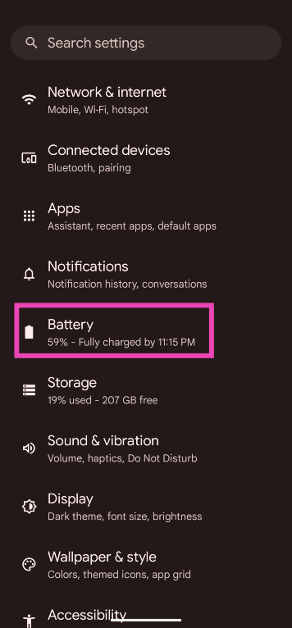
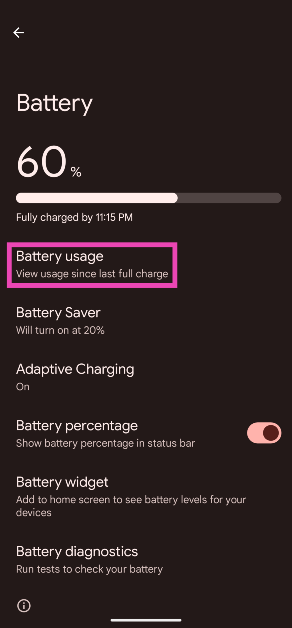
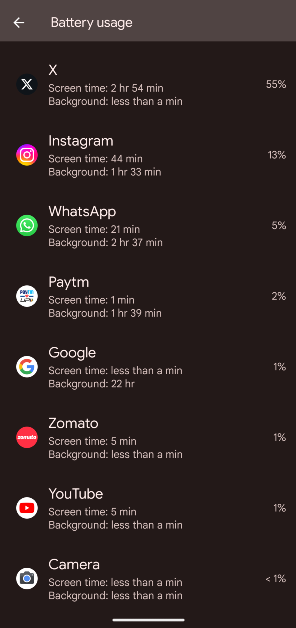
Android phones allow users to view which apps consume the most power. If you notice that an app is draining the battery faster than usual, uninstall it from your device. Here is how you can view the battery breakdown.
Step 1: Go to Settings and select Battery.
Step 2: Tap on Battery usage.
Step 3: Scroll down and view the percentage of battery used by the different apps on your phone.
Turn on Battery Saver
Turning on the battery saver on your Android phone reduces the overnight battery drain by cutting down the non-vital background tasks. You can turn it on either by tapping its tile in the Quick Settings Menu or going to Settings>Battery>Battery Saver and turning on its toggle switch.
Update your phone
Keeping your phone updated to its latest version ensures that the software is optimised to get the best performance out of the battery.
Step 1: Go to Settings and select Software update.
Step 2: Tap on Download and install.
Step 3: Select Install now.
Frequently Asked Questions (FAQs)
How do I fix the overnight battery drain on my Android phone?
You can reduce overnight battery drain by turning on flight mode/DND when you go to bed. Some phones may have battery optimisation features that help accomplish the same task. If you want no drain whatsoever, turn off your phone before going to bed.
Is 10% overnight battery drain normal?
Typically, a smartphone with a healthy battery shows a 5-10% battery drain overnight. If it is greater than 10%, you need to diagnose the issue causing the increased drain.
Is it okay to charge my phone overnight?
Modern smartphones have intelligent charging functions that allow them to trickle charge when you go to bed with the charger plugged into the device. This restores the battery’s health and keeps it from overcharging.
How do I enable Standby Sleep Optimisation?
Go to Settings>Battery>More Settings and turn on the toggle switch next to ‘Standby Sleep Optimisation’.
How do I check my Android phone’s battery health?
Go to Settings>Battery>Battery Information and check the ‘Battery Health’ category.
This is how you can fix overnight battery drain on your Android phone. This issue is more common in older phones. It is important to practise good battery habits to increase the device’s longevity. Keeping your phone updated to the latest OS version helps its battery life as well. If you’re aware of any other methods that may help resolve this problem, let us know in the comments!
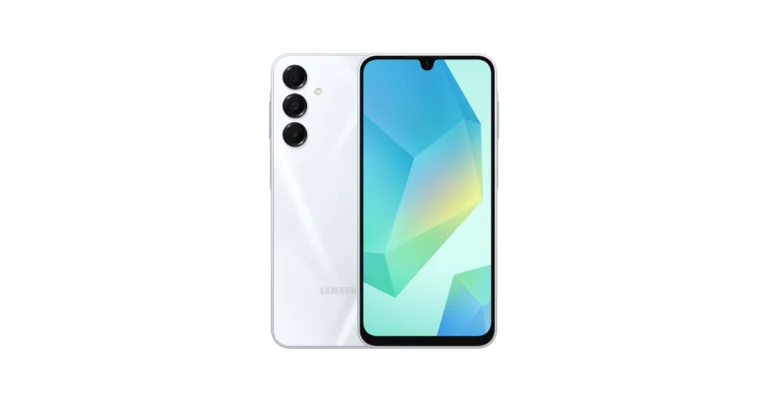
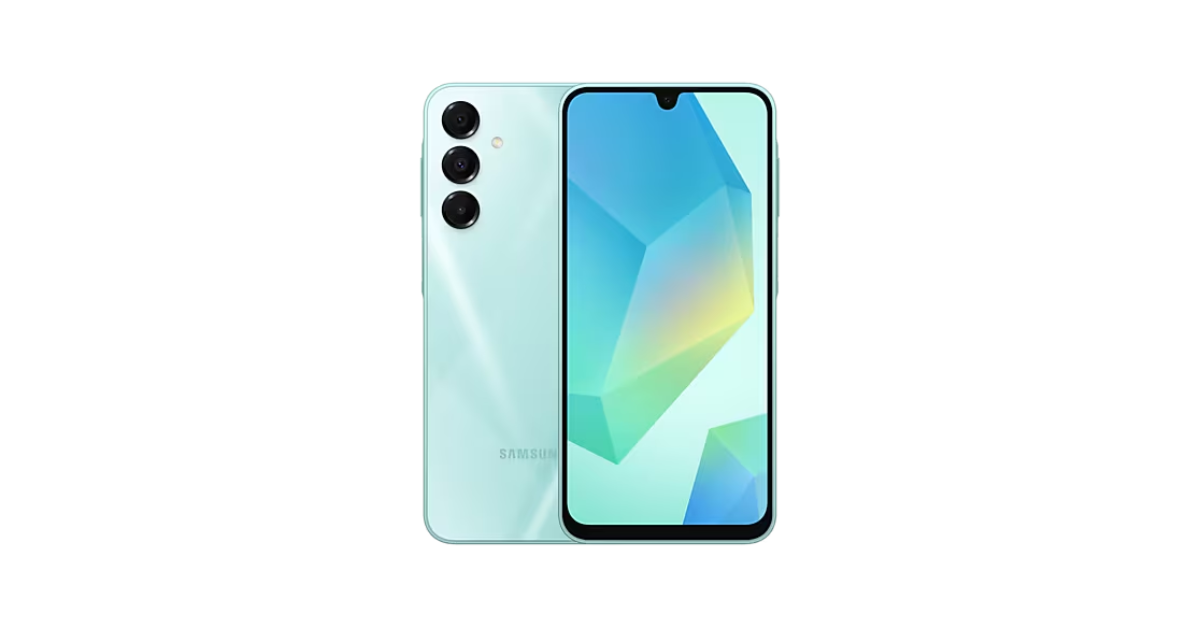
Samsung has officially announced the launch of a brand-new smartphone in the Indian market today. Samsung Galaxy A16 5G is the latest addition to the company A-Series with a 6.7-inch display with a 90Hz refresh rate. The device is powered by MediaTek Dimensity 6300 SoC. It features a triple rear camera setup and has an IP54 rating.
In This Article
Samsung Galaxy A16 5G price in India, sale details
Samsung Galaxy A16 5G has been launched in India in two different configurations. The 8GB RAM with 128GB storage model is priced at Rs 18,999 whereas the 8GB RAM with 256GB storage model costs Rs 21,999. The device will be available in three colour options Light Green, Blue Black and Gold. The device will be available across retail stores, Samsung.com, and online platforms including Amazon.in and Flipkart.com, starting today.
As part of the Galaxy A16 5G launch offer, Samsung India is offering a special promotion for its Tap & Pay feature. Users who complete five Tap & Pay transactions through Samsung Wallet will receive a Rs 500 voucher. This limited-time offer is valid until December 31. Also, there will be Bank cashback of up to Rs 1,000 on Axis and SBI Credit card transactions.
The Samsung Galaxy A16 5G comes equipped with MediaTek Dimensity 6300 SoC with 8GB RAM and up to 256GB storage which can be expanded up to 1TB using a microSD card. The device will come with 6 generations of OS upgrades and 6 years of security updates. The phone features a 6.7-inch full-HD+ AMOLED display with a 90Hz refresh rate and a contrast ratio of 1 million :1. The handset boasts an IP54 rating for water and dust resistance. Samsung’s Knox Vault chipset comes in separate tamper-resistant storage for protection against software and hardware threats.
The Galaxy A16 5G has a triple rear camera unit that includes a 50-megapixel primary sensor, a 5-megapixel ultra wide-angle lens, and a 2-megapixel macro lens. The device includes a 13-megapixel selfie camera.
Samsung has introduced the Galaxy A16 5G with Samsung Wallet, a unique device with ‘Tap & Pay’ capability powered by NFC, enhancing payment convenience. The device also features Voice Focus, designed for Indian users, ensuring clear communication even in noisy environments.
The Galaxy A16 5G uses the Knox Security platform for enhanced security and privacy. It offers features like Samsung Pass, Pin App, Secure Folder, and Private Share, enabling users to securely manage their data and enhance their overall experience.





![Step 5: Tap the payment method under the 'Switch to [country] Play Store' category.](https://www.gadgetbridge.com/wp-content/uploads/2024/10/gpy10.webp)