The Infinix XPAD tablet sale is set to kick off on Flipkart tomorrow, September 26, with prices starting from an enticing ₹9,899, inclusive of bank offers. Infinix, a brand that’s been quietly making waves in the tech world, is introducing this feature-rich tablet to cater to professionals, students, and entertainment enthusiasts alike.
In This Article
Sleek Design Meets Vibrant Colors
Available in three eye-catching colours—Titan Gold, Stellar Grey, and Frost Blue—the Infinix XPAD tablet sports a premium metallic design that’s just 7.6mm slim. Despite its sleek profile, it packs a punch with two memory variants: a 4GB+128GB LTE + Wi-Fi model priced at ₹10,999, and an 8GB+256GB LTE + Wi-Fi version at ₹13,999. And if you’re keen on saving a few extra bucks, additional discounts are up for grabs through bank offers.
Infinix XPAD Tablet Performance and Specifications
Under the hood, the Infinix XPAD tablet is powered by the MediaTek Helio G99 processor, an octa-core chipset known for balancing efficiency and performance. This means smooth multitasking, snappy app launches, and the ability to handle demanding applications without breaking a sweat. Running on the latest Android 14, users can expect access to new features, security updates, and system optimizations that keep the tablet running like a well-oiled machine.
Display and Audio Experience
The device boasts an impressive 11-inch FHD+ display with a 90Hz refresh rate, delivering vibrant visuals and fluid navigation. Whether you’re binge-watching your favourite series or crunching numbers for a project, the expansive screen enhances the experience. The quad-speaker system, enhanced by DTS audio technology, ensures that the sound quality matches the stunning visuals, making it ideal for multimedia consumption.
Infinix XPAD Tablet Connectivity and Camera Features
Connectivity is another strong suit for the XPAD. With support for 4G LTE and Wi-Fi, you can stay connected on the go or at home. The dual 8 MP cameras—front and back—make for decent photography and seamless video conferencing. The inclusion of Folax, a personal voice assistant powered by OpenAI, adds a layer of convenience, allowing users to interact with the tablet through voice commands.
Battery anxiety? Not with this device. The XPAD houses a hefty 7000 mAh battery, promising all-day endurance. And when it’s time to recharge, the 18W fast charging feature ensures you’re back in action with minimal downtime. This focus on Infinix XPAD battery life means more work and play without constantly searching for a power outlet.
Multi-Device Collaboration
One of the standout features is the tablet’s multi-device collaboration capability. This allows for seamless file sharing and screen mirroring across various devices—perfect for those who juggle between a tablet, smartphone, and computer. It’s a nod to the increasingly interconnected world we live in, where flexibility and integration are key.
Infinix XPAD Tablet: A Tablet Worth Considering
In a market flooded with options, the Infinix XPAD manages to stand out by offering a blend of performance and affordability. While it may not dethrone the heavyweights just yet, it’s certainly a compelling choice for those seeking a feature-rich tablet without burning a hole in their pocket.
iPhones are known for their extravagant cameras and state-of-the-art photo processing. While the base variants have the standard wide and ultrawide lenses, the Pro models sport an additional telephoto camera. iPhone’s camera interface makes it very easy to switch between these lenses. However, users often report a strange flickering on the viewfinder. Today, we bring you the top 8 ways to fix the ‘Camera blinking or flickering’ issue on your iPhone.
If you notice strange flickering or blinking on your iPhone’s viewfinder, it could be due to the following reasons.
Automatic switch to macro mode
Display’s frame rate and frequency of the light source are out of sync
Imbalance in exposure
Camera app’s cache is corrupted
Camera’s hardware is damaged
Background software issues
Restart the Camera app
Background glitches can cause your iPhone’s camera app to malfunction. This could be due to a corrupt cache or a fault with the RAM. The solution to this is quite simple. Force stop the camera app and relaunch it. Swipe up and hold from the bottom of the screen to access the app switcher. Swipe up on the camera app’s card to stop it. Tap on its app icon on the home screen to relaunch it.
Disable Macro Mode
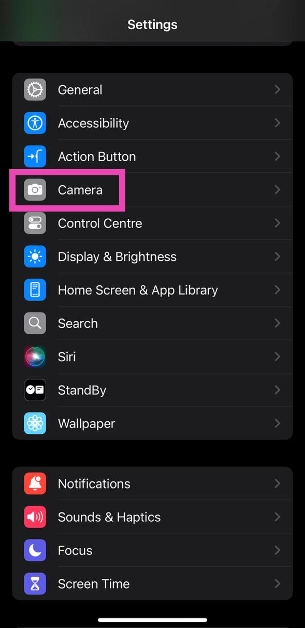
Step 1: Go to Settings.
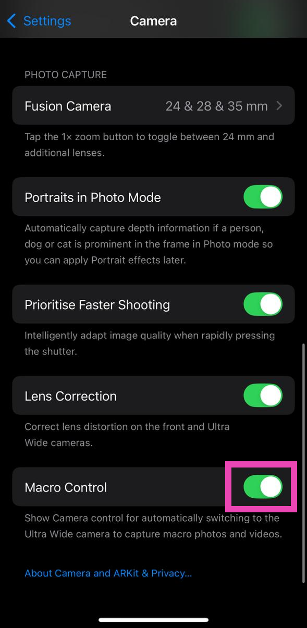
Step 2: Tap on Camera.
Step 3: Turn off the toggle switch for Macro Control.
Change the exposure
Your iPhone’s camera automatically changes the exposure (the amount of light it lets in) based on the lighting conditions of the scene. Sometimes, it may not be able to assess the intensity of the surrounding lighting, leading to unwanted blinking or flickering. In this scenario, it is better to adjust the exposure yourself. Here’s how.
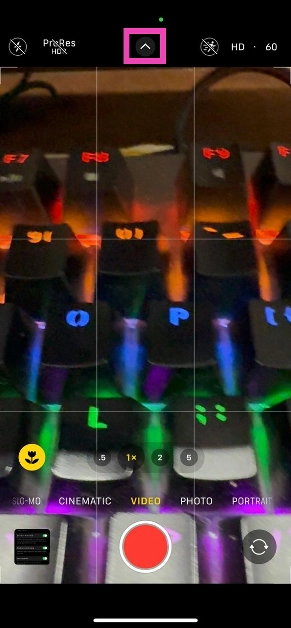
Step 1: Launch the Camera app on your iPhone.
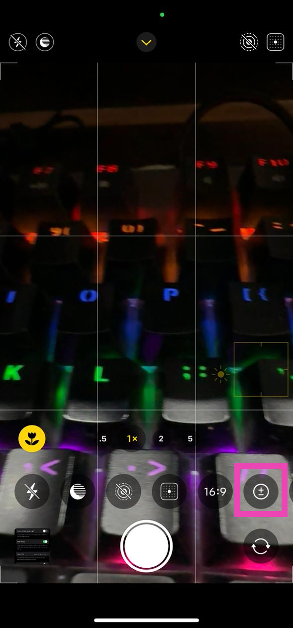
Step 2: Tap the arrow icon at the top of the screen.
Step 3: Tap the circle icon with the plus and minus signs inside it.
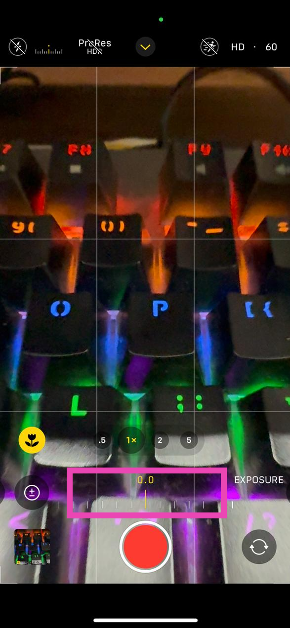
Step 4: Use the slider to adjust the exposure level until the blinking stops.
Lock the camera
If you want the exposure to remain stable while recording a video, lock the camera. Here’s how.
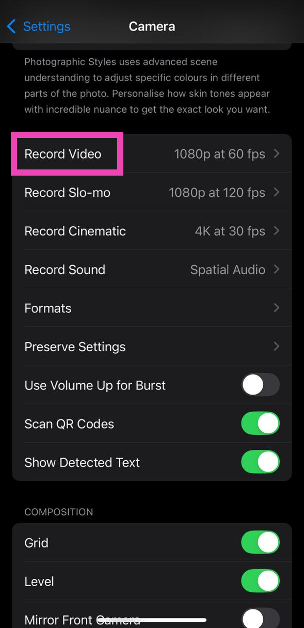
Step 1: Go to Settings and select Camera.
Step 2: Tap on Record Video.
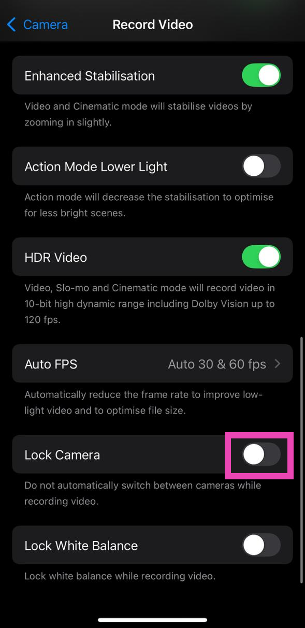
Step 3: Turn on the toggle switch next to Lock Camera.
Turn off Live Photos
If the Live Photo mode starts to malfunction, it can lead to unwanted results. Turn it off to check if it is behind the annoying flickering.
Step 1: Launch the Camera app on your iPhone.
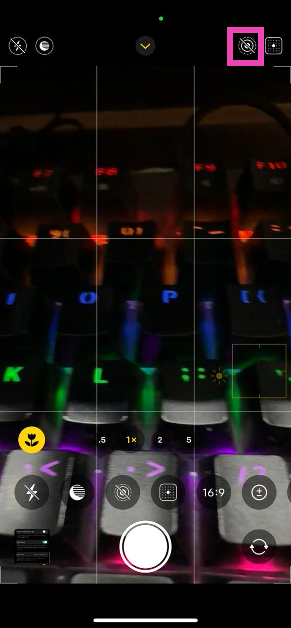
Step 2: Tap the icon with the concentric circles in the top right corner of the screen to turn off Live Photos.
Clean the camera lens
A dirty lens can cause flickering and blinking on the viewfinder in the Camera app. Use a clean, dry cloth to clean all the lenses on your iPhone’s rear camera array. You can use isopropyl alcohol to get rid of the settled grime. If you notice flickering on the viewfinder while taking a selfie, clean the notch/dynamic island on the display.
Restart your iPhone
Restarting your iPhone can resolve temporary issues stemming from software glitches. It refreshes your phone and clears the temporary memory. Press the side button along with any volume key to access the power menu. Drag the slider across the screen to turn off your iPhone. Wait for a few seconds and long-press the side key to turn on your iPhone.
Update iOS
Step 1: Make sure your iPhone is connected to a WiFi network and plug in its charger.
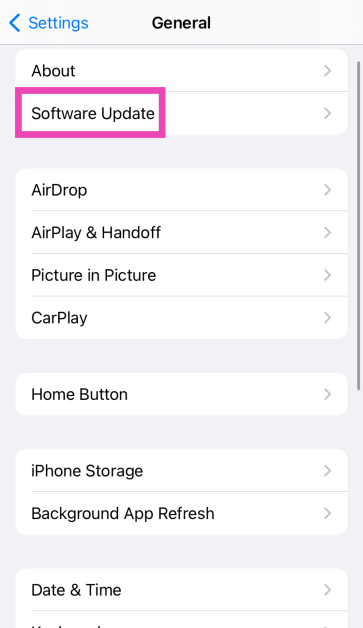
Step 2: Go to Settings and select General.
Step 3: Select Software Update.
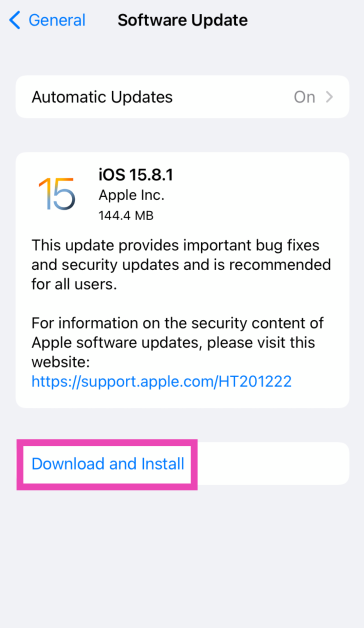
Step 4: Tap on Download and Install.
Frequently Asked Questions (FAQs)
Why does my iPhone camera keep blinking?
Your iPhone’s camera may start blinking when you move closer to a subject. This is because it automatically switches to Macro Mode to take close-up shots. The camera may also blink when it struggles to adjust the exposure to match the surrounding light.
What does it mean when my camera is flickering?
When you point your camera towards a light source, you may notice some flickering on the screen. This is because your phone’s refresh rate and the light source’s frequency are out of sync. Adjust the refresh rate to match the frequency of the light source to eliminate this issue.
How do I fix my iPhone’s camera from flickering?
To keep your iPhone’s camera from flickering, change its refresh rate, clean the camera lens, lock the camera, and turn off live photos.
How do I turn off Live Photos on my iPhone’s camera?
Launch the Camera app, hit the icon in the top right corner of the screen, and tap the concentric circles icon to disable Live Photos.
How do I disable the macro mode on my iPhone?
Go to Settings, select Camera, and turn off the toggle switch next to Macro Control to disable it.
These are the top 8 ways to fix the ‘Camera blinking or flickering’ issue on your iPhone. If these fixes do not work for you, try performing a factory reset on your iPhone. This will wipe all your personal data from the phone, so make sure you create a backup beforehand. If you have any questions, let us know in the comments!
If you’ve been holding out for the perfect moment to upgrade your audio setup, the Amazon Great Indian Festival 2024 might just be it. Sennheiser is offering fantastic discounts on some of its most sought-after products, making high-quality audio gear more accessible than ever. From seasoned streamers to passionate content creators, there’s something for everyone in these Sennheiser audio gear deals.
In This Article
Sennheiser Profile Streaming Set USB Microphone for Podcasting
Podcasters and streamers, rejoice! The Profile USB Microphone is designed with you in mind, offering exceptional audio quality without the hassle. Powered via USB-C, it features three essential controls: Gain Control, Mix Control, and Volume Control. Its adjustable tilt function allows you to position the mic just right. Whether you need a compact table stand or a flexible boom arm, this microphone adapts to your setup seamlessly.
Sennheiser Profile Streaming Set USB Microphone –Buy Them here.
Need a reliable microphone for your mobile or computer? The XS Lav USB-C is an affordable Lavalier microphone that won’t let you down. With its omnidirectional pickup and a generous 2m cable, it captures clear, natural audio in any setting. Accessories like a removable foam windscreen and a drawstring pouch make it easy to protect and carry wherever you go.
Sennheiser MKE 600 Professional Shotgun XLR Unidirectional Microphone
For filmmakers, vloggers, and content creators seeking a professional shotgun microphone, the MKE 600 is a top choice. Its high directivity ensures clear audio capture from where your camera is pointed, and the switchable “Low Cut” filter effectively minimizes wind noise. Compatible with a wide range of cameras and camcorders, it operates on either phantom power or battery power, making it versatile for various shooting conditions.
The HD 490 PRO Studio Headphones are perfect for those who demand meticulous audio reproduction. Its open-back design delivers a wide, immersive soundstage, ideal for critical listening and mixing. Lightweight and comfortable, these headphones are engineered for long sessions. Plus, the included DearVR MIX-SE plugin simulates the acoustics of mixing studios, helping you achieve a balanced and consistent mix across different systems.
Sennheiser HD 25 Plus Monitoring Headphones for DJs and Cameramen
DJs and cameramen need equipment that can keep up with their demanding environments. The HD 25 Plus headphones offer exceptional sound quality in a lightweight and durable design. Their closed-back design effectively blocks background noise, ensuring accurate audio monitoring even in noisy settings. Built to withstand rigorous use, they’re a reliable choice for professionals on the move.
Sennheiser HD 25 Plus Monitoring Headphones – Buy them here.
Sennheiser EW-DP ME 2 Digital Wireless Microphone System
When it comes to a wireless microphone system for presenters, the EW-DP ME 2 stands out. Ideal for interviews, documentaries, and broadcast applications, it offers exceptional audio quality and reliability. Featuring a stable UHF connection, it provides superior range and interference-free operation. With quick channel selection and long-lasting batteries, it’s designed for convenience and efficiency.
Sennheiser XS Wireless 1 Lavalier Mic Set
Presenters and moderators will appreciate the user-friendly XS Wireless 1 Lavalier Mic Set. With up to 10 compatible channels in a stable UHF band, it ensures reliable wireless transmission for impactful presentations. The set includes a stationary receiver, a lightweight bodypack transmitter, and an unobtrusive clip-on microphone—everything you need to deliver powerful and inspiring speeches.
Sennheiser XS Wireless 1 Lavalier Mic Set – Buy them here.
Musicians and sound engineers seeking a dynamic cardioid microphone will find the E 835s to be a reliable choice. Its cardioid pickup pattern focuses on the desired sound source, while its high sound pressure level handling ensures clear audio in demanding environments. With rugged construction and minimal proximity effect, it’s built to handle the demands of professional-level applications.
Sennheiser E 835s Live Vocal Microphone – Buy them here.
In conclusion, the Amazon Great Indian Festival 2024 offers a golden opportunity to elevate your audio game without breaking the bank. With these top-notch Sennheiser products on offer, both professionals and enthusiasts can find gear that meets their needs. Don’t miss out on these unbeatable deals—your ears will thank you.
BenQ has launched its latest productivity monitor, the GW2486TC, featuring a Full HD 100Hz IPS display. This stylish white monitor offers smooth, immersive visuals and extensive eye care features. It also features 65W USB-C and USB Hub for ease of connectivity and comfort, along with HAS and ergonomic adjustments.
The BenQ GW2486TC is a top-tier gaming monitor with a 24-inch/27-inch Full HD IPS panel. The GW2486TC is intended for creative projects, office tasks, casual web browsing, coding, or immersive gameplay. It has a 100Hz refresh rate, 99% sRGB colour gamut coverage, and a 65W USB-C power supply. It has an edge-to-edge narrow bezel for a smooth viewing experience and a coding mode for better text clarity. Its compact, space-saving form makes it great for both productivity and enjoyment, blending in effortlessly with any surroundings.
BenQ monitors include Brightness Intelligence Gen 2, which adjusts screen brightness based on ambient lighting conditions. Low Blue Light Plus and Flicker-Free technology decrease eye fatigue, resulting in a more comfortable viewing experience. TUV Rheinland 2024 is certified for low blue light and flicker-free operation, they also provide special modes such as e-paper, coding, colour weakness, and RPF 35 Eye-Safe 2.0 certification. E-paper Mode: Simulates the look of physical paper for a comfortable reading experience. Colour Weakness Mode: Designed to assist individuals with colour vision deficiencies. In terms of connectivity, there is 5W USB-C power delivery, HDMI 1.4 and DisplayPort 1.2, USB Hub, and Daisy Chain support. VESA-certified Media Sync ensures maximum performance and compatibility.
The BenQ GW2486TC 24-inch monitor is currently available for Rs 14,998, while the bigger 27-inch monitor will be priced at Rs 18,490. Both are available via the BenQ e-store, popular e-commerce platforms, and major IT retail outlets in India.
Garena Free Fire Max is a battle royale game with regular awards and tournaments to keep players interested. If you play Garena Free Fire, you should be aware of the redeem codes that are released on a daily basis. However, because the battle royale game is banned in India, players from other countries can use the Free Fire Redeem codes daily. If you’re unfamiliar with the Garena Free Fire redeem codes or don’t know how to get them, we’ve put together a step-by-step guide to help you redeem them. Check out Garena Free Fire Max Redeem Codes for 25 September 2024.
The Free Fire Max redeem codes are a great way to get free stuff. These are 12-digit codes that contain alphabets and numbers, as well as an expiration date and time. Because the Garena FF redeem codes cannot be used more than once, you should hurry to the redemption page to claim your free reward before someone else does. To get a free reward, all you have to do is go to reward.ff.garena.com/en, which is the official redemption page. Also, keep an eye on this space for daily updates on Garena Free Fire Max redemption codes and rewards.
25 September 2024: New Amazon Quiz is now available. Customers from different parts of the country are participating in the daily quiz. The quiz starts at midnight today and will be live until 11:59 PM tonight. By successfully answering every question, participants in the quiz have the chance to win wonderful rewards. A Rs 500Amazon Pay Balance is up for grabs to participants today.
One wrong answer could eliminate you from the quiz. You have a chance to win Rs 500 Amazon Pay Balance if you successfully answer everyquestion. Users of the app only have the opportunity to take the quiz. Check Out 25 September 2024 Amazon Quiz Answers.
Onlyapp users are eligible to play the Amazon quiz every morning from 12 AM to 11:59 PM. The quiz is not available on the desktop. For those who are unaware of how to play the Amazon quiz, below are the steps, you can follow to take the quiz.
We have written an explainer above, you can refer to that.
When are the winners of the Amazon Quiz and contest announced or declared?
The announcement of today’s Amazon quiz winner will take place Tomorrow. As for the Special Quiz and “Spin & Win” Contest, thewinners will be declared once the Quiz Contest comes to an end. To find out who the lucky winner is, you can refer to the Amazon Quiz Winners List or visit the Amazon Winners tab in the Amazon App.
How to participate in the Daily Amazon Quiz?
That is very easy, just got to the Amazon app and scroll to the bottom of the page and you will find the Quiz section. Click on it (usually it is called the fun zone) and you can enter the Amazon Today Quiz Contest.
Are there any other quizzes or contests running on Amazon daily?
Yes, there are many running on a daily basis. These range from spinning the wheel to answering the questions correctly. All are located in the Fun Zone.
What are the criteria for selecting a winner in the Daily Amazon Quiz?
When a qualified player submits correct answers to all the questions, they will automatically be entered into a lucky draw. This draw will include all participants who answered all the questions correctly.Amazon randomly selects the final winners from the pool of eligible participants who gave the right answers.
Which Types of Questions are asked within Amazon Daily Quiz?
These are very simple and straightforward questions. These are mainly related to general knowledge.
Where should I look for Amazon Daily Quiz answers?
You canbookmark this page as we will help you every day with the Amazon Daily Quiz. We bring you fresh answers every day for the Amazon Daily Quiz and Contest.
What time does Amazon Announce previous winners?
The previous winner’s name will be announced today at 12 PM (noon).
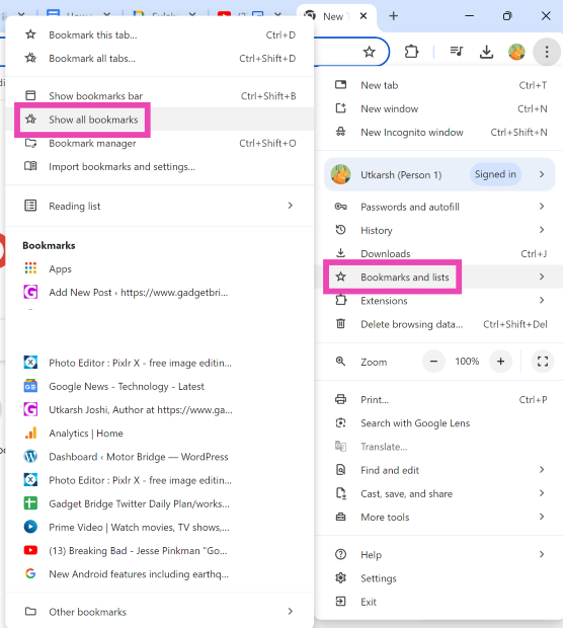
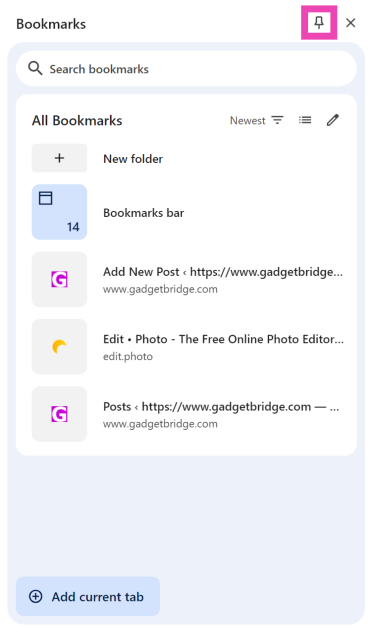
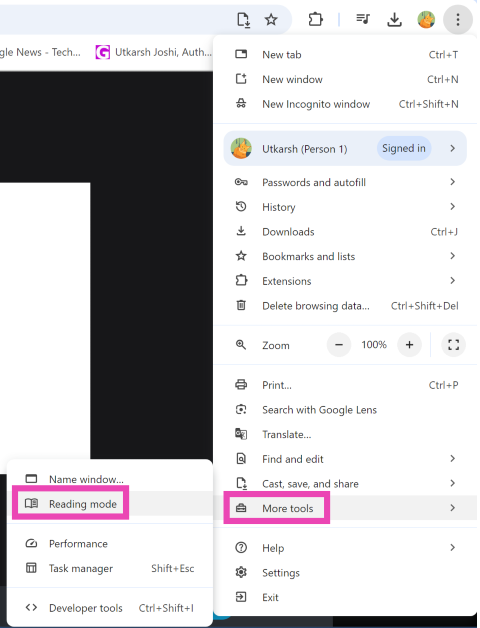
Chrome’s latest feature drop brings a bunch of interesting tools and customisation options for the web browser. Users can now use AI to create themes and group similar tabs together. One of the minor yet important features added to Google Chrome is the option to pin Bookmarks and Reading Mode to the toolbar at the top. This makes these two functions more accessible as you don’t have to wade through the Chrome menu to reach them. Check out how you can pin them to the toolbar.
If you haven’t been paying attention, Google added a nifty Reading Mode for Chrome on Windows and Android. This mode allows the user to read any article, blog, or news piece without any distractions. It opens up in a separate panel without any ads or pop-ups. The text is displayed against a plain background. The user can change the size and font of the text along with the colour of the background.
You can enter Reading Mode on your PC by right-clicking anywhere on the screen and selecting ‘Open in Reading Mode’. To access it on your Android phone, you will need to install the Reading Mode app first. Once that’s done, go to Accessibility Settings, select Reading Mode, and turn on its toggle switch. Once it is enabled, you can use its shortcut in the Chrome app to open any article in reading mode.
Pin Bookmarks and Reading Mode to Google Chrome’s toolbar
This is how you can pin Bookmarks and Reading Mode to Google Chrome’s toolbar. Using the experimental AI features in Chrome, you can now group similar tabs together. This feature is still being rolled out in a phased manner. If you have any questions, let us know in the comments!
Ahead of the Great Indian Festival sale on Amazon, iQOO has introduced Max Offers for several of its well-known smartphones, including the flagship iQOO 12, Neo 9 Pro, Z9x, and Z9s Pro. Starting on September 27th, the deals will be accessible.
iQOO India will be giving ‘Max’ prices on certain phones, such as the iQOO Neo 9 Pro, iQOO Z9s Pro, and iQOO 12. During the Great Indian Festival sale, these reductions will be available on Amazon at competitive rates, along with exchange incentives, no-cost EMI options, and discounts.
Bundled bank offers are another factor in the lower pricing. Prime members have early access to the Amazon sale on September 26th, with the sale beginning on September 27. Customers can also avail no-cost EMI options with 3, 6, and 9-month options.
Kickstarter deals are live on Amazon for the iQOO Z9 Lite, iQOO Z9 5G, and iQOO Z7 Pro, adding excitement to the festive season.
During the Amazon Great Indian Festival sale, the iQOO 12, which is presently priced at Rs 52,999 in India, will be available for a reduced price of Rs 5,000. The gadget would cost a total of Rs 47,999 because of the bank offers.
The initial pricing of Rs 35,999 for the iQOO Neo 9 Pro has been reduced to Rs 31,999. The retail prices of the iQOO Z9s and Z9s Pro are set to be Rs 17,499 and Rs 21,999, respectively. The Pro model of the iQOO Z9s was priced at Rs 24,999, while the Z9s was first released at Rs 19,999. Due to the recent announcement of both phones in India, the discount rates are low.
The iQOO Z9 Lite, iQOO Z9x, iQOO Z9s 5G, and iQOO Z9s Pro 5G are all available with no-cost EMI options, with current MOPs of Rs. 10,499, Rs. 12,499, Rs. 19,999, and Rs. 24,999 respectively. But during the sale, the devices will cost you Rs. 9,499, Rs. 10,749, Rs. 17,499 and Rs 21,999 respectively.
Kodak has revealed that during the Flipkart Big Billion Days and Amazon Great Indian Festival, it will be providing unbeatable discounts on its entire range of televisions. This announcement comes ahead of the festive sale. The company will be offering an exciting range of smart televisions ranging from HD Ready, Full HD, 4K, and QLED TVs, starting at Rs 7,999.
Beginning on September 27, 2024, Flipkart Big Billion Days and Amazon Great Indian Festival will include festive discounts on Kodak TVs, with prices beginning at Rs 7,999. A free three-month OTT play subscription to SonyLIV, ZEE5, and 25 other original applications for Android TVs is also being given to Prime members, along with early access to the Amazon Great Indian festival.
Amazon India will be offering a 10% instant discount on SBI Credit and Debit Cards, while Flipkart will be providing a 10% instant discount on HDFC Credit Cards and Debit Cards and EMI Transactions.
Some of the models that Kodak TV provides at different festive prices include 32HDX7XPRO, 32HDX900S, 32MT5077, 40SE5001BL, 409X5061, 40SE5003BL, 439X5081, 43MT5055, 43UHDX7XPROBL, 50CAPROGT5012, 50MT5011, 50UHDX7XPROBL, 55CAPROGT5014, 65MT5033, 75MT5044, and 43SE5004BL.
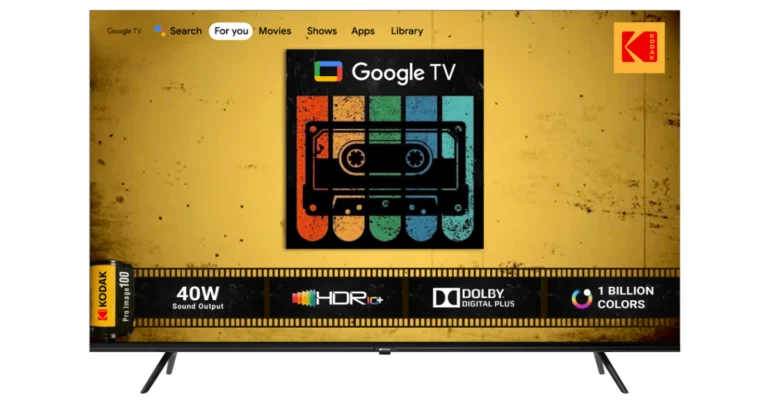
Kodak has partnered with Google TV to offer new QLED TVs in six sizes, starting at Rs 10,999. These models feature DTS TRUSURROUND sound, a QLED 4K display with 1.1 billion colours, Dolby Atmos, Dolby Vision HDR 10+, 2GB RAM, and 16GB internal storage. Super Plastronics Pvt Ltd (SPPL) is the first Indian manufacturer to introduce QLED TVs with GOOGLE TV. The TVs also offer support for multiple user profiles, manual and voice control for smart home devices, and a personalised home screen.
The KODAK 75-inch 4K QLED TV (75MT5044) features DTS TruSurround, 1.1 billion colours, Dolby MS12, HDR 10+, 2GB RAM, 16GB internal storage, Bezel-less and Airslim design, HDR10+, Dolby Atmos, Dolby Vision, Dolby Digital Plus, and in-built Chromecast & Airplay, priced at Rs 74,999.
Kodak has launched the KODAK 43-inch Matrix QLED TV at Rs 20,999, and the KODAK CA PRO series, featuring Google TV, 4K HDR10 display, Dolby Digital Plus, and DTS TruSurround, starts at Rs 25,999. The 55-inch CA PRO Google TV is available on Flipkart for Rs 28,999.
The Kodak 9XPRO series, powered by Android 11, offers 32-inch HD Ready and Full HD models starting at Rs 9,999, featuring a Realtek Processor, Dolby Digital Plus, Netflix, Google Assistant, and Chromecast.
The CA PRO series, starting at Rs 25,999, features a 4K HDR10 display, Dolby Digital Plus, and DTS TruSurround, with an innovative Google TV interface, versatile connectivity, and a sleek, bezel-less design. The 55CAPROGT5014 model, priced at Rs 28,999, offers an intuitive remote and built-in Google Assistant.
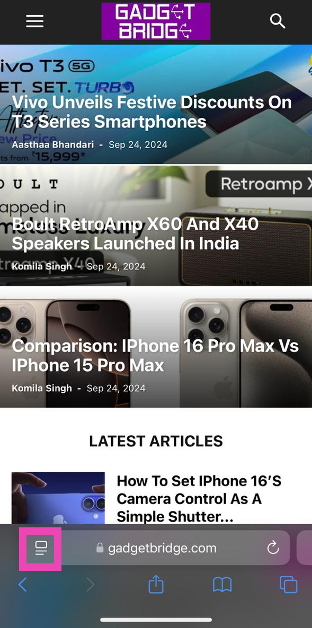
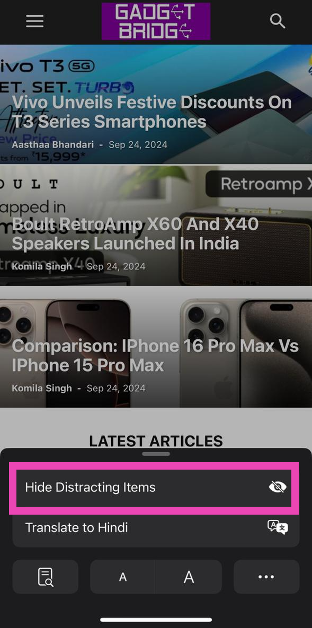
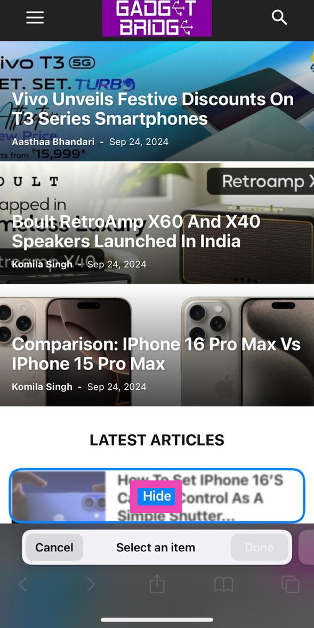
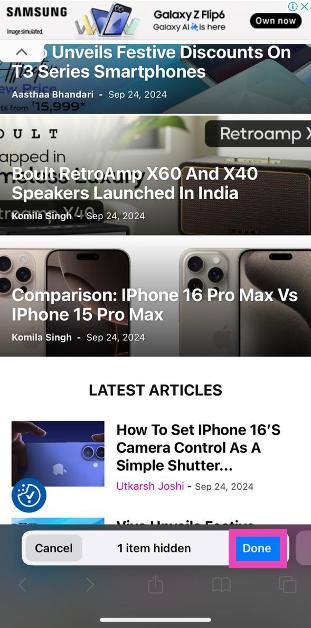
Now that iOS 18 has been out for more than a week, some features have flown under the radar that you must know about. One of them is Distraction Control for Safari. This nifty tool improves your reading experience by hiding distracting items from the web page. You can use it to hide the ads as well. Since it isn’t a part of Apple Intelligence, this feature is available for all users. So, let’s take a look at how you can use Distraction Control on iOS 18 to hide ads in Safari.
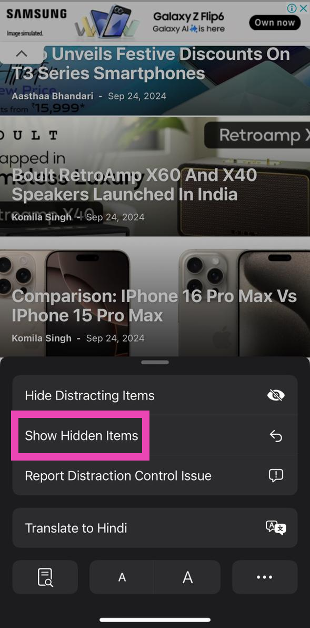
Distraction Control isn’t exclusively meant for ads. You can use this tool to hide any item on a webpage. This includes popups, banners, cookie alerts, and more. Once you return to a webpage, the items you’ve selected remain hidden. While it may be a controversial addition, the option to hide ads is very useful for users who want a clean, distraction-free web browsing experience.
To further improve your Safari experience, you can block annoying popups on the browser using device settings. Go to Settings, tap on Apps, select Safari, and turn on the toggle switch next to ‘Block Pop Ups’. Now that Safari has added the Distraction Control tool, it will be interesting to see how other web browsers like Chrome, Firefox, and Edge incorporate similar tools in their interface.
This is how you can use Distraction Control on iOS 18 to hide ads from any webpage in Safari. Apple will add AI summarisation to Safari next month as a part of the iOS 18.1 update. If you want to use this feature right now, update your iPhone to iOS 18.1 Public Beta. If you have any questions, let us know in the comments!
Apple Intelligence may have grabbed all the headlines surrounding the new iPhone 16, but Apple’s latest smartphone series has one hardware feature that distinguishes it from its Android counterparts. We’re talking about the new Camera Control button on the right edge of the iPhone 16. As the name suggests, this button can be used to carry out a range of tasks within the Camera app. If you want to keep things simple, you can program it to only take pictures. Let’s take a look at what the Camera Control on the iPhone 16 can do and how you can set it as a simple shutter button.
For starters, the Camera Control button can be used to launch the native Camera app on your iPhone no matter which screen you’re on. Pressing it again takes a picture. So far so good. To expand its range of functionality, Apple has made this button touch-sensitive. It also responds to light half-presses. When you lightly press the camera control, you will get to choose from the following functions:
Exposure
Depth
Zoom
Cameras
Style
Tone
Once Apple Intelligence rolls out for iPhone 16, this button will be able to access Visual Intelligence as well.
Use Camera Control as a simple shutter button only
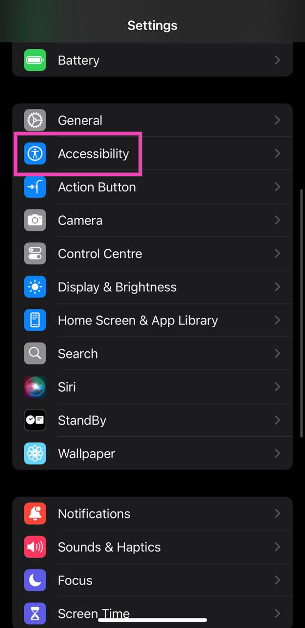
Step 1: Go to Settings.
Step 2: Select Accessibility.
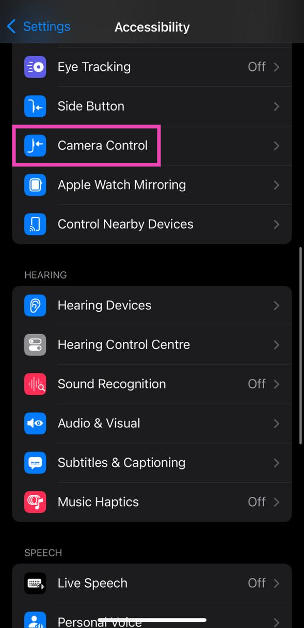
Step 3: Tap on Camera Control.
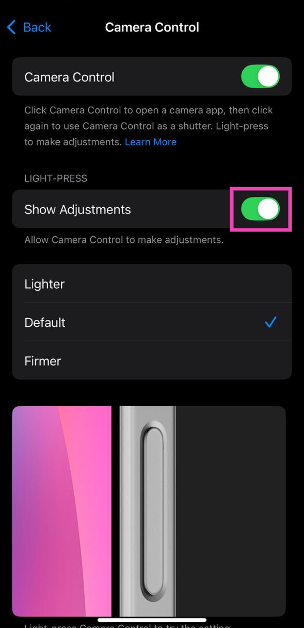
Step 4: Turn off the toggle switches for Show Adjustments under Light Press.
Change the number of clicks it takes to open Camera with Camera Control
Step 1: Go to Settings.
Step 2: Select Camera.
Step 3: Tap on Camera Control.
Step 4: Select Single Click or Double Click.
Frequently Asked Questions (FAQs)
How do I use the iPhone 16’s camera button?
Pressing the camera control button once opens the camera app and pressing it again triggers the shutter. Pressing and holding the button starts recording a video.
Is the camera control a button?
The camera control on your iPhone’s right edge is indeed a capacitive button. It is touch-sensitive and offers haptic feedback when you press it.
How do I use the new button on iPhone 16?
You can press the button to launch the camera app, then light-press it to view the in-app menu. You can browse through this menu by dragging your finger along the button. To select an option, lightly press the button again.
This is how you can set the iPhone 16’s camera control button as a simple shutter. Once you carry out these steps, the camera app won’t show you the popup menu when you lightly press the button. If you have any other questions, let us know in the comments!
As the festive season kicks off, Vivo has announced a slew of enticing offers on its T3 series smartphones, providing consumers with impressive Vivo T3 series discounts. Coinciding with Flipkart’s Big Billion Day Sale from September 26 to October 6, 2024, these deals make the fastest smartphones in their segments more affordable than ever. Shoppers can take advantage of these offers across Flipkart, the Vivo India e-store, and partner retail stores.
In This Article
Price Drops and Cashback Galore
Vivo’s top-tier offerings, the T3 Pro 5G and T3 Ultra 5G, are now available with cashback of up to Rs 3,000 through HDFC Bank cashback offers or exchange deals of the same amount. Additionally, customers can opt for no-cost EMI options spanning 3 or 6 months. The Vivo T3 Pro 5G price is set at Rs 24,999 for the 8GB+128GB variant and Rs 26,999 for the 8GB+256GB variant. Meanwhile, the Vivo T3 Ultra 5G comes in at Rs 31,999 for the 8GB+128GB variant, Rs 33,999 for the 8GB+256GB variant, and Rs 35,999 for the 12GB+256GB variant—all prices inclusive of taxes.
The Vivo T3 Ultra 5G, being the flagship of the series, boasts high-end specifications that cater to tech enthusiasts. Equipped with advanced 5G capabilities, it ensures faster connectivity and smoother online experiences. Its robust performance makes it suitable for gaming, multitasking, and media consumption. With the current offers, the Vivo T3 Ultra 5G features become even more accessible for those seeking premium capabilities without the premium price tag.
Additional Savings on Other Models
Adding a splash of color to the lineup, the Vivo T3x 5G now comes in a new Sapphire Blue variant and has seen a price reduction of Rs 500. The 4GB+128GB model is now priced at Rs 12,999, the 6GB+128GB at Rs 14,499, and the 8GB+128GB at Rs 15,999. Customers can also get a flat Rs 1,750 instant discount with HDFC Bank cashback offers.
During this promotional period, the Vivo T3 Lite is available at Rs 10,499 for the 4GB+128GB variant and Rs 11,499 for the 6GB+128GB variant. Buyers can avail cashback of up to Rs 1,000 through select HDFC Bank offers.
All the smartphones in the T3 series boast a 4-star and above rating on Flipkart, reflecting positive customer feedback and satisfaction. This indicates that the devices have been well-received for their performance, build quality, and value for money. Moreover, these smartphones are manufactured at Vivo’s Greater Noida facility, emphasizing the company’s dedication to producing Made in India smartphones. This not only supports local manufacturing but also contributes to the nation’s economy and job creation.
A Festive Opportunity Worth Considering
In a market saturated with options, Vivo’s aggressive pricing and attractive bank offers make the T3 series a compelling choice this festive season. For consumers eyeing performance-packed smartphones without breaking the bank, these deals might just tip the scales.
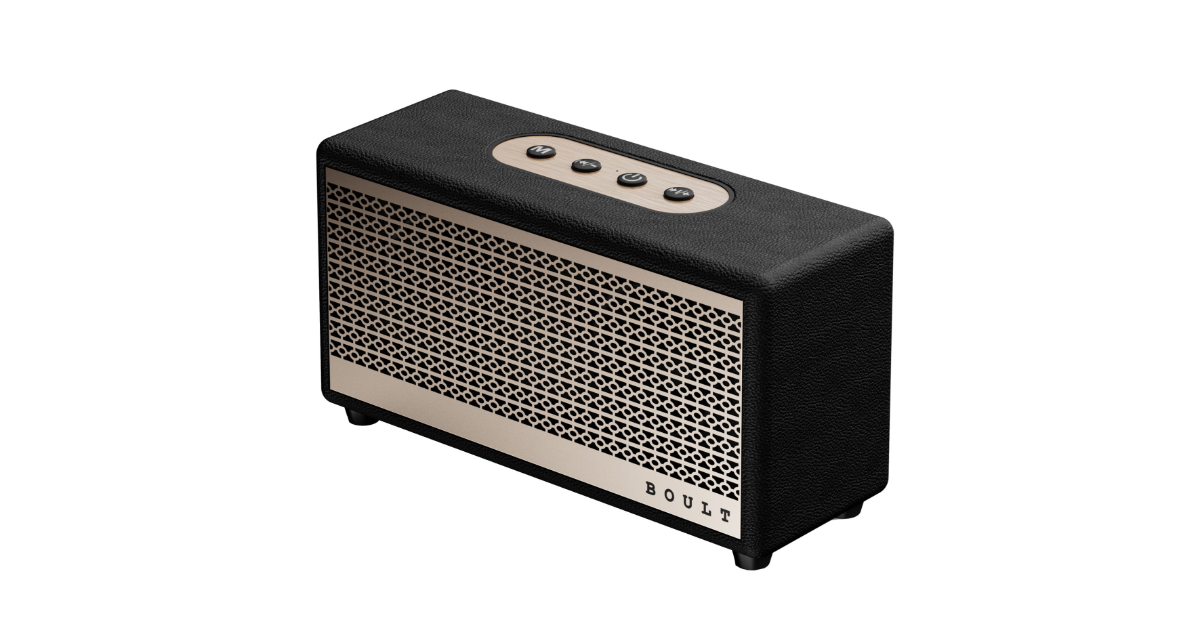
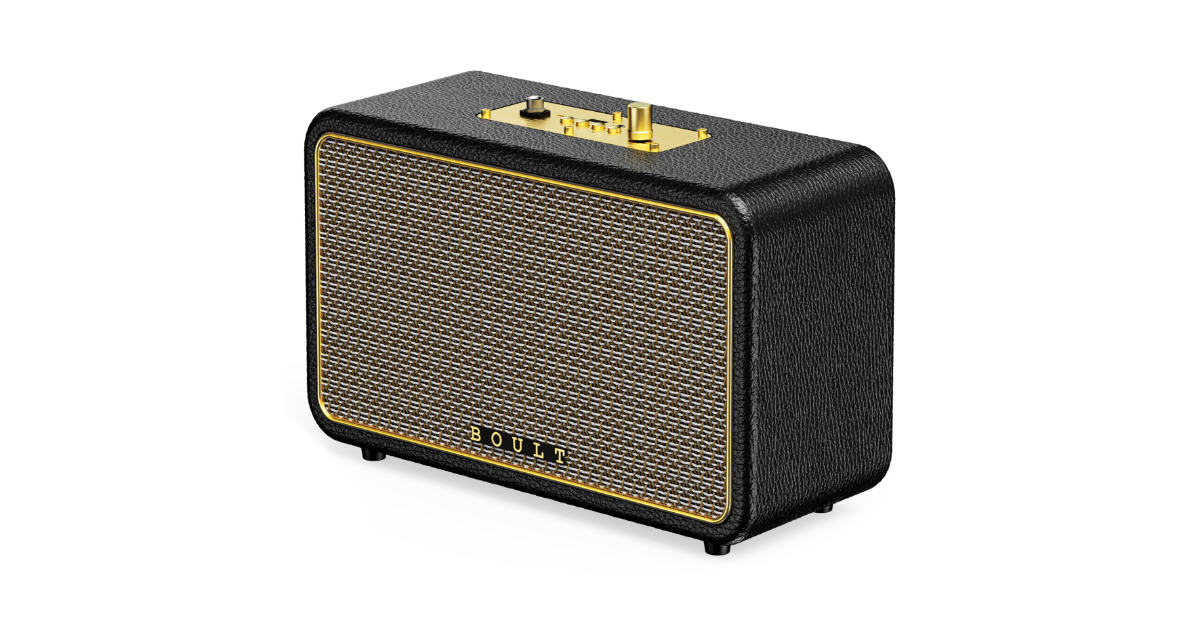
Boult has announced the debut of the RetroAmp X60 and X40 speakers, which combine contemporary audio technology with a vintage aesthetic. The X40 delivers 40W of power and superb sound quality with copper accents, while the X60 has 60W dual dynamic drivers and a tough leather construction.
Varun Gupta, Co-Founder of BOULT said, “We are excited to introduce the RetroAmp X60 and X40, two new products that embodies our commitment to combining timeless design with cutting-edge technology. These speakers are not just about great sound; it’s about creating an experience that resonates with our customers’ lifestyles. Whether you’re enjoying music at home or on the go, the RetroAmp speakers are designed to deliver. Further, it also brings in a sense of nostalgia which essentially makes it a device that cuts across age groups.”
In This Article
RetroAmp X60 and X40 features
The RetroAmp X60 is a classy and robust speaker featuring a Royal Gold Classic Rugged Leather cover. With its dual dynamic drivers, it can produce sounds of studio quality at 60 watts. In addition to providing TF card, USB, and AUX connectivity, it supports Bluetooth 5.3 and EDR. It’s ideal for parties and social events because it offers karaoke mode and up to 14 hours of playback.
Perfect for FM and Bluetooth listening, the 40W RetroAmp X40 speaker boasts powerful dual drivers. Along with up to 10 hours of playback and compatibility for different input types including AUX, USB, and TF cards, it has a tough leather shell with copper accents. It guarantees rapid connectivity with Bluetooth 5.3.
RetroAmp speakers are the ideal combination of design and functionality, with an easy-to-use master control panel.
RetroAmp X60 and X40 price in India and availability
The speakers are exclusively available on Flipkart and boultaudio.com at an introductory price of Rs 3,999 for the Retro Amp X40 and Rs 5,999 for the Retro Amp X60.
Google’s new experimental AI features for Chrome make it easy to keep your tabs organised and streamline your workflow. If you’ve got a cluster of tabs open in Chrome at all times, the tab organisation feature will come in quite handy. While you can manually create tab groups, having Chrome do it for you is intuitive, easy, and time-saving. The web browser’s suggestions are generally pretty accurate, especially when you have a lot of tabs open.
The experimental Google AI for Chrome analyses your open tabs and provides grouping suggestions for them. For example, if you’re working and looking at food recipes and nearby restaurants at the same time, it will create three groups – Work, Recipes, and Restaurants. The open tabs on the browser will be allocated to the relevant groups. These groups are colour-coded for easier access.
Of course, every AI feature comes with apprehensions about data usage. For this feature, Google collects page titles, URLs, tab group data, and your feedback. This data, which includes generative model research and machine learning technologies, is used to improve this feature.
Group the open tabs in Google Chrome using the tab organiser
Step 1: Open Google Chrome on your PC and click the Experiments Icons next to the address bar (it might only be available in Chrome Beta, at the moment).
Step 2: From the drop-down menu, select Enabled.
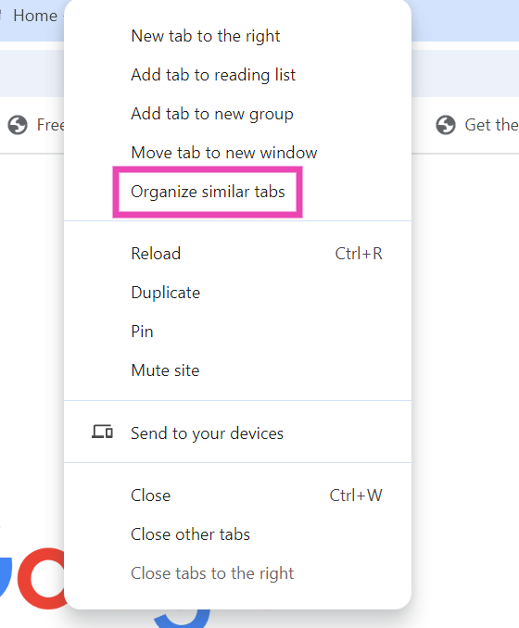
Step 3:Right-click on any open tab.
Step 4: Select Organise Similar Tabs.
Step 5: From the new popup you can now create groups.
Step 6: A black line will appear under the group. You can add any new tabs by dragging them to the group.
Frequently Asked Questions (FAQs)
How do I organise open tabs in Chrome?
Turn on ‘Tab organiser’ in Chrome settings. Then, click the downward arrow icon, go to the Organise section, and select ‘Check now’. Google Chrome will come up with a tab group selection for you.
How do I rearrange tabs in Chrome?
Right-click on a tab and select ‘Pin’ to fix it on the left corner of the screen. Pinned tabs occupy less space. Right-click on the tab and select ‘Unpin’ to expand it.
How do I change the tabs that open in Chrome?
If you want to change the tabs that open automatically as soon as you launch Chrome, go to Settings, select ‘On startup’, click on ‘Open a specific page or set of pages’, and enter your preferred URL(s).
This is how you can organise open tabs in Google Chrome. The tab groups created by Google AI can be synced across all of your devices if you’ve turned on Sync for Chrome. If you have any other questions, let us know in the comments!
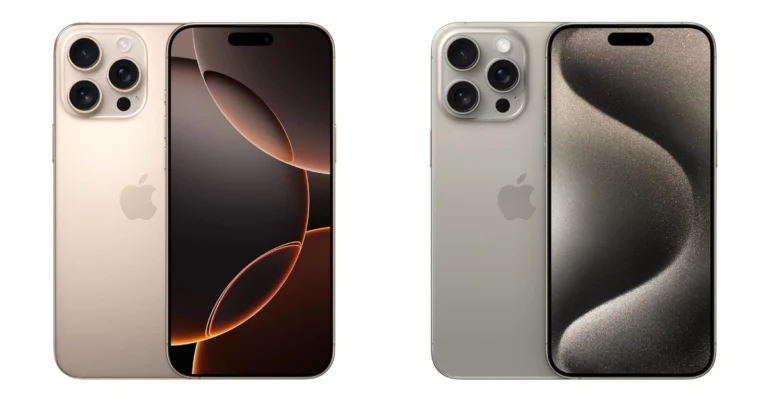
The iPhone 16 Pro Max is unquestionably the best smartphone out there. That being said, the iPhone 15 Pro Max remains the leader. There are a few significant changes between the iPhone 15 Pro Max and iPhone 16 Pro Max this year. Now let’s examine which is a better deal between the iPhone 16 Pro Max and the iPhone 15 Pro Max.
In This Article
Display
iPhone 16 Pro Max: 6.9-inch Super Retina XDR OLED
iPhone 15 Pro Max: 6.7-inch Super Retina XDR display
Processor
iPhone 16 Pro Max: 3nm A18 Pro CPU
iPhone 15 Pro Max: An octa-core A17 Pro chip
Rear camera(s)
iPhone 16 Pro Max: 48-megapixel wide primary camera (f/1.78 aperture), an upgraded 48-megapixel ultra-wide-angle camera (f/2.2 aperture) and a 12-megapixel telephoto camera (f/2.8 aperture)
iPhone 15 Pro Max: The triple rear camera unit includes a 48-megapixel main camera (f/1.78 and OIS) and a 12-megapixel telephoto camera with periscope lens (f/2.8 aperture, 5x optical zoom and OIS) and 2-megapixel ultra-wide angle lens (f/2.2 aperture and 120-degree field-of-view)
Selfie camera
iPhone 16 Pro Max: 12-megapixel TrueDepth camera (f/1.9 aperture)
iPhone 15 Pro Max: 12-megapixel TrueDepth camera with an f/1.9 aperture
RAM and storage
iPhone 16 Pro Max: 256GB storage, 512GB storage and 1TB storage
Compared to the iPhone 15 Pro Max, which had a 6.7-inch panel, the iPhone 16 Pro Max boasts a 6.9-inch Super Retina XDR panel. Both screens have 2000 nits of peak brightness and enable Apple’s ProMotion 120Hz refresh rate.
The A17 Pro in the iPhone 15 Pro Max was replaced with the A18 Pro with 16-core Neural Engine in the 16 Pro Max, which performs 20% better on the GPU and 15% quicker on CPU activities like gaming, multitasking and AI features.
The iPhone 16 Pro Max has a 48MP ultra-wide lens for improved detail in landscape and macro images, as opposed to the iPhone 15 Pro Max’s 12MP lens. The sensor also improves low-light shooting using Apple’s machine-learning-based image processing. The 48MP primary camera supports 2x 12MP pictures with optical quality cropping.
In terms of video recording, the iPhone 16 Pro Max performs better than the iPhone 15 Pro Max. It can record 4K video at 120 frames per second in both regular and slow-motion modes, and it lets users choose the playback speed after it has been captured.
Now that the iPhone 16 Pro Max includes a Camera Control button under the power button, users may adjust camera parameters including exposure, aperture, zooming, and launching. To lock focus on a subject, lightly push the button as well. For speedy access to data, Camera Control activates Apple’s Visual Intelligence feature, which functions similarly to Google Lens. While the iPhone 15 Pro Max does not have this capability, it does include an Action Button for the camera and other features.
So if you want to upgrade from a regular iPhone to the Pro Max Model, now is a great time to get the phone because amazing offers and discounts will be available on the model when the holiday sale kicks off soon.
Nu Republic has launched two new fashion-forward wireless earbuds—the Cyberstud X2 and Cyberstud X4 Firefly. These innovative products aim to blend cutting-edge technology with standout design elements, appealing to trendsetters, gamers, and free spirits alike.
The Cyberstud X2 introduces a unique approach to wearable tech. Featuring a reactor-inspired design and a sleek metal chain, these earbuds double as a locket that can be worn around the neck. This fusion of fashion and function transforms the earbuds into a style statement, adding a street-punk vibe to any outfit.
Beyond its eye-catching exterior, the Cyberstud X2 packs impressive audio capabilities. Equipped with 13mm neodymium drivers and Environmental Noise Cancellation (ENC) technology, it promises a powerful and immersive listening experience. With up to 70 hours of playtime, users can enjoy extended periods of music or gaming without frequent recharging.
On the other hand, the Cyberstud X4 Firefly takes a more dynamic approach with its firefly-inspired design and LED breathing lights. These visual elements create a mesmerizing glow that sets the earbuds apart, especially in low-light environments. Whether walking down a runway or navigating an airport terminal, the Cyberstud X4 Firefly is designed to make a statement.
The Cyberstud X4 doesn’t just rely on looks; it’s built for performance. Featuring Active Noise Cancellation up to 32dB and X-Bass technology, it delivers deep bass and crisp vocals for an enhanced audio experience. The earbuds offer dual modes for gaming and music, catering to different user preferences. With ultra-low 40ms latency and Bluetooth V5.3 connectivity, they provide seamless and responsive performance for gamers and music enthusiasts alike. A rapid 15-minute fast charge ensures minimal downtime between uses.
Both products are competitively priced, with the Cyberstud X2 available at INR 2,499 exclusively on the company’s website, and the Cyberstud X4 Firefly priced at INR 1,799, available on various platforms including Blinkit.com and leading quick commerce platforms.
Ujjwal Sarin, the founder of Nu Republic, commented on the launch, “We believe that technology should not only perform exceptionally but also reflect individual style and personality. The Cyberstud X2 and X4 Firefly are designed to bring innovation and self-expression together in a way that’s never been done before.”
With the introduction of the Cyberstud X2 and X4 Firefly, Nu Republic is exploring new territory in wearable tech. By merging distinctive design with robust audio features, they might set a new trend that prioritizes both form and function in personal audio devices.
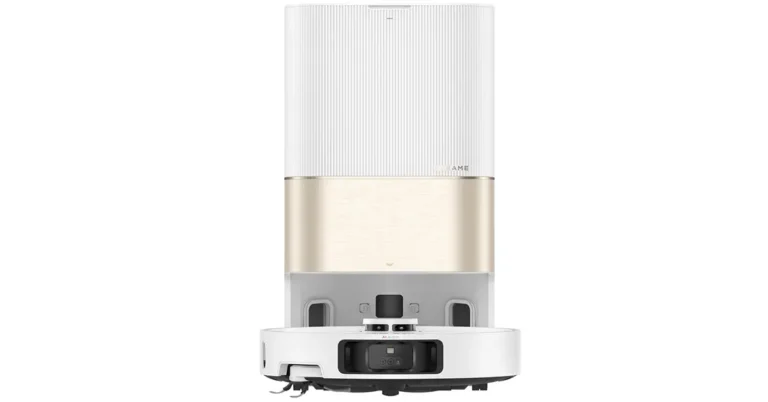
Dreame Technology has introduced its latest flagship product to the Indian market—the Dreame X40 Ultra. This advanced robot vacuum cleaner aims to revolutionize home cleaning with its powerful technologies and smart features. Available on Amazon and Dreame’s official website, the X40 Ultra is set to elevate the standard for intelligent home cleaning solutions.
In This Article
Innovative Features for Efficient Cleaning
One of the standout features of the X40 Ultra is its Side Reach Technology. This allows the robot to clean even the toughest spots with high efficiency. The side brush can lift up to 10mm and extend to reach wall corners and curved furniture legs, minimizing missed spots. It also prevents cross-contamination between dry and wet messes, which is particularly useful for carpet cleaning.
The MopExtend RoboSwing Technology is another innovative addition. This feature enables the X40 Ultra to extend its mop up to 4cm, allowing it to clean under low-profile furniture with ease. Automatic mop extension and retraction ensure thorough cleaning in hard-to-reach areas like corners and gaps.
Equipped with Vormax suction power of 12,000 Pa, the X40 Ultra stands out as one of the most powerful in the industry. Its optimized air duct design ensures smooth airflow, effectively removing pet hair, dust, and larger debris while maintaining a quieter operation.
The robot also features a 7-in-1 Auto Base Station that takes self-maintenance to the next level. The base station handles automatic dustbin emptying, 70°C hot water mop cleaning, self-cleaning washboard, automatic mop drying, and refilling of both water and cleaning solution. This seamless functionality allows users to enjoy a truly hands-off cleaning experience.
Smart Navigation and Obstacle Avoidance
The Dreame X40 Ultra comes with advanced Omni Sensitivity and Obstacle Avoidance technologies. With OmniDirt detection, the robot intelligently identifies and targets stubborn stains, adjusting its cleaning method for optimal results. The built-in RGB camera and 3D structured light technology enable precise obstacle detection, allowing for efficient cleaning even in dimly lit rooms. A turbidity sensor ensures the mops are rewashed when necessary, providing a cleaner home environment.
Versatile Carpet Cleaning Strategies
For homes with carpets, the X40 Ultra offers versatile cleaning strategies. It lifts its mops when encountering carpets to prevent them from getting wet. Users can choose from various modes, including avoiding carpets, using extra suction, or deep cleaning for a more thorough result.
The Dreame X40 Ultra is available for purchase on Amazon at a launch price of Rs 1,29,999. As part of the upcoming Diwali festivities, there’s an exclusive promotional price of Rs 99,999. Amazon Prime members will have early access to the Diwali discounts starting on 26th September, with the sale opening to all customers from 27th September to 30th October 2024. The product comes with a one-year warranty.
In a market flooded with smart home appliances, the Dreame X40 Ultra stands out by offering a blend of powerful performance and intelligent features. While the price point is on the higher side, the array of advanced technologies could make it a worthwhile investment for those seeking a premium, hands-free cleaning solution.
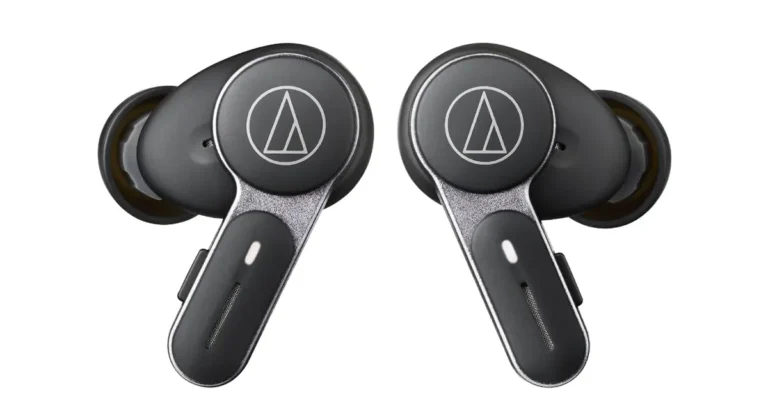
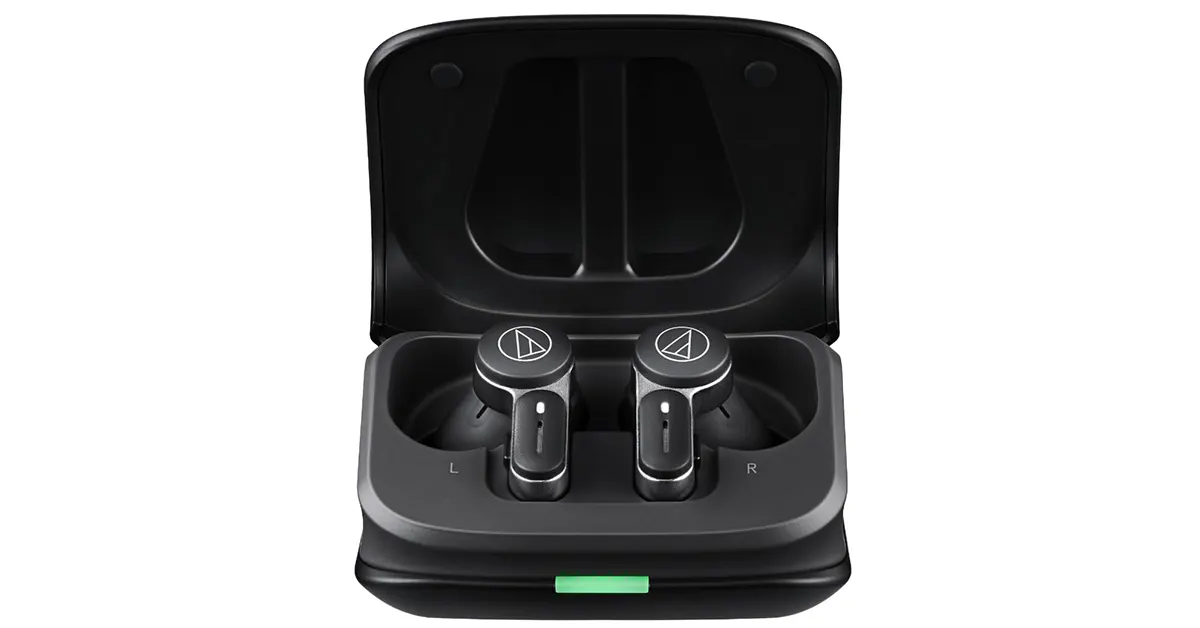
Audio-Technica has unveiled its latest offering to the Indian market — the ATH-TWX7 true wireless earbuds. Catering to audiophiles and casual listeners alike, these earbuds aim to redefine audio quality and user experience in the realm of true wireless earbuds in India.
At the heart of the ATH-TWX7 are 5.8mm high-resolution drivers designed to deliver detailed music playback. These drivers ensure that every note and beat is reproduced with the clarity and precision that Audio-Technica is renowned for. Complementing the stellar sound quality is the advanced digital hybrid noise-cancelling technology, which eliminates unwanted ambient noise. Whether you’re in a bustling city or a quiet room, the earbuds promise a crystal-clear sound performance at just a touch.
The Audio-Technica ATH-TWX7 doesn’t stop at delivering great sound; it also offers a personalized listening experience. Users can easily access hear-through and talk-through functions, allowing them to stay aware of their surroundings without removing the earbuds. Additionally, a unique soundscape function produces sounds suitable for concentrating, meditating, or relaxing, catering to various user needs throughout the day.
Superior Call Quality
Communication is key, and these earbuds are equipped to handle it seamlessly. Built-in MEMS microphones combined with beamforming technology ensure that your voice is heard loud and clear, even in noisy environments. With two selectable call modes—Natural for quieter settings and noise reduction for louder ones—the ATH-TWX7 enhances call clarity based on your surroundings. There’s even a call test function that lets you check the tone and clarity of your voice anytime.
Designed for Comfort and Convenience
Comfort is crucial for any in-ear device, and the ATH-TWX7 is designed with a secure and comfortable fit in mind. The earbuds offer approximately 6.5 hours of playback time on a single charge, with up to 20 hours available when using the non-slip portable charging case. The IPX4 water-resistant rating means they can withstand rain, water, and sweat, making them suitable for workouts and daily commutes alike.
Enhanced Features with the Audio-Technica CONNECT App
For those who love to tweak settings, the Audio-Technica CONNECT app unlocks a suite of additional functions. From low latency mode and ambience control to EQ settings and touch sensor configurations, users have full control over their audio experience. The earbuds also support fast charging and multipoint pairing, adding to their versatility.
What’s in the Box?
The ATH-TWX7 package is comprehensive:
ATH-TWX7 earbuds
Two sets of ear tips (XS/S/M/L): soft ear tips for extended comfort and standard ear tips for a secure fit
30 cm USB-A/USB-C charging cable
Audio-Technica ATH-TWX7 Price and Availability
The ATH-TWX7 true wireless earbuds are priced at an MRP of ₹34,385 and an MOP of ₹19,990. They will be available on Amazon and through Audio-Technica’s distribution network across the country.
In a market flooded with options, the ATH-TWX7 earbuds from Audio-Technica seem to strike a balance between high-quality sound and user-friendly features. While the price point is on the higher side, the advanced technologies and customizable options might just make them worth considering for those seeking a premium audio experience.
WhatsApp has added a new spam prevention function to safeguard users from receiving unwanted messages from unwanted accounts. This feature stops messages from being sent by unknown senders by filtering them out under certain conditions. Some beta testers have previously had access to this capability, which has to be manually activated.
Wabetainfo reports that WhatsApp is updating the Google Play Beta Program to version 2.24.20.16 and is giving certain beta testers access to a new security feature that allows them to block messages from unknown accounts.
Users will be able to reject incoming messages if they reach a predetermined volume thanks to a function that WhatsApp is testing that lets users block messages from unknown accounts. Public testing of the functionality is now underway, and some beta testers are experimenting with message filtering from accounts they do not know.
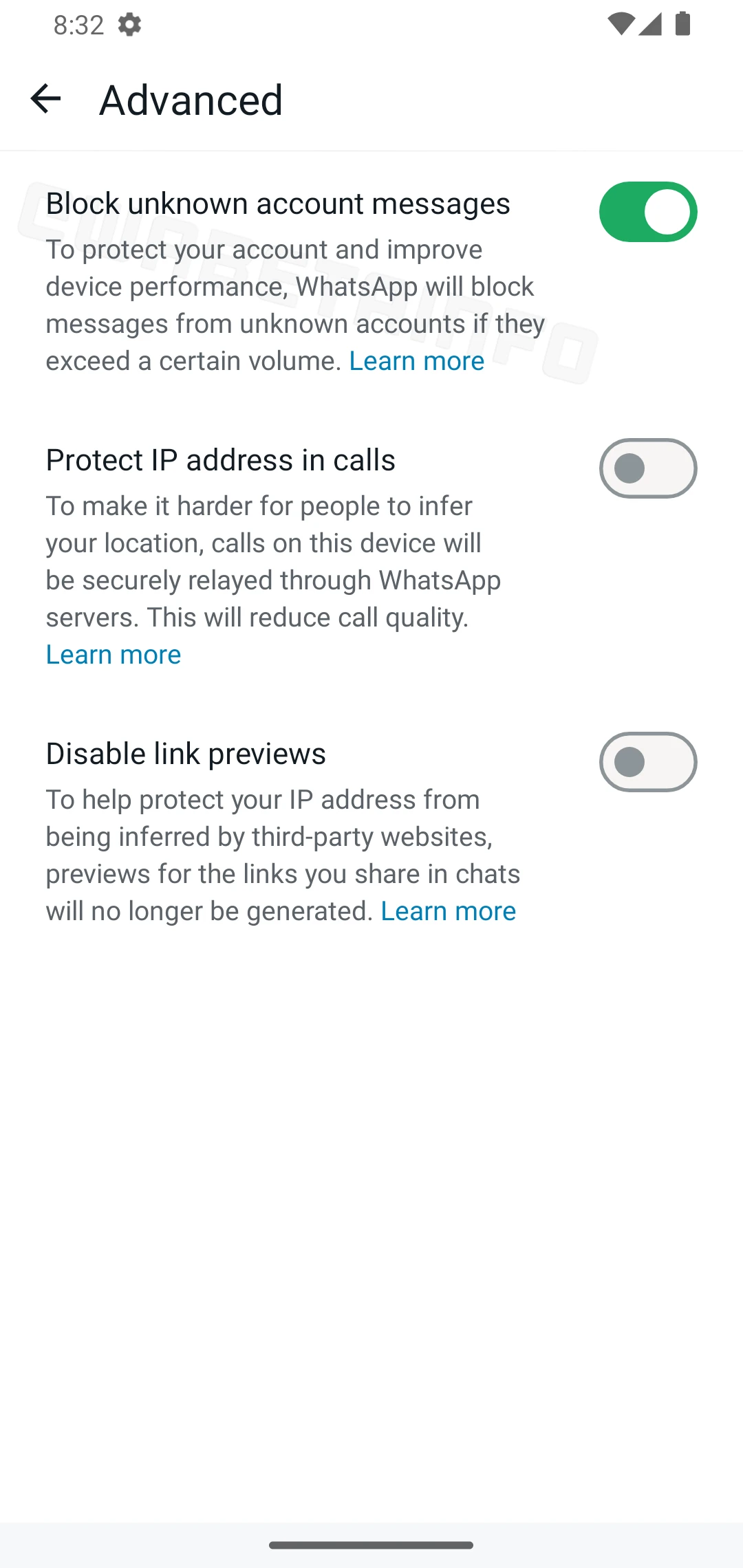
Image courtesy: Wabetainfo
According to the shared screenshot, beta testers have access to a new security option in the app settings that allows them to filter out large amounts of unknown messaging. By accessing the Advanced section of their privacy settings, users can enable this. With the addition of the block unknown account messages feature, unwanted interactions may now be better prevented by automatically blocking messages from unknown accounts if their volume exceeds a certain threshold.
Reports indicate that when used, this function cannot completely avoid unknown messages. It aims to stop accounts from sending a lot of messages in a short period of time, preserving device performance from spam overload and ensuring users get essential messages from random contacts. The block is lifted when the volume of messages sent and received by unknown accounts is normalised, as determined by the algorithm. For security against any spam or phishing efforts, WhatsApp advises turning this function on if a user starts to get a lot of messages from accounts they are not familiar with. Not all unknown contacts are blocked permanently by this function.
Garena Free Fire Max is a battle royale game with regular awards and tournaments to keep players interested. If you play Garena Free Fire, you should be aware of the redeem codes that are released on a daily basis. However, because the battle royale game is banned in India, players from other countries can use the Free Fire Redeem codes daily. If you’re unfamiliar with the Garena Free Fire redeem codes or don’t know how to get them, we’ve put together a step-by-step guide to help you redeem them. Check out Garena Free Fire Max Redeem Codes for 24 September 2024.
The Free Fire Max redeem codes are a great way to get free stuff. These are 12-digit codes that contain alphabets and numbers, as well as an expiration date and time. Because the Garena FF redeem codes cannot be used more than once, you should hurry to the redemption page to claim your free reward before someone else does. To get a free reward, all you have to do is go to reward.ff.garena.com/en, which is the official redemption page. Also, keep an eye on this space for daily updates on Garena Free Fire Max redemption codes and rewards.
24 September 2024: New Amazon Quiz is now available. Customers from different parts of the country are participating in the daily quiz. The quiz starts at midnight today and will be live until 11:59 PM tonight. By successfully answering every question, participants in the quiz have the chance to win wonderful rewards. A Rs 500Amazon Pay Balance is up for grabs to participants today.
One wrong answer could eliminate you from the quiz. You have a chance to win Rs 500 Amazon Pay Balance if you successfully answer everyquestion. Users of the app only have the opportunity to take the quiz. Check Out 24 September 2024 Amazon Quiz Answers.
Onlyapp users are eligible to play the Amazon quiz every morning from 12 AM to 11:59 PM. The quiz is not available on the desktop. For those who are unaware of how to play the Amazon quiz, below are the steps, you can follow to take the quiz.
We have written an explainer above, you can refer to that.
When are the winners of the Amazon Quiz and contest announced or declared?
The announcement of today’s Amazon quiz winner will take place Tomorrow. As for the Special Quiz and “Spin & Win” Contest, thewinners will be declared once the Quiz Contest comes to an end. To find out who the lucky winner is, you can refer to the Amazon Quiz Winners List or visit the Amazon Winners tab in the Amazon App.
How to participate in the Daily Amazon Quiz?
That is very easy, just got to the Amazon app and scroll to the bottom of the page and you will find the Quiz section. Click on it (usually it is called the fun zone) and you can enter the Amazon Today Quiz Contest.
Are there any other quizzes or contests running on Amazon daily?
Yes, there are many running on a daily basis. These range from spinning the wheel to answering the questions correctly. All are located in the Fun Zone.
What are the criteria for selecting a winner in the Daily Amazon Quiz?
When a qualified player submits correct answers to all the questions, they will automatically be entered into a lucky draw. This draw will include all participants who answered all the questions correctly.Amazon randomly selects the final winners from the pool of eligible participants who gave the right answers.
Which Types of Questions are asked within Amazon Daily Quiz?
These are very simple and straightforward questions. These are mainly related to general knowledge.
Where should I look for Amazon Daily Quiz answers?
You canbookmark this page as we will help you every day with the Amazon Daily Quiz. We bring you fresh answers every day for the Amazon Daily Quiz and Contest.
What time does Amazon Announce previous winners?
The previous winner’s name will be announced today at 12 PM (noon).
The Olympic Games are not merely a competition in sports but also a global stage where athletes have used their platform to make political statements. This legacy of advocacy has been increasingly supported by the advancements in technology, turning quick bold actions into moments that go viral within seconds. Whether it’s the media capturing these moments live or social media amplifying them globally, technology has played a vital role in ensuring these powerful messages reach the world instantly.
In This Article
The Olympic Platform: A Global Stage Enhanced by Technology
The Olympic Games, broadcasted to hundreds of millions of viewers worldwide, have always been a powerful platform for political and social statements. However, what makes this platform even more influential in the 21st century is the integration of cutting-edge technology. Through live streaming, AI-driven analytics, and augmented reality (AR), the reach of athletes’ messages has expanded. The rapid sharing of these moments on social media, with billions of users, often overshadows traditional media. This technological shift has allowed athletes’ protests to resonate long after their podium moments. Their deeds can electrify the whole world to discuss how different societies celebrate sporting events, like the case of online betting sites in Bangladesh, where the fan base is brought in as one through the events.
Take the 1968 protest by Tommie Smith and John Carlos. Had this occurred in today’s world, their raised fists would likely have been trending on Twitter within seconds, shared across Instagram stories, and dissected on YouTube by millions. It’s not just a podium anymore; it’s a multimedia experience that keeps evolving through new technologies.
Technology and the Speed of Dissemination
The real-time speed of dissemination, enabled by technologies like 5G, has amplified athletes’ actions. Events like U.S. shot-putter Raven Saunders’ protest at Tokyo 2020 were not only covered by traditional broadcasters but instantly captured, streamed, and reshared across digital platforms. With the use of 360-degree cameras and drones at the Tokyo Games, the protests gained new dimensions, making athletes’ actions accessible from every angle and allowing audiences to engage with the events like never before.
AI and Data Analytics in Protests
AI is now increasingly being used to analyze reactions to political statements. Social media monitoring tools provide insights into how these protests are received in real-time, offering a reflection of global sentiment. For instance, an athlete’s action at the Games can be tracked for virality, gauging the level of engagement, sentiment, and regional response.
A Modern Example: The Role of Social Media Platforms
Platforms like TikTok and Instagram Reels have become modern-day tools for advocacy, with athletes leveraging these spaces to make their statements go viral. British diver Tom Daley’s advocacy for LGBTQ+ rights was not just a moment in front of cameras but a cause that spread rapidly across digital ecosystems, encouraging millions of views, shares, and conversations on inclusivity in sports.
Final Thoughts
As technology continues to evolve, its role in shaping political statements at the Olympics will only grow. From AI analysis to the vast reach of social media, technology has turned the Olympic Games into more than just a competition—it’s a global forum where athletes can engage with social issues at unprecedented scales. Athletes in future Olympics are likely to embrace these technological tools, pushing for change in ways that transcend the games themselves.
Stake Casino has become a popular choice for online gambling enthusiasts worldwide, thanks to its wide range of games and cryptocurrency-friendly approach. One of the most crucial aspects of any online casino experience is the ability to withdraw your winnings quickly and easily. In this comprehensive guide, we’ll walk you through the process of withdrawing your funds from Stake Casino, ensuring you can enjoy your hard-earned winnings without any hassle.
In This Article
Understanding Stake’s Withdrawal Process
Before we dive into the step-by-step guide, it’s essential to understand some key points about Stake’s withdrawal system:
Cryptocurrency Focus: Stake primarily deals with cryptocurrencies, which means faster and more secure transactions compared to traditional payment methods.
No Withdrawal Limits: Unlike many online casinos, Stake does not impose any withdrawal limits, allowing you to cash out your entire balance if desired.
Quick Processing: Most Stake 出金 requests are processed within minutes, thanks to the efficiency of blockchain technology.
KYC Requirements: While Stake generally doesn’t require KYC (Know Your Customer) verification for smaller withdrawals, larger amounts may trigger a verification process for security purposes.
Step-by-Step Guide to Withdrawing from Stake Casino
Now, let’s go through the process of withdrawing your funds from Stake Casino:
1. Log in to Your Stake Account
First, navigate to the Stake website and log in to your account using your credentials.
2. Access the Withdrawal Page
Once logged in, look for the “Wallet” or “Cashier” option in the main menu. Click on it, and then select the “Withdraw” tab.
3. Choose Your Cryptocurrency
Stake supports multiple cryptocurrencies. Select the one you wish to use for your withdrawal. Common options include Bitcoin, Ethereum, and Litecoin.
4. Enter Withdrawal Amount
Input the amount you want to withdraw. Remember, Stake allows you to withdraw your entire balance if you wish.
5. Provide Wallet Address
Enter the wallet address where you want to receive your funds. Double-check this information to avoid any mistakes.
6. Confirm the Transaction
Review all the details of your withdrawal request. If everything looks correct, confirm the transaction.
7. Wait for Processing
Most Stake 出金 requests are processed quickly, often within minutes. However, during busy periods or for larger amounts, it may take a bit longer.
Tips for Smooth Stake Withdrawals
To ensure a seamless withdrawal experience, keep these tips in mind:
Verify Your Account: If you haven’t already, consider verifying your account to avoid any potential delays with larger withdrawals.
Use the Same Cryptocurrency: For smoother transactions, try to withdraw using the same cryptocurrency you used for deposits.
Check Network Fees: Be aware of the current network fees for your chosen cryptocurrency, as these can affect the final amount you receive.
Keep Your Wallet Secure: Always ensure you’re withdrawing to a secure and personal wallet address.
Understand Tax Implications: Remember that gambling winnings may be taxable in your jurisdiction. Keep records of your transactions for tax purposes.
Troubleshooting Common Withdrawal Issues
If you encounter any issues with your Stake 出金 process, here are some common problems and solutions:
Pending Withdrawals: If your withdrawal is pending for an unusually long time, check the blockchain explorer for your transaction or contact Stake support.
Incorrect Wallet Address: Double-check your wallet address before confirming. If you’ve entered an incorrect address, contact support immediately.
Verification Requests: If Stake requests verification for a large withdrawal, promptly provide the necessary documents to avoid delays.
Conclusion
Withdrawing your funds from Stake Casino is generally a straightforward process, thanks to their user-friendly interface and efficient cryptocurrency transactions. By following this guide and keeping our tips in mind, you should be able to enjoy your winnings without any complications. Remember, responsible gambling is key – only withdraw what you can afford to, and always gamble within your means.
Whether you’re cashing out a small win or a significant jackpot, Stake’s withdrawal system is designed to make the Stake 出金 process as smooth as possible. With this knowledge at your fingertips, you’re well-equipped to navigate the withdrawal process and enjoy your online casino experience to the fullest.
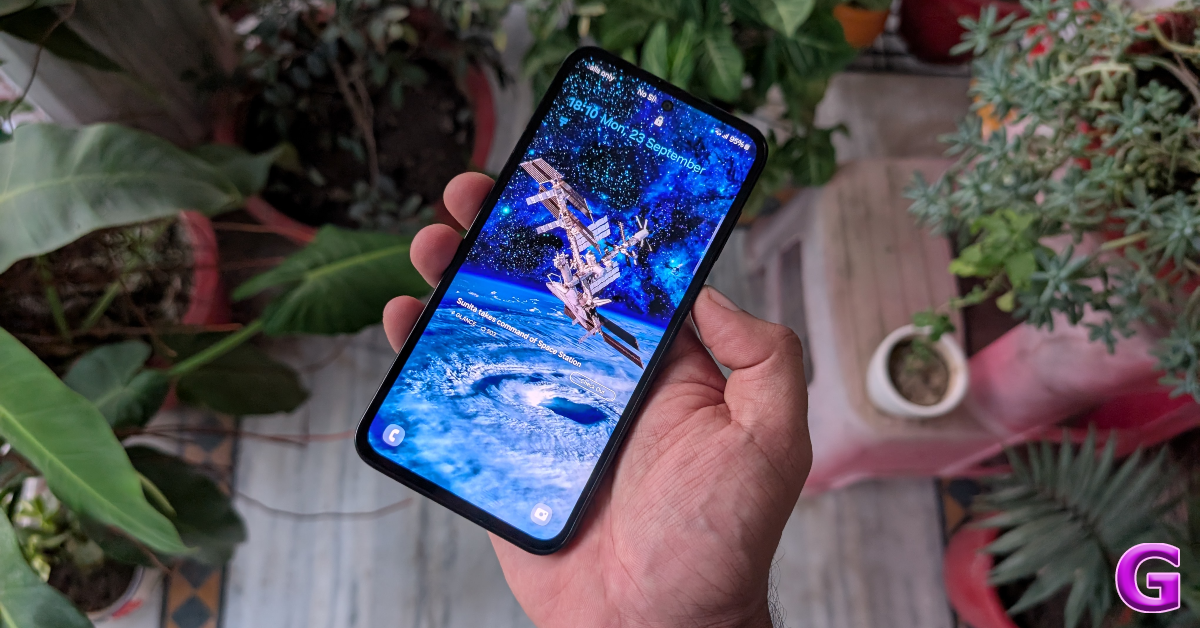
Back in July, Samsung added a new smartphone to its Galaxy M series. Priced at Rs 20,000, the Samsung Galaxy M35 brings incremental updates to last year’s Galaxy M34. When we reviewed the Galaxy M34 last year, we were happy with its long-lasting battery but its waterdrop notch made it look quite dated. Samsung has replaced the notch with a punch hole cutout on the Galaxy M35 and made a few other design tweaks to elevate the device’s appearance. Under the hood, the smartphone rocks the Exynos 1380 SoC – a small upgrade compared to last year’s Exynos 1280. Interestingly, the smartphone’s biggest asset, the 6,000 mAh battery, remains unchanged. We used the device for a week to see how well the updated processor manages the battery capacity. Here is our in-depth review of the Samsung Galaxy M35.
Here’s what you get inside the Samsung Galaxy M35’s retail box.
Smartphone
USB Type-C to Type-C cable
SIM ejector
Quick start guide
Regional lock guide
The first thing you’ll notice about the Galaxy M35 is that it is thick. Infact, it is thicker than its predecessor in Galaxy M34 (8.8mm v 9.1mm). The massive 6,000 mAh battery pack is the primary reason behind this. It has its benefits though, as the camera cutouts do not protrude as much as they do on other Galaxy smartphones.
Speaking of the camera cutouts, Samsung has gone for its signature triple camera setup on the Galaxy M35. The back is now made out of polycarbonate instead of plastic. The result is a smudge-resistant back panel that does not flex upon being pressed. The in-hand feel of the device is superior compared to the all-plastic M34.
The flat back panel curved gently towards the edges. The smartphone’s flat frame has a matte-like finish to it. The weight (222g) of the device is divided evenly. It does not feel top-heavy like most smartphones. Overall, it feels very pleasant to hold. The right edge of the frame houses the side key and the volume rocker. This side key doubles up as a fingerprint sensor. The primary smartphone, USB port, and speaker outlet are positioned on the bottom edge. The SIM card tray lies on the left edge while the secondary microphone finds its way to the top edge.
Display under sunlight
Samsung doesn’t do mediocre displays even on its budget offerings. The Galaxy M35 packs a stunning 6.6-inch Super AMOLED panel with a 120Hz refresh rate and 1,000 nits of brightness in HBM. The selfie camera is now housed in a punch-hole cutout instead of a waterdrop notch. The display is surrounded by uniform but slightly chunky bezels. The touch response is elite and unmatched by other smartphones in this price category. Our only minor complaint is that the display lacks the peak brightness to be perfectly legible under harsh sunlight.
The Samsung Galaxy M35 was our primary media steaming device during the review period. We watched several titles across platforms like Netflix, Prime Video, and Disney+ Hotstar. The AMOLED display produced splendid images with rich colours and a lot of detail. The stereo speaker setup was the icing on the cake. The latter is a big improvement over the single speaker outlet on the Galaxy M34.
Samsung Galaxy M35 Review: Performance and Cameras
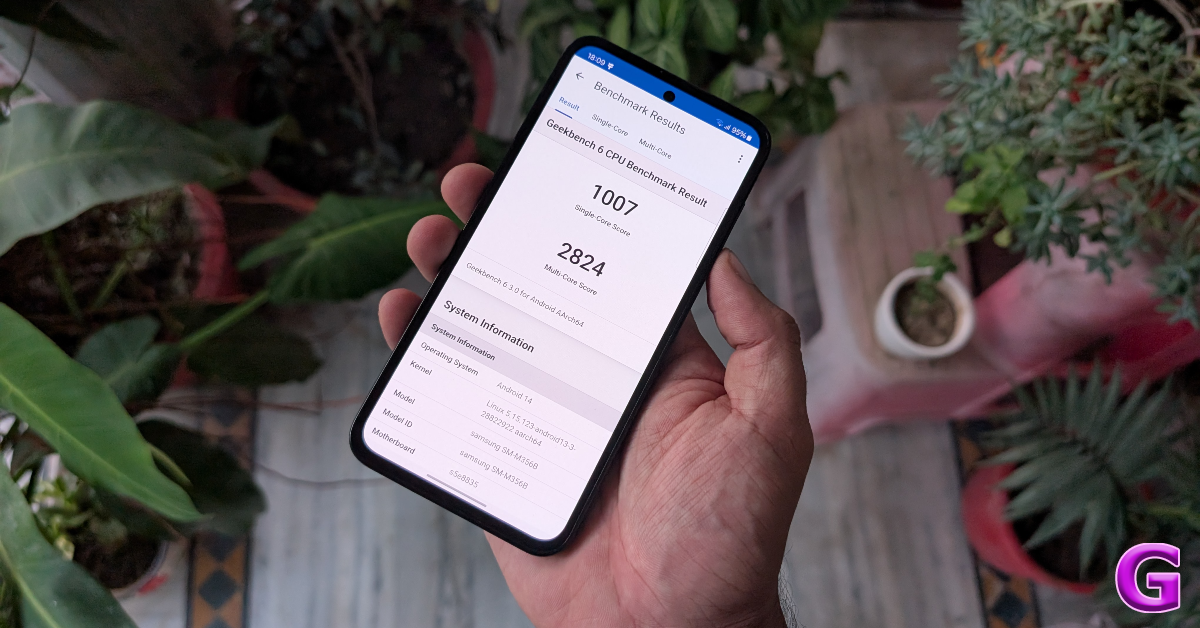
Powering the Samsung Galaxy M35 is the Exynos 1380 SoC. The smartphone is available in three RAM and storage variants – 6GB + 128GB (Rs 19,999), 8GB + 128GB (Rs 21,499), and 8GB + 256GB (Rs 24,499). On the Geekbench 6 app, the smartphone scored 1,007 points in the single-core test and 2,824 points in the multi-core test. In comparison, the Galaxy M34 scored 934 and 2,033 points.
As a daily driver, the Galaxy M35 managed routine tasks really well. We did not encounter any issues while instant messaging, video calling, social media browsing, etc. The apps take a fraction of a second longer to load, but that is the case with every sub-Rs 20,000 smartphone. However, when it comes to general fluidity and browsing experience, the Galaxy M35 towers above its rivals.
We played games like Call of Duty Mobile and Asphalts Legends Unite on the Galaxy M35 with medium to heavy graphics and had a decent time. The addition of a vapour chamber has done wonders for the smartphone’s internal heat management. The Galaxy M35 did not warm up even after 40 minutes of gaming. We did experience the odd frame drop after maxing out the in-game graphics but that isn’t a dealbreaker for a smartphone in this price range. The overall gaming experience is quite good for casual users.
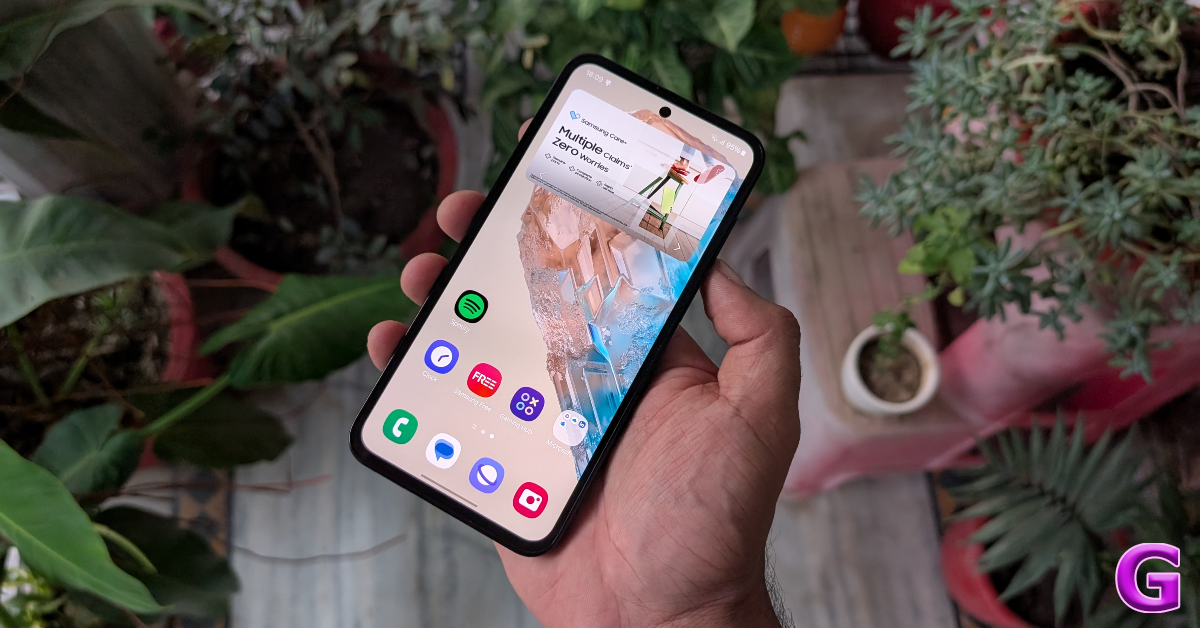
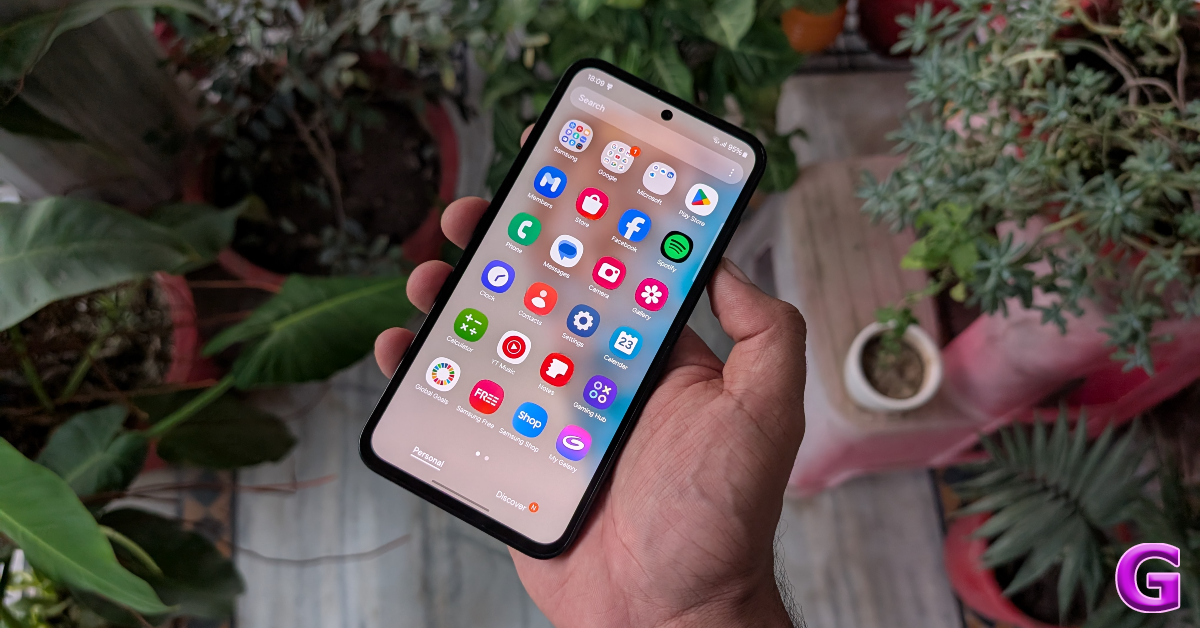
Samsung Galaxy M35 runs Android 14-based OneUI 6.1 out of the box. Despite being a budget offering, the smartphone has a couple of Galaxy AI features for photo editing. You get an object eraser and an image remaster tool as a part of the native editor. Other Galaxy AI features like call translation, generative AI wallpapers, and AI photo editing are not available on this device yet. There is some bloatware on this device, but it does not push spam notifications.
Samsung has promised 4 years of major software updates and 5 years of security patches for the Galaxy M35, which is simply incredible for a smartphone in this price range. We hope that other OEMs will take note of this development and adopt it as the standard for this segment.
Samsung’s Galaxy M Series is known for its amazing battery performance and the M35 does not disappoint in this regard. On moderate usage, the smartphone lasted a day and a half with ease. If you’re more conservative with your usage, you can 2 day’s worth of juice out of the 6,000 mAh battery inside this phone. During the review period, we kept the Samsung Galaxy M35’s AOD turned on at all times and used it at a 120Hz refresh rate. The only downside of the battery performance is the 25W charging speed. It takes 90 minutes to fully charge the phone.
Galaxy M35’s camera setup remains unchanged from last year. The triple camera layout at the back comprises a 50MP primary shooter, an 8MP ultrawide lens, and a 2MP macro sensor. The 13MP front-facing camera remains unchanged as well.
Ultrawide Shot
The primary shooter takes good pictures in outdoor lighting conditions. The images pack a lot of details and showcase balanced colours. We would have preferred a little more contrast and dynamic range, but the overall results leave very little room for complaints. The 8MP ultrawide camera retains the balanced colours of the primary sensors but the images are a little softer. With that being said, this 8MP ultrawide lens is still one of the better-performing cameras in this segment.
Ultrawide Shot
In limited lighting conditions, the primary shooter does a good job of letting in a good amount of light. The smartphone brightens up the subject quite well. However, the pictures are visibly grainy even with the Night Mode turned on. The ultrawide lens struggles in limited lighting, which isn’t something out of the ordinary in this segment.
Without Night Mode v Night ModeWithout Night Mode v Night Mode
The Galaxy M35 takes well-focused portraits with rich colours. Its edge detection skills aren’t up there with the best phones in this category, but it certainly excels in applying a good natural blur to the images. The front-facing camera takes good selfies in natural and artificial lighting. It keeps the skin tone and texture correction to a minimum, which is something we like about the smartphone.
The Samsung Galaxy M35 meets almost all the parameters of a good budget smartphone. Its Super AMOLED display is one of the best in the category and the 6,000 mAh battery can last up to 2 days on conservative usage. The Exynos 1380 SoC is a good processor that can handle casual gaming. The M35 is one of the rare phones in its segment to come with a dedicated cooling chamber. To top it off, the camera module on this phone takes respectable pictures in different lighting conditions. Our only gripe with the M35 is that for a ‘battery’ focused smartphone its charging speed is limited to 25W. A 90-minute charge time is way behind the industry standard in 2024.
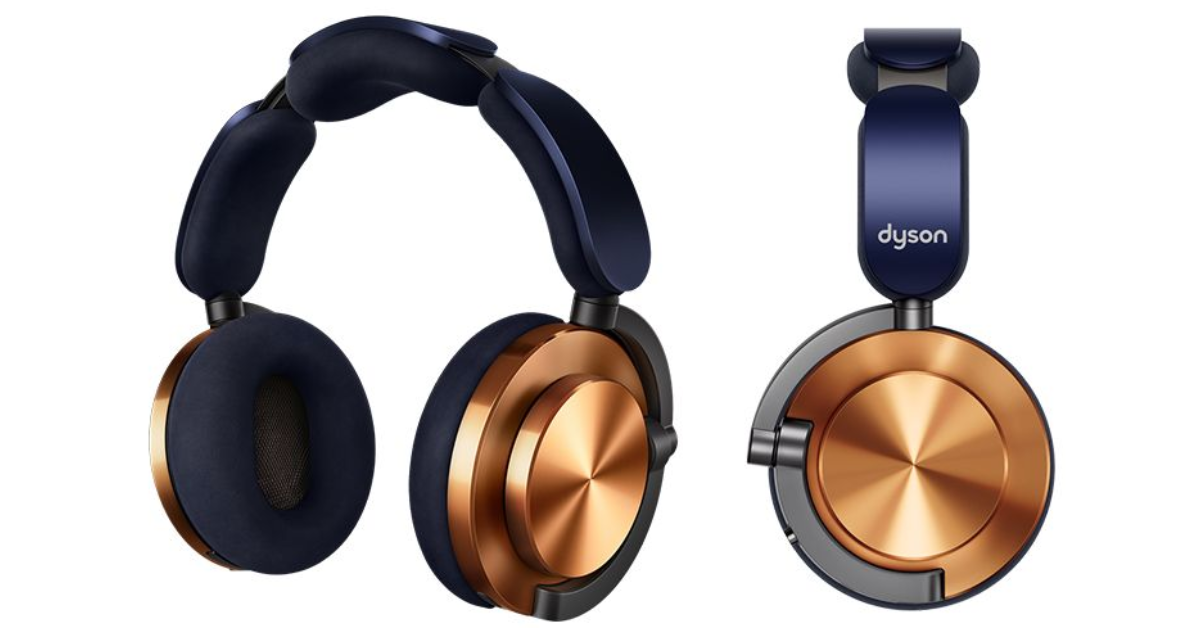
Dyson today officially announced the launch of OnTrac Headphones in India. The stylish headphones have customisable ear cushions and exterior covers. It comes with 2,000 customisable colour combinations for outer caps and ear cushions. The device supports ANC and has a battery life of up to 55 hours.
In This Article
Dyson OnTrac Headphones Specifications
The Dyson OnTrac Headphones are equipped with 40mm neodymium drivers with advanced audio signal processing that makes them capable of producing sound at frequencies ranging from 6Hz to 21kHz.
For a more direct sonic response, the speaker housing was angled 13˚ in the direction of the ear. A better acoustic seal and long-lasting comfort are ensured by carefully chosen materials and ergonomic design. Superior foam cushions and multi-pivot gimbal arms ease the strain on the ears, and the headband’s battery placement equally distributes weight. A consistent fit is offered across a range of head sizes thanks to the soft microsuede ear cushions and optimised clamp force. Jake Dyson and the CMF team created four distinct colourways for the Dyson OnTrac, each expertly made with long-lasting, distinctive finishes.
Options include CNC Copper, Nickel, and Aluminium, which are all inspired by the CNC manufacturing process. The Ceramic Cinnabar variety has a painted coating that feels ceramic. Apart from these four colour options, you can personalise your Dyson OnTrac by adding ear cushions and outer covers in other hues and textures. Customisable cushions and caps available High-grade aluminium is machined to create the exterior caps, which come in a variety of colours and finishes (such as ceramic or anodised) and are lightweight and robust.
Head-detection technology in Dyson OnTrac headphones senses when the ear cups are taken off and pauses the sound. Once replaced, the audio automatically restarts. Real-time soundtracking, automated software upgrades, crystal-clear calls with dual beam-forming microphones, and an easy-to-use joystick are all included. The MyDyson app alerts users to possible danger and offers real-time updates on volume levels.
With the use of eight microphones and a unique Active Noise Cancellation (ANC) algorithm, it can reduce background noise by up to 40dB by sampling external sound 384,000 times per second.
According to Dyson, customers can just tap the ear cups to activate ANC mode. Dyson claims that with ANC enabled, the battery life can last up to 55 hours. The two high-capacity lithium-ion battery cells are suspended in the headband for more even weight distribution. To switch between ANC on and off, simply double-tap on either ear cup.
Dyson OnTrac Headphones price in India and availability
The price of the Dyson OnTrac headphones is set at Rs 44,900 in the Indian market. The headset can be purchased via Dyson.in and Dyson demo stores across the country.