Dragon Blox Codes (February 2026)

Dragon Ball Z is an anime that needs no introduction. While the re-run watches never get tiring, you should certainly check out Dragon Blox on Roblox for a new experience based on the anime. This game puts you on a journey to become a Super Saiyan, throwing intense battles your way. It also offers some special codes to help you progress further in the game. Here are all the Dragon Blox codes available in February 2026. Read Also: OnePlus Valentine Sale Brings Cheaper Buds and Tablets in India

List of active codes (February 2026)

  • FEBRUARY: 5 Premium Wishes.
  • SNEAKSSOON: 5 Premium Wishes.
  • QOL: 5 Premium Wishes.
  • QUICKUPDATE: 10 Premium Wishes.
  • JANUARY: 5 Premium Wishes.
  • FIRSTWISH: 15 Premium Wishes.
  • DB2026: 15 Premium Wishes.
  • HAPPYNEWYEAR: 5 Premium Wishes.
  • HAPPYHOLIDAYS2025: 5 Premium Wishes.
  • XMAS2025: 10 Premium Wishes.

List of expired codes

These codes can no longer be redeemed.
  • RAIDNOW
  • DELAY2
  • HAPPYHOLIDAYS
  • DUNGEONRAIDS
  • SHUTDOWN
  • WINTER
  • SSJ4ISBACK
  • DECEMBER2025
  • THEYRECOMING
  • HAPPYNOVEMBER
  • EVENTEXTEND
  • FINALLY
  • WEHAVECODES
  • VASTO
  • HAPPYHOLLOWS
  • HOLLOW
  • DBOCTOBER
  • DBSEPTEMBER
  • MOREANDMORE
  • FREEBIESAGAIN
  • GRINDEVENT
  • AUTUMN2025
  • FALL
  • AIZEN
  • BOARDSREWORK
  • MOREFREECODES
  • TENFREEWISHES
  • PREMIUMSGALORE
  • 100CODES
  • WISHFORBROLY
  • DBAUGUST
  • MORECODES
  • GETYOURWISHES
  • UNLIMITEDWISHES
  • DARKBROLY
  • WISHON
  • BATTLEPASSRESET
  • PREMIUMSWOO
  • SAVEYOURROLLS
  • RACES
  • MOREWISHES
  • STARTSAVING
  • TENWISHES
  • 1BILLIONWISHES
  • SMOLWISH
  • BRUH
  • DELAYAGAIN
  • LOLMBCHAT
  • MOREREROLLS
  • INFUSEDREWORK
  • SUMMERISCOMING
  • BPUPDATE
  • FREEPREMIUMSAGAIN
  • SUMMEREVENT
  • ANEWWORLDSOONMAYBE
  • OOPSIE
  • FREEPREMIUMS
  • VEGITOYES

How to redeem a code in this game

How to redeem a code in this game
  1. Launch Dragon Blox on Roblox.
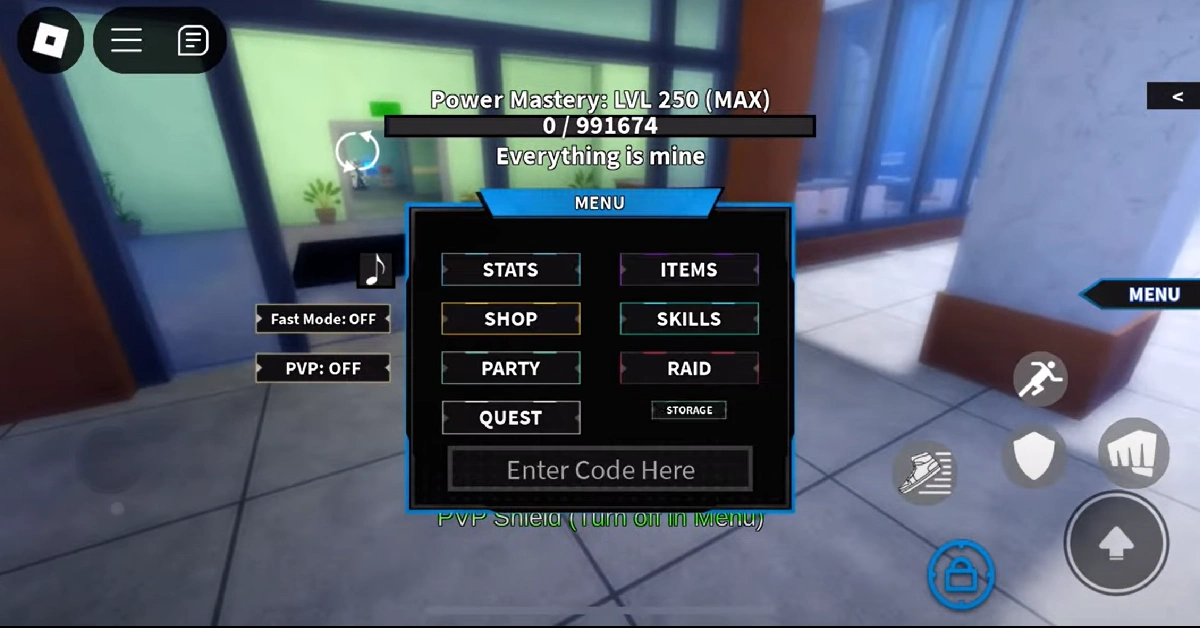
  2. Hit the Menu button on the home page.
  3. Hit the Redeem Codes button at the bottom of the menu.
  4. Enter your code in the text box.
  5. Hit Redeem.

Frequently Asked Questions (FAQs)

Why is my code not working in this game?

If you can’t get your code to work, check it for typos and make sure it is in uppercase.

How do I get free premium wishes in this game?

Use codes FEBRUARY, SNEAKSSOON, QOL, and QUICKUPDATE to get free premium wishes in Dragon Blox.

How do I redeem a code in this game?

Launch Dragon Blox, hit the Menu icon, tap on ‘Redeem Codes’, paste your code into the text box, and hit ‘Redeem’.

Why am I not able to redeem my code in this game?

If your code has expired, it can no longer be redeemed.

Where can I find the newest Roblox codes?

Keep checking the Gadget Bridge home page for the latest Roblox code drops. Read Also: Snapchat’s ‘Arrival Notifications’ let you inform your friends that you’ve reached home safely: Here’s how you can enable them

Final Thoughts

Dragon Blox is not the only DBZ adaptation on Roblox. If you’re a superfan of the anime, we highly recommend giving Dragon Ball Rage a shot too. While you’re here, take a look at the latest Heroes World codes. Got any questions about this game? Let us know in the comments!

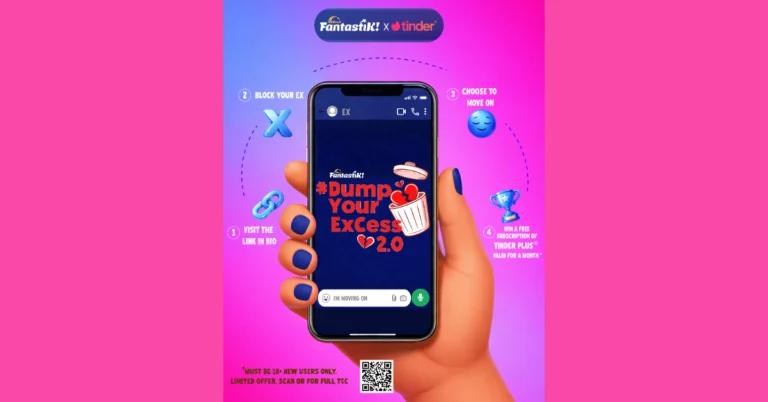
Tinder Collaborates with Sunfeast Fantastik: Launches #Dump YourExCess2.0 this V-Day

Sunfeast Fantastik brought back its #DumpYourExCess2.0 campaign this Valentine’s Day. The campaign encourages Gen Z to move on from past relationships in a fun and bold way. After its first campaign was a success, it is now working with a worldwide dating app to get young people to prioritise self-love and engagement first. For Valentine’s Day 2026, Sunfeast Fantastik is bringing back its viral campaign, #DumpYourExCess 2.0. The goal of this campaign is to encourage Gen Z to “block the ex” and embrace themselves. The main idea changes from physical and emotional disposals to a digital focus, encouraging people to block their exes on social media as a way to get closure. Also Read: XElectron iProjector 3 Plus Google TV LED projector with 2000 ANSI Lumens launched in India The company has partnered with Tinder, a popular worldwide dating app, to give members a chance to win a one-month free subscription and other unique rewards for blocking their exes. The initiative also includes a dedicated #DumpYourExCess Hotline, which works through a WhatsApp chatbot and allows users to publicly commit to blocking their ex, with everyone receiving a personalised shareable digital badge, turning private emotions into cultural conversation. The chatbot also records real-life closure stories and links users to additional on-ground and online touchpoints, ensuring the campaign’s impact extends beyond social media. Also Read: Samsung Galaxy Unpacked Event 2026 Date Announced: Pre-Reservations Open Now Speaking on the campaign, Mr. Subash Balar, VP and Business Head, Chocolates, Coffee & Confectionery business, ITC said, “Young consumers today experience relationships and break-ups largely in the digital world. With #DumpYourExCess 2.0, we wanted to encourage a simple but powerful act of closure, turning “moving on” into something positive and empowering. This initiative reflects Sunfeast Fantastik!’s belief in creating campaigns that feel real, relatable and culturally relevant for young audiences.”

OnePlus Valentine Sale Brings Cheaper Buds and Tablets in India

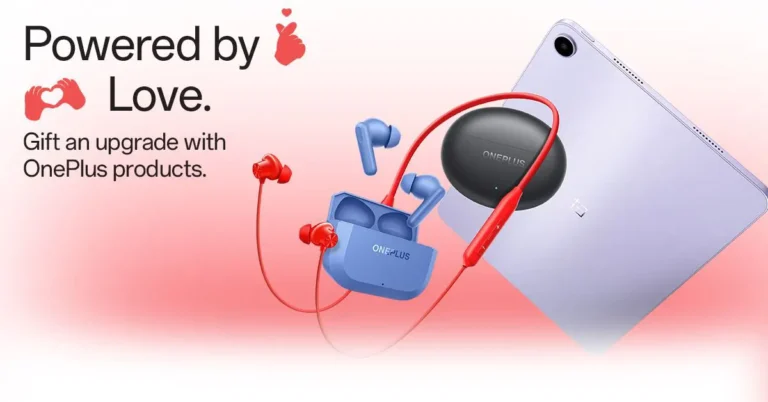
India’s Valentine’s Day shopping season has a new tech twist this year. The OnePlus Valentine sale is running from February 6 to February 15, 2026, with limited-period deals across the brand’s audio lineup and tablets. If your idea of romance is sharing a playlist, bingeing a series together, or finally buying that “productivity” tablet you have been justifying since New Year’s, the discounts are clearly aimed at that crowd.

This is not a one-product flash deal. It’s a spread across multiple price points, from budget-friendly neckbands to premium true wireless earbuds, plus tablets that cover streaming, studying, and work-on-the-go needs.

Audio deals that target every budget

The headline for value hunters is simple. Several models get straight price drops, making them easier to recommend for people who want fuss-free listening.

Here are the key audio offers in this window:

  • OnePlus Bullets Z3 price drops to Rs 1,299 (from Rs 1,699)

  • OnePlus Nord Buds deals land across multiple models

    • Nord Buds 3R at Rs 1,599

    • Nord Buds 3 at Rs 1,999

    • Nord Buds 3 Pro at Rs 2,699

  • OnePlus Buds 4 at Rs 5,499 (from Rs 5,999)

  • OnePlus Buds Pro 3 comes in at Rs 10,999 (from Rs 11,999)

What this lineup signals is pretty straightforward. OnePlus is trying to cover gifting brackets that typically sit between “I want good audio” and “I do not want to overthink codecs.” The pricing also makes sense for students and commuters who want better calling performance and a cleaner daily carry, without turning it into a luxury purchase.

Read Also: Lumio rolls out Android 14 across its TVs and projectors

Tablets get the bigger play this Valentine’s

Audio is the impulse buy. Tablets are the “let’s make life easier” buy. OnePlus is pushing offers across three tiers: entry-level, mid-range, and flagship, with a focus on bundles and bank discounts.

Entry and everyday options

  • OnePlus Pad Lite price starts at Rs 12,499 (6GB/128GB Wi-Fi)

  • Pad Lite 8GB/128GB LTE at Rs 14,499

This tier is clearly built for streaming, browsing, online classes, and casual gaming. It is also the easiest one to gift without triggering the “please do not spend that much on me” conversation.

Mid-range productivity angle

  • OnePlus Pad Go (Pad Go 8/128 Wi-Fi) at Rs 14,999

  • Pad Go 8/128 LTE at Rs 16,999

  • Pad Go 8/256 LTE at Rs 18,999

  • Pad Go 2 series starts at Rs 24,999, with higher storage and 5G variants priced up to Rs 30,999

If you want a tablet that lives half its life on a couch and the other half in a backpack, this segment is the practical one. The pricing is also structured to make the bank discount feel like a meaningful nudge, especially on LTE and 5G variants.

Flagship tier and bundle value

  • OnePlus Pad 2 offers Valentine pricing at

    • 8GB variant at Rs 34,999

    • 12GB variant at Rs 37,999

  • OnePlus Pad 3 price starts at Rs 44,999

    • 16GB/512GB variant at Rs 49,999

The bigger hook here is not just the sticker price. It’s the bundled accessories. For buyers who actually plan to type, sketch, or multi-task, keyboards and stylus add-ons can change the value equation more than a small discount ever will. For anyone who has purchased a tablet and then spent weeks “researching” accessories, this is the rare moment when the bundle does the decision-making for you.

Read Also: Samsung Galaxy Unpacked Event 2026 Date Announced: Pre-Reservations Open Now

Availability and where the deals are live

The offers are live in India through February 15, 2026, across OnePlus online channels, OnePlus Experience Stores, major e-commerce platforms, and select offline retail partners. Audio products are also listed through additional quick-commerce and fashion marketplaces in India.

Price snapshot for quick comparison

A few of the most eye-catching Valentine prices from the list:

  • OnePlus Bullets Z3 at Rs 1,299

  • OnePlus Buds Z2 ANC at Rs 1,899

  • OnePlus Nord Buds 3 at Rs 1,999

  • OnePlus Buds 4 at Rs 5,499

  • OnePlus Buds Pro 3 at Rs 10,999

  • OnePlus Pad Lite (Wi-Fi) at Rs 12,499

  • OnePlus Pad Go (Wi-Fi) at Rs 14,999

  • OnePlus Pad 2 at Rs 34,999

  • OnePlus Pad 3 at Rs 44,999

Valentine’s gifting tends to split into two camps: cute and forgettable, or useful and used. These deals are clearly chasing the second camp. If you already planned to buy earbuds or a tablet in early 2026, the timing is convenient. If you were not planning to, the smartest move is to pick based on your actual routine, not the temporary price. A discounted gadget is still expensive if it ends up as a very premium paperweight.

Snapchat’s ‘Arrival Notifications’ let you inform your friends that you’ve reached home safely: Here’s how you can enable them

0
Snapchat’s new feature takes location-sharing to the next level. Instead of tracking your friend’s location until they’ve reached home, you can put your phone down and get a ping when they arrive at their destination. Arrival notifications are easy to set up and use. You can save up to 10 locations at one time. Snapchat lets you decide whether you want to send these alerts to just one friend or the entirety of your contact list. Here’s how you can enable arrival notifications on Snapchat. Read Also: Heroes World Codes (February 2026)

Before you begin

Arrival notifications require constant access to your device’s location. Before you enable this feature, go to Settings>App>Snapchat>Permissions>Location and select ‘Allowed all the time’. Additionally, set up your ‘Home’ location in Snapchat if you want to use this feature to alert friends when you’ve safely reached home. Enabling Ghost Mode on Snapchat automatically stops arrival notifications from being sent to the selected contacts. If you’re on the receiving end of these notifications, you can choose to stop them at any given time. This requires going to the chat, tapping the name of the destination, and disabling the notifications. The user will not be notified once you execute this step. However, the notifications will be turned off on their end, too.

Enable Arrival Notifications on Snapchat

  1. Launch the Snapchat app on your phone.
  2. Switch to the Chats tab and go to a friend’s profile.
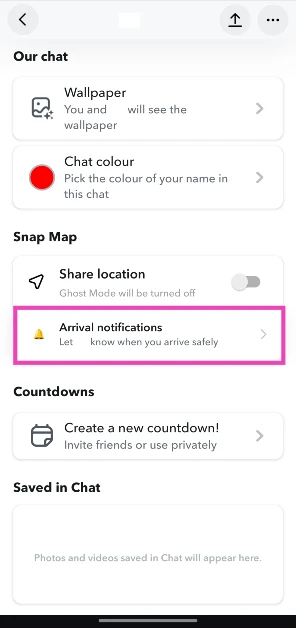
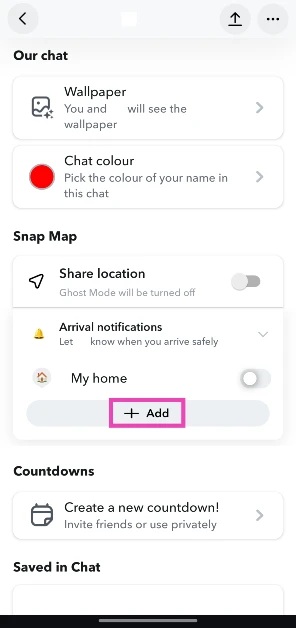
  3. Tap on Arrival notifications. Tap on Arrival notifications.
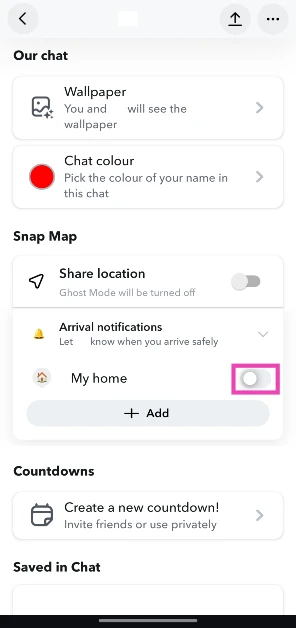
  4. Turn on the toggle switch next to My home. Turn on the toggle switch next to Home.
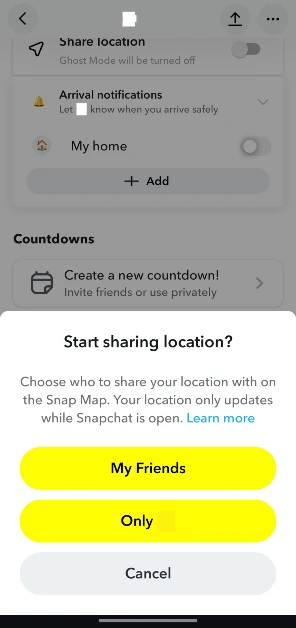
  5. Choose whether you want to share your location with all of your friends or only the one you’ve selected. Choose whether you want to share your location with all of your friends or only the one you’ve selected.
  6. If you want to choose another location, hit Add. If you want to choose another location, hit Add. Snapchat’s ‘Arrival Notifications’ let you inform your friends that you’ve reached home safely: Here’s how you can enable them
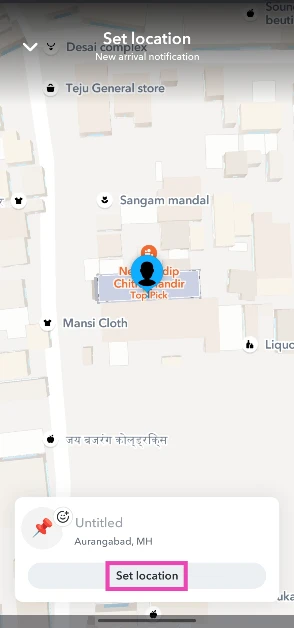
  7. Select your destination on the map.
  8. Hit Set location. Select your destination on the map. Snapchat’s ‘Arrival Notifications’ let you inform your friends that you’ve reached home safely: Here’s how you can enable them
  9. Turn on the toggle switch next to the location’s name.
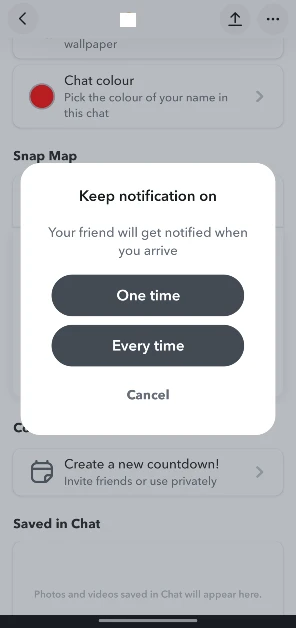
  10. Choose whether you want to send the arrival notification one time or every time you reach the destination. Choose whether you want to send the arrival notification one time or every time you reach the destination. Snapchat’s ‘Arrival Notifications’ let you inform your friends that you’ve reached home safely: Here’s how you can enable them

Frequently Asked Questions (FAQs)

What are arrival notifications on Snapchat?

Arrival notifications alert your friends that you’ve reached your destination. You can set them for your home or any other location on the Snap map.

How do I enable arrival notifications for a friend?

Go to your friend’s Snapchat profile, tap on ‘Arrival notifications’, and turn on the toggle switch next to Home or your preferred destination.

Can I set up arrival notifications for multiple places?

Yes, Snapchat lets you enable arrival notifications for multiple locations. You can let a user know when you’ve arrived at your home, workplace, or school without sending individual alerts. Simply go to the arrival notifications section in the user’s profile and hit ‘Add’. Choose a location from the map. Once a location has been selected, turn on the toggle switch next to its name.

How many places can I send arrival notifications for?

You can save up to 10 locations in arrival notifications.

How do I stop receiving arrival notifications from a friend?

Open your chat with the friend, tap the name of the location, hit the ellipses, and select ‘Stop receiving this notification’. Read Also: Samsung Galaxy Unpacked Event 2026 Date Announced: Pre-Reservations Open Now

Final Thoughts

If you’re not a fan of location-sharing on Snapchat, you can always use WhatsApp to share your live location with your friends. However, WhatsApp does not have arrival reminders yet. If you’re done with Snap map for good, make sure you wipe your location record by going to Settings>Privacy control>Map and selecting ‘Delete location history’.

Heroes World Codes (February 2026)

Based on My Hero Academia, Heroes World puts you in the world of the anime and lets you play as different characters. It does an amazing job of incorporating the magical storylines of the anime into its gameplay. If you’re new to the game, you will need some help to get started. There are a bunch of special codes you can use to get your hands on free cash and spins. Here are all the Heroes World codes that are up for grabs in February 2026. Read Also: How to create an AI playlist on YouTube Music

List of active codes (February 2026)

  • SorryForShutdown!: 20k Cash.
  • MUSCULAR: 20k Cash, 1 Legendary Spin, 2 Rare Spins, 2 Wheel Spins.
  • IRONMIGHT: 20k Cash, 2 Rare Spins, 2 Wheel Spins, 2 Epic Spins.
  • FilleshLovesFixing!: 20k Cash, 2 Rare Spins, 1 Wheel Spin.
  • JerLovesDrawing!: 15k Cash, 1 Rare Spin, 1 Wheel Spin.
  • FilleshFixes: 20k Cash, 1 Legendary Spin, 7 Rare Spins, 4 Wheel Spins.
  • FilleshT1Fixer: 20k Cash, 2 Legendary Spins, 7 Rare Spins, 4 Wheel Spins.
  • FilleshIsSorry2!: 25k Cash, 5 Legendary Spins, 10 Rare Spins, 10 Wheel Spins. 
  • FilleshIsSorry!: 25k Cash, 5 Legendary Spins, 10 Rare Spins, 10 Wheel Spins.
  • Christmas!: 7.5k Cash, 1 Legendary Spin, 2 Rare Spins, 2 Wheel Spins.
  • FinalSeason!: 7.5k Cash, 1 Legendary Spin, 2 Rare Spins, 2 Wheel Spins.
  • youtubeisback!: 4 Epic Spins, 2 Rare Spins.
  • KurogiTower!: 15k Cash, 1 Legendary Spin, 2 Wheel Spins.
  • BetterAFO!: 3 Epic Spins, 1 Rare Spin.
  • EffectRework!: 1 Epic Spin, 3 Rare Spins.
  • BugFixes!: 3 Epic Spins.
  • HypeSoon!: 750 Star Fragments.
  • AFORework!: 5 Epic Spins, 10 Rare Spins.
  • Boost!: 1 Hour of Money Boost.
  • Wheel!: 2 ‘Spin the Wheel’ Pulls.
  • H3ROSWORLD!: 30 Minutes of all Boosts.
  • ReAFONextWeek!: 1 Legendary Spin.
  • NemuUpdate!: 10 Epic Spins, 2 Hours EXP.
  • RamadanMubarak!: 2 Legendary Spins.
  • SorryForDelay!: 2 Legendary Spins.
  • Christmas2024: 3 Leg Spins, 20 Epic Spins, 3x EXP, Cash.
  • Vigilanti!: 3 Leg Spins.
  • OFARaid!: 2x EXP, Cash.
  • ShiftLock!: 500 Fragments.
  • LongAwaited: 3 Epic Spins.
  • TheGramBoss: 2 Leg Spins.
  • SpinReWork: 3 Leg Spins.
  • CDNerf: 3 Epic Spins.
  • Happy Halloween!: 3 Legendary Spins.
  • New Quirk!!!: 2x EXP Boost.

List of expired codes

These codes are no longer redeemable.
  • Reaper!
  • QuirkStyles!
  • WorldBoss!!
  • MysteryShard
  • TheGramHero
  • AFOPower!
  • NewMap!
  • JoinDaGram!
  • Awakenings
  • HWIsBack!
  • BossStudiosTakeOver!
  • InfernoBack!
  • NewRaid!
  • AwakeningSoon!
  • welcomeback
  • almost500k
  • ultra480k
  • epic460k
  • 470kplus
  • the440k
  • 430kcode
  • 360kcode
  • 370klikes
  • 380kCODE!
  • 420k
  • easter340k
  • 450kLIKES
  • thank350k
  • 240kCODE
  • thank220k
  • 230kcode!
  • 210kCODE!
  • likereward1
  • 110kcodeyay
  • plus120k!
  • big130k
  • letsgo150k
  • goal200k
  • theultra190k
  • ultra140k
  • easter340k
  • 330kLIKES
  • 320kday
  • 310kLIKES
  • big300k
  • FirstCode!
  • thank290k
  • 70kalready
  • 280kLIKES
  • 270kREAL
  • 260ktime
  • the250k
  • 80kcode!
  • newupdate!
  • 160ktux
  • spinner180k
  • its90k!
  • zi170k

How to redeem a code in this game

How to redeem a code in Heroes World
  1. Launch Heroes World on Roblox.
  2. Press the M key.
  3. Enter the code in the text field.
  4. Hit Enter.

Frequently Asked Questions (FAQs)

Why is my code not working in this game?

If you can’t get your code to work, check it for typos and make sure its letters are in the correct case.

How do I get free cash in this game?

Use codes SorryForShutdown!, MUSCULAR, and IRONMIGHT to get free cash in Heroes World.

How do I redeem a code in this game?

Launch Heroes World, press ‘M’, type the code in the text field, and hit ‘Enter’.

Why am I not able to redeem my code in this game?

If your code has expired, it can no longer be redeemed in Roblox.

Where can I find the newest Roblox codes?

Keep checking the Gadget Bridge home page for the latest Roblox code drops. Read Also: GeForce Now India launch gets real in Mumbai, to roll out soon in rest of India

Final Thoughts

If you’re a My Hero Academia superfan, we recommend giving Hero’s Ultimatum: Legacy Edition a shot as well. While you’re here, check out the latest Midnight Chasers: Highway Racing codes. If you have any questions, let us know in the comments!

GeForce Now India launch gets real in Mumbai, to roll out soon in rest of India

After a long “almost there” phase, the GeForce Now India launch is finally moving from promise to hardware. NVIDIA has now showcased GeForce Now servers in India and signalled that an open beta will roll out ahead of a wider launch in the coming days, starting with local infrastructure in Mumbai.

That matters because cloud gaming is not just about playing big PC titles on a small device. It is about doing it with a latency low enough that your inputs still feel like your inputs, not a polite suggestion delivered three seconds later.

What Nvidia is putting inside Indian data centres

GeForce Now in India will run on Nvidia’s RTX 5080 Super Pods based on the latest Blackwell architecture, with the idea being simple: stream demanding games from the cloud so your laptop, phone, TV stick, or handheld does not need a room heater disguised as a GPU.

Read Also: Portronics Vader X mouse launched in India under Rs 600

At a media preview in Mumbai on Friday, February 6, Nvidia highlighted high frame-rate streaming and a focus on low latency, while reiterating that the Indian offering is being tuned for local conditions rather than being copied and pasted.

How GeForce Now works, and why the model is different

GeForce Now’s pitch is built on three pillars: publisher partnerships, GeForce tech running in the cloud instead of on local hardware, and turning “almost any device” into a GeForce RTX-class gaming machine.

In practical terms, Nvidia says players will get access to 4,000+ games, including ready-to-play titles and a newer install-to-play option that lets you install certain games directly from the cloud. A free account exists, but premium features are expected to sit behind paid tiers, with India pricing and the exact launch date still unannounced.

Key experience features Nvidia is talking up include:

  • 4K at 60fps targets for supported streams and setups

  • Optional Cinematic Quality Streaming (CQS) toggle for sharper detail

  • Latency optimisations using tech like Nvidia Reflex and Rivermax packet pacing

  • Broad device support, including TV sticks, handhelds, Linux clients, and more (VR currently appears as a virtual screen rather than native VR gameplay)

NVIDIA has confirmed the GeForce Now servers for India are located in Mumbai, which is crucial because routing gameplay through overseas data centres is where fast shooters go to feel slow.

The India timing: better networks, growing PC interest, and one big unknown

NVIDIA’s India messaging leans on improving connectivity and growth in gaming interest. It has pointed to stronger network infrastructure and growing usage patterns in PC gaming as part of why the timing works.

The one big unknown is the one every Indian gamer will ask first: pricing. If the subscription lands in the “impulse buy” zone, cloud gaming becomes a gateway drug for PC titles. If it lands in “EMI thoughts,” the audience narrows quickly.

Read Also: Oppo K14x 5G with 6500mAh battery launched in India

Cloud gaming in India is heating up, and Xbox is already in the ring

This GeForce Now move lands just as Xbox cloud gaming has expanded into India, using a Game Pass-based model and supported controllers, with monthly plans starting at Rs 499.

The business model difference is the real story:

  • Xbox cloud gaming: primarily Game Pass access and streaming within Microsoft’s ecosystem.

  • GeForce Now: connects to libraries you already own on platforms like Steam, Epic, or Battle.net, then streams those purchases from nearby servers.

For players, it is less “which is better” and more “which fits my existing library, internet quality, and budget.”

The bigger backdrop: AI is eating memory, and India is building data centres

NVIDIA’s India cloud gaming push is also arriving during a broader memory chip crunch linked to AI demand, with industry reports suggesting launch timelines for some gaming hardware have faced pressure.

Meanwhile, India’s data centre runway is expanding fast. Industry projections suggest India’s installed data centre capacity could cross 2GW by 2026 and rise to 8GW in the next five years, driven by large capital investments. The Union Budget 2026-27 has also proposed a tax holiday until 2047 for qualifying foreign companies setting up and using data centre operations in India, under specified conditions.

Put it together, and the direction is clear: cloud services want to live closer to Indian users, and gaming is one of the most latency-sensitive use cases to prove it.

What We think?

If Nvidia nails pricing and stability, GeForce Now could become the “graphics card upgrade” many players skip, especially for students and first-time PC gamers who just want the experience without the tower. If pricing overshoots, it risks being admired more than used, like a supercar spotted in traffic.

XElectron iProjector 3 Plus Google TV LED projector with 2000 ANSI Lumens launched in India

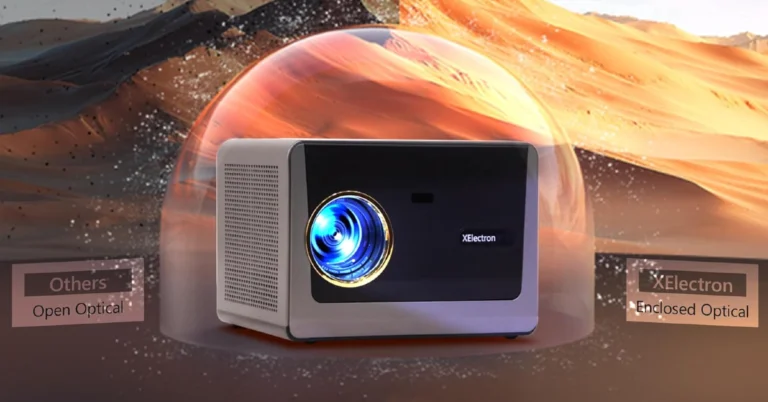
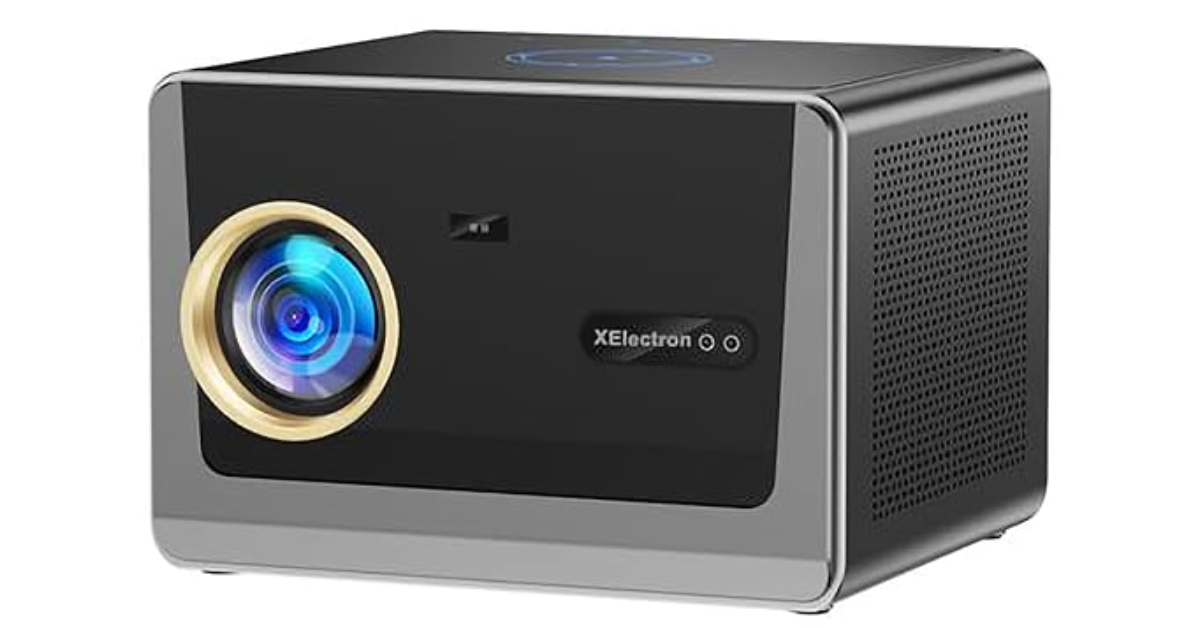
XElectron has unveiled the iProjector 3 Plus, which is touted as India’s brightest Google TV LED projector, with an astounding 2000 ANSI lumens brightness and native 1080P resolution with 4K Ultra HD capability. The projector is intended for a large-screen, immersive viewing experience at home and comes with official Google TV integration, automated screen adjustment functions, and built-in bass speakers. The XElectron iProjector 3 Plus is priced at ₹27,990 and will be available for purchase in India through Amazon, Flipkart, and select retailers. It comes with a one-year warranty and nationwide after-sales service from XElectron. XElectron iProjector 3 Plus Google TV LED projector with 2000 ANSI Lumens launched in India The iProjector 3 Plus is intended to serve as the primary entertainment unit in modern living rooms, providing an expansive, immersive experience for movies, gaming, and live sports. It includes Official Google TV, which provides high-speed access to various certified OTT services such as Netflix, Prime Video, and others, enabling a smooth streaming experience without the use of extra devices. This smart projector has Native Full HD (1080p) resolution and supports 4K, resulting in sharp visuals suitable for various content formats. It improves usage in living rooms, bedrooms, and other flexible household settings by eliminating the need for external dongles or set-top boxes. Also Read: Samsung Galaxy Unpacked Event 2026 Date Announced: Pre-Reservations Open Now The iProjector 3 Plus is designed for ease of use, with various automated functions such as auto focus, auto keystone correction, auto screen fit, and obstacle avoidance. These features ensure that the projector automatically adjusts the image for ideal alignment and framing, regardless of where it is placed or how it relocates between rooms. Furthermore, the projector has a brightness of 25000 lumens (equal to 2000 ANSI), making it acceptable for usage in average household lighting circumstances, allowing viewers to enjoy films and sports without the need for a fully dark room. Also Read: Samsung announced the SmartThings Home Care Service for the 2026 Bespoke AI Air Conditioner range The iProjector includes built-in 20W speakers that deliver clear and enough audio for regular viewing, eliminating the urgent need for external speakers. It enables Bluetooth 5.4 connectivity for individuals who want to set up advanced audio systems. It also includes Wi-Fi 6, which enables smoother streaming, faster connectivity, and better performance across a variety of applications. The projector has various connectivity options, including HDMI, USB, and LAN, making it compatible with gaming consoles, laptops, and other media devices.

Lumio rolls out Android 14 across its TVs and projectors

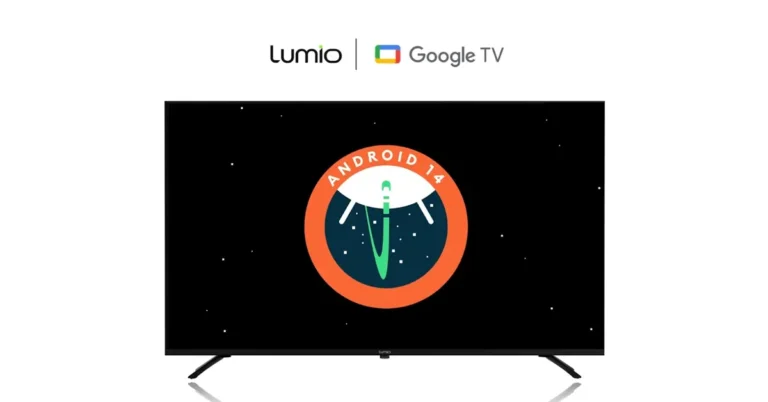
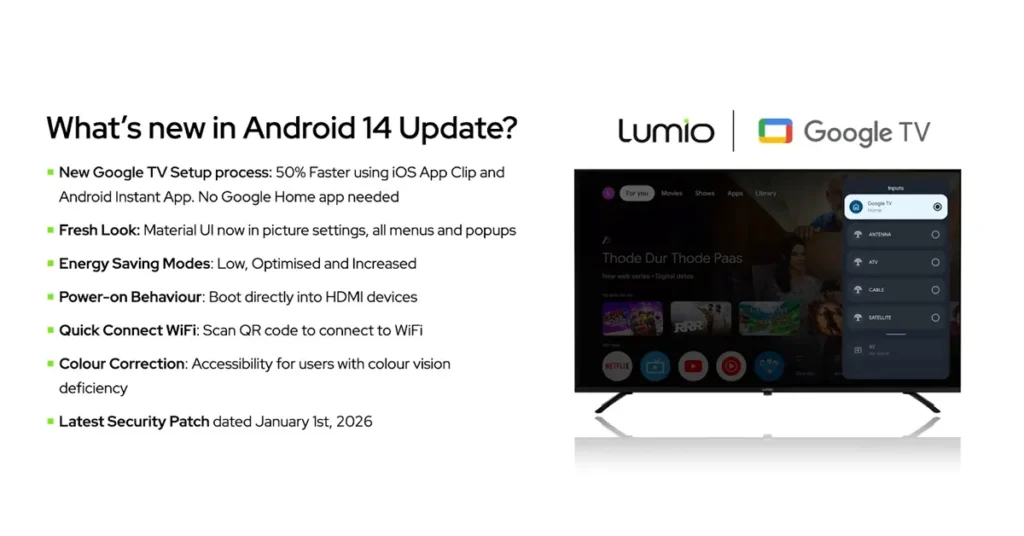
The Lumio Android 14 update is headed to living rooms in one sweep, and Lumio says it is the first brand to push Android 14 across its entire product portfolio. The company says it has upgraded its entire TV lineup first, and will follow up with a Lumio Arc projector update next. New Lumio Vision TVs are already shipping with Google TV Android 14 out of the box, while existing owners are set to get the same software via a phased over-the-air rollout starting February 14, followed by projectors in March.

That might sound like “yet another version number”, but TV software updates are often the unglamorous hero of the home. When the remote feels laggy, voice search takes a beat too long, or settings look like a maze, it is usually the software doing the tripping.

What changes with Android 14 on Google TV

Lumio says Android 14 is aimed at better performance, stability, and day-to-day usability, while keeping the familiar Google TV experience intact. The update also lands alongside a Google TV launcher update on Lumio devices, so the home screen and navigation may feel fresher even if your favourite apps stay the same.

Key changes you are likely to notice

  • Faster first-time setup, with Lumio claiming up to 50% quicker out-of-the-box setup for new installs

  • QR code TV setup that helps you sign in and finish onboarding with fewer remote clicks

  • Google Assistant offers faster voice responses, with Lumio claiming up to 30% faster performance

  • A refreshed system interface where quick settings and system controls follow a unified, modern layout

  • More power and connectivity controls in standby, including multiple energy profiles

  • A new option to power on directly to the last used input, handy for consoles and set-top boxes

  • Quick Wi-Fi sharing via a QR code for guests, plus new accessibility features such as colour correction support

  • The latest Google security patch, aimed at strengthening system protection against emerging threats

Setup gets quicker, especially for households with both Android and iPhone

If you have ever entered a Wi-Fi password using a TV remote, you deserve a medal and probably a snack. Lumio is leaning into a QR-led flow where you sign in by scanning a code on the TV. The company also says iPhone users can complete setup through a temporary Google TV App Clip experience, so they do not have to install an extra app just to get started.

Read Also: Portronics Vader X mouse launched in India under Rs 600

This is not just a speed flex. Faster onboarding also reduces the odds of a half-finished setup that turns into a weekend project.

A cleaner control panel and smarter standby

lumio android 14 tv what are new features

Android 14 also brings an interface refresh that targets a common smart TV pain point. The settings you actually need often end up buried. Lumio says quick settings, picture modes, sound profiles, and system controls now follow a unified layout, so you spend less time hunting and more time watching.

The update also adds more control over standby behaviour. Users can pick energy profiles depending on priorities. Lower power draw is useful for overnight standby. Faster casting and smart home connectivity can help if your TV doubles as a living-room hub.

The practical extras that help day to day

Beyond speed and visuals, Lumio is highlighting quality-of-life additions that tend to age well. Guest-friendly Wi-Fi sharing via QR code is the kind of feature you only appreciate when friends are hovering near your router. Accessibility options such as colour correction support can also make a meaningful difference for viewers who need it.

Security is the quieter headline. TVs sit on home networks for years. Keeping the latest Google security patch current is one of the simplest ways to reduce exposure to newly discovered issues.

Lumio’s Head of Product Sudeep Sahu framed the rollout as a long-term play, saying the company is focused on “fast, reliable and long-lasting software experiences” and that these Android 14 updates across its Vision and Arc lineup reflect an ongoing commitment to improvement for existing customers.

Rollout timeline and how to check

Lumio says new sets already ship with Android 14. Existing owners should start seeing the Lumio Vision TVs update from February 14, 2026, in phases. The Lumio Arc projector update is planned for March 2026.

Read Also: Apple begins accepting applications for the Swift Student Challenge 2026

If you want to check manually, go to Settings, then System, then About, then System update. If the rollout has reached your device, it should appear there.

This kind of update is not flashy like a new panel or a bigger screen, but it decides whether your premium hardware still feels premium six months from now. If Lumio can keep shipping meaningful platform updates on schedule, that will matter as much as any spec sheet.

How to create an AI playlist on YouTube Music

0
After adding Taste Match playlists to its platform, YouTube Music has introduced AI playlists to keep up with the likes of other streaming giants like Spotify, Apple Music, and Deezer. The idea behind this feature is simple – you enter a prompt based on your mood and the kind of music you want to hear, and the platform curates a fresh playlist for you based on your pointers. You need to be a paid subscriber in order to use this feature. Interested to see what recommendations you get based on your prompt? Here’s how you can create an AI playlist on YouTube Music. Read Also: Samsung Galaxy Unpacked Event 2026 Date Announced: Pre-Reservations Open Now

How to get the best out of this feature

Your AI playlist will only be as good as the prompt you enter. Google uses its Gemini models to analyse your input and create something based on what you asked. Here are some things you need to keep in mind while framing your prompt.
  • Mention the genres that you want the playlist to cover. Dive into specific subgenres if you can. If you’re in the mood for rock music, but don’t want to limit yourself to a certain sonic palette, mention adjacent genres like grunge and metal.
  • If you can’t land on a genre, mention how you want the mood of the playlist to be. You can throw in qualitative pointers like ‘songs for a rainy day’ or ‘songs for a road trip’.
  • Add details about other factors like the length of the playlist, essential artists, songs to omit, and more. 

Create an AI playlist on YouTube Music

How to create an AI playlist on YouTube Music
  1. Launch the YouTube Music app on your smartphone.
  2. Go to the Library tab.
  3. Hit the New button.
  4. Select AI playlist.
  5. Enter a prompt for the playlist using text or voice. Make sure it is detailed and touches on key aspects of the mood and sonic nature of the playlist.
  6. Your AI playlist will be generated in a few seconds.

Frequently Asked Questions (FAQs)

Does YT Music offer the option to create playlists using AI?

YouTube Music has added an option to create AI playlists, but the feature is available to Premium subscribers only.

How do I create an AI playlist on YT Music?

Go to YouTube Music>Library>New>AI playlist, type your prompt, and hit Enter.

Why can’t I create AI playlists on YT Music?

This feature is exclusively available to Premium subscribers. Google is rolling it out in a phased manner, so it may take some time to reach your device.

How do I create a Taste Match playlist with my friends on YT Music?

Launch the YouTube Music app, go to Library>New>Taste Match>Invite, and share the link with your friends. The playlist will be created once they click the link and join the collaboration.

How do I create an AI playlist on Spotify?

Go to Spotify>Your Library, hit the plus icon, select AI Playlist, enter a prompt and hit Send. Read Also: OnePlus Pad Go 2 Review: This midrange tablet delivers on almost every front

Final Thoughts

YouTube Music is limiting this feature to Premium users in a bid to drive up paid subscribers. The music streaming platform recently started restricting some ad-assisted users from viewing song lyrics. It remains to be seen whether this change will be applied across all non-Premium users.

Samsung Galaxy Unpacked Event 2026 Date Announced: Pre-Reservations Open Now

Samsung has set the date for its Galaxy Unpacked event: Wednesday, February 25, 2026. This is when the new Galaxy S26 series will be disclosed to the world. There will likely be three variants in the series: the Galaxy S26, S26+, and S26 Ultra. After the event, pre-orders for the Galaxy S26 series should start between February 26 and March 4. This is a fantastic chance for people who want to get one. Samsung is also having a deal for pre-reservations right now. They are offering a Rs 999 VIP Pass that lets people have early access to the new smartphones.

Galaxy Unpacked Event, Pre-booking Details

The Galaxy Unpacked Event will take place in San Francisco, USA, on February 25, 2026, at 10:00 AM PT. This timing corresponds to 1:00 PM ET, 6:00 PM GMT, and 11:30 PM IST. The Samsung Newsroom, Samsung’s official website, and its YouTube channel will all stream the event live, making it easy for people all over the world to enjoy. The company said that buyers can pay Rs 999 for the Galaxy Pre-reserve VIP Pass to reserve ahead of time. This pass lets consumers get Rs 5,000 worth of perks in the form of an e-store coupon when they buy more Galaxy phones in the future. Additionally, those who pre-reserve will automatically qualify for a giveaway worth Rs 50,000. Also Read: Samsung announced the SmartThings Home Care Service for the 2026 Bespoke AI Air Conditioner range

Here is What to Expect:

Samsung is expected to launch the Galaxy S26 Series, which will include three main models that follow the company’s usual product lineup structure. The Galaxy S26 is the base flagship model, the Galaxy S26+ is a mid-sized version with a better battery and a bigger screen, and the Galaxy S26 Ultra is the best option in the series, said to have more rounded corners for better ergonomics. Samsung has always offered choices that meet the needs and wants of different customers, and this structured approach is no different. Samsung’s most recent teasers for its next phone show off some of its most important features and improvements. The “Privacy Display” is a new feature that combines hardware and software to keep screen content from being seen from the side, which improves user privacy. The company noted in a blog post that it took more than five years to build this function and that it involved a lot of engineering, testing, and tweaking. Also Read: Oppo K14x 5G with 6500mAh battery launched in India The announcement talks about Samsung’s newest security features for Galaxy smartphones and stresses how important it is to have robust security to protect privacy. It exhibits how long Samsung Knox has been dedicated to protection at many levels, such as Knox Vault, dedicated security hardware, and Knox Matrix, an ecosystem defence. The new protection goes much farther in keeping this promise by giving consumers privacy at the pixel level and promising both visual privacy and real security. The event, titled “The Next AI Phone”, focuses on integrating AI to make it easier and more personal to use. Most places will get the Snapdragon 8 Elite Gen 5 or the Exynos 2600 as the chipset for the smartphones. There are also rumours that the Ultra variant might charge at speeds up to 60W. There is also proof of a new unified design for the camera module across all three models, which would replace the separate lens cutouts that were used before. All in all, these improvements point to a big change in both hardware and software that will make the user experience better.