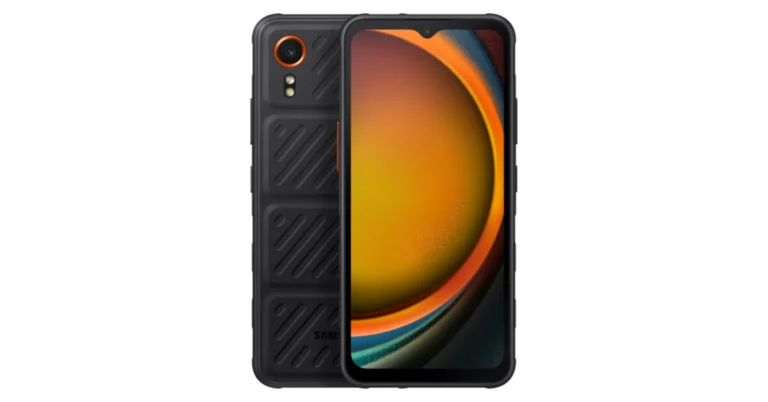
The Samsung Galaxy XCover 7 has launched in India.
The device comes in two variants Enterprise and a Standard Edition.
The smartphone has Gorilla Glass Victus protection and can withstand severe weather or similar hazards.
Samsung has officially announced the launch of its new rugged smartphone in India- Galaxy XCover 7. Prior to the launch the handset was listed on the device support page in India. The new device can withstand severe weather or similar hazards. The phone’s display is responsive when used while wearing gloves and features Gorilla Glass Victus protection on the front panel. It comes with an IP68-certified build and military-grade (MIL-STD-810H) durability. Besides this it has a 50-megapixel camera on its rear.
Samsung Galaxy XCover 7 price in India, sale details
Samsung Galaxy XCover 7 price in India starts at Rs 27,208 for the Standard Edition. Whereas the Enterprise Edition price is set at Rs 27,530. The new rugged phone comes in a single configuration of 6GB RAM with 128GB storage.As per the company it will offer two years of warranty on the Enterprise Edition and one year on the Standard Edition. Additionally the firm will also offer a subscription for 12-months for Knox Suite on the more expensive Enterprise model.
Samsung Galaxy XCover 7 specifications
The Samsung Galaxy XCover 7 sports a 6.6-inch full-HD+ TFT display with 1,080 x 2,408 pixels of resolution. The screen comes with a refresh rate of 60 Hz and Corning Gorilla Glass Victus+ protection. The device displays also allow for adjustments to touch sensitivity, making them easy to use for workers wearing gloves. As per the company it has been extensively tested for use with sanitizers.The device is IP68-rated for water and dust resistance and includes military-grade (MIL-STD-810H) durability. It is designed to be shock-resistant to drops of up to 1.5m.In terms of software, the phone operates on Android 14 out of the box. Under its hood, there is a 6nm octa-core, believed to be a MediaTek Dimensity 6100 SoC with 6GB of RAM and 128GB of internal storage that can be expanded up to 1TB via a microSD card.Also Read:NoiseFit Grace smartwatch for women launched in IndiaFor photos and videos, the Samsung Galaxy XCover 7 features a single 50-megapixel camera with an f/1.8 aperture. In terms of selfies, there is a 5-megapixel front-facing camera. The rugged phone includes a customisable XCover key to enable shortcuts and improved productivity, as well as barcode scanning with Knox Capture. In addition to this, the speakers get Dolby Atmos audio support.Also Read:OnePlus 12 Review: A True Flagship SmartphoneFor connectivity, there is a USB Type-C port with Pogo pin connectors, 5G, GPS, GLONASS, Galileo, BeiDou, QZSS, and a 3.5mm audio jack. The sensors on the phone include an accelerometer, proximity sensor, geomagnetic sensor, gyro sensor, and proximity sensor.
Garena Free Fire is a battle royale game with regular awards and tournaments to keep players interested. If you play Garena Free Fire, you should be aware of the redeem codes that are released on a daily basis. However, because the battle royale game is banned in India, players from other countries can use the Free Fire Redeem codes daily. If you’re unfamiliar with the Garena Free Fire redeem codes or don’t know how to get them, we’ve put together a step-by-step guide to help you redeem them. Check out Garena Free Fire Redeem Codes for 7 February 2024.The Free Fire redeem codes are a great way to get free stuff. These are 12-digit codes that contain alphabets and numbers, as well as an expiration date and time. Because the Garena FF redeem codes cannot be used more than once, you should hurry to the redemption page to claim your free reward before someone else does. To get a free reward, all you have to do is go to reward.ff.garena.com/en, which is the official redemption page. Also, keep an eye on this space for daily updates on Garena Free Fire redemption codes and rewards.Also Read: Sennheiser Accentum Plus wireless headphones with Hybrid Adaptive Noise Cancellation launched
Garena Free Fire Redeem Codes Today 7 February 2024
In the fast-evolving world of online gambling, the year 2024 marks a significant milestone, especially in the realm of Esports betting. This dynamic and rapidly growing segment has transformed from a niche interest into a global phenomenon, capturing the attention of millions and reshaping the landscape of online casinos.
The Current State of Esports iGaming
The global esports betting market, once valued at USD 0.9 billion in 2020, has witnessed a substantial surge, reaching USD 1.7 billion in 2022. This remarkable growth trajectory underscores the increasing influence of Esports as a major player in the online gambling sector. Key titles like NBA 2K, the FC Series, and NHL have become focal points for betting, creating a rich ecosystem for wagers and engagement.
The Integration of Technology in Online Casinos
The integration of advanced technologies such as Artificial Intelligence (AI), Virtual and Augmented Reality (VR and AR), and blockchain is revolutionizing online casinos. AI is increasingly used to personalize gaming experiences and analyze player behavior. VR and AR are enhancing the immersion of live dealer games, bringing a more realistic experience to online gambling. Blockchain technology, notably through cryptocurrencies, is gaining ground for its security and transparency advantages, leading to an increase in crypto-focused casinos.
Mobile Gaming: The New Frontier
The trend towards mobile-first design in online casinos is undeniable. The focus on mobile-friendly gameplay caters to the growing number of users who prefer the convenience of playing on their smartphones. This shift has led to innovations in game selection and user interface, making mobile gaming a key area of growth in the online casino industry.
The Expansion of Live Dealer and Skill-Based Games
Live dealer games have bridged the gap between land-based and online casinos, offering real-time interaction with live dealers. This sector is set to grow, with more innovative game formats being added. Similarly, skill-based games are on the rise, attracting players who enjoy a competitive aspect in their gaming experience. This aligns with the preferences of younger generations, broadening the player demographic.
Esports Betting: The New Mainstay
Esports betting is expected to continue its upward trajectory in 2024. This sector offers diverse betting options, from match-win bets to complex accumulators, catering to a wide range of strategies. The market is diversifying with more betting markets and options, particularly in competitive video game tournaments. This growth is not just limited to traditional Esports titles but is also expanding into virtual sports betting, providing alternatives to traditional sports betting.
The Ethical and Legal Landscape
As Esports betting grows, so do the ethical and legal challenges. Issues such as match-fixing, underage gambling, and addiction are of concern, necessitating strict policies and procedures to maintain integrity and protect individuals. The legal landscape varies globally, with some regions fully legalizing and regulating Esports betting, while others remain in a gray area.
The Future Outlook
The future of Esports betting in online casinos looks promising. With technological innovations, responsible gambling practices, and a focus on sustainability and security, the industry is poised for continued growth. The dynamic blend of gaming and betting is evolving into a significant segment of the gambling industry, offering an engaging way for fans to interact with their favorite games and teams.
For a more detailed guide on Esports betting, including strategies and tips, you can visit Real Casino’s Esports Betting Guide.
In conclusion, 2024 is set to be an exciting year for the iGaming industry, with Esports betting at the forefront. This segment of online gambling is not just a passing trend but a significant, evolving part of the industry, set to provide thrilling experiences for players and bettors alike.
WhatsApp may be the most popular instant messenger around, but Telegram is by far the more feature-laden messaging app. The instant messaging app allows you to save messages and media from any chat into one easily accessible folder. In its newest update, the platform has made changes to this folder, making it more accessible. You don’t need to scroll all the way to the top to find a message anymore. Here is how you can use Saved Messages 2.0 on Telegram. Make sure you update the app to gain access to the newest set of features.Read Also:How to make a Genius Bar appointment at an Apple Store in the USA or UK? (2024)
What’s new on Telegram’s most recent update?
Telegram’s newest update brings new features for regular and premium users. The biggest of them all is ‘Saved Messages 2.0’ which now lets you sort your saved messages by chat. This makes it incredibly easy to locate old saved messages. The saved messages folder also has a ‘Shared Media’ tab that lets you view all the saved videos, pictures, and documents in one place. Premium subscribers can add emojis as tags to saved messages to categorise them even further.The new update also lets you pause video messages and voice notes while sending them to a user. You can lock the record button and hit the pause icon to gather your thoughts before hitting play and continuing your message. You can also tap on the ‘view-once’ icon to make sure the message self-destructs after the recipient has viewed it. On top of that, you can view the exact time your message was read by the recipient simply by tapping on it.
How to Save a message on Telegram?
Step 1:Launch the Telegram app on your smartphone.Step 2: Go to the chat containing the message that you want to save.Step 3:Long-press the message and hit the forward icon at the top right corner of the screen.Step 4: Select Saved Messages as the destination folder.
How to access and use Saved Messages 2.0 on Telegram?
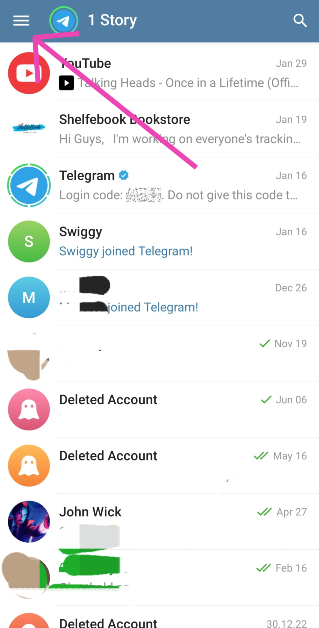
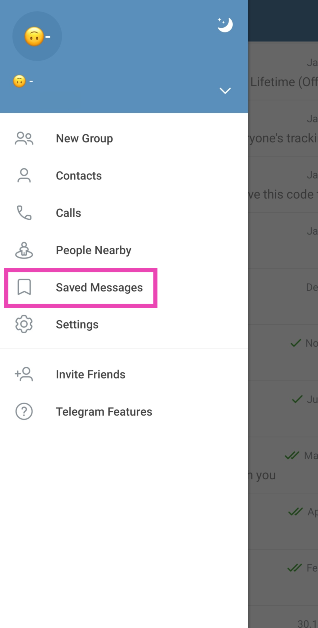
Step 1:Launch the Telegram on your phone and hit the hamburger menu at the top left corner of the screen.Step 2: Select Saved Messages.Step 3: All the messages you have saved from different chats will appear in one list-like pattern.Step 4: You can send a message to this chat to save it as a note.Step 5: To sort the messages by their respective chats, hit the ellipses at the top right corner of the screen and select View as Chats. You can also hit the banner to achieve the same result.Step 6: Tap on a chat to view all the saved messages from it.Step 7: Switch to the Media tab to view all the saved media files in one place.
Frequently Asked Questions (FAQs)
How do I save a message on Telegram?
Long-press the message, hit the forward sign, and select Saved Messages as the destination folder to save a message on Telegram.
Can I add tags to saved messages on Telegram?
Only Premium subscribers can add emojis as tags to their saved messages. These tags can be accessed by tapping the Search symbol in the saved messages folder.
How do I send a one-time voice recording on Telegram?
This is how you can use the newly updated ‘Saved Messages 2.0’ feature on Telegram. You can use saved messages to send messages, documents, voice notes, video messages, and more to yourself. You don’t need to send a message to someone else in order to save it. Simply go to the saved messages folder and send the things you want to save.
One of the best aspects of buying from Apple is that you get reliable and quick assistance from the customer support staff whenever necessary. If your iPhone’s screen gets broken, you can get it repaired within a day from the Genius Bar at your local Apple Store. The only catch is that you need to make a reservation beforehand. If you walk into the store without one, you may have to wait for the current appointments to be over before getting your device checked. Today, we show you how to make a Genius Bar appointment at an Apple Store in the USA or UK.Read Also:Top 11 Ways to Fix ‘Message Blocking is Active’ on iPhone
Is something wrong with your Apple device? Here are your options
Not every problem with your device necessitates visiting the Apple Store Genius Bar. You can resolve most software issues at home with a little bit of troubleshooting and looking up help online. You may want to check out our ‘How To’ section for an answer to your problem. You can also use Apple’s customer helplines if you’re facing issues with one of the services.
US Helpline Numbers
1-800-275-2273: For general issues related to your device.1-800-800-2775: For help related to Educational Devices.1-877-204-3930: For help with issues related to Apple’s accessibility tools.1-877-233-8552: For help with Apple Cash.1-866-752-7753: For Enterprise customers.
UK Helpline Numbers
08000480408: Contact Apple Online Store.08001076285: Contact Apple Customer Support.08000582222: Contact Apple Store forBusiness.08000480408: Contact Apple Store for Education.However, if you’re facing a hardware-related problem on your device, you will need to visit an Apple Store or an Apple-authorised service centre to get it fixed. The process of making an appointment is very simple.
How to make a Genius Bar appointment at an Apple Store
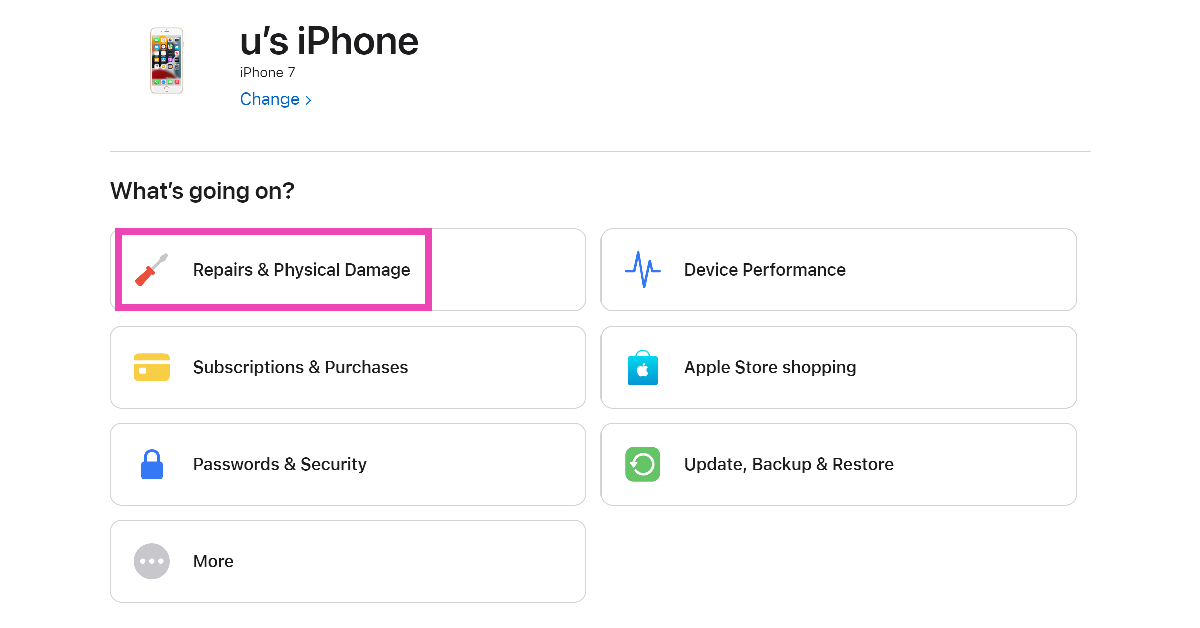
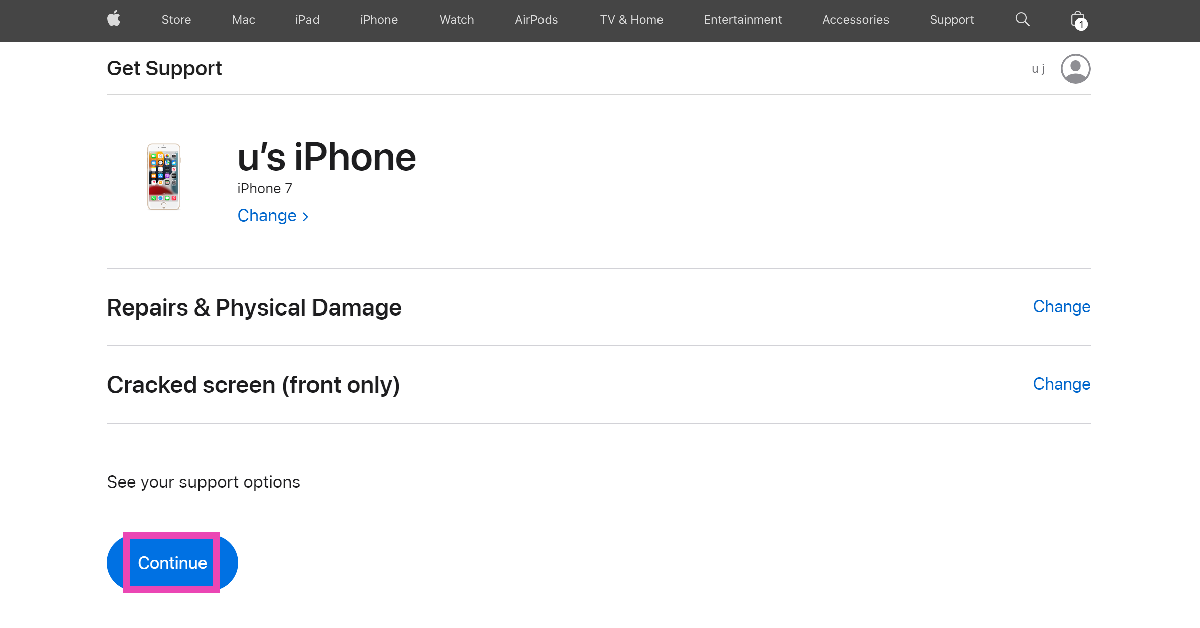
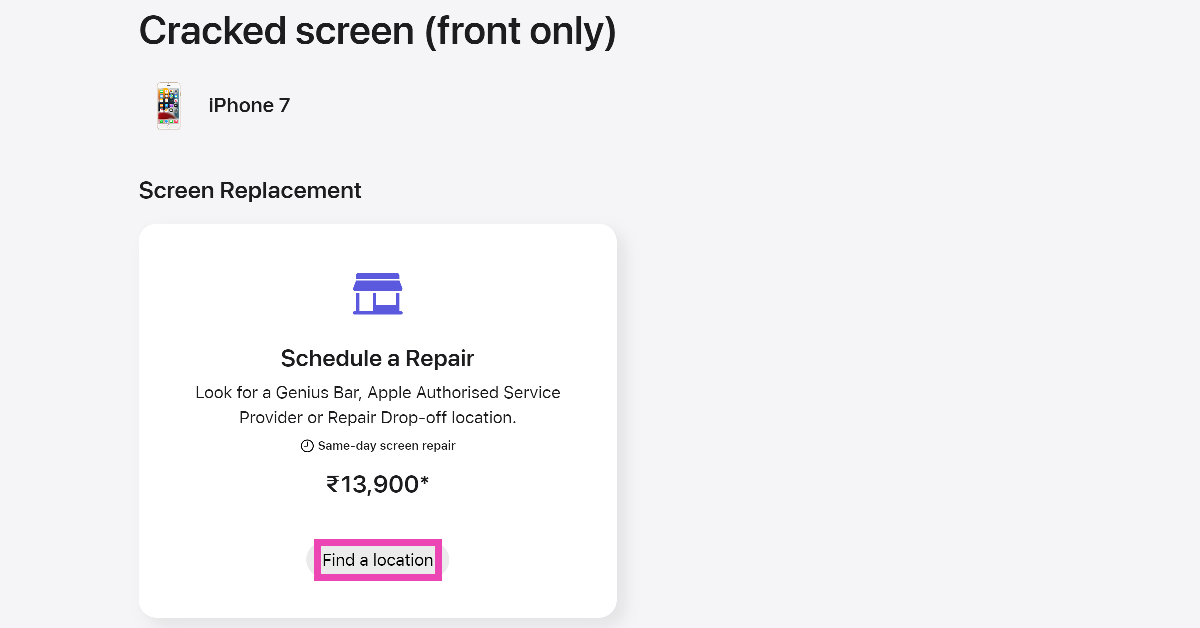
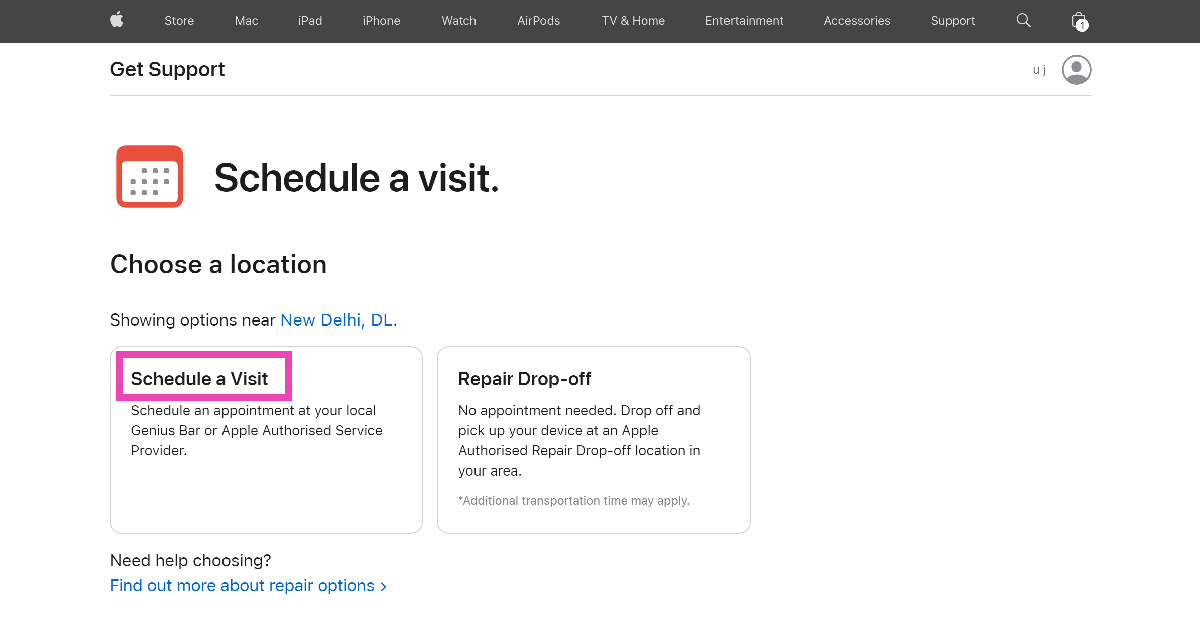
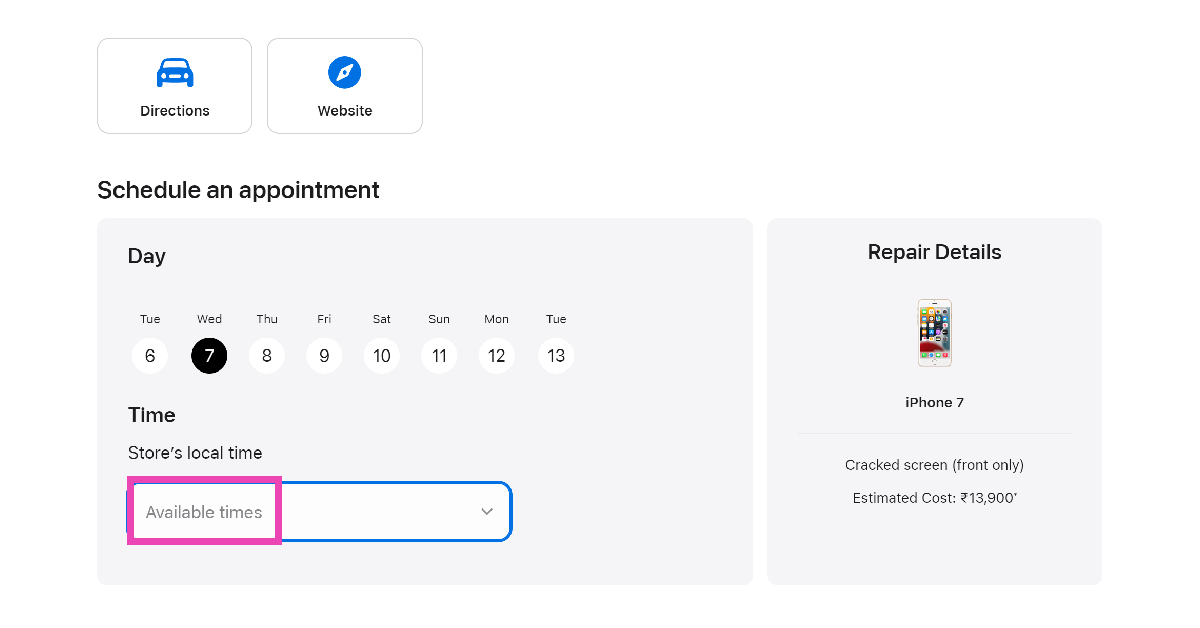
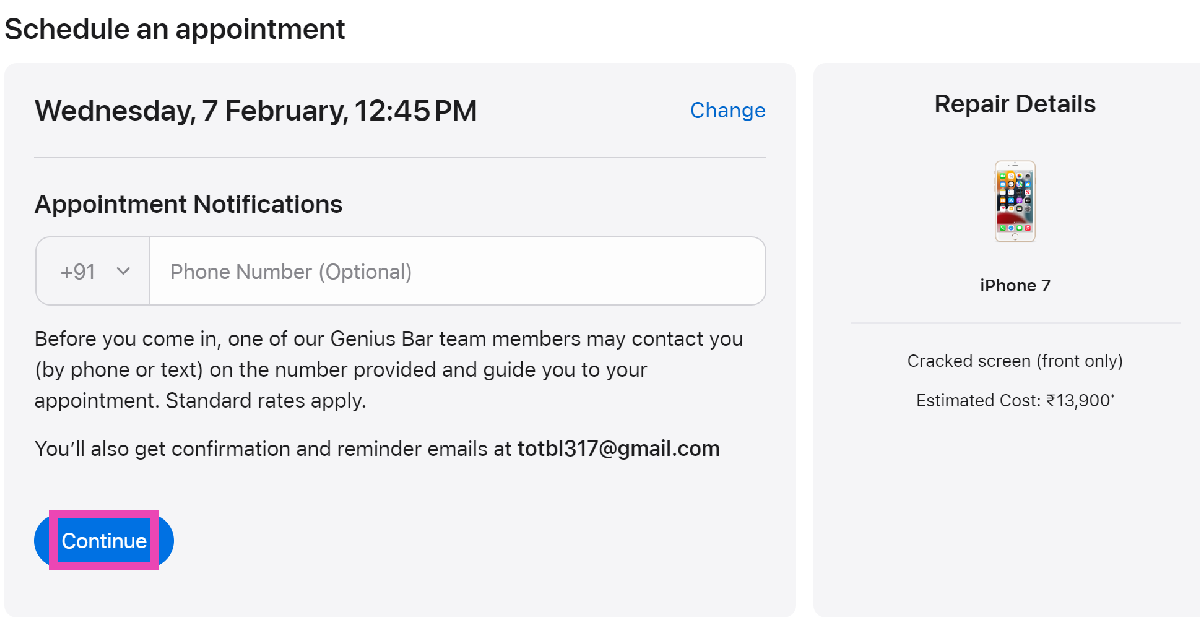
Step 1: Go to the Apple Support Page and sign in using your Apple ID.Step 2: Select the device for which you are seeking support.Step 3: Select the problem you are facing with your device.Step 4: Hit Continue.Step 5: Click on Find Location in the ‘Schedule a Repair’ section.Step 6: Click on Schedule a Visit.Step 7: Scroll down and select the Apple Store nearest to your location. If there are no Apple Stores near you, select an authorised repair centre.Step 8: Pick the day of your visit and click on Store’s local time to select the appointment time.Step 9: You may enter your phone number to receive appointment notifications. This is entirely optional. Hit Continue.Step 10: On the following page, click on Reserve Now.Your appointment at the Genius Bar will be reserved.
Frequently Asked Questions (FAQs)
How do I book an appointment at Apple’s Genius Bar?
Go to the Apple Support Page, select your device and the problem you are facing with it, choose an Apple Store near you, and schedule a visit.
How do I get my iPhone repaired if there are no Apple Stores in my area?
If there are no Apple Stores in your area, you can use the Apple Support Page to schedule a visit to an Apple-authorised repair centre.
How much does AppleCare+ for iPhone cost in the US?
This is how you can book an appointment at Apple’s Genius Bar in the USA or UK. If you know any other way to get this done, let us know in the comments! Also, check out this article to learn how you can contact Apple Support to get help for Apple devices.
The HP Spectre x360 laptop features 2.8K OLED screens.
The display supports up to 120Hz refresh rate.
The laptops come with smart AI-enhanced features.
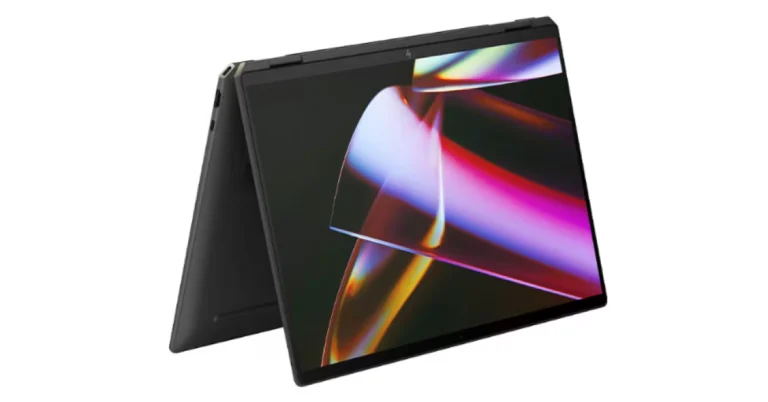
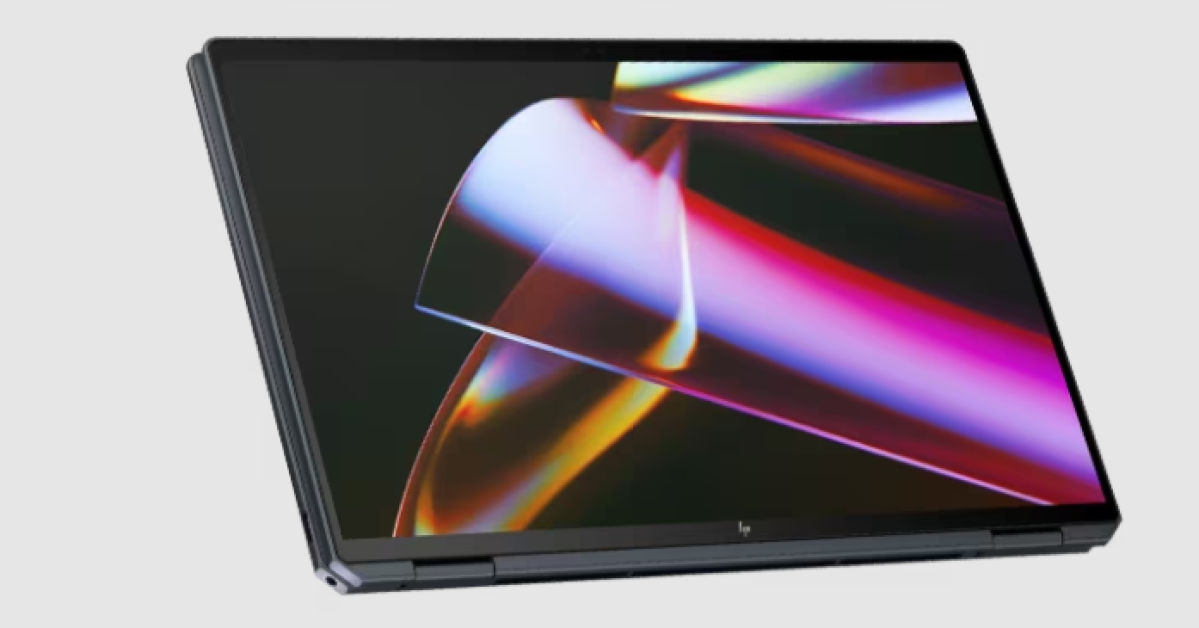
HP Spectre x360 16, HP Spectre x360 14 laptops launched in India today. The 14-inch and 16-inch laptops are powered by Intel Core Ultra 7 processors with RTX 4050 GPUs integrated. The new Spectre laptops feature smart AI enhancements. Notably, they represent HP’s inaugural consumer portfolio integrating a Neural Processing Unit (NPU) for efficient AI workload management.
HP Spectre x360 16, HP Spectre x360 14 price in India, sale details
HP Spectre x360 16 price in India starts at Rs 1,79,999. It is available in Nightfall Black colour. On the other hand, the Spectre x360 14 pricing begins at Rs 1,64,999. It is available in Nightfall Black and Slate Blue colours. The new laptops can be purchased via HP World stores, HP Online store, and at all leading retail counters.
HP Spectre x360 16, HP Spectre x360 14 specifications
The HP Spectre x360 14-inch and 16-inch laptops feature 2.8K OLED screens with a 16:10 aspect ratio and the refresh rate can adjust from 48 Hz to 120 Hz based on the type of content being viewed. The display comes with IMAX Enhanced Certification for watching movies. The HP Spectre x360 16-inch has the world’s largest haptic touchpad for a Windows-based 16-inch PC.Also Read:NoiseFit Grace smartwatch for women launched in IndiaUnder the chassis, there are Intel Core Ultra 7 processors. The smart AI-enhanced features of the new x360 are said to improve security, performance, and collaboration. Furthermore, HP’s Spectre laptops are the company’s first consumer lineup to have a Neural Processing Unit (NPU) for AI workloads. The machine includes three engine machines (CPU, GPU, and NPU) and NVIDIA Studio with RTX 4050 GFX to facilitate expedited video editing and enhanced productivity and content creation. The device also offers built-in security features including wake-on-approach, walk-away lock, and privacy alerts that warn users of prying eyes.The convertible laptops come equipped with a 9 MP camera that can be adjusted for low light using hardware. Additionally, it offers adaptive screen adjustments like a screen dimmer when the user looks away to save power and variable refresh rate for immersive performance and power efficiency.Also Read:OnePlus 12 Review: A True Flagship SmartphoneThe automatic performance optimization also adjusts fan noise and temperatures based on applications being used, placement of the laptop, and battery status. Moreover, users can improve video and calls with Windows Studio effects which offload AI features like automatic framing, background blur, and the ability to maintain eye contact onto the NPU for engaging connections.
NoiseFit Grace smartwatch supports Bluetooth Calling with Noise Tru Sync technology
The wearable comes with multiple sports modes.
It is IP67 water and dust resistance rated.
The smartwatch also supports 100+ watch faces.
Indian tech brand Noise has expanded its smartwatch portfolio with the launch of the NoiseFit Grace smartwatch. The newly launched tracker sports a cut dial design and sleeker size with a metallic build and link strap specially designed for women. In addition to this, it comes with essential health metrics such as heart rate, SpO2, and more. The device is said to provide 4 days of battery life on a single charge.
Noisefit Grace price in India and availability
Noisefit Grace has been launched in India with a price tag of Rs 2,999. The device will be available in three colour options of Rose Gold, Metal Silver, and Jet Black. It can be purchased via Flipkart, and the brand’s website, gonoise.com
Noisefit Grace specifications
Noisefit Grace sports a 1.1-inch AMOLED with 360 x 360 pixels of resolution. The screen supports Always on and comes with 600 nits of peak brightness. Additionally, it has a cut dial design and a sleeker size with a metallic build and link strap. Along with Bluetooth calling the fitness tracker includes an AI voice assistant and an in-built calendar. Customers can also benefit from more than 100 watch faces and sports modes, as well as a seamless pairing experience with the NoiseFit App.Also Read:Telegram update brings Saved Messages 2.0, new features and improvementsNoisefit Grace is IP67-rated for water and dust resistance. The smartwatch enables quick access to the dial pad and recent call logs with storage for up to 10 contacts for quick calling. It also includes a wide range of functions for tracking health and productivity. Women may efficiently track vital health indicators including heart rate, SpO2, sleep patterns, and stress levels, among others, with the help of Noise Health Suite. On the other hand, the integrated Productivity Suite keeps daily reminders and weather forecasts easily accessible. Along with weather updates and a notification display, it offers an Alarm, camera control, music control, and calculator.Also Read:OnePlus 12 Review: A True Flagship SmartphoneThe NoiseFit Grace provides four smartwatch menu styles. It boasts a four-day battery backup
We have been testing the OnePlus 12 since its introduction last week in India. So this is our in-depth review of OnePlus 12. Given that the design is quite similar to the OnePlus 11 from the previous year, we will discuss the advantages and disadvantages as well as what has changed. It costs about Rs 64,999 in India and includes the top Snapdragon 8 Gen 3 SoC processor for 2024. The device is the successor to last year’s OnePlus 11, but still lacks the IP68 certification; however, it does come with a wireless charging capability this time. Let’s discuss it further in the review of the OnePlus 12 below.
OnePlus 12 Review: Design and Display
Many of the features from the previous generation are still present in OnePlus. Actually, the design has remained the same and has a striking resemblance to the OnePlus 11 (as said). Despite having a similar appearance, the design has been improved. A few design modifications have been made, particularly to the weight and thickness. The smartphone now has a larger battery capacity, which undoubtedly makes it heavier and thicker.Looking at the design language, OnePlus has continued to use the previous generation’s style. Again, the camera device is circular. Within the module, the Hasselblad logo sits on a glossy marble finish module housing four camera lenses. We also observed some gorgeous glitter in it that gives the appearance of the brightness of the night stars. There are two colour options for the OnePlus 12: Silky Black and Flowy Emerald.Also Read:Vivo X100 Pro review: Goes above and beyond with its camerasFor the review, we got the Flowy Emerald colour variant, which has a matte finish and a marble-like design that actually looks pretty fantastic. According to the company it is inspired by the magnificent sight of New Zealand’s braided Dart River, where emerald ribbons pulse with vivid energy. Flowy Emerald captures the essence of natural wonders and uses cutting-edge AG technology along with a precise etching process to give the phone’s glass back cover a premium texture with exquisite dynamism.Take note that Corning Gorilla 5 protects the back panel.Despite having a matte appearance, the back feels a little slick to the touch. Therefore, we advise you to put a silicon case on it to prevent accidental drops or slips from your hand. Using a back cover will safeguard the glass-made rear panel and provide you with a firm grip. And yes, the back cover is present inside the box, so need to purchase a new one, unless you want a different appearance.The phone is undoubtedly heavier due to its larger battery and the usage of glass and metal materials. But despite this, you don’t feel like it’s a very heavy handset.In addition, the edges have rounded corners and a curved finish. Gorilla Glass Victus 2 protection has been added to the display. The bezels are kept to a minimum, which looks pretty good. In addition, it has a high-quality appearance and feel thanks to the metal frame and the soft curves on both sides. Our small hands could comfortably use the phone with one hand because it is not overly broad. The gadget is not waterproof, but it does have an IP65 classification for dust and splash resistance.The alert slider is on the left side of the frame, and the power and volume buttons are on the right. It includes an IR blaster on top, a dual SIM card slot and a USB Type C port speaker unit at the bottom.Let’s proceed to the display next. The main feature of the OnePlus 12 is its 6.82-inch quad-HD+ LTPO OLED screen, which boasts a resolution of 1,440 x 3,168 pixels. The variable refresh rate of the front panel spans from 1Hz to 120Hz. Furthermore supported is a screen brightness of 4,500 nits. Keep in mind that this OnePlus smartphone’s screen is the brightest we’ve ever seen.Also Read:iQOO 12 5G Review: Oozes personality and powerIt provides incredibly smooth and lifelike images for an excellent viewing experience. Additionally, TÜV Rheinland certifies it for Intelligent Eye Care because of its capacity to efficiently decrease blue light output and intelligently modify the colour temperature in response to varying ambient conditions.Because it is an LTPO panel, the display can automatically transition between a refresh rate of 1Hz to 120Hz while maintaining a relatively low power consumption, depending on user preferences and particular usage conditions. On the other hand, Dolby Vision is also supported, enhancing the visual experience overall with incredibly bright colours, sharp contrast, and showcasing well even the minutest details.The touch response of the display functions perfectly. Sweaty hands and mishaps during both intense gameplay and regular use are greatly reduced thanks to the Aqua Touch’s ability to detect moist fingers and water droplets on the screen and adjust accordingly.Dolby Atoms is supported by the dual speaker setup and dedicated spatial audio, which provides high-quality audio with less acoustic resonance even without headphones. We quite loved it.
OnePlus 12 Review: Performance and cameras
Qualcomm’s 4nm Snapdragon 8 Gen 3 SoC, one of the most potent chipsets for Android premium phones, powers the device underneath. The device supports up to 512GB of UFS 4 internal storage in addition to up to 12GB of LPDDR5X RAM.The OnePlus 12 offers good performance in all areas, including gaming and daily use. With almost no lag or glitches, the OxygenOS optimisation made for an excellent experience.The whole experience is powerful and quite positive even in terms of gaming. In terms of regular use, there is very little temperature rise and you also receive Vapor Chamber cooling. Thus, we would conclude that it is highly optimised for gaming.Also Read:OnePlus Open Review: It can really open up to youBecause this phone has the most powerful chipset available, it can play high-end games very well. Playing games and multitasking on this device is quite effortless. Call of Duty Mobile, Asphalt 9, PUBG New State, BGMI, and other games all functioned flawlessly without any lags or frame dips.Based on Android 14, OxygenOS 14 powers the OnePlus 12. The shelf has improved because you can configure the toggles and several currently available widgets; the previous shelf was not that large. You can change the backgrounds, style, support for AOD themes, colour, fingerprint animation, and edge lighting for notifications have been added.Numerous additional developments are included, such as enhanced memory management, software, and performance optimisations.The device walks in with five years of security patches and four years of Android upgrades, but with the most recent Galaxy S24 Series, Samsung is delivering seven years of software updates. Maybe OnePlus will also do that with the next version? Maybe.What makes the OnePlus 12 a heavy lifter is its latest Trinity Engine that is a software-based feature, which is claimed to handle multitasking, offer smoother performance and also power efficiency. It does this by utilising six different technologies: CPU-Vitalization, ROM-Vitalization, RAM-Vitalization, HyperBoost, HyperRendering and HyperTouch.Thus, the optimal performance is determined by the CPU Vitalization. It improves the device’s efficiency and smoothness. Then there is ROM vitalization, which is associated with storage usage and refers to providing you with optimal storage experiences through efficient storage utilisation. RAM vitalization works to speed up RAM access if an application requires more RAM than the engine can supply. Also Read:Oppo Reno 11 Review: Elegance across the boardAnd also the Hyper Boost, a crucial feature for gamers that gives you extra power to play with improved performance. For more realistic, immersive gaming, hyperrendering reduces latency and battery consumption while enhancing frame interpolation. Last but not least, the HyperTouch offers end-to-end touch control that guarantees accuracy or mis-touch protection for responsiveness and stability that win games.Aside from this, there are no call dropouts and the call quality is generally decent. The fingerprint sensor is also working fine for us since the day we set up the device.Now let’s talk about the cameras, the camera setup is quite similar to the OnePlus Open so let’s see how good the camera experience is on the flagship device. OnePlus 12’s standout feature is its triple rear camera setup powered by Hasselblad. It includes a Sony LYT-808 sensor with a 50-megapixel primary camera (OIS, and f/1.6 aperture), a 64-megapixel telephoto secondary lens (OIS, 3X optical zoom and f/2.6 aperture) and a 48-megapixel ultra-wide-angle lens (114-degree field-of-view). The 32-megapixel front-facing camera (f/2.4 aperture) is provided for video calling and selfies. So that’s the camera aspect so let’s go straight into the camera samples to see how it performs.Speaking of the daylight pictures, you can get excellent details and rich, beautiful colours there as well. The photographs have excellent overall quality and a very natural appearance. In actuality, the colours are rich in tones without being overly saturated, and the dynamic range is pleasant and broad. You can see that the details are good by zooming in.The 48-megapixel ultra-wide-angle lens produced remarkably similar images, and the colour reproduction was accurate once more. We would describe it as being roughly comparable to the main camera. The dynamic range appears mostly acceptable, and the sharpness levels are fairly good. It’s really useful to have an ultra-wide-angle camera.With the ability to zoom 3x optically, the telephoto lenses can now capture a wealth of information. Additionally consistent are the colour and dynamic range. It performs well in this case as well in terms of sharpness levels.Let’s move on to the close-up photographs, where you can see even more vibrant colours and excellent overall image quality. Also, the backdrop blur looks fantastic. Keep in mind that the telephoto lens, which handles the macro department, provides an abundance of details and has performed an excellent job with macros.You will be able to take pictures in 1x, 2x, and 3x for portraits. The telephoto lens handles 3x, while the primary camera handles 1x and 2x. The skin tones appear rather realistic, the results are good, and there are no saturation problems. The telephoto lens has some edge detection issues, but overall quality is good and edge detection is acceptable at 1x and 2x zoom. In actuality, it is not that crisp, and in certain instances, the edges were not very good.There are plenty of details under artificial indoor light, and the night mode provides decent details outdoors as well. It does not overexpose or over-brighten, but the details and dynamic range are excellent. In a dim light, we also observed a few lens flare incidents.Regarding selfies, the 32-megapixel front-facing camera performs nicely; we particularly enjoyed the colour tones. The dynamic range is lovely, and the skin tones seem natural. The selfies don’t feature any beauty effects on the face, but the edge detection in the portrait selfies gives the images an unnatural appearance.While testing, our review unit also received its first OTA update. After updating the OnePlus 12’s camera app got support for the ProXDR feature in the Google Photos app which wasn’t available before the software update landed. It is essentially a kind of display technology that uses atomization to brighten the dark areas in images.There is also one major upgrade, which is now the OnePlus 12 has received – the Master Mode. It is basically a camera feature by Hasselblad for colour tuning. And trust us, this is the main USP of the device. If you prefer more candid shots, you will definitely adore this option. We simply can’t get enough of using this ability to snap photos. The outcomes were, in fact, remarkably close to what our eyes saw even in low light conditions. The Master Mode is visible just next to Video mode that was home to Pro mode earlier. Don’t fret the Pro mode is still there. Just tap on the Mater mode and you will see two options on the extreme left Auto and Pro.Master ModeNight PortaitMaster ModeThe OnePlus 12 has good video quality when recording in 8K at 24 frames per second, although there are some noticeable issues with contrast and white balance. Additionally, the gadget can record in 4K at 60 frames per second, where the colour appears rather natural. The OIS + EIS combination stabilisation system performs wonderfully, and the overall video quality is excellent. The other video quality is also quite high; even when walking, the stabilisation is strong, and the colours and dynamic range also seem fantastic.While the white balance appears slightly amiss in videos taken with telephoto lenses, overall we would say the telephoto lens performed well with OIS in terms of stabilisation. Films in 4K at 60 frames per second can also be captured by the ultrawide lens. You can take 4K 30 frames per second selfie videos with the front-facing camera.The battery capacity is arguably among the best that we have seen in the flagship category or pricing range. The battery has a very long lifespan. You can easily obtain up to two days of battery life with casual to regular usage. However, if you use the device heavily, the battery life may still last up to one and a half days, or perhaps just one day if you play a lot of games. These results are based on our testing, which involved utilising the camera, social media apps, browsing, and other apps while making a few calls.The smartphone can be charged at 100W rapid speed in roughly 23 minutes. Additionally, it comes with built-in compatibility for 50W wireless charging which needs to be bought separately. And yes, unlike some smartphones, this one carried the charger within the box.
Verdict
In terms of build quality, the OnePlus 12 is a good gadget. Overall, the design is rather appealing and has a high-end feel about it. The display, an OLED LTPO panel with excellent colour reproduction, is incredibly vibrant and vivid. Dolby Vision and HDR10+ compatibility mean that this panel is jam-packed with the greatest features available. Furthermore, the HDR option allows for a brightness increase of up to 4,500 nits.Everything has been handled by the Trinity Engine, including app opening times, response times, and memory management. From a software and performance standpoint, it’s a good device.Also Read:OnePlus Pad Go Review: Works like a charmDespite having an IP certification, the product is not waterproof. In this price range, IP68 certification is required, therefore OnePlus should have offered it, however, it’s missing.The OnePlus 12 cameras perform incredibly well in daylight conditions, particularly in colour and dynamic range. Overall, the image processing is excellent. The telephoto and ultra wide-angle lenses perform nicely. The phone doesn’t overheat, however playing games for extended periods warms the phone, particularly the area surrounding the camera module.In conclusion, the OnePlus 12 is a very good package, particularly considering its camera sensors. It might not have the finest photography performance available in this price range, but it won’t let you down in any way. We think OnePlus’s pricing is also really good. We wholeheartedly endorse the OnePlus 12 as a great all-around flagship device based on user experience.OnePlus 12 pricing with configuration is listed below:12GB RAM with 256GB storage: Rs 64,99916GB RAM with 512GB storage: Rs 69,999Pros
Even though instant messaging is the norm these days, sometimes you may want to send a good old-fashioned SMS to someone who doesn’t use iMessage or any other IM app. SMS charges are deducted from your phone’s talk time. Most network carriers offer unlimited text messages along with their data packs, so you don’t have to worry about any additional charges while sending a quick SMS. Sometimes, a text message may fail to go through and throw up a weird error message. Today, we bring you the top 14 ways to fix the ‘Message Blocking is Active’ error on your iPhone.Read Also:Telegram update brings Saved Messages 2.0, new features and improvements
Why am I getting the ‘Message Blocking is Active’ error message on my iPhone?
The answer lies in the message. If a number is blocked in any capacity, either by your phone or network carrier, the ‘Message Blocking is Active’ error will pop up on your phone’s screen. Nine times out of ten, this happens due to the number being discontinued by the network provider. This is typically the case when the user has not recharged their number in a long time. Dormant numbers either get discontinued or assigned to someone else.You may also receive this message upon entering the incorrect number in the ‘message recipient’ field. If the incorrect number belongs to someone else, the message will easily go through. However, if it is an unavailable number, you will get the ‘Message Blocking is Active’ message on the screen. The numbers that you have blocked on your phone can trigger the same message. Here are some possible fixes.
Make sure the recipient’s number is correct
If you’re trying to send a message to a number that is no longer registered, you will get the ‘Message Blocking is Active’ error message on your iPhone. Make sure you have entered the correct number in the recipient field. Network providers are known to pull services from unused numbers, so make sure the contact’s phone number is updated on your iPhone.
Check your cellular balance
If your cellular balance is lower than the amount needed to send an SMS, the ‘Message Blocking is Active’ error message may pop up on your iPhone. Make sure there is an active SMS plan on your phone numbers. Network providers typically offer free SMS and talk time with their internet data packages.
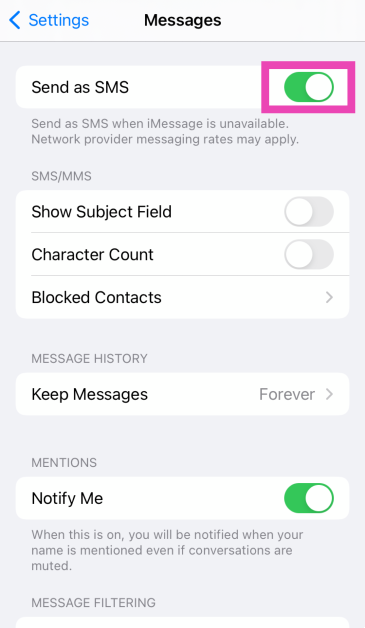
Turn on ‘Send as SMS’
Step 1: Go to Settings and tap on Messages.
Step 2: Turn on the toggle switch next to Send as SMS.
Check if the contact is blocked on your iPhone
Blocking someone is a two-way street. While the blocked user will not be able to contact you, you won’t be able to call or text them either. Sending a text to a blocked user prompts the ‘Message Blocking is Active’ error on your iPhone. To unblock someone, go to Settings>Phone>Blocked Contacts>Edit and hit the red minus sign next to the contact.
Text someone else
It is possible that the issue lies with the recipient’s network service. To confirm whether this is the case, text someone else in your contact list. If the message goes through, there is no issue on your end. If you’re still encountering the ‘message blocking is active’ error, move on to the other fixes in this list.
Re-insert the SIM card
Lack of proper network coverage can keep you from sending text messages. If limited coverage is unusual in your area, you may want to check your SIM card. Physical SIM cards are known to collect dust and moisture over time. Use a SIM ejector tool to pop out the SIM tray and give everything a thorough wipe. Reinsert the SIM card and make sure your phone is receiving a full signal. If your network coverage is still limited, you may want to buy a duplicate SIM card. If you use an e-SIM on your iPhone, you can skip this method and move on to the next fix.
Restart iPhone
If the error is caused by a background software glitch, a simple restart can handle it. Press and hold the side button and any volume key to access the power menu on your iPhone. Swipe the power slider to turn off your device. Wait for a few seconds and long-press the side button again to restart your device.
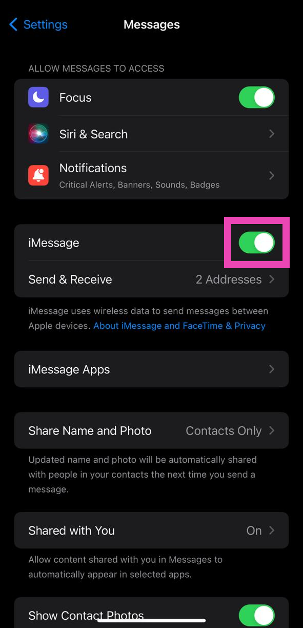
Disable iMessage
To make sure the iMessage app doesn’t meddle with regular SMS services, disable it and try sending the text again. Here’s how.Step 1: Go to Settings and select Messages.Step 2: Turn off the toggle switch for iMessage.Read Also:How to enable DApp browser on Trust Wallet for Android and iOS?
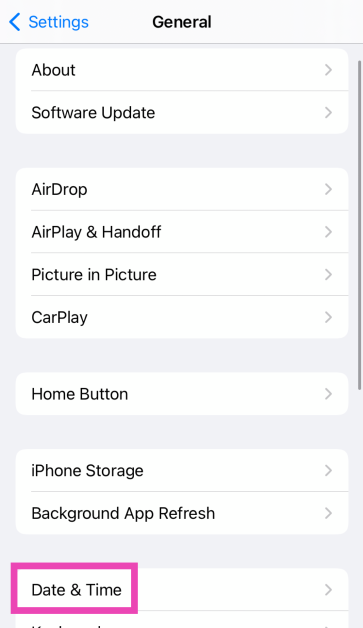
Check the Date and Time on your iPhone
Incorrect date and time on your iPhone can cause messaging services to halt unexpectedly. Here’s how you can correct this problem.Step 1: Go to Settings and select General.Step 2: Tap on Date and Time.Step 3: Turn on the toggle switch for Set Automatically.
Update Carrier Settings
Typically, carrier settings are updated automatically on your iPhone. But here’s how you can make sure there are no pending updates.Step 1: Go to Settings and select General.Step 2: Tap on About.Step 3: A popup box will appear, asking you to update the carrier settings. Hit Update.
Reset Network Settings
Step 1: Go to Settings and select General.Step 2: Tap on Transfer or Reset Device.Step 3: Hit Reset.Step 4: Select Reset Network Settings.
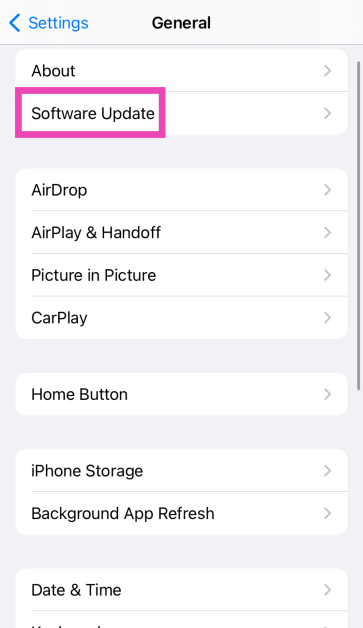
Update iOS
Step 1: Make sure your iPhone is connected to a WiFi network and plug in its charger.Step 2: Go to Settings and select General.Step 3: Select Software Update.Step 4: Tap on Download and Install.
Contact the network provider
If you are still getting the ‘Message Blocking is Active’ error on your iPhone after trying the fixes mentioned above, you may want to contact your network provider. Try dialling the helpline number or pay a visit to the local customer support office. Once you are connected to the customer support staff, the issue should not take a long time to resolve.
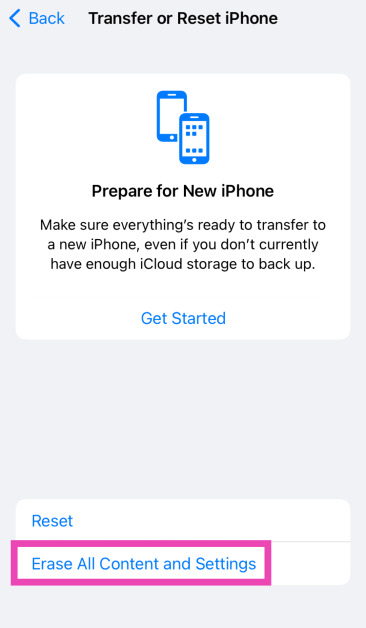
Factory reset your iPhone
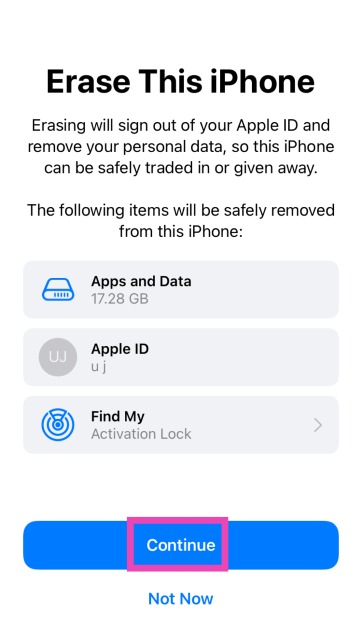
If the methods mentioned above didn’t work, try performing a factory reset on your iPhone. Make sure to backup your data as this procedure will erase all the contents of your device.
Step 1: Go to Settings and select General.
Step 2: Tap on Transfer or Reset iPhone.
Step 3: Hit Erase All Content And Settings.
Step 4: Tap on Continue and enter the passcode to reset your iPhone to its factory settings.
Frequently Asked Questions (FAQs)
Why am I getting the ‘Message Blocking is Active’ error on my iPhone?
This error message usually pops up when you are trying to reach a number that is no longer active. This means either the user has discontinued their number or you have entered the wrong number in the message drafting page.
How do I fix the ‘Message Blocking is Active’ error on my iPhone?
Make sure you are sending the message to the correct number. Make sure the contact isn’t on your blocklist. Your phone number must have the appropriate balance to send the message. Give your phone a quick restart if the problem persists.
How do I update carrier settings on my iPhone?
Carrier settings are updated automatically on your iPhone as soon as they are pushed by the network provider. To manually update them, go to Settings>General>About and hit Update.
How do I set my iPhone to ‘Send as SMS’?
Go to Settings>Apps>Messages and turn on the toggle switch next to ‘Send as SMS’.
These are the top 14 ways to fix the ‘Message Blocking is Active’ error on your iPhone. Before you reset the network settings on your iPhone, make sure you save the passwords of connected WiFi networks in the Notes app. After resetting the network settings, the connected WiFi networks and Bluetooth devices are unpaired and forgotten from your device. If you know any other way to fix this issue, let us know in the comments!
There is no need to splurge like crazy on a flagship smartphone if all you want from your device is efficient performance and a good primary camera. Premium smartphones may have powerful telephoto cameras and other flashy features, but a price tag of over $1,500 is rarely ever worth it. The sub-$750 category is where you’ll find the best pound-for-pound smartphones in the market. These smartphones perfectly bridge the divide between flagship specs and affordable pricing. So, let’s jump into our list of the top 10 smartphones priced under $750 in the USA.Read Also:OnePlus Nord Buds 3 India launch soon, bags BIS certification
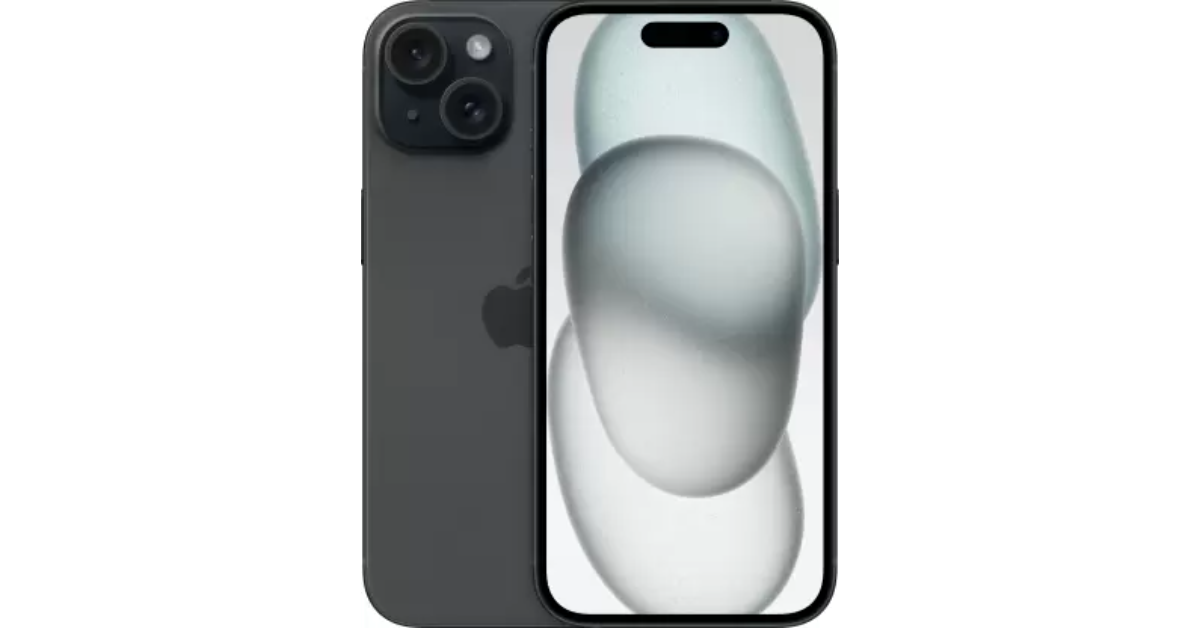
Now that the iPhone 16 Series is finally here, Apple has slashed the prices for last year’s iPhone 15. The vanilla variant of the iPhone 15 is priced at $699 while the Plus variant fetches $799. The smartphone flaunts a 6.1-inch Super Retina XDR OLED display that can reach a peak brightness of 2,000 nits. Under the hood, the iPhone 15 is powered by the Apple A16 Bionic chipset. Its camera sensors comprise a 48MP primary shooter and a 12MP ultrawide lens. Up front, it gets a 12MP selfie sensor housed inside the pill-shaped Dynamic Island. If you’re an iPhone loyalist, this is one of the best smartphones you can buy in the USA, now that Apple has discontinued its Pro variants.
The Samsung Galaxy S24 series was launched last month, which means 2023’s Galaxy S23 series can now be purchased at a reduced price. The base variant of the Galaxy S23 is priced at $699, making it an excellent deal. The smartphone gets a 6.1-inch Dynamic AMOLED 2X display with a refresh rate of 120Hz. It is powered by the Snapdragon 8 Gen 2 SoC. The triple camera module at the back of the smartphone consists of a 50MP primary shooter, a 12MP ultrawide lens, and a 10MP telephoto sensor. Samsung Galaxy S23 is rated IP68 for dust and water resistance.
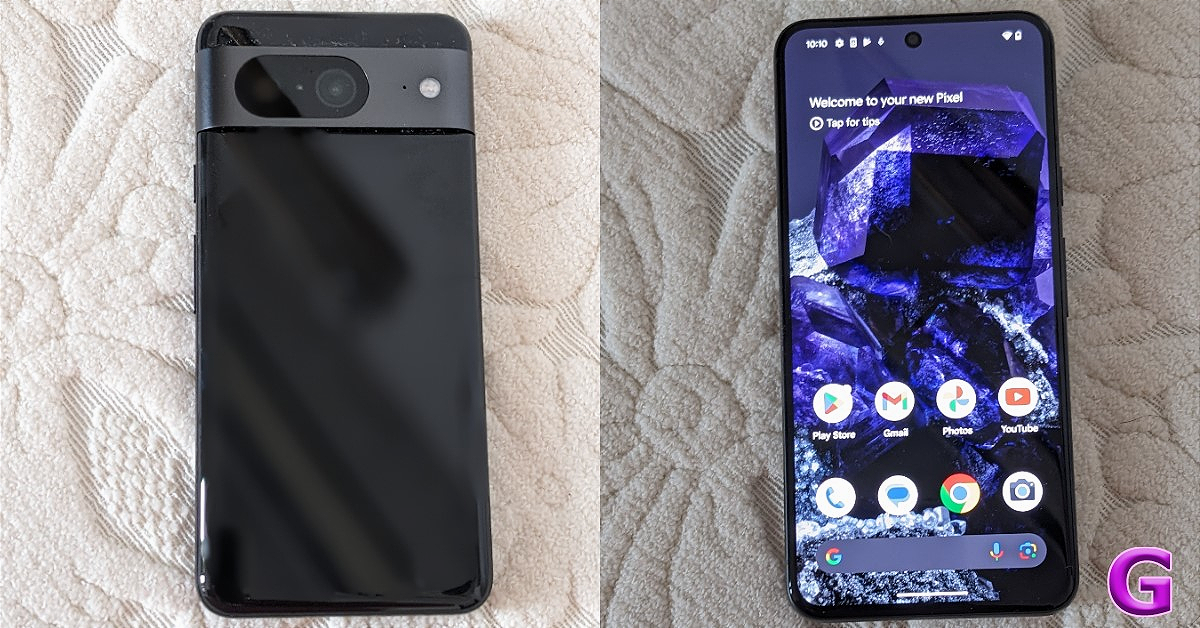
Pixels are all about impressive cameras and clever software. The newest Pixel 8 series upholds that reputation. The non-Pro Pixel 8 is priced modestly (as far as flagships go) at $549. Powered by Google’s in-house Tensor G3 chipset, the Pixel 8 replicates a similar performance as its Pro sibling. The signature Pixel camera band at the back of the smartphone houses a 50MP primary shooter and a 12MP ultrawide lens. Up front, the 10.5MP selfie camera is contained in a punch-hole cutout. Google Pixel 8 is equipped with interesting features like Best Take, Magic Editor, and more. Read our review of the smartphone to learn more.
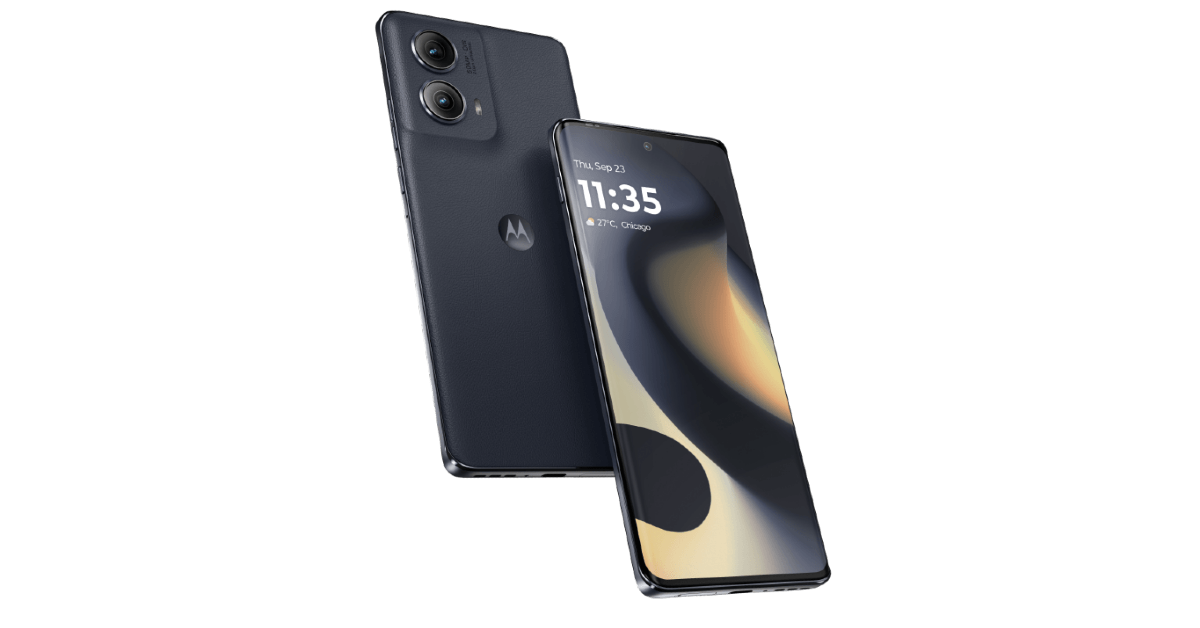
The newly launched Motorola Edge 2024 retains its signature eco-leather back and packs a number of important upgrades. Under the hood, the smartphone is powered by the Snapdragon 7s Gen 2 SoC. It is rated IP68 for dust and water resistance. The 6.6-inch P-OLED display on the smartphone has a refresh rate of 144Hz and peak brightness of 1,300 nits. The dual camera panel at the back comprises a 50MP primary shooter and a 13MP ultrawide lens. The 5,000mAh battery on the Edge 2024 can easily last a day. There’s support for 68W wired and 15W wireless charging.
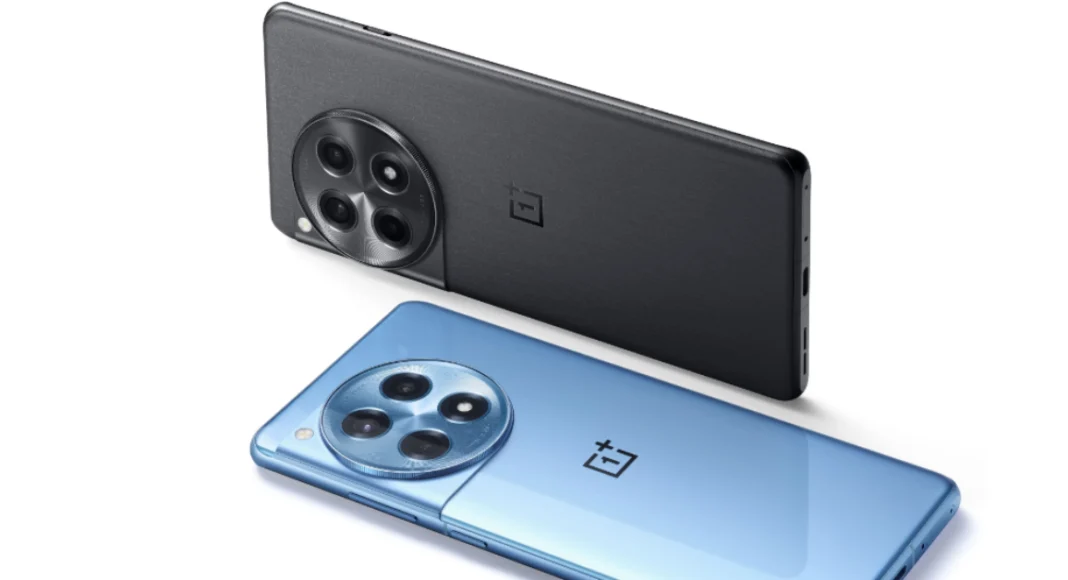
Released alongside the flagship OnePlus 12, the 12R could very well be one of the best midrange smartphones of 2024. It is powered by last year’s flagship Snapdragon 8 Gen 2 chipset and flaunts a 6.82-inch LTPO4 AMOLED display. OnePlus 12R matches the design of the flagship unit but manages to stay in the affordable price bracket by ditching features like wireless charging. Its rear camera module replaces the telephoto lens from the flagship with a 2MP macro sensor. Other than that, you get a 50MP primary camera and an 8MP ultrawide lens.
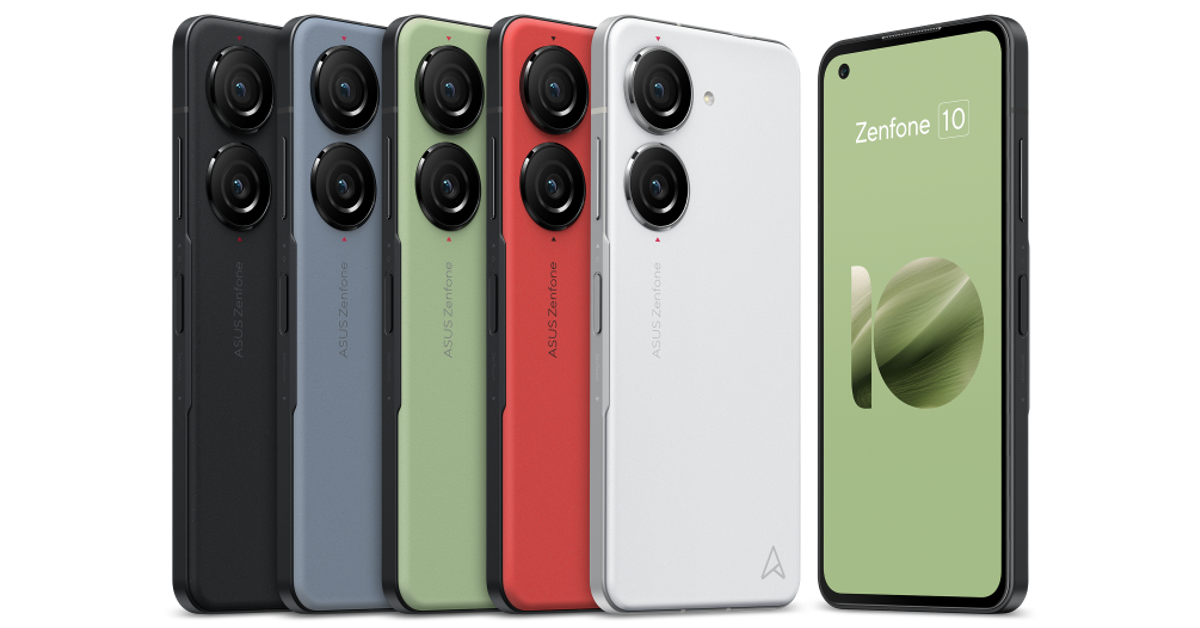
One of the best compact smartphones around, the Asus Zenfone is also one of the best smartphones you can buy for under $750 in the USA. It features a 5.92-inch Super AMOLED display and is powered by the Snapdragon 8 Gen 2 SoC. The two rear cameras are housed in individual cutouts. The 50MP primary camera can record 8K videos at 24fps. The 13MP ultrawide camera is a nice addition to the camera module as well. Up front, the 32MP selfie camera is placed inside a punch-hole cutout on the display. Due to its small size, the Zenfone 10 only has a 4,300 mAh battery but it can easily last you an entire day.
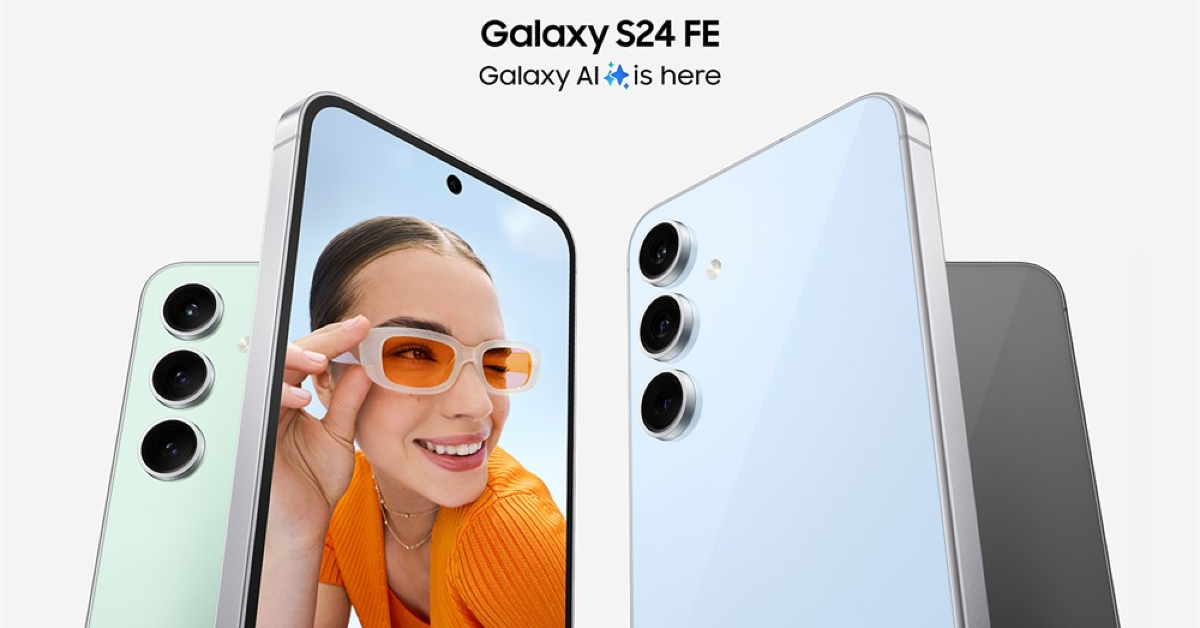
Samsung’s S24 series has finally received a ‘Fan Edition’. The crowd favourite is certainly one of the best smartphones you can buy under $750 in the USA. The Samsung Galaxy S24 FE flaunts a 6.7-inch Dynamic AMOLED 2X display with a 120Hz refresh rate and 1,900 nits of peak brightness. The device is powered by the Exynos 2400e processor. It is rated IP68 for dust and water resistance. Its rear triple camera setup comprises a 50MP primary shooter, an 8MP telephoto sensor, and a 12MP ultrawide lens. The smartphone can record 8K videos at 30fps. Its 4,700mAh battery pack lasts an entire day on a full charge.
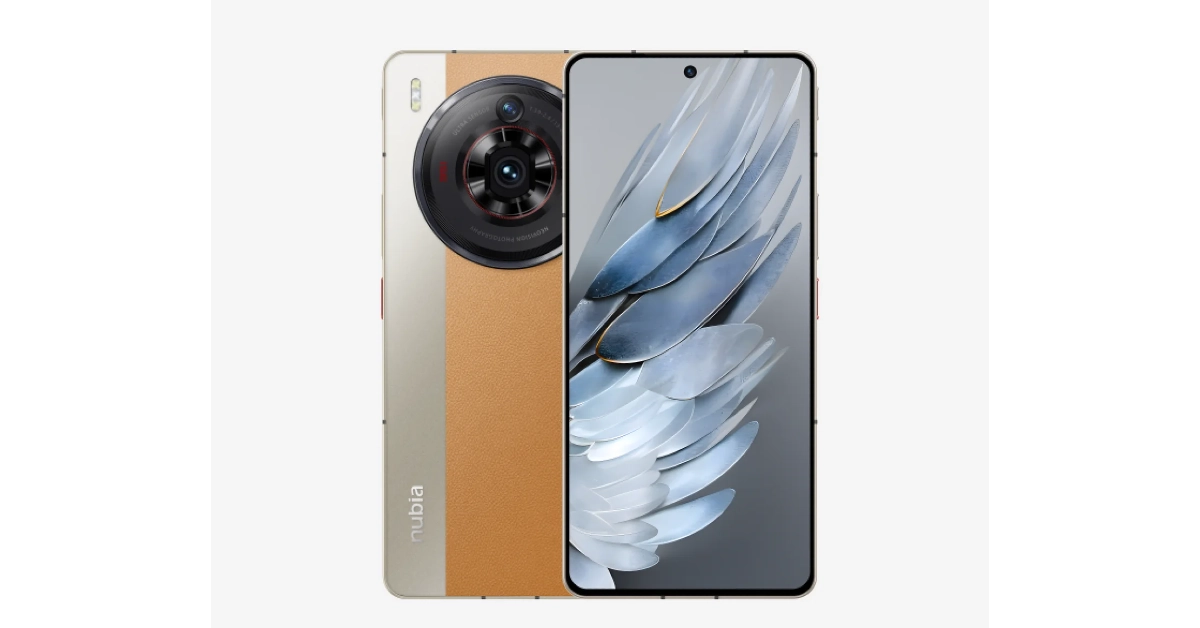
Powered by the updated Snapdragon 8+ Gen 2, the Nubia Z50S Pro is an all-round performer. Its rear camera dial houses a 50MP primary shooter, another 50MP ultrawide lens, and an 8MP telephoto lens. Up front, the 16MP selfie camera is housed in a punch-hole cutout. The primary shooter can record 8K videos at 30fps. However, the selfie camera’s recording resolution is capped at 1080p (30fps). The smartphone gets a silicone polymer (eco-leather) back with dual-tone colour schemes. There’s support for 80W wired charging. The Z50S ships with a power adapter inside the box. Easily one of the best smartphones you can buy for under $750 in the USA.
One of our favourite foldable smartphones, the Motorola Razr+, is next on the list. This folding phone packs the Snapdragon 8+ Gen 1 chipset and runs stock Android 13 OS out of the box (upgradeable to Android 14). The 3.6-inch AMOLED cover display ensures you don’t have to flip the phone open to check notifications, respond to messages, or carry out other quick tasks. The inner 6.9-inch LTPO AMOLED display is superfluid, owing to its 165Hz refresh rate. The 3,800 mAh battery pack on the smartphone can provide a day’s worth of charge on normal usage. The Razr+ supports 30W wired charging and 5W wireless charging.
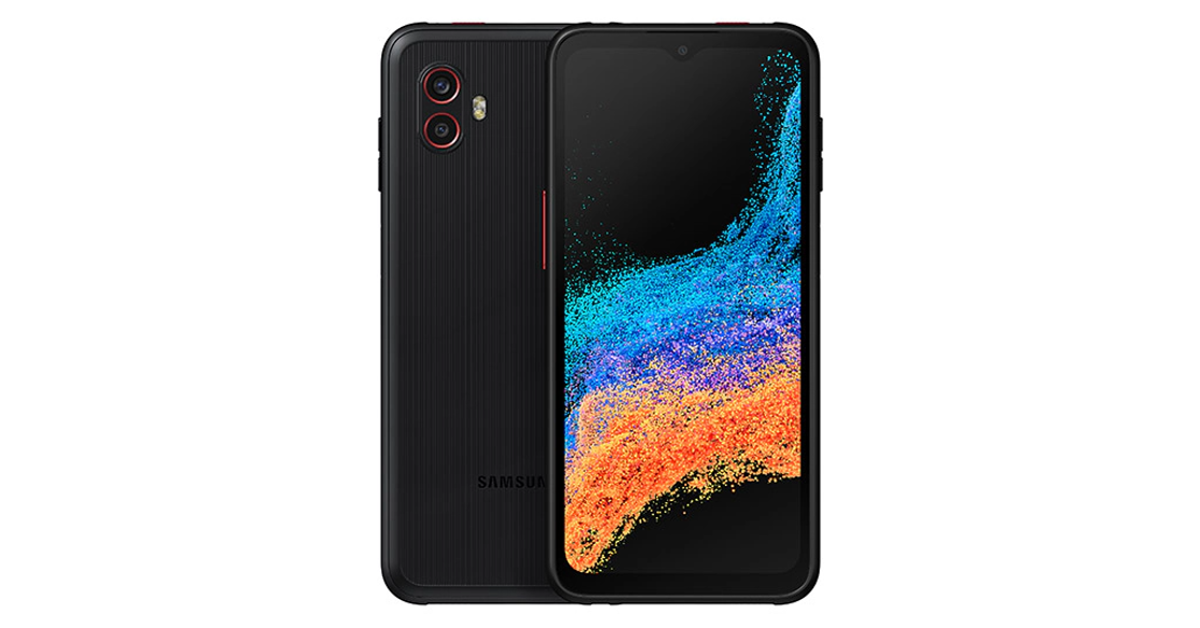
If you’re looking for a rugged phone, the Samsung Galaxy XCover6 Pro is one of the best ones around. This sturdy smartphone is rated IP68 for dust and water resistance and is MIL-STD-810H compliant. It can easily take a fall from 1.5 metres. Talking about the specs, the XCover6 Pro is powered by the Snapdragon 778G SoC and is upgradeable to Android 14. While it is only available with 128GB of internal storage, it has a memory card slot for expandable storage. The rear camera unit of the smartphone houses a 50MP primary shooter which can record 4K videos and an 8MP ultrawide lens. The 13MP selfie camera is housed inside a waterdrop notch and can record 1080p videos.
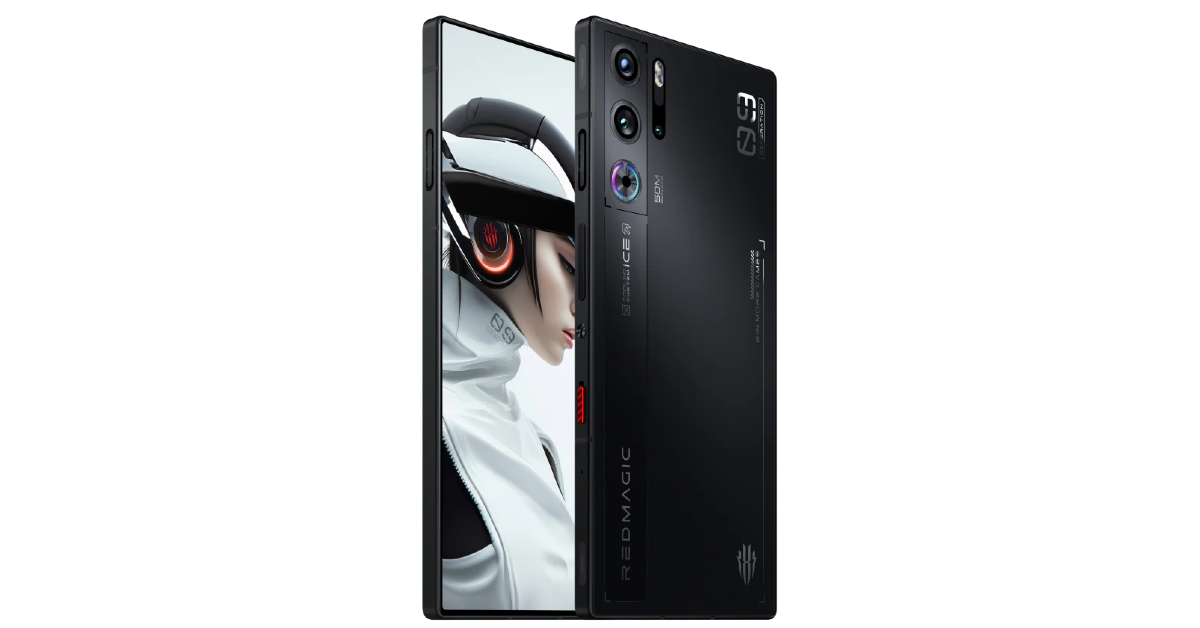
Gaming specialist Redmagic 9 Pro has a perfectly flat form factor, with no camera bumps jutting out of the rear panel. To maximise the gaming experience the smartphone offers a ‘true fullscreen’ display, meaning the selfie camera is tucked under the AMOLED panel. This diminishes the quality of the selfies, but if your main priority is getting a distraction-free display for gaming, you will relish this smartphone. The ICE 13.0 cooling system with a built-in cooling fan keeps the internal temperature of the device in check. Qualcomm’s flagship Snapdragon 8 Gen 3 chipset is an excellent choice for this smartphone. For gaming enthusiasts, the Redmagic 9 Pro is one of the best smartphones in the USA priced under $750.
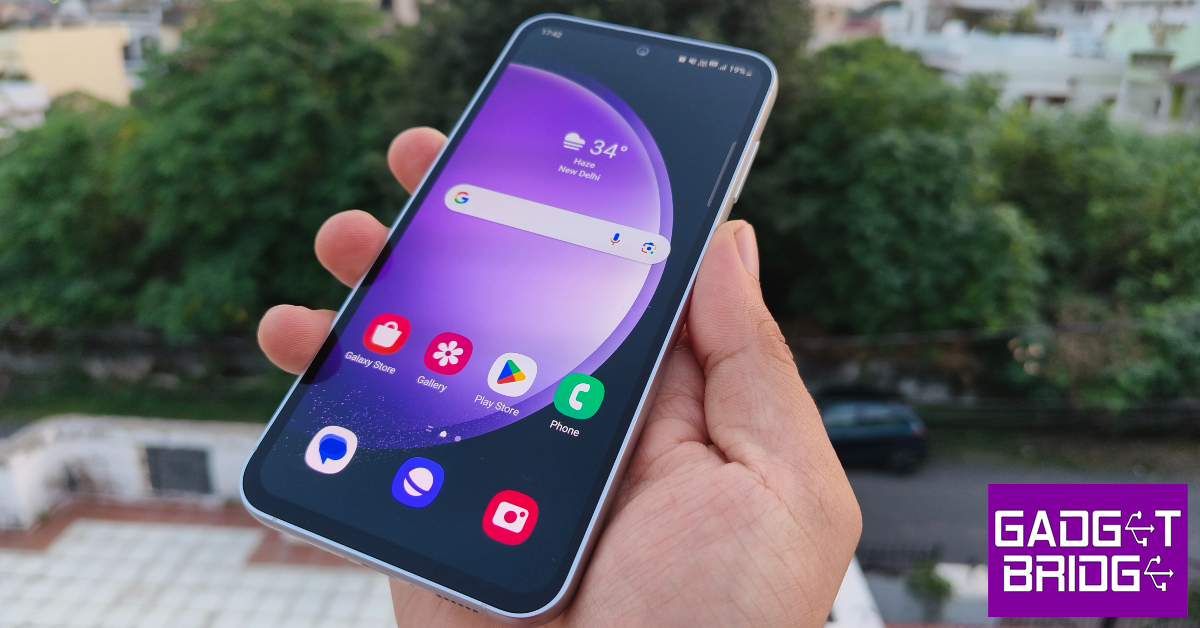
The Fan Edition variant of the Samsung Galaxy S23 series has all the makings of a great smartphone. It is one of the best smartphones you can buy for under $750 in the USA. The US version of the S23 FE holds a massive advantage in the form of the Snapdragon 8 Gen 1 chipset powering the device. International models of the smartphone are powered by Samsung’s in-house Exynos 2200 SoC which pales in comparison to Qualcomm’s 2022 chipset. The 6.4-inch Dynamic AMOLED 2X display works like a charm and is practically flagship grade. The vertical camera array comprising a 50MP primary shooter, an 8MP telephoto lens, and a 12MP ultrawide sensor produces great results as well. Read our full review of the smartphone to learn more.
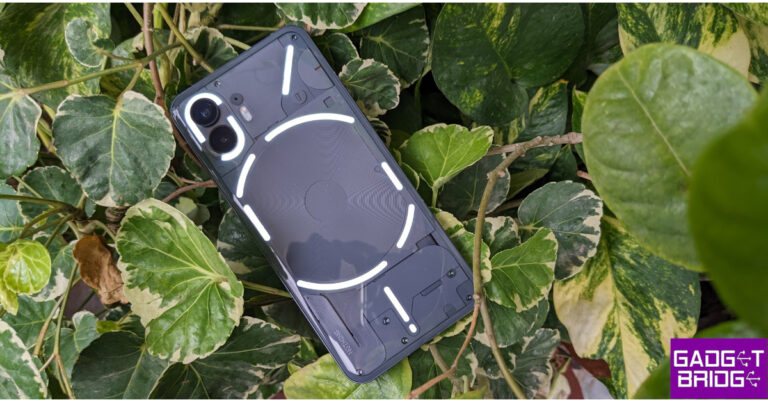
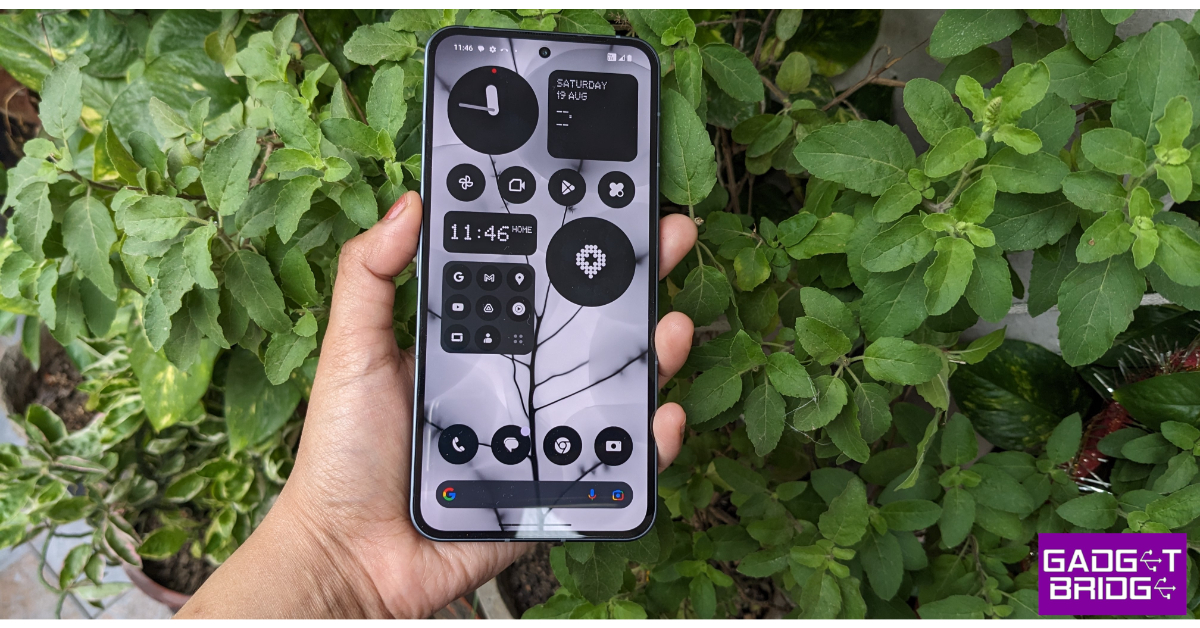
After bursting onto the scene with its debut smartphone in 2022, British tech outfit Nothing followed it up with the rock-solid Phone 2. Refining the Glyph design of the smartphone, Nothing added more functionality to it, letting users track their cab and other orders on the LED strip. Powering the smartphone is the Snapdragon 8+ Gen 1 SoC. The 6.7-inch LTPO OLED display is a great choice for the midrange device. Nothing also upped its software game on the Phone (2) with the release of the Nothing OS 2.5. Check out our full review of the smartphone here.Read Also:Top 5 Easy Ways to Stop Call Forwarding on Android and iPhone (2024)
Conclusion
These are the top 10 smartphones you can buy for under $750 in the USA. If you are willing to expand your budget to $799, you can get the newest iPhone 14 and Samsung Galaxy S24. Think we missed out on a smartphone that deserves to be on this list? Let us know in the comments!




 Step 2:
 Step 3:
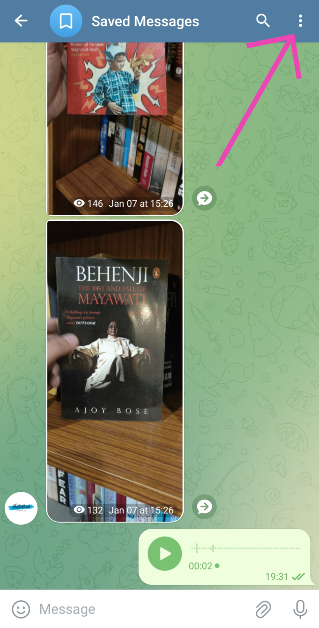 Step 6:
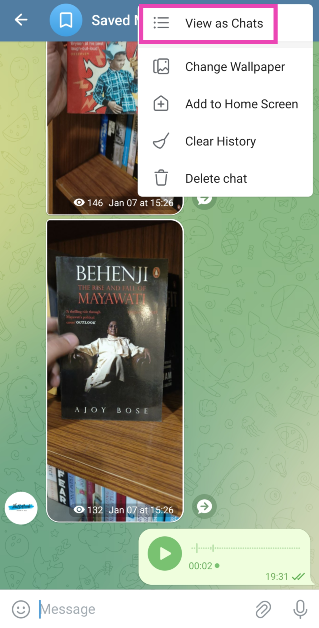 Step 7:

 Step 2: Select the device for which you are seeking support.
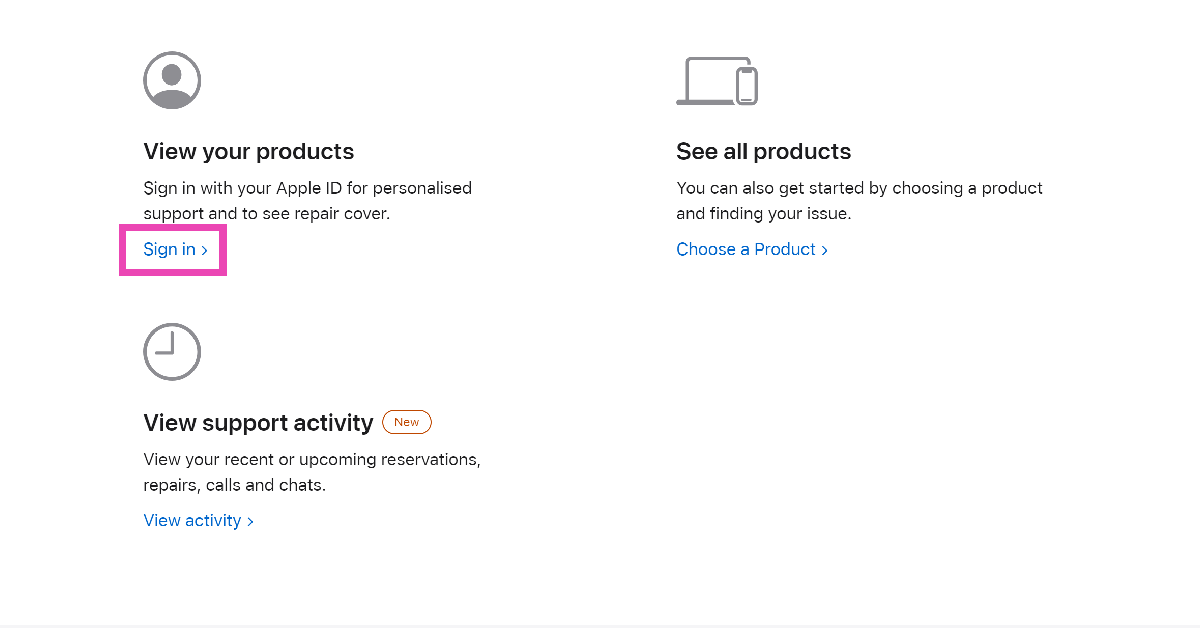 Step 2: Select the device for which you are seeking support.
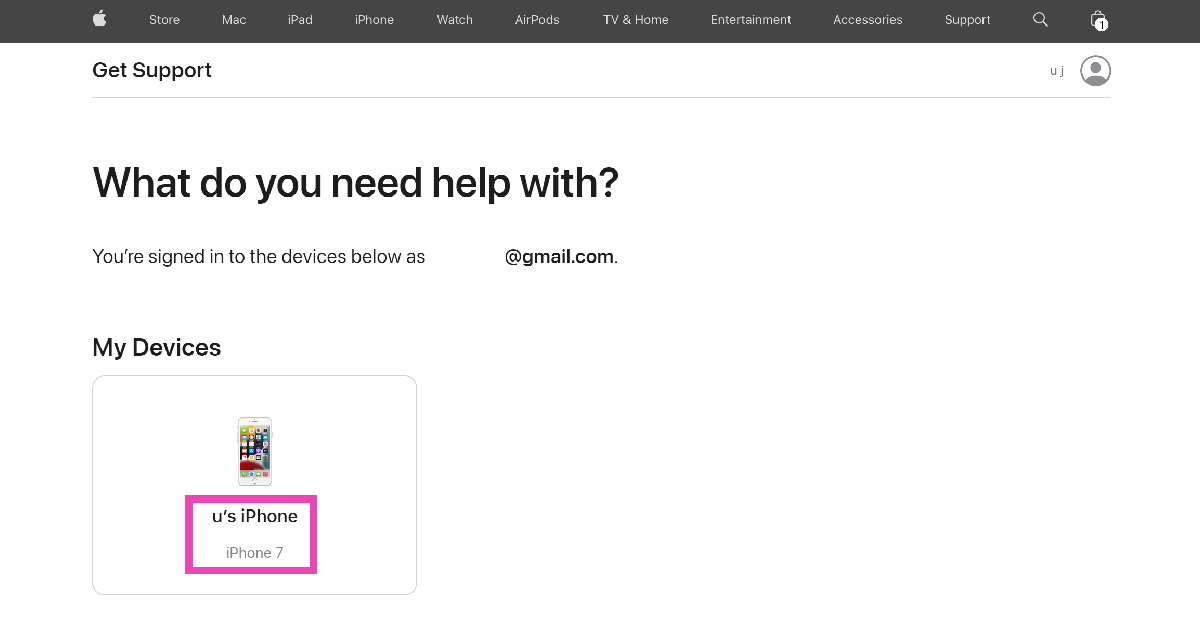 Step 3: Select the problem you are facing with your device.
 Step 4: Hit Continue.
 Step 5: Click on Find Location in the ‘Schedule a Repair’ section.
 Step 6: Click on Schedule a Visit.
 Step 7: Scroll down and select the Apple Store nearest to your location. If there are no Apple Stores near you, select an authorised repair centre.
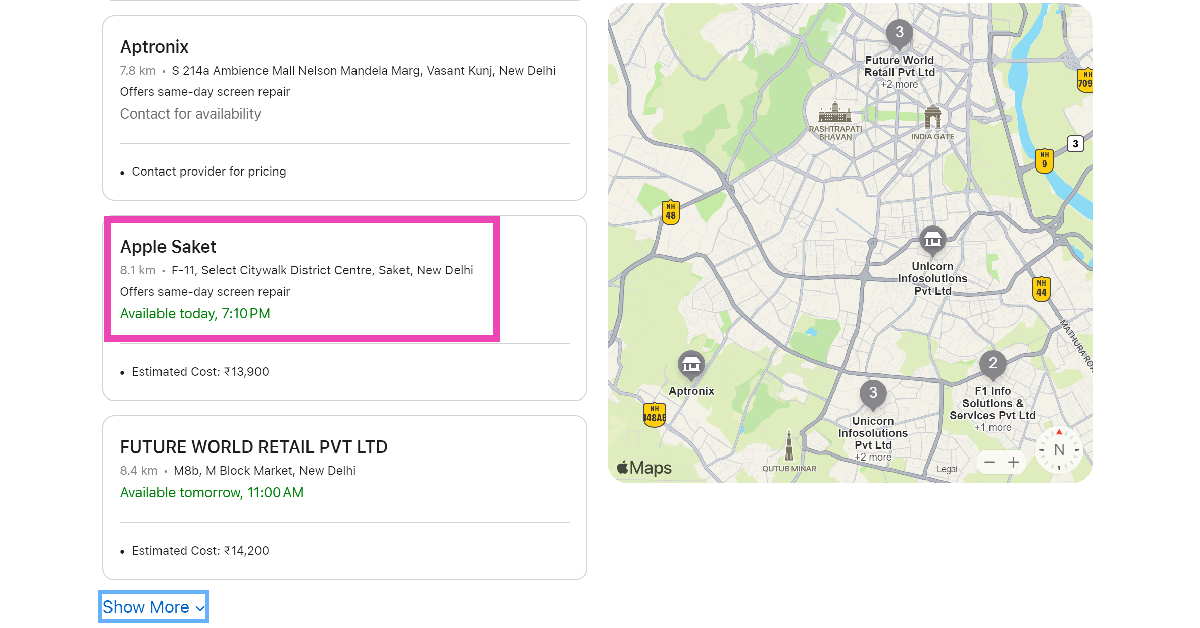 Step 8: Pick the day of your visit and click on Store’s local time to select the appointment time.
 Step 9: You may enter your phone number to receive appointment notifications. This is entirely optional. Hit Continue.
 Step 10: On the following page, click on Reserve Now.
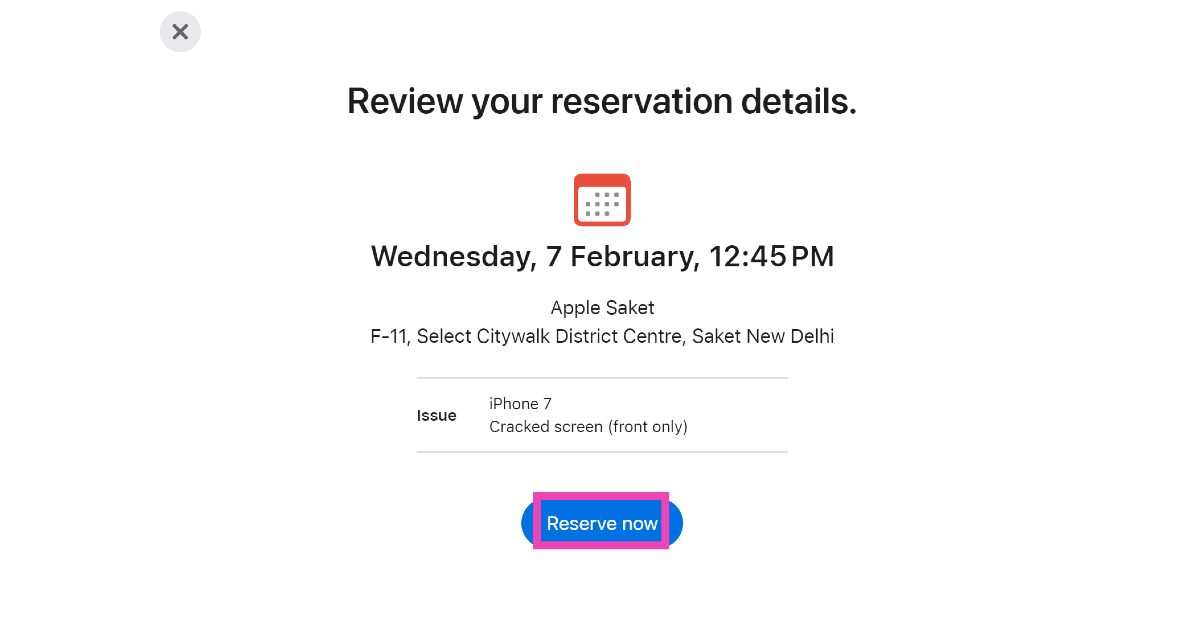 Your appointment at the Genius Bar will be reserved.

 The convertible laptops come equipped with a 9 MP camera that can be adjusted for low light using hardware. Additionally, it offers adaptive screen adjustments like a screen dimmer when the user looks away to save power and variable refresh rate for immersive performance and power efficiency.
Also Read: OnePlus 12 Review: A True Flagship Smartphone
The automatic performance optimization also adjusts fan noise and temperatures based on applications being used, placement of the laptop, and battery status. Moreover, users can improve video and calls with Windows Studio effects which offload AI features like automatic framing, background blur, and the ability to maintain eye contact onto the NPU for engaging connections.
The convertible laptops come equipped with a 9 MP camera that can be adjusted for low light using hardware. Additionally, it offers adaptive screen adjustments like a screen dimmer when the user looks away to save power and variable refresh rate for immersive performance and power efficiency.
Also Read: OnePlus 12 Review: A True Flagship Smartphone
The automatic performance optimization also adjusts fan noise and temperatures based on applications being used, placement of the laptop, and battery status. Moreover, users can improve video and calls with Windows Studio effects which offload AI features like automatic framing, background blur, and the ability to maintain eye contact onto the NPU for engaging connections. 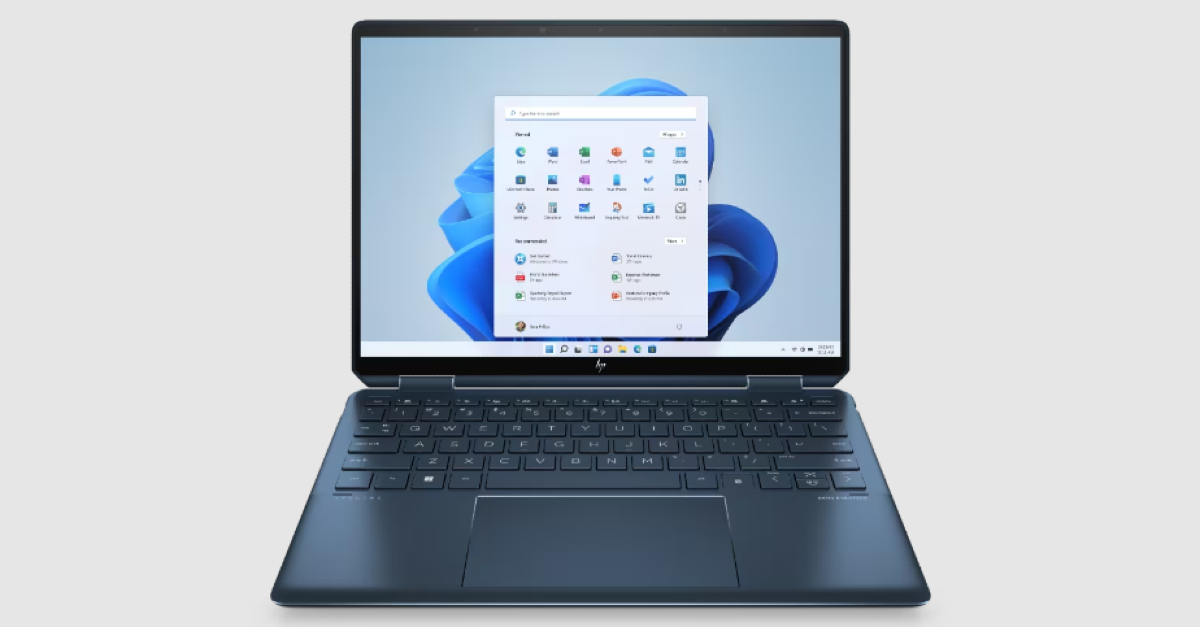
 The convertible laptops come equipped with a 9 MP camera that can be adjusted for low light using hardware. Additionally, it offers adaptive screen adjustments like a screen dimmer when the user looks away to save power and variable refresh rate for immersive performance and power efficiency.
Also Read: OnePlus 12 Review: A True Flagship Smartphone
The automatic performance optimization also adjusts fan noise and temperatures based on applications being used, placement of the laptop, and battery status. Moreover, users can improve video and calls with Windows Studio effects which offload AI features like automatic framing, background blur, and the ability to maintain eye contact onto the NPU for engaging connections.
The convertible laptops come equipped with a 9 MP camera that can be adjusted for low light using hardware. Additionally, it offers adaptive screen adjustments like a screen dimmer when the user looks away to save power and variable refresh rate for immersive performance and power efficiency.
Also Read: OnePlus 12 Review: A True Flagship Smartphone
The automatic performance optimization also adjusts fan noise and temperatures based on applications being used, placement of the laptop, and battery status. Moreover, users can improve video and calls with Windows Studio effects which offload AI features like automatic framing, background blur, and the ability to maintain eye contact onto the NPU for engaging connections. 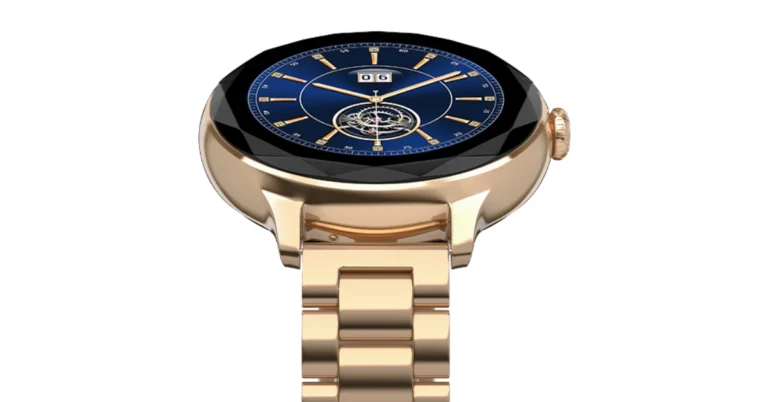
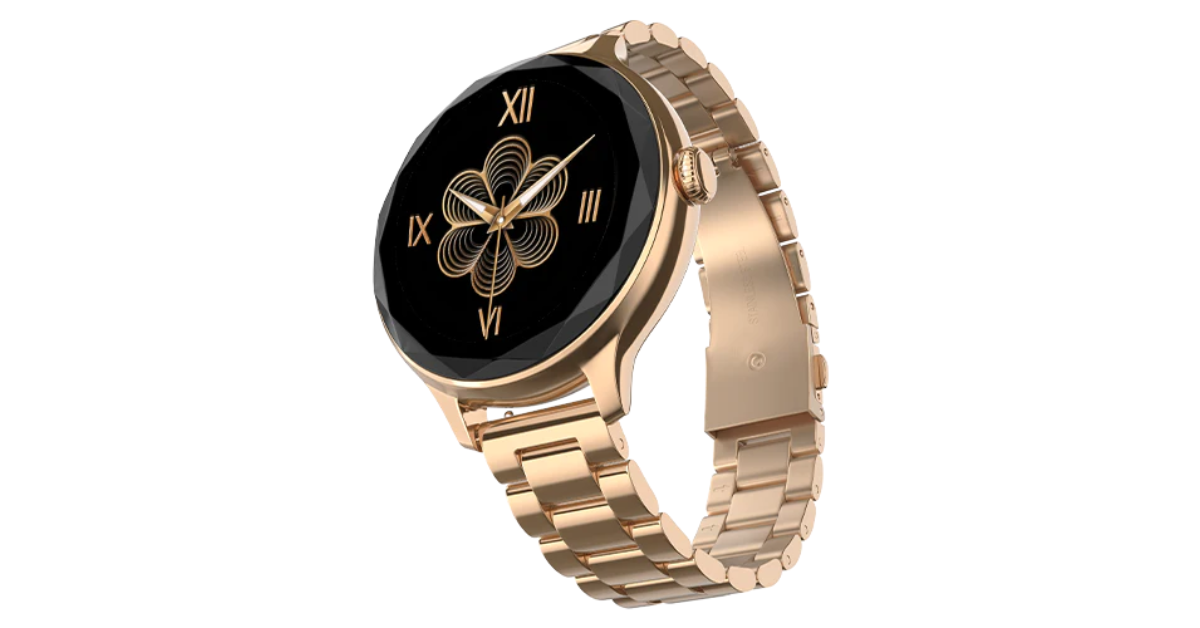
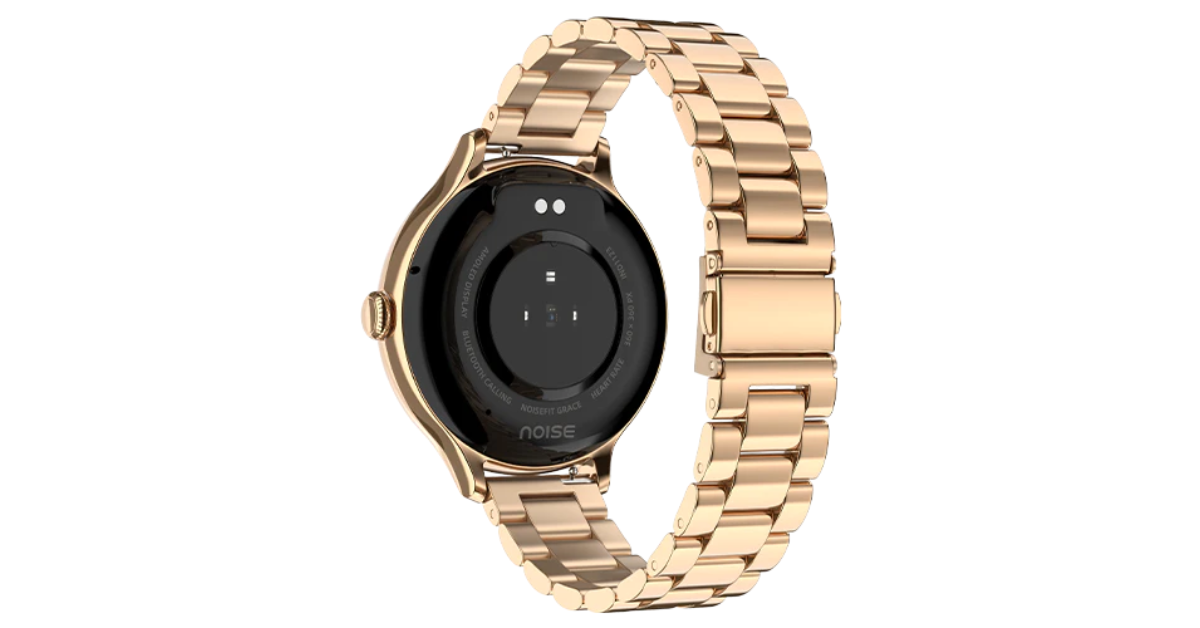 Noisefit Grace is IP67-rated for water and dust resistance. The smartwatch enables quick access to the dial pad and recent call logs with storage for up to 10 contacts for quick calling. It also includes a wide range of functions for tracking health and productivity. Women may efficiently track vital health indicators including heart rate, SpO2, sleep patterns, and stress levels, among others, with the help of Noise Health Suite. On the other hand, the integrated Productivity Suite keeps daily reminders and weather forecasts easily accessible. Along with weather updates and a notification display, it offers an Alarm, camera control, music control, and calculator.
Also Read: OnePlus 12 Review: A True Flagship Smartphone
The NoiseFit Grace provides four smartwatch menu styles. It boasts a four-day battery backup
Noisefit Grace is IP67-rated for water and dust resistance. The smartwatch enables quick access to the dial pad and recent call logs with storage for up to 10 contacts for quick calling. It also includes a wide range of functions for tracking health and productivity. Women may efficiently track vital health indicators including heart rate, SpO2, sleep patterns, and stress levels, among others, with the help of Noise Health Suite. On the other hand, the integrated Productivity Suite keeps daily reminders and weather forecasts easily accessible. Along with weather updates and a notification display, it offers an Alarm, camera control, music control, and calculator.
Also Read: OnePlus 12 Review: A True Flagship Smartphone
The NoiseFit Grace provides four smartwatch menu styles. It boasts a four-day battery backup 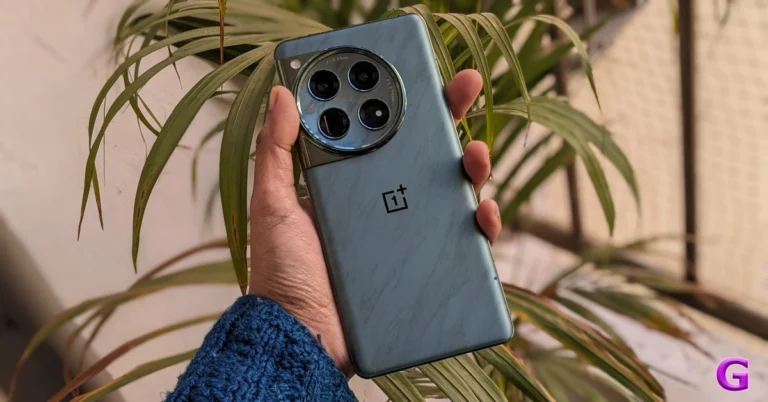
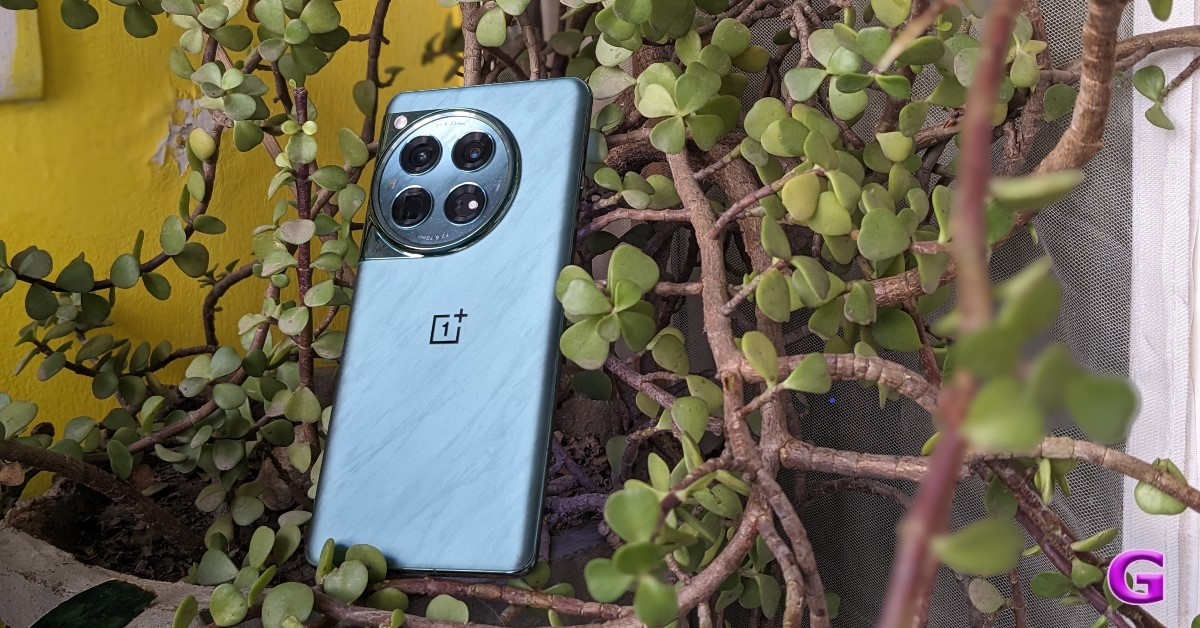 Looking at the design language, OnePlus has continued to use the previous generation’s style. Again, the camera device is circular. Within the module, the Hasselblad logo sits on a glossy marble finish module housing four camera lenses. We also observed some gorgeous glitter in it that gives the appearance of the brightness of the night stars. There are two colour options for the OnePlus 12: Silky Black and Flowy Emerald.
Also Read: Vivo X100 Pro review: Goes above and beyond with its cameras
For the review, we got the Flowy Emerald colour variant, which has a matte finish and a marble-like design that actually looks pretty fantastic. According to the company it is inspired by the magnificent sight of New Zealand’s braided Dart River, where emerald ribbons pulse with vivid energy. Flowy Emerald captures the essence of natural wonders and uses cutting-edge AG technology along with a precise etching process to give the phone’s glass back cover a premium texture with exquisite dynamism.
Looking at the design language, OnePlus has continued to use the previous generation’s style. Again, the camera device is circular. Within the module, the Hasselblad logo sits on a glossy marble finish module housing four camera lenses. We also observed some gorgeous glitter in it that gives the appearance of the brightness of the night stars. There are two colour options for the OnePlus 12: Silky Black and Flowy Emerald.
Also Read: Vivo X100 Pro review: Goes above and beyond with its cameras
For the review, we got the Flowy Emerald colour variant, which has a matte finish and a marble-like design that actually looks pretty fantastic. According to the company it is inspired by the magnificent sight of New Zealand’s braided Dart River, where emerald ribbons pulse with vivid energy. Flowy Emerald captures the essence of natural wonders and uses cutting-edge AG technology along with a precise etching process to give the phone’s glass back cover a premium texture with exquisite dynamism.
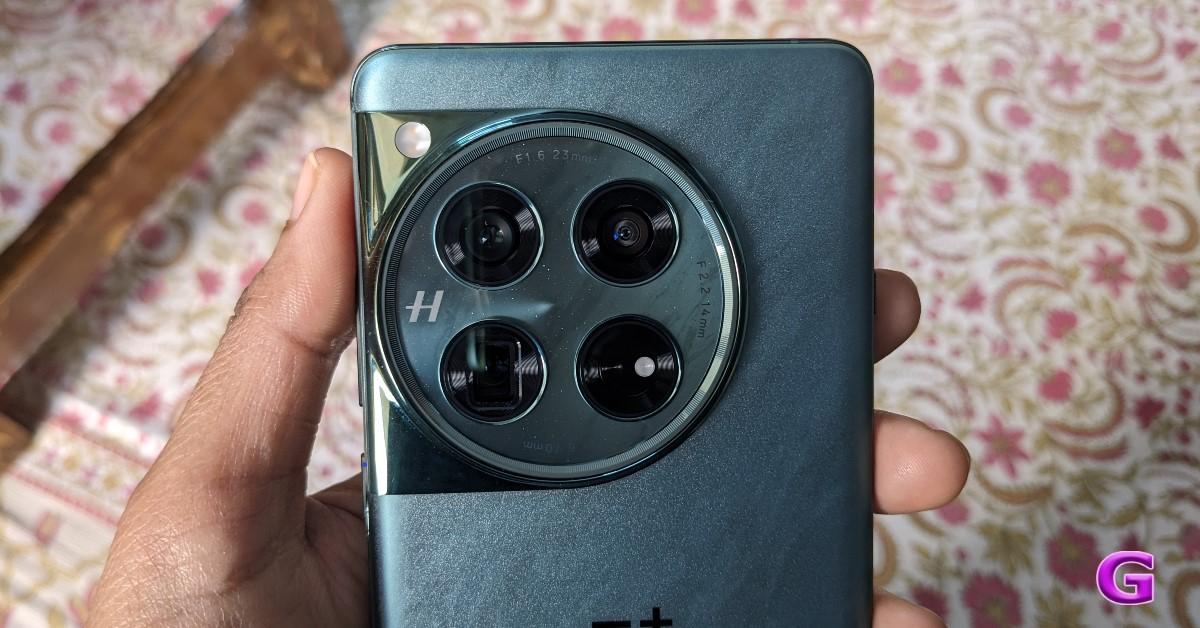 Take note that Corning Gorilla 5 protects the back panel.
Despite having a matte appearance, the back feels a little slick to the touch. Therefore, we advise you to put a silicon case on it to prevent accidental drops or slips from your hand. Using a back cover will safeguard the glass-made rear panel and provide you with a firm grip. And yes, the back cover is present inside the box, so need to purchase a new one, unless you want a different appearance.
The phone is undoubtedly heavier due to its larger battery and the usage of glass and metal materials. But despite this, you don’t feel like it’s a very heavy handset.
Take note that Corning Gorilla 5 protects the back panel.
Despite having a matte appearance, the back feels a little slick to the touch. Therefore, we advise you to put a silicon case on it to prevent accidental drops or slips from your hand. Using a back cover will safeguard the glass-made rear panel and provide you with a firm grip. And yes, the back cover is present inside the box, so need to purchase a new one, unless you want a different appearance.
The phone is undoubtedly heavier due to its larger battery and the usage of glass and metal materials. But despite this, you don’t feel like it’s a very heavy handset.
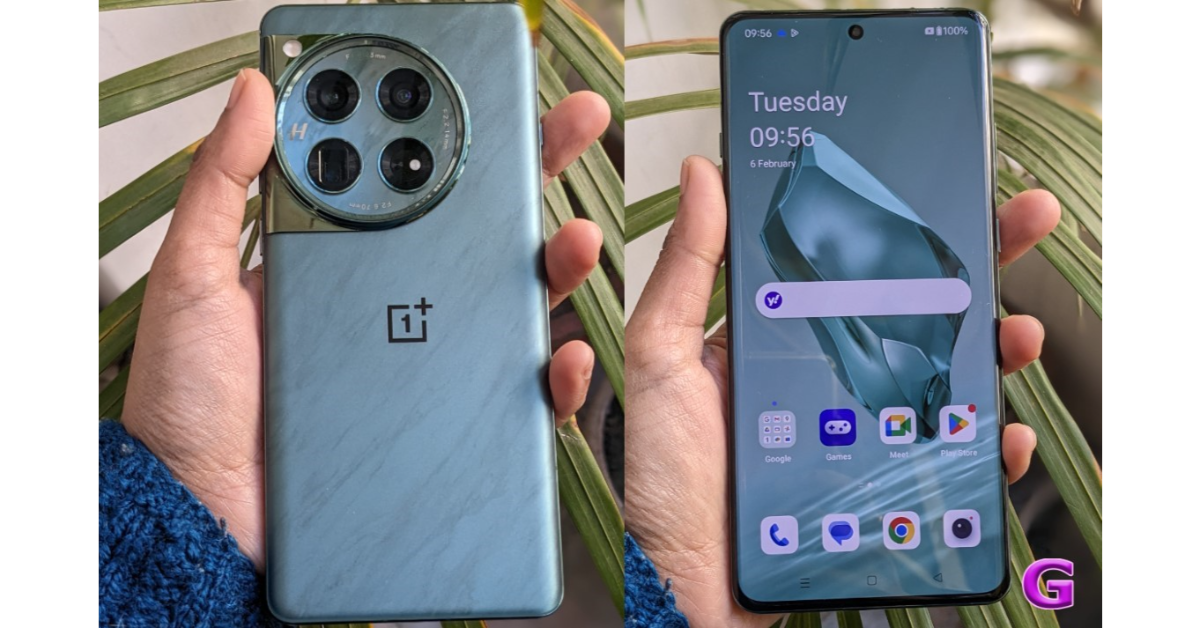 In addition, the edges have rounded corners and a curved finish. Gorilla Glass Victus 2 protection has been added to the display. The bezels are kept to a minimum, which looks pretty good. In addition, it has a high-quality appearance and feel thanks to the metal frame and the soft curves on both sides. Our small hands could comfortably use the phone with one hand because it is not overly broad. The gadget is not waterproof, but it does have an IP65 classification for dust and splash resistance.
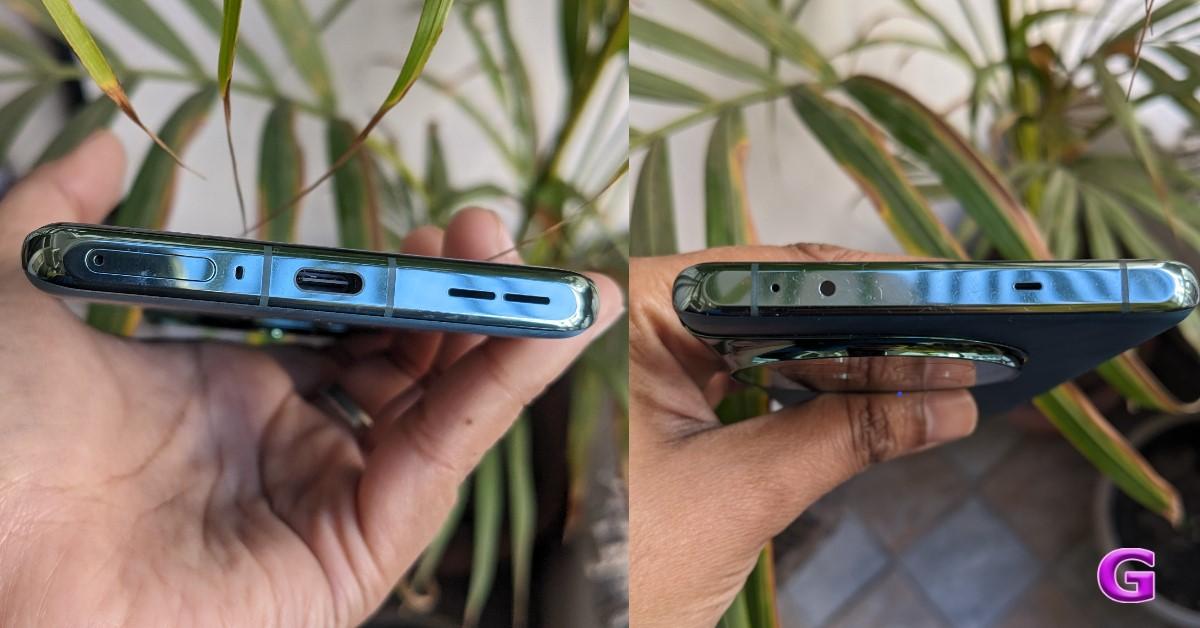
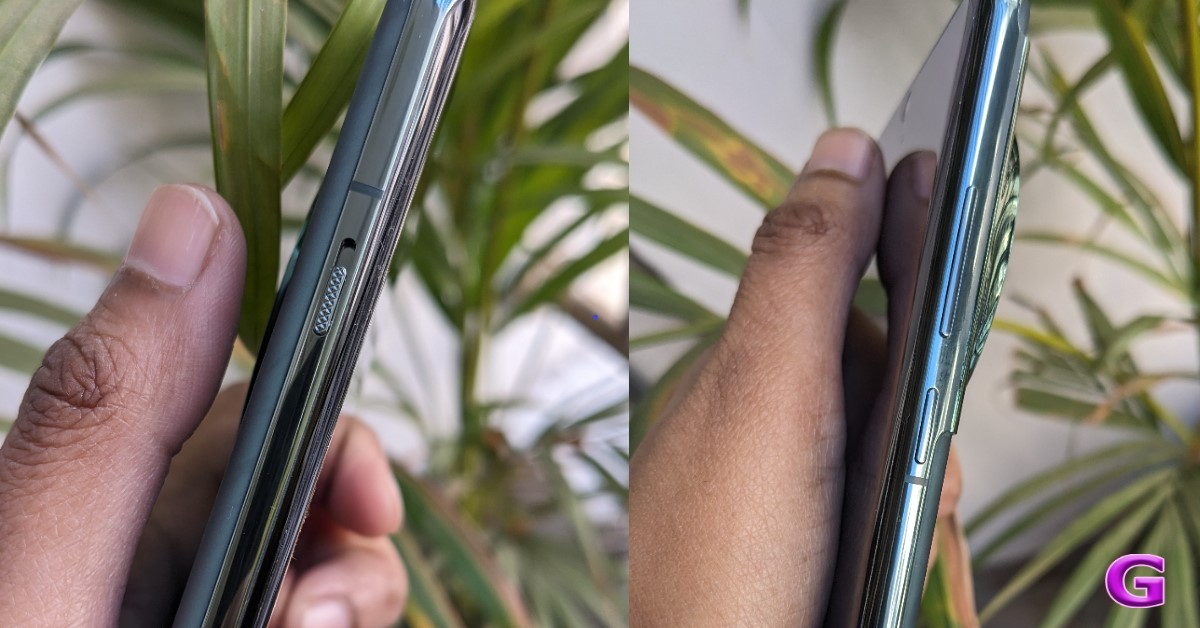 The alert slider is on the left side of the frame, and the power and volume buttons are on the right. It includes an IR blaster on top, a dual SIM card slot and a USB Type C port speaker unit at the bottom.
 Let’s proceed to the display next. The main feature of the OnePlus 12 is its 6.82-inch quad-HD+ LTPO OLED screen, which boasts a resolution of 1,440 x 3,168 pixels. The variable refresh rate of the front panel spans from 1Hz to 120Hz. Furthermore supported is a screen brightness of 4,500 nits. Keep in mind that this OnePlus smartphone’s screen is the brightest we’ve ever seen.
Also Read: iQOO 12 5G Review: Oozes personality and power
It provides incredibly smooth and lifelike images for an excellent viewing experience. Additionally, TÜV Rheinland certifies it for Intelligent Eye Care because of its capacity to efficiently decrease blue light output and intelligently modify the colour temperature in response to varying ambient conditions.
Let’s proceed to the display next. The main feature of the OnePlus 12 is its 6.82-inch quad-HD+ LTPO OLED screen, which boasts a resolution of 1,440 x 3,168 pixels. The variable refresh rate of the front panel spans from 1Hz to 120Hz. Furthermore supported is a screen brightness of 4,500 nits. Keep in mind that this OnePlus smartphone’s screen is the brightest we’ve ever seen.
Also Read: iQOO 12 5G Review: Oozes personality and power
It provides incredibly smooth and lifelike images for an excellent viewing experience. Additionally, TÜV Rheinland certifies it for Intelligent Eye Care because of its capacity to efficiently decrease blue light output and intelligently modify the colour temperature in response to varying ambient conditions.
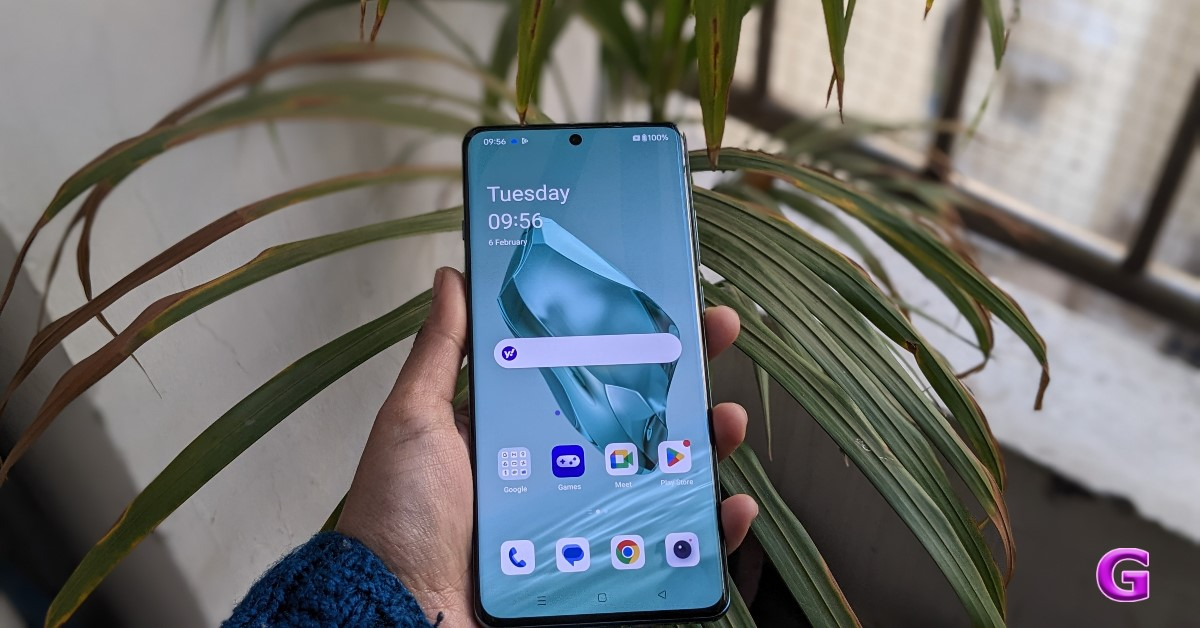 Because it is an LTPO panel, the display can automatically transition between a refresh rate of 1Hz to 120Hz while maintaining a relatively low power consumption, depending on user preferences and particular usage conditions. On the other hand, Dolby Vision is also supported, enhancing the visual experience overall with incredibly bright colours, sharp contrast, and showcasing well even the minutest details.
The touch response of the display functions perfectly. Sweaty hands and mishaps during both intense gameplay and regular use are greatly reduced thanks to the Aqua Touch’s ability to detect moist fingers and water droplets on the screen and adjust accordingly.
Dolby Atoms is supported by the dual speaker setup and dedicated spatial audio, which provides high-quality audio with less acoustic resonance even without headphones. We quite loved it.
Because it is an LTPO panel, the display can automatically transition between a refresh rate of 1Hz to 120Hz while maintaining a relatively low power consumption, depending on user preferences and particular usage conditions. On the other hand, Dolby Vision is also supported, enhancing the visual experience overall with incredibly bright colours, sharp contrast, and showcasing well even the minutest details.
The touch response of the display functions perfectly. Sweaty hands and mishaps during both intense gameplay and regular use are greatly reduced thanks to the Aqua Touch’s ability to detect moist fingers and water droplets on the screen and adjust accordingly.
Dolby Atoms is supported by the dual speaker setup and dedicated spatial audio, which provides high-quality audio with less acoustic resonance even without headphones. We quite loved it.
 Speaking of the daylight pictures, you can get excellent details and rich, beautiful colours there as well. The photographs have excellent overall quality and a very natural appearance. In actuality, the colours are rich in tones without being overly saturated, and the dynamic range is pleasant and broad. You can see that the details are good by zooming in.
 The 48-megapixel ultra-wide-angle lens produced remarkably similar images, and the colour reproduction was accurate once more. We would describe it as being roughly comparable to the main camera. The dynamic range appears mostly acceptable, and the sharpness levels are fairly good. It’s really useful to have an ultra-wide-angle camera.
With the ability to zoom 3x optically, the telephoto lenses can now capture a wealth of information. Additionally consistent are the colour and dynamic range. It performs well in this case as well in terms of sharpness levels.
The 48-megapixel ultra-wide-angle lens produced remarkably similar images, and the colour reproduction was accurate once more. We would describe it as being roughly comparable to the main camera. The dynamic range appears mostly acceptable, and the sharpness levels are fairly good. It’s really useful to have an ultra-wide-angle camera.
With the ability to zoom 3x optically, the telephoto lenses can now capture a wealth of information. Additionally consistent are the colour and dynamic range. It performs well in this case as well in terms of sharpness levels.
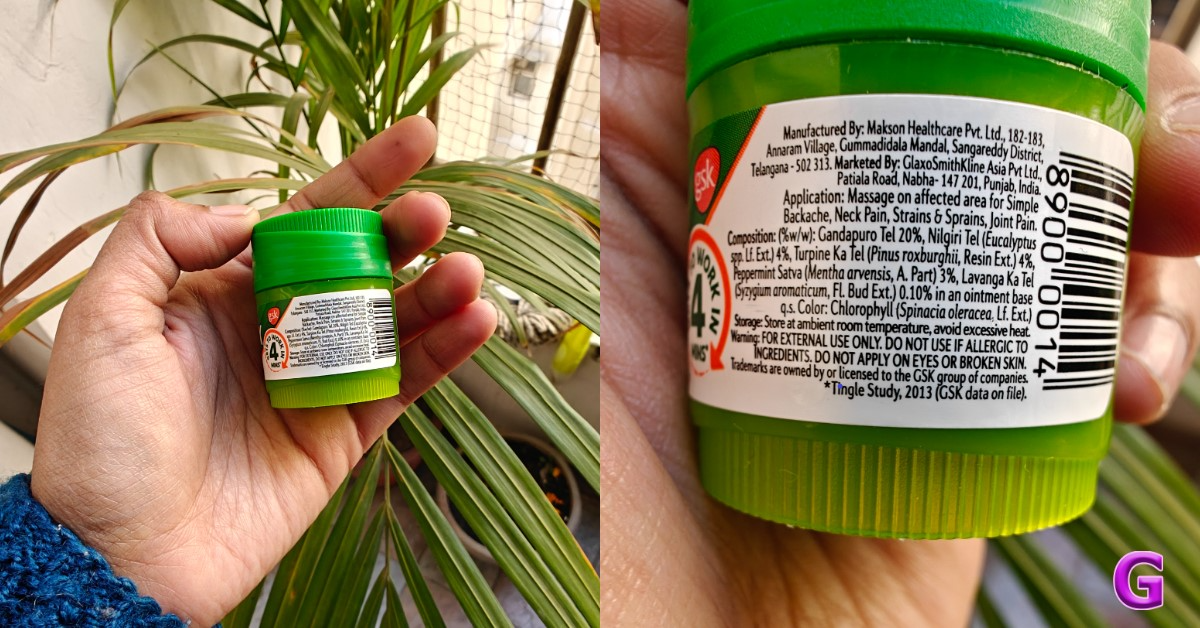 Let’s move on to the close-up photographs, where you can see even more vibrant colours and excellent overall image quality. Also, the backdrop blur looks fantastic. Keep in mind that the telephoto lens, which handles the macro department, provides an abundance of details and has performed an excellent job with macros.
 You will be able to take pictures in 1x, 2x, and 3x for portraits. The telephoto lens handles 3x, while the primary camera handles 1x and 2x. The skin tones appear rather realistic, the results are good, and there are no saturation problems. The telephoto lens has some edge detection issues, but overall quality is good and edge detection is acceptable at 1x and 2x zoom. In actuality, it is not that crisp, and in certain instances, the edges were not very good.
 There are plenty of details under artificial indoor light, and the night mode provides decent details outdoors as well. It does not overexpose or over-brighten, but the details and dynamic range are excellent. In a dim light, we also observed a few lens flare incidents.
Regarding selfies, the 32-megapixel front-facing camera performs nicely; we particularly enjoyed the colour tones. The dynamic range is lovely, and the skin tones seem natural. The selfies don’t feature any beauty effects on the face, but the edge detection in the portrait selfies gives the images an unnatural appearance.
While testing, our review unit also received its first OTA update. After updating the OnePlus 12’s camera app got support for the ProXDR feature in the Google Photos app which wasn’t available before the software update landed. It is essentially a kind of display technology that uses atomization to brighten the dark areas in images.
There are plenty of details under artificial indoor light, and the night mode provides decent details outdoors as well. It does not overexpose or over-brighten, but the details and dynamic range are excellent. In a dim light, we also observed a few lens flare incidents.
Regarding selfies, the 32-megapixel front-facing camera performs nicely; we particularly enjoyed the colour tones. The dynamic range is lovely, and the skin tones seem natural. The selfies don’t feature any beauty effects on the face, but the edge detection in the portrait selfies gives the images an unnatural appearance.
While testing, our review unit also received its first OTA update. After updating the OnePlus 12’s camera app got support for the ProXDR feature in the Google Photos app which wasn’t available before the software update landed. It is essentially a kind of display technology that uses atomization to brighten the dark areas in images.
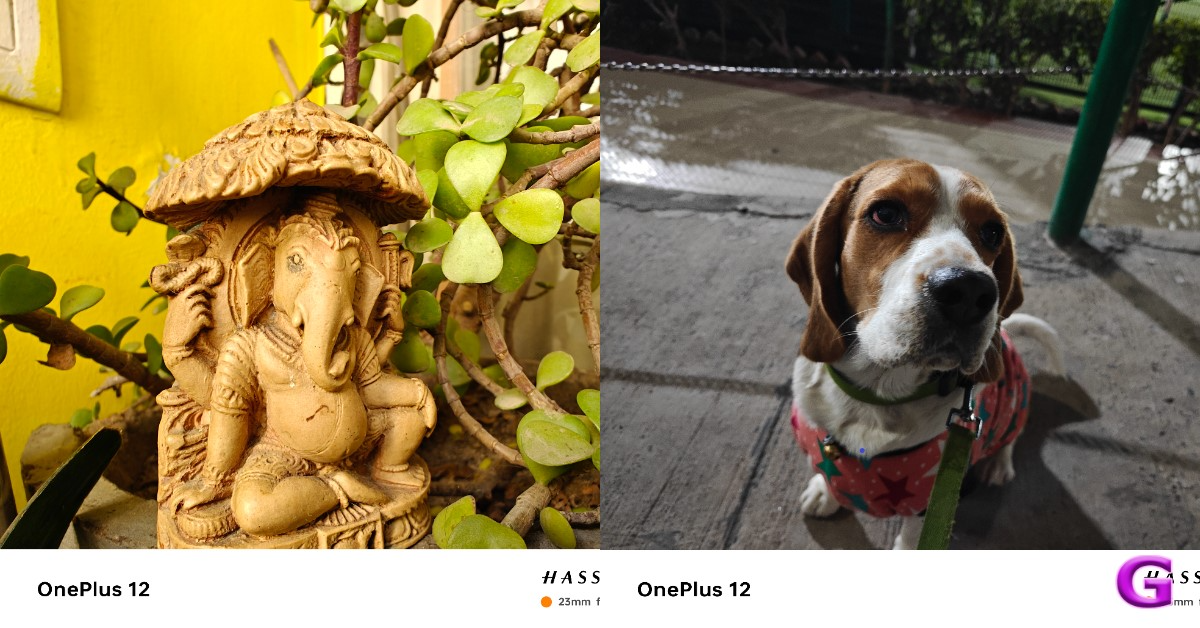 There is also one major upgrade, which is now the OnePlus 12 has received – the Master Mode. It is basically a camera feature by Hasselblad for colour tuning. And trust us, this is the main USP of the device. If you prefer more candid shots, you will definitely adore this option. We simply can’t get enough of using this ability to snap photos. The outcomes were, in fact, remarkably close to what our eyes saw even in low light conditions. The Master Mode is visible just next to Video mode that was home to Pro mode earlier. Don’t fret the Pro mode is still there. Just tap on the Mater mode and you will see two options on the extreme left Auto and Pro.





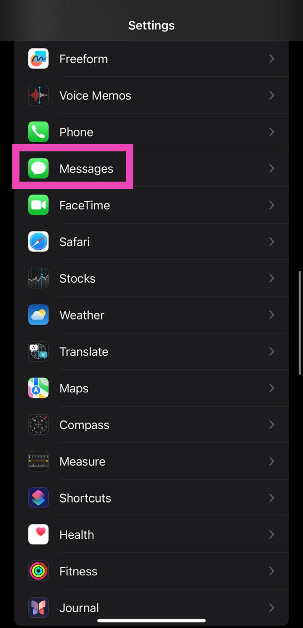 Step 2: Turn on the toggle switch next to Send as SMS.


 Read Also:
  Step 2:
 Step 3: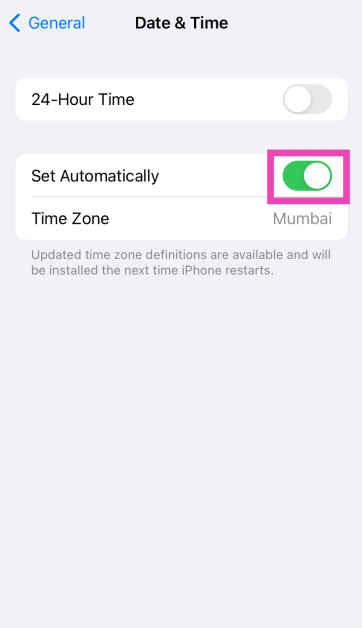
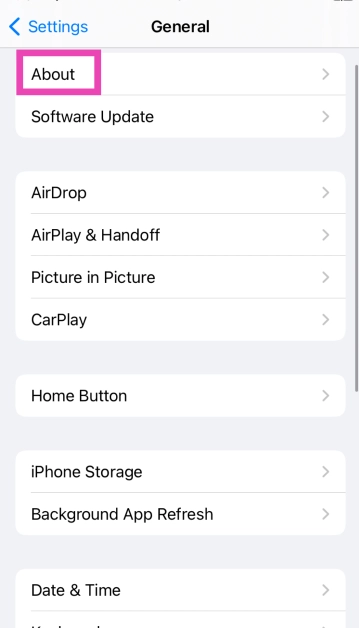 Step 3:
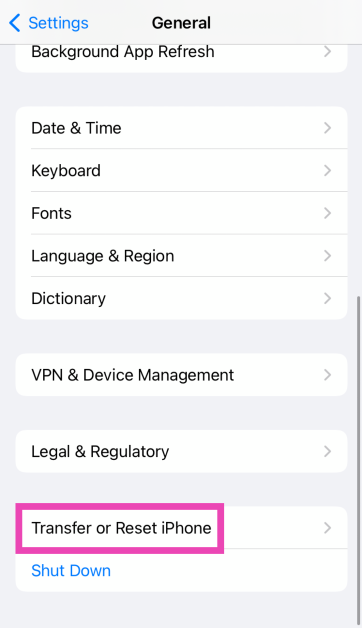 Step 3:
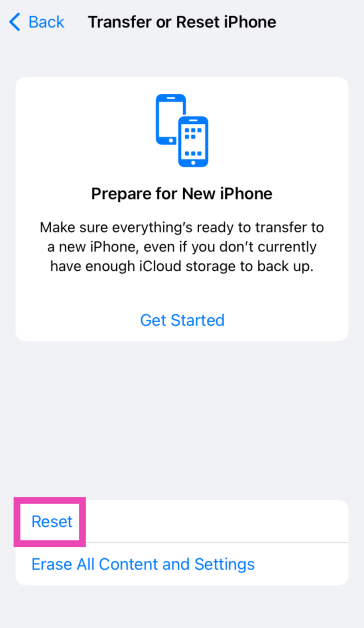 Step 4: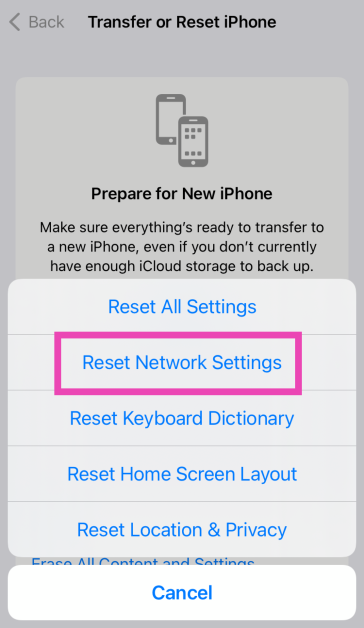
 Step 4: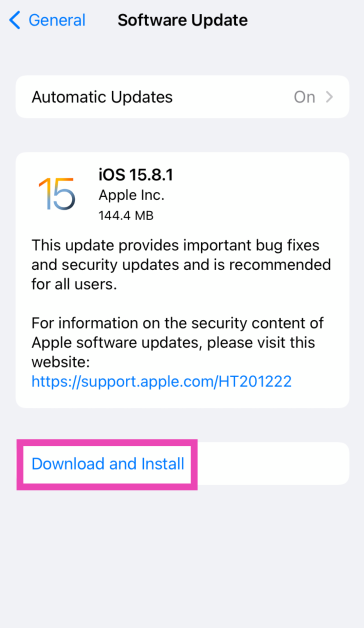
 Step 4: Tap on Continue and enter the passcode to reset your iPhone to its factory settings.
 Key Specs
 Key Specs
 Key Specs
 Key Specs
 Key Specs
 Key Specs
 Key Specs
 Key Specs
 Key Specs
 Key Specs
 Key Specs
 Key Specs
 Key Specs
 Key Specs