There is no need to splurge like crazy on a flagship smartphone if all you want from your device is efficient performance and a good primary camera. Premium smartphones may have powerful telephoto cameras and other flashy features, but a price tag of over $1,500 is rarely ever worth it. The sub-$750 category is where you’ll find the best pound-for-pound smartphones in the market. These smartphones perfectly bridge the divide between flagship specs and affordable pricing. So, let’s jump into our list of the top 10 smartphones priced under $750 in the USA.Read Also:OnePlus Nord Buds 3 India launch soon, bags BIS certification
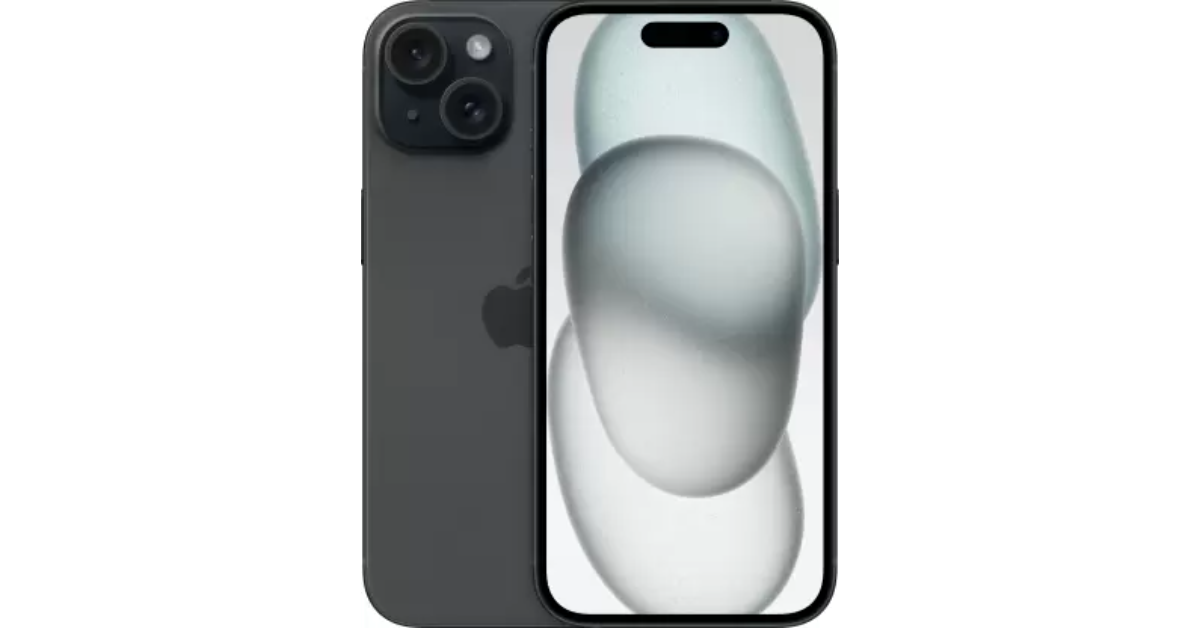
Now that the iPhone 16 Series is finally here, Apple has slashed the prices for last year’s iPhone 15. The vanilla variant of the iPhone 15 is priced at $699 while the Plus variant fetches $799. The smartphone flaunts a 6.1-inch Super Retina XDR OLED display that can reach a peak brightness of 2,000 nits. Under the hood, the iPhone 15 is powered by the Apple A16 Bionic chipset. Its camera sensors comprise a 48MP primary shooter and a 12MP ultrawide lens. Up front, it gets a 12MP selfie sensor housed inside the pill-shaped Dynamic Island. If you’re an iPhone loyalist, this is one of the best smartphones you can buy in the USA, now that Apple has discontinued its Pro variants.
The Samsung Galaxy S24 series was launched last month, which means 2023’s Galaxy S23 series can now be purchased at a reduced price. The base variant of the Galaxy S23 is priced at $699, making it an excellent deal. The smartphone gets a 6.1-inch Dynamic AMOLED 2X display with a refresh rate of 120Hz. It is powered by the Snapdragon 8 Gen 2 SoC. The triple camera module at the back of the smartphone consists of a 50MP primary shooter, a 12MP ultrawide lens, and a 10MP telephoto sensor. Samsung Galaxy S23 is rated IP68 for dust and water resistance.
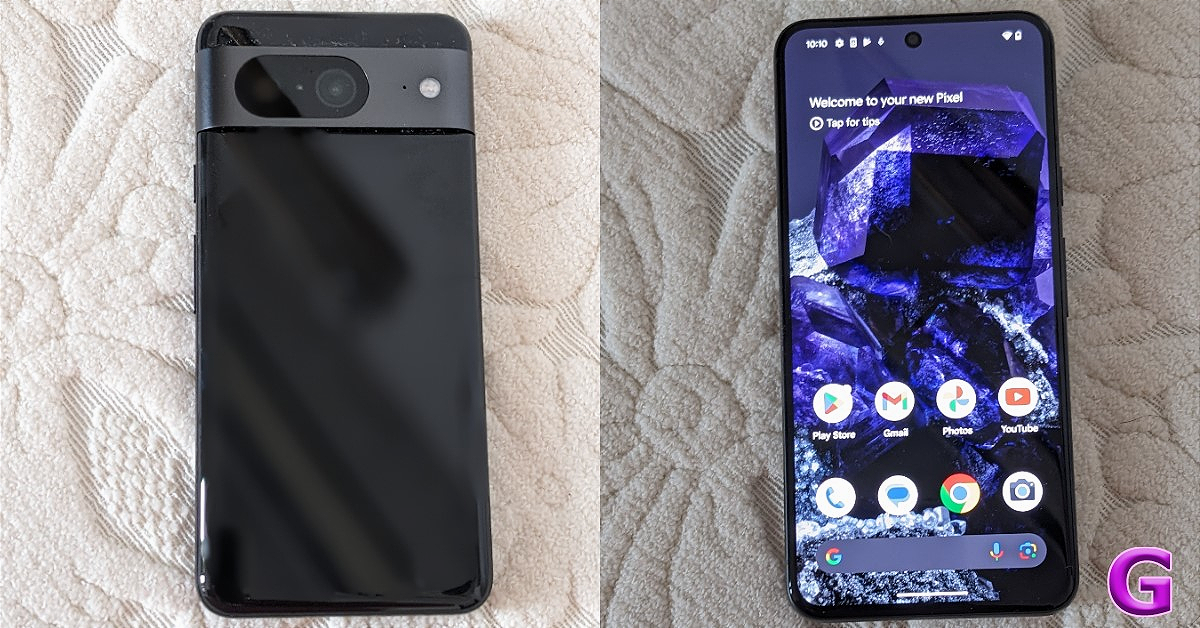
Pixels are all about impressive cameras and clever software. The newest Pixel 8 series upholds that reputation. The non-Pro Pixel 8 is priced modestly (as far as flagships go) at $549. Powered by Google’s in-house Tensor G3 chipset, the Pixel 8 replicates a similar performance as its Pro sibling. The signature Pixel camera band at the back of the smartphone houses a 50MP primary shooter and a 12MP ultrawide lens. Up front, the 10.5MP selfie camera is contained in a punch-hole cutout. Google Pixel 8 is equipped with interesting features like Best Take, Magic Editor, and more. Read our review of the smartphone to learn more.
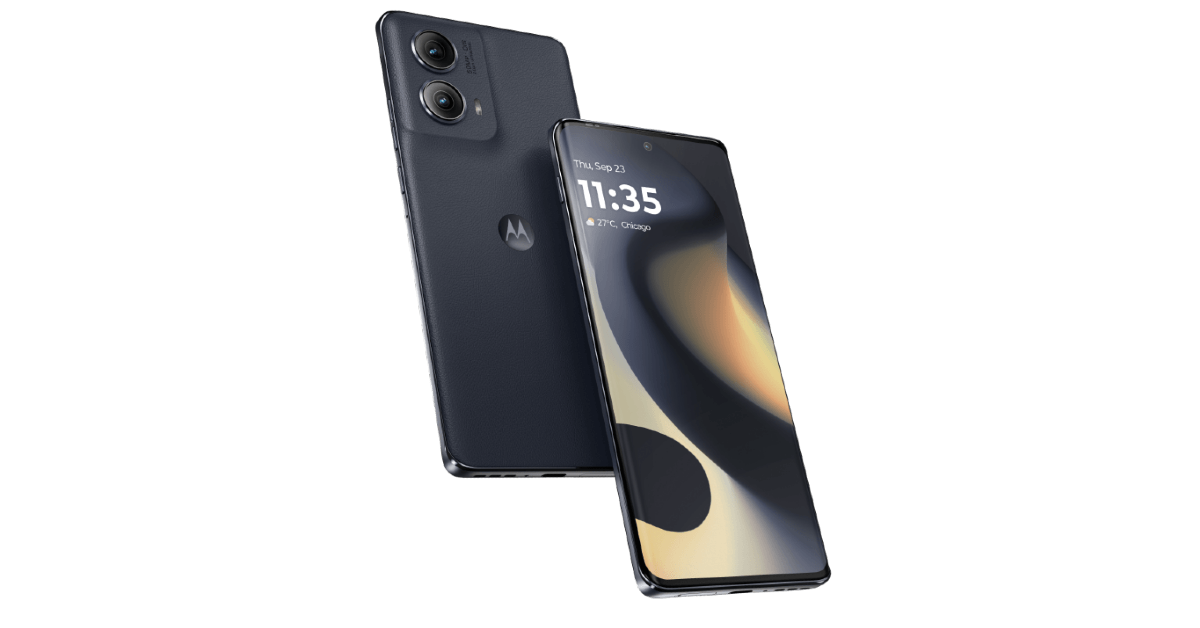
The newly launched Motorola Edge 2024 retains its signature eco-leather back and packs a number of important upgrades. Under the hood, the smartphone is powered by the Snapdragon 7s Gen 2 SoC. It is rated IP68 for dust and water resistance. The 6.6-inch P-OLED display on the smartphone has a refresh rate of 144Hz and peak brightness of 1,300 nits. The dual camera panel at the back comprises a 50MP primary shooter and a 13MP ultrawide lens. The 5,000mAh battery on the Edge 2024 can easily last a day. There’s support for 68W wired and 15W wireless charging.
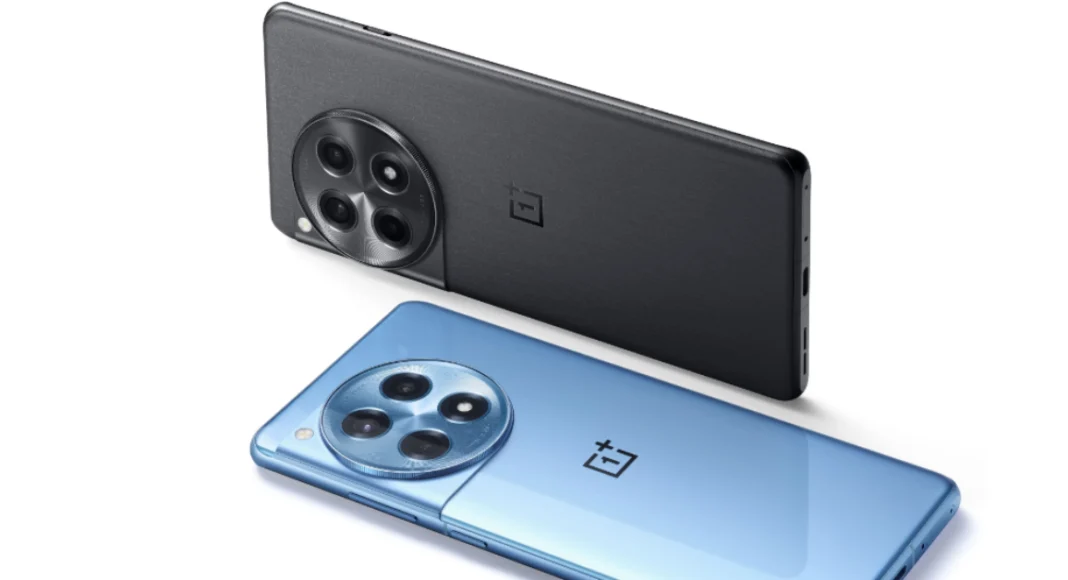
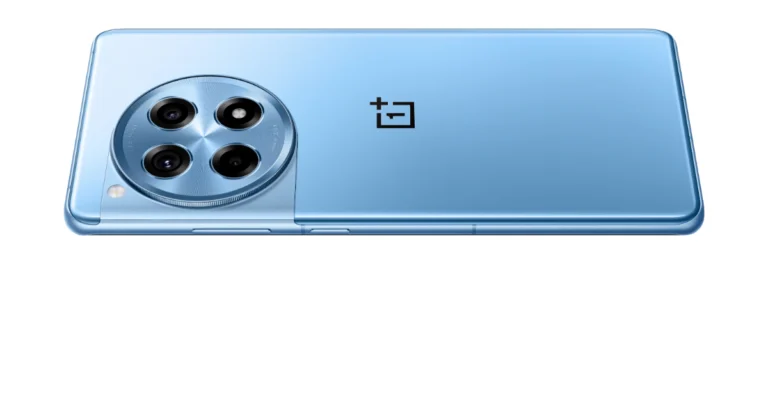
Released alongside the flagship OnePlus 12, the 12R could very well be one of the best midrange smartphones of 2024. It is powered by last year’s flagship Snapdragon 8 Gen 2 chipset and flaunts a 6.82-inch LTPO4 AMOLED display. OnePlus 12R matches the design of the flagship unit but manages to stay in the affordable price bracket by ditching features like wireless charging. Its rear camera module replaces the telephoto lens from the flagship with a 2MP macro sensor. Other than that, you get a 50MP primary camera and an 8MP ultrawide lens.
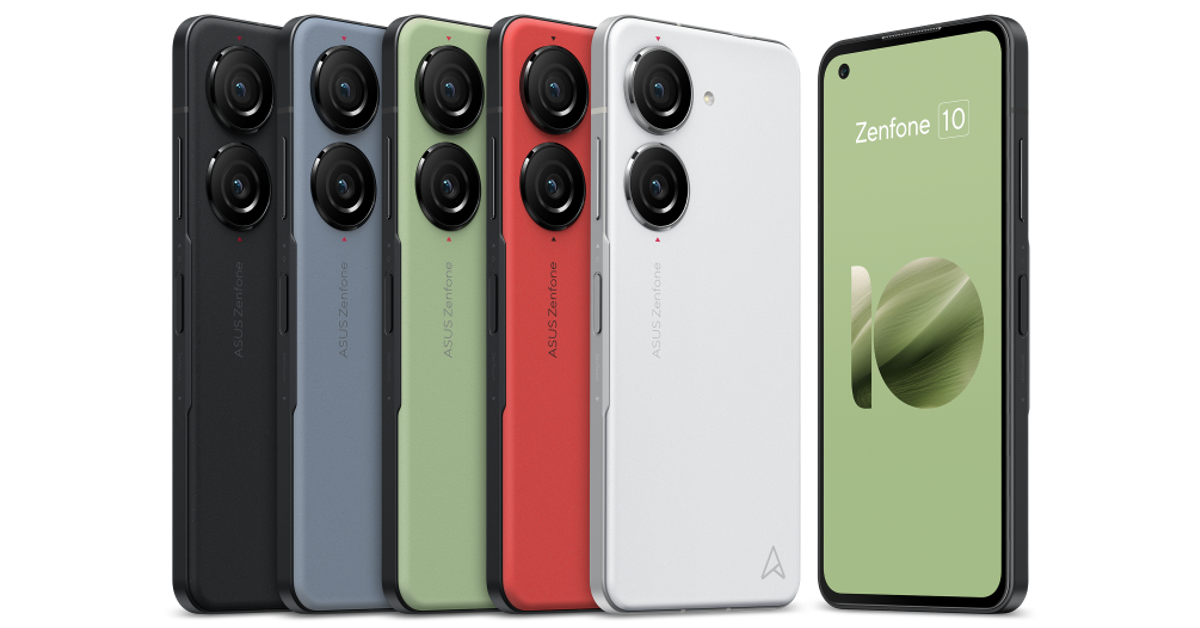
One of the best compact smartphones around, the Asus Zenfone is also one of the best smartphones you can buy for under $750 in the USA. It features a 5.92-inch Super AMOLED display and is powered by the Snapdragon 8 Gen 2 SoC. The two rear cameras are housed in individual cutouts. The 50MP primary camera can record 8K videos at 24fps. The 13MP ultrawide camera is a nice addition to the camera module as well. Up front, the 32MP selfie camera is placed inside a punch-hole cutout on the display. Due to its small size, the Zenfone 10 only has a 4,300 mAh battery but it can easily last you an entire day.
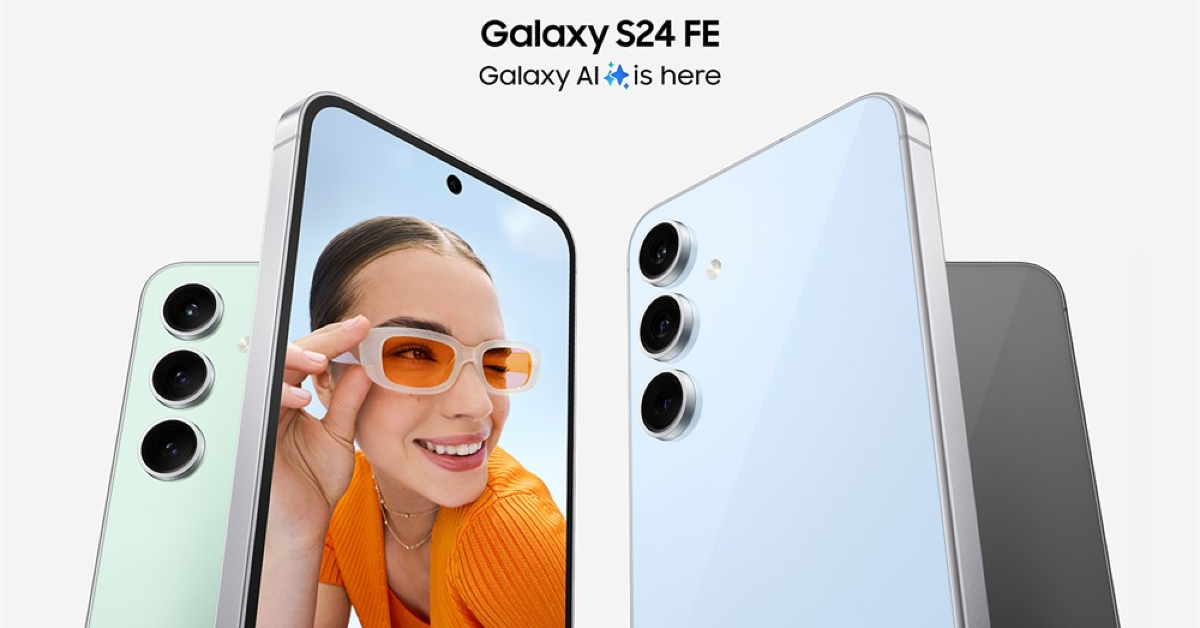
Samsung’s S24 series has finally received a ‘Fan Edition’. The crowd favourite is certainly one of the best smartphones you can buy under $750 in the USA. The Samsung Galaxy S24 FE flaunts a 6.7-inch Dynamic AMOLED 2X display with a 120Hz refresh rate and 1,900 nits of peak brightness. The device is powered by the Exynos 2400e processor. It is rated IP68 for dust and water resistance. Its rear triple camera setup comprises a 50MP primary shooter, an 8MP telephoto sensor, and a 12MP ultrawide lens. The smartphone can record 8K videos at 30fps. Its 4,700mAh battery pack lasts an entire day on a full charge.
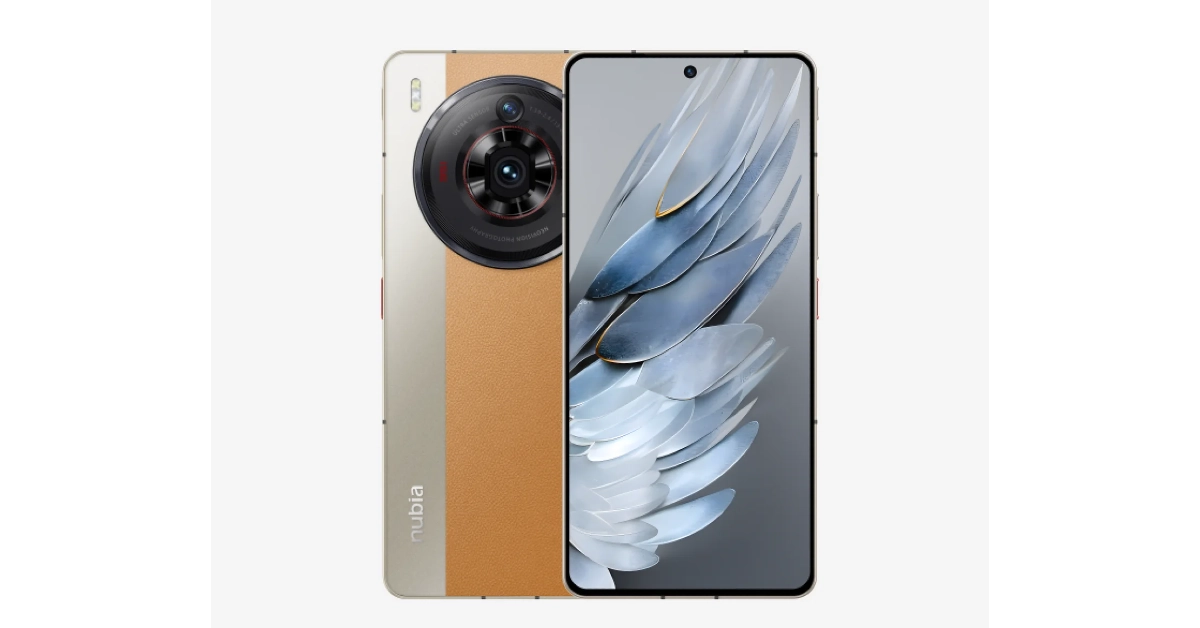
Powered by the updated Snapdragon 8+ Gen 2, the Nubia Z50S Pro is an all-round performer. Its rear camera dial houses a 50MP primary shooter, another 50MP ultrawide lens, and an 8MP telephoto lens. Up front, the 16MP selfie camera is housed in a punch-hole cutout. The primary shooter can record 8K videos at 30fps. However, the selfie camera’s recording resolution is capped at 1080p (30fps). The smartphone gets a silicone polymer (eco-leather) back with dual-tone colour schemes. There’s support for 80W wired charging. The Z50S ships with a power adapter inside the box. Easily one of the best smartphones you can buy for under $750 in the USA.
One of our favourite foldable smartphones, the Motorola Razr+, is next on the list. This folding phone packs the Snapdragon 8+ Gen 1 chipset and runs stock Android 13 OS out of the box (upgradeable to Android 14). The 3.6-inch AMOLED cover display ensures you don’t have to flip the phone open to check notifications, respond to messages, or carry out other quick tasks. The inner 6.9-inch LTPO AMOLED display is superfluid, owing to its 165Hz refresh rate. The 3,800 mAh battery pack on the smartphone can provide a day’s worth of charge on normal usage. The Razr+ supports 30W wired charging and 5W wireless charging.
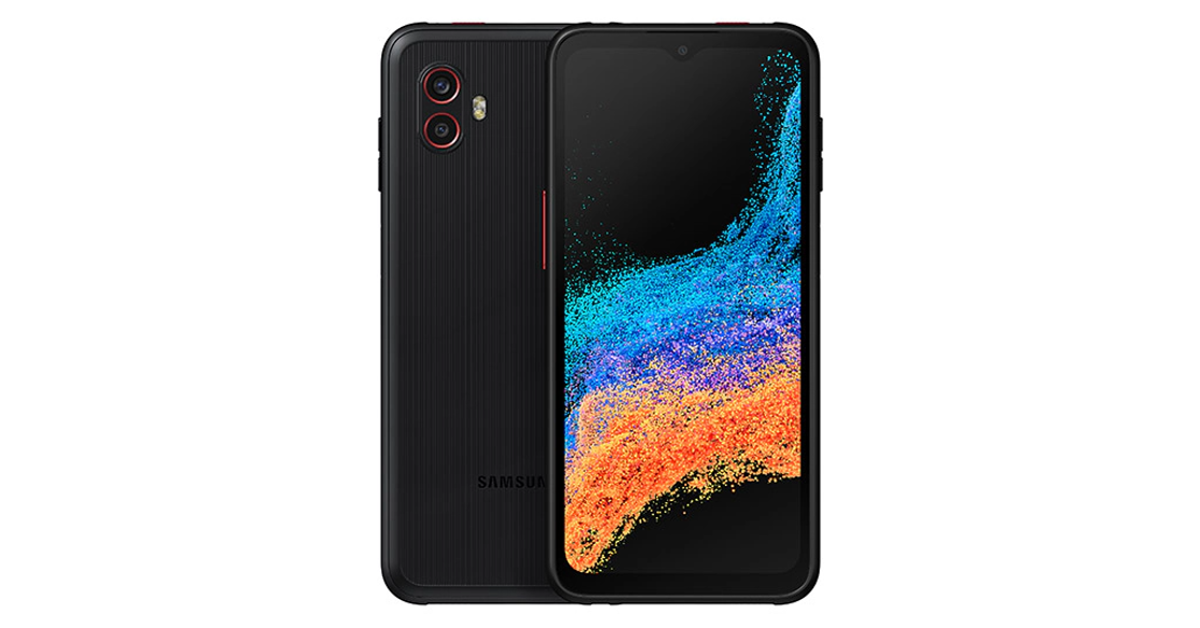
If you’re looking for a rugged phone, the Samsung Galaxy XCover6 Pro is one of the best ones around. This sturdy smartphone is rated IP68 for dust and water resistance and is MIL-STD-810H compliant. It can easily take a fall from 1.5 metres. Talking about the specs, the XCover6 Pro is powered by the Snapdragon 778G SoC and is upgradeable to Android 14. While it is only available with 128GB of internal storage, it has a memory card slot for expandable storage. The rear camera unit of the smartphone houses a 50MP primary shooter which can record 4K videos and an 8MP ultrawide lens. The 13MP selfie camera is housed inside a waterdrop notch and can record 1080p videos.
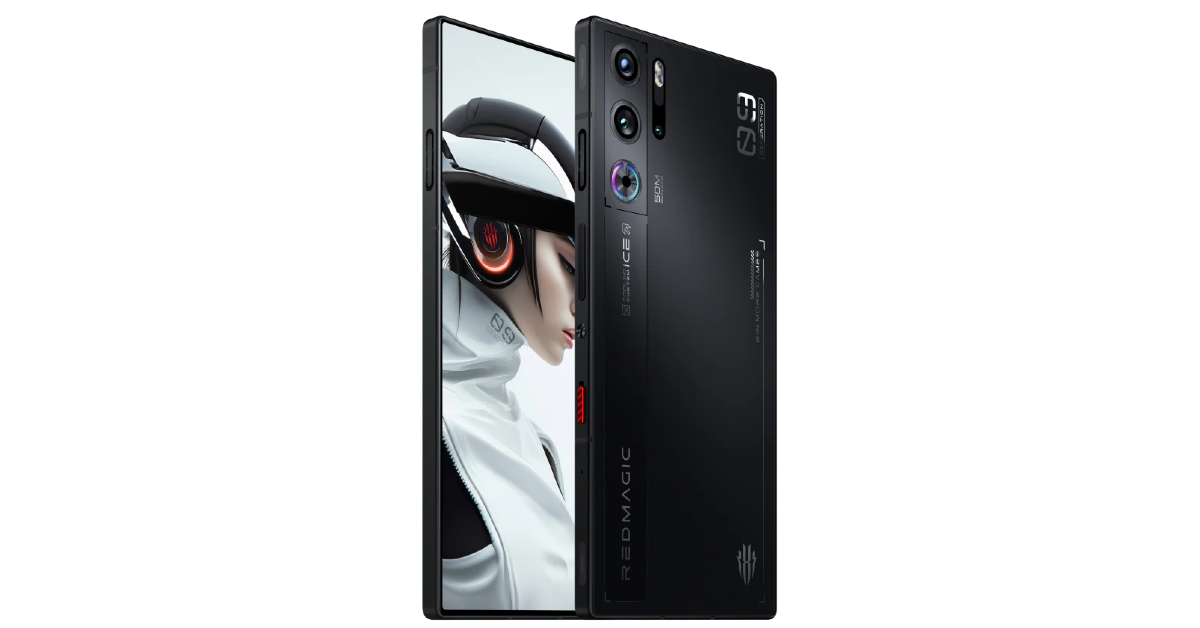
Gaming specialist Redmagic 9 Pro has a perfectly flat form factor, with no camera bumps jutting out of the rear panel. To maximise the gaming experience the smartphone offers a ‘true fullscreen’ display, meaning the selfie camera is tucked under the AMOLED panel. This diminishes the quality of the selfies, but if your main priority is getting a distraction-free display for gaming, you will relish this smartphone. The ICE 13.0 cooling system with a built-in cooling fan keeps the internal temperature of the device in check. Qualcomm’s flagship Snapdragon 8 Gen 3 chipset is an excellent choice for this smartphone. For gaming enthusiasts, the Redmagic 9 Pro is one of the best smartphones in the USA priced under $750.
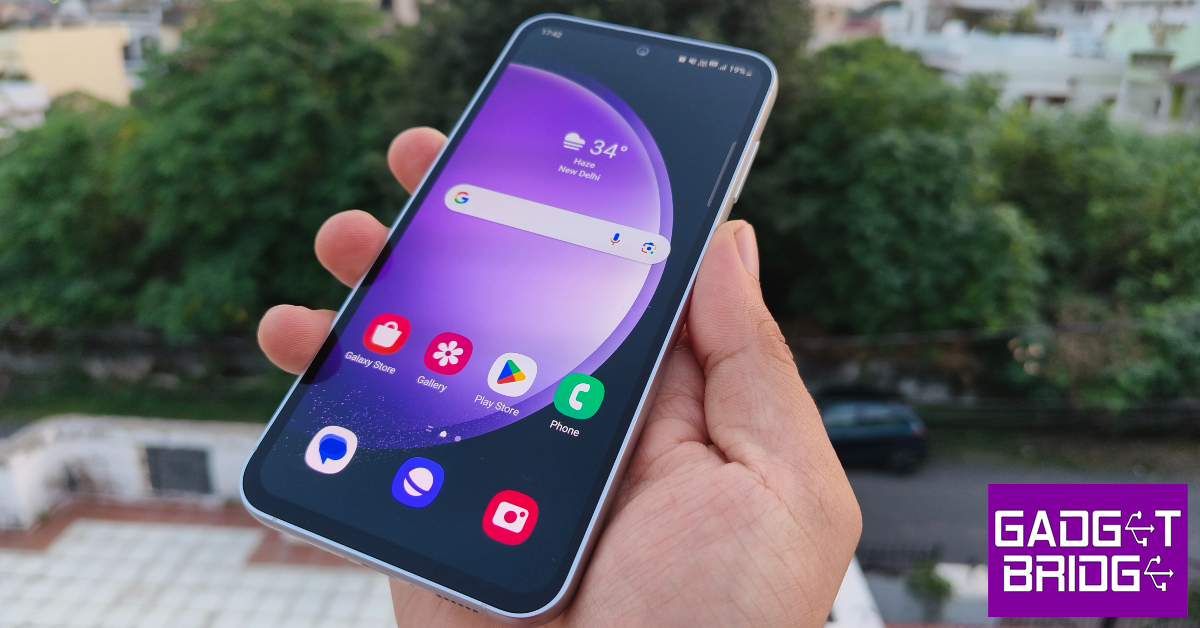
The Fan Edition variant of the Samsung Galaxy S23 series has all the makings of a great smartphone. It is one of the best smartphones you can buy for under $750 in the USA. The US version of the S23 FE holds a massive advantage in the form of the Snapdragon 8 Gen 1 chipset powering the device. International models of the smartphone are powered by Samsung’s in-house Exynos 2200 SoC which pales in comparison to Qualcomm’s 2022 chipset. The 6.4-inch Dynamic AMOLED 2X display works like a charm and is practically flagship grade. The vertical camera array comprising a 50MP primary shooter, an 8MP telephoto lens, and a 12MP ultrawide sensor produces great results as well. Read our full review of the smartphone to learn more.
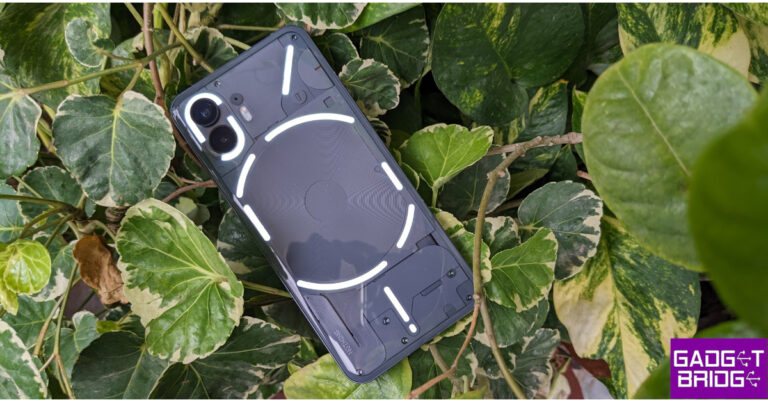
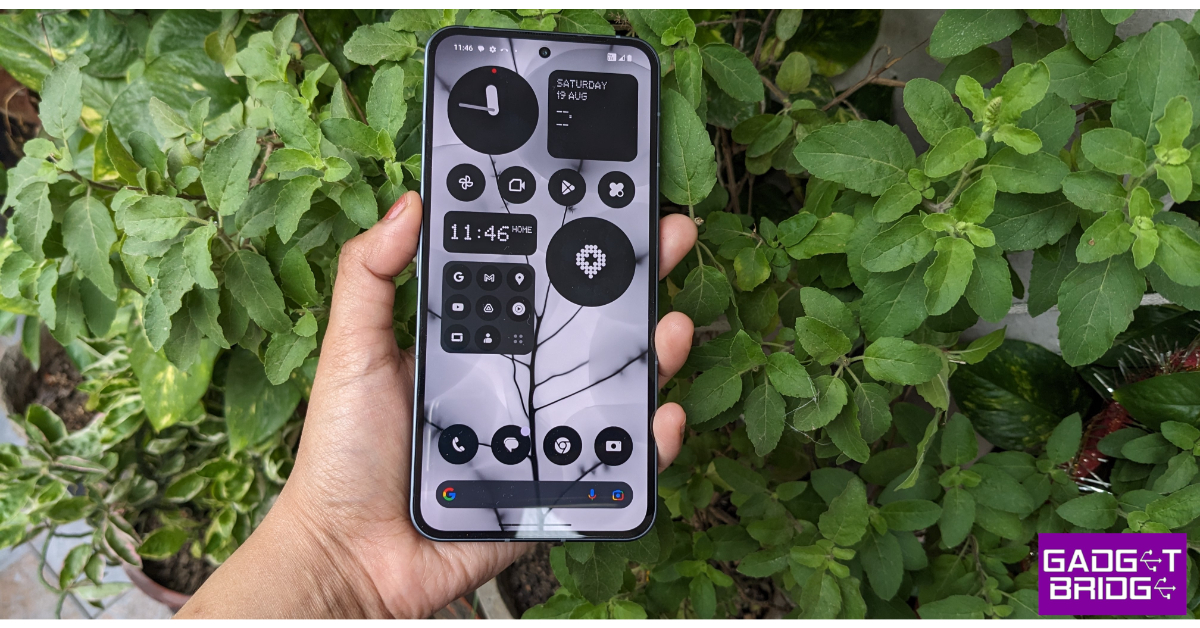
After bursting onto the scene with its debut smartphone in 2022, British tech outfit Nothing followed it up with the rock-solid Phone 2. Refining the Glyph design of the smartphone, Nothing added more functionality to it, letting users track their cab and other orders on the LED strip. Powering the smartphone is the Snapdragon 8+ Gen 1 SoC. The 6.7-inch LTPO OLED display is a great choice for the midrange device. Nothing also upped its software game on the Phone (2) with the release of the Nothing OS 2.5. Check out our full review of the smartphone here.Read Also:Top 5 Easy Ways to Stop Call Forwarding on Android and iPhone (2024)
Conclusion
These are the top 10 smartphones you can buy for under $750 in the USA. If you are willing to expand your budget to $799, you can get the newest iPhone 14 and Samsung Galaxy S24. Think we missed out on a smartphone that deserves to be on this list? Let us know in the comments!
Telegram users will be able to save bookmarks, media, and links efficiently in Saved Messages.
Users can also see a list of private chats, groups, and channels from which you’ve forwarded messages in the new View as Chats mode.
View-Once setting is now available for voice and video messages.
Instant messaging platform Telegram has rolled out a new update. The latest Telegram update has added 10 new features such as Saved Messages 2.0, One-Time Voice Messages and 8 more functionalities. The update is available for both iOS and Android users.The Telegram app got an upgrade that brought additional functionality to the platform. Saved Messages 2.0 is one of the more important features that the messaging service has received. All Telegram users have a chat called Saved Messages where they have notes, reminders, and messages that have been forwarded from other chats. But with the update, the users will be able to save bookmarks, media, and links in an efficient manner in Saved Messages. Additionally, users will be able to use the new ‘Saved’ option in Shared Media to access messages saved from any specific chat, see saved messages by chat or as a short list, and tag them.Users can also see a list of private chats, groups, and channels from which you’ve forwarded messages in the new View as Chats mode. Users can pin any of these chats to the top.To switch views, simply tap the title in your Saved Messages. You can also tap ⋮ / ⋯ and select ‘View as Messages’ or ‘View as Chats’ – in this case, Saved Messages will be shown in the selected mode the next time you open them.The Telegram Update has also added Tags to Saved Messages that will allow you to add several tags. By doing this one can swiftly filter them in Search, for even more organisation. You can add several tags to your Saved Messages, which will allow you to swiftly filter them in Search, for even more organisation.According to the company, adding a tag is as simple as adding a reaction because tags are based on emoji, tags can also have names. Already, all Telegram Premium users have access to tags. To search in your Saved Messages, tap the 🔍 icon in the top corner. Your tags will appear under the search bar – simply tap to filter your search by that tag.You can quickly access images, links, music, and more in chats, groups, and channels in the shared media section. But as per the new Telegram update any messages from that chat that you’ve forwarded to your Saved Messages are also included in the new “Saved” tab.The upgrade has also improved searching in all chats, and now it’s easier to navigate your search results and view them as a compact list. Moreover, the View-Once setting is now available for voice and video messages. To record a view-once message, hold down and then swipe up to lock recording, then tap the view-once icon before sending.Also Read:OnePlus 12R to go on sale for the first time in India today: Sale offers detailsTelegram has also enabled the ability to pause and then resume recording later – instead of sending multiple messages while recording any voice or video message. To pause, swipe up to lock recording and tap the pause ⏸️ button. To resume recording, simply tap the microphone or camera icon again.Telegram has also enabled Read Time in private chats allowing users to see the exact time when your message was opened. Users have the option to hide the read status in the Privacy Settings. To protect privacy, read times in private chats are only visible for 7 days before being deleted – just like in groups. Besides this when your last seen or read time is hidden from someone also hides theirs from you. However, you may still view the last seen and read times of people who share them with you if you have Telegram Premium.Also Read: OnePlus Nord Buds 3 India launch soon, bags BIS certificationWith the latest Telegram update, Premium users can choose between having ‘Everyone’ or ‘My Contacts and Premium Users’ send them messages. When enabled, users without Premium or who are not in your contacts cannot initiate chats with you, but they can respond if you message them first.
OnePlus 12R will go on sale via the OnePlus India website and Amazon India.
The company has announced exciting launch offers on the purchase of the phone.
The customers will also get OnePlus Buds Z2 worth Rs 4,999.
The OnePlus 12R is the new smartphone that the company has introduced in India recently alongside OnePlus 12 and OnePlus Buds 3 in India. The device is a gaming smartphone that is scheduled to go on sale in the country for the first time today. The Qualcomm Snapdragon 8 Gen 2 SoC powered the phone. It features a 1.5K AMOLED screen that supports up to 120Hz adaptive refresh rate. Additionally, the device houses a 5,500mAh battery with 100W SuperVOOC fast charging support.
OnePlus 12R price in India, sale details
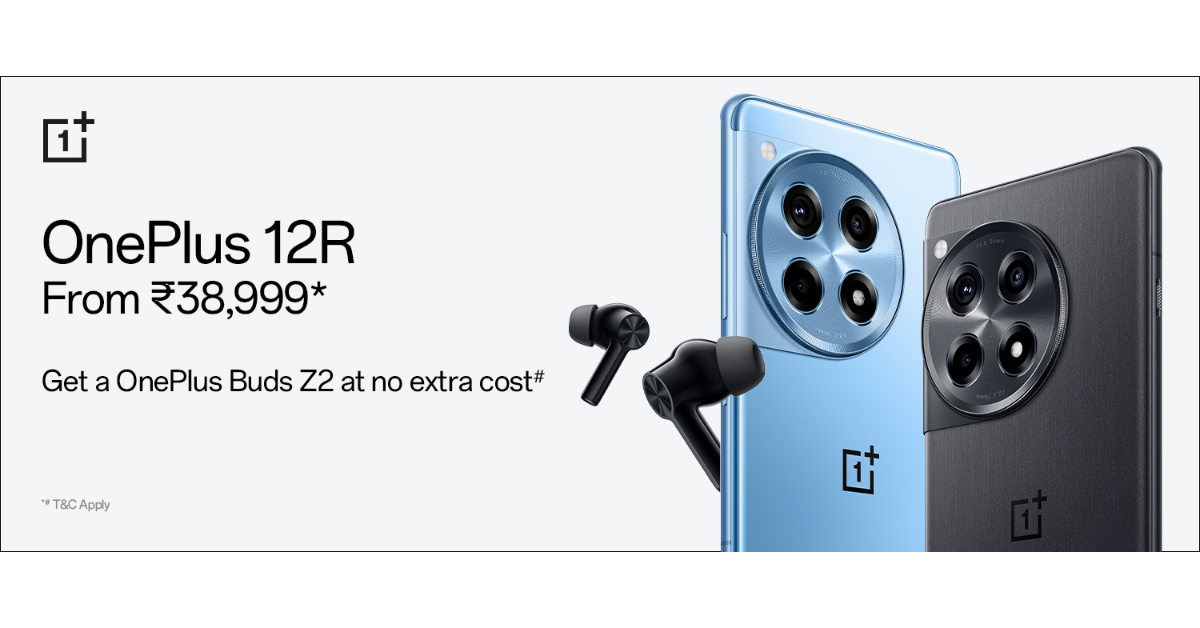
The latest gaming-centric phone- the OnePlus 12R will be available for purchase from today onwards. The device’s sale will open at noon. OnePlus India website and Amazon India will sell this phone. The OnePlus 12R has been launched at a starting price of Rs 39,999 for the 8GB RAM with 128GB storage and Rs 45,999 for the 16GB RAM with 256GB storage. The handset will be available in two colourways Iron Gray and Cool Blue.Customers who buy this smartphone during the sale will also receive a significant discount. The buyers are eligible to receive a Rs 1,000 discount when purchasing OnePlus 12R via ICICI Credit Card or OneCard.Apart from this those who place their orders for the device within the first 12 hours of its sale will receive the OnePlus Buds Z2 valued at Rs 4,999. Customers purchasing the 12R can avail of benefits worth INR 2,250 on Jio Plus. Buyers will get a free trial of Google One for 6 months & YouTube Premium for 3 months. Consumers can also buy the OnePlus 12R with OnePlus Easy Upgrades and get 35% assured value at the end of the 24 months. Shoppers can also avail of a 6-month no-cost EMI through ICICI credit/debit card EMI and OneCard EMI. The device can also be bought with OnePlus Easy Upgrades and get 35% assured value at the end of the 24 months.Also Read: Vivo T2 5G, Vivo Y27 4G price in India dropped
OnePlus 12R Specifications
The OnePlus 12R features a 6.78-inch Oriental AMOLED LTPO display with 1,264×2,780 pixels of resolution. The OLED screen supports up to 120Hz adaptive refresh rate, 360Hz touch sampling rate and 2160Hz instant touch sampling rate. The display also has 4,500 nits peak brightness and comes with Corning Gorilla Glass Victus 2 protection. Under the hood, there is an octa-core 4nm Snapdragon 8 Gen 2 SoC, along with an Adreno 740 GPU. The device comes with up to 8GB of LPDDR5x RAM options and 256TB UFS 4.0 storage.The triple rear camera setup on the phone includes a 50-megapixel Sony IMX890 primary sensor with an f/1.8 aperture and OIS, an 8-megapixel ultra wide-angle sensor with f/2.2 aperture and a 2-megapixel macro camera with f/2.4 aperture. The device sports a 16-megapixel front-facing camera with f/2.4 aperture for taking selfies.In terms of connectivity, there is 5G, 4G LTE, Wi-Fi 7, Bluetooth 5.3, Beidou, GLONASS, Galileo, GPS, and NFC. Additionally, there is an accelerometer, e-compass, gyroscope, gravity sensor, geomagnetic sensor, IR control, light sensor, colour temperature sensor, proximity sensor, and X-axis linear motor.Also Read:OnePlus Nord Buds 3 India launch soon, bags BIS certificationThe stereo speaker setup on the phone supports Dolby Atmos.OnePlus 12R is backed by a 5,500mAh battery with 100W SuperVOOC fast charging support. The OnePlus 12R has the iconic OnePlus Alert Slider in its new home on the phone’s left.
Garena Free Fire is a battle royale game with regular awards and tournaments to keep players interested. If you play Garena Free Fire, you should be aware of the redeem codes that are released on a daily basis. However, because the battle royale game is banned in India, players from other countries can use the Free Fire Redeem codes daily. If you’re unfamiliar with the Garena Free Fire redeem codes or don’t know how to get them, we’ve put together a step-by-step guide to help you redeem them. Check out Garena Free Fire Redeem Codes for 6 February 2024.The Free Fire redeem codes are a great way to get free stuff. These are 12-digit codes that contain alphabets and numbers, as well as an expiration date and time. Because the Garena FF redeem codes cannot be used more than once, you should hurry to the redemption page to claim your free reward before someone else does. To get a free reward, all you have to do is go to reward.ff.garena.com/en, which is the official redemption page. Also, keep an eye on this space for daily updates on Garena Free Fire redemption codes and rewards.Also Read: Sennheiser Accentum Plus wireless headphones with Hybrid Adaptive Noise Cancellation launched
Garena Free Fire Redeem Codes Today 6 February 2024
Call forwarding works pretty much the same on Android and iOS devices. You can turn it on from dialer settings or by sending a code to the network provider. If you’re embarking on a trip where you expect your phone to be out of service, you may want to forward your calls to another phone number. But what happens when you come back and want your phone number to receive calls again? Here are the top 5 ways to stop call forwarding on Android and iPhone.Read Also:Poco X6 Review: Does it have the X factor?
Conditional Forwarding vs Unconditional Forwarding: What’s the difference?
Before you disable it, you need to know the kind of call forwarding that is activated on your number. Call forwarding can belong to one of two categories – Conditional and Unconditional. As the name suggests, conditional forwarding works selectively, only when the underlying conditions are met. Phone calls to your number will be forwarded to another number only when your line is busy, unavailable, or unanswered. If you’re about to catch a flight, you may want to enable conditional forwarding for your number.Conversely, unconditional forwarding relays incoming calls to another number without taking your line’s status into consideration. Even if your phone is switched on and receiving optimum network coverage, unconditional forwarding will connect the calls to another number. You should use this when you are away from your phone and want the calls to be relayed to someone else’s number.
Stop Unconditional Call Forwarding on iPhone
Step 1: Go to Settings and select Phone.Step 2: Tap on Call Forwarding.Step 3: Turn off the toggle switch.
Stop Unconditional Call Forwarding on Android
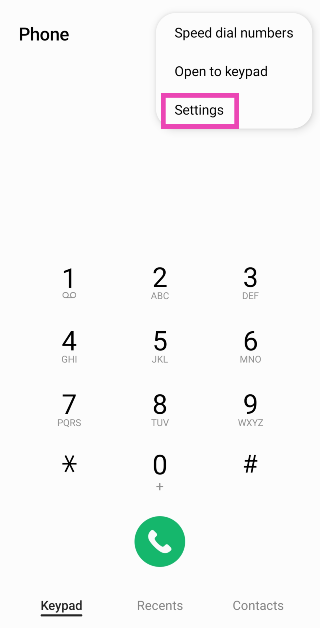
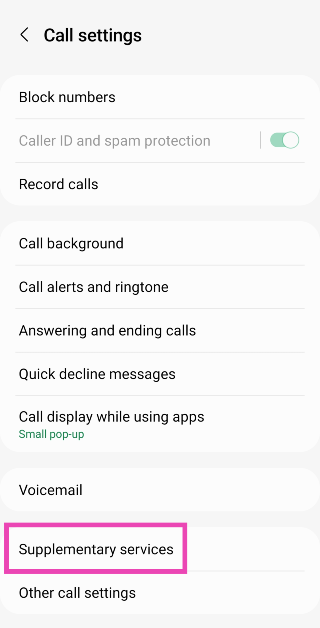
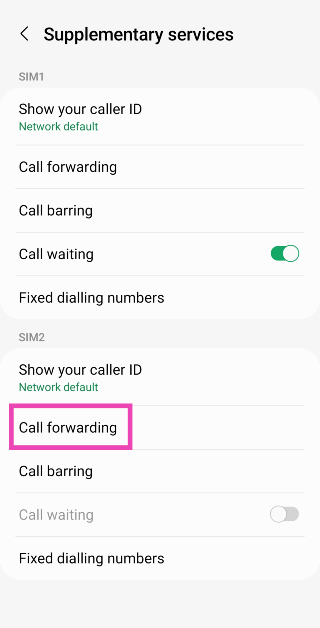
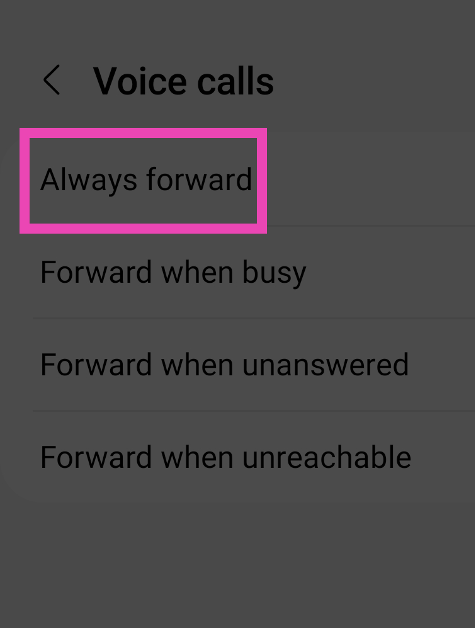
Step 1: Launch the dialer app on your smartphone.Step 2: Hit the ellipses at the top right corner of the screen.Step 3: Tap on Settings.Step 4: Scroll down and select Supplementary services.Step 5: Tap on Call forwarding.Step 6: Tap on Always forward and select Never.
Stop Call Forwarding using the Google Dialer on Android
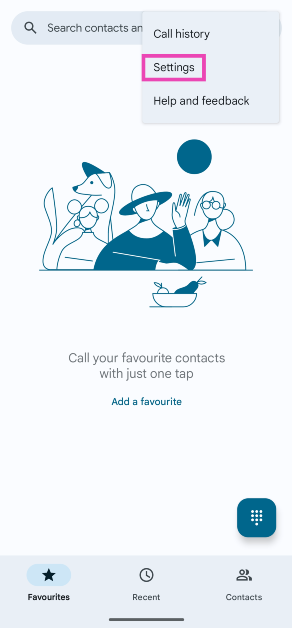
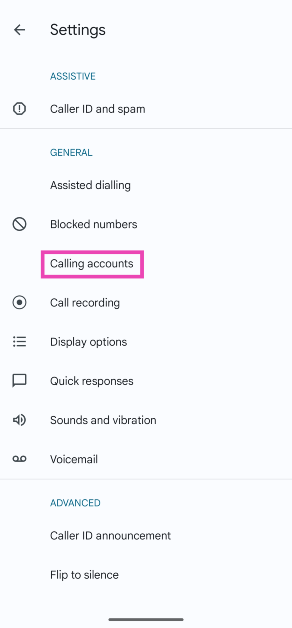
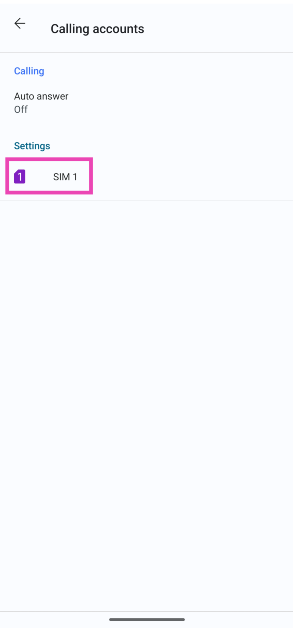
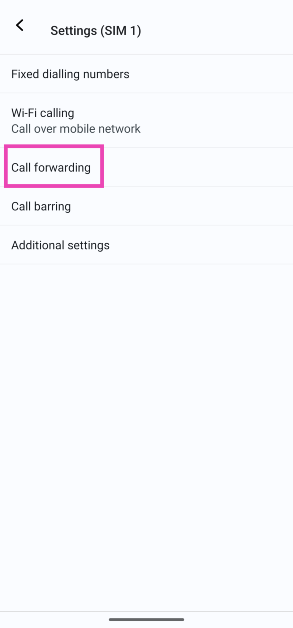
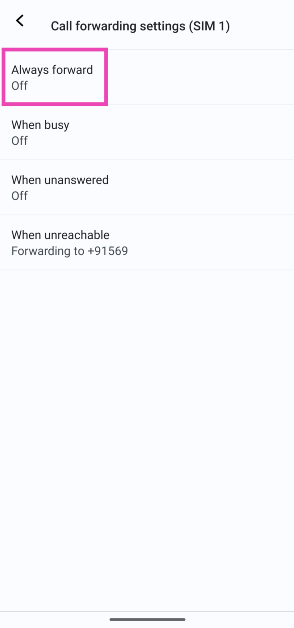
If you use the Google Dialer on your smartphone, follow these steps to disable call forwarding.Step 1: Launch the Google Dialer on your phone and hit the ellipses at the top right corner of the screen.Step 2: Tap on Settings.Step 3: Select Calling accounts.Step 4: Select the SIM for which you want to disable call forwarding.Step 5: Tap on Call forwarding.Step 6: Tap on Always forward and select Off. To turn off conditional forwarding, disable the other options as well.
Stop Conditional Call Forwarding using dialer code (iPhone and Android)
Step 1: Launch the dialer app on your smartphone.Step 2: Dial ##004#. This code may vary among different network providers.Step 3: Hit the Call button.Conditional call forwarding will be disabled for your number.
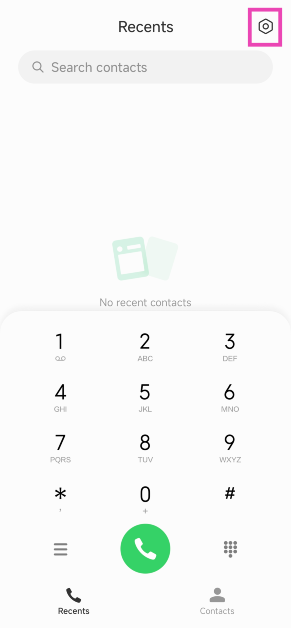
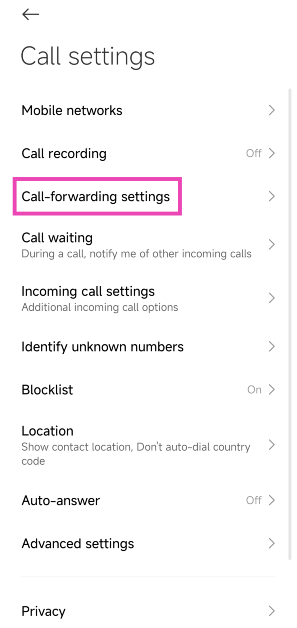
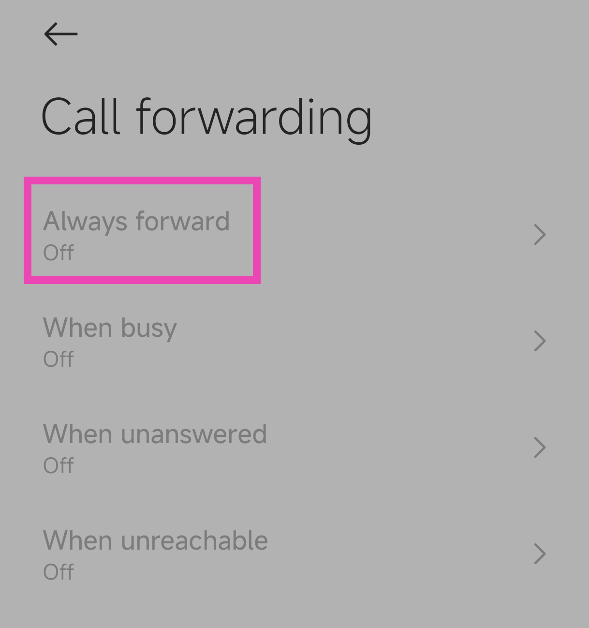
Bonus Tip: Stop Call Forwarding on a Xiaomi smartphone
Step 1: Launch the native dialer app and hit the Settings icon at the top right corner of the screen.Step 2: Tap on Call-forwarding settings.Step 3: Tap on Always forward and select Off.
Frequently Asked Questions (FAQs)
How do I turn on Call Forwarding for my Airtel number?
Dial **21* followed by the phone number to which you want to forward your calls. You will receive a confirmation message after a few seconds.
How do I turn off call forwarding on Android?
Go to Phone>Settings>Supplementary services>Call forwarding and select ‘Never’ to turn it off.
These are the top 5 ways to stop call forwarding on Android and iPhone. Make sure you are using the default dialer on your phone while carrying out this process. If you know any other way to accomplish this task, let us know in the comments! Check out this article to learn how to change your voicemail greeting on Android. This article lists 2 ways to do the same on an iPhone.
OnePlus Nord Buds 3 will succeed the OnePlus Nord Buds 2 that were launched last year.
The device will come with a revamped design.
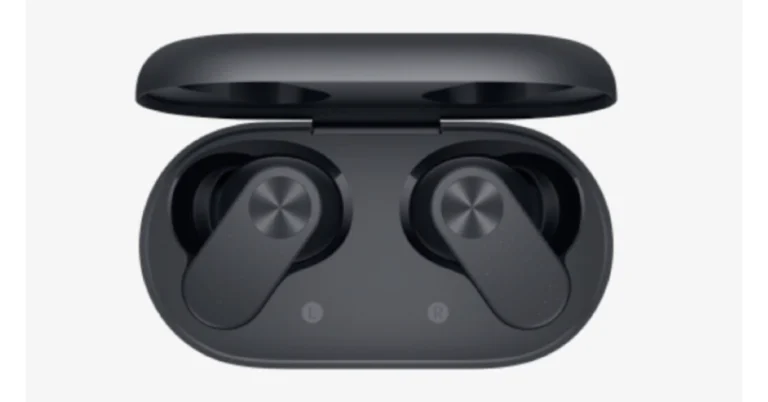
OnePlus Nord Buds 3 will debut in India soon. According to a new leak the device has bagged BIS certification. Previously CAD renders of the TWS earphones were also leaked. According to rumours, the audio device will come with a new design. The earphones’ half-in-ear form and the charging case’s oval shape are suggested by the renders.According to a report, the OnePlus Nord Buds 3 has been listed on the Bureau of Indian Standards (BIS) website. The listing suggests that the device will be coming to India soon. It bears model number E512A.The company has not yet disclosed the OnePlus Nord Buds 3 earphones launch date, but before the announcement the audio device’s CAD renders also appeared on the web. The purported render displays the charging case and black earphones. The design reveals an oval-shaped earphone case with the OnePlus logo on the front. The cover seems to have a matte finish on the remaining side and a glossy lid on top. The earphone features a half-in-ear design rumoured to have touch controls for controlling music, volume, answering and rejecting calls, and more.OnePlus Nord Buds 3 will succeed the OnePlus Nord Buds 2 which was launched last year in April.OnePlus Nord Buds 2 has a capsule-shaped charging case and the design and in-ear design earbuds are touch sensitive and offer customisable controls and shortcuts that can be controlled via the HeyMelody app. The earphones are IP55-rated for dust and water resistance.Also Read:Vivo T2 5G, Vivo Y27 4G price in India droppedOnePlus Nord Buds 2 are equipped with 12mm drivers with a master equalizer with choices for balanced, serenade, bold, and bass modes to deliver user-specific audio output. The OnePlus Nord Buds 2 comes with Bluetooth 5.3 which supports both SBC and AAC codecs.The OnePlus Nord Buds 2 also offers Active Noise Cancellation with 25dB depth and a dual-core processor that cancels out unwanted environmental noises. The dual mic system and the Enhanced Clear Call function on these TWS work together to amplify speech sounds during an audio or video call.Also Read: Nothing Phone 2a India availability confirmed, renders leakedOnePlus Nord Buds 2 comes with a price tag of Rs 2,999. It comes in two colour options of Lightning White and Thunder Gray. The device is available for purchase via both the OnePlus store and Amazon in the country.
Vivo T2 5G, and Vivo Y27 4G are now available in India at reduced pricing.
Both the phones have received a price cut.
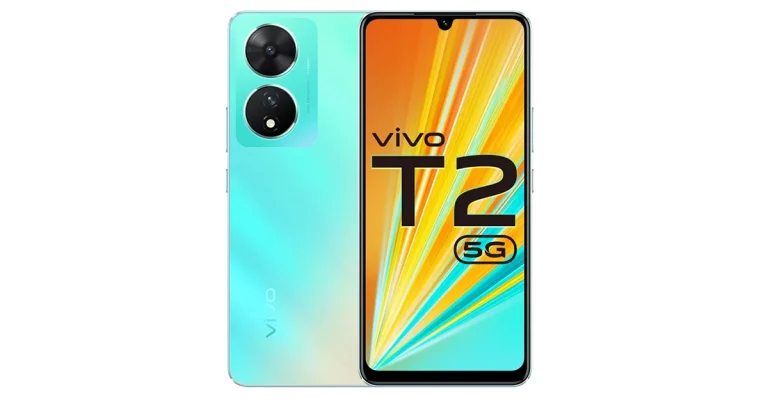
Vivo T2 5G, and Vivo Y27 4G have become affordable. Now both smartphones are seeing a price cut. The former was launched in April while the latter one in July last year. Vivo T2 5G comes with a 6.38-inch AMOLED display with 90Hz refresh rate. It is powered by a Snapdragon 695 SoC. On the other hand, Vivo Y27 includes an FHD+ sunlight display along with a 2.5D glass body design.Vivo T2 5G is currently selling at a reduced price of Rs 15,999 and Rs 17,999 for the 6GB RAM with 128GB storage and 8GB RAM with 128GB storage variants respectively. On the other hand Vivo Y27 4G is currently available at Rs 11,999 for the 6GB RAM with 128GB storage variant after a price cut. The company is also offering a cashback of up to Rs 1,000 if the transaction is made via SBI, Yes Bank, IDFC First Bank, Bank of Baroda, DBS Bank, Federal Bank, and IndusInd Bank cards.
Vivo T2 5G specifications
Vivo T2 5G runs on Android 13-based Funtouch OS 13. It features a 6.38-inch AMOLED display with a refresh rate of 90Hz and a 360Hz touch sampling rate. It is powered by a Snapdragon 695 SoC. The device includes a dual rear camera setup that includes a 64-megapixel primary sensor and a 16-megapixel sensor. The phone packs a 4500mAh battery, with 44W fast charging support.
Vivo Y27 specifications
The Vivo Y27 has a 6.64-inch FHD+ LCD Sunlight display with a resolution of 2388 1080 pixels. The screen’s maximum brightness is 600 nits. It runs on FunTouch OS 13 based on the Android 13 operating system. A MediaTek Helio G85 chipset and its Extended RAM 3.0 functionality, which adds 6 GB of RAM powers the phone.Also Read:Nothing Phone 2a India availability confirmed, renders leakedThe smartphone features dual rear cameras: a 50 MP primary camera and a 2 MP bokeh camera. It has a variety of camera functions, including Bokeh Flare Portrait, Super Night Mode, and Super Night Selfie Mode. It has an 8 MP front camera with the Aura Screen Light function for selfies, ensuring sharp, high-resolution selfies in any setting.Also Read:Vivo Y200 5G now comes in a new 256GB storage variant: Price in IndiaA side fingerprint scanner is included with the Vivo Y27 for improved security and quick unlocking. It includes a 5000mAh battery and a quick 44W FlashCharge. With fast charging capabilities, thorough 24-dimension Security Protection, and anti-scald protection, the vivo Y27’s AI-powered safe charging avoids overcharging, increases battery life, and ensures worry-free nighttime charging.
The Nothing Phone 2 is expected to launch in India later this month.
The device will feature a dual rear camera setup.
The phone is expected to be powered by MediaTek Dimensity 7200 SoC.
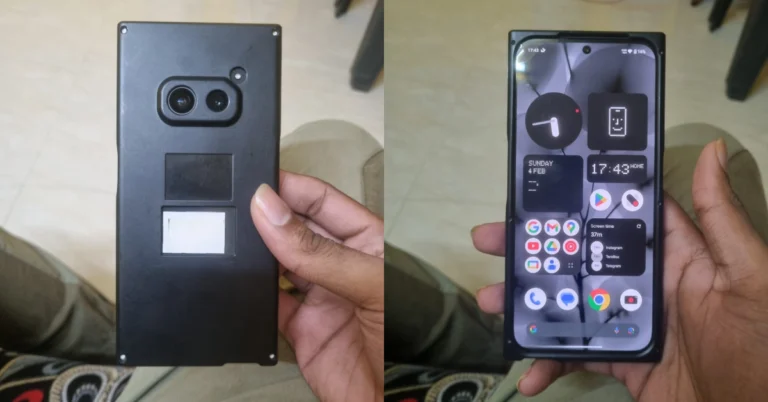
Recently Nothing confirmed about its next product launch which is Phone 2a. The device is also confirmed to launch in India. To tease the India launch the event page went live on its India website. Now the company has revealed the availability details of Nothing Phone 2a. Also, the phone’s renders have been leaked ahead of the official launch.Nothing has officially teased the availability of Nothing Phone 2a by listing it on Flipkart. The dedicated microsite has confirmed India’s availability which says coming soon. In addition to this, the listing is carrying a Nothing community update video featuring co-founder and marketing lead Akis Evangelidis. The exact launch date, time and other key details are not mentioned on the home page. The company will be hosting a Nothing to See event that will take place on February 27 during the MWC 2024 where it is expected to launch the Nothing Phone 2a.Besides this tipster, Abhishek Yadav has shared Nothing Phone 2A hands-on images via Reddit user. The pictures, which display the phone’s front and back with a privacy cover suggest a distinct design aesthetic from that of existing Nothing Phones. The black colour variant has been leaked with a dual rear camera setup. The rear cameras are positioned horizontally at the centre. The front panel with a hole punch camera in the middle of the display.Earlier Nothing Phone 2a was spotted listed on the TUV certification website with model number A142. The listing suggests, the Nothing Phone 2a will come with a 45W charging speed. It will also get USB Power Delivery (PD) standard support, which means that the Nothing Phone 2a should be able to be charged using any USB PD-compliant charger. Earlier the upcoming handset also appeared listed on the Bureau of Indian Standards(BIS) site.As per a leak, the Phone 2a is likely to come in Black and White colour options and in two different configurations: 8GB of RAM with 128GB storage and 12GB RAM with 256GB of storage. The phone’s price is speculated below EUR 400 (approx Rs 36,800).Also Read:Vivo Y200 5G now comes in a new 256GB storage variant: Price in IndiaReportedly the handset is speculated to feature a 6.7-inch AMOLED display manufactured by BOE and Visionox under the product number rm692h5. The screen is expected to have 1,084 x 2,412 pixels of resolution. The display may also support a refresh rate of 120Hz. The phone is slated to be powered by a MediaTek Dimensity 7200 chipset.Also Read:Google rolled out new generative AI features for Google MapsAdditionally, the mobile is rumoured to come with a dual rear camera setup that may include a 50-megapixel Samsung S5KNG9 1/1.5-inch main sensor and the 50-megapixel Samsung S5KJN1 1/2.76-inch ultrawide lens. The phone is anticipated to feature a 32-megapixel Sony IMX615 sensor on the front.
Last month, we reviewed the Poco X6 Pro and were highly impressed by its power-packed performance, clean design, and immaculate display. Now, we turn our attention to its non-Pro sibling, which is currently priced at Rs 22,000. There is a Rs 5,000 difference between the two variants. This brings up the most obvious question – is it worth paying the extra Rs 5,000 and going for the Pro variant? On paper, the biggest difference between the two smartphones is the chipset. The Poco X6 is powered by the Snapdragon 7 Gen 2 SoC while the Pro model houses MediaTek Dimensity 8300 Ultra. The latter proved to be a solid chipset that delivered a fast, snappy performance (read the full review here). Hoping to get a similar performance out of the Snapdragon chipset, we used the Poco X6 as our daily driver for a week – here is our review of the smartphone.Read Also:Top 5 Ways to Set Different Notification Sounds for Apps on Android
Poco X6 review: Design and Display
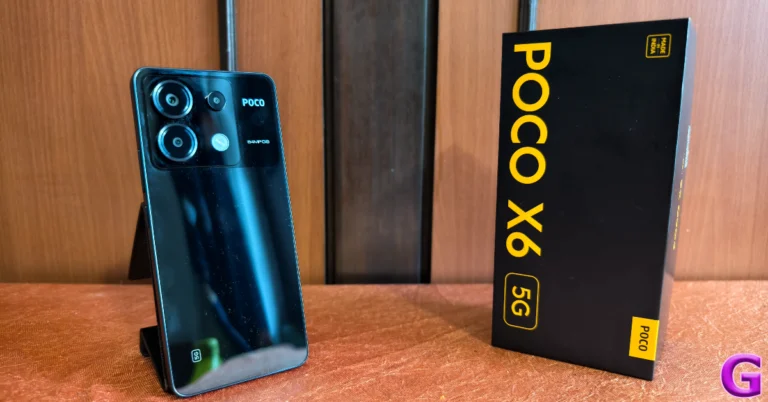
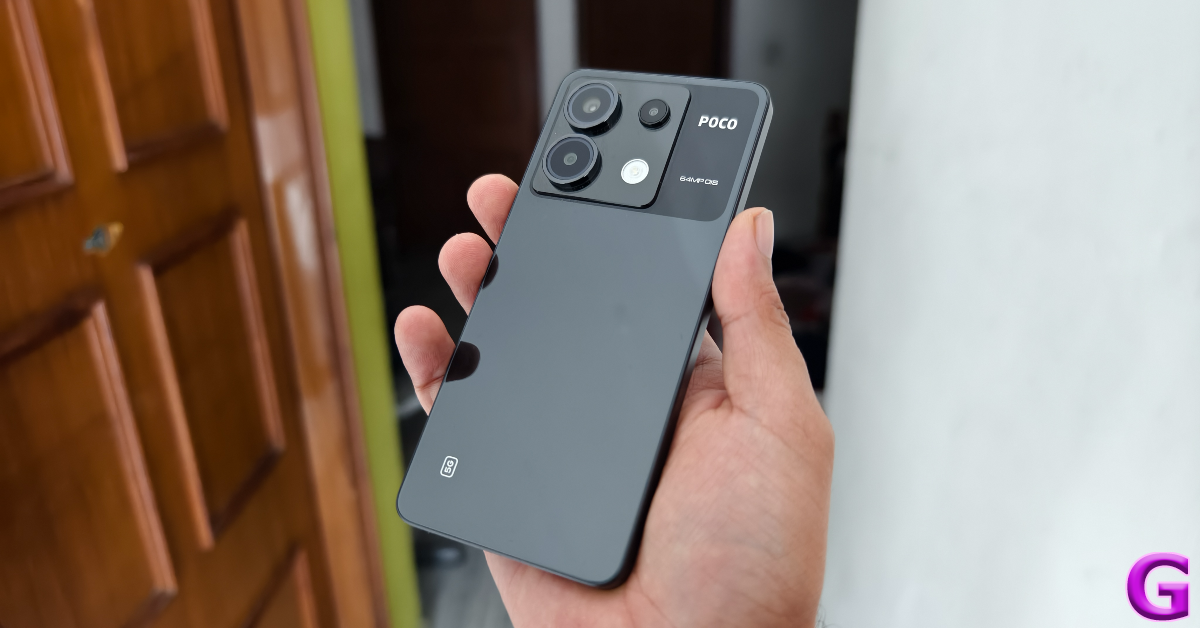
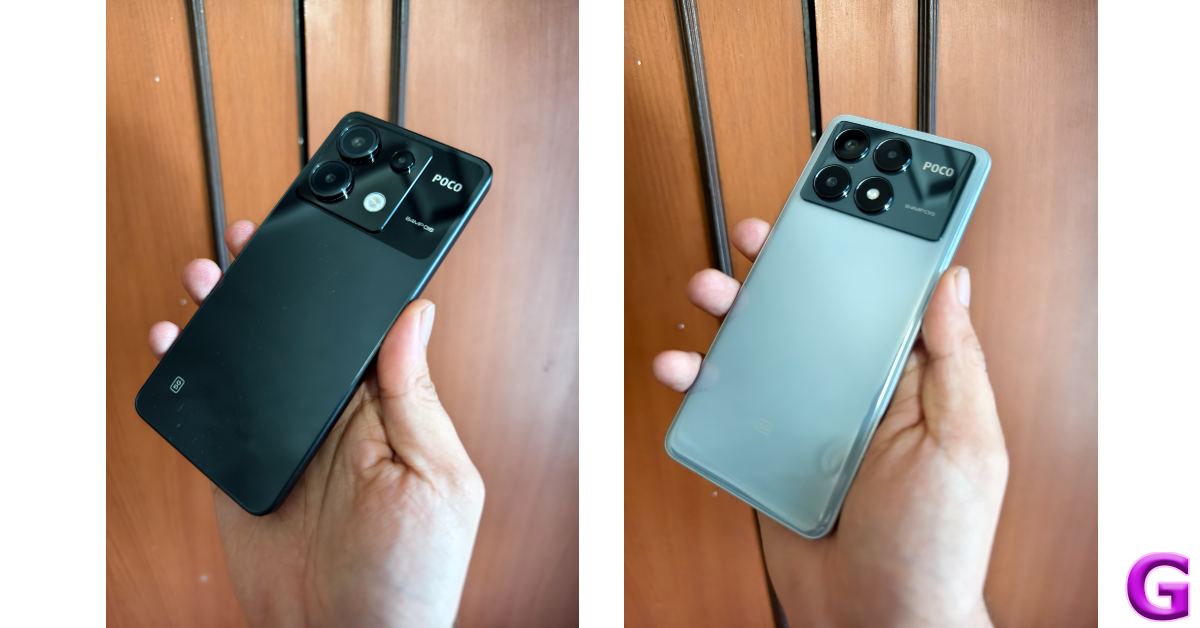
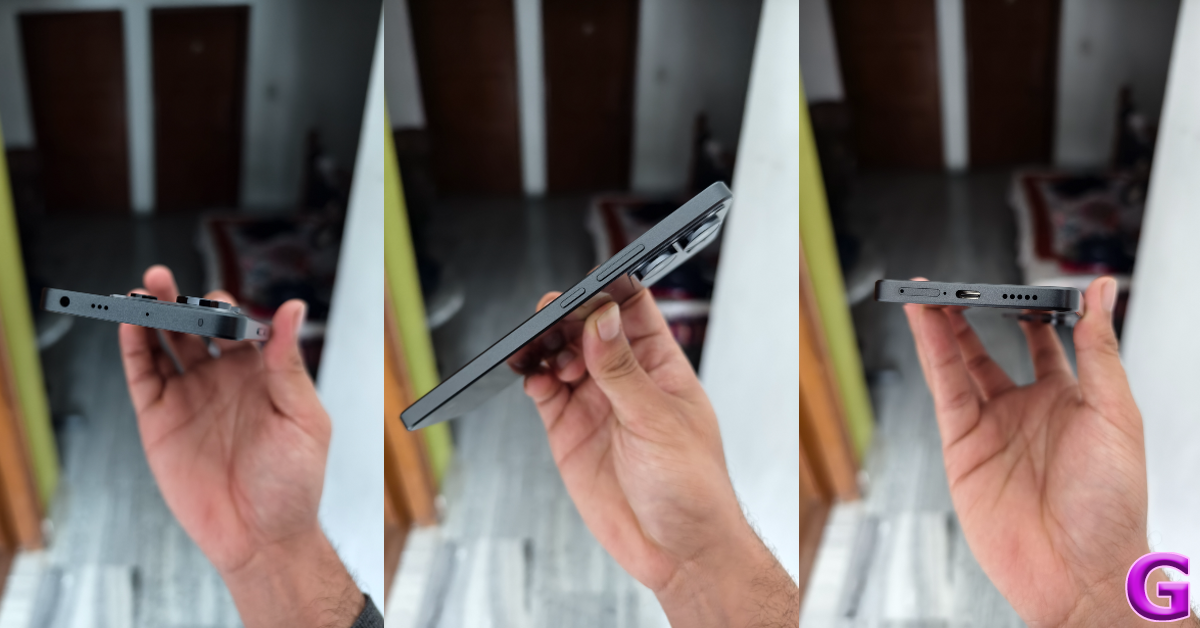
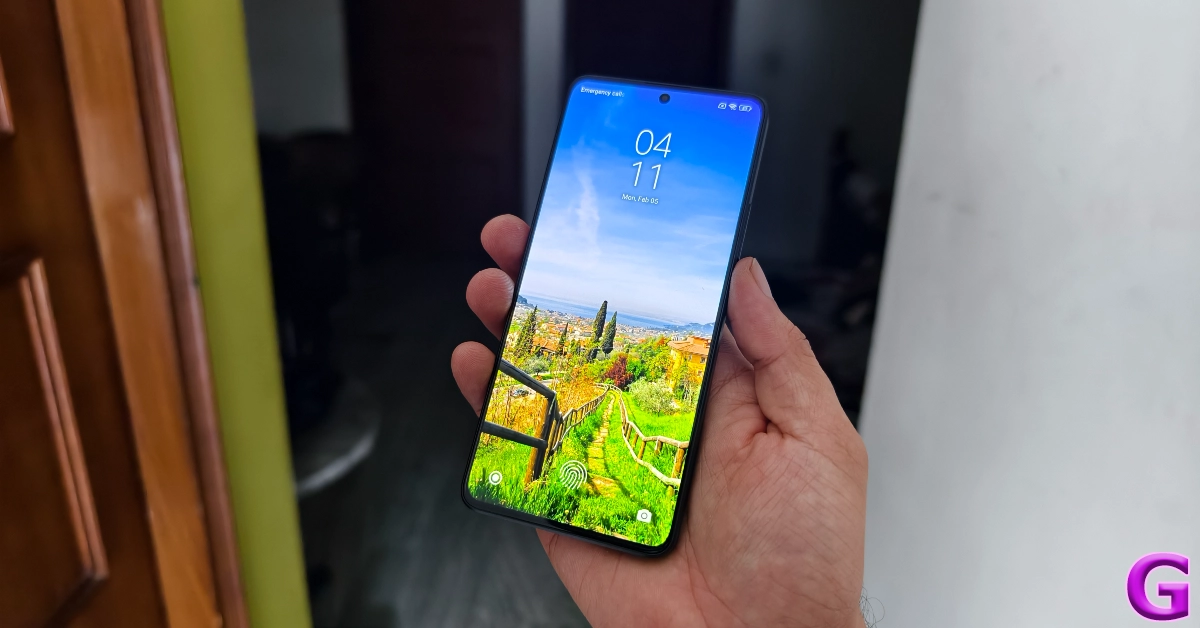
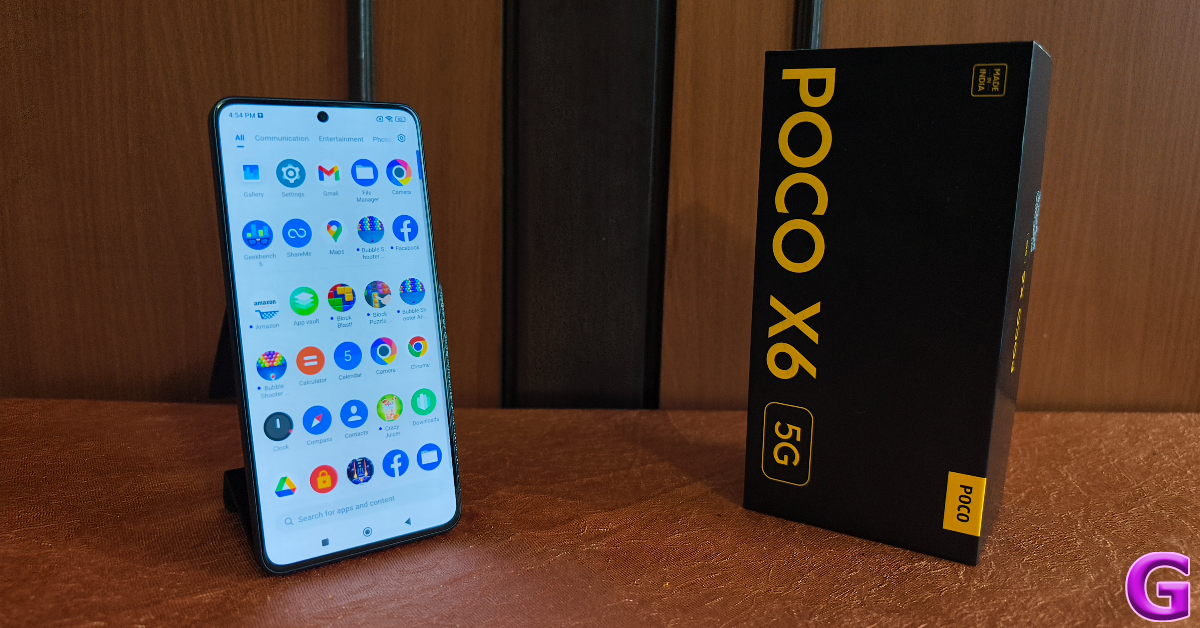
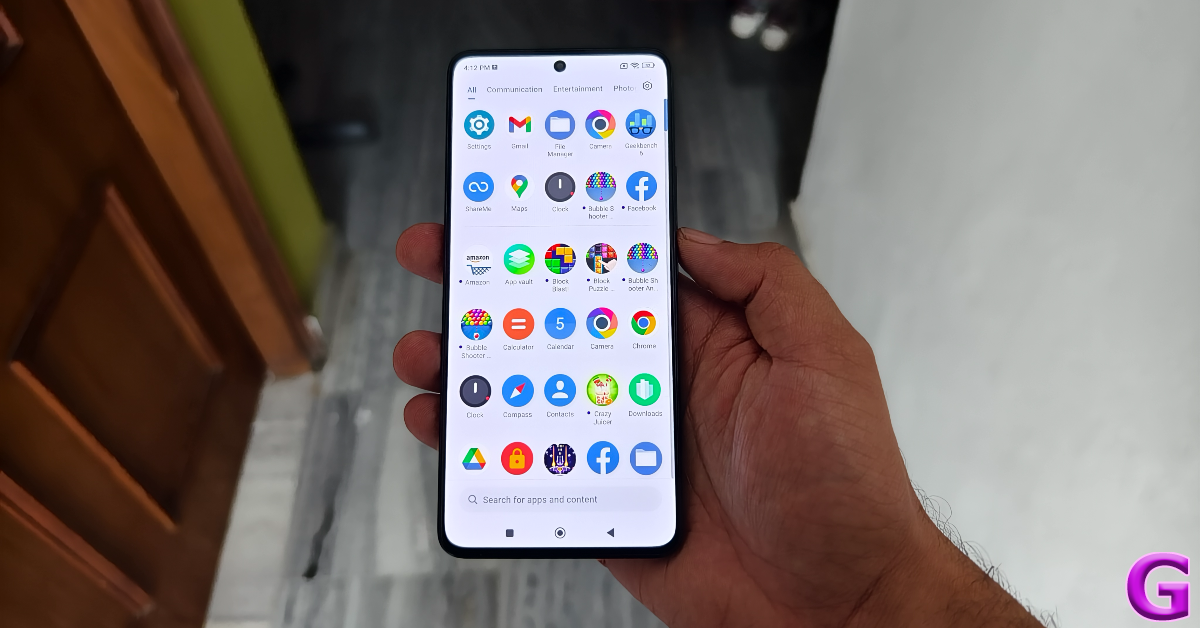
Inside the Poco X6 retail package, you get the smartphone, a 67W power adapter, a USB Type-C cable, an opaque plastic cover, a SIM ejector tool, and a quick start guide. The smartphone is available in two colour variants – Mirror Black and Snowstorm White.There are some key differences in the design of the two X6 variants. On the Pro model, the top portion of the back panel has a rectangular plastic panel for the camera module. The standard Poco X6 has a square panel. The Poco branding can be found to the right of this panel, surrounded by a black shade. The primary lens and ultrawide sensor are enclosed in big circular cutouts. The macro lens has a small plastic ring around it while the LED flash is integrated into the panel without a cutout.Poco X6 vs Poco X6 ProWe used the black colour variant of the Poco X6 for this review. The camera section of the rear panel is a darker shade of black. This dual-tone scheme on the Snowstorm White colour variant also looks very appealing. We liked the feel of the curved ‘glasstic’ back panel on the Pro variant, but the standard panel has a flat back which feels like ordinary plastic. It is extremely glossy and a fingerprint magnet like its elder sibling. The in-hand feel of the device is significantly diminished by the choice of materials and the flat design.On the right edge of the plastic frame, you will find the volume rocker keys and the power button. The SIM tray, primary microphone, USB Type-C port, and primary speaker grille are located on the bottom edge. Up top lie the 3.5mm headphone jack (missing on the Pro variant), a secondary speaker grille, a secondary microphone, and an IR blaster.Moving on, the 6.67-inch AMOLED display on the Poco X6 is surrounded by slim bezels on all four sides. These bezels get every so slightly thicker at the top and the bottom. The selfie camera is housed in a punch-hole cutout at the centre of the display. In direct sunlight, this panel can reach a peak brightness of 1,800 nits, as claimed by Poco. We did not face any issues while using the phone outdoors. The display was legible and offered optimum brightness under different conditions.The content viewing experience on the Poco X6 is also a delight. A screen resolution of 1,220 x 2,712p and Widevide L1 certification ensure that you can stream HD videos on the device across all the major OTT platforms. The colours produced by the display are vibrant and punchy. The images are bright and super detailed, leaving no stone unturned in bringing the ideal viewing experience. While the display has a maximum refresh rate of 120Hz, the media playback rate is capped at 60Hz.An IP54 rating for dust and water resistance means the Poco X6 can handle minor splashes of water but may face damage upon submersion. We did use the smartphone under light rainfall, and it was completely unfazed.Read Also:Google rolls out new generative AI features for Google Maps
Poco X6 review: Performance and Cameras
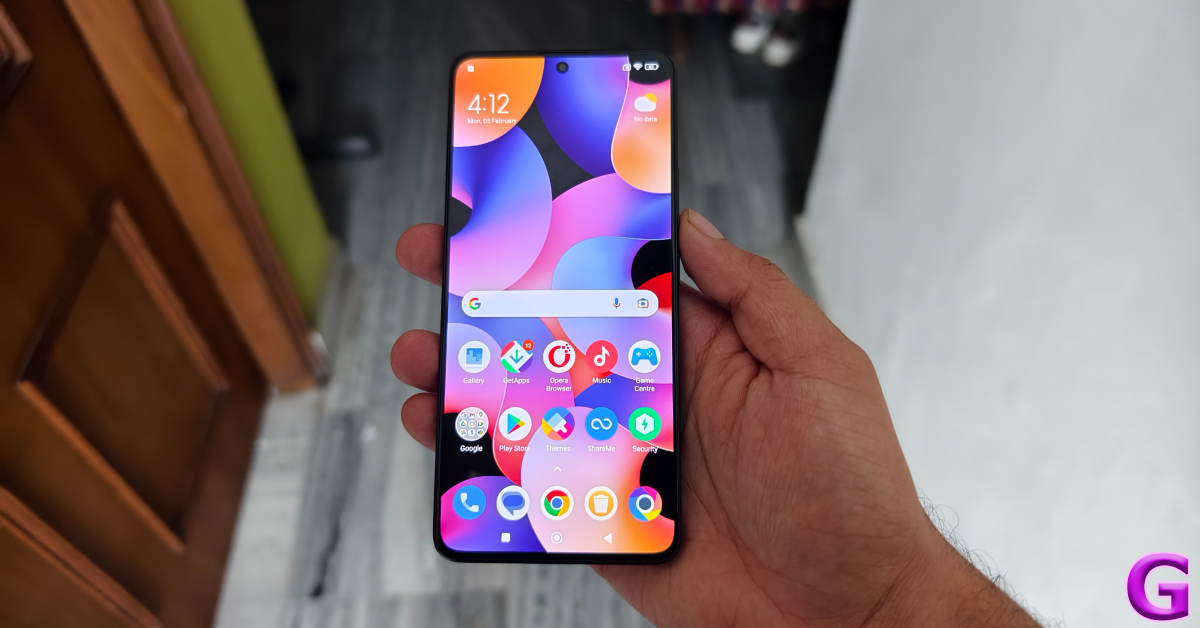
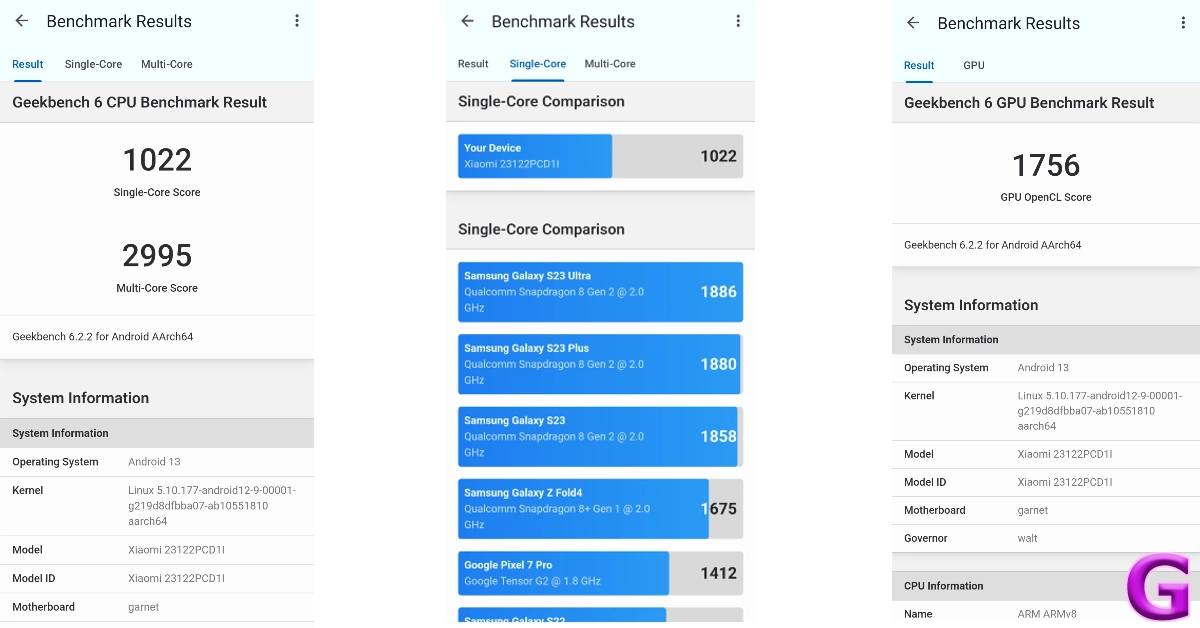
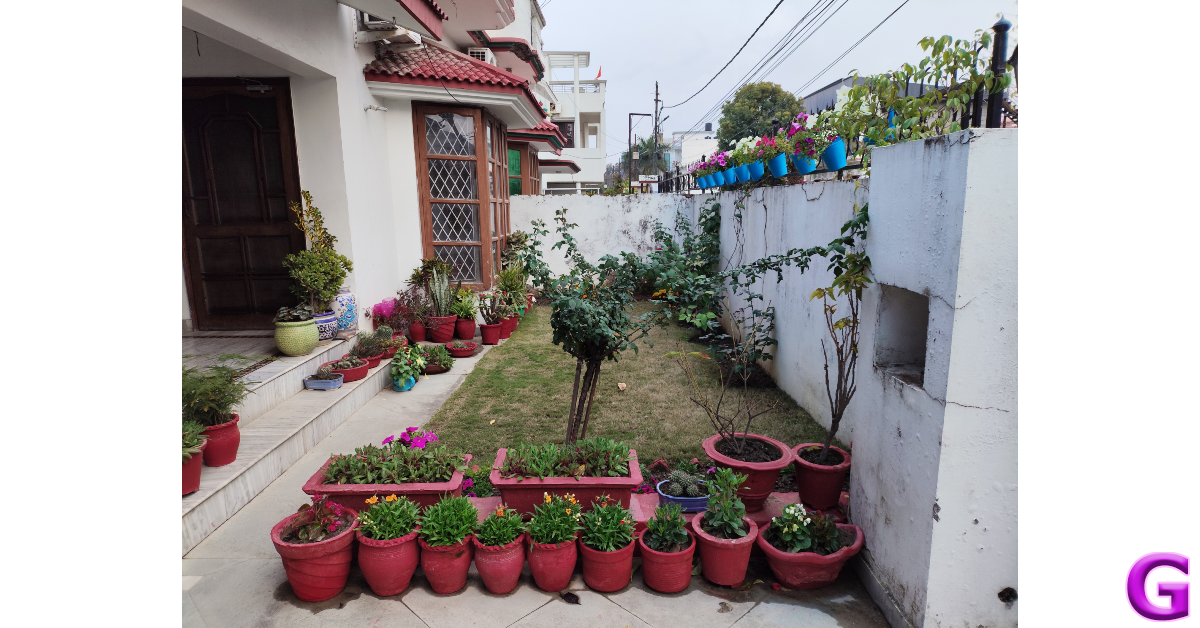
Under the hood, the Poco X6 packs the Snapdragon 7 Gen 2 SoC. It is available in two RAM and storage variants – 8GB + 256GB and 12GB + 512GB. The latter variant is priced at Rs 25,000. In the Geekbench 6 app, the smartphone scored 1,022 points in the single-core test and 2,995 points in the multi-core test. In comparison, the Poco X6 Pro scored 1,445 and 4,506 points respectively.For daily usage, the Poco X6 is a decent smartphone. We did not face any issues with multitasking or other power-intensive tasks. However, the Pro variant is marginally faster than the regular model. Even though the difference is minimal, it is noticeable. We tried loading the same apps on the two smartphones and the Pro variant (which is powered by the MediaTek Dimensity 8300 Ultra) beat the Poco X6 every time. This is something we expected from the faster chipset.Taking the Pro model out of the picture, the Poco X6 is a fine smartphone in its segment. Its amazing display offers a very fluid touch reception, making it very easy to browse through the apps and stay on top of your tasks. This smooth experience is something we enjoyed a lot on the smartphone. Even with half a dozen apps open in the background, the X6 does not miss a step in performance.We even tried a bit of gaming on the device and were pleasantly surprised by how well it handled titles like Call of Duty Mobile, BGMI, and EA Sports FC. After adjusting the graphics to a level below the highest settings, the gameplay was smooth and lag-free. There weren’t any unwanted jitters of any kind and the internal temperature of the smartphone did not rise to a concerning level even after 40 minutes of continuous gameplay.OS duties on Poco X6 are handled by MIUI 14. Its Pro sibling ships with HyperOS out of the box, which the standard model will also get in a future update. At the time of writing this review, HyperOS has not arrived for the X6 yet, but you can check out how it performed in our review of the Pro model. MIUI 14 is not our favourite Android skin, but there are certain aspects of the software experience where it rises among its peers. We like Xiaomi’s clever way of separating the notification shade and the quick settings menu. A swipe-down gesture from the left side of the screen pulls down the notification shades while a similar gesture from the right side reveals the quick setting menu. You can also swipe on either panel to access the other one.MIUI 14 also has a decent set of customisation options, although they are much more refined on HyperOS. The lock screen layouts and customisation options are very limited on MIUI 14. But what we do like is the integration of the hidden apps folder in the app drawer. Swiping twice on the app drawer lets you access all the hidden apps. One of the bigger letdowns of the OS is the tremendous volume of bloatware that comes with it. You’ll need to set aside some time to delete all the apps you don’t need on your device.The battery capacity of the X6 is slightly larger than the Pro model. The 5,100 mAh battery pack can be charged in under 50 minutes using the 67W power adapter provided in the box. During the review period, our daily usage consisted of tasks like instant messaging, voice and video calling, web browsing, navigation, media playback, and gaming, which left us with a 15-20% at the end of the day on the Poco X6.The rear camera panel on the Poco X6 houses a 64MP primary shooter, an 8MP ultrawide lens, and a 2MP macro lens. Images taken with the primary camera in outdoor daylight were vivid and detailed. We were happy with the depth and tone of the colours produced in the images. The dynamic range is close to ideal, and the phone does a good job of processing the contrast in the images. The quick shutter speed and efficient autofocus make the photography experience quite fun.In low-light conditions, the pictures can be a hit or miss depending upon the intensity of surrounding light. The night mode does a decent job of limiting the grain and noise in the images, but it is far from ideal. What we can say about this smartphone is that you won’t hesitate to take it out to take pictures at night. The quality of pictures exceeds the baseline expectation one might have from a phone in this price range.Ultrawide shotThe ultrawide camera also produces good results in daylight conditions. While there is a little softness to the pictures, we like that the colours were tuned very well. Typically, ultrawide sensors in this price range produce washed images. That is not the case here. However, in limited lighting, we would suggest sticking with the primary sensor.Ultrawide shotThe camera app also has a Portrait Mode which produces good results. The camera does a good job of separating the subject from the background and applying the appropriate blur. The edge detection can be a hit or miss and you may have to take multiple shots before landing on the result you want.Portrait ModeThe 16MP selfie camera takes good images in optimum lighting. We would have preferred if the images were a little more detailed and sharper. The good thing is that the phone doesn’t overcorrect the skin tone of the subject. This front-facing camera can record 1080p videos at 30/60fps. Meanwhile, the primary camera at the back can record 4K videos at 30fps.Read Also:Vivo Y200 5G now comes in a new 256GB storage variant: Price in India
Verdict
During our time with the device, Poco X6 proved to be a gritty performer that delivers on every front. Its stunning AMOLED display with ultra-slim bezels is great for watching video content across the board – be it movies or live sports. The Snapdragon 7 Gen 2 SoC handles everyday tasks without any hiccups. The primary camera is fun to play with, producing detailed images in a wide range of lighting conditions. At Rs 22,000 the X6 is a great deal. However, we can’t help but compare it to its Pro sibling. Splurging an extra Rs 5,000 fetches you a superior back panel and a snappier chipset, which is well worth the money.
One of the more underrated features of modern Android smartphones is notification management. Commercial apps are notorious for pushing promotional content disguised as notifications on your phone. Not only does this contribute to spam, but it can also be very distracting. What you can do is allow only certain categories of important notifications to filter through. If you want to focus on a particular task without being distracted, you can set up custom notification sounds for the most important apps on your phone. This makes it easier to ignore the notifications that don’t deserve your immediate attention. Today, we bring you the top 6 ways to set different notification sounds for apps on Android.Read Also:How to use Google Bard’s new AI image generator?
Can I make my own notification tone?
The great thing about using an Android device is the level of control you get over every aspect of your device. Every Android phone has an alert tone library that you can use to customise the notification sounds of any app. On top of that, you can install a third-party app like Zedge to explore more tones. Most of the tones on Zedge are free to download. If you’ve got a melody or hook stuck in your head, you can record it and set it as a notification alert tone as well!You can use the voice recorder app to capture a sample sound. If you want a cleaner cut, use a synthesiser or guitar simulator app to create the tone. Once the sample sound has been created, save it to your device’s library. To set it as a notification sound, you will need to edit it to the ideal length. You don’t want the alert tones on your phone to be longer than 2 seconds. Download the Ringtone Maker: Music Cutter app to trim the tone. Once it has been saved on your device, you can use it as a notification sound for any app on your device.
Set a different notification sound for apps using Settings
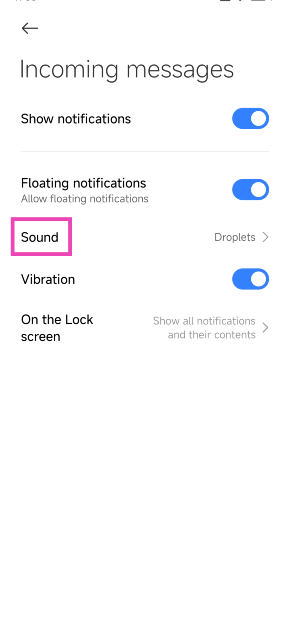
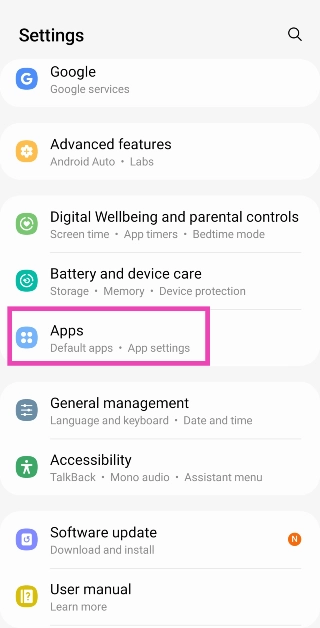
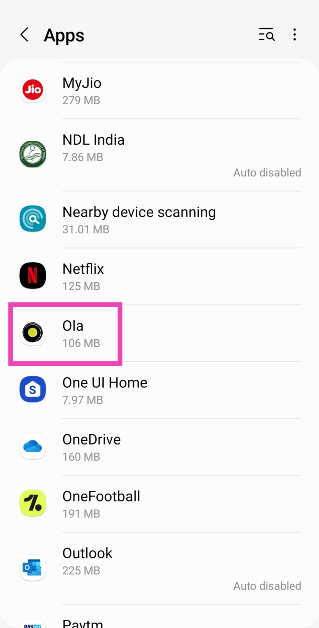
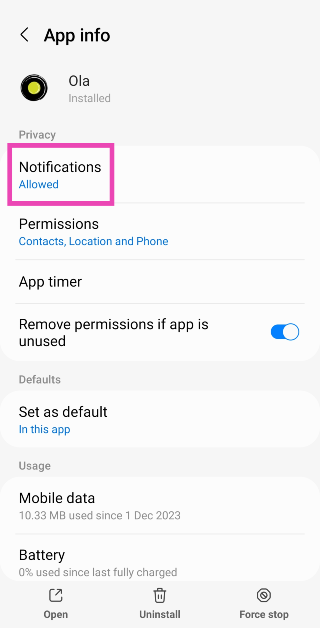
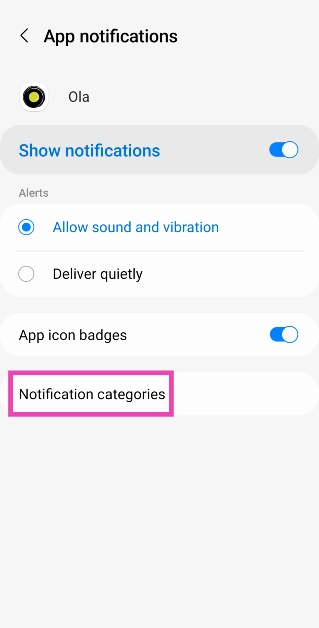
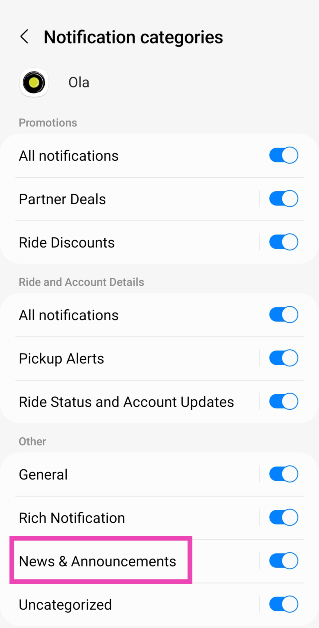
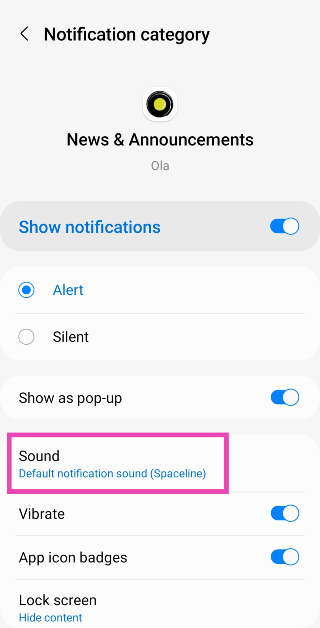
Step 1: Go to Settings and select Apps.Step 2: Select the app for which you want to change the notification sound.Step 3: Tap on Notifications.Step 4: Make sure the toggle switch for Show notifications is turned on and tap on Notification categories.Step 5: Notification categories will contain the kinds of notifications that the app pushes on your device. For a messaging app, this may be incoming texts, group texts, incoming calls, and more. Tap on the category for which you want to change the notification sound.Step 6: Tap on Sound.Step 7: Pick a tone from the list.
Set a different notification sound for WhatsApp using in-app settings
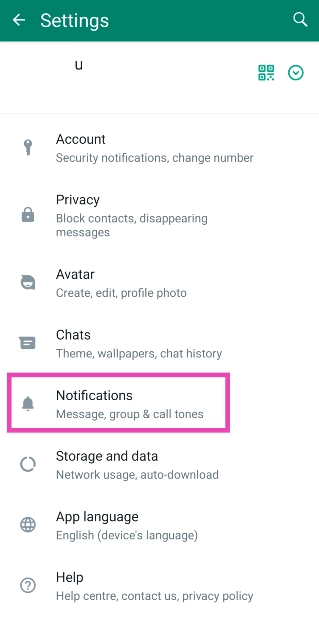
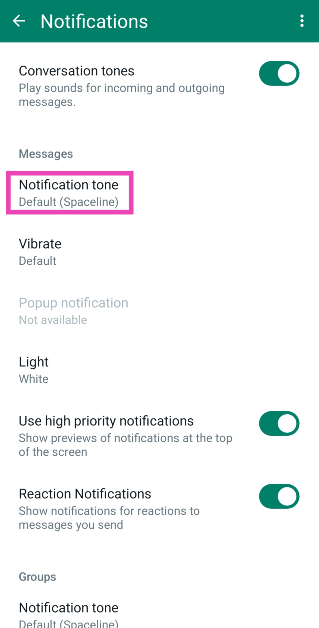
Step 1: Launch WhatsApp and tap the ellipses at the top right corner of the screen.Step 2: Tap on Settings.Step 3: Select Notifications.Step 4: Tap on Notification Tone under Messages.Step 5: Select a tone from the list. Similarly, you can change the notification sound for calls and group notifications.
Set a different notification sound for Telegram using in-app settings
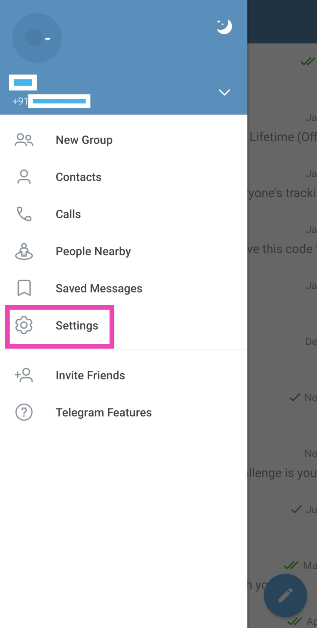
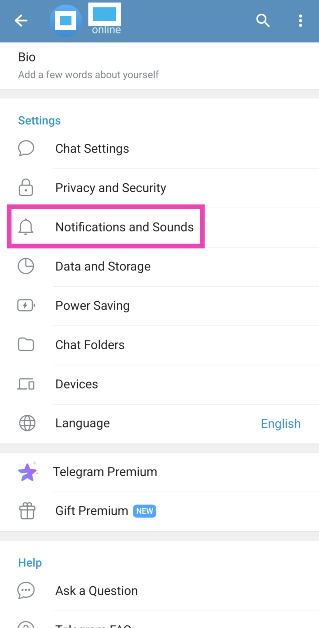
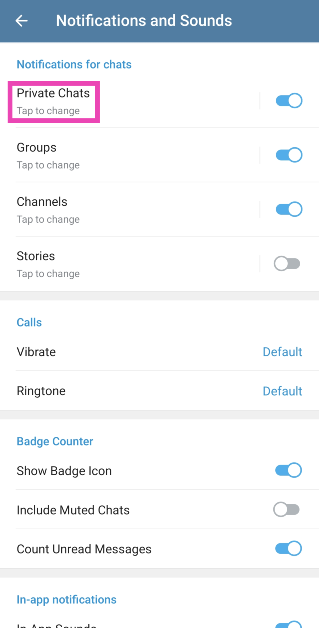
Step 1: Launch Telegram and tap the hamburger menu at the top left corner of the screen.Step 2: Tap on Settings.Step 3: Select Notifications and Sounds.Step 4: Tap on the category for which you want to change the notification sound.Step 5: Tap on Sound and select a tone.
Change the default notification sound
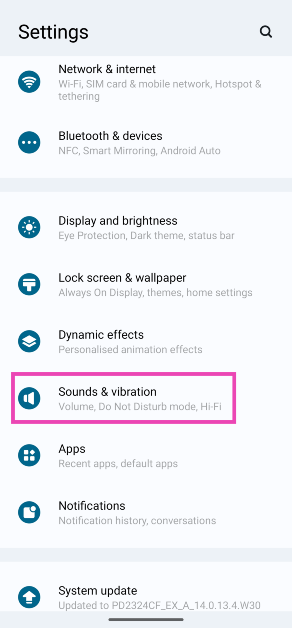
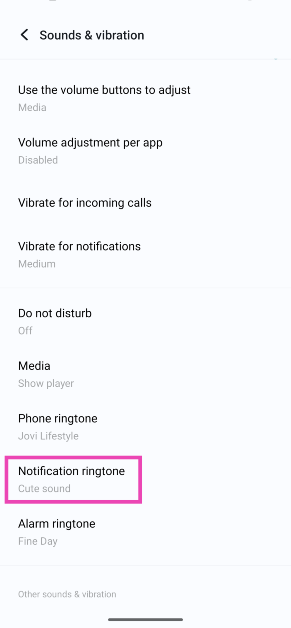
Step 1: Go to Settings and select Sounds and vibration.Step 2: Tap on Notification ringtone.Step 3: Select a tone from the list.
Set a different notification sound for Instagram using in-app settings
Step 1:Launch the Instagram app on your phone and go to your profile.
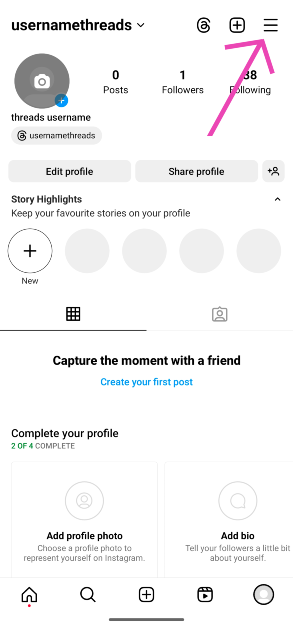
Step 2: Hit the hamburger menu in the top right corner of the screen.
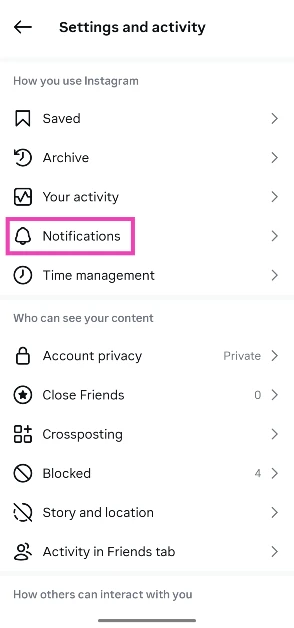
Step 3: Tap on Notifications.
Step 4: Select a category.
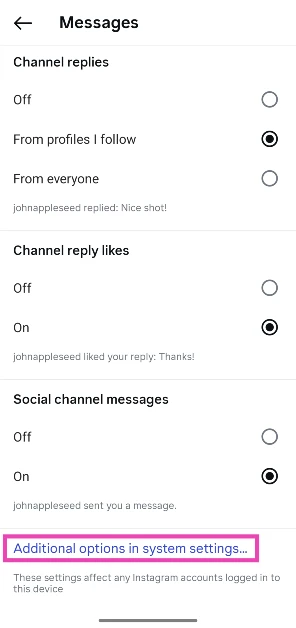
Step 5: Scroll down and select Additional options in system settings.
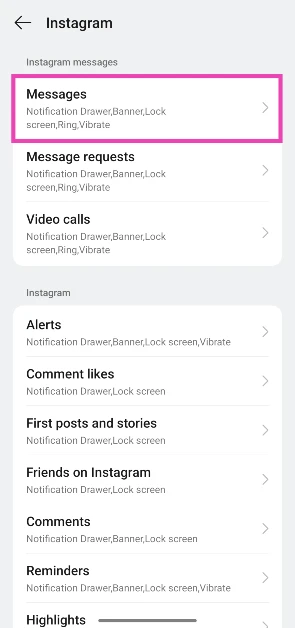
Step 6: Select the category again.
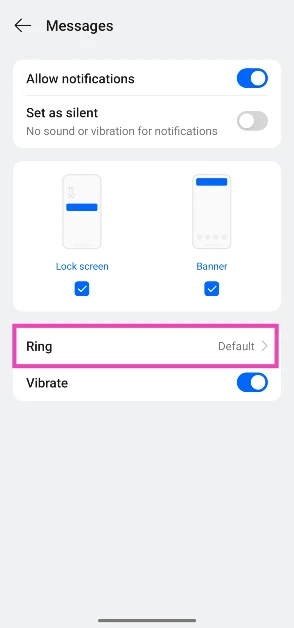
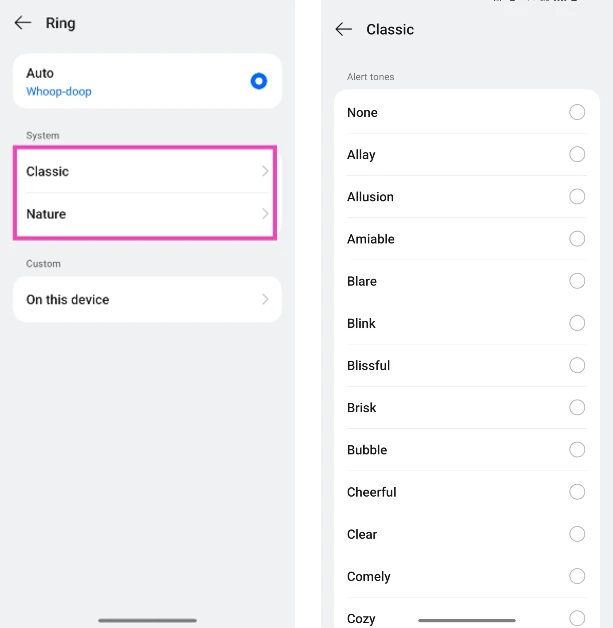
Step 7: Tap on Ring.
Step 8: Choose a ringtone.
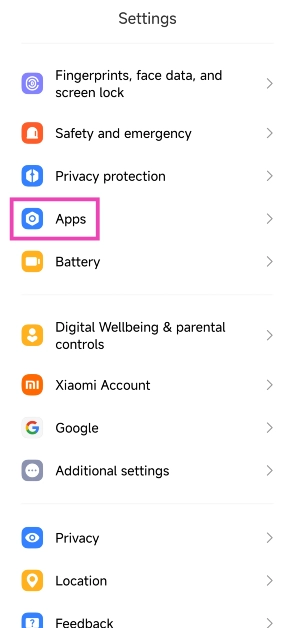
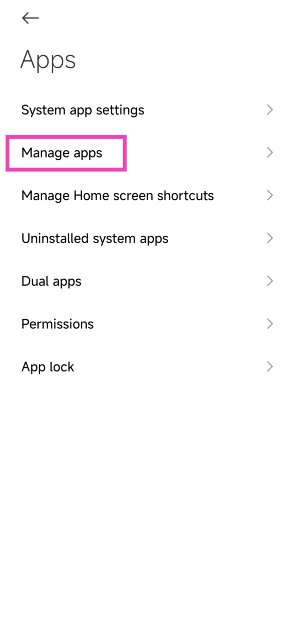
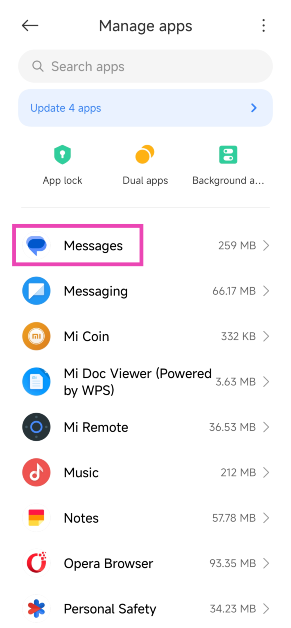
Bonus Tip: Set different app notification sounds on Xiaomi
Step 1: Go to Settings and select Apps.Step 2: Tap on Manage apps.Step 3: Select the app for which you want to change the notification sound.Step 4: Tap on Notifications.Step 5: Select the category for which you want to change the notification sound.Step 6: Tap on Sound and select a tone.
Frequently Asked Questions (FAQs)
How do I set up custom notifications for an app on Android?
Go to Settings>Apps and select the app for which you want to change the notification sound. Now, go to Notifications>Notification category and pick a type. Finally, hit ‘Sound’ and select a tone.
How do I assign a custom ringtone to a particular contact on my phone?
Go to contacts and tap on the name of the person for whom you want to set up a custom ringtone. Hit ‘Edit’ and tap on ‘View more’. Select the ringtone category and pick a tone.
These are the top 6 ways to set different notification sounds for apps on Android. Every Android OEM has a specific set of unique tones that can be used across all third-party apps. If you want to expand your options, apps like Zedge contain vast libraries of ringtones, alert tones, and other notification tones to customise your phone. If you know any other way to change the notification sounds for an app on Android, let us know in the comments!


 Key Specs
 Key Specs
 Key Specs
 Key Specs
 Key Specs
 Key Specs
 Key Specs
 Key Specs
 Key Specs
 Key Specs
 Key Specs
 Key Specs
 Key Specs








 Step 2:
 Step 3:
 Step 4:
 Step 5:
 Step 6:
 Step 7: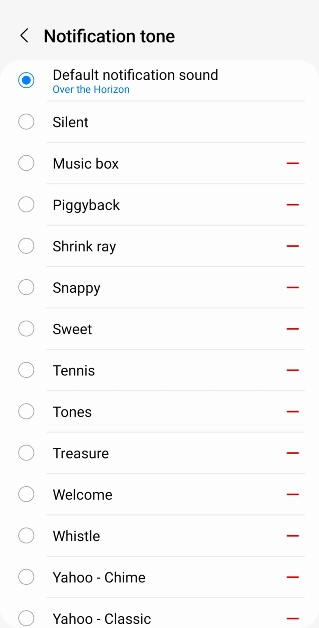
 Step 2:
 Step 3:
 Step 4:
 Step 5:
 Step 3:
 Step 4:
 Step 5:
 Step 2:
 Step 3: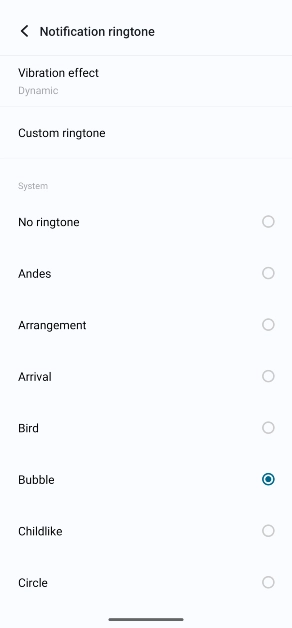
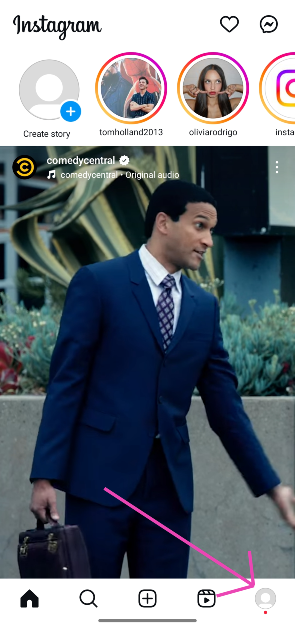 Step 2: Hit the hamburger menu in the top right corner of the screen.
 Step 3: Tap on Notifications.
 Step 4: Select a category.
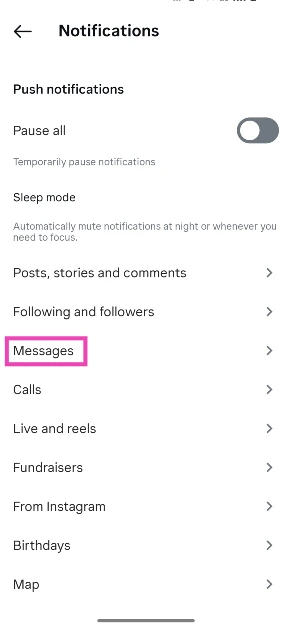 Step 5: Scroll down and select Additional options in system settings.
 Step 6: Select the category again.
 Step 7: Tap on Ring.
 Step 8: Choose a ringtone.
 Step 2:
 Step 3:
 Step 4:
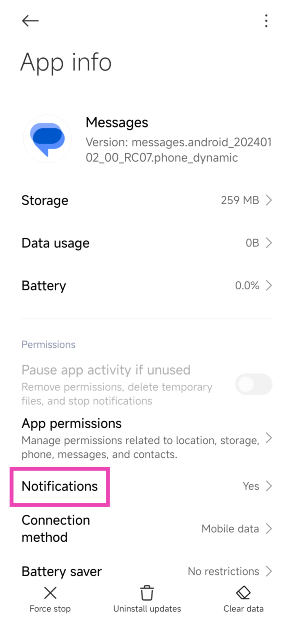 Step 5:
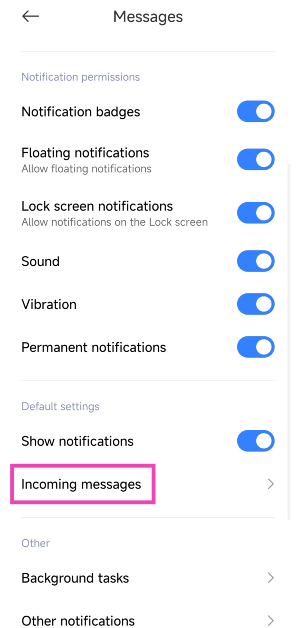 Step 6: