Garena Free Fire Redeem Codes Today 5 February 2024: Here is how to claim them

Garena Free Fire is a battle royale game with regular awards and tournaments to keep players interested. If you play Garena Free Fire, you should be aware of the redeem codes that are released on a daily basis. However, because the battle royale game is banned in India, players from other countries can use the Free Fire Redeem codes daily. If you’re unfamiliar with the Garena Free Fire redeem codes or don’t know how to get them, we’ve put together a step-by-step guide to help you redeem them. Check out Garena Free Fire Redeem Codes for 5 February 2024. The Free Fire redeem codes are a great way to get free stuff. These are 12-digit codes that contain alphabets and numbers, as well as an expiration date and time. Because the Garena FF redeem codes cannot be used more than once, you should hurry to the redemption page to claim your free reward before someone else does. To get a free reward, all you have to do is go to reward.ff.garena.com/en, which is the official redemption page. Also, keep an eye on this space for daily updates on Garena Free Fire redemption codes and rewards. Also Read: Sennheiser Accentum Plus wireless headphones with Hybrid Adaptive Noise Cancellation launched

Garena Free Fire Redeem Codes Today 5 February 2024

WLSGJXS5KFYR FF11NJN5YS3 EZRJAPH294KV5 Y6ACLK7KUD1N W0JJAFV3TU5E SARG886AV5GR FF1164XNJZ2V MCPTFNXZF4TA FF11HHGCGK3B ZYPPXWRWIAHD YXY3EGTLHGJX FF10GCGXRNHY PCNF5CQBAJLK FF11WFNPP956 X99TK56XDJ4X FF11DAKX4WHV B6IYCTNH4PV3 8F3QZKNTLWBZ FF10617KGUF9 FF119MB3PFA5

How to Get Free Fire Redeem Codes for Garena on 5 February 2024?

  • Visit the Garena Free Fire game’s official website at reward.ff.garena.com.
  • Use your Facebook, Google, VK, Apple ID, Huawei ID, or Twitter account to log in.
  • You’ll be taken to a valid redemption code (s)
  • Copy and paste the 12-digit redemption code into the text box.
  • On the screen, a dialogue box will appear.
  • ‘Ok’ should be selected.
For the latest gadget and tech news, and gadget reviews, follow us on TwitterFacebook and Instagram. For newest tech & gadget videos subscribe to our YouTube Channel. You can also stay up to date using the Gadget Bridge Android App. You can find the latest car and bike news here.

Garena Free Fire Redeem Codes Today 4 February 2024: Here is how to claim them

Garena Free Fire is a battle royale game with regular awards and tournaments to keep players interested. If you play Garena Free Fire, you should be aware of the redeem codes that are released on a daily basis. However, because the battle royale game is banned in India, players from other countries can use the Free Fire Redeem codes daily. If you’re unfamiliar with the Garena Free Fire redeem codes or don’t know how to get them, we’ve put together a step-by-step guide to help you redeem them. Check out Garena Free Fire Redeem Codes for 4 February 2024. The Free Fire redeem codes are a great way to get free stuff. These are 12-digit codes that contain alphabets and numbers, as well as an expiration date and time. Because the Garena FF redeem codes cannot be used more than once, you should hurry to the redemption page to claim your free reward before someone else does. To get a free reward, all you have to do is go to reward.ff.garena.com/en, which is the official redemption page. Also, keep an eye on this space for daily updates on Garena Free Fire redemption codes and rewards. Also Read: Sennheiser Accentum Plus wireless headphones with Hybrid Adaptive Noise Cancellation launched

Garena Free Fire Redeem Codes Today 4 February 2024

XUW3FNK7AV8N FFBBCVQZ4MWA FFAC2YXE6RF2 FFICJGW9NKYT FFCMCPSBN9CU F4TG5BTNGKOIUYG FFEVDBHUA7Q6TGH FERTY9IHKBOV98U

How to Get Free Fire Redeem Codes for Garena on 4 February 2024?

  • Visit the Garena Free Fire game’s official website at reward.ff.garena.com.
  • Use your Facebook, Google, VK, Apple ID, Huawei ID, or Twitter account to log in.
  • You’ll be taken to a valid redemption code (s)
  • Copy and paste the 12-digit redemption code into the text box.
  • On the screen, a dialogue box will appear.
  • ‘Ok’ should be selected.
For the latest gadget and tech news, and gadget reviews, follow us on TwitterFacebook and Instagram. For newest tech & gadget videos subscribe to our YouTube Channel. You can also stay up to date using the Gadget Bridge Android App. You can find the latest car and bike news here.

Google rolled out new generative AI features for Google Maps

Key Highlights
  • The users will be able to locate places on Google Maps with generative AI.
  • The feature is rolled out to select users in the US.
  • The LLMs analyse Maps’ detailed information about 250 million locations on Google Maps to generate results.
Google has officially released exciting new AI upgrades to Google Maps. The new generative AI feature will be helpful to users in assisting them in finding new locations. The upgrade will provide customised recommendations based on each user’s need using large language models. The LLMs analyse Maps’ detailed information about 250 million locations on Google Maps and contributions from over 300 million users to generate travel recommendations. Google announced via a blog post which says, “Today, we’re introducing a new way to discover places with generative AI to help you do just that — no matter how specific, niche or broad your needs might be. Simply say what you’re looking for and our large-language models (LLMs) will analyze Maps’ detailed information about more than 250 million places and trusted insights from our community of over 300 million contributors to quickly make suggestions for where to go.” According to the company, Google Maps’ generative AI feature will be accessible to select Local Guides in the US, who are some of the most active and passionate members of the Maps community. Also Read: Apple Races to Build Its Own Generative AI Framework

How to locate places on Google Maps with generative AI?

If you are new to a place and want to shop for souvenirs for your loved one just ask Maps what you’re looking for the AI model will analyze Maps’ rich information about nearby businesses and places along with photos, ratings and reviews from the Maps community to give you trustworthy suggestions. The results are organised into useful categories such as clothing stores, vinyl shops and flea markets — along with photo carousels and review summaries that highlight why a place might be interesting for you to visit. Also Read: Google Bard Vs Google AI Search: Everything you need to know Now when you get tired after shopping, you will also feel hungry. In that case, just continue the conversation with a follow-up question like “How about lunch?” Maps will suggest places that match the vibe you are looking for, from there, you may add the locations to a list, share them with others, and can also revisit them in the future. As per Google, these AI-powered results are particularly helpful if you need to make last-minute changes to your plans or are feeling spontaneous. “For example, if you’re out and about and it starts to rain, just ask Maps for “activities for a rainy day” to get suggestions for indoor activities. You’ll get helpful suggestions like comedy shows or movie theatres. If you’re looking for options the whole family can enjoy, ask a follow-up question like, “What about options for kids?”. You’ll see places like bowling alleys, children’s museums or indoor playgrounds depending on where you are, along with highlights based on reviews from people who have been there.”

iQoo Neo 9 Pro pre-order details revealed, pre-reservations to start on February 8

Key Highlights
  • iQoo Neo 9 Pro will include a 50-megapixel dual back camera setup.
  • The phone will be powered by Snapdragon 8 Gen 2 SoC.
  • iQoo will begin taking pre-orders for the Neo 9 Pro via its official website in India and also on Amazon.
There are still a lot of days left for the launch of the iQoo Neo 9 Pro in India. To keep the upcoming smartphone in the news, iQoo has been teasing the key features of the upcoming phone from time to time. Now that Vivo’s sub-brand has shared the pre-order details of the device, let’s take a look at what is on offer. The iQoo Neo 9 Pro is scheduled to launch in India on February 22. Ahead of the official release, the firm has revealed the pre-order details for the device. Interested buyers will be able to pre-book iQoo Neo 9 Pro in India from February 8 at noon. Beginning next week buyers can pre-reserve the phone through the iQoo website and Amazon. Those booking the device in advance will receive a discount of Rs 1,000. Consumers who wish to reserve the phone in advance must pay a 1,000 Rupee refundable deposit. As per the company, the device will come with 2 years of warranty (including 12 months extended warranty). The launch offer will be revealed on the day of the release. Steps to avail of the benefits:
  • Pre-booking starts from noon, 8th February 2024 on Amazon.in and iQOO.com
  • The pre-booking stock is limited and will be available only on a first-come-first-serve basis
  • You can pay a refundable amount of Rs 1,000 which will be adjusted in your final payment of the device.
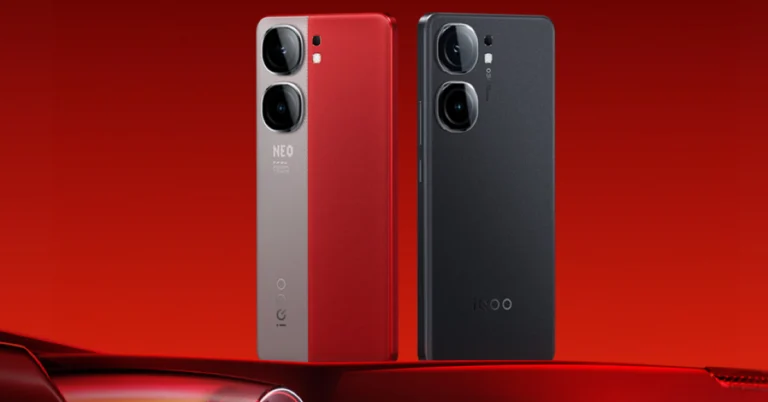
Also Read: Apple crossed the 10-million mark in shipments during the quarter: Report The company has already confirmed that the Snapdragon 8 Gen 2 SoC has been used for the iQoo Neo 9 Pro in India instead of the MediaTek Dimensity chipset used for the Chinese variant. Yes, under the hood of the iQoo Neo 9 Pro in China is a MediaTek Dimensity 9300 SoC. Also Read: Infinix Smart 8 8GB RAM with 128GB storage option to launch soon in India The iQoo Neo 9 Pro teaser suggests a dual-tone rear panel. The rear also sports a leather finish in shades of grey and vibrant red. In addition, there is a dual camera on the back panel. Post-launch, the device will be available for purchase via Amazon in the country. The company has also created a dedicated microsite to tease its availability.

How to use Google Bard’s new AI image generator?

0
Google Bard’s February update allows users to generate AI images using the chatbot. While Google was quick to launch Bard after ChatGPT broke into the mainstream, the tech giant took some time to add the image generation feature to it. The good news is that it is free to use. Google also has an experimental ‘ImageFX’ tool in the works. ImageFX is based on the Imagen 2 model. As of now, it is only available for users in the US, Kenya, New Zealand, and Australia. For those located elsewhere, here’s how you can use Google Bard’s new AI image generator. Read Also: More than 600 new apps announced for Apple Vision Pro, which goes on sale today

Before you begin

Google Bard works just like any other AI image generator. Entering the right prompt is pivotal in generating the right image. You can select every aspect of the image, from its style to the contents it portrays. If you are unsatisfied with the result, you can enter a follow-up prompt with the changes you want to see in the pictures. Bard will take your feedback into consideration and generate more images with the appropriate changes. While that sounds awesome, our favourite feature has to be generating images alongside text. Bard can write a short story, blog post or any other kind of content and add relevant images to go along with it. The images are integrated into the post. You can also ask the bot to create more images around certain pieces of text and add them to the post. It works surprisingly well!

Generate AI images using Google Bard

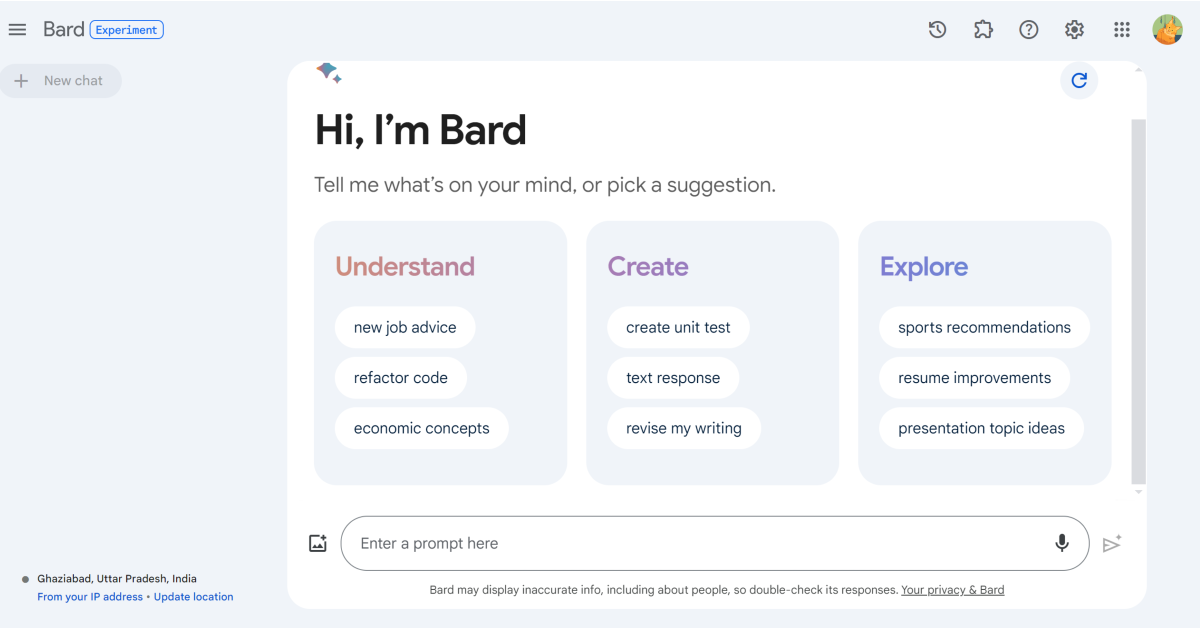
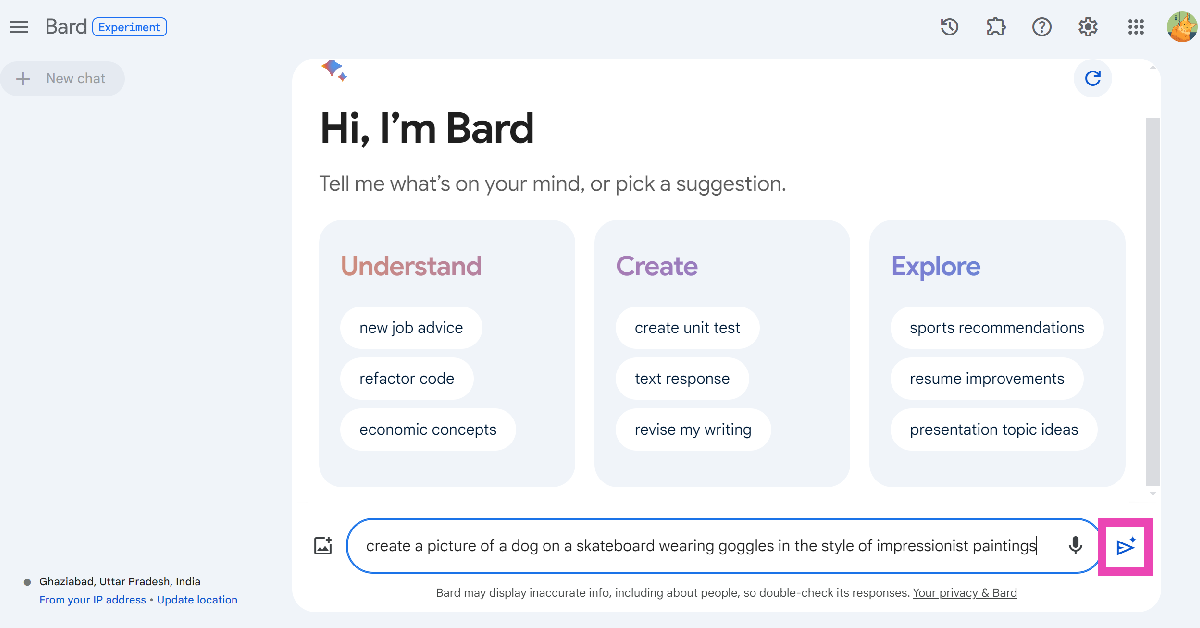
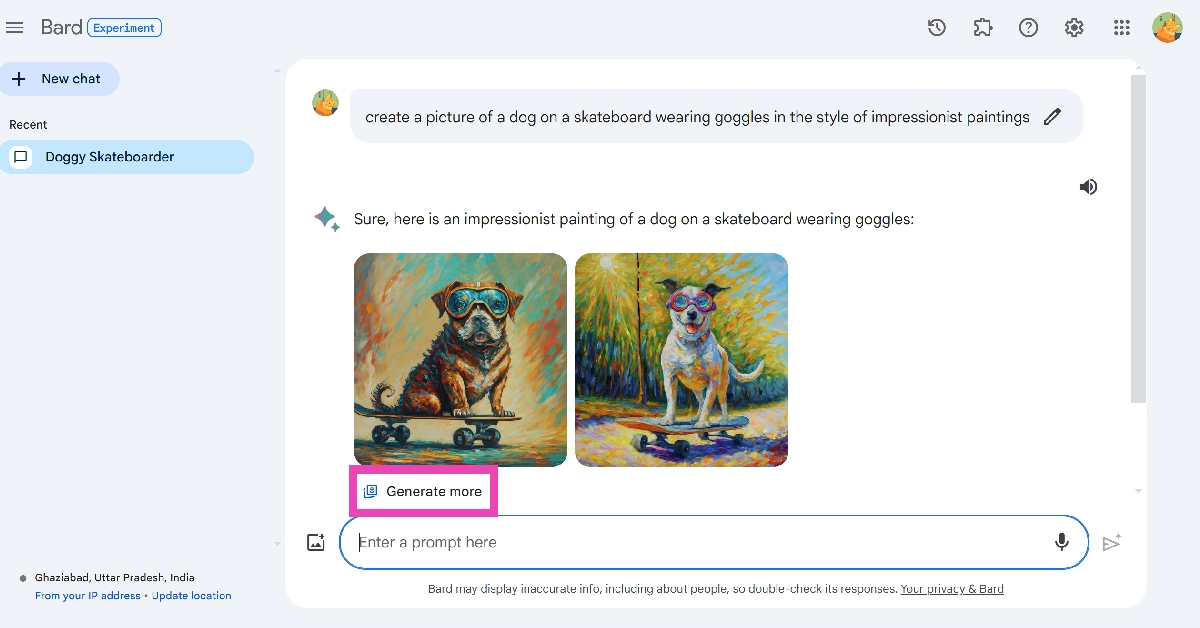
Step 1: Go to https://bard.google.com/ and sign in using your Google Account. Step 1: Go to https://bard.google.com/ and sign in using your Google Account. Step 2: Enter your prompt for the image in the chat box. Make sure your prompt starts with “Draw a..”, “Generate a picture..”, “Create an image..”, or something along those lines. Your prompt should make it clear that you want Bard to generate an image. Step 3: You can also tell Bard the style of image you want. You can choose from any style you like, be it a digital animation or oil painting. The more detailed your prompt is, the better the result will be. Step 2: Enter your prompt for the image in the chat box. Make sure your prompt starts with “Draw a..”, “Generate a picture..”, “Create an image..”, or something along those lines. Your prompt should make it clear that you want Bard to generate an image. Step 4: Hit Enter. Step 5: Bard will generate two images based on your prompt. Click on an image to expand it. As of right now, Google Bard can generate images only in 512px x 512px resolution. Step 5: Bard will generate two images based on your prompt. Click on an image to expand it. As of right now, Google Bard can generate images only in 512px x 512px resolution. Step 6: Hit the download button at the top right corner of the screen to save the image on your device. Step 6: Hit the download button at the top right corner of the screen to save the image on your device. Step 7: Go back and click on Generate more to get more images based on your prompt. Step 7: Go back and click on Generate more to get more images based on your prompt.

Frequently Asked Questions (FAQs)

Why can’t I use Google Bard’s AI image generator?

Google Bard’s AI image generator is not available for users in the European Economic Area (EEA), Switzerland, and the UK.

Is Google Bard free to use?

Yes, as of now Google Bard and its image creation tool are free to use.

What is the resolution of images created by Google Bard?

Google Bard generates AI images in 512px x 512px resolution. Read Also: Top 10 smartphones under $1,000 in USA (2024)

Conclusion

This is how you can use Google Bard to generate AI images. The quality of the image depends on the strength of your prompt. You can use Google Bard on PC, Android, and iPhone. If you have any questions related to the chatbot, let us know in the comments!

Garena Free Fire Redeem Codes Today 3 February 2024: Here is how to claim them

Garena Free Fire is a battle royale game with regular awards and tournaments to keep players interested. If you play Garena Free Fire, you should be aware of the redeem codes that are released on a daily basis. However, because the battle royale game is banned in India, players from other countries can use the Free Fire Redeem codes daily. If you’re unfamiliar with the Garena Free Fire redeem codes or don’t know how to get them, we’ve put together a step-by-step guide to help you redeem them. Check out Garena Free Fire Redeem Codes for 3 February 2024. The Free Fire redeem codes are a great way to get free stuff. These are 12-digit codes that contain alphabets and numbers, as well as an expiration date and time. Because the Garena FF redeem codes cannot be used more than once, you should hurry to the redemption page to claim your free reward before someone else does. To get a free reward, all you have to do is go to reward.ff.garena.com/en, which is the official redemption page. Also, keep an eye on this space for daily updates on Garena Free Fire redemption codes and rewards. Also Read: Sennheiser Accentum Plus wireless headphones with Hybrid Adaptive Noise Cancellation launched

Garena Free Fire Redeem Codes Today 3 February 2024

V427K98RUCHZ BR43FMAPYEZZ FFCMCPSEN5MX FF11NJN5YS3E FF10617KGUF9 NPYFATT3HGSQ FFCMCPSUYUY7E FFCMCPSJ99S3 EYH2W3XK8UPG MCPW2D1U3XA3 FFCMCPSGC9XZ VNY3MQWNKEGU FFIC33NTEUKA ZZATXB24QES8 UVX9PYZV54AC MCPW3D28VZD6 XZJZE25WEFJJ 6KWMFJVMQQYG MCPW2D2WKWF2 HNC95435FAGJ U8S47JGJH5MG ZZZ76NT3PDSH

How to Get Free Fire Redeem Codes for Garena on 3 February 2024?

  • Visit the Garena Free Fire game’s official website at reward.ff.garena.com.
  • Use your Facebook, Google, VK, Apple ID, Huawei ID, or Twitter account to log in.
  • You’ll be taken to a valid redemption code (s)
  • Copy and paste the 12-digit redemption code into the text box.
  • On the screen, a dialogue box will appear.
  • ‘Ok’ should be selected.
For the latest gadget and tech news, and gadget reviews, follow us on TwitterFacebook and Instagram. For newest tech & gadget videos subscribe to our YouTube Channel. You can also stay up to date using the Gadget Bridge Android App. You can find the latest car and bike news here.

Infinix Smart 8 8GB RAM with 128GB storage option to launch soon in India

Key Highlights
  • Infinix Smart 8 is powered by MediaTek Helio G36 SoC.
  • The phone is shipped with Android 13 Go Edition-based XOS 13.
  • The handset comes equipped with a 5,000 mAh battery.
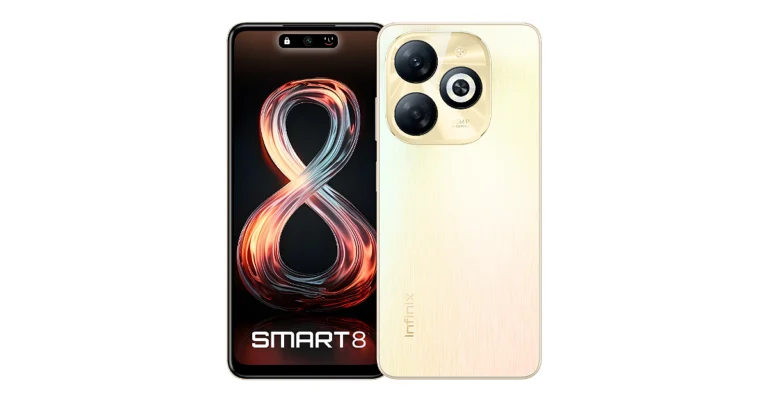
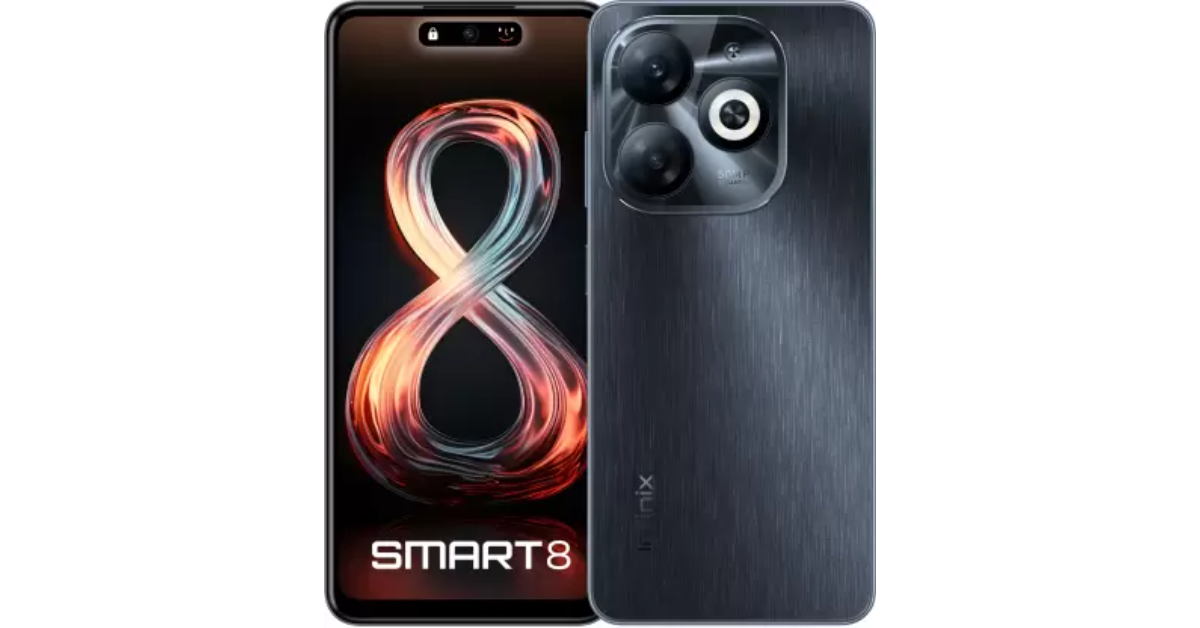
Infinix Smart 8 was launched in India last month after its global debut. Initially, a single 4GB RAM variant was introduced but today the phone will soon be available in a new RAM and storage option. The device comes with a 6.6-inch HD+ display with a 90-Hz refresh rate. The Infinix Smart 8 features a 50MP dual-AI camera. Additionally, it housed a 5,000 mAh battery. A MediaTek Helio G36 SoC powers the device and runs on Android 13 Go Edition-based XOS 13.

Infinix Smart 8 new variant price in India

Infinix Smart 8 will be available in a new 8GB RAM with 128GB storage option soon. The new model will be priced at Rs 8,000 in the country. The company has not revealed the availability date but the phone will be sold via Flipkart in the country. The device already comes with 4GB of RAM with 64GB of storage variant priced at Rs 7,499. The handset is offered in Galaxy White, Rainbow Blue, Shiny Gold, and Timber Black colour options. Infinix Smart 8 new variant price in India

Infinix Smart 8 specifications

The Infinix Smart 8 features a 6.6-inch HD+ display with 1,612 x 720 pixels of resolution. The screen comes with a 90Hz refresh rate and a touch sampling rate of 180Hz. The panel supports 500 nits of peak brightness. An octa-core Unisoc T606 SoC powers it with 4GB of LPDDR4X RAM and 64GB of eMMC 5.1 storage. The smartphone also includes an expandable RAM feature, while the internal storage can be further expanded up to 2TB using a microSD card. The device operates on XOS 13 skinned over Android 13. Also Read: Apple crossed the 10-million mark in shipments during the quarter: Report The mobile phone sports a 50-megapixel main sensor, an AI camera, and a quad-LED Ring flash for photos and videos. In terms of selfies, there is an 8-megapixel front-facing camera with an LED flash. Also Read: More than 600 new apps announced for Apple Vision Pro, which goes on sale today The Infinix Smart 8 includes a Magic Ring feature akin to Apple’s dynamic island. The expandable notch feature enables functions such as face unlock, background call management, charging animations, and charge completion reminders, adding a layer of convenience and personalisation for users. In terms of connectivity, there is dual 4G, nano SIM, Wi-Fi, Bluetooth 5.0, GPS, GLONASS, and a USB Type-C port. Additionally, the handset packs a 5,000mAh battery.

Apple crossed the 10-million mark in shipments during the quarter: Report

Key Highlights
  • Apple has declared its report for the first quarter of its fiscal 2024.
  • It showed $2.18 in quarterly earnings per diluted share.
  • As per the company it had $119.6 billion in revenue, up 2% year over year.
Apple released its financial results today for the first quarter of its fiscal 2024, which ended on December 30, 2023. Reportedly, the tech firm has reported $2.18 in quarterly earnings per diluted share, up 16 per cent from the previous year, and $119.6 billion in revenue, up 2% year over year. According to a Counterpoint report, Apple’s shipments exceeded 10 million enabling it to overtake all other companies in terms of revenue for the first time in a calendar year. “Today Apple is reporting revenue growth for the December quarter fueled by iPhone sales, and an all-time revenue record in Services,” said Tim Cook, Apple’s CEO. “We are pleased to announce that our installed base of active devices has now surpassed 2.2 billion, reaching an all-time high across all products and geographic segments. And as customers begin to experience the incredible Apple Vision Pro tomorrow, we are as committed as ever to the pursuit of groundbreaking innovation — in line with our values and on behalf of our customers.” “Our December quarter top-line performance combined with margin expansion drove an all-time record EPS of $2.18, up 16 percent from last year,” said Luca Maestri, Apple’s CFO. “During the quarter, we generated nearly $40 billion of operating cash flow and returned almost $27 billion to our shareholders. We are confident in our future, and continue to make significant investments across our business to support our long-term growth plans.” According to the company Apple’s board of directors have announced a $0.24 cash dividend for each share of ordinary stock. To stockholders of record as of the close of business on February 12, 2024, the dividend is payable on February 15, 2024. Based on the Company’s fiscal calendar, the first quarter of fiscal 2024 will consist of 13 weeks, whilst the first quarter of fiscal 2023 will consist of 14 weeks. According to the most recent data from Counterpoint’s Monthly India Smartphone Tracker, there was no change in India’s smartphone shipments in 2023 at 152 million units. However, Apple’s shipments exceeded the 10-million barrier, helping them take the top spot in revenue for the first time ever in a calendar year. Still, the company’s shipments exceeded the 10-million barrier, helping them take the top spot in terms of revenue. This has happened for the very first time in a calendar year. As per the CEO, India recorded robust double-digit growth in revenue during the December quarter, therefore setting a new record for the quarter. Also Read: Google’s Circle to Search feature lands on Pixel 8 and Pixel 8 Pro Commenting on the competitive landscape and brand-level analyses, Research Analyst Shubham Singh said, “Samsung led the market in 2023 with an 18% share driven by a strong performance of the A series, aggressive marketing in offline, and focussed approach in the premium segment. vivo ranked second with a 17% share and led the affordable premium segment in 2023 driven by CMF (Colour, Material, Finish)-focused V29 series in offline and T series in online. Xiaomi slipped to the third spot in 2023 but captured the top spot in Q4 2023 driven by its strategy to launch 5G phones in the affordable segment, offline expansion and a leaner portfolio. Also Read: More than 600 new apps announced for Apple Vision Pro, which goes on sale today The premium segment (>INR 30,000, ~ $360) witnessed a 64% YoY growth in 2023 driven by easy financing schemes, which resulted in consumers jumping price bands to purchase higher-priced smartphones. One out of every three smartphones was purchased through financing in 2023. Apple’s focus on India is also aiding the trend, with the brand surpassing the 10-million-unit mark in shipments and capturing the top position in revenue in a calendar year for the first time, propelled by robust demand for both its latest and older iPhones. The opening of its own retail stores and increasing focus on LFR (large-format retail) through regular promotions contributed to increased offline shipments. Besides, higher trade-in values presented an appealing proposition for consumers to transition to iOS.”

Top 10 smartphones under $1,000 in USA (August 2024)

$1,000 in today’s smartphone market can buy you a premium flagship that will last you for years. As a one-time investment, you need to take software support for the next few years into consideration, and this is where the flagship smartphones step in. Apple promises 6-7 years of software updates on the iPhone. This year, Samsung stepped up its game as well, promising 7 years of major OS upgrades for the Galaxy S24 lineup. So, let’s take a look at the top 10 smartphones under $1,000 that you can buy in the USA right now. Read Also: Google’s Circle to Search feature lands on Pixel 8 and Pixel 8 Pro

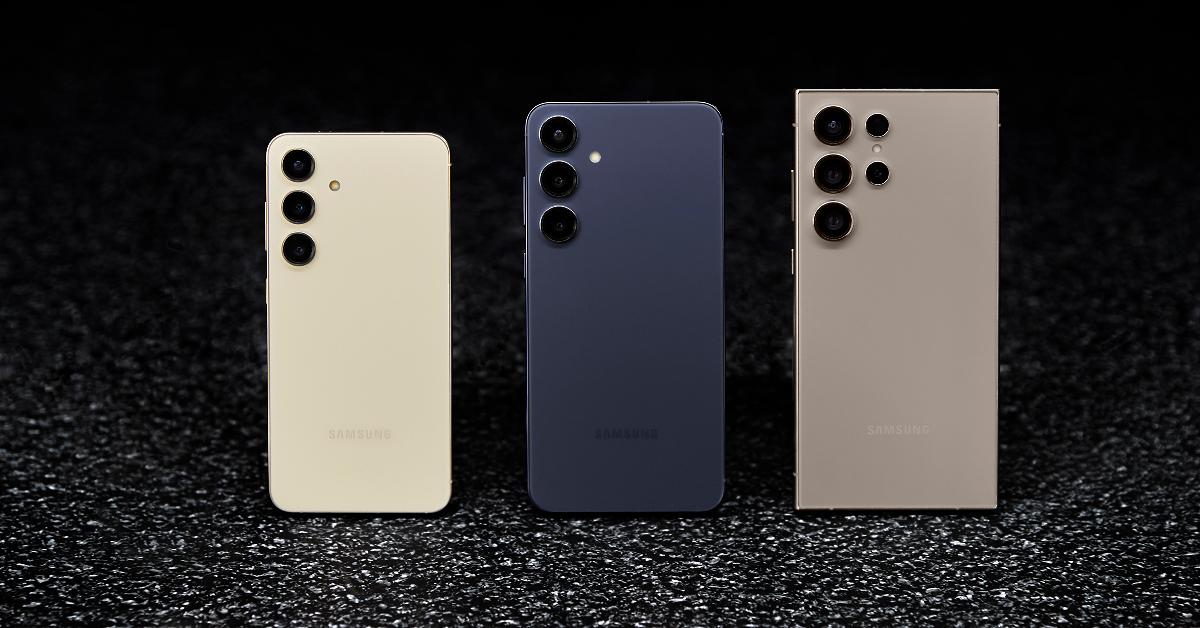
Samsung Galaxy S24+

Price: $999 on Samsung.com Galaxy S24+ Key Specs
Display 6.7-inch Dynamic LTPO AMOLED 2X
Chipset Snapdragon 8 Gen 3
RAM 12GB
Storage 256GB, 512GB
Battery 4,900 mAh
The new Samsung Galaxy S24 series packs a lot of exciting features. The Galaxy S24+ sits in the middle of the lineup, priced just under $1,000. The smartphone flaunts a 6.7-inch Dynamic LTPO AMOLED display and is powered by the latest Snapdragon 8 Gen 3 chipset. Samsung’s 2024 Galaxy S series is all about AI – the S24+ is equipped with features like Circle to Search, Chat Assist, Generative Edit, Gemini AI, and more. Talking about the cameras, the S24+ misses out on the Ultra variant’s periscope lens but gets a 50MP primary shooter, a 12MP ultrawide sensor, and a 10MP telephoto lens.

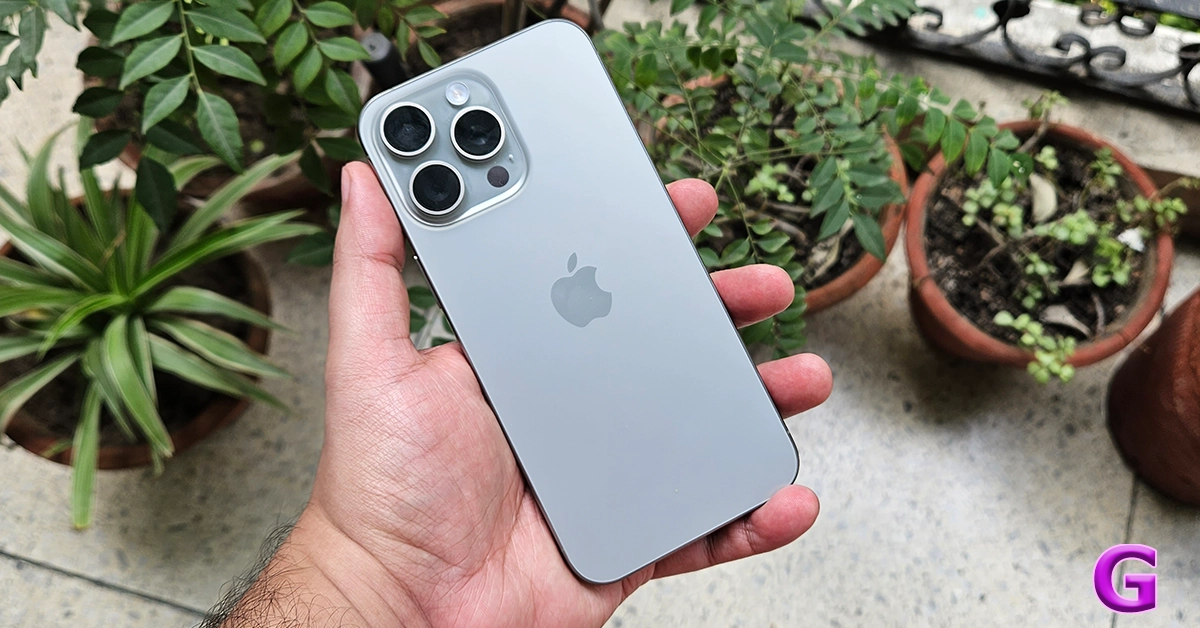
iPhone 15 Pro

Price: $999 on Apple.com iphone 15 pro max rear Key Specs
Display 6.1-inch LTPO Super Retina XDR OLED
Chipset Apple A17 Pro
RAM 8GB
Storage 128GB, 256GB, 512GB, 1TB
Battery 3,274 mAh
The Pro variant of the iPhone 15 Series is powered by the new Apple A17 Pro chipset. It also gets the new Action Button which replaces the alert slider. The iPhone 15 Series marks the debut of the USB Type-C port on the smartphone. One of the advantages of buying the Pro variant is that it has a USB Type-C 3.2 which allows fast transfers. The non-Pro variants are stuck with USB Type-C 2.0 for now. Another big change on the iPhone 15 Pro is the titanium frame which not only imparts next-level toughness to the smartphone but also makes it a smidge lighter. Read our review here.

Samsung Galaxy S24

Price: $799 on Samsung.com Samsung Galaxy S24 Series goes on sale in India: Check price, launch offers and specs Key Specs
Display 6.2-inch Dynamic LTPO AMOLED 2X
Chipset Snapdragon 8 Gen 3
RAM 8GB, 12GB
Storage 128GB, 256GB
Battery 4,000 mAh
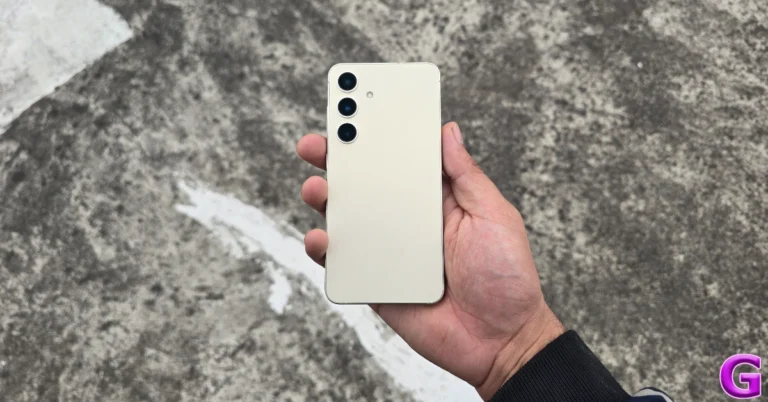
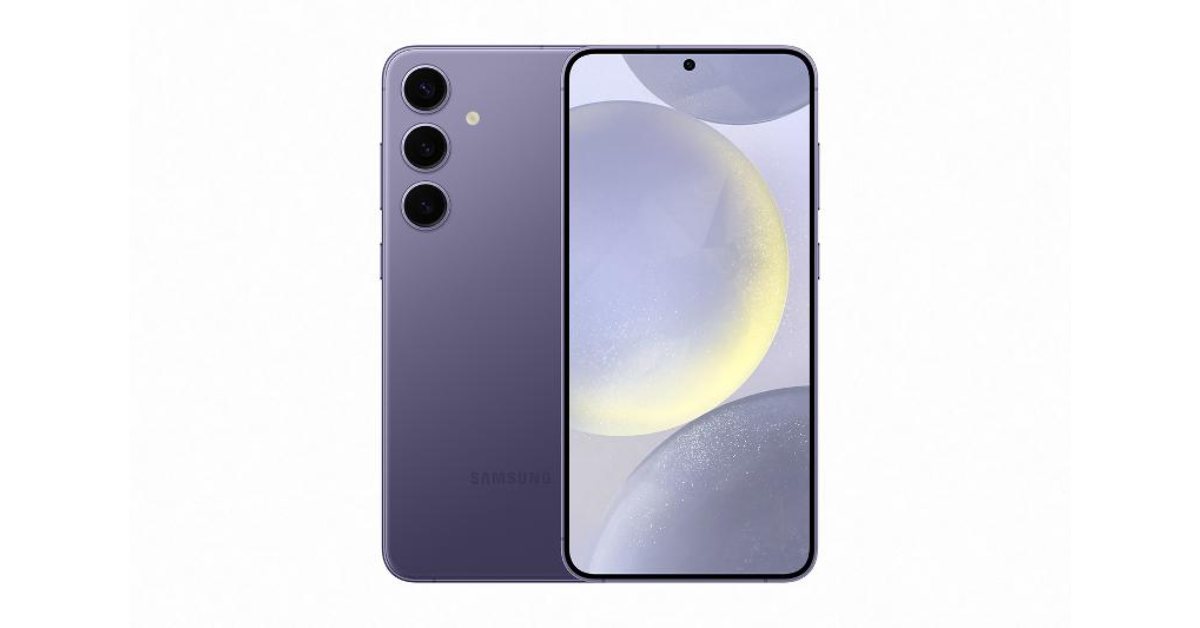
The base variant in the Samsung Galaxy S24 Series is one of the best compact smartphones you can buy for under $1,000 in the USA right now. The smartphone sports a 6.2-inch Dynamic LTPO AMOLED 2X display which has a refresh rate of 120Hz. Like the newest iPhone series, this year’s Galaxy S24 series also gets a titanium frame. But the real highlight is the much-talked-about Galaxy AI. The vertical design of the triple camera layout has been retained from last year. The S24 features a 50MP primary shooter, a 10MP telephoto lens, and a 12MP ultrawide lens.

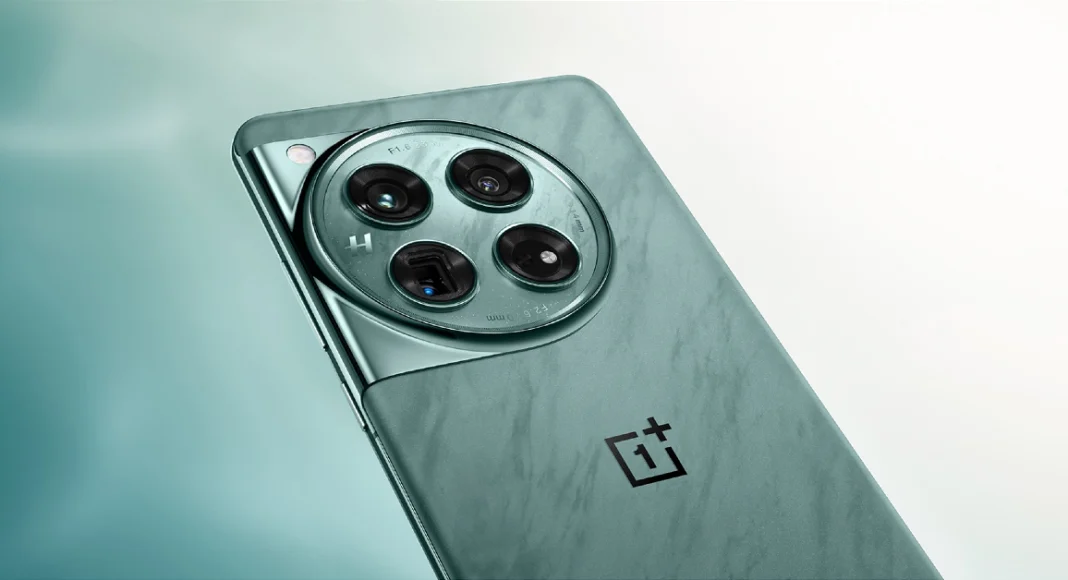
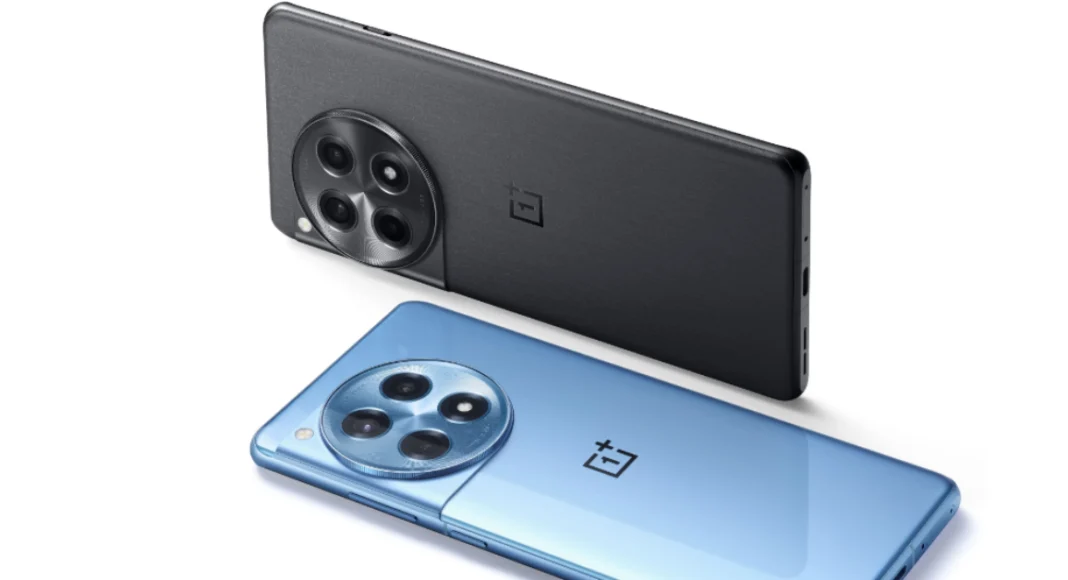
OnePlus 12

Price: $799 on OnePlus.com OnePlus 12 debuts in India and globally: Price in India, specs details inside Key Specs
Display 6.82-inch LTPO AMOLED
Chipset Snapdragon 8 Gen 3
RAM 12GB, 16GB
Storage 256GB, 512GB
Battery 5,400 mAh
Launched in January 2023, the OnePlus 12 is one of the more affordable flagships you can buy right now. It packs the latest Snapdragon 8 Gen 3 chipset and flaunts a 6.82-inch LTPO AMOLED display with a 120Hz refresh rate. OnePlus has also reintroduced wireless charging on its newest premium smartphone. With 50W AirVOOC (wireless) charging support, the smartphone can be fully charged in 55 minutes. Using a Type-C USB cable, this feat can accomplished in 30 minutes (80W charging). OnePlus 12 also has the biggest battery (5,400 mAh) we’ve seen on a flagship smartphone. The only downside its IP65 rating is a far cry from the baseline IP67 you expect in this price range.

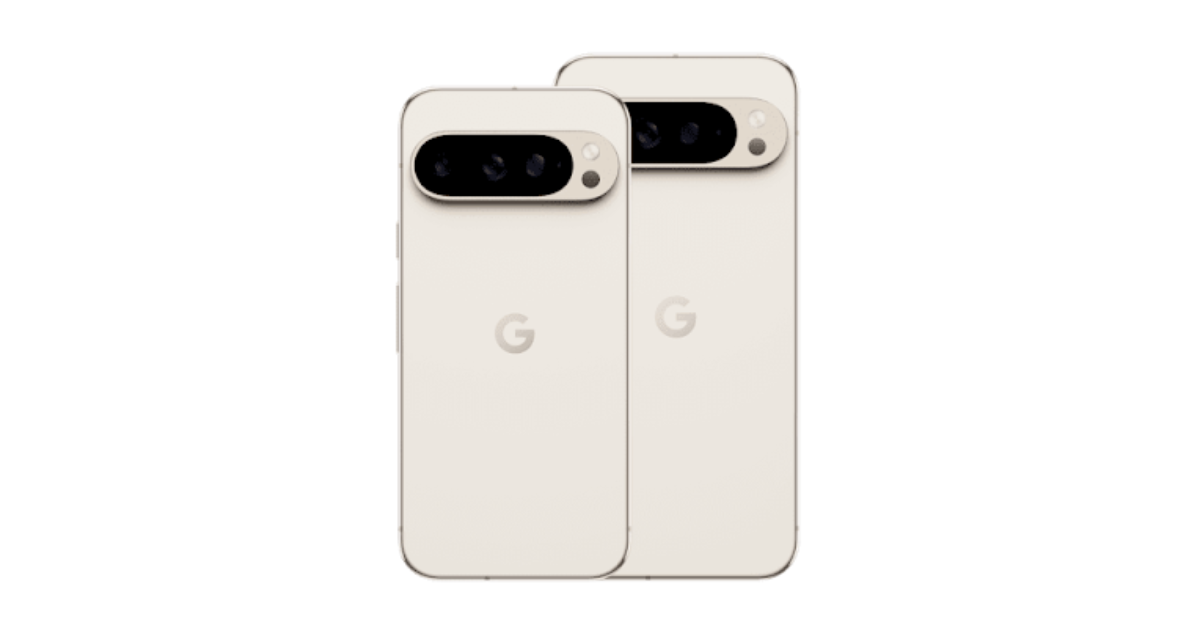
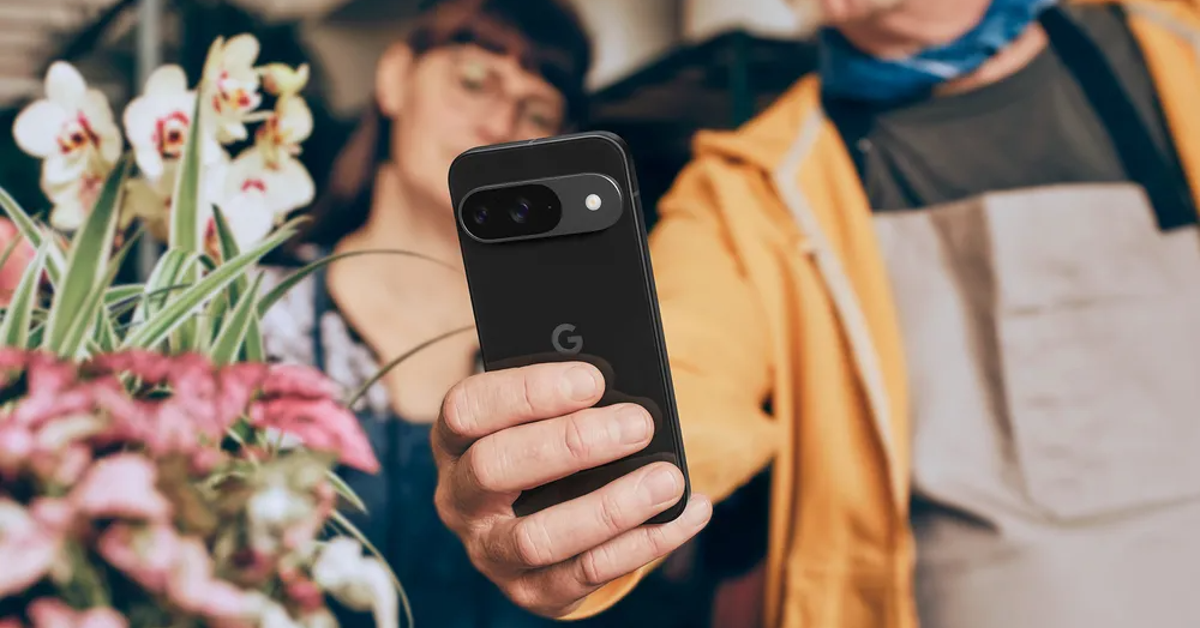
Google Pixel 9 Pro

Price: $999 on Google Store   Google Pixel 9 Pro and XL Top 10 smartphones under $1,000 in USA (2024) Key Specs
Display 6.3-inch LTPO OLED
Chipset Google Tensor G4
RAM 16GB
Storage 128GB, 256GB, 512GB, 1TB
Battery 4,700 mAh
This year, the Google Pixel 9 Series has two ‘Pro’ variants — Pro and Pro XL. The smaller of the two Pro variants is priced at $999 and has a 6.3-inch LTPO OLED display. Being a smaller smartphone, its battery size is limited to 4,700. Google has redesigned the camera visor at the back, giving it a more refined and cleaner look. This visor houses a 50MP primary shooter, a 48MP ultrawide lens, and a 48MP periscope telephoto lens. Powering the new series of Pixels is the Google Tensor G4 chipset. If you’re looking for something more affordable, the entry-level Pixel is priced at $799.

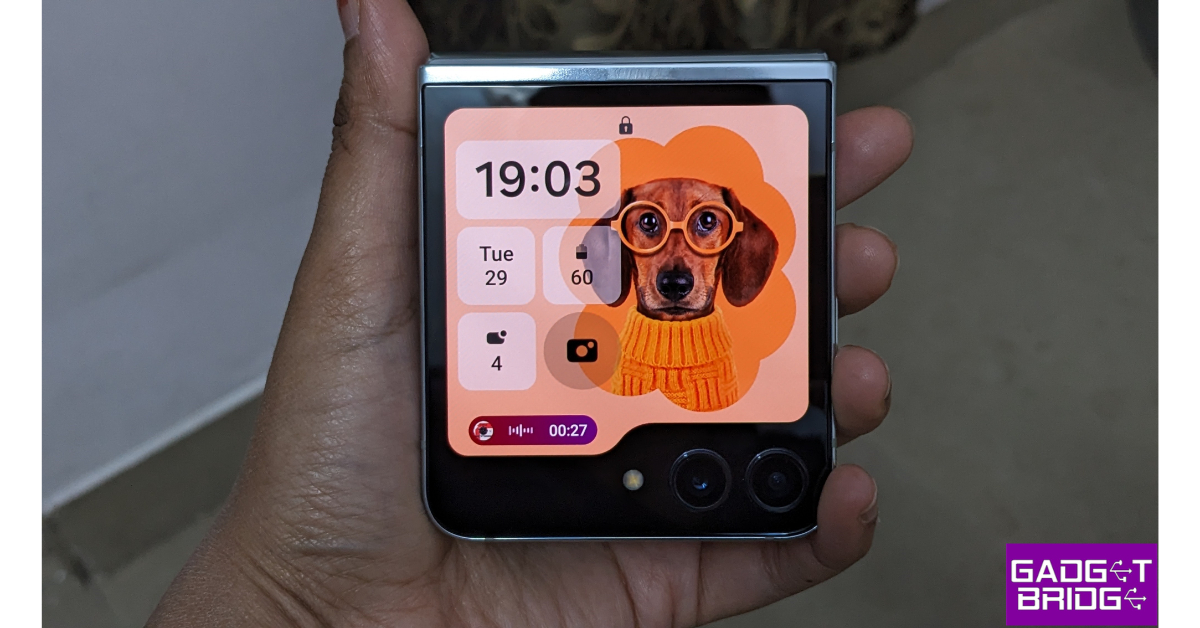
Samsung Galaxy Z Flip 5

Price: $999 on Samsung.com Review of Galaxy Z Flip 5 Top 10 smartphones under $1,000 in USA (2024) Key Specs
Display Inner: 6.7-inch Dynamic AMOLED 2X | Cover: 3.4-inch Super AMOLED 
Chipset Snapdragon 8 Gen 2
RAM 8GB
Storage 256GB, 512GB
Battery 3,700 mAh
The Samsung Galaxy Z Flip 5 is one of the best folding smartphones you can buy in the USA for under $1,000 in 2024. In its unfolded form, the Dynamic AMOLED 2X display spans 6.7 inches. The Galaxy Z 5 Series also debuts larger cover displays for the folding smartphones. The Flip 5 has a 3.4-inch Super AMOLED display which can be used to toggle through widgets, reply to messages, take pictures, and more. Since it’s a 2023 smartphone, the Galaxy Flip 5 is powered by the Snapdragon 8 Gen 2 SoC. The rear camera setup of the smartphone consists of 12MP wide and ultrawide sensors. Read our review of the smartphone here.

Google Pixel 9

Price: $799 on Google Store   How to ‘Reimagine’ pictures and edit them using AI on Google Pixel 9 Top 10 smartphones under $1,000 in USA (2024) Key Specs
Display 6.3-inch OLED
Chipset Google Tensor G4
RAM 12GB
Storage 128GB, 256GB
Battery 4,700 mAh
The entry-level variant of the Google Pixel 9 Series offers excellent value for money. It is one of the best smartphones you can buy in the USA right now. The vanilla Pixel 9 is powered by the same chipset as the Pro variants — Google Tensor G4. It lacks the telephoto sensor but retains the 50MP primary shooter and 48MP ultrawide lens from the Pro models. The 10.5MP selfie camera up front can shoot 4K videos at 30/60fps. Camera specs aside, the Pixel 9 runs stock Android 14 OS and flaunts a 6.3-inch OLED display. This display has a 120Hz refresh rate and can reach a peak brightness of 2,700 nits.

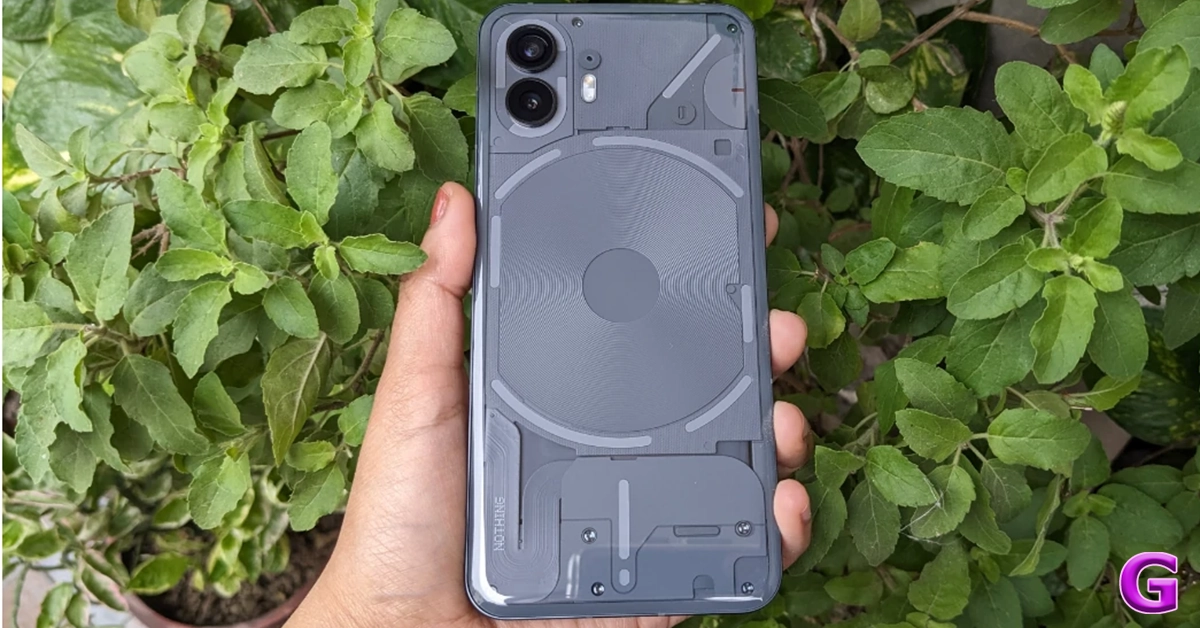
Nothing Phone 2

Price: $599 on Nothing.tech Nothing announced massive up to Rs 10,000 discount on Phone 2: Additional discounts Top 10 smartphones under $1,000 in USA (2024) Key Specs
Display 6.7-inch LTPO OLED
Chipset Snapdragon 8+ Gen 1
RAM 8GB, 12GB
Storage 128GB, 256GB, 512GB
Battery 4,700 mAh
Even though it is a mid-ranger, the Nothing Phone 2 deserves a shout-out on this list. The second iteration of Nothing’s highly talked about smartphone made it to the US in July 2023. Known for its iconic Glyph Interface and see-through back design, the Nothing Phone 2 also packs serious power with the Snapdragon 8+ Gen 1 chipset. The tech outfit has also refined its OS on the Phone 2, giving it a distinct look with its dot matrix font and greyscale icon packs. The smartphone features two 50MP sensors, one for the wide lens and the other for the ultrawide camera. Read our review of the smartphone here.

OnePlus 12R

Price: $499 on OnePlus.com OnePlus 12R with Qualcomm Snapdragon 8 Gen 2 SoC launched in India Top 10 smartphones under $1,000 in USA (2024) Key Specs
Display 6.82-inch LTPO4 AMOLED
Chipset Snapdragon 8 Gen 2
RAM 8GB, 16GB
Storage 128GB, 256GB
Battery 5,500 mAh
Launched alongside the OnePlus 12, the 12R could be the real flagship killer of 2024. It packs the flagship Snapdragon 8 Gen 2 chipset from last year and flaunts a stunning 6.82-inch LTPO4 AMOLED display. The massive 5,500 mAh battery pack supports up to 100W of fast wired charging. OnePlus 12R matches the design of the flagship smartphone. Its rear camera module consists of a 50MP primary shooter, an 8MP ultrawide lens, and a 2MP macro sensor. The smartphone runs on Android 14-based OxygenOS 14 out of the box. With prices starting at $499, the OnePlus 12R is undoubtedly one of the best smartphones you can buy for under $1,000 in the USA.

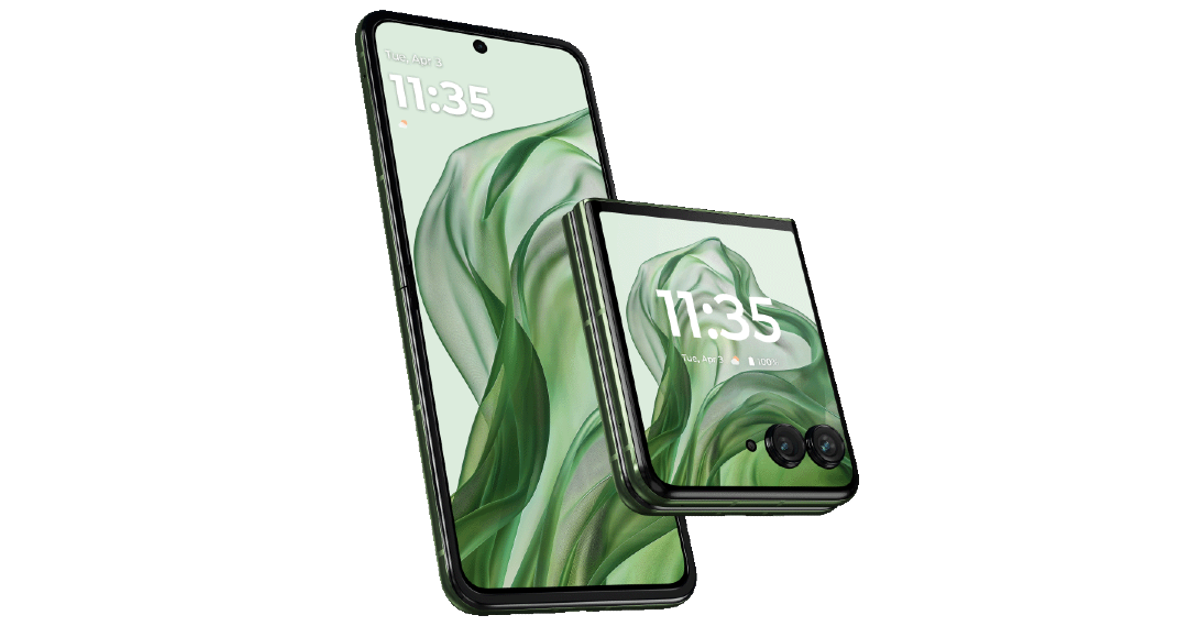
Motorola Razr+ (2024)

Price: $899 on Motorola.com   Motorola Razr+ (2024) Top 10 smartphones under $1,000 in USA (2024) Key Specs
Display Inner: 6.9-inch LTPO AMOLED | Cover: 4-inch AMOLED
Chipset Snapdragon 8s Gen 3
RAM 12GB
Storage 256GB
Battery 4,000 mAh
2024’s Moto Razr+ packs a bigger battery and a larger outer display than its 2023 counterpart. The processor on the smartphone has been updated to Snapdragon 8s Gen 3 SOC. The inner LTPO AMOLED display still spans 6.9 inches. The smartphone is rated IPX8 for dust and water resistance. It can survive submersion in water up to 1.5m for 30 minutes. The rear camera panel of the smartphone sports a 50MP primary shooter and a 50MP telephoto lens. Read Also: Top 6 Ways to Copy Instagram Comments and Captions on Android or iPhone (2024) 

Conclusion

These are the top 10 smartphones under $1,000 that you can buy in the USA right now. As the year rolls on we expect a few more devices to be added to this list. Keep watching this space for regular updates. If you think we missed out on a smartphone, let us know in the comments!

Top 7 Ways to Copy Instagram Comments and Captions on Android or iPhone

0
Have you ever come across a quirky or funny caption on Instagram and wanted to save it to use in your post later? Or perhaps you want to save a comment if you’re keeping receipts for an online feud. If you’ve ever tried copying text on Instagram, you must be aware that it is impossible to do so on the official app. Interestingly, Instagram’s website does not have this roadblock. Looking for a fix to this problem? Today, we bring you the top 7 ways to copy Instagram comments and captions on iPhone or Android. Read Also: How to Voice Type in Tamil on an Android smartphone?

What’s the deal with copying Instagram comments and captions?

Copying text on your smartphone is never an issue on most apps. However, OTT apps like Netflix and Disney+ prevent this action on their platforms due to their stringent copyright policies. Strangely enough, Instagram also restricts this action even though most of the content on the platform is user-generated. While there is no official explanation for this, users widely believe it is done to combat spam on the platform. Luckily, there are a handful of ways you can work around this issue. If you often find yourself wanting to copy text from Instagram, you would be better off installing a third-party app that lets you perform that action on your phone. Although if it is a one-time thing, there are other methods you can use that don’t require installing an app. We discuss both options below.

Copy Instagram comments and captions on your iPhone

You can copy the text on any iPhone using the Live Text feature. This feature is available on iPhones running iOS 15 or above. Step 1: Launch the Instagram app and take a screenshot of the caption/comment you want to copy. Step 2: Go to the Photos app and open the screenshot. Step 2: Go to the Photos app and open the screenshot. Step 3: Long press the text you want to copy. Step 4: Select Copy from the pop-up options. Step 4: Select Copy from the pop-up options.

Copy Instagram comments and captions on Android using Google Photos

Step 1: Take a screenshot of the Instagram caption/comment you want to copy. Step 2: Open the screenshot in Google Photos. Step 3: Tap on Copy Text at the bottom of the screen. Step 3: Tap on Copy Text at the bottom of the screen. Step 4: Select the comment/caption you want to copy. Step 4: Select the comment/caption you want to copy. Step 5: Tap on Copy. The text will be copied to the clipboard.

Use Circle to Search (Android)

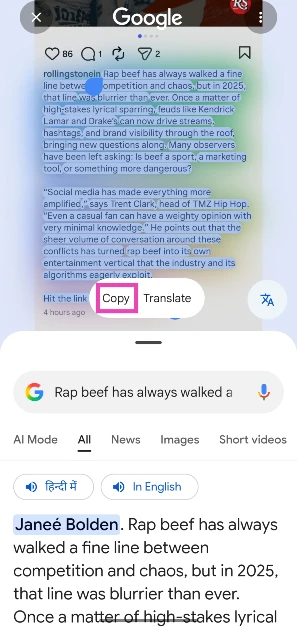
Step 1: Go to the Instagram post caption you wish to copy. Step 2: Long-press the navigation bar to trigger Circle to Search. Step 2: Long-press the navigation bar to trigger Circle to Search. Top 7 Ways to Copy Instagram Comments and Captions on Android or iPhone (2024) Step 3: Select the text on the screen and hit Copy. Step 3: Select the text on the screen and hit Copy. Top 7 Ways to Copy Instagram Comments and Captions on Android or iPhone (2024)
Copy Instagram captions using the web browser (Android and iOS)

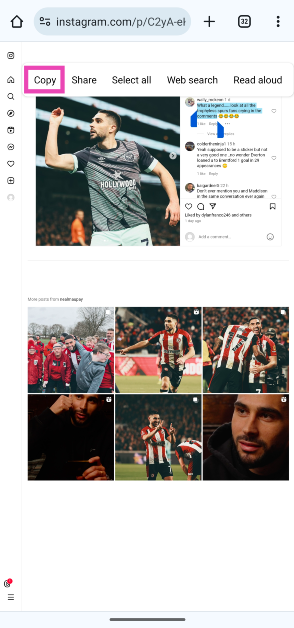
Step 1: Go to the Instagram post you wish to copy. Hit the Share button and tap on Copy link. Step 1: Go to the Instagram post you wish to copy. Hit the Share button and tap on Copy link. Step 2: Open your preferred web browser and paste the link into the address box. Hit Enter. Step 2: Open your preferred web browser and paste the link into the address box. Hit Enter. Step 3: The Instagram post will open in the web browser. Long press the caption to highlight it and select Copy. Step 3: The Instagram post will open in the web browser. Long press the caption to highlight it and select Copy. Strangely, this method only works for Instagram captions. If you want to copy a comment, follow the method mentioned below.

Copy Instagram comments using the Desktop Mode on Chrome (Android and iOS)

Step 1: Go to the Instagram post you want to copy. Hit the Share button and select Copy link. Step 1: Go to the Instagram post you wish to copy. Hit the Share button and tap on Copy link. Step 2: Open Google Chrome on your smartphone and paste the link into the address bar. Hit Enter. Step 2: Open your preferred web browser and paste the link into the address box. Hit Enter. Step 3: Hit the ellipses at the top right corner of the screen and select Desktop site. Step 3: Hit the ellipses at the top right corner of the screen and select Desktop site. Step 4: Long-press the comment to highlight its text and select Copy. Step 4: Long press the comment to highlight its text and select Copy.

Use Universal Copy (Android)

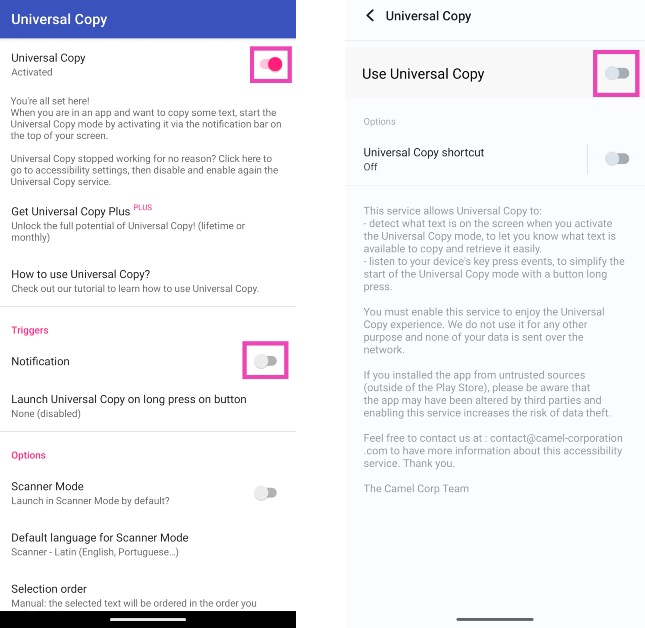
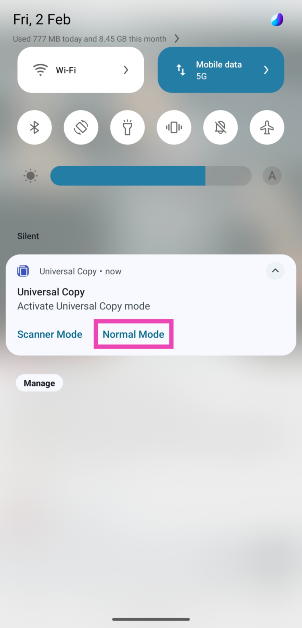
Step 1: Install the Universal Copy app from the Google Play Store. Step 2: Open the app and enable Use Universal Copy. Give the app the necessary permissions whenever prompted. Step 2: Open the app and enable Use Universal Copy. Give the app the necessary permissions whenever prompted. Step 3: Open Instagram and go to the post you want to copy. Step 4: On the notification panel, select Activate Universal Copy Mode. Step 4: On the notification panel, select Activate Universal Copy Mode. Step 5: Universal Copy app will let you select any text you want on the app. Highlight the caption and copy it to the clipboard. Step 5: Universal Copy app will let you select any text you want on the app. Highlight the caption and copy it to the clipboard.

Copy Instagram captions and comments on a Google Pixel smartphone

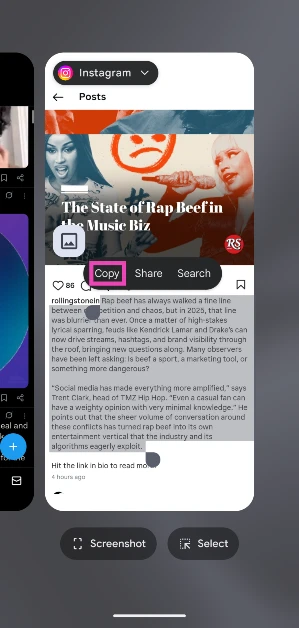
  Google Pixel smartphones make it easy to copy text from any app without needing to download a third-party app. Just follow these simple steps. Step 1: Launch Instagram and open the post you wish to copy. Step 2: Use the navigation buttons or swipe gestures to go to the app switcher/recent apps panel. Step 3: On Instagram’s card, long-press the text you wish to copy. Step 3: On Instagram’s card, long-press the text you wish to copy. Top 7 Ways to Copy Instagram Comments and Captions on Android or iPhone (2024) Step 4: Select Copy from the pop-up options. Step 4: Select Copy from the pop-up options. Top 7 Ways to Copy Instagram Comments and Captions on Android or iPhone (2024)

Frequently Asked Questions (FAQs)

How do I copy Instagram comments and captions on my Android phone?

Install the Universal Copy app on your device, give it the necessary permissions and enable ‘Use Universal Copy’. Go to the Instagram post and select ‘Activate Universal Copy Mode’ from the notification panel. Highlight the comment or caption and copy the text to the clipboard.

How do I copy Instagram comments and captions on my iPhone?

Take a screenshot of the Instagram post and open it in the Photos app. Long-press to highlight the text and hit ‘Copy’.

How do I copy Instagram comments and captions without using an app?

Copy the link to the Instagram post and open it in Google Chrome. Request ‘Desktop Site’ and long-press the text to highlight it. Select ‘Copy Text’ from the pop-up menu. Read Also: How to geotag your property in Delhi as per MCD guidelines?

Conclusion

These are the top 7 ways to copy Instagram captions or comments on iPhone and Android. Check out these 5 easy methods to access and manage your iPhone’s clipboard. Android users can check out this article to learn how to manage the clipboard on their devices. If you know any other way to copy unselectable text, let us know in the comments!