Vivo is one of the few smartphone manufacturers that release their flagship series towards the end of the year. Its powerful X Series sets the bar for camera performance, throwing the gauntlet to the smartphones that follow it in the following year. Such is the case with the newly released Vivo X100 Pro as well. Launched globally in December 2023, Vivo’s flagship arrived in India earlier this month (priced at Rs 89,999). Excited to check out the exemplary cameras, we used the smartphone as our daily driver for a week. Here is our in-depth review of the Vivo X100 Pro.Read Also:Xiaomi 360 Home Security Camera 2K launched in India
Vivo X100 Pro review: Design and Display
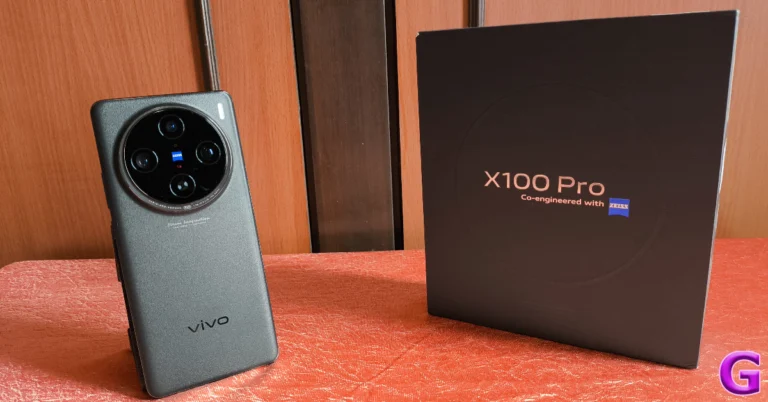
Here’s what you get inside the X100 Pro’s retail package.
Smartphone
Body-coloured silicon cover
USB Type-C to Type-C cable
120W power adapter (the smartphone supports 100W wired charging)
SIM ejector tool
Warranty card
Quick start guide
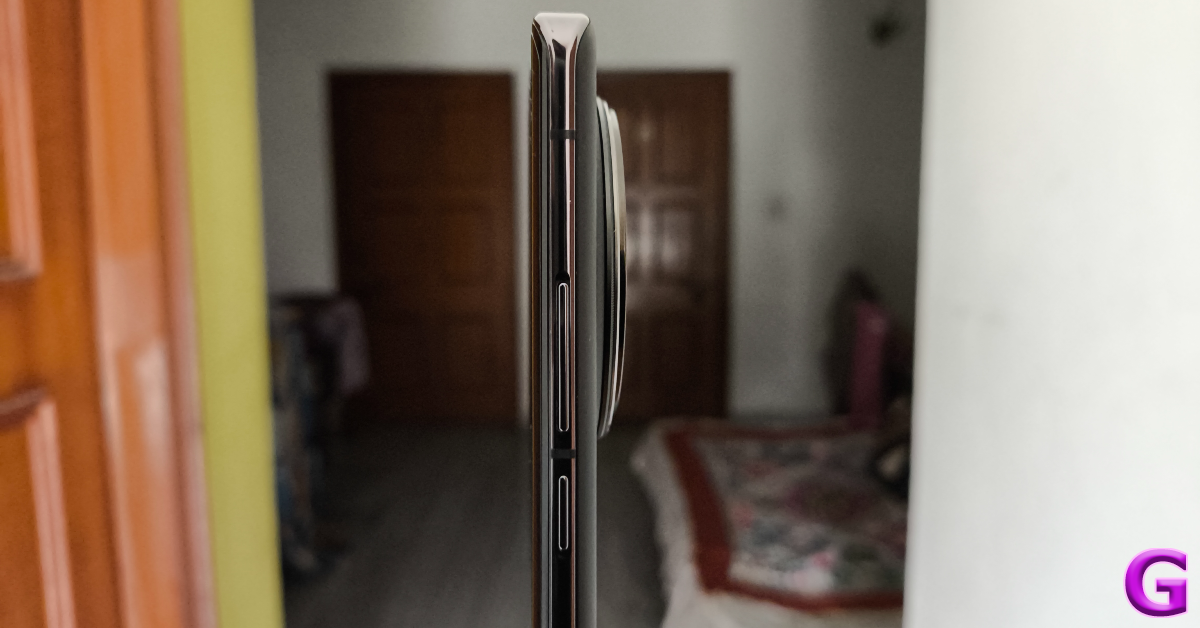
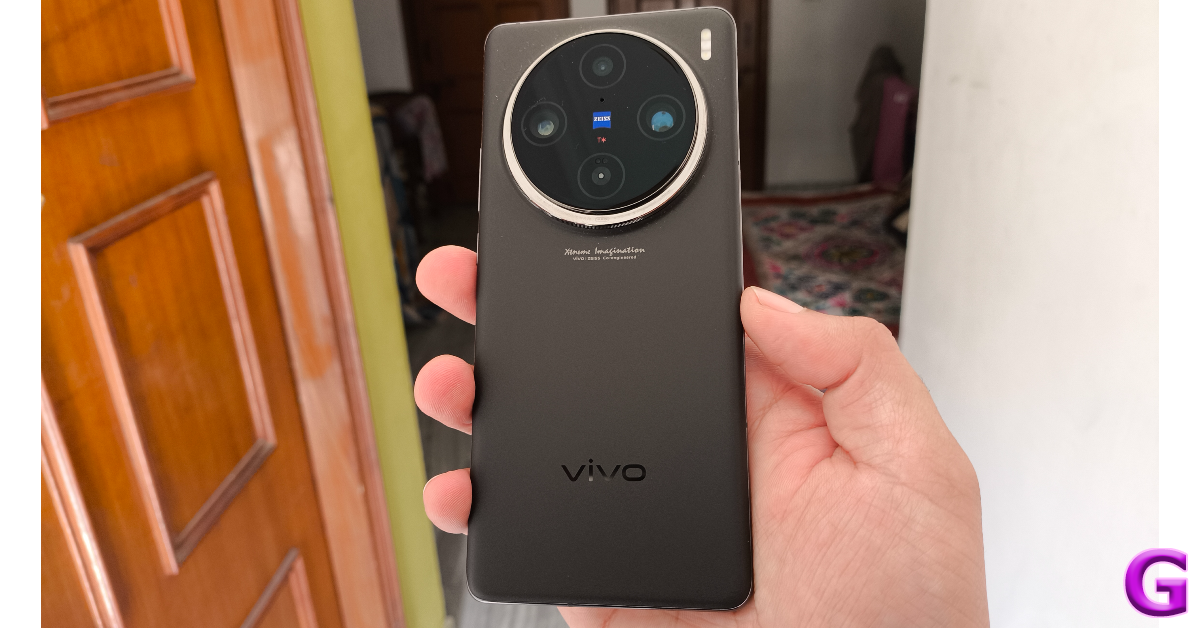
The circular camera cutout that made its debut in the Vivo X80 Pro has been perfected on the X100 Pro. Instead of being aligned to the left of the back panel, it is now positioned centrally. The Zeiss branding which was previously found on the side of the camera panel is now positioned within it. A stainless steel ring with a ridged perimeter forms the frame of the two-step cutout, giving the smartphone its distinct ‘camera’ look. This feels like the final form of the camera design, after two steady years of evolution.We used the Asteroid Black colour variant of the Vivo X100 Pro for this review. The smartphone is also available in Startail Blue and Sunset Orange shades. The matte black finish on our model made it a bit slippery, but on the bright side, there were no fingerprints to be found on the glass back panel. The smartphone weighs 225g, which is pretty standard for flagship devices, but if you’re making the switch from a midrange or budget phone, you will clearly feel the difference.The aluminium frame has curved edges to accommodate the curved AMOLED display. The volume rocker keys and the power button are positioned on the right edge while the IR blaster and secondary microphone make their way to the top of the phone. The bottom edge houses the SIM tray, primary microphone, USB Type-C port, and speaker grille. The left edge has been left keyless.Vivo X100 Pro’s 6.78-inch LTPO curved AMOLED display offers a maximum refresh rate of 120Hz and a peak brightness of 3,000 nits. Needless to say, the smartphone is perfectly legible under direct sunlight. The refresh rate is set to ‘Smart Switch’ (adaptable) by default, but you can lock it at 60Hz or 120Hz from device settings. While you’re there, you can also select the ideal colour profile for yourself and regulate the colour temperature of the screen.Scrolling and navigation on this 120Hz AMOLED display is as smooth as it can get. The display is only slightly curved towards the edges, so the accidental touches are kept to a minimum. We are not super fond of curved panels, but we really enjoyed our time with this one. The overall touch reception is quite snappy. Even the slightest flicks get registered with ease. The bezels around the display have been kept to a minimum, giving you more screen real estate. Up top, the selfie camera lies inside a punch-hole cutout. The under-display optical scanner is positioned a bit lower than we would have liked and isn’t the fastest one around, but it does a good job on the device.Watching HD movies and videos on this 1,260 x 2,800p display proved to be a remarkable experience. The deep blacks are astonishing and the contrasting vivid colours are punchy and fun. The curved nature of the display does not diminish the viewing angles in any way. You can hold the smartphone in any posture and still get well-composed images that truly ‘pop’. While binge-watching videos, the top-heavy nature of the smartphone can make it fatiguing to hold, but you can easily prop it against a solid surface.Vivo X100 Pro is rated IP68 for water and dust resistance. This means it can easily survive water splashes and even small dips. Vivo claims the smartphone can remain unscathed after submerging to 1.5m for up to 30 minutes.
Vivo X100 Pro review: Performance and Cameras
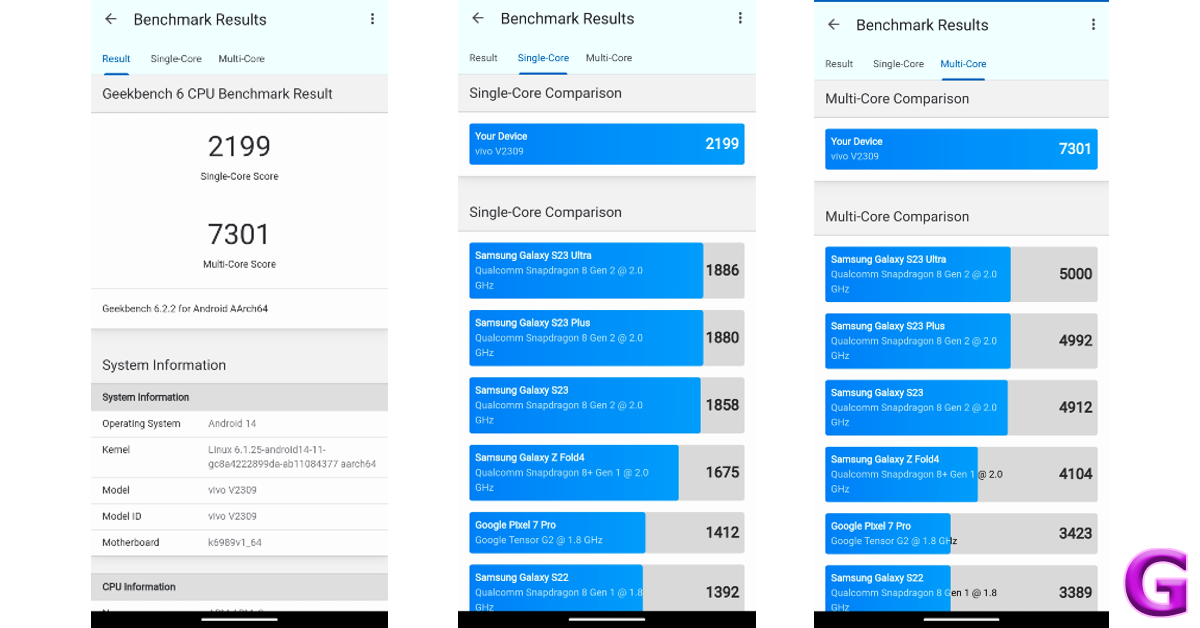
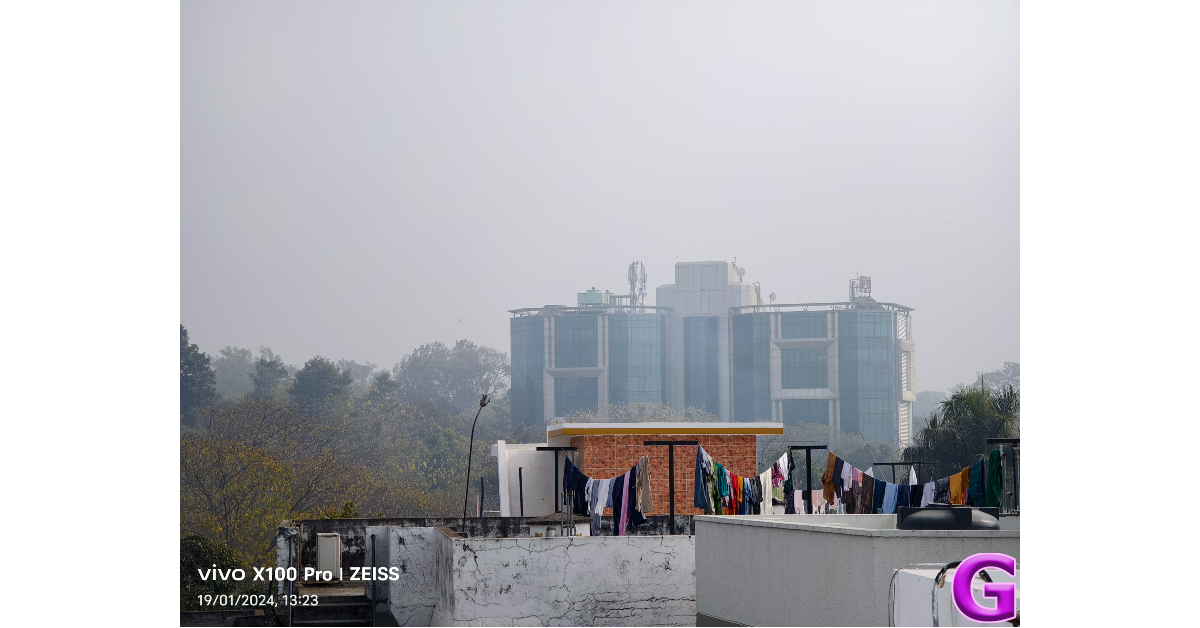
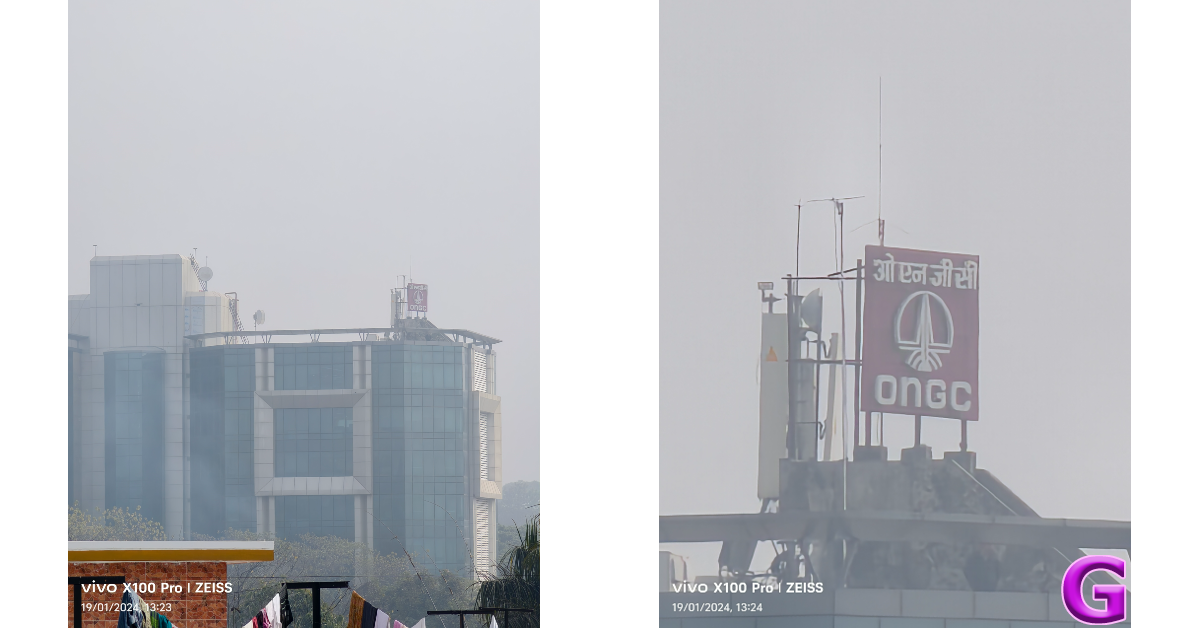
The X100 Pro is the first smartphone in India to be powered by the MediaTek Dimensity 9300 SoC. This chipset is a direct rival to Qualcomm’s Snapdragon 8 Gen 3. Interestingly, the latter is found in iQOO 12 (read our review here), which happens to be Vivo’s subsidiary brand. Accompanying the Dimensity 9300 SoC is Vivo’s V3 chip which pulls its weight in photoprocessing and gaming duties. The smartphone is available in a single 16GB RAM + 512GB storage variant.As soon as we got the Vivo X100 Pro for review, we transferred all our apps to the smartphone and loaded a dozen of them to check its RAM performance. The device did not take any time to load the apps after a period of inactivity. We were able to pick things up right where we left off. Basic tasks like instant messaging, web browsing, video calling, navigation, and media playback present no problems whatsoever. Since this is a camera smartphone, we tried editing the videos we shot on it and were delighted to see how easily it crushed every task.Vivo X100 Pro is not a gaming smartphone. But when you’re paying Rs 90,000 for a device, you expect a high standard on every front. With that in mind, we played titles like Call of Duty Mobile, Genshin Impact, and Asphalt 9 on the device. Even after an hour of gaming, the internal temperature of the smartphone did not rise to a point where we had to put it down to cool off. The surrounding temperature is also a contributing factor here (we are in the thick of winter, after all), but all things considered, the X100 Pro does a good job of thermal management. The V3 chip is a nice addition to the smartphone, as it does its part in bringing smoothness to the gameplay and handling demanding graphics.In the Geekbench 6 CPU benchmark, the Vivo X100 Pro scored 2,199 points in the single-core test and 7,301 points in the multi-core test. In comparison, the iQOO 12, powered by the Snapdragon 8 Gen 3 SoC, scored 2,219 and 6,696 points respectively.Moving on to the software, the Android 14-based Functouch 14 OS does a good job on Vivo’s flagship smartphone. We like the extensive set of Dynamic Effects that the Funtouch OS provides for screen transitions, phone unlock, fingerprint icon, charging, USB insertion, and ambient light notifications. The smartphone also has a ‘Simple Mode’, that covers the home screen with tiles for all the essential functions and increases the font size. The bloatware has been kept to a minimum, but it still isn’t a good look on a smartphone that costs Rs 90,000.Supplying the smartphone with its juice is a 5,400 mAh Li-Ion battery pack. This battery pack is composed of 2 individual cells. A battery capacity of 5,400 mAh is new for flagships, but Vivo X100 Pro is still a one-day phone. This isn’t a complaint by any means, as we got a steady 6-7 hours of screen time out of it until it hit the 20% threshold. On more conservative usage, we were able to push the screen time to more than 10 hours. Vivo ships a 120W charging brick with the X100 Pro even though its wired charging support is capped at 100W. It took a little over half an hour to fully charge the smartphone.Let’s talk about what the Vivo X100 Pro does best – cameras and photography. The massive camera cutout at the back of the smartphone houses three 50MP sensors for the wide, ultrawide, and floating telephoto lenses. On the left side of the panel lies the Zeiss 1-inch main camera which gets the Sony IMX989 sensor. The ultrawide camera is positioned at the top while the Zeiss APO floating telephoto camera is placed to its right. The new generation of Zeiss T* coating reduces reflectance from the lenses and brings new clarity to the images.The 1-inch primary shooter is an absolute delight to use. In daylight conditions, the camera captures accurate colours and the V3 chip does a solid job of processing the images. Most of the shots we captured were taken in overcast conditions (you can thank the January winter for that) and the smartphone did well to expose the sky perfectly. The colours were tuned perfectly, doing justice to the scene in front of us.We were happy with the dynamic range produced in the images. The shadows were detailed and the dimly lit parts of the scene were processed without being overblown by artificial brightness. This is largely due to the 1-inch sensor which captures a lot of light and doesn’t rely too heavily on photoprocessing. A similar performance is replicated in limited lighting, where the Vivo X100 Pro performs brilliantly even without the Night Mode turned on. We were surprised by the sharpness of images taken at night and the way the natural colour of objects was produced in the resulting images.Ultrawide shotPhotos taken with the 50MP ultrawide sensor are sharp, well-composed, and pack a good amount of details. If you’re tired of most ultrawide sensors taking ‘soft’ pictures, you may want to switch to the X100 Pro. Even at night, this sensor produces great results, with accurate colours and incredible detail. The autofocus skills of this camera are also on point. We wish it could cover a wider field of view, but we would take detailed images over that any day.Ultrawide shotThe 50MP floating telephoto camera rounds off an already great camera module in style. It offers 4.3x optical zoom and 100mm equivalent focal length. This range comes in very handy while taking portrait shots from a distance. At 4.3x native zoom, the X100 Pro expertly manages to create the ideal depth effect and apply the appropriate background blur. There is a nice separation between the subject and the background as well. Zooming in further to distant objects produces good results, albeit with the help of smart photo processing. To test the limits of the periscope telephoto lens, we zoomed it at a board roughly 300 metres away. Even in foggy conditions, the camera did a stellar job of producing legible results.4.3x optical zoom with the telephoto lens1x vs 4.3xBeing a camera-centric smartphone, Vivo X100 Pro’s camera app offers a plethora of shooting options. To begin with, you get to choose from 3 shooting profiles – Vivid, Textured, and Zeiss Natural. The Astrophotography Mode is nestled away in the adjacent page along with Zeiss’ landscape and architecture mode. In portrait mode, the camera lets you choose from 5 focal lengths – 24mm, 35mm, 50mm, 85mm, and 100mm. You also get a bunch of bokeh flares and portrait effects for your shots. Super Macro mode is one of the underrated features of the camera setup. The textures we were able to capture in this mode were amazing.10x vs 63x35mm portrait vs 100mm portraitUp front, the 32MP selfie camera does a good job of capturing the appropriate amount of details. It doesn’t mess with the skin tones or textures too much, but there are manual controls which let you control the smoothness of the photos. The downside of this camera is that it can only record 1080p videos. Meanwhile, the main rear sensor can shoot 8K videos at 30fps. The ultrawide and telephoto lens can shoot 4K & 1080p videos at 30 and 60fps.Some more portrait shots4.3x optical zoom with the telephoto lensRead Also:What is Circle to Search? Everything about it
Verdict
With the X100 Pro, Vivo has produced one of the best camera smartphones in the flagship category. Of course, there are many more releases yet to come this year, but we can easily see this smartphone holding its own even among the more premium flagships. While camera performance is consistently good across the board, the portrait shots taken with the primary and telephoto lenses are some of the best we’ve seen on any smartphone. Photography chops aside, the smartphone justifies its Rs 90,000 price tag with its high-octane chipset. The supreme benchmark figures are backed up with a rock-solid performance day in and day out. During the week-long review period, the Vivo X100 Pro did not produce a single hiccup. Lastly, the unique camera cutout and glass back bring a lot of flair to the device, making it a very easy device to recommend.
The gaming earphones come with a latency rate of less than 30 milliseconds.
The device provides an immersive gaming experience for PC, mobile, and console gameplay.
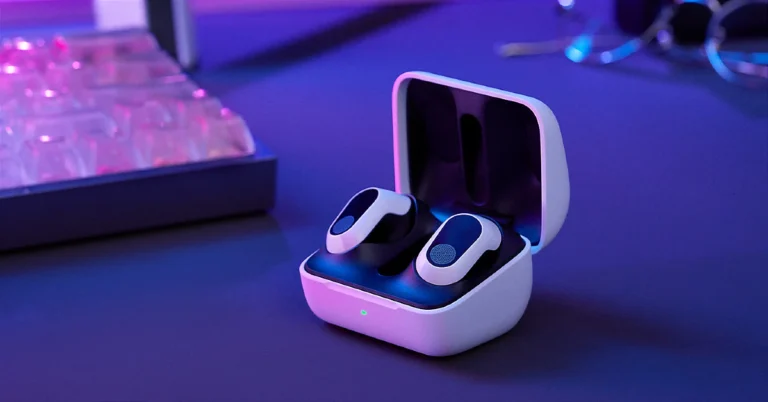
Popular audio brand Sony has officially announced the launch of new gaming TWS earbuds in India. Sony Inzone Buds truly wireless stereo earphones that have been introduced today have an in-ear design equipped with 8.4mm drivers. Moreover, wireless gaming earphones support active noise cancellation (ANC). As these were designed with gaming in mind, they come with a latency rate of less than 30 milliseconds. The audio device is claimed to provide up to 12 hours of battery life.
Sony Inzone Buds price in India and availability
The Sony Inzone Buds price in India is set at Rs 17,990. The TWS earbuds will be available for purchase via Sony retail stores (Sony Center and Sony Exclusive), the www.ShopatSC.com portal, major electronic stores, and other e-commerce websites in the country starting January 22. The earphones will come in two colour options- Black and White.
Sony Inzone Buds specs, features
Sony Inzone Buds have been created in collaboration with the famous esports team Fnatic. The gaming earbuds feature 8.4mm drivers and come with active noise cancellation and personalised spatial sound. The device is said to provide the industry’s longest battery life, up to 12 hours on a single charge and 12 hours with a case. It is powered by a low-consumption L1 processor. A quick 5-minute charge delivers up to an hour of playtime.
Also Read:WhatsApp channels to receive polls, the ability to share updates on status, and more features
Sony Inzone Buds support 2.4 GHz wireless connections through a USB Type-C dongle, ensuring low-latency connectivity for gaming. It has a latency rate of less than 30 milliseconds. Additionally, they are compatible with Bluetooth LE audio using the codec LC3. Note that traditional Bluetooth codecs, including SBC, AAC, aptX, and LDAC, are not supported. In addition to this, there is an AI-assisted microphone that ensures clear communication during gaming. It also comes integrated with an advanced AI DNN algorithm crafted from over 500 million voice samples. This technology distinguishes and amplifies the user’s voice as a result of enhanced in-game communication, allowing gamers to be heard with exceptional clarity, and contributing to an immersive and engaging gaming experience.
Also Read:Here is how to get iPhone 15 for as low as Rs 36,949
For better control, the TWS has customisable tap functions. This allows players to access vital controls with a simple touch, like adjusting in-game volume, managing music playback, or activating personalised settings through the INZONE Hub.
Voice notes can now be shared within channels by channel administrators.
Also, better channel management will result from having multiple admins.
Channel administrators will have the authority to make and share polls.
Adding content to the status feature will improve visibility.
Meta has updated WhatsApp channels with more interactive features. The instant messaging platform’s broadcasting feature will be integrated with polls, voice notes, a function to share channel updates on your status, and a feature to promote new admins. These features have been under the pipeline since last year. The four new features will improve the user experience and give channel owners and their viewers greater control.
Meta’s CEO, Mark Zuckerberg, revealed through his WhatsApp channel that a total of four features will be rolled out soon to WhatsApp channels. According to him, Voice notes, Multiple admins, Sharing to Status and Polls will be part of the latest update.
Also Read:Here is how to get iPhone 15 for as low as Rs 36,949
With Voice notes, WhatsApp channel admins will be allowed to share voice notes within their channels. This feature will make communication with followers more engaging.
Another latest feature enhancement is the addition of Multiple Admins to promote collaborative channel management. Several admins will assist channel owners in adding fresh content to their channels; therefore, visibility is improved.
Also Read:Xiaomi 360 Home Security Camera 2K launched in India
On the other hand, polls are the latest addition to the instant messaging platform’s broadcasting feature. This feature was already available on WhatsApp group chats but is now being expanded to Channels allowing users to make more than one choice at once. The ability to share polls will enable channel administrators to improve engagement with their followers. It will also let admins know their followers better by getting comments, likes, dislikes, and thoughts.
Virtual meeting apps like Zoom and Google Meet let you record calls and meetings with ease. The record button on these apps is quite accessible and comes in quite handy when you want to save a meeting, lecture, or seminar for future reference. While WhatsApp is meant for personal communication, over the last few months it has been adding features that rival apps like Google Meet and Zoom. However, one of the features that’s missing from the instant messaging platform is the option to record calls. In future, Meta may add it to the platform, but for now here are the top 2 ways to record calls on WhatsApp.Read Also:Samsung Galaxy S24, Galaxy S24+ and Galaxy S24 Ultra prices in India revealed: Details Inside
Recording calls on WhatsApp: What are my options?
The most straightforward way of recording calls on WhatsApp is by using a third-party app. Not only does a third-party app allow you to record calls across platforms like WhatsApp, Telegram, and Signal, but it also delivers good audio quality. The only catch is that this method only works for Android smartphones. Apple is very stringent with microphone and accessibility permissions given to third-party apps. A third-party app cannot access your iPhone’s microphone while you’re on a call. This pretty much kills any room for an app to record your calls. This leaves you with one other option – using another device to record your calls. It could be a dictaphone or another smartphone running the voice recorder app. You can also use external recording hardware like RecorderGear PR200 and EVISTR Magnetic Call Recorder, but they may not be worth the price if you only intend to record a single call.
Use a third-party app (Cube ACR)
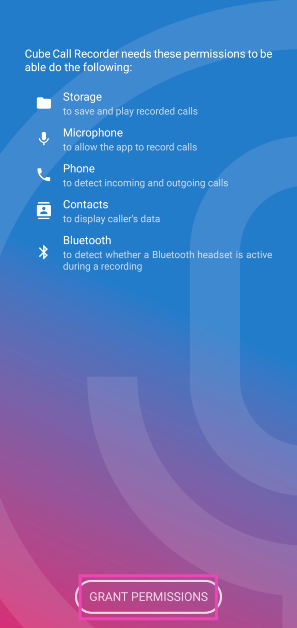
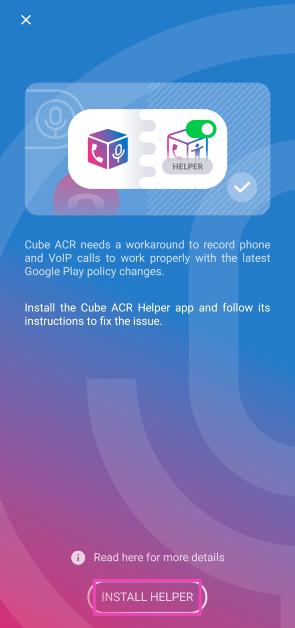
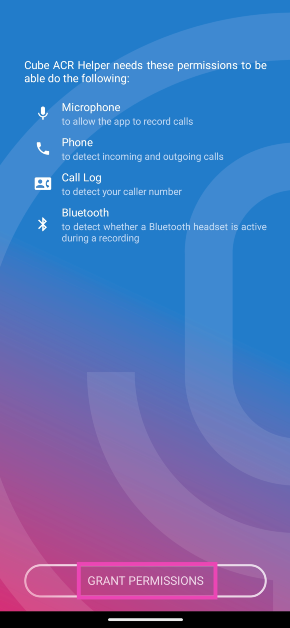
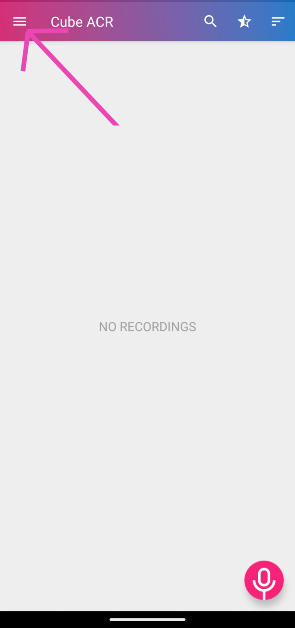
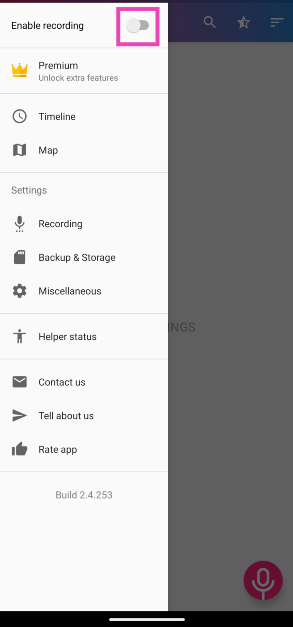
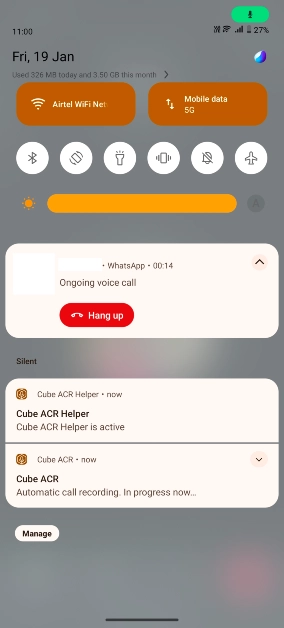
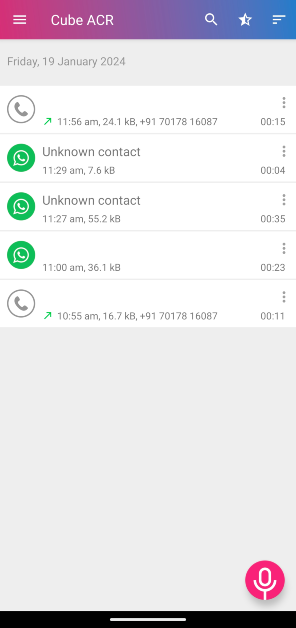
Step 1: Download and install the Cube ACR app from the Google Play Store.Step 2: Launch the app and give it the necessary permissions.Step 3: You will be prompted to install the Cube ACR Helper app. Hit Install Helper.Step 4: Give the Cube ACR Helper app the necessary permissions. This includes Accessibility services.Step 5: Once the helper is set up, go back to the Cube ACR app and hit the hamburger menu at the top left corner of the screen.Step 4: Turn on the toggle switch for Enable recording.Step 5: Go to WhatsApp and make a call. Cube ACR will automatically record it for you.Step 6: The recording will automatically cut off once the call is ended. Go to the Cube ACR app to view it.Step 7: Your WhatsApp call recording will have the WhatsApp icon next to it. Tap it to listen to it.
Use the recorder app on another device
Cube ACR is the perfect app to record phone calls across multiple platforms, but it needs several permissions to function. Not only does it require permission to use the dialer, contacts, microphone, nearby devices, and notifications, but it also relies on getting access to your phone’s accessibility services. If you’re not comfortable with granting an app total access to your device, you can always record calls the old-school way.The quality of the recording may take a hit, but it will get the job done. For starters, you need to make sure that the WhatsApp call is on loudspeaker. There are certain steps you can take to elevate the quality of the recording. The biggest of them all is limiting the surrounding noise.Turn off the fan and any other nearby devices that may be contributing to the background noise. Once that’s taken care of, open the voice recorder app on your secondary device and place it at an optimum distance from your phone’s loudspeaker. You don’t want to place it too close or the recording will sound too harsh. Once you have recorded the call, use a third-party tool to make it sound cleaner by removing the background noise. There are certain AI tools on the Internet that you can use for this task as well. These tools can accurately separate the callers’ voices from the general humdrum.
Frequently Asked Questions (FAQs)
How do I record WhatsApp calls on my phone?
Use the Cube ACR app to record calls across all apps, including WhatsApp. You can also go the old-school route and put the call on the loudspeaker while using another device to record it.
Does screen recording my phone record my calls as well?
Due to privacy and security restrictions, Android smartphones restrict the native screen recorder from using the microphone during calls. Which means you cannot record the call using that tool.
How do I record a regular phone call on my Android phone?
This is how you can record WhatsApp calls on any Android smartphone. Check out this article to learn how you can disable the call recording warning on Google’s dialer app. Third-party dialer apps like drupe have a recording feature baked into them, which can come in handy in certain situations.
iPhone 15 is getting a discount of Rs 12,991 on Flipkart.
Flipkart is running a Republic Day Sale where it is offering a great deal on iPhone 15.
The device was launched in India at a starting price of Rs 79,990.
Flipkart’s Republic Day is still on and will end today. So that you don’t miss out on an exciting deal on the iPhone 15, we thought of informing you that there is a huge discount on the iPhone 15 at Flipkart. The homegrown e-commerce platform is offering the iPhone for as low as Rs 36,949. Keep on reading how to get the deal.iPhone 15 was launched in India last in September and is currently seeing a massive price drop after its release. It was launched at a starting price of Rs 79,990. However, after a significant discount of Rs 12,991, the device is currently listed at Rs 66,999 on the e-commerce platform.Note that this is the effective price which the e-commerce store is offering. You can also apply for an available bank offer to further bring down its cost.Also Read:Xiaomi 360 Home Security Camera 2K launched in IndiaIf you do not have an ICICI bank card then do not despair because Flipkart is offering up to Rs 54,990 off with Buy with Exchange offer. You can only get the best exchange deal depending on the condition of your device. Suppose you have a Samsung Galaxy S22 5G which is in flawless condition then it might bring around Rs 11,700.But if you have an iPhone for example if you exchange iPhone 14 you can avail Rs 30050 exchange discount on the purchase of an iPhone 15. If your phone is in excellent or in good condition then you can get an exchange discount of Rs 22,550 and Rs 17,100 respectively.
iPhone 15 specifications
The iPhone 15 is highlighted with a 6.1-inch Super Retina XDR OLED display. The display is protected with a Ceramic Shield for protection. The handset features an IP68 classification for dust and water protection. The A16 Bionic chip which powered Apple’s iPhone 14 Pro models last year, is found in the new iPhone 15.Also Read:What is Circle to Search? Everything about itThe iPhone 15 has a 48-megapixel wide-angle camera as its main sensor with a 2um quad-pixel sensor and an f/1.6 aperture. Additionally, the device has a 12-megapixel ultra-wide camera with sensor-shift stabilisation and an f/1.6 aperture.On the front, there is a 12-megapixel TrueDepth camera for selfies and video calls. The device features a USB Type-C port instead of the company’s exclusive Lightning connector.
Garena Free Fire is a battle royale game with regular awards and tournaments to keep players interested. If you play Garena Free Fire, you should be aware of the redeem codes that are released on a daily basis. However, because the battle royale game is banned in India, players from other countries can use the Free Fire Redeem codes daily. If you’re unfamiliar with the Garena Free Fire redeem codes or don’t know how to get them, we’ve put together a step-by-step guide to help you redeem them. Check out Garena Free Fire Redeem Codes for 19 January 2024.The Free Fire redeem codes are a great way to get free stuff. These are 12-digit codes that contain alphabets and numbers, as well as an expiration date and time. Because the Garena FF redeem codes cannot be used more than once, you should hurry to the redemption page to claim your free reward before someone else does. To get a free reward, all you have to do is go to reward.ff.garena.com/en, which is the official redemption page. Also, keep an eye on this space for daily updates on Garena Free Fire redemption codes and rewards.
Garena Free Fire Redeem Codes Today 19 January 2024
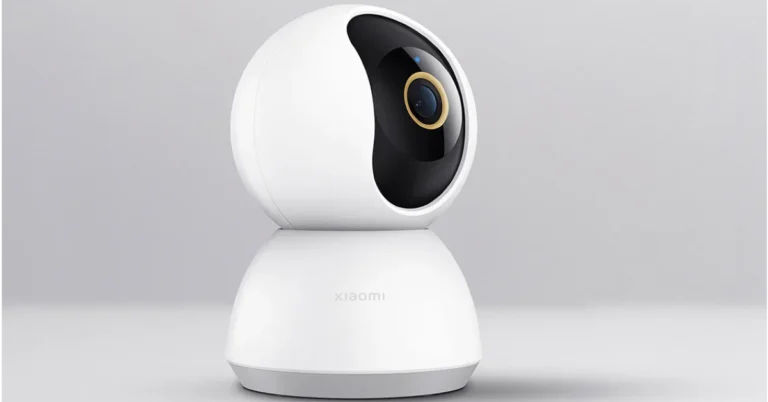
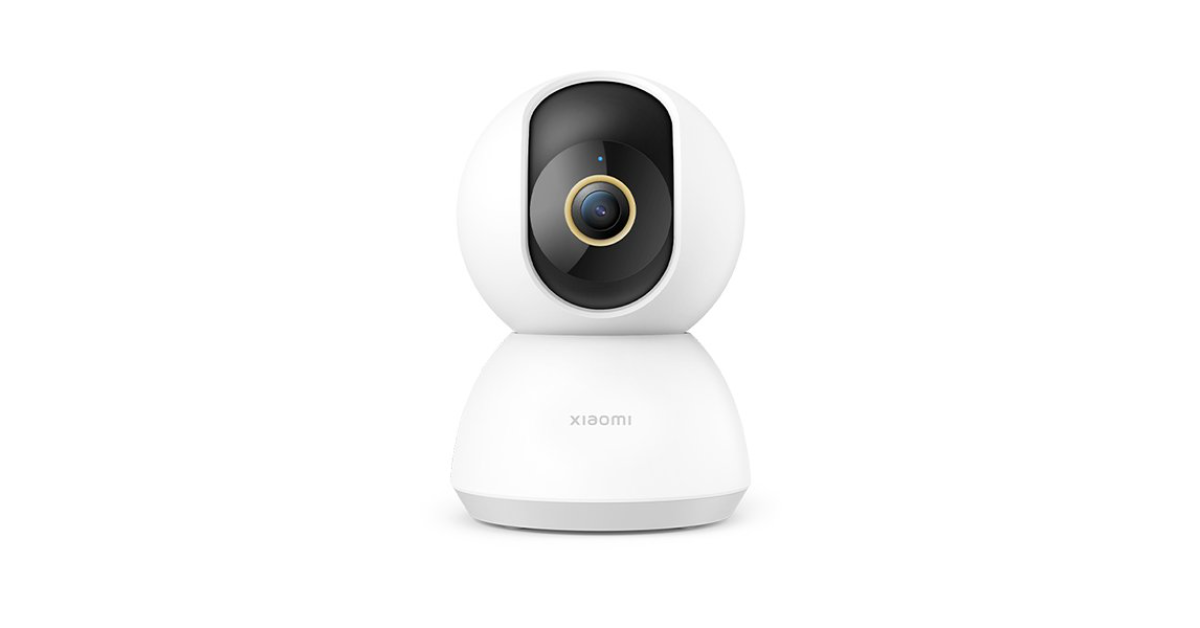
The Xiaomi 360 Home Security Camera 2K can capture a 360° horizontal view and a 108° vertical view.
The camera supports Infrared Night Vision for nighttime surveillance.
Xiaomi has introduced a new home security camera in India. The company launched Xiaomi 360 Home Security Camera 2K which comes with 360° Vision offering full home protection. It has a dual motor head that allows the camera to rotate and capture a full 360° horizontal view and a 108° vertical view. In addition to this, the CCTV camera has AI Human Detection technology that can filter out false alarms. The camera supports microSD cards and is equipped with a 3MP camera.
Xiaomi 360 Home Security Camera 2K price in India, sale details
Xiaomi 360 Home Security Camera 2K price in India has been set at Rs 3,200. The security camera comes in a single white colour option. The device is up for sale on mi.com. It is scheduled to be available via Amazon and Flipkart from January 22.
Xiaomi 360 Home Security Camera 2K features
Xiaomi 360 Home Security Camera 2K has a 3MP camera and uses ultra-clear HD technology with 2,304 x 1,296 pixels resolution to capture more detailed images and share an output of 2K ultra-clear HD video on your device. The security camera features a 360° pan-tilt-zoom panoramic view for comprehensive monitoring with no blind spots. In addition, the dual-motor head on the camera enables the camera to rotate and capture a full 360° horizontal view and a 108° vertical view.Also Read:What is Circle to Search? Everything about itXiaomi 360 Home Security Camera 2K has Infrared Night Vision as it comes with invisible 940nm infrared LEDs for clear night vision. With AI Human Detection the CCTV camera can filter out false alarms. It can identify when a person is walking around the camera’s surroundings and sends alert notifications accordingly. Because there is smart Motion Detection, you no longer receive false warning signals if your pet walks in front of the camera. With human tracking, the camera can follow if a human is detected. This feature can be enabled from the Xiaomi Home app in the Camera Settings.Also Read:Samsung Galaxy S24, Galaxy S24+ and Galaxy S24 Ultra prices in India revealed: Details InsideThe security camera also supports two-way real-time calls. Also, users can live monitor across multiple devices including smartphones, and tablets with Xiaomi Home App. For storing footage, there is a slot for microSD cards which supports up to 2256GB. It also supports Network-attached storage.
The circle-to-search feature was launched first for the Galaxy S24 Series.
The functionality will be available on Pixel phones as well.
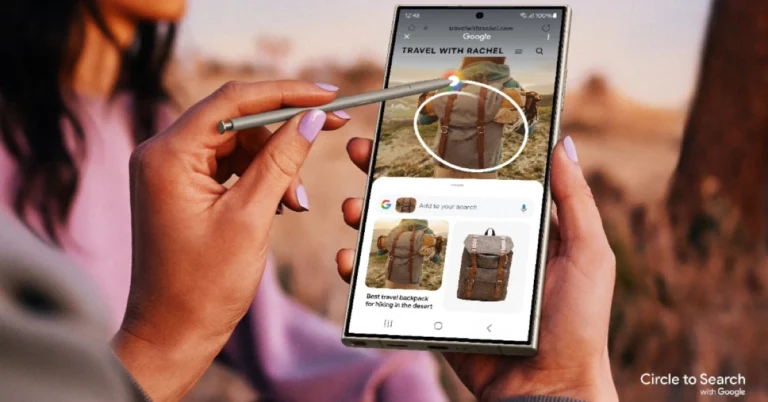
Samsung introduced the new Galaxy S24 Series in India and globally. This year’s Samsung flagship series is powered by Galaxy AI. The Samsung Galaxy S24, Galaxy S24+, and Galaxy S24 Ultra have other features such as Live Translate, Note Assist, and Circle to Search. Now what is this Circle to search? The Google-powered Circle to Search function will boost search results for Galaxy S24 phones. It is a new way to search for anything on your phone with a simple gesture—without switching apps.
What is Circle to Search?
The Google-powered Circle to Search feature has launched with the Samsung Galaxy S24 Series. The new tool makes searching results easier with a simple motion. The user will be able to see helpful, high-quality search results by long pressing the home button and circling, highlighting, scribbling, or tapping anything on the Galaxy S24’s screen.However, the company may have introduced the Circle to Search feature on the Galaxy S24 series, but it will also let Android users search anything on their devices without switching apps. “Now, with a simple gesture, you can select what you’re curious about in whatever way comes naturally to you—like circling, highlighting, scribbling or tapping — and get more information right where you are,” Google Noted in its blog post.Also Read:Redmi Note 13 Pro 5G Review: Amazing performance
How to use Circle to Search?
For instance, to identify a few items a creator wore in their “Outfit of the Day” video, just long-press the home button or navigation bar on your Android phone to activate Circle to Search. From there, you can circle or select any item that you see with your preferred gesture—like circling their sunglasses—to quickly find similar, shoppable options from retailers online. You could scribble the bag and tap on the boots to look those up, too—all without leaving where you are. When you’re done, simply swipe away, and you’re right back where you started.In complex situations, such as browsing social media, you may come across an image of a delicious corn dog with some unique toppings. All you have to do is circle the corn dog and pose a question, such as, “Why are these so popular?”Similarly, you can also look for something you saw on YouTube Shorts by quickly scribbling over the topic or caption.Also Read:Samsung Galaxy S24, Galaxy S24+ and Galaxy S24 Ultra prices in India revealed: Details Inside
Circle to Search Availability
According to Google, the Circle to Search feature will be launching on January 31 on premium Android smartphones—the Pixel 8, Pixel 8 Pro, and the new Samsung Galaxy S24 series—in all languages and locations where they’re available.
Samsung has announced Indian pricing for the Samsung Galaxy S24, Galaxy S24+, and Galaxy S24 Ultra.
The company will be offering pre-booking benefits worth Rs 22,000 on the Galaxy S24 Ultra and Galaxy S24+.
There will be pre-booking benefits worth Rs 15,000 on the purchase of the Galaxy S24.
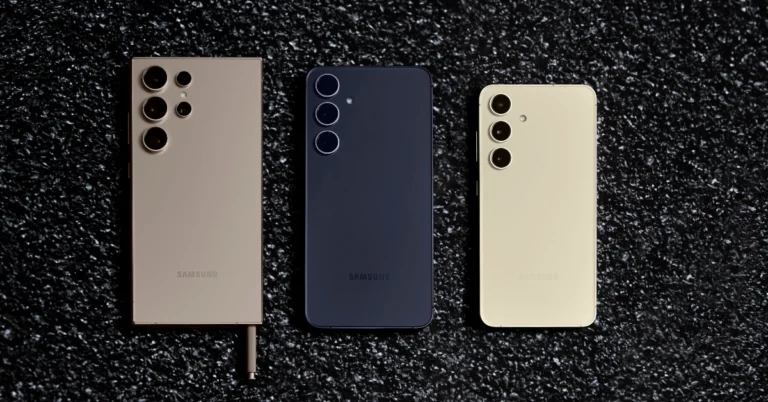
The Samsung Galaxy S24, Galaxy S24+, and Galaxy S24 Ultra officially debuted last evening. The firm did not share India’s price at the time of introduction, but we now have all of the pricing and availability information for Indian shoppers who were eagerly awaiting the disclosure. All the models in the Galaxy S24 Series are powered by the Snapdragon 8 Gen 3 Mobile Platform for Galaxy. They operate on Android 14-based One UI 6.1. Moreover, the phone comes with a dynamic AMOLED 2X display with support for up to 120Hz refresh rate.
Galaxy S24 Ultra
Samsung Galaxy S24, Galaxy S24+ and Galaxy S24 Ultra price in India
The Galaxy S24 Ultra will come in three different configurations:
12GB RAM + 1TB storage- Rs 1,59,999
12GB RAM + 512GB storage- Rs 1,39,999
12GB RAM + 256GB storage- Rs 1,29,999
The Galaxy S24+ will be available in two different variants:
12GB RAM + 512GB storage- Rs 1,09,999
12GB of RAM and 256GB storage- Rs 99,999
The Galaxy S24 has been launched in three variants:
8GB RAM + 512GB storage- Rs 89,999
8GB RAM + 256GB storage- Rs 79,999
Colour options for:
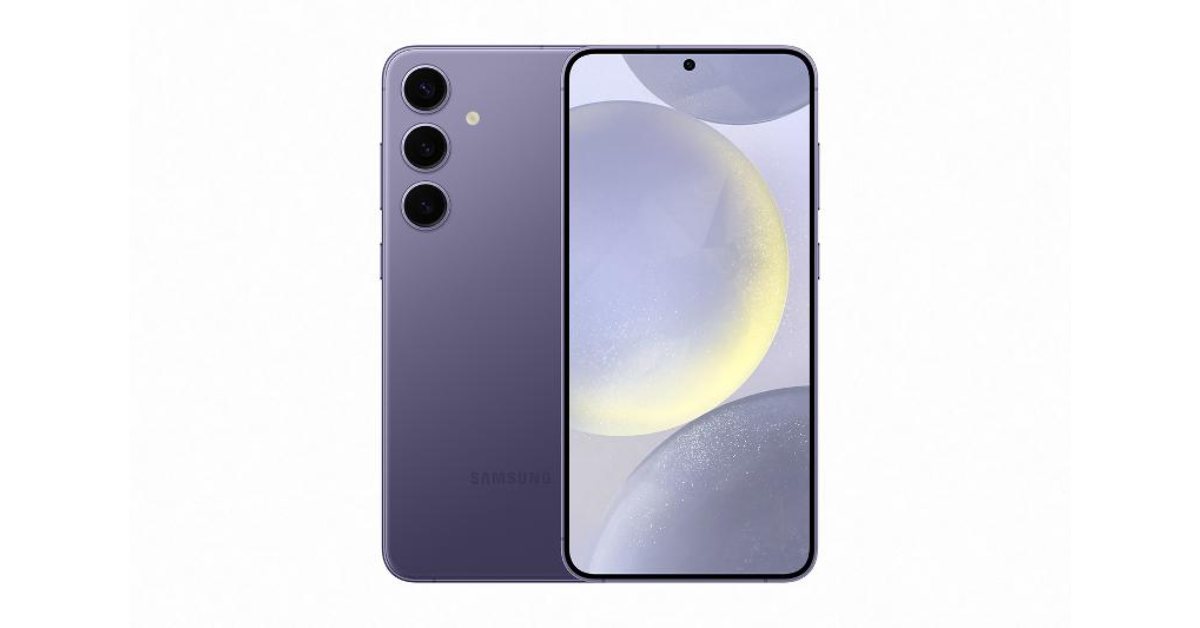
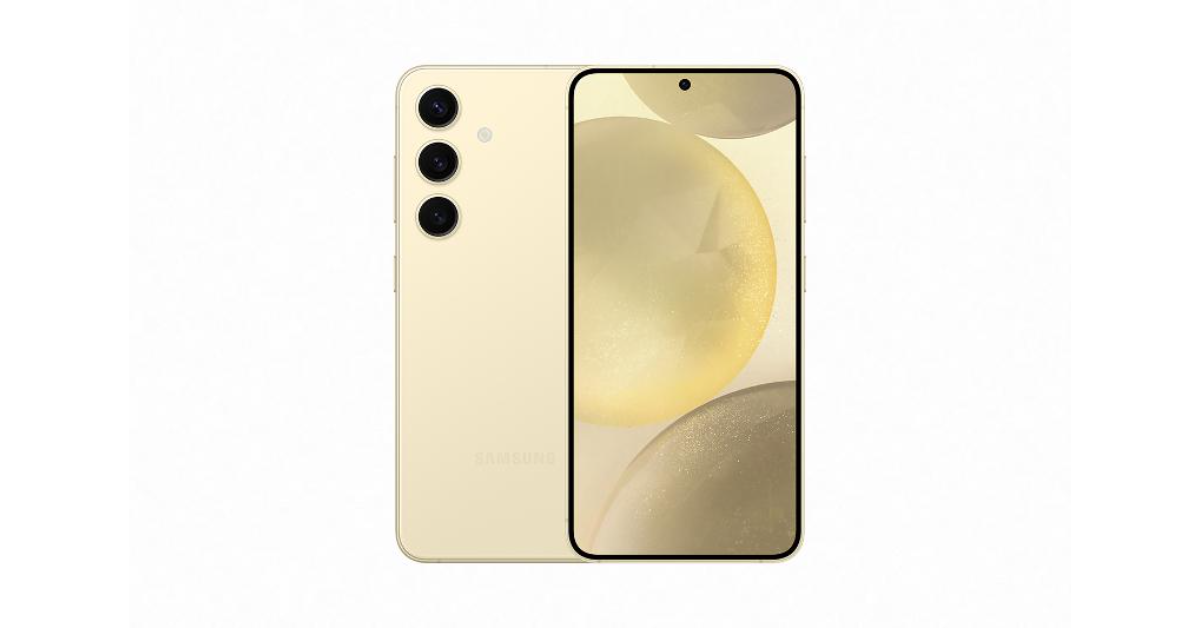
Galaxy S24: Amber Yellow, Cobalt Violet, Onyx, and Black
Galaxy S24 Plus: Cobalt Violet, Onyx Black
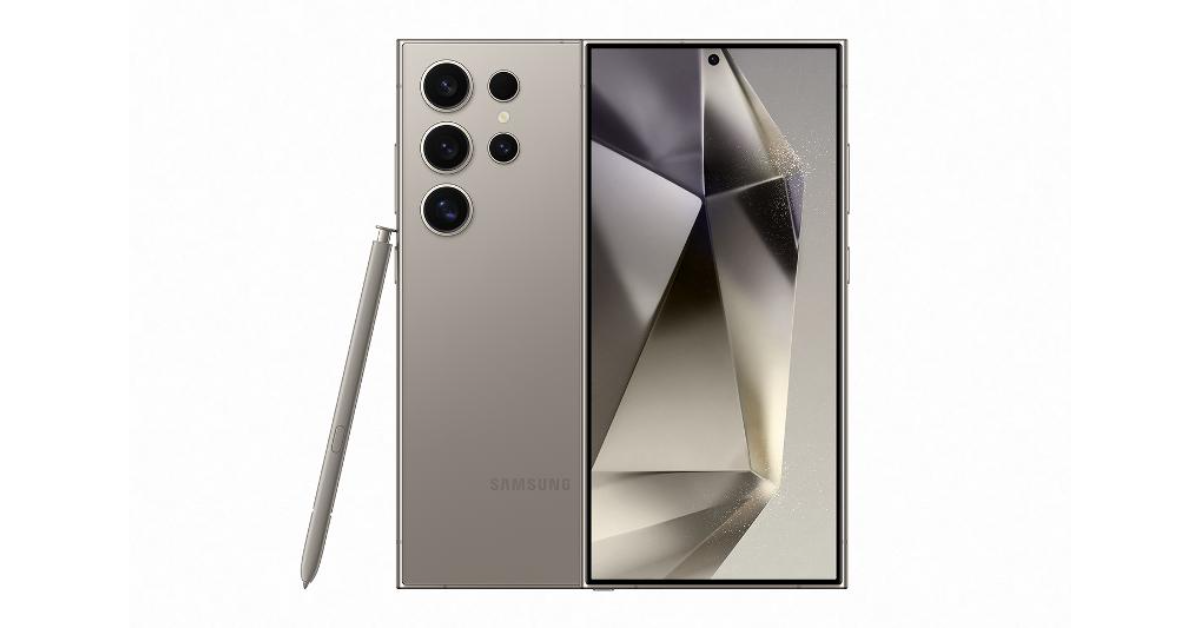
Galaxy S24 Ultra: Titanium Gray, Titanium Violet, Titanium Black and Titanium Gray
Also Read:Samsung officially announced Galaxy S24, Galaxy S24+, and Galaxy S24 Ultra
The company will be offering three exclusive colours for Ultra for online buyers: Titanium Blue, Titanium Green and Titanium Orange. Whereas, those buying the Galaxy S24 and S24 Plus from samsung.com will get the option of two exclusive colours: Sapphire Blue and Jade Green.
Specifications
Offers
No Cost EMI
“Benefits worth INR 22K”
Up to 11 months [Samsung Finance+]
Galaxy S24 Ultra
INR 12K Upgrade Bonus
&
+
Galaxy S24 Plus
INR 10K Storage Upgrade (Pre-book 256GB and Get 512GB)
Alternatively, INR 5K Bank Cashback can be availed along with INR 5K Upgrade [Total Benefits 10K]
Galaxy S24
“Benefits worth INR 15K”
Up to 11 months [Samsung Finance+]
INR 15K Upgrade Bonus
Alternatively, INR 5K Bank Cashback can be availed along with INR 8K Upgrade [Total Benefits 13K]
Galaxy S24 Series Live Commerce OfferCustomers pre-booking Galaxy S24 Series during “Samsung Live” event starting 12 pm on January 18will get an additional exclusive gift of a Wireless Charger Duo worth INR 4999. The URL to pre-book the devices during live commerce are https://www.samsung.com/in/live-offers/
Samsung Galaxy S24 Series specifications
The Samsung Galaxy S24 Ultra features a 6.8-inch QHD+ Dynamic AMOLED 2X Display with a Super Smooth 120Hz refresh rate (1~120Hz), 2,600nit peak brightness, and Vision booster. The screen is protected with Corning Gorilla Armor. Whereas the Galaxy S24 and S24+ come with 6.2-inch FHD+ and 6.7-inch QHD+ Dynamic AMOLED 2X displays, respectively.
Galaxy S24 Ultra+
All the smartphones come equipped with a tweaked version of the Snapdragon 8 Gen 3 SoC, which Samsung is calling the Snapdragon 8 Gen 3 Mobile Platform for Galaxy. In India, only the Ultra Variant comes with a Qualcomm processor, whereas the other two models house an Exynos 2400 SoC. The smartphone will be shipped with Android 14 with UI 6.1. The company will provide seven generations of OS upgrades and seven years of security updates.
Galaxy S24 Ultra has a quad rear camera setup that includes a 12MP Ultra-Wide Camera (F2.2 aperture, FOV-120˚), 200MP Wide Camera (OIS, F1.7 Aperture, and FOV-85˚), 50MP Telephoto Camera (5x Optical Zoom, OIS, F3.4 aperture, and FOV of 22˚) and a 10MP Telephoto Camera (3x Optical Zoom, OIS, F2.4 aperture, and FOV 36˚).
Galaxy S24
On the other hand, the Galaxy S24 and Galaxy S24+ have the same triple rear camera setup that includes a 12MP Ultra-Wide Camera (F2.2, FOV 120˚), 50MP Wide Camera (OIS F1.8, FOV 85˚) and a 10MP Telephoto Camera (3x Optical Zoom, F2.4, FOV 36˚). All the models come with a 12MP selfie camera (F2.2, FOV 80˚).
Also Read:Top 24 apps for your new Samsung Galaxy S24 Ultra
For connectivity, there is 5G, 4G LTE, Wi-Fi 7, Wi-Fi Direct, Bluetooth 5.3 and a USB Type-C port. The S24 Ultra, S24+, and S24 boast a 5,000mAh, 4,900mAh, and 4,000mAh battery, respectively.
The Galaxy S24 Ultra comes with a S Pen stylus. In addition to this, all the variables include Samsung Knox, Knox Vault, and Passkeys.
Besides this, all the phones in the Galaxy S24 Series come pre-loaded with Live Translate, Note Assist, and Circle to Search, powered by built-in AI features.
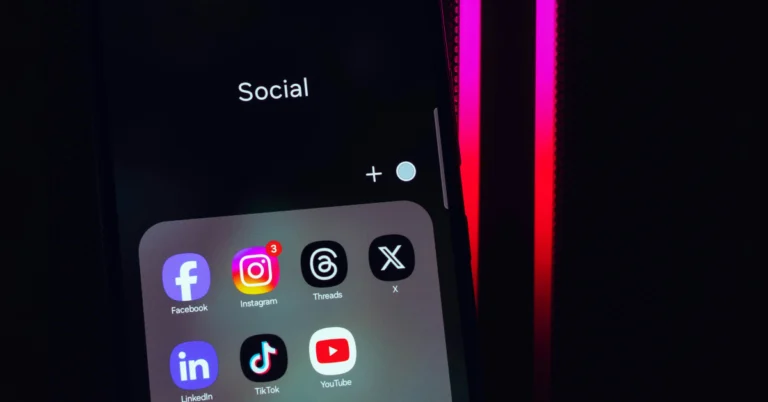
A simple swipe gesture in either direction is enough to remove a notification from your phone’s lock screen and home page. If there are a lot of notifications piled up, the ‘Clear all’ button comes in quite handy. But what if a notification entry refuses to go away? Sometimes clearing the app from the app switcher doesn’t work either. If the problem keeps persisting, it can get annoying really quickly. Luckily, we’ve got a bunch of fixes for you. Here are the top 11 ways to fix or clear the Instagram notifications that won’t go away.Read Also:Samsung offering a discount on Galaxy A54 5G, Galaxy A34 5G in India
Why is the Instagram notification stuck on my phone?
There are several types of malfunctions that can cause an Instagram notification to get stuck on your phone’s lock screen and home page. Sometimes, a corrupt file in the app’s cached memory may get corrupted, derailing certain functions and causing weird glitches. This can easily be fixed by clearing the cache for the app from your device’s settings.Ghost notifications are also known to get stuck on your phone’s interface when the content that they are linking to is no longer present in the app. This is known to happen when someone sends you a message and then deletes it right away. Ideally, this deletes the notification as well, but sometimes, it refuses to disappear. If you’re dealing with a similar situation, check out these fixes.
Pause notifications from the Instagram app
Step 1:Launch the Instagram app on your smartphone and tap your profile picture at the bottom right corner of the screen.Step 2: Tap the hamburger menu at the top right corner of the screen.Step 3: Go to Settings and privacy.Step 4: Select Notifications.Step 5: Turn on the toggle switch for Pause all.Step 6: Turn the notifications back on when the current one gets cleared from your phone.
Pause system notifications for Instagram
Step 1: Go to Settings and select Notifications.Step 2: Tap on App Notifications.Step 3: Turn off the toggle switch for Instagram.Step 4: Turn the toggle switch back on when the current notification has been cleared.
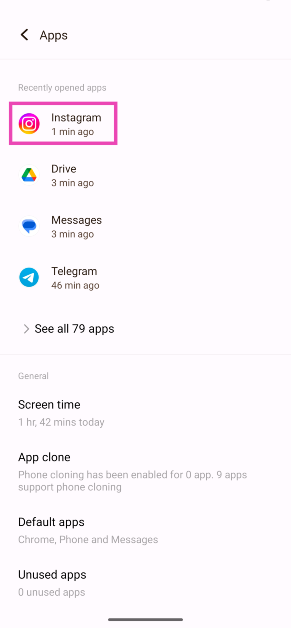
Force Stop the Instagram app
Step 1: Go to Settings and select Apps.Step 2: Tap on Instagram.Step 3: Tap on Force Quit.
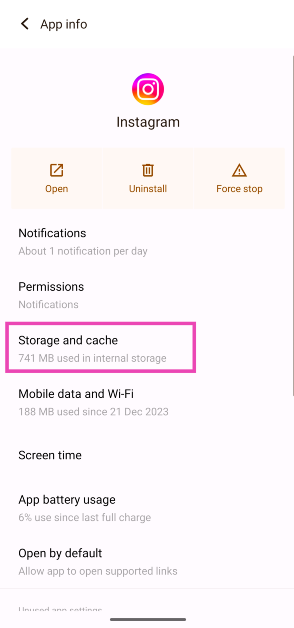
Clear Instagram’s cache
Step 1: Go to Settings and select Apps.Step 2: Tap on Instagram.Step 3: Select Storage and cache.Step 4: Hit Clear Cache.
Check your secondary Instagram profile
Instagram lets you create and use multiple profiles on your phone. The notifications from all the profiles are displayed on the app. If the indicator on the Instagram app refuses to go away, switch to your secondary profile(s) and check the pending notifications. They could be unread messages, follow requests, likes, etc. Once you’ve done that, the ghost notifications and red dot indicators will be gone.
Update the app
Bug-related issues can cause an app’s notifications to get stuck on your phone’s lock screen and notification shade. If you’re using an older version of the app, updating it can fix this issue. Go to the Google Play Store, search for Instagram, and hit ‘Update’ on the app’s page.
Restart your smartphone
If updating the Instagram fix doesn’t fix the issue, try restarting your smartphone. If the problem lies with your phone’s OS, a quick restart should fix it. Press and hold the side key to reveal the power menu. Select ‘Restart’ from the list. If long-pressing the side key triggers the voice assistant, press and hold it along with the Volume Up key to access the power menu.
Delete and reinstall Instagram
The last thing you can try to get rid of the stuck Instagram notification is deleting the app. This should remove the notification from the top shade as well. Press and hold the Instagram app icon in the app drawer and hit the bin icon in the popup menu to uninstall the app. Once the notification disappears, reinstall Instagram from the Google Play Store and log in using the proper credentials.
Check Instagram’s servers
Sometimes, you may notice an Instagram DM notification on your phone but tapping on it does nothing. This happens due to sluggish servers. The notification reaches you first but due to the slow servers, the actual message takes time to deliver on your phone. Go to DownDetector.in and search for Instagram to check if its servers are experiencing an outage.
Check your internet connection
If Instagram’s servers are fine, it is possible that a faulty internet connection on your end is causing the issue. The lingering notification on your device won’t go away until the content that it is linked to has fully loaded in the background. Switch to a better WiFi connection to fix this issue.
Update your phone’s OS
If the notification issue is not just exclusive to Instagram, a specific bug on your phone might be the reason behind it. Luckily, Android developers are quick to patch such bugs with swift updates. Here’s how you can update your phone to the latest OS version.
Step 1: Go to Settings and select Software update.
Step 2: Tap on Download and install.
Step 3: Select Install now.
Frequently Asked Questions (FAQs)
Why won’t the Instagram notification go away on my phone?
Sometimes, a corrupt cache and unexpected bugs on the app can cause its notifications to get stuck on your phone’s lock screen or home page. This is a temporary issue that can be fixed with a couple of quick measures.
How do I get rid of the Instagram notification stuck on my phone?
Force quit the Instagram app from App Settings on your device and clear its cache to get rid of the notification.
Why does Instagram show an extra notification?
If you’re logged into multiple Instagram accounts, the app will push notifications from all of them, giving the appearance of ‘extra’ notifications.
How do I pause all Instagram notifications?
To pause all Instagram notifications on your smartphone, launch the app, go to your profile, select Menu>Settings and privacy>Notifications and turn off the toggle switch for ‘Pause all’.
These are the top 11 ways to fix the ‘Instagram notification won’t go away’ issue on your smartphone. If you keep facing this issue on your mobile device, switch to the Instagram Lite app. If you know any other way to fix this problem, let us know in the comments!


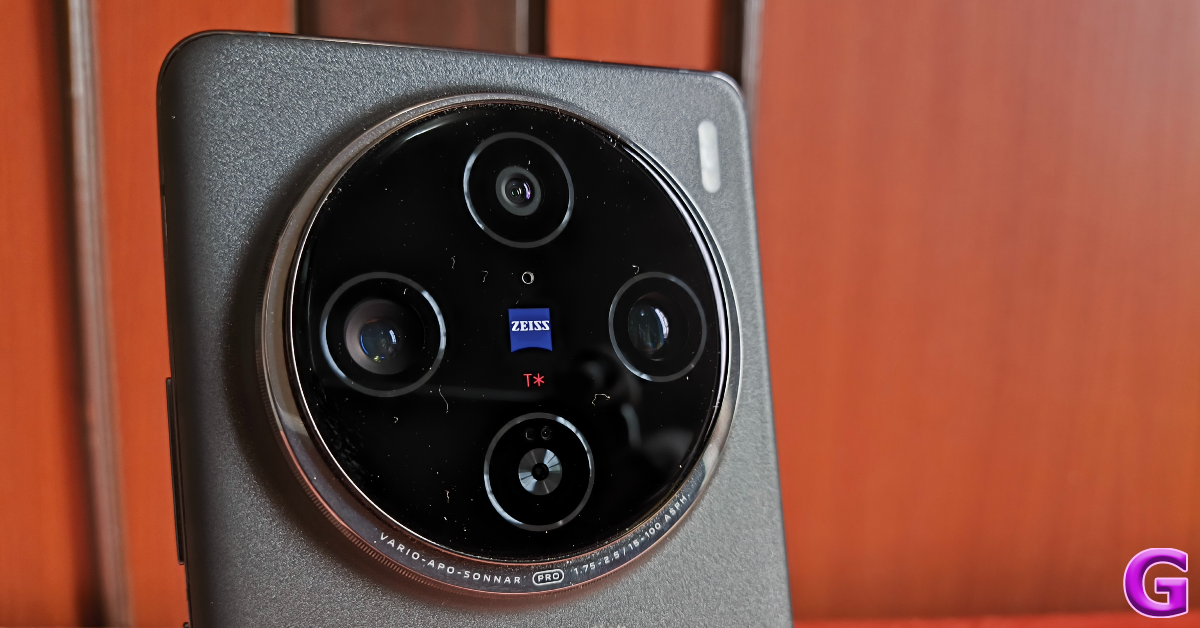 The circular camera cutout that made its debut in the Vivo X80 Pro has been perfected on the X100 Pro. Instead of being aligned to the left of the back panel, it is now positioned centrally. The Zeiss branding which was previously found on the side of the camera panel is now positioned within it. A stainless steel ring with a ridged perimeter forms the frame of the two-step cutout, giving the smartphone its distinct ‘camera’ look. This feels like the final form of the camera design, after two steady years of evolution.
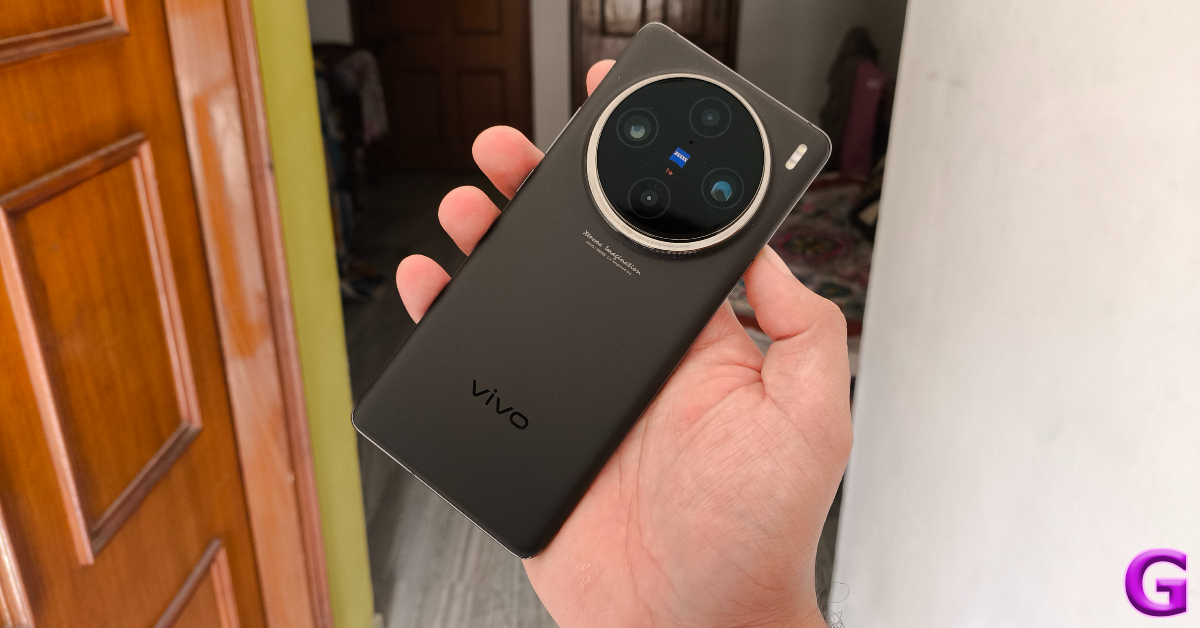 We used the Asteroid Black colour variant of the Vivo X100 Pro for this review. The smartphone is also available in Startail Blue and Sunset Orange shades. The matte black finish on our model made it a bit slippery, but on the bright side, there were no fingerprints to be found on the glass back panel. The smartphone weighs 225g, which is pretty standard for flagship devices, but if you’re making the switch from a midrange or budget phone, you will clearly feel the difference.
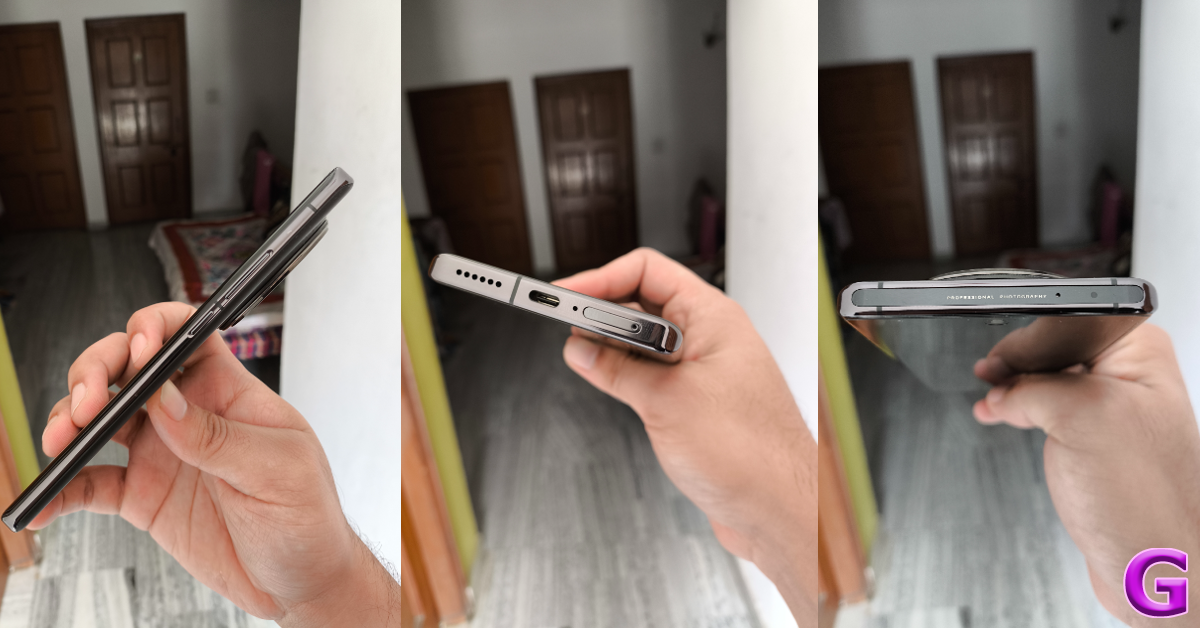 The aluminium frame has curved edges to accommodate the curved AMOLED display. The volume rocker keys and the power button are positioned on the right edge while the IR blaster and secondary microphone make their way to the top of the phone. The bottom edge houses the SIM tray, primary microphone, USB Type-C port, and speaker grille. The left edge has been left keyless.
 Vivo X100 Pro’s 6.78-inch LTPO curved AMOLED display offers a maximum refresh rate of 120Hz and a peak brightness of 3,000 nits. Needless to say, the smartphone is perfectly legible under direct sunlight. The refresh rate is set to ‘Smart Switch’ (adaptable) by default, but you can lock it at 60Hz or 120Hz from device settings. While you’re there, you can also select the ideal colour profile for yourself and regulate the colour temperature of the screen.
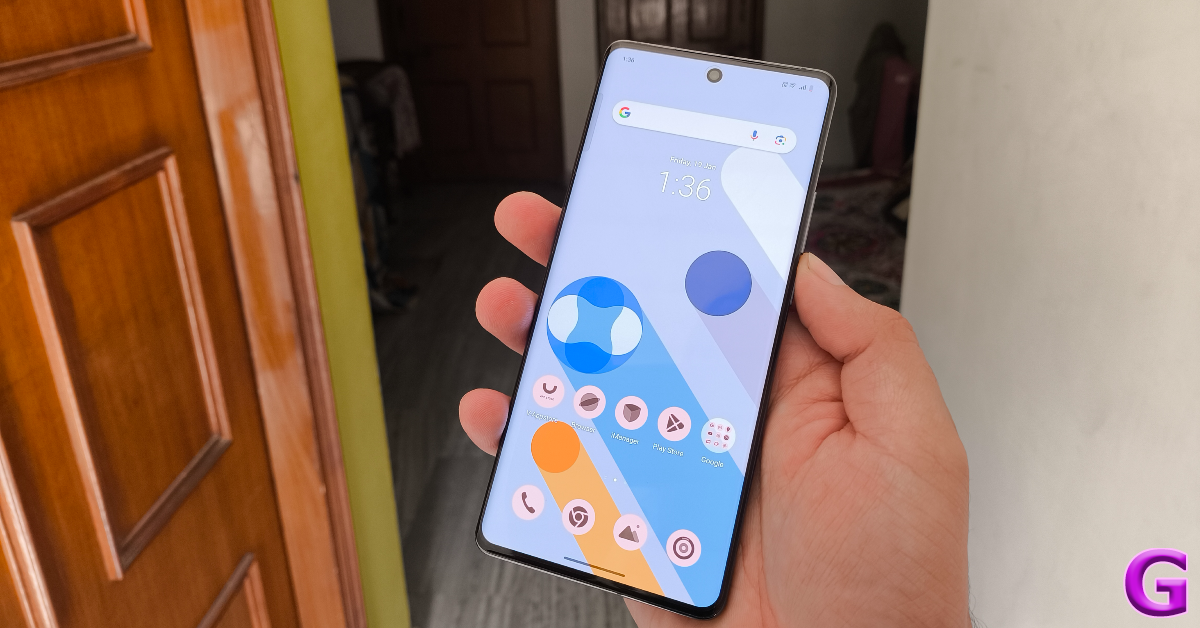 Scrolling and navigation on this 120Hz AMOLED display is as smooth as it can get. The display is only slightly curved towards the edges, so the accidental touches are kept to a minimum. We are not super fond of curved panels, but we really enjoyed our time with this one. The overall touch reception is quite snappy. Even the slightest flicks get registered with ease. The bezels around the display have been kept to a minimum, giving you more screen real estate. Up top, the selfie camera lies inside a punch-hole cutout. The under-display optical scanner is positioned a bit lower than we would have liked and isn’t the fastest one around, but it does a good job on the device.
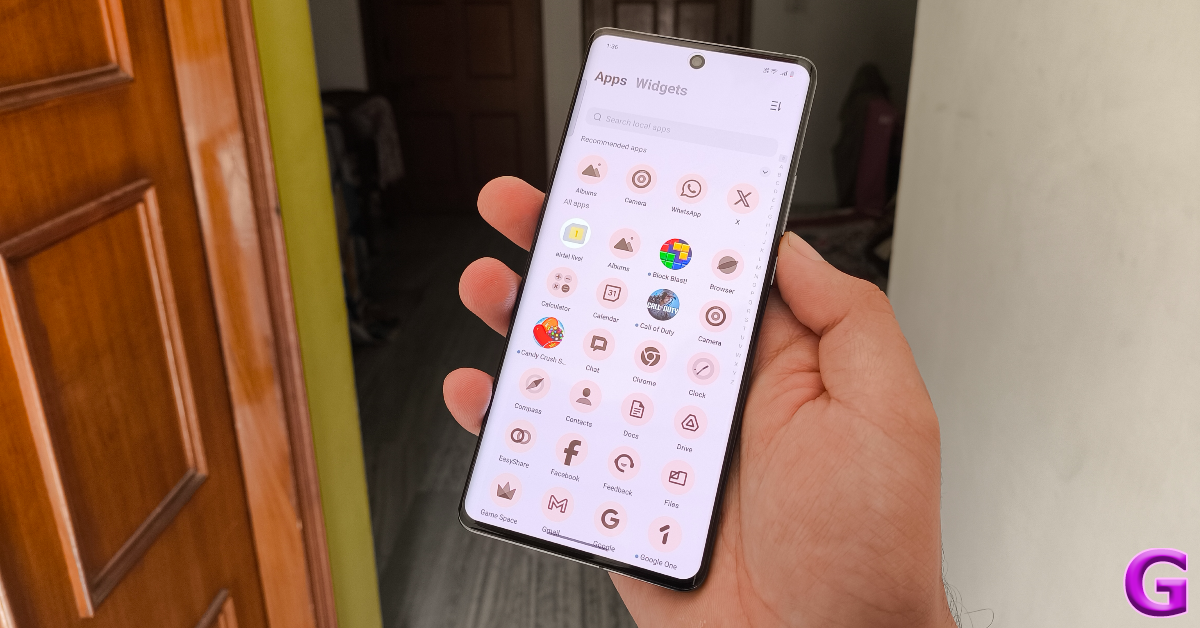 Watching HD movies and videos on this 1,260 x 2,800p display proved to be a remarkable experience. The deep blacks are astonishing and the contrasting vivid colours are punchy and fun. The curved nature of the display does not diminish the viewing angles in any way. You can hold the smartphone in any posture and still get well-composed images that truly ‘pop’. While binge-watching videos, the top-heavy nature of the smartphone can make it fatiguing to hold, but you can easily prop it against a solid surface.
Vivo X100 Pro is rated IP68 for water and dust resistance. This means it can easily survive water splashes and even small dips. Vivo claims the smartphone can remain unscathed after submerging to 1.5m for up to 30 minutes.
Watching HD movies and videos on this 1,260 x 2,800p display proved to be a remarkable experience. The deep blacks are astonishing and the contrasting vivid colours are punchy and fun. The curved nature of the display does not diminish the viewing angles in any way. You can hold the smartphone in any posture and still get well-composed images that truly ‘pop’. While binge-watching videos, the top-heavy nature of the smartphone can make it fatiguing to hold, but you can easily prop it against a solid surface.
Vivo X100 Pro is rated IP68 for water and dust resistance. This means it can easily survive water splashes and even small dips. Vivo claims the smartphone can remain unscathed after submerging to 1.5m for up to 30 minutes.
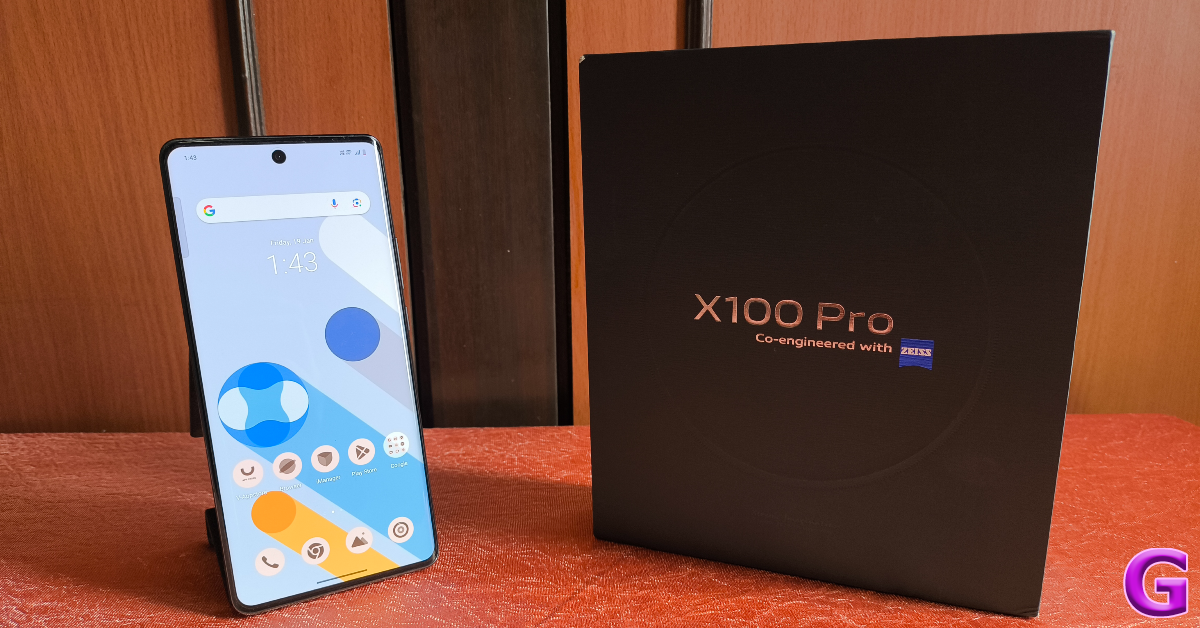 As soon as we got the Vivo X100 Pro for review, we transferred all our apps to the smartphone and loaded a dozen of them to check its RAM performance. The device did not take any time to load the apps after a period of inactivity. We were able to pick things up right where we left off. Basic tasks like instant messaging, web browsing, video calling, navigation, and media playback present no problems whatsoever. Since this is a camera smartphone, we tried editing the videos we shot on it and were delighted to see how easily it crushed every task.
Vivo X100 Pro is not a gaming smartphone. But when you’re paying Rs 90,000 for a device, you expect a high standard on every front. With that in mind, we played titles like Call of Duty Mobile, Genshin Impact, and Asphalt 9 on the device. Even after an hour of gaming, the internal temperature of the smartphone did not rise to a point where we had to put it down to cool off. The surrounding temperature is also a contributing factor here (we are in the thick of winter, after all), but all things considered, the X100 Pro does a good job of thermal management. The V3 chip is a nice addition to the smartphone, as it does its part in bringing smoothness to the gameplay and handling demanding graphics.
In the Geekbench 6 CPU benchmark, the Vivo X100 Pro scored 2,199 points in the single-core test and 7,301 points in the multi-core test. In comparison, the iQOO 12, powered by the Snapdragon 8 Gen 3 SoC, scored 2,219 and 6,696 points respectively.
As soon as we got the Vivo X100 Pro for review, we transferred all our apps to the smartphone and loaded a dozen of them to check its RAM performance. The device did not take any time to load the apps after a period of inactivity. We were able to pick things up right where we left off. Basic tasks like instant messaging, web browsing, video calling, navigation, and media playback present no problems whatsoever. Since this is a camera smartphone, we tried editing the videos we shot on it and were delighted to see how easily it crushed every task.
Vivo X100 Pro is not a gaming smartphone. But when you’re paying Rs 90,000 for a device, you expect a high standard on every front. With that in mind, we played titles like Call of Duty Mobile, Genshin Impact, and Asphalt 9 on the device. Even after an hour of gaming, the internal temperature of the smartphone did not rise to a point where we had to put it down to cool off. The surrounding temperature is also a contributing factor here (we are in the thick of winter, after all), but all things considered, the X100 Pro does a good job of thermal management. The V3 chip is a nice addition to the smartphone, as it does its part in bringing smoothness to the gameplay and handling demanding graphics.
In the Geekbench 6 CPU benchmark, the Vivo X100 Pro scored 2,199 points in the single-core test and 7,301 points in the multi-core test. In comparison, the iQOO 12, powered by the Snapdragon 8 Gen 3 SoC, scored 2,219 and 6,696 points respectively.
 Moving on to the software, the Android 14-based Functouch 14 OS does a good job on Vivo’s flagship smartphone. We like the extensive set of Dynamic Effects that the Funtouch OS provides for screen transitions, phone unlock, fingerprint icon, charging, USB insertion, and ambient light notifications. The smartphone also has a ‘Simple Mode’, that covers the home screen with tiles for all the essential functions and increases the font size. The bloatware has been kept to a minimum, but it still isn’t a good look on a smartphone that costs Rs 90,000.
Supplying the smartphone with its juice is a 5,400 mAh Li-Ion battery pack. This battery pack is composed of 2 individual cells. A battery capacity of 5,400 mAh is new for flagships, but Vivo X100 Pro is still a one-day phone. This isn’t a complaint by any means, as we got a steady 6-7 hours of screen time out of it until it hit the 20% threshold. On more conservative usage, we were able to push the screen time to more than 10 hours. Vivo ships a 120W charging brick with the X100 Pro even though its wired charging support is capped at 100W. It took a little over half an hour to fully charge the smartphone.
Moving on to the software, the Android 14-based Functouch 14 OS does a good job on Vivo’s flagship smartphone. We like the extensive set of Dynamic Effects that the Funtouch OS provides for screen transitions, phone unlock, fingerprint icon, charging, USB insertion, and ambient light notifications. The smartphone also has a ‘Simple Mode’, that covers the home screen with tiles for all the essential functions and increases the font size. The bloatware has been kept to a minimum, but it still isn’t a good look on a smartphone that costs Rs 90,000.
Supplying the smartphone with its juice is a 5,400 mAh Li-Ion battery pack. This battery pack is composed of 2 individual cells. A battery capacity of 5,400 mAh is new for flagships, but Vivo X100 Pro is still a one-day phone. This isn’t a complaint by any means, as we got a steady 6-7 hours of screen time out of it until it hit the 20% threshold. On more conservative usage, we were able to push the screen time to more than 10 hours. Vivo ships a 120W charging brick with the X100 Pro even though its wired charging support is capped at 100W. It took a little over half an hour to fully charge the smartphone.
 Let’s talk about what the Vivo X100 Pro does best – cameras and photography. The massive camera cutout at the back of the smartphone houses three 50MP sensors for the wide, ultrawide, and floating telephoto lenses. On the left side of the panel lies the Zeiss 1-inch main camera which gets the Sony IMX989 sensor. The ultrawide camera is positioned at the top while the Zeiss APO floating telephoto camera is placed to its right. The new generation of Zeiss T* coating reduces reflectance from the lenses and brings new clarity to the images.
 The 1-inch primary shooter is an absolute delight to use. In daylight conditions, the camera captures accurate colours and the V3 chip does a solid job of processing the images. Most of the shots we captured were taken in overcast conditions (you can thank the January winter for that) and the smartphone did well to expose the sky perfectly. The colours were tuned perfectly, doing justice to the scene in front of us.
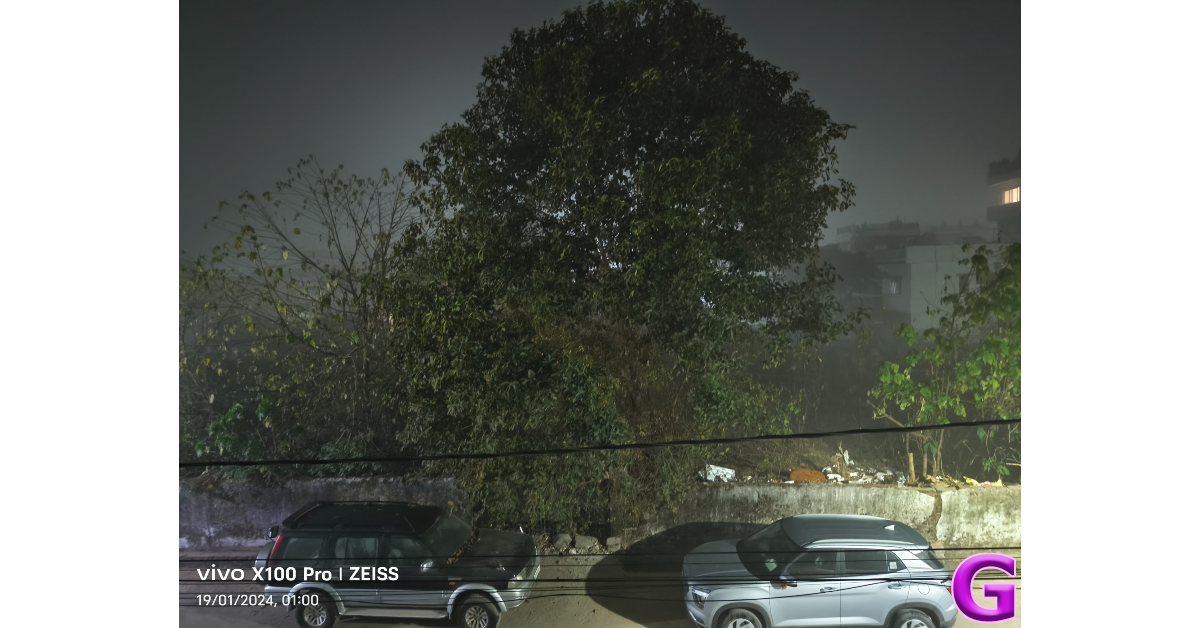
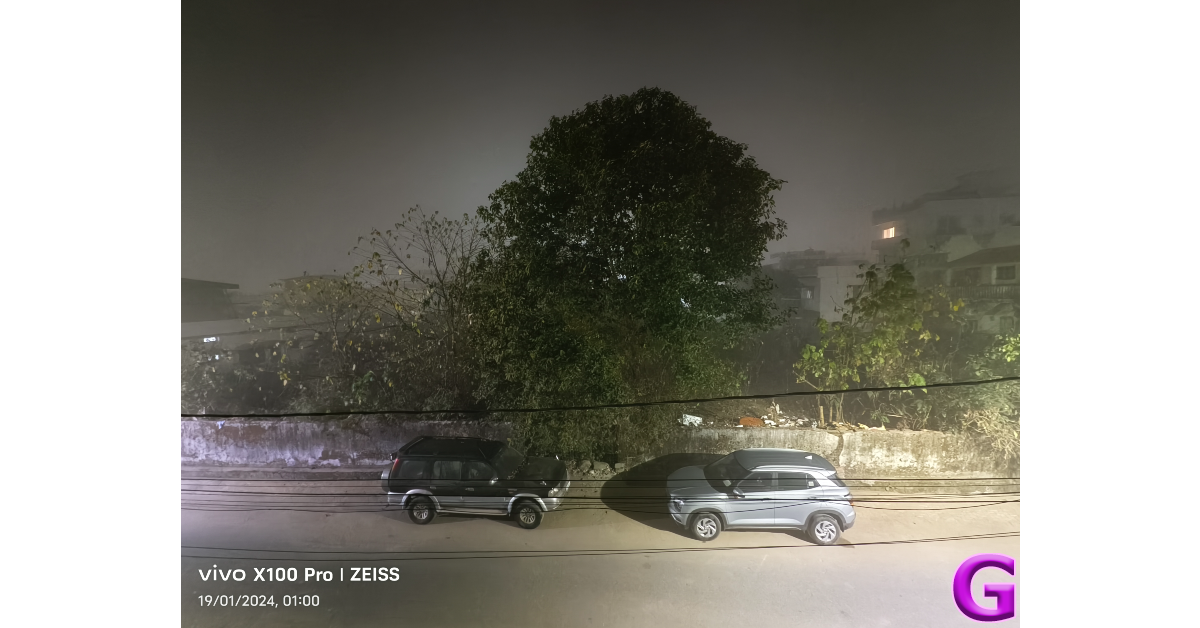
 We were happy with the dynamic range produced in the images. The shadows were detailed and the dimly lit parts of the scene were processed without being overblown by artificial brightness. This is largely due to the 1-inch sensor which captures a lot of light and doesn’t rely too heavily on photoprocessing. A similar performance is replicated in limited lighting, where the Vivo X100 Pro performs brilliantly even without the Night Mode turned on. We were surprised by the sharpness of images taken at night and the way the natural colour of objects was produced in the resulting images.







 Step 3:
 Step 4:
 Step 5:
 Step 4:
 Step 5:
 Step 6:
 Step 7:

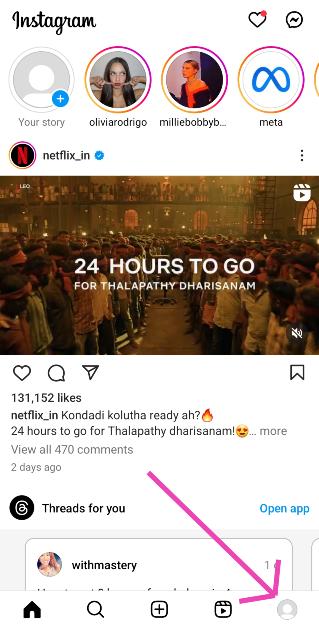 Step 2:
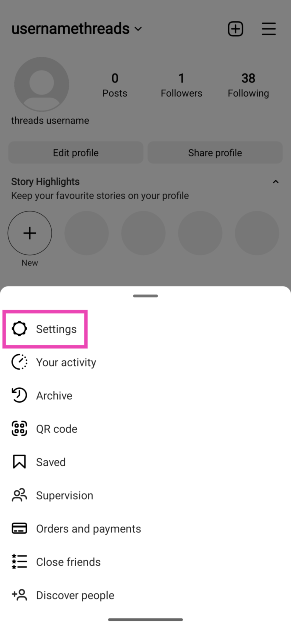 Step 4:
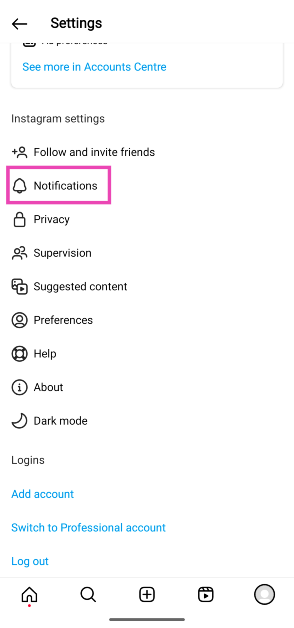 Step 5:
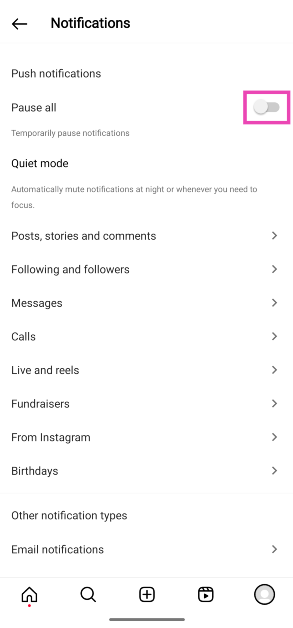 Step 6:
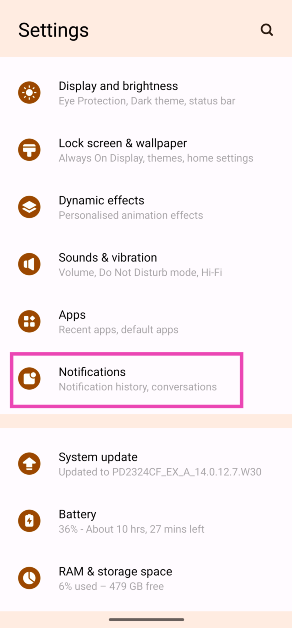 Step 2:
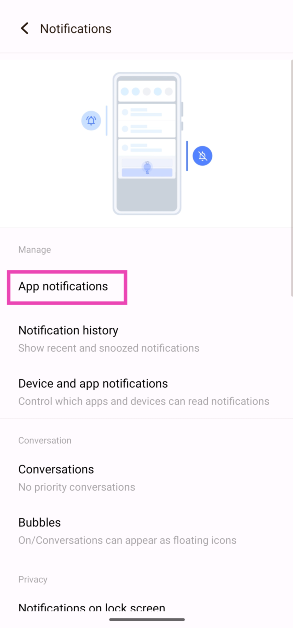 Step 3:
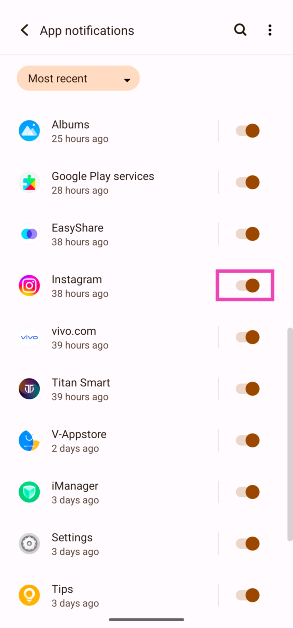 Step 4:
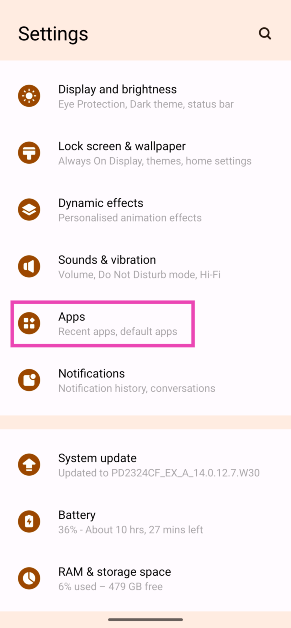 Step 2:
 Step 3: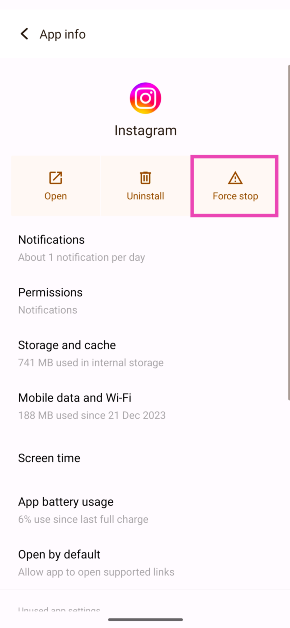
 Step 4: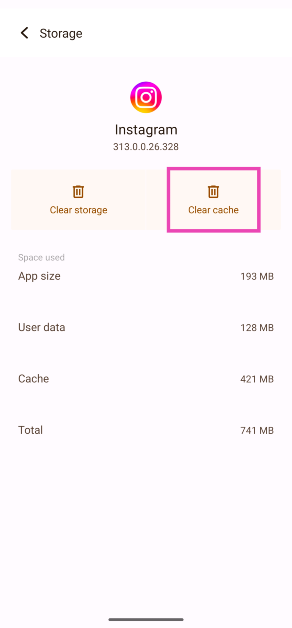
 Instagram lets you create and use multiple profiles on your phone. The notifications from all the profiles are displayed on the app. If the indicator on the Instagram app refuses to go away, switch to your secondary profile(s) and check the pending notifications. They could be unread messages, follow requests, likes, etc. Once you’ve done that, the ghost notifications and red dot indicators will be gone.



 Sometimes, you may notice an Instagram DM notification on your phone but tapping on it does nothing. This happens due to sluggish servers. The notification reaches you first but due to the slow servers, the actual message takes time to deliver on your phone. Go to DownDetector.in and search for Instagram to check if its servers are experiencing an outage.
 If Instagram’s servers are fine, it is possible that a faulty internet connection on your end is causing the issue. The lingering notification on your device won’t go away until the content that it is linked to has fully loaded in the background. Switch to a better WiFi connection to fix this issue.
 Step 2: Tap on Download and install.
 Step 3: Select Install now.
