NYT Wordle Answer and Hints Today (January 2) #1658

Are you looking for today’s Wordle answer for January 2, 2026? The problem is difficult to solve, so if you need assistance, we’ve included hints and the clue to today’s Wordle Quiz. Below, we have made it simple for everyone to understand how to get to the Wordle Answer today.

Hints and Answers for Today’s Wordle January 2

Before answering directly, please check the Wordle Hints first. Hint 1: Today’s Wordle answer includes a vowel. Hint 2: The answer for today has a repeating letter. Hint 3: Meaning- a fact or piece of information that shows that something exists or is true

What word does today’s Wordle begin with?

Do you need help with today’s Wordle answer’s initial letter? The first letter in today’s Wordle is “P”

Today’s Wordle Answer 

The answer to Wordle #1658 on January 2, 2026, is — PROOF

Also Read: iQOO 15, equipped with Snapdragon 8 Elite Gen 5 SoC, launched in India

What is Wordle?

Wordle: A Five-Letter Word Guessing Game • The game allows six guesses of a five-letter word. • Provide feedback on the guessed letters’ placement in the puzzle. • The New York Times purchased the game in 2022. • Created by Josh Wardle for his partner, narrowing down 12,000 English words to 2,500. • Named after the word “word.”

How To Play Wordle?

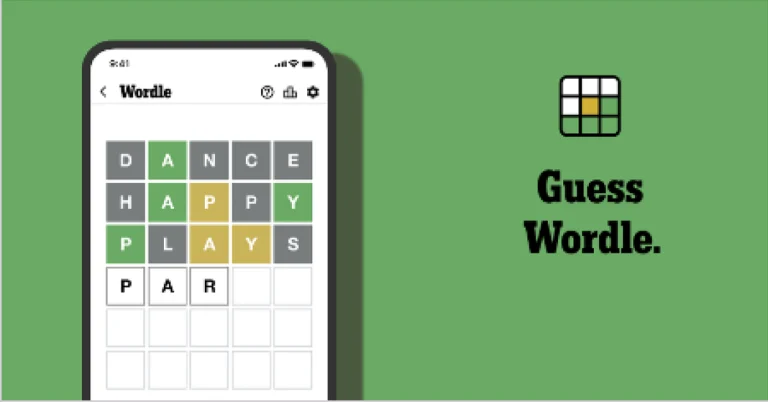
Wordle is a New York Times word puzzle game that allows users to guess a five-letter word in six attempts. The letters are highlighted in Yellow and Green, indicating whether the word is present in the answer or not, and Green letters indicate the correct guess. Also Read: Samsung Galaxy M17 5G Review: Budget Bombshell
Wordle Tips and Tricks
  • Select a powerful starting word: Avoid using unusual words, as they frequently do not match common letters. A good opening word has plenty of benefits.
  • Repeating letters: Don’t be afraid of repeating letters; they appear frequently in words. The answer may contain one or two repeated letters.
  • Use the Wordlebot: The NYT’s Wordlebot analyses and compares replies to itself. This challenge can assist you in enhancing your guessing skills and highlighting areas for development.

BloxStrike Codes (January 2026)

0
Roblox has a thriving section of FPS games, but BloxStrike takes the cake for us. Based on Counter-Strike, this game promises loads of thrilling action and hours of guaranteed fun. In this 5v5 shooter game, you need strategy and skill in equal parts to excel. You can gain the upper hand by making key upgrades to your gear and weapons. Of course, you will need to spend credits for these upgrades. The game offers some special codes that can be used to get free credits. Here are all the BloxStrike codes available in January 2026. Read Also: Poco M8 5G India launch date revealed, key specs details shared

List of active codes (January 2026)

  • QOLUPDATE: Credits.
  • CHRISTMAS2025: 100 Credits.
  • WINTER2025: 100 Credits.

List of expired codes

These codes can no longer be redeemed.
  • FridayUpdate
  • SORRYTHURSDAY
  • 1MVISITS
  • RELEASE
  • SORRY

How to redeem a code in this game

How to redeem a code in this game
  1. Launch BloxStrike in Roblox.
  2. Spot the Redeem Code section on the left side of the home page.
  3. Enter your code in the text box.
  4. Hit Redeem.

Frequently Asked Questions (FAQs)

Why is my code not working in this game?

If you can’t get your code to work, check it for typos and make sure its letters are in the correct case.

How do I get free credits in this game?

Use codes QOLUPDATE, CHRISTMAS2025, and WINTER2025 to get free credits in BloxStrike.

How do I redeem my code in this game?

Launch BloxStrike, go to the ‘Redeem Codes’ section on the left side of the screen, enter your code in the text box, and hit ‘Redeem’.

Why am I not able to redeem my code in this game?

If your code has expired, it can no longer be redeemed in Roblox.

Where can I find the newest Roblox codes?

Keep checking the Gadget Bridge home page for the latest Roblox code drops. Read Also: How to turn on your Android phone’s flashlight by shaking it

Final Thoughts

For more shooter-based games, we recommend checking out Hypershot, Combat Arena, and Entry Point on Roblox. While you’re here, take a look at the latest Knife Arena codes as well. If you have any questions, let us know in the comments!

Knife Arena Codes (December 2025)

Knife Arena is a relatively new game on Roblox, but it has quickly climbed the charts and become one of the top trending games on the platform. The idea behind the game is simple – defeat your enemies with the knife of your choice. Of course, as the battles get tougher, your slashing weapon will need upgrades. The game offers some special codes that make upgrades easier. Here are all the Knife Arena codes available in December 2025. Read Also: How to disable Control Centre on iPhone’s lock screen

List of active codes (December 2025)

  • freecase: 1 Release Case.

List of expired codes

Currently, this title does not have any expired codes.

How to redeem a code in this game

How to redeem a code in this game
  1. Launch Knife Arena in Roblox.
  2. Hit the gear icon in the top right section of the screen.
  3. Go to the Redeem Code section.
  4. Paste your code into the text box that says Enter Code Here.
  5. Hit the Redeem button.

Frequently Asked Questions (FAQs)

Why is my code not working in this game?

If you can’t get your code to work, check it for typos and make sure its letters are in the correct case.

How do I get a free Release Case in this game?

Use code freecase to get 1 free Release Case in Knife Arena.

How do I redeem a code in this game?

Launch Knife Arena, go to settings, switch to the ‘Redeem Code’ section, enter your code in the text box, and hit ‘Redeem’.

Why am I not able to redeem my code in this game?

If your code has expired, it can no longer be redeemed in Roblox.

Where can I find the newest Roblox codes?

Keep checking the Gadget Bridge home page for the latest Roblox code drops. Read Also: Dungeon Hunters Codes (December 2025)

Final Thoughts

If you like combat games, we recommend checking out Untitled Boxing Game and Combat Arena on Roblox. While you’re here, check out the latest Bee Swarm Simulator codes as well. If you have any questions, let us know in the comments!

How to disable Control Centre on iPhone’s lock screen

0
The Control Centre acts as the main hub for connectivity, convenience, media playback, and accessibility features on your iPhone. You can access it by swiping down from the status bar, no matter which page you’re on. This applies to the lock screen as well. You don’t need to unlock your iPhone to toggle the quick controls. However, this means that any person with physical access to your phone can carry out these changes, even if they don’t know the passcode. To prevent this from happening, you can disable the Control Centre on your iPhone’s lock screen.  Read Also: Best of 2025: Top home appliances and gadgets of the year

Manage your iPhone’s lock screen

Your iPhone offers plenty of customisation options for the lock screen. You can change the size of the clock, apply depth effects to the wallpaper, set up quick shortcuts, control the media playback, and do a whole lot of other stuff on it. While setting up or customising the lock screen, you need to decide which content and features you’re comfortable letting other people see. Giving access to the Control Centre on the lock screen lets you toggle the WiFi, Bluetooth, Airplane Mode, Focus Mode, and mobile data with just a couple of taps. Any option that displays or changes your personal data needs passcode access to come into effect. We highly recommend enabling Medical ID access on the home screen. You can do it by going to the Health app>profile picture>Medical ID>Edit and turning on ‘Show When Locked and Emergency Call’. In case of an emergency, a first responder can access your important medical details by swiping up on the lock screen and tapping ‘Medical ID’.

Disable Control Centre on iPhone’s lock screen

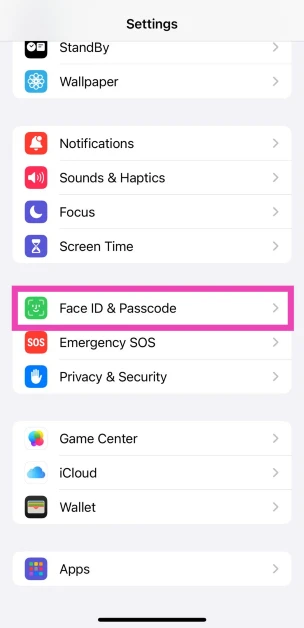
  1. Go to Settings.
  2. Tap on Face ID and Passcode. Tap on Face ID and Passcode.
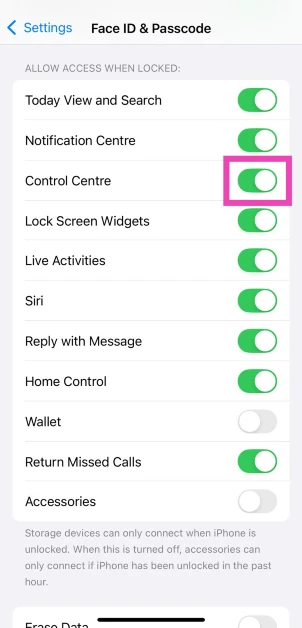
  3. Enter your iPhone’s passcode to enter.
  4. In the Allow Access When Locked section, turn off the toggle switch next to Control Centre. In the Allow Access When Locked section, turn off the toggle switch next to Control Centre.
  5. Confirm your selection.

Frequently Asked Questions (FAQs)

How do I stop the Control Centre from showing up on the lock screen?

Go to Settings>Face ID and Passcode and turn off the toggle switch next to Control Centre.

How do I trigger the Control Centre with Back Tap?

Go to Settings>Accessibility>Touch>Back Tap>Double Tap and select Control Centre. Now, tap the back panel twice to access the Control Centre.

Can I access the Control Centre with the Action button?

Yes, but you will need to create a home screen shortcut for the Control Centre first. Once it is created, go to Settings>Action Button and swipe through the panels till you reach that shortcut.

How do I add a new control to the Control Centre?

Swipe down from the top right corner of the screen to go to the Control Centre, tap the plus icon, select ‘Add a Control’, and choose your preferred tile.

How do I add a new page to the Control Centre?

Go to the Control Centre, tap the plus sign, tap the dotted circle, and choose your preferred control page. Read Also: WhatsApp brings New Year 2026 features celebrating the festive season

Final Thoughts

When you carry out these steps, no one will be able to access your iPhone’s control when it is locked. While you’re here, check out how you can find your lost Apple TV remote using your iPhone. If you have any questions, let us know in the comments!

Best of 2025: Top home appliances and gadgets of the year

Home improvement is one of the few categories that surprises us with novel and interesting tech products every year. 2025 was no different. With AI still finding its place in home products, this year felt like a glimpse into the future. As we reach the end of the year, we thought we’d take a look back at some of our favourite releases in the last 12 months. Here are our top 10 home appliances and gadgets of 2025. Read Also: LG challenges Samsung’s The Frame with the introduction of its new Gallery TV

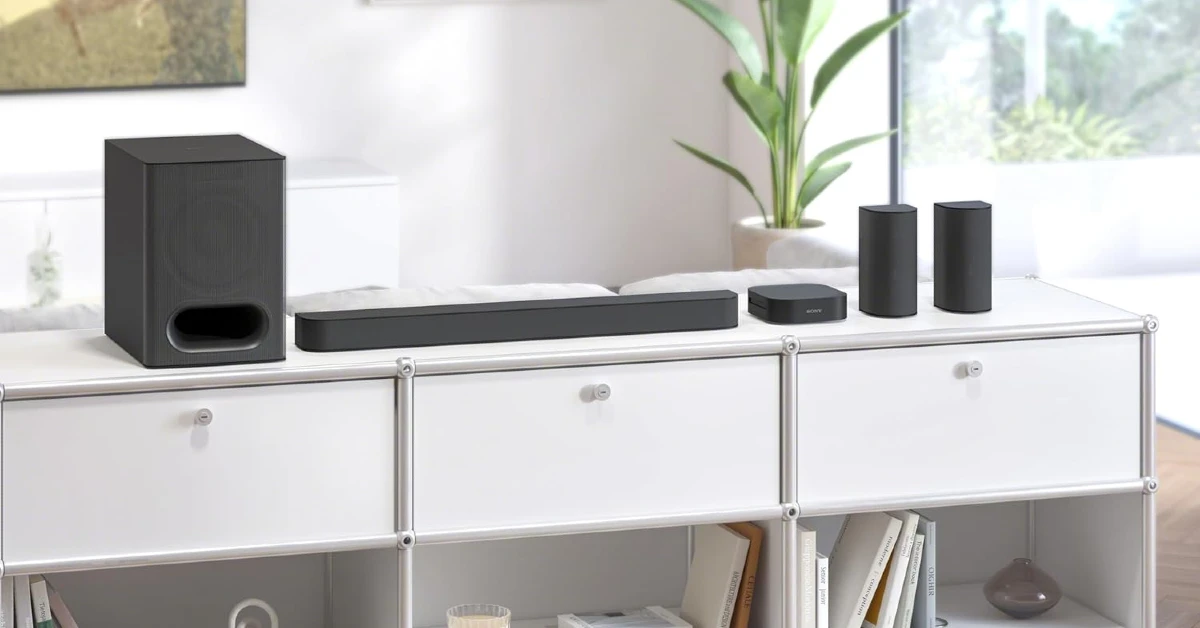
Sony Bravia Home Theatre System 6

Sony Bravia Home Theatre System 6 The Sony Bravia Home Theatre System 6 can liven up your living room with a premium 5.1 channel surround sound. The 1,000W audio output is clear, detailed, and has a rich texture. The HT-S60 setup comprises a soundbar, a subwoofer, and rear speakers that are able to reach every corner of the room. The Dolby Atmos and DTS:X support brings the best out of movies and TV shows. Paired with a Sony Bravia TV, this speaker setup offers ‘Voice Zoom 3’, which boosts the voice of the speakers of the scene, enabling you to hear them clearly, even in loud action scenes. Buy on Amazon for Rs 49,979

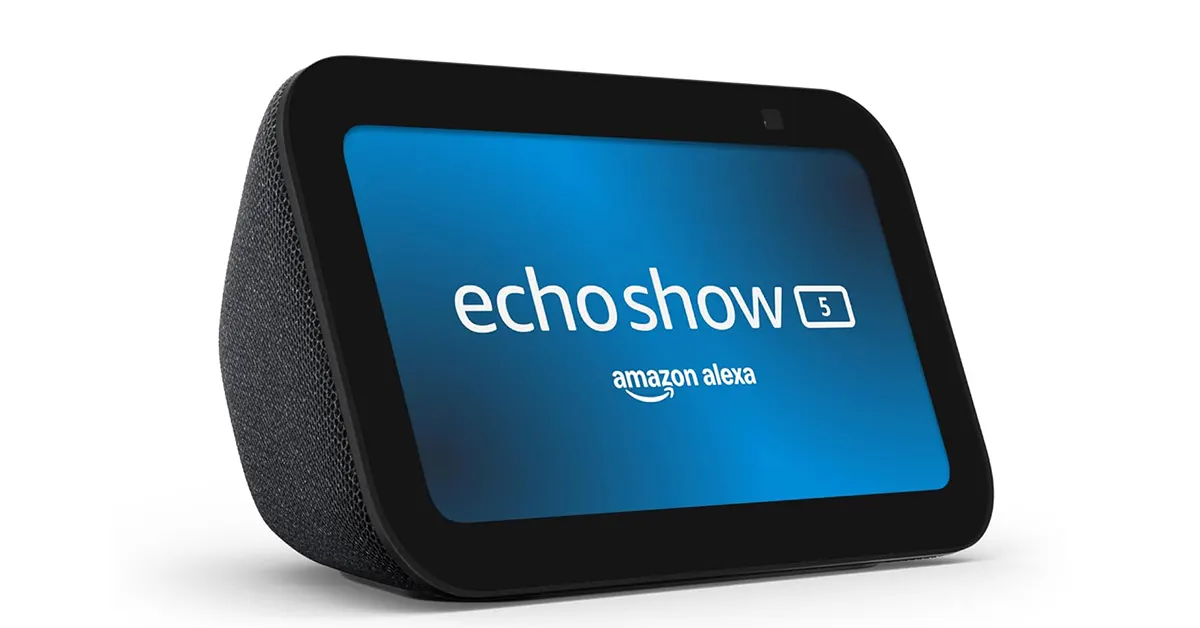
Amazon Echo Show 5 (3rd Gen)

Amazon Echo Show 5 3rd gen The 3rd-generation Echo Show 5 hit the market in July this year. The bedside smart speaker makes key upgrades in design, audio, visuals, and home monitoring. Its 5.5-inch smart display can relay the footage from your CCTV cameras as well as stream movie titles from streaming services like Prime Video. Its accessible interface makes it easy to control the smart devices in your house without getting up from bed. It has a built-in camera which serves as a home monitor. Using the ‘Drop In’ feature, you can check what’s going on in your room at any given time. The 1.7-inch rear-facing speaker produces a rich audio output with a healthy dose of bass. Buy on Amazon for Rs 10,999

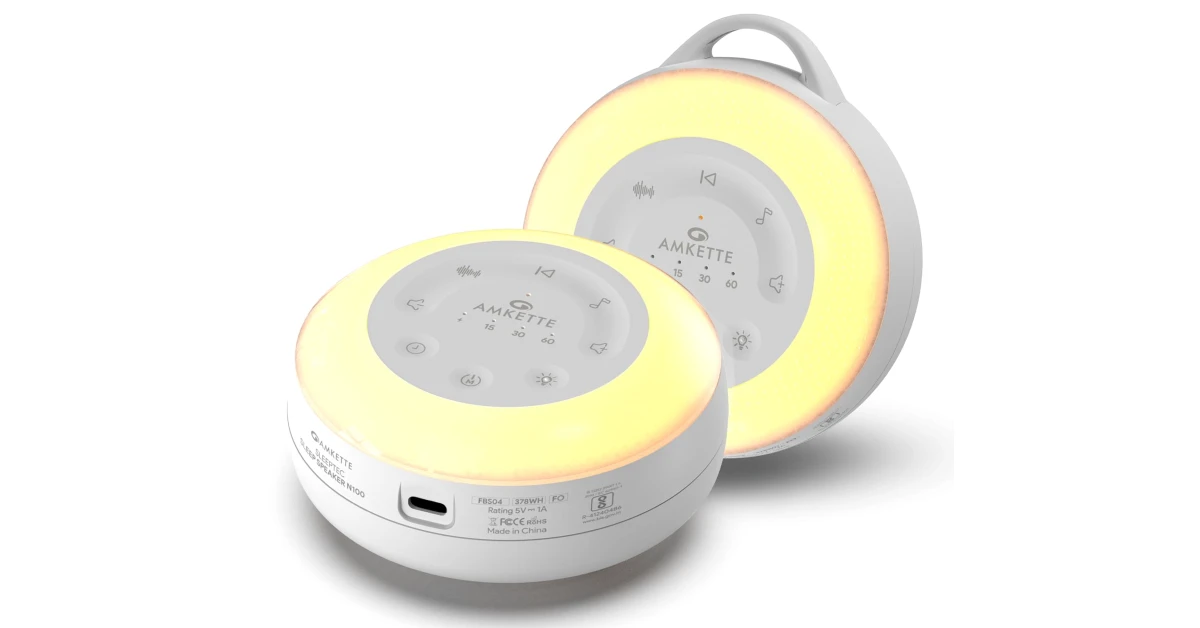
Amkette Sleep Speaker N100

Amkette Sleep Speaker N100 If the loud sounds from the street pour into your room, making it hard to fall asleep, you will like the Amkette Sleep Speaker N100. The white noise generated by this device fills the room and makes the outside noises less harsh. There are 16 calming soundscapes (including white noise and nature sounds) and 8 gentle music tracks pre-loaded on the device. The audio output is delivered by a 52mm driver. The 6-level night light sets the right ambience for a deep sleep. The compact form factor of the device makes it the ideal travel device as well. Buy on Amazon for Rs 1,599

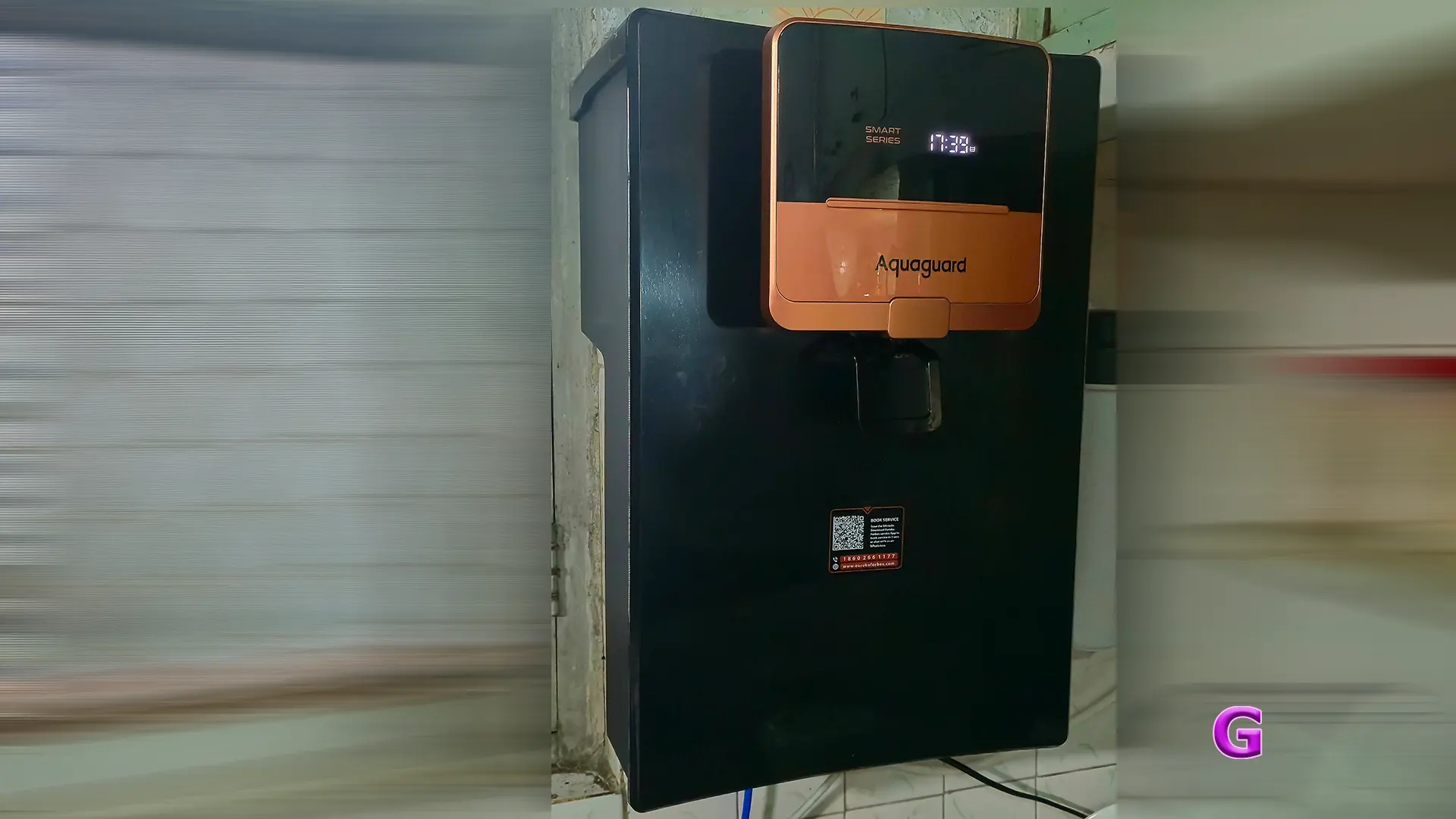
Aquaguard Ritz Pro RO

Aquaguard Ritz Pro Review Water purifiers aren’t really flashy enough to end up in year-end lists, but the Aquaguard Ritz Pro RO really stood out for us this year. Its sleek and compact body is crafted from Acrylonitrile Butadiene Styrene and weighs just 7kg. The small display panel shows real-time TDS levels entering and exiting the device. The filter life and water intake can be tracked with the Eureka Forbes app. The 5-litre steel tank is a much better option than the plastic water storage tanks in most purifiers. The Ritz Pro uses a 9-stage purification process to cleanse the water of bacteria, viruses, and other harmful particles. Its purification setup comprises a Mega Sediment Filter, High Recovery RO membrane cartridge, UV purification, and the 3-in-1 Active Copper technology. For more details about the filtration process, check out our review of the Aquaguard Ritz Pro RO. Buy on Amazon for Rs 15,999

Dreame MOVA K10 Pro

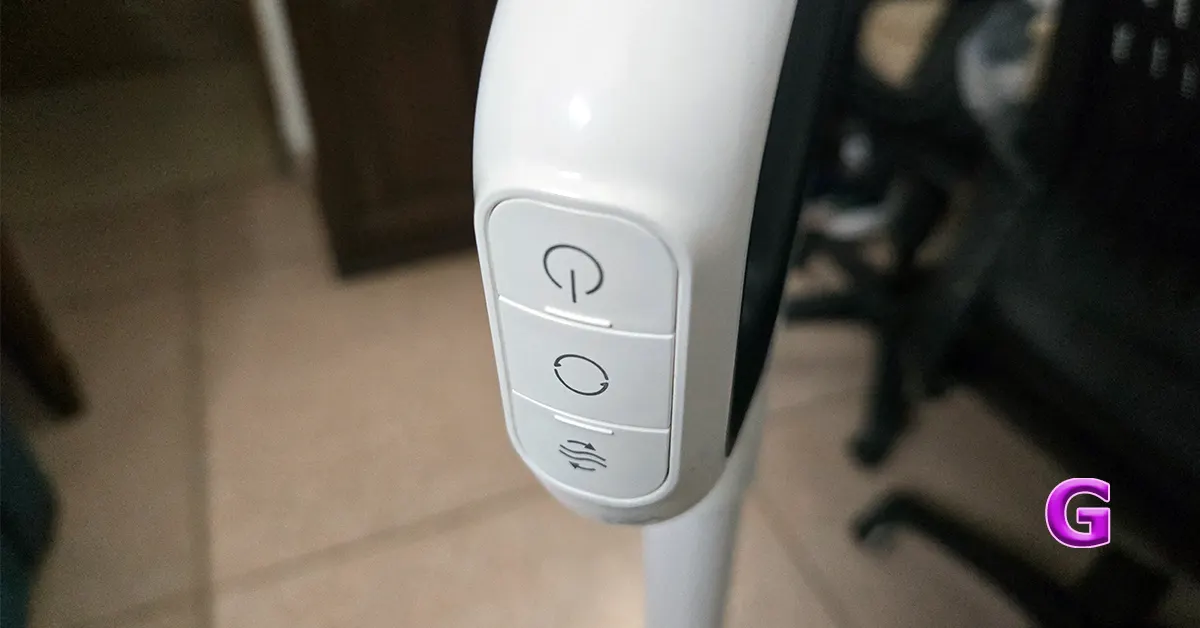
The Dreme MOVA K10 Pro has a compact size, a powerful motor, and a form factor that can reach inaccessible spots, making it one of the best vacuum cleaners of the year. The device weighs 4.7kg, which is slightly heavier than an average handheld vacuum. The LED panel displays the cleaning mode, battery level, and the amount of accumulated dirt. The clean water tank has a 890ml capacity, while the used water tank holds up to 600ml. The 15kPa suction power cleans the most stubborn debris and dirt particles. A full charge gives you between 25 and 35 minutes of cleaning time. Read our Dreame MOVA K10 Pro review for a deeper analysis. Buy on Amazon for Rs 18,999

Whirlpool Intellifresh Pro 308L

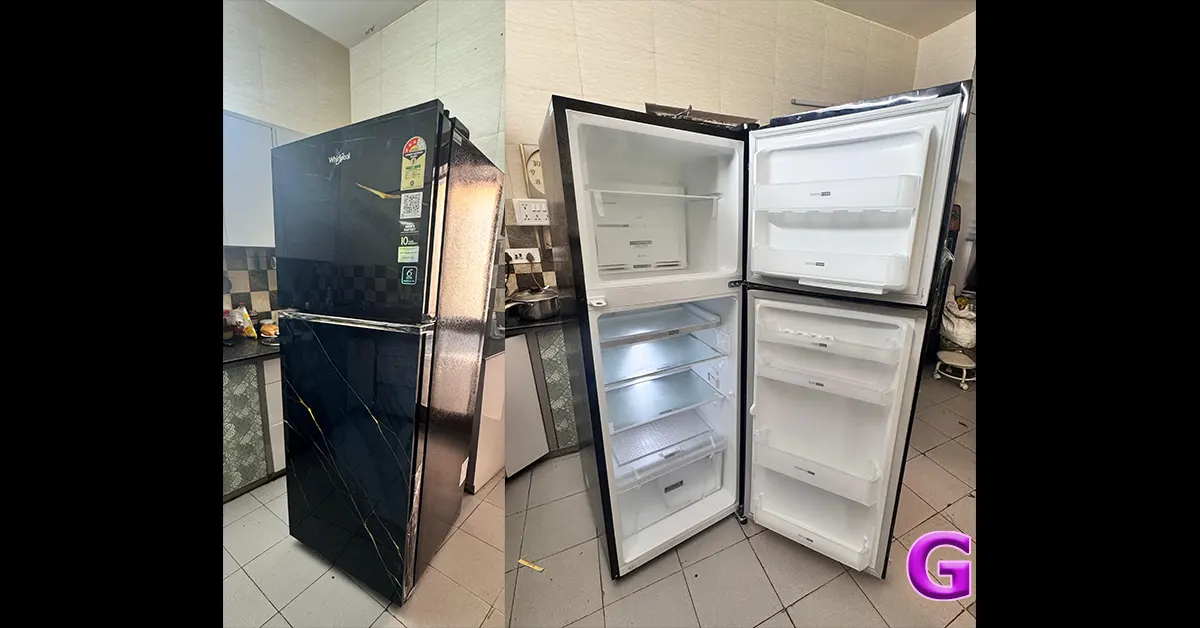
Whirlpool Intellifresh Pro 308L Review Best of 2025: Top home appliances and gadgets of the year The Whirlpool Intellifresh Pro refrigerator has a 308-litre storage capacity. If you’ve got more stuff to store, the freezer can be converted into an extra cooling compartment for your groceries. The Intellifresh Pro offers up to 40% faster bottle cooling and up to 7 days of dairy freshness. It prevents excessive ripening of fruits and limits up to 99.99% of bacterial growth. The toughened glass shelves have a load-bearing capacity of 240kg. The convertible 10-in-1 modes help you adapt the cooling section according to your needs. For more details, read our review of the Whirlpool Intellifresh Pro 308L. Buy on Whirlpool India eStore for Rs 41,080

Samsung Bespoke AI Refrigerator (RT38DG5A4DS8HL)

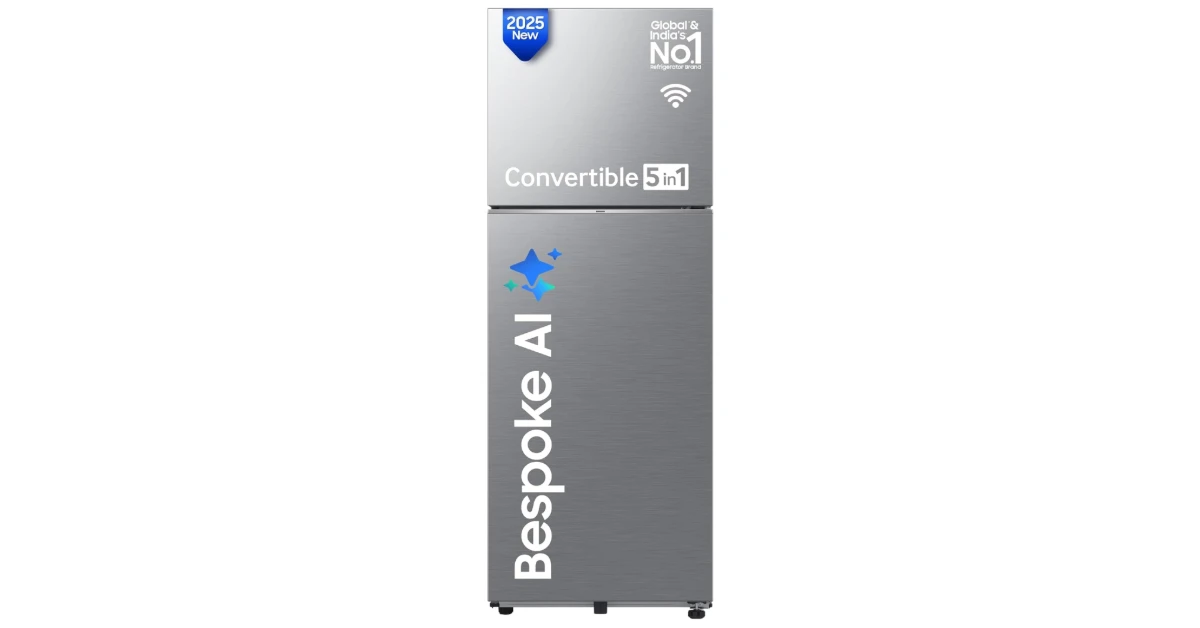
Samsung Bespoke AI Refrigerator (RT38DG5A4DS8HL) Best of 2025: Top home appliances and gadgets of the year The 350-litre model in Samsung’s Bespoke AI refrigerator range stood out for us this year. Its 350L storage capacity is suitable for families with 3-4 members. Its annual energy consumption comes out to 243kWh per year. Samsung offers a 1-year comprehensive warranty and a 20-year warranty on the digital inverter compressor. This compressor consumes 50% less power and has a very faint operational noise. There are a total of 2 compartments on this fridge: a 275-litre fresh food storage unit and a 75-litre freezer. There are 3 toughened glass shelves and 1 vegetable drawer in the cooling section. The fridge is packed with features like AI Energy Mode, Twin Cooling Plus, SmartThings connectivity, power freeze, and more. Buy on Amazon for Rs 40,990  

Samsung Bespoke AI Washer Dryer

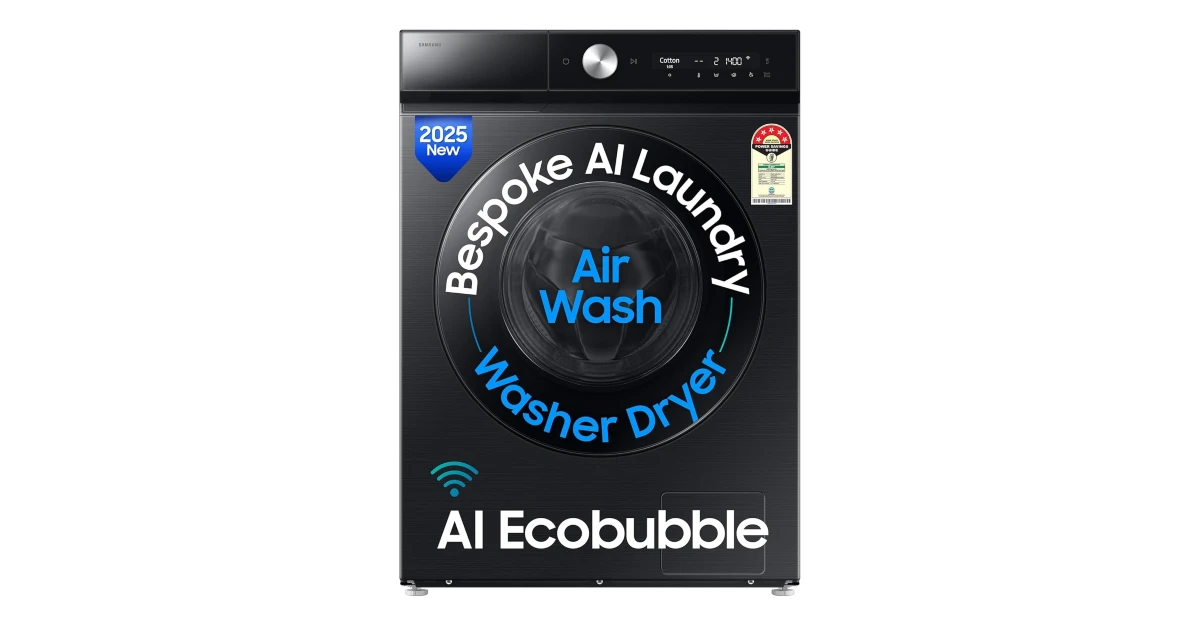
Samsung Bespoke AI Washer Dryer Best of 2025: Top home appliances and gadgets of the year Samsung’s Bespoke AI washer dryer has a 12kg washing and 7kg drying capacity. Its AI Ecobubble and AI Energy modes deliver deep cleaning and efficient drying without spending too much energy. The washer gives 45% better fabric care, 70% energy savings, and up to 54% less microplastics. The powerful electric motor at the heart of this device can spin at 1,400rpm. The AI Wash feature senses the clothing by fabric weight and softness, thereby offering powerful cleaning with less water and detergent usage. The Air Wash feature keeps clothes fresh and deodorised without using water. Buy on Amazon

Honeywell Move Pure 5

Honeywell Move Pure 5 Best of 2025: Top home appliances and gadgets of the year In a year when the Air Quality Index reached new heights, the Honeywell Move Pure 5 came in quite clutch. This air purifier’s filtration system is able to capture 99.99% of PM2.5 & PM10 particles, allergens, and microscopic pollutants. The small display panel shows the PM2.5 levels in real-time. The advanced 4-in-1 filter on this device comprises a pre-filter, a nano silver anti-bacterial filter, an H12 HEPA filter, and formaldehyde removal crystals. It is also able to get rid of unwanted odour, smoke, dust, allergens, microscopic pollutants, VOC (Volatile Organic Compounds), and harmful bacteria. Buy on Amazon

CP Plus Z45Q

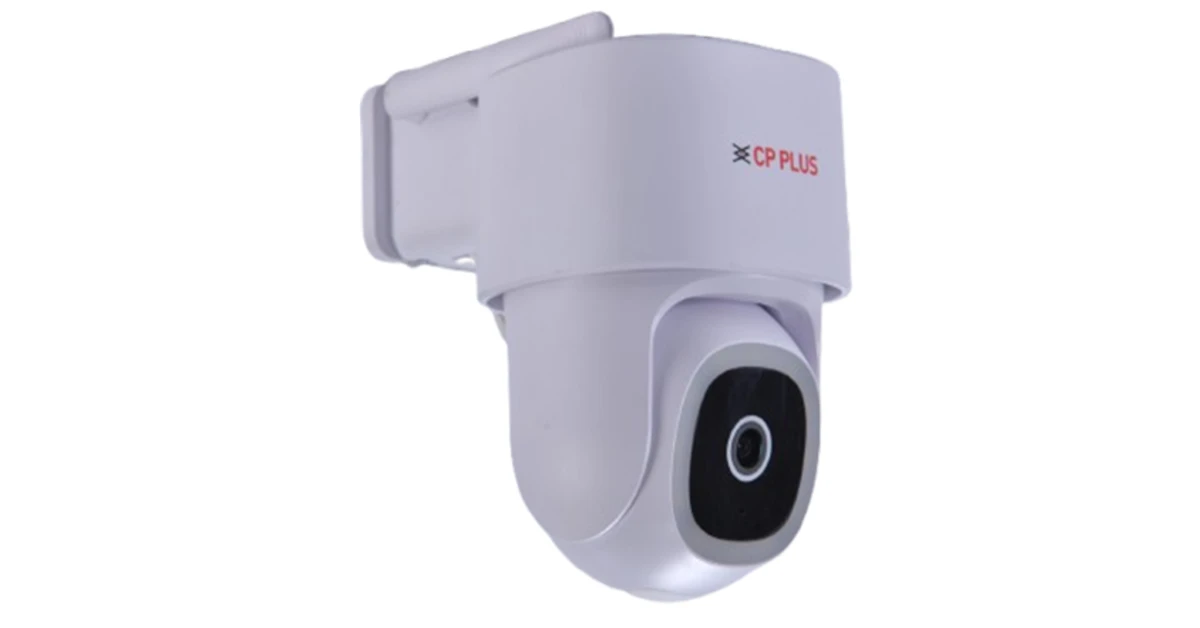
CP Plus Z45Q Best of 2025: Top home appliances and gadgets of the year The CP Plus Z45Q was one of our favourite home security devices of the year. This 4MP WiFi CCTV camera captures and relays detailed footage with crystal-clear video quality. It is ideal for outdoor use in commercial and personal premises. It is capable for motorized 360° pan and 96° tilt movements, completely eliminating blind spots. The Smart Motion Detection feature sends you instant alerts on your phone whenever the camera notices human activity in front of it. The 12 white LEDs (8–10m range), along with IR LEDs (15m range), provide colourful footage at night. Buy on Amazon for Rs 3,399 Read Also: Bee Swarm Simulator (December 2025)

Final Thoughts

These are our top 10 home appliances and gadgets of 2025. While you’re here, make sure you check out the annual Gadget Bridge Award nominees. If you think we missed out on a device that deserves a spot on this list, give it a shout-out in the comments!

LG challenges Samsung’s The Frame with the introduction of its new Gallery TV

LG plans to show off its new “Gallery TV” at CES 2026. The company wants to compete with Samsung’s popular “The Frame” TV. LG plans to enhance the spatial curation experience with this new addition to its lifestyle screen lineup, which will feature its own canvas. It will be compatible with more than 4,500 pieces of content that are accessible on the LG Gallery+ service. The LG Gallery TV is perfect for people who care about how their house’s decor looks. It combines cutting-edge technology with personal taste to create a classy gallery setting at home. The TV has “Gallery Mode,” which works with museum curators to make colours and brightness more vivid so that the visual texture of genuine works of art is accurately represented. A unique screen reduces glare and reflections, giving you an art-like viewing experience. Automatic image quality changes assist in keeping the picture clear in different lighting situations throughout the day. The Gallery TV comes in 55- and 65-inch sizes and has a sleek, flush-mount design with magnetic frames that can be customised to match your style. It has a lot of internal memory, so users may choose to save their favourite content. Also Read: WhatsApp brings New Year 2026 features, celebrating the festive season The Gallery TV is now in competition with other brands like Hisense and TCL. LG’s product will include the LG Gallery+ service, which gives you access to more than 4,500 pieces of content for a better spatial curation experience. It has LG’s MiniLED technology and the α (Alpha) 7 AI Processor, which provide you with amazing 4K visuals and immersive audio with AI Sound Pro (Virtual 9.1.2ch). It can be used as a canvas and a high-quality entertainment device. The LG Gallery+ service enhances the Gallery TV experience by infusing displays with a fresh aesthetic that offers numerous applications. It adds more than 4,500 new works each month. It has a wide range of images, from fine art to cinematic scenes and animations, so people may decorate their homes in a way that suits their interests. Also Read: Oppo Pad 5 confirmed to launch in India soon, listed on Flipkart Users may make their space their own by using generative AI for creating images or by showing their pictures. LG Gallery+ makes things feel better by playing background music from built-in songs or users’ own Bluetooth playlists. LG Gallery+ lets users turn their TVs into creative hubs. It works with all LG TVs.

Availability

At CES 2026, LG will show off its whole range of Art TVs, including the new Gallery TV. This will show how displays may change from being only for entertainment to becoming elegant and useful parts of modern houses. At booth #15004 in the Las Vegas Convention Centre, people can see LG’s newest lifestyle TVs.

Garena Free Fire Max Redeem Codes Today 31 December 2025: Here is how to claim them

Garena Free Fire (GFF) Max is a battle royale game with regular awards and tournaments to keep players interested. If you play GFF, you should be aware of the redeem codes that are released on a daily basis. However, because the battle royale game is banned in India, players from other countries can use the Free Fire Redeem codes daily. If you’re unfamiliar with the codes or don’t know how to get them, we’ve put together a step-by-step guide to help you redeem them. Check out Garena Free Fire Max Redeem Codes for 31 December 2025. These codes are a great way to get free items in the game. The 12-digit codes contain letters and numbers, as well as an expiration date and time. Because the Garena FF redeem codes cannot be used more than once, you should hurry to the redemption page to claim your free reward before someone else does. To get a free reward, all you have to do is go to reward.ff.garena.com/en, which is the official redemption page. Also, keep an eye on this space for daily updates on Gadget Bridge on GFF Max redemption codes and rewards. Also Read: Amazon Quiz Answers Today 27 November 2025: Participate to win Up To Rs 500 Amazon Pay Balance

Garena Free Fire Max Redeem Codes Today 

XF4SWKCH6KY4 FFEV0SQPFDZ9 FFPSTXV5FRDM FFX4QKNFSM9Y FFXMTK9QFFX9 UVX9PYZV54AC FF2VC3DENRF5 FFCO8BS5JW2D FFICJGW9NKYT FFW2Y7NQFV9S FFPURTQPFDZ9 FFNRWTQPFDZ9 FF4MTXQPFDZ9 FV1P9C4J7H5F3SBM FB1Z6U8N9A7O5TRS FIYUJUT7UKYFFDSU F7FGYJUR76JUT6HK

Also Read: OnePlus 15R confirmed to be powered by Snapdragon 8 Gen 5 SoC

How to Get Free Fire Max Redeem Keys for Garena?

  • Visit the game’s official website at reward.ff.garena.com.
  • Use your Facebook, Google, VK, Apple ID, Huawei ID, or Twitter account to log in.
  • You’ll be taken to a valid redemption code (s)
  • Copy and paste the 12-digit redemption code into the text box.
  • On the screen, a dialogue box will appear.
  • ‘Ok’ should be selected.

Amazon Quiz Answers Today 31 December 2025: Participate to win Up To Rs 500 Amazon Pay Balance

Amazon Quiz 31 December 2025: The New Daily Quiz is now available. Customers from different parts of the country are participating in the daily quiz. The quiz starts at midnight today and will be live until 11:59 PM tonight. By successfully answering every question, participants in the quiz have the chance to win wonderful rewards. Up to Rs 500 Amazon Pay Balance is up for grabs to participants today. One wrong answer could eliminate you from the quiz. You have a chance to win up to Rs 500 Amazon Pay Balance if you successfully answer every question. Users of the app only have the opportunity to take the quiz. Check Out the 31 December 2025 Quiz.

Are you not able to find Amazon FunZone? Click below and participate.

Click here to enter the Amazon FunZone Quiz and play today. Today’s Prize: Rs 500 Amazon Pay Balance Quiz Date: 31 December 2025 Daily Timing: 12 AM to 11:59 PM Previous Winners Announcement: Today 12 PM Noon

Amazon Daily Quiz Answers Today: Win Up To ₹ 500 Amazon Pay Balance

Question 1: Who beat Novak Djokovic in the final to win his 2nd consecutive Wimbledon men’s singles title? Answer: Carlos Alcaraz Question 2: In Captain America: Brave New World, scheduled to be released in 2025, which legendary actor plays the role of Thaddeus Thunderbolt Ross? Answer: Harrison Ford Question 3: Which place in South India is also known as the Scotland of India? Answer: Coorg Question 4: This is a picture taken in which African country? Answer: Morocco Question 5: What is the name given to the profession of the man in the picture? Answer: Gondolier Also Read: iQOO 15, equipped with Snapdragon 8 Elite Gen 5 SoC, launched in India

How To Play Amazon Daily Quiz Today

Only app users are eligible to play the Amazon quiz every morning from 12 AM to 11:59 PM. The quiz is not available on the desktop. For those who are unaware of how to play the Amazon quiz, below are the steps you can follow to take the quiz.
  • First, download the Amazon app from the Google Play Store or App Store or go here to download the Amazon App
  • Now fill in the required information through the Sign-Up option.
  • To find the Amazon Daily Quiz banner, log in to the Amazon app and scroll down to the home screen.
  • Tap on the banner and tap on the Start button to start the Quiz.
  • Now you will get 5 questions and you need to answer them correctly. One wrong answer will eliminate you from the Quiz.
  • After answering all the questions correctly, you are now eligible for a Lucky Draw.
  • The previous winner’s name will be announced today at 12 PM.

Amazon Daily Quiz Answers from the previous few days.

Here are all the answers from the previous 5 days of the Amazon Daily Quiz and Contest.

29 December 2025

Question 1: Achanta Sharath Kamal represents India in which sport? Answer: Table Tennis Question 2: Which date is to be celebrated as Hyderabad Liberation Day? Answer: 17-sep Question 3: In which sport did India win its first two medals at the 2024 Paris Olympics? Answer: Shooting Question 4: This painting was created in which historical period? Answer: Renaissance Question 5: Where is the headquarters of this brand in the USA? Answer: Atlanta

28 December 2025

Question 1: In 2024, who became the youngest person to win two Oscars? Answer: Billie Eilish Question 2: The D. B. Patil International Airport is located in which place? Answer: Navi Mumbai Question 3: Which country had the first-ever married couple to serve as flag bearers at the Paris Olympic Opening Ceremony? Answer: Romania Question 4: When was this app launched? Answer: 2011 Question 5: Which is the smallest monkey in the world? Answer: Marmoset

27 December 2025

Question 1: Complete the title of this 2024 film: “Chhota Bheem and the Curse of”. Answer: Damyaan Question 2: What regal title does Yaduveer Krishnadatta hold? Answer: Maharaja of Mysore Question 3: Which John Lennon and Yoko Ono song has been sung at six Olympic Opening Ceremonies, including Paris 2024? Answer: Imagine Question 4: Who is the architect of this cathedral? Answer: Filippo Brunelleschi Question 5: In the English edition of this game, how many word tiles are there? Answer: 100

26 December 2025

Question 1: As per Guinness World Records, which national flag is the world’s oldest and longest-running flag? Answer: Denmark Question 2: Name this largest and most powerful rocket ever flown. Answer: Starship Question 3: Which of the major planets of our solar system is named for a Greek god, not a Roman? Answer: Uranus Question 4: Which candy brand was the first to go to space? Answer: M&M Question 5: The character of Spock in Star Trek is from which planet? Answer: Vulcan

25 December 2025

Question 1: The iconic Air India building at Nariman Point was handed over to which state government? Answer: Maharashtra Question 2: Which country topped the list of UN’s Human Development Index? Answer: Switzerland Question 3: Which Hollywood superstar portrays the role of MMA legend Matt Kerr in the biopic ‘The Smashing Machine’? Answer: Dwayne Johnson Question 4: Which sport first appeared in the Winter Olympics in 1936? Answer: Alpine skiing Question 5: This brand is the largest sportswear manufacturer in which continent? Answer: Europe

24 December 2025

Question 1: Which film is based on Mstyslav Chernov’s daily news dispatches and personal footage of his own country at war? Answer: 20 days in Mariupol Question 2: Ae Watan Mere Watan’ is inspired by which freedom fighter, instrumental in founding the underground Congress Radio? Answer: Usha Mehta Question 3: Which Indian musician’s biography, written by Oliver Craske, is titled Indian Sun? Answer: Ravi Shankar Question 4: Which Roman Emperor was fond of this fruit? Answer: Tberius Question 5: In the beginning, what was this system called? Answer: Navstar Also Read: Samsung Galaxy M17 5G Review: Budget Bombshell

Frequently Asked Questions (FAQs)

Where can I check the previous winners? Did I win? How to check?

You can head over to this link on your mobile or desktop to check the winners of the Amazon Daily Quiz Contest.

How to Play Amazon Daily Quiz or Contest?

We have written an explainer above; you can refer to that.

When are the winners of the Quiz and contest announced or declared?

The announcement of today’s quiz winner will take place Tomorrow. As for the Special Quiz and “Spin & Win” Contest, the winners will be declared once the Quiz Contest comes to an end. To find out who the lucky winner is, you can refer to the Winners List or visit the Amazon Winners tab in the Amazon App.

How to participate in the Daily Amazon Quiz?

That is very easy, just got to the Amazon app and scroll to the bottom of the page and you will find the Quiz section. Click on it (usually it is called the fun zone) and you can enter the Amazon Today Quiz Contest. 

Are there any other quizzes or contests running on Amazon daily?

Yes, there are many running daily. These range from spinning the wheel to answering the questions correctly. All are located in the Fun Zone. 

What are the criteria for selecting a winner in the Daily Amazon Quiz?

When a qualified player submits correct answers to all the questions, they will automatically be entered into a lucky draw. This draw will include all participants who answered all the questions correctly. Amazon randomly selects the final winners from the pool of eligible participants who gave the right answers.

Which Types of Questions are asked within the Amazon Daily Quiz?

These are very simple and straightforward questions. These are mainly related to general knowledge. 

Where should I look for Amazon Daily Quiz answers?

You can bookmark our website www.gadgetbridge.com as we will help you every day with the Amazon Daily Quiz. We bring you fresh answers every day for the Amazon Daily Quiz and Contest. 

What time does Amazon announce previous winners?

The previous winner’s name will be announced today at 12 PM (noon).

NYT Wordle Answer and Hints Today (December 31) #1656

Are you looking for today’s Wordle answer for December 31, 2025? The problem is difficult to solve, so if you need assistance, we’ve included hints and the clue to today’s Wordle Quiz. Below, we have made it simple for everyone to understand how to get to the Wordle Answer today.

Hints and Answers for Today’s Wordle December 31

Before answering directly, please check the Wordle Hints first. Hint 1: Today’s Wordle answer includes two vowels. Hint 2: The answer for today has no repeating letters. Hint 3: Meaning- a device for making a loud warning noise

What word does today’s Wordle begin with?

Do you need help with today’s Wordle answer’s initial letter? The first letter in today’s Wordle is “S”

Today’s Wordle Answer 

The answer to Wordle #1656 on December 31, 2025, is — SIREN

Also Read: iQOO 15, equipped with Snapdragon 8 Elite Gen 5 SoC, launched in India

What is Wordle?

Wordle: A Five-Letter Word Guessing Game • The game allows six guesses of a five-letter word. • Provide feedback on the guessed letters’ placement in the puzzle. • The New York Times purchased the game in 2022. • Created by Josh Wardle for his partner, narrowing down 12,000 English words to 2,500. • Named after the word “word.”

How To Play Wordle?

Wordle is a New York Times word puzzle game that allows users to guess a five-letter word in six attempts. The letters are highlighted in Yellow and Green, indicating whether the word is present in the answer or not, and Green letters indicate the correct guess. Also Read: Samsung Galaxy M17 5G Review: Budget Bombshell
Wordle Tips and Tricks
  • Select a powerful starting word: Avoid using unusual words, as they frequently do not match common letters. A good opening word has plenty of benefits.
  • Repeating letters: Don’t be afraid of repeating letters; they appear frequently in words. The answer may contain one or two repeated letters.
  • Use the Wordlebot: The NYT’s Wordlebot analyses and compares replies to itself. This challenge can assist you in enhancing your guessing skills and highlighting areas for development.

Bee Swarm Simulator (December 2025)

Bee Swarm Simulator is a relaxing game for folks with a special interest in bees. This game lets you grow your own swarm of bees, collect pollen, and make honey. You can even meet friendly bears and complete fun side quests! However, while fighting against bugs and monsters, you may require some extra firepower. You can use some special codes to gain access to items that will give you a boost. Here are all the Bee Swarm Simulator codes available in December 2025. Read Also: Google Photos Memories features coming to Samsung AI TVs: Here is when

List of active codes (December 2025)

  • LatePresents: 2 Presents.
  • 777: Honeyday Event, Super Smoothie, Unlimited Gumdrops (7 minutes), 7x Red Boost, 7x White Boost, 7x Blue Boost, 7x Focus, 7x Haste, 7x Precision, 7x Coconut Field Winds, 7x Pine Tree Forest Winds, 7x Pepper Patch Winds, 7x Bitter Berries, 7x Field Dice, 7x Whirligigs, 7x Tickets, 1x White Balloon.

List of expired codes

These codes can no longer be redeemed.
  • ThreeBeeVee
  • 15MMembers
  • 38217
  • BeesBuzz123
  • BopMaster
  • ClubBean
  • Connoisseur
  • Crawlers
  • Nectar
  • Roof
  • Wax
  • latepresent
  • MarchIsMerry
  • Octobersmas
  • summersmas
  • WordFactory
  • Wink
  • DarzethDoodads
  • ThnxCyasToyBox
  • Troggles
  • SecretProfileCode
  • Sure
  • WalmartToys
  • Marshmallow
  • Millie
  • Luther
  • Jumpstart
  • GumdropsForScience
  • Dysentery
  • Cubly
  • WeekExtension
  • Banned
  • Buzz
  • CarmenSanDiego
  • Cog
  • ClubConverters
  • BoxWhoops
  • 6irthday
  • BeequipTradeReboot
  • 2MLikes
  • DemiDecade
  • PlushFriday
  • Teespring
  • 500mil
  • 10mMembers
  • 1MLikes
  • SonyXbox
  • 5Years
  • FourYearFiesta
  • 2Billion
  • 5MFavorites
  • FrozenBugReboot
  • 100MVisits
  • 12HourGeneral
  • 1MFavorites
  • 1MoreTime
  • 2MFavorites
  • 2Years
  • 2YearsAfterParty
  • 300MVisits
  • 3YearFix
  • 3YearParty
  • 3YearPartyFix
  • 4MilMembers
  • 5mMembers
  • AccentMaster
  • AceUnhackedLoot
  • AceUnhatched
  • Afternoon
  • AnniversaBee
  • Arizona
  • August
  • BeeDay2019
  • BeeMine
  • BeesmasBegins
  • BeesmasCheer
  • Berlin
  • BigBag
  • BillionVisits
  • BlackBearMythic
  • BlackFriday
  • BloxyBoos
  • BloxyCelebration
  • Breeze
  • BrownBearReboot
  • Buoyant
  • Buzzy
  • ByeBeeBear
  • Cactus4Now
  • CantSleep
  • Change
  • ClubBasket
  • ClubCloud
  • ClubJellies
  • ClubParty
  • ClubSnacks
  • CookieClub
  • Cornsyrup
  • Crafty
  • DarzethDonation
  • DarzethPack
  • Decaboost
  • Discord100k
  • Discord50k
  • DontUseThisJelly
  • EggReboot
  • Elladiely
  • ExoExtract
  • ExtraPass
  • FeelingLucky
  • FestiveFinale
  • FestiveFrogs
  • Friday
  • FruitMachine
  • FruitSalad
  • FuzzyFarewell
  • FuzzyReboot
  • Gel
  • General
  • GravycatFan
  • GravyGoodies
  • GremlinGoodies
  • Gumaden10T
  • GummyBoost
  • GummySausage
  • HappyNewYear
  • HasteHelper
  • JellyHill
  • JollyJelly
  • Keen4
  • kot?kbean
  • LateNightGumdrops
  • Leftovers
  • MagicMittens
  • Market
  • MayRuTreats
  • MegaMittens
  • Meow
  • MillionMembers
  • MinhMaMaMoons
  • MischiefMaker
  • Mocito100T
  • MondoOutage
  • MoonMiracle
  • MoreTime
  • NewMic
  • NikTacAttack
  • Nonchalant
  • Noobasha+
  • NoobashaBonus
  • NotHoney
  • OffToOrlando
  • OnettJelly
  • OodlesOfNoodles
  • PandaPower
  • Pectin
  • PineappleParty
  • PingBoost
  • Poke
  • PreUpdate
  • PumpkinOfJustice
  • PuppyPerk
  • Reboooot
  • Reboot
  • Reboot2020
  • RebootBag
  • RebootBoost
  • RebootCheer
  • RebootCloud
  • RebootCode
  • RebootFriday
  • RebootPC
  • Reboots
  • RebootXmas
  • RedCatBee
  • RedMarket
  • RobziRampage
  • RobziRobot
  • RoyalRobzi
  • SaleEnd
  • SDMittens1T
  • Shhhh
  • Shutdown
  • Soup
  • SpaceReboot
  • Sriracha
  • Starch
  • Strawbeary
  • SugarRush
  • Summer
  • SunBearSendoff
  • SunSample
  • Tabby
  • TallTallMountain
  • Tapioca
  • TeraBriteFight
  • TeraTreasure
  • ThatGuyGift
  • ThatGuysCrew
  • ThnxCyaBoost
  • ThoseEyes
  • Tornado
  • TornadoGlitch
  • TrickOrTreat
  • Trying
  • Unity
  • Valentine
  • Waiting
  • Wax2
  • WealthClock1
  • Whoops
  • WikiAwardClock
  • WikiHonor
  • WillGoold
  • WindyReboot
  • WindyWeekend
  • WintersEnd
  • Xanthan
  • YTFMMoons

How to redeem a code in this game

How to redeem a code in this game
  1. Launch Bee Swarm Simulator in Roblox.
  2. Hit the Gear icon on the left side of the screen.
  3. Enter your code in the text box.
  4. Hit Redeem.

Frequently Asked Questions (FAQs)

Why is my code not working in this game?

If you can’t get your code to work, check it for typos and make sure its letters are in the correct case.

How do I redeem my code in this game?

Go to Bee Swarm Simulator in Roblox, hit the gear icon, paste your code in the text box, and hit ‘Redeem’.

How do I get free presents in this game?

Use code LatePresents to get 2 free presents in this game.

Why am I not able to redeem my code in this game?

If your code has expired, it can no longer be redeemed in Roblox.

Where can I find the latest Roblox codes?

Keep checking the Gadget Bridge home page for the latest Roblox code drops. Read Also: Best of 2025: Top 10 smart wearables of the year

Final Thoughts

If you want to explore more chill and relaxing games on Roblox, we highly recommend giving Fisch, Slap Battles, and Catch Critters a shot. While you’re here, check out the latest Dungeon Hunters codes as well. If you have any questions, let us know in the comments!

Dungeon Hunters Codes (December 2025)

Dungeon Hunters puts you in a thrilling, monster-infested world, where the only way out is by slaying the beastly creatures. Behind every door lies a treasure item or a beastly monster. You can train your team and deploy a smart strategy to make an escape. To help you along the way, the game offers some special codes that can be redeemed for gems. Here are all the Dungeon Hunters codes available in December 2025. Read Also: Poco M8 5G India launch date revealed, key specs details shared

List of active codes (December 2025)

  • Dc_!10000!: 100 Gems.
  • dC_!9000: 100 Gems.
  • DC_!8000: 100 Gems.
  • 120kLIKes: 100 Gems.
  • DC_7000!: 100 Gems.
  • DC_6000!: 100 Gems.
  • DC_5000!: 100 Gems.
  • Dc_4000!: 100 Gems.
  • Dc!_3000: 100 Gems.
  • DC_2000: 100 Gems.
  • 50likeS_k: 100 Gems.
  • k25lIkES: 100 Gems.
  • DC_1000: 100 Gems.
  • DC_500: 100 Gems.
  • DC_100: 100 Gems.
  • 12K_LiKes: 100 Gems.
  • 5K_lIKes: 100 Gems.
  • 1K_LiKes: 100 Gems.
  • 100liKES: 100 Gems.
  • DC_join: 100 Gems.
  • NEW: 100 Gems.

List of expired codes

Currently, this title does not have any expired codes.

How to redeem a code in this game

How to redeem a code in this game
  1. Launch Dungeon Hunters on Roblox.
  2. Hit the gear icon in the top-right corner of the screen.
  3. Enter your code in the text box.
  4. Hit OK.

Frequently Asked Questions (FAQs)

Why is my code not working in this game?

If you can’t get your code to work, check it for typos and make sure its letters are in the correct case.

How do I redeem my code in this game?

Launch Dungeon Hunters on Roblox, hit the gear icon, paste the code in the text box, and hit ‘OK’.

Why am I not able to redeem my code in this game?

If your code has expired, it can no longer be redeemed in Roblox.

Where can I find the latest Roblox codes?

Keep checking the Gadget Bridge home page for the latest Roblox code drops. Read Also: How to turn on your Android phone’s flashlight by shaking it

Final Thoughts

The code drop for this game will occur when it crosses 200k likes on Roblox. Currently, it is sitting at 139k likes. For more action-packed games, check out Anime Fighting Simulator: Endless and Speed Bike Escape on Roblox. While you’re here, take a look at the latest Endzone Strike codes as well. If you have any questions, let us know in the comments!

Poco M8 5G India launch date revealed, key specs details shared

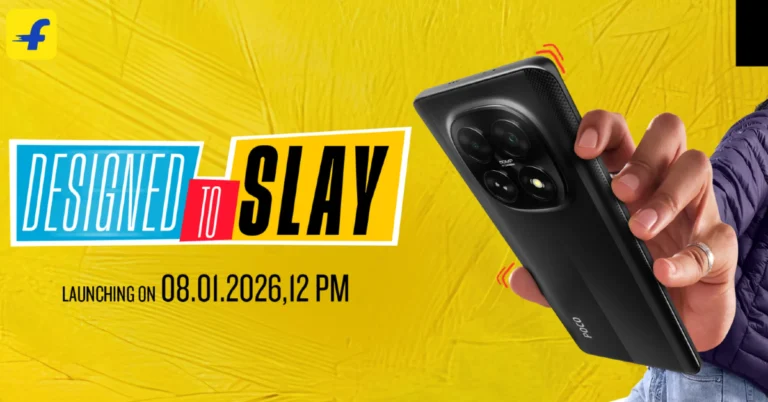
Poco has officially confirmed that the Poco M8 5G will be available in India next week. You will be able to buy this phone on Flipkart. It will be the successor to the Poco M7. It is said to have a 6.77-inch AMOLED screen with a slim design that is only 7.35mm thick. The Poco M8 5G will include a strong 50-megapixel AI camera system and is said to be powered by a Snapdragon 6 Gen 3 CPU and a large 5,520mAh battery. Poco M8 5G is scheduled to be launched in India on January 8 at noon IST and will be available for purchase on Flipkart. Recently, design details were previewed through a microsite on the platform, displaying a dual-tone posterior panel that integrates matte and vegan leather textures. It will feature a 50-megapixel AI-enhanced primary camera, encased within a centrally aligned squircle-shaped camera module that also accommodates two additional sensors and an LED light. The device has been verified to have a thickness of 7.35mm and an approximate weight of 178g. Also Read: WhatsApp brings New Year 2026 features, celebrating the festive season The Poco M8 5G is believed to be a rebranded variant of the Redmi Note 15 5G. If we believe the rumour, it would incorporate a 6.77-inch AMOLED display with a 120Hz refresh rate and a remarkable peak brightness of up to 3200 nits, presumably safeguarded by Corning Gorilla Glass 7i. Also Read: Oppo Pad 5 confirmed to launch in India soon, listed on Flipkart The device may be powered by the Snapdragon 6 Gen 3 chipset, with configurations providing up to 8GB of RAM and 256GB of internal storage. Additionally, the device is anticipated to contain a substantial 5,520mAh battery, facilitating 45W rapid charging and 18W reverse charging functionalities. The camera system is expected to feature a dual rear configuration, comprising a 108-megapixel primary sensor, complemented by a 20-megapixel front-facing camera.

WhatsApp brings New Year 2026 features celebrating the festive season

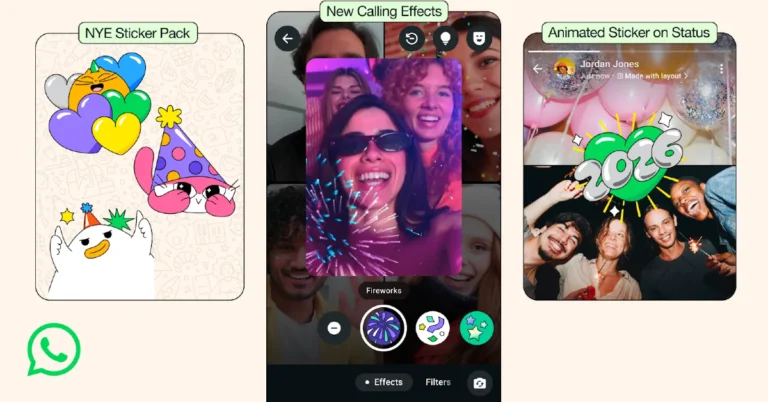
WhatsApp has announced new features for New Year 2026. These include video call effects like fireworks and confetti, animated emoji reactions, and group chat features to help plan the celebrations. This introduction comes before the platform’s busiest day, when it usually gets more messages and calls than usual. It gets well over 100 billion messages and 2 billion calls every day around the world. While announcing the feature, the company, via blog post, said, “New Year’s is our biggest day at WhatsApp, with each year breaking new records for how people text and call their friends and loved ones. On a regular day, we support over 100 billion messages and 2 billion calls – but the twenty four hours when the world welcomes a New Year always tops our charts. Whether it’s a video call that unites families across continents, or a group chat that organises a celebration, we’re proud to play a small role in making people’s wishes for next year special.” Also Read: Oppo Pad 5 confirmed to launch in India soon, listed on Flipkart WhatsApp’s New Year 2026 update has many fun features that are meant to make it easier for people to talk to each other during the holidays. A special 2026 sticker set for sending New Year’s wishes in both personal and group conversations and new video call effects that let users show fireworks, confetti, and stars on their screens while they are on a call are some of the most important new features. Additionally, WhatsApp has brought back animated confetti reactions. A unique animation appears in the conversation when users reply with the confetti emoji. WhatsApp is also adding animated stickers for status updates. These stickers let users send holiday greetings to friends with a special 2026-themed design. These features will be available during the whole holiday season. Also Read: Samsung introduced its 2026 audio range ahead of CES 2026 WhatsApp recently added capabilities to help users plan New Year’s celebrations in group chats. Users may create and pin events to increase visibility, collect RSVPs, and post updates from a single location. The Polls feature may help participants make selections about food, beverages, or activities, and live location sharing allows them to get to venues and arrive safely. Furthermore, voice notes and video messages enable users to share real-time moments with those who cannot attend in person.

How to turn on your Android phone’s flashlight by shaking it

0
Convenience is all about accessibility. You could have a super-useful feature at your disposal, but it won’t be of much use if it’s buried somewhere in the device’s settings. Luckily, your Android phone offers quick and easy actions to access important tools and features. The flashlight is one of them. It is so well integrated into the OS that you don’t even need to wake up your phone to illuminate it. Let’s take a look at how you can turn on the flashlight by simply shaking your Android phone. Read Also: Google Photos Memories features coming to Samsung AI TVs: Here’s when

A note about availability

A simple shake gesture to turn on the flashlight seems quite obvious, but not all Android phones support it. As of now, it can only be found in Vivo/iQOO and Motorola smartphones. However, the good news is that there are plenty of third-party apps that can bring this feature to your device. If you don’t want to download a third-party app on your phone, there are other quick gestures you might want to look into. Here are some of them.
  • Quick Tap on Google Pixel smartphones.
  • Double-pressing the side button on Samsung smartphones.
  • Long-pressing the Volume Down key on OnePlus/Oppo smartphones.
  • Using the Plus/Quick/Camera button on smartphones that support it.

Enable the ‘Shake for flashlight’ gesture on your Vivo smartphone

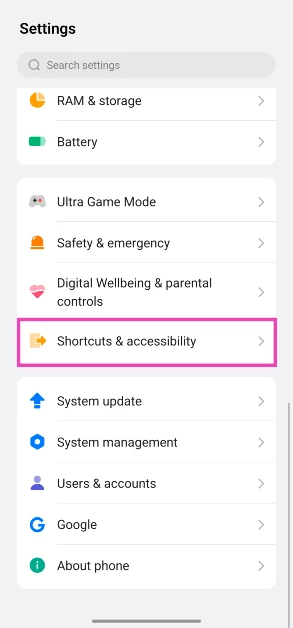
  1. Go to Settings.
  2. Scroll down and select Shortcuts & accessibility. shortcuts and accessibility How to turn on your Android phone’s flashlight by shaking it
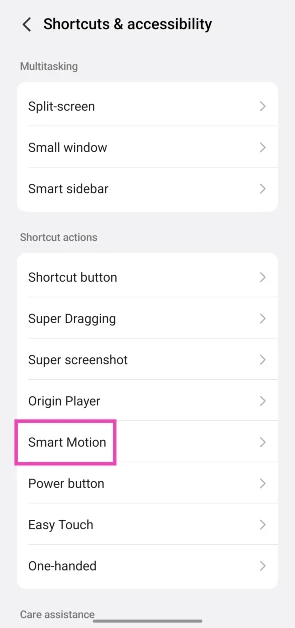
  3. Tap on Smart Motion. Tap on Smart Motion. How to turn on your Android phone’s flashlight by shaking it
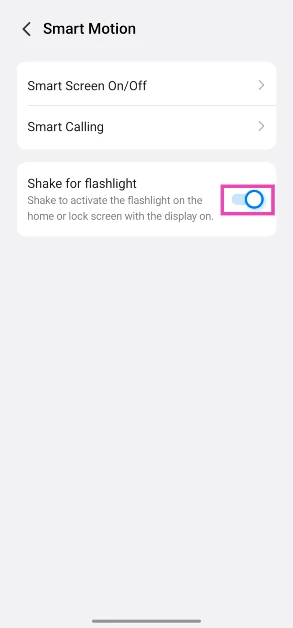
  4. Turn on the toggle switch next to Shake for flashlight. Turn on the toggle switch next to Shake for flashlight. How to turn on your Android phone’s flashlight by shaking it
  5. Go to the lockscreen or homepage and shake your phone a couple of times to turn on the flashlight. This does not work if your phone’s screen is not active.
  6. To turn off the flashlight, go to Quick Settings and tap the Torch tile.

Enable the ‘Fast Flashlight’ gesture on your Motorola smartphone

 
  1. Go to Settings.
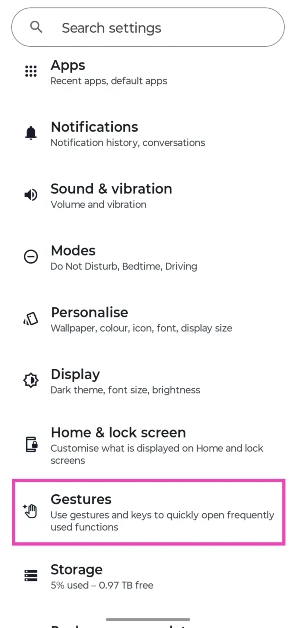
  2. Select Gestures. Select Gestures.
  3. Tap on Fast Torch. Tap on Fast Torch.
  4. Turn on the toggle switch next to Use Fast torch. Turn on the toggle switch next to Use Fast torch.
  5. Move your phone in a chop gesture to turn on the flashlight.

Other Android phones

  1. Download the Shake Flashlight app from the Google Play Store.
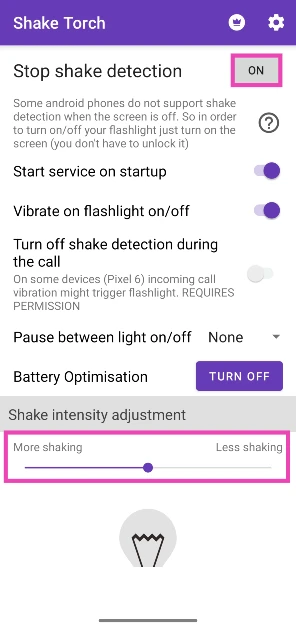
  2. Launch the app and make sure the box next to Stop shake detection says On. Launch the app and make sure the box next to Stop shake detection says On.
  3. Use the slider at the bottom of the screen to set your preferred shake intensity.
  4. Shake your phone in a chopping motion to turn on the flashlight. Some phones may not register this motion when they’re locked. Press the side button and carry out the gesture again to bring the flashlight to life.
  5. Shake your phone again to turn off the flashlight.

Frequently Asked Questions (FAQs)

How do I turn on my phone’s torch without touching it?

If your phone isn’t in your near vicinity, you can use Google Assistant or Siri to turn on its torch. Simply say ‘Ok Google/Hey Siri, turn on the torchlight’, and the phone’s flashlight will light up.

What’s the quickest way to turn on my phone’s flashlight?

You can add the flashlight icon to your phone’s lock screen if you want to access it without unlocking the device. Additionally, you can enable the shake and quick tap gestures to turn on the torchlight.

How do I add the flashlight icon to my Android phone’s lock screen?

Go to Settings>Home screen and Lock screen>Lock screen shortcuts and select ‘Torch’ from the list.

How do I use Quick Tap on my Google Pixel to turn on the torchlight?

Go to Settings>System>Gestures>Quick Tap, and select ‘Toggle flashlight’.

How do I enable shake gestures for my phone’s flashlight?

Go to Settings>Shortcuts & accessibility>Smart Motion and turn on the toggle switch next to ‘Shake for flashlight’. Read Also: Best of 2025: Top 10 smart wearables of the year

Final Thoughts

Some smartphones may not be capable of detecting the shake gesture when their screen is off. In this case, press the side button before carrying out the gesture. If you have any questions, let us know in the comments!

Google Photos Memories features coming to Samsung AI TVs: Here is when

Starting in March 2026, Samsung will add Google Photos’ Memories feature to its smart TVs that use AI. For the first six months, this feature will only be available on Samsung TVs. Customers will be able to watch curated memories on their TVs thanks to this feature. Samsung also plans to release the Create with AI feature and Personalised Results from Google Photos later in 2026. Google Photos intends to improve the experience of reliving and sharing memories with a planned integration with Samsung TVs, which will allow users to see photographs in a bigger size. This integration will allow users to browse curated memories organised by people, places, and key moments, boosting their engagement with Samsung’s Vision AI Companion (VAC) and providing improved photo experiences. Samsung plans to make Google Photos an intrinsic part of the TV experience, fostering natural photo presentations through Daily+ and Daily Board. The user setup is simple; you need to sign in with a Google Account for fast access to photo memories on the TV screen. Three forthcoming innovations are designed to improve the user experience on Samsung TVs. “Memories, set to begin in early 2026, would provide curated stories based on consumers’ significant memories. “Create with AI”, set to launch later in 2026, will have themed templates driven by Google DeepMind’s image model, allowing users to artistically change photographs. In addition, “Personalised Results,” which will be available later in 2026, will allow users to explore similar photographs in a slideshow style organised by themes such as the ocean, hiking, or locations like Paris. Samsung and Google Photos are teaming up to give Samsung TV customers a cinematic gallery experience. This lets people look through their own photo libraries and relive memories in detail. This integration is meant to make it easier for users to look back on their travels, make new stories, and remember happy times. Also Read: Oppo Pad 5 confirmed to launch in India soon, listed on Flipkart Kevin Lee, Executive Vice President of the Customer Experience Team at the Visual Display (VD) Business of Samsung Electronics, said, “Samsung TVs have always brought people together, and bringing Google Photos to the big screen makes that experience even more personal. Through this partnership, we help users rediscover and relive cherished moments by bringing to light the stories behind their photos—right from the comfort of their living room.” Also Read: Samsung introduced its 2026 audio range ahead of CES 2026 Shimrit Ben-Yair, Vice President, Google Photos and Google One, “Google Photos is a home for people’s photos and videos, helping them organise and bring their memories to life. We’re excited to bring Google Photos to Samsung TVs — helping people enjoy their favourite photos on a larger screen and reconnect with their memories in new ways.”

Best of 2025: Top 10 smart wearables of the year

Over the years, smartwatches, fitness bands, and other smart wearables have carved out a niche for themselves among fitness enthusiasts. Even if you don’t like a display on your wrist, you can track your workouts with a smart strap or ring. This year, we saw a lot of activity in the smart wearable segment, so we thought we’d compile a list of our favourite products. Here are our top 10 smart wearables of 2025. Read Also: Oppo Pad 5 confirmed to launch in India soon, listed on Flipkart

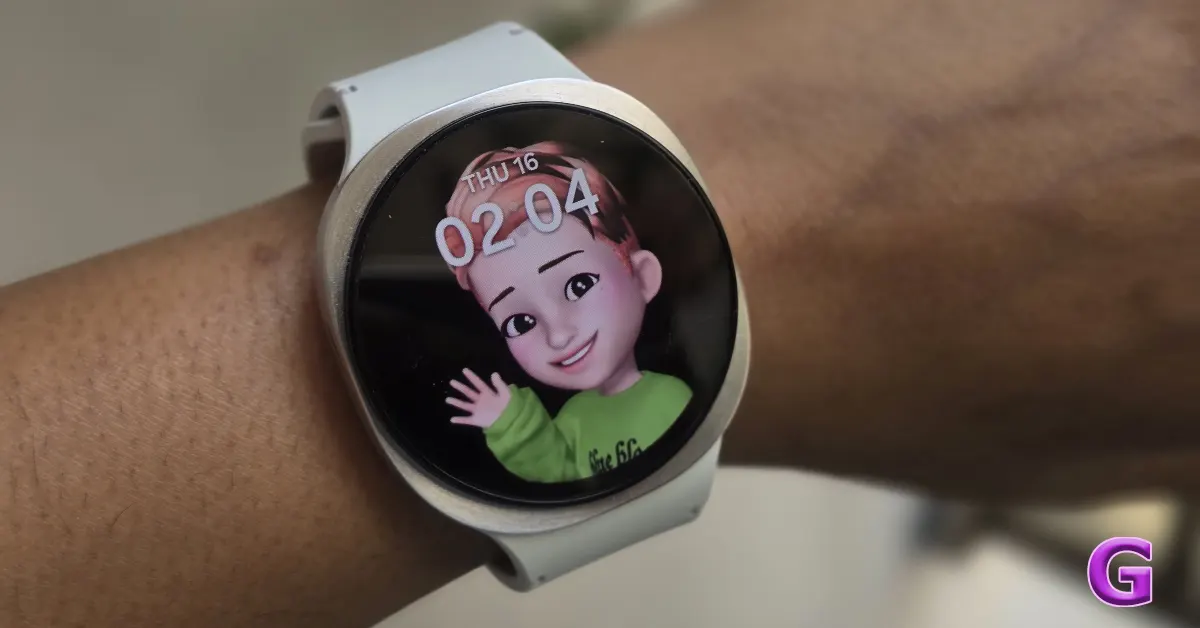
Samsung Galaxy Watch8 Classic

Samsung Galaxy Watch8 Classic Review: Design and Display No smart wearable fits the ‘best of both worlds’ definition better than the Samsung Galaxy Watch8 Classic. It has the aesthetics of a high-end traditional watch while rocking a powerful Exynos W1000 processor under its hood. This smartwatch can track your steps, workouts, sporting activities, and health metrics with utmost precision. Its 1.34-inch circular AMOLED display has a 438p resolution and can reach a peak brightness of 3,000 nits. Software duties are handled by One UI 8 Watch OS. The 445mAh battery pack can power the watch for up to 30 hours on a full charge (with the AOD turned off). For more details, read our review of the Samsung Galaxy Watch8 Classic. Buy on Amazon for Rs 41,999

Samsung Galaxy Watch8

Samsung Galaxy Watch 8 Review (Long Term): Android Smartwatch King The vanilla model in Samsung’s flagship smartwatch series strikes the right balance between design and performance. Unlike its ‘Classic’ counterpart, it has a sportier design and a lighter form factor. Its 1.47-inch Super AMOLED display can reach a peak brightness of 3,000 nits. Powering this watch is Samsung’s in-house W1000 processor. Software duties are handled by One UI 8 Watch OS. There’s 2GB RAM on board, along with 32GB storage. The smartwatch is rated IP68 for dust and water resistance. It is immersible up to 50m, surviving underwater pressure up to 5ATM. The 435mAh battery pack supports 10W wireless charging. Read our Samsung Galaxy Watch8 review for a deeper dive into its everyday performance. Buy on Amazon for Rs 36,999

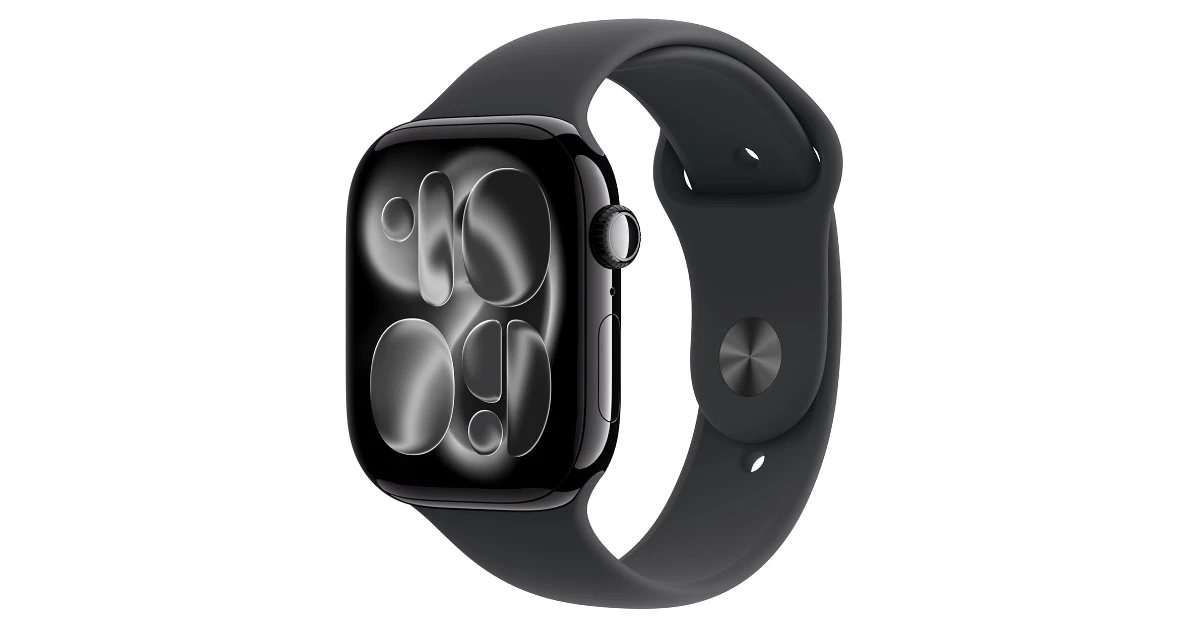
Apple Watch Series 11

Apple Watch Series 11 Launched in September 2025 alongside the new iPhone 17 series, the Apple Watch Series 11 was one of our favourite smartwatches of the year. Its 1.96-inch Retina LTPO3 OLED display has a peak brightness of 2,000 nits. Powering the smartwatch is Apple’s in-house S10 chipset, with watchOS 26 handling the software duties. It is rated IP6X for protection against dust, and is immersible up to 50m. Apple claims a 24-hour battery life on the Watch 11, making it practical for all-day wear and overnight sleep tracking. A 15-minute charge delivers up to 8 hours of use. Buy on Amazon for Rs 46,900 

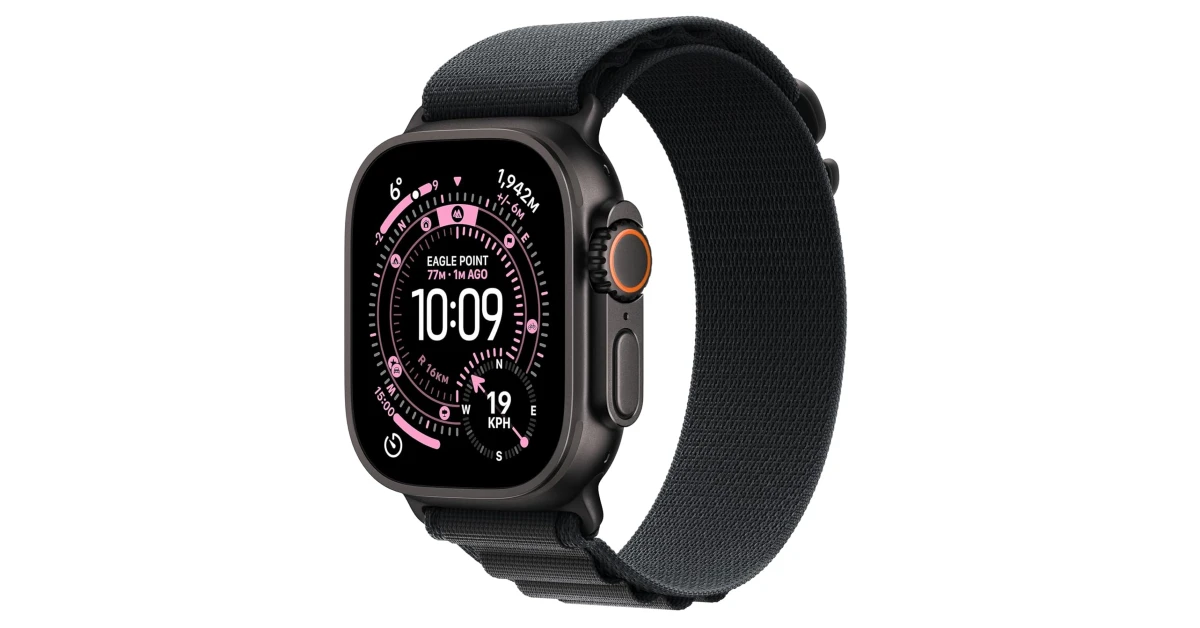
Apple Watch 3 Ultra

Apple Watch 3 Ultra The Apple Watch Ultra 3 may feel like overkill to casual users, but pro athletes swear by this smartwatch. Runners get accurate multi-band GPS, Precision Start, interval and zone metrics, and Race Route. Cyclists can pair power meters, track cadence, and view Live Activity on iPhone. Swimmers can track strokes, laps, and SWOLF, and divers can turn Ultra 3 into a recreational dive computer with Oceanic+. The smartwatch rocks the largest display on an Apple Watch yet – a 1.98-inch Retina LTPO3 OLED panel with a peak brightness of 3,000 nits. A full charge lasts up to 42 hours in regular mode and 72 hours in Low Power Mode. Buy on Amazon for Rs 89,900

Google Pixel Watch 4

Google Pixel Watch 4 The Google Pixel Watch 4 has a 1.4-inch LTPO AMOLED display that can reach a peak brightness of 3,000 nits. It is rated IP68 for dust and water resistance and is immersible up to 50m, withstanding up to 5ATM of pressure. Powering the smartwatch is the Snapdragon W5 Gen 2 chipset. Software duties are handled by Android Wear OS 6. There are 2 sizes on offer – 41mm and 45mm. The compact dial has a round, pebble-shaped form factor, which makes it quite comfortable to wear. The health and fitness tracking tools of this watch are on par with those of other flagship devices. The 455mAh battery pack can go up to 30 hours (41mm) on a full charge. Buy on Flipkart for Rs 39,900

Fastrack MYND

Fastrack MYND Review: Design and Display Best of 2025: Top 10 smart wearables of the year The Fastrack MYND was one of the best budget smartwatches we saw in 2025. It has a clean and minimal design. The rectangular polycarbonate frame has a smooth matte finish. The scroll wheel on the right side of this frame also acts as the menu button. The 1.9-inch AMOLED display has a curved form factor. There’s IP68 rating on board for protection against dust and water. The Fastrack Smart World companion app for this watch gives you access to over 150 watch faces. You can also use the AI Watch Face generator in the app to create new ones. The smartwatch supports over 100 sports, activities, and workout routines. It can also track health metrics like heart rate, blood oxygen, and sleep cycles. For more details, read our Fastrack MYND review. Buy on Amazon for Rs 3,999

Redmi Watch Move

Redmi Watch Move Review: Design and Display Best of 2025: Top 10 smart wearables of the year The Redmi Watch Move is even more affordable than the Fastrack MYND. Its pricetag feels even more bizarre when you consider that it packs a 1.5-inch AMOLED display. This display has a 60Hz refresh rate and can reach a peak brightness of 600 nits. The TPU watch strap offers a snug and comfortable fit. The smartwatch supports Bluetooth 5.3 and is compatible with smartphones running Android 6/iOS 12 and above. Its sensor array comprises an accelerometer, a heart rate sensor, and a blood oxygen sensor. The device is capable of recording your steps, blood oxygen, and heart rate in the background. Its 300mAh battery pack can last up to 14 days on a full charge. Read our Redmi Watch Move review for a deeper analysis. Buy on Flipkart for Rs 1,999

Lava ProWatch X

Lava Prowatch X Review Best of 2025: Top 10 smart wearables of the year The Lava ProWatch X comes in 3 strap options – Metal, Silicon, and Nylon. Its 1.43-inch AMOLED display has a 466p resolution and can reach a peak brightness of 500 nits. The smartwatch is powered by a 128 MHz dual-core Actions ATS3085C chipset. Its heart rate and blood oxygen readings are consistent with medical-grade equipment. There’s support for 110 workout regimens, sports, exercises, and other activities. The built-in GPS ensures that you don’t need to take your phone with you on hikes and runs. The 300mAh battery pack can last up to 6 days on a full charge. It takes over 2 hours to reach a 100% charge. For more details, read our Lava ProWatch X review. Buy on Flipkart for Rs 2,199

Amazfit Helio Strap

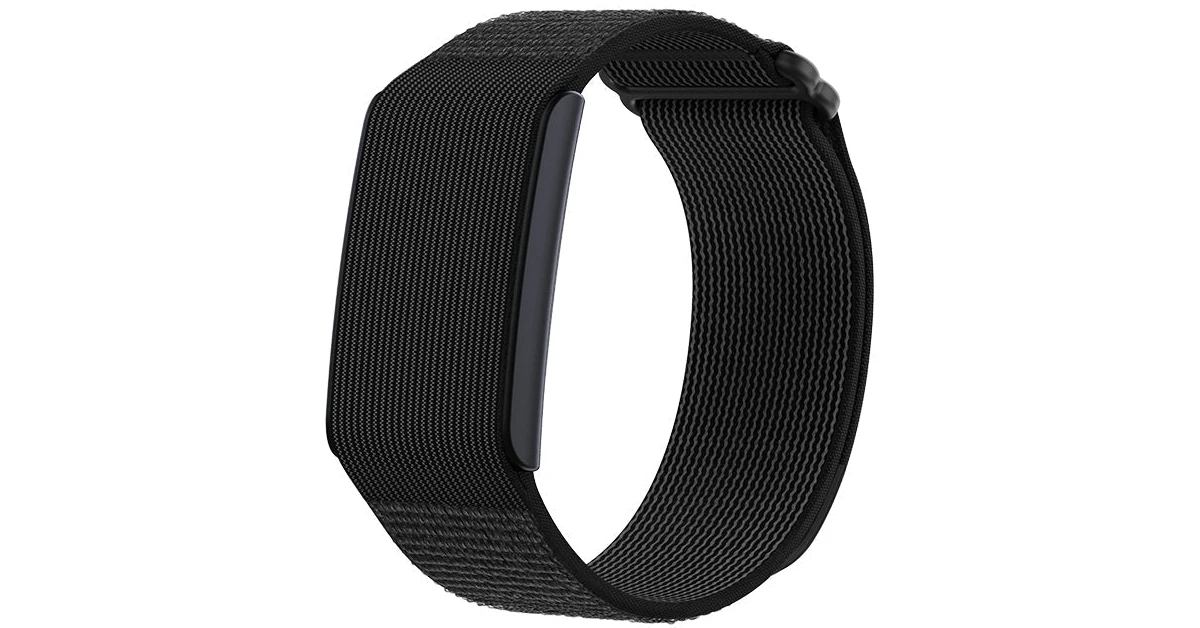
Amazfit Helio Strap Best of 2025: Top 10 smart wearables of the year The Amazfit Helio strap is a no-nonsense smart wearable. It offers round-the-clock health and fitness tracking. This includes tracking your heart rate, sleep cycles, stress, and up to 27 workouts. Its companion app gives you a detailed breakdown of your daily activities and workout routines. You get access to advanced metrics like VO2 Max, training load, and recovery time. Equipped with a 232mAh battery pack, this smart wearable offers a 21-day battery life. Buy on Amazfit eStore for Rs 8,999

Fittr Hart X2

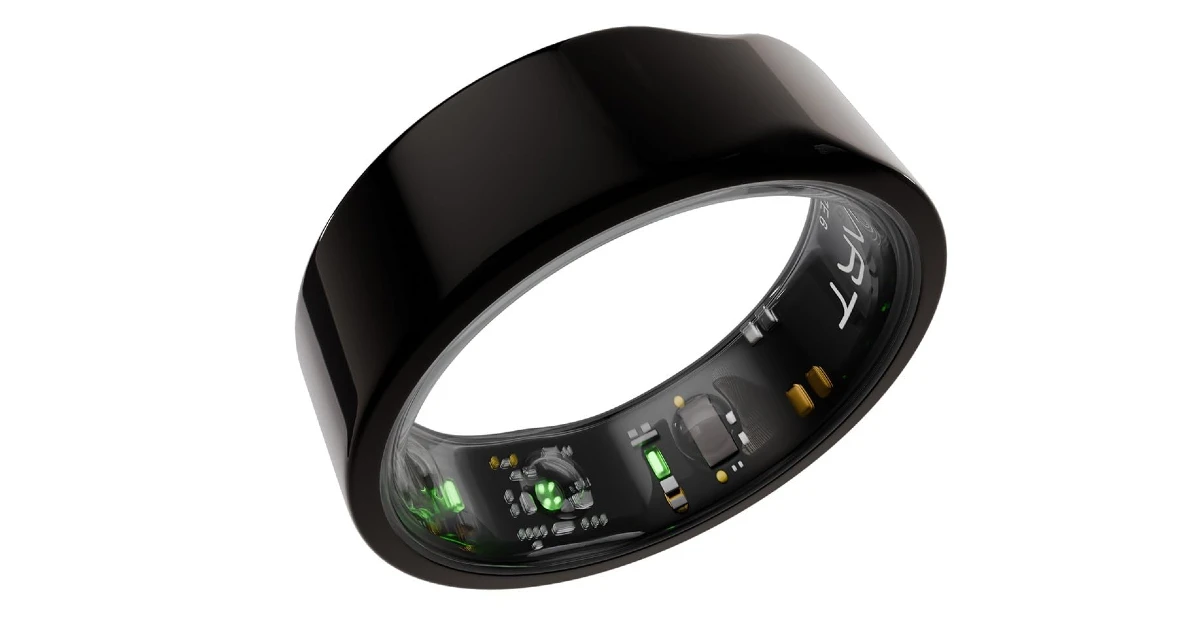
Fittr Hart X2 Best of 2025: Top 10 smart wearables of the year The Fittr Hart X2 was the best smart ring we came across this year. It comes in sizes 6-13. The company offers sizing kits that help users find the fit that works for them. There are 3 colour options on offer – Gunmetal Black, Sterling Gold, and Silver. This smart ring can measure your heart rate and track your sleeping patterns. It uses advanced algorithms to calculate a Recovery Score based on Heart Rate Variability (HRV), sleep, and Resting Heart Rate (RHR). It also offers VO2 Max tracking to help you optimise your workouts. The 200mAh battery pack offers over 8 days of battery life. Buy on Amazon for Rs 19,499 Read Also: How to enable Scam Detection on Google Pixel

Final Thoughts

These are our top 10 smart wearables of 2025. While you’re here, check out our top 10 smartphones of 2025 as well. Think we missed out on a wearable that should be on this list? Let us know in the comments!

Oppo Pad 5 confirmed to launch in India soon, listed on Flipkart

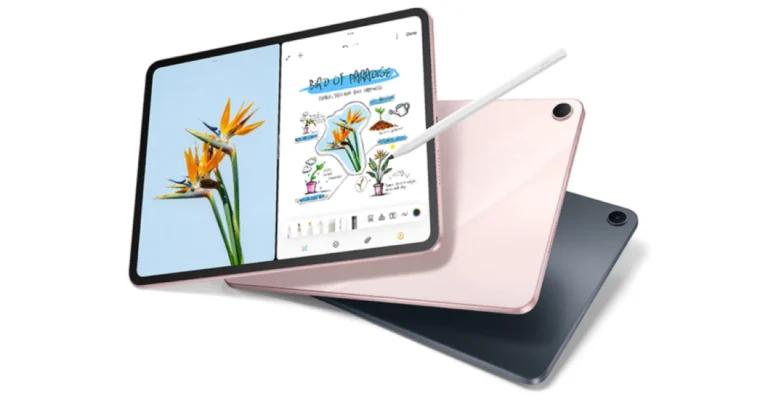
The Oppo Pad 5 is slated to arrive in India alongside the Reno 15 series, with availability confirmed through Flipkart. The Indian edition will have a 12.1-inch display and a 10,050mAh battery, which is somewhat less than the 10,420mAh battery seen in the Chinese version. It will have up to 16GB of RAM and 512GB of storage, is powered by the MediaTek Dimensity 9400+ processor, and supports 67W rapid charging. The Oppo Pad 5 was first launched in China in October. Oppo is planning to introduce the Oppo Pad 5 in India, according to a landing page on Flipkart’s webpage for the next Oppo Reno 15 series. The debut is expected to coincide with the Oppo Reno 15 series release, although no exact date has been announced. The Oppo Pad 5 will have a 12.1-inch 2.8K display and an AI-powered note-taking function. The tablet will be available in at least two colours: black and pink, however the exact names for these colours are still unknown. It will support stylus and has a 10,050mAh battery, which is somewhat smaller than the Chinese variant’s 10,420mAh battery. Also Read: Samsung introduced its 2026 audio range ahead of CES 2026 Pricing and other specs for the Indian market are yet to be released. As previously reported, the tablet made its debut in China in October of this year. It is available in a variety of configurations: the 8GB RAM with 128GB storage variant is priced at CNY 2,599 (approximately Rs.32,000), while the 8GB RAM with 256GB storage, 12GB RAM with 256GB storage, and 16GB RAM with 512GB storage models are priced at CNY 2,799 (approximately Rs 34,000), CNY 3,099 (approximately Rs 38,000), and CNY 3,599 (close to Rs 44,000), respectively. Also Read: Redmi 15C 5G Review: The budget phablet that never dies The Oppo Pad 5 runs ColorOS 16, which is based on Android 16, and is powered by a MediaTek Dimensity 9400+ octa-core CPU, with configurations ranging from 16GB of RAM to 512GB of internal storage. The gadget has a 12.1-inch LCD display with a resolution of 2,120×3,000 pixels, an adjustable refresh rate of up to 144Hz, a pixel density of 304ppi, and an excellent screen-to-body ratio (88.5%). The display can reach a maximum brightness of 900 nits and has a touch sampling rate of up to 540Hz. In terms of photography capabilities, the gadget sports an 8-megapixel back camera and another 8-megapixel front-facing camera for video calls and selfies.

Garena Free Fire Max Redeem Codes Today 30 December 2025: Here is how to claim them

Garena Free Fire (GFF) Max is a battle royale game with regular awards and tournaments to keep players interested. If you play GFF, you should be aware of the redeem codes that are released on a daily basis. However, because the battle royale game is banned in India, players from other countries can use the Free Fire Redeem codes daily. If you’re unfamiliar with the codes or don’t know how to get them, we’ve put together a step-by-step guide to help you redeem them. Check out Garena Free Fire Max Redeem Codes for 30 December 2025. These codes are a great way to get free items in the game. The 12-digit codes contain letters and numbers, as well as an expiration date and time. Because the Garena FF redeem codes cannot be used more than once, you should hurry to the redemption page to claim your free reward before someone else does. To get a free reward, all you have to do is go to reward.ff.garena.com/en, which is the official redemption page. Also, keep an eye on this space for daily updates on Gadget Bridge on GFF Max redemption codes and rewards. Also Read: Amazon Quiz Answers Today 27 November 2025: Participate to win Up To Rs 500 Amazon Pay Balance

Garena Free Fire Max Redeem Codes Today 

updating soon…

Also Read: OnePlus 15R confirmed to be powered by Snapdragon 8 Gen 5 SoC

How to Get Free Fire Max Redeem Keys for Garena?

  • Visit the game’s official website at reward.ff.garena.com.
  • Use your Facebook, Google, VK, Apple ID, Huawei ID, or Twitter account to log in.
  • You’ll be taken to a valid redemption code (s)
  • Copy and paste the 12-digit redemption code into the text box.
  • On the screen, a dialogue box will appear.
  • ‘Ok’ should be selected.

Amazon Quiz Answers Today 30 December 2025: Participate to win Up To Rs 500 Amazon Pay Balance

Amazon Quiz 30 December 2025: The New Daily Quiz is now available. Customers from different parts of the country are participating in the daily quiz. The quiz starts at midnight today and will be live until 11:59 PM tonight. By successfully answering every question, participants in the quiz have the chance to win wonderful rewards. Up to Rs 500 Amazon Pay Balance is up for grabs to participants today. One wrong answer could eliminate you from the quiz. You have a chance to win up to Rs 500 Amazon Pay Balance if you successfully answer every question. Users of the app only have the opportunity to take the quiz. Check Out the 30 December 2025 Quiz.

Are you not able to find Amazon FunZone? Click below and participate.

Click here to enter the Amazon FunZone Quiz and play today. Today’s Prize: Rs 500 Amazon Pay Balance Quiz Date: 30 December 2025 Daily Timing: 12 AM to 11:59 PM Previous Winners Announcement: Today 12 PM Noon

Amazon Daily Quiz Answers Today: Win Up To ₹ 500 Amazon Pay Balance

Question 1: Achanta Sharath Kamal represents India in which sport? Answer: Table Tennis Question 2: Which date is to be celebrated as Hyderabad Liberation Day? Answer: 17-sep Question 3: In which sport did India win its first two medals at the 2024 Paris Olympics? Answer: Shooting Question 4: This painting was created in which historical period? Answer: Renaissance Question 5: Where is the headquarters of this brand in the USA? Answer: Atlanta Also Read: iQOO 15, equipped with Snapdragon 8 Elite Gen 5 SoC, launched in India

How To Play Amazon Daily Quiz Today

Only app users are eligible to play the Amazon quiz every morning from 12 AM to 11:59 PM. The quiz is not available on the desktop. For those who are unaware of how to play the Amazon quiz, below are the steps you can follow to take the quiz.
  • First, download the Amazon app from the Google Play Store or App Store or go here to download the Amazon App
  • Now fill in the required information through the Sign-Up option.
  • To find the Amazon Daily Quiz banner, log in to the Amazon app and scroll down to the home screen.
  • Tap on the banner and tap on the Start button to start the Quiz.
  • Now you will get 5 questions and you need to answer them correctly. One wrong answer will eliminate you from the Quiz.
  • After answering all the questions correctly, you are now eligible for a Lucky Draw.
  • The previous winner’s name will be announced today at 12 PM.

Amazon Daily Quiz Answers from the previous few days.

Here are all the answers from the previous 5 days of the Amazon Daily Quiz and Contest.

29 December 2025

Question 1: Achanta Sharath Kamal represents India in which sport? Answer: Table Tennis Question 2: Which date is to be celebrated as Hyderabad Liberation Day? Answer: 17-sep Question 3: In which sport did India win its first two medals at the 2024 Paris Olympics? Answer: Shooting Question 4: This painting was created in which historical period? Answer: Renaissance Question 5: Where is the headquarters of this brand in the USA? Answer: Atlanta

28 December 2025

Question 1: In 2024, who became the youngest person to win two Oscars? Answer: Billie Eilish Question 2: The D. B. Patil International Airport is located in which place? Answer: Navi Mumbai Question 3: Which country had the first-ever married couple to serve as flag bearers at the Paris Olympic Opening Ceremony? Answer: Romania Question 4: When was this app launched? Answer: 2011 Question 5: Which is the smallest monkey in the world? Answer: Marmoset

27 December 2025

Question 1: Complete the title of this 2024 film: “Chhota Bheem and the Curse of”. Answer: Damyaan Question 2: What regal title does Yaduveer Krishnadatta hold? Answer: Maharaja of Mysore Question 3: Which John Lennon and Yoko Ono song has been sung at six Olympic Opening Ceremonies, including Paris 2024? Answer: Imagine Question 4: Who is the architect of this cathedral? Answer: Filippo Brunelleschi Question 5: In the English edition of this game, how many word tiles are there? Answer: 100

26 December 2025

Question 1: As per Guinness World Records, which national flag is the world’s oldest and longest-running flag? Answer: Denmark Question 2: Name this largest and most powerful rocket ever flown. Answer: Starship Question 3: Which of the major planets of our solar system is named for a Greek god, not a Roman? Answer: Uranus Question 4: Which candy brand was the first to go to space? Answer: M&M Question 5: The character of Spock in Star Trek is from which planet? Answer: Vulcan

25 December 2025

Question 1: The iconic Air India building at Nariman Point was handed over to which state government? Answer: Maharashtra Question 2: Which country topped the list of UN’s Human Development Index? Answer: Switzerland Question 3: Which Hollywood superstar portrays the role of MMA legend Matt Kerr in the biopic ‘The Smashing Machine’? Answer: Dwayne Johnson Question 4: Which sport first appeared in the Winter Olympics in 1936? Answer: Alpine skiing Question 5: This brand is the largest sportswear manufacturer in which continent? Answer: Europe

24 December 2025

Question 1: Which film is based on Mstyslav Chernov’s daily news dispatches and personal footage of his own country at war? Answer: 20 days in Mariupol Question 2: Ae Watan Mere Watan’ is inspired by which freedom fighter, instrumental in founding the underground Congress Radio? Answer: Usha Mehta Question 3: Which Indian musician’s biography, written by Oliver Craske, is titled Indian Sun? Answer: Ravi Shankar Question 4: Which Roman Emperor was fond of this fruit? Answer: Tberius Question 5: In the beginning, what was this system called? Answer: Navstar Also Read: Samsung Galaxy M17 5G Review: Budget Bombshell

Frequently Asked Questions (FAQs)

Where can I check the previous winners? Did I win? How to check?

You can head over to this link on your mobile or desktop to check the winners of the Amazon Daily Quiz Contest.

How to Play Amazon Daily Quiz or Contest?

We have written an explainer above; you can refer to that.

When are the winners of the Quiz and contest announced or declared?

The announcement of today’s quiz winner will take place Tomorrow. As for the Special Quiz and “Spin & Win” Contest, the winners will be declared once the Quiz Contest comes to an end. To find out who the lucky winner is, you can refer to the Winners List or visit the Amazon Winners tab in the Amazon App.

How to participate in the Daily Amazon Quiz?

That is very easy, just got to the Amazon app and scroll to the bottom of the page and you will find the Quiz section. Click on it (usually it is called the fun zone) and you can enter the Amazon Today Quiz Contest. 

Are there any other quizzes or contests running on Amazon daily?

Yes, there are many running daily. These range from spinning the wheel to answering the questions correctly. All are located in the Fun Zone. 

What are the criteria for selecting a winner in the Daily Amazon Quiz?

When a qualified player submits correct answers to all the questions, they will automatically be entered into a lucky draw. This draw will include all participants who answered all the questions correctly. Amazon randomly selects the final winners from the pool of eligible participants who gave the right answers.

Which Types of Questions are asked within the Amazon Daily Quiz?

These are very simple and straightforward questions. These are mainly related to general knowledge. 

Where should I look for Amazon Daily Quiz answers?

You can bookmark our website www.gadgetbridge.com as we will help you every day with the Amazon Daily Quiz. We bring you fresh answers every day for the Amazon Daily Quiz and Contest. 

What time does Amazon announce previous winners?

The previous winner’s name will be announced today at 12 PM (noon).

NYT Wordle Answer and Hints Today (December 30) #1655

Are you looking for today’s Wordle answer for December 30, 2025? The problem is difficult to solve, so if you need assistance, we’ve included hints and the clue to today’s Wordle Quiz. Below, we have made it simple for everyone to understand how to get to the Wordle Answer today.

Hints and Answers for Today’s Wordle December 30

Before answering directly, please check the Wordle Hints first. Hint 1: Today’s Wordle answer includes two vowels. Hint 2: The answer for today has no repeating letters. Hint 3: Meaning- the style in which the inside of a building is decorated

What word does today’s Wordle begin with?

Do you need help with today’s Wordle answer’s initial letter? The first letter in today’s Wordle is “D”

Today’s Wordle Answer 

The answer to Wordle #1655 on December 30, 2025, is — DECOR

Also Read: iQOO 15, equipped with Snapdragon 8 Elite Gen 5 SoC, launched in India

What is Wordle?

Wordle: A Five-Letter Word Guessing Game • The game allows six guesses of a five-letter word. • Provide feedback on the guessed letters’ placement in the puzzle. • The New York Times purchased the game in 2022. • Created by Josh Wardle for his partner, narrowing down 12,000 English words to 2,500. • Named after the word “word.”

How To Play Wordle?

Wordle is a New York Times word puzzle game that allows users to guess a five-letter word in six attempts. The letters are highlighted in Yellow and Green, indicating whether the word is present in the answer or not, and Green letters indicate the correct guess. Also Read: Samsung Galaxy M17 5G Review: Budget Bombshell
Wordle Tips and Tricks
  • Select a powerful starting word: Avoid using unusual words, as they frequently do not match common letters. A good opening word has plenty of benefits.
  • Repeating letters: Don’t be afraid of repeating letters; they appear frequently in words. The answer may contain one or two repeated letters.
  • Use the Wordlebot: The NYT’s Wordlebot analyses and compares replies to itself. This challenge can assist you in enhancing your guessing skills and highlighting areas for development.

Samsung introduced its 2026 audio range ahead of CES 2026

Samsung Electronics unveiled its 2026 audio range, which includes improved Q-Series soundbars and new Music Studio speakers designed to provide richer and clearer audio experiences. This expanded line, which will be shown at CES 2026, focuses on fuller immersion and improved multi-device performance with innovative audio technologies. Samsung’s 2026 Q-Series soundbars improve cinematic sound in modern homes by adjusting to different room sizes and listening habits. The flagship model, the HW-Q990H, has unique Sound Elevation technology that places dialogue in the centre of the screen, resulting in a more natural aural experience. It also supports Auto Volume, which maintains constant sound levels throughout channels and content, resulting in a smoother and more balanced listening experience. The 11.1.4-channel system has a 7.0.2 main bar, 4.0.2 rear speakers, and a small active subwoofer that delivers strong bass and an expansive sound field thanks to up-firing channels and AI tuning. The new HW-QS90H model from Samsung’s 2026 series is an all-in-one soundbar with a convertible fit design that allows for flexible mounting and automated channel adjustment via gyro sensor. A 7.1.2-channel system also has 13 drivers and a built-in Quad Bass Woofer, allowing for deep bass without the need for a separate subwoofer. Samsung is unveiling two new Wi-Fi speakers, the “Music Studio 5” and “Music Studio 7”, to improve their integrated environment. These models enable more sound system combinations, increasing the audiovisual experience and improving the audio environment while complementing the user’s surroundings. Both speakers feature Erwan Bouroullec’s ageless design, which is inspired by universal symbols in music and art and is consistent with Samsung’s aesthetic. Music Studio 7 (LS70H model) has 3.1.1-channel spatial audio and top-firing speakers for immersive sound. It employs Samsung’s Audio Lab Pattern Control Technology for improved directionality and AI Dynamic Bass Control for deeper bass. The system supports Hi-Resolution Audio up to 24-bit/96kHz, with a frequency range of 35kHz for more detail. It comes in black and white and can be used as a single speaker or coupled with Samsung TVs via Q-Symphony to provide a more immersive audio experience. Also Read: Redmi 15C 5G Review: The budget phablet that never dies Music Studio 5 (LS50H model) combines elegant design and sound, with a small shape that complements interiors. Samsung Sound Lab tuned it, and it features a 4″ woofer and dual tweeters with a waveguide for balanced sounds, as well as AI Dynamic Bass Control for distortion-free low frequencies. It has Wi-Fi casting, streaming capabilities, voice control, and Bluetooth connectivity. Also Read: Samsung and SK are planning to begin mass manufacturing of new AI memory chip HBM4 chips in February The 2026 portfolio includes the adaptive Q-Symphony, which enables seamless integration of Samsung TVs, soundbars, and Wi-Fi speakers while optimising audio output for increased clarity and surround sound. The SmartThings app allows users to change settings and regulate playback. The latest Sound Tower models, ST50F and ST40F, improve outdoor listening experiences.
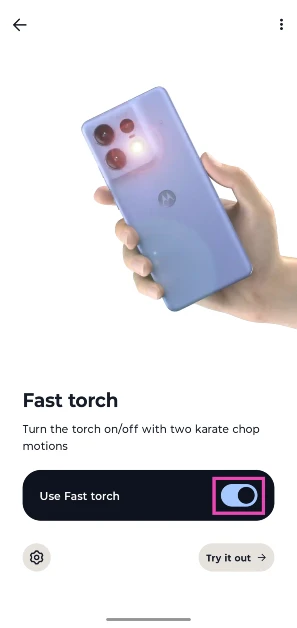
How to enable Scam Detection on Google Pixel

0
Older folks are the most common target of scam calls. Scammers and con artists often rely on scare tactics to entrap users into sending them money – something that older people are more susceptible to. If you’re worried that your parents may fall for such scams, you can enable an intelligent feature on their phones that will send them a warning when they’re in the middle of a scam call. Right now, this feature is only available on Pixel smartphones. Here’s how you can enable Scam Detection on a Google Pixel. Read Also: Endzone Strike Codes (December 2025)

How Scam Detection works

Scam Detection works quietly in the background, scanning your phone calls for potential suspicious activity. Google says this feature is based on “the corpus of knowledge about how scammers scam victims.” It displays a warning message when it comes across content that’s similar to how scammers operate. This could be anything from someone asking you for your credit card details to a line that is frequently used in call scripts. You can choose to dismiss the warning if you’re certain that the caller on the other end is not a scammer. On Pixel 9 and later smartphones, Scam Detection uses Gemini Nano to function. All data is processed on the device. On older Pixels, it uses on-device machine learning models. No data is sent to Google’s servers at any point. Scam Detection is available on the following devices:
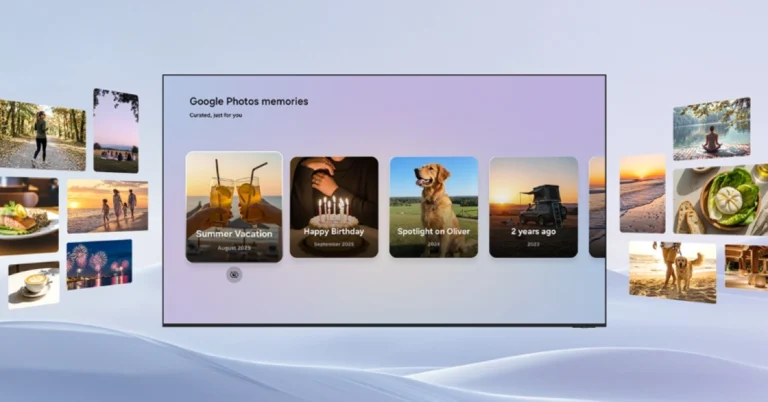
  • Google Pixel 6 and up: In the USA.
  • Google Pixel 9 and up (excluding Pixel 9a): In Australia, India, Canada, Ireland, and the UK.

Enable Scam Detection

Google rolling out new AI protection features to safeguard your privacy
  1. Launch the Phone app on your Google Pixel.
  2. Hit the ellipses in the top-right corner of the screen.
  3. Go to Settings.
  4. Tap on Scam Detection.
  5. Turn on the toggle switch.

Turn off Scam Detection for an ongoing call

  1. Hit the ellipses on the call screen.
  2. Turn off Scam Detection.
To disable this feature for all calls, go to Phone>Settings>Scam Detection and turn off the toggle switch.

Frequently Asked Questions (FAQs)

Is Scam Detection an AI feature?

Scam Detection is powered by the Gemini Nano AI model on Pixel 9 and later devices. Older Pixels utilise on-device machine learning models for this feature.

Does Scam Detection send user data to Google’s servers?

Google maintains that the data processing for Scam Detection takes place entirely on the device. No conversation audio or transcript is sent to Google’s servers.

Is Scam Detection available on non-Pixel Android phones?

No, this feature is available exclusively on Google Pixel smartphones.

How do I turn on Scam Detection on my Pixel?

Go to Phone>Settings>Scam Detection and turn on the toggle switch.

How do I disable Scam Detection for an ongoing call?

Hit the ellipses on the call screen and tap on Scam Detection to disable it for that particular call. Read Also: Best of 2025: Top 10 PC accessories of the year

Final Thoughts

As mentioned earlier, this feature is only available on Google Pixel smartphones. It remains to be seen whether it will be rolled out for wider Android devices. While you’re here, check out how you can block spam text messages on your smartphone. If you have any questions, let us know in the comments!

Endzone Strike Codes (December 2025)

Endzone Strike is one of the newer titles on Roblox, but it promises a lot of fun. It fuses American Football with anime aesthetics, letting you play as different characters. You can use your anime powers in the game to break through defences and rack up points. The game offers special codes that can be redeemed for useful items. Here are all the Endzone Strike codes available in December 2025. Read Also: Samsung’s upcoming Galaxy S26 series could get more expensive: Here is why

List of active codes (December 2025)

  • MERRYCHRISTMASS: 5 Lucky Spins.
  • UPDATE2: 1 Lucky Draw, 3 Normal Draws.
  • SORRYFORUPDATE: 3 Lucky Draws, 3 Normal Draws.
  • 1MVISITS: 3 Lucky Spins.
  • UPDATE1: 3 Lucky Spins, 1 Normal Spin.
  • GRIFFITHLOST: 5 Normal Spins, 3K Yen.
  • 30KLIKES: 2 Lucky Spins, 3 Normal Spins, 2K Yen.
  • 10KMEMBERS: 4 Normal Draws, 1 Lucky Draw.
  • 1KCCU: 3 Lucky Draws.
  • DISCORDONLY: Gift Ball Skin.
  • OPENING: 5 Normal Draws.
  • RELEASE: 2 Lucky Draws.

List of expired codes

Currently, this title has no expired codes.

How to redeem a code in this game

How to redeem a code in this game
  1. Launch Endzone Strike in Roblox.
  2. Hit the Codes icon at the bottom of the screen.
  3. Enter your code in the text box.
  4. Hit Submit.

Frequently Asked Questions (FAQs)

Why is my code not working in this game?

If your code isn’t working, check it for typos and make sure its letters are in all caps.
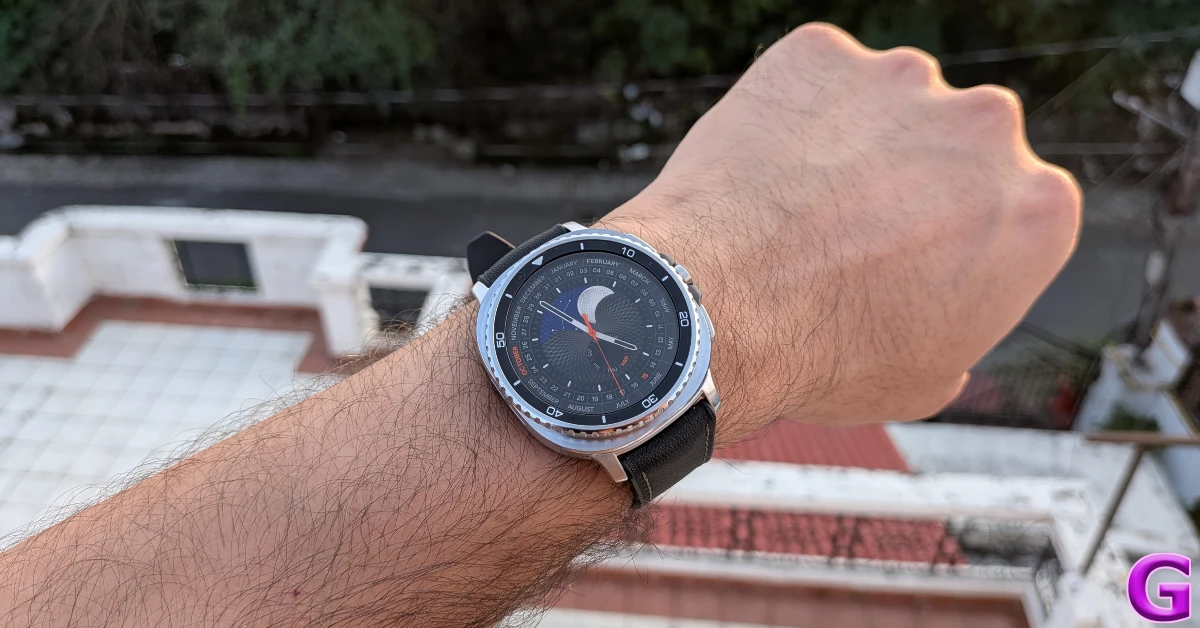
How do I redeem a code in this game?

Launch Endzone Strike, hit the Codes icon, enter your code in the text box, and hit ‘Submit’.

How do I get free Yen in this game?

Use codes GRIFFITHLOST and 30KLIKES to get free Yen in Endzone Strike.

Why am I not able to redeem my code in this game?

If your code has expired, it can no longer be redeemed in Roblox.

Where can I find the latest Roblox codes?

Keep checking the Gadget Bridge home page for the latest Roblox code drops. Read Also: How to record calls on Android

Final Thoughts

For more American Football action on Roblox, check out NFL Universe Football. While you’re here, take a look at the latest Jujutsu Zero codes as well. If you have any questions, let us know in the comments!

Samsung’s upcoming Galaxy S26 series could get more expensive: Here is why

Samsung plans to debut the Galaxy S26 series, which will include the standard Galaxy S26, Galaxy S26+, and Galaxy S26 Ultra, globally in February 2026, including in India. According to reports, the series might be priced more because of rising component costs, notably memory sticks, which are in limited supply. While the company has not independently verified any information, it is possible that the Galaxy S26 may use the Exynos 2600 SoC and include triple rear cameras. Additionally, the phones are expected to be available for purchase around a month following their official release. According to The Bell, Samsung’s Mobile Experience (MX) unit is struggling to reduce production costs as component prices rise and competition heats up. This situation has forced the corporation to devote additional resources to marketing and labour, complicating the determination of “reasonable sales prices” for upcoming products. As a result, the prices for the upcoming Samsung Galaxy S26, S26+, and S26 Ultra models may be significantly higher than those of their predecessors, the Galaxy S25 lineup. Also Read: Redmi 15C 5G Review: The budget phablet that never dies Previously, ETNews stated that the S26 Series will cost more than this year’s Galaxy S25 series. Rising pricing of key phone components has been suggested to be the cause for the anticipated price increase. As the prices of these essential parts have grown at the same time, so have the entire production costs for phones. As a result, Samsung looks to be planning to boost the pricing of the Galaxy S26 lineup—which is expected to comprise the Galaxy S26, Galaxy S26+, and Galaxy S26 Ultra—to preserve good profit margins. Samsung expects to have its Galaxy Unpacked debut event on February 25, 2024, in San Francisco, California. This is the company’s first launch event in San Francisco in three years, with the last taking place in 2023. Samsung has shifted its launch date from late January or early February. Also Read: Samsung and SK are planning to begin mass manufacturing of new AI memory chip HBM4 chips in February Galaxy S25 Ultra was launched with the following pricing: 12GB RAM and 1TB storage at Rs 165,999, 12GB RAM and 512GB storage at Rs 141,999, and 12GB RAM and 256GB storage at Rs 129,999. The Galaxy S25+ debuted with prices of 12GB RAM and 512GB storage at Rs 111,999 and 12GB RAM and 256GB storage at Rs 99,999. The Galaxy S25 was priced at 12GB RAM and 512GB storage at Rs 92,999, and 12GB RAM and 256GB storage at Rs 80,999.

How to record calls on Android

0
Recording phone calls just got a whole lot easier for Pixel users. The record button is now placed in the Call Assist menu on the native Phone app by Google. When you hang up a call, the recording can be accessed from the call history section in the app. This feature is also available for non-Pixel Android users, but it does not appear in the Call Assist menu on their devices. Instead, it gets its own tile on the call screen. Here is a step-by-step tutorial explaining how you can record calls on your Android phone. Read Also: Redmi 15C 5G Review: The budget phablet that never dies

Here’s what you need to use this feature

  • Non-Pixel devices must run Android 9 or up.
  • Pixel devices must belong to the Pixel 6 series or up.
  • Pixel devices must run Android 14 or up.
  • The Phone app (by Google) must be updated to the latest version.
  • The call recording feature must be available in your country.  

Enable call recording on your Android phone

display
  1. Launch the Google Phone app on your Android phone.
  2. Tap the ellipses in the top-right corner of the screen.
  3. Go to Settings.
  4. Tap on Call Recording.
  5. Hit the toggle switch next to Turn on Call Recording. Additionally, you can choose whether you want all calls from unknown numbers or selected contacts to get recorded automatically.

Record calls on your Android phone

5 Easy Ways To Fix ‘Unable Answer Calls’ On Any Android Smartphone
  1. Make or receive a call on your phone.
  2. If you’re a Pixel user, go to Call Assist>Call Recording. Non-Pixel users can directly tap the Record button on the call screen.
  3. Hit Record in the pop-up box. An audio clip will play on the call, letting everyone know that the call is being recorded.
  4. Hit Stop when you want to end the recording.

Find the recorded call on your Android phone

Bad news: Google will remove all Android call recording apps from Play Store on May 11
  1. Launch the Google Phone app on your Android phone.
  2. Go to the Home tab.
  3. Go through your call history to find the recording. You can tap on a caller’s name to view your call history with them.
  4. Hit the play icon to play the recording.
  5. Hit the bin icon to delete the recording.

Delete all call recordings from your Android phone

display
  1. Launch the Google Phone app and hit the ellipses.
  2. Go to Settings.
  3. Tap on Call Recording.
  4. Select Delete all call recordings now.
  5. Hit Delete in the pop-up box.

Frequently Asked Questions (FAQs)

How do I enable call recording on Android?

Go to Phone>Settings>Call Recordings and hit the toggle switch next to ‘Turn on Call Recording’.

How do I record a call on my Android phone?

Hit the Record button on the call screen to start recording it. This will play an audio message, letting everyone on the call know that it is being recorded. If you’re a Pixel user, go to Call Assist>Call Recording on the call screen.

Is there a way to block the call recording audio message on Android?

No, the Phone app by Google does not offer the option to mute or block the audio message that lets members know that the call is being recorded.

Why can’t I view the call recording feature on my phone?

The call recording feature for the Phone app is not available for all countries yet. Google is still rolling it out in certain regions.

How do I delete all call recordings on my phone?

Go to Phone>Settings>Call Recording and tap on ‘Delete all call recordings now’. Read Also: Best of 2025: Top 10 PC accessories of the year

Final Thoughts

The Phone app by Google does not record a call until the person on the other end answers it. When a call is placed on hold, the recording gets paused. Additionally, Google does not allow users to record conference calls yet.