Sales of larger washing machines surged by 45% this year.
Demand for smaller washing machines dropped by 26%.
Bigger machines enhance wash quality and energy efficiency.
Indian consumers are increasingly opting for larger washing machines, driven by a need for convenience and superior wash performance, according to the latest data from Samsung India’s consumer research.
Over the past two years, there has been a significant shift in consumer behaviour, with a notable preference for washing machines with larger drum sizes. These larger machines, which offer better wash quality and can handle greater laundry loads, have seen sales rise by 45% this year. Conversely, sales of smaller front-load washing machines (7 kg and below) have fallen by 26% during the same period.
Read Also:Best Automatic Washing Machines Under Rs 20,000
Larger washing machines provide several benefits, including the ability to wash more clothes per load, which reduces the frequency of washing machine use, making it both time and energy-efficient. Additionally, bigger drums allow more space for clothes to move, resulting in cleaner and less tangled laundry.
These machines are especially useful for washing household items like bedsheets, curtains, and saris, which are common in Indian households. As consumers continue to prioritize convenience and efficiency, the demand for larger washing machines is expected to grow further.
Samsung India’s consumer survey highlighted that many users optimize their laundry loads to save energy and minimize water wastage. The survey also revealed that Indian households prefer washing a wide range of items at home, from bed sheets to cushion covers.
The shift towards larger washing machines also reflects a growing awareness of sustainability and energy efficiency among Indian consumers. Indian consumer households are big and they want lager machines. Also, many times Indian users would want to wash clothes 2-3 times only a week and save water plus electricity. So this could be one more reason why users are going for bigger washing machines.
Truke’s new series of Open-ear Wireless Stereo (OWS) earbuds are designed to eliminate the stress that comes with using traditional in-ear buds. The earbuds hover over the ear canal instead of pushing inside it. Previously, we reviewed the Truke Buds Freedom OWS and found them to be a good alternative to standard TWS for users who don’t fancy the in-ear design. The soundstage offered by the Freedom OWS, while not as ‘full’ as we’d like, was still decent enough for its price category. We now turn our attention to the Liberty OWS, which is currently priced at Rs 1,899. These earbuds pack the same 16mm Beryllium drivers as the Freedom OWS. They also feature 360 Spatial Audio for a more immersive listening experience. We used the Truke Buds Liberty OWS for a week, here is our review of the earbuds.Read Also:Redmi Pad Pro 5G, Redmi Pad SE 4G launched in India
In This Article
Truke Buds Liberty OWS Review: Design
Here’s what you get inside the Truke Buds Liberty OWS retail box:
Charging case with earbuds inside
USB Type-A to Type-C cable
Warranty card
User manual
The design of the Truke Buds Liberty OWS is similar to the Freedom OWS. The charging case sports the lunchbox form factor and needs two hands to be flipped open. There is a small notch under the lid to help with this task. The top of the lid has a glossy finish, while the bottom of the case has a matte texture. A thin strip separates the lid from the bottom half of the case. The USB port is positioned below the hinge.Truke Liberty OWS v Freedom OWSThe inside of the case has a contrasting colour, giving the OWS a dual-tone theme. The matte finish on this inlay elevates the feel of the device. The two earbuds are firmly locked into their respective magnetic cutouts.Truke Buds Liberty OWS comes in two colour options – Aqua Blue and Black. We used the former for the review. The charging case is prone to scratches if it is kept inside pockets with keys and loose change. However, given the size of the case, we found it much more convenient to tuck it away in a backpack.The key difference between the Freedom and the Liberty OWS lies in the earbud design. While the size of the two earbuds is similar, the Liberty OWS has a more uniform touch panel without any fingertip-shaped indentation. This touch panel has the Truke branding right in the middle along with a small notification light. It is bordered by a plastic frame finished in silver.The titanium wire ear hooks wrap around the ear while the buds hover over the ear canal. For the earbuds to deliver the best audio output, you need to ensure that they are not obstructed by the tragus. This will require some adjustment before you get it right. The fit of the earbuds isn’t quite there yet. While the earbuds are designed to be loose and ‘open’ we would have preferred the ear hooks to be tighter and more secure.The good thing about the open-ear design of these earbuds is that it makes you more aware of your surroundings. Since there is no passive noise cancellation whatsoever, you can put these earbuds on while going on a jog and be conscious of the traffic around you. If you have sensitive inner ear skin, you will like the hygienic advantage that comes with this OWS.The earbuds are rated IPX5 for water resistance. We wore them while working out and were pleased to find that they were unfazed by the sweat. However, the ear hoos tend to get a little slippery when things get sweaty.
Truke Buds Liberty OWS Review: Performance
The Truke Buds Liberty OWS uses 16mm Beryllium drivers to deliver the audio output. These drivers are also present on the Freedom OWS. Also on board are SBC and AAC codecs, ENC, Bluetooth 5.4, low latency mode, and voice assistant support.The soundstage presented by the Liberty OWS is not dominated by a beefy low-end. The bass is tuned nicely and doesn’t muddle other frequencies. Compared to other TWS products in this price range, the Liberty’s soundstage is a lot more close to neutral.While we like neutral-sounding earbuds, the output produced by the Liberty OWS feels slightly muffled. This is something we noticed on the Freedom OWS as well. The two earbuds feature the same driver, so they’re plagued by the same issues. On the bright side, there is minimal to no audio leakage despite the open-ear design of the earbuds.The listening experience was ideal within the 40-80% range. In this window, the audio did not leak outside of the buds and the sound produced by the drivers was relatively lush. We listened to rock classics like The Beach Boys’ seminal record ‘Pet Sounds’ and the more avant-garde ‘In the Court of the Crimson King’ by King Crimson and were satisfied by the details that the Truke Buds Liberty OWS managed to pack in the output. The soundstage did justice to the layered sound of both albums.Another thing we like about the Liberty OWS is its finely-tuned touch controls. The larger size of the earbuds allowed us to use the frame for any adjustment. This meant the touch panel was kept free of any accidental touches. The controls for navigating the songs and answering/rejecting incoming calls are very intuitive as well.Truke Buds Liberty OWS also has a handy gaming mode which can be triggered by tapping the left earbud 3 times. In this mode, the audio latency of the earbuds drops down to 40ms. We played Call of Duty Mobile while wearing the earbuds and did not experience any audio lags or annoying delays. The crispness of the sound of gunshots and the faint crescendo of approaching footsteps were relayed perfectly by the earbuds.The calling experience offered by the Liberty OWS is not bad either. The earbuds use their ENC chops to extract the voice of the speaker, clear the background noise, and relay it to the caller. This works smoothly in an indoor setting, but some background noise manages to creep in while using the earbuds in an outdoor environment.The Liberty OWS’s battery specs and performance are identical to its Freedom sibling. The charging case packs a 500mAh battery pack and the earbuds are equipped with 50mAh units. Truke claims a maximum playtime of up to 10 hours on the earbuds alone. The charging case extends this playtime to 50 hours. During the week-long review period, we used the Truke Buds Liberty OWS for 5-6 hours a day. By the end of the week, we were left with a 30% charge. Using a USB Type-C cable, we were able to fully charge the case in under 2 hours.Read Also:Oppo Reno12 Review: Best AI Features Within Rs 33,000?
Verdict
Truke continues to impress with its diverse range of affordable audio products. The Liberty OWS is meant for users who do not want passive noise cancellation of any kind. The open-ear design makes sure that the earbuds do not contribute to any wax buildup inside the ear. The soundstage of this OWS is close to neutral and isn’t marred by a dominating blanket of bass.The lack of app support is one glaring issue we have with Truke’s product at large. For a TWS priced around Rs 2,000, we expect the option to customise the touch controls and choose from different sound profiles.
Redmi Pad Pro 5G and Redmi Pad SE 4G debuted in India today.
The Pad Pro 5G is powered by the Qualcomm Snapdragon 7s Gen 2 CPU and runs Xiaomi HyperOS.
The Pad SE has a MediaTek Helio G99 CPU under its hood.
Xiaomi’s sub-brand Redmi today expanded its tablet portfolio in India with the launch of two new devices- Redmi Pad Pro 5G, and Redmi Pad SE 4G. The Pad Pro is powered by Snapdragon 7s Gen 2 chipset and features a 120Hz display. The 4G tablet on the other hand has a 90Hz LCD screen and is equipped with MediaTek Helio G99 chipset.
In This Article
Redmi Pad Pro 5G, Redmi Pad SE 4G price in India, availability details
The price of the Redmi Pad Pro Wi-Fi-only is set at Rs 21,999 and will come in Graphite Grey and Quick Silver. Whereas the 5G model price in India starts at Rs 24,999 for the 8GB RAM and 128GB storage and Rs 26,999 for the 8GB RAM with 256GB storage variant. The 5G variant will be available in Mist Blue and Graphite Grey colour options.The price of Redmi Pad SE 4G starts at Rs 10,999 for the 4GB RAM with 64GB storage and Rs 11,999 for the 4GB RAM with 128GB storage. There will be three colour options for it- Forest Green, Urban Grey, and Ocean Blue.The Pro model is scheduled to go on sale on August 2 while the 4G tablet will be available from August 8 via mi.com, Flipkart, Amazon India, and Xiaomi retail stores in the country.
Redmi Pad Pro 5G specifications
The Redmi Pad Pro 5G is a 12.1-inch 2.5K tablet that features a 120Hz refresh rate, 600 nits peak brightness, 180Hz touch sampling rate, Dolby Vision, and Corning Gorilla Glass 3 protection. It runs Xiaomi HyperOS, which is based on Android 14. It is equipped with the Qualcomm Snapdragon 7s Gen 2 CPU, Adreno 710 GPU, 8GB RAM, and 256GB internal storage. The tablet sports an 8MP front and back camera and a 10,000mAh battery with 33W fast charging capabilities. The device includes an in-display fingerprint sensor, a 3.5mm headphone jack, and quad speakers with Dolby Atmos support.
Pad SE 4G specifications
The Redmi Pad SE 4G tablet features an 8.7-inch HD LCD display, a MediaTek Helio G99 CPU, 4GB RAM, and up to 128GB of storage. It has an 8MP rear camera and a 5MP front camera. The tablet has a 6,650mAh battery and supports 18W fast charging. It runs Android 14. It also sports a 3.5mm headphone socket, Bluetooth 5.4, a USB Type-C port, twin stereo speakers, and Dolby Atmos audio support.
Saving articles on your phone’s web browser is a very easy and intuitive task. Every web browser has an accessible ‘bookmark’ button that saves the webpage in an instant. However, returning to the webpage at a later time requires Internet connectivity. If you’re on your way to a place with limited network coverage, you should get your reading list sorted beforehand. Of course, you can always take screenshots of the article you wish to read, but that comes at the cost of compromising the reading quality. The next best thing is saving it as a PDF. So, without further ado, here are the top 3 ways to save an article or webpage as a PDF on your Android phone.Read Also:Poco M6 Plus 5G India launch set for August 1: Price and specs details Inside
In This Article
Before you begin
There are a bunch of ways you can go about saving an article on your phone. If you don’t want to download a third-party app on your phone, you should use the ‘Print’ function in the Google Chrome browser. This process is similar to saving a webpage on a PC. It is quick, effective, and does not require giving a third-party app access to your phone’s storage.If you already have a PDF viewer app on your phone (like Adobe Reader), you can use it to create a PDF version of the webpage. This option can be accessed from the web browser itself. The great thing about using this method is that you can access all your PDFs from your preferred app.If you’re looking for a cleaner and less distracting way of reading articles, there are a bunch of third-party apps that can remove the ads from the webpage before saving it as a PDF. This is similar to using the Reading Mode on your Android phone. Not only do these apps get rid of the ads, but they also offer a better reading experience by displaying the text in a cleaner template.
Save an article as a PDF on your phone using Google Chrome
Step 1:Launch the Google Chrome web browser on your phone and open the article or webpage you wish to download.Step 2: Tap the ellipses at the top right corner of the screen and select Share.Step 3: Tap on Print.Step 4: Hit the dropdown menu at the top of the screen and select Save as PDF.Step 5: Hit the download icon.
Use a PDF viewer app
Step 1:Launch Google Chrome on your phone and open the article.Step 2: Tap the ellipses and hit the Share button.Step 3: Select your preferred PDF viewer app from the list.Step 4: The app will create a PDF version of the webpage.
Use the Web to PDF app
The Web to PDF app has a built-in web browser which you can use to save any webpage or article as a PDF file. Here’s how.Step 1:Download and install the Web to PDF app from the Google Play Store.Step 2:Paste the address to the article in the URL box and hit the arrow icon.Step 3: Tap on Save at the bottom of the screen.Step 4: Select the destination folder and hit Done.Note: You can also choose to clean the webpage and get rid of all the ads before saving it.
Frequently Asked Questions (FAQs)
How do I save an article as a PDF on my Android phone?
Open the article in Google Chrome, tap the ellipses, go to Share>Print, select ‘Save as PDF’ and hit the download icon.
Why am I not able to save an entire article as a PDF on my phone?
If an article is locked behind a paywall, you won’t be able to save it as a PDF unless you pay to unlock it. The ‘print’ option will only display the part of the article that is outside of the paywall.
These are the top 3 ways to save an article or webpage as a PDF on your Android phone. To send the PDF quickly, you should compress it and reduce its size first. If the article you want to read is locked behind a paywall, accessing it for free can be quite tricky. Here are some tips you can use to unlock any article.
Xiaomi’s next smartphone, the Poco M6 Plus 5G, is set to launch in India on August 1.
Key specifications include a hole punch design at the front, a dual-tone design with a 108-megapixel primary rear camera, and a Snapdragon 4 Gen 2 processor.
The launch date has been confirmed through a special Flipkart microsite and on Amazon.
Xiaomi is set to launch the Poco M6 Plus 5G soon. The launch date of the company’s next smartphone in the Indian market has been officially revealed. The company has also disclosed the phone’s key specifications in addition to the launch schedule. The device will have a hole punch design at the front and a dual-tone design with a 108-megapixel primary rear camera on the back. Anticipated hardware for the phone includes a Snapdragon 4 Gen 2 processor.The Poco M6 Plus 5G India launch is scheduled for August 1. The launch date has been revealed through a special Flipkart microsite. Furthermore, the gadget has also been viewed on Amazon, indicating that it is available there as well.Also Read:Samsung’s WindFree Air Conditioners with 360-degree bladeless technology launched in IndiaThe Poco M6 Plus 5G has a violet dual-tone back design with flat corners and a hole punch cutout for a selfie shooter, according to the listing. It also features a 108-megapixel primary camera, a dual rear camera arrangement with ring LED, and support for a 3x in-sensor zoom.Poco M6 Plus 5G India price details were disclosed in an Amazon listing. The base 8GB RAM with 128GB storage variant would set you back Rs 14,999, according to the listing. Introduced in China in May, with a starting model that had 128GB of storage and 6GB of RAM priced at CNY 1,399, or approximately Rs 16,000. The phone is priced up to CNY 1,999, or around Rs 23,000.Though it’s unclear if the prices and specs given on Amazon are accurate, the website does confirm that the phones will be delivered by August 2, which is the day after launch. The phone is teasing its availability in graphite black.Also Read:HP’s EliteBook Ultra and HP OmniBook X AI PCs with Copilot+ and Snapdragon X Elite processor launched in IndiaThe Poco M6 5G listing also discloses that the device has a 6.79-inch LCD screen with a refresh rate of 120Hz. The next phone will have a 16-megapixel front camera and run HyperOS, an Android 14 operating system. Additionally, the Qualcomm Snapdragon 4 Gen 2 CPU will power the M6 Plus 5G. A 5,030mAh battery with 33W fast charging capabilities will be included.
Garena Free Fire Max is a battle royale game with regular awards and tournaments to keep players interested. If you play Garena Free Fire, you should be aware of the redeem codes that are released on a daily basis. However, because the battle royale game is banned in India, players from other countries can use the Free Fire Redeem codes daily. If you’re unfamiliar with the Garena Free Fire redeem codes or don’t know how to get them, we’ve put together a step-by-step guide to help you redeem them. Check out Garena Free Fire Max Redeem Codes for 29 July 2024.The Free Fire Max redeem codes are a great way to get free stuff. These are 12-digit codes that contain alphabets and numbers, as well as an expiration date and time. Because the Garena FF redeem codes cannot be used more than once, you should hurry to the redemption page to claim your free reward before someone else does. To get a free reward, all you have to do is go to reward.ff.garena.com/en, which is the official redemption page. Also, keep an eye on this space for daily updates on Garena Free Fire Max redemption codes and rewards.Also Read: Sennheiser Accentum Plus wireless headphones with Hybrid Adaptive Noise Cancellation launched
In This Article
Garena Free Fire Max Redeem Codes Today 29 July 2024
29 July 2024: New Amazon Quiz is now available. Customers from different parts of the country are participating in the daily quiz. The quiz starts at midnight today and will be live until 11:59 PM tonight. By successfully answering every question, participants in the quiz have the chance to win wonderful rewards. A Rs 500 Amazon Pay Balance is up for grabs to participants today.One wrong answer could eliminate you from the quiz. You have a chance to win Rs 500 Amazon Pay Balance if you successfully answer every question. Users of the app only have the opportunity to take the quiz. Check Out 29 July 2024 Amazon Quiz Answers.Amazon Quiz Today Prize: Rs 500 Amazon Pay Balance
Quiz Date: 29 July 2024Daily Timing: 12 AM to 11:59 PM
Previous Amazon Quiz Winners Announcement: Today 12 PM Noon
Question 1: As of 2023, what household items are officially banned from being manufactured and sold in the U.S.?
Answer: Incandescent lightbulbsQuestion 2: Faced with a prolonged drought, which country’s 3.5 million citizens are without access to tap water fit for drinking?
Answer: Uruguay
Question 3: In 2023, which Asian city is the world’s most polluted major city, according to air quality monitoring firm IQAir?
Answer: Jakarta
Question 4: What is the only country where the black version of this animal is considered good luck?Answer: United Kingdom
Question 5: Where is the headquater of ICC located?Answer: Dubai Also Read:Noise Buds Verve, budget TWS with up to 45 hours of playback launched in India
How To Play Amazon Quiz Today
Only app users are eligible to play the Amazon quiz every morning from 12 AM to 11:59 PM. The quiz is not available on the desktop. For those who are unaware of how to play the Amazon quiz, below are the steps, you can follow to take the quiz.
Question 1: Which mercenary group supposedly takes its name from the radio call sign of its first field commander?
Answer: WagnerQuestion 2: Which of these is dubbed as a “text-based conversation app” linked to Instagram?Answer: Threads
Question 3: The final season of which web series dominated the Emmys 2023 nominations with 27 nods?
Answer: Succession
Question 4: Which countries consider this their national heritage animal?Answer: India
Question 5: This fruit contains which acid?Answer: Malic acid
Question 1: During the Mughal period, which of these heritage sites was originally along the path of the Yamuna river?
Answer: Red FortQuestion 2: Which country banned the film “Barbie” because it features a map showing China’s claim to the South China Sea?Answer: Vietnam
Question 3: Name the author of “The Unbearable Lightness of Being” who passed away in 2023.
Answer: Milan Kundera
Question 4: What is the largest prey for these omnivores?Answer: Antelope
Question 5: This is associated with which festival tradition?Answer: Christmas
Question 1: The Tata Steel Chess tournament played in the classical format is being held in which country?
Answer: NetherlandsQuestion 2: The show ‘Criminal Justice’ stars which actor in the central character of lawyer Madhav Mishra?Answer: Pankaj Tripathi
Question 3: The Amroha Dholak is a musical instrument from which state that got a GI tag in 2023?
Answer: Uttar Pradesh
Question 4: This ancient temple is located in which country?Answer: Egypt
Question 5: This statue is located at which famous educational institution?Answer: IISC Bangalore
Question 1: Which of these West Indies bowlers took the wicket of Steve Smith with his first ball in Test cricket?
Answer: Shamae JosephQuestion 2: At the 2024 Emmy Awards which series won the award for Best Drama Series?Answer: Succession
Question 3: Sharmistha Mukherjee has recently written a book titled ‘_____ My Father: A Daughter Remembers’. Fill in the blank
Answer: Bhagat Singh
Question 4: Name the famous freedom fighter, whose statue is in the middleAnswer: Bilbao
Question 5: Name this famous person who had cameos in several Marvel moviesAnswer: Stan Lee
Question 1: Which former champion did Caroline Garcia knock out in the first round of the 2024 Australian Open?
Answer: Naomi OsakaQuestion 2: Lily Gladstone won the ‘Best Female Actor in a Film- drama’ at the 2024 Golden Globes for which film?Answer: Killers of the Flower Moon
Question 3: Nigar Shahji is the project director of which ISRO mission that was launched on 2nd September 2023?
Answer: Aditya- L1
Question 4: In which city is this famous museum located?Answer: Bilbao
Question 5: This famous shoe brand was founded in which country?Answer: Germany
We have written an explainer above, you can refer to that.
When are the winners of the Amazon Quiz and contest announced or declared?
The announcement of today’s Amazon quiz winner will take place Tomorrow. As for the Special Quiz and “Spin & Win” Contest, the winners will be declared once the Quiz Contest comes to an end. To find out who the lucky winner is, you can refer to the Amazon Quiz Winners List or visit the Amazon Winners tab in the Amazon App.
How to participate in the Daily Amazon Quiz?
That is very easy, just got to the Amazon app and scroll to the bottom of the page and you will find the Quiz section. Click on it (usually it is called the fun zone) and you can enter the Amazon Today Quiz Contest.
Are there any other quizzes or contests running on Amazon daily?
Yes, there are many running on a daily basis. These range from spinning the wheel to answering the questions correctly. All are located in the Fun Zone.
What are the criteria for selecting a winner in the Daily Amazon Quiz?
When a qualified player submits correct answers to all the questions, they will automatically be entered into a lucky draw. This draw will include all participants who answered all the questions correctly. Amazon randomly selects the final winners from the pool of eligible participants who gave the right answers.
Which Types of Questions are asked within Amazon Daily Quiz?
These are very simple and straightforward questions. These are mainly related to general knowledge.
Where should I look for Amazon Daily Quiz answers?
You can bookmark this page as we will help you every day with the Amazon Daily Quiz. We bring you fresh answers every day for the Amazon Daily Quiz and Contest.
A black screen popping up on your phone out of the blue can be quite confusing to deal with. There’s not much you can do when your phone doesn’t respond to anything. This is why some people call it the ‘black screen of death’. In some cases, the black screen pops up occasionally and disappears after a while. There are a few things you can do in this situation to salvage your phone. So, let’s take a look at the top 10 ways to fix the ‘black screen of death’ on an Android phone.
There could be many reasons causing your phone to get stuck on the ‘black screen of death’. Here are some of them.
Dysfunctional motherboard
The displays connecting wires to the motherboard have been dislodged
An app is malfunctioning in the background
Corrupt cache
Faulty battery
Software issues
Force restart your smartphone
A quick restart can fix the software issues causing your phone to malfunction. But how do you go about restarting your Android phone if it’s stuck on a black screen? The answer is a hard reboot. Long-press the side key along with the volume down button until you see the brand’s logo on the screen. This may take around 15-20 seconds or more. Once your phone starts booting up, release the two buttons.
Check your phone for damaged or stuck buttons
If one or multiple buttons on your phone are permanently pressed, it may cause it to shut down. Rub isopropyl alcohol around the buttons to loosen them up. Remove the debris, dirt, and grime as much as you can. If the buttons do not get restored to their normal positions, you will need to take your phone to an authorised service centre.
Drain the phone’s battery and recharge it
If your phone is turned on but displaying a black screen, wait until its battery gets drained out. Once the phone has died, connect it to a charger and power it up. Once the device reaches around 20% charge, reboot it and check if the problem presents itself again.
Tap the phone
The internal wiring connecting the display to the motherboard on your phone can get displaced after it falls down or hits a hard surface. Tap the back of the phone gently to put the wiring back in place. Give it a couple of attempts before moving on to the other fixes mentioned in this list.
Cool your phone down
Excessive heating can cause your phone to break down and suspend vital functions. If the internal temperature crosses a certain threshold, your phone may even get switched off. Trying to turn it on while it is still hot will not yield any results. Let your phone cool down to normal temperature before you restart it. Do not place your phone inside a refrigerator, since a rapid change in temperature can damage its internals.
Wipe cache partition
A corrupted cache can cause your phone to get stuck on a blank screen. Here’s how you can clear the cache.
Step 1:Turn off your smartphone.
Step 2: Long-press the side key and volume down button simultaneously until the phone starts booting up.
Step 3: When your phone enters Recovery Mode, use the volume down button to scroll to the Wipe Cache Partition option.
Step 4: Press the side key to select it.
Restart your phone in Safe Mode
If your phone frequently displays a black screen, you need to restart it in Safe Mode to confirm whether it is an issue caused by a third-party app installed on the device. If you encounter the issue in safe mode as well, it is not caused by a malfunctioning third-party app. Press and hold the side key to trigger the power menu, then tap and hold the ‘Power off’ option. On the following screen, tap on Safe Mode.
Clean the charging port
If your phone is stuck on a black screen due to a power issue, make sure its charging port is clean. If your charger isn’t able to provide the phone the juice that it needs to run, it is possible that the charging port is at fault. Over a period of time, dust and grime can collect on the port, rendering it unusable. Use a pair of pliers to pull out the larger dirt particles. You can also use isopropyl alcohol to clean the rest.
Pull out the microSD card
A corrupted microSD card can cause your phone to get stuck on the Black Screen of Death (BSoD). Use a SIM ejector tool to pop open the SIM tray. Pull out the microSD card and pop the tray in. Restart your phone. If the BSoD goes away, it means the microSD card was at fault.
Perform a factory reset
Step 1: Go to Settings, scroll down and select General management.
Step 2: Tap on Reset.
Step 3: Select Factory data reset.
Step 4: Scroll down and tap on Reset.
Frequently Asked Questions (FAQs)
How do I fix the black screen of death on my Android phone?
Drain the battery and charge the phone. Hard reboot the phone if the display is still stuck on a black screen. If the black screen pops up every now and then, restart the phone in Safe Mode to check if it is an app-related issue.
How do I restart my phone in Safe Mode?
Long-press the side key to access the power menu, tap and hold the ‘Power off’ option, then tap on ‘Safe Mode’ in the following screen.
What happens when I restart my phone in Safe Mode?
Safe Mode temporarily disables all third-party apps on your phone. This allows you to get to the root of the issue you’re experiencing on your device.
How do I wipe my phone’s cache partition?
Enter the recovery mode by turning off your phone and turning it on by long-pressing the ‘side key + volume down key’. Use the volume down key to navigate to ‘Wipe cache partition’ and select it using the side key.
Why is my phone not charging?
If your phone is not able to charge, it could be because of a faulty charging port. Use a pair of pliers, isopropyl alcohol, and a cotton swab to clean the port.
These are the top 10 ways to fix the ‘black screen of death’ issue on your Android phone. If these fixes don’t work out for you, take your phone to an authorised service centre for further diagnosis. If you’re aware of any other fixes for this problem, let us know in the comments!
Smart rings are the next big thing in the world of wearable tech and Samsung is one of the first brands to pounce early and launch a premium product that showcases the tech in its finest form. The Samsung Galaxy Ring can track your health and fitness metrics around the clock without creating a distraction with a giant display. The smart ring also has a couple of gesture-based controls that can be used to access certain functions on your smartphone. Let’s take a look at how you can enable the gesture controls on the Samsung Galaxy Smart Ring.Read Also:How to use Oppo’s AI Studio to create animated pictures of yourself
In This Article
Which gestures does the Galaxy Ring support?
As of now, the Samsung Galaxy Ring supports two gesture-based controls – Alarm dismissal and Camera shutter. All you need to do is double pinch your fingers to dismiss a ringing alarm or take a picture or a video when the camera app is open on your smartphone.The Galaxy Ring can also track your heart rate, sleep cycle, and workouts throughout the day. Its week-long battery life ensures that it is able to collect a stronger set of data. The ring also analyses your sleep cycle, daily activities, and heart rate data to assign you an ‘Energy’ score.One of the limitations of the Galaxy Ring is that it cannot measure your blood pressure. Getting a blood pressure reading requires specific sensors that measure the force of blood against the wall of arteries. These sensors are not present on the Galaxy Ring.
Enable Gesture Controls on Samsung Galaxy Smart Ring
Step 1:Launch the Samsung Galaxy Wearable app on your smartphone.Step 2: Select your Galaxy Ring.Step 3: Tap on Gestures.Step 4: Tap on Try it to make sure the Galaxy Ring is able to register your gestures.Step 5: Turn on the toggle switches for Dismiss alarm and Take picture or video.Note: The gesture controls will not work on your Galaxy Ring if they are also enabled on your Galaxy Smartwatch.
Frequently Asked Questions (FAQs)
Which gesture controls does the Samsung Galaxy Ring support?
You can use gesture controls on your Samsung Galaxy Ring to dismiss a ringing alarm or take a picture or video using the camera app on your phone.
How do I enable the gesture controls on my Samsung Galaxy Ring?
Go to the Samsung Wearable app and select Galaxy Ring>Gestures. Turn on the toggle switches for the available gestures.
Is the Samsung Galaxy Ring compatible with all Android smartphones?
The Galaxy Ring is compatible with smartphones with Android 11.0 or above and a minimum of 1.5GB memory. The ring also requires the Galaxy Wearable app, the Samsung Health app, and a Samsung account.Read Also:Where to watch the 2024 Paris Olympics online for free?
Conclusion
This is how you can enable gesture controls on your Samsung Galaxy Smart Ring. Samsung will likely add more gesture controls (including call pick up/hang up) in future updates. Prices for the Galaxy Ring start at $399.99 and there are 9 sizes on offer.
Oppo’s new AI package contains a diverse range of features that can handle tasks ranging from summarisation to photo editing. Previously, we covered the AI Eraser tool on Oppo smartphones which is quite similar to Google Pixel’s Magic Eraser. We now turn our attention to the AI Studio. Unlike other Oppo AI features, the AI Studio is a standalone app in ColorOS 14.1. Let’s take a look at how you can use the AI Studio app to create animated pictures of yourself on your Oppo smartphone.Read Also:Where to watch the 2024 Paris Olympics online for free?
In This Article
Before you begin
The AI Studio app relies on your pictures to create an accurate animated portrait. The key to generating the perfect portrait is uploading a good-quality picture with the right composition. Here are some tips you should keep in mind while uploading a picture on the app:
Your picture should be a close-up of the upper half of your body
Your face should be clearly visible
No obstructions should be present between the subject and the camera
Make sure the picture is taken in well-lit conditions
If you’re not happy with the animated portrait, you can always upload another image with a different pose.
Create animated pictures of yourself using Oppo’s AI Studio
Step 1: Launch the AI Studio app on your Oppo smartphone.Step 2: Sign into your Oppo account. Agree to AI Studio’s T&C.Step 3: Choose whether you want to create an AI portrait for an individual or a group of people.Step 4: Select the Style, Gender, and Theme from the top menu.Step 5: Scroll down and choose a template.Step 6: Tap on Generate.Step 7: Upload a picture of yourself based on the template guidelines.Step 8: The AI Studio will generate AI Portraits based on your image. Tap on Try another pose to create a portrait based on another image.
Frequently Asked Questions (FAQs)
Is Oppo AI Studio free to use?
Every template on Oppo AI Studio requires 10 stars to generate four portraits. Once you sign into your Oppo account, you get 5,000 complimentary stars for AI Studio.
Does Oppo AI Studio carry out the editing process on the device itself?
Oppo’s AI Studio relies upon cloud servers to carry out the AI computational tasks. None of the editing tasks take place on the device.
This is how you can create animated portraits of yourself using Oppo’s AI Studio. Thinking of buying the new Oppo Reno12? Make sure you read our review of the smartphone before making the purchase. If you have any other questions regarding Oppo’s AI suite, let us know in the comments!
After a scintillating opening ceremony that consisted of performances from Celine Dion, Gojira, Lady Gaga, and more, the 2024 Summer Olympics have officially kicked off. The Indian contingent at the Paris Olympics is made up of 117 athletes performing in 16 sports. The 70 men and 47 women athletes will compete in 69 events for 95 medals, starting today. Here’s how you can tune into the 2024 Summer Olympics coverage and watch it online for free.Read Also:How to use AI Writing Assistant on Oppo smartphones
In This Article
2024 Paris Summer Olympics: Where to watch?
The 2024 Summer Olympics will be broadcast live on the Sports18 TV network. Viewers can watch the quadrennial event on Jio Cinema online for free. The streaming service is available on Android, iOS, Android TV, and more. While Jio Cinema does not have an app for Windows PCs, users can watch the Olympics coverage on the streaming service’s official website.Here are the key events that Indian athletes will be participating in today:12:30 PM: Balraj Panwar | Rowing – Men’s Singles Sculls5:00 PM: Bopanna/Balaji | Tennis – Men’s DoublesNot before 7:10 PM: Lakshya Sen | Badminton – Men’s Singles7:15 PM: Harmeet Desai | Table Tennis – Men’s SinglesNot before 8:00 PM: Shetty/Rankireddy | Badminton – Men’s Doubles9:00 PM: India vs New Zealand | Hockey – Men’s Group StageNot before 11:50 PM: Crasto/Ponnappa | Badminton – Women’s Doubles12:02 AM (28th July): Preeti Pawar | Boxing – Women’s 54kgApart from these events, Indian athletes will also be participating in the qualification rounds of 10m Air Rifle and 10m Air Pistol. Jio Cinema will stream the coverage for all the events. Viewers can also catch all the highlights of Indian performances at the Olympics along with exclusive interviews with Indian athletes on the streaming platform.Image Credit: GettyJio Cinema has two subscription plans:Premium – Rs 29 per month
This is how you can watch the 2024 Paris Summer Olympics online for free. At the Tokyo Olympics in 2020, India secured 7 medals – their biggest haul at the sporting event so far. While India’s 2024 contingent at the Olympics is slightly smaller than its previous one, the country will be hoping to exceed its medal tally in France. What are your expectations for India at the Olympics? Let us know in the comments!
Surface Pro 11 and Laptop 7 are Copilot+ PCs, powered by the Snapdragon X series CPU launched in India.
The Pro has a Qualcomm Hexagon NPU for AI tasks and an OLED display.
The Surface Laptop 7 has two display variations, Corning Gorilla Glass 5 and IPS LCDs, and an NPU for AI operations.
In India, Microsoft has released the Surface Pro 11 and Surface Laptop 7. The gadgets, often referred to as Copilot+ PCs, are powered by the Snapdragon X series CPU. While the vanilla model has a neural processing unit (NPU) to handle AI tasks, the Pro has a Qualcomm Hexagon NPU. The Surface Laptop features a new HDR touchscreen display, and the new Surface Pro offers an OLED version with an HDR display.Driven by Snapdragon X Plus and Elite chipsets, the Microsoft Surface Pro 11 is a 13-inch laptop featuring an OLED and LCD screen with a refresh rate of 120Hz. More than 40 trillion operations per second (TOPS) can be executed by its Qualcomm Hexagon NPU. A Flex keyboard, haptic touchpad, kickstand, and integrated pen storage are further features of the gadget. 65W of fast charging is supported.There are two display variations for the Surface Laptop 7, measuring 13.5 and 15 inches respectively, and using Corning Gorilla Glass 5 and IPS LCDs. It features a neural processing unit (NPU) for AI operations, Dolby Vision IQ, HDR compatibility, and a refresh rate of 120 Hz.Windows Hello Enhanced Sign-in, Microsoft Pluton Security, and a special Copilot key are all turned on by default on Copilot+ PCs. Exclusive to Copilot+ PCs, Cocreator enables text suggestions, natural inking, and graphic creation and modification. Windows Live Captions provides instantaneous translation of recorded or live audio into English.Also Read:Samsung’s WindFree Air Conditioners with 360-degree bladeless technology launched in IndiaA few multi-brand stores, Amazon, Croma, Reliance Digital, and Vijay Sales are among the retailers selling the Copilot+ PCs. In addition to a free one-month subscription to Microsoft 365 and PC Game Pass, customers who buy a Surface Pro 11 or Laptop 7 by August 5, 2024, will also receive a Marshall Major IV Wireless Headset, priced at Rs 14,999.
Models
Surface Pro 11th Edition
MRP (INR)
Snapdragon X Plus, 16GB RAM, 256GB SSDAvailable in Platinum
116,999
Snapdragon X Plus, 16GB RAM, 512GB SSDAvailable in Platinum and Black
134,999
Snapdragon X Elite, 16GB RAM, 512GB SSD, OLED displayAvailable in Platinum and Black
165,999
Snapdragon X Elite, 16GB RAM, 1TB SSD, OLED displayAvailable in Black
185,999
Snapdragon X Elite, 32GB RAM, 1TB SSD, OLED displayAvailable in Platinum
237,999
Surface Laptop 7th Edition – 13.8”
MRP (INR)
Snapdragon X Plus, 16GB RAM, 256GB SSDAvailable in Platinum
116,999
Snapdragon X Plus, 16GB RAM, 512GB SSDAvailable in Platinum and Black
134,999
Snapdragon X Elite, 16GB RAM, 512GB SSDAvailable in Black
154,999
Snapdragon X Elite, 16GB RAM, 1TB SSDAvailable in Black
175,999
Snapdragon X Elite, 32GB RAM, 1TB SSDAvailable in Black
207,999
Surface Laptop 7th Edition – 15”
MRP (INR)
Snapdragon X Elite, 16GB RAM, 256GB SSDAvailable in Platinum
142,999
Snapdragon X Elite, 16GB RAM, 512GB SSDAvailable in Black
163,999
Snapdragon X Elite, 16GB RAM, 1TB SSDAvailable in Black
Garena Free Fire Max is a battle royale game with regular awards and tournaments to keep players interested. If you play Garena Free Fire, you should be aware of the redeem codes that are released on a daily basis. However, because the battle royale game is banned in India, players from other countries can use the Free Fire Redeem codes daily. If you’re unfamiliar with the Garena Free Fire redeem codes or don’t know how to get them, we’ve put together a step-by-step guide to help you redeem them. Check out Garena Free Fire Max Redeem Codes for 27 July 2024.The Free Fire Max redeem codes are a great way to get free stuff. These are 12-digit codes that contain alphabets and numbers, as well as an expiration date and time. Because the Garena FF redeem codes cannot be used more than once, you should hurry to the redemption page to claim your free reward before someone else does. To get a free reward, all you have to do is go to reward.ff.garena.com/en, which is the official redemption page. Also, keep an eye on this space for daily updates on Garena Free Fire Max redemption codes and rewards.Also Read: Sennheiser Accentum Plus wireless headphones with Hybrid Adaptive Noise Cancellation launched
In This Article
Garena Free Fire Max Redeem Codes Today 27 July 2024
27 July 2024: New Amazon Quiz is now available. Customers from different parts of the country are participating in the daily quiz. The quiz starts at midnight today and will be live until 11:59 PM tonight. By successfully answering every question, participants in the quiz have the chance to win wonderful rewards. A Rs 500 Amazon Pay Balance is up for grabs to participants today.One wrong answer could eliminate you from the quiz. You have a chance to win Rs 500 Amazon Pay Balance if you successfully answer every question. Users of the app only have the opportunity to take the quiz. Check Out 27 July 2024 Amazon Quiz Answers.Amazon Quiz Today Prize: Rs 500 Amazon Pay Balance
Quiz Date: 27 July 2024Daily Timing: 12 AM to 11:59 PM
Previous Amazon Quiz Winners Announcement: Today 12 PM Noon
Question 1: Which mercenary group supposedly takes its name from the radio call sign of its first field commander?
Answer: WagnerQuestion 2: Which of these is dubbed as a “text-based conversation app” linked to Instagram?Answer: Threads
Question 3: The final season of which web series dominated the Emmys 2023 nominations with 27 nods?
Answer: Succession
Question 4: Which countries consider this their national heritage animal?Answer: India
Question 5: This fruit contains which acid?Answer: Malic acidAlso Read:Noise Buds Verve, budget TWS with up to 45 hours of playback launched in India
How To Play Amazon Quiz Today
Only app users are eligible to play the Amazon quiz every morning from 12 AM to 11:59 PM. The quiz is not available on the desktop. For those who are unaware of how to play the Amazon quiz, below are the steps, you can follow to take the quiz.
Question 1: During the Mughal period, which of these heritage sites was originally along the path of the Yamuna river?
Answer: Red FortQuestion 2: Which country banned the film “Barbie” because it features a map showing China’s claim to the South China Sea?Answer: Vietnam
Question 3: Name the author of “The Unbearable Lightness of Being” who passed away in 2023.
Answer: Milan Kundera
Question 4: What is the largest prey for these omnivores?Answer: Antelope
Question 5: This is associated with which festival tradition?Answer: Christmas
Question 1: The Tata Steel Chess tournament played in the classical format is being held in which country?
Answer: NetherlandsQuestion 2: The show ‘Criminal Justice’ stars which actor in the central character of lawyer Madhav Mishra?Answer: Pankaj Tripathi
Question 3: The Amroha Dholak is a musical instrument from which state that got a GI tag in 2023?
Answer: Uttar Pradesh
Question 4: This ancient temple is located in which country?Answer: Egypt
Question 5: This statue is located at which famous educational institution?Answer: IISC Bangalore
Question 1: Which of these West Indies bowlers took the wicket of Steve Smith with his first ball in Test cricket?
Answer: Shamae JosephQuestion 2: At the 2024 Emmy Awards which series won the award for Best Drama Series?Answer: Succession
Question 3: Sharmistha Mukherjee has recently written a book titled ‘_____ My Father: A Daughter Remembers’. Fill in the blank
Answer: Bhagat Singh
Question 4: Name the famous freedom fighter, whose statue is in the middleAnswer: Bilbao
Question 5: Name this famous person who had cameos in several Marvel moviesAnswer: Stan Lee
Question 1: Which former champion did Caroline Garcia knock out in the first round of the 2024 Australian Open?
Answer: Naomi OsakaQuestion 2: Lily Gladstone won the ‘Best Female Actor in a Film- drama’ at the 2024 Golden Globes for which film?Answer: Killers of the Flower Moon
Question 3: Nigar Shahji is the project director of which ISRO mission that was launched on 2nd September 2023?
Answer: Aditya- L1
Question 4: In which city is this famous museum located?Answer: Bilbao
Question 5: This famous shoe brand was founded in which country?Answer: Germany
Question 1: Recently which of these New Zealand batters equaled the record for most sixes in a T20I innings?
Answer: Finn AllenQuestion 2: Which movie won the Best Film- Drama Award at the 2024 Golden Globes?Answer: Oppenheimer
Question 3: The Tangail sarees from which state recently got a GI tag?
Answer: West Bengal
Question 4: Which university is shown here, attended by the likes of Mark Zuckerberg?Answer: Harvard University
Question 5: What breed of dog is shown here?Answer: Shih Tzu
We have written an explainer above, you can refer to that.
When are the winners of the Amazon Quiz and contest announced or declared?
The announcement of today’s Amazon quiz winner will take place Tomorrow. As for the Special Quiz and “Spin & Win” Contest, the winners will be declared once the Quiz Contest comes to an end. To find out who the lucky winner is, you can refer to the Amazon Quiz Winners List or visit the Amazon Winners tab in the Amazon App.
How to participate in the Daily Amazon Quiz?
That is very easy, just got to the Amazon app and scroll to the bottom of the page and you will find the Quiz section. Click on it (usually it is called the fun zone) and you can enter the Amazon Today Quiz Contest.
Are there any other quizzes or contests running on Amazon daily?
Yes, there are many running on a daily basis. These range from spinning the wheel to answering the questions correctly. All are located in the Fun Zone.
What are the criteria for selecting a winner in the Daily Amazon Quiz?
When a qualified player submits correct answers to all the questions, they will automatically be entered into a lucky draw. This draw will include all participants who answered all the questions correctly. Amazon randomly selects the final winners from the pool of eligible participants who gave the right answers.
Which Types of Questions are asked within Amazon Daily Quiz?
These are very simple and straightforward questions. These are mainly related to general knowledge.
Where should I look for Amazon Daily Quiz answers?
You can bookmark this page as we will help you every day with the Amazon Daily Quiz. We bring you fresh answers every day for the Amazon Daily Quiz and Contest.
Oppo is one of the few Android OEMs to offer a full suite of AI features on its midrange offerings. The new Oppo Reno12 Series seamlessly integrates these AI features into the phone’s software and makes them easily accessible to the user. Oppo will also be rolling out these features for its older smartphones in the coming months. We recently reviewed the Oppo Reno12 and were very impressed by its AI-generated captions for images. Let’s take a quick look at how you can use the AI Writing Assistant on your Oppo smartphone.Read Also:HP’s EliteBook Ultra and HP OmniBook X AI PCs with Copilot+ and Snapdragon X Elite processor launched in India
In This Article
What’s new on Oppo AI?
Here are all the features you get on Oppo’s AI package:
AI Summary & Speak: Accurately summarises webpages and covers all the important details. Once you land on the webpage, swipe left on the sidebar and tap on ‘AI Summary’. Select ‘AI Speak’ if you want your smartphone to read the text out loud.AI Eraser: Much like Google Pixel’s Magic Eraser, Oppo’s AI Eraser removes unwanted objects from your pictures.AI Writer: Scans the image on the screen and comes up with compelling captions based on your prompts and selected tonality.AI Studio: Creates animated portraits based on your selfies.AI Best Face & Clear Face: As the name suggests, AI Best Face rectifies any closed eyes on your selfies while Clear Face restores the clarity in the images.
Use AI Writing Assistant on Oppo phones to come up with captions
Step 1: Launch a social media app like Instagram and select the image you want to upload.Step 2:Swipe left on the sidebar to reveal it.Step 3: Tap on AI Writer. The tool will scan the screen for the image you have chosen.Step 4: On the following popup box, enter the prompts and tone for the caption.Step 5: Tap the circle next to ‘Generates text based on onscreen images’.Step 6: Hit Generate. The AI Writer will come up with a caption based on your prompts.
Frequently Asked Questions (FAQs)
Which apps are compatible with Oppo’s AI Writing Assistant tool?
Oppo’s AI Writer tool works on social media apps like Instagram, Twitter, Facebook, and Reddit.
How do I summarise webpages using AI on my Oppo smartphone?
Go to the page with the text you want to summarize, swipe on the Smart Sidebar, and select ‘AI Summary’.
Which old Oppo smartphones will get the new AI features?
This is how you can use the Oppo AI Writing Assistant to generate captions for your images across all social media apps. You may also want to check out how to use Oppo’s AI Eraser to remove unwanted objects from the images in your phone’s gallery. If you have any other questions, let us know in the comments!
The launch of the Oppo Reno12 Series comes just 7 months after its previous iteration was introduced in India. AI integration in Android smartphones has grown rapidly since then, and it is abundantly clear that Oppo does not want to be left behind. At the price of Rs 33,000, the Oppo Reno12 is one of the few midrange smartphones to flaunt a comprehensive AI package. The smartphone has also levelled up in terms of build quality and form factor. It does come with some trade-offs, though, as Oppo has replaced the telephoto lens on the Reno12 with a much inferior macro sensor. Curious to check whether the AI features are worth ditching the ‘Portrait Expert’ reputation, we got our hands on the smartphone’s base variant and used it as our daily driver for a week. Here is our review of the Oppo Reno12.Read Also:Samsung’s WindFree Air Conditioners with 360-degree bladeless technology launched in India
In This Article
Oppo Reno12 Review: Design and Display
Here’s what you get inside the Oppo Reno12 retail box:
Smartphone
80W SuperVOOC charger
USB Type-A to Type-C cable
Clear plastic case with a ridged texture
SIM ejector
Phone hole seal stickers
Quick guide
The glass back panel on the Oppo Reno12 is a big upgrade from the polycarbonate back on the Reno11. Oppo has also made some key changes to the design language of this smartphone. The oval-shaped camera module has been ditched for a more rectangular unit. The vertical camera layout is much simpler than the avant-garde design of the Reno11’s rear camera panel. There are three colour options on offer – Sunset Peach, Astro Silver, and Matte Brown.We used the Sunset Peach colour variant of the Oppo Reno12 for this review. The orange shade on the back panel gets progressively denser towards the bottom. The layered cloud design fully reveals itself when it is held against a light source. We quite like this colour scheme and patterned design even though some may find it a bit gaudy.The curved glass back panel seamlessly blends into the glossy alloy frame of the smartphone. The right edge of this frame holds the volume rocker keys and the side button. The SIM tray, primary microphone, USB port, and primary speaker grille are positioned at the bottom edge. Up top lies the secondary speaker along with the IR blaster and secondary microphone.The 6.7-inch AMOLED display has a 120Hz refresh rate and can reach a peak brightness of 1,200 nits. This panel also supports HDR10+. The ‘Splash Touch’ tech ensures that the touch response of the display remains error-free when there are water droplets or moisture on it. This is similar to the Aqua Touch tech on newer OnePlus smartphones.The AMOLED display produces rich images with punchy colours and deep shades of black. Watching HD content on this smartphone proved to be a delightful experience. The stereo speaker setup produces a good audio output and we never felt the need to reach for our headphones. The maximum brightness of the display holds up quite well when using the phone outdoors.The Oppo Reno12 can do a little better when it comes to water resistance. The smartphone is rated IP65, which only makes it resistant to water splashes. At this price point, we expect smartphones to carry an IP67 rating.
Oppo Reno12 Review: Performance and Cameras
Powering the Oppo Reno12 is the MediaTek Dimensity 7300-Energy SoC, which has been customised for Reno smartphones. Some people might not agree with the choice of Dimensity 7300 for a smartphone in this segment. A Snapdragon 7 or Dimnesity 8000 series chipset would have been a much better choice. The debate will continue on this.On the flip side, testing it with the Geekbench 6 app, the Reno12 scored 1,045 points in the single-core test and 2,933 points in the multi-core test. The CMF Phone 1, powered by the same chipset, scored 1,023 and 2,894 points respectively. While the CMF Phone 1 is more affordable, it lacks the high-end AI features that the Reno12 offers.Benchmark numbers aside, the smartphone does a good job of handling everyday tasks like video calling, media streaming, web browsing, and more. During the week-long review period, we did not encounter any major lags while using the Oppo Reno12. When compared to premium smartphones, the Reno12 takes a fraction of a second longer to load the apps, but the difference in performance is not super apparent to the average user. Not to mention, the premium smartphones cost a pretty penny. The Reno12’s gaming performance is quite ordinary. We played titles like Call of Duty Mobile and Asphalt Legends Unite on the smartphone and weren’t particularly blown away by the performance. On medium graphics, the smartphone delivers a consistent performance but starts developing stutters and lags if you switch to anything more demanding.Android 14-based Color OS 14.1 does a good job on the software front. The vibrant interface and the range of customisation options for the app icons, AOD, text font, fingerprint icon, and quick settings are remarkable. Privacy features like app lock, private safe, and system cloner are great additions too. However, this smartphone has a lot of bloatware. While all of the pre-installed apps are removable, they mar the software experience quite a bit.Oppo’s marketing strategy for the Reno12 revolves around its AI features so let’s dive into it. Google’s Gemini family of LLMs powers Oppo’s AI suite. The majority of the AI computation takes place in cloud servers and not on the device itself. While on-device computation is certainly ideal, no Android smartphone has completely on-device AI features yet.AI SummaryMost of the AI features on the Oppo Reno12 are suggested to the user on the smart sidebar, depending on what’s happening on the screen. If you’re browsing a webpage, the AI Speak and AI Summary tools will automatically appear at the top of the sidebar. The transcription and summarisation features for voice notes can be accessed from the Recorder app. The AI-generated transcripts and summaries are saved to the Notes app on the phone.AI Writing AssistantAI Writer is the feature that impressed us the most. We used it to generate captions for our Instagram posts and it did a tremendous job. You can give it certain prompts and decide the tone of the caption beforehand. The AI Writer scans the image and comes up with highly relevant captions.The AI Eraser tool in the Photos app does a good job of removing unwanted objects from images. It isn’t as accurate as Google Pixel’s Magic Eraser, but it works well 80% of the time. There are some AI features that work behind the scenes to boost the smartphone’s performance. AI Clear Voice extracts the voice of the speaker on audio calls and suppresses the background noise to a considerable degree.With a 5,000 mAh battery unit onboard, the Reno12 is easily able to last an entire day on a full charge. We were able to squeeze 1.5 days of battery life out of the smartphone with conservative usage. On regular usage, we were left with a 15-20% charge at the end of the day. During the review period, our daily tasks on the Oppo Reno12 included social media browsing, emailing, web browsing, video calling, media streaming, and gaming. The 80W SuperVOOC charger was able to fully charge the smartphone in 50 minutes.Oppo’s Reno series is known for its camera performance. However, the Reno12 takes a step back by ditching the 32MP telephoto lens for a 2MP macro sensor. The 50MP primary shooter packs a Sony LYT600 sensor while the 8MP ultrawide lens has a Sony IMX355 sensor.Pictures taken in outdoor daylight conditions with the primary shooter pack a lot of details and showcase rich colours. Overall, the images are vibrant and do justice to the scene in front of the lens. We like that Oppo Reno12 does not go overboard with photoprocessing and retains the natural look of the images.There is not a drastic drop in the colour profile of the images taken with the ultrawide lens. However, they do appear a little softer compared to the pictures taken with the primary shooter. In limited lighting conditions, the primary sensor does well to adapt to the conditions and produces well-lit images with accurate colours assigned to the subject. The ultrawide struggles to replicate this performance, producing dark and noise-ridden images. It is better to stick with the primary shooter at night.Ultrawide lensPrimary shooter vs Ultrawide lensThe telephoto lens of the Reno11 is what made it a ‘Portrait Expert’. The Reno12 relies on the primary shooter to take portrait shots and they leave a lot to be desired. While it does a good job of recognising the edges of the subject, the intensity of the background blur is quite weak.Portrait Shots: 1x vs 2xNight Mode: Primary Shooter vs Ultrawide lensThe front-facing 32MP camera takes good selfies with minimal tone and texture correction. In an indoor environment, the results are highly dependent on the lighting conditions. The front and rear cameras can record 4K videos at 30fps.Read Also:How to enable sideloading on new Samsung phones (2024)
Verdict
The Oppo Reno12 is designed for users who don’t want the meanest machine out there as long as it delivers a certain uniqueness that makes it instantly recognisable among a sea of smartphones. The Reno12’s cosmetic and software design is able to achieve this with ease. The AI features are integrated seamlessly into the software and do not look contrived. The smartphone may not feature the most powerful chipset in the segment, but it holds up well in everyday use. The only ‘big’ miss on this smartphone is the telephoto lens.
Samsung introduced WindFree Air Conditioners in the Chilled Water Indoor category.
Incorporates Wind-Free and 360o Bladeless Technology into chilled water-based cassette units.
Provides superior cooling without direct cold draft discomfort.
Samsung has introduced WindFree Air Conditioners in the Chilled Water Indoor category, which incorporates Wind-Free and 360-degree Bladeless Technology into chilled water-based cassette units. These units provide superior cooling without direct cold draft discomfort and are available in three variants to suit consumer needs.
Samsung WindFree Air Conditioners price in India, features
The Samsung WindFree Air Conditioners is available in 3 variants of chilled water fan coil units with a price starting at Rs 35,000 for the smallest capacity unit. The device can be purchased via Samsung’s network of registered offline partners across the country.Also Read:HP’s EliteBook Ultra and HP OmniBook X AI PCs with Copilot+ and Snapdragon X Elite processor launched in IndiaSamsung has launched WindFree air conditioners in India. These units provide superior cooling without the inconvenience of direct cold drafts. The new Fan coil unit WindFree ACs features WindFree cooling technology, which allows customers to set a desired temperature and disperses cold air up to 15,000 micro-air holes at a wind speed of 0.15m/sec. This innovative airflow system cools rooms quickly and softly, with only 24 dB(A) of noise, making it suitable for bedrooms, studies, and baby rooms. These Hydronic Fan Coil Units use coils to circulate hot or cold water, heating or cooling large spaces.Samsung Chilled Water Fan Coil units come in three variants: 1 Way Cassette (2.6KW~4.2KW), 4 Way Cassette (6.0KW~10.0KW), and 360o Chilled Water Cassette (6.0KW~10.0KW). The 1Way Cassette is designed for cooling large areas quickly and efficiently with its auto-swing feature, allowing air to be distributed in every direction. Its slim, aesthetic design fits into small ceiling spaces, making it suitable for limited space. The 4-Way Cassette offers superior cooling performance with a large blade design, directing air precisely to chosen spots. The 360-degree Chilled Water Cassette features an innovative circular design that disperses air uniformly in all directions without cold drafts, expelling up to 25% more air and spreading it farther.Also Read:Google Maps rolling out new AI features in India, prepare for upcoming flyovers, locate the nearest charging station and moreMr. Vipin Agrawal, Senior Director, SAC Business, Samsung India said, “At Samsung our objective is to provide convenience and durability to end users through our cutting-edge product offerings. The Chilled Water Fan Coil units provide superior cooling at a faster pace while operating quietly. The cooling units are most appropriate for large spaces and our endeavour is to make airflow systems more advanced, soothing and accessible.”
HP has launched the EliteBook Ultra and OmniBook X in India, featuring Copilot+ and Snapdragon X Elite processors.
Both laptops are available at HP World Stores and HP Online stores in India.
The AI PCs also feature a 5-megapixel IR camera, dual-array microphones, dual stereo speakers, and a full-size backlit keyboard.
HP is expanding its AI PPCS portfolio in India with the launch of the HP EliteBook Ultra and HP OmniBook X. The newly launched laptops with Copilot+ for businesses & retail customers are powered by a Snapdragon X Elite processor and its dedicated Neural Processing Unit (NPU) capable of 45 trillion operations per second (TOPS). The machines are claimed to deliver up to 26 hours of battery life.
In This Article
EliteBook Ultra and OmniBook X price in India, sale details
HP EliteBook UltraThe HP EliteBook Ultra features a 14-inch 2.2K touchscreen with 2,240×1,400 pixels of resolution The display supports 300nits of peak brightness. The laptop is equipped with enterprise-grade endpoint security to safeguard data. It is powered by Qualcomm’s 12-core Snapdragon X Elite X1E-78-100 processor with Qualcomm Adreno graphics along with Neural Processing Unit (NPU), capable of 45 trillion operations per second (TOPS). Available with 16 GB of LPDDR5x-8400MHz RAM the device also includes 1 TB PCIe Gen4 NVMe TLC M.2 SSD storage.The AI PC has a 5-megapixel IR camera paired with dual array microphones. There are dual stereo speakers and a full-size backlit keyboard. The device houses a 59Whr battery with a 65W USB Type-C power adapter.HP OmniBook XOn the other hand, HP OmniBook comes with a 14-inch 2.2K multi-touch display with 300 nits of brightness. The screen offers Corning Gorilla Glass protection. Powered by the same processor, the AI laptop by HP includes 16 GB of LPDDR5x-8448 MHz RAM and 1 TB PCIe Gen4 NVMe M.2 SSD storage.The HP OmniBook X also has a 5-megapixel IR webcam with dual mic and speakers. The PC includes a 59Whr battery.Also Read:Nothing Phone (2a) Plus CPU and GPU details revealed ahead of upcoming eventThe new HP laptops feature a built-in HP AI Companion, a personal AI assistant that enhances productivity and creativity. It uses generative AI to analyse and assess personal files, providing refined responses or outputs. The Copilot+ PC, when combined with the Poly Camera Pro, provides a more personalised computing experience. The Poly Camera Pro enhances virtual interactions across collaboration and streaming apps, using the NPU to power AI enhancements like Spotlight, Background Blur & Replace, and Auto Framing.
Google Maps has introduced new AI features to enhance India’s navigation and exploration experiences.
The AI approach is designed to help navigate small streets, prepare for upcoming flyovers, and locate EV charging stations.
The app allows users to easily book metro tickets and report road incidents.
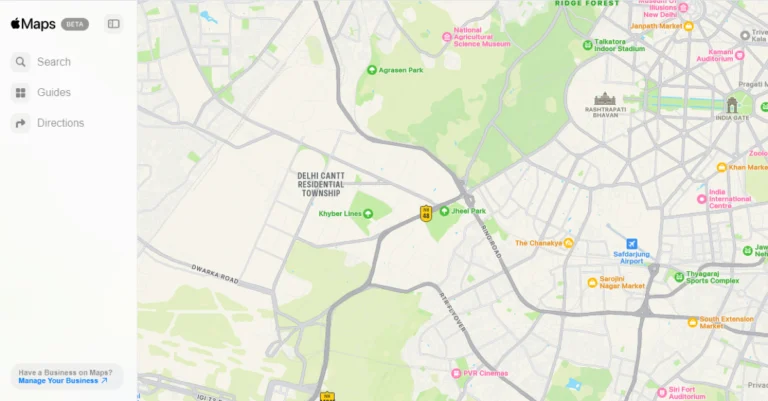
In India, Google Maps has added new features to improve navigation and exploring experiences, making them more sustainable and effective. These elements are designed to meet the nation’s specific navigational requirements. Among these is a specially designed AI approach for navigating small streets, preparing for upcoming flyovers, and finding EV charging stations. In addition, the Google Maps app now allows users to order metro tickets, and reporting road incidents has become easier. Real-time road disruptions can now be seen on the map by the largest community of map contributors thanks to the upgrade.For Indian users, Google Maps is rolling out an artificial intelligence (AI) feature that will assist four-wheeler drivers in navigating narrow roads. The feature seeks to decrease the use of small roads in unfamiliar locations by utilising Street View, satellite imaging, and other data such as building distances, types of roads, and paved parts.Also Read:Nothing Phone (2a) Plus CPU and GPU details revealed ahead of upcoming eventWith no impact on trip time or distance, four-wheelers may now steer clear of small roads thanks to enhanced AI routing algorithms. This helps commuters, bikers, and pedestrians in addition to four-wheelers. Furthermore, Google is incorporating audible alerts into Maps Directions and Navigation panels to notify users of any tight areas of their route, enabling them to proceed with caution or select a different route. With intentions to soon expand to iOS and additional cities, the feature is now being rolled out on Android devices in eight cities.A new feature coming soon to Google Maps will alert you of flyovers along your suggested path so you can plan and get ready. Users of Android apps and Android Auto will begin to notice flyover callouts for both two- and four-wheeler active navigation in 40 Indian cities this week. Support for iOS and CarPlay is on the horizon.Developers will soon have access to Narrow Roads and Flyover capabilities via India’s Google Maps Platform Routes API, which will enable them to incorporate these features into their apps and services, improving location-based experiences for Indian customers.Google Maps is partnering with top providers ElectricPe, Ather, Kazam, and Statiq to bring information on electric vehicle charging stations in India. Through the partnership, consumers can access full information about more than 8,000 charging stations, including plug types and current availability. Users can verify if the station is open and filter based on the type of charger. India is the first nation to get this feature, which is a first for Google Maps as it allows EV charging stations for two-wheelers on the map for the first time. Google intends to increase real-time data availability and dependability while also extending coverage across the country.Also Read:Apple announced the launch of Maps on the web, currently available in public betaIn collaboration with ONDC and Namma Yatri, Google has introduced a new metro booking experience on Google Maps in Chennai and Kochi. By using the service, customers can book their tickets in advance, saving them time and avoiding lineups at stations. In these cities, you can find the new booking option when looking for directions for public transit. Without having to wait at the station, the booking and payment process is guided by a single tap. Google intends to add more cities and public transport options to this service.The process of reporting road accidents has been made simpler by Google Maps. With only a few taps, the update makes it easier to report road issues, like ongoing construction or traffic accidents. In India, this update is compatible with iOS, Android Auto, Android, and Apple CarPlay.With the new “Lists” function, users of Google Maps can now create, share, and work together on lists of their favourite locations. Users may now vote on places using emojis, share recommendations, and add their suggestions to the itinerary thanks to the enhanced feature. Bengaluru, Delhi, Mumbai, Goa, Hyderabad, Pune, Ahmedabad, Chennai, Kolkata, and Jaipur are among the 10 main cities and tourism destinations for which Google Maps has curated lists in collaboration with regional specialists like NDTV Food and magicpin.
Google Play Store offers safe and secure app downloads for Android, but it may not always have the app you’re looking for. While its app library is exhaustive, some apps are not allowed on the platform due to copyright issues. In situations like these, users often turn to third-party marketplaces, a process called ‘sideloading’. Sideloading apps is always risky as independent marketplaces do not have as stringent regulatory policies as the Play Store. To ensure user safety, sideloading is disabled by default on the newer crop of Samsung phones. If you’re certain about the legitimacy of the app, here’s how you can enable sideloading on your new Samsung phone.Read Also:How to add text to your Instagram posts
In This Article
What is the Auto Blocker?
As the name suggests, Auto Blocker is a filter tool that automatically blocks the installation of apps that were downloaded from third-party sources. You can download the APK files from third-party marketplaces of your choice, but tapping on the downloaded file to install it on your phone triggers the Auto Blocker. Previously, this tool wasn’t turned on by default. You had to navigate to Settings>Security and privacy to activate it.While Auto Blocker may have added an extra hurdle, it is a welcome feature on One UI 6.1.1. Unsuspecting users are often made to download apps on their devices after they click on an installation link disguised as an ad. Using the ad as a facade, malicious entities often push malware on devices through their apps. Auto Blocker ensures that no third-party apps are installed on your phone without your consent.
Disable Auto Blocker on your Samsung phone (One UI 6.1.1)
Step 1: Go to Settings and tap on Security and privacy.Step 2: Select Auto Blocker.Step 3: Turn off its toggle switch.Step 4: Authenticate your identity to confirm the action.
Frequently Asked Questions (FAQs)
Is there any alternative to sideloading apps?
If you don’t want to sideload an app from an untrusted source, you can use your OEM’s verified app marketplace to download it. Samsung phones have the Galaxy Store, Xiaomi has GetApps, and Vivo and iQOO have the V-Appstore. These marketplaces are a great alternative to the Google Play Store.
Which are some trusted third-party app marketplaces?
APKMirror, APKPure, F-Droid, Cydia, Aptoide, and Uptodown are some of the most trusted third-party app marketplaces for Android.
This is how you can disable Auto Blocker and enable sideloading on your new Samsung phone. As a general rule of thumb, be careful while installing apps from third-party sources. Check out this article for our list of the best third-party app marketplaces around. of the
Garena Free Fire Max is a battle royale game with regular awards and tournaments to keep players interested. If you play Garena Free Fire, you should be aware of the redeem codes that are released on a daily basis. However, because the battle royale game is banned in India, players from other countries can use the Free Fire Redeem codes daily. If you’re unfamiliar with the Garena Free Fire redeem codes or don’t know how to get them, we’ve put together a step-by-step guide to help you redeem them. Check out Garena Free Fire Max Redeem Codes for 26 July 2024.The Free Fire Max redeem codes are a great way to get free stuff. These are 12-digit codes that contain alphabets and numbers, as well as an expiration date and time. Because the Garena FF redeem codes cannot be used more than once, you should hurry to the redemption page to claim your free reward before someone else does. To get a free reward, all you have to do is go to reward.ff.garena.com/en, which is the official redemption page. Also, keep an eye on this space for daily updates on Garena Free Fire Max redemption codes and rewards.Also Read: Sennheiser Accentum Plus wireless headphones with Hybrid Adaptive Noise Cancellation launched
In This Article
Garena Free Fire Max Redeem Codes Today 26 July 2024
Nothing has officially teased the key details of Phone (2a) Plus.
The phone is set to launch in India on July 31.
It is going to be an upgraded variant of Nothing Phone (2a) that was launched in March this year.
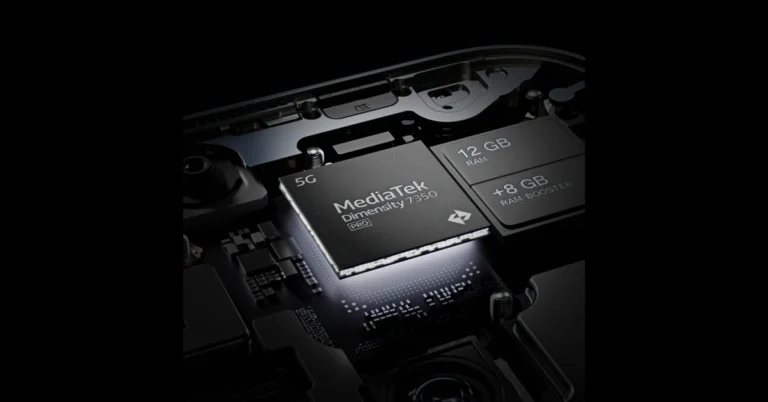
Nothing is planning to launch the Nothing Phone (2a) Plus in India on July 31. Ahead of the formal release, Nothing is teasing the phone’s hardware details, including advancements to the CPU, RAM, and GPU over the Nothing Phone 2a. The forthcoming smartphone will have a new MediaTek Dimensity chipset and 12GB of RAM. It will have RAM Booster technology and a Mali-G610 MC4 GPU.Nothing announced that the Nothing Phone (2a) Plus will be powered by the MediaTek Dimensity 7350 Pro SoC, which provides 10% faster performance than the model before it (Nothing Phone 2a). The phone will come with 12GB of RAM, which can be increased to 20GB via RAM Booster technology. Additionally, it will have a Mali-G610 MC4 GPU, which is 30% faster than the previous generation and clocked up to 1.3GHz.Also Read:Apple announced the launch of Maps on the web, currently available in public betaA few days ago Nothing’s co-founder Akis Evangelidis hinted that the forthcoming Nothing Phone 2a Plus will be a “beefed-up version” of the Phone 2a, with more processing power and enhancements without necessitating modifications to the hardware design. The device is said to have a similar design to the present Phone 2a model and be powered by a more potent CPU. As the smartphone’s debut date approaches, more information and teases are anticipated.The upcoming Nothing Phone is likely to be a mid-range model expected to cost under 30k, and has been added to India’s BIS and UAE’s TDRA certification website. Jio has also added the Nothing Phone (2a) Plus to its list of 5G-compatible devices. Flipkart is expected to begin selling the 2a (Plus) edition after its launch.
Nothing Phone (2a) price and specifications
Nothing Phone (2a) price in India starts at Rs 23,999 for 8GB RAM with 128GB storage. The price of the 8GB RAM with 256GB storage and 12GB RAM with 256GB storage is set at Rs 25,999 and Rs 27,999 respectively.Also Read:HMD Crest, Crest Max with repairable parts launched in IndiaThe device features a 6.7-inch FHD+ AMOLED 120Hz display with an adaptive refresh rate ranging from 30Hz to 120Hz. The phone comes with Corning Gorilla Glass 5 protection. The device is powered by MediaTek Dimensity 7200 Pro SoC paired with up to 12GB of RAM and up to 256GB of storage. The dual rear camera setup on the phone includes a 50-megapixel main camera (with OIS and EIS) and a 50-megapixel ultra-wide sensor. In addition to this, there is a 32-megapixel selfie camera. The handset runs on Nothing OS 2.5 based on Android 14. It also packs a 5,000mAh with 45W fast charging technology.
26 July 2024: New Amazon Quiz is now available. Customers from different parts of the country are participating in the daily quiz. The quiz starts at midnight today and will be live until 11:59 PM tonight. By successfully answering every question, participants in the quiz have the chance to win wonderful rewards. A Rs 500 Amazon Pay Balance is up for grabs to participants today.One wrong answer could eliminate you from the quiz. You have a chance to win Rs 500 Amazon Pay Balance if you successfully answer every question. Users of the app only have the opportunity to take the quiz. Check Out 26 July 2024 Amazon Quiz Answers.Amazon Quiz Today Prize: Rs 500 Amazon Pay Balance
Quiz Date: 26 July 2024Daily Timing: 12 AM to 11:59 PM
Previous Amazon Quiz Winners Announcement: Today 12 PM Noon
Question 1: During the Mughal period, which of these heritage sites was originally along the path of the Yamuna river?
Answer: Red FortQuestion 2: Which country banned the film “Barbie” because it features a map showing China’s claim to the South China Sea?Answer: Vietnam
Question 3: Name the author of “The Unbearable Lightness of Being” who passed away in 2023.
Answer: Milan Kundera
Question 4: What is the largest prey for these omnivores?Answer: Antelope
Question 5: This is associated with which festival tradition?Answer: ChristmasAlso Read:Noise Buds Verve, budget TWS with up to 45 hours of playback launched in India
How To Play Amazon Quiz Today
Only app users are eligible to play the Amazon quiz every morning from 12 AM to 11:59 PM. The quiz is not available on the desktop. For those who are unaware of how to play the Amazon quiz, below are the steps, you can follow to take the quiz.
Question 1: The Tata Steel Chess tournament played in the classical format is being held in which country?
Answer: NetherlandsQuestion 2: The show ‘Criminal Justice’ stars which actor in the central character of lawyer Madhav Mishra?Answer: Pankaj Tripathi
Question 3: The Amroha Dholak is a musical instrument from which state that got a GI tag in 2023?
Answer: Uttar Pradesh
Question 4: This ancient temple is located in which country?Answer: Egypt
Question 5: This statue is located at which famous educational institution?Answer: IISC Bangalore
Question 1: Which of these West Indies bowlers took the wicket of Steve Smith with his first ball in Test cricket?
Answer: Shamae JosephQuestion 2: At the 2024 Emmy Awards which series won the award for Best Drama Series?Answer: Succession
Question 3: Sharmistha Mukherjee has recently written a book titled ‘_____ My Father: A Daughter Remembers’. Fill in the blank
Answer: Bhagat Singh
Question 4: Name the famous freedom fighter, whose statue is in the middleAnswer: Bilbao
Question 5: Name this famous person who had cameos in several Marvel moviesAnswer: Stan Lee
Question 1: Which former champion did Caroline Garcia knock out in the first round of the 2024 Australian Open?
Answer: Naomi OsakaQuestion 2: Lily Gladstone won the ‘Best Female Actor in a Film- drama’ at the 2024 Golden Globes for which film?Answer: Killers of the Flower Moon
Question 3: Nigar Shahji is the project director of which ISRO mission that was launched on 2nd September 2023?
Answer: Aditya- L1
Question 4: In which city is this famous museum located?Answer: Bilbao
Question 5: This famous shoe brand was founded in which country?Answer: Germany
Question 1: Recently which of these New Zealand batters equaled the record for most sixes in a T20I innings?
Answer: Finn AllenQuestion 2: Which movie won the Best Film- Drama Award at the 2024 Golden Globes?Answer: Oppenheimer
Question 3: The Tangail sarees from which state recently got a GI tag?
Answer: West Bengal
Question 4: Which university is shown here, attended by the likes of Mark Zuckerberg?Answer: Harvard University
Question 5: What breed of dog is shown here?Answer: Shih Tzu
Question 1: The Yonex Sunrise India Open 2024 badminton tournament is being held in which city?
Answer: New DelhiQuestion 2: The upcoming movie ‘LSD2’ is directed by which famous director?Answer: Dibakar Banerjee
Question 3: Breaking the Mould: Reimagining India’s Economic Future is a book written by which former RBI Governor?
Answer: Raghuram Rajan
Question 4: This visual depicts which famous ruler and his court.Answer: Genghis Khan
Question 5: This is the Virupaksha Temple in which UNESCO World Heritage Site?Answer: Hampi
We have written an explainer above, you can refer to that.
When are the winners of the Amazon Quiz and contest announced or declared?
The announcement of today’s Amazon quiz winner will take place Tomorrow. As for the Special Quiz and “Spin & Win” Contest, the winners will be declared once the Quiz Contest comes to an end. To find out who the lucky winner is, you can refer to the Amazon Quiz Winners List or visit the Amazon Winners tab in the Amazon App.
How to participate in the Daily Amazon Quiz?
That is very easy, just got to the Amazon app and scroll to the bottom of the page and you will find the Quiz section. Click on it (usually it is called the fun zone) and you can enter the Amazon Today Quiz Contest.
Are there any other quizzes or contests running on Amazon daily?
Yes, there are many running on a daily basis. These range from spinning the wheel to answering the questions correctly. All are located in the Fun Zone.
What are the criteria for selecting a winner in the Daily Amazon Quiz?
When a qualified player submits correct answers to all the questions, they will automatically be entered into a lucky draw. This draw will include all participants who answered all the questions correctly. Amazon randomly selects the final winners from the pool of eligible participants who gave the right answers.
Which Types of Questions are asked within Amazon Daily Quiz?
These are very simple and straightforward questions. These are mainly related to general knowledge.
Where should I look for Amazon Daily Quiz answers?
You can bookmark this page as we will help you every day with the Amazon Daily Quiz. We bring you fresh answers every day for the Amazon Daily Quiz and Contest.
Apple Maps on the web is under public beta and will be accessible in the English language.
It works with Edge and Chrome on Windows PCs and Safari and Chrome on Mac and iPad.
Apple has launched Apple Maps on the web as a public beta in English. Users may now use phones and desktop computers to get directions, check routes, browse business listings, and look up phone numbers and addresses. Using MapKit JS, developers may embed the application on websites. There are presently only a few languages and platforms supported by the app, but in the upcoming months, more will be added. It had been informally accessible on the internet using the Maps API, but it has now been formally released into beta testing.Users globally can now order meals, find locations, get directions, and peruse well-crafted guides using Apple Maps on the web, which is currently in public testing. In the upcoming months, more features will be added, such as Look Around. In addition, users may locate locations with photographs, hours, ratings, and reviews, get walking and driving directions, and take action.Also Read:HMD Crest, Crest Max with repairable parts launched in IndiaThe company announced the availability through a blog post which said, “Today, Apple Maps on the web is available in public beta, allowing users around the world to access Maps directly from their browser.”All developers, including those utilising MapKit JS, can link to Maps on the web, according to claims, enabling users to view complete place information, receive driving directions, and more.Also Read:Adobe announced new creative features for Illustrator and PhotoshopThe web version of Maps is now accessible in English and works with Edge and Chrome on Windows PCs and Safari and Chrome on Mac and iPad. With time, as per the company, more platforms, languages, and browsers will be supported. The web version can be accessed at beta.maps.apple.com.The biggest rival to Apple Maps, Google Maps, first appeared on the web in 2005 and later made an Android debut in 2008. As a rival, Apple released Maps for the iPhone in 2012.
The company has introduced HMD Crest and Crest Max.
HMD Global has launched two new smartphones in the Indian market today.
Both the devices come with similar specs and designs.
HMD has announced its Crest portfolio in India, which includes the HMD Crest and Crest Max models. The Crest series also features repairable components like screens and batteries. The original name was Arrow, but the company changed it owing to legal concerns. These 4G phones are powered by the Unisoc T760 SoC. They have a 6.67-inch FHD+ OLED display and a 50MP selfie camera. The HMD phones include a 5,000mAh battery that supports 33W fast charging.
In This Article
HMD Crest, Crest Max price in India
The price of the HMD Crest is set at Rs 14,499 for the single 6GB RAM with 128GB storage variant but can be purchased at a launch price of Rs 12,999. The vanilla variant comes in purple, red, and blue colour options. On the other hand, Crest Max will be available with 8GB RAM with 256GB storage priced at Rs 16,999 will be offered at a launch price of Rs 14,999. The Max model will come in three colour options- green, red, and purple.Also Read:Adobe announced new creative features for Illustrator and Photoshop


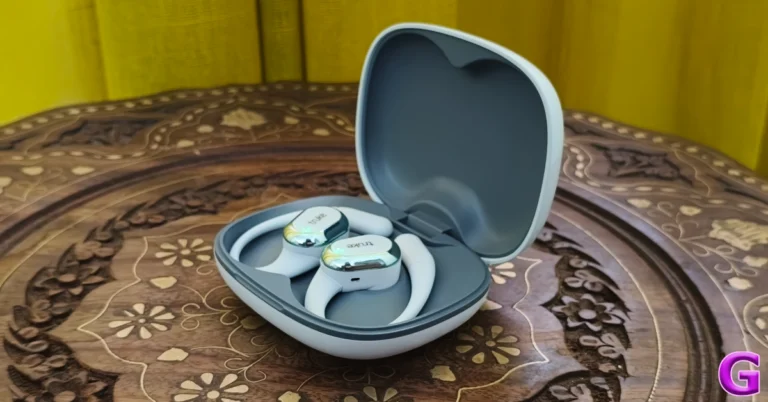
 The design of the Truke Buds Liberty OWS is similar to the Freedom OWS. The charging case sports the lunchbox form factor and needs two hands to be flipped open. There is a small notch under the lid to help with this task. The top of the lid has a glossy finish, while the bottom of the case has a matte texture. A thin strip separates the lid from the bottom half of the case. The USB port is positioned below the hinge.
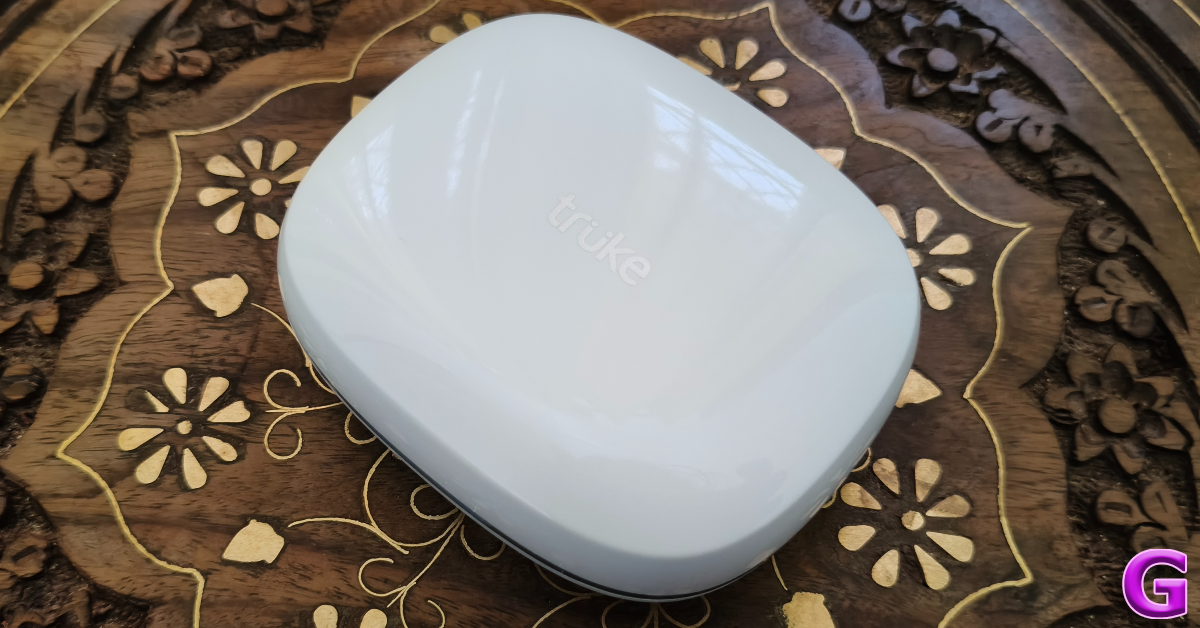 The design of the Truke Buds Liberty OWS is similar to the Freedom OWS. The charging case sports the lunchbox form factor and needs two hands to be flipped open. There is a small notch under the lid to help with this task. The top of the lid has a glossy finish, while the bottom of the case has a matte texture. A thin strip separates the lid from the bottom half of the case. The USB port is positioned below the hinge.
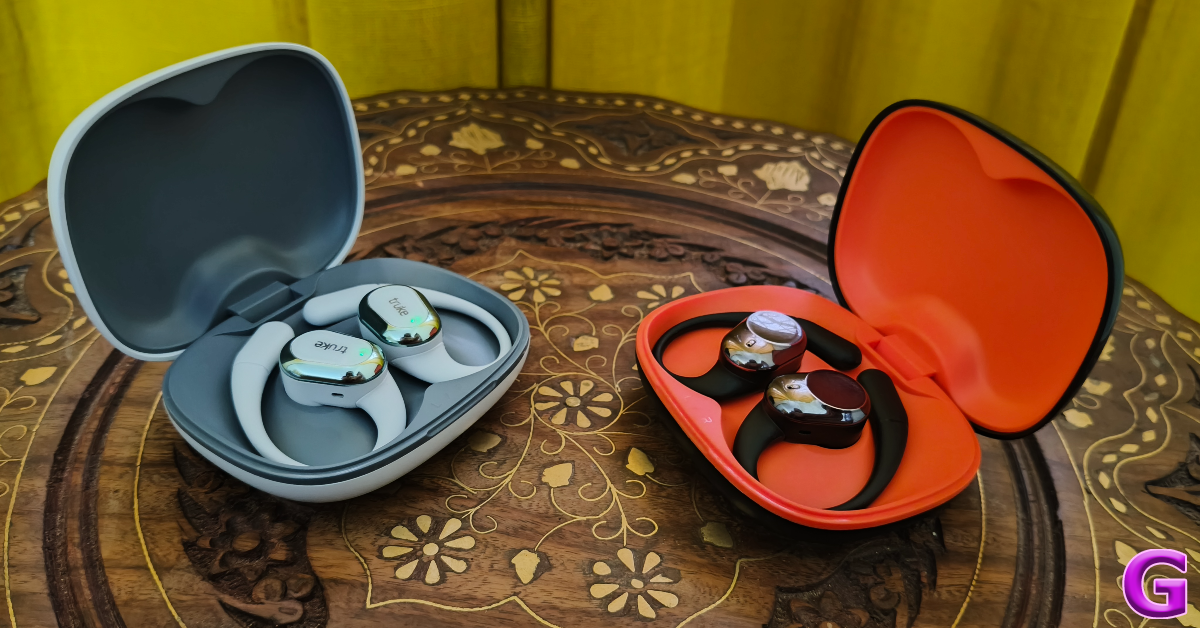
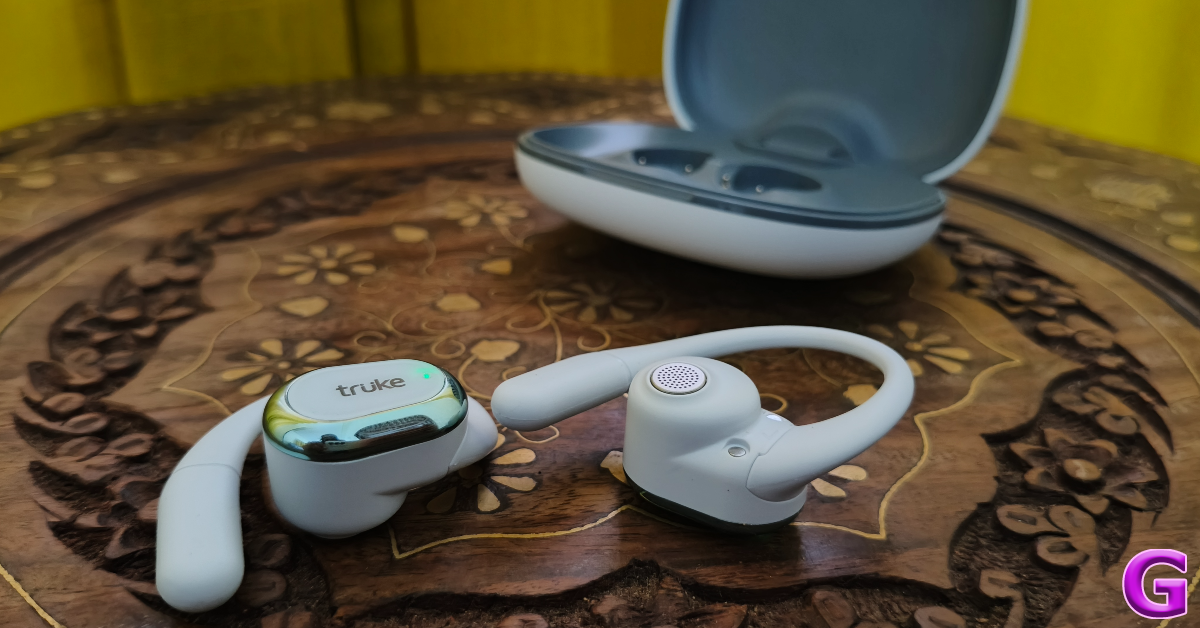 The key difference between the Freedom and the Liberty OWS lies in the earbud design. While the size of the two earbuds is similar, the Liberty OWS has a more uniform touch panel without any fingertip-shaped indentation. This touch panel has the Truke branding right in the middle along with a small notification light. It is bordered by a plastic frame finished in silver.
The titanium wire ear hooks wrap around the ear while the buds hover over the ear canal. For the earbuds to deliver the best audio output, you need to ensure that they are not obstructed by the tragus. This will require some adjustment before you get it right. The fit of the earbuds isn’t quite there yet. While the earbuds are designed to be loose and ‘open’ we would have preferred the ear hooks to be tighter and more secure.
The key difference between the Freedom and the Liberty OWS lies in the earbud design. While the size of the two earbuds is similar, the Liberty OWS has a more uniform touch panel without any fingertip-shaped indentation. This touch panel has the Truke branding right in the middle along with a small notification light. It is bordered by a plastic frame finished in silver.
The titanium wire ear hooks wrap around the ear while the buds hover over the ear canal. For the earbuds to deliver the best audio output, you need to ensure that they are not obstructed by the tragus. This will require some adjustment before you get it right. The fit of the earbuds isn’t quite there yet. While the earbuds are designed to be loose and ‘open’ we would have preferred the ear hooks to be tighter and more secure.
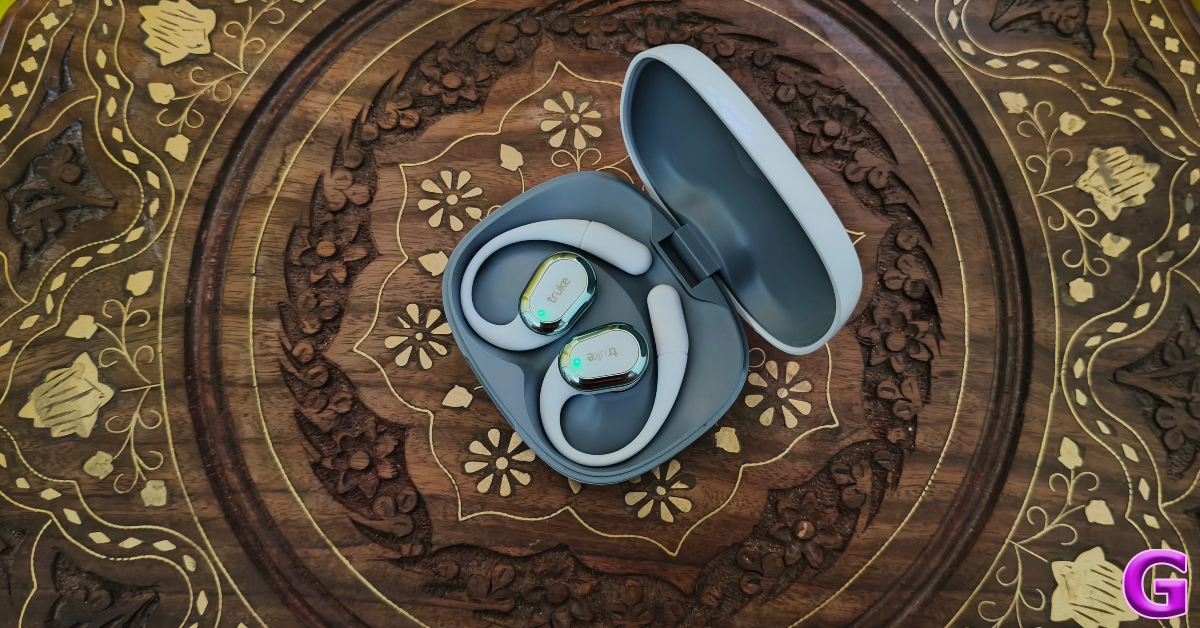 The good thing about the open-ear design of these earbuds is that it makes you more aware of your surroundings. Since there is no passive noise cancellation whatsoever, you can put these earbuds on while going on a jog and be conscious of the traffic around you. If you have sensitive inner ear skin, you will like the hygienic advantage that comes with this OWS.
The earbuds are rated IPX5 for water resistance. We wore them while working out and were pleased to find that they were unfazed by the sweat. However, the ear hoos tend to get a little slippery when things get sweaty.
The good thing about the open-ear design of these earbuds is that it makes you more aware of your surroundings. Since there is no passive noise cancellation whatsoever, you can put these earbuds on while going on a jog and be conscious of the traffic around you. If you have sensitive inner ear skin, you will like the hygienic advantage that comes with this OWS.
The earbuds are rated IPX5 for water resistance. We wore them while working out and were pleased to find that they were unfazed by the sweat. However, the ear hoos tend to get a little slippery when things get sweaty.
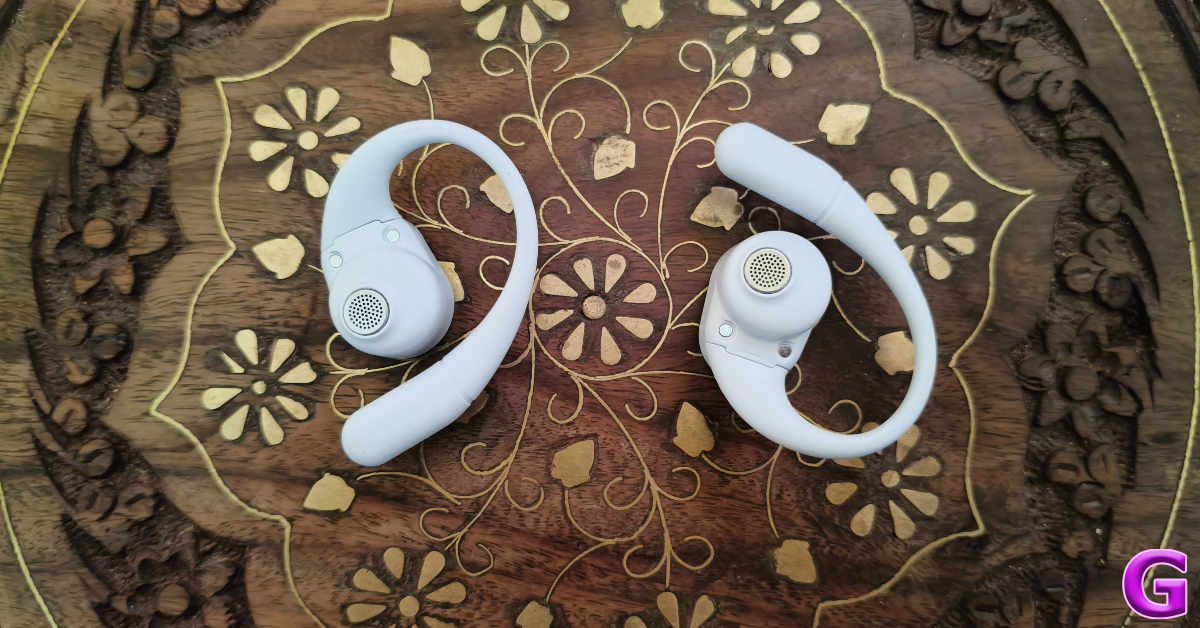 The soundstage presented by the Liberty OWS is not dominated by a beefy low-end. The bass is tuned nicely and doesn’t muddle other frequencies. Compared to other TWS products in this price range, the Liberty’s soundstage is a lot more close to neutral.
While we like neutral-sounding earbuds, the output produced by the Liberty OWS feels slightly muffled. This is something we noticed on the Freedom OWS as well. The two earbuds feature the same driver, so they’re plagued by the same issues. On the bright side, there is minimal to no audio leakage despite the open-ear design of the earbuds.
The listening experience was ideal within the 40-80% range. In this window, the audio did not leak outside of the buds and the sound produced by the drivers was relatively lush. We listened to rock classics like The Beach Boys’ seminal record ‘Pet Sounds’ and the more avant-garde ‘In the Court of the Crimson King’ by King Crimson and were satisfied by the details that the Truke Buds Liberty OWS managed to pack in the output. The soundstage did justice to the layered sound of both albums.
The soundstage presented by the Liberty OWS is not dominated by a beefy low-end. The bass is tuned nicely and doesn’t muddle other frequencies. Compared to other TWS products in this price range, the Liberty’s soundstage is a lot more close to neutral.
While we like neutral-sounding earbuds, the output produced by the Liberty OWS feels slightly muffled. This is something we noticed on the Freedom OWS as well. The two earbuds feature the same driver, so they’re plagued by the same issues. On the bright side, there is minimal to no audio leakage despite the open-ear design of the earbuds.
The listening experience was ideal within the 40-80% range. In this window, the audio did not leak outside of the buds and the sound produced by the drivers was relatively lush. We listened to rock classics like The Beach Boys’ seminal record ‘Pet Sounds’ and the more avant-garde ‘In the Court of the Crimson King’ by King Crimson and were satisfied by the details that the Truke Buds Liberty OWS managed to pack in the output. The soundstage did justice to the layered sound of both albums.
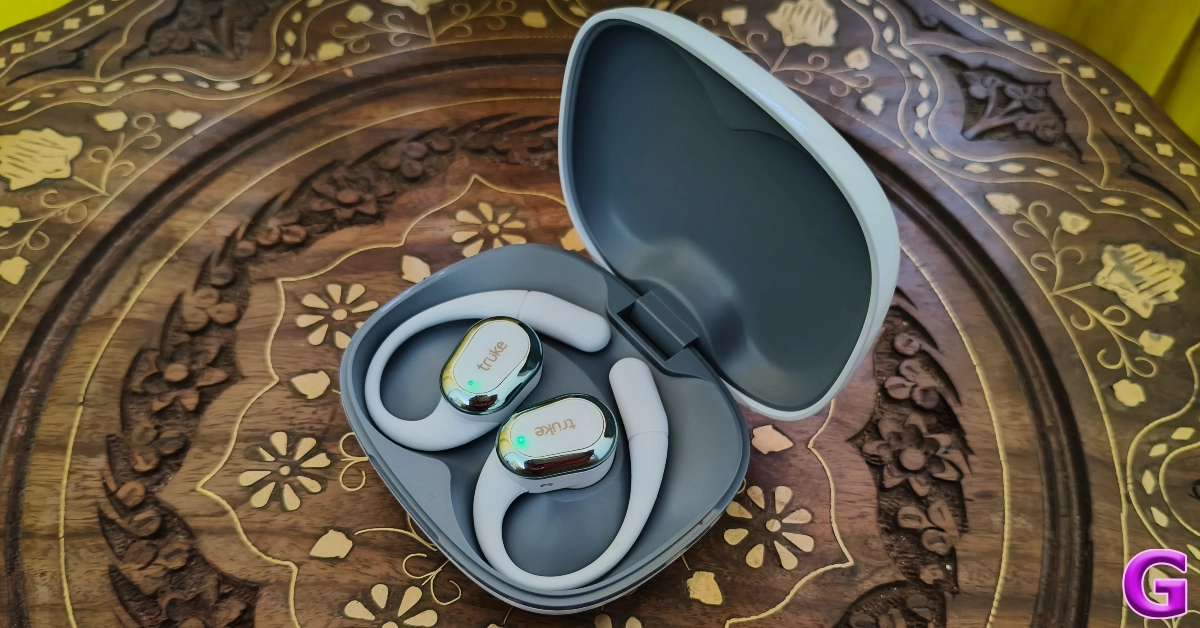 Another thing we like about the Liberty OWS is its finely-tuned touch controls. The larger size of the earbuds allowed us to use the frame for any adjustment. This meant the touch panel was kept free of any accidental touches. The controls for navigating the songs and answering/rejecting incoming calls are very intuitive as well.
Truke Buds Liberty OWS also has a handy gaming mode which can be triggered by tapping the left earbud 3 times. In this mode, the audio latency of the earbuds drops down to 40ms. We played Call of Duty Mobile while wearing the earbuds and did not experience any audio lags or annoying delays. The crispness of the sound of gunshots and the faint crescendo of approaching footsteps were relayed perfectly by the earbuds.
The calling experience offered by the Liberty OWS is not bad either. The earbuds use their ENC chops to extract the voice of the speaker, clear the background noise, and relay it to the caller. This works smoothly in an indoor setting, but some background noise manages to creep in while using the earbuds in an outdoor environment.
The Liberty OWS’s battery specs and performance are identical to its Freedom sibling. The charging case packs a 500mAh battery pack and the earbuds are equipped with 50mAh units. Truke claims a maximum playtime of up to 10 hours on the earbuds alone. The charging case extends this playtime to 50 hours. During the week-long review period, we used the Truke Buds Liberty OWS for 5-6 hours a day. By the end of the week, we were left with a 30% charge. Using a USB Type-C cable, we were able to fully charge the case in under 2 hours.
Read Also: Oppo Reno12 Review: Best AI Features Within Rs 33,000?
Another thing we like about the Liberty OWS is its finely-tuned touch controls. The larger size of the earbuds allowed us to use the frame for any adjustment. This meant the touch panel was kept free of any accidental touches. The controls for navigating the songs and answering/rejecting incoming calls are very intuitive as well.
Truke Buds Liberty OWS also has a handy gaming mode which can be triggered by tapping the left earbud 3 times. In this mode, the audio latency of the earbuds drops down to 40ms. We played Call of Duty Mobile while wearing the earbuds and did not experience any audio lags or annoying delays. The crispness of the sound of gunshots and the faint crescendo of approaching footsteps were relayed perfectly by the earbuds.
The calling experience offered by the Liberty OWS is not bad either. The earbuds use their ENC chops to extract the voice of the speaker, clear the background noise, and relay it to the caller. This works smoothly in an indoor setting, but some background noise manages to creep in while using the earbuds in an outdoor environment.
The Liberty OWS’s battery specs and performance are identical to its Freedom sibling. The charging case packs a 500mAh battery pack and the earbuds are equipped with 50mAh units. Truke claims a maximum playtime of up to 10 hours on the earbuds alone. The charging case extends this playtime to 50 hours. During the week-long review period, we used the Truke Buds Liberty OWS for 5-6 hours a day. By the end of the week, we were left with a 30% charge. Using a USB Type-C cable, we were able to fully charge the case in under 2 hours.
Read Also: Oppo Reno12 Review: Best AI Features Within Rs 33,000?
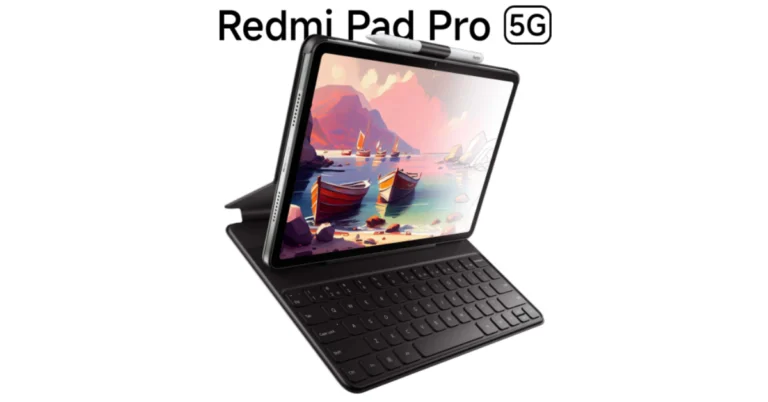

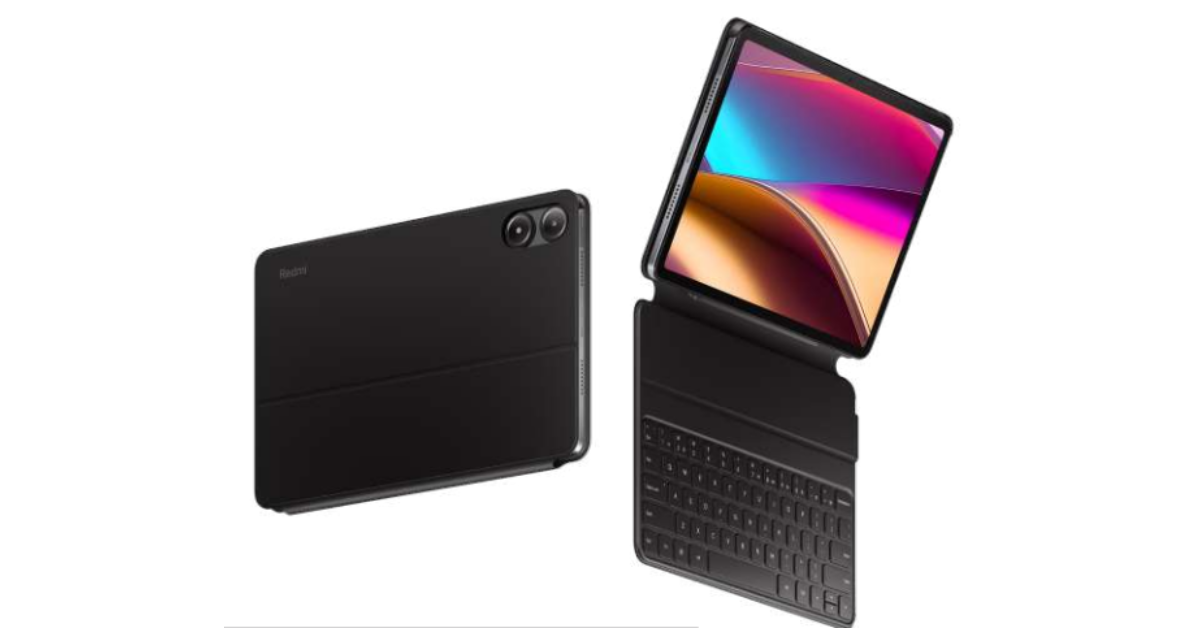 The price of Redmi Pad SE 4G starts at Rs 10,999 for the 4GB RAM with 64GB storage and Rs 11,999 for the 4GB RAM with 128GB storage. There will be three colour options for it- Forest Green, Urban Grey, and Ocean Blue.
The Pro model is scheduled to go on sale on August 2 while the 4G tablet will be available from August 8 via mi.com, Flipkart, Amazon India, and Xiaomi retail stores in the country.
The price of Redmi Pad SE 4G starts at Rs 10,999 for the 4GB RAM with 64GB storage and Rs 11,999 for the 4GB RAM with 128GB storage. There will be three colour options for it- Forest Green, Urban Grey, and Ocean Blue.
The Pro model is scheduled to go on sale on August 2 while the 4G tablet will be available from August 8 via mi.com, Flipkart, Amazon India, and Xiaomi retail stores in the country.


 Step 3: Tap on Print.
 Step 4: Hit the dropdown menu at the top of the screen and select Save as PDF.
 Step 5: Hit the download icon.
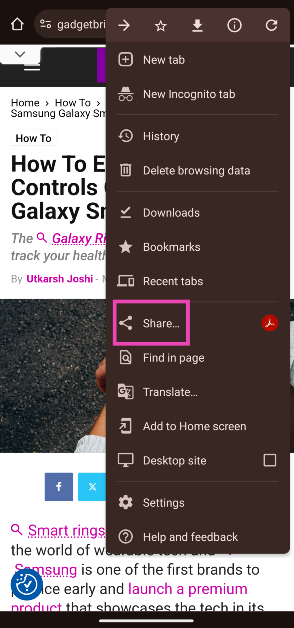 Step 3: Tap on Print.
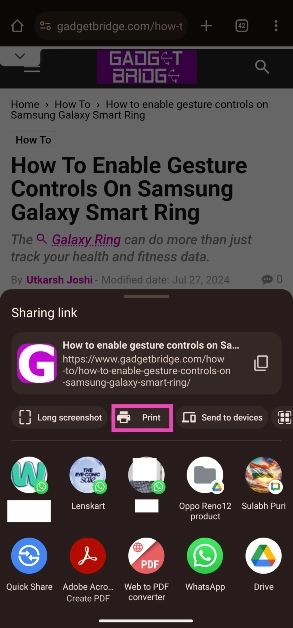 Step 4: Hit the dropdown menu at the top of the screen and select Save as PDF.
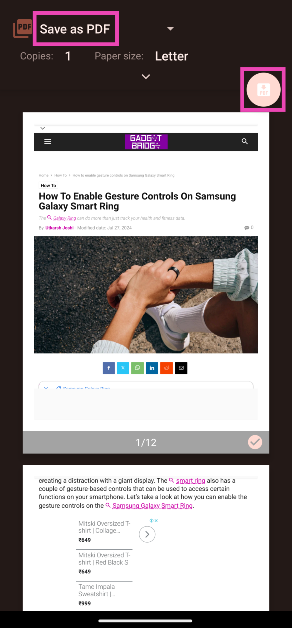 Step 5: Hit the download icon.
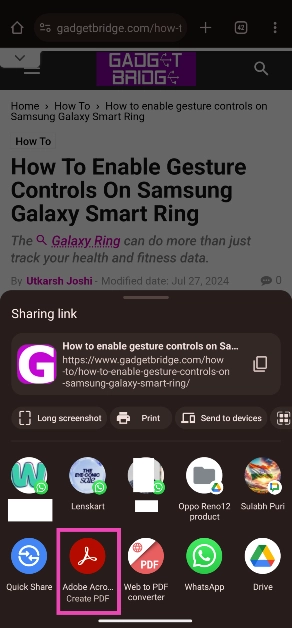 Step 4: The app will create a PDF version of the webpage.
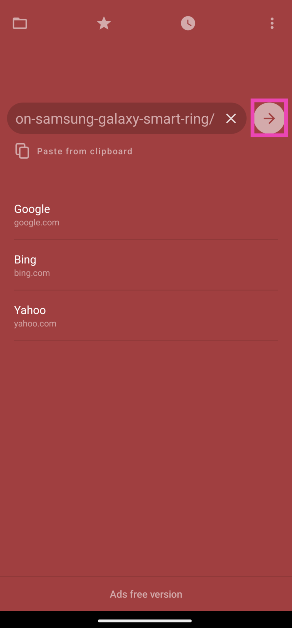 Step 3: Tap on Save at the bottom of the screen.
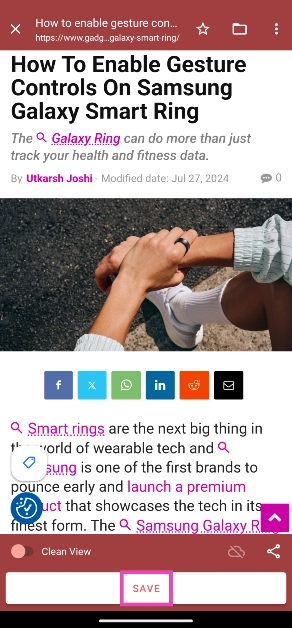 Step 4: Select the destination folder and hit Done.
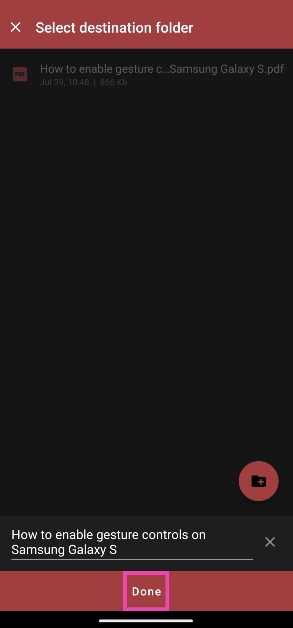 Note: You can also choose to clean the webpage and get rid of all the ads before saving it.
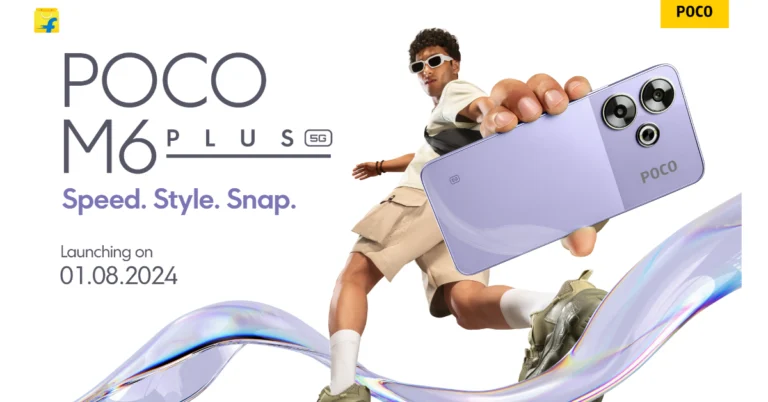


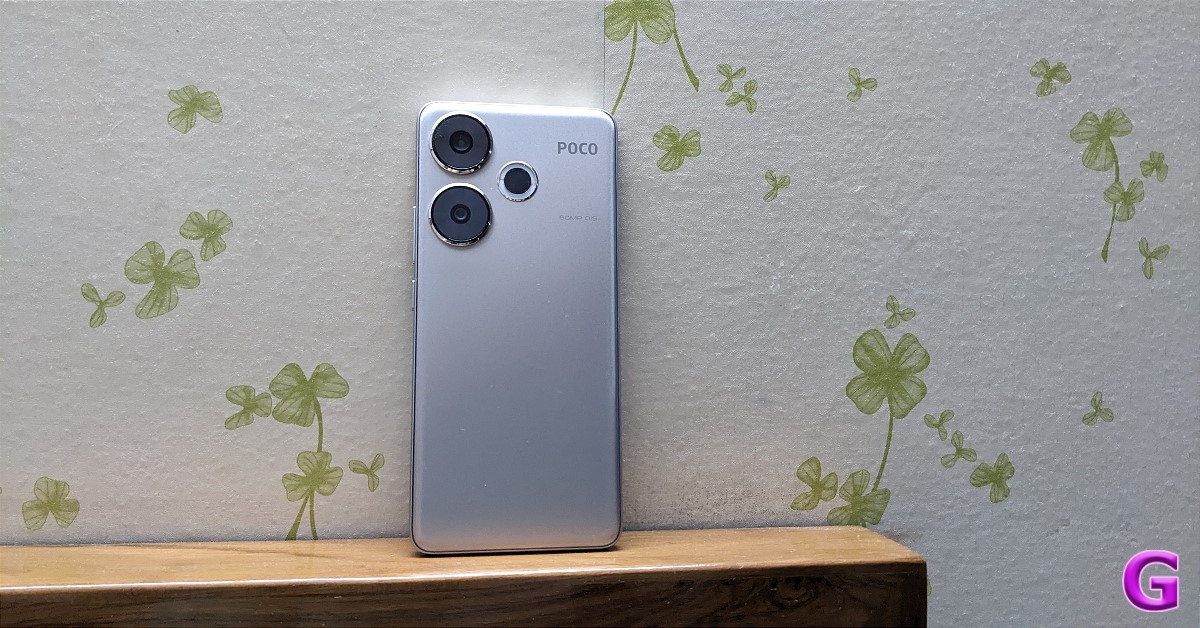
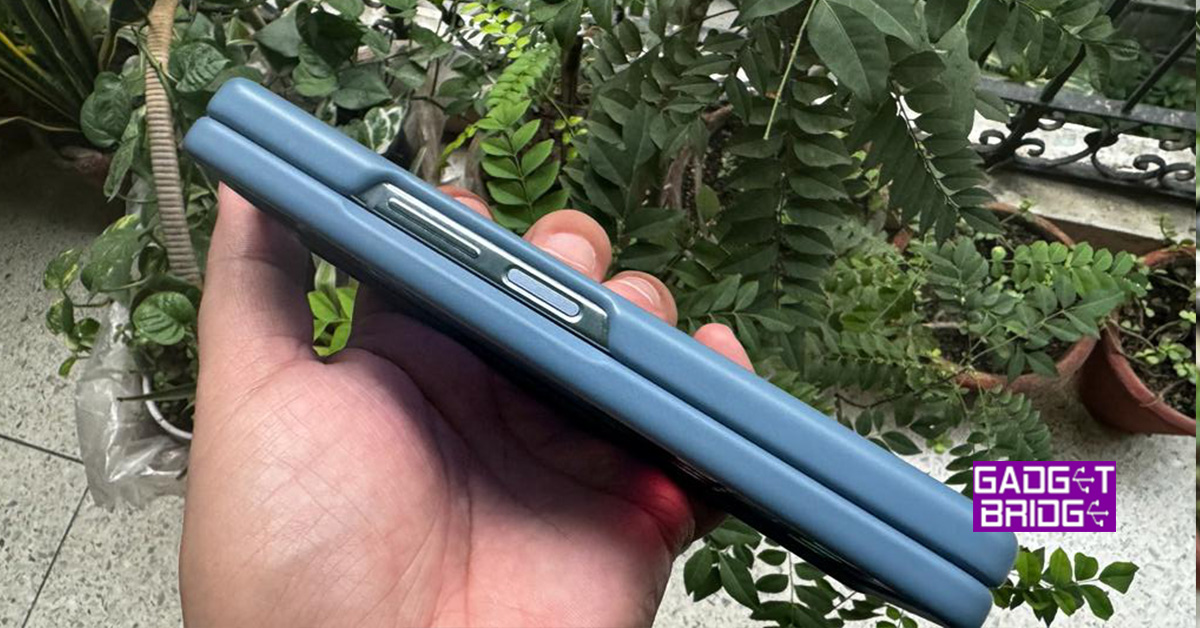

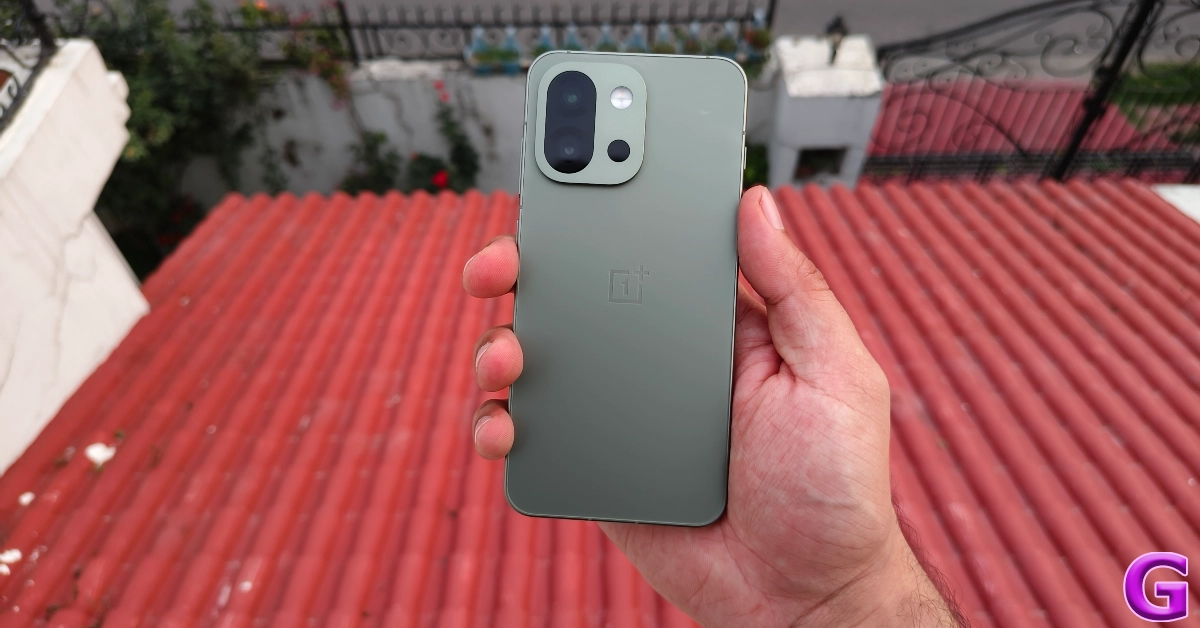


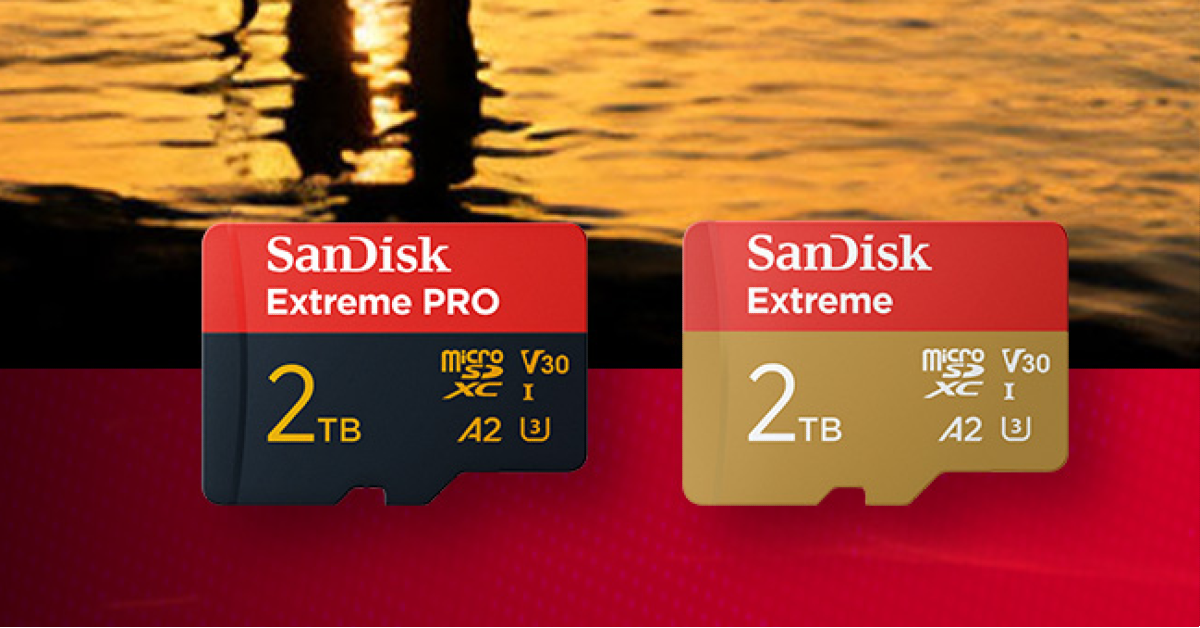
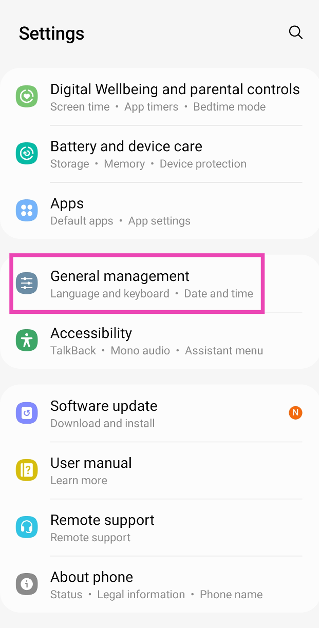

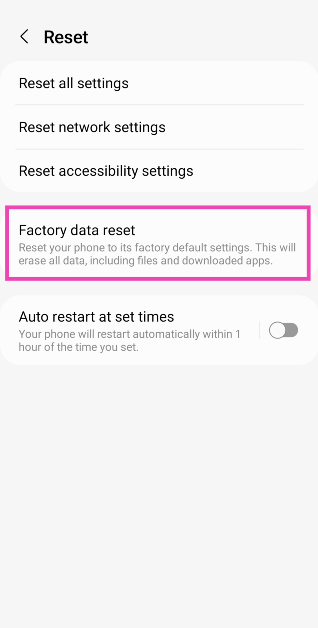
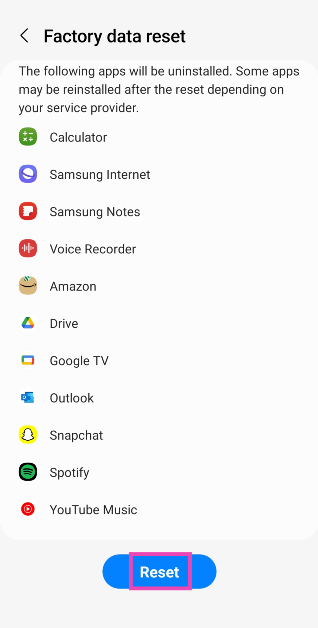

 As of now, the Samsung Galaxy Ring supports two gesture-based controls – Alarm dismissal and Camera shutter. All you need to do is double pinch your fingers to dismiss a ringing alarm or take a picture or a video when the camera app is open on your smartphone.
The Galaxy Ring can also track your heart rate, sleep cycle, and workouts throughout the day. Its week-long battery life ensures that it is able to collect a stronger set of data. The ring also analyses your sleep cycle, daily activities, and heart rate data to assign you an ‘Energy’ score.
One of the limitations of the Galaxy Ring is that it cannot measure your blood pressure. Getting a blood pressure reading requires specific sensors that measure the force of blood against the wall of arteries. These sensors are not present on the Galaxy Ring.
As of now, the Samsung Galaxy Ring supports two gesture-based controls – Alarm dismissal and Camera shutter. All you need to do is double pinch your fingers to dismiss a ringing alarm or take a picture or a video when the camera app is open on your smartphone.
The Galaxy Ring can also track your heart rate, sleep cycle, and workouts throughout the day. Its week-long battery life ensures that it is able to collect a stronger set of data. The ring also analyses your sleep cycle, daily activities, and heart rate data to assign you an ‘Energy’ score.
One of the limitations of the Galaxy Ring is that it cannot measure your blood pressure. Getting a blood pressure reading requires specific sensors that measure the force of blood against the wall of arteries. These sensors are not present on the Galaxy Ring.
 Step 1: Launch the Samsung Galaxy Wearable app on your smartphone.
Step 2: Select your Galaxy Ring.
Step 3: Tap on Gestures.
Step 4: Tap on Try it to make sure the Galaxy Ring is able to register your gestures.
Step 5: Turn on the toggle switches for Dismiss alarm and Take picture or video.
Note: The gesture controls will not work on your Galaxy Ring if they are also enabled on your Galaxy Smartwatch.
Step 1: Launch the Samsung Galaxy Wearable app on your smartphone.
Step 2: Select your Galaxy Ring.
Step 3: Tap on Gestures.
Step 4: Tap on Try it to make sure the Galaxy Ring is able to register your gestures.
Step 5: Turn on the toggle switches for Dismiss alarm and Take picture or video.
Note: The gesture controls will not work on your Galaxy Ring if they are also enabled on your Galaxy Smartwatch.

 Step 3: Choose whether you want to create an AI portrait for an individual or a group of people.
 Step 7: Upload a picture of yourself based on the template guidelines.
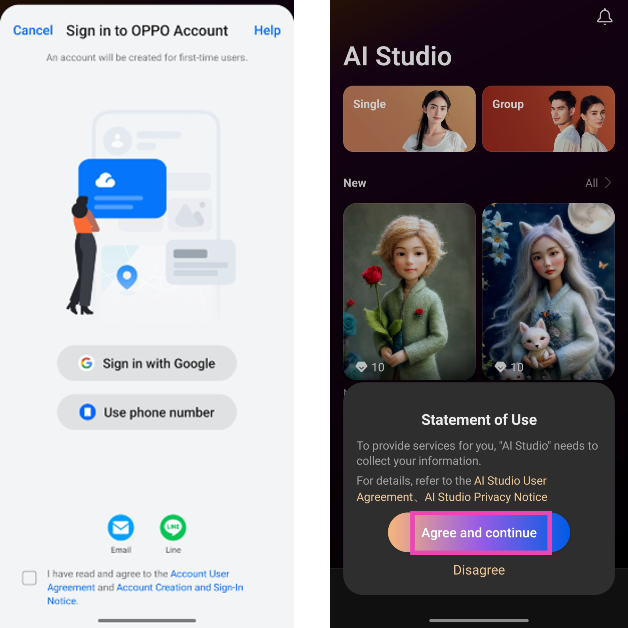 Step 3: Choose whether you want to create an AI portrait for an individual or a group of people.
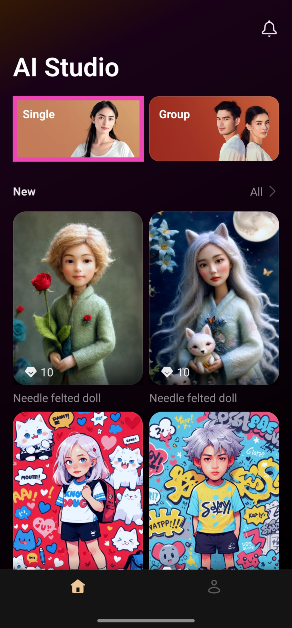 Step 4: Select the Style, Gender, and Theme from the top menu.
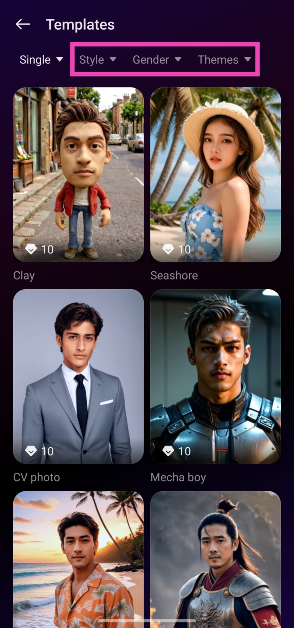 Step 5: Scroll down and choose a template.
Step 6: Tap on Generate.
Step 5: Scroll down and choose a template.
Step 6: Tap on Generate.
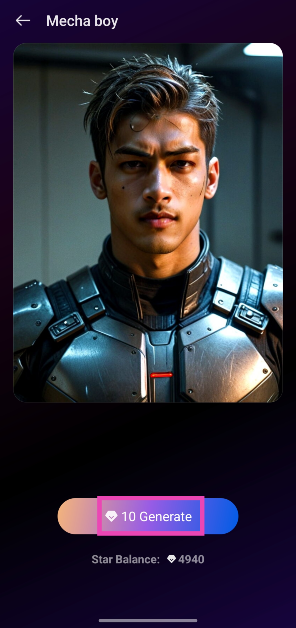 Step 7: Upload a picture of yourself based on the template guidelines.
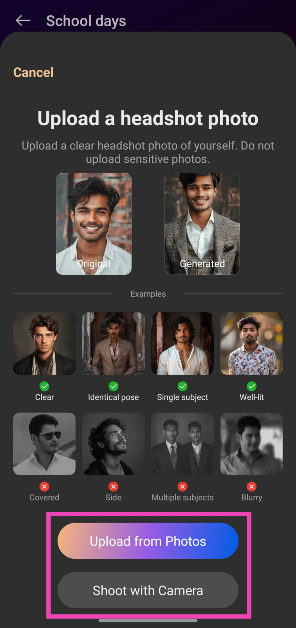 Step 8: The AI Studio will generate AI Portraits based on your image. Tap on Try another pose to create a portrait based on another image.
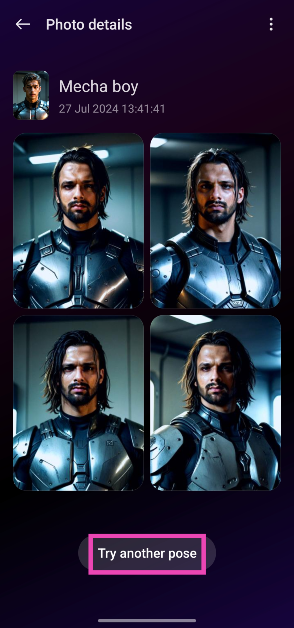

 Here are the key events that Indian athletes will be participating in today:
12:30 PM: Balraj Panwar | Rowing – Men’s Singles Sculls
5:00 PM: Bopanna/Balaji | Tennis – Men’s Doubles
Not before 7:10 PM: Lakshya Sen | Badminton – Men’s Singles
7:15 PM: Harmeet Desai | Table Tennis – Men’s Singles
Not before 8:00 PM: Shetty/Rankireddy | Badminton – Men’s Doubles
9:00 PM: India vs New Zealand | Hockey – Men’s Group Stage
Not before 11:50 PM: Crasto/Ponnappa | Badminton – Women’s Doubles
12:02 AM (28th July): Preeti Pawar | Boxing – Women’s 54kg
Apart from these events, Indian athletes will also be participating in the qualification rounds of 10m Air Rifle and 10m Air Pistol. Jio Cinema will stream the coverage for all the events. Viewers can also catch all the highlights of Indian performances at the Olympics along with exclusive interviews with Indian athletes on the streaming platform.
Here are the key events that Indian athletes will be participating in today:
12:30 PM: Balraj Panwar | Rowing – Men’s Singles Sculls
5:00 PM: Bopanna/Balaji | Tennis – Men’s Doubles
Not before 7:10 PM: Lakshya Sen | Badminton – Men’s Singles
7:15 PM: Harmeet Desai | Table Tennis – Men’s Singles
Not before 8:00 PM: Shetty/Rankireddy | Badminton – Men’s Doubles
9:00 PM: India vs New Zealand | Hockey – Men’s Group Stage
Not before 11:50 PM: Crasto/Ponnappa | Badminton – Women’s Doubles
12:02 AM (28th July): Preeti Pawar | Boxing – Women’s 54kg
Apart from these events, Indian athletes will also be participating in the qualification rounds of 10m Air Rifle and 10m Air Pistol. Jio Cinema will stream the coverage for all the events. Viewers can also catch all the highlights of Indian performances at the Olympics along with exclusive interviews with Indian athletes on the streaming platform.




 Step 4: On the following popup box, enter the prompts and tone for the caption.
Step 5: Tap the circle next to ‘Generates text based on onscreen images’.
Step 4: On the following popup box, enter the prompts and tone for the caption.
Step 5: Tap the circle next to ‘Generates text based on onscreen images’.
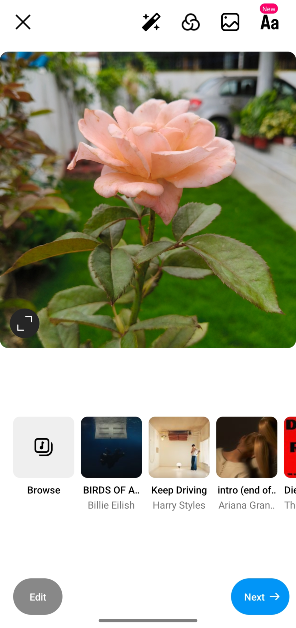 Step 2: Swipe left on the sidebar to reveal it.
Step 3: Tap on AI Writer. The tool will scan the screen for the image you have chosen.
Step 2: Swipe left on the sidebar to reveal it.
Step 3: Tap on AI Writer. The tool will scan the screen for the image you have chosen.
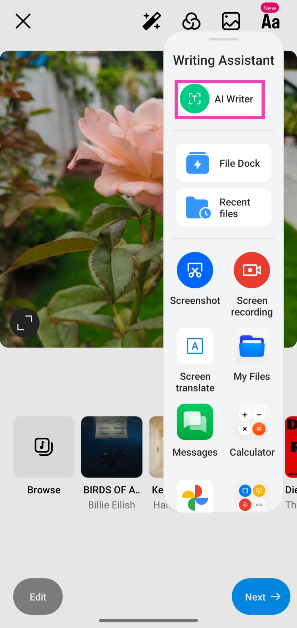 Step 4: On the following popup box, enter the prompts and tone for the caption.
Step 5: Tap the circle next to ‘Generates text based on onscreen images’.
Step 4: On the following popup box, enter the prompts and tone for the caption.
Step 5: Tap the circle next to ‘Generates text based on onscreen images’.
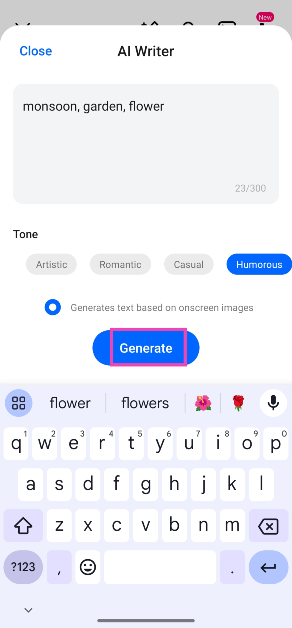 Step 6: Hit Generate. The AI Writer will come up with a caption based on your prompts.
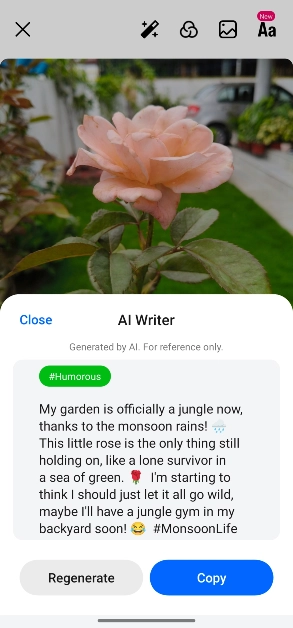
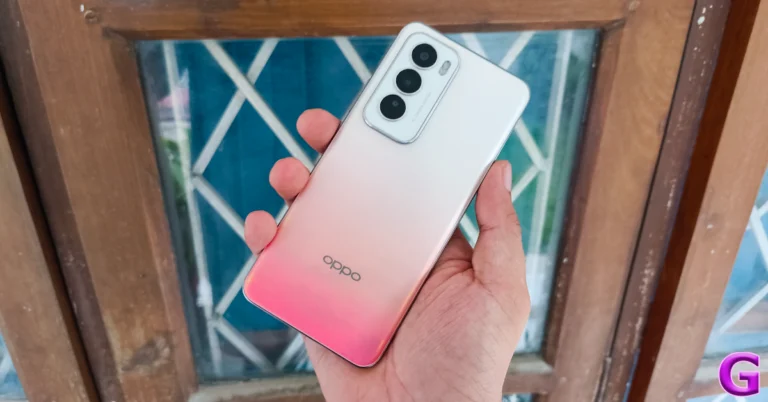
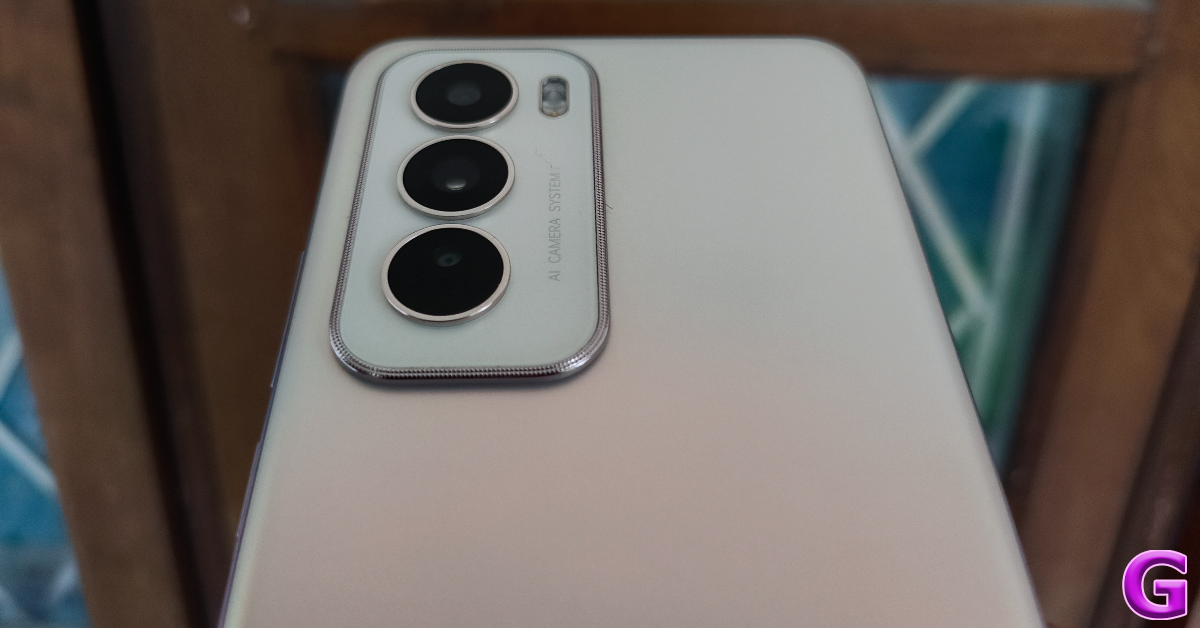 The glass back panel on the Oppo Reno12 is a big upgrade from the polycarbonate back on the Reno11. Oppo has also made some key changes to the design language of this smartphone. The oval-shaped camera module has been ditched for a more rectangular unit. The vertical camera layout is much simpler than the avant-garde design of the Reno11’s rear camera panel. There are three colour options on offer – Sunset Peach, Astro Silver, and Matte Brown.
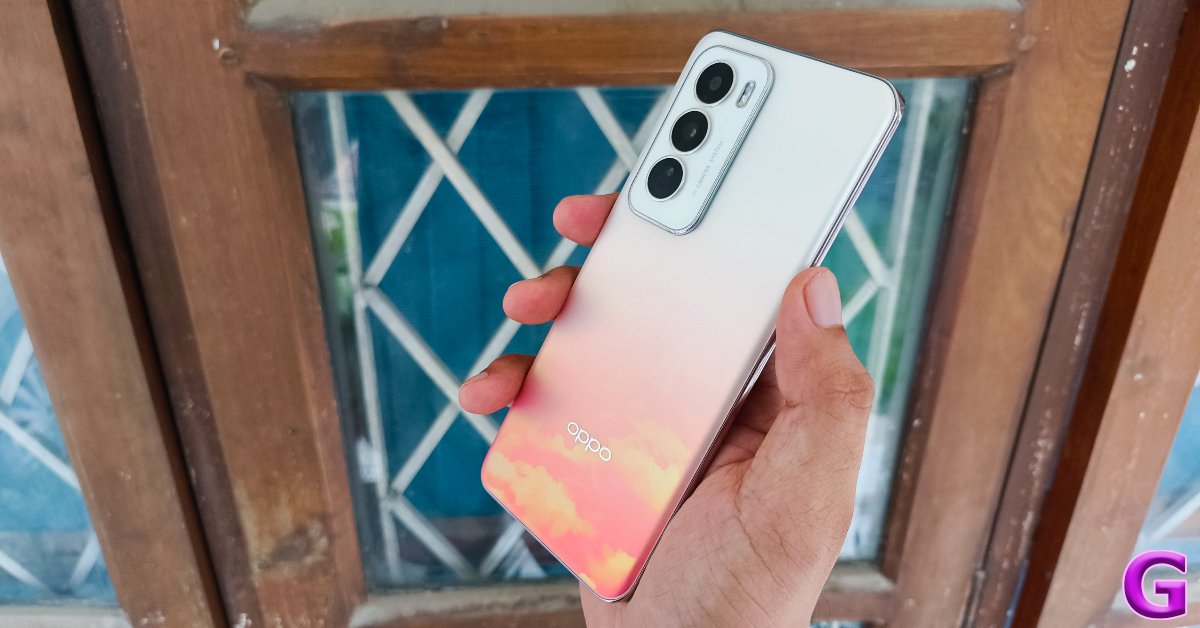 We used the Sunset Peach colour variant of the Oppo Reno12 for this review. The orange shade on the back panel gets progressively denser towards the bottom. The layered cloud design fully reveals itself when it is held against a light source. We quite like this colour scheme and patterned design even though some may find it a bit gaudy.
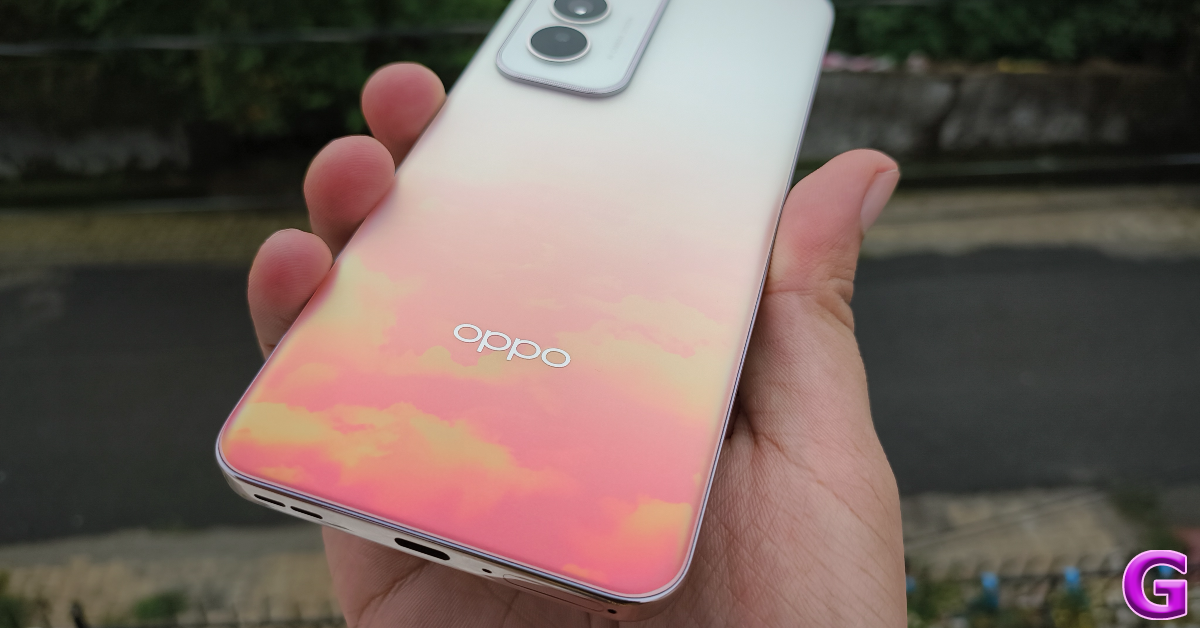 The curved glass back panel seamlessly blends into the glossy alloy frame of the smartphone. The right edge of this frame holds the volume rocker keys and the side button. The SIM tray, primary microphone, USB port, and primary speaker grille are positioned at the bottom edge. Up top lies the secondary speaker along with the IR blaster and secondary microphone.
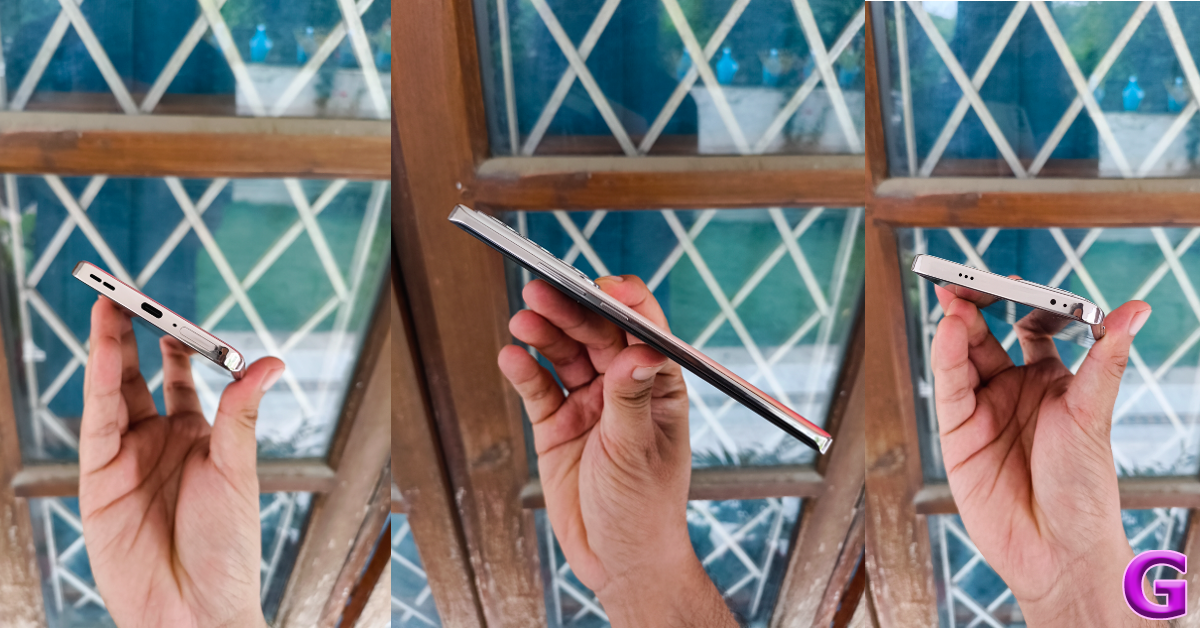 The 6.7-inch AMOLED display has a 120Hz refresh rate and can reach a peak brightness of 1,200 nits. This panel also supports HDR10+. The ‘Splash Touch’ tech ensures that the touch response of the display remains error-free when there are water droplets or moisture on it. This is similar to the Aqua Touch tech on newer OnePlus smartphones.
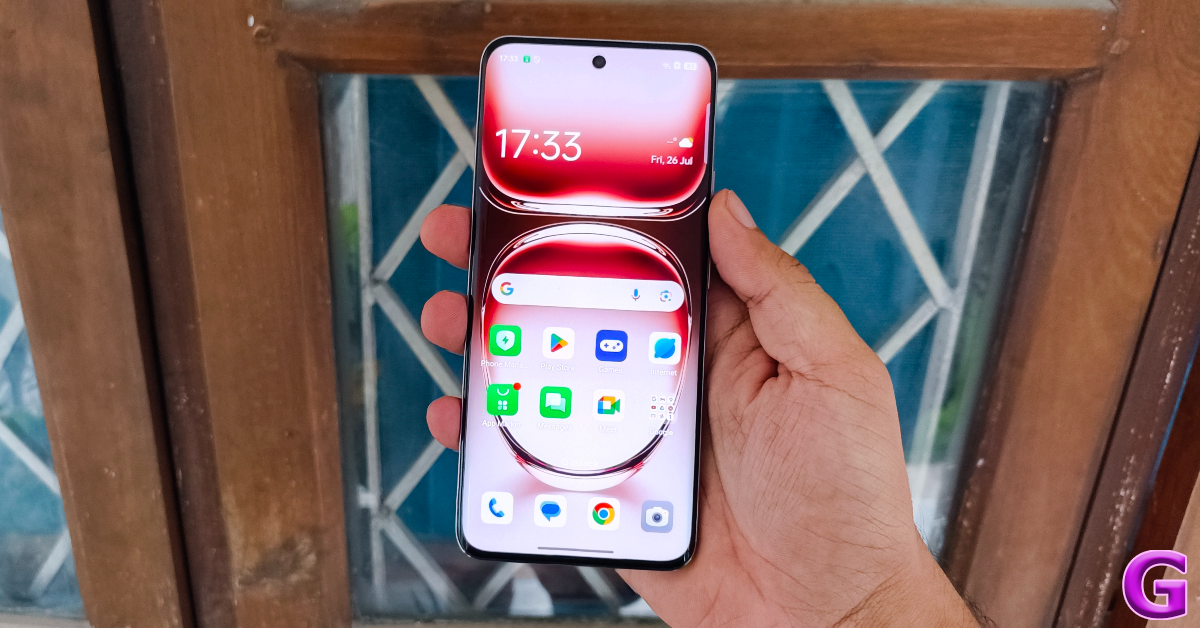 The AMOLED display produces rich images with punchy colours and deep shades of black. Watching HD content on this smartphone proved to be a delightful experience. The stereo speaker setup produces a good audio output and we never felt the need to reach for our headphones. The maximum brightness of the display holds up quite well when using the phone outdoors.
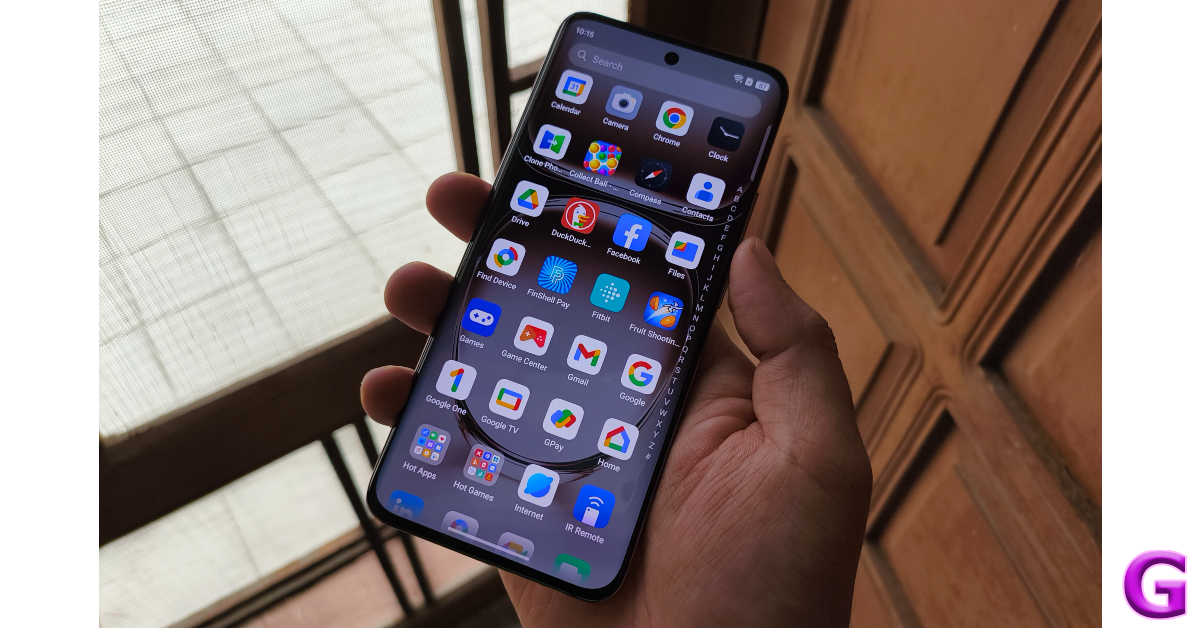 The Oppo Reno12 can do a little better when it comes to water resistance. The smartphone is rated IP65, which only makes it resistant to water splashes. At this price point, we expect smartphones to carry an IP67 rating.
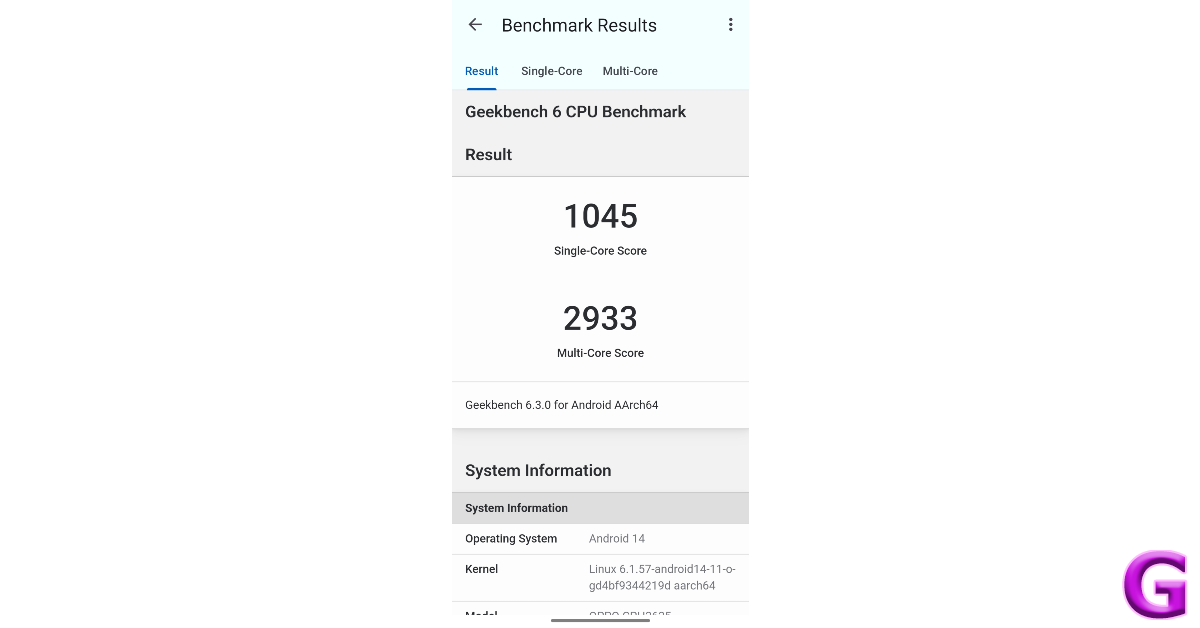 Benchmark numbers aside, the smartphone does a good job of handling everyday tasks like video calling, media streaming, web browsing, and more. During the week-long review period, we did not encounter any major lags while using the Oppo Reno12. When compared to premium smartphones, the Reno12 takes a fraction of a second longer to load the apps, but the difference in performance is not super apparent to the average user. Not to mention, the premium smartphones cost a pretty penny.
The Reno12’s gaming performance is quite ordinary. We played titles like Call of Duty Mobile and Asphalt Legends Unite on the smartphone and weren’t particularly blown away by the performance. On medium graphics, the smartphone delivers a consistent performance but starts developing stutters and lags if you switch to anything more demanding.
Android 14-based Color OS 14.1 does a good job on the software front. The vibrant interface and the range of customisation options for the app icons, AOD, text font, fingerprint icon, and quick settings are remarkable. Privacy features like app lock, private safe, and system cloner are great additions too. However, this smartphone has a lot of bloatware. While all of the pre-installed apps are removable, they mar the software experience quite a bit.
Oppo’s marketing strategy for the Reno12 revolves around its AI features so let’s dive into it. Google’s Gemini family of LLMs powers Oppo’s AI suite. The majority of the AI computation takes place in cloud servers and not on the device itself. While on-device computation is certainly ideal, no Android smartphone has completely on-device AI features yet.
Benchmark numbers aside, the smartphone does a good job of handling everyday tasks like video calling, media streaming, web browsing, and more. During the week-long review period, we did not encounter any major lags while using the Oppo Reno12. When compared to premium smartphones, the Reno12 takes a fraction of a second longer to load the apps, but the difference in performance is not super apparent to the average user. Not to mention, the premium smartphones cost a pretty penny.
The Reno12’s gaming performance is quite ordinary. We played titles like Call of Duty Mobile and Asphalt Legends Unite on the smartphone and weren’t particularly blown away by the performance. On medium graphics, the smartphone delivers a consistent performance but starts developing stutters and lags if you switch to anything more demanding.
Android 14-based Color OS 14.1 does a good job on the software front. The vibrant interface and the range of customisation options for the app icons, AOD, text font, fingerprint icon, and quick settings are remarkable. Privacy features like app lock, private safe, and system cloner are great additions too. However, this smartphone has a lot of bloatware. While all of the pre-installed apps are removable, they mar the software experience quite a bit.
Oppo’s marketing strategy for the Reno12 revolves around its AI features so let’s dive into it. Google’s Gemini family of LLMs powers Oppo’s AI suite. The majority of the AI computation takes place in cloud servers and not on the device itself. While on-device computation is certainly ideal, no Android smartphone has completely on-device AI features yet.
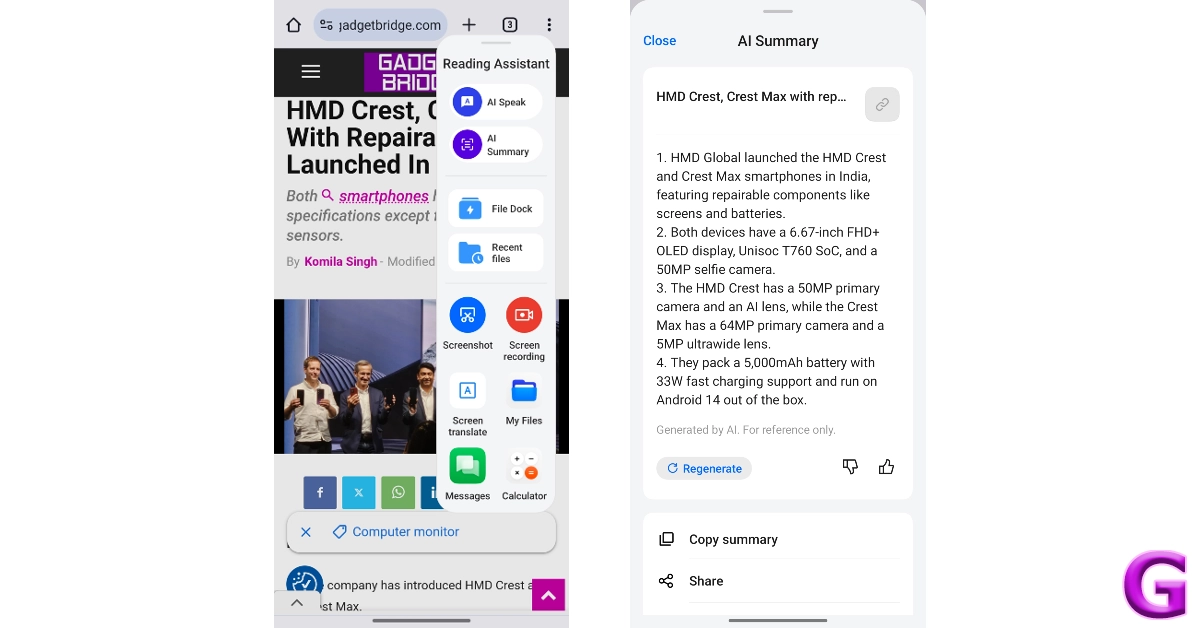
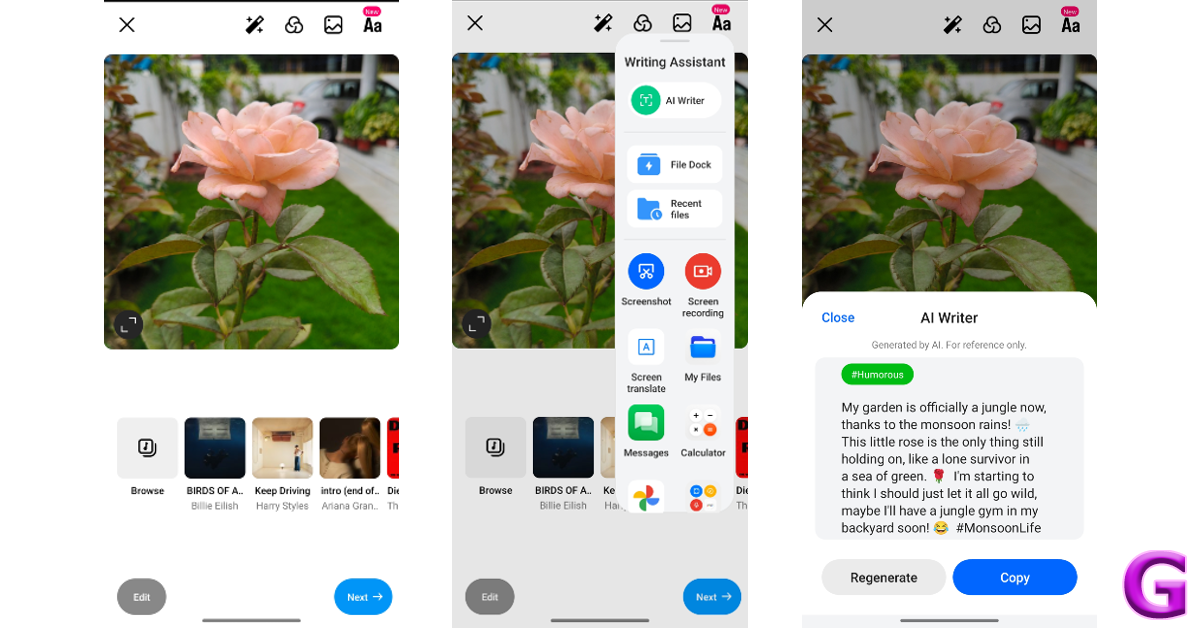
 Oppo’s Reno series is known for its camera performance. However, the Reno12 takes a step back by ditching the 32MP telephoto lens for a 2MP macro sensor. The 50MP primary shooter packs a Sony LYT600 sensor while the 8MP ultrawide lens has a Sony IMX355 sensor.
 Pictures taken in outdoor daylight conditions with the primary shooter pack a lot of details and showcase rich colours. Overall, the images are vibrant and do justice to the scene in front of the lens. We like that Oppo Reno12 does not go overboard with photoprocessing and retains the natural look of the images.
 There is not a drastic drop in the colour profile of the images taken with the ultrawide lens. However, they do appear a little softer compared to the pictures taken with the primary shooter. In limited lighting conditions, the primary sensor does well to adapt to the conditions and produces well-lit images with accurate colours assigned to the subject. The ultrawide struggles to replicate this performance, producing dark and noise-ridden images. It is better to stick with the primary shooter at night.



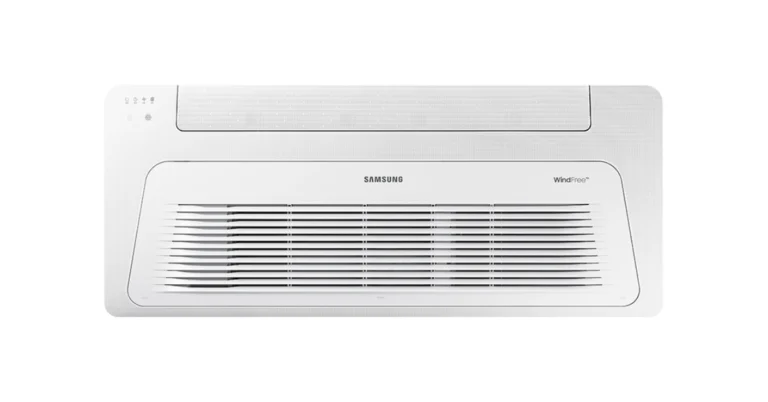
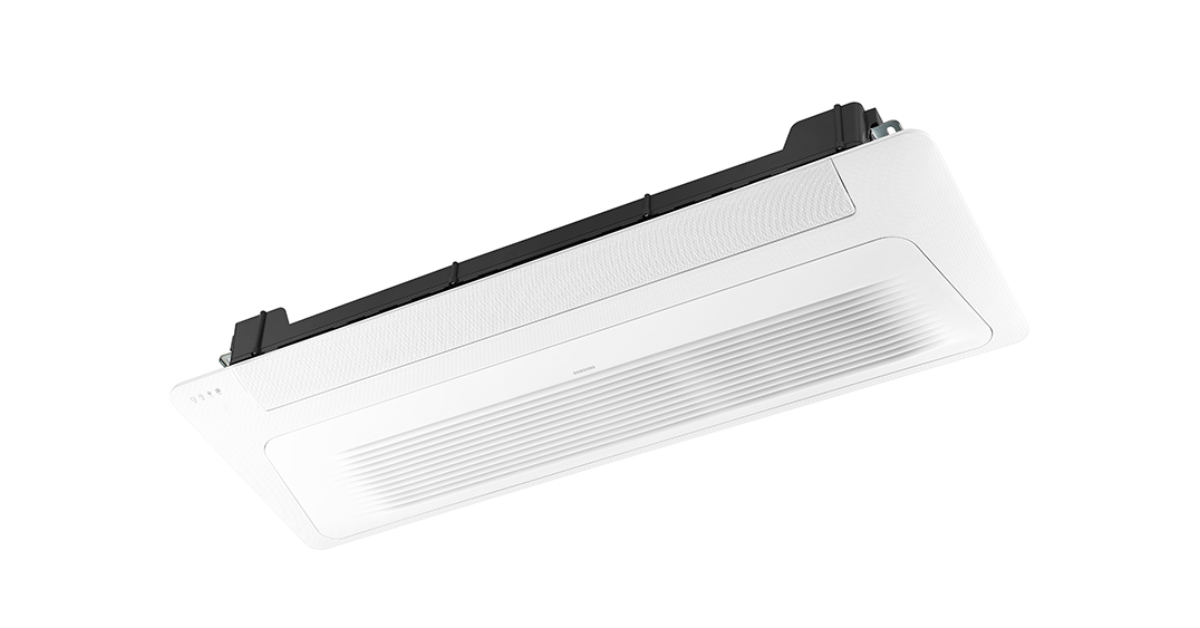 The Samsung WindFree Air Conditioners is available in 3 variants of chilled water fan coil units with a price starting at Rs 35,000 for the smallest capacity unit. The device can be purchased via Samsung’s network of registered offline partners across the country.
Also Read: HP’s EliteBook Ultra and HP OmniBook X AI PCs with Copilot+ and Snapdragon X Elite processor launched in India
Samsung has launched WindFree air conditioners in India. These units provide superior cooling without the inconvenience of direct cold drafts. The new Fan coil unit WindFree ACs features WindFree cooling technology, which allows customers to set a desired temperature and disperses cold air up to 15,000 micro-air holes at a wind speed of 0.15m/sec. This innovative airflow system cools rooms quickly and softly, with only 24 dB(A) of noise, making it suitable for bedrooms, studies, and baby rooms. These Hydronic Fan Coil Units use coils to circulate hot or cold water, heating or cooling large spaces.
The Samsung WindFree Air Conditioners is available in 3 variants of chilled water fan coil units with a price starting at Rs 35,000 for the smallest capacity unit. The device can be purchased via Samsung’s network of registered offline partners across the country.
Also Read: HP’s EliteBook Ultra and HP OmniBook X AI PCs with Copilot+ and Snapdragon X Elite processor launched in India
Samsung has launched WindFree air conditioners in India. These units provide superior cooling without the inconvenience of direct cold drafts. The new Fan coil unit WindFree ACs features WindFree cooling technology, which allows customers to set a desired temperature and disperses cold air up to 15,000 micro-air holes at a wind speed of 0.15m/sec. This innovative airflow system cools rooms quickly and softly, with only 24 dB(A) of noise, making it suitable for bedrooms, studies, and baby rooms. These Hydronic Fan Coil Units use coils to circulate hot or cold water, heating or cooling large spaces.
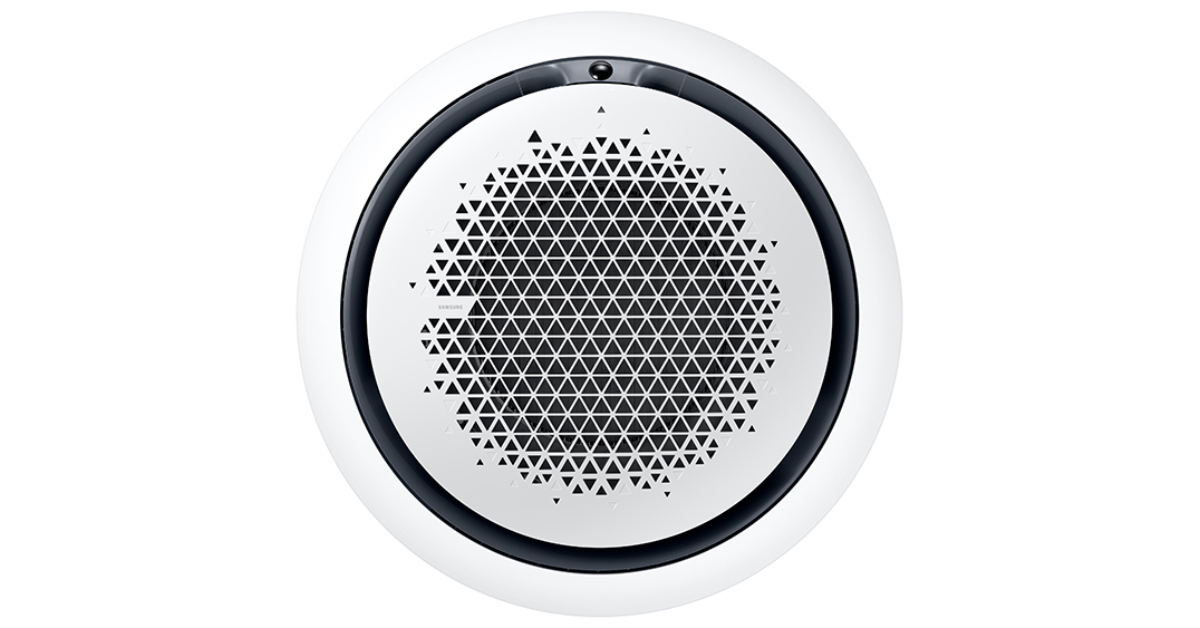 Samsung Chilled Water Fan Coil units come in three variants: 1 Way Cassette (2.6KW~4.2KW), 4 Way Cassette (6.0KW~10.0KW), and 360o Chilled Water Cassette (6.0KW~10.0KW). The 1Way Cassette is designed for cooling large areas quickly and efficiently with its auto-swing feature, allowing air to be distributed in every direction. Its slim, aesthetic design fits into small ceiling spaces, making it suitable for limited space. The 4-Way Cassette offers superior cooling performance with a large blade design, directing air precisely to chosen spots. The 360-degree Chilled Water Cassette features an innovative circular design that disperses air uniformly in all directions without cold drafts, expelling up to 25% more air and spreading it farther.
Also Read: Google Maps rolling out new AI features in India, prepare for upcoming flyovers, locate the nearest charging station and more
Samsung Chilled Water Fan Coil units come in three variants: 1 Way Cassette (2.6KW~4.2KW), 4 Way Cassette (6.0KW~10.0KW), and 360o Chilled Water Cassette (6.0KW~10.0KW). The 1Way Cassette is designed for cooling large areas quickly and efficiently with its auto-swing feature, allowing air to be distributed in every direction. Its slim, aesthetic design fits into small ceiling spaces, making it suitable for limited space. The 4-Way Cassette offers superior cooling performance with a large blade design, directing air precisely to chosen spots. The 360-degree Chilled Water Cassette features an innovative circular design that disperses air uniformly in all directions without cold drafts, expelling up to 25% more air and spreading it farther.
Also Read: Google Maps rolling out new AI features in India, prepare for upcoming flyovers, locate the nearest charging station and more
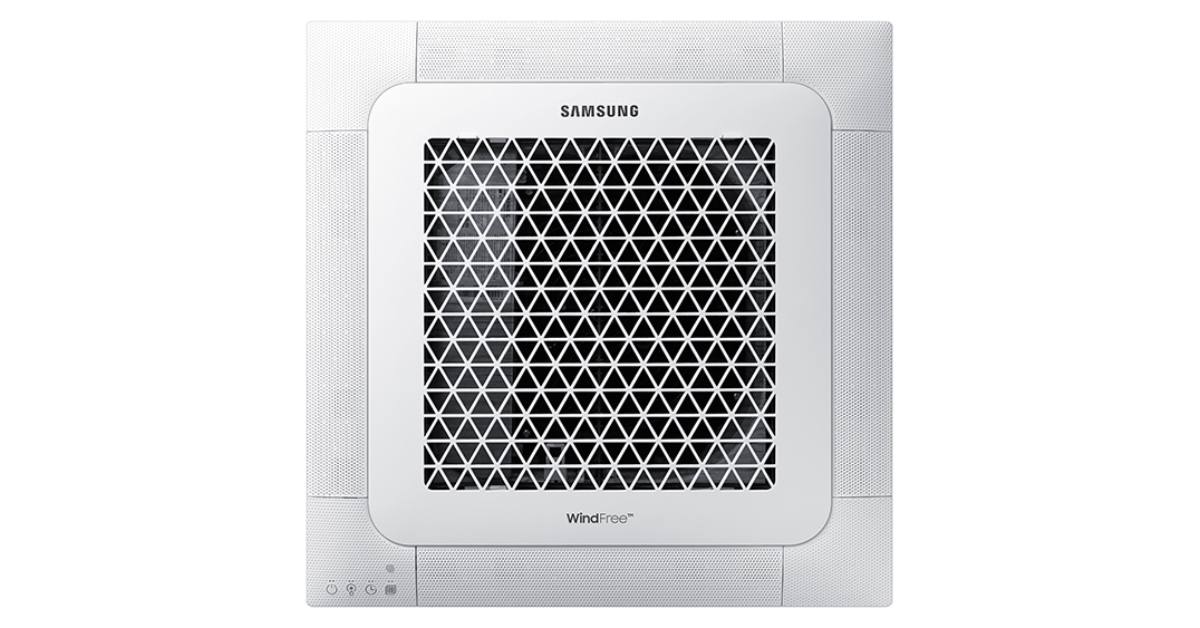 Mr. Vipin Agrawal, Senior Director, SAC Business, Samsung India said, “At Samsung our objective is to provide convenience and durability to end users through our cutting-edge product offerings. The Chilled Water Fan Coil units provide superior cooling at a faster pace while operating quietly. The cooling units are most appropriate for large spaces and our endeavour is to make airflow systems more advanced, soothing and accessible.”
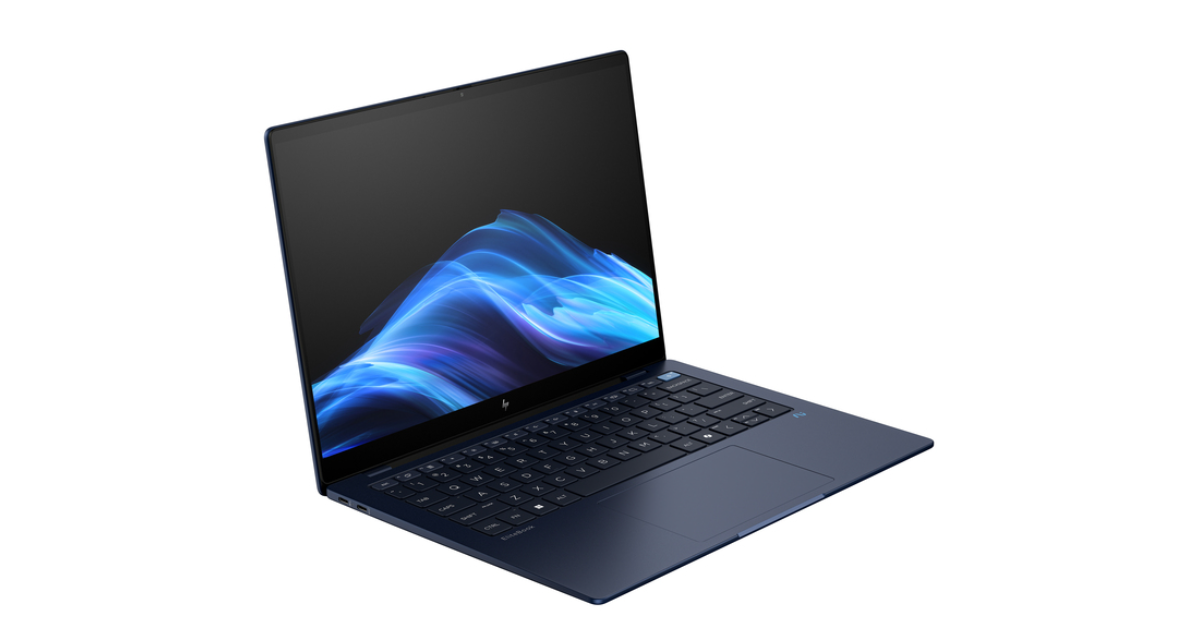
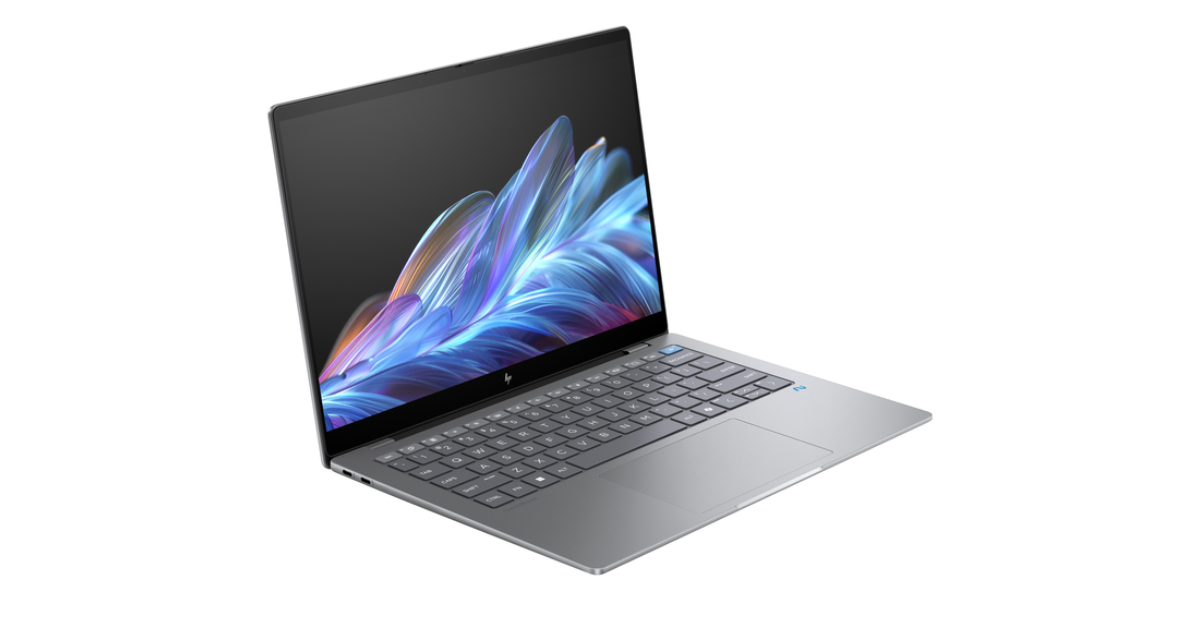
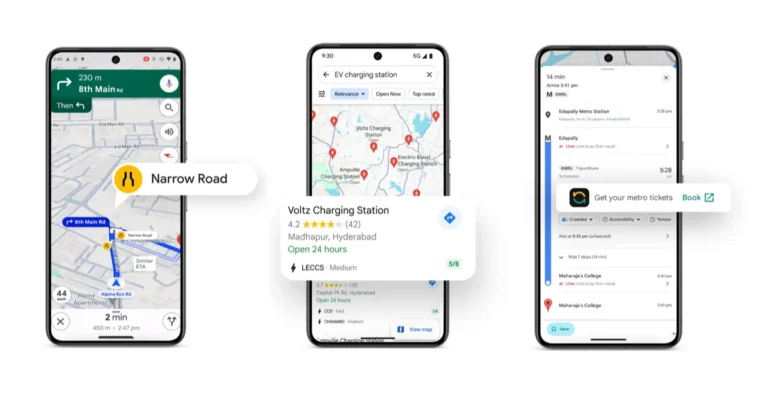
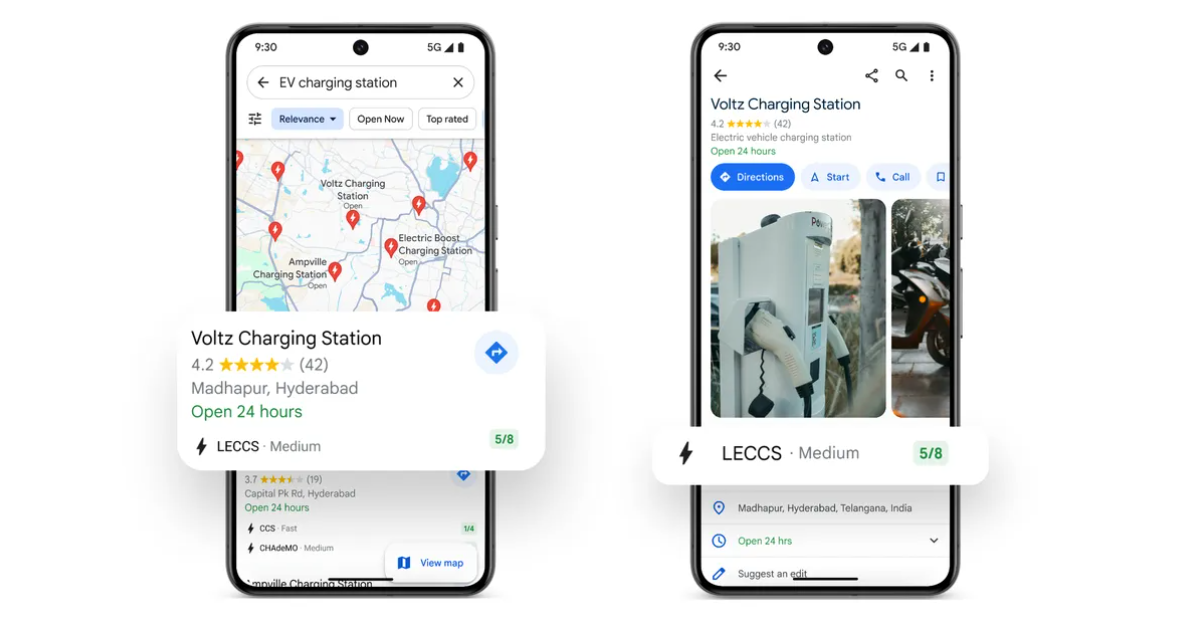 Google Maps is partnering with top providers ElectricPe, Ather, Kazam, and Statiq to bring information on electric vehicle charging stations in India. Through the partnership, consumers can access full information about more than 8,000 charging stations, including plug types and current availability. Users can verify if the station is open and filter based on the type of charger. India is the first nation to get this feature, which is a first for Google Maps as it allows EV charging stations for two-wheelers on the map for the first time. Google intends to increase real-time data availability and dependability while also extending coverage across the country.
Also Read: Apple announced the launch of Maps on the web, currently available in public beta
In collaboration with ONDC and Namma Yatri, Google has introduced a new metro booking experience on Google Maps in Chennai and Kochi. By using the service, customers can book their tickets in advance, saving them time and avoiding lineups at stations. In these cities, you can find the new booking option when looking for directions for public transit. Without having to wait at the station, the booking and payment process is guided by a single tap. Google intends to add more cities and public transport options to this service.
Google Maps is partnering with top providers ElectricPe, Ather, Kazam, and Statiq to bring information on electric vehicle charging stations in India. Through the partnership, consumers can access full information about more than 8,000 charging stations, including plug types and current availability. Users can verify if the station is open and filter based on the type of charger. India is the first nation to get this feature, which is a first for Google Maps as it allows EV charging stations for two-wheelers on the map for the first time. Google intends to increase real-time data availability and dependability while also extending coverage across the country.
Also Read: Apple announced the launch of Maps on the web, currently available in public beta
In collaboration with ONDC and Namma Yatri, Google has introduced a new metro booking experience on Google Maps in Chennai and Kochi. By using the service, customers can book their tickets in advance, saving them time and avoiding lineups at stations. In these cities, you can find the new booking option when looking for directions for public transit. Without having to wait at the station, the booking and payment process is guided by a single tap. Google intends to add more cities and public transport options to this service.
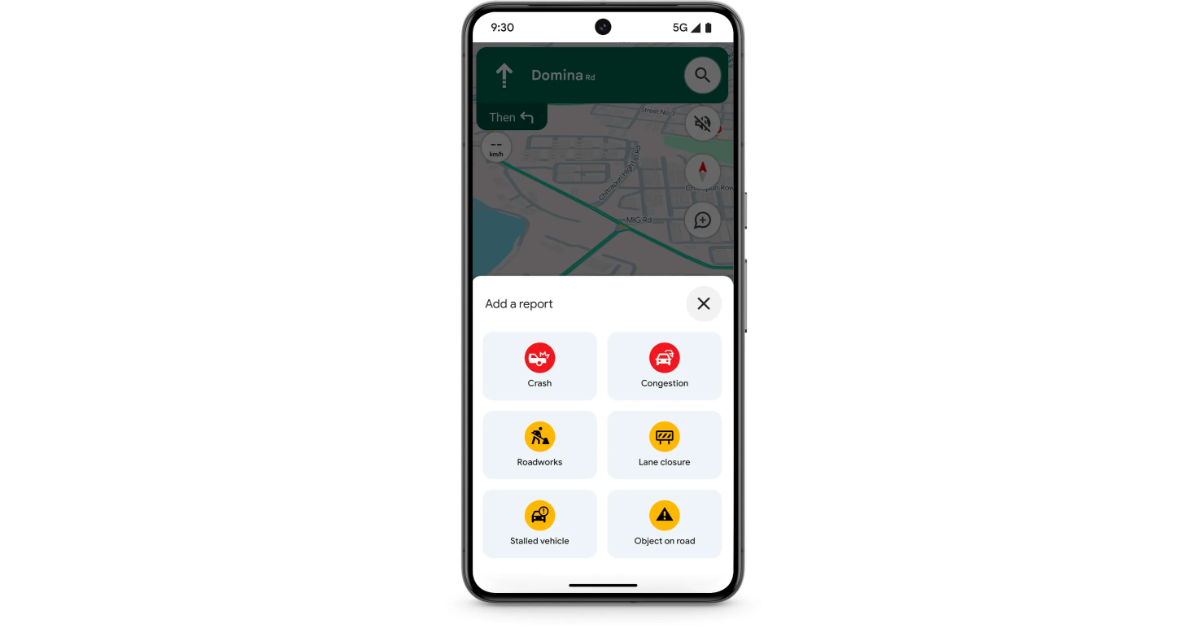 The process of reporting road accidents has been made simpler by Google Maps. With only a few taps, the update makes it easier to report road issues, like ongoing construction or traffic accidents. In India, this update is compatible with iOS, Android Auto, Android, and Apple CarPlay.
With the new “Lists” function, users of Google Maps can now create, share, and work together on lists of their favourite locations. Users may now vote on places using emojis, share recommendations, and add their suggestions to the itinerary thanks to the enhanced feature. Bengaluru, Delhi, Mumbai, Goa, Hyderabad, Pune, Ahmedabad, Chennai, Kolkata, and Jaipur are among the 10 main cities and tourism destinations for which Google Maps has curated lists in collaboration with regional specialists like NDTV Food and magicpin.
The process of reporting road accidents has been made simpler by Google Maps. With only a few taps, the update makes it easier to report road issues, like ongoing construction or traffic accidents. In India, this update is compatible with iOS, Android Auto, Android, and Apple CarPlay.
With the new “Lists” function, users of Google Maps can now create, share, and work together on lists of their favourite locations. Users may now vote on places using emojis, share recommendations, and add their suggestions to the itinerary thanks to the enhanced feature. Bengaluru, Delhi, Mumbai, Goa, Hyderabad, Pune, Ahmedabad, Chennai, Kolkata, and Jaipur are among the 10 main cities and tourism destinations for which Google Maps has curated lists in collaboration with regional specialists like NDTV Food and magicpin. 
 Step 2: Select Auto Blocker.
 Step 3: Turn off its toggle switch.
 Step 4: Authenticate your identity to confirm the action.
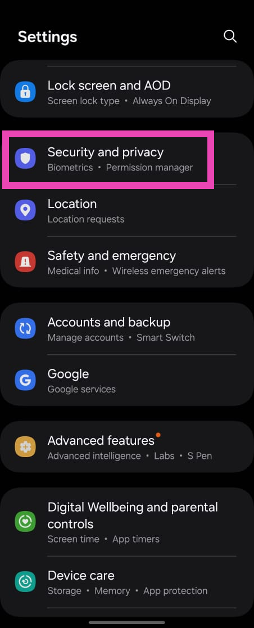 Step 2: Select Auto Blocker.
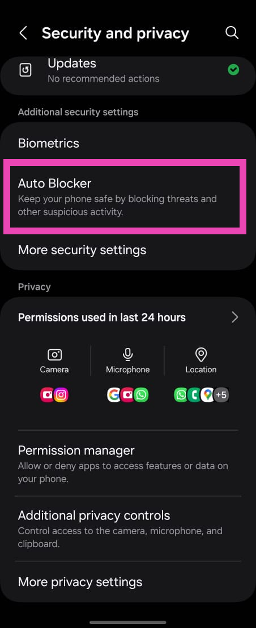 Step 3: Turn off its toggle switch.
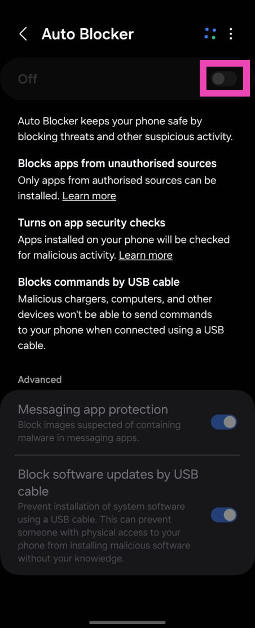 Step 4: Authenticate your identity to confirm the action.