Western Digital Unveils the WD Blue SN5000 NVMe SSD in India

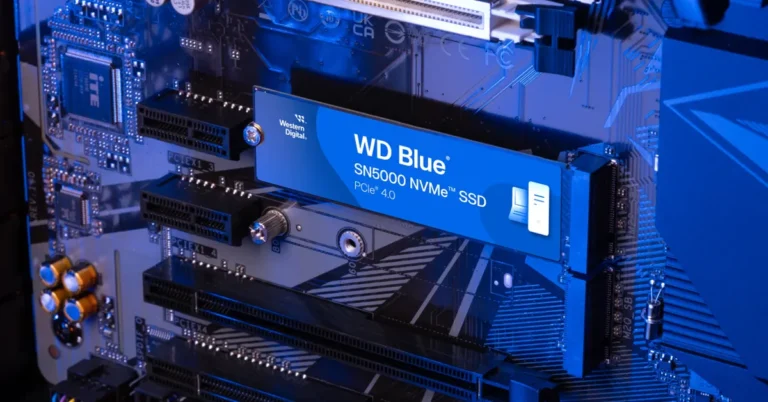
If you’ve ever tried editing a 4K video on a laptop that groans like an ancient pirate ship, you’ll understand the desperate need for a high-performance NVMe SSD for creators. Fortunately, Western Digital has just dropped the WD Blue SN5000 NVMe SSD in India, aimed squarely at creative pros who juggle high-resolution videos, intricate photo projects, and demanding audio edits. In this news update, we’ll explore what’s new about this storage wizard, how it addresses AI-enabled creative workflows, and why it might be the next must-have for professionals.

Faster, Bigger, and Smarter Storage

A Drive for the Demanding The WD Blue SN5000 NVMe SSD is designed for those who frequently push their systems to the limit. Whether you’re dabbling in 4K video editing essentials or managing AI-enabled creative workflows, this SSD promises to keep your files accessible at lightning speeds. Pair that with impressive read speeds up to 5,500MB/s—24% faster than the previous generation—and you can say goodbye to endless loading bars. Read Also: WD My Passport SSD with up to 2TB capacity launched in India Engineered for Workflow Efficiency
  • High Capacity: Available in sizes up to 4TB, it provides 2x more storage than its predecessor.
  • Speed Boost: PCIe Gen4 enables professional-grade SSD performance, helping you fly through 4K video timelines and large-scale graphic edits.
  • Western Digital nCache 4.0: This advanced data storage technology ensures swift folder and file copies, making multitasking effortless.
  • Impressive Endurance: With up to 1,200 TBW, it stands strong through repeated renderings and data-intensive tasks.
Beyond raw performance, the SN5000 is said to align with Stages 4 and 6 of the AI Data Cycle, emphasizing efficient workflow solutions and robust digital content creation within AI-driven projects. Read Also: WD My Passport Go external SSD review: Quick and rugged

Pricing and Availability

For anyone seeking efficient workflow solutions, the WD Blue SN5000 NVMe SSD might be appealing. Capacities begin at 500GB for Rs 3,199, stretching up to a 4TB variant priced at Rs 26,999. They’re available on Amazon India and through various IT retail stores, offering options for different budgets and storage needs. On balance, the WD Blue SN5000 NVMe SSD seems well-positioned to tackle today’s creative challenges. With speeds that cater to advanced editing and AI-driven tasks, it feels like a worthwhile contender in the competitive SSD market, especially for content creators who refuse to compromise on performance.

How to change your login picture on a PC and Mac?

0
If you’re bored of seeing the same lock screen on your laptop every day, you can mix it up using personalisation settings. MacBooks and Windows laptops offer a bunch of customisation options for the lock screen background and display picture. You can set up a slideshow for the background pictures and put up a monogram or Memoji as your profile picture. Here’s how you can change the login picture on your Windows PC and Mac. Read Also: How to send HD pictures on Instagram DMs?

Before you begin

Your Windows PC and MacBook are linked to your Outlook account and Apple ID respectively. If you set up a new profile picture, the changes will be reflected across all devices where you’re logged in using your account. There is no way to change to change the login picture locally. MacBook users get a range of exciting options for their login pictures. Memoji: If you don’t want to put up a picture of yourself on your account, you can choose your Memoji. A Memoji is an animated avatar for Apple users that can be used across different apps and services. Emoji: If you haven’t created a Memoji yet, your MacBook gives you the option of setting up a plain emoji as your profile picture. Monogram: Your initials will be stylised and displayed as your profile picture. Camera: Don’t have a picture of yourself saved on your MacBook? Select this option to quickly take one using the webcam. Photos: This is the option you should select if you want to set up a photo from your Mac’s gallery as your display picture.  Suggestions: This is where Apple suggests a bunch of default images to put up as your profile picture. In contrast, Windows PCs offer only 2 options for your profile picture – clicking an image using the webcam or uploading one from the PC’s gallery.

Change your login picture on a Windows 11 PC

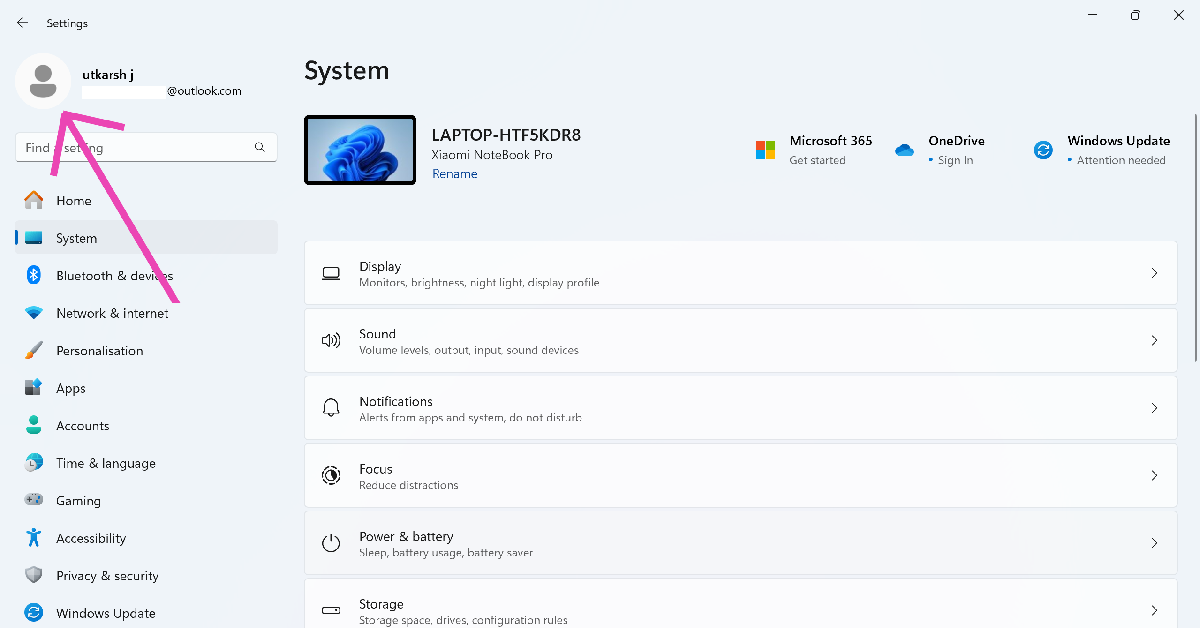
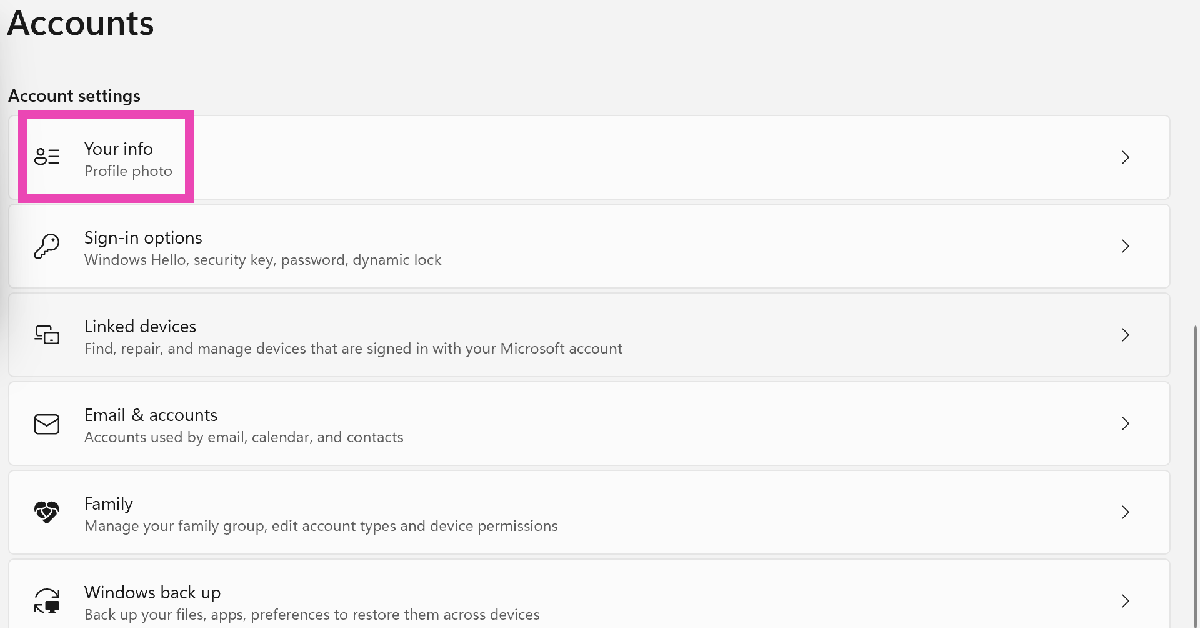
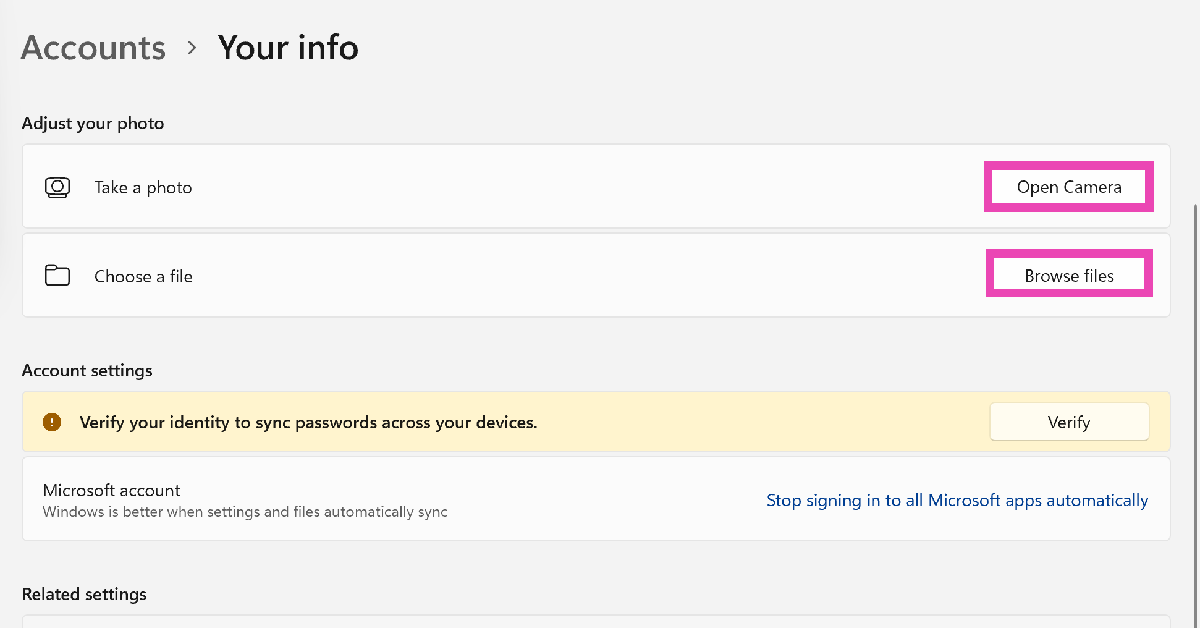
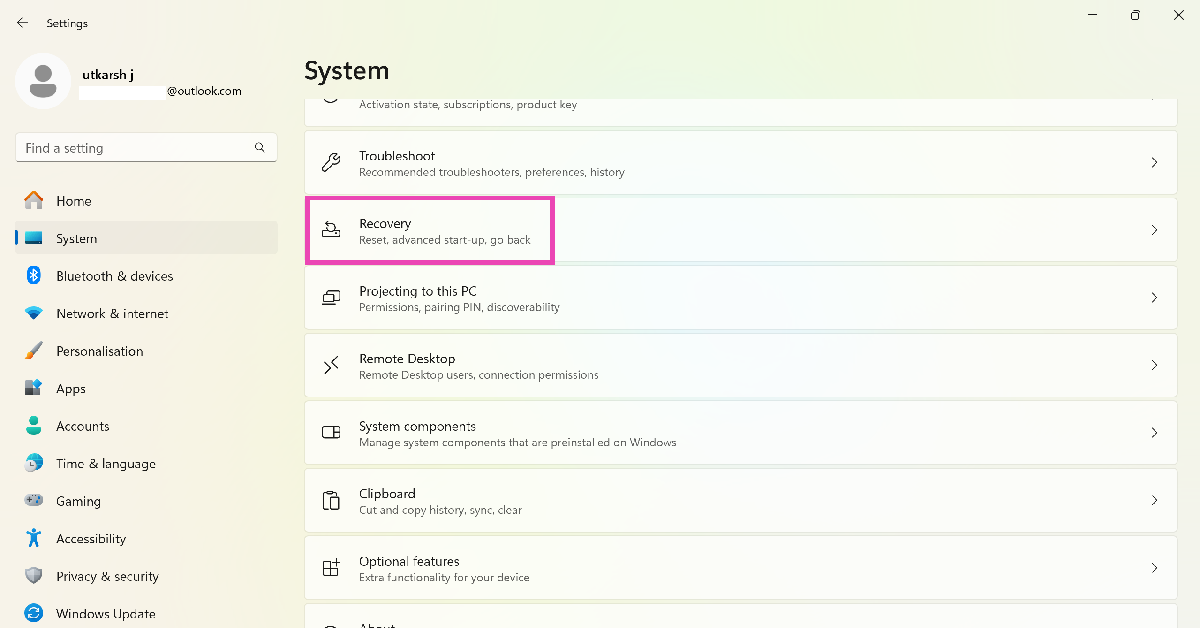
Step 1: Hit the Windows icon on the taskbar and select Settings. Step 2: Click your profile picture in the top left corner of the screen. Step 2: Click your profile picture in the top left corner of the screen. Step 3: Select Your info. Step 3: Select Your info. Step 4: Click on Open Camera if you want to take a picture using the webcam. Select Browse files if you want to choose a picture from your PC’s storage. Step 4: Click on Open Camera if you want to take a picture using the webcam. Select Browse files if you want to choose a picture from your PC’s storage.

Change your login picture on a Mac

Macbook keyboard Step 1: Hit the Apple logo in the top left corner of the screen and select System Preferences. Step 2: Switch to the Users & Groups tab on the sidebar. Step 3: Click on your profile picture. Step 4: You will be provided with a list of options for your new profile picture. Select Photos to upload a picture from your Mac’s storage. Step 5: Customise the picture from its preview panel in the bottom left corner of the screen. Hit Save when you’re done.

Bonus Tip: Change the lock screen picture on a Windows 11 PC

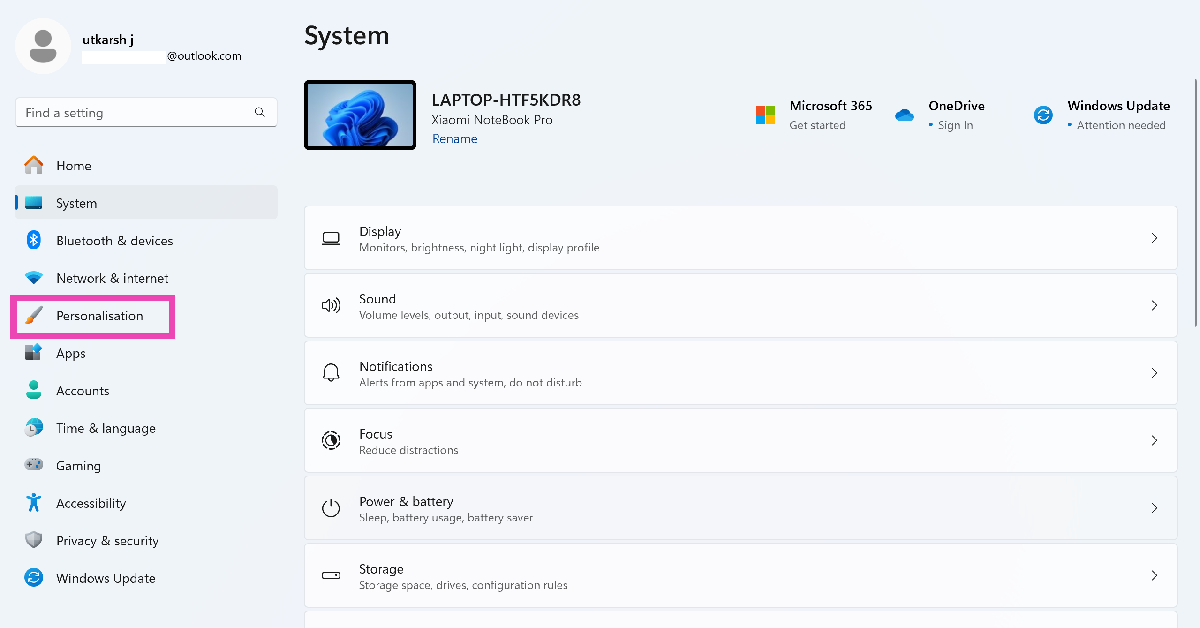
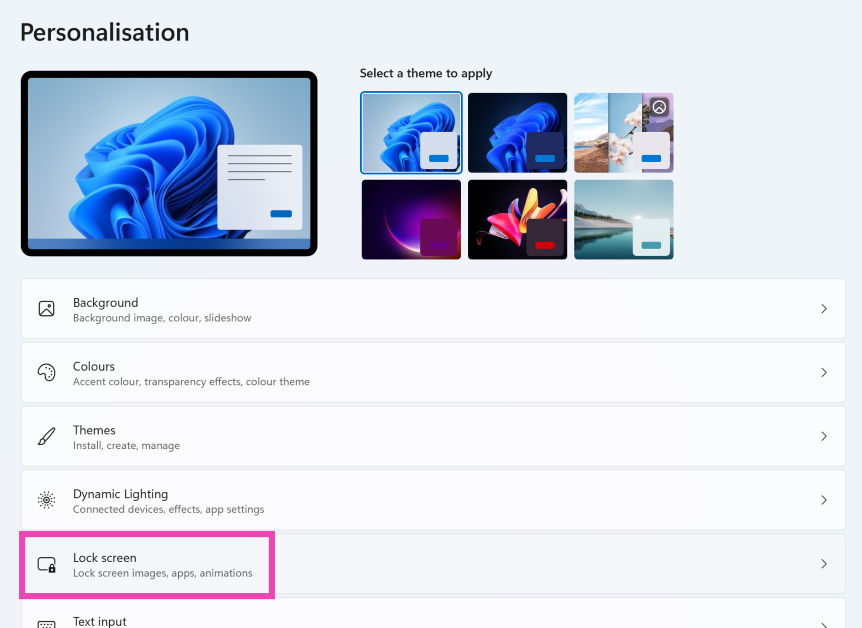
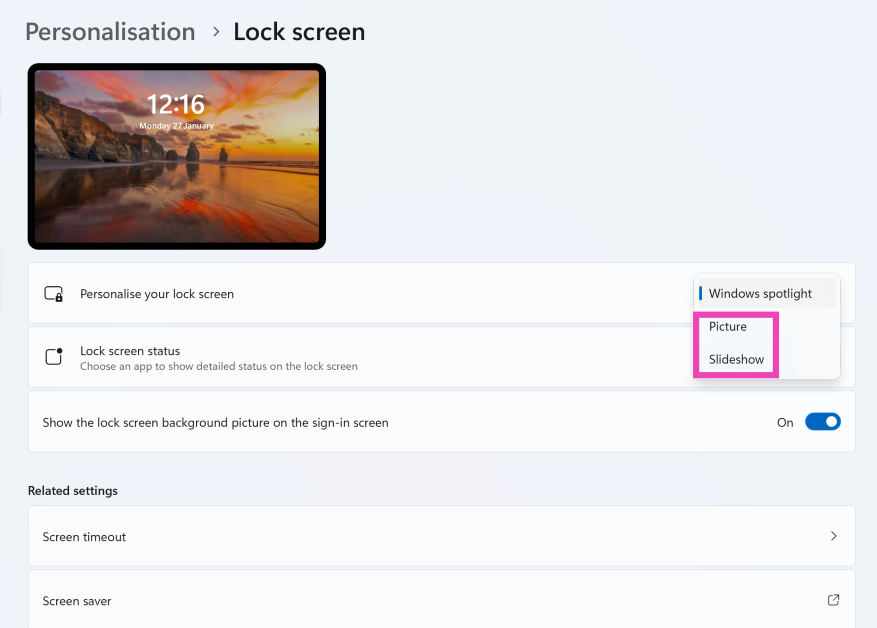
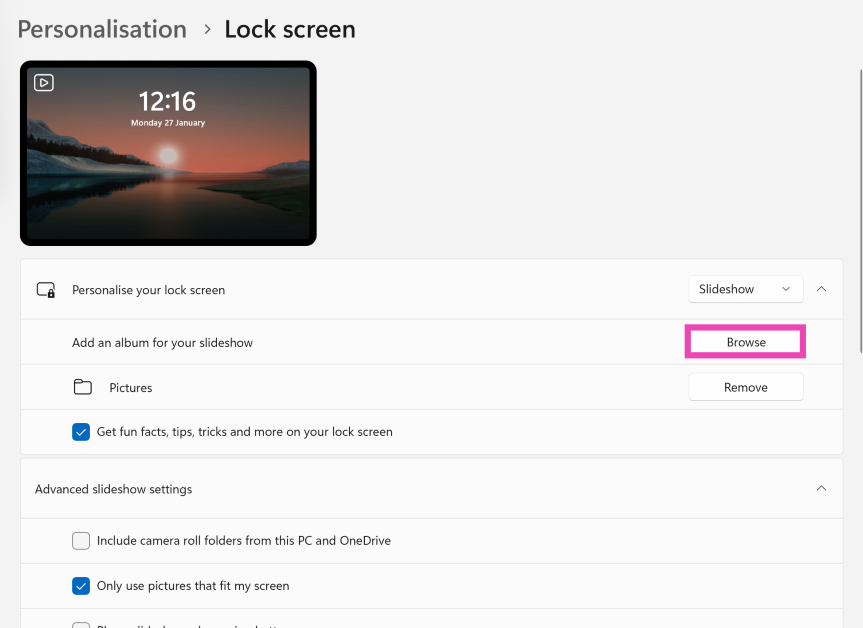
Step 1: Hit the Windows icon on the taskbar and select Settings. Step 2: Switch to the Personalisation tab in the taskbar. Step 2: Switch to the Personalisation tab in the taskbar. Step 3: Click on Lockscreen. Step 3: Click on Lockscreen. How to change your login picture on a PC and Mac? Step 4: Click the dropdown menu next to Personalise your lock screen. Step 4: Click the dropdown menu next to Personalise your lock screen. How to change your login picture on a PC and Mac? Step 5: Select Picture and choose a lock screen image from the default options provided to you. Hit Browse photos to upload a picture from your PC’s storage. Alternatively, you can select Slideshow and upload multiple photos from your PC. Step 5: Select Picture and choose a lock screen image from the default options provided to you. Hit Browse photos to upload a picture from your PC’s storage. Alternatively, you can select Slideshow and upload multiple photos from your PC. How to change your login picture on a PC and Mac?

Frequently Asked Questions (FAQs)

How do I change the lock screen picture on my Mac?

Go to Apple Menu>System Preferences>Wallpaper and pick an image from the list of options.

How do I change the login background image on Mac?

Go to Apple Menu>System Preferences>Users & Groups and click your profile picture. If you want to upload a picture of yourself, click Photos and choose an image from the gallery. Other options include putting up a Memoji, emoji, monogram, or a default image.

How do I change the account picture on my Windows PC?

Go to Settings, click your profile picture in the top right corner of the screen, select ‘Your Info’, then click ‘Open Camera’ to take a login picture using the webcam or ‘Browse files’ to upload one from your phone’s gallery.

How do I change my login name on Mac?

You can only change the name of your user account when you’re logged into another (administrator) account. Click on the menu bar in Finder, then navigate to Go>Go to Folder. Type /users and hit Return. Select the user account for which you wish to change the name. Hit Return and enter the new name.

How do I change the lock screen picture in Windows 11?

Go to Settings>Personalisation>Lockscreen, click on Windows Spotlight next to ‘Customise your lock screen’ and select Picture or Slideshow. Upload the picture(s) from your PC’s gallery. Read Also: 11 Ways to Fix ‘WiFi Authentication Error’ on Android

Final Thoughts

This is how you can change your login picture on a PC and Mac. You do not need administrator privilege to change your user account’s display picture. If you have any questions, let us know in the comments!

Comparison: Samsung Galaxy S25 Ultra Vs Galaxy S24 Ultra

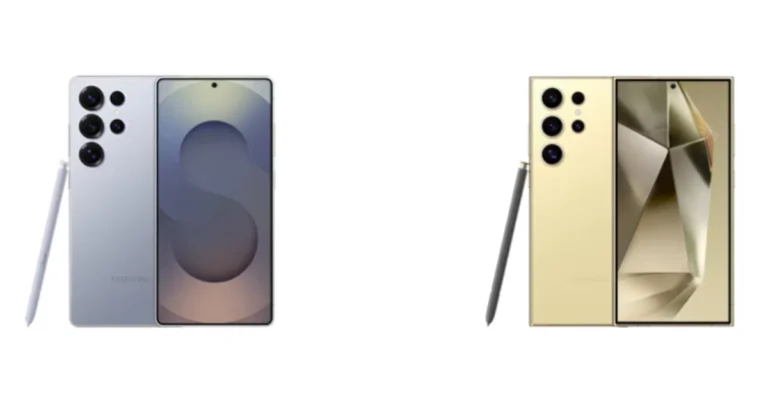
The brand-new Samsung Galaxy S25 Series was unveiled by South Korean smartphone manufacturer Samsung during this year’s first Galaxy Unpacked event. The portfolio consists of three models: the Galaxy S25, Galaxy S25+, and Galaxy S25 Ultra. Among smartphones, the Ultra is the priciest model. Although all of the smartphones have many intriguing features, we will focus on the Ultra, the best smartphone, in our comparison. For the purpose of guiding you in deciding which smartphone is better to purchase, we compared the Galaxy S25 Ultra against the Galaxy S24 Ultra. Here’s a spec-by-spec comparison of the Samsung Galaxy S25 Ultra and the Galaxy S24 Ultra.

Samsung Galaxy S25 Ultra Vs Galaxy S24 Ultra

Display

Samsung Galaxy S25 Ultra: 6.9-inch Dynamic AMOLED 2X screen Samsung Galaxy S24 Ultra: 6.8-inch Edge QHD+ Dynamic AMOLED 2X

Processor

Samsung Galaxy S25 Ultra: Qualcomm Snapdragon 8 Elite processor Samsung Galaxy S24 Ultra: Qualcomm Snapdragon 8 Gen 3 SoC

Rear camera(s)

Samsung Galaxy S25 Ultra: For the photos and videos, the Galaxy S25 Ultra packs a Quad-Camera Module having a 200MP with OIS: Optical Image Stabilisation, a 50MP 120-degree Ultra Wide sensor, a 10MP Telephoto lens (3x Optical Zoom, OIS F2.4, FOV 36˚) and a 50MP Periscope lens (5x Optical Zoom, OIS F3.4, FOV 22˚). Samsung Galaxy S24 Ultra: Quad rear camera setup includes a 12MP Ultra-Wide Camera (F2.2 aperture, FOV-120˚), 200MP Wide Camera (OIS, F1.7 Aperture, and FOV-85˚), 50MP Telephoto Camera (5x Optical Zoom, OIS, F3.4 aperture, and FOV of 22˚) and a 10MP Telephoto Camera (3x Optical Zoom, OIS, F2.4 aperture, and FOV 36˚).

Selfie camera

Samsung Galaxy S25 Ultra: 12MP front camera Samsung Galaxy S24 Ultra: 12MP selfie camera (F2.2, FOV 80˚)

RAM and storage

Samsung Galaxy S25 Ultra: 12GB RAM with 1TB storage/12GB RAM with 512GB storage/12GB RAM with 256GB storage Samsung Galaxy S24 Ultra: 12GB RAM + 256GB storage,12GB RAM + 512GB storage and 12GB RAM + 1TB storage Also Read: Google rolls out theft protection with identity check features for Pixel and Samsung One UI 7 devices

Battery

Samsung Galaxy S25 Ultra: 5,000mAh battery Samsung Galaxy S24 Ultra: 5,000mAh battery

Operating system

Samsung Galaxy S25 Ultra: One UI 7 interface on top of Android 15 Samsung Galaxy S24 Ultra: Android 14 with UI 6.1

Price

Samsung Galaxy S25 Ultra: Rs 1,65,999 Samsung Galaxy S24 Ultra: Rs 1,21,999

Our Take

The Samsung Galaxy S24 Ultra has an IP68 rating, a titanium frame, and a Corning Gorilla Armor 2. Under different lighting conditions, its optically improved Corning Gorilla Armor may give up to 75%. Titanium Grey, Titanium Black, Titanium Violet, and Titanium Yellow are the available colours for the phone. The Galaxy S25 Ultra also has a titanium frame, Corning Gorilla Armour 2, and ceramic anti-reflective coating. It is the first smartphone to have a ceramic anti-reflective coating and comes in Titanium Silver blue, Titanium Black, Titanium White Silver, Titanium Grey, Titanium Pink gold, Titanium Jet black, and Titanium Jade green colours. Both the Samsung Galaxy S24 Ultra and S25 Ultra have a 6.8-inch Quad HD+ Infinity-O-Edge Dynamic AMOLED screen with a resolution of 3120 x 1440 pixels, a variable refresh rate of 120 Hz, and a maximum brightness of 2,600 nits. Protection with Corning Gorilla Glass Armor 2 is available on both devices. As the S25 Ultra is powered by the Snapdragon 8 Elite for Galaxy devices, the Samsung Galaxy S24 Ultra is equipped with the exclusive Qualcomm Snapdragon 8 Gen 3 CPU. While the S25 runs Android 15 and has One UI 7 installed, the S24 runs OneUI 6.1, which is based on the Android 14 operating system. There will be seven major Android OS updates for the Galaxy S25 Ultra, including an enhanced Gemini assistant, personalised briefing, better circle-to-search capabilities, and an audio eraser. By late February or early March, these functionalities should be available on the Galaxy S24 Ultra with the OneUI 7 update. Also Read: Nothing teased upcoming smartphone sketches, likely Nothing Phone 3 The Galaxy S24 Ultra’s quad-camera array has been tweaked by Samsung, which swapped out the 12 MP ultra-wide-angle sensor for a 50 MP one. The Galaxy S25 Ultra offers slightly superior images and videos thanks to enhanced software optimisation, while the other cameras stay the same. A 5,000mAh battery, 45W fast wired charging, 10W Qi wireless charging, and wireless power share are features of both models. With its strong internals and superb design language, the Samsung Galaxy S25 Ultra 5G provides top-tier features and specifications. The CPU has also changed significantly and is now of a higher calibre. Since both phones have advanced capabilities, we would choose the S24 Ultra because it is significantly less expensive and has most of the same specifications as the Galaxy S25 Ultra. Therefore, we suggest the Samsung Galaxy S24 Ultra if you’re content with its specifications and have a modest budget. Better offers on the S24 Ultra might also be available during an upcoming sale.

Google rolls out theft protection with identity check features for Pixel and Samsung One UI 7 devices

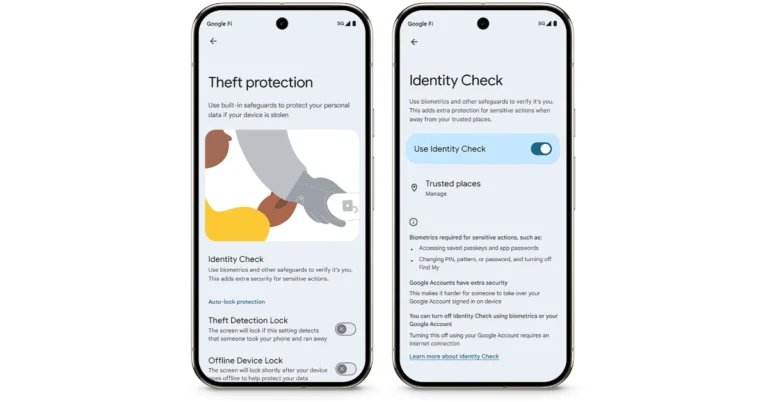
In order to prevent identity theft, financial fraud, and privacy violations, Google is implementing Android’s Identity Check function on a limited number of Pixel and Samsung Galaxy handsets. Other OEMs will thereafter be allowed to use this feature as well. The feature is anticipated to prevent data and personal handsets from being stolen by using biometric authentication to secure devices. Android has introduced Android Theft Protection, a set of tools intended to safeguard users and their data prior to, during, and following device theft. The company keeps adding new features and improving existing ones so that more customers throughout the world can benefit from even stronger protection.

Identity Check

On Pixel and Samsung Galaxy devices that are compatible with One UI 7, Identity Check is now available, offering improved security for critical account and device settings. Users can employ explicit biometric authentication to access sensitive resources outside trusted locations by turning on Identity Check. Making it more difficult for unauthorised attackers to take over accounts, this innovation further improves Samsung Account security on One UI 7 eligible Galaxy devices and Google Account security on all supported devices. Also Read: Nothing teased upcoming smartphone sketches, likely Nothing Phone 3 By turning on Identity Check, users can specify trustworthy locations where they can change important account and device settings, like the device’s PIN or biometrics, and turn off theft protection, or access passkeys, when outside these trusted locations. Identity Check is a security feature that, even in the event that an attacker figures out the device PIN, shields private device assets from unwanted access. It is currently available on Pixel devices running Android 15, and in the upcoming weeks, it will be accessible on Galaxy devices that support One UI 7 as well as later this year on Android devices from other manufacturers. One UI 7 is presently available for Samsung’s Galaxy S25 series, which includes the S25, S25+, and Ultra variants, whereas Android 15 is currently available for Google Pixel devices, which include the Pixel Fold smartphone and the Pixel 6, 7, 8, and 9 series. Also Read: Acer unveiled Aspire 3 compact and lightweight laptop in India

Theft Detection Lock

Introduced last year, Theft Detection Lock, an AI-powered feature, is a theft security feature available for Android 10+ phones globally. In order to keep thieves away from the device, it employs an on-device algorithm to identify possible theft attempts and locks the screen if it is found.

Garena Free Fire Max Redeem Codes Today 27 January 2025: Here is how to claim them

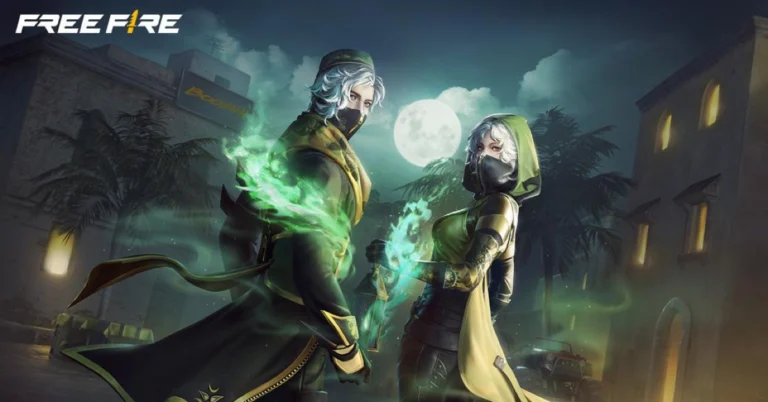
Garena Free Fire Max is a battle royale game with regular awards and tournaments to keep players interested. If you play Garena Free Fire, you should be aware of the redeem codes that are released on a daily basis. However, because the battle royale game is banned in India, players from other countries can use the Free Fire Redeem codes daily. If you’re unfamiliar with the Garena Free Fire redeem codes or don’t know how to get them, we’ve put together a step-by-step guide to help you redeem them. Check out Garena Free Fire Max Redeem Codes for 27 January 2025. The Free Fire Max redeem codes are a great way to get free stuff. These are 12-digit codes that contain alphabets and numbers, as well as an expiration date and time. Because the Garena FF redeem codes cannot be used more than once, you should hurry to the redemption page to claim your free reward before someone else does. To get a free reward, all you have to do is go to reward.ff.garena.com/en, which is the official redemption page. Also, keep an eye on this space for daily updates on Garena Free Fire Max redemption codes and rewards. Also Read: Sennheiser Accentum Plus wireless headphones with Hybrid Adaptive Noise Cancellation launched

Garena Free Fire Max Redeem Codes Today 27 January 2025

FF9MJ31CXKRG FG4TY7NQFV9S HFNSJ6W74Z48 ZZATXB24QES8 FCSP9XQ2TNZK F8YC4TN6VKQ9 V44ZX8Y7GJ52 ZRW3J4N8VX56 FF4MTXQPFDZ9 FFBD24JANRTG U8S47JGJH5MG NRFFQ2CKFDZ9

How to Get Free Fire Max Redeem Codes for Garena on 27 January 2025?

  • Visit the Garena Free Fire Max game’s official website at reward.ff.garena.com.
  • Use your Facebook, Google, VK, Apple ID, Huawei ID, or Twitter account to log in.
  • You’ll be taken to a valid redemption code (s)
  • Copy and paste the 12-digit redemption code into the text box.
  • On the screen, a dialogue box will appear.
  • ‘Ok’ should be selected.
For the latest gadget and tech news, and gadget reviews, follow us on Twitter, Facebook and Instagram. For newest tech & gadget videos subscribe to our YouTube Channel. You can also stay up to date using the Gadget Bridge Android App. You can find the latest car and bike news here.

NYT Wordle Answer and Hints Today (January 27)

Are you looking for today’s Wordle for January 27, 2025? The problem is difficult to solve, so if you need assistance, we’ve included hints and the answer to the January 27 Wordle.

Hints and Answers for Today’s Wordle January 27

Before answering directly, please check the January 27 Wordle Hints first. Hint 1: Today’s Wordle answer includes one vowel. Hint 2: The answer for today has no repeating letter. Hint 3: To move a railway train from one track to another.

What word does today’s Wordle begin with?

Do you need help with today’s Wordle answer’s initial letter? The first letter in today’s Wordle is “S”

Today’s Wordle Answer January 27 #1318

The answer to Wordle #1318 on January 27, 2025, is — SHUNT Also Read: Ranveer Allahbadia got his YouTube Channels back, videos restored

What is Wordle?

Wordle: A Five-Letter Word Guessing Game • The game allows six guesses of a five-letter word. • Provide feedback on guessed letters’ placement in the puzzle. • The New York Times purchased the game in 2022. • Created by Josh Wardle for his partner, narrowing down 12,000 English words to 2,500. • Named after the word “word.”

How To Play Wordle?

Wordle is a New York Times word puzzle game that allows users to guess a five-letter word in six attempts. The letters are highlighted in Yellow and Green, indicating whether the word is present in the answer or not, and Green letters indicate the correct guess. Also Read: Samsung Galaxy Tab S10+, Galaxy Tab S10 Ultra with Galaxy AI launched in India

Wordle Tips and Tricks

  • Select a powerful starting word: Avoid using unusual words, as they frequently do not match common letters. A good opening word has plenty of benefits.
  • Repeating letters: Don’t be afraid of repeating letters; they appear frequently in words. The answer may contain one or two repeated letters.
  • Use the Wordlebot: The NYT’s Wordlebot analyses and compares replies to itself. This challenge can assist you enhance guessing skills and highlight areas for development.

Amazon Quiz Answers Today 27 January 2025: Participate to win Up To Rs 500 Amazon Pay Balance

27 January 2025: New Amazon Quiz is now available. Customers from different parts of the country are participating in the daily quiz. The quiz starts at midnight today and will be live until 11:59 PM tonight. By successfully answering every question, participants in the quiz have the chance to win wonderful rewards. Up to Rs 500 Amazon Pay Balance is up for grabs to participants today. One wrong answer could eliminate you from the quiz. You have a chance to win up to Rs 500 Amazon Pay Balance if you successfully answer every question. Users of the app only have the opportunity to take the quiz. Check Out 27 January 2025 Amazon Quiz Answers.

Are you not able to find Amazon FunZone? Click below and participate.

Click here to enter the Amazon FunZone Quiz and play today. Amazon Quiz Today Prize: Rs 500 Amazon Pay Balance Quiz Date: 27 January 2025 Daily Timing: 12 AM to 11:59 PM Previous Amazon Quiz Winners Announcement: Today 12 PM Noon

Amazon Quiz Answers Today 27 January 2025: Win Up To ₹ 500 Amazon Pay Balance

Question 1: Achanta Sharath Kamal represents India in which sport? Answer: Table tennis Question 2: Which date is to be celebrated as Hyderabad Liberation Day? Answer: 17-Sep Question 3: In which sport did India win its first two medals at the 2024 Paris Olympics? Answer: Shooting Question 4: This painting was created in which historical period? Answer: Renaissance Question 5: Where is the headquarter of this brand in USA? Answer: Atlanta

How To Play Amazon Quiz Today

Only app users are eligible to play the Amazon quiz every morning from 12 AM to 11:59 PM. The quiz is not available on the desktop. For those who are unaware of how to play the Amazon quiz, below are the steps, you can follow to take the quiz.
  • First, download the Amazon app from the Google Play Store or App Store or go here to download the Amazon App
  • Now fill in the required information through the Sign-Up option.
  • To find the Amazon Quiz banner, log in to the Amazon app and scroll down to the home screen.
  • Tap on the Amazon Quiz banner and tap on the Start button to start the Quiz.
  • Now you will get 5 questions and you need to answer them correctly. One wrong answer will eliminate you from the Quiz.
  • After answering all the questions correctly you are now eligible for a Lucky Draw.
  • The previous winner’s name will be announced today at 12 PM.

Amazon Daily Quiz Answers from the previous few days.

Here are all the answers from the previous 5 days of the Amazon Daily Quiz and Contest.

Amazon Quiz Answers Today 26 January 2025: Win Up To ₹ 500 Amazon Pay Balance

Question 1: Achanta Sharath Kamal represents India in which sport? Answer: Table tennis Question 2: Which date is to be celebrated as Hyderabad Liberation Day? Answer: 17-Sep Question 3: In which sport did India win its first two medals at the 2024 Paris Olympics? Answer: Shooting Question 4: This painting was created in which historical period? Answer: Renaissance Question 5: Where is the headquarter of this brand in USA? Answer: Atlanta

Amazon Quiz Answers Today 25 January 2025: Win Up To ₹ 500 Amazon Pay Balance

Question 1: In 2024, who became the youngest person to win two Oscars? Answer: Billie Eilish Question 2: The D. B. Patil International Airport is located in which place? Answer: Navi Mumbai Question 3: Which country had the first-ever married couple to serve as flag bearers at the Paris Olympic Opening Ceremony? Answer: Romania Question 4: When was this app launched? Answer: 2011 Question 5: Which is the smallest monkey in the world? Answer: Pygmy marmoset

Amazon Quiz Answers Today 24 January 2025: Win Up To ₹ 500 Amazon Pay Balance

Question 1: Complete the title of this 2024 film: “Chhota Bheem and the Curse of ________”. Answer: Damyaan Question 2: What regal title does Yaduveer Krishnadatta hold? Answer: Maharaja of Mysore Question 3: Which John Lennon and Yoko Ono song has been sung at six Olympic Opening Ceremonies, including Paris 2024? Answer: Imagine Question 4: Who is the architect of this cathedral? Answer: Filippo Brunelleschi Question 5: In the English edition of this game, how many word tiles are there? Answer: 100

Amazon Quiz Answers Today 23 January 2025: Win Up To ₹ 500 Amazon Pay Balance

Question 1: As per Guinness World Records, which national flag is the world’s oldest and longest-running flag? Answer: Denmark Question 2: Name this largest and most powerful rocket ever flown. Answer: Starship Question 3: Which of the major planets of our solar system is named for a Greek god, not Roman? Answer: Uranus Question 4: Which candy brand was the first to go to space? Answer: M&M Question 5: The character of Spock in Star Trek is from which planet? Answer: Vulcan

Amazon Quiz Answers Today 22 January 2025: Win Up To ₹ 500 Amazon Pay Balance

Question 1: The iconic Air India building at Nariman Point was handed over to which state government? Answer: Maharashtra Question 2: Which country topped the list of UN’s Human Development Index? Answer: Switzerland Question 3: Which Hollywood superstar portrays the role of MMA legend Matt Kerr in the biopic ‘The Smashing Machine’? Answer: Dwayne Johnson Question 4: Which sport first appeared in the Winter Olympics in 1936? Answer: Alpine skiing Question 5: This brand is the largest sportswear manufacturer in which continent? Answer: Europe

Amazon Quiz Answers Today 21 January 2025: Win Up To ₹ 500 Amazon Pay Balance

Question 1: Which film is based on Mstyslav Chernov’s daily news dispatches and personal footage of his own country at war? Answer: 20 Days in Mariupol Question 2: Ae Watan Mere Watan’ is inspired by which freedom fighter, instrumental in founding the underground Congress Radio? Answer: Usha Mehta Question 3: Which Indian musician’s biography, written by Oliver Craske, is titled Indian Sun? Answer: Ravi Shankar Question 4: Which Roman Emperor was fond of this fruit? Answer: Tiberius Question 5: In the beginning, what was this system called? Answer: Navstar

Amazon Quiz Answers Today 20 January 2025: Win Up To ₹ 500 Amazon Pay Balance

Question 1: Which director won his first directing Oscar in 2024? Answer: Christopher Nolan Question 2: Jane Fraser is the current CEO of which bank? Answer: Citigroup Question 3: Which Asian country’s passport has been rated the most ‘powerful’ in the world for 2024, according to the Henley Index? Answer: Singapore Question 4: Which state is the largest producer of this? Answer: Maharashtra Question 5: Which was the first country to make this drink? Answer: France

Amazon Quiz Answers Today 18 January 2025: Win Up To ₹ 500 Amazon Pay Balance

Question 1: The Tata Steel Chess tournament played in the classical format is being held in which country? Answer: Netherlands Question 2: The show ‘Criminal Justice’ stars which actor in the central character of lawyer Madhav Mishra? Answer: Pankaj Tripathi Question 3: The Amroha Dholak is a musical instrument from which state that got a GI tag in 2023? Answer: Uttar Pradesh Question 4: This ancient temple is located in which country? Answer: Egypt Question 5: This statue is located at which famous educational institution? Answer: IISC Bangalore

Amazon Quiz Answers Today 17 January 2025: Win Up To ₹ 500 Amazon Pay Balance

Question 1: Which of these West Indies bowlers took the wicket of Steve Smith with his first ball in Test cricket? Answer: Shamar Joseph Question 2: At the 2024 Emmy Awards which series won the award for Best Drama Series? Answer: Succession Question 3: Sharmistha Mukherjee has recently written a book titled ‘_____ My Father: A Daughter Remembers’. Fill in the blanks Answer: Pranab Question 4: Name the famous freedom fighter, whose statue is in the middle Answer: Bhagat Singh Question 5: Name this famous person who had cameos in several Marvel movies Answer: Stan Lee

Amazon Quiz Answers Today 16 January 2025: Win Up To ₹ 500 Amazon Pay Balance

Question 1: Which former champion did Caroline Garcia knock out in the first round of the 2024 Australian Open? Answer: Naomi Osaka Question 2: Lily Gladstone won the ‘Best female actor in a film- drama’ at the 2024 Golden Globes for which film? Answer: Killers of the Flower Moon Question 3: Nigar Shahji is the project director of which ISRO mission that was launched on 2nd September, 2023? Answer: Aditya- L1 Question 4: In which city is this famous museum located? Answer: Bilbao Question 5: This famous shoe brand was founded in which country? Answer: Germany

Amazon Quiz Answers Frequently Asked Questions (FAQs)

Where can I check the previous winners? Did I win how to check?

You can head over to this link on your mobile or desktop to check the winners of the Amazon Daily Quiz Contest.

How to Play Amazon Daily Quiz or Contest?

We have written an explainer above, you can refer to that.

When are the winners of the Amazon Quiz and contest announced or declared?

The announcement of today’s Amazon quiz winner will take place Tomorrow. As for the Special Quiz and “Spin & Win” Contest, the winners will be declared once the Quiz Contest comes to an end. To find out who the lucky winner is, you can refer to the Amazon Quiz Winners List or visit the Amazon Winners tab in the Amazon App.

How to participate in the Daily Amazon Quiz?

That is very easy, just got to the Amazon app and scroll to the bottom of the page and you will find the Quiz section. Click on it (usually it is called the fun zone) and you can enter the Amazon Today Quiz Contest. 

Are there any other quizzes or contests running on Amazon daily?

Yes, there are many running on a daily basis. These range from spinning the wheel to answering the questions correctly. All are located in the Fun Zone. 

What are the criteria for selecting a winner in the Daily Amazon Quiz?

When a qualified player submits correct answers to all the questions, they will automatically be entered into a lucky draw. This draw will include all participants who answered all the questions correctly. Amazon randomly selects the final winners from the pool of eligible participants who gave the right answers.

Which Types of Questions are asked within Amazon Daily Quiz?

These are very simple and straightforward questions. These are mainly related to general knowledge. 

Where should I look for Amazon Daily Quiz answers?

You can bookmark our website www.gadgetbridge.com as we will help you every day with the Amazon Daily Quiz. We bring you fresh answers every day for the Amazon Daily Quiz and Contest. 

What time does Amazon Announce previous winners?

The previous winner’s name will be announced today at 12 PM (noon).

AI Detectors vs. Human Review: Which Is Better for Content Authenticity?

These days, it is hard to ignore how much content is being created by AI. You see articles, blogs, and essays popping up everywhere, and it is not always easy to tell if it is from a human or a machine. Personally, I have found myself in this situation many times – wondering if the piece I am reading or writing is authentic. I have used AI detectors and had human reviews to check for authenticity, but which one’s actually better? That’s what I want to get into here.

What Are AI Detectors Anyway?

So, let’s start with AI detectors. These are tools that are supposed to help you figure out if an AI wrote a piece of content. They search for patterns, structures, and specific word choices commonly associated with AI writing. I have used them on my own stuff a few times just to make sure I haven’t accidentally let AI slip into my work. For instance – when I have been using a paraphrasing tool to help me reword some sentences – I will run the text through an AI detector to be sure nothing too obvious sneaks in. It is comforting, in a way. But, honestly, it is not always perfect.

The Problems with AI Detectors

AI detectors are cool, but they are not flawless. Sometimes, they will flag content that I know was written by me, a human. That’s frustrating – especially when I have made sure my writing is 100% original. I have even had cases where the detector didn’t catch content that I knew was AI-generated. One time, I ran a piece through an AI detector that I was sure had AI influence, and it passed without a problem. So yeah, while these tools can help, they are not always right. And that’s something to keep in mind when using them.

Human Review – The Good Stuff

Now, let’s talk about human review. I think this is where things get a little more reliable. When I have someone else read my work—whether it is a friend, a colleague, or an editor—they can catch things an AI detector just wouldn’t. Humans can understand tone, voice, and the overall flow in a way that an algorithm simply can’t. I have had reviews where people pointed out that a sentence did not quite sound right or that the phrasing was too awkward. A machine wouldn’t have caught that. Human reviewers also understand context – which is something an AI detector often misses.

But Human Review Isn’t Perfect, Either

But let’s not pretend human review is without issues, either. For one – it takes time. If I need to get feedback on something fast, waiting around for a human reviewer can slow everything down. Plus, human reviewers can be subjective. One person might think a piece is fine – while another might have a completely different opinion. I have had feedback where one reviewer loved the content – and another felt it wasn’t good enough. It can be confusing at times – but it is just the nature of human judgment, I guess.

So, Which Is Better? AI Detectors or Human Review?

In my experience, both AI detectors and human reviews have their pros and cons. The AI detectors can quickly tell you if something looks machine-generated, but they are not perfect. On the other hand, human reviews are thorough and insightful but can be slow and subjective. It is really hard to say one is better than the other—they both have their place.

The Best Approach – Use Both

For me, the best thing to do is to use both. I will first run my content through an AI detector just to see if anything stands out. It is a quick check. Then, I will have a human review it. This way, I get the benefits of both worlds. The AI detector might catch anything too obvious – while the human reviewer will make sure the content sounds natural and engaging. This combination has worked the best for me, and it gives me the confidence that my content is both original and authentic. If you are using AI for writing, make sure you use a paraphrasing tool as well.

Conclusion

To wrap it up, I don’t think there is a clear winner between AI detectors and human reviews. Both have their strengths – but they also have flaws. What works best for me is using both methods together. The AI detector is a great starting point, and the human review helps make sure everything feels right.

NYT Wordle Answer and Hints Today (January 26)

Are you looking for today’s Wordle for January 26, 2025? The problem is difficult to solve, so if you need assistance, we’ve included hints and the answer to the January 26 Wordle.

Hints and Answers for Today’s Wordle January 26

Before answering directly, please check the January 26 Wordle Hints first. Hint 1: Today’s Wordle answer includes two vowels. Hint 2: The answer for today has a repeating letter. Hint 3: Having a lot of light from the sun

What word does today’s Wordle begin with?

Do you need help with today’s Wordle answer’s initial letter? The first letter in today’s Wordle is “S”

Today’s Wordle Answer January 26 #1317

The answer to Wordle #1317 on January 26, 2025, is — SUNNY Also Read: Ranveer Allahbadia got his YouTube Channels back, videos restored

What is Wordle?

Wordle: A Five-Letter Word Guessing Game • The game allows six guesses of a five-letter word. • Provide feedback on guessed letters’ placement in the puzzle. • The New York Times purchased the game in 2022. • Created by Josh Wardle for his partner, narrowing down 12,000 English words to 2,500. • Named after the word “word.”

How To Play Wordle?

Wordle is a New York Times word puzzle game that allows users to guess a five-letter word in six attempts. The letters are highlighted in Yellow and Green, indicating whether the word is present in the answer or not, and Green letters indicate the correct guess. Also Read: Samsung Galaxy Tab S10+, Galaxy Tab S10 Ultra with Galaxy AI launched in India

Wordle Tips and Tricks

  • Select a powerful starting word: Avoid using unusual words, as they frequently do not match common letters. A good opening word has plenty of benefits.
  • Repeating letters: Don’t be afraid of repeating letters; they appear frequently in words. The answer may contain one or two repeated letters.
  • Use the Wordlebot: The NYT’s Wordlebot analyses and compares replies to itself. This challenge can assist you enhance guessing skills and highlight areas for development.

Amazon Quiz Answers Today 26 January 2025: Participate to win Up To Rs 500 Amazon Pay Balance

26 January 2025: New Amazon Quiz is now available. Customers from different parts of the country are participating in the daily quiz. The quiz starts at midnight today and will be live until 11:59 PM tonight. By successfully answering every question, participants in the quiz have the chance to win wonderful rewards. Up to Rs 500 Amazon Pay Balance is up for grabs to participants today. One wrong answer could eliminate you from the quiz. You have a chance to win up to Rs 500 Amazon Pay Balance if you successfully answer every question. Users of the app only have the opportunity to take the quiz. Check Out 26 January 2025 Amazon Quiz Answers.

Are you not able to find Amazon FunZone? Click below and participate.

Click here to enter the Amazon FunZone Quiz and play today. Amazon Quiz Today Prize: Rs 500 Amazon Pay Balance Quiz Date: 26 January 2025 Daily Timing: 12 AM to 11:59 PM Previous Amazon Quiz Winners Announcement: Today 12 PM Noon

Amazon Quiz Answers Today 26 January 2025: Win Up To ₹ 500 Amazon Pay Balance

Question 1: Achanta Sharath Kamal represents India in which sport? Answer: Table tennis Question 2: Which date is to be celebrated as Hyderabad Liberation Day? Answer: 17-Sep Question 3: In which sport did India win its first two medals at the 2024 Paris Olympics? Answer: Shooting Question 4: This painting was created in which historical period? Answer: Renaissance Question 5: Where is the headquarter of this brand in USA? Answer: Atlanta

How To Play Amazon Quiz Today

Only app users are eligible to play the Amazon quiz every morning from 12 AM to 11:59 PM. The quiz is not available on the desktop. For those who are unaware of how to play the Amazon quiz, below are the steps, you can follow to take the quiz.
  • First, download the Amazon app from the Google Play Store or App Store or go here to download the Amazon App
  • Now fill in the required information through the Sign-Up option.
  • To find the Amazon Quiz banner, log in to the Amazon app and scroll down to the home screen.
  • Tap on the Amazon Quiz banner and tap on the Start button to start the Quiz.
  • Now you will get 5 questions and you need to answer them correctly. One wrong answer will eliminate you from the Quiz.
  • After answering all the questions correctly you are now eligible for a Lucky Draw.
  • The previous winner’s name will be announced today at 12 PM.

Amazon Daily Quiz Answers from the previous few days.

Here are all the answers from the previous 5 days of the Amazon Daily Quiz and Contest.

Amazon Quiz Answers Today 25 January 2025: Win Up To ₹ 500 Amazon Pay Balance

Question 1: In 2024, who became the youngest person to win two Oscars? Answer: Billie Eilish Question 2: The D. B. Patil International Airport is located in which place? Answer: Navi Mumbai Question 3: Which country had the first-ever married couple to serve as flag bearers at the Paris Olympic Opening Ceremony? Answer: Romania Question 4: When was this app launched? Answer: 2011 Question 5: Which is the smallest monkey in the world? Answer: Pygmy marmoset

Amazon Quiz Answers Today 24 January 2025: Win Up To ₹ 500 Amazon Pay Balance

Question 1: Complete the title of this 2024 film: “Chhota Bheem and the Curse of ________”. Answer: Damyaan Question 2: What regal title does Yaduveer Krishnadatta hold? Answer: Maharaja of Mysore Question 3: Which John Lennon and Yoko Ono song has been sung at six Olympic Opening Ceremonies, including Paris 2024? Answer: Imagine Question 4: Who is the architect of this cathedral? Answer: Filippo Brunelleschi Question 5: In the English edition of this game, how many word tiles are there? Answer: 100

Amazon Quiz Answers Today 23 January 2025: Win Up To ₹ 500 Amazon Pay Balance

Question 1: As per Guinness World Records, which national flag is the world’s oldest and longest-running flag? Answer: Denmark Question 2: Name this largest and most powerful rocket ever flown. Answer: Starship Question 3: Which of the major planets of our solar system is named for a Greek god, not Roman? Answer: Uranus Question 4: Which candy brand was the first to go to space? Answer: M&M Question 5: The character of Spock in Star Trek is from which planet? Answer: Vulcan

Amazon Quiz Answers Today 22 January 2025: Win Up To ₹ 500 Amazon Pay Balance

Question 1: The iconic Air India building at Nariman Point was handed over to which state government? Answer: Maharashtra Question 2: Which country topped the list of UN’s Human Development Index? Answer: Switzerland Question 3: Which Hollywood superstar portrays the role of MMA legend Matt Kerr in the biopic ‘The Smashing Machine’? Answer: Dwayne Johnson Question 4: Which sport first appeared in the Winter Olympics in 1936? Answer: Alpine skiing Question 5: This brand is the largest sportswear manufacturer in which continent? Answer: Europe

Amazon Quiz Answers Today 21 January 2025: Win Up To ₹ 500 Amazon Pay Balance

Question 1: Which film is based on Mstyslav Chernov’s daily news dispatches and personal footage of his own country at war? Answer: 20 Days in Mariupol Question 2: Ae Watan Mere Watan’ is inspired by which freedom fighter, instrumental in founding the underground Congress Radio? Answer: Usha Mehta Question 3: Which Indian musician’s biography, written by Oliver Craske, is titled Indian Sun? Answer: Ravi Shankar Question 4: Which Roman Emperor was fond of this fruit? Answer: Tiberius Question 5: In the beginning, what was this system called? Answer: Navstar

Amazon Quiz Answers Today 20 January 2025: Win Up To ₹ 500 Amazon Pay Balance

Question 1: Which director won his first directing Oscar in 2024? Answer: Christopher Nolan Question 2: Jane Fraser is the current CEO of which bank? Answer: Citigroup Question 3: Which Asian country’s passport has been rated the most ‘powerful’ in the world for 2024, according to the Henley Index? Answer: Singapore Question 4: Which state is the largest producer of this? Answer: Maharashtra Question 5: Which was the first country to make this drink? Answer: France

Amazon Quiz Answers Today 18 January 2025: Win Up To ₹ 500 Amazon Pay Balance

Question 1: The Tata Steel Chess tournament played in the classical format is being held in which country? Answer: Netherlands Question 2: The show ‘Criminal Justice’ stars which actor in the central character of lawyer Madhav Mishra? Answer: Pankaj Tripathi Question 3: The Amroha Dholak is a musical instrument from which state that got a GI tag in 2023? Answer: Uttar Pradesh Question 4: This ancient temple is located in which country? Answer: Egypt Question 5: This statue is located at which famous educational institution? Answer: IISC Bangalore

Amazon Quiz Answers Today 17 January 2025: Win Up To ₹ 500 Amazon Pay Balance

Question 1: Which of these West Indies bowlers took the wicket of Steve Smith with his first ball in Test cricket? Answer: Shamar Joseph Question 2: At the 2024 Emmy Awards which series won the award for Best Drama Series? Answer: Succession Question 3: Sharmistha Mukherjee has recently written a book titled ‘_____ My Father: A Daughter Remembers’. Fill in the blanks Answer: Pranab Question 4: Name the famous freedom fighter, whose statue is in the middle Answer: Bhagat Singh Question 5: Name this famous person who had cameos in several Marvel movies Answer: Stan Lee

Amazon Quiz Answers Today 16 January 2025: Win Up To ₹ 500 Amazon Pay Balance

Question 1: Which former champion did Caroline Garcia knock out in the first round of the 2024 Australian Open? Answer: Naomi Osaka Question 2: Lily Gladstone won the ‘Best female actor in a film- drama’ at the 2024 Golden Globes for which film? Answer: Killers of the Flower Moon Question 3: Nigar Shahji is the project director of which ISRO mission that was launched on 2nd September, 2023? Answer: Aditya- L1 Question 4: In which city is this famous museum located? Answer: Bilbao Question 5: This famous shoe brand was founded in which country? Answer: Germany

Amazon Quiz Answers Frequently Asked Questions (FAQs)

Where can I check the previous winners? Did I win how to check?

You can head over to this link on your mobile or desktop to check the winners of the Amazon Daily Quiz Contest.

How to Play Amazon Daily Quiz or Contest?

We have written an explainer above, you can refer to that.

When are the winners of the Amazon Quiz and contest announced or declared?

The announcement of today’s Amazon quiz winner will take place Tomorrow. As for the Special Quiz and “Spin & Win” Contest, the winners will be declared once the Quiz Contest comes to an end. To find out who the lucky winner is, you can refer to the Amazon Quiz Winners List or visit the Amazon Winners tab in the Amazon App.

How to participate in the Daily Amazon Quiz?

That is very easy, just got to the Amazon app and scroll to the bottom of the page and you will find the Quiz section. Click on it (usually it is called the fun zone) and you can enter the Amazon Today Quiz Contest. 

Are there any other quizzes or contests running on Amazon daily?

Yes, there are many running on a daily basis. These range from spinning the wheel to answering the questions correctly. All are located in the Fun Zone. 

What are the criteria for selecting a winner in the Daily Amazon Quiz?

When a qualified player submits correct answers to all the questions, they will automatically be entered into a lucky draw. This draw will include all participants who answered all the questions correctly. Amazon randomly selects the final winners from the pool of eligible participants who gave the right answers.

Which Types of Questions are asked within Amazon Daily Quiz?

These are very simple and straightforward questions. These are mainly related to general knowledge. 

Where should I look for Amazon Daily Quiz answers?

You can bookmark our website www.gadgetbridge.com as we will help you every day with the Amazon Daily Quiz. We bring you fresh answers every day for the Amazon Daily Quiz and Contest. 

What time does Amazon Announce previous winners?

The previous winner’s name will be announced today at 12 PM (noon).

Garena Free Fire Max Redeem Codes Today 26 January 2025: Here is how to claim them

Garena Free Fire Max is a battle royale game with regular awards and tournaments to keep players interested. If you play Garena Free Fire, you should be aware of the redeem codes that are released on a daily basis. However, because the battle royale game is banned in India, players from other countries can use the Free Fire Redeem codes daily. If you’re unfamiliar with the Garena Free Fire redeem codes or don’t know how to get them, we’ve put together a step-by-step guide to help you redeem them. Check out Garena Free Fire Max Redeem Codes for 26 January 2025. The Free Fire Max redeem codes are a great way to get free stuff. These are 12-digit codes that contain alphabets and numbers, as well as an expiration date and time. Because the Garena FF redeem codes cannot be used more than once, you should hurry to the redemption page to claim your free reward before someone else does. To get a free reward, all you have to do is go to reward.ff.garena.com/en, which is the official redemption page. Also, keep an eye on this space for daily updates on Garena Free Fire Max redemption codes and rewards. Also Read: Sennheiser Accentum Plus wireless headphones with Hybrid Adaptive Noise Cancellation launched

Garena Free Fire Max Redeem Codes Today 26 January 2025

FF9MJ31CXKRG FG4TY7NQFV9S HFNSJ6W74Z48 ZZATXB24QES8 FCSP9XQ2TNZK F8YC4TN6VKQ9 V44ZX8Y7GJ52 ZRW3J4N8VX56 XN7TP5RM3K49 FF4MTXQPFDZ9 FFBD24JANRTG U8S47JGJH5MG NRFFQ2CKFDZ9

How to Get Free Fire Max Redeem Codes for Garena on 26 January 2025?

  • Visit the Garena Free Fire Max game’s official website at reward.ff.garena.com.
  • Use your Facebook, Google, VK, Apple ID, Huawei ID, or Twitter account to log in.
  • You’ll be taken to a valid redemption code (s)
  • Copy and paste the 12-digit redemption code into the text box.
  • On the screen, a dialogue box will appear.
  • ‘Ok’ should be selected.
For the latest gadget and tech news, and gadget reviews, follow us on Twitter, Facebook and Instagram. For newest tech & gadget videos subscribe to our YouTube Channel. You can also stay up to date using the Gadget Bridge Android App. You can find the latest car and bike news here.

How to send HD pictures on Instagram DMs?

0
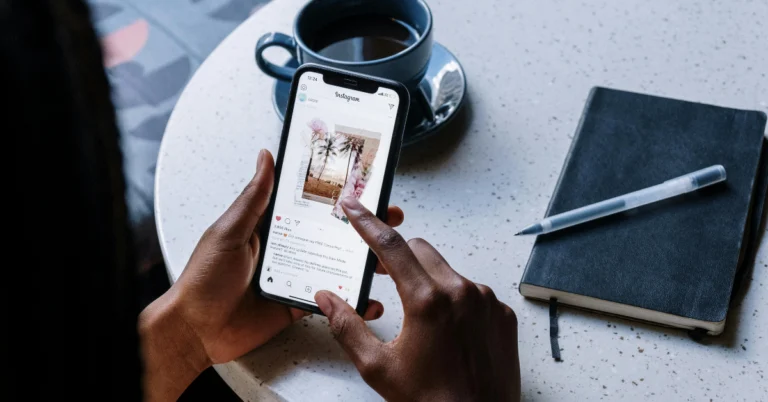
Since last year, Instagram has added a slew of features to its messaging service, bringing it up to speed with popular instant messaging platforms like WhatsApp and Telegram. In 2024, Instagram DMs were integrated with Meta AI, which opened the door to a whole lot of new experiences on the platform. Alongside AI integration, the messaging platform was also updated with a new ‘Edit’ option – something users had been rallying for a long time. Now, users can HD images to each other over DMs. Here’s how you can send HD pictures to friends and groups on Instagram DMs. Read Also: 11 Ways to Fix ‘WiFi Authentication Error’ on Android

Can’t see the HD option in Instagram DMs? Here are some fixes

If you cannot see the option to send HD pictures on the Instagram app on your phone, it’s because the social media platform is rolling out this feature in a phased manner. This means that not everyone will get access to this feature immediately. The platform may choose to prioritise certain regions and users before making the feature available to everyone. If your friends can access this feature, but you can’t find it on your device, these fixes might help.
  • Update the Instagram app on your phone
  • Force stop the app and restart it
  • Clear the app’s cache
  • Uninstall and reinstall your app
  • Log out of your account and log back in

Send HD pictures in Instagram DMs

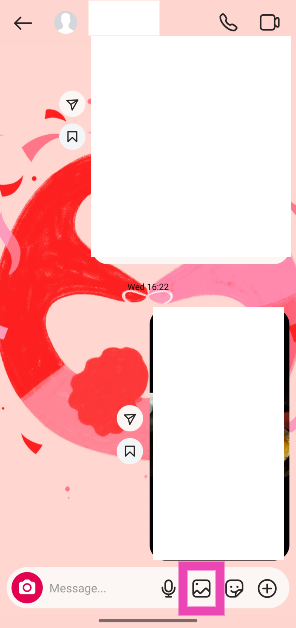
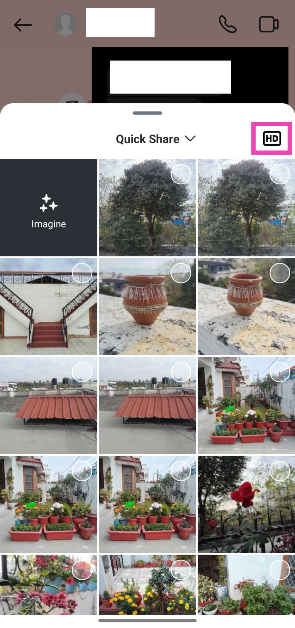
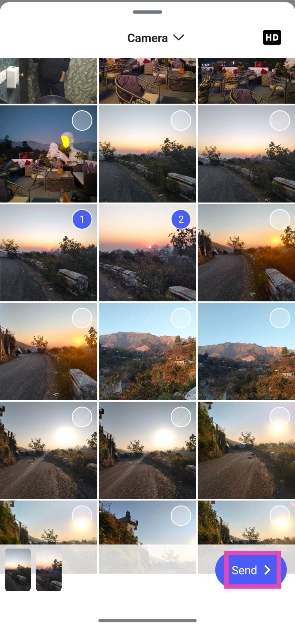
Step 1: Launch the Instagram app on your phone and swipe left to access your DMs. Step 2: Open a conversation. Step 3: Tap the picture icon to select images from your phone’s gallery. Step 3: Tap the picture icon to select images from your phone’s gallery. Step 4: Before you select the images, hit the HD icon in the top right corner of the popup page. Tap on Try it. Step 4: Before you select the images, hit the HD icon in the top right corner of the popup page. Tap on Try it. How to send HD pictures on Instagram DMs? Step 5: Select the images you wish to send from your phone’s gallery. Step 5: Select the images you wish to send from your phone’s gallery. How to send HD pictures on Instagram DMs? Step 6: Hit Send.

Frequently Asked Questions (FAQs)

How do I send high-quality pictures on Instagram DMs?

Go to your Instagram DMs, open a conversation, tap the picture icon at the bottom of the screen, and hit the HD icon. Select the images you want to send from your phone’s storage and hit ‘Send’.

Does sending pictures on Instagram DMs reduce their quality?

Yes, the quality of images takes a hit when you send them over an instant messenger, including Instagram DMs. However, Instagram now lets you send pictures in HD quality over DMs.

Why are photos blurry on Instagram?

Your Instagram photos and stories look blurry because they’ve been compressed to meet the platform’s size requirements. Make sure the image you’re uploading is within the file size guidelines so it does not undergo compression.

Does Instagram support 4K videos?

Instagram supports 1080p resolution videos for Reels, stories, and posts. It does not support 4K videos yet.

How to send HD photos on WhatsApp?

Open a chat, tap the camera icon at the bottom of the screen, select an image from your library, and hit the HD icon in the preview window before sending it. Read Also: How to restart a Windows 11 PC or laptop in Safe Mode?

Final Thoughts

This is how you can send HD pictures to anyone on Instagram DMs. While you’re here, check out how you can use Trial Reels on Instagram to test your content among a larger audience before publishing it for your followers. If you have any questions, let us know in the comments!

12 Ways to Fix ‘WiFi Authentication Error’ on Android

0
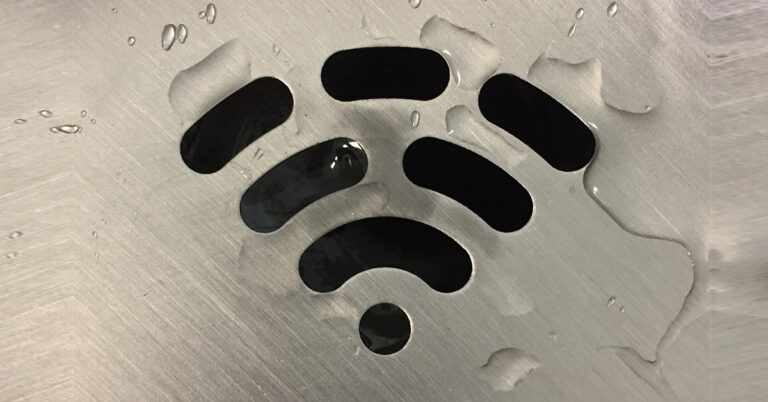
Have you ever tried connecting to a WiFi network and encountered an authentication error? Nine times out of ten, this error is due to an incorrect password. However, this isn’t the only issue that can spring this error on you. Figuring out the root cause of this error can take some time. So, strap in as we guide you through the causes of the ‘WiFi authentication’ error on your Android phone and show you how to fix it. Read Also: National Tourism Day 2025: Best travel gadgets for the perfect vacation

What causes the ‘WiFi authentication error’ on Android?

As we mentioned earlier, entering an incorrect WiFi password on your Android phone triggers an authentication error most of the time. Here are some other reasons that may cause the same problem.
  • The WiFi network’s password was updated recently
  • Inconsistencies with the router’s security protocol
  • The router has exceeded the device limit
  • Network issues on your phone
  • Background software issues on your phone
  • Hardware issue with the router

Check the password 

password If you’re connecting to a WiFi network for the first time and it springs the authentication error at you, chances are that you entered the wrong password. Tap the network name and re-enter the password. Double-check the validity of the password before entering it.

Use the QR code to connect to a network

Top 6 Easy Ways Scan QR Codes with iPhone If a WiFi network’s password is long and complicated, there is a possibility of errors creeping in when you manually type it out. To bypass this issue, use the QR code for the password to connect to it. You will need a smartphone that is already connected to the network for this method. Go to Settings>WiFi>Network Name and tap on ‘Share’. A QR code will appear on the screen. Scan this QR code on the other phone by going to Settings>WiFi and tapping the barcode icon on the top right corner of the screen.

Forget the network

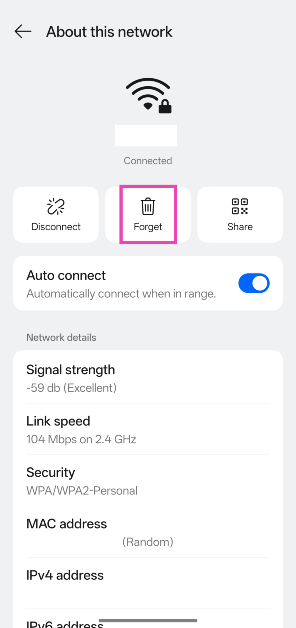
If you changed your WiFi password but did not update it on your phone, it will display the ‘WiFi Authentication Error’. Forget the WiFi network and enter the new password to connect to it again. Here’s how. Step 1: Go to Settings and tap on WiFi. 12 Ways to Fix ‘WiFi Authentication Error’ on Android Step 2: Hit the i icon next to the WiFi network. Step 2: Hit the i icon next to the WiFi network. Step 3: Hit Forget. 11 Ways to Fix ‘WiFi Authentication Error’ on Android Step 4: Go back and select the WiFi network. Step 5: Enter the new password.

Toggle the Airplane Mode on and off

Turn on the Airplane Mode You can refresh your phone’s network connection by toggling the Airplane Mode on and off. Enabling this mode turns off the cellular, mobile data, WiFi, and Bluetooth reception on your phone. Swipe down from the status bar and hit the airplane tile in the Quick Settings Menu. Wait for 10-15 seconds and hit the tile again to disable Airplane Mode.

Restart your phone

Restart Your Phone Background software issues can often cause the ‘WiFi Authentication Error’ on your Android phone. The good news is that a simple restart can fix this. Press the volume up button with the side key to access the power menu. Tap the ‘Restart’ icon or move the slider towards it to reboot your smartphone.

Restart the router

D-Link-AX1500-smart-router-R15-rear It is possible that the fault does not lie with your phone but with the router. If restarting your phone does not fix the WiFi authentication error, you should restart the router. Turn off the switch to the power outlet to which the router is connected. Pull out the plug and wait for 10-15 seconds. Plug the router back in and turn on the switch.

Change the security protocol

Your WiFi router has access to different levels of security protocols, depending on the kind of encryption you want. If you come across an authentication error on your WiFi network, the fault may lie with the security protocol. Go to your router’s management portal or app to change its security protocol to WPA/WPA2/WPA3.

Change from DHCP to Static

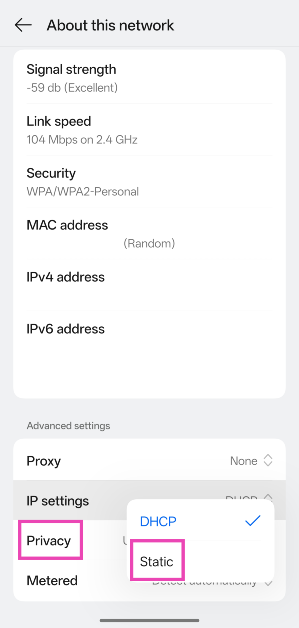
Step 1: Go to Settings and select WiFi. 11 Ways to Fix ‘WiFi Authentication Error’ on Android Step 2: Tap the i icon next to the WiFi name. 11 Ways to Fix ‘WiFi Authentication Error’ on Android Step 3: Scroll down and hit IP settings. Select Static. 11 Ways to Fix ‘WiFi Authentication Error’ on Android

Change the router 

D-Link-AX1500-smart-router-R15 review 11 Ways to Fix ‘WiFi Authentication Error’ on Android If you’re facing an authentication error on multiple devices, the fault likely lies with the router. Replace your router with another unit to check if it fixes the problem. If the new router works fine, take the older router to a repair centre to get it fixed.

Check the number of devices connected to your WiFi network

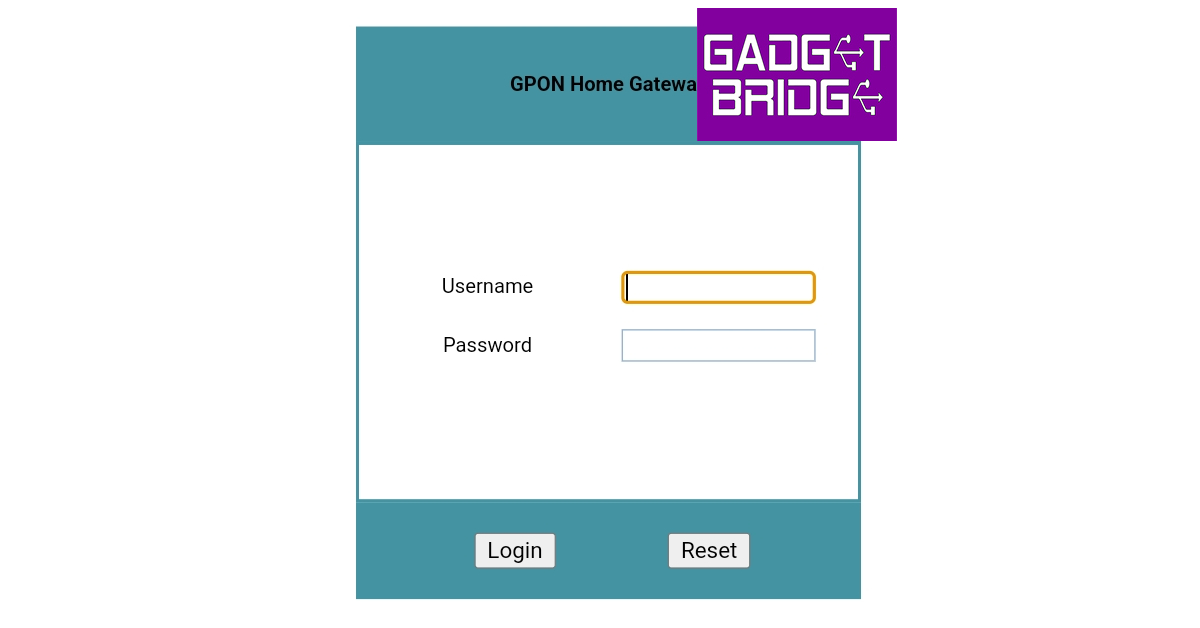
Step 1: Type http://192.168.1.1/ in your web browser and hit Enter to access your WiFi router‘s gateway page. Alternatively, go to your router’s management app. Step 2: Log in using the valid credentials. This will lead you to the router’s management portal. wifi router history android app Step 3: Go to the log page to view the WiFi router’s history and Device Management to check the currently connected devices. If the number of supported devices has exceeded its limit, you won’t be able to connect new devices to the network. Step 6: Go to the log page to view the WiFi router history. wifi router history android app

Reset network settings on your phone

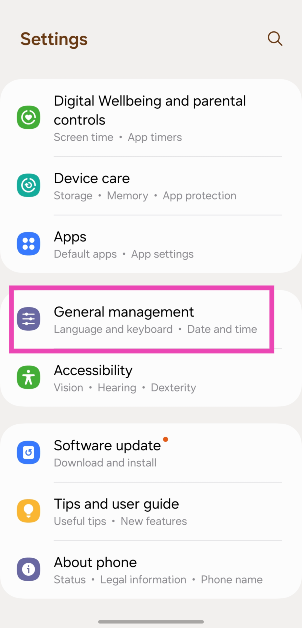
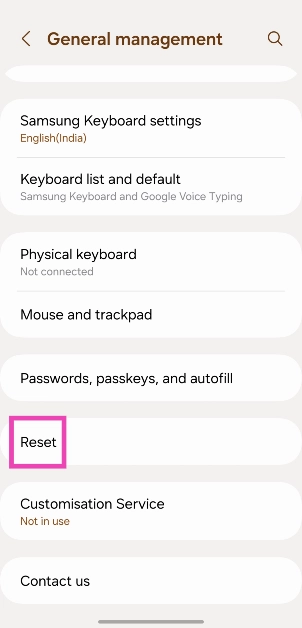
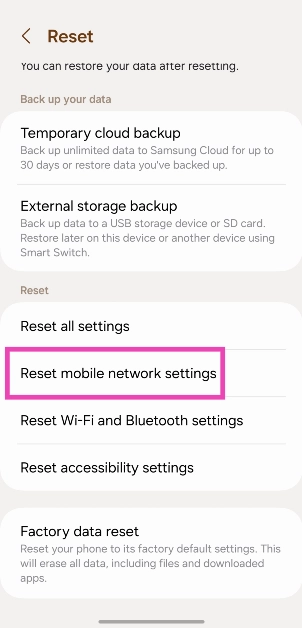
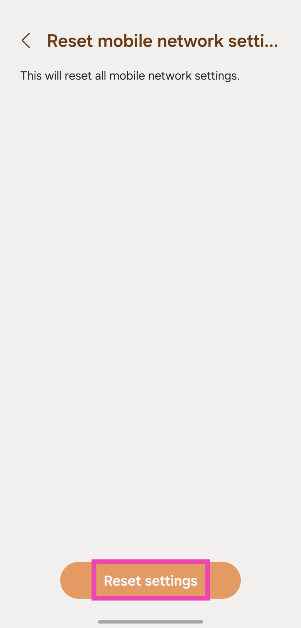
Step 1: Go to Settings and select General Management. Step 1: Go to Settings and General Management. Top 8 Ways to Fix an Android Phone That Can't Make or Receive Calls Top 8 ways to fix the ‘Emergency Calls Only’ error message on Android (2024) Step 2: Scroll down and select Reset. Step 2: Tap on Reset. Top 8 Ways to Fix an Android Phone That Can't Make or Receive Calls Top 8 ways to fix the ‘Emergency Calls Only’ error message on Android (2024) Step 3: Tap on Reset Network Settings. Step 3: Select Reset mobile network settings. Top 8 Ways to Fix an Android Phone That Can't Make or Receive Calls Top 8 ways to fix the ‘Emergency Calls Only’ error message on Android (2024) Step 4: Select Reset Settings. Step 4: Hit Reset settings. Top 8 Ways to Fix an Android Phone That Can't Make or Receive Calls Top 8 ways to fix the ‘Emergency Calls Only’ error message on Android (2024) Step 5: Enter your PIN to confirm your selection.

Update your phone’s OS

Step 1: Go to Settings and select Software update. Go to Settings and select Software update. 10 top ways to fix unable to answer calls on Android phone Top 7 ways to fix ‘Microphone not working’ on an Android phone (2024) Top 6 ways to fix overnight battery drain on your Android phone (2024) Step 2: Tap on Download and install. tap on download and install 10 top ways to fix unable to answer calls on Android phone Top 7 ways to fix ‘Microphone not working’ on an Android phone (2024) Top 6 ways to fix overnight battery drain on your Android phone (2024) Step 3: Select Install now. Select Install now. 10 top ways to fix unable to answer calls on Android phone Top 7 ways to fix ‘Microphone not working’ on an Android phone (2024) Top 6 ways to fix overnight battery drain on your Android phone (2024)

Frequently Asked Questions (FAQs)

How to fix the WiFi authentication error on my phone?

Entering the correct password typically fixes the WiFi authentication error on your Android phone. You can also try restarting your phone and router, changing the IP setting from DHCP to static, and setting a different security protocol on the router.

Why can’t I connect to my WiFi network if the password is correct?

This error can arise when you’re trying to connect to a different bandwidth, which may have a different password. Make sure you select the correct WiFi bandwidth before entering the password.

What does the authentication error mean?

An authentication error means that your WiFi router could not establish a secure connection with your phone because you entered the wrong password.

How to reset a WiFi router?

The reset button is typically positioned at the back of the router. Press this button with a paperclip for 15 seconds to reset your router.

How do I auto-restart my WiFi router?

Go to the router’s web management portal, navigate to WiFi Setup>WiFi Schedule, turn on the toggle switch for ‘Enabled’, and enter the day and time for reboot. Read Also: Lava announced Republic Day deals on smartphones and accessories

Final Thoughts

This is how you can fix the ‘WiFi authentication error’ on your Android smartphone. While you’re here, check out how you can access your home router remotely. If you have any questions, let us know in the comments!

National Tourism Day 2025: Best travel gadgets for the perfect vacation

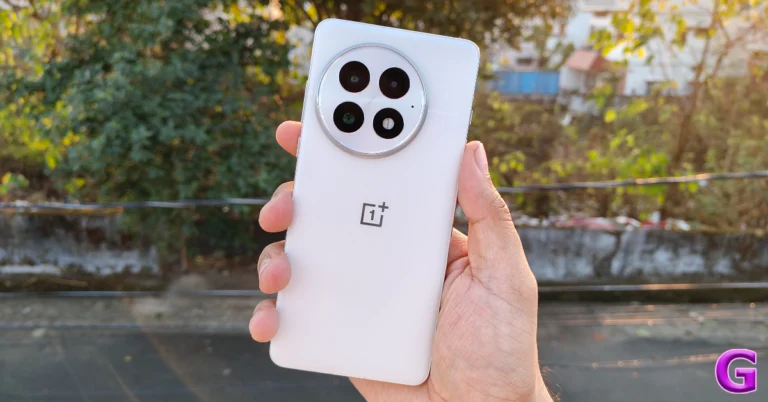
January 25 is observed as the National Tourism Day in India. This year’s theme for the National Tourism Day is “Tourism for Inclusive Growth”. Tourism is the primary driver of the economy in many regions of India. As a tourist, you should look to engage with local communities and buy from local businesses. India is home to a diverse and colourful range of travel experiences. You can be on the road for a month and barely scratch the surface. While travelling across the country, you need some essential gadgets in your backpack. For National Tourism Day 2025, here are our top 10 travel gadgets.  Read Also: OnePlus 13 Review: The sensible flagship

Ambrane MagSafe Wireless Power Bank

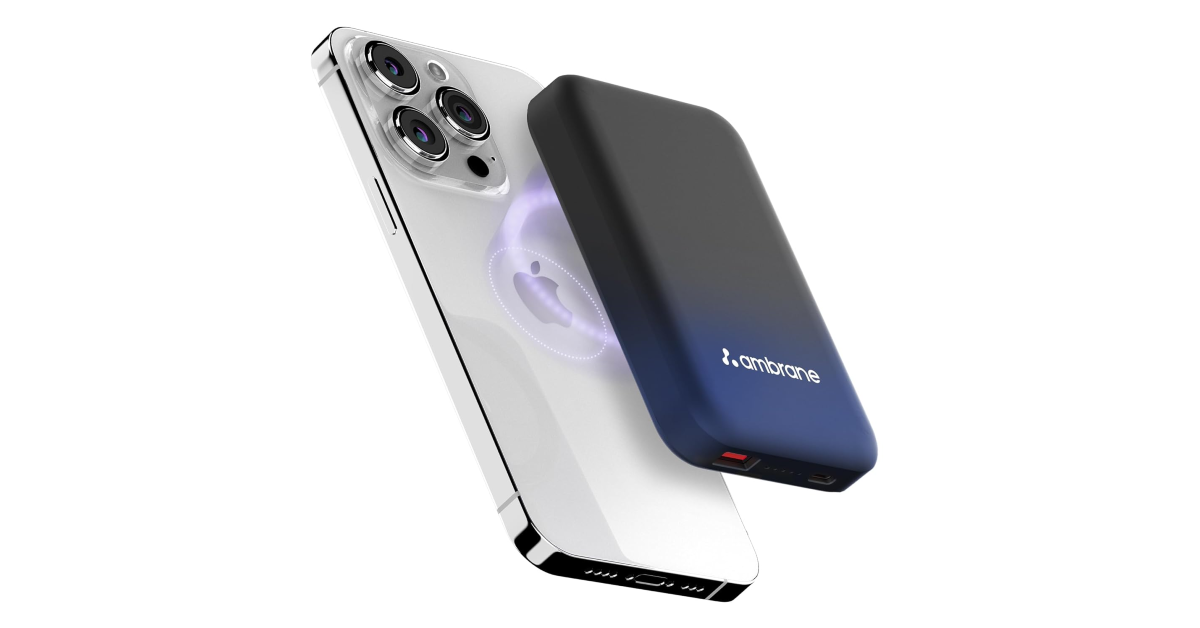
Ambrane MagSafe Wireless Power Bank A power bank is an essential travel accessory that everyone should have in their backpack. While there are innumerable options out there, the Ambrane MagSafe Wireless Power Bank is our pick of the lot. The reason is its versatility. It can snap onto the back of your iPhone or Qi-enabled Android smartphone and wirelessly charge it at a constant 15W speed. There’s support for 22W Type-C charging as well. The power bank can hold 10,000mAh of charge, which is capable of fully charging an average smartphone twice. To top things off, it has a sleek profile and a premium rubber finish which lends it an exquisite in-hand feel. Pros
  • Wireless charging
  • Sleek profile
Buy on Amazon for Rs 1,308

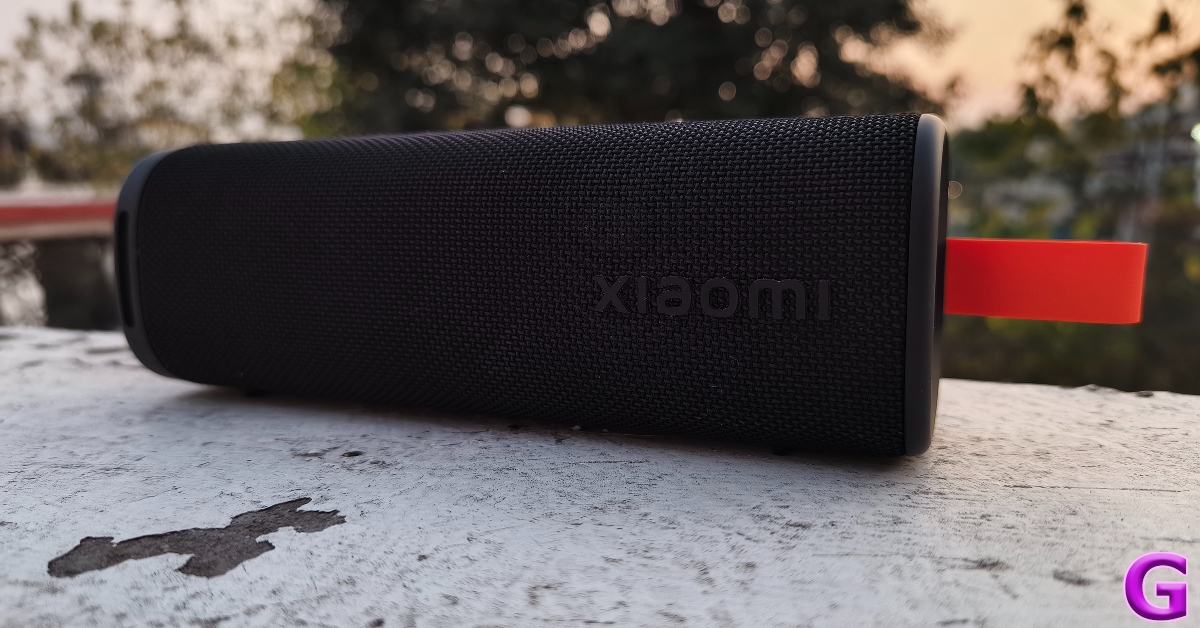
Xiaomi Sound Outdoor

Xiaomi Sound Outdoor Speaker Review: Brings life to the party! If you’re planning to spend most of your vacation on a beach, you need a good Bluetooth speaker that remains unfazed upon exposure to dust and water. The Xiaomi Sound Outdoor is rated IP67 for dust and water resistance, which means it can survive water splashes and beach sand. The 20W woofer and 10W driver deliver a combined audio output of 30W on this portable speaker. There are two passive woofer radiators on this speaker, positioned on either side of the grille. These radiators bring the thump and make the listening experience all the more enjoyable. If you want to increase the output, you can link two or more of these speakers together with just one press of a button. Read our Xiaomi Sound Outdoor review to learn more about its performance. Pros
  • IP67 rated
  • Great audio output
Buy on Flipkart for Rs 4,000

Apple iPad Mini (2024)

Apple iPad Mini 2024 Review The iPad Mini is the perfect travel companion for long flights and road trips. Its 8.3-inch IPS LCD panel is perfect for watching movies on the go and its compact profile makes it very portable. The tablet weighs just 293g, which isn’t a lot of extra weight to carry. Powering the iPad Mini is Apple’s in-house A17 Pro chipset. This processor is powerful enough to run Apple Intelligence features. There are 2 cameras on 2024’s iPad Mini – a rear-facing 12MP wide lens and a front-facing 12MP ultrawide lens. The mini canvas supports Apple Pencil Pro, which is good news for budding artists. The 5,078mAh battery under its hood ensures 10 hours of video playback. Read our review of the iPad Mini to know more. Pros
  • Compact
  • Apple Intelligence
Buy on Amazon for Rs 47,999

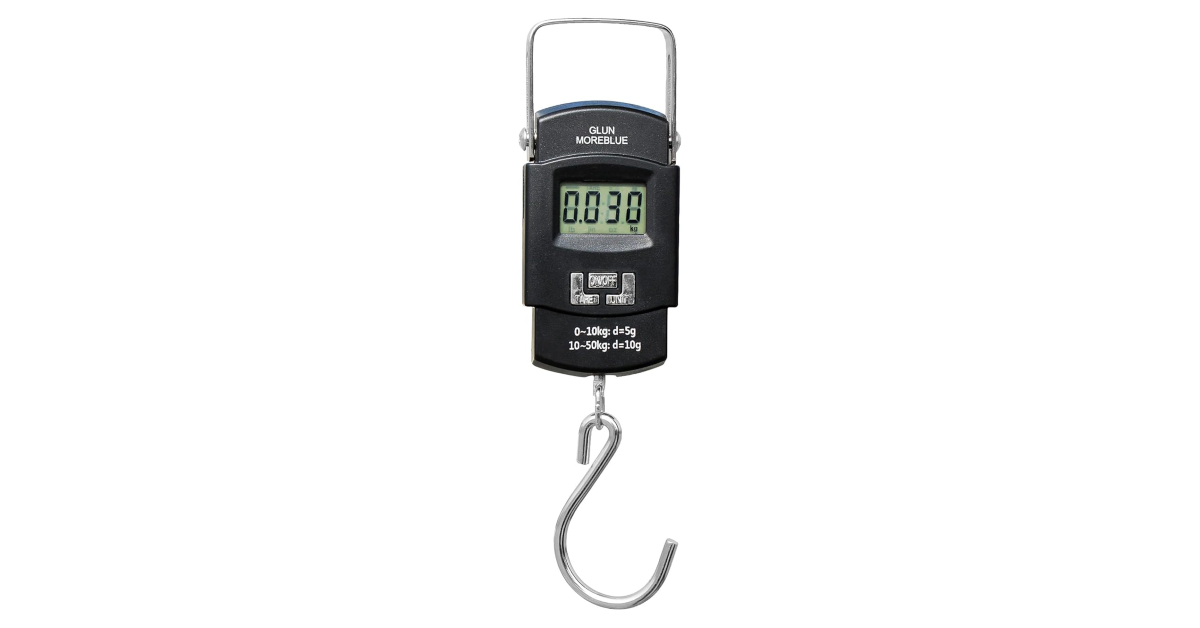
Glun Luggage Weighing Scale

Glun Luggage Weighing Scale This little travel gadget can save you extra luggage fees. If you have a habit of going on a shopping spree on your vacations, you need to check the weight of your luggage before checking into the airport. The Glun luggage weighing scale has a weighing capacity of up to 50kg and its readings are accurate up to 10g. This is pretty good for a travelling scale. Its backlit LCD panel displays the weight of the object you’re measuring. It auto shuts off when the scale is not in use – thereby preserving its battery life. Its compact form factor makes it highly portable. You can slip it into your suitcase or travel backpack and forget about it. Pros
  • Accurate readings
  • Portable
Buy on Amazon for Rs 249

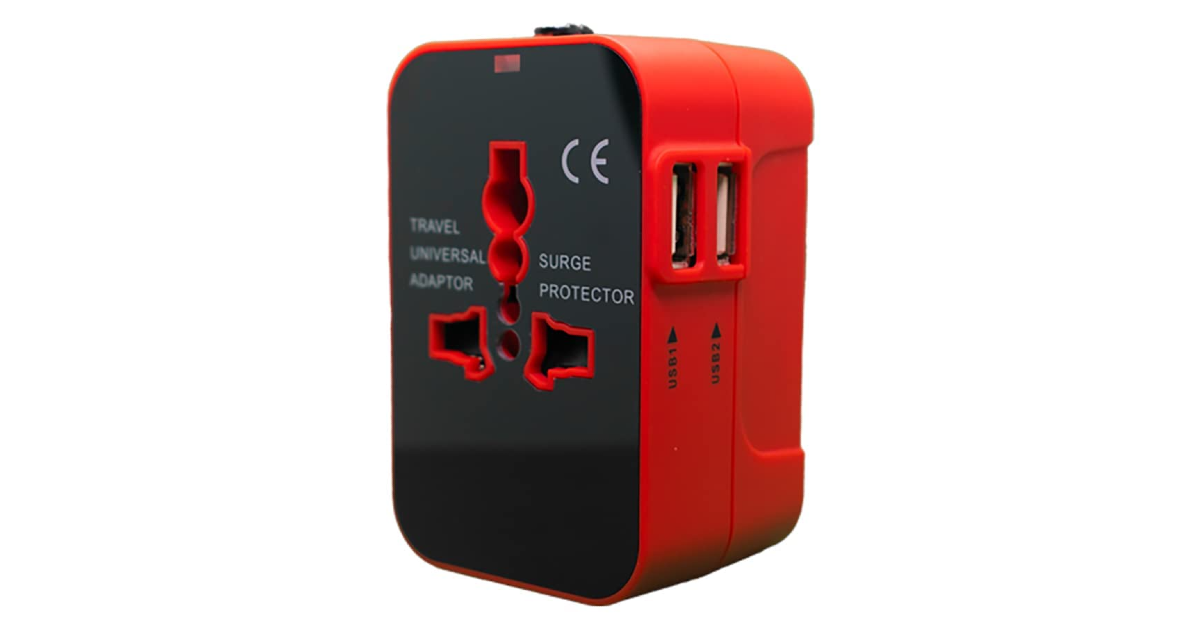
rts Universal Travel Adapter

rts Universal Travel Adapter If you’re travelling overseas, a universal travel adapter is one gadget that you should certainly have in your arsenal. The rts universal travel adapter is compatible with power outlets in more than 200 countries. This includes the USA, England, New Zealand, China, Japan, and more. The best part is that you don’t need to attach your smartphone’s power brick to this adapter as it already has 2 USB ports. On the safety front, this travel adapter has built-in fuse protection and safety shutters. The LED power indicator lets you know when the device is in use. Pros
  • Compatible with almost all power outlets across the world
  • USB ports
Buy on Amazon for Rs 589 

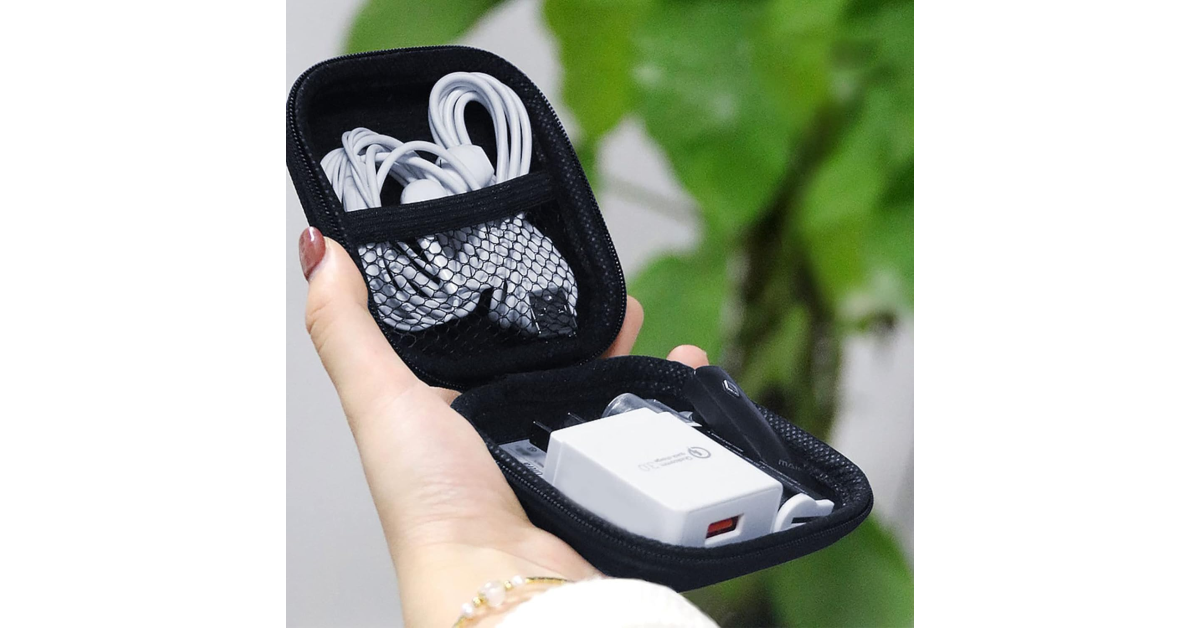
Wolpin Portable Travel Organiser

Wolpin Portable Travel OrganiserTravelling with multiple gadgets means that you’ve got to carry different chargers for all of them. While your iPhone may have USB Type-C charging, your AirPods Max may still be stuck with a Lightning port. Unorganised cables can occupy a lot of space in your suitcase. Not to mention, keeping track of them is a big hassle. This is where the Wolpin portable travel organiser comes into play. This handy pouch can store your data cables, wired earphones, adapters, and pen drives. It is completely waterproof and is made out of high-quality fabric. You can comfortably slide this accessory into your backpack, purse, or any travel bag. Pros

  • Portable
  • Waterproof
Buy on Amazon for Rs 228

Apple AirTag

Update the AirTag’s firmware - Apple AirTag 2025 National Tourism Day 2025: Best travel gadgets for the perfect vacation Scared of losing your luggage? Place an AirTag in it. Apple’s location tracker is highly accurate and reliable. If you’ve got multiple layovers on your journey, there is always a possibility for the airline to lose your luggage. An AirTag will keep you updated with the live location of your stuff. You can use this coin-shaped location tracker for keys and wallets too. Your location history is never stored on the device. The Apple AirTag is rated IP67 for dust and water resistance. Its replaceable battery lasts over a year.  Pros
  • Super compact
  • Accurate location tracking
Buy on Amazon for Rs 3,190

InstaCuppa Portable Electric Kettle

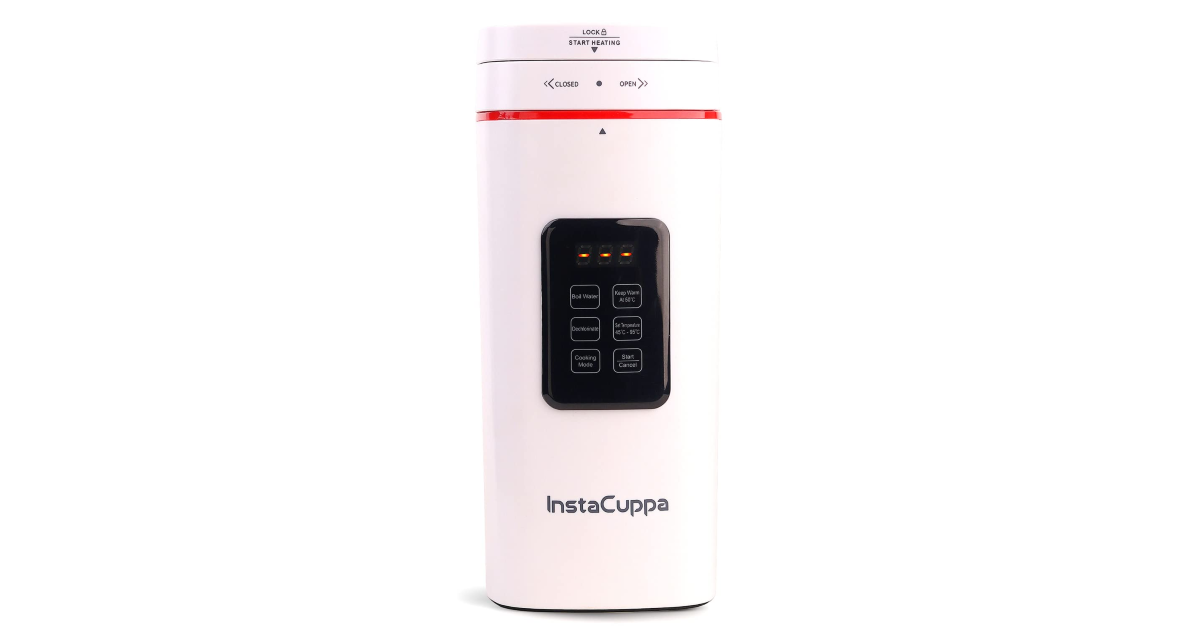
InstaCuppa Portable Electric Kettle National Tourism Day 2025: Best travel gadgets for the perfect vacation If you can’t go anywhere without a cup of tea, you should invest in the InstaCuppa. This portable electric kettle can hold up to 500ml of water and bring it to a boil within 6 minutes. Its interior is made out of stainless steel, making it rust and odour-free. The kettle weighs 800g, which is not a lot of weight for a device of its utility. It can slip into most backpacks and travel bags. The InstaCuppa comes with an attached power cord. If you’re ambitious enough, you can even make instant noodles in this kettle. Pros
  • Portable
  • Stainless steel interior
Buy on Amazon for Rs 3,000

Sony ULT Wear

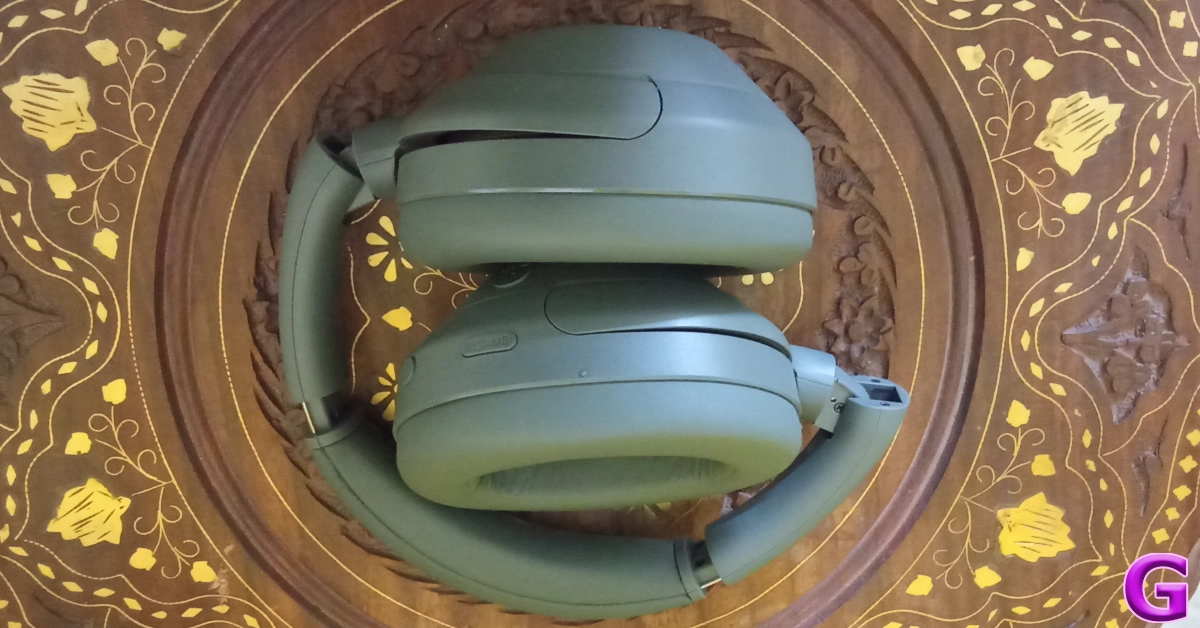
Sony ULT Wear (WH-ULT900N) Review: Performance National Tourism Day 2025: Best travel gadgets for the perfect vacation A good pair of noise-cancelling headphones is one of the best travel gadgets you can buy for long vacations. Not only can they curate a high-end music listening experience, but they can also nullify the noise emanating from the airplane engine. This comes in handy if you find it hard to fall asleep while flying. Sony’s new ULT Wear headphones fit the bill perfectly. These headphones have foldable earcups, which reduces the headphones to half their size. The portable hard case provided with the headphones can easily slip into your luggage without occupying a lot of space. The 40mm drivers in the earcups produce a delightful soundstage and the dedicated ULT button amps up the bass output. These headphones can last up to 50 hours on a single charge. Read our Sony ULT Wear review to learn more about them.  Pros
  • Foldable design
  • Good ANC
Buy on Amazon for Rs 14,600

Baishun Bluetooth Transmitter

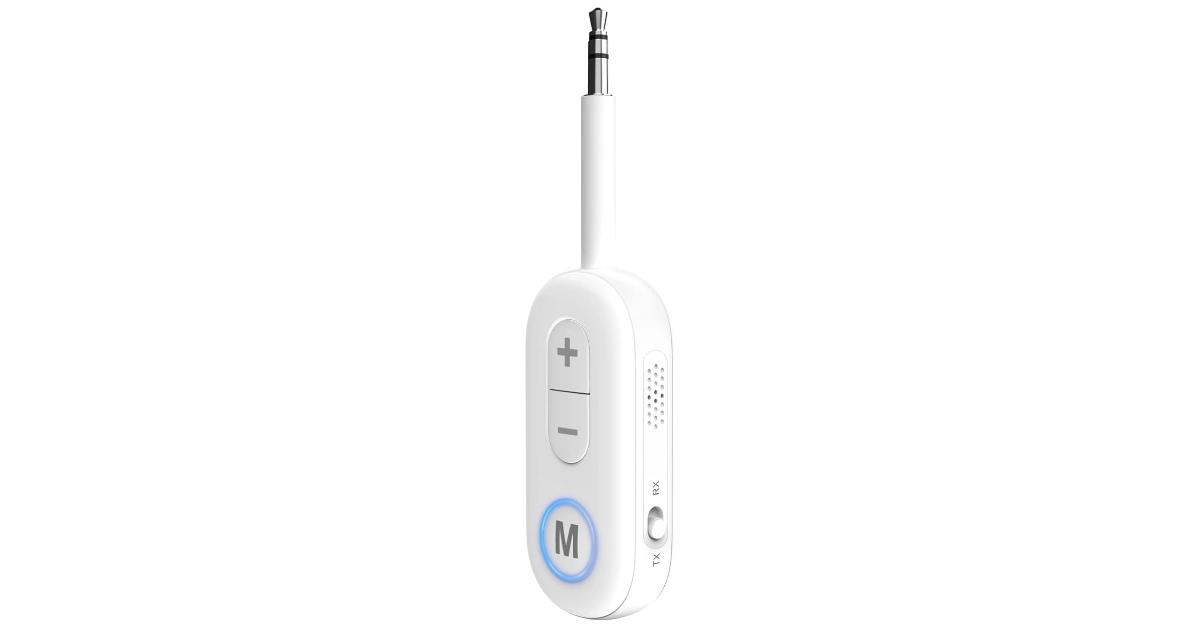
Baishun Bluetooth Transmitter National Tourism Day 2025: Best travel gadgets for the perfect vacation While most smartphones may have gotten rid of the headphone jack, eliminating the need to carry wired headphones, airline entertainment systems still haven’t made the switch. If you don’t want to use the wired headphones provided by the airline, get the Baishun Bluetooth transmitter. This device plugs into the 3.5mm headphone jack and transmits the audio to your wireless earbuds via Bluetooth. Its built-in battery offers 12 hours of playtime. You can even use it on your TV, car stereo, PC, and other devices. Pros
  • Portable
  • 12-hour battery life
Buy on Amazon for Rs 2,140 Read Also: Acer unveiled Aspire 3 compact and lightweight laptop in India

Final Thoughts

These are our top 10 travel gadgets for National Tourism Day 2025. While they are not strictly ‘gadgets’ you should look into investing in neck pillows and ergonomic backpacks before embarking on your journey. If you think we missed out on an essential travel gadget, let us know in the comments!

Garena Free Fire Max Redeem Codes Today 25 January 2025: Here is how to claim them

Garena Free Fire Max is a battle royale game with regular awards and tournaments to keep players interested. If you play Garena Free Fire, you should be aware of the redeem codes that are released on a daily basis. However, because the battle royale game is banned in India, players from other countries can use the Free Fire Redeem codes daily. If you’re unfamiliar with the Garena Free Fire redeem codes or don’t know how to get them, we’ve put together a step-by-step guide to help you redeem them. Check out Garena Free Fire Max Redeem Codes for 25 January 2025. The Free Fire Max redeem codes are a great way to get free stuff. These are 12-digit codes that contain alphabets and numbers, as well as an expiration date and time. Because the Garena FF redeem codes cannot be used more than once, you should hurry to the redemption page to claim your free reward before someone else does. To get a free reward, all you have to do is go to reward.ff.garena.com/en, which is the official redemption page. Also, keep an eye on this space for daily updates on Garena Free Fire Max redemption codes and rewards. Also Read: Sennheiser Accentum Plus wireless headphones with Hybrid Adaptive Noise Cancellation launched

Garena Free Fire Max Redeem Codes Today 25 January 2025

FW2NFDX4CPXT FFNFSXTPVQZ9 FFMGY7TPWNV2 BLFY7MSTFXV2 FFNRWTQPFDZ9 FCSP9XQ2TNZK GXFT7YNWTQSZ RDNAFV2KX2CQ FFXT7SW9KG2M FFKSY7PQNWHG FFNGY7PP2NWC FWSKTXVQF2NR NPCQ2FW7PXN2 FG4TY7NQFV9S XF4SWKCH6KY4 FF4MTXQPFDZ9

How to Get Free Fire Max Redeem Codes for Garena on 25 January 2025?

  • Visit the Garena Free Fire Max game’s official website at reward.ff.garena.com.
  • Use your Facebook, Google, VK, Apple ID, Huawei ID, or Twitter account to log in.
  • You’ll be taken to a valid redemption code (s)
  • Copy and paste the 12-digit redemption code into the text box.
  • On the screen, a dialogue box will appear.
  • ‘Ok’ should be selected.
For the latest gadget and tech news, and gadget reviews, follow us on Twitter, Facebook and Instagram. For newest tech & gadget videos subscribe to our YouTube Channel. You can also stay up to date using the Gadget Bridge Android App. You can find the latest car and bike news here.

NYT Wordle Answer and Hints Today (January 25)

Are you looking for today’s Wordle for January 25, 2025? The problem is difficult to solve, so if you need assistance, we’ve included hints and the answer to the January 25 Wordle.

Hints and Answers for Today’s Wordle January 25

Before answering directly, please check the January 25 Wordle Hints first. Hint 1: Today’s Wordle answer includes one vowel. Hint 2: The answer for today has a repeating letter. Hint 3: Firm and fresh or new

What word does today’s Wordle begin with?

Do you need help with today’s Wordle answer’s initial letter? The first letter in today’s Wordle is “C”

Today’s Wordle Answer January 25 #1316

The answer to Wordle #1316 on January 25, 2024, is — CRISP Also Read: Ranveer Allahbadia got his YouTube Channels back, videos restored

What is Wordle?

Wordle: A Five-Letter Word Guessing Game • The game allows six guesses of a five-letter word. • Provide feedback on guessed letters’ placement in the puzzle. • The New York Times purchased the game in 2022. • Created by Josh Wardle for his partner, narrowing down 12,000 English words to 2,500. • Named after the word “word.”

How To Play Wordle?

Wordle is a New York Times word puzzle game that allows users to guess a five-letter word in six attempts. The letters are highlighted in Yellow and Green, indicating whether the word is present in the answer or not, and Green letters indicate the correct guess. Also Read: Samsung Galaxy Tab S10+, Galaxy Tab S10 Ultra with Galaxy AI launched in India

Wordle Tips and Tricks

  • Select a powerful starting word: Avoid using unusual words, as they frequently do not match common letters. A good opening word has plenty of benefits.
  • Repeating letters: Don’t be afraid of repeating letters; they appear frequently in words. The answer may contain one or two repeated letters.
  • Use the Wordlebot: The NYT’s Wordlebot analyses and compares replies to itself. This challenge can assist you enhance guessing skills and highlight areas for development.

Amazon Quiz Answers Today 25 January 2025: Participate to win Up To Rs 500 Amazon Pay Balance

25 January 2025: New Amazon Quiz is now available. Customers from different parts of the country are participating in the daily quiz. The quiz starts at midnight today and will be live until 11:59 PM tonight. By successfully answering every question, participants in the quiz have the chance to win wonderful rewards. Up to Rs 500 Amazon Pay Balance is up for grabs to participants today. One wrong answer could eliminate you from the quiz. You have a chance to win up to Rs 500 Amazon Pay Balance if you successfully answer every question. Users of the app only have the opportunity to take the quiz. Check Out 25 January 2025 Amazon Quiz Answers.

Are you not able to find Amazon FunZone? Click below and participate.

Click here to enter the Amazon FunZone Quiz and play today. Amazon Quiz Today Prize: Rs 500 Amazon Pay Balance Quiz Date: 25 January 2025 Daily Timing: 12 AM to 11:59 PM Previous Amazon Quiz Winners Announcement: Today 12 PM Noon

Amazon Quiz Answers Today 25 January 2025: Win Up To ₹ 500 Amazon Pay Balance

Question 1: In 2024, who became the youngest person to win two Oscars? Answer: Billie Eilish Question 2: The D. B. Patil International Airport is located in which place? Answer: Navi Mumbai Question 3: Which country had the first-ever married couple to serve as flag bearers at the Paris Olympic Opening Ceremony? Answer: Romania Question 4: When was this app launched? Answer: 2011 Question 5: Which is the smallest monkey in the world? Answer: Pygmy marmoset

How To Play Amazon Quiz Today

Only app users are eligible to play the Amazon quiz every morning from 12 AM to 11:59 PM. The quiz is not available on the desktop. For those who are unaware of how to play the Amazon quiz, below are the steps, you can follow to take the quiz.
  • First, download the Amazon app from the Google Play Store or App Store or go here to download the Amazon App
  • Now fill in the required information through the Sign-Up option.
  • To find the Amazon Quiz banner, log in to the Amazon app and scroll down to the home screen.
  • Tap on the Amazon Quiz banner and tap on the Start button to start the Quiz.
  • Now you will get 5 questions and you need to answer them correctly. One wrong answer will eliminate you from the Quiz.
  • After answering all the questions correctly you are now eligible for a Lucky Draw.
  • The previous winner’s name will be announced today at 12 PM.

Amazon Daily Quiz Answers from the previous few days.

Here are all the answers from the previous 5 days of the Amazon Daily Quiz and Contest.

Amazon Quiz Answers Today 24 January 2025: Win Up To ₹ 500 Amazon Pay Balance

Question 1: Complete the title of this 2024 film: “Chhota Bheem and the Curse of ________”. Answer: Damyaan Question 2: What regal title does Yaduveer Krishnadatta hold? Answer: Maharaja of Mysore Question 3: Which John Lennon and Yoko Ono song has been sung at six Olympic Opening Ceremonies, including Paris 2024? Answer: Imagine Question 4: Who is the architect of this cathedral? Answer: Filippo Brunelleschi Question 5: In the English edition of this game, how many word tiles are there? Answer: 100

Amazon Quiz Answers Today 23 January 2025: Win Up To ₹ 500 Amazon Pay Balance

Question 1: As per Guinness World Records, which national flag is the world’s oldest and longest-running flag? Answer: Denmark Question 2: Name this largest and most powerful rocket ever flown. Answer: Starship Question 3: Which of the major planets of our solar system is named for a Greek god, not Roman? Answer: Uranus Question 4: Which candy brand was the first to go to space? Answer: M&M Question 5: The character of Spock in Star Trek is from which planet? Answer: Vulcan

Amazon Quiz Answers Today 22 January 2025: Win Up To ₹ 500 Amazon Pay Balance

Question 1: The iconic Air India building at Nariman Point was handed over to which state government? Answer: Maharashtra Question 2: Which country topped the list of UN’s Human Development Index? Answer: Switzerland Question 3: Which Hollywood superstar portrays the role of MMA legend Matt Kerr in the biopic ‘The Smashing Machine’? Answer: Dwayne Johnson Question 4: Which sport first appeared in the Winter Olympics in 1936? Answer: Alpine skiing Question 5: This brand is the largest sportswear manufacturer in which continent? Answer: Europe

Amazon Quiz Answers Today 21 January 2025: Win Up To ₹ 500 Amazon Pay Balance

Question 1: Which film is based on Mstyslav Chernov’s daily news dispatches and personal footage of his own country at war? Answer: 20 Days in Mariupol Question 2: Ae Watan Mere Watan’ is inspired by which freedom fighter, instrumental in founding the underground Congress Radio? Answer: Usha Mehta Question 3: Which Indian musician’s biography, written by Oliver Craske, is titled Indian Sun? Answer: Ravi Shankar Question 4: Which Roman Emperor was fond of this fruit? Answer: Tiberius Question 5: In the beginning, what was this system called? Answer: Navstar

Amazon Quiz Answers Today 20 January 2025: Win Up To ₹ 500 Amazon Pay Balance

Question 1: Which director won his first directing Oscar in 2024? Answer: Christopher Nolan Question 2: Jane Fraser is the current CEO of which bank? Answer: Citigroup Question 3: Which Asian country’s passport has been rated the most ‘powerful’ in the world for 2024, according to the Henley Index? Answer: Singapore Question 4: Which state is the largest producer of this? Answer: Maharashtra Question 5: Which was the first country to make this drink? Answer: France

Amazon Quiz Answers Today 18 January 2025: Win Up To ₹ 500 Amazon Pay Balance

Question 1: The Tata Steel Chess tournament played in the classical format is being held in which country? Answer: Netherlands Question 2: The show ‘Criminal Justice’ stars which actor in the central character of lawyer Madhav Mishra? Answer: Pankaj Tripathi Question 3: The Amroha Dholak is a musical instrument from which state that got a GI tag in 2023? Answer: Uttar Pradesh Question 4: This ancient temple is located in which country? Answer: Egypt Question 5: This statue is located at which famous educational institution? Answer: IISC Bangalore

Amazon Quiz Answers Today 17 January 2025: Win Up To ₹ 500 Amazon Pay Balance

Question 1: Which of these West Indies bowlers took the wicket of Steve Smith with his first ball in Test cricket? Answer: Shamar Joseph Question 2: At the 2024 Emmy Awards which series won the award for Best Drama Series? Answer: Succession Question 3: Sharmistha Mukherjee has recently written a book titled ‘_____ My Father: A Daughter Remembers’. Fill in the blanks Answer: Pranab Question 4: Name the famous freedom fighter, whose statue is in the middle Answer: Bhagat Singh Question 5: Name this famous person who had cameos in several Marvel movies Answer: Stan Lee

Amazon Quiz Answers Today 16 January 2025: Win Up To ₹ 500 Amazon Pay Balance

Question 1: Which former champion did Caroline Garcia knock out in the first round of the 2024 Australian Open? Answer: Naomi Osaka Question 2: Lily Gladstone won the ‘Best female actor in a film- drama’ at the 2024 Golden Globes for which film? Answer: Killers of the Flower Moon Question 3: Nigar Shahji is the project director of which ISRO mission that was launched on 2nd September, 2023? Answer: Aditya- L1 Question 4: In which city is this famous museum located? Answer: Bilbao Question 5: This famous shoe brand was founded in which country? Answer: Germany

Amazon Quiz Answers Frequently Asked Questions (FAQs)

Where can I check the previous winners? Did I win how to check?

You can head over to this link on your mobile or desktop to check the winners of the Amazon Daily Quiz Contest.

How to Play Amazon Daily Quiz or Contest?

We have written an explainer above, you can refer to that.

When are the winners of the Amazon Quiz and contest announced or declared?

The announcement of today’s Amazon quiz winner will take place Tomorrow. As for the Special Quiz and “Spin & Win” Contest, the winners will be declared once the Quiz Contest comes to an end. To find out who the lucky winner is, you can refer to the Amazon Quiz Winners List or visit the Amazon Winners tab in the Amazon App.

How to participate in the Daily Amazon Quiz?

That is very easy, just got to the Amazon app and scroll to the bottom of the page and you will find the Quiz section. Click on it (usually it is called the fun zone) and you can enter the Amazon Today Quiz Contest. 

Are there any other quizzes or contests running on Amazon daily?

Yes, there are many running on a daily basis. These range from spinning the wheel to answering the questions correctly. All are located in the Fun Zone. 

What are the criteria for selecting a winner in the Daily Amazon Quiz?

When a qualified player submits correct answers to all the questions, they will automatically be entered into a lucky draw. This draw will include all participants who answered all the questions correctly. Amazon randomly selects the final winners from the pool of eligible participants who gave the right answers.

Which Types of Questions are asked within Amazon Daily Quiz?

These are very simple and straightforward questions. These are mainly related to general knowledge. 

Where should I look for Amazon Daily Quiz answers?

You can bookmark our website www.gadgetbridge.com as we will help you every day with the Amazon Daily Quiz. We bring you fresh answers every day for the Amazon Daily Quiz and Contest. 

What time does Amazon Announce previous winners?

The previous winner’s name will be announced today at 12 PM (noon).

OnePlus 13 Review: The sensible flagship

At a time when premium flagship smartphones fetch an exorbitant amount of money, OnePlus continues to impress with its specced-out devices that don’t require breaking the bank. Although the new OnePlus 13 demands a premium of Rs 5,000 over its predecessor, it makes some key upgrades that secure its place in the upper echelon of smartphones. The display is brighter than ever, there’s IP69 protection onboard, and the new 6,000 Si/C battery can easily power the smartphone for an entire day and then some more. Not to mention, it runs on the new Snapdragon 8 Elite processor, which is Qualcomm’s flagship processor for 2025. We got our hands on the smartphone soon after it was launched and have been using it as our daily driver for the last 10 days. Here is our comprehensive review of the OnePlus 13. Read Also: How to translate conversations on your OnePlus smartphone?

OnePlus 13 Review: Design and Display

Here’s what you’ll find inside the OnePlus 13’s retail box:
  • Smartphone
  • 100W power adapter
  • USB Type-A to Type-C cable
  • Opaque silicone case
  • SIM ejector
  • Phone seal stickers
  • Quick guide
OnePlus has ditched the outer panel around the camera module for a cleaner and minimal look. The circular camera module sits on the top left section of the back panel, with the Hasselblad branding to its right. This positioning causes the smartphone to wobble when it is placed on a flat surface. A centrally aligned camera unit would’ve eliminated the wobble but it would’ve come at the cost of the smartphone looking more like its Oppo and Vivo counterparts. While we do like the minimal look, it doesn’t exactly ooze a lot of personality. We used the Arctic Dawn (White) colour variant for this review, but the Midnight Ocean (Blue) and Black Eclipse (Black) variants are more exciting options. OnePlus 13 Review: Design and Display The changes to the form factor are certainly more welcome. The aluminium rails are now flatter and have smooth curves around the corners. The back panel and display curve slightly towards the frame. The matte finish on the back is soft to the touch and lends the smartphone an exquisite in-hand feel. The tri-state alert slider sits on its traditional spot on the left edge of the frame. The right edge houses the volume rocker keys and the side button. Up top lie the secondary microphone and speaker along with an IR blaster. The SIM tray, USB slot, primary microphone, and speaker grille are positioned on the bottom edge. design The familiar 6.82-inch LTPO AMOLED display remains largely unchanged from the previous iteration of the smartphone but it now packs an ultrasonic fingerprint sensor which is leagues ahead of optical units. A simple tap on the display is enough to unlock it – even when the lock screen isn’t active. The overall touch response of this display is very satisfying as it registers even the lightest of touches. The curves along the sides of the panel are very subtle compared to the OnePlus 12. We did not experience any accidental touches on the OnePlus 13 during the review period. display Out of the box, the display is set to an adaptive refresh rate. You can set it to 120Hz or dial it down to 60Hz from display settings. The resolution is set to 2,376 x 1,080p by default and can be taken up to 3,168 x 1,440p. There’s an option to set app-specific refresh rates as well. There are a couple of video enhancement features like Image Sharpener and Video Colour Boost to enhance the media-viewing experience. OnePlus 13 Review: Design and Display We streamed numerous movies and TV shows across popular OTT platforms while reviewing the OnePlus 13. The smartphone delighted us with excellent image quality and vivid colours. It offers a wide range of viewing angles, which means you don’t need to prop the phone in awkward positions when you’re lying on the sofa and binging on content. The stereo speaker setup produces a well-rounded audio output. An IP69 rating for dust and water protection is a very welcome change on the OnePlus 13. The smartphone can survive being underwater up to 1.5m for 30 minutes. This is a big improvement over the measly IP65 rating on the OnePlus 12.

OnePlus 13 Review: Performance and Cameras

Powering the OnePlus 13 is Qualcomm’s most powerful chipset on the market right now – Snapdragon 8 Elite. We ran a couple of benchmark tests on the smartphone. Here is how it performed:
  • Geekbench 6: 3,012 (single-core) | 8,901 (multi-core)
  • AnTuTu: 2,274,509
benchmark OnePlus 13 is available in 3 RAM (LPDDR5X) and Storage (UFS 4.0) variants:
  • 12GB + 256GB: Rs 69,999
  • 16GB + 512GB: Rs 76,999
  • 24GB + 1TB: Rs 89,999 (Available in the Black Eclipse colour scheme only)
The jump in performance facilitated by the Snapdragon 8 Elite processor is immediately noticeable on the OnePlus 13. The smartphone crushes any task you throw at it while juggling multiple things in the background. We ran YouTube and Reddit in multi-screen mode at the same time for an hour and did not hit a single roadblock. The performance remained smooth and jitter-free the entire time. The device does not break a sweat even with multiple apps running in the background. You can shoot an email while also using Google Maps navigation and streaming songs on Spotify without having to worry about any unexpected app crashes. The gaming performance is top-tier as well, even though OnePlus does not market its flagship offering as a gaming phone. During the review period, we played titles like Call of Duty and BGMI on the OnePlus 13 and were pleased with the performance. While it may not have a 144Hz display as the iQOO 13 (our review here), the 120Hz panel offered a brilliant touch response and ensured that even the most subtle touches were registered in the game. The smartphone’s Cryo-velocity cooling system ensured that thermal throttling was kept to a minimum. We noticed a slight warmth on the camera bump after 40 minutes of gameplay. OnePlus 13 Review: Performance and Cameras Software duties on the OnePlus 13 are handled by the Android 15-based OxygenOS 15. OnePlus has promised 4 major OS upgrades (which will take it up to Android 19) and 6 years of security patches. While this doesn’t match up to Samsung’s 7-year OS upgrade policy for its flagships, it is acceptable nonetheless. OxygenOS 15 offers a clean and snappy software experience on the OnePlus 13. There are a wide range of customisation options for the lock screen, home page, Always On Display, app layout, wallpaper, fingerprint sensor, and more. Privacy features like app lock, private safe, and system cloner put OxygenOS 15 ahead of its peers. While OxygenOS 15 has not taken a massive leap in terms of AI features, the ones that are present on the OnePlus 13 have been executed tastefully. There is no central hub for AI on the smartphone – the features are intricately woven into the software and are presented whenever necessary. For instance, you can pull out the sidebar while reading an article and use AI to summarise or dictate it. If you’re texting on WhatsApp, the ‘AI Reply’ feature on the sidebar reads the conversation and comes up with suitable replies. While it is quite neat to see a smartphone do this, it feels invasive. OnePlus 13 Review: Performance and Cameras The native photo editor can boost the details and enhance the clarity of images while also getting rid of unwanted objects, blur, shadows, and reflections. While AI removal works great for small objects, the results are inconsistent when the object is large or against a busy background. Google still leads the pack with its Magic Eraser. However, when it comes to battery performance, the OnePlus 13 is several leagues ahead of the flagship phones offered by Apple, Samsung, and Google. The fact that OnePlus was able to pack a 6,000mAh battery in this smartphone while also making it thinner than its predecessor is a testament to its excellent engineering. The Silicon-carbon battery in the smartphone is smaller than the Li-Po units and holds more charge. During the review period, we pushed the OnePlus 13 to its limits. This meant pinning the refresh rate at 120Hz, dialling up the screen resolution to 3,168 x 1,440p, using Always On Display, and applying the video-enhancing features. The smartphone coasted an entire day with ease, even after racking up a screen time of almost 9 hours. With a 4-hour screen time, we were left with a 40% charge at the end of the day. It is safe to say that OnePlus 13 is easily a 2-day phone. The 100W power adapter provided in the box can fully charge it in just over 30 minutes. OnePlus 13 Review: Performance and Cameras OnePlus 13 delivers a solid camera performance that is consistent across all 4 lenses on this device. The rear camera array comprises a 50MP Sony LYT-808 primary shooter, a 50MP ultrawide lens, and a 50MP telephoto lens with 3x optical zoom. Up front, the 32MP selfie camera is housed inside a punch-hole cutout. OnePlus 13 Review: Performance and Cameras camera The 50MP primary shooter captures sharp, detailed images in outdoor daylight conditions. The images are bright and showcase balanced colours. The dynamic range and contrast levels are on point. The smartphone preserves the natural look of the scene in the pictures. We like that the results don’t look overprocessed. However, when it comes to exposing the sky, we felt this sensor could have done a better job. The hues and the tones of the sky feel ever-so-slightly washed. primary camera
primary
Primary Shooter: Without Night Mode v Night Mode
In limited lighting conditions, this camera does a good job of brightening the subject and removing the grain from the images. It assigns accurate colours to the objects and the scene. However, in certain scenarios, it can overbrighten the areas with external light falling on them.
OnePlus 13 Review: Performance and Cameras
Ultrawide Lens
ultrawide
Ultrawide Lens
The 50MP ultrawide lens matches the performance of the primary shooter. The colours remain natural and the images pack a lot of detail. There is no visible softness in the images. However, in limited lighting, the images are a little grainy and dark.
Ultrawide
Ultrawide Lens
night mode
Ultrawide Lens: Without Night Mode v Night Mode
The 50MP telephoto lens produces excellent results at 3x optical zoom. The images are sharp, detailed, and vivid. Zooming in further produces good results as well. Even at the 20x mark, the images do not lose a lot of detail and maintain good composition. You quickly hit the point of diminishing returns around the 30x mark. The smartphone can zoom up to 120x and relies on AI processing to resolve the images.
OnePlus 13 Review: Performance and Cameras
1x v 3x
OnePlus 13 Review: Performance and Cameras
10x v 20x
OnePlus 13 Review: Performance and Cameras
60x v 120x
Portrait shots taken with the OnePlus 13 are well-focussed and showcase a good depth of field. The smartphone does a great job of separating the subject from the background and applying the appropriate level of background blur. Portraits taken at 3x zoom have incredible depth of field, as you can see in the images below.
portrait
Portrait Shots: 1x v 2x
OnePlus 13 Review: Performance and Cameras
Portrait Shots: 2x v 3x
The 32MP front-facing camera takes good selfies in a range of lighting conditions. The smartphone limits skin smoothening and tone correction in the processing phase, which is good to see. The selfie camera can shoot 4K videos at 60 and 30fps. The primary shooter can record in 8K at 30fps. Meanwhile, the ultrawide and telephoto lenses can record 4K footage. Read Also: Nothing teased upcoming smartphone sketches, likely Nothing Phone 3

Verdict

It may be early in the year to make this call, but the OnePlus 13 is one of the finest smartphones we’ll see in 2025. Its well-rounded performance along with an attractive price tag makes it a very easy recommendation from us. The Snapdragon 8 Elite chipset delivers a phenomenal performance on this smartphone. It can carry out any task you throw at it, no matter how power-intensive it may be. The software experience is clean and intelligent, the latter largely due to the tasteful AI features on offer. We found the design of the smartphone a little underwhelming, but that’s always a subjective aspect. The triple rear camera setup produces good results in a wide range of lighting conditions, but it remains a step behind the likes of Vivo and Google. This seems like a decent tradeoff when you take OnePlus 13’s pricing into account. However, what seals the deal for us is the smartphone’s battery performance. Its 2-day power backup will put your battery anxiety to rest.

OnePlus 13: Pros

  • Great hardware
  • IP69 rating
  • Smooth display (with ultrasonic sensor)
  • Powerful performance
  • 2-day battery life

OnePlus 13: Cons

  • The design could’ve been more exciting

How to translate conversations on your OnePlus smartphone?

0
OnePlus is rolling out its native translation app on the latest OxygenOS 15 update. This app is available on Oppo/ColorOS 15 phones as well. It is capable of live translating your conversations in real-time, much like Google Translate. If you ever find yourself in a place where people don’t speak your native language, this app will come to your rescue. Here is how you can live translate your conversations in real time using the Translate app on your OnePlus smartphone. Read Also: Acer unveiled Aspire 3 compact and lightweight laptop in India

What can the OnePlus Translate app do?

The Translate app on OnePlus smartphones is not a one-trick pony. Apart from basic translation, it can carry out a range of tasks on your phone. Here are the different modes you’ll find on the app. Translation mode: This basic mode translates the text you feed to the app. You can hit the mic button to dictate the text instead of typing it. Conversation: If you need help translating what you’re saying and relaying it to another person, use this mode. The app recognises two speakers and seamlessly translates what they’re saying to each other. You don’t need to switch the languages every time you need to translate them. Live translate: As the name suggests, this mode translates what you’re saying while you’re saying it. Screen: Can’t recognise the language on your screen? This tool will translate it in no time. This feature can be used to translate messages on WhatsApp.

Translate a conversation on a OnePlus smartphone

Step 1: Launch the Translate app on your OnePlus smartphone. Step 2: Tap on Conversation. Step 2: Tap on Conversation. Step 3: Select your language in the first dropdown menu. Tap on the next menu to select the listener’s language. Step 3: Select your language in the firStep 3: Select your language in the first dropdown menu. Tap on the next menu to select the listener’s language.st dropdown menu. Tap on the next menu to select the listener’s language. Step 4: Tap the mic icon and start speaking. Your sentences will be automatically translated. Step 5: Hit the play icon next to the translated message to play it out loud. Step 5: Hit the play icon next to the translated message to play it out loud. Step 6: Hit the mic icon again and let the listener respond in their native language. Step 6: Hit the mic icon again and let the listener respond in their native language. Step 7: Once they’ve stopped speaking, hit the play icon next to the translated message to listen to it. Step 8: Tap the chat bubble icon next to the ellipses to enable the split screen mode. Step 8: Tap the chat bubble icon next to the ellipses to enable the split screen mode. Step 9: Move your phone down so the listener can see the display. Your message will be translated and shown to the listener. You don’t need to turn your phone around for them to see it. Similarly, their response will be translated and shown on your end of the screen. Step 9: Move your phone down so the listener can see the display. Your message will be translated and shown to the listener. You don’t need to turn your phone around for them to see it. Similarly, their response will be translated and shown on your end of the screen.

Auto-translate the screen on your OnePlus smartphone

Step 1: Launch the Translate app on your OnePlus smartphone and tap on Screen. Step 1: Launch the Translate app on your OnePlus smartphone and tap on Screen. How to translate conversations on your OnePlus smartphone? Step 2: Hit the globe icon and select the source and target languages. How to translate conversations on your OnePlus smartphone? Step 3: Hit Done. Step 4: Launch an app and tap the translate icon at the bottom left corner of the screen. Hit Fullscreen to translate the entire page into your desired language. Step 4: Launch an app and tap the translate icon at the bottom left corner of the screen. Hit Fullscreen to translate the entire page into your desired language. How to translate conversations on your OnePlus smartphone?

Frequently Asked Questions (FAQs)

Do OnePlus phones have a live translation feature?

OnePlus offers a native translation app for its smartphones. This app is capable of live translating your conversations with another person. However, your smartphone must be updated to the latest OxygenOS 15 version to access this app.

How do I translate a conversation on my OnePlus smartphone?

Launch the Translate app, tap the ‘Conversation’ tile and hit the mic icon before speaking. The app will translate your sentences after every pause.

How do I translate my OnePlus smartphone’s screen?

Launch the Translate app, select ‘Screen’, and set the source and target languages. Hit ‘Fullscreen’ to convert the language on the screen.

Can I translate my WhatsApp messages?

You can translate your WhatsApp messages by using the screen translation feature on WhatsApp. The Google Translate app also has a similar feature that works on all messaging apps.

How much does the OnePlus 13 cost in India?

Prices for the OnePlus 13 start at Rs 70,000 in India and go up to Rs 90,000. Read Also: How to restart a Windows 11 PC or laptop in Safe Mode

Final Thoughts

This is how you can use your OnePlus smartphone to translate conversations in real-time. If you don’t like OnePlus’ native translation app, you can use Google Translate to carry out the same task. While you’re here, check out how you can use Google Translate’s dual-screen feature on the Pixel 9 Pro Fold. If you have any questions, let us know in the comments!

Nothing teased upcoming smartphone sketches, likely Nothing Phone 3

After the release of the Nothing Phone 2, Nothing plans to release several smartphones, including a flagship model. The company has hinted at an upcoming product on social media, the Nothing Phone 3, which would have a transparent rear and dual back cameras. The phone, which is reportedly Nothing’s first AI-powered platform venture, is anticipated to launch in Q1 2025. The phone’s launch date is confirmed by the leaked email and teased photos. The Nothing Phone 3 may use the codename Arcanine, according to a previous teaser that included an image of the Arcanine Pokémon. An image of the Arcanine Pokémon, which is thought to be a teaser for an upcoming device, was published by the company for the Nothing Phone 3. This confirms earlier rumours that the phone might have the codename Arcanine. Nothing has posted several smartphone design sketches on X, with the word “WIP” perhaps signifying work in progress. The first sketch partially depicts a phone with a transparent back panel that has screws in place; it looks to have a dual rear camera unit and a transparent design, which has come to represent the company in recent years. Also Read: Acer unveiled Aspire 3 compact and lightweight laptop in India The rear cameras of the alleged phone are suggested by a sketch that shows two circles in a horizontal pill-shaped structure that resembles the camera unit of Nothing Phone 2a versions. It is unclear, meanwhile, if the gadget will use the company’s iconic Glyph interface because the complete rear cover is not visible. According to a leaked email from a UK-based corporate official, the Nothing Phone 3 is scheduled to launch in Q1 2025. This follows reports that the British OEM would introduce three smartphones in 2025. Evan Blass posted an alleged email from Carl Pei, the CEO of Nothing, outlining the company’s 2025 accomplishments and inventions. The email claims to have four billion users worldwide and to be the fastest-growing brand in the audio and smartphone industries. Pei says it has increased its software and camera teams by half. A “landmark” launch and the confirmation of Nothing’s next flagship phone, the Nothing Phone 3, which is expected to replace the Nothing Phone 2 and launch in Q1 2025, are also mentioned in the email. Also Read: LG announced S95TR and S90TY Soundbars with five up-firing speakers and triple-level spatial sound launched in India The phone is anticipated to deliver “breakthroughs” in user interface design and to have AI-powered user interfaces.

Acer unveiled Aspire 3 compact and lightweight laptop in India

Acer has unveiled the Aspire 3, a low-cost laptop that offers performance, portability, and versatility. With an 11.6-inch screen, a weight of 1 kg, and a thickness of 16mm, it’s great for students and budget-conscious users. It is powered by the Intel Celeron N4500 processor, which provides smooth multitasking and efficient performance. The Aspire 3 is a lightweight laptop with a thin design and a weight of roughly 1 kg, making it ideal for mobile users. The Acer Aspire 3 has an 11.6-inch HD Acer ComfyView LED-backlit display with crisp images. The laptop is powered by an Intel Celeron N4500 processor and 8GB DDR4 RAM (upgradable to 16GB). Acer unveiled Aspire 3 compact and lightweight laptop in India Also Read: LG announced S95TR and S90TY Soundbars with five up-firing speakers and triple-level spatial sound launched in India It is equipped with Intel UHD Graphics for smooth video playing and efficient multitasking. The machine includes a 38Wh Li-ion battery for continuous productivity. Storage options ranging from 128 GB to 1 TB PCIe NVMe SSD offer enough room for data. The Aspire 3 laptop features a 720p HD webcam, dual stereo speakers, a Microsoft Precision-certified touchpad, and a moisture-resistant build. It has improved usability and multi-gesture support, and it comes preloaded with Acer’s proprietary software, such as Acer Care Centre and Quick Access, to provide a more convenient experience. The laptop comes with a one-year Carry-in Warranty It features USB 3.2 Gen 1 ports, USB Type-C ports, HDMI ports, and a Micro SD Card Reader for seamless connectivity. Also Read: Lava announced Republic Day deals on smartphones and accessories The Aspire 3 is priced at Rs 15,990 and will be available on Flipkart. Acer unveiled Aspire 3 compact and lightweight laptop in India Rahul Malhotra, Director & Head, Systems & Components Partners, India Tech Ecosystem, Intel India added “At Intel, we are deeply committed to enabling greater access to technology for learning, exploration, and growth through creating class-leading products. We are proud to be a part of this initiative, which is about opening doors to opportunities by making computing solutions more accessible and affordable. Whether it is building skills for the future, fostering creativity, or unlocking new ways to connect and collaborate, this reflects our vision for India where technology empowers every learner and dreamer. By making PCs more attainable, we’re advancing a larger mission to create an ecosystem of possibilities that drives progress for all.”

LG announced S95TR and S90TY Soundbars with five up-firing speakers and triple-level spatial sound launched in India

LG Electronics has introduced its premium flagship soundbars, the LG S95TR and S90TY, in India. These soundbars have five up-firing speakers and triple-level spatial sound, which creates an immersive audio experience. They include Wireless Dolby Atmos and true wireless rear surround speakers, which improve home entertainment with high-quality sound and a clean, modern style that complements LG TVs. LG’s S95TR Soundbar, with 17 precisely positioned speakers, provides an 810W power output, improving the three-dimensional soundscape and providing crystal-clear dialogue. The LG S95TR has 9.1.5 channels, including 5 up-firing speakers, improved tweeters, and passive radiators. Its Soundbar provides balanced sound at 120Hz, while tuned tweeters produce clearer, higher frequencies for a better audio experience. LG announced S95TR and S90TY Soundbars with five up-firing speakers and triple-level spatial sound launched in India Also Read: Lava announced Republic Day deals on smartphones and accessories LG’s WOWCAST technology enables the Soundbar to connect wirelessly to select TVs, improving cinematic experiences with wireless Dolby Atmos and DTS: X2. The WOW Interface provides an easy method to manage LG TV sound settings and use WOW Orchestra technology. Also Read: Samsung Galaxy S24 Ultra price on Amazon dropped after Galaxy S25 Series launch LG’s Soundbar and select LG TVs have collaborated to improve audio performance. The Soundbar employs LG’s 3D Spatial Sound Technology to produce realistic sound and an immersive environment. LG AI Room Calibration improves audio quality by analysing the room’s environment and fine-tuning parameters. This improves audio immersion and increases installation versatility, particularly for rear surround speakers. The LG S95TR and S90TY Soundbars, priced at 84,990 and 69,990 respectively, are available for purchase on retail and online platforms like LG.com.

How to restart a Windows 11 PC or laptop in Safe Mode

0
Rebooting your PC in Safe Mode helps when you’re unable to diagnose the issue that’s causing it to malfunction. If your PC keeps restarting out of the blue or if it freezes while performing the most basic tasks, restarting it in Safe Mode can help you determine what’s causing the strange behaviour. In this mode, only the essential tasks are allowed to run on your PC. Third-party apps and non-essential functions are shut down. If your PC’s performance isn’t restored to normal in Safe Mode, then you can deduce that the third-party apps have nothing to do with the malfunctions it is experiencing. Here’s how you can restart your Windows 11 PC/laptop in Safe Mode. Read Also: Lava announced Republic Day deals on smartphones and accessories

Which Safe Mode configuration should you use?

Windows 11 PCs offer 3 Safe Mode options. As we mentioned earlier, all non-essential functions of your computer are shut down in Safe Mode. This includes internet connectivity as well. If you need internet access in Safe Mode, you can choose a particular configuration. Conversely, if you want to shut down all the frivolous functions, including the graphic interface, you can use Safe mode in Command Prompt. Standard Safe Mode: You can access this mode by pressing 4 or F4 in Advanced Startup Options. It limits the files and drivers on your PC and is great for basic troubleshooting. Safe Mode with Networking: This enables the network options in Safe Mode. Use this option if you want internet access. You can choose it by pressing 5 or F5. Safe Mode with Command Prompt: If you don’t want the standard Windows interface, choose this option by pressing 6 or F6.

Use Advanced Startup in the Power Menu

Step 1: Click the Windows icon in the taskbar and hit the power icon. Step 2: Press and hold the Shift key and click Restart. Keep holding the Shift and only let it go when the PC/laptop starts rebooting. Step 2: Press and hold the Shift key and click Restart. Keep holding the Shift and only let it go when the PC/laptop starts rebooting. Step 3: Your PC will display the Advanced Startup Options. Select Troubleshoot. Step 3: Your PC will display the Advanced Startup Options. Select Troubleshoot. Step 4: Click on Advanced options. Step 4: Click on Advanced options. Step 5: Select Startup settings and hit Restart. Step 5: Select Startup settings and hit Restart. Step 6: Press 4 to restart your PC/laptop in Safe Mode, 5 to enable Safe Mode with Internet, and 6 to enable it with Command Prompt. Step 6: Press 4 to restart your PC/laptop in Safe Mode, 5 to enable Safe Mode with Internet, and 6 to enable it with Command Prompt. How to restart a Windows 11 PC or laptop in Safe Mode

Use device settings

Step 1: Go to Settings and select System. Step 2: Scroll down and select Recovery. Step 1: Go to Settings and switch to the System tab. Windows 11 PC keeps restarting? Here are 8 fixes (2024) How to restart a Windows 11 PC or laptop in Safe Mode Step 3: Click Restart now next to Advanced startup. Step 3: Click Restart now next to Advanced startup. How to restart a Windows 11 PC or laptop in Safe Mode Step 4: Once you’re in Advanced startup, follow the steps mentioned in the previous method to restart your PC/laptop in Safe Mode.

Use Recovery Mode

Windows 11 cumulative updates If you can’t restart your PC in Safe Mode using the 2 methods mentioned above, try booting your PC in Recovery Mode. Your computer automatically loads in recovery when it fails to boot 3 times. So, all you need to do is abort 3 boot attempts to access Recovery Mode. Step 1: Long-press the power button to turn off your PC. Step 2: Press the power button once to turn on the device. Step 3: When the OEM’s logo displays on the screen, long-press the power button again to shut down the PC. Step 4: Press the power button to turn on the device again. Step 5: Repeat this process 2 more times. Step 6: Once the Advanced Startup Options are displayed on the screen, follow the steps mentioned in the first method to restart your PC in Safe Mode.

Can’t disable Safe Mode? Try this fix

If you’re in Safe Mode, a simple reboot will help you disable it. However, if you’re unable to exit it, try using this fix. Step 1: Press Win + R to launch the Run command box. Step 2: Type msconfig and hit Enter. Step 3: Switch to the Boot tab and uncheck the box next to Safe boot. Step 4: Hit OK and restart your PC.

Frequently Asked Questions (FAQs)

How to start a PC in Safe Mode?

Go to Settings>System>Recovery>Restart, then select Troubleshoot>Advanced options>Startup>Restart. Press 4, 5, or 6 depending on your network/interface preference to restart your PC in Safe Mode.

How do I force startup in Safe Mode?

If you can’t your PC to boot in Safe Mode using Recovery Settings or ASO, long-press the power button to turn it off, then press it once to restart it. As soon as you see the OEM’s logo on the screen, long-press the power button again. Restart the PC and repeat this procedure 2 more times. This will load the ASO on the screen. Go to Troubleshoot>Advanced options>Startup>Restart to enable Safe Mode.

How do I exit Safe Mode?

A simple restart can disable Safe Mode on your computer. Hit the Windows logo on the taskbar, click the power icon, and select ‘Restart’.

Why won’t my laptop exit Safe Mode?

If you can’t get your laptop to exit Safe Mode, press Win + R, type msconfig, and hit Enter. Switch to the Boot tab and deselect the box next to ‘Safe boot’.

How do I restart my Android phone in Safe Mode?

Press the volume up button along with the side key to access power options. Long-press the power icon until it changes to the Safe Mode icon. Select this icon to boot your phone in Safe Mode. Read Also: Top 10 apps for Samsung Galaxy S25 Ultra

Final Thoughts

This is how you can restart your Windows 11 PC or laptop in Safe Mode. A simple restart can exit your PC from Safe Mode. While you’re here, check out how you can find out your SSD’s read/write speeds. If you have questions, let us know in the comments! 

Garena Free Fire Max Redeem Codes Today 24 January 2025: Here is how to claim them

Garena Free Fire Max is a battle royale game with regular awards and tournaments to keep players interested. If you play Garena Free Fire, you should be aware of the redeem codes that are released on a daily basis. However, because the battle royale game is banned in India, players from other countries can use the Free Fire Redeem codes daily. If you’re unfamiliar with the Garena Free Fire redeem codes or don’t know how to get them, we’ve put together a step-by-step guide to help you redeem them. Check out Garena Free Fire Max Redeem Codes for 24 January 2025. The Free Fire Max redeem codes are a great way to get free stuff. These are 12-digit codes that contain alphabets and numbers, as well as an expiration date and time. Because the Garena FF redeem codes cannot be used more than once, you should hurry to the redemption page to claim your free reward before someone else does. To get a free reward, all you have to do is go to reward.ff.garena.com/en, which is the official redemption page. Also, keep an eye on this space for daily updates on Garena Free Fire Max redemption codes and rewards. Also Read: Sennheiser Accentum Plus wireless headphones with Hybrid Adaptive Noise Cancellation launched

Garena Free Fire Max Redeem Codes Today 24 January 2025

NRFFQ2CKFDZ9 FCSP9XQ2TNZK F8YC4TN6VKQ9 HFNSJ6W74Z48 FF4MTXQPFDZ9 FFBD24JANRTG V44ZX8Y7GJ52 ZRW3J4N8VX56 XN7TP5RM3K49 FG4TY7NQFV9S XF4SWKCH6KY4 ZZATXB24QES8 U8S47JGJH5MG FF9MJ31CXKRG

How to Get Free Fire Max Redeem Codes for Garena on 24 January 2025?

  • Visit the Garena Free Fire Max game’s official website at reward.ff.garena.com.
  • Use your Facebook, Google, VK, Apple ID, Huawei ID, or Twitter account to log in.
  • You’ll be taken to a valid redemption code (s)
  • Copy and paste the 12-digit redemption code into the text box.
  • On the screen, a dialogue box will appear.
  • ‘Ok’ should be selected.
For the latest gadget and tech news, and gadget reviews, follow us on Twitter, Facebook and Instagram. For newest tech & gadget videos subscribe to our YouTube Channel. You can also stay up to date using the Gadget Bridge Android App. You can find the latest car and bike news here.

Lava announced Republic Day deals on smartphones and accessories

Lava is offering Republic Day deals on their smartphone lineup from January 24 to 26, 2025. These special offers include discounts and cashback options, making this an excellent opportunity to upgrade to a Lava smartphone. Customers can find a wide range of devices at competitive pricing. Lava is currently giving flat discounts or cashback on select smartphones and accessories, including the famous Blaze and Agni series, through HDFC Bank Credit Cards and EMI transactions. Lava India has announced Republic Day deals on smartphones and accessories, including TWS earphones, with enticing discounts and cashback offers. HDFC Bank credit cards provide flat discounts or rewards on purchases and EMI transactions. Special pricing is available for Blaze and Agni series smartphones, as well as Probuds series accessories. The sale applies from January 24 to January 26, 2025, in leading retail stores and on Lava’s official website. Also Read: Samsung Galaxy S24 Ultra price on Amazon dropped after Galaxy S25 Series launch The Agni 3 smartphone is available for Rs 22,999 or Rs 24,999, with a Rs 3,000 discount via HDFC Credit Card and EMI transactions. While the O3 model is priced at Rs 6,199, it comes with a 5% discount or up to Rs 1,000 off when paid with an HDFC credit card. The O3 (3GB) model costs Rs 5,799 with a 5% discount of up to Rs 1,000 on HDFC Credit Card transactions, while the Yuva 5G variant costs Rs 8,699 with a flat 10% discount. The Blaze 5G smartphone is priced at Rs 9,299 with a flat discount of Rs 930 when purchased with an HDFC Credit Card, while the Blaze 3 model costs Rs 11,499 with a Rs 1,000 discount. Also Read: Samsung teased Galaxy S25 Edge at the Galaxy Unpacked 2025 event

Exclusive Offers

Bank Offers (Applicable on HDFC Credit Cards & EMI Transactions – Smartphones):

Series MOP (₹) Offer Amount (₹) Remarks/Offer Callout
Agni 3 22,999/24,999 3,000 Flat ₹3,000 off on HDFC Credit Card & EMI
O3 6,199 310 Flat 5% off (up to ₹1,000) on HDFC Credit Card
O3 (3GB) 5,799 290 Flat 5% off (up to ₹1,000) on HDFC Credit Card
Yuva 5G 8,699 870 Flat 10% off (up to ₹1,000) on HDFC Credit Card
Blaze 5G 9,299 930 Flat 10% off (up to ₹1,000) on HDFC Credit Card
Blaze 3 11,499 1,000 Flat 10% off (up to ₹1,000) on HDFC Credit Card
Blaze Curve 14,999/15,999 1,000 Flat 10% off (up to ₹1,000) on HDFC Credit Card
Blaze Duo 16,999/17,999 2,000 Flat ₹2,000 off on HDFC Credit Card & EMI
Blaze X 14,999/15,999/16,999 2,000 Flat ₹2,000 off on HDFC Credit Card & EMI
O3 Pro 6,999 350 Flat 5% off (up to ₹1,000) on HDFC Credit Card
Yuva 4 7,099/7,599 355/380 Flat 5% off (up to ₹1,000) on HDFC Credit Card
Storm 12,499 1,500 Flat ₹1,500 price drop


Bank Offers (Applicable on Accessories):

Model Name MOP (₹) Offer Price (₹) Offer Type Offer Amount (₹)
PROBUDS N31 999 799 Price Drop 200
PROBUDS N32 1,099 999 Price Drop 100
PROBUDS T31 (TWS) 1,099 999 Price Drop 100