


Windows 11 has extremely useful tools and features in the UI. Microsoft started rolling out its new OS on October 5, 2021. The company will slowly move ahead to bring Windows 11 to all eligible users. But if you don’t want to wait in line, you can manually install it on your old or new system with help of the Windows 11 Media Creation Tool and making a bootable USB drive for Windows 11.
The sole purpose of this application is to install the latest version of Windows onto a user’s PC/Laptop. In the tool, you get two options. Either you can upgrade to the latest version of Windows or build a USB drive to perform a clean install. The Media Creation Tool by Microsoft is completely free and easy to use. Here is how to use it. (Note: You will need a USB pen/storage drive with at least 8-16GB of storage inside.)
Step 1 – Visit the official Windows 11 download page by Microsoft.
Step 2 – Select the Create Windows 11 Installation Media option.

Step 3 – Make sure you read Before you start just above the download button. It will get you through the minimum requirements and free storage you need to perform the installation process.
Step 4 – Click on the Download Now button.

Step 5 – Once the download is completed, open the application.
Step 6 – There will be terms and user licence screen in front of you.

Step 7 – Accept them and move further.
Step 8 – Select the language or edition manually or let the tool pick it for you. Press next after it is done.

Step 9 – Select the USB flash drive from the two options (Make sure your USB flash storage is connected to your pc/laptop).
Read Also: Top 2 ways: How to upgrade to Windows 11 for free easily

Step 10 – Choose your flash storage device from the list by which you want to install Windows 11.

Step 11 – Wait till the download process is completed. And thereafter, your bootable USB drive for Windows 11 is ready. You can use it to install on a new PC/Laptop or on an existing PC.

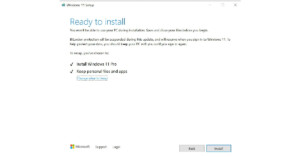
Step 12 (extra step) – When you want to install using the bootable Windows 11 USB drive. A prompt will ask you if you want to keep the existing files or give the system a fresh start. Choose accordingly and press install.
Read Also: WhatApp will soon stop working on these smartphones
For the latest gadget and tech news, and gadget reviews, follow us on Twitter, Facebook and Instagram. For newest tech & gadget videos subscribe to our YouTube Channel. You can also stay up to date using the Gadget Bridge Android App. You can find the latest car and bike news here.


