



Instagram has rolled out a new feature that allows users to add music to their profiles. This new feature can be accessed in the profile editor. Users can add a 30-second snippet of any song (as long as it is in Instagram’s library). Profile visitors can play the song by hitting the play button. The song won’t be visible to the public if your profile is private. So, let’s look at how you can add a song to your Instagram profile.
Read Also: Apple’s Beat Studio Pro Kim Special Edition now available in India
In This Article
What’s new on Instagram?
The concept of adding music to social media profiles has existed since the days of MySpace. However, in recent years, social media platforms like TikTok and Instagram have come to directly contribute to the virality of a song and influence its position in the charts. Allowing users to add songs to their profiles will not only give them a new personalisation option but also help musicians in marketing their music.
Apart from adding music to your Instagram profile, you can use up to 20 songs to create Reels. Of course, these songs can only be picked from Instagram’s music library. Both of these features are being rolled out in a phased manner. If they haven’t reached your device yet, make sure your Instagram app is updated to its latest version.
Add music to your Instagram profile
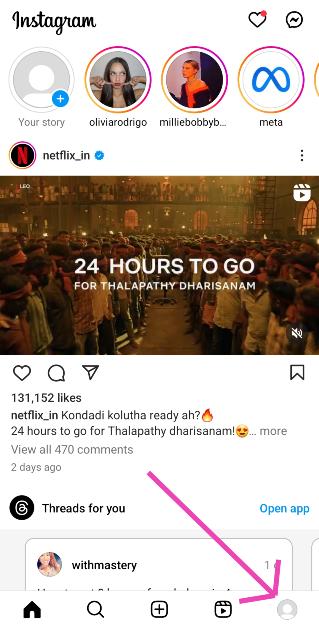
Step 1: Launch the Instagram app on your phone and tap the profile picture icon at the bottom right corner of the screen.
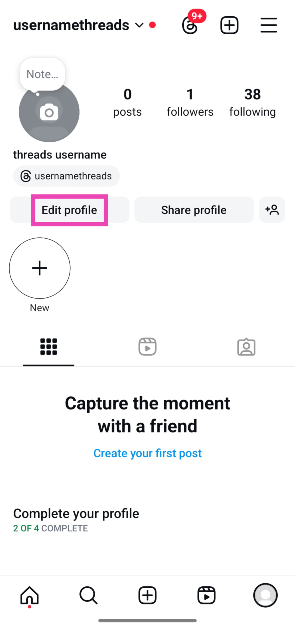
Step 2: Tap on Edit Profile.
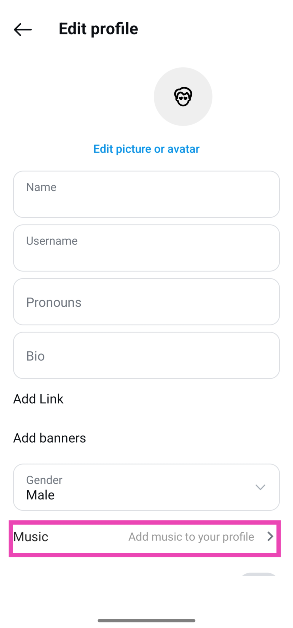
Step 3: Tap on Add music to your profile.
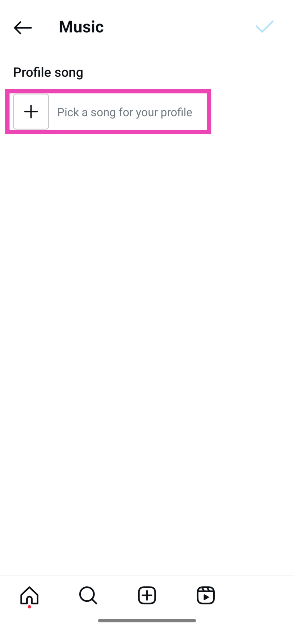
Step 4: Hit the plus icon.
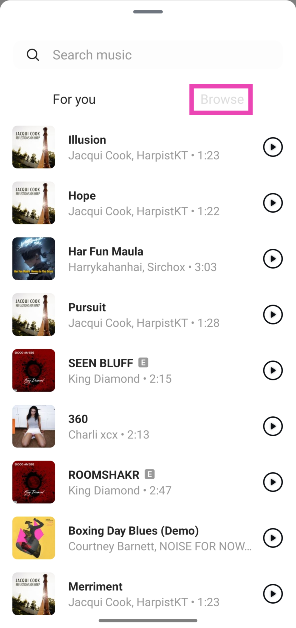
Step 5: Pick a trending song from the For You section or switch to the Browse tab to go through different themes and genres.
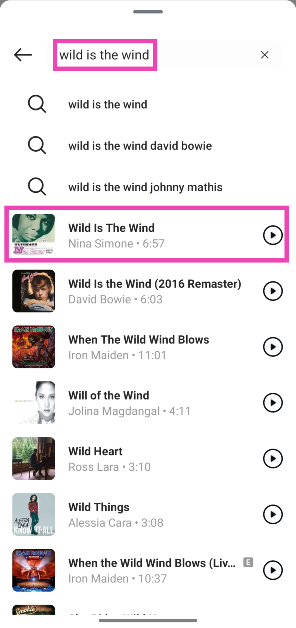
Step 6: If you can’t find your preferred song from the list, simply type it in the search bar at the top of the screen.
Step 7: Hit the play icon next to the song to preview it.
Step 8: Tap the song title to select it.
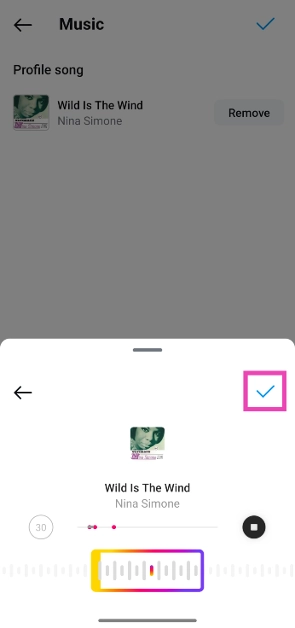
Step 9: Use the seek bar at the bottom to select the part of the song that you want to add to your profile. You can select a 30-second segment.
Step 10: Tap the red dots in the play bar to select the most preferred segments.
Step 11: Hit the tick icon once you’re happy with the segment you’ve selected.
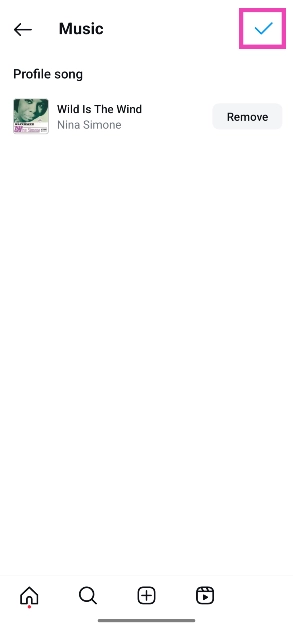
Step 12: Tap the blue tick icon at the top right corner of the screen to add the song to your profile.
Bonus Tip: Share music via Instagram DMs
Step 1: Launch the Instagram app on your phone.
Step 2: Swipe left from the home screen to go to DMs.
Step 3: Open a conversation.
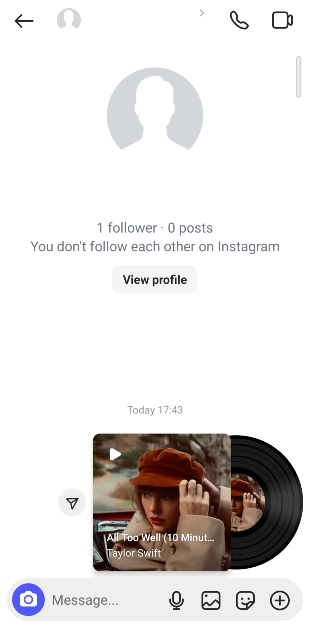
Step 4: Tap the sticker icon.
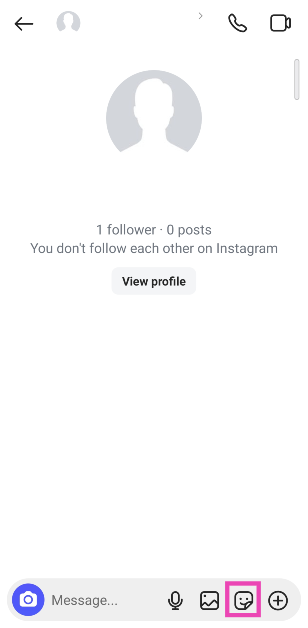
Step 5: Select Music.
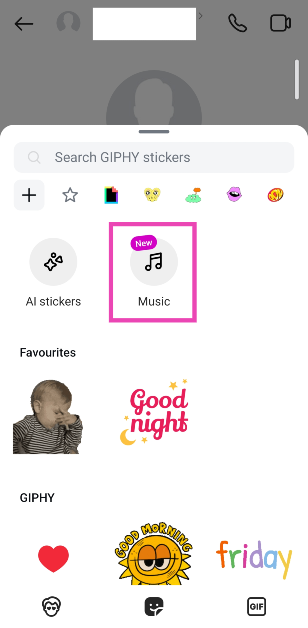
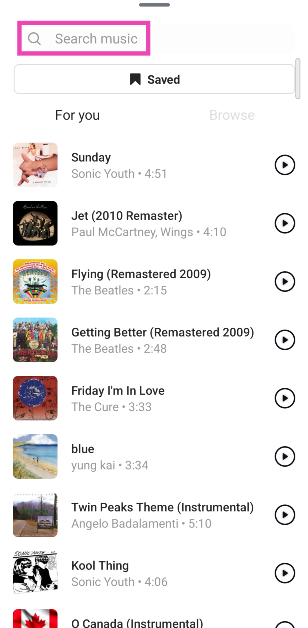
Step 6: Select a song from the library or use the search bar at the top of the screen to look up a song of your choice.
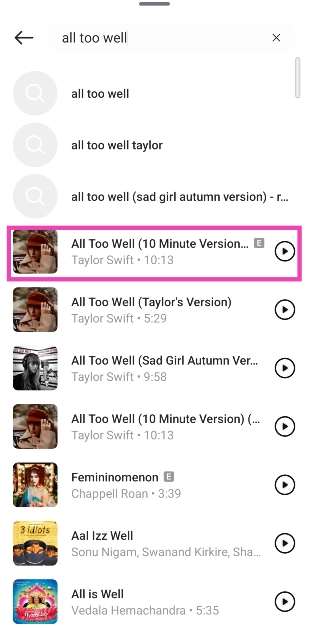
Step 7: Hit the song title to send it in the chat.
Step 6: Tap the vinyl sticker in the chat to play the song.
Frequently Asked Questions (FAQs)
How do I add a song to my Instagram profile?
Go to your Instagram profile and select Edit profile>Add music to your profile>Pick a song for your profile. Search for a song or pick one from the For you/Browse tab. Use the seek bar to select a 30-second segment from the song. Hit the tick icon in the pop-up box, followed by the tick icon at the top right corner of the page.
How many songs can I add to my Instagram profile?
At the moment, you can add only one song to your Instagram profile.
How do I remove a song from my Instagram profile?
Go to your profile and select Edit profile>Music>Remove and tap the blue tick icon at the top right corner of the screen.
Read Also: 2 Ways to Turn Off a Kindle Paperwhite Properly
Conclusion
This is how you can add music to your Instagram profile. Once you add a song, only the visitors to your profile can view it. The social media platform also allows you to use up to 20 songs on your Reels. Which song are you going to pick for your profile? Let us know in the comments!


