NYT Wordle Answer and Hints Today (September 29) #1563

Are you looking for today’s Wordle for September 29, 2025, answer? The problem is difficult to solve, so if you need assistance, we’ve included hints and the clue to today’s Wordle Quiz. Below, we have made it simple for everyone to understand how to get to the Wordle Answer today.

Hints and Answers for Today’s Wordle September 29

Before answering directly, please check the Wordle Hints first.

Hint 1: Today’s Wordle answer includes a vowel.
Hint 2: The answer for today has a repeating letter.
Hint 3: Meaning-connected with the state, not with the army or any religion

What word does today’s Wordle begin with?

Do you need help with today’s Wordle answer’s initial letter?

The first letter in today’s Wordle is “C”

Today’s Wordle Answer 

The answer to Wordle #1563 on Sept 29, 2025, is — CIVIL

Also Read: iPhone 17 Series, iPhone Air Sale Kicked Off in India Today: Pricing and Availability

What is Wordle?

Wordle: A Five-Letter Word Guessing Game
• The game allows six guesses of a five-letter word.
• Provide feedback on the guessed letters’ placement in the puzzle.
• The New York Times purchased the game in 2022.
• Created by Josh Wardle for his partner, narrowing down 12,000 English words to 2,500.
• Named after the word “word.”

How To Play Wordle?

Wordle is a New York Times word puzzle game that allows users to guess a five-letter word in six attempts. The letters are highlighted in Yellow and Green, indicating whether the word is present in the answer or not, and Green letters indicate the correct guess.

Also Read: Garena Free Fire Max Redeem Codes Today 7 September 2025: Here is how to claim them

Wordle Tips and Tricks
  • Select a powerful starting word: Avoid using unusual words, as they frequently do not match common letters. A good opening word has plenty of benefits.
  • Repeating letters: Don’t be afraid of repeating letters; they appear frequently in words. The answer may contain one or two repeated letters.
  • Use the Wordlebot: The NYT’s Wordlebot analyses and compares replies to itself. This challenge can assist you in enhancing your guessing skills and highlighting areas for development.

Garena Free Fire Max Redeem Codes Today 28 September 2025: Here is how to claim them

Garena Free Fire (GFF) Max is a battle royale game with regular awards and tournaments to keep players interested. If you play GFF, you should be aware of the redeem codes that are released on a daily basis. However, because the battle royale game is banned in India, players from other countries can use the Free Fire Redeem codes daily. If you’re unfamiliar with the codes or don’t know how to get them, we’ve put together a step-by-step guide to help you redeem them. Check out Garena Free Fire Max Redeem Codes for 28 September 2025.

These codes are a great way to get free items in the game. The 12-digit codes contain letters and numbers, as well as an expiration date and time. Because the Garena FF redeem codes cannot be used more than once, you should hurry to the redemption page to claim your free reward before someone else does. To get a free reward, all you have to do is go to reward.ff.garena.com/en, which is the official redemption page. Also, keep an eye on this space for daily updates on Gadget Bridge on GFF Max redemption codes and rewards.

Also Read: CERT-In identified multiple high-risk vulnerabilities in Android: Details

Garena Free Fire Max Redeem Codes Today 

DYPNX2KCZ9VH
FFCO8BS5JW2D
FFBUNY2TKXCP
FFMY5KXCTGNQ
KXPFCBRATYFF
FFV4XKQCTGNQ
YECKZ2MQPD9V
FFWCGLONFY8M
CTFFNX2KSZ9H
FFYCQ2KXPNFF
FFEVOX2MFQY4
FFBNTX2KFCQ7
HFFNX2KSZ9PQ
FFBYSNVTLXFF
FFPNX2KCZ9VH
GUFFYCKXTGNP
FFFCTYMQFX5K

Also Read: IFA 2025: Lenovo introduced Legion Pro 7 (2025) and Lenovo Legion Go with AMD’s Ryzen 9000 HX series processors

How to Get Free Fire Max Redeem Keys for Garena?

  • Visit the game’s official website at reward.ff.garena.com.
  • Use your Facebook, Google, VK, Apple ID, Huawei ID, or Twitter account to log in.
  • You’ll be taken to a valid redemption code (s)
  • Copy and paste the 12-digit redemption code into the text box.
  • On the screen, a dialogue box will appear.
  • ‘Ok’ should be selected.

NYT Wordle Answer and Hints Today (September 28) #1562

Are you looking for today’s Wordle for September 28, 2025, answer? The problem is difficult to solve, so if you need assistance, we’ve included hints and the clue to today’s Wordle Quiz. Below, we have made it simple for everyone to understand how to get to the Wordle Answer today.

Hints and Answers for Today’s Wordle September 28

Before answering directly, please check the Wordle Hints first.

Hint 1: Today’s Wordle answer includes two vowels.
Hint 2: The answer for today has a repeating letter.
Hint 3: Meaning-soft and sticky

What word does today’s Wordle begin with?

Do you need help with today’s Wordle answer’s initial letter?

The first letter in today’s Wordle is “G”

Today’s Wordle Answer 

The answer to Wordle #1562 on Sept 28, 2025, is — GOOEY

Also Read: iPhone 17 Series, iPhone Air Sale Kicked Off in India Today: Pricing and Availability

What is Wordle?

Wordle: A Five-Letter Word Guessing Game
• The game allows six guesses of a five-letter word.
• Provide feedback on the guessed letters’ placement in the puzzle.
• The New York Times purchased the game in 2022.
• Created by Josh Wardle for his partner, narrowing down 12,000 English words to 2,500.
• Named after the word “word.”

How To Play Wordle?

Wordle is a New York Times word puzzle game that allows users to guess a five-letter word in six attempts. The letters are highlighted in Yellow and Green, indicating whether the word is present in the answer or not, and Green letters indicate the correct guess.

Also Read: Garena Free Fire Max Redeem Codes Today 7 September 2025: Here is how to claim them

Wordle Tips and Tricks
  • Select a powerful starting word: Avoid using unusual words, as they frequently do not match common letters. A good opening word has plenty of benefits.
  • Repeating letters: Don’t be afraid of repeating letters; they appear frequently in words. The answer may contain one or two repeated letters.
  • Use the Wordlebot: The NYT’s Wordlebot analyses and compares replies to itself. This challenge can assist you in enhancing your guessing skills and highlighting areas for development.

You can now edit pictures using voice prompts in Google Photos: Here’s how

0

Google’s native image editor in the Photos app is one of the best in the business. Not only does it offer cutting-edge features like Magic Eraser and Unblur, but it is also one of the most accessible editors around. In the latest Pixel 10 series, Google debuted a new feature for the Photos app that makes the editing process easier and more seamless. Instead of searching for the right tools, you simply tell the editor what to do. Here’s how you can edit pictures using voice prompts in Google Photos.

Read Also: Oppo Enco Buds3 Pro Review: A no-nonsense TWS with an affordable price tag

Here’s how it works

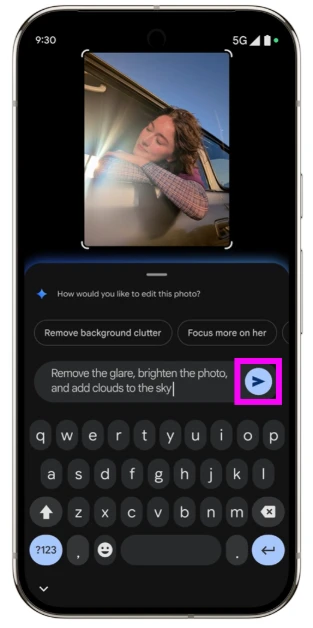
Every good photo editor strikes the right balance between tools and accessibility. A wide set of editing tools is of no use if the user doesn’t know how to apply them to their images. Google’s new ‘Help Me Edit’ feature bypasses the stage where you need to find the right tools to make the necessary edits. As mentioned earlier, you can simply tell the image editor what to do.

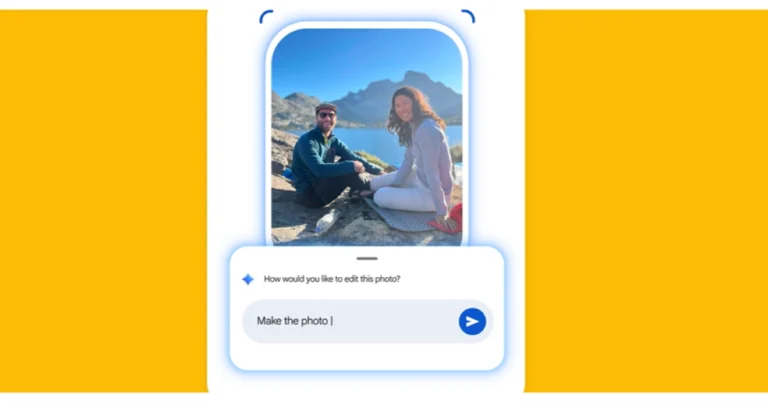
The great thing about ‘Help Me Edit’ is that it accepts natural language input. Instead of finding the right keywords, you can simply tell it to make the image clearer, brighter, or colourful. Even a simple ‘make it better’ will suffice. If you’re feeling more adventurous, you can get it to change the background of the image, add more objects, and restyle the overall aesthetic – the possibilities are endless. 

How to use Help Me Edit in Google Photos


Step 1: Launch Google Photos on your Android phone.

Step 2: Open the image you wish to edit.

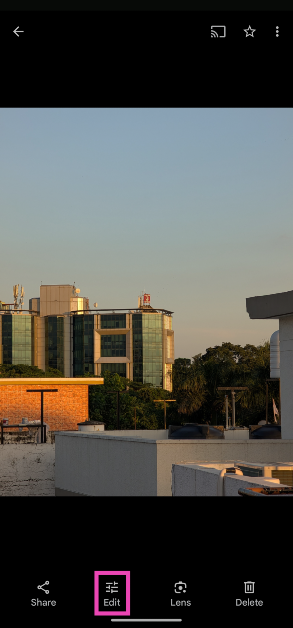
Step 3: Hit the Edit icon at the bottom of the screen.

Step 2: Hit the Edit button at the bottom of the screen.

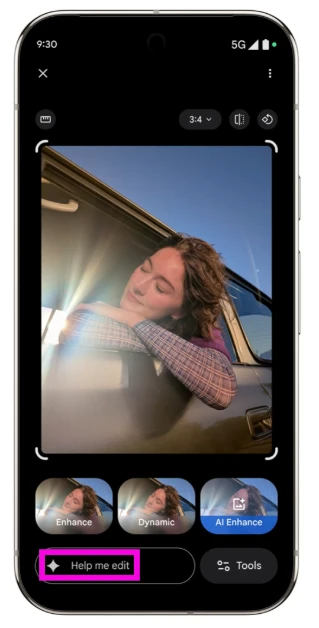
Step 4: Tap on Help Me Edit.

Step 5: Enter a text prompt or tap the mic icon to issue voice commands to the Magic Editor.

Step 5: Enter a text prompt or tap the mic icon to issue voice commands to the Magic Editor.

Step 5: Enter a text prompt or tap the mic icon to issue voice commands to the Magic Editor. You can now edit pictures using voice prompts in Google Photos: Here’s how

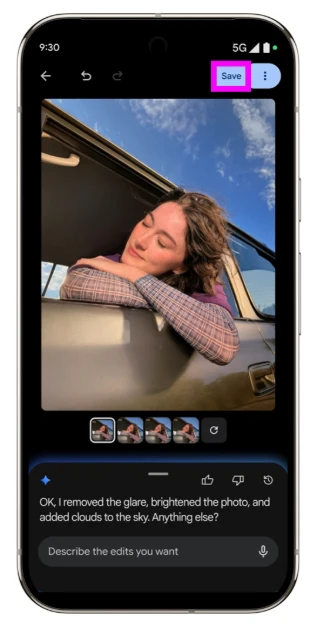
Step 6: Google’s image editor will analyse your commands and make the necessary edits.

Step 6: Google’s image editor will analyse your commands and make the necessary edits. You can now edit pictures using voice prompts in Google Photos: Here’s how

Step 7: Hit the Save button in the top right corner of the screen to save the image to your phone. You can choose to give follow-up commands as well.

Frequently Asked Questions (FAQs)

What is the Help Me Edit feature in Google Photos?

‘Help Me Edit’ takes text prompts and voice commands from the user regarding the changes they want to see in their pictures. The native image editor then makes the necessary changes.

Can I use Help Me Edit on my Android phone?

This feature was initially launched in the Google Pixel 10 Series. Google has now started rolling out its Photos app across all Android devices in the US. It will be launched in a phased manner in other regions.

How to use the Google Pixel AI photo editor?

Launch the Photos app on your Pixel, open an image, hit the Edit button, and switch to the Actions tab to use AI features like Magic Editor, Unblur, Zoom Enhance, and more.

How do I use the Magic Eraser in Google Photos?

Launch the Photos app, open an image, go to Edit>Actions>Magic Eraser, select the object you want to erase, and hit the ‘Erase’ button.

Read Also: How to add custom backgrounds to messages on your iPhone

Final Thoughts

Help Me Edit was initially launched for the Google Pixel 10. Google has now confirmed that it will be rolled out for all users in the United States. Following that, it will be launched in other regions too. 

Oppo Enco Buds3 Pro Review: A no-nonsense TWS with an affordable price tag

Oppo may not have the most expansive audio catalogue in India, but its releases leave a lasting impression. This is a much better option than flooding the market with run-of-the-mill products that fail to stand out among their peers. The latest TWS release from Oppo is priced very competitively at Rs 1,799. At this price point, it manages to pack all the essential hardware specs and convenient features. The biggest omission is Active Noise Cancellation, which seems like a rational trade-off when you consider the affordable pricing of the earbuds. We used them for a week to find out if they can kick it with the best TWS in this price bracket. Here is our in-depth review of the Oppo Enco Buds3 Pro.

Read Also: How to add custom backgrounds to messages on your iPhone

Oppo Enco Buds3 Pro Review: Design

Before we dive into the review, let’s take a look at what you get inside the Enco Buds3 Pro’s retail box:

  • Charging case
  • Earbuds
  • S & L ear tips
  • User guide

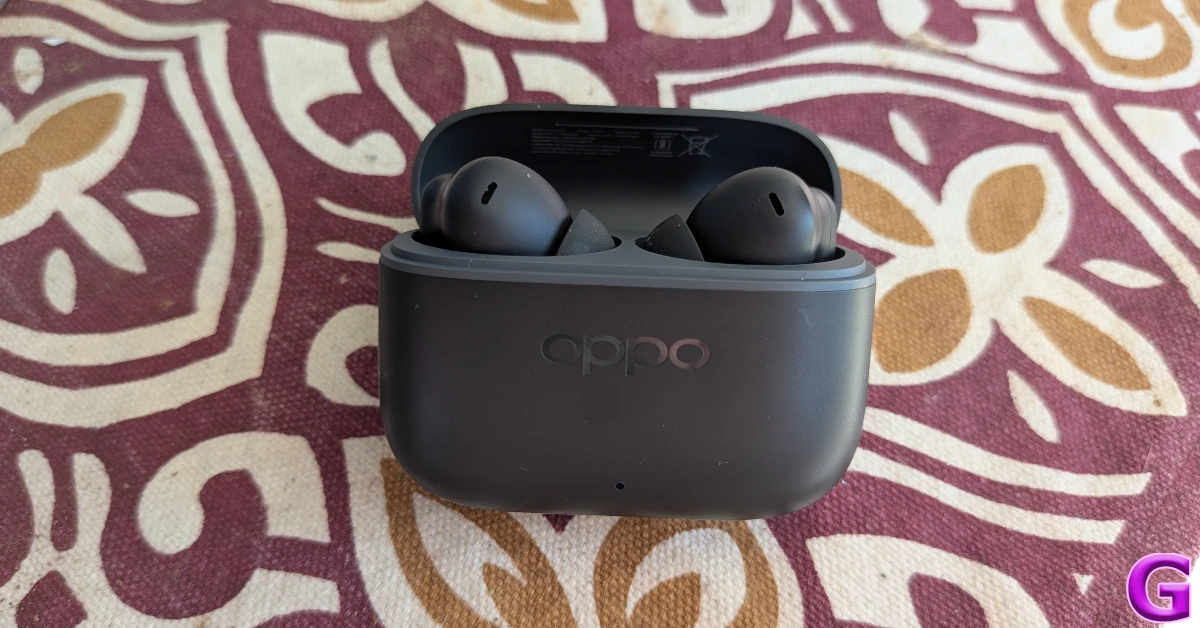
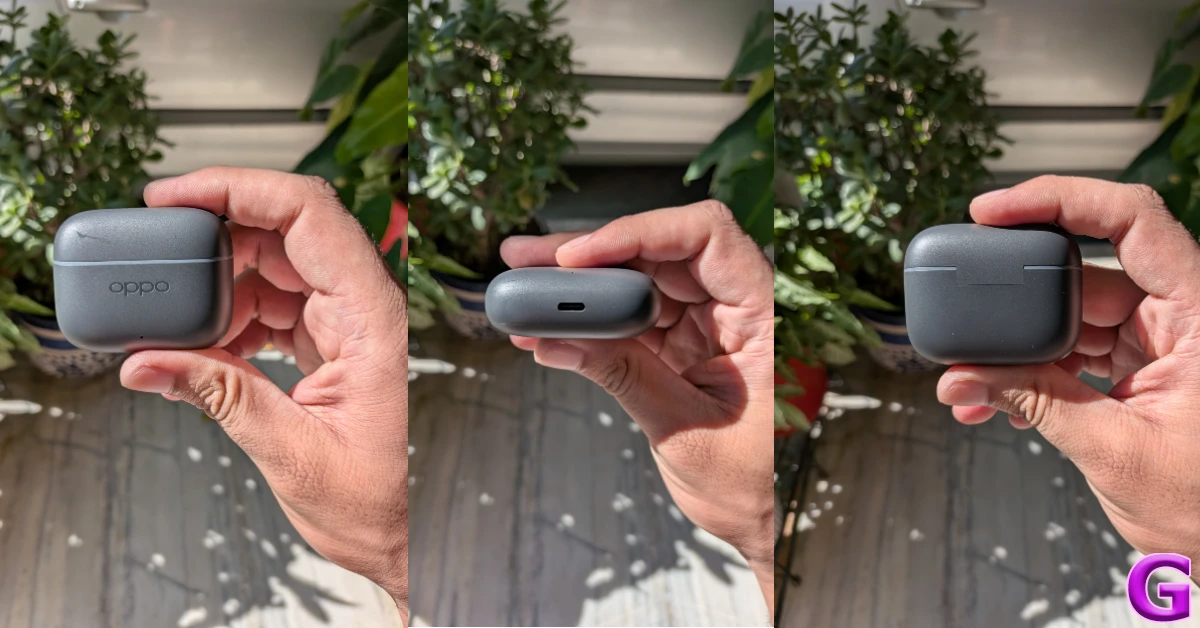
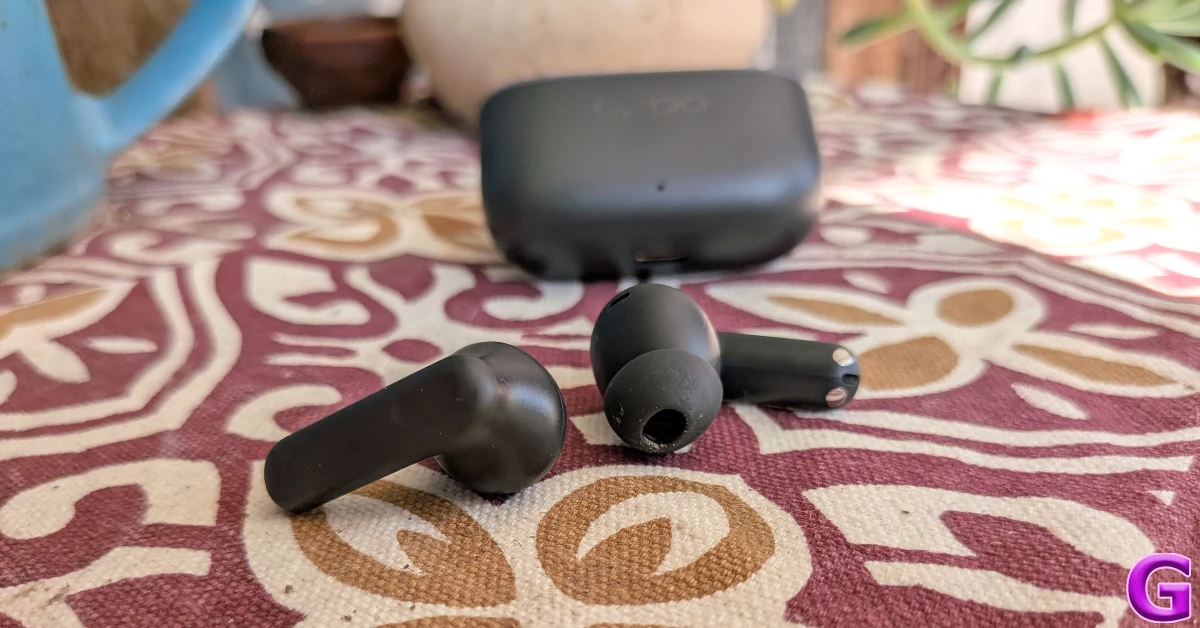
The rectangular charging case has a compact form factor. It can easily slide into pockets and doesn’t occupy a lot of space. Weighing just 44g, it doesn’t make its presence felt at all. The matte finish on the plastic body lends it a nice in-hand feel. The hinge is strong and inspires confidence. Oppo’s internal tests claim it is good for at least 20,000 fold cycles. The lid can be flipped open with one finger. The satisfying snap-shut motion makes it very hard not to fidget with the case.

Oppo Enco Buds3 Pro Review: Design

The ‘OPPO’ lettering is engraved just below the lid. Its glossy texture offers a nice contrast to the surrounding matte finish. Moving further down, you will notice the small LED indicator in the lower section of the front panel. The USB-C charging port is placed at the bottom of the case. There is no dedicated pairing button on this device.

design

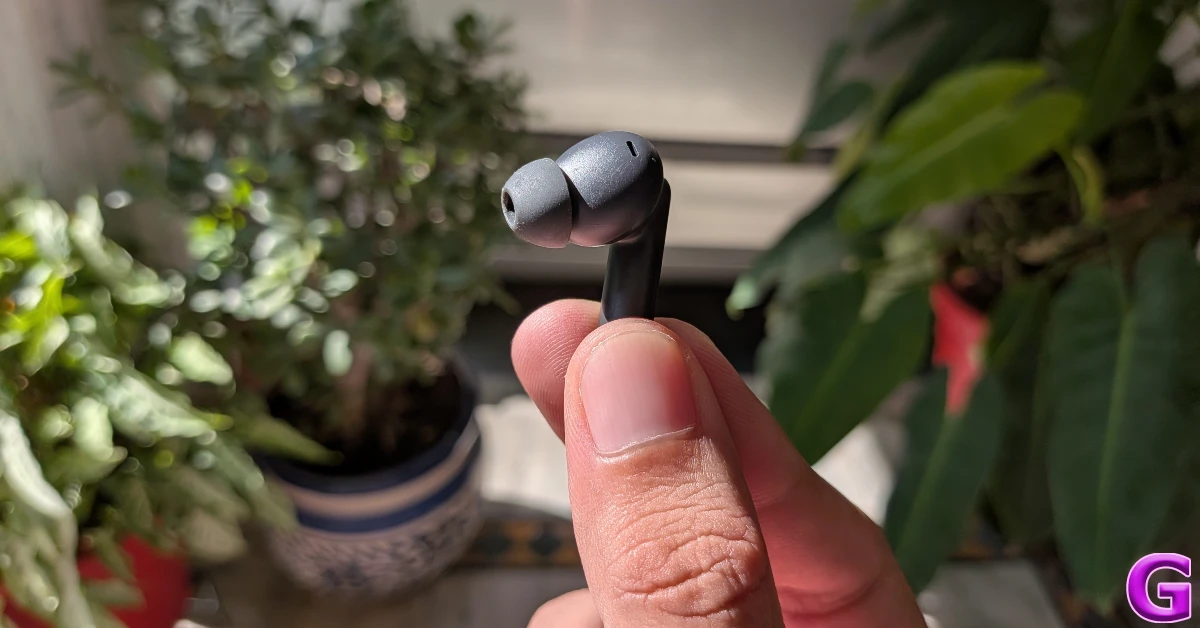
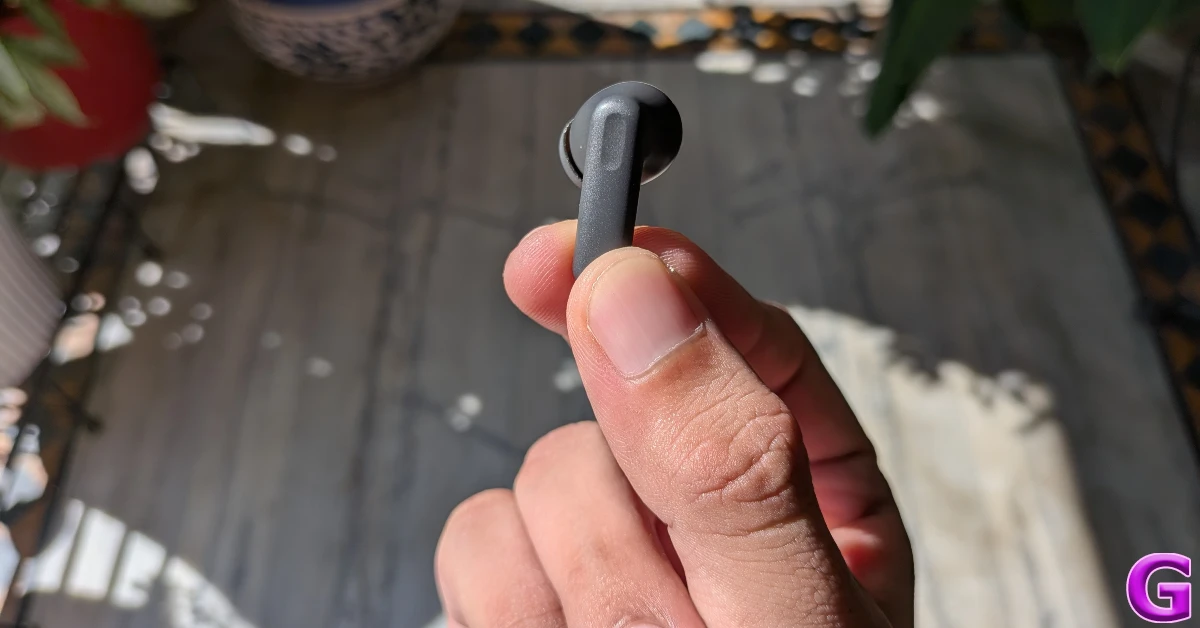
The earbuds have a traditional in-ear design. Their compact form factor makes them incredibly comfortable. You can wear them for multiple hours and not feel any ear fatigue at all. Each earbud weighs just 4.3g. There are small and medium ear tips in the box to cater to the widest range of ear sizes. The matte finish on the earbuds makes them less prone to sliding out when they come in contact with sweat. The stem of either earbud has a small notch marking the touch-sensitive area for playback controls. These controls are tuned nicely. Accidental triggers are a very rare occurrence.

Oppo Enco Buds3 Pro Review: Design

These earbuds are rated IP55 for resistance against dust and water. We wore them while hiking and working out, and were pleased to see that they remained unfazed by excessive sweat and kept on performing up to the mark.

Oppo Enco Buds3 Pro Review: Performance

The Enco Buds3 Pro are equipped with Bluetooth 5.4 and support Google Fast Pair. Once connected, the earbuds have a functional range of 10m. There are 2 audio codecs on offer – AAC and SBC.

Oppo Enco Buds3 Pro Review: Performance

The audio output on these earbuds is produced through 12.4mm, titanium-coated, dynamic drivers. The soundstage is wide and detailed. The low-range frequencies tastefully blend into the mids and the highs. The bass is prominent, but it does not muddle the mix. The level of detail in the output is worthy of praise. There is very minimal distortion even when the volume is pushed to its maximum level. As far as the listening experience goes, these earbuds are some of the best in this price bracket.

However, when it comes to the calling experience, the Enco Buds3 Pro can do better. In an indoor setting, the earbuds do a good job of extracting the speaker’s voice, limiting the ambient sounds, and relaying it to the listener. However, in an outdoor setting, the background noise manages to creep in and depreciate the call quality. The TWS could’ve used ENC to make this situation better.

heymelody

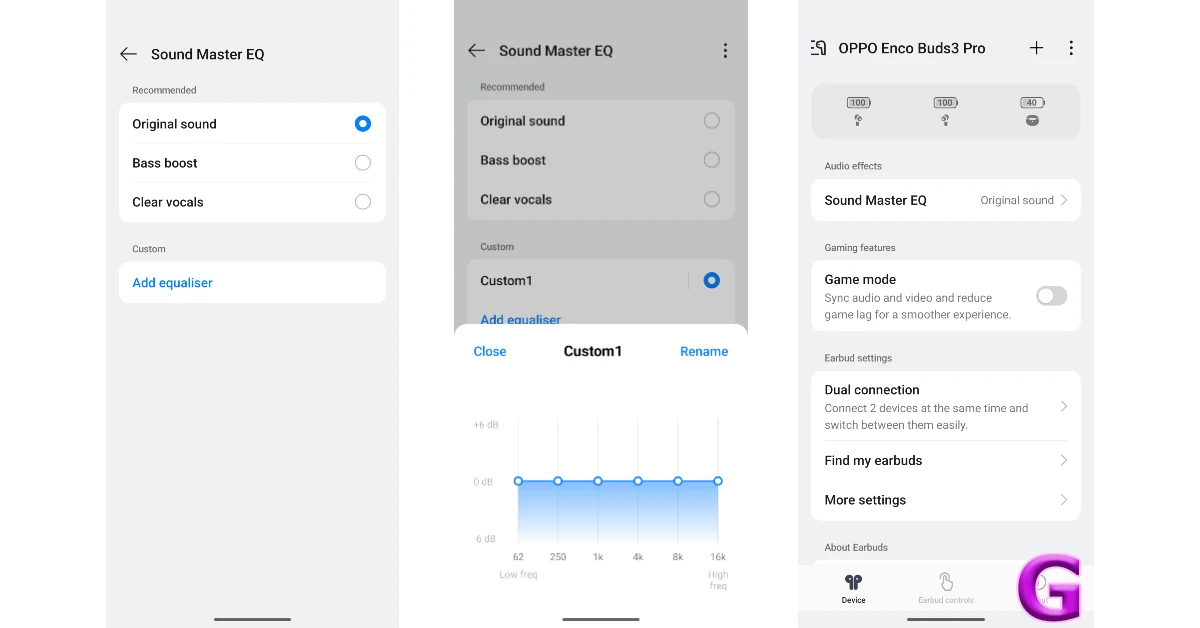
To unlock additional features of this TWS, you need to install the HeyMelody companion app on your phone. This isn’t necessary if you use an Oppo or OnePlus smartphone. Once the app is installed, you can use it to choose one of three equaliser profiles: Original sound, Bass boost, and Clear vocals. If none of these rock your boat, you can create a customised equaliser profile.

The earbuds offer a 47ms low-latency mode for gaming. This is the optimum latency for relaying standard gameplay. We did not notice any lag while playing Call of Duty Mobile. The visuals on the screen perfectly synced up with the audio coming out of the earbuds. If you want to pair these earbuds with another device, the HeyMelody app has the option to enable Dual Connection. If you’re an Oppo or OnePlus user, you can use these earbuds to trigger your phone camera’s shutter.

design

Each earbud is equipped with a 58mAh battery pack, and there’s an additional 560mAh in the case. Oppo claims a battery life of 12 hours on the earbuds on a single charge, and 54 hours including the case. We found these numbers to be consistent with our testing. During the week-long review period, we weren’t able to exhaust the juice in the charging case. With an average daily use of 5 hours, we were left with almost a 54% charge left in the tank. The earbuds and case take almost 2 hours to fully charge. A quick 10-minute charge offers 4 hours of continuous playtime.

Read Also: Realme P4 Pro was the star of Flipkart, with a 222% YoY increase in sales

Verdict

The Oppo Enco Buds3 Pro is a no-nonsense TWS that delivers a top-notch audio output. If your biggest priority is a wide soundstage and a rich sound quality, these earbuds will not disappoint. There are no bells and whistles on this product. The biggest misses are Active Noise Cancellation, in-ear detection, 3D Spatial Audio, ENC/call noise reduction, and AI translation. In our opinion, these are fair trade-offs for a delectable audio quality at a very reasonable price.

Pros

  • Compact
  • Comfortable
  • Great audio output
  • Affordable

Cons

  • Outdoor call quality isn’t that good
  • Lacks secondary features

How to add custom backgrounds to messages on your iPhone

0

iOS 26 is one of the biggest cosmetic facelifts we’ve seen for the iPhone. The Liquid Glass design is embedded into the very fabric of the OS and works fluidly with different on-screen elements. The cosmetic upgrades don’t just end there. You can now tailor the aesthetic of your chats with interesting backgrounds. Be it individual chats or group texts, you can give every conversation its own unique flavour. Here’s how you can add custom backgrounds to messages on your iPhone.

Read Also: How to add contacts to Do Not Disturb whitelist on Android

About chat backgrounds

While third-party instant messaging apps like WhatsApp have had the option to change the chat theme for a while, Apple’s native Messages app is new to the party. However, its implementation is unique and tasteful. When you go to the Background section, you get to choose from one of the following themes: Colour, Sky, Water, and Aurora. Apple also offers some sample backgrounds for your text chains.

If that isn’t your style, you can always pick an image from your iPhone’s gallery and use it as a background. Feeling creative? You can always summon Image Playground to generate a background based on a prompt. If the other person in the chat changes the background, it gets implemented on your end as well – as long as your iPhone is updated to iOS 26. If you’re an old-school texter and don’t want to adapt to the new style, you can always disable this feature from settings.

Add a custom background to your messages

How to force restart your iPhone 16 and enter recovery mode?

Step 1: Launch the Messages app on your iPhone and open a conversation.

Step 2: Tap the name of the contact or group at the top of the screen.

Step 3: Switch to the Backgrounds tab.

Step 4: Choose Colour, Water, Sky, or Aurora. Once you’ve made a selection, choose a filter.

Step 5: If you want to set an image as the background, select Photo and pick a picture from your iPhone’s gallery.

Step 6: Adjust the picture and hit the tick icon when you’re done.

Remove the custom background from a conversation

How to share the WiFi password as a QR code on iOS 18

Step 1: Launch the Messages app on your iPhone and open a conversation.

Step 2: Tap the name of the contact or group at the top of the screen.

Step 3: Switch to the Backgrounds tab.

Step 4: Hit None to remove the current background.

Disable conversation backgrounds

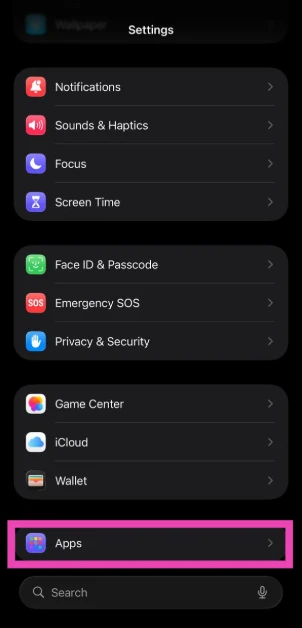
Step 1: Go to Settings.

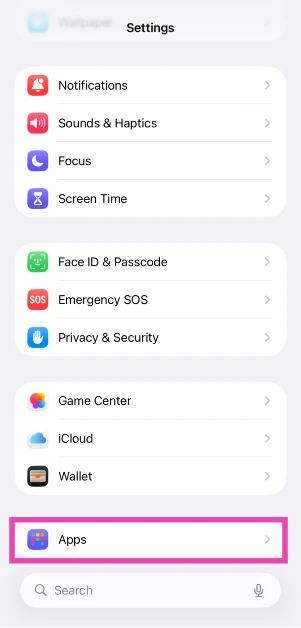
Step 2: Tap on Apps.

Step 2: Tap on Apps.

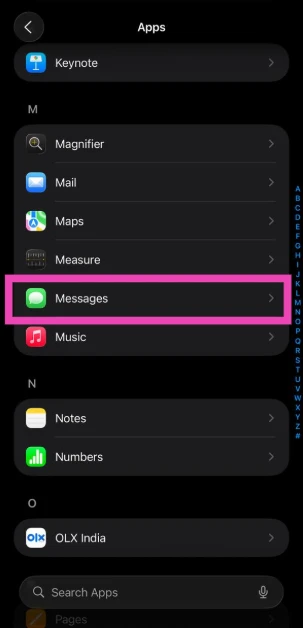
Step 3: Select Messages.

Step 3: Select Messages.

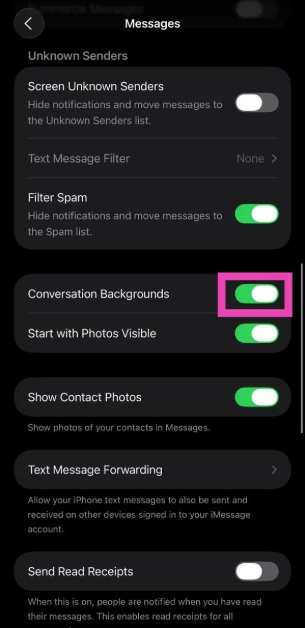
Step 4: Turn off the toggle switch next to Conversation Backgrounds.

Step 4: Turn off the toggle switch next to Conversation Backgrounds.

Frequently Asked Questions (FAQs)

How do I change the conversation background on my iPhone?

Go to Messages, open a conversation, tap the contact name, switch to the ‘Backgrounds’ tab, and select a background from the list.

How do I set a picture from my iPhone’s gallery as the conversation background?

Open the conversation in Messages, tap the contact’s name, switch to the Background tab, and select ‘Photo’. Pick an image from your iPhone’s gallery, adjust its size, and hit the tick icon.

How do I remove the custom background of a conversation?

Open the conversation in Messages, tap the contact’s name, switch to the Backgrounds tab, and hit ‘None’.

Is there a way to disable conversation backgrounds on my iPhone?

Go to Settings>Apps>Messages and turn off the toggle switch next to ‘Conversation Backgrounds’.

Why can’t I see the background image in messages?

The background image feature for messages is only available on iOS 26. Update your iPhone to use it.

Read Also: Infinix’s latest QLED Google TV line-up is now available for sale on Flipkart

Final Thoughts

If you can’t decide which background to pick, you can always generate one by entering a prompt in Image Playground. Apart from custom backgrounds, Apple has also added live translation for messages on iOS 26. If you have any questions, let us know in the comments!

How to add contacts to Do Not Disturb whitelist on Android

0

The Do Not Disturb (DND) mode has been an essential part of Android phones for years. If you’re in the middle of an important task that demands your utmost attention, DND can help you deal with the distractions on your phone. It puts a barrier on calls and messages, allowing you to focus on the task at hand. Notifications from other third-party apps are blocked as well. However, you may not want to miss out on alerts from some important people. These people can be added to a whitelist that doesn’t obey the DND rules. So, let’s take a look at how you can add contacts to your Do Not Disturb whitelist on your Android phone.

Read Also: Infinix’s latest QLED Google TV line-up is now available for sale on Flipkart

DND options on Android 16

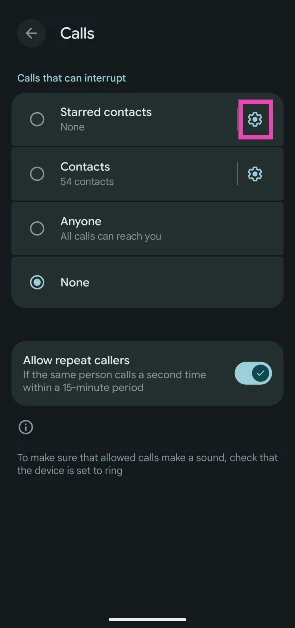
Enabling DND mode on your phone is a good way to keep distractions at bay and focus on the tasks at hand. But on the flipside, you don’t want to miss out on something important or urgent. To address this conundrum, Android 16 lets you create a whitelist for DND. Here are the filters on offer:

Starred contacts: Only a set of contacts selected by you will be able to contact you when DND mode is enabled.

Contacts: When this setting is selected, the calls and messages from all the contacts on your phone will reach you in DND. Notifications from unknown numbers will be held until the mode is disabled.

Anyone: Calls and messages from anyone can reach you in DND. Choosing this setting beats the whole point of DND.

Priority conversations: You can choose to be notified of new messages in specific conversations.

Apart from these filters, there is an option to let the calls from repeat calls come through. If the same number calls you within a 15-minute period, their call will pierce the DND filter and show up on the screen. This feature makes sure that people are able to reach you in times of emergency, even when your phone is on Do Not Disturb.

Add contacts to your Do Not Disturb whitelist on Android 16

Step 1: Go to Settings.

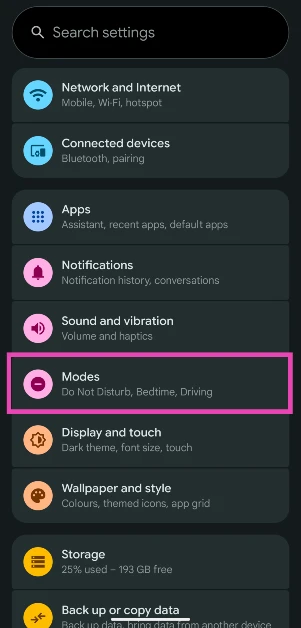
Step 2: Tap on Modes.

Step 2: Tap on Modes.

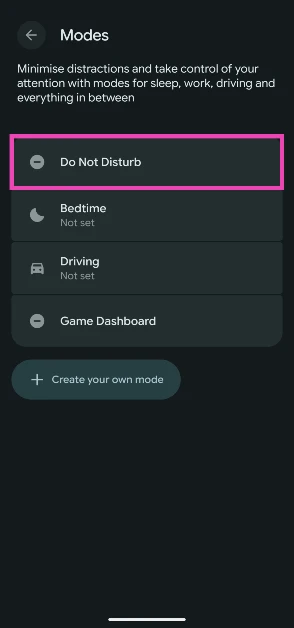
Step 3: Select Do Not Disturb.

Step 3: Select Do Not Disturb.

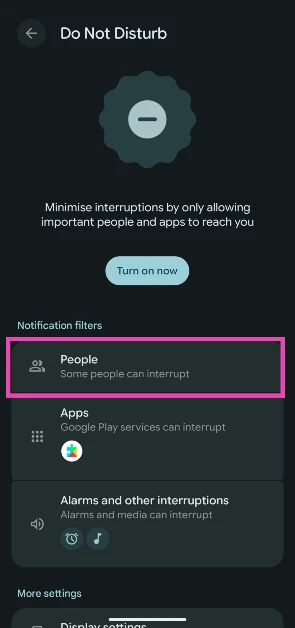
Step 4: Tap on People.

Step 4: Tap on People.

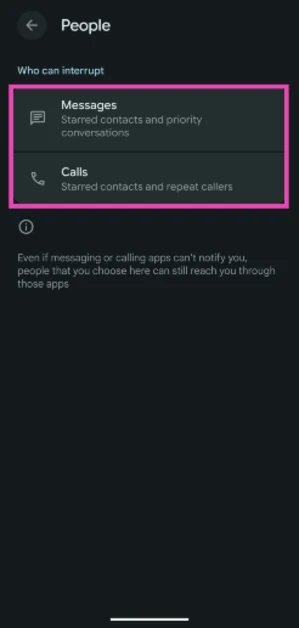
Step 5: Select Messages or Calls.

Step 5: Select Messages or Calls.

Step 6: Hit the cog wheel icon next to Starred contacts.

Step 6: Hit the cog wheel icon next to Starred contacts.

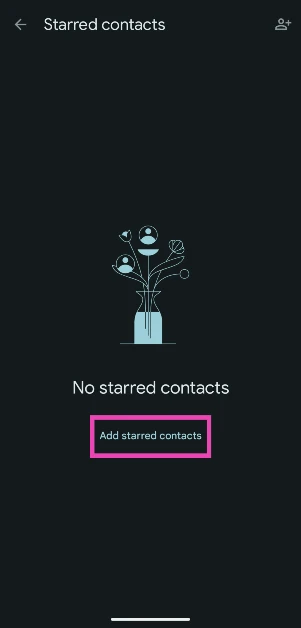
Step 7: Tap on Add starred contacts.

Step 7: Tap on Add starred contacts.

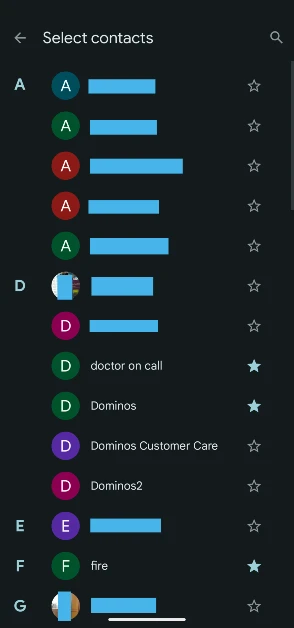
Step 8: Hit the star icon next to the contacts you want to add to the whitelist.

Step 8: Hit the star icon next to the contacts you want to add to the whitelist.

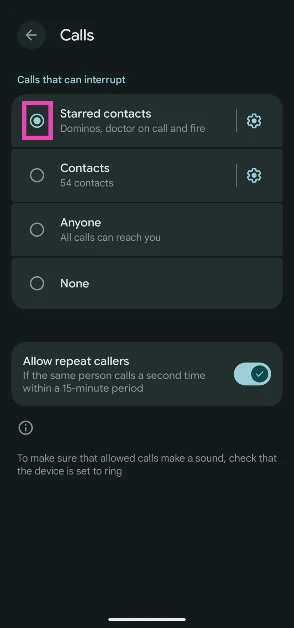
Step 9: Go back and select Starred contacts.

Step 9: Go back and select Starred contacts.

Frequently Asked Questions (FAQs)

What happens when your phone is on Do Not Disturb and someone calls you?

When your phone is on DND, it does not display any incoming calls or messages. You get the missed calls notifications after DND has been disabled.

How is someone still calling me on Do Not Disturb?

If you have added someone to the DND whitelist, their calls will be allowed to pass through the filter. Additionally, if someone calls you twice within a 15-minute period, their call will reach you, too.

Can people tell when your phone is on Do Not Disturb?

No, if someone calls you when your phone is on DND, they will get the regular ‘User Busy’ message.

Does Do Not Disturb block WhatsApp calls?

Yes, DND works for WhatsApp calls as well. You can choose to add WhatsApp to the whitelist of apps if you want to receive its notifications in DND mode.

How to call someone whose phone is on Do Not Disturb?

If you suspect someone’s phone is on DND, simply call them twice within 15 minutes. Your call will be allowed to pass through the filter.

Read Also: How to live translate text messages on iPhone

Final Thoughts

Apart from contacts, you can also add apps, alarms, and reminders to the DND whitelist. To make your phone less distracting, we recommend turning on the Greyscale Mode for the display. If you have any questions, let us know in the comments!

Amazon Quiz Answers Today 27 September 2025: Participate to win Up To Rs 500 Amazon Pay Balance

Amazon Quiz 27 September 2025: The New Daily Quiz is now available. Customers from different parts of the country are participating in the daily quiz. The quiz starts at midnight today and will be live until 11:59 PM tonight. By successfully answering every question, participants in the quiz have the chance to win wonderful rewards. Up to Rs 500 Amazon Pay Balance is up for grabs to participants today.

One wrong answer could eliminate you from the quiz. You have a chance to win up to Rs 500 Amazon Pay Balance if you successfully answer every question. Users of the app only have the opportunity to take the quiz. Check Out the 27 September 2025 Quiz.

Are you not able to find Amazon FunZone? Click below and participate.

Click here to enter the Amazon FunZone Quiz and play today.

Today’s Prize: Rs 500 Amazon Pay Balance

Quiz Date: 27 September 2025

Daily Timing: 12 AM to 11:59 PM

Previous Winners Announcement: Today 12 PM Noon

Amazon Daily Quiz Answers Today: Win Up To ₹ 500 Amazon Pay Balance

Question 1: Which Indian won the silver medal in the FIDE women’s candidates 2024?

Answer: Koneru Humpy

Question 2: Which of these actresses is the executive producer of the Amazon Prime series ‘Poacher’?

Answer: Alia Bhatt

Question 3: Which of these is a traditional, flat-bottomed Venetian rowing boat?

Answer: Gondola

Question 4: The man in the picture is cosplaying a character from which famous children’s book?

Answer: Alice in Wonderland

Question 5: This is the Adalaj Ni Vav, a stepwell located in which state?

Answer: Gujarat

Also Read: CERT-In identified multiple high-risk vulnerabilities in Android: Details

How To Play Amazon Daily Quiz Today

Only app users are eligible to play the Amazon quiz every morning from 12 AM to 11:59 PM. The quiz is not available on the desktop. For those who are unaware of how to play the Amazon quiz, below are the steps you can follow to take the quiz.

  • First, download the Amazon app from the Google Play Store or App Store or go here to download the Amazon App
  • Now fill in the required information through the Sign-Up option.
  • To find the Amazon Daily Quiz banner, log in to the Amazon app and scroll down to the home screen.
  • Tap on the banner and tap on the Start button to start the Quiz.
  • Now you will get 5 questions and you need to answer them correctly. One wrong answer will eliminate you from the Quiz.
  • After answering all the questions correctly, you are now eligible for a Lucky Draw.
  • The previous winner’s name will be announced today at 12 PM.

Amazon Daily Quiz Answers from the previous few days.

Here are all the answers from the previous 5 days of the Amazon Daily Quiz and Contest.

26 September 2025

Question 1: Which team recently set the record for the highest chase in Indian Premier League history by successfully chasing a target of 262?

Answer: Punjab Kings

Question 2: The comedy movie ‘Ricky Stanicky’ stars which of these actors, also a big star in sports entertainment?

Answer: John Cena

Question 3: The famous monument, Humayun’s Tomb, was built in which century?

Answer: 16th century

Question 4: This is the famous Rathaus, located in which famous European capital?

Answer: Vienna

Question 5: Which of these famous guitarists was part of this iconic band?

Answer: Slash

25 September 2025

Question 1: Which of these recently played ATP events has a court named after the legendary tennis player Rafael Nadal?

Answer: Barcelona Open

Question 2: The movie Road House sees Jake Gyllenhaal play the role of an ex-UFC fighter. Which of these famous sportspeople also acts in the movie?

Answer: Conor McGregor

Question 3: What is the other name given to the swamp deer, the state animal of Madhya Pradesh?

Answer: Barasingha

Question 4: In which of these cities in the USA is this famous museum located?

Answer: New York

Question 5: Which of these controversial media organisations was founded by this Australian editor and publisher?

Answer: Wikileaks

24 September 2025

Question 1: Which of these players won the Monte Carlo Masters tennis tournament in 2024, his 3rd triumph in that event in 4 years?

Answer: Stefanos Tsitsipas

Question 2: Which of these Amazon Prime shows shares its name with a 2005 Brad Pitt- Angelina Jolie movie?

Answer: Mr and Mrs Smith

Question 3: Which animal features on the election symbol of the Republican party in the USA?

Answer: Elephant

Question 4: These waterfalls span the border between the province of Ontario in Canada and which state in the USA?

Answer: New York

Question 5: Which of these famous architects designed this iconic monument in India?

Answer: Edwin Lutyens

23 September 2025

Question 1: Against which team did Sunrisers Hyderabad set a new record scoring 287 in an IP match?

Answer: Delhi Capitals

Question 2: Who plays the role of soldier Arun Katyal in the recently released movie Yodha?

Answer: Sidharth Malhotra

Question 3: Which of these famous rulers was born in the Shineri Fort in Maharashtra in the 17th century?

Answer: Shivaji

Question 4: Name this famous church located in Europe

Answer: St. Peter’s Basilica

Question 5: This is the flag of which Caribbean country?

Answer: Barbados

19 September 2025

Question 1: Achanta Sharath Kamal represents India in which sport?

Answer: Table tennis

Question 2: Which date is to be celebrated as Hyderabad Liberation Day?

Answer: 17-Sep

Question 3: In which sport did India win its first two medals at the 2024 Paris Olympics?

Answer: Shooting

Question 4: This painting was created in which historical period?

Answer: Renaissance

Question 5: Where is the headquarters of this brand in the USA?

Answer: Atlanta

18 September 2025

Question 1: Achanta Sharath Kamal represents India in which sport?

Answer: Table tennis

Question 2: Which date is to be celebrated as Hyderabad Liberation Day?

Answer: 17-Sep

Question 3: In which sport did India win its first two medals at the 2024 Paris Olympics?

Answer: Shooting

Question 4: This painting was created in which historical period?

Answer: Renaissance

Question 5: Where is the headquarters of this brand in the USA?

Answer: Atlanta

Also Read: IFA 2025: Lenovo introduced Legion Pro 7 (2025) and Lenovo Legion Go with AMD’s Ryzen 9000 HX series processors

Frequently Asked Questions (FAQs)

Where can I check the previous winners? Did I win? How to check?

You can head over to this link on your mobile or desktop to check the winners of the Amazon Daily Quiz Contest.

How to Play Amazon Daily Quiz or Contest?

We have written an explainer above; you can refer to that.

When are the winners of the Quiz and contest announced or declared?

The announcement of today’s quiz winner will take place Tomorrow. As for the Special Quiz and “Spin & Win” Contest, the winners will be declared once the Quiz Contest comes to an end. To find out who the lucky winner is, you can refer to the Winners List or visit the Amazon Winners tab in the Amazon App.

How to participate in the Daily Amazon Quiz?

That is very easy, just got to the Amazon app and scroll to the bottom of the page and you will find the Quiz section. Click on it (usually it is called the fun zone) and you can enter the Amazon Today Quiz Contest. 

Are there any other quizzes or contests running on Amazon daily?

Yes, there are many running daily. These range from spinning the wheel to answering the questions correctly. All are located in the Fun Zone. 

What are the criteria for selecting a winner in the Daily Amazon Quiz?

When a qualified player submits correct answers to all the questions, they will automatically be entered into a lucky draw. This draw will include all participants who answered all the questions correctly. Amazon randomly selects the final winners from the pool of eligible participants who gave the right answers.

Which Types of Questions are asked within the Amazon Daily Quiz?

These are very simple and straightforward questions. These are mainly related to general knowledge. 

Where should I look for Amazon Daily Quiz answers?

You can bookmark our website www.gadgetbridge.com as we will help you every day with the Amazon Daily Quiz. We bring you fresh answers every day for the Amazon Daily Quiz and Contest. 

What time does Amazon announce previous winners?

The previous winner’s name will be announced today at 12 PM (noon).

NYT Wordle Answer and Hints Today (September 27) #1561

Are you looking for today’s Wordle for September 27, 2025, answer? The problem is difficult to solve, so if you need assistance, we’ve included hints and the clue to today’s Wordle Quiz. Below, we have made it simple for everyone to understand how to get to the Wordle Answer today.

Hints and Answers for Today’s Wordle September 27

Before answering directly, please check the Wordle Hints first.

Hint 1: Today’s Wordle answer includes a vowel.
Hint 2: The answer for today has no repeating letter.
Hint 3: Meaning- broken or not working

What word does today’s Wordle begin with?

Do you need help with today’s Wordle answer’s initial letter?

The first letter in today’s Wordle is “F”

Today’s Wordle Answer 

The answer to Wordle #1561 on Sept 27, 2025, is — FRITZ

Also Read: iPhone 17 Series, iPhone Air Sale Kicked Off in India Today: Pricing and Availability

What is Wordle?

Wordle: A Five-Letter Word Guessing Game
• The game allows six guesses of a five-letter word.
• Provide feedback on the guessed letters’ placement in the puzzle.
• The New York Times purchased the game in 2022.
• Created by Josh Wardle for his partner, narrowing down 12,000 English words to 2,500.
• Named after the word “word.”

How To Play Wordle?

Wordle is a New York Times word puzzle game that allows users to guess a five-letter word in six attempts. The letters are highlighted in Yellow and Green, indicating whether the word is present in the answer or not, and Green letters indicate the correct guess.

Also Read: Garena Free Fire Max Redeem Codes Today 7 September 2025: Here is how to claim them

Wordle Tips and Tricks
  • Select a powerful starting word: Avoid using unusual words, as they frequently do not match common letters. A good opening word has plenty of benefits.
  • Repeating letters: Don’t be afraid of repeating letters; they appear frequently in words. The answer may contain one or two repeated letters.
  • Use the Wordlebot: The NYT’s Wordlebot analyses and compares replies to itself. This challenge can assist you in enhancing your guessing skills and highlighting areas for development.

Garena Free Fire Max Redeem Codes Today 27 September 2025: Here is how to claim them

Garena Free Fire (GFF) Max is a battle royale game with regular awards and tournaments to keep players interested. If you play GFF, you should be aware of the redeem codes that are released on a daily basis. However, because the battle royale game is banned in India, players from other countries can use the Free Fire Redeem codes daily. If you’re unfamiliar with the codes or don’t know how to get them, we’ve put together a step-by-step guide to help you redeem them. Check out Garena Free Fire Max Redeem Codes for 27 September 2025.

These codes are a great way to get free items in the game. The 12-digit codes contain letters and numbers, as well as an expiration date and time. Because the Garena FF redeem codes cannot be used more than once, you should hurry to the redemption page to claim your free reward before someone else does. To get a free reward, all you have to do is go to reward.ff.garena.com/en, which is the official redemption page. Also, keep an eye on this space for daily updates on Gadget Bridge on GFF Max redemption codes and rewards.

Also Read: CERT-In identified multiple high-risk vulnerabilities in Android: Details

Garena Free Fire Max Redeem Codes Today 

XCDE-BVFR-NMKL
IOKM-JHGF-TYGH
ERTY-UJIK-OLPM
OIKJ-U8T7-YHGF
FGTR-45RT-GHTY
4YHJ-BS7H-SK54
G6HT-43WS-FCV4
XCDS-WE34-56YH
ZXCV-BNMA-SDFG
PLKM-NJUH-YTGF
MLO9-BVFD-SSZ2
ZSE4-RFVB-GTH8
RTY6-LKM8-FGHJ
QWAS-DXSE-MNBG
JHUY-T567-89IO
SDFG-HJKM-LO09
WERT-56TY-GHJK

Also Read: IFA 2025: Lenovo introduced Legion Pro 7 (2025) and Lenovo Legion Go with AMD’s Ryzen 9000 HX series processors

How to Get Free Fire Max Redeem Keys for Garena?

  • Visit the game’s official website at reward.ff.garena.com.
  • Use your Facebook, Google, VK, Apple ID, Huawei ID, or Twitter account to log in.
  • You’ll be taken to a valid redemption code (s)
  • Copy and paste the 12-digit redemption code into the text box.
  • On the screen, a dialogue box will appear.
  • ‘Ok’ should be selected.

Infinix’s latest QLED Google TV line-up is now available for sale on Flipkart

Infinix is offering festive deals on Flipkart’s Big Billion Days for its 2025 QLED Google TV lineup, featuring premium and budget-friendly models with HDR10 displays, Dolby Audio/Atmos, and Google TV 5.0, priced between ₹8,299 and ₹34,199. It features a QLED with HDR10, over a billion colours, and up to 400 nits brightness. It also has a 60Hz refresh rate for smooth motion. The bezel-less design maximises screen-to-body ratio and immersion.

The latest Infinix QLED Google TV lineup includes four new QLED variants: 32GH3Q, 43GH3Q, 55GU3Q, and 65GU2Q. The 2025 series upgrades to Google TV 5.0, which has a personalised, content-first interface, improved parental controls, and live TV integration. The 43-inch and 55-inch versions include better brightness levels, more vibrant colours, and enhanced audio formats for immersive viewing. Starting at ₹8,299, the series provides extra bank deals during the Big Billion Days Sale.

The Infinix Google TV QLED series will be available on major online and offline outlets during Flipkart’s Big Billion Days Sale. The 32GH3Q, 43GU3Q, 55GU3Q, and 65GU3Q cost ₹8,299, ₹16,199, ₹26,299, and ₹34,199, respectively.

Also Read: Realme P4 Pro was the star of Flipkart, with a 222% YoY increase in sales

Infinix’s new TV series includes QLED technology with HDR10 support, resulting in ultra-realistic graphics with over a billion colours and increased energy efficiency. Each screen, ranging from 32 to 65 inches, provides better contrasts and more vibrant tones. The 32GH3Q provides 32-inch HD resolution with 300 nits of brightness and 100% sRGB coverage, while the 43GU3Q adds UHD resolution with 117% sRGB accuracy. The 55GU3Q and 65GU2Q models provide UHD clarity with a peak brightness of 350 nits and support Dolby Vision and Dolby Atmos. QLED provides vivid gradients, better contrasts, and smoother performance at a refresh rate of 60Hz, making it great for movies, gaming, and sports.

Also Read: Introduced: Vibes, a new feed of AI videos allowing users to create AI videos in the Meta AI app

Google TV 5.0 has customised recommendations, profiles, parental controls, and Live TV integration. It also has a Google Assistant voice remote, Google Cast integration, dual-band Wi-Fi, Bluetooth 5.0, HDMI, USB, LAN, RF, and optical output.

Realme P4 Pro was the star of Flipkart, with a 222% YoY increase in sales

During the festive season, Realme has had record-breaking revenue growth. With the P4 Pro placing in the top two in the 25K price range, the brand’s P4 Pro, P series, 80 Lite series, GT7 Series, and 15 Series all had notable year-over-year growth. The Realme 15 series grew by 158% year over year, while the Realme P series grew by 100%.

The Realme brand in India has had record-breaking sales growth throughout the festive period. With a 222% YoY increase in sales, the Realme P4 Pro dominated Flipkart’s 25K price range, and the Realme P series had a 100% YoY rise. The top-selling items on Amazon in the Realme 80 Lite, Realme 15, and GT7 series also experienced a notable increase. There were also notable gains in sales of the Realme P4 Pro and GT7 Series.

Also Read: Introduced: Vibes, a new feed of AI videos allowing users to create AI videos in the Meta AI app

With a 300% YoY rise, Air7 became the best-selling TWS in the mid-premium pricing range for Diwali, according to the business, which also reported considerable growth in its AIoT portfolio. Realme established itself as an online disruptor on Flipkart by recording a robust 165% gain in sales and 10X growth in the ₹15,000–₹20,000 pricing range.

Customers may get the latest smartphones from Realme at incredible prices thanks to these seasonal discounts.

Also Read: iQOO 15 coming to India soon, launch confirmed

Realme Offers Limited-Time Festive Prices

  • Realme P4 Pro starts at ₹19,999 from 22nd to 24th September.
  • Realme P4 starts at ₹14,999 from 22nd–27th September (Stock grey variant at ₹14,999 from 25th–27th September).
  • Realme 15 Pro starts at ₹26,999 from 22nd September to 2nd October.
  • Realme GT 7 Series starts at ₹32,999.

Introduced: Vibes, a new feed allowing users to create AI videos in the Meta AI app

Mark Zuckerberg has unveiled Vibes, a new feature of the Meta AI app and meta.ai that enables users to create, edit, remix, and share short-form videos. The functionality allows users to add music, change styles, and build on others’ ideas, transforming every video into something unique. Users may see their pictures and videos on their phones and AI glasses, and they can post them quickly on Meta AI, Instagram, Facebook Stories, and Reels.

The company via blog post said, “Today, we’re rolling out the next iteration of the Meta AI app, including an early preview of Vibes, a new feed in the Meta AI app and on meta.ai where you can create and share short-form, AI-generated videos.”

Introduced: Vibes, a new feed of AI videos allowing users to create AI videos in the Meta AI app

Vibes is a tool that helps users find creative inspiration and explore Meta AI’s media capabilities. It includes a wide range of AI-generated videos from creators and communities, which will get more personalised over time. Users may produce, remix, and share their favourite content with friends and followers.

The recently released tool allows users to make and remix films from existing content, as well as add new visuals, layer music, and adjust styles. They may post directly to the Vibes feed, direct message friends, or cross-post to Instagram, Facebook Stories, and Reels. If you encounter a Meta AI video on Instagram, you may remix it using the Meta AI app.

Also Read: iQOO 15 coming to India soon, launch confirmed

“We’re working on even more powerful creation tools and models with a number of talented visual artists and creators, and will be rolling these out more widely in the future.”

Previously, Meta introduced an AI-powered video editing feature in its Meta AI app, website, and Edits app, allowing users to utilise preset prompts to change costumes, locations, lighting, and more, as well as share or upload edited videos. The capability, inspired by Movie Gen models, enables users to generate and modify AI video content in their applications and products. Later this year, Meta AI will allow users to produce video edits with their own text prompts.

Also Read: Realme GT 8 Pro India launch confirmed, to use a Snapdragon 8 Elite Gen 5 SoC

The AI video editing tool enables anybody to create high-quality edits without prior video editing experience. Users may upload a video to the Meta AI app, website, or Edits app and choose one of over 50 editing prompts to edit 10 seconds for free. According to the business, Meta AI then changes the video to match the chosen scenario, such as converting a video into a graphic book, transforming a gloomy day into a dreamy ambiance, or converting a movie into a video game with neon lights and combat attire.

How to live translate text messages on iPhone

0

Apple’s AI suite for the iPhone still needs to bridge the gap between its biggest Android rival in Galaxy AI. However, when it comes to live translation, Apple may have edged out its Samsung counterpart on the latest iOS 26 update. Using Apple Intelligence, iPhone users can now live translate their text messages. The entire process is seamless and works like a charm. Here’s how you can go about it.

Read Also: iQOO 15 coming to India soon, launch confirmed

Live translation on iPhone

Even though live translation is a part of the iOS 26 update, it is only available on iPhones that support Apple Intelligence. Users with iPhone 15 Pro/Pro Max and higher models can access this feature. To begin the translation process, you need to download the language pack of the source language on your device. It is recommended that you connect your device to a WiFi network before downloading the pack.

The translated messages show up below the original messages in a conversation. You can choose to view the messages in the translated language only. When you reply to a message, your text automatically gets translated to the receiver’s language. As of now, this feature supports 9 languages:

  • Chinese (Simplified)
  • English (UK, U.S.)
  • French (France)
  • German
  • Italian
  • Japanese
  • Korean
  • Portuguese (Brazil)
  • Spanish (Spain)

Live translate text messages on iPhone

Force restart your iPhone 16

Step 1: Launch the Messages app on your iPhone and open a conversation.

Step 2: Tap the contact’s name at the top of the screen.

Step 3: Turn on the toggle switch next to Automatically Translate.

Step 4: Tap on Translate From and download the necessary language pack.

Step 5: If you don’t want to translate the messages anymore, tap the ‘Translating [Language]’ option at the bottom of the conversation and select Stop Translation.

Frequently Asked Questions (FAQs)

Can my iPhone translate text messages from any language?

As of now, live translation for text messages works for only 9 languages: Chinese (Simplified), English (UK, U.S.), French (France), German, Italian, Japanese, Korean, Portuguese (Brazil), and Spanish (Spain).

How do I translate a text message on my iPhone?

Launch the Messages app, select a conversation, tap the contact’s name, and turn on the toggle switch next to ‘Automatically Translate’. Once that’s done, tap on ‘Translate From’ and download the relevant language pack.

How large are language packs on an iPhone?

The average size of a language pack on an iPhone is around 900MB. Make sure you’re connected to a WiFi network while downloading a language pack.

How do I see translated captions in FaceTime?

Tap the screen on a FaceTime call to view the controls. Then, hit the ellipses and select ‘Live Captions’.

How do I translate a phone call on my iPhone?

Hit the ellipses on the call screen and tap ‘Live Translation’. Choose the caller’s language and your preferred language. Hit ‘Start Translation’.

Read Also: How to enable Advanced Tracking and Fingerprinting Protection in Safari

Final Thoughts

Other than the Messages app on the iPhone, third-party communication apps like WhatsApp and Instagram also have necessary translation tools. While you’re here, check out how you can scan documents on your iPhone without using a third-party app. If you have any questions, let us know in the comments!

iQOO 15 coming to India soon, launch confirmed

The iQOO 15 is slated to debut in India soon. The company has confirmed the impending phone’s release. It will use a 6.85-inch 2K 8T LTPO Samsung Everest display and be an early user of the Snapdragon 8 Elite Gen 5 SoC. The gadget is expected to have a 7,000mAh battery.

Nipun Marya, CEO of iQOO India, confirmed the iQOO 15’s debut on X, revealing that it would operate on Qualcomm’s recently unveiled Snapdragon 8 Elite Gen 5 SoC, Qualcomm’s latest flagship chipset with a 2+6 core architecture, with two prime cores at 4.6GHz and six performance cores at 3.62GHz.

The manufacturer has not yet announced the launch date, but the new iQOO phone is likely to follow the same launch calendar as last year’s iQOO 13 in China and India.

The iQOO 15 is expected to arrive in China in October and has a colour-changing back panel. Pre-orders are already available through the company’s official web store.

The iQOO smartphone is expected to have an IP68 or IP69 rating for dust and water protection.

Also Read: Realme GT 8 Pro India launch confirmed, to use a Snapdragon 8 Elite Gen 5 SoC

The upcoming mobile phone will include a 6.85-inch 2K 8T LTPO Samsung “Everest” display with a refresh rate of 144Hz, peak local brightness of 6,000 nits, full-screen brightness of 2,600 nits, and fast touch response of 3,200Hz. It may also have an ultrasonic fingerprint sensor. It will be powered by the iQOO Q3 gaming chipset.

Also Read: GOBOULT offering up to 90% per cent off on its audio products: Grab the deal

The handset is rumoured to include a triple back camera system that includes a 50-megapixel main camera, a 50-megapixel ultrawide lens, and a 50-megapixel telephoto sensor.

Previous speculation indicates that the device will have a 7,000mAh battery with 100W wired and wireless charging capabilities.

How to enable Advanced Tracking and Fingerprinting Protection in Safari

0

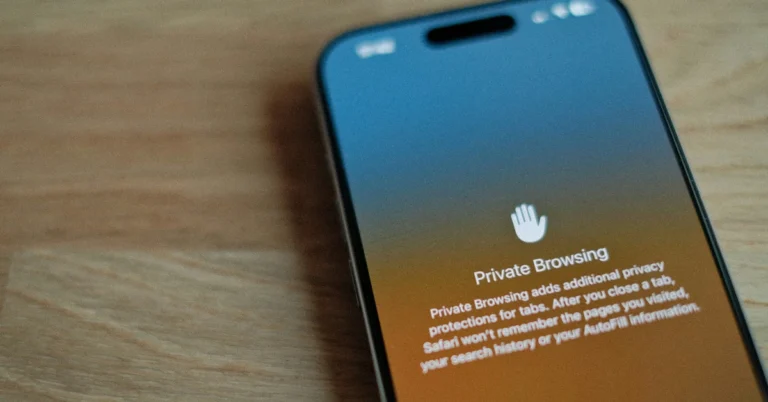
The Liquid Glass design may have been the showstopper on iOS 26, but there are several non-cosmetic upgrades that you need to know about. One of the smaller safety upgrades on the OS can help you safeguard your anonymity while browsing the web. We’re talking about the Advanced Tracking and Fingerprinting Protection in Safari. Initially available for Private Browsing, this feature has now been extended to all tabs.

Read Also: Realme GT 8 Pro India launch confirmed, to use a Snapdragon 8 Elite Gen 5 SoC

How does this feature work?

In order to learn how this feature works, you need to know about how your data is harvested on the internet. Every user leaves behind a ‘digital footprint’ when they get on the web. This footprint consists of information like their IP address, web browser and device info, location, gender, and other details. This digital profile is passed along to advertisers who use your information to pitch you targeted ads.

If this makes you slightly uncomfortable, you wouldn’t be in the wrong. It is not uncommon for data brokers to sell your digital profile to malicious entities. This is where Apple’s new tracking and fingerprinting protection feature comes in. Available exclusively on Safari, this feature hides your device and browser info from third-party cookies and keeps your digital profile from expanding. 

Enable Advanced Tracking and Fingerprinting Protection in Safari

Step 1: Update your iPhone to iOS 26.

Step 2: Go to Settings.

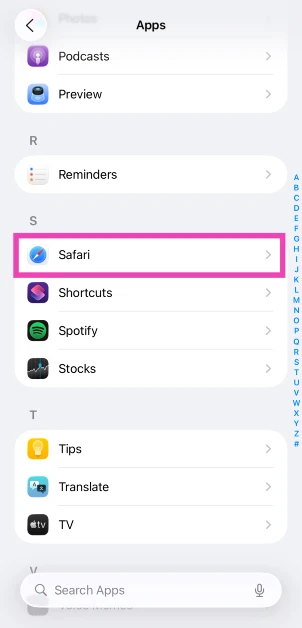
Step 3: Scroll to the bottom and select Apps.

Step 3: Scroll to the bottom and select Apps.

Step 4: Tap on Safari.

Step 4: Tap on Safari.

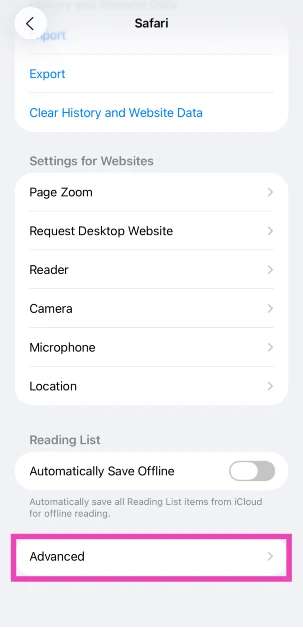
Step 5: Scroll down to the bottom and tap on Advanced.

Step 5: Scroll down to the bottom and tap on Advanced.

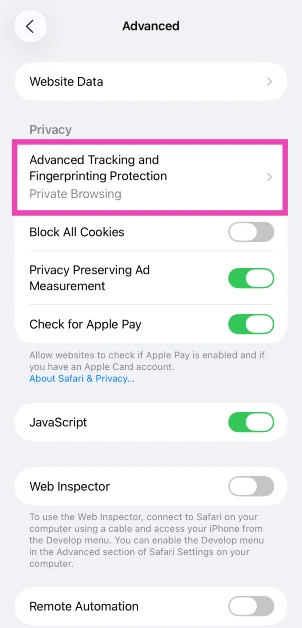
Step 6: Tap on Advanced Tracking and Fingerprinting Protection.

Step 6: Tap on Advanced Tracking and Fingerprinting Protection.

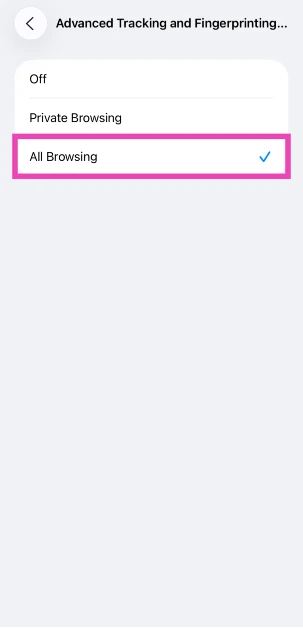
Step 7: Select All Browsing.

Step 7: Select All Browsing.

Frequently Asked Questions (FAQs)

What does Advanced Tracking and Fingerprinting Protection do on the iPhone?

This feature conceals the user’s browser and device data that’s used to create a digital profile or fingerprint.

How do I enable Advanced Tracking and Fingerprinting Protection on my iPhone?

Go to Settings>Apps>Safari>Advanced>Advanced Tracking and Fingerprinting Protection, and select ‘All Browsing’.

Why can’t I apply Advanced Tracking Protection to all tabs on Safari?

Apple extended this safety feature to all tabs on iOS 26. If you’re using a previous version of iOS, you will only be able to use it in Private Browsing.

How do I update my iPhone to iOS 26?

Go to Settings>General>Software Update and hit ‘Download and Install’ to update your iPhone to iOS 26.

Which iPhones can be updated to iOS 26?

All models from iPhone 12 and above are eligible for the iOS 26 update.

Read Also: 3 ways to scan a document on an iPhone

Final Thoughts

This safety feature can be used on the Safari browser for MacBooks as well. It does not extend to other browsers like Google Chrome, Mozilla Firefox, and Microsoft Edge, to name a few. If you have any questions, let us know in the comments!

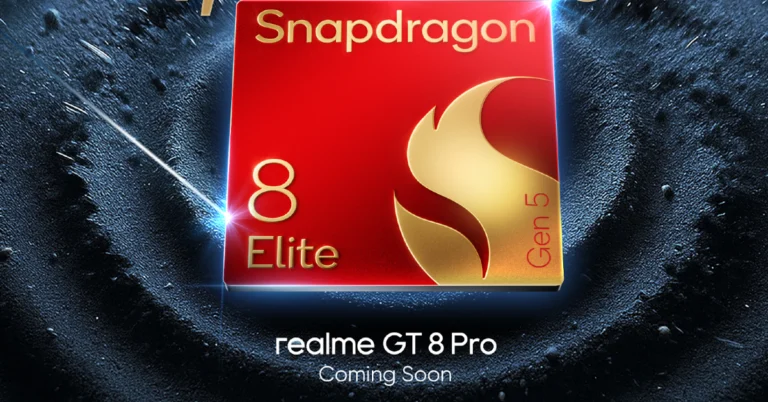
Realme GT 8 Pro India launch confirmed, to use a Snapdragon 8 Elite Gen 5 SoC

Realme has officially announced that its upcoming phone, the Realme GT 8 Pro, will launch in India soon. The manufacturer has provided important information about the smartphone ahead of its formal unveiling. The phone is reportedly powered by Qualcomm’s latest processor. It is set to contain two symmetrical stereo speakers, a 7,000mAh battery and a triple rear camera setup.

Realme’s latest phone GT 8 Pro, is set to hit the Indian market soon. The company has not announced the exact launch date, but the gadget is expected to be released next month, in October. The forthcoming phone is said to use a Snapdragon 8 Elite Gen 5 SoC with a dedicated R1 graphics unit. The Snapdragon 8 Elite Gen 5 is built using TSMC’s 3nm N3P fabrication process, which assures high energy efficiency. It has a 2+6 octa-core processing design with a clock speed of 4.61 GHz, resulting in remarkable power.

The smartphone is said to be the first to debut in India with the Snapdragon 8 Elite Gen 5 flagship, with an Antutu benchmark score of more than 4 million.

Also Read: BoAt PartyPal 700 party speaker with 300W sound output launched in India

Furthermore, the GT 8 Pro will incorporate GT BOOST 3.0, which provides prophetic energy efficiency scheduling and outstanding gaming capabilities. It can run two heavy-load games at high frame rates for up to an hour.

Also Read: Flipkart Big Billion Days Sale: Asus is offering exciting deals on consumer and gaming laptops

The Realme GT 8 Pro will include a dedicated R1 graphics chip to accompany the Snapdragon 8 Elite Gen 5 CPU, providing a strong dual-core gaming experience. The gadget will also include dual symmetrical speakers, which will improve the multimedia experience by delivering genuine stereo sound and a broader, more balanced soundstage.

The Realme GT 8 Pro will include a 2K resolution flat display, a 200-megapixel periscope telephoto sensor, a triple back camera configuration, and a 7,000mAh battery, the maker has announced.

3 ways to scan a document on an iPhone

0

Signing a physical document and emailing its scanned copy to someone is a task that your iPhone can handle within seconds. The scanned copies are bright, clear, and perfectly legible. If you’re a student, you can use your phone to scan the notes of a missed lecture instead of spending hours jotting them down. Here are the 3 ways to scan a document on your iPhone.

Read Also: Google Pixel 10 Review: The most complete vanilla flagship?

Which method is best for you?

The document scanner is embedded into several native iPhone apps. The new ‘Preview’ app, introduced on iOS 26, is designed for the special purpose of annotating and editing PDFs. It is also capable of scanning digital documents from physical copies. If you want to work with something more familiar, the Files app has a scanner built into it as well. The scanning process requires pointing the camera at a page, and the iPhone does the rest.

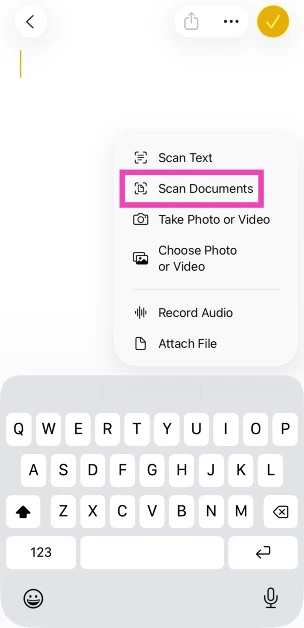
These methods create standalone digital files from physical documents. If you want to scan a page from a book and place it as a reference in a note, your iPhone offers that option too. Once you’re in the Notes app, you can scan a document and add it to any note using the attachments menu.

Use the Preview app

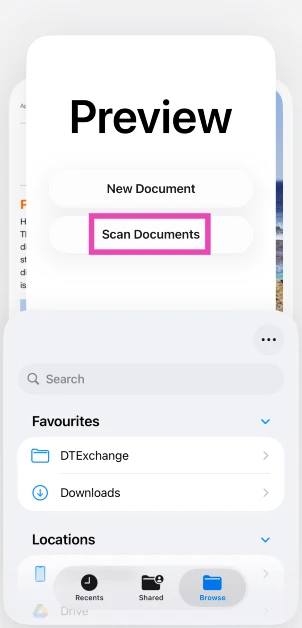
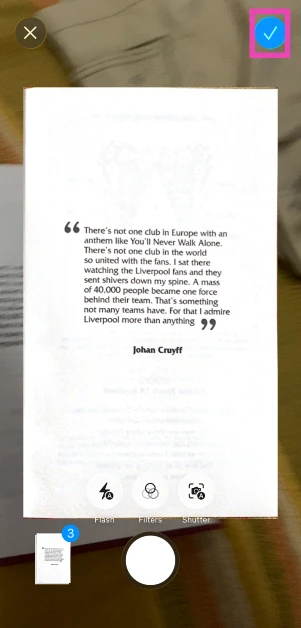
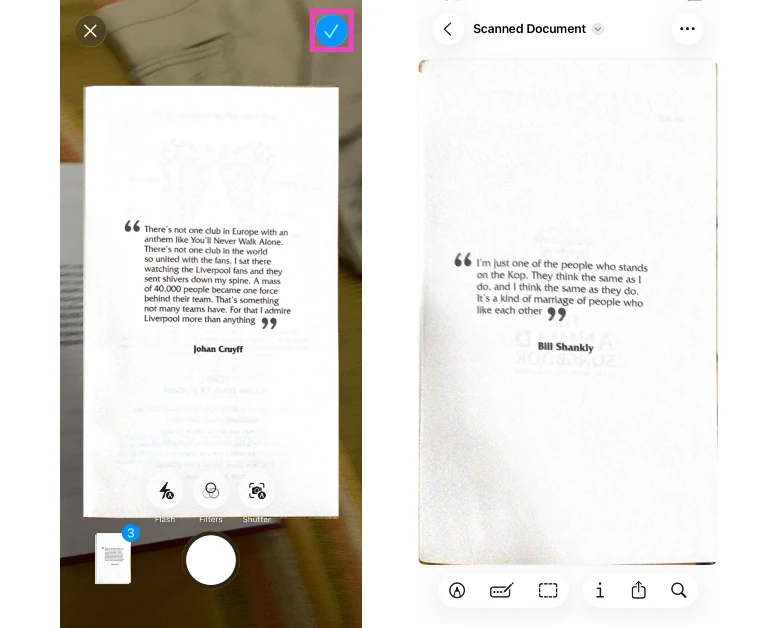
Step 1: Launch the Preview app on your iPhone.

Step 2: Tap on Scan Documents.

Step 2: Tap on Scan Documents.

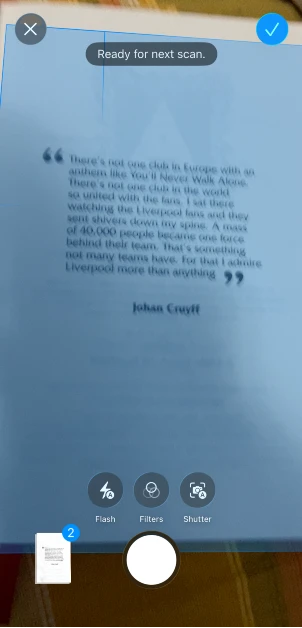
Step 3: The Preview app will trigger your iPhone’s camera. Point it at the document.

Step 3: The Preview app will trigger your iPhone’s camera. Point it at the document.

Step 4: Once the document has been scanned, tap the tick icon in the top right corner of the screen.

Step 4: Once the document has been scanned, tap the tick icon in the top right corner of the screen.

Step 5: The scanned document will be automatically saved on your iPhone.

Use the Files app

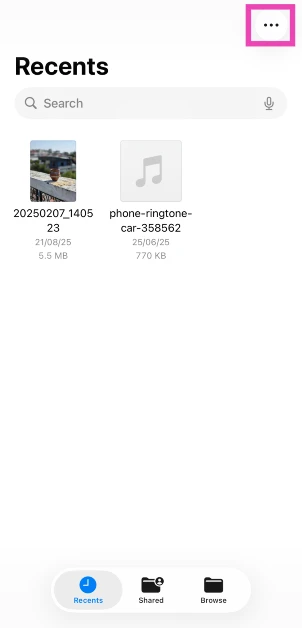
Step 1: Launch the Files app on your iPhone.

Step 2: Hit the ellipses in the top right corner of the screen.

Step 2: Hit the ellipses in the top right corner of the screen.

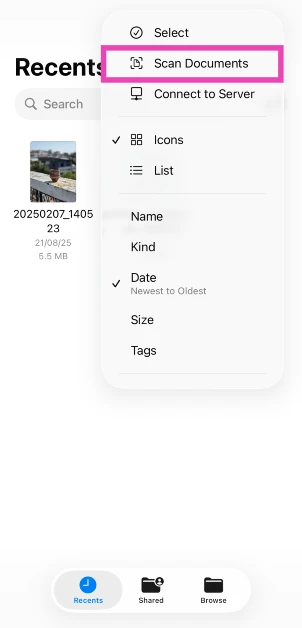
Step 3: Tap on Scan Documents.

Step 3: Tap on Scan Documents.

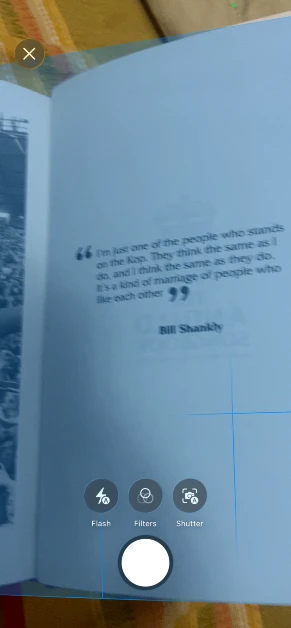
Step 4: The Files app will launch your iPhone’s camera. Point it at the document.

Step 4: The Files app will launch your iPhone’s camera. Point it at the document.

Step 5: The document will be scanned automatically. Once a page has been scanned, its preview will appear on the screen.

Step 5: The document will be scanned automatically. Once a page has been scanned, its preview will appear on the screen.

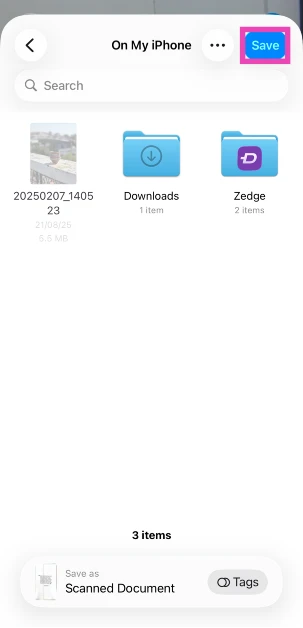
Step 6: Hit the tick icon in the top right corner of the screen when you’re done scanning the document.

Step 7: Go to the folder where you’d like to store the scanned document and hit Save.

Step 7: Go to the folder where you’d like to store the scanned document and hit Save.

Use the Notes app

Step 1: Launch the Notes app on your iPhone.

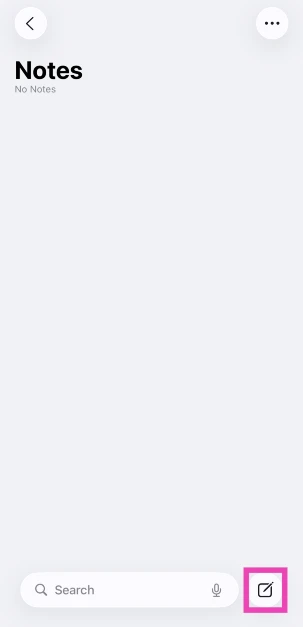
Step 2: Tap the icon to create a new note in the bottom right corner of the screen.

Step 2: Tap the icon to create a new note in the bottom right corner of the screen.

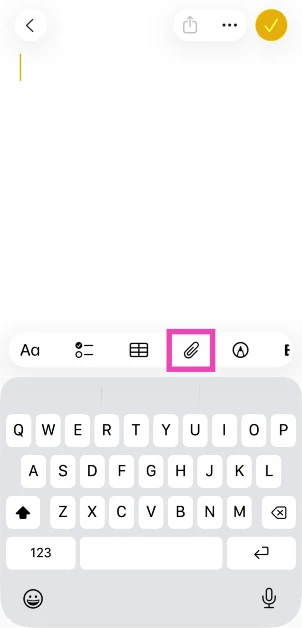
Step 3: Hit the paperclip icon.

Step 3: Hit the paperclip icon.

Step 4: Tap on Scan Documents.

Step 4: Tap on Scan Documents.

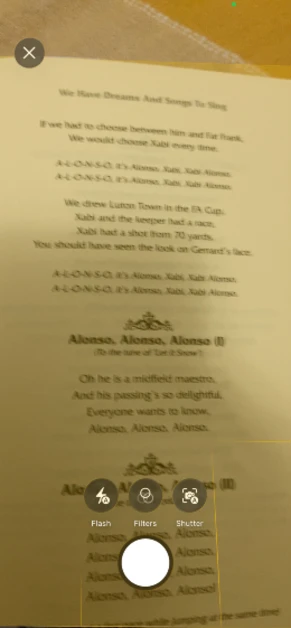
Step 5: The Notes app will trigger your iPhone’s camera. Point it at the document to scan it.

Step 5: The Notes app will trigger your iPhone’s camera. Point it at the document to scan it.

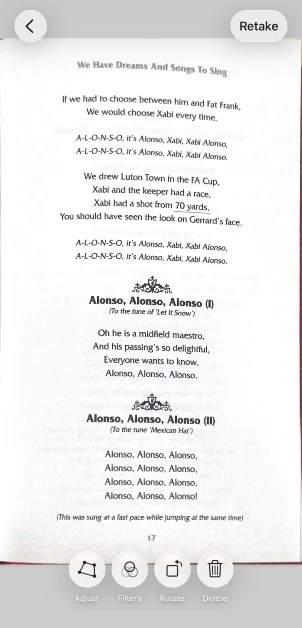
Step 5: Once the document has been scanned, it will be added to the note.

Step 5: Hit the tick icon in the top right corner of the screen to save the document.

Bonus Tip: Scan and send documents on WhatsApp

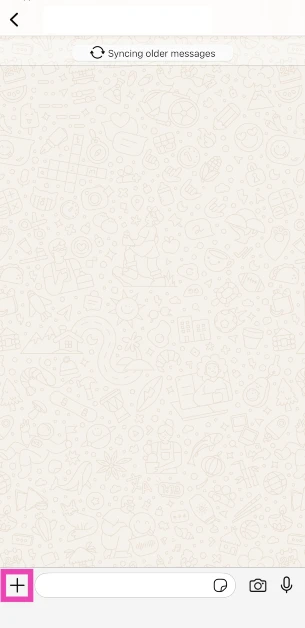
Step 1: Launch WhatsApp Messenger on your iPhone and open a conversation.

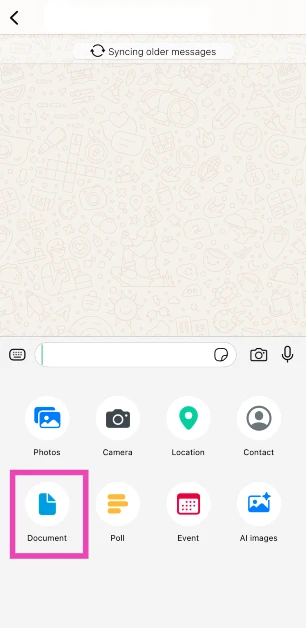
Step 2: Tap the plus icon in the bottom right corner of the screen.

Step 2: Tap the plus icon in the bottom right corner of the screen.

Step 3: Select Document.

Step 3: Tap the document icon. 3 ways to scan a document on an iPhone

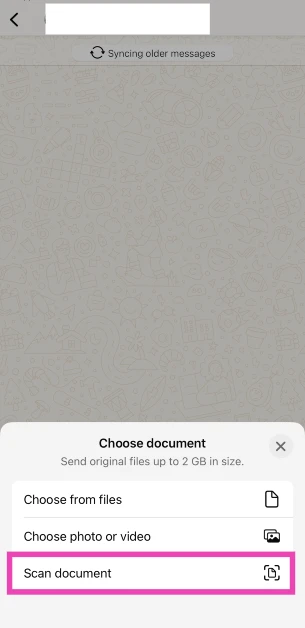
Step 4: Select Scan Document.

Step 4: Select Scan Document. 3 ways to scan a document on an iPhone

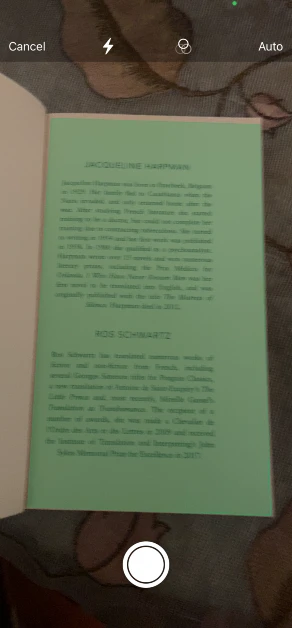
Step 5: Use your iPhone’s camera to scan the document.

Step 5: Scan the document using your iPhone’s camera. 3 ways to scan a document on an iPhone

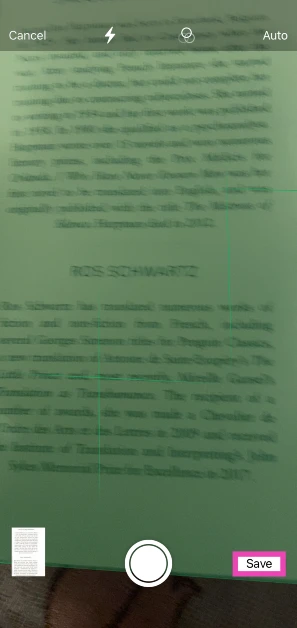
Step 6: Hit Save.

Step 6: Hit Save. 2 ways to scan and send documents on WhatsApp (Android and iOS) 3 ways to scan a document on an iPhone

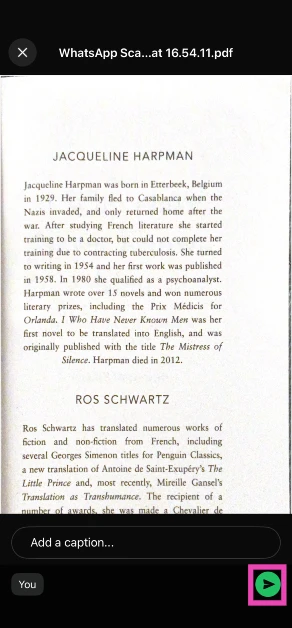
Step 7: The document will be saved as a PDF. Add a caption to the file and hit the green icon to send it.

Step 7: The document will be saved as a PDF. 2 ways to scan and send documents on WhatsApp (Android and iOS) 3 ways to scan a document on an iPhone

Frequently Asked Questions (FAQs)

Where is the document scanner on my iPhone?

The document scanner is embedded in the Files, Notes, and Preview app.

How do I scan a document on my iPhone?

Launch the Notes app on your iPhone, tap the Plus icon in the top right corner of the screen, and select ‘Scan Documents’. Point your phone’s camera at the document. Once the scan is complete, tap the tick icon in the top right corner of the screen. Go to the target folder and hit ‘Save’.

What is the Preview app on my iPhone?

The Preview app is a new addition on iOS 26. This app can be used to create, edit, and annotate PDFs.

How do I scan a text from a page on my iPhone?

Launch the Notes app on your iPhone, create a new note, hit the attachment icon, and select ‘Scan Text’. A pop-up with the viewfinder of your iPhone’s camera will appear in the bottom half of the screen. Point the camera at the text. It will be scanned and pasted into the note.

Which third-party apps can I use to scan a document on my phone?

Adobe Scan, Doc Scanner, and Microsoft Lens are some of the best document scanner apps for the iPhone.

Read Also: How to enable voice translation for phone calls on Google Pixel

Final Thoughts

The Preview app on iOS 26 unlocks a wide array of tools to annotate and markup scanned documents. If you need to quickly send a document to a friend, you can scan it directly within WhatsApp. If you have any questions, let us know in the comments!

Garena Free Fire Max Redeem Codes Today 26 September 2025: Here is how to claim them

Garena Free Fire (GFF) Max is a battle royale game with regular awards and tournaments to keep players interested. If you play GFF, you should be aware of the redeem codes that are released on a daily basis. However, because the battle royale game is banned in India, players from other countries can use the Free Fire Redeem codes daily. If you’re unfamiliar with the codes or don’t know how to get them, we’ve put together a step-by-step guide to help you redeem them. Check out Garena Free Fire Max Redeem Codes for 26 September 2025.

These codes are a great way to get free items in the game. The 12-digit codes contain letters and numbers, as well as an expiration date and time. Because the Garena FF redeem codes cannot be used more than once, you should hurry to the redemption page to claim your free reward before someone else does. To get a free reward, all you have to do is go to reward.ff.garena.com/en, which is the official redemption page. Also, keep an eye on this space for daily updates on Gadget Bridge on GFF Max redemption codes and rewards.

Also Read: CERT-In identified multiple high-risk vulnerabilities in Android: Details

Garena Free Fire Max Redeem Codes Today 

F4Q8W2E6R1T5Y9U3
F7A1S5D9F2G6H3J7
F2Z6X3C7V1B5N8M4
F5H9J1K8L4P2O6I3
F3H8J4K1L7P5O2I9
F9S2D6F3G7H1J4K8
F1L5P9O3I7U2Y4T8
F6Q1W5E9R3T7Y2U4
F9A4S8D2F6G3H7J1
F1Z5X9C3V7B2N6M8
F8S3D7F4G1H5J9K2
F3L7P2O6I4U8Y1T5

Also Read: IFA 2025: Lenovo introduced Legion Pro 7 (2025) and Lenovo Legion Go with AMD’s Ryzen 9000 HX series processors

How to Get Free Fire Max Redeem Keys for Garena?

  • Visit the game’s official website at reward.ff.garena.com.
  • Use your Facebook, Google, VK, Apple ID, Huawei ID, or Twitter account to log in.
  • You’ll be taken to a valid redemption code (s)
  • Copy and paste the 12-digit redemption code into the text box.
  • On the screen, a dialogue box will appear.
  • ‘Ok’ should be selected.

Amazon Quiz Answers Today 26 September 2025: Participate to win Up To Rs 500 Amazon Pay Balance

Amazon Quiz 26 September 2025: The New Daily Quiz is now available. Customers from different parts of the country are participating in the daily quiz. The quiz starts at midnight today and will be live until 11:59 PM tonight. By successfully answering every question, participants in the quiz have the chance to win wonderful rewards. Up to Rs 500 Amazon Pay Balance is up for grabs to participants today.

One wrong answer could eliminate you from the quiz. You have a chance to win up to Rs 500 Amazon Pay Balance if you successfully answer every question. Users of the app only have the opportunity to take the quiz. Check Out the 26 September 2025 Quiz.

Are you not able to find Amazon FunZone? Click below and participate.

Click here to enter the Amazon FunZone Quiz and play today.

Today’s Prize: Rs 500 Amazon Pay Balance

Quiz Date: 26 September 2025

Daily Timing: 12 AM to 11:59 PM

Previous Winners Announcement: Today 12 PM Noon

Amazon Daily Quiz Answers Today: Win Up To ₹ 500 Amazon Pay Balance

Question 1: Which team recently set the record for the highest chase in Indian Premier League history by successfully chasing a target of 262?

Answer: Punjab Kings

Question 2: The comedy movie ‘Ricky Stanicky’ stars which of these actors, also a big star in sports entertainment?

Answer: John Cena

Question 3: The famous monument, Humayun’s Tomb, was built in which century?

Answer: 16th century

Question 4: This is the famous Rathaus, located in which famous European capital?

Answer: Vienna

Question 5: Which of these famous guitarists was part of this iconic band?

Answer: Slash

Also Read: CERT-In identified multiple high-risk vulnerabilities in Android: Details

How To Play Amazon Daily Quiz Today

Only app users are eligible to play the Amazon quiz every morning from 12 AM to 11:59 PM. The quiz is not available on the desktop. For those who are unaware of how to play the Amazon quiz, below are the steps you can follow to take the quiz.

  • First, download the Amazon app from the Google Play Store or App Store or go here to download the Amazon App
  • Now fill in the required information through the Sign-Up option.
  • To find the Amazon Daily Quiz banner, log in to the Amazon app and scroll down to the home screen.
  • Tap on the banner and tap on the Start button to start the Quiz.
  • Now you will get 5 questions and you need to answer them correctly. One wrong answer will eliminate you from the Quiz.
  • After answering all the questions correctly, you are now eligible for a Lucky Draw.
  • The previous winner’s name will be announced today at 12 PM.

Amazon Daily Quiz Answers from the previous few days.

Here are all the answers from the previous 5 days of the Amazon Daily Quiz and Contest.

25 September 2025

Question 1: Which of these recently played ATP events has a court named after the legendary tennis player Rafael Nadal?

Answer: Barcelona Open

Question 2: The movie Road House sees Jake Gyllenhaal play the role of an ex-UFC fighter. Which of these famous sportspeople also acts in the movie?

Answer: Conor McGregor

Question 3: What is the other name given to the swamp deer, the state animal of Madhya Pradesh?

Answer: Barasingha

Question 4: In which of these cities in the USA is this famous museum located?

Answer: New York

Question 5: Which of these controversial media organisations was founded by this Australian editor and publisher?

Answer: Wikileaks

24 September 2025

Question 1: Which of these players won the Monte Carlo Masters tennis tournament in 2024, his 3rd triumph in that event in 4 years?

Answer: Stefanos Tsitsipas

Question 2: Which of these Amazon Prime shows shares its name with a 2005 Brad Pitt- Angelina Jolie movie?

Answer: Mr and Mrs Smith

Question 3: Which animal features on the election symbol of the Republican party in the USA?

Answer: Elephant

Question 4: These waterfalls span the border between the province of Ontario in Canada and which state in the USA?

Answer: New York

Question 5: Which of these famous architects designed this iconic monument in India?

Answer: Edwin Lutyens

23 September 2025

Question 1: Against which team did Sunrisers Hyderabad set a new record scoring 287 in an IP match?

Answer: Delhi Capitals

Question 2: Who plays the role of soldier Arun Katyal in the recently released movie Yodha?

Answer: Sidharth Malhotra

Question 3: Which of these famous rulers was born in the Shineri Fort in Maharashtra in the 17th century?

Answer: Shivaji

Question 4: Name this famous church located in Europe

Answer: St. Peter’s Basilica

Question 5: This is the flag of which Caribbean country?

Answer: Barbados

19 September 2025

Question 1: Achanta Sharath Kamal represents India in which sport?

Answer: Table tennis

Question 2: Which date is to be celebrated as Hyderabad Liberation Day?

Answer: 17-Sep

Question 3: In which sport did India win its first two medals at the 2024 Paris Olympics?

Answer: Shooting

Question 4: This painting was created in which historical period?

Answer: Renaissance

Question 5: Where is the headquarters of this brand in the USA?

Answer: Atlanta

18 September 2025

Question 1: Achanta Sharath Kamal represents India in which sport?

Answer: Table tennis

Question 2: Which date is to be celebrated as Hyderabad Liberation Day?

Answer: 17-Sep

Question 3: In which sport did India win its first two medals at the 2024 Paris Olympics?

Answer: Shooting

Question 4: This painting was created in which historical period?

Answer: Renaissance

Question 5: Where is the headquarters of this brand in the USA?

Answer: Atlanta

Also Read: IFA 2025: Lenovo introduced Legion Pro 7 (2025) and Lenovo Legion Go with AMD’s Ryzen 9000 HX series processors

Frequently Asked Questions (FAQs)

Where can I check the previous winners? Did I win? How to check?

You can head over to this link on your mobile or desktop to check the winners of the Amazon Daily Quiz Contest.

How to Play Amazon Daily Quiz or Contest?

We have written an explainer above; you can refer to that.

When are the winners of the Quiz and contest announced or declared?

The announcement of today’s quiz winner will take place Tomorrow. As for the Special Quiz and “Spin & Win” Contest, the winners will be declared once the Quiz Contest comes to an end. To find out who the lucky winner is, you can refer to the Winners List or visit the Amazon Winners tab in the Amazon App.

How to participate in the Daily Amazon Quiz?

That is very easy, just got to the Amazon app and scroll to the bottom of the page and you will find the Quiz section. Click on it (usually it is called the fun zone) and you can enter the Amazon Today Quiz Contest. 

Are there any other quizzes or contests running on Amazon daily?

Yes, there are many running daily. These range from spinning the wheel to answering the questions correctly. All are located in the Fun Zone. 

What are the criteria for selecting a winner in the Daily Amazon Quiz?

When a qualified player submits correct answers to all the questions, they will automatically be entered into a lucky draw. This draw will include all participants who answered all the questions correctly. Amazon randomly selects the final winners from the pool of eligible participants who gave the right answers.

Which Types of Questions are asked within the Amazon Daily Quiz?

These are very simple and straightforward questions. These are mainly related to general knowledge. 

Where should I look for Amazon Daily Quiz answers?

You can bookmark our website www.gadgetbridge.com as we will help you every day with the Amazon Daily Quiz. We bring you fresh answers every day for the Amazon Daily Quiz and Contest. 

What time does Amazon announce previous winners?

The previous winner’s name will be announced today at 12 PM (noon).

NYT Wordle Answer and Hints Today (September 26) #1560

Are you looking for today’s Wordle for September 26, 2025, answer? The problem is difficult to solve, so if you need assistance, we’ve included hints and the clue to today’s Wordle Quiz. Below, we have made it simple for everyone to understand how to get to the Wordle Answer today.

Hints and Answers for Today’s Wordle September 25

Before answering directly, please check the Wordle Hints first.

Hint 1: Today’s Wordle answer includes a vowel.
Hint 2: The answer for today has a repeating letter.
Hint 3: Meaning- to waste time or do something slowly

What word does today’s Wordle begin with?

Do you need help with today’s Wordle answer’s initial letter?

The first letter in today’s Wordle is “D”

Today’s Wordle Answer 

The answer to Wordle #1560 on Sept 26, 2025, is — DALLY

Also Read: iPhone 17 Series, iPhone Air Sale Kicked Off in India Today: Pricing and Availability

What is Wordle?

Wordle: A Five-Letter Word Guessing Game
• The game allows six guesses of a five-letter word.
• Provide feedback on the guessed letters’ placement in the puzzle.
• The New York Times purchased the game in 2022.
• Created by Josh Wardle for his partner, narrowing down 12,000 English words to 2,500.
• Named after the word “word.”

How To Play Wordle?

Wordle is a New York Times word puzzle game that allows users to guess a five-letter word in six attempts. The letters are highlighted in Yellow and Green, indicating whether the word is present in the answer or not, and Green letters indicate the correct guess.

Also Read: Garena Free Fire Max Redeem Codes Today 7 September 2025: Here is how to claim them

Wordle Tips and Tricks
  • Select a powerful starting word: Avoid using unusual words, as they frequently do not match common letters. A good opening word has plenty of benefits.
  • Repeating letters: Don’t be afraid of repeating letters; they appear frequently in words. The answer may contain one or two repeated letters.
  • Use the Wordlebot: The NYT’s Wordlebot analyses and compares replies to itself. This challenge can assist you in enhancing your guessing skills and highlighting areas for development.

GOBOULT offering up to 90% per cent off on its audio products: Grab the deal

GOBOULT is running a festive sale with up to 90% discount during Amazon’s Great Indian Festival and Flipkart’s Big Billion Day. The sale includes audio devices and wearables that may help you set the mood, keep active, measure your fitness, and make useful gifts for friends and family this Diwali.

During the festive season, GOBOULT is giving big discounts on its audio and smartwatch lineups during the Great Indian Festival and Big Billion Days deals on Amazon and Flipkart. With reductions of up to 90%, now is a great moment to enhance your personal technology, watch your health, or locate the perfect present for loved ones.

The GOBOULT Y1 and Z20 are now available for Rs 699 and Rs 899, respectively, a 90% discount from their previous retail price of Rs 5,499. The GOBOULT Y1 Pro and Z20 Pro are now Rs 899 (was Rs 5,999), with an 85% savings.

Also Read: BoAt PartyPal 700 party speaker with 300W sound output launched in India

The GOBOULT Thrux is currently priced at Rs 1,799, an 80% drop from the initial asking price of Rs 7,999, while the GOBOULT X Mustang Q is available for Rs 2,299, a 70% decrease from its original price of Rs 6,999. These special deals provide an excellent opportunity to obtain high-quality audio and smartwatches at a fraction of the usual price.

Also Read: Flipkart Big Billion Days Sale: Asus is offering exciting deals on consumer and gaming laptops

The Mustang Q over-ear headphones are intended for audiophiles seeking both performance and comfort. They have 40mm bass-boosted drivers with BoomX technology for deep, immersive sound, a 70-hour battery life, and memory foam earcups. Dual device connection, the Boult AMP App for personalised music, Quad ENC microphones for crystal-clear talks with powerful noise cancellation, IPX5 water resistance, and sturdy knurled designs are among the standout features. These headphones are great for both professional and gaming applications, as well as long-distance use.

BoAt PartyPal 700 party speaker with 300W sound output launched in India

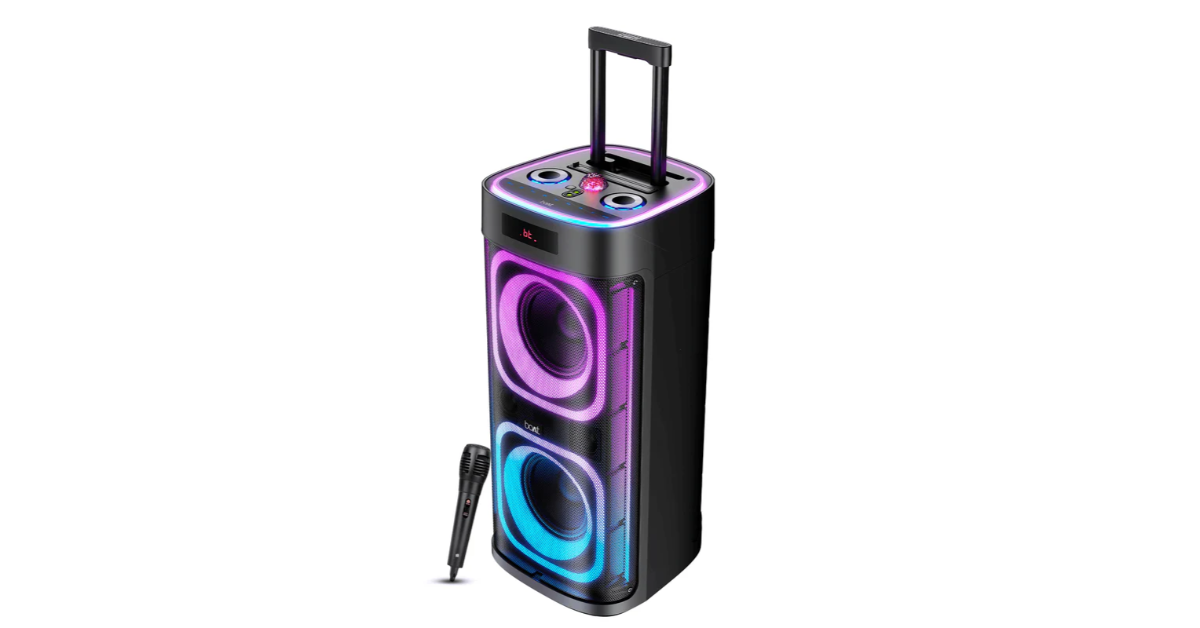
BoAt has announced the BoAt PartyPal 700 party speaker in India, which has Karaoke capability and a 300W sound output. The speaker is part of a collaboration with Netflix India on the current series, The Ba***ds Of Bollywood. The launch is backed by an advertising campaign that incorporates the speaker into the show’s narrative and promotes the phrase “Speaker itna loud, sab bolna allowed.”

In addition to supporting a variety of connectivity options, including Bluetooth v5.3, AUX, USB, TF card, wired/wireless microphone, and RGB LED lights and a built-in disco ball for dynamic visual effects appropriate for both indoor and outdoor parties, the PartyPal 700 boasts 300W BoAt Signature Sound with deep bass and immersive audio. It can play continuously for up to six hours, and its trolley handle and wheels make getting around effortless.

BoAt PartyPal 700 party speaker with 300W sound output launched in India

The speaker has guitar input, TWS stereo mode, karaoke auto-tune, and a rechargeable UHF wireless microphone.

Also Read: Flipkart Big Billion Days Sale: Asus is offering exciting deals on consumer and gaming laptops

This product from BoAt Lifestyle may be purchased on the official website, Amazon, Flipkart, and in-store around the country at a price tag of Rs 54,990.

Speaking on the brand collaboration, Aman Gupta said: “At boAt, we believe in creating products that reflect the energy, boldness, and authenticity of our audience. The Ba***ds of Bollywood, full of drama and unapologetic spirit, was the perfect platform to amplify our PartyPal speaker. After all, who wouldn’t want to have a wild party even wilder?”

“By joining hands with Netflix and Red Chillies Entertainment, boAt continues to reinforce its leadership at the intersection of lifestyle, technology, and entertainment – strengthening its deep cultural connect with India’s youth.” He added.

Also Read: Great Indian Festival Sale: Best tablets to buy on Amazon under Rs 20000

BoAt has partnered with Netflix India for The Ba***ds Of Bollywood, launching an ad-film that skillfully intertwines the launch of a new product with the show’s authentic essence. The ad-film revolves around boAt’s PartyPal 700 Speaker, which allows the stars of the show to be as unfiltered and uninhibited as the series itself. The film features Lakshya Lalwani and Bobby Deol exchanging witty repartee, Anya Singh and Mona Singh trading barbed one-liners, Sahher Bambba and Manoj Pahwa throwing playful jibes, and Raghav Juyal rallying the crowd with his signature humour. Aman Gupta, Co-founder & CMO of boAt, makes a surprise cameo with a punchline that no one expected, reviving the wild energy and ensuring the party roars back to life.

Countries where iPhone 17 Series is cheaper than India: Pricing Compared

In India, the iPhone 17 Series is frequently priced higher than in other countries, particularly when compared to Apple products. The iPhone 17 series, which includes the iPhone 17, iPhone 17 Air, iPhone 17 Pro, and iPhone 17 Pro Max, meets a variety of consumer demands and lifestyles. These gadgets have been introduced globally, drawing tech aficionados from all over the world. However, costs vary greatly between countries due to taxes, import tariffs, and local market factors. Comparing international prices enables purchasers to choose the most affordable options.

Model India (INR) US UAE / Dubai UK Vietnam
iPhone 17 Rs 82,900 $799

(Rs 70,500)

AED 3,399

(Rs 81,700)

£799

(Rs 87,900)

₫39,024,960

(Rs 128,800)

iPhone Air Rs 119,900 $999

(Rs 88,200)

AED 4,299

(Rs 103,300)

£999

(Rs 109,900)

₫31,999,000

(Rs 105,400)

iPhone 17 Pro Rs 134,900


$1,099

(Rs 97,000)

AED 4,699

(Rs 113,000)

£1,099

(Rs 120,900)

₫34,999,000

(Rs 115,500)

iPhone 17 Pro Max Rs 149,900 $1,199

(Rs 105,800)

AED 5,099

(Rs 122,500)

£1,199

(Rs 131,900)

₫37,999,000

(Rs 125,400)


Our Analysis

The iPhone 17 is now available for around Rs 12,400 less in the United States than in India. Vietnam is the most costly market, followed by the UAE (where costs are roughly comparable to India) and the United Kingdom (where prices are higher).
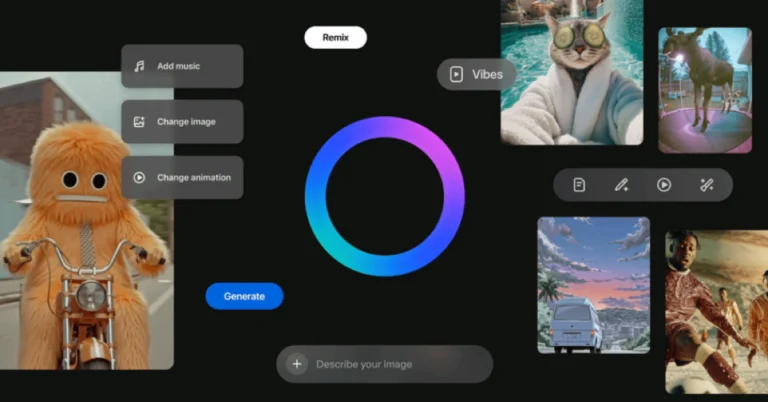
Also Read: Great Indian Festival Sale: Best tablets to buy on Amazon under Rs 20000

The iPhone Air is now the most economical option in the United States, saving around Rs 31,700, while the most costly alternative is available in India. The UAE saves Rs 16,600 compared to India, while the UK saves Rs 10,000 and Vietnam saves Rs 14,500.
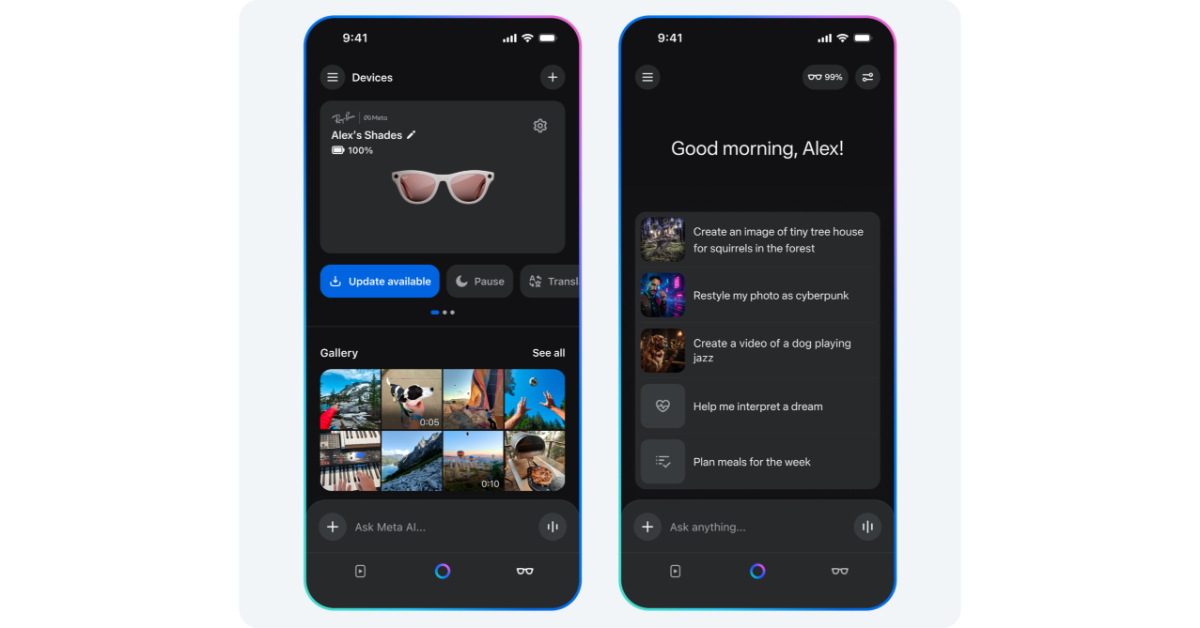
The iPhone 17 Pro is now the most affordable option in the United States, with huge savings of around Rs 37,900, while the most costly option is in India. The UAE saves roughly Rs 21,900 compared to the Indian pricing, while the UK saves around Rs 14,000 and Vietnam saves about Rs 19,400.

Also Read: Flipkart Big Billion Days Sale: Asus is offering exciting deals on consumer and gaming laptops

The iPhone 17 Pro Max is the most affordable in the United States, with a savings of around Rs 44,100, while the most expensive model is available in India. The UAE provides an enormous savings of nearly Rs 27,400, whilst the UK is approximately Rs 18,000.

Indian buyers pay a large premium for the iPhone 17 series, whereas the United States is the most cost-effective location to buy any model. UAE connections are an appealing option to purchasing devices in India, owing to import charges, local taxes, and currency changes.

Kingshot Free Codes: How to Get Rewards & Claim Benefits

Mobile gaming has turned into more than just an everyday pastime. It has a mature feel with sensational graphics, energising gameplay, and an active community; games such as Kingshot have captured attention. Whether you are an everyday player or mounting the leaderboards, one thing is well-defined: in-game purchases and upgrades play a crucial role in staying ahead. That is why players are all of the time searching for means to get the most value out of their money. Did you hear about Kingshot free codes? You are already one step forward. These codes can give you a practical advantage. But how do they work, and where can you get them? Moreover, how can you save up on Kingshot top up and game recharge costs? Let’s discover all this in this article.

What Is Kingshot?

Before we plunge into free codes and top-ups, let’s take a quick look at what makes Kingshot so popular.

Kingshot is an action game that mixes strategy, shooting, and real-time multiplayer fights. With its superior graphics and attractive gameplay, it is no surprise that it has built a hardcore fan base almost worldwide.

Kingshot offers in-game purchases for items like:

  • Exceptional arms and skins
  • VIP memberships
  • Character upgrades
  • Battle passes
  • Exclusive events and loot boxes

To approach these boasts, players need to recharge their accounts, which is where Kingshot top-up services move in.

What Are Kingshot Free Codes?

A Kingshot free code is basically a promo code or gift code offered by the developers or promotional partners. These codes can be used for in-game rewards specified as:

  • Diamonds or coins
  • Power-ups or boosters
  • Selective character skins
  • Event passes or exceptional equipment

They are often utilised to reward hardcore players, draw in new users, or celebrate holidays and game milestones.

Where to Find Kingshot Free Codes?

Here are a few of the basic and authentic places to find Kingshot free codes:

1. Authorised Social Media Pages:

Accompany Kingshot on pages such as  Facebook, Twitter, Discord, and Instagram. Developers frequently put up codes during events, celebrations, or as part of limited-time runs.

2. Game Events:

Take part in seasonal or weekly events posted in the game. A few of these offer gift codes as payoffs for finishing challenges or logging in regularly.

3. Email Newsletters:

Take the game’s newsletter if accessible. Developers occasionally send code straight away to your inbox as a thank-you gift.

4. Gaming Forums & Communities:

Sites such as Reddit, Discord servers, or Kingshot fan pages often share active codes. Be sure only to use codes from trustworthy sources to avoid expired or invalid codes.

5. Promotional Campaigns and Top-Up Sites:

A few Kingshot top-up programs or game recharge services might provide bonus codes as part of their promotional campaigns. All the time, check if there is an active deal prior to making a purchase.

How to Save More with Kingshot Top-Up Deals?

Still with free codes, daily players oftentimes require to top up their accounts to follow with in-game advancement. That is where recognising how to save on Kingshot top-up services gets in handy.

Rather than purchasing through the app store at a reasonable price, you will be able to get the best deal by utilising third-party game recharge programs. These sites specialise in digital top-ups and oftentimes offer:

  • Lower costs
  • Bonus in-game currency
  • Extra bundles
  • Flash deals and seasonal offers

Here is what to search for while selecting a recharge platform:

  • Fast Delivery: You need your top-up to shine in your game rapidly.
  • Safe Payment Choices: Ensure the program supports trustworthy payment methods.
  • Authentic Resellers: Just utilise long-familiar or formally partnered programs to avoid scams.
  • Customer Support: Authentic support can make a significant difference if something goes wrong.

A few platforms, as well, include Kingshot free codes with your purchase as an incentive, and so you get back more value for your money.

How to Merge Free Codes with Game Recharge for Supreme Benefit?

Smart players recognise how to reach their resources. By merging free codes with discounted game recharge offers, you will be able to unlock more easygoing and relish superior boasts without draining your wallet.

Here is a tip a lot of players use:

  • Gather up all accessible free codes to unlock the first bonuses.
  • Utilise the Kingshot top-up platform to recharge your account at a discounted rate.
  • Pay off both to pile up your in-game currency and overload your upgrades.

It is all about planning your purchases safely and taking advantage of every accessible offer.

In Summary:

The world of mobile gaming is more breathtaking than ever, but resting competitively can come at a cost. Cheers to innovative tools such as  Kingshot free codes, discounted Kingshot top-up, and trustworthy game recharge programs, which can assist you in getting the most out of your feel without overspending.

Whether you are going after high ranks, unlocking superior content, or only relishing the game at your own pace, these tips can help you play smarter and save up more. And so keep an eye out for those codes, follow for discounts, and relish the Kingshot adventure to the best!