Setting up your new Amazon Echo device requires a WiFi connection. If you have a home router, this task should not take more than a couple of minutes. Those who don’t have a WiFi connection at home need not fret. You can use your smartphone’s WiFi hotspot as a shared connection. The only catch is that the Echo device must be connected to the hotspot at all times if you want to use Alexa’s voice commands. If you’re only interested in using your Amazon Echo device as a Bluetooth speaker, you can make it work without WiFi. Here’s how.Read Also:Top 3 Methods to Hide Apps on MIUI OS
Why use your Amazon Echo device as a Bluetooth Speaker?
As great as Amazon Echo devices are to play music and control other smart devices, there is always something more you can do with them. If you’re watching a movie on your laptop and need just that little extra boost to the volume, you can always pair it with your Echo speaker. The best part is that there are no latency issues to deal with.The need to use your Amazon Echo device as a Bluetooth speaker arises the most when you want to play music or videos on YouTube. Strangely, Echo speakers lack native support for YouTube, even though Amazon Music’s direct rivals, Apple Music and Spotify, are present on the platform. This means you cannot use voice commands to get Alexa to play music from YouTube on your Echo device. Luckily, the option to play music via Bluetooth is always there.
Use the Alexa app to connect to the Amazon Echo Device over Bluetooth
Step 1: Launch the Amazon Alexa app on your Android smartphone.Step 2: Switch to the Devices tab.Step 3: Select your Amazon Echo device.Step 4: Turn on your phone’s Bluetooth.Step 5: Tap on Connect a device.Step 6: The Amazon Alexa app will search for nearby devices. Tap on your phone’s name on the list.
Use your Amazon Echo Device as a Bluetooth Speaker
Step 1: Make sure your Amazon Echo device is plugged into a power socket.Step 2: Turn on the Bluetooth on your Android smartphone.Step 3: Say “Alexa, connect to my phone’s Bluetooth”.This method only works when your phone has been connected to the Echo device before.
Use your Amazon Echo Device as a Bluetooth Speaker without WiFi
If you don’t have access to home WiFi, you can always use your phone’s WiFi hotspot to set up the Amazon Echo Device. Here’s how.Step 1: Turn on your phone’s WiFi hotspot from the Quick Settings Menu.Step 2: Make sure your Amazon Echo device is plugged into a power outlet.Step 3: Launch the Amazon Alexa app and sign in using your Amazon account.Step 4: Tap the plus icon at the top right corner of the screen and select Add Device.Step 5: Select Amazon Echo from the list. On the following page, choose your model of the Echo.Step 6: Press the Action button on the Echo device to put it in Setup Mode.Step 7: On the Alexa app, choose your mobile hotspot as the WiFi network.Step 8: Alexa will be paired with your device. Now, follow the methods mentioned above to use it as a Bluetooth speaker.
Frequently Asked Questions (FAQs)
Can I use my Amazon Echo device as a Bluetooth speaker if it doesn’t have access to home WiFi?
You can use your Echo device as a Bluetooth speaker, but in order to connect it to your phone, you will need access to home WiFi or your phone’s hotspot. Once you have connected it to your phone over Bluetooth, it will function as a speaker even without WiFi access.
How do I pair my phone to my Amazon Echo device?
To pair your phone to your Amazon Echo device, launch the Amazon Alexa app, go to Devices>Echo>Connect to a device and select your phone.
How do I play music from YouTube on my Amazon Echo device?
Since Amazon Echo devices do not have native support for YouTube, you will need to connect your phone over Bluetooth in order to play music or videos from the Google-owned streaming platform.Read Also:Acer showcased Aspire 3D 15 SpatialLabs Edition Laptop at CES 2024
Conclusion
These are the top 3 ways to use your Amazon Echo device as a Bluetooth speaker with or without WiFi. If you know any other way to connect your phone to an Echo device over Bluetooth, let us know in the comments! Check out this article to learn how to connect two or more Amazon Echo speakers.
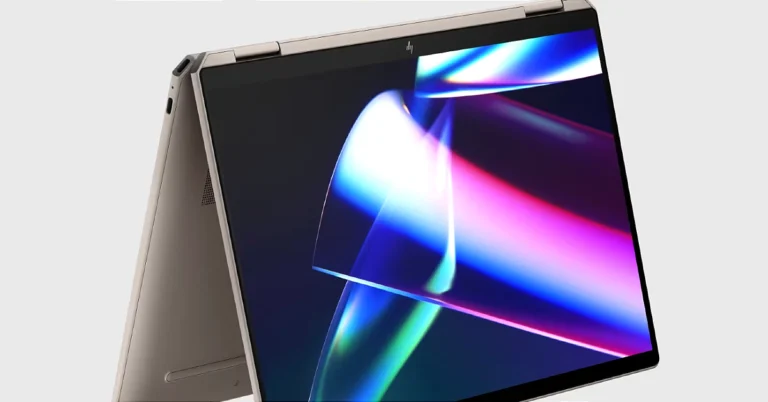
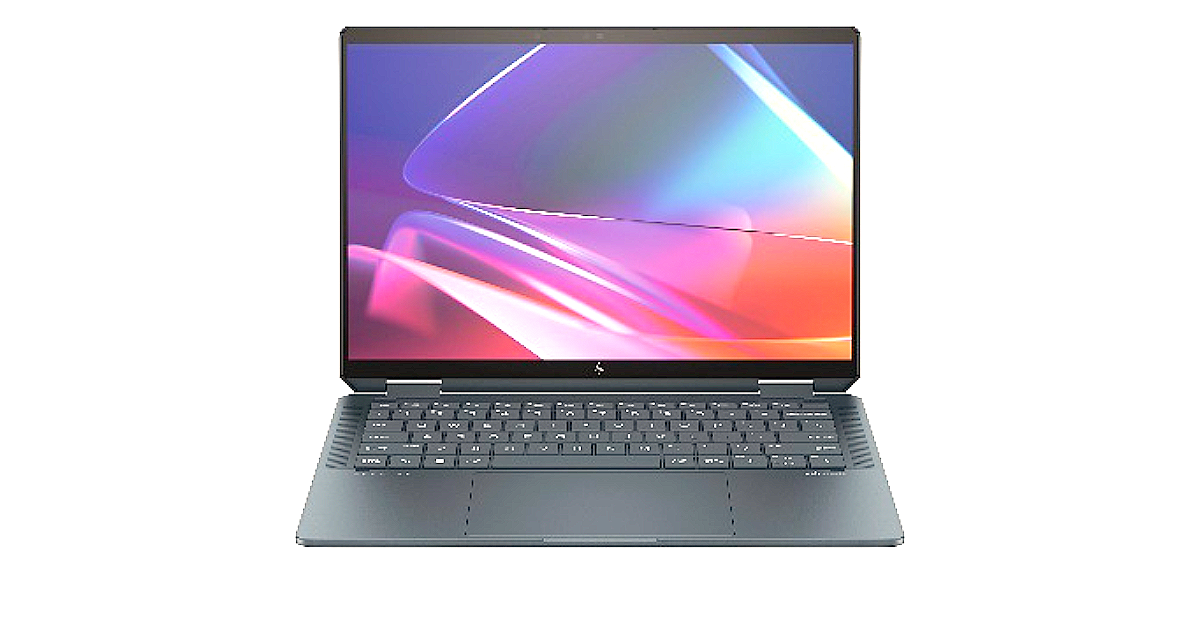
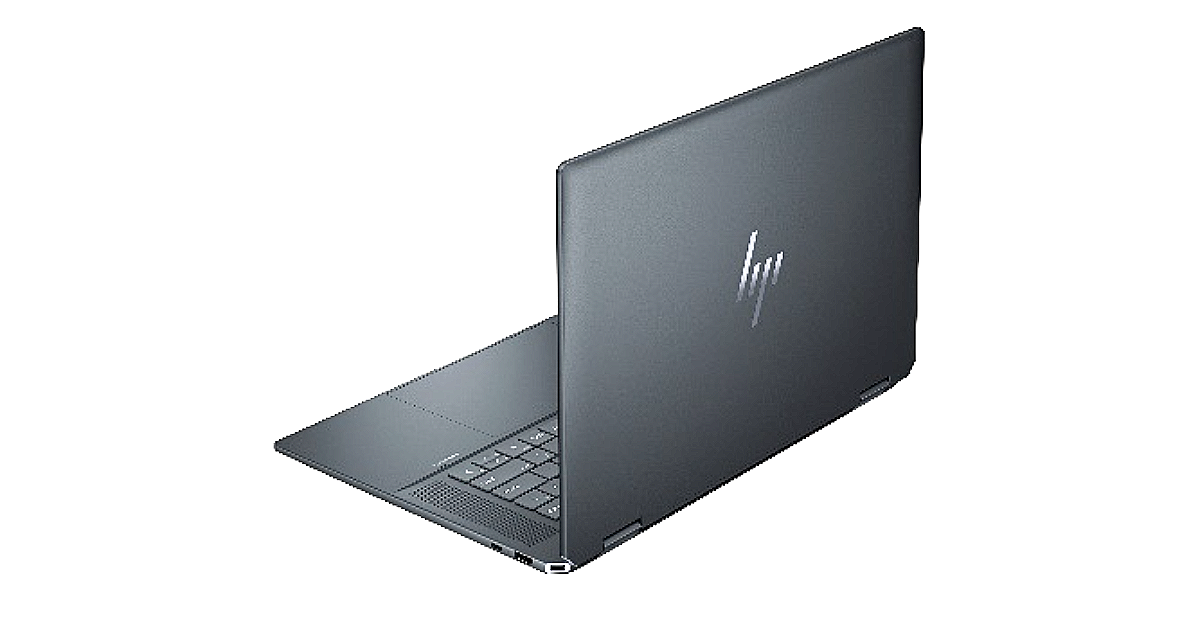
HP Spectre x360 laptops will be available in two sizes 14 inches and 16 inches.
The laptops will be powered by Intel Core Ultra processors.
HP has also introduced the HP 690 Rechargeable Wireless Mouse, HP 430 Programmable Wireless Keypad, HP USB-C Travel Hub G3, HP 400 Backlit Wired Keyboard and more.
CES 2024 is currently being held in Las Vegas and will run till January 11. At this year’s mega tech event, renowned tech brands showcased their devices and the technology they are currently working on. HP is also part of the event and there it presented its upcoming laptops and other devices. The firm launched HP Spectre x360 laptops with built-in AI technology, Poly Voyager Free 20 wireless earbuds, HP 960 Ergonomic Wireless Keyboard, HP 430 Programmable Wireless Keypad and a lot more.
HP Spectre x360 laptops
HP Spectre x360 laptops include two models HP Spectre x360 14-inch 2-in-1 Laptop PC and the HP Spectre x360 16-inch 2-in-1 Laptop PC. The machine features a display, with up to a 2.8K OLED screen along with an IMAX Enhanced Certification. The screen can adjust the refresh rate from 48 Hz to 120 Hz according to the content and aspect ratio of 16:10.The HP Spectre x360 laptops are stuffed with Intel Core Ultra processors and optional NVIDIA GeForce RTX 4050 Laptop GPUs. The laptops are tuned by Poly Studio. It is said to improve calls and video with Windows Studio effects, which offloads AI features like automatic framing, background blur, and the ability to maintain eye contact onto the NPU for engaging connections.The HP Spectre x360 14-inch 2-in-1 Laptop PC and the HP Spectre x360 16-inch 2-in-1 Laptop PC have a 9MP webcam with hardware-enabled low-light adjustment for clear calls day or night. The machine also comes integrated with a dedicated AI chip that delivers built-in security features including walk away lock, wake on approach, and privacy alerts to warn you of snooping eyes; adaptive screen adjustments like a screen dimmer when you look away to save power and variable refresh rate for immersive performance and power efficiency; and, automatic performance optimization that adjusts fan noise and temperatures based on applications being used, placement of the laptop, and battery status.The HP Spectre x360 14-inch 2-in-1 Laptop PC is available now at HP.com for a starting price of $1,499.99. The device is also available at BestBuy.com.The HP Spectre x360 16-inch 2-in-1 Laptop PC is available now at HP.com for a starting price of $1,599.99. The device is also available at BestBuy.com.
Poly Voyager Free 20 wireless earbuds
The Poly Voyager Free 20 wireless earbuds feature hybrid adaptive active noise cancelling (ANC) to block out background noise while you’re taking a call or listening to music. In addition, you can expect up to eight hours of listening time from the earbuds and a 2.5 times longer battery life thanks to the portable Qi charging case. The Poly Lens Mobile App provides recommendations for the perfect ear tip size along with a personalised fit test to enhance your comfort and overall listening experience.The Poly Voyager Free 20 wireless earbuds are expected to be available in May 2024 for $149.00.
HP 960 Ergonomic Wireless Keyboard
The HP 960 Ergonomic Wireless Keyboard is a versatile ergonomic split wireless keyboard that can be easily customised. Its split-zone layout adjusts to your typing style. The keyboard also includes a separate numeric keypad and 20 programmable keys further enhancing customisation. It comes with Bluetooth and dongle connectivity built-in for connectivity. This keyboard contains 50% post-consumer recycled materials and its external packaging is sustainably sourced.The HP 960 Ergonomic Wireless Keyboard is expected to be available in April on HP.com for $119.00.
HP Series 5 Monitors
At CES 2024 the company also introduced HP Series 5 Monitors. These displays will be available in three sizes 24-, 27-, and 32-inch sizes. All of them have a 100Hz refresh rate and a 1500:1 contrast ratio. They come with an additional HDMI connector, so you may easily connect to many devices in addition to their thin and light design.HP Series 5 Monitors have ultra-thin bezels and integrated cable management for a smooth visual experience.The HP Series 5 Displays are expected to be available in Spring 2024 at HP.com. Pricing will be shared closer to availability.Also Read:Acer showcased Aspire 3D 15 SpatialLabs Edition Laptop at CES 2024
HP 690 Rechargeable Wireless Mouse, HP 430 Programmable Wireless Keypad and HP 400 Backlit Wired Keyboard
HP 690 Rechargeable Wireless Mouse is the company’s first-ever Qi-charging Bluetooth mouse. It possesses six or more customisable buttons for effortless wireless connectivity. Personalize your productivity through the HP Accessory Center App.The HP 690 Rechargeable Wireless Mouse is available now on HP.com for $59.99.The HP 430 Programmable Wireless Keypad is a compact-sized keyboard. You can take it with you anywhere when you are travelling. Whereas the HP 400 Backlit Wired Keyboard is a spill-resistant and sanitizable keyboard. It includes a USB-C cord and USB-A adapter for connectivity.The HP 430 Programmable Wireless Keypad is available now at HP.com for $49.99. The HP 400 Backlit Wired Keyboard is available now on HP.com for $49.99.Also Read:Acer Predator with massive 57-inch-wide gaming monitors shown at CES 2024
HP USB-C Travel Hub G3
HP USB-C Travel Hub G3 is a mobile hub where you can give your notebook five important ports: two USB-A ports, one USB-C port, and one HDMI port. It provides plug-and-play connectivity.
The HP USB-C Travel Hub G3 is expected to be available in late February on HP.com for $69.99.
The bite-sized nature of Instagram Reels makes them easy to binge on for hours. The only drawback is that, unlike a regular video, you can’t watch Reels in the background while you’re occupied with other tasks. By default, you need to swipe up to move to the next Reel and swipe down to go to the previous one. Instagram recently started rolling out the feature that automatically scrolls the Reels for you. Here are the top 6 ways to auto-scroll Instagram Reels on Android and iOS.Read Also:Top 10 Apps You Should Download First on Vivo X100 Pro
Automatic Scrolling on Instagram: Is it possible?
Instagram lets you automatically scroll through Reels, but this option is turned off by default. It is being rolled out in a phased manner, so it isn’t available to all users yet. If it isn’t available on your device, there are a handful of third-party apps that you can use for the job. These apps require permission to draw over other apps and use the accessibility services on your device. The former is necessary to overlay a toolbar on the screen, while the latter lets them control the swiping gestures. Some apps may use these permissions to overlay ads on your phone’s interface, which is why you need to choose wisely.One of the major problems that you will run into is setting the scrolling speed on the app. Since these apps aren’t designed with Instagram in mind, they do not automatically scroll up when the Reel ends. Instead, you need to set a timer for the swipe gesture. Since the upper time limit for Reels is 60 seconds, you can set the app to scroll automatically once every 60 seconds. With shorter Reels, you will need to rely on manual gestures.
Use the native auto-scroll feature in the Instagram app
Step 1:Launch the Instagram app on your phone and switch to the Reels tab.
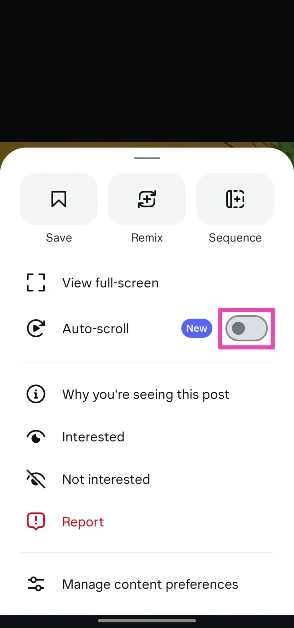
Step 2: Hit the ellipses in the bottom right corner of the screen.
Step 3: Turn on the toggle switch next to Auto-scroll.
Use Automatic Scroll to auto-scroll Instagram Reels on Android
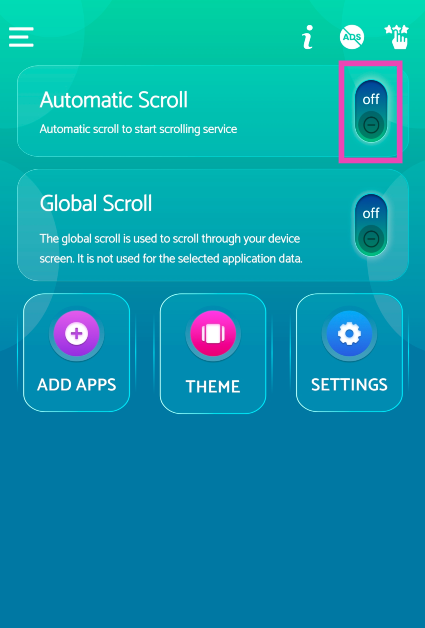
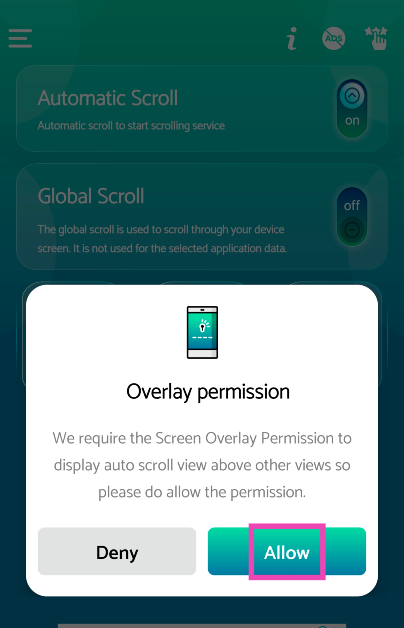
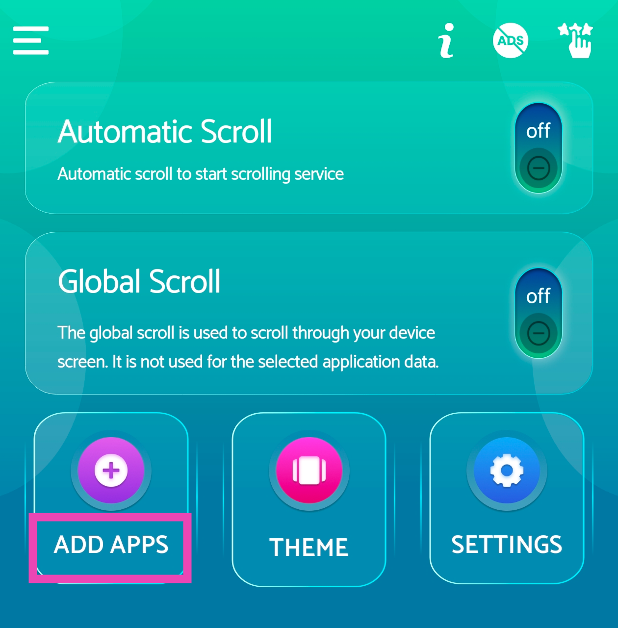
Step 1:Download the Automatic Scroll app from the Google Play Store.Step 2:Launch the app and skip the tutorial.Step 3: Turn on the toggle switch for Automatic Scroll.Step 4: Give the app permission to overlay above other apps.Step 5: Go to Add Apps and select Instagram.Step 6: Go to Settings, switch to the Scrollingtab, and set the scroll speed.Step 7:Launch Instagram and play a Reel.Step 8: Hit the downward arrow from the toolbar on the left to set auto scroll in motion.
Use Easy Scroll to auto-scroll Instagram Reels on Android
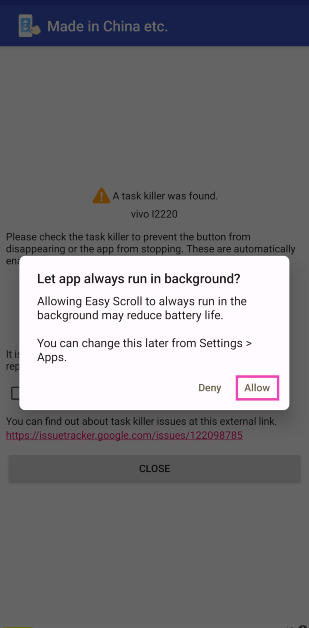
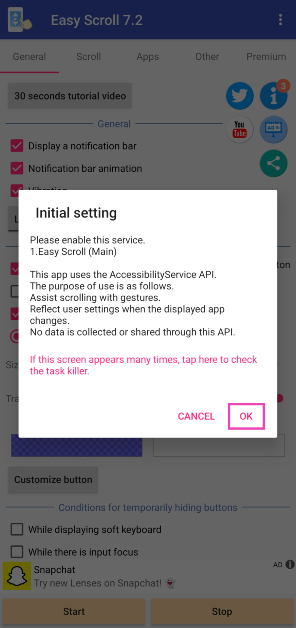
Step 1:Download the Easy Scroll app from the Google Play Store.Step 2:Launch the app and allow it to run in the background.Step 3: Give it permission to overlay the auto-scroll button on other apps.Step 4: Allow Easy Scroll the necessary accessibility permissions.Step 5: Switch to the Scroll tab and select the scrolling speed. Tap on Start.Step 6: Go to Reels and hit the next page button on the toolbar on the right.Read Also:Quantum AI Spearheading Pharmaceutical Research
Use Voice Control to auto-scroll Instagram Reels on iOS
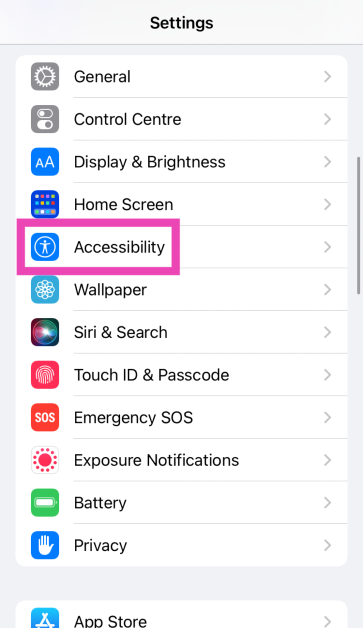
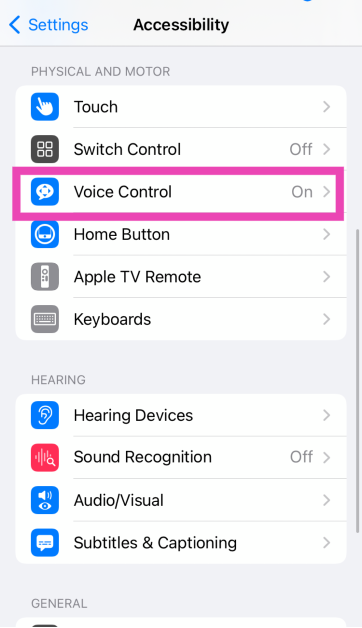
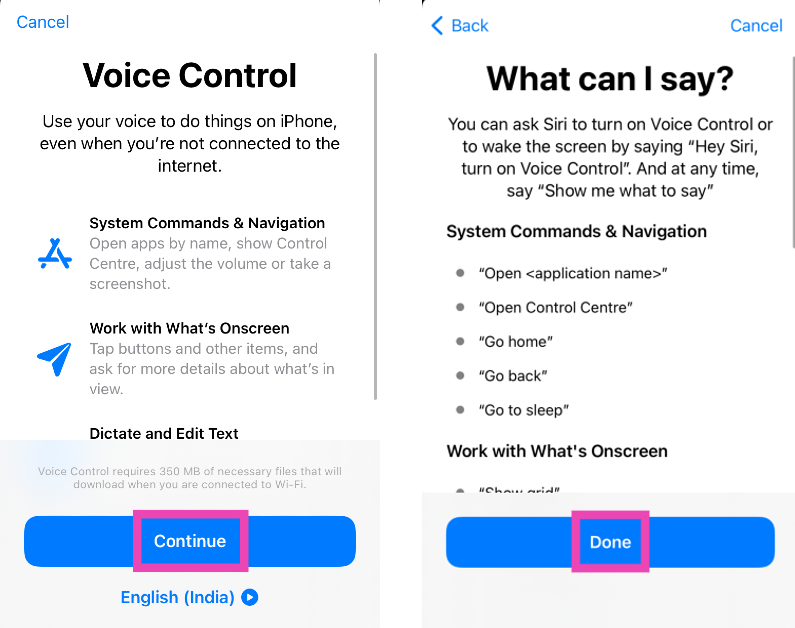
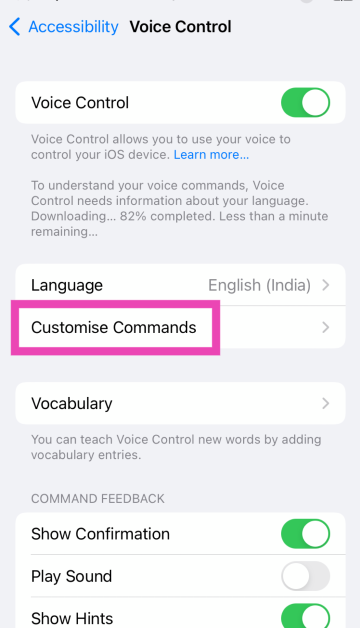
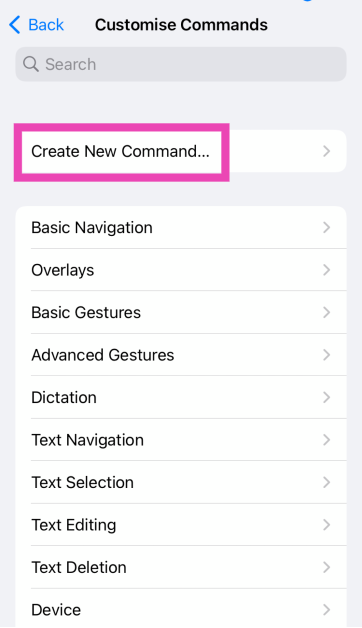
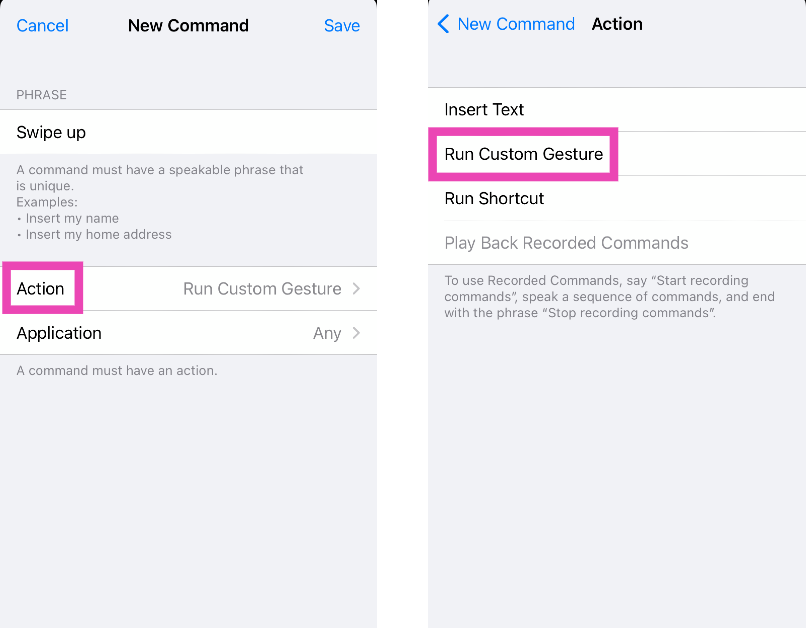
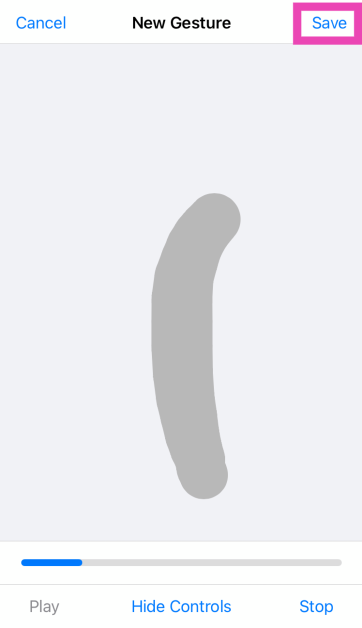
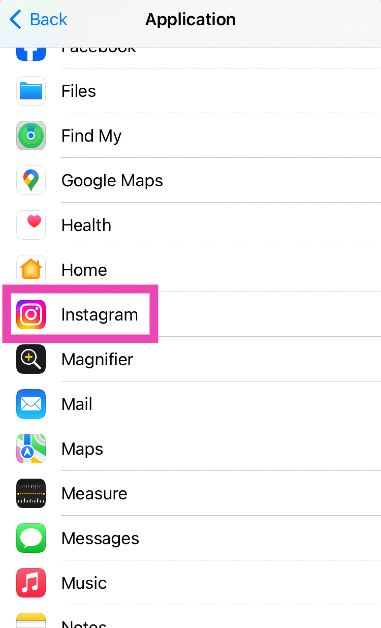
Step 1: Go to Settings and select Accessibility.Step 2: Tap on Voice Control.Step 3: Select Set Up Voice Control. Hit Continue and Done.Step 4: Select Customise Commands.Step 5: Tap on Create New Command.Step 6: Enter a name for the command. Make sure the name is short and easy to speak while giving the command.Step 7: Tap on Action and select Run Custom Gesture.Step 8: On the following page, perform the swipe-up gesture and hit Save.Step 9: Go to the previous page and tap on Application.Step 10: Select Instagram from the list.Step 11: Go to Instagram and use the Voice Command you just created to scroll through Reels.
Use the Safari Auto Scroll Shortcut on iOS
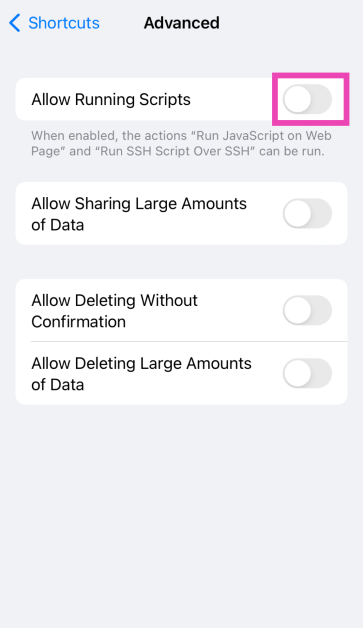
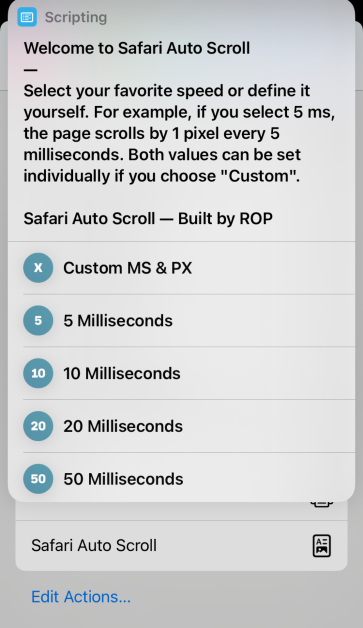
Step 1:Download the Safari Auto Scroll Shortcut.Step 2: Allow the Shortcut to run scripting actions.Step 3: Open Instagram on Safari and log in to your account.Step 4: Hit the Share button in the bottom toolbar.Step 5: Select Safari Auto Scroll.Step 6: Select a scrolling speed.Step 7: Open a Reel.The page will automatically scroll at your selected speed.
Bonus Tip: Use Auto Scroll TT to auto-scroll TikToks on Android
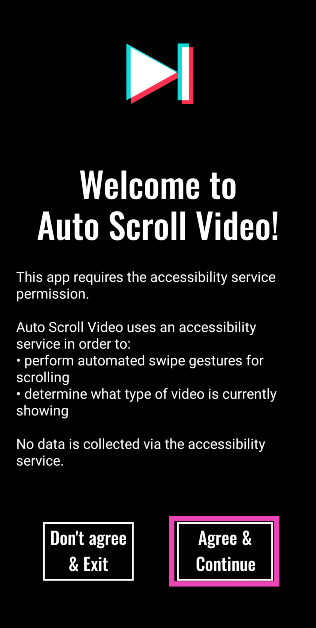
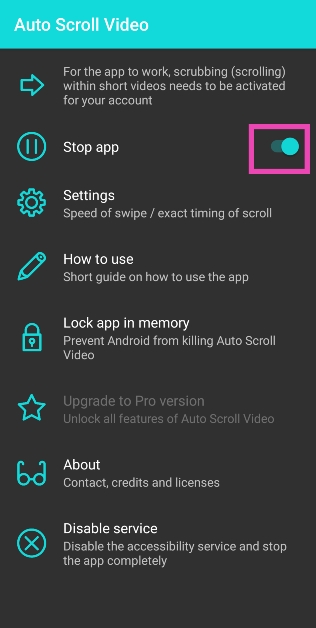
Step 1:Download the Auto Scroll TT app from the Google Play Store.Step 2:Launch the app and give it the necessary permissions.Step 3: Turn on the toggle switch for Start app.Step 4: Open your For You Page. The Auto Scroll TT app will automatically scroll to the next video once the current one ends.
Frequently Asked Questions (FAQs)
How do I automatically scroll Instagram Reels on Android?
Use third-party accessibility apps like Easy Scroll and Automatic Scroll to auto-scroll Instagram Reels on your Android smartphone.
Is there a way to automatically scroll Instagram Reels on iOS?
Use the ‘Safari Auto Scroll’ Shortcut to scroll through Instagram Reels on your iPhone automatically. This method only works if you’re using the Instagram mobile website on Safari. To scroll Reels on the Instagram app without using your hands, use Voice Control.
Is there a third-party app for auto-scrolling on iOS?
Since iOS does not allow apps to draw over other apps, there are no third-party auto-scrolling apps for the platform.
Is there a native way to automatically scroll Instagram Reels?
Go to a reel, hit the ellipses, and turn on the toggle switch next to ‘Auto-scroll’.
How do I stop my likes from showing up in the ‘Friends’ tab on Instagram?
These are the top 6 ways to auto-scroll Instagram Reels on Android and iOS. While going through third-party apps, make sure you select one that does not use its accessibility permissions to overlay invasive apps on your Android phone’s interface. If you know any other method to perform this task, let us know in the comments!
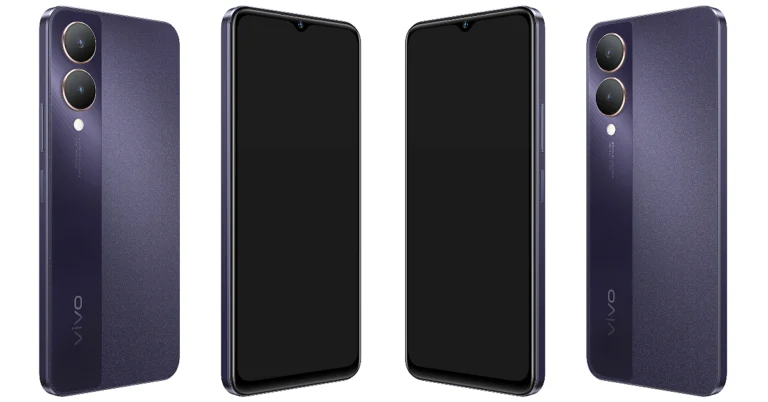
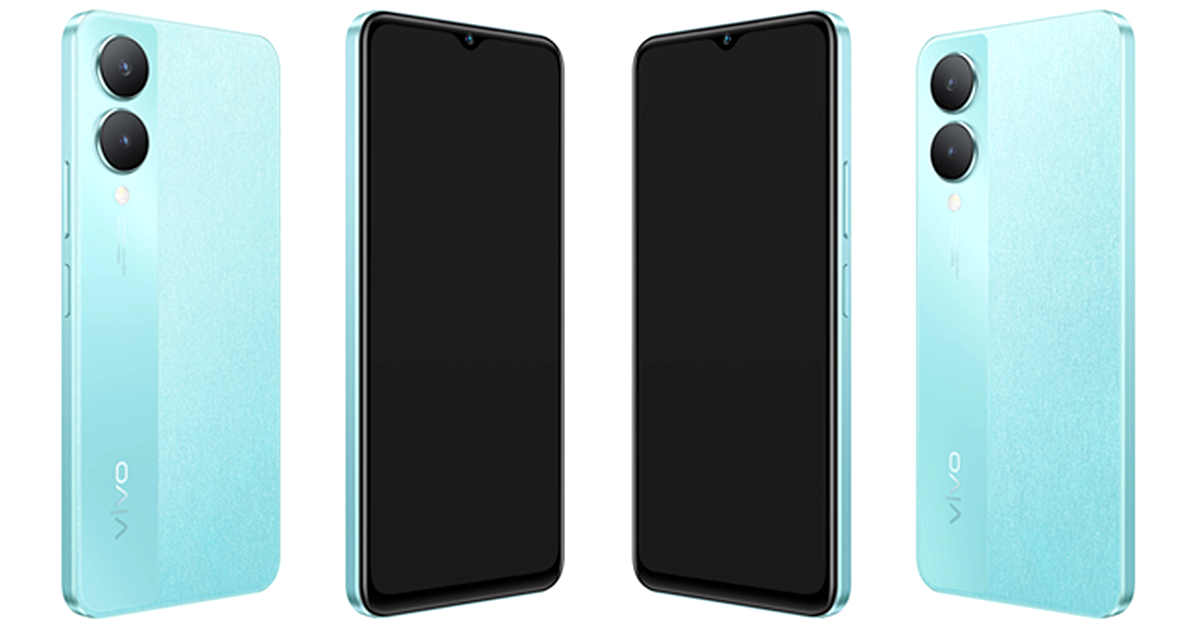
Vivo has brought a new smartphone to India under its Y-Series. The company has introduced Vivo Y28 5G in the country. The smartphone is powered by MediaTek Dimensity 6020 SoC. It comes with a 90Hz display and consists of a 50-megapixel dual rear camera setup. The device also packs a 5,000mAh battery and runs on Android 13-based Funtouch OS 13.
Vivo Y28 5G price in India, availability
Vivo Y28 5G price in India has been set at Rs 13,999 for the base 4GB RAM with 128GB storage. The 6GB RAM with 128GB storage comes with a price tag of Rs 15,499. There is another 8GB RAM with 128GB storage that is available at Rs 16,999. The company is offering two colour options for the handset: Crystal Purple and Glitter Aqua.Also Read: Samsung Galaxy S23 and Galaxy S23+ price in India dropped by Rs 10,000Customers can purchase the phone via Amazon, Flipkart, Vivo India e-store, and leading retail outlets in the country. There will be up to Rs 1,000 cashback on the purchase of the phone using SBI, DBS, and IDFC First Bank along with others.
Vivo Y28 5G Specifications
Vivo Y28 5G is IP54-rated and features a 6.56-inch HD+ display with 720×1,612 pixels of resolution. The screen supports up to 90Hz refresh rate and 269ppi pixel density. The LCD display also has a peak brightness of 840 nits. The device operates on Android 13 with Funtouch OS 13 skin on top. The smartphone is powered by a 7nm octa-core MediaTek Dimensity 6020 SoC paired with up to 12GB of LPDDR4X RAM which can be further expanded up to 16GB. The phone sports 128GB UFS 2.2 internal storage.For the photos and videos the Vivo Y28 5G sports a dual rear camera setup that includes a 50-megapixel primary camera with f/2.0 aperture and a 2-megapixel sensor with an f/2.4 aperture. The camera also offers light effects, customizable bokeh flares, and the Super Night Mode for stunning low-light shots. It also includes an 8-megapixel sensor for taking selfies and video calling.
Also Read:Acer Predator with massive 57-inch-wide gaming monitors shown at CES 2024The device packs a 5,000mAh battery with 15W fast charging support.In terms of connectivity, there is Bluetooth 5.1, Wi-Fi, GPS, OTG, FM radio, A-GPS and a USB 2.0 port. The sensors on the phone include a side-mounted fingerprint sensor, accelerometer, ambient light sensor, colour temperature sensor, e-compass, gyroscope, and proximity sensor.
Garena Free Fire is a battle royale game with regular awards and tournaments to keep players interested. If you play Garena Free Fire, you should be aware of the redeem codes that are released on a daily basis. However, because the battle royale game is banned in India, players from other countries can use the Free Fire Redeem codes daily. If you’re unfamiliar with the Garena Free Fire redeem codes or don’t know how to get them, we’ve put together a step-by-step guide to help you redeem them. Check out Garena Free Fire Redeem Codes for 9 January 2024.The Free Fire redeem codes are a great way to get free stuff. These are 12-digit codes that contain alphabets and numbers, as well as an expiration date and time. Because the Garena FF redeem codes cannot be used more than once, you should hurry to the redemption page to claim your free reward before someone else does. To get a free reward, all you have to do is go to reward.ff.garena.com/en, which is the official redemption page. Also, keep an eye on this space for daily updates on Garena Free Fire redemption codes and rewards.
Garena Free Fire Redeem Codes Today 9 January 2024
Mobile gaming has exploded in popularity thanks to powerful phones that deliver console-quality experiences on the go.
Lightning-fast processors, vivid displays, and long-lasting batteries let gamers immerse in intensive titles without compromise.
Even those who consider themselves light games and are mainly fans of real money gaming and the best betting apps for cricket and other sports are warry about the phones that are still great to buy this year.
Well, you’re in luck because we’ll showcase 2024’s top 5 smartphones primed to redefine your mobile gaming experience.
Ready? Let’s dive right into it.
Samsung Galaxy A34 5G: Smooth Performance for Casual Gamers
The Samsung Galaxy A34 5G brings premium features to a wallet-friendly price point. Its 6.5-inch FHD+ display strikes an ideal balance between immersion and portability with vibrant Super AMOLED imagery.
Powering its visuals is an Exynos 1280 processor packing robust AI to bolster gaming speeds without overheating. The device’s 5000mAh battery will also keep your gaming marathon sessions rolling for days.
Many reviewers praise the Galaxy A34’s capability to handle casual games like Subway Surfers and Temple Run smoothly. For an easy entry into mobile gaming, the Galaxy A34 5G is a reliable choice.
Poco X5 Pro 5G: Futureproof Powerhouse Processing
With a bleeding-edge Snapdragon 778G processor, the Poco X5 Pro delivers desktop-rivalling muscle on a budget. This 6nm chip flies through intensive RPGs and MOBAs without breaking a sweat thanks to its Adreno 642L GPU.
This phone has a silky smooth 6.67-inch AMOLED panel which offers startling clarity down to the last pixel. Poco’s LiquidCool Technology 2.0 comprises an enlarged copper vapour chamber and multiple layers of graphite. They keep the phone’s temperatures firmly in check even during heavy gaming sessions.
OnePlus 10T 5G: Blazing-Fast Premium Gaming
OnePlus consolidates its reputation for obscenely responsive gaming with the formidable 10T 5G. Headlining its performance is Qualcomm’s exclusive Snapdragon 8+ Gen 1 processor. This chip is capable of hitting staggering speeds up to 3.2 GHz through cutting-edge 4nm architecture.
OnePlus has also equipped its latest smartphone with one of the most advanced cooling systems with 8 temperature sensors precisely regulating heat.
With hyper-realistic visuals on a 6.7-inch 120 Hz Fluid AMOLED display matched by an all-day 5000mAh battery, the OnePlus 10T 5G brings elite-tier gaming to discerning players out there.
Xiaomi Redmi Note 12 Pro: Beast Mode on a Tight Budget
Redmi Note 12 Pro breaks expectations for what we consider mid-range devices. This smartphone runs on MediaTek Dimensity 1080 5G octa-core which can handle extreme frame rates in even graphics-heavy titles.
Xiaomi has crammed in a high-performing Mali-G68 GPU alongside the fast chipset besides ample LPDDR4X RAM to annihilate lags.
The phone has a 5160mAh battery which means it can last over 6.5 hours even under intensive gaming usage. For budget-conscious buyers unwilling to compromise on power, the Redmi Note 12 Pro is a gift with entry-level pricing.
Apple iPhone 12: All-Round Excellence for Apple Arcade Lovers
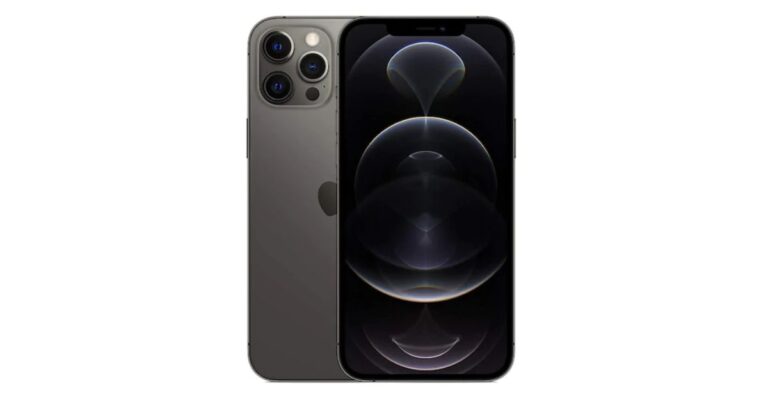
While less outwardly “gaming-focused” than Android rivals, Apple’s tight hardware-software integration squeezes every ounce of power from the iPhone 12’s blazing A14 Bionic processor.
Combined with Apple’s gaming ecosystem spanning the feature-packed Arcade platform and controller support, it delivers one of the most versatile mobile gaming experiences. Although the 6.1-inch screen falls short of max-out immersion, its Super Retina XDR OLED brilliance matched by spatial Dolby Atmos audio transports players into game worlds.
Wrap Up
When choosing an optimal gaming smartphone in 2024, display quality, battery endurance, and sustainable peak performance are some of the most important things you should consider.
You’ll want to look into phones with powerful chipsets like the Snapdragon 8+ Gen 1 and MediaTek Dimensity 1080. They could help you avoid lags and frame drops that could affect your gameplay.
In addition, it’s best to focus on phones with proven heat dissipation like the Poco X5 Pro to prevent throttling issues over time. If you’re someone on the go, phones with sizable batteries exceeding 5000mAh can give you uninterrupted gaming marathons.
If you’re all about graphics, always check the screen display of a mobile device. The best you can get are phones with 144Hz AMOLED panels as they amplify immersion across fast-paced competitive mobile gaming titles.
What’s great is that nowadays, you won’t have to spend a lot to experience some of these features. But of course, expect to pay more if you want to enjoy all of that on a single device.
With phones now rivalling consoles, mobile gaming’s future looks brighter than ever in 2024. While the phones we recommend are already some of the best in the market, we still can’t wait and see what mobile gaming will look like in the coming years.
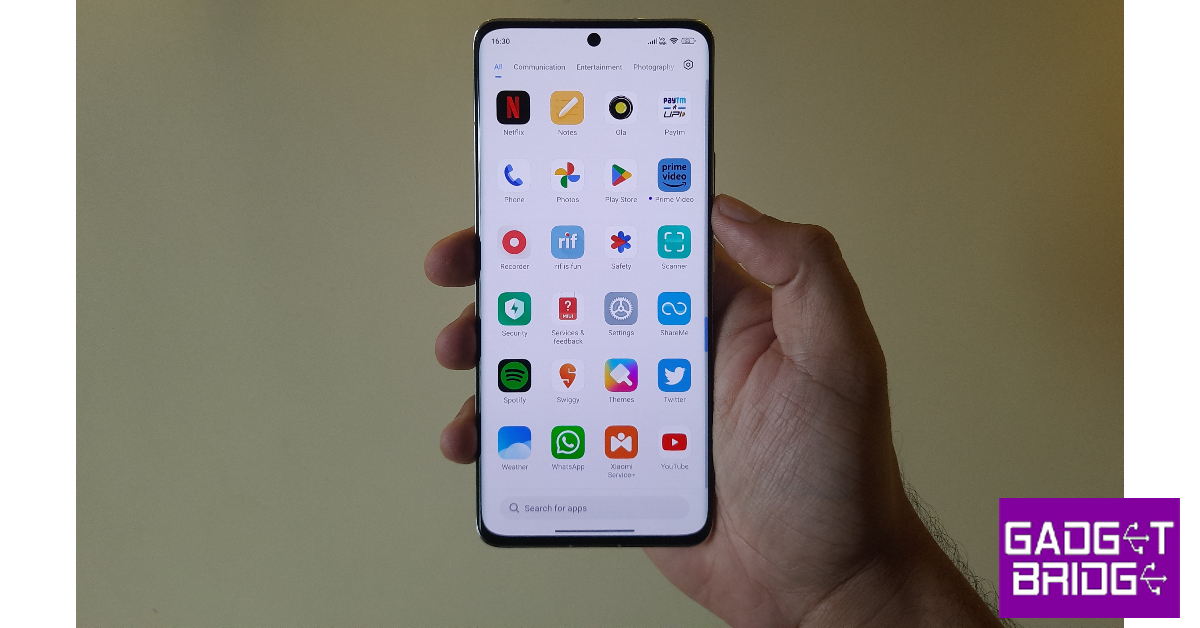
Xiaomi’s MIUI OS is one of the most popular Android-based skins around right now. Primarily operating in the budget category, it powers Poco, Redmi, and Xiaomi smartphones. Like most of its peers, it allows users to hide any app from the app drawer of the smartphone. While you may know about the availability of the feature, sometimes it can get tricky to find it on the smartphone. If it confused you as well, you’ve landed on the right page to find the answer to your queries. Here are the 3 best methods to hide apps on MIUI OS.Read Also:Samsung Galaxy S23 and Galaxy S23+ price in India dropped by Rs 10,000
What happens when you hide an app on your smartphone?
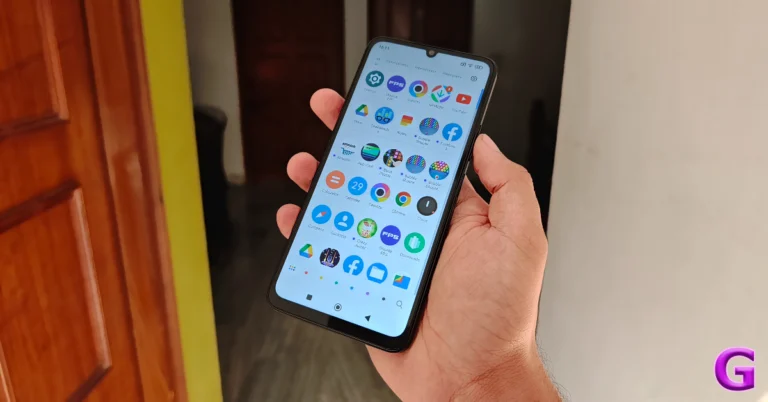
Hiding an app on your Android smartphone removes its icon from the home page and the app drawer. The app is moved to a hidden folder which is password-protected and not visible on the home screen. Different Android skins use different methods to access this hidden folder. On MIUI devices, it can be accessed by swiping two fingers in opposite directions on the home page (Xiaomi) or swiping right twice on the app drawer (Poco).When you hide an app, you can still receive its notifications. The app will continue to appear in the app switcher. If you want more privacy, you should consider locking the app as well. All the major Android-based operating systems have a native app locker. Once you lock an app, you will only be able to access it after entering the PIN/pattern or fingerprint.
Hide Apps on MIUI OS (Poco)
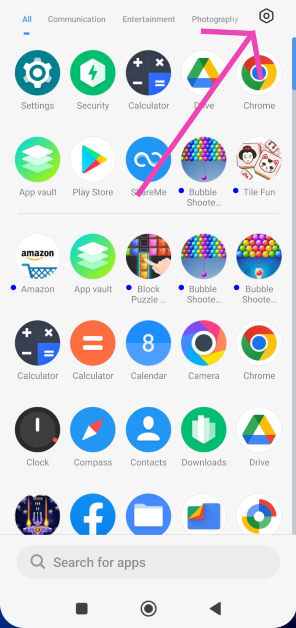
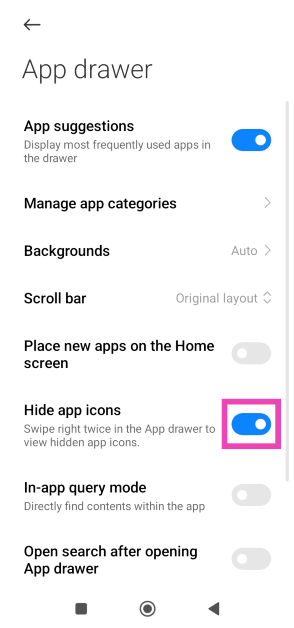
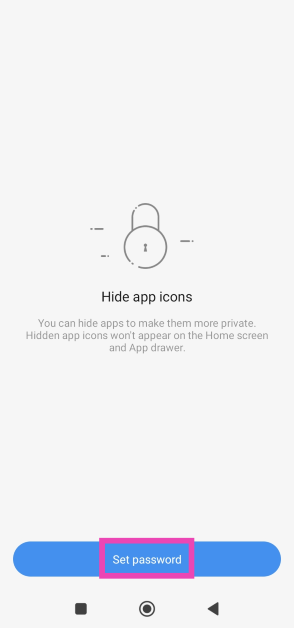
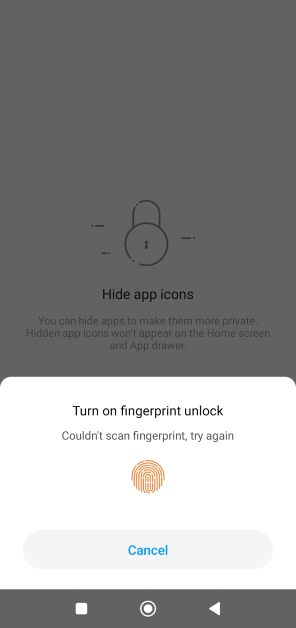
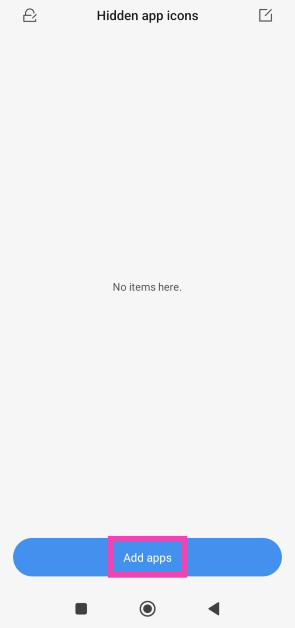
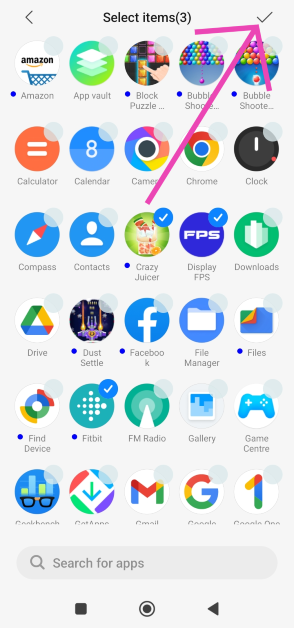
Step 1: Go to the app drawer and hit the settings icon at the top right corner of the screen.Step 2: Turn on the toggle switch for Hide app icons.Step 3: Go back to the app drawer and swipe right twice to view the hidden folder.Step 4: Hit Set Password.Step 5: Verify your identity using fingerprint or PIN and set up a pattern for the hidden folder.Step 6: Tap on Add apps.Step 7: Select the apps you want to hide and hit the tick icon at the top right corner of the screen.Step 8: The apps will be hidden. To view the hidden apps, swipe right twice on the app drawer and verify your identity using fingerprint or pattern unlock.Read Also:Top 6 Ways to Hide Your Snapchat Story From Others (2024)
Hide apps on MIUI OS (Xiaomi/Redmi)
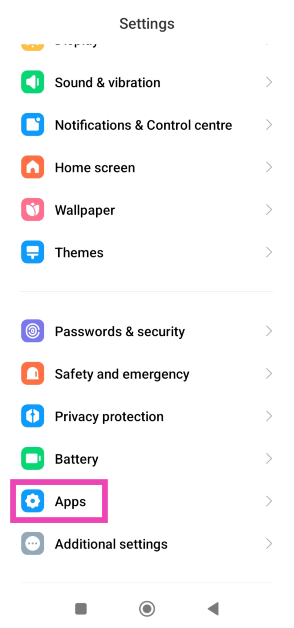
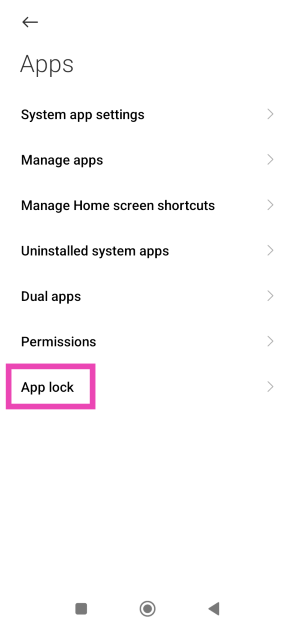
Step 1: Go to Settings and select Apps.Step 2: Select App lock.Step 3: Set up a password or enter the pre-existing password.Step 4: Switch to the Hidden Apps tab.Step 5: Turn on the toggle switch for the apps you want to hide.Step 6: Turn off the toggle switch for the apps you want to unhide.Step 7: To view the hidden apps on your Xiaomi phone, swipe two fingers in opposite directions on the home screen. You will be asked for your fingerprint or the password that you’ve set up for the app lock.
Lock an app on MIUI OS
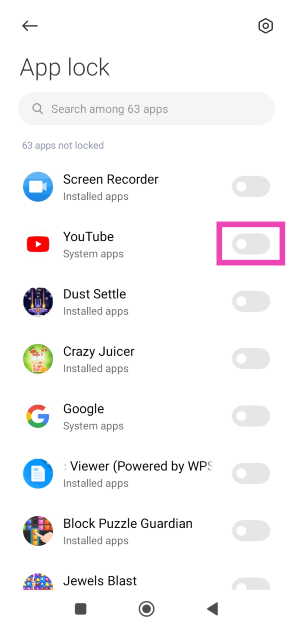
Instead of hiding an app from the app drawer, you may want to try protecting it with a password instead. Here’s how.Step 1: Go to Settings and select Apps.Step 2: Tap on App lock.Step 3: Enter using your fingerprint, PIN, or pattern unlock.Step 4: Turn on the toggle switch next to the app you want to lock.Step 5: Once the app is locked use your fingerprint or PIN/pattern to unlock it.
Frequently Asked Questions (FAQs)
How do I hide an app on my POCO phone?
Swipe up to enter the app drawer, hit the settings icon at the top right corner of the screen, and turn on the toggle switch for ‘Hide app icons’. Go to the hidden folder by swiping right twice on the app drawer. Once you’re in the hidden folder, tap on ‘Add apps’.
Will I get notifications from an app if I hide it?
Hiding an app does not mute its notifications. Once you tap on the notification, the hidden app will open on your smartphone. To mute notifications, go to app settings.
These are the top 3 methods to hide apps on MIUI OS. Third-party apps can handle this task as well, but it comes at the cost of replacing the OS’ native launcher with a customised one offered by the app. This is why the native method is always preferred. If you know any other way to hide an app on MIUI OS, let us know in the comments!
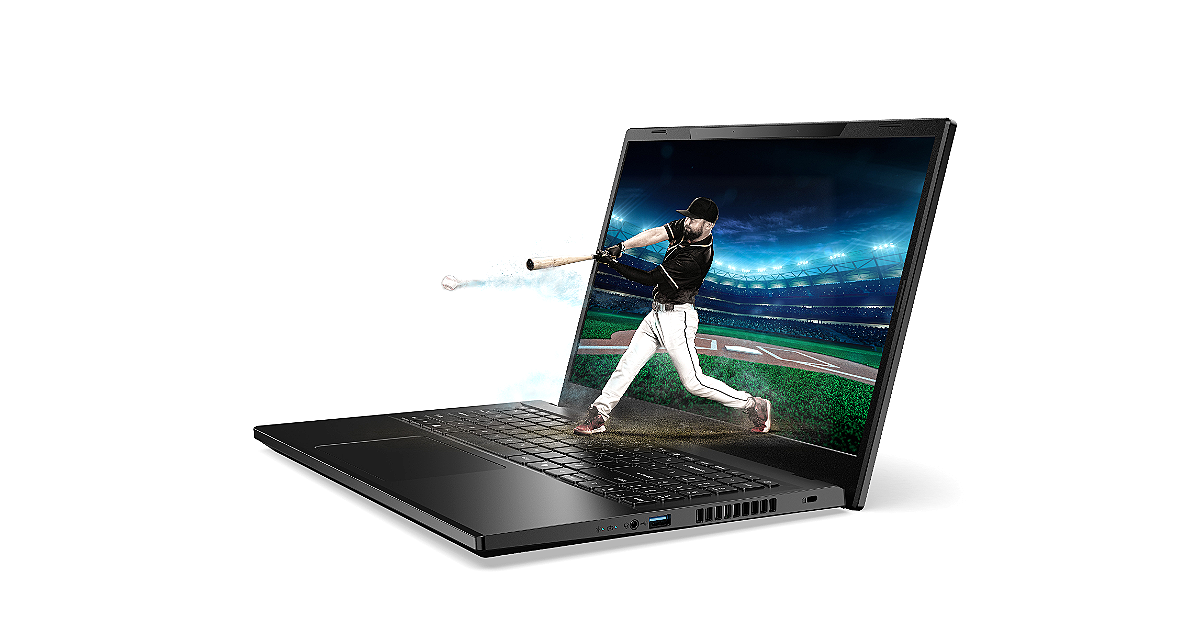
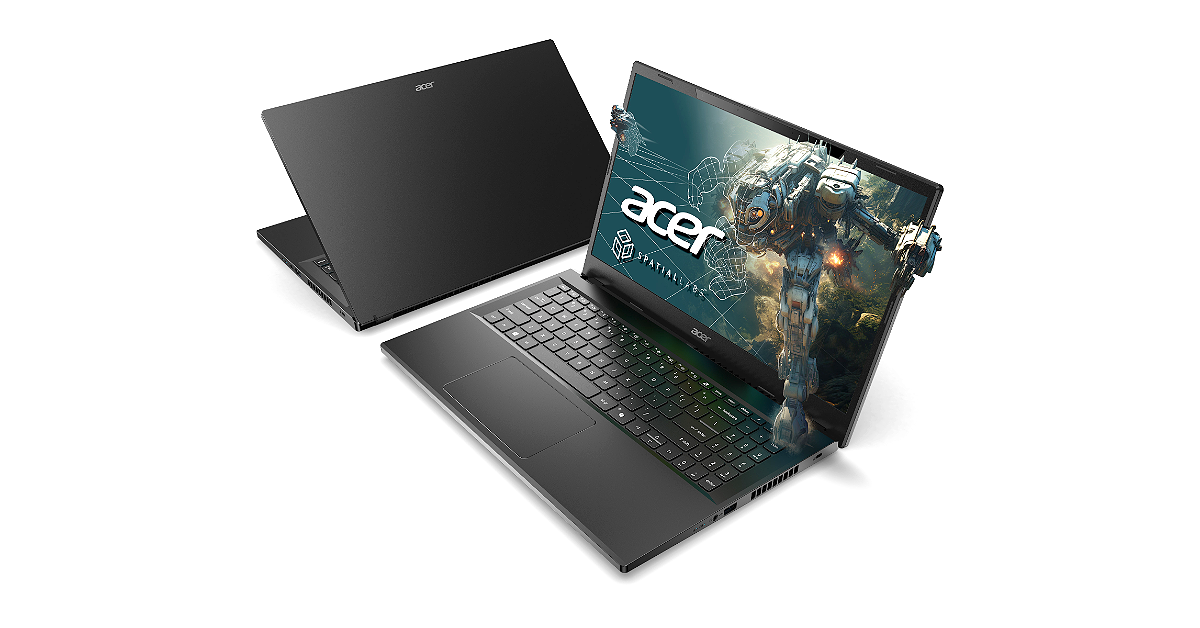
At CES 2024, Acer introduced its new lineup of SpatialLabs stereoscopic 3D laptops and monitors.
The company introduced the Aspire 3D 15 SpatialLabs Edition Laptop and Predator SpatialLabs View 27 gaming monitor.
Acer brought a whole new range of laptops and PCs to CES 2024. The company showed the Aspire 3D 15 SpatialLabs Edition Laptop. As the name suggests the laptop comes with a suite of AI-powered SpatialLabs applications for 3D viewing and content creation. It is powered by the Intel Core i7 processor 13620H and up to NVIDIA GeForce RTX 4050 graphics. In addition to this, the machine features a 15.6-inch UHD display. Additionally, the company has also introduced the Predator SpatialLabs View 27 gaming monitor.
Aspire 3D 15 SpatialLabs Edition Laptop
Acer Aspire 3D 15 SpatialLabs Edition features a 15.6-inch 4K Ultra UHD IPS display with 3840 x 2160 (2D) resolution. The screen comes with 100% support for Adobe RGB colour gamut and can be switched between 2D and 3D viewing modes. At its heart, there is up to an Intel Core i7 processor 13620H paired with up to NVIDIA GeForce RTX 4050 Laptop GPUs to project attention-grabbing 3D images and scenes. It comes with up to 32 GB of DDR5 memory and up to 2 TB of storage.Also Read:Acer Predator with massive 57-inch-wide gaming monitors shown at CES 2024Aspire 3D 15 SpatialLabs Edition laptop is integrated with Acer PurifiedVoice and PurifiedView to provide AI-supported noise reduction technologies and camera effects during video calling.The Aspire 3D 15’s internals stay cool and functional even under demanding 3D rendering workloads because of Acer’s TwinAir technology and thermal management system, which has three copper pipes to effectively dissipate heat.According to the company using the AcerSense key, users can access the AcerSense utility app, which makes system maintenance and performance monitoring easy. For connectivity, there is an HDMI 2.1 port, a USB Type-C Thunderbolt 4 port, and Wi-Fi 6 compatibility. The newly introduced laptop is provided with SpatialLabs Experience Center Pro which includes a variety of SpatialLabs apps and additional features to further enhance 3D experiences. The stereoscopic 3D laptop also can instantly convert 2D content to 3D using Acer’s exclusive AI. Plus, SpatialLabs Player gives full control for side-by-side video playback and seamless switching to 2D or 3D modes when viewing on the Aspire 3D 15.The 3D laptop also supports Acer’s OpenXR runtime for seamless 3D content creation on compatible applications in addition to other developer tools like the SpatialLabs Unity and Unreal Engine plug-ins to expedite 3D projects and expand support for more creators.The laptop also comes pre-installed with Copilot and a dedicated Copilot key for quick and easy access to the everyday AI assistant.The Acer Aspire 3D 15 SpatialLabs Edition (A3D15-71GM) will be available in North America in February, starting at USD 1,399.99; in EMEA in March, starting at EUR 1,499, and in China in April, starting at RMB 14,999.Also Read:CES 2024: Acer launched the new Aspire Vero 16 with latest Intel Core Ultra Processors, first Aspire Go laptops were also announced
Predator SpatialLabs View 27 Gaming Monitor
Not just Aspire 3D 15 SpatialLabs Edition Laptop the company has also expanded its SpatialLabs stereoscopic 3D lineup to Predator SpatialLabs View 27 Gaming Monitor. The display comes with a 27-inch, 2D-3D switchable 4K panel. The 3D monitor supports 160 Hz refresh rate, 400 nits brightness, and Delta E< 2 color accuracy. The AMD FreeSync and NVIDIA G-SYNC compatibility allow it to deliver vivid, tear-free frames even when gaming under extremely low-light environments.The Predator SpatialLabs View 27 Gaming Monitor has built-in dual 2.5 W speakers.The Predator SpatialLabs View 27 will be available in North America in Q2 2024, starting at USD 1,999 and EMEA in Q1 2024, starting at EUR1,999.
The MiniLED options include Predator Z57 and Predator X34 V3.
The OLED models include the Predator X39 and Predator X34 X.
All the models come with a high refresh rate.
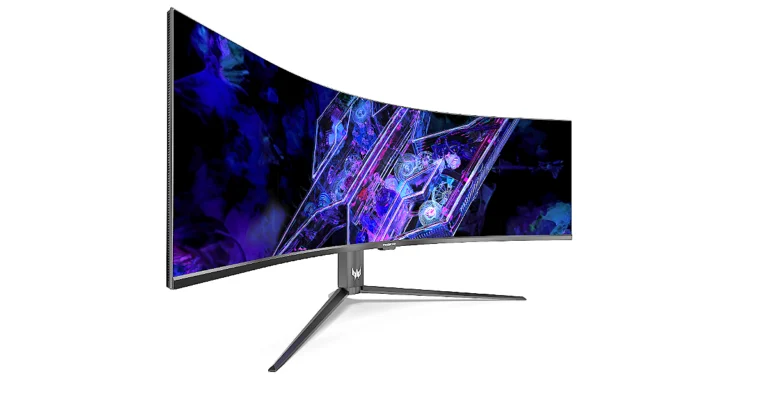
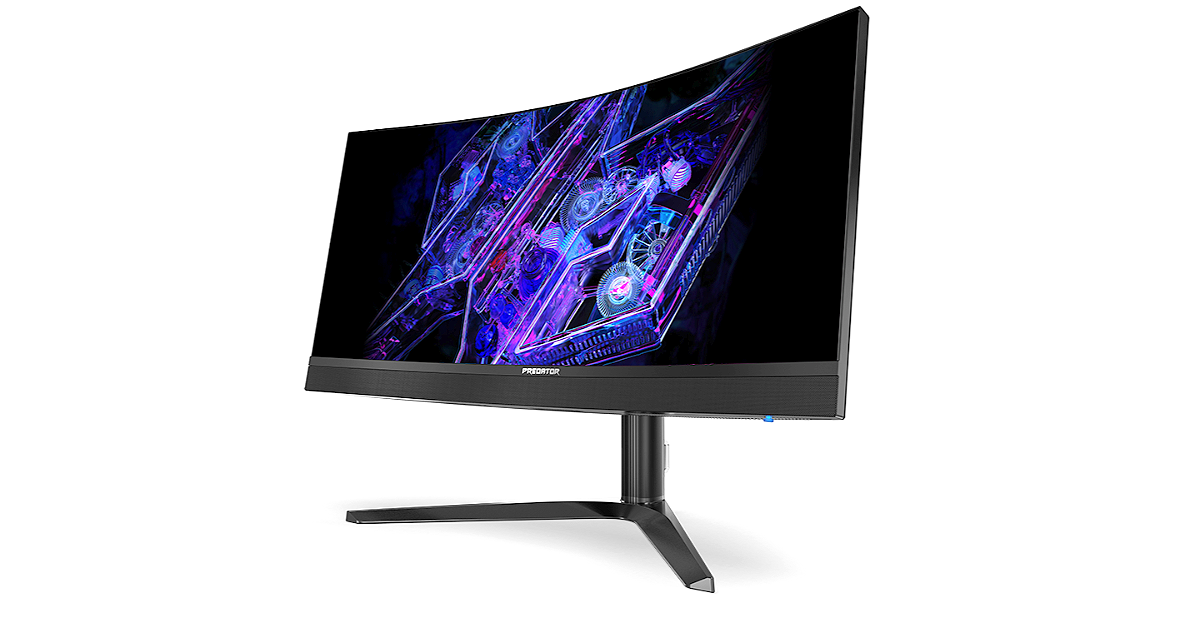
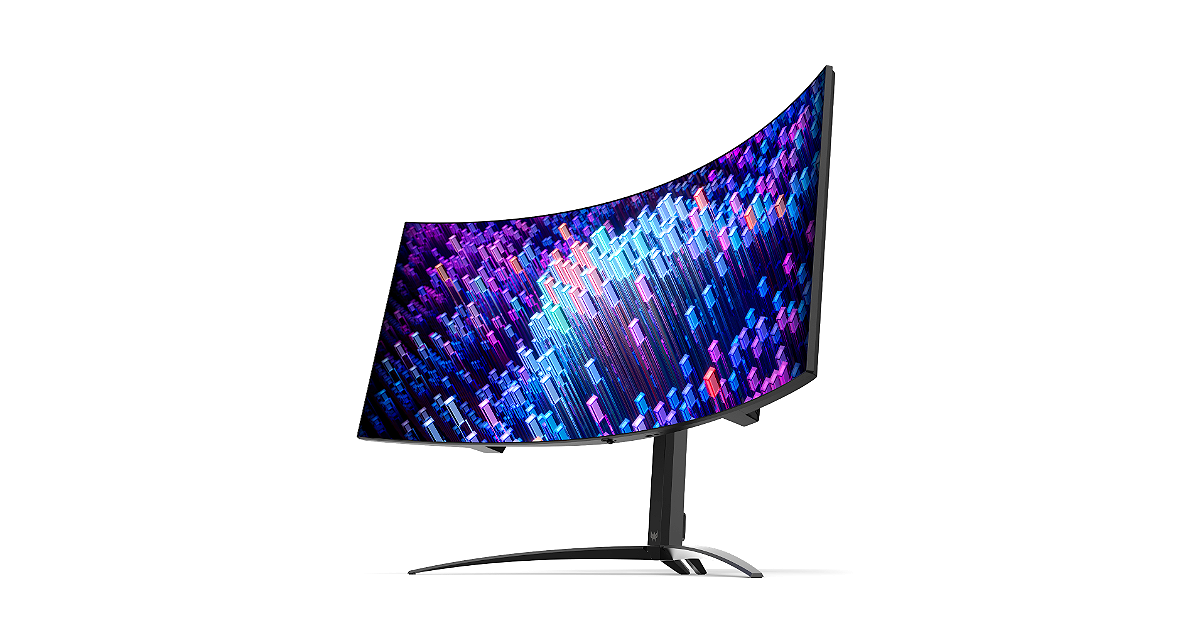
Acer today presented four new monitors for avid gamers at CES 2024. The company has introduced Predator Z57 and Predator X34 V3 with MiniLED and two with OLED panels, the Predator X39 and Predator X34 X. The former one features a massive 57-inch display while the other one comes with a 34-inch display. The X39 and X34 X are 39-inch and 34-inch OLED monitors.
Acer Predator Z57
The Acer Predator Z57 is a 1000R curved monitor measuring 57 inches. It comes with a DUHD (7680×2160) resolution with a 120Hz refresh rate and a wide 32:9 aspect ratio. It is integrated with 2304-zone MiniLED technology and is VESA DisplayHDR 1000 certified. The screen offers up to 1000 nit brightness with a wide DCI-P3 98% colour gamut. The Predator Z57 is also VESA-compliant for hanging on a wall to save desk spaceThe Acer Predator Z57 gaming monitor offers two HDMI 2.1 ports that support the latest consoles (PlayStation 5 and XBOX Series X), and a DisplayPort 1.4 port. It also has two powerful 10W speakers to amplify sound effects.As of right now, The Predator Z57 will be available in North America in Q2 2024, starting at USD 2,499.99; in EMEA in Q2 2024, starting at EUR 2,399, and in China in Q1 2024, starting at RMB 17,999.Also Read:CES 2024: Acer launched the new Aspire Vero 16 with latest Intel Core Ultra Processors, first Aspire Go laptops were also announcedAcer Predator X34 V3
Acer Predator X34 V3
The Acer Predator X34 V3 features a 34-inch curved MiniLED display with 1500R curvature and a 21:9 ultrawide QHD (3440×1440) resolution. The display has a DCI-P3 94% color gamut and VESA DisplayHDR 1000 certification. The screen supports a 180 Hz refresh rate and 1 ms (G-to-G) response time support fluid. The Acer Predator gaming monitors also include two HDMI 2.0 ports and DisplayPort 1.4 for connectivity. Just like its elder sibling Predator X34 V3 can also be hung on a wall and has an adjustable height, tilt, and swivel to optimise viewing comfort. Furthermore, it includes 5W speakers.The Predator X34 V3 will be available in North America in Q2 2024, starting at USD 899.99; in EMEA in Q2 2024, starting at EUR 849, and in China in Q1 2024, starting at RMB 5,999.Also Read:Samsung Galaxy S23 and Galaxy S23+ price in India dropped by Rs 10,000Acer Predator X39
Acer Predator X39 & Predator X34 X
The Acer Predator X39 & Predator X34 X on the other hand are highlighted with a 39-inch and 34-inch UWQHD (3440×1440) resolution with up to a 240 Hz refresh rate and 0.01 ms pixel response time. Both the models have 800R curvature and tight angles of up to 178 degrees. The gaming monitors also come with DCI-P3 99% colour gamut and VESA DisplayHDR True Black 400 support. These new models are also Eyesafe 2.0 certified and default to image retention refresh to help prevent eye strain.The Predator X39 will be available in North America in Q2 2024, starting at USD 1,499.99; in EMEA in Q2 2024, starting at EUR 1,499, and in China in Q1 2024, starting at RMB 9,999.The Predator X34 X will be available in North America in Q2 2024, starting at USD 1,299.99; in EMEA in Q2 2024, starting at EUR 1,299, and in China in Q1 2024, starting at RMB 8,999.
Any new tech in audio products is always one slip-up away from being dismissed as a gimmick. The stakes are all the more high when you’re a new tech outfit planning to showcase your groundbreaking innovation on your debut product. Indian startup Rapture Audio Labs takes on this gargantuan task on its Sonic Lamb headphones. Featuring an ‘Impulse Driver’, Sonic Lambs brings the subwoofer experience to headphones, offering next-level immersion that allows the user to feel the music. Currently priced at Rs 15,999, it goes up against some of the most premium headphones on the market. We used the Sonic Lamb for a couple of weeks and put it through a series of tests, here is our review of the headphones.Read Also:How to disable Link History on Facebook? (Android and iOS)
Sonic Lamb review: Design
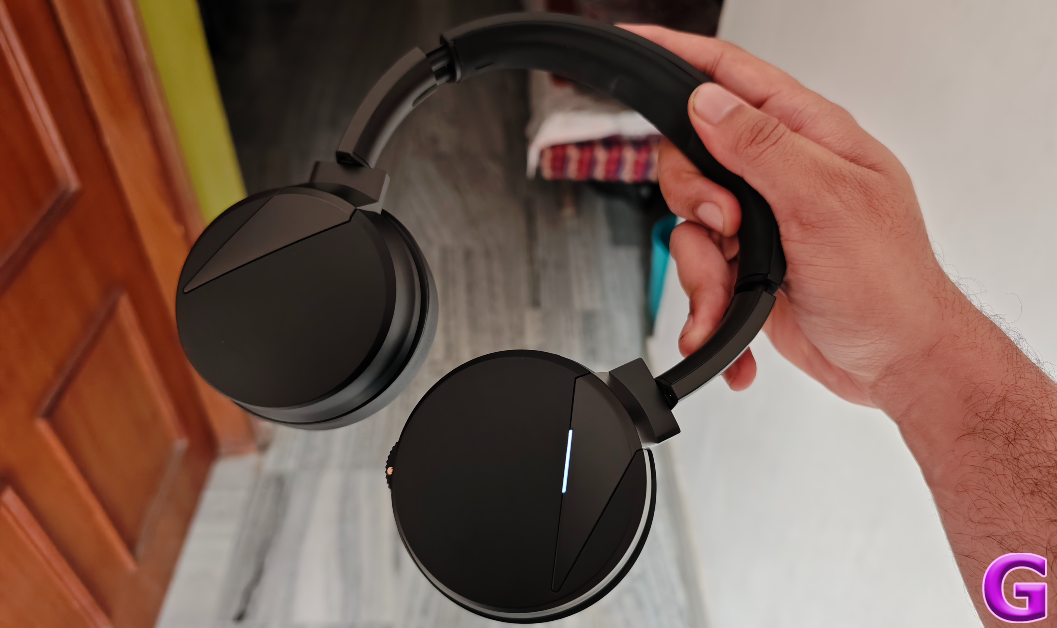
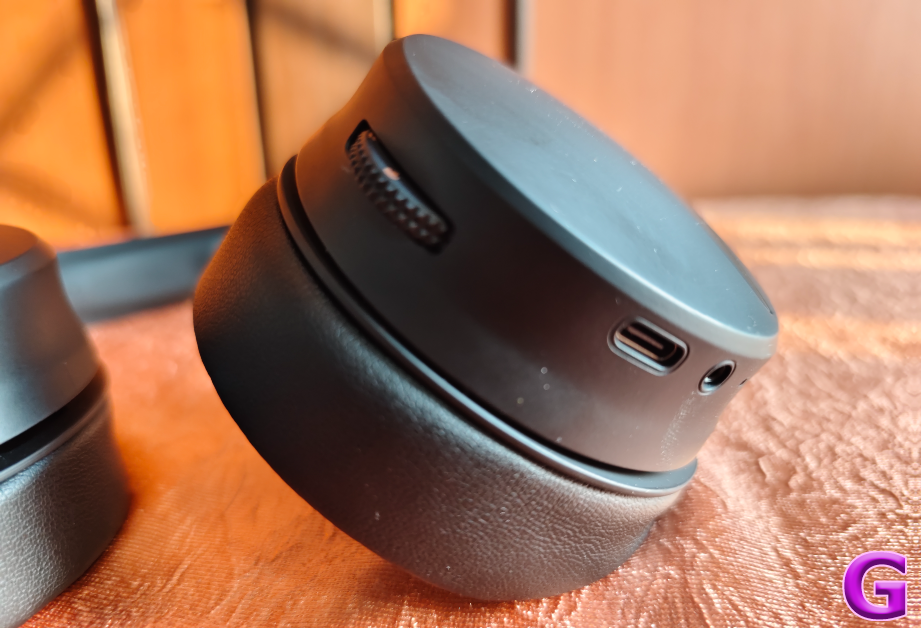
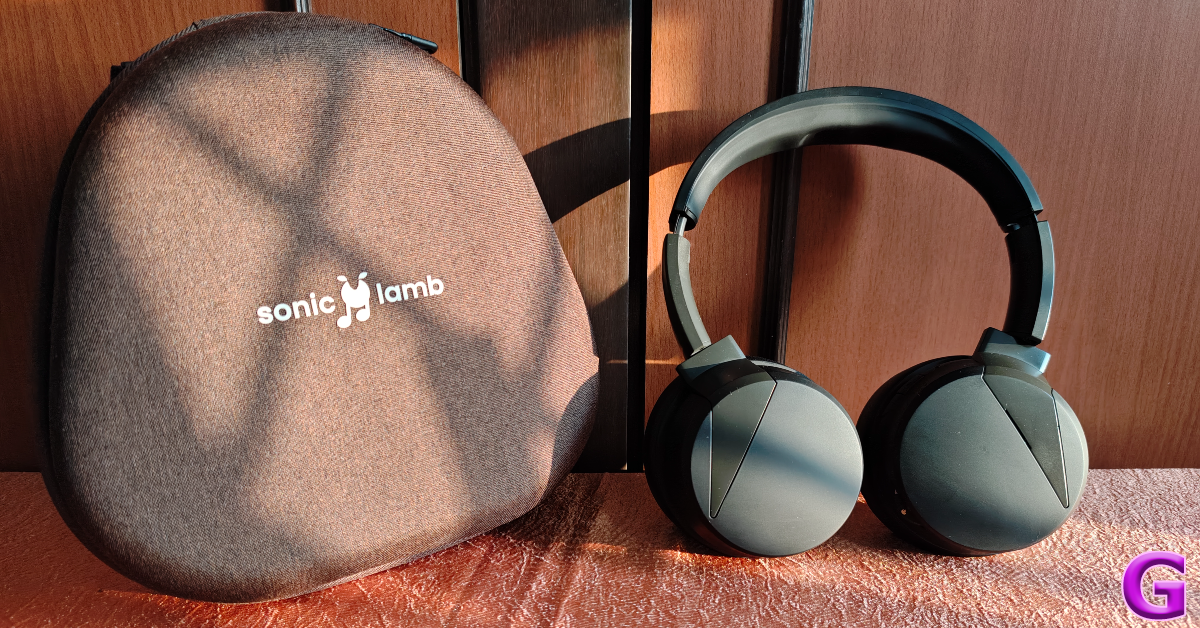
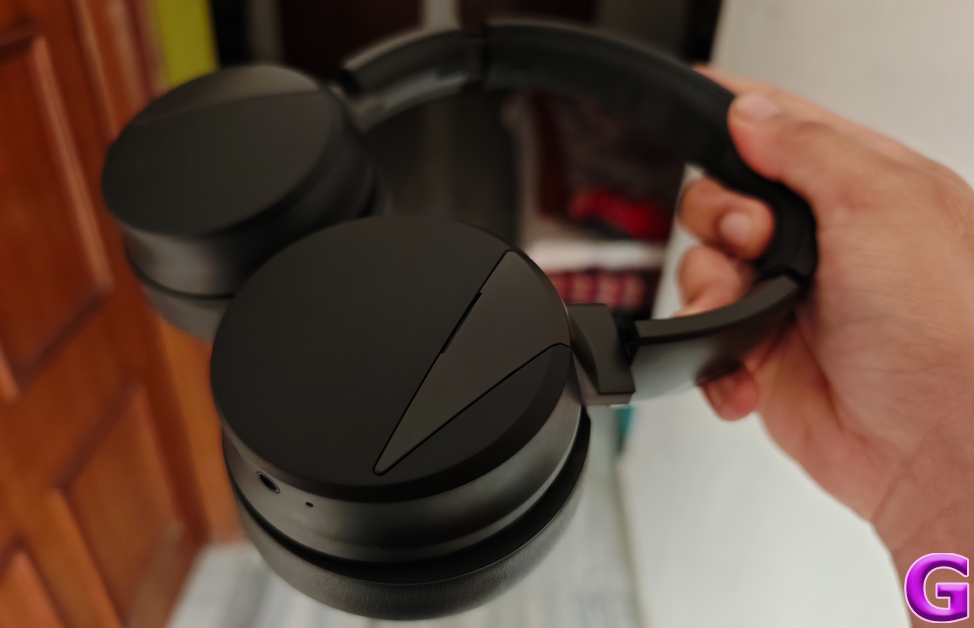
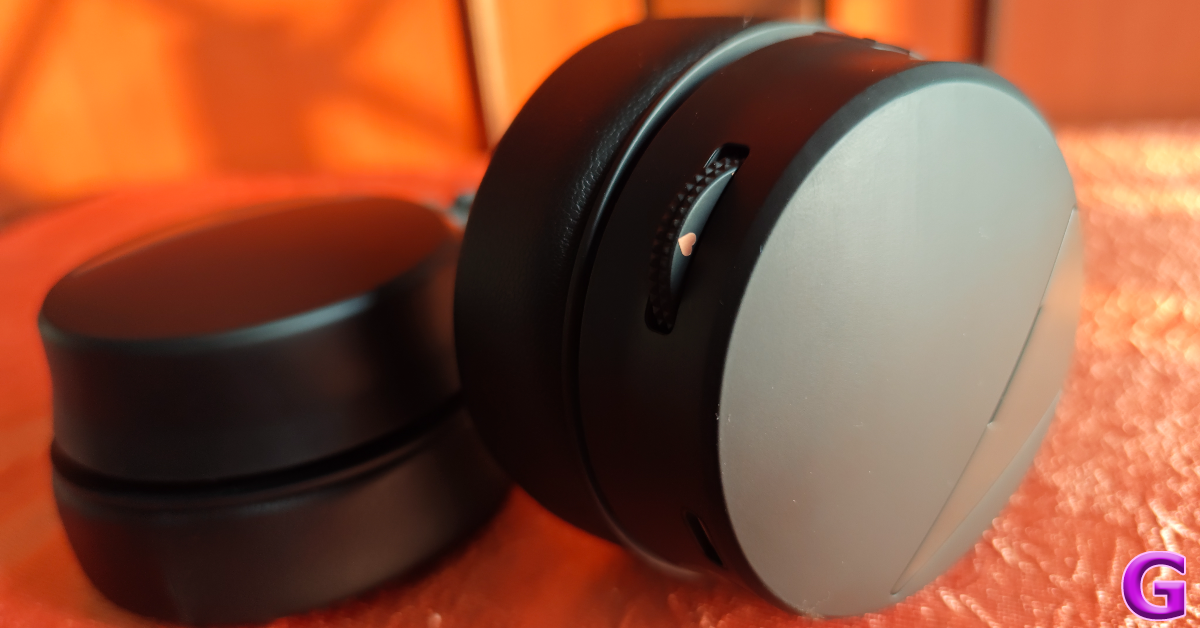
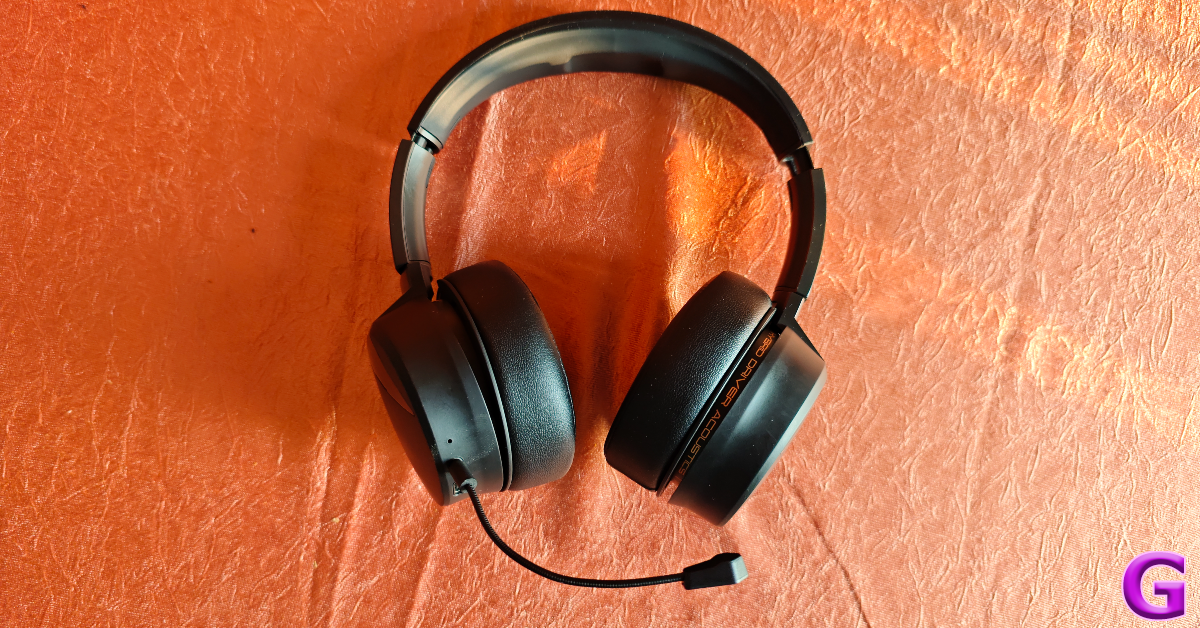
Inside the Sonic Lamb retail box, you get the headphones, a hard case, a 1.5m USB charging cable, a boom mic attachment, and a quick start guide. There are three colour variants on offer – Moonstone White, Ember Gray (with orange highlights), and Obsidian Black (featured in this review).Sonic Lamb’s design is simple, but not basic. The two swivelling earcups have a smooth triangular panel jutting into them from the headband. The Ember Gray colour variant highlights this panel with a contrasting orange shade. There is an LED notification light on the right earcup. This earcup also gets the control buttons and the scroll wheel to change the immersion level of the headphones.It takes some time to get used to the position of the buttons. A stronger ‘clicky’ feedback on these buttons would have been ideal, but it is something we can excuse on the debut product. The scroll wheel’s ridge texture and ratcheted feedback are decent. Also present on this earcup is a USB Type-C charging port, a microphone, and a 2.5mm jack for the boombox mic attachment.The quality of the materials used on the headphones imparts a lot of lushness to them. The silicone headband is padded well enough to not cause fatigue even after hours of wearing the headphones. The vegan leather used on the earpads is quite exquisite as well. The earpads, or ‘Wooferpads’ as Rapture likes to call them, can be rotated around. Being easily detachable, they can be replaced when they get worn out. An additional pair costs Rs 999 on Sonic Lamb’s official website.The overall fit of the headphones is very comfortable. There was minimal fatigue to be felt after hours of use. The earpads cosily wrap around the ears, forming a nice, warm chamber for hearing. We can’t speak to the water and dust resistance of the device, as it does not have an IP rating. But, it can withstand sweat and minor water splashes without impeding the performance of the drivers. Read Also:BenQ GV31 Portable Projector with in-built Android TV featuring Netflix launched
Sonic Lamb review: Performance
Powering the Sonic Lamb is Qualcomm’s QCC 3034 chipset. There are 4 codecs on offer – aptX, aptX HD, AAC, and SBC. With Bluetooth 5.1 onboard, the headphones provide a functional range of up to 15 metres. A wired connection (using a USB Type-C cable) is also supported on certain devices. The star of the show is the 27mm impulse driver that brings the physical sensation to the sonic experience. This driver is integrated with a 40mm dynamic driver on either earcup, completing the hybrid acoustic setup.Before we get to the subwoofer immersion, let’s talk about the general soundstage. We listened to a range of genres on the Sonic Lamb and were pleased with how the 40mm driver relayed the output. The mix of frequencies is delicate and very nuanced here. Before trying on the headphones, we feared the low end would dominate and marr the mix, but thankfully that is not the case here. The mids and the highs are pronounced and easily separable from the bass. Even the subtle hits of the clapper on our favourite rock tunes found good representation in the overall mix.Sonic Lamb has all the makings of a premium pair of headphones. Even without the integrated subwoofer tech, its audio output can easily go up against the established heavyweights in its category. If you’re used to an entry-level headset, the step-up in terms of soundstage will be immediately noticeable. But that’s not all on offer here. Let’s talk about the subwoofer.The scroll wheel on the left earcup can be used to toggle between the four immersion modes: Hear, Feel, Immerse, and Beast. The ‘Hear’ mode is the most neutral-sounding profile on the headphones. Ideal for calling and listening to podcasts, you can also stick to this mode while listening to genres that do not need a pronounced low end. The impulse driver kicks in on the ‘Feel’ mode, banging against the membrane to produce some delightful woofer-like sensations. The same is the case for ‘Immerse’ mode, which is our favourite out of the lot.This mode brings the right degree of power and sensation to the mix. The bass elements take full form and reverberate around the ear, creating a layer of immersion that we haven’t felt in any pair of headphones before. Every kick of the bass drum is relayed with appropriate intensity. What’s surprising is that it doesn’t meddle with the higher frequencies at all. The guitar and vocal notes remain clear and unobstructed. The final ‘Beast’ mode takes things up a notch and delivers a powerful surround which is borderline bewildering. We used this mode while watching movies and gaming. After a while, the Beast mode can get fatiguing.While the audio performance of the Sonic Lamb is impressive, it does leave a little more to be desired in terms of features. Active Noise Cancellation is hands down the biggest miss on these headphones. At the price of Rs 16,000, the lack of ANC is inexcusable. Another mildly annoying thing about these headphones is that there is no way to tell the battery level on the device. A companion app by Rapture is supposedly in the works, which should fix this problem, but ideally, you want the battery info to be reflected in the interface of the connected device. Multi-point connection is a welcome feature, but its functioning isn’t as smooth as we would have liked. Hopefully, a firmware update can fix these issues.There are a couple of things that deserve appreciation, though. The first is the boom mic attachment which elevates the calling experience massively. It picks up even the faintest of whispers and works perfectly in tandem with the internal noise suppression microphone to relay noise-free audio. Another nifty feature is the support for wired connection, which lets you use the headphones while they are connected to a PC or laptop via a USB cable. The quality of the 1.5m USB cable is pretty high-end, which is nice to see.Equipped with a 1,400 mAh battery pack, these headphones last up to 24 hours in Hear Mode, 14 hours in Feel Mode, 10 hours in Immerse Mode, and 7 hours in Beast Mode. We mainly used the Sonic Lamb in Feel and Immerse modes throughout the review period. It lasted us 5 days upon 2-3 hours of daily usage. It takes up to 2 hours to fully charge the headphones using a USB Type-C product.Read Also:Top 10 Apps for Redmi Note 13 Pro+
Verdict
After experiencing Sonic Lamb’s immersive soundstage, you wouldn’t think it is a first-generation product from a recently founded startup. The integrated subwoofer adds a fun element to the mix without muddling the higher frequencies. It is evident that a lot of effort went into tuning this new tech so that it adds to the output without becoming a distraction. If you’re a basshead, then these headphones should definitely be on your radar.



 Step 1: Launch the Amazon Alexa app on your Android smartphone.
Step 2: Switch to the Devices tab.
Step 3: Select your Amazon Echo device.
Step 4: Turn on your phone’s Bluetooth.
Step 5: Tap on Connect a device.
Step 6: The Amazon Alexa app will search for nearby devices. Tap on your phone’s name on the list.
Step 1: Launch the Amazon Alexa app on your Android smartphone.
Step 2: Switch to the Devices tab.
Step 3: Select your Amazon Echo device.
Step 4: Turn on your phone’s Bluetooth.
Step 5: Tap on Connect a device.
Step 6: The Amazon Alexa app will search for nearby devices. Tap on your phone’s name on the list.
 Step 1: Make sure your Amazon Echo device is plugged into a power socket.
Step 2: Turn on the Bluetooth on your Android smartphone.
Step 3: Say “Alexa, connect to my phone’s Bluetooth”.
This method only works when your phone has been connected to the Echo device before.
Step 1: Make sure your Amazon Echo device is plugged into a power socket.
Step 2: Turn on the Bluetooth on your Android smartphone.
Step 3: Say “Alexa, connect to my phone’s Bluetooth”.
This method only works when your phone has been connected to the Echo device before.
 If you don’t have access to home WiFi, you can always use your phone’s WiFi hotspot to set up the Amazon Echo Device. Here’s how.
Step 1: Turn on your phone’s WiFi hotspot from the Quick Settings Menu.
Step 2: Make sure your Amazon Echo device is plugged into a power outlet.
Step 3: Launch the Amazon Alexa app and sign in using your Amazon account.
Step 4: Tap the plus icon at the top right corner of the screen and select Add Device.
Step 5: Select Amazon Echo from the list. On the following page, choose your model of the Echo.
Step 6: Press the Action button on the Echo device to put it in Setup Mode.
Step 7: On the Alexa app, choose your mobile hotspot as the WiFi network.
Step 8: Alexa will be paired with your device. Now, follow the methods mentioned above to use it as a Bluetooth speaker.
If you don’t have access to home WiFi, you can always use your phone’s WiFi hotspot to set up the Amazon Echo Device. Here’s how.
Step 1: Turn on your phone’s WiFi hotspot from the Quick Settings Menu.
Step 2: Make sure your Amazon Echo device is plugged into a power outlet.
Step 3: Launch the Amazon Alexa app and sign in using your Amazon account.
Step 4: Tap the plus icon at the top right corner of the screen and select Add Device.
Step 5: Select Amazon Echo from the list. On the following page, choose your model of the Echo.
Step 6: Press the Action button on the Echo device to put it in Setup Mode.
Step 7: On the Alexa app, choose your mobile hotspot as the WiFi network.
Step 8: Alexa will be paired with your device. Now, follow the methods mentioned above to use it as a Bluetooth speaker.

 Step 2: Hit the ellipses in the bottom right corner of the screen.
 Step 3: Turn on the toggle switch next to Auto-scroll.
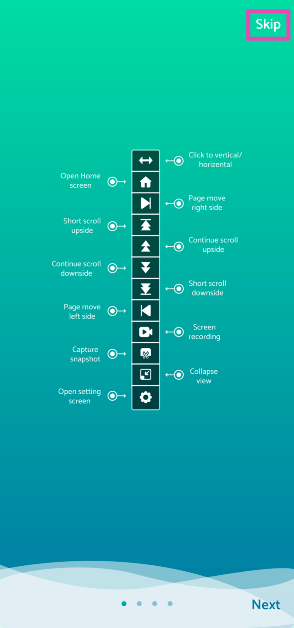




 Step 11: Go to Instagram and use the Voice Command you just created to scroll through Reels.




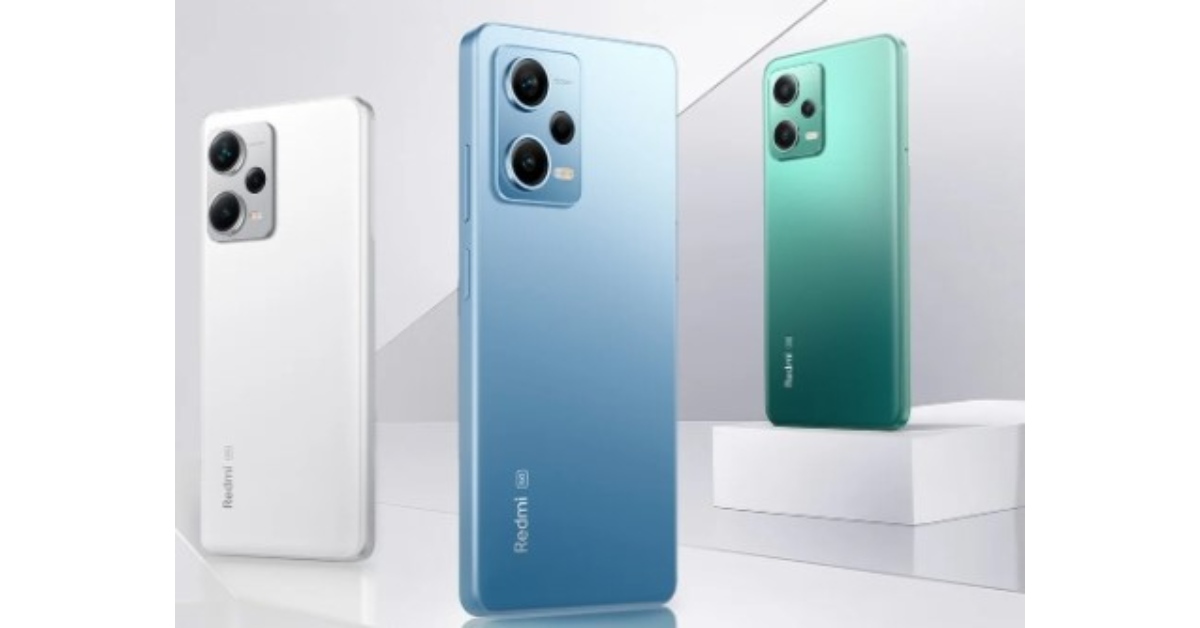 Redmi Note 12 Pro breaks expectations for what we consider mid-range devices. This smartphone runs on MediaTek Dimensity 1080 5G octa-core which can handle extreme frame rates in even graphics-heavy titles.
Xiaomi has crammed in a high-performing Mali-G68 GPU alongside the fast chipset besides ample LPDDR4X RAM to annihilate lags.
The phone has a 5160mAh battery which means it can last over 6.5 hours even under intensive gaming usage. For budget-conscious buyers unwilling to compromise on power, the Redmi Note 12 Pro is a gift with entry-level pricing.
Redmi Note 12 Pro breaks expectations for what we consider mid-range devices. This smartphone runs on MediaTek Dimensity 1080 5G octa-core which can handle extreme frame rates in even graphics-heavy titles.
Xiaomi has crammed in a high-performing Mali-G68 GPU alongside the fast chipset besides ample LPDDR4X RAM to annihilate lags.
The phone has a 5160mAh battery which means it can last over 6.5 hours even under intensive gaming usage. For budget-conscious buyers unwilling to compromise on power, the Redmi Note 12 Pro is a gift with entry-level pricing.
 Step 2:
 Step 3:
 Step 5:
 Step 6:
 Step 7:
 Step 8:
 Step 1:
 Step 2:
 Step 3:
 Step 5: