Best 65-inch TVs to enjoy watching movies with your family

Living rooms are built around the television set, so why not go for a large display to maximise your viewing experience? Unlike your bedroom or office, living room TVs are meant for group viewing, be it a movie or live sports. There are several large-screen TVs across different brands that can fill the void on your wall but if you’re looking for the best picks in every price category, you have landed on the right page. In this article, we bring you our picks for the best 65-inch TVs for enjoying watching movies with your family. Read Also: iPhone 14 is now available for as low as 15k during Flipkart’s Big Diwali Sale

Samsung S90C OLED (QA65S90CAKLXL)

Price: Rs 2,02,490 on Samsung.in Samsung S90C OLED (QA65S90CAKLXL) Samsung S90C OLED is one of the best 65-inch TVs you can buy right now. The OLED display panel on this TV generates deep blacks and stunning, vivid colours. The Neural Quantum Processor 4K brings the best out of the 4K pictures produced on the screen. What sets apart this TV from the competition is its ultra-slim form factor that oozes a lot of personality. Gamers will be pleased to know that the S90C supports motion enhancements up to 4K 144Hz, resulting in smooth, lag-free gameplay.

Sony Bravia X82L (KD-65X82L IN5)

Price: Rs 1,64,900 on Sony.co.in Sony Bravia X82L (KD-65X82L IN5) Powered by the 4K HRD Processor X1, Sony Bravia X82L produces stunning visuals and massively amps up the viewing experience. The X82L can upscale 2K videos to 4K using a unique 4K database to fill in the missing details. Sony continues to impress with the incredible surround sound to go along with the stunning visuals. The X82L uses Acoustic Auto Calibration to optimise the sound of the TV according to the positions of the objects in your room. Smart features like Google TV, Chromecast, and AirPlay support make this TV a complete package.

LG UR90 (65UR9050PSK)

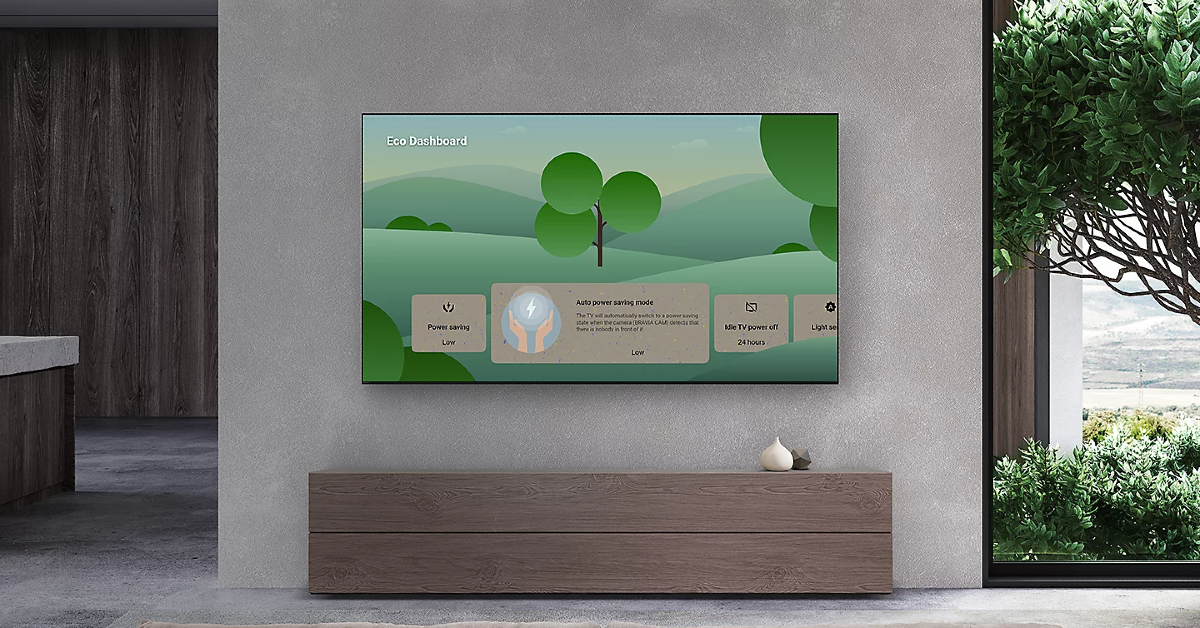
Price: Rs 98,431 on LG.com LG UR90 (65UR9050PSK) LG UR90 employs the α5 AI Processor 4K Gen6 to deliver life-like visuals on screen. It can even upscale non-4K content to 4K resolution. The slim form factor ensures that the UR90 blends seamlessly into your living room like a perfectly placed portrait. One of our favourite features on the LG UR90 is the Game Optimiser 7 Dashboard. This is where you can find all your game-related settings without going through the hassle of navigating the TV’s display menu. You can also change the game genre settings very quickly from this dashboard.

Hisense 65A7H Tornado 2.0

Price: Rs 44,990 on Amazon Hisense 65A7H Tornado 2.0 Best 65-inch TVs for enjoying watching movies with your family Talking about more affordable options, the Hisense Tornado 2.0 is a good pick. Apart from delivering 4K resolution visuals, the 65A7H also rocks a 61W 3-speaker system from JBL. There are 3 HDMI ports on this TV to connect to set-top boxes, Blu-Ray players, and gaming consoles. Adding to the connectivity options are 2 USB ports, Dual Band Wi-Fi, and Bluetooth 5.1. With pixel tuning onboard, the Hisense 65A7H adjusts the visual output frame-by-frame in real-time, leading to a more immersive viewing experience.

TCL C645

Price: Rs 59,990 on Amazon TCL C645 Best 65-inch TVs for enjoying watching movies with your family If you’re looking for a good midrange 65-inch TV for your gaming needs, the TCL C645 fits the bill perfectly. This Smart TV supports 4K resolution and a refresh rate of 60Hz. Offering a response time of 6.5ms, the C645 ensures there are no lags, delays, or latency issues during gameplay. TCL’s Game Master unlocks this TV’s gaming potential with advanced display & audio tech and a smoother streaming experience. The bezel-less design of the C645 is perfect to go along with the immersive visuals.

Redmi X65

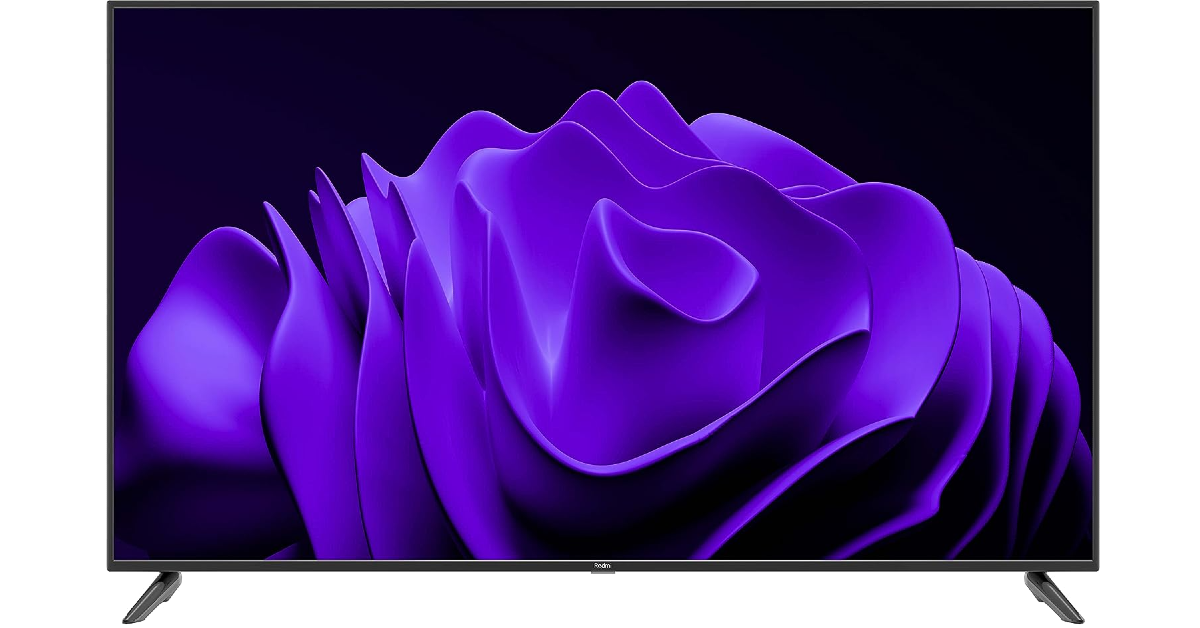
Price: Rs 57,999 on Mi.com Redmi X65 Best 65-inch TVs for enjoying watching movies with your family Over the years, Redmi has put out great Smart TVs that offer incredible value for money. The Redmi X65 is no exception. Belonging to the ‘X’ family of Redmi Smart TVs, the X65 offers a premium 4K viewing experience with HDR10+ support. The X65 is able to create a seamless flow of visuals with the MEMC Reality Flow which uses intelligent frame insertion to bring smoothness to sport footage. The two 30W speakers on this TV generate a solid sound output that envelopes the viewers perfectly. Redmi’s PatchWall TV OS brings all your favourite content to your home screen, eliminating the need to navigate to different OTT platforms. At Rs 57,999, the Redmi X65 is an excellent deal in our book.

OnePlus TV 65 Q2 Pro

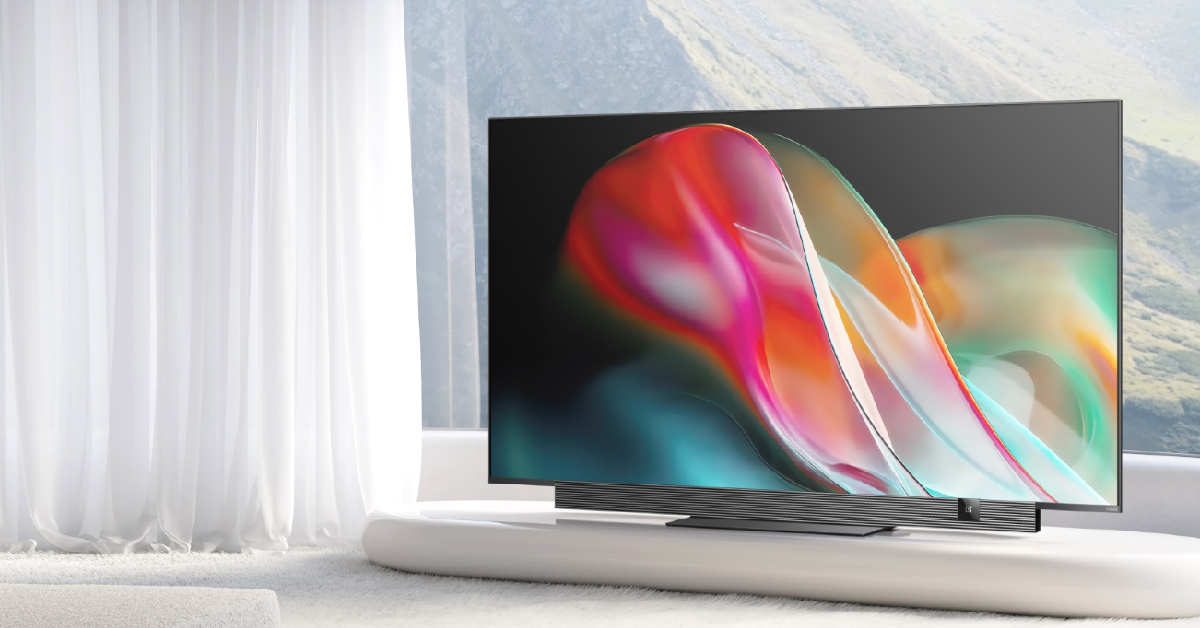
Price: Rs 94,999 on OnePlus.in OnePlus TV 65 Q2 Pro Best 65-inch TVs for enjoying watching movies with your family OnePlus’ foray into the premium TV segment was something we could have all seen coming after the brand gained a solid footing in the midrange category. The 65-inch Q2 Pro is OnePlus at its best – a great mix of exemplary hardware and clever tuning. The Q2 Pro offers a variable refresh rate of 120Hz and syncs the frame rate to match it. The Advanced MEMC tech aids the smooth flow of visuals on the screen. The sound system on this TV delivers a combined 70W output, with 40W coming from the Horizon Soundbar and 30W from the subwoofer. OnePlus smartphone, tablet, and TWS users will also be able to access the special ecosystem features on the Q2 Pro. Read Also: 10 Cool Gadgets Every College Student Must Have to Help Make Campus Living a Breeze

Conclusion

These are our picks for the best 65-inch TVs for enjoying watching movies with your family. Since the festive season is upon us, you will be able to get significant Diwali discounts on some of these picks. Make sure to check GadgetBridge.com for Diwali gifting guides! If you think we missed out on a TV that deserves a spot on this list, let us know in the comments!

Elon Musk launched its first AI chatbot, Grok

Key Highlights
  • xAI started developing Grok four months ago.
  • It is the company’s first AI model based on a new large language model (LLM).
  • The AI chatbot went through many iterations.
  • It is only available to a small number of users.
Microblogging platform X, previously known as Twitter’s owner, Elon Musk, has entered the world of artificial intelligence. He has introduced its first AI model, called Grok. The new AI model has been developed by xAI. Elon Musk has officially announced the rollout of its first AI model, Grok. The chatbot is designed to answer anything and is modelled after the Hitchhiker’s Guide to the Galaxy. As per the blog post, the AI model will not only answer but will also suggest questions to ask. It is said that Grok has all the real-time knowledge of the world thanks to the X platform. Moreover, the AI chatbot will also answer spicy questions that are rejected by most other AI systems. As per the company, the new AI model, Grok, is a prototype and is available to selected users. “Grok is still a very early beta product—the best we could do with 2 months of training—so expect it to improve rapidly with each passing week with your help,” the xAI Team noted. Grok is powered by LLM, which was developed over the last four months. As per the startup, it trained a prototype LLM (Grok-0) with 33 billion parameters. Its capability was tested with a series of evaluations using a few standard machine learning benchmarks designed to measure math and reasoning abilities. Also Read: Apple iPhone 14 can now be purchased for just Rs 6,749: Find out how It managed to score 62 percent on GSM8k, 73 percent on MMLU, and 63.2 percent on HumanEval. Furthermore, on MATH, it managed to score 23.9 percent. The xAI said, “On these benchmarks, Grok-1 displayed strong results, surpassing all other models in its compute class, including ChatGPT-3.5 and Inflection-1. It is only surpassed by models that were trained with a significantly larger amount of training data and compute resources, like GPT-4. This showcases the rapid progress we are making at xAI in training LLMs with exceptional efficiency.” In addition to this, the AI chatbot was able to score a C (59%) on the Hungarian National High School Math Exam (May 2023). According to the company, it has given Grok access to search tools and real-time information; however, there are still chances that the AI model can generate false or contradictory information. As mentioned earlier, Grok is in the developmental phase, so the company is asking for human feedback, which will help improve the overall experience.

Grok Availability

As of now, Grok Chatbot’s features are being offered to a limited number of users in the United States. Users can access the Grok prototype and provide valuable feedback. Those who are interested can join the Grok waitlist here. The company said that it will be rolling out a new feature in the coming month, but it didn’t open up about the wider release of the AI model.

Here is how to get Rs 43,500 off on iPhone 14 Plus on Flipkart

Key Highlights
  • The e-commerce platform is offering up to Rs 42,000 exchange discount on the iPhone.
  • The original price of the iPhone 14 Plus is Rs 79,990.
Flipkart’s Big Diwali Sale is live. The company is offering a lot of offers on iPhones. The e-commerce platform is now providing up to Rs 42,000 off on iPhone 14 at the same time you can also avail Rs 43,500 off on iPhone 14 Plus. To know how, check out the details below. Here is how to get Rs 43,500 off on iPhone 14 Plus on Flipkart The iPhone 14 Plus was originally priced at Rs 79,990. During the ongoing Flipkart Big Diwali Sale, you can now purchase it for as low as Rs 20,499. Flipkart is selling the iPhone 14 Plus for Rs 63,999 after a discount of Rs 15,991. Besides this, customers can also receive a Rs 1,500 instant discount using SBI credit card EMI transactions. In addition to this, if you are upgrading from an older smartphone, you can get an exchange discount of up to Rs 42,000. However, this additional exchange discount depends on the build and state of your old smartphone. After applying all the above-mentioned offers, the price of your iPhone 14 Plus will come down to Rs 20,499. Also Read: How to use Visual Lookup on your iPhone to find out what’s wrong with your car and other things? The device comes in four colour options: blue, purple, midnight, starlight, and red. It features a 6.7-inch Super Retina XDR OLED screen. The display offers a wide colour gamut, HDR, and 1200 nits of brightness. In addition to this, it comes with a pixel density of 460 ppi, and there is support for a 60 Hz refresh rate. The screen is protected with a ceramic shield front cover that is water- and dust-resistant. The iPhone 14 Plus also includes Face ID and is built to IP68 standards for water and dust protection. Under the hood, there is an Apple A15 Bionic SoC and up to 512GB of internal storage. The device runs on iOS 16. For taking photos and videos, the iPhone 14 Plus sports a dual rear camera setup with a 12MP wide-angle sensor with a bigger f/1.5 aperture, sensor-shift OIS, and a secondary 12MP ultra-wide-angle sensor. The ultra-wide camera provides a distinctive viewpoint for broader views and enhances low-light images using a Photonic Engine. For selfies and video calls, the front camera has a 12 MP sensor with autofocus.

How to use Visual Lookup on your iPhone to find out what’s wrong with your car and other things?

0
First introduced in iOS 16, Visual Lookup is Apple’s answer to Google Lens. This nifty feature lets you know more about the objects in the images you take. This year, Apple has expanded Visual Lookup’s object detection and even added support for special scenarios. The result is a more seamless and intuitive tool that works perfectly in tandem with real-life objects. People who aren’t accustomed to their car’s display are going to love this feature as it can easily recognise all the signs and symbols on the dashboard and tell you what’s wrong with your car. In this article, we show you how to use Visual Lookup on your iPhone. Read Also: Google Pixel 8 Pro 256GB storage variant listed on Flipkart, now available for purchase

Use Visual Lookup on your iPhone

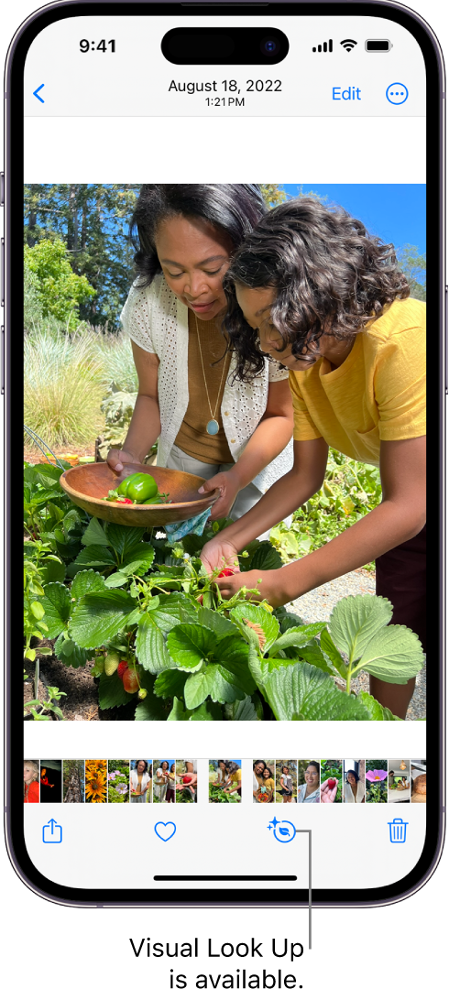
Use Visual Lookup on your iPhone You can use Visual Lookup on your iPhone to identify any tag, sign, or instructional diagram. It can be put to good use if you want to decipher the washing instructions on the back of your sweater or can’t understand the confusing signs on your car’s display. Here’s what you need to do. Step 1: Take a picture of the signs that you need to decipher. If you don’t know what’s wrong with your car, take a picture of the driver’s display. Step 2: Open the picture in the Photos app on your iPhone. Step 3: Tap the info icon at the bottom toolbar. For images of the driver’s display, you will see a steering wheel icon instead of the info icon. Step 3: Tap the info icon at the bottom toolbar. For images of the driver’s display, you will see a steering wheel icon instead of the info icon. Step 4: You will be able to view the image metadata and other details on the pop-up page. Your iPhone will also detect the objects in the picture. To know more about them, tap on ‘Look up’. Step 5: Once you select Look Up, your iPhone will give you more details about the picture.

Frequently Asked Questions (FAQs)

What is Visual Lookup on iPhone?

Introduced on iOS 16, Visual Lookup allows iPhone users to know more about the objects, pets, signs, and symbols in the photos they take. Apple expanded this feature on iOS 17, giving it the ability to completely decipher common templates like washing instructions, car displays, and more.

Does Visual Lookup work on videos?

Yes, you can pause the video to learn more about the objects and signs on a particular frame using visual lookup.

Can Apple’s Visual Lookup identify signs in languages other than English?

Visual Lookup currently works for Spanish, Italian, Japanese, French, German, and English. Apple will be adding support for other languages soon. Read Also: Instagram users can now add Song Lyrics to their Reels just like Stories

Conclusion

This is how you can use Visual Lookup on your iPhone to identify common objects, signs, symbols, and more in pictures. Once your iPhone recognises an object, the info icon on the bottom toolbar changes into a customised icon reflecting the theme of the object. For pictures of pets, it will turn into a dog icon. Similarly, it will get special icons for wash manuals and car displays.

8 Ways to Fix the ‘Phone Date is Inaccurate’ Error on WhatsApp

If you’re setting up WhatsApp on a device that has been switched off for a long time, you may run into a screen that says you need to update your phone’s date and time in order to proceed. This error also pops up when you move to a different time zone and do not update your device’s time and date accordingly. WhatsApp relies on your device’s date and time to assign accurate time stamps to the messages. In this article, we bring you the top 8 easy ways to fix the ‘phone date is inaccurate’ error on WhatsApp. Read Also: Instagram users can now add Song Lyrics to their Reels just like Stories

What’s causing the inaccurate date error on WhatsApp?

Modern smartphones are quite adept at keeping accurate time and date. Even when you start up the device for the first time, it displays the correct date and time as soon as you enter your location. Most of the apps on your phone rely on the date and time data to function properly. When there is an inaccuracy with this data, the apps relying on it fail to launch. It is essential for messaging apps like WhatsApp to have access to accurate time and date info at all times. If it starts displaying the inaccurate date error message, it could be due to one of the following reasons.
  • You have manually changed your phone’s date
  • Your phone isn’t able to sync its time and date with the network
  • WhatsApp’s servers are down
  • WhatsApp’s cache is corrupted
  • Software bugs on your phone

Manually change your phone’s data and time

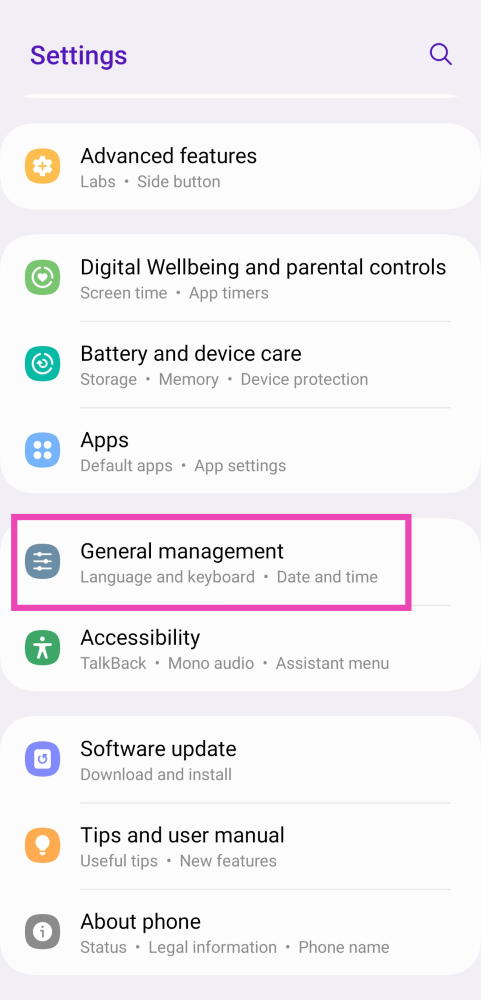
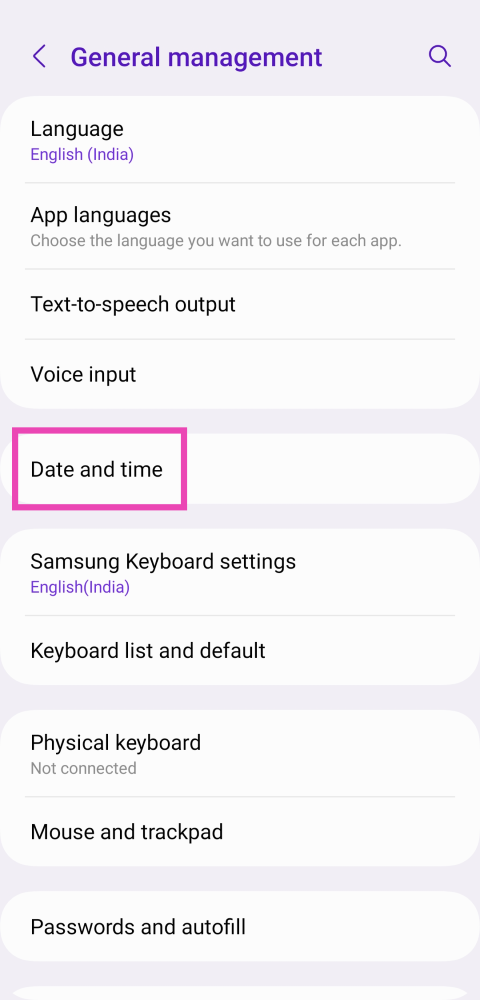
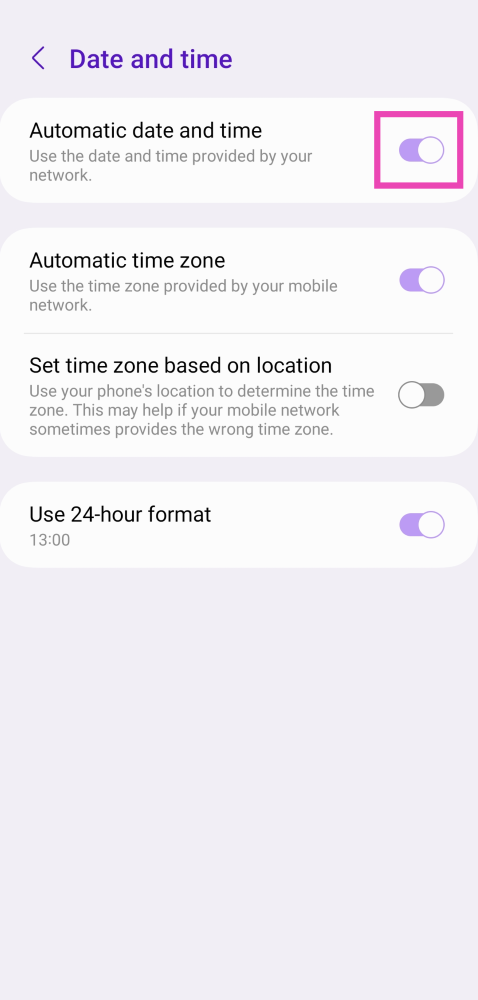
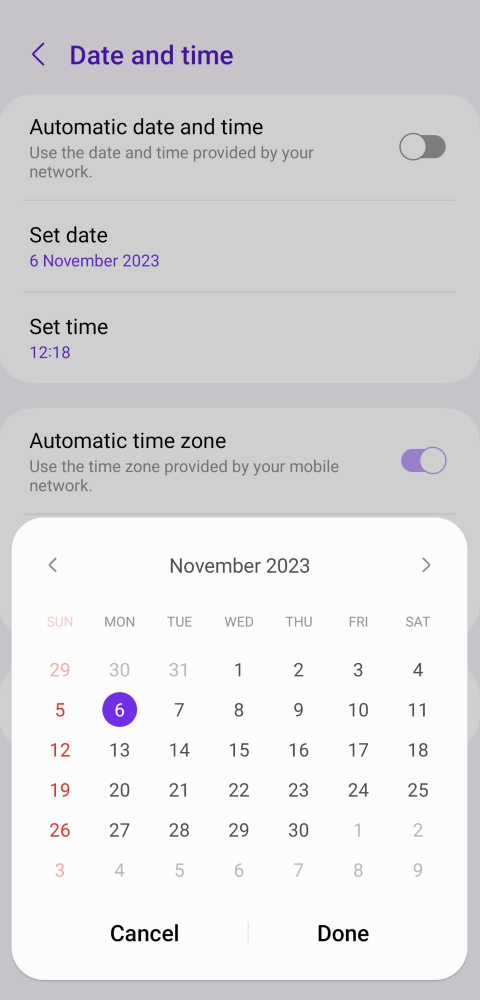
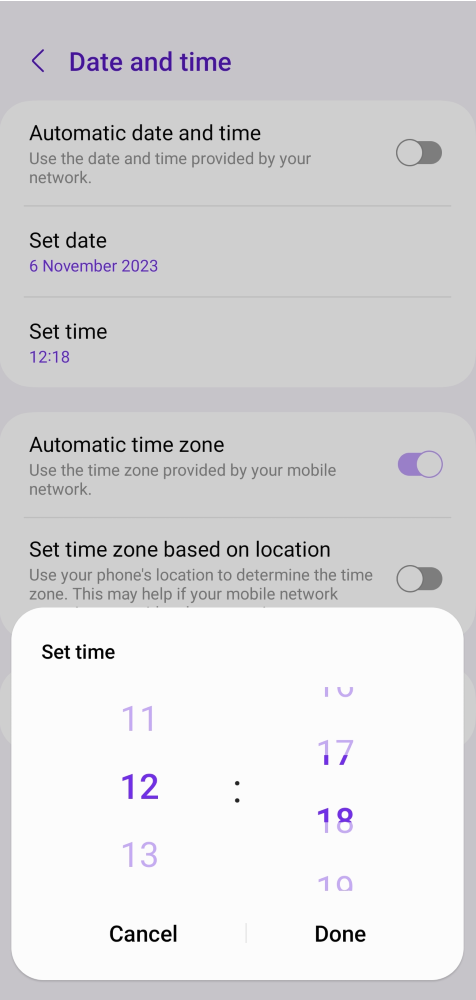
Your smartphone uses the GPS and cell services to keep accurate time. If this mechanism faces some malfunction, you can always set the date and time manually. Here’s how. Step 1: Go to Settings and select General Management. Step 1: Go to Settings and select General Management. Step 2: Tap on Date and time. Step 2: Tap on Date and time. Step 3: Turn off the toggle switch for Automatic date and time. Step 3: Turn off the toggle switch for Automatic date and time. Step 4: Tap on Set date and use the pop-up calendar to set the current date. Step 4: Tap on Set date and use the pop-up calendar to set the current date. Step 5: Tap on Set time and use the pop-up clock to set the current time. Step 5: Tap on Set time and use the pop-up clock to set the current time.

Turn on Automatic date and time

Step 1: Go to Settings and select General Management. Step 1: Go to Settings and select General Management. Step 2: Tap on Date and time. Step 2: Tap on Date and time. Step 3: Turn on the toggle switch for Automatic date and time. Step 3: Turn off the toggle switch for Automatic date and time. 6 Easy Ways to Fix the ‘Phone Date is Inaccurate’ Error on WhatsApp

Restart your phone

Software glitches are all too common on Android smartphones, but the good news is that most of these problems can be quickly fixed by restarting your phone. If you’ve tried manually and automatically setting the date and time to no avail, your next step should be restarting the device. Press and hold the side key and select ‘Restart’ from the power menu to do so. If the side key triggers the voice assistant on your device, press and hold it along with the volume up or down key to access the power menu.

Check the internet connection

Your smartphone needs a steady internet connection and access to location services to keep the accurate time. The device syncs its clock with time servers so as to not drift over time. It also uses GPS to keep the time updated with respect to your location. If your smartphone does not have access to the internet WhatsApp may show the ‘phone date is inaccurate’ error. This is quite rare but it is known to happen. Fix your mobile data connection or switch to a WiFi network to get rid of this issue.

Clear WhatsApp’s cache

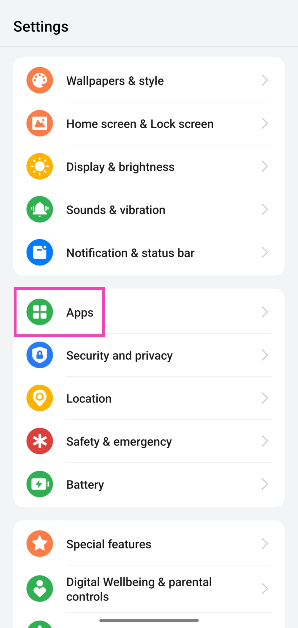
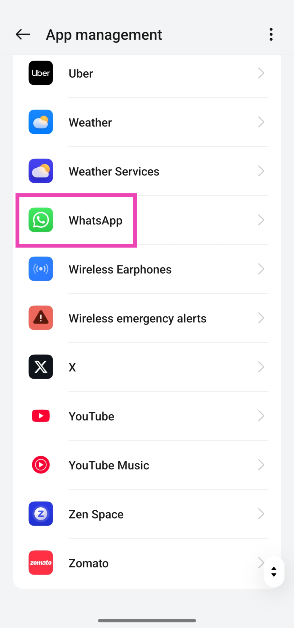
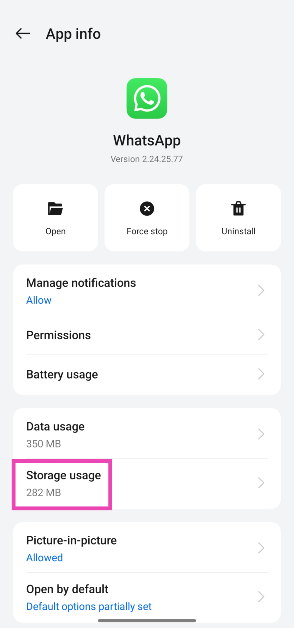
Step 1: Go to Settings and select Apps. Step 1: Go to Settings and select Apps. Top 8 ways to fix ‘WhatsApp images not showing in gallery’ Step 2: Tap on WhatsApp. Step 2: Tap on WhatsApp. 8 Ways to Fix the ‘Phone Date is Inaccurate’ Error on WhatsApp Step 3: Select Storage. Step 3: Select Storage. Top 8 ways to fix ‘WhatsApp images not showing in gallery’ 8 Ways to Fix the ‘Phone Date is Inaccurate’ Error on WhatsApp Step 4: Tap on Clear cache. Step 4: Tap on Clear cache. Top 8 ways to fix ‘WhatsApp images not showing in gallery’ 8 Ways to Fix the ‘Phone Date is Inaccurate’ Error on WhatsApp

Update WhatsApp on your device

WhatsApp to release new alternative profile privacy feature: Here is everything about it 6 Easy Ways to Fix the ‘Phone Date is Inaccurate’ Error on WhatsApp Older versions of WhatsApp, or any other app for that matter, are routinely phased out by developers. These versions are also more susceptible to bug-related issues that are no longer present in the newest version of the app. If you come across the ‘phone date is inaccurate error’ on WhatsApp, simply update it to the latest version. Go to the Google Play Store, search for WhatsApp and hit the ‘Update’ button on its app page.

Reinstall WhatsApp

These iOS and Android phones will stop running WhatsApp from next month: Check if yours is on the list 6 Easy Ways to Fix the ‘Phone Date is Inaccurate’ Error on WhatsApp Removing WhatsApp from your phone and reinstalling it can also fix the date and time error that is keeping you from using the messaging app. You can uninstall WhatsApp by going to Settings>Apps>WhatsApp>Uninstall or simply long-press its icon in the app drawer and hit ‘Uninstall’ in the pop-up menu.

Update your phone’s OS

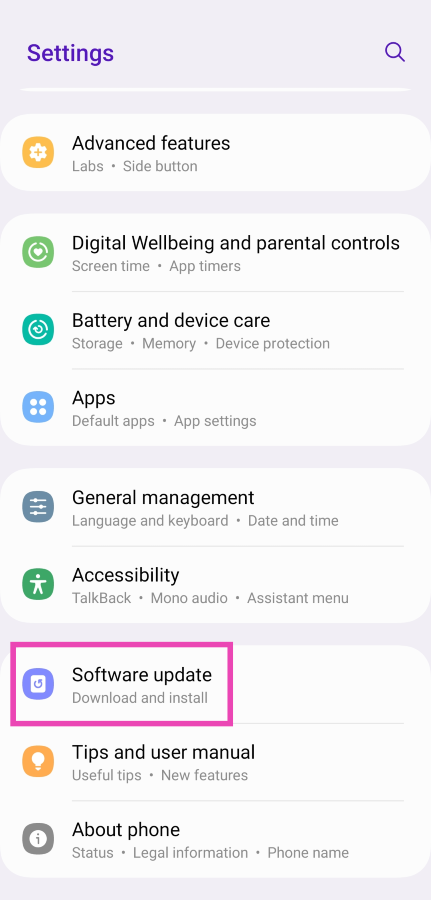
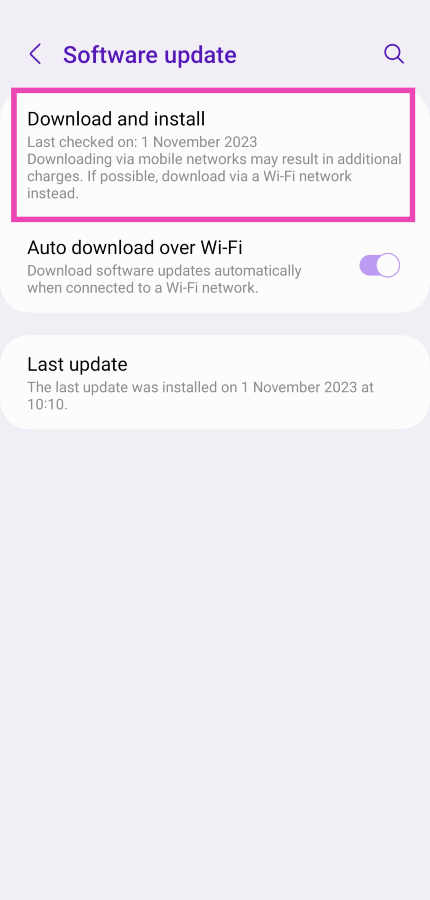
Step 1: Connect your phone to a WiFi network and plug in its charger. Step 2: Go to Settings and select Software update. Step 2: Go to Settings and select Software update. Smartphone clicking things on its own? Here are 8 ways to fix Ghost touches on Android 6 Easy Ways to Fix the ‘Phone Date is Inaccurate’ Error on WhatsApp Step 3: Tap on Download and Install. Your smartphone will check for any new updates. Step 3: Tap on Download and Install. Your smartphone will check for any new updates. Smartphone clicking things on its own? Here are 8 ways to fix Ghost touches on Android 6 Easy Ways to Fix the ‘Phone Date is Inaccurate’ Error on WhatsApp Step 4: If an update is available, tap on Install Now. You can also schedule the update for a later time.

Frequently Asked Questions (FAQs)

Why is WhatsApp showing the ‘phone date is inaccurate’ error?

WhatsApp needs the accurate date and time to assign the correct timestamps to the messages that you send and receive on the app. If there is a fault with the time and date on your phone, you will be unable to use the messenger.

How do I set the correct date and time on my phone?

Your smartphone automatically sets the date and time using the nearest cell tower and GPS services on your device. If you want to manually set the date and time on your device, go to Settings>General Management>Date and time and turn off the toggle switch for Automatic date and time.

How can I restore my WhatsApp date?

Your WhatsApp date will automatically be restored as soon as the date on your phone matches your physical location. Go to Settings>General Management>Language and region>Region and set the correct time zone.

How do I check if WhatsApp is down?

Go to DownDetector.in and look up WhatsApp to check if the messenger’s servers are down. If you notice a spike in user reports within the last few minutes or hours, it means that the app is experiencing a server outage.

How do I update WhatsApp on my phone?

Go to the Google Play Store, search for WhatsApp, open the app’s page, and hit the Update button. Read Also: Here are the best deals on OnePlus flagship smartphones including OnePlus Open: Details

Conclusion

These are the top 8 ways you can fix the ‘phone date is inaccurate’ error on WhatsApp. If you come across a similar error on the WhatsApp app for PC, simply go to Settings>Time & language>Date and time settings and update them accurately. The same goes for other devices like iPhones and Macs.

iPhone 14 is now available for as low as 15k during Flipkart’s Big Diwali Sale

Key Highlights
  • Flipkart is offering up to Rs 42,000 exchange discount on iPhone 14.
  • The device was last year.
  • Flipkart sale ends on November 11.
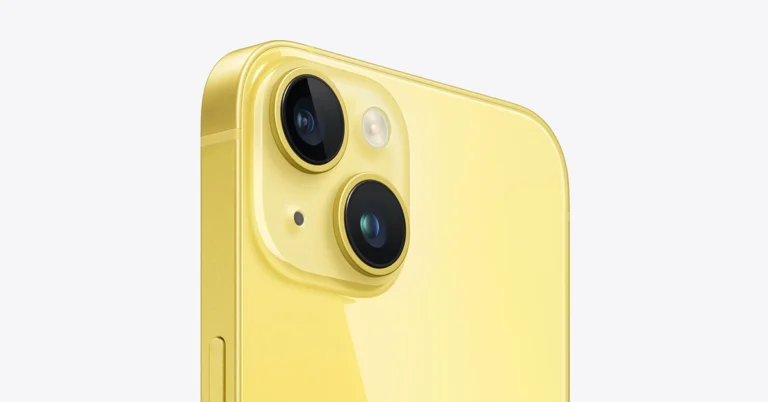
We think Flipkart is the best place where you will get iPhone deals right now. iPhone 14 is now getting incredible offers during the Flipkart Big Diwali Sale. You can purchase the iPhone for as little as Rs 14,000, isn’t it a steal deal? So hurry up because the Flipkart sale is going to end soon and this offer is available for a limited duration. Find out how you can purchase the iPhone 14 at its best price. Flipkart Big Diwali Sale will end on November 11, a day before Diwali. Festive sale is the best time to buy a new iPhone because the company offers the best deals on the previous generation device. Right now Apple iPhone 14 is available at mind-blowing prices and deals as part of Flipkart’s Big Diwali Sale. iPhone 14 original price is Rs 69,999 but Flipkart is offering a massive discount on the device. Currently, it is listed at a discounted price of Rs 56,999. Flipkart is also offering additional bank offers of up to Rs 1,750 to SBI credit card and Flipkart Axis Bank card owners. Furthermore, there will be 500 Off On SBI Credit Card 6 Months EMI Transactions. Also Read: Best smartphones to buy under Rs 15,000 in India (November 2023) To further reduce the cost, the customers can apply for exchange where they can avail up to Rs 42,000 discounts. However, the additional exchange discount depends on the model and condition of your old device.

Apple iPhone 14 specifications

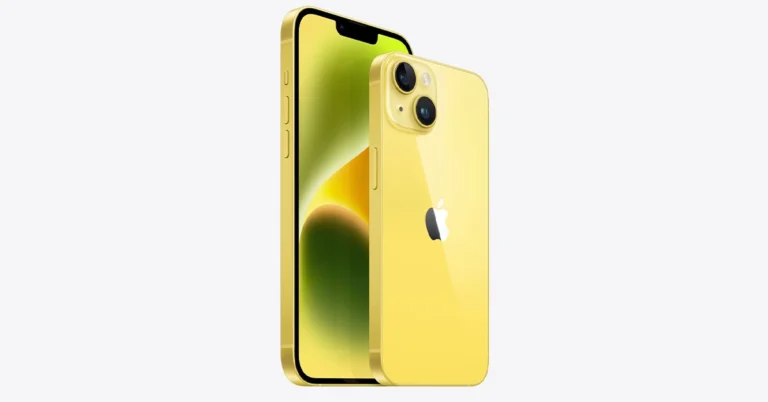
Apple iPhone 14 features a 6.1-inch Super Retina XDR OLED screen which offers a wide colour gamut, HDR, and 1200 nits of brightness. The display comes with a pixel density of 460 ppi and supports a 60Hz refresh rate. The screen has a tough Ceramic Shield front cover that is water and dust-resistant. The iPhone 14 also includes Face ID and is built to IP68 standards for water and dust protection. Under the hood, there is an Apple A15 Bionic SoC and up to 512GB of internal storage. The device runs on iOS 16. The iPhone 14 is highlighted with a dual rear camera setup with a primary 12MP wide-angle sensor with a bigger f/1.5 aperture, sensor-shift OIS, and a secondary 12MP ultra-wide-angle sensor. The Ultra Wide camera provides a distinctive viewpoint for broader views and enhances low-light images using a Photonic Engine. For selfies and video calls, the front camera has a 12MP sensor with autofocus.

Garena Free Fire Redeem Codes Today 6 November 2023: Here is how to claim them

Garena Free Fire is a battle royale game with regular awards and tournaments to keep players interested. If you play Garena Free Fire, you should be aware of the redeem codes that are released on a daily basis. However, because the battle royale game is banned in India, players from other countries can use the Free Fire Redeem codes daily. If you’re unfamiliar with the Garena Free Fire redeem codes or don’t know how to get them, we’ve put together a step-by-step guide to help you redeem them. Check out Garena Free Fire Redeem Codes for 6 November 2023. The Free Fire redeem codes are a great way to get free stuff. These are 12-digit codes that contain alphabets and numbers, as well as an expiration date and time. Because the Garena FF redeem codes cannot be used more than once, you should hurry to the redemption page to claim your free reward before someone else does. To get a free reward, all you have to do is go to reward.ff.garena.com/en, which is the official redemption page. Also, keep an eye on this space for daily updates on Garena Free Fire redemption codes and rewards.

Garena Free Fire Redeem Codes Today 6 November 2023

FF11WFNPP956 WLSGJXS5KFYR FF11NJN5YS3E W0JJAFV3TU5E SARG886AV5GR MCPTFNXZF4TA FF11HHGCGK3B Y6ACLK7UD1N ZRJAPH294KV5 FF10GCGXRNHY 8F3QZKNTLWBZ FF10617KGUF9 FF11DAKX4WHV B6IYCTNH4PV3 X99TK56XDJ4X FF1164XNJZ2V FF119MB3PFA5 ZYPPXWRWIAHD YXY3EGTLHGJX

How to Get Free Fire Redeem Codes for Garena on 6 November 2023?

  • Visit the Garena Free Fire game’s official website at reward.ff.garena.com.
  • Use your Facebook, Google, VK, Apple ID, Huawei ID, or Twitter account to log in.
  • You’ll be taken to a valid redemption code (s)
  • Copy and paste the 12-digit redemption code into the text box.
  • On the screen, a dialogue box will appear.
  • ‘Ok’ should be selected.
For the latest gadget and tech news, and gadget reviews, follow us on TwitterFacebook and Instagram. For newest tech & gadget videos subscribe to our YouTube Channel. You can also stay up to date using the Gadget Bridge Android App. You can find the latest car and bike news here.

10 Cool Gadgets Every College Student Must Have to Help Make Campus Living a Breeze

School is back in session, and you’ve probably gathered all the essentials. But you’re not yet ready for life on campus without key tech gadgets that will make your college life easier. After all, life as a student is hectic, so anything that can make it better is worth considering. Remember, you’re expected to be completely self-sufficient and independent in college, but you also have to follow the college schedule and rules. This is a big change from life at home. However, helpful gadgets for college students can be a game changer. They will leave you feeling prepared for the challenges of life in uni. We’ve searched the web to find cool gadgets for college students that are both smart and useful for online and offline classes. We’ve considered devices that can assist with different functions, including late-night study, note-taking, connectivity, storage, and entertainment needs. The result is an array of 10 devices that will help you start your learning journey on the right foot!

What Are The Best Gadgets for Students Taking Online Classes?

There are many must-have educational gadgets for students studying online. If you’re one of them, the first gadget to have is a laptop with a decent microphone and webcam. Most laptops come with these inbuilt features, otherwise, you’ll need to buy them separately. A laptop will help you to write homework, access handouts, participate in discussions, and take notes. In addition, you’ll want to invest in a good pair of headphones to ensure your online classes go undisturbed no matter where you’re taking them from. Lastly, a strong Wi-Fi connection is a must. Pay attention to upload and download speeds to determine if you’ve got reliable internet. Make sure you can send those last-minute school assignments without the stress of slow internet.

10 Cool Gadgets for College Students Who Want to Make Campus Life Easier

1.    Laptop

A laptop is a must-have gadget for college students. It provides flexibility by allowing students to work on science projects or complete other assignments from any place. It’s light and easy to carry since you don’t have to waste time pulling out cords or straining your shoulder as you travel. There are laptops for students to suit every budget and study program. Also, student writers can use a laptop for other functions, including typing essays, connecting with peers, and streaming music during essay writing.

2.    Noise-cancelling headphones

If you like to listen to some good music while studying, you can turn the deadly silent library into your private concert with noise-cancelling headphones. They come in a range of designs, including wireless, earbuds, or wired headphones. The gadget is also one of the effective ADHD tools used by students who are very sensitive to external stimuli. Next time you navigate noisy sidewalks or a busy cafeteria, try this useful gadget to stay sane.

3.    Kindle

The Amazon Kindle is one of the smart gadgets that you should get as a college student. It’s a compact and lightweight eBook reader that will save you the pain and time of carrying physical books. With this tech, you can have an entire library of reference materials, textbooks, and novels at your fingertips wherever you go. Also, its amazing display mimics real paper, giving you a comfortable and customized reading experience. Kindle eliminates all the disadvantages of having physical books. It’s especially convenient for students taking online classes.

4.    Adjustable laptop stand

College students spend countless hours note-taking, doing class reading, researching, or writing essays on laptops. Getting an adjustable laptop stand can make your life easier by letting you find a comfortable angle that improves posture. Still, academic writing is a daunting task, even with helpful gadgets, especially when dealing with an extra-urgent essay or huge project paper. If you find yourself stuck with an assignment and want friendly and confidential support, get a unique AI-free paper of the highest quality from professional research paper writers on CustomWritings who can help professionally with any academic task.

5.    Wi-Fi range extender

Are you living in a shared university house or other places where the Wi-Fi situation can be strained? Reliable internet has many advantages that make it a need of the time for college students. So, if you need to boost your Wi-Fi connection anywhere in the house, use a Wi-Fi range extender to boost your network. The electronic gadget will remove worries of connectivity anywhere in the house when taking online classes, researching, communicating, and watching movies.

6.    Charging backpack

As a student, nothing can leave you more stranded and concerned than a dying laptop or phone, especially when you’re away from home. That’s why a charging backpack is one of the most helpful gadgets for college students. It has a charging station with multiple ports that allow you to charge your phone or laptop on the go. In addition, most charging backpacks have extra safety features, such as anti-theft pockets and water-resistant materials.

7.    Wireless mouse and keyboard

Wireless mouse and keyboard are some of the best gadgets for college students. They allow you to take notes easily, search the internet instantly, and navigate applications without leaving your seat or moving around during lectures and presentations. In addition, there are new Bluetooth folding keyboards that are lightweight and connect to your phone or tablet. So you won’t have to swap your computer with a tablet to have a constant study partner.

8.    Streaming stick

College students are always on the lookout for top gadgets that they can use to improve learning, help with classes, and make life easier. If you’re a tech lover, one of the gadgets you should get is a streaming stick for your presentations and streaming video content. This helpful device allows you to broadcast content on your tablet or laptop onto a projector for many people to see. This way, you can easily show videos on YouTube as part of your classy presentation or stream Netflix during a study break without having a crowd of people around your laptop.

9.    Smart coffee maker

If you’re planning to have an all-nighter or can’t function without a dose of caffeine, then this gadget is for you. For example, medical students must endure long study hours to cover multiple readings and assignments, so they need more than ramen noodles to fuel their long study periods. With no kitchen in sight, a smart coffee maker is a practical and helpful solution. Most of them are eco-friendly and work with virtual assistants like Alexa. Smart coffee makers also boost productivity by making it easier to wake up and attend early labs and lectures.

10.                   Portable hard drive

The only thing worse than writing a long research project is losing it to a spontaneous malfunction of study gadgets, such as a laptop or phone. Also, you never know when your laptop may run out of battery. That’s why you need a portable external hard drive to back up your work. Apart from creating free space on your laptop, it keeps your work secure and ready to use wherever you are. This gadget is a lifesaver for any student.

When It Comes to Studying and Student Life, the Right Gadget Can Make All the Difference!

Whether you want cool gadgets for students to show off, to help with studying or to make life easier, you have plenty of options to choose from. Of course, you don’t need everything listed in this article to survive college, but getting a few of these gadgets can keep you more focused, productive, and connected.

Best smartphones to buy under Rs 15,000 in India (November 2023)

All the smartphone brands offer smartphones across price ranges. All of us, however, have a budget that we must stick to if we want even the most basic features. If you are looking for a smartphone under Rs 15,000, and you’re having trouble deciding which one to get, we can help you choose a smartphone. Check out the best smartphones under Rs 15,000 listed below.

Samsung Galaxy F23 5G

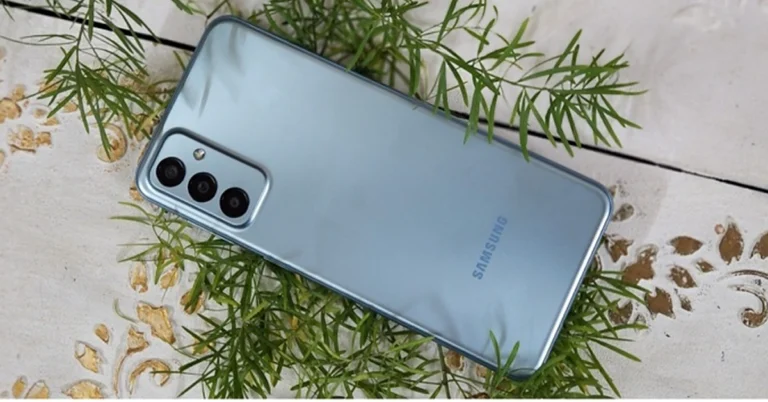
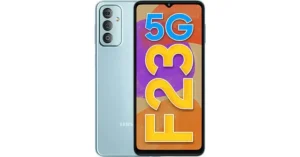
Samsung Galaxy F23 5G Samsung Galaxy F23 5G (Review) comes with a 6.6-inch full-HD+ Infinity-U Display. It is powered by Qualcomm Snapdragon 750G SoC. This Samsung phone has a triple rear camera setup that includes a 50-megapixel Samsung ISOCELL JN1 primary sensor with f/1.8 aperture. An 8-megapixel ultra-wide lens and a 2-megapixel macro sensor are also included in the camera setup. Additionally, the smartphone has an 8-megapixel selfie camera sensor on the front for selfies and video chats. It is packed with a 5,000mAh battery that supports 25W fast charging. The Samsung Galaxy F23 5G is available with 4GB RAM with 128GB storage option priced at Rs 15,999 whereas the 6GB RAM with 128GB memory option comes with a price tag of Rs 16,999.

iQoo Z6 Lite 5G

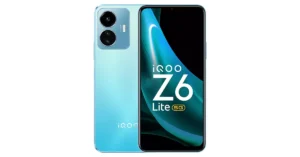
iQoo Z6 Lite 5G iQoo Z6 Lite 5G (Review)features a 6.58-inch full-HD+ display. Under its hood, there is a Snapdragon 4 Gen 1 SoC. The device comes with a dual rear camera setup that includes a 50MP Eye Autofocus main camera and a 2MP macro camera. The smartphone sports an 8-megapixel front camera for taking selfies and making video calls. In addition to this, there is a 5,000mAh battery with 18W fast charge support on the phone. iQoo Z6 Lite 5G 6GB RAM with 128GB storage model costs Rs 12,999.

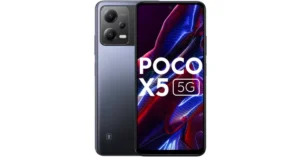
Poco X5 5G

Poco X5 5G The Poco X5 5G (Review) is highlighted with a 6.67-inch AMOLED full-HD+ display. The phone runs Android 12 and MIUI 13. The handset is powered by a Snapdragon 695 SoC. For photos and videos, the device boasts a triple rear camera setup that includes a 48MP primary camera, an 8MP secondary lens and a 2MP tertiary lens. In addition to this, there is a 16MP front-facing camera for selfies and video calling. The handset sports a 5,000mAh battery with 33W fast charging support. Also, there is a side-mounted fingerprint sensor as well for biometrics. Also Read: Google Pixel 8 Pro 256GB storage variant listed on Flipkart, now available for purchase The price of the base 6GB RAM with 128GB storage of the Poco X5 5G is set at Rs 13,999. While the 8GB RAM with 256GB storage option comes at Rs 14,999.

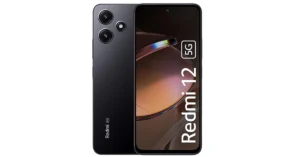
Redmi 12 5G

Redmi 12 5G The Redmi 12 5G (Review)has a 6.79-inch full-HD+ display. It is powered by a Qualcomm Snapdragon 4 Gen 2 chipset with up to 8GB of RAM and 256GB of onboard storage. It operates on MIUI 14 with Android 13 out of the box. The mobile phone sports a dual rear camera setup consisting of a 50-megapixel primary and a 2-megapixel macro lens. It also sports an 8-megapixel selfies sensor. Moreover, the 5G phone comes with a 5,000mAh battery with 18W charging support. The price of Redmi 12 5G starts at Rs 11,999 for the base 4GB RAM with 128GB storage. The price of the 6GB RAM with 128GB variant and 8GB RAM with 256GB storage variant is set at Rs 13,499 and Rs 14,999 respectively.

Redmi Note 10S

Redmi Note 10S There is a 6.43-inch full-HD+ display on the Redmi Note 10S. The phone is powered by a MediaTek Helio G95 SoC. It runs MIUI 12.5 on top of Android 11. The quad rear camera system on the phone includes a 64-megapixel primary sensor with f/1.79 aperture, an 8-megapixel ultra-wide-angle lens with f/2.2 aperture, two 2-megapixel macro and a depth sensor with f/2.4 aperture. It has a 13-megapixel front-facing camera with an aperture of f/2.45 for selfies. The Redmi Note 10S has a 5,000mAh battery that supports 33W rapid charging. Redmi Note 10S price is set at Rs 10,999 for the 6GB RAM with 64GB inbuilt storage model. The 6GB RAM with 128GB internal storage option has a price of Rs 12,499 and 8GB RAM with 128GB internal storage edition is presently available for Rs 11,999.

Google Pixel 8 Pro 256GB storage variant listed on Flipkart, now available for purchase

Key Highlights
  • Google Pixel 8 Pro was launched alongside Pixel 8.
  • The smartphone is powered by Tensor G3.
  • The device comes with a 50-megapixel primary sensor.
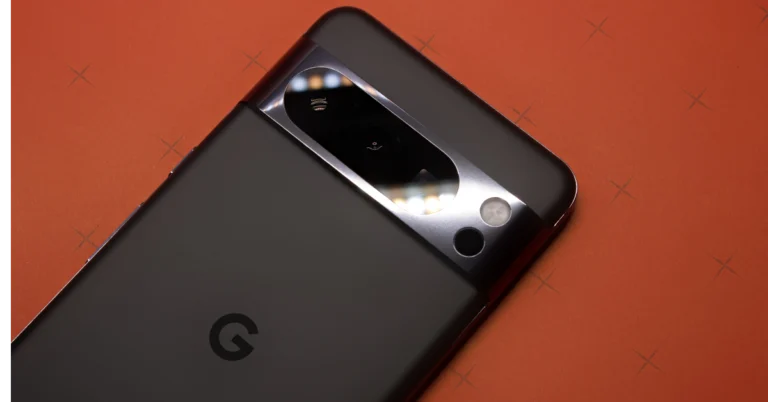
Google Pixel 8 Pro was introduced in India last month. The device was then launched in a single 12GB RAM with a 128GB storage option. But now the company has introduced a new 256GB storage option. The rest of the specs of the smartphone remain unchanged. The device comes with an OLED display. It is powered by Google’s latest Tensor G3 processor. In addition to this, the handset sports a 50-megapixel LED triple rear camera setup.

Google Pixel 8 Pro new variant price and sale details

Google has quietly introduced a new 256GB storage variant of the Pixel 8 Pro in India. No official announcement was made, it was simply spotted listed on Flipkart the company’s official sale partner. The new 12GB RAM with 256GB storage option has been introduced with a price tag of Rs 1,13,999.
Google quietly launches car crash detection feature in India and others in Pixel phones
Pixel 8 Pro
On the purchase of the new model, the company is offering Rs 9,000 SBI Bank Credit Card discount. In addition to this buyers can also avail up to Rs 4,000 off on the exchange of their old device. Google at its Made by Google 2023 event last month introduced the Pixel 8 Pro in a 12GB RAM with 128 GB storage option priced at Rs 1,06,999. The phones in both configurations are available for purchase via Flipkart, as said before. There will be only one single colour option Obsidian for the 256GB storage, unlike the 128GB which comes in two colourways Bay and Obsidian. Also Read: Instagram users can now add Song Lyrics to their Reels just like Stories

Google Pixel 8 Pro features, specs

The Google Pixel 8 Pro features a 6.7-inch Super Actua display with 1344 x 2992 resolution. It also supports an Adaptive refresh rate ranging from 1Hz to 120Hz and 20:9 aspect The LTPO OLED features a peak brightness of 2,400 nits. The front panel is protected with Corning Gorilla Glass Victus 2. The device is powered by Tensor G3 SoC with Titan M2 security coprocessor. It runs on Android 14 with Pixel-exclusive features. For photos and videos, the device has a triple rear camera set-up that includes the following sensors:
  • 50-megapixel Octa PD sensor
  • 48-megapixel Quad PD ultrawide camera with autofocus
  • 48-megapixel Quad PD telephoto lens
The device features a 10.5-megapixel Dual PD sensor on the front panel for selfies.’ The Pixel 8 Pro sports a 4,950mAh battery along with 27W wired fast and 12W wireless charging support. For connectivity, there is 5G, Wi-Fi 7, Bluetooth 5.3 and NFC.