In the ever-evolving world of mobile technology, Apple has once again taken a giant leap forward with its latest flagship lineup, the iPhone 15 Pro Max. This groundbreaking device, powered by the A17 Pro Bionic processor, promises to revolutionize the mobile gaming experience like never before.
With native support for console-quality gaming and an array of impressive hardware upgrades, Apple’s new offering is poised to leave an indelible mark on the gaming industry. It’s not just about gaming, though. The iPhone 15 Pro Max is a great way to try out new mobile apps. These apps offer a seamless and optimized gaming experience, making it an excellent choice for playing mobile iGaming with fast withdrawals and high cashouts. Whether you’re into high-stakes poker, thrilling slots, or classic table games, this phone’s capabilities ensure a top-tier mobile gaming experience.
But what features make the iPhone 15 Pro poised as the world’s first true gaming smartphone?
The triple-A Game changer
A-17 pro chip
The Game Catalog Conundrum
The perfect size of the iPhone 15
The Triple-A Game Changer
Apple’s iPhone 15 Pro and Pro Max are set to change the game, quite literally. Unlike any other Android manufacturer with less powerful phones like the Tecno Camon, Apple is boldly stepping into the realm of true mobile gaming. No more watered-down versions or cloud gaming; the iPhone 15 Pro series boasts the capability to run triple-A (AAA) video games natively. These are the premium titles that video game publishers traditionally associate with gaming consoles like the PS5, Xbox Series X, or high-end PCs.
This development is garnering excitement even from unlikely sources, a prospect that even our Editor-in-Chief, Aleksandra Andrishak, is excited about. In fact, she is just waiting for her order to be delivered. She was among the millions of people who preordered the iPhone 15 pro and here’s why:
The Power of iOS A17 Pro Chip
The heart of this gaming revolution lies in the A17 Pro chip, exclusively available in the iPhone 15 Pro and Pro Max. This 3nm chip, with an astounding 19 billion transistors, packs a serious punch.
Apple estimates a 10% performance gain compared to its predecessor, the A16 Bionic chip, while the GPU receives a 20% boost with an additional core. Moreover, hardware ray tracing acceleration and Metal FX scaling technology promise to optimize the gaming experience.
In terms of raw power, the iPhone 15 Pro rivals, if not surpasses, the PS4. Upcoming AAA games like Assassin’s Creed: Mirage are expected to run smoothly at 30 FPS in 1080p, although some graphical compromises may be necessary. These specs are madly insane for a phone! Storage capacity, however, remains a concern, as large game files may strain the 128 GB version.
The Perfect Size
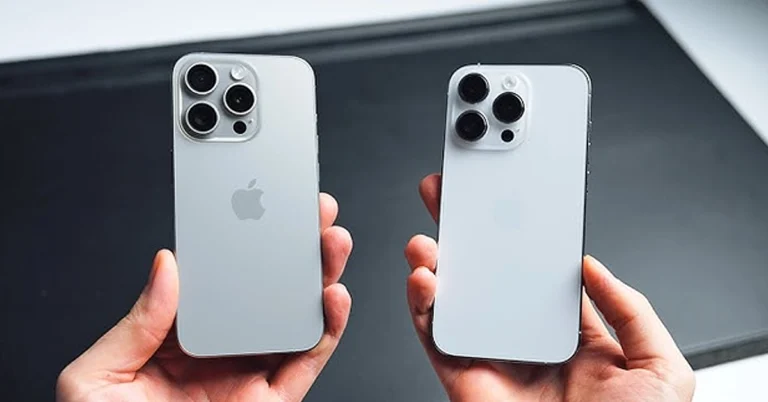
Critics argue that the 6.1-inch screen of the iPhone 15 Pro might not do justice to intricate games like Assassin’s Creed: Mirage. Yet, the iPhone 15 Pro Max, with its 6.7-inch OLED panel, offers a more immersive mobile gaming experience. The perfect size also makes it easier to chat and seek tips from fellow enthusiasts.
The Game Catalog Conundrum
While it’s exciting to contemplate playing console-quality games on an iPhone, there are hurdles to overcome. Most games, including Assassin’s Creed: Mirage, Resident Evil Village, and Death Stranding, are ports not initially designed for the mobile. You can now download and update your favourite games on the app store on the home screen. If you can’t find them, update the app manually.
Apple’s move into this space not only shakes up the gaming industry but also solidifies mobile gaming as a dominant force in the gaming world. It’s a great way to try out new mobile players and explore the endless possibilities that the future of mobile gaming holds.
Availability and Pricing
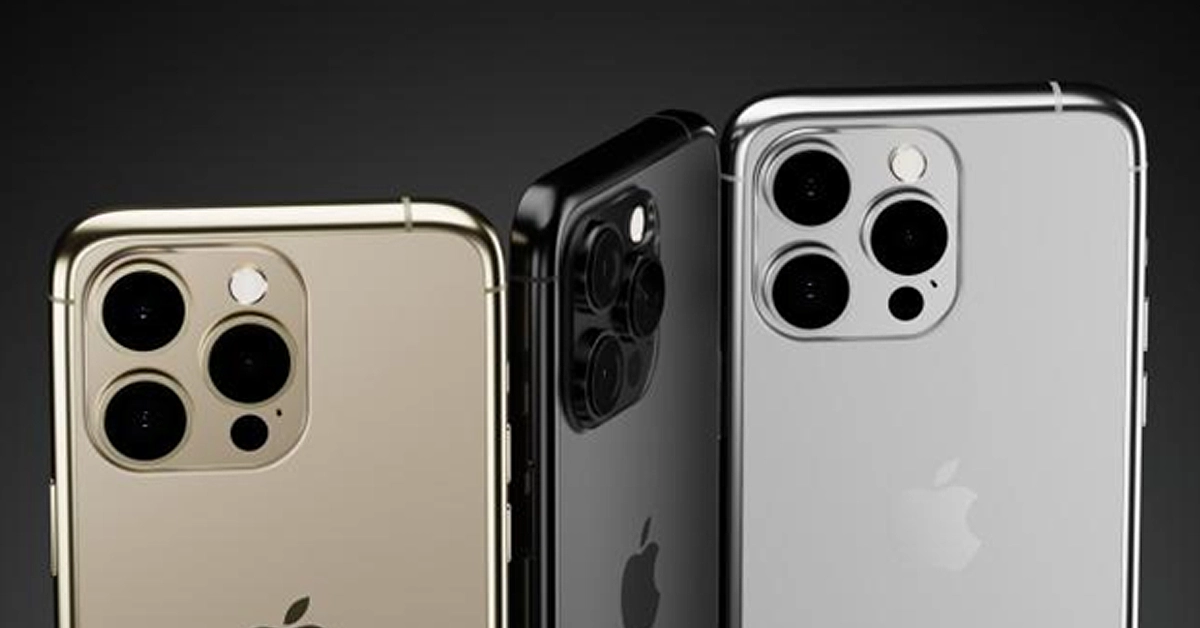
The iPhone 15 Pro Max hit the market on September 22, with Apple receiving millions of pre-orders even before the release date. If you haven’t made your order, then you should order it online from the Apple store or other trusted dealers. To avoid getting scammed, you can call Apple’s customer care number to seek help on how you can get it. The base model starts at $999, while the Pro Max 256GB black titanium version begins at $1,199.
If you want a more vibrant super case, you can order the rose, gold or silver mobile versions. This pricing places these devices within reach of serious gamers and tech enthusiasts alike, making the future of gaming more accessible than ever before. And unlike Android phones, you do not have to worry about transferring your contacts and other files because iCloud got you covered.
However, pricing may deter some gamers from choosing the iPhone over traditional platforms. Why pay full price for a game on your iPhone when you can get it cheaper on a console with over 1 TB storage or PC. Apple might need to explore solutions like offering exclusive games through Apple Arcade+ or a Pro subscription.
Controls and Accessories
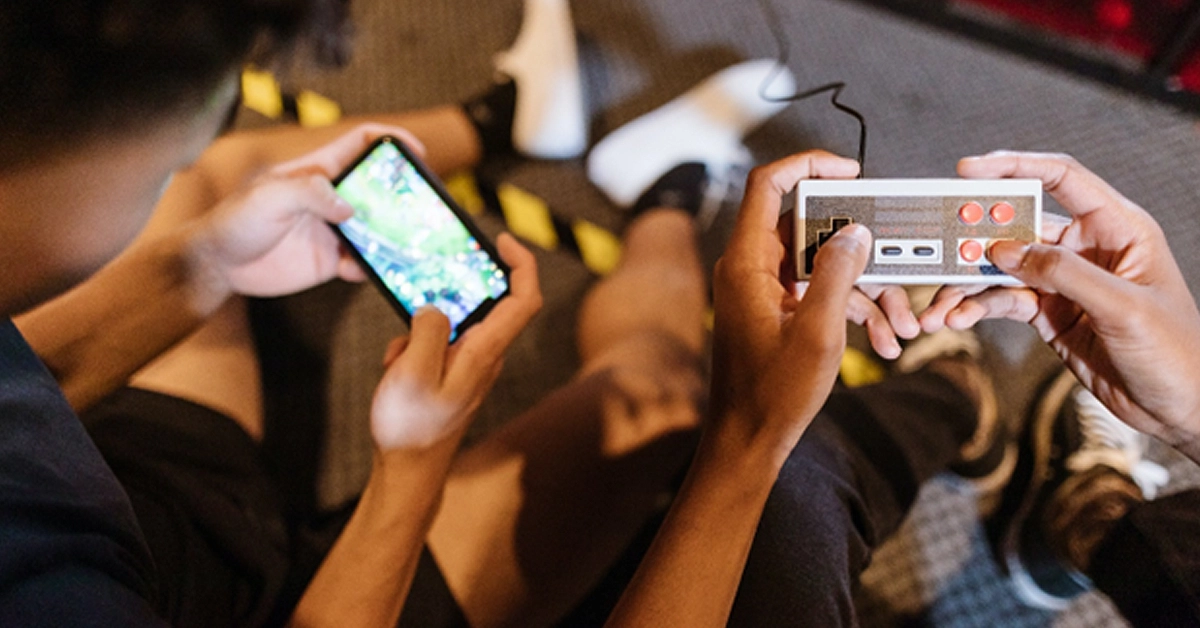
Although in-game controls on a touchscreen can be challenging to use since virtual buttons might clutter the screen, Apple has a solution. You can buy Bluetooth controller support and other Apple’s range of MFI accessories to ensure a seamless gaming experience.
These accessories offer a solution to those who think that the iPhone 15s screen is way too small for onscreen controls. And yes, these hands-on controls and accessories improve your gaming experience.
Is the iPhone 15 the future of mobile gaming?
Yes, I know at this point I should stop bombarding you with superlatives, but this is the future unfolding. A while back, not even in my wildest dreams did I think gaming smartphones would be this powerful. However, with the iPhone 15, I can be able to play real console games on the phone.
Apple’s bold move into console-quality gaming on mobile devices signifies a significant step forward for the gaming industry. This shift aligns with the growing trend of mobile gaming, which has become a dominant force in the gaming world. Gamers worldwide are buzzing with excitement over the prospect of playing high-end titles on their iPhones.
Other selling points
The USB C charging port and improved battery capacity
Just like the Mac and iPad, Apple finally caved into pressure and resorted to including a USB C charging port. With a 3,274mAh / 12.70Wh battery, the iPhone 15 Pro outperforms the 14 Pro’s 3,200mAh battery, providing extended gaming sessions and more hours of online gaming, listening or downloading your favourite music on iTunes and live gameplay for avid gamers.
An improved display
The iPhone 15 and 15 Plus feature the same OLED Super Retina XDR display as last year’s models, but with an improved design and enhancements in brightness, reaching up to 1000 nits for typical max brightness and 1600 nits for peak HDR brightness, surpassing last year’s levels of 800 and 1200 nits, respectively.
Conclusion
The iPhone 15 Pro Max is poised to redefine mobile gaming by bringing console-quality experiences to the palm of your hand. With its A17 Pro chip and which promises to support AAA games, Apple is pushing the boundaries of what a smartphone can do. While challenges like game adaptation and pricing remain, the gaming community eagerly awaits the iPhone’s transformation into a gaming powerhouse. Even our Editor-in-Chief, Aleksandra Andrishak, can’t wait to try out new mobile gaming and see if the iPhone will win her over to Team Apple. It’s a revolution in mobile gaming, and since its release date, orders have been skyrocketing day by day.
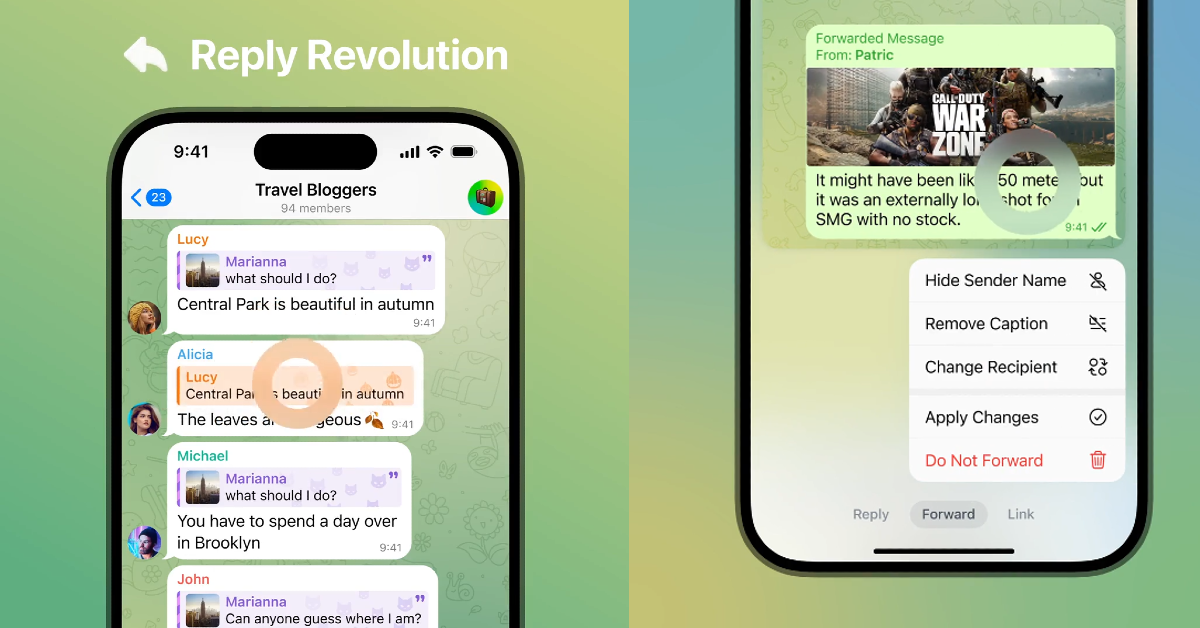
Users can now quote specific parts of a message in their replies.
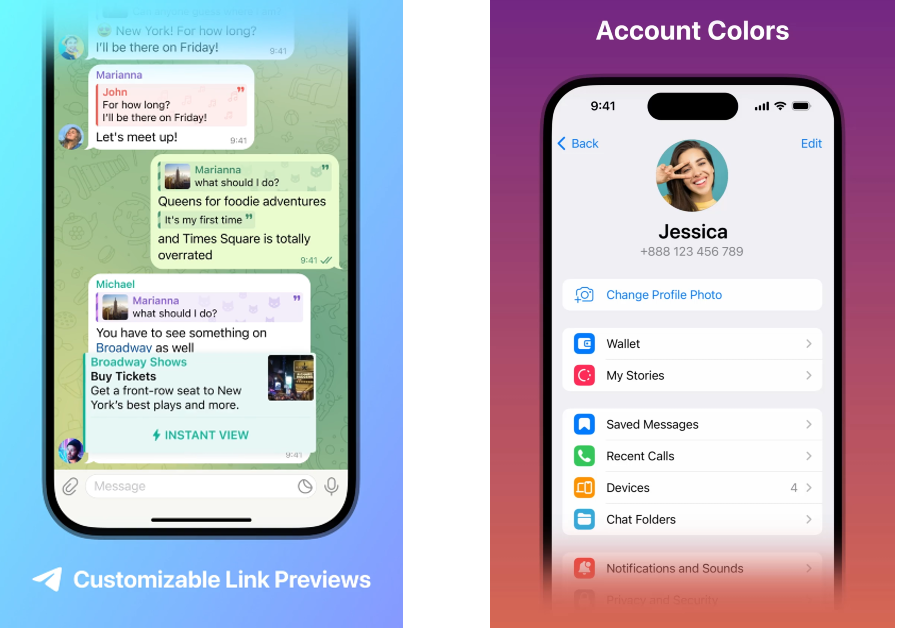
Premium subscribers get the option to change the colour of their name, messages, and links in group chats.
Update the Telegram app on your device to use these new features.
IM platform Telegram has always been a step ahead when it comes to experimental features and customisation options. In its latest update, Telegram has added new features like replies 2.0, account colours, quote formatting, adjustable link previews, and more. The messaging app currently boasts over 800 million monthly active users, making it one of the most popular IMs around.Read Also:Everything that we know about today’s Apple Event “Scary Fast” and how to watch it?
Telegram brings new features like quote replies, story improvements, and adjustable links
Dubbed ‘Replies 2.0’, the new reply function on Telegram lets you quote a specific part of the message while responding to it. Users can quote any part of a text with a simple ‘tap and drag’ gesture. Another significant feature in the ‘Replies 2.0’ package is the option to respond privately to a text that is sent to a group. Users can also choose to respond to a group text in another group.Finessing its editing options, Telegram has added the quote formatting to the texts on the platform. Users can choose to add multiple quotes to any text, bringing clarity and flair to their responses. New tabs have been added to the menu, letting users access settings while replying, forwarding, or including links in messages. On top of that, users can also choose whether they want the link preview to be displayed before or after their message. The size of the media sent on the app can also be changed.The new update also brings a series of customisations for Telegram Premium subscribers. Users can now change the colour of their name, replies, links, and replies. The message background can now be changed as well. Channels boosted to Level 5 or higher can also access these settings.Finally, Telegram has also added support for Story playback gestures. Pressing and holding the screen while dragging right and left can now control the video playback. The front flash for selfies now gets multiple colour temperature options. The tutorial for these gestures can be accessed from the app as well.Read Also:How to acquire information about the Hindu heritage and know more using Google Search?
Conclusion
Telegram has always pushed the envelope when it comes to experimental features and giving users more control over the app. While most mainstream messaging apps play it safe, Telegram’s cutting-edge features are a big pull to draw new users. To access these new features, update the Telegram app using the Google Play Store or the App Store.
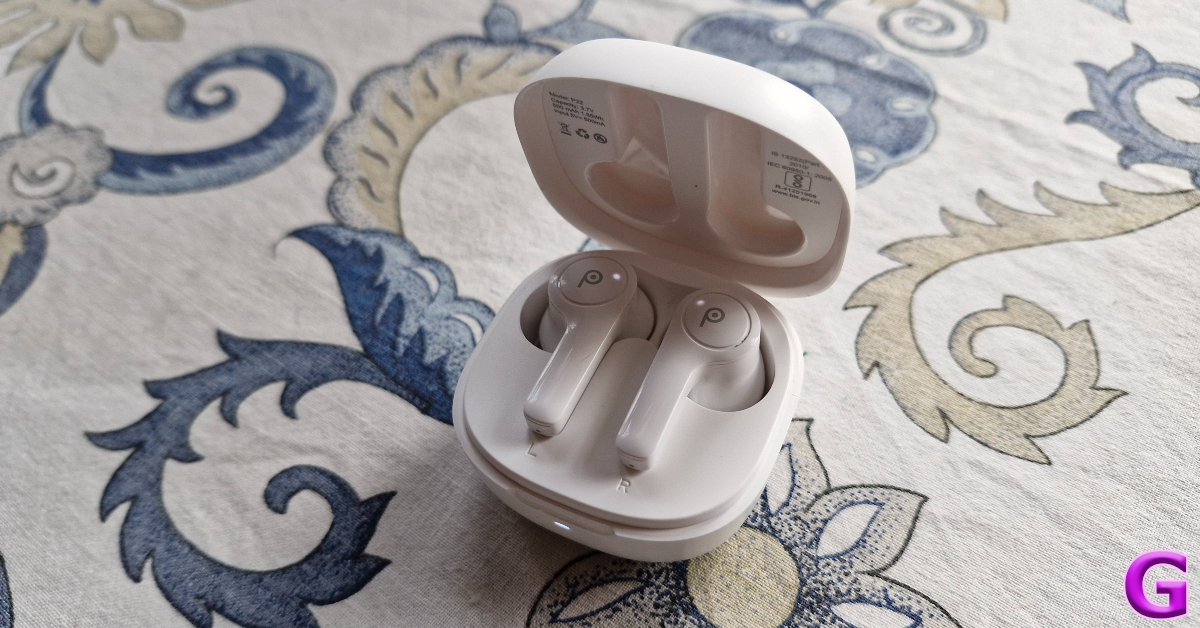
The disappearance of the headphone jack from flagship and midrange smartphones has created a huge demand for affordable wireless earbuds. If you don’t want to splurge on premium TWS products, there are plenty of budget offerings that can get the job done. More recently, entry-level wireless earbuds have seen a great rise in popularity as they have massively upped their audio game. If you’re looking for a pair of earbuds under Rs 2,000 you no longer have to settle for a boxy output with barely any detail. Lava is one of the tech outfits that have consistently put out good TWS products over the last few years. We’ve been using its latest release, the Probuds 22 for the last few days. Here is our in-depth Lava Probuds 22 TWS review.Read Also:How to acquire information about the Hindu heritage and know more using Google Search?
Lava Probuds 22 review: Design
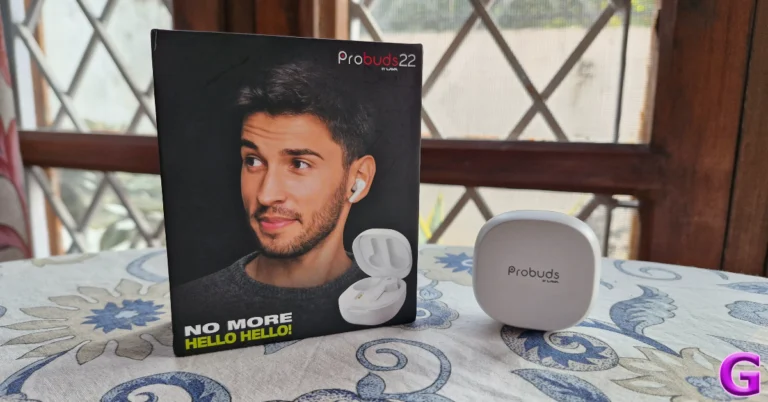
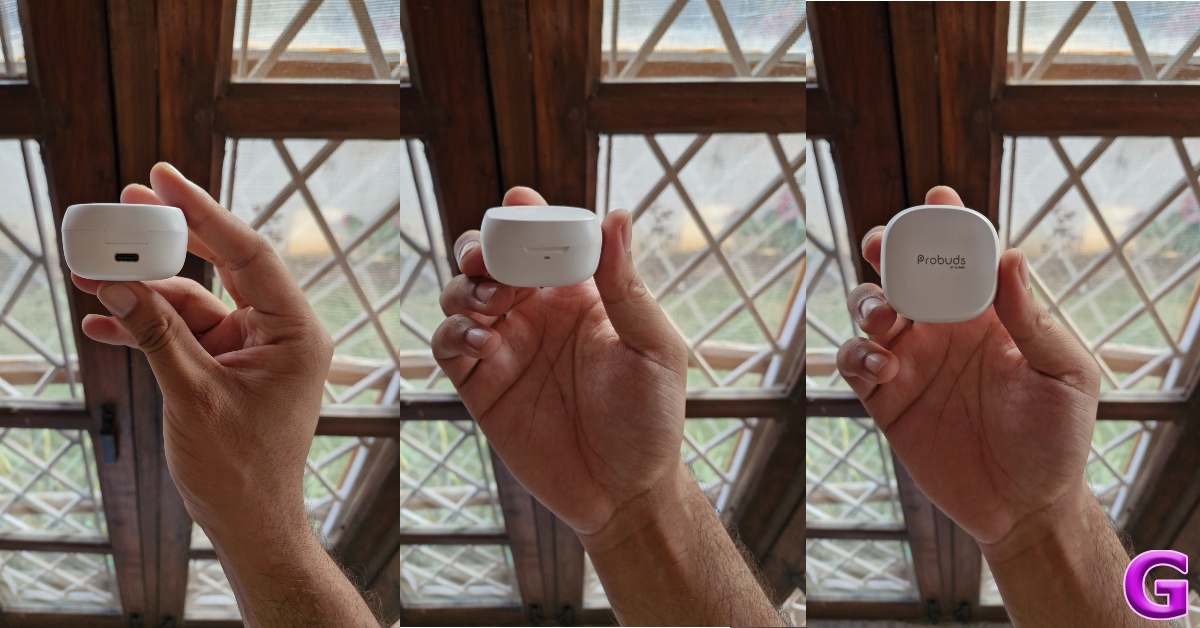
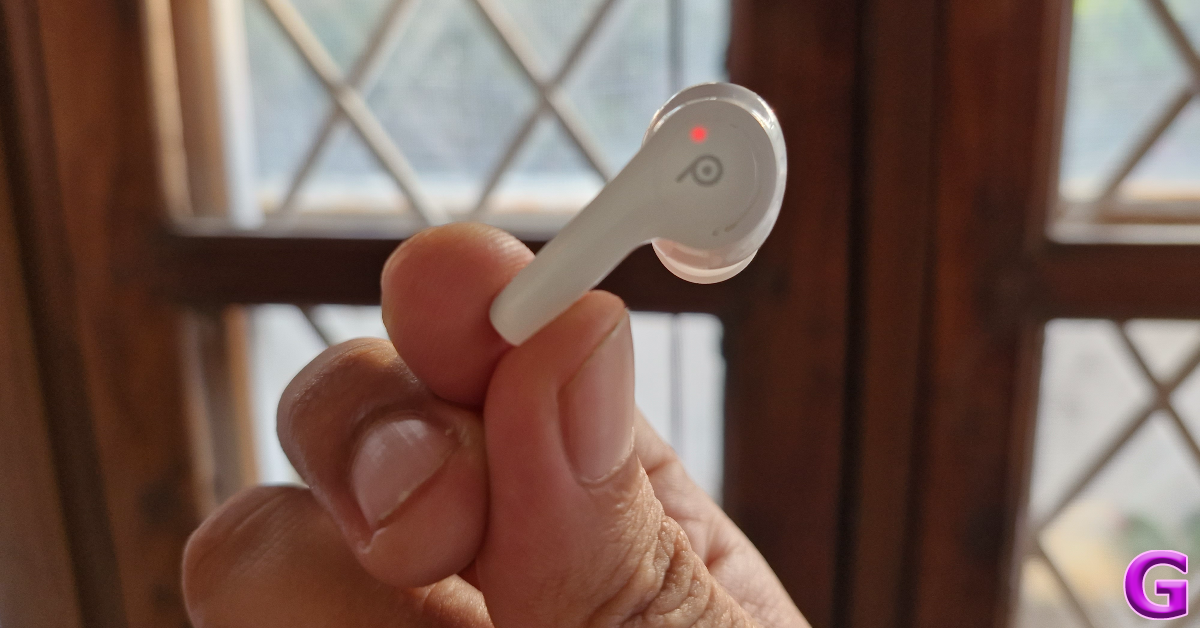
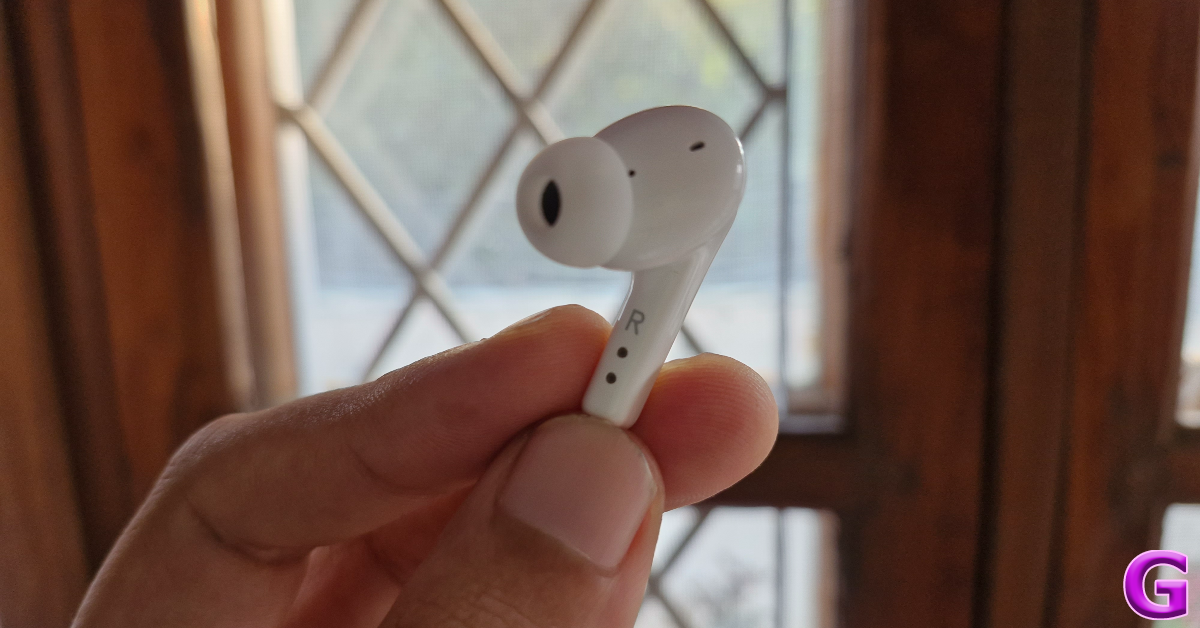
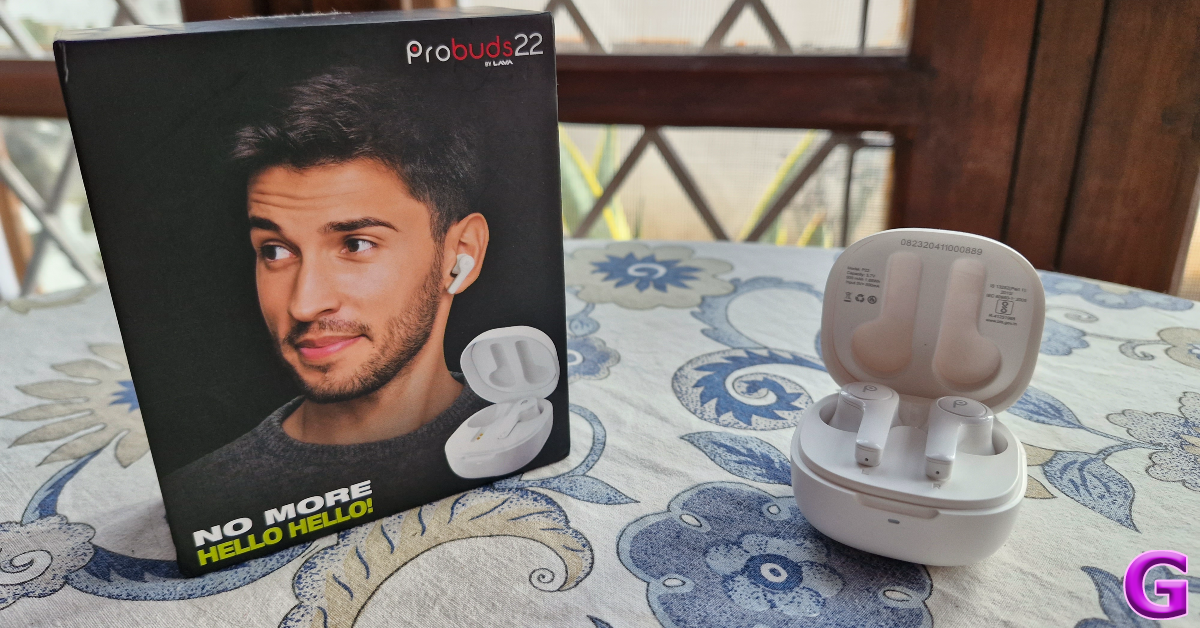
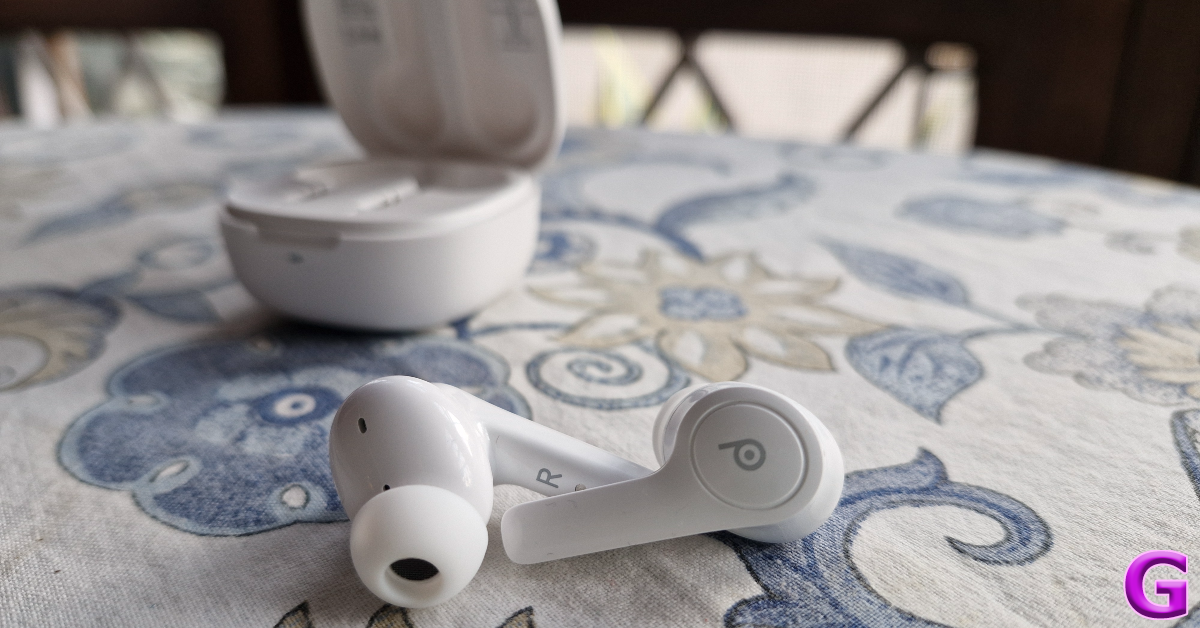
Inside the Lava Probuds 22, you’ll find the charging case with earbuds inside, two pairs of extra ear tips, a USB charging cable, a quick start guide, a warranty card, and some stickers. The Probuds 22 are available in two colour options – Space Black and Frost White.As far as design goes, Lava has kept things simple and practical. The plastic charging case sports a standard lunchbox design. The ‘Probuds by Lava’ branding can be found on top of the lid. A small LED notification light sits right below this lid. The USB Type-C slot is positioned under the hinge. After a week of rugged use, this charging case did not register any major scratches even after being kept in pockets with keys and loose change. The strength of the hinge is acceptable, although it is not the most versatile unit we’ve seen in this segment. The compactness and light weight of the case works in its favour.The earbuds feature the standard in-ear design. The stem is a bit longer than what we’re used to, but it doesn’t present any functional issues. There are four mics on either earbud, along with an LED indicator that lets you know the charge status. Made entirely out of plastic, these earbuds are very light and do not cause any fatigue to the ear. Even though they have a glossy finish, the earbuds have a snug fit.What the Lava Probuds 22 get dead right are the touch-based controls. In this price range, you won’t find a better touch-sensitive panel on any other TWS. A lot of times, these controls prove to be a big annoyance due to accidental touches while adjusting the earbuds. This wasn’t the case with Probuds 22. The long stem plays a big role in providing an ample gripping surface to adjust the buds.Lava Probuds 22 are rated IPX4 for dust and water resistance. This means you don’t have to worry about any damage due to sweat, minor water splashes, or light rain. We used the Probuds while working out and can confirm that they remained unaffected by sweat.
Lava Probuds 22 review: Performance
Delivering the audio output on the Lava Probuds 22 are two 12mm drivers. The TWS supports Bluetooth 5.3 and has a functional range of up to 10 metres. There’s support for Google Assistant and Siri as well.The most important part of any TWS product is its audio profile. While most budget TWS play it safe with a bass-heavy output, Lava Probuds 22 surprised us with a well-balanced soundstage. There is a very prominent bassy element in the undertones, but it doesn’t ruin the mids and the highs. Instead, the higher frequencies are very well represented on the soundstage.We used the Probuds 22 to listen to a variety of genres, and it delivered a good performance every single time. The detail in the mix is quite satisfactory and we didn’t once feel that any integral element was missing. Our only minor gripe is that the output gets a little screechy when listening to music at the highest possible volume. For the ideal listening experience, you need to stick within the 40-80% range.With Quad Mic ENC onboard, the Lava Probuds 22 do a solid job of extracting the caller’s video from the background noise and relaying it effectively to the receiver. We were happy with the call clarity in an indoor setting. Outdoors, the audio takes a hit when there’s a lot of noise flowing into the earbuds. This is pretty standard for the TWS in this price range.There is no app support for Lava’s TWS products yet. This means there is no way to customise the touch controls or set up a personalised equaliser setting. The Probuds offer a low latency mode for gaming, but it can only be enabled using the touch controls. The gaming mode is a good feature to have, but it doesn’t hold a candle to the dedicated gaming earbuds in this category. We faced minor audio delays in certain patches of gameplay while playing COD Mobile.Lava claims 7 hours of continuous playtime on a single charge, with 50 hours of additional charge in the case. We got up to 6.5 hours of playtime while reviewing the Lava Probuds 22. The charge on the case lasted for almost 10 days. Our daily usage did not exceed more than 5-6 hours. It took us an hour to fully charge the case using a USB Type-C cable. A quick 10-minute is enough to power the earbuds for up to 2 hours.Read Also:How to find downloaded songs and playlists on Amazon Music?
Verdict
Priced at Rs 1,399 the Lava Probuds 22 are one of the best TWS wireless earbuds in their segment. If a bass-heavy audio output has kept you away from entry-level TWS so far, these earbuds could potentially change your mind. We were impressed by the balanced sound output and the adequate representation of the mid and high frequencies on the soundstage. The lack of app support is a significant drawback, but it isn’t something that we would consider a dealbreaker.
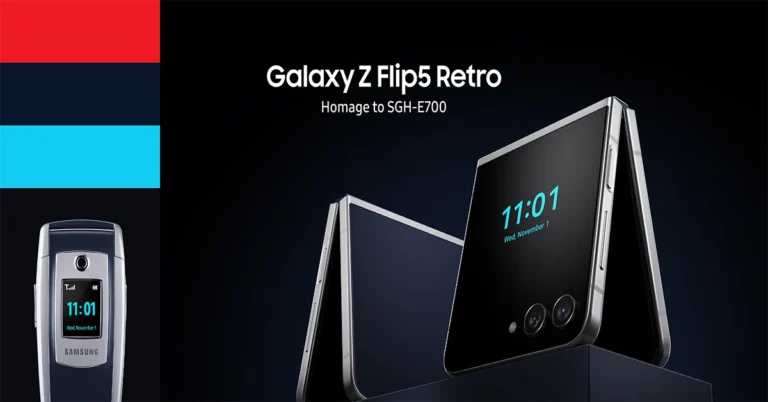
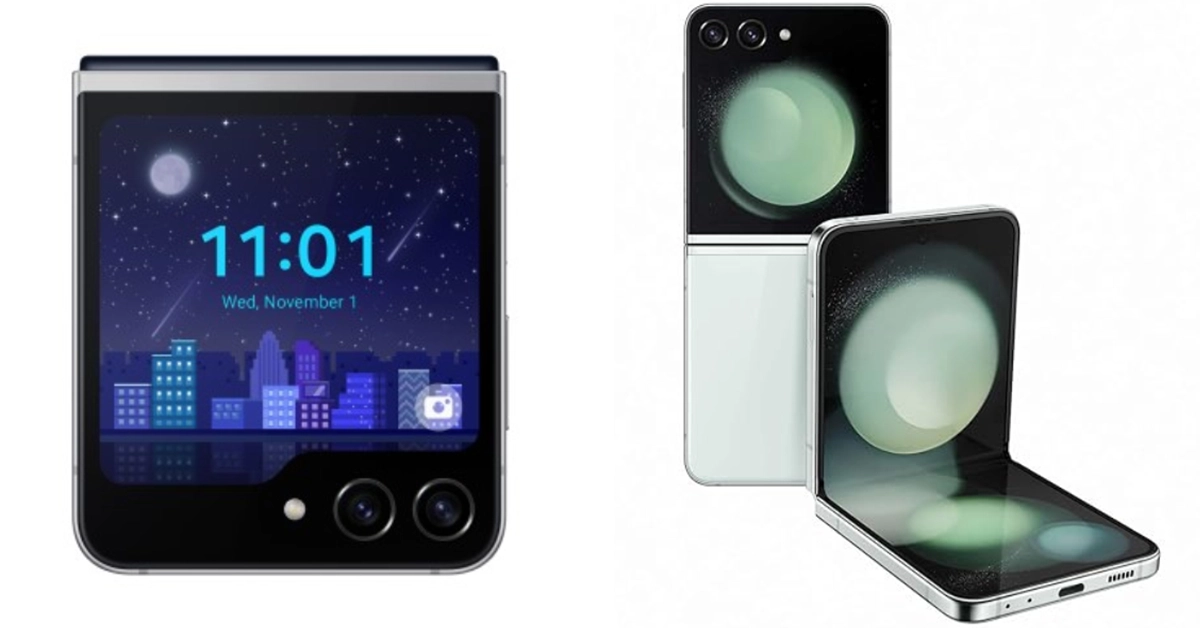
The Samsung Galaxy Z Flip5 Retro features similar features of the SGH-E700.
We always love a good story behind an upgrade and Samsung has just played right in to our hearts. To pay tribute to its iconic smartphone, the Samsung E700, the South Korean brand has introduced a limited edition Galaxy Z Flip 5 Retro. For those who are unaware E700 was launched two decades ago in the year 2003. The new Flip phone comes with a similar-looking silver and indigo blue hues.The company via blog post said, “Samsung Electronics pays homage to the innovative design and features of SGH-E700 with the release of Galaxy Z Flip5 Retro, marking 20 years of technical advancement.”
Samsung has a history of paying tribute to its legendary smartphone and this time the company chose to homage SGH-E700 aka Samsung E700. It is the company’s first handset to feature an antenna. The latest Samsung Galaxy Z Flip 5 is modelled after the SGH-E700.
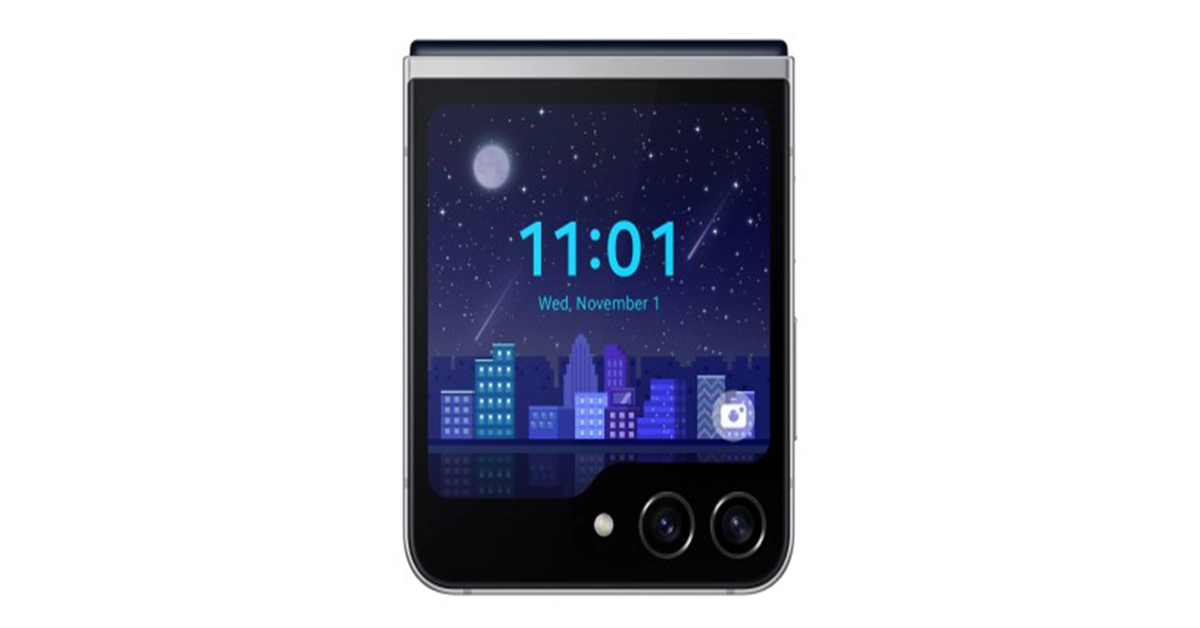
Also Read:Samsung Galaxy Z Flip 5 Review: Flip it good!The Samsung Galaxy Z Flip 5 Retro has similar features to the SGH-E700, such as the combination of indigo blue and silver colours. It also reflects the UX design reinterpretation of 2000s pixel graphics and an exclusive animation on the Flex Window.Along with the new clamshell design phone, the company also ships three Flipsuit cards featuring logos from different eras of Samsung’s history, a Flipsuit case and a collector card engraved with a unique serial number.The Samsung Galaxy Z Flip5 Retro will be available for purchase till stock lasts. You can buy it in Korea, the U.K., France, Germany, Spain and Australia through Samsung’s official website, Samsung.com.Also Read:Everything that we know about today’s Apple Event “Scary Fast” and how to watch it?The Samsung Galaxy Z Flip 5 was launched in July this year. It features a 6.7-inch FHD+ Dynamic AMOLED 2X Infinity Flex primary display along with a 3.4-inch Super AMOLED cover screen. The clamshell design phone runs on Android 13 with OneUI 5 out of the box. Under its hood, there is a Snapdragon 8 Gen 2 processor for Galaxy. It is available with 8GB of RAM and up to 512GB of internal storage.The Galaxy Z Flip 5 is highlighted with a dual rear camera setup that includes a 12-megapixel ultra-wide primary sensor and a 12-megapixel wide-angle camera. A 10-megapixel selfie camera for selfies is featured on the front of the foldable display. The flip phone sports a 3,700mAh battery with 25W charging support.
Before UPI payments became the norm, online wallets were the standard way of making quick payments. Some users still prefer online wallets because they are generally more reliable during peak traffic hours. This is because online wallets do not rely on your bank’s servers to send money. If you are a Paytm user, you can recharge your online wallet using Gpay as well. In this article, we show you how to transfer money from Gpay to Paytm.Read Also:How to find downloaded songs and playlists on Amazon Music?
Transfer money to your Paytm wallet using GPay
Step 1:Launch the Paytm app on your device and select Wallet.Step 2: Tap on Gift Voucher and change it to Paytm Wallet. The header should now read ‘Add money to Paytm Wallet’.Step 3: Enter the amount you want to send and hit Proceed.Step 4: Hit Add [amount] in the popup box.Step 5: In the payment options window, tap on UPI and select GPay.Step 6: Enter your UPI PIN to complete the money transfer.
Perform a UPI transaction
Paytm and Gpay support UPI (Universal Payments Interface) transactions, which means you don’t need to transfer money to your online wallet before sending it to the recipient. With UPI, you can send money directly from your bank account to another party at any given time. Here’s how you can send money via UPI on the Paytm app.Step 1:Launch the Paytm app on your smartphone.Step 2: Select the transfer method for the UPI transaction. You can choose to send money to the recipient using their phone number or UPI ID.Step 3: To send money to a GPay UPI ID, tap on ‘To Bank or Self A/c’ and select ‘Enter UPI ID of Any UPI App’. Alternatively, you can also scan the QR Code linked to the recipient’s account by tapping on ‘Scan & Pay’.Step 4: Enter the amount you want to pay and hit Pay Securely.Step 5: Enter your UPI PIN to complete the transaction.
Frequently Asked Questions (FAQs)
Does the GPay app have a wallet?
Google has a separate wallet app of its own called ‘Google Wallet’. This app is currently not available in India. The GPay can be used for UPI transactions and bank transfers.
Can I transfer money to my Paytm wallet using GPay?
Paytm allows you to add money using any UPI service, including Gpay. Simply go to the Wallet option and select ‘Add money’. You can complete the transaction using GPay, PhonePe, BHIM, or any other app that allows UPI transfers.
What is the maximum amount of money that I can add to my Paytm wallet?
This is how you can add money to your Paytm wallet using GPay. Instead of using GPay, you can use any other app that supports UPI payments. This includes PhonePe, BHIM, BharatPe, and others. If you’re looking for another quick way to send money using UPI, check out UPI Lite. This new service is supported by most UPI apps and does not require you to enter your UPI PIN to complete small transactions.
Do you ever notice your phone’s screen suddenly light up even when it doesn’t receive a notification? It is easier to ignore if it happens now and then, but it can be a real headscratcher if it happens more frequently. Some users are quick to jump to the conclusion that their device is being controlled by someone else remotely. However, the truth is often much simpler. In this article, we bring you the top 10 ways to fix the ‘Android phone screen keeps turning on randomly’ issue.Read Also:Samsung Calendar Not Syncing with Google Calendar? Here are 7 fixes
What is causing this strange behaviour?
Watching a phone’s screen light up randomly is weird to witness. However, like most oddities, this can be explained too. Here are some reasons why your phone’s display might be acting irregularly:
Dirt accumulation under the screen protector: Dirt and dust particles stuck under the screen protector can trigger the touch display and cause it to light up randomly. If the screen protector is not stuck properly to the display, pull it off and apply it again.
Faulty proximity sensor: The proximity sensor on your phone is responsible for killing the display when you bring it close to your ear to pick up a call. When you move the phone away from your ear, it lights up again. A faulty proximity sensor can cause the display to light up randomly.
Ghost notifications: Notifications cause your phone to light up. However, when a notification disappears immediately upon arrival, it is called a ‘ghost notification’. This typically happens due to glitches in the software.
Rogue apps: A third-party app gone rogue can mess with your phone’s normal functioning and cause it to behave strangely. Random display flashes are not an uncommon sign of this issue.
Turn off Lift To Wake
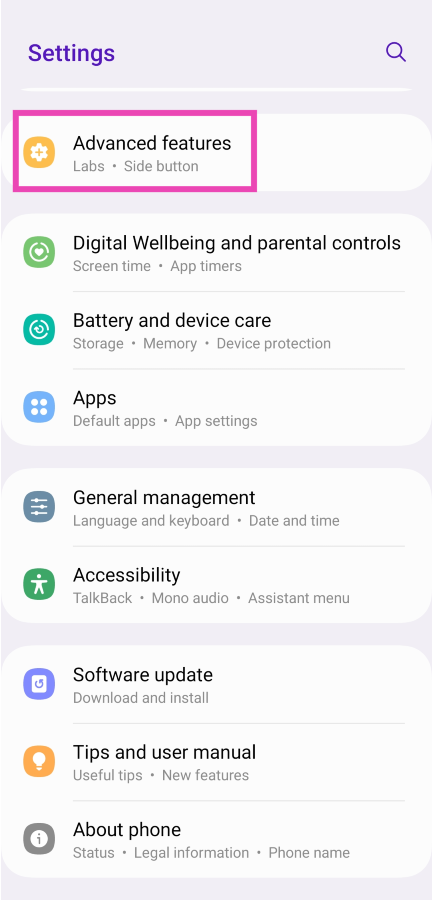
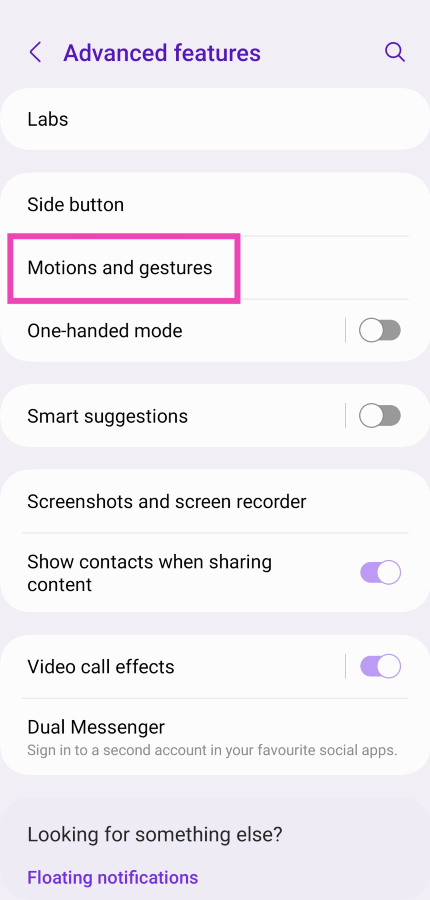
Lift to wake is a handy feature that allows you to quickly glance through your notifications and look at the time on your phone, without needing to press a button. As the name suggests, you simply need to lift your phone to activate the lock screen. On certain phones, this feature is turned on by default. If you don’t want your device’s screen to get activated every time you lift it, here’s how you can turn it off.Step 1: Go to Settings and select Advanced features.Step 2: Tap on Motions and gestures.Step 3: Turn off the toggle switch for Lift to wake.
Turn off Double Tap to Turn on Screen
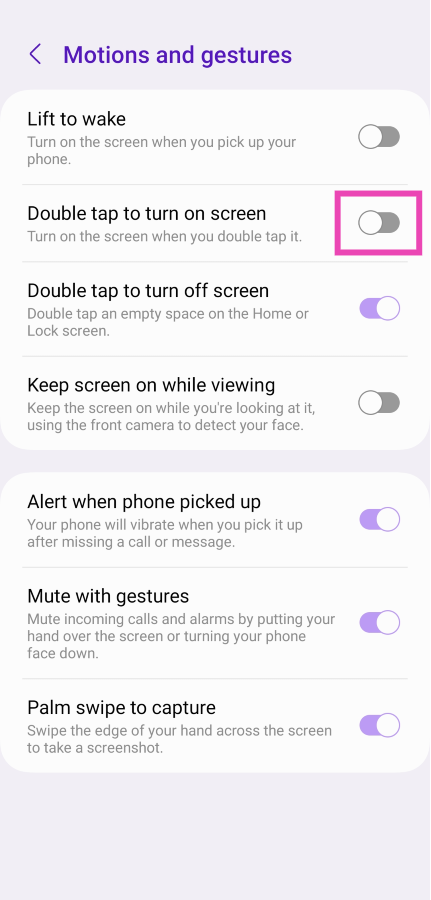
If your phone’s screen keeps turning on while you’re fidgeting with it, it is most likely due to the ‘Double Tap to Turn on Screen’ feature. This handy function cuts your reliance on the side key to unlock your phone. A double tap is all it takes to lock your phone or turn on the lock screen. If you don’t want your phone to respond while you’re tapping its idle screen, here’s how you can turn off the double tap for your lock screen.Step 1: Go to Settings and select Advanced features.Step 2: Tap on Motions and gestures.Step 3: Turn off the toggle switch for Doube tap to turn on screen.
Make sure the side key isn’t pressed
Software glitches aside, there is a good chance that your phone’s screen keeps lighting up randomly because of the side key getting triggered. More often than not, this is due to a faulty case that isn’t a perfect match for your phone and presses against the side key. Inspect the case thoroughly to know for sure. Better yet, pull your phone out of the case and use it for a bit to see if you encounter the problem again.
Disable Google Assistant when your phone is locked
Your phone is very receptive to the ‘Hey Google’ voice trigger. It can even set off the voice assistant when your phone is locked, springing the dormant lock screen into action. Accidental triggers may be uncommon, but they are known to happen. Here’s how you can disable Google Assistant when your phone is locked.Step 1: Tap the Google widget on your phone’s home screen. Alternatively, launch the Google app from the app drawer.Step 2: Tap on your profile picture at the top right corner of the screen.Step 3: Hit Settings.Step 4: Select Google Assistant.Step 5: Tap on Lock screen.Step 6: Turn off the toggle switch for Assistant responses on lock screen.
Check for Ghost notifications
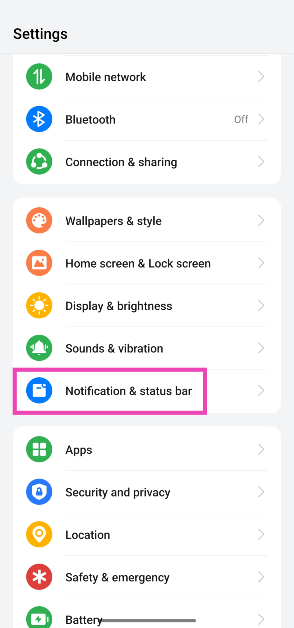
A ‘ghost notification’ is one that flashes on your screen for a brief moment and immediately goes away. If you notice your phone’s screen light up but can’t view any new notifications, there is a way you can check for them. Here’s how.
Step 1: Go to Settings.
Step 2: Tap on Notification & status bar.
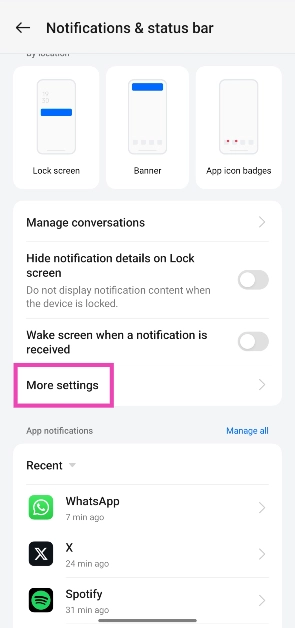
Step 3: Tap on More settings.
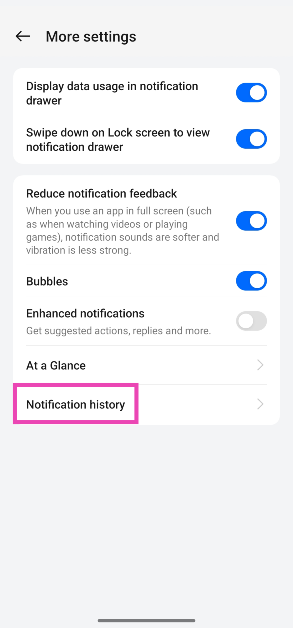
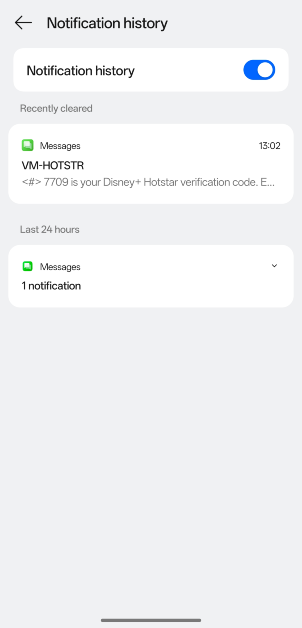
Step 4: Select Notification history.
Step 5: This is where you can see the log of all the notifications that your phone has received. The most recent notification will be at the top of the list.
Restart the phone in Safe Mode
If you suspect that your phone’s screen keeps randomly turning on due to a malfunctioning third-party app, try restarting your phone in Safe Mode. Press and hold the side key to enter the power menu, then tap and hold the Power Off option to activate Safe Mode. Once your phone enters safe mode, it will disable all the third-party apps on the system. If you encounter the issue again, it means that third-party apps have nothing to do with it. However, if your phone keeps functioning normally, you will need to figure out which third-party app is the culprit behind this problem and remove it from your device.
Use a different charger
If you only experience random lock screen triggers while charging your phone, it is likely due to a faulty charger. Inspect the USB cable and the power adapter for any damage. If your charger isn’t able to constantly power your phone, it will do so in fits and bursts. This causes the lock screen to light up randomly. You can even try using a different wall outlet if you’re sure there is nothing wrong with your charger.
Check the proximity sensor
Your phone’s proximity sensor is responsible for cutting off the display when you bring your phone close to your ear upon picking up a call. If this sensor starts malfunctioning, it will trigger the lock screen into action at random times. Dial *#0*# on your phone and tap on ‘Sensor’ to perform a quick diagnostic test. Give your phone’s screen a quick wipe to make sure that grime and dirt do not collect on the sensor. Read this article to learn other tricks to fix this issue.
Update your phone’s OS
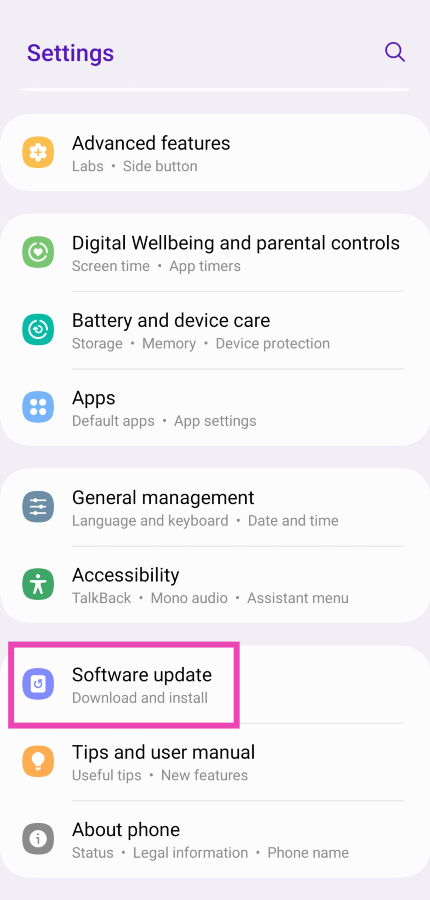
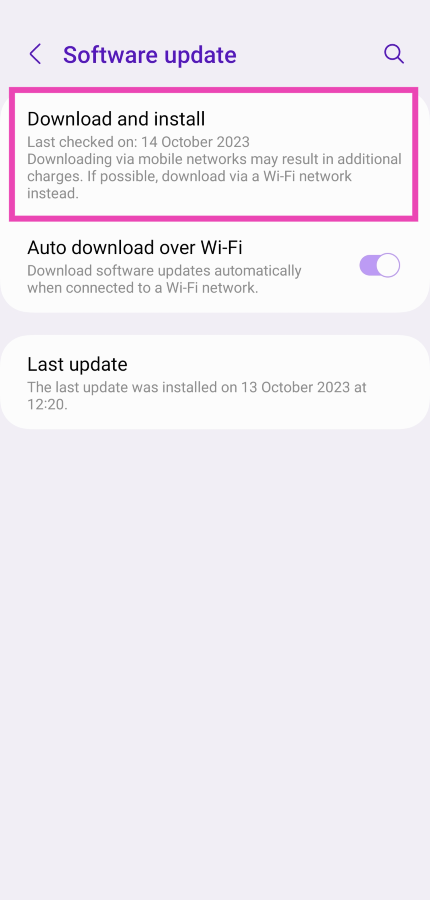
If the problem you’re facing is bug-related, chances are that the manufacturer has already patched it with an update. Here’s how you can update your phone’s OS.Step 1: Connect your phone to a WiFi network and plug in its charger.Step 2: Go to Settings and select Software update.Step 3: Tap on Download and Install. Your smartphone will check for any new updates.Step 4: If an update is available, tap on Install Now. You can also schedule the update for a later time.
Perform a factory reset of your device
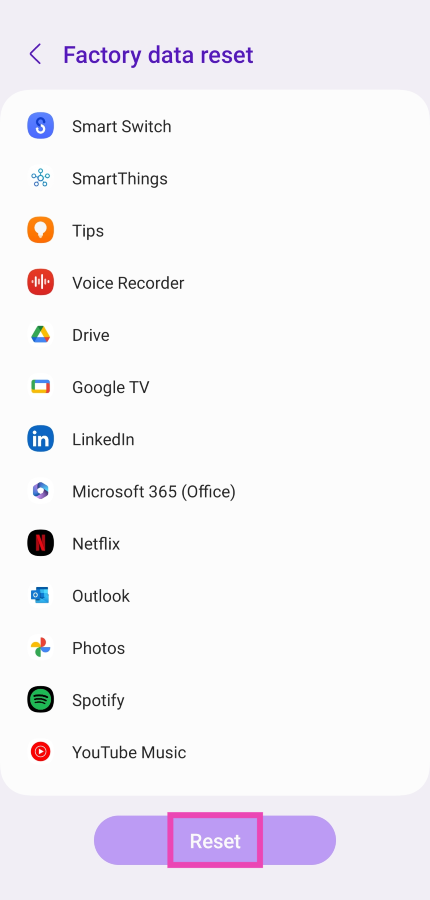
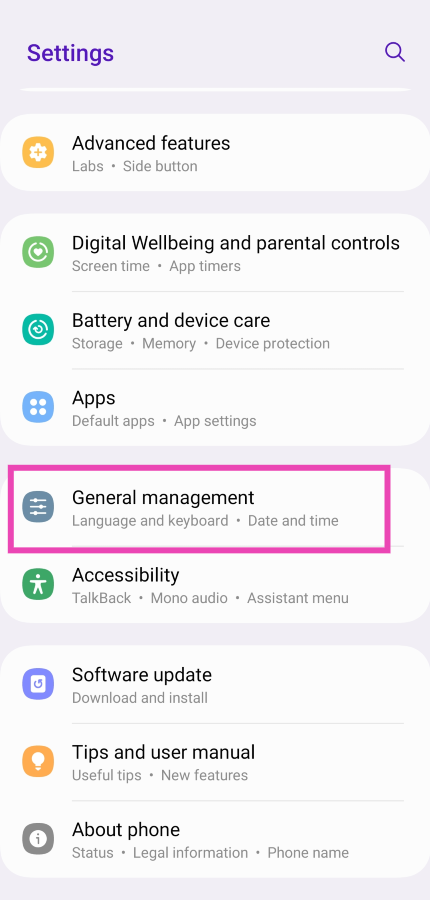
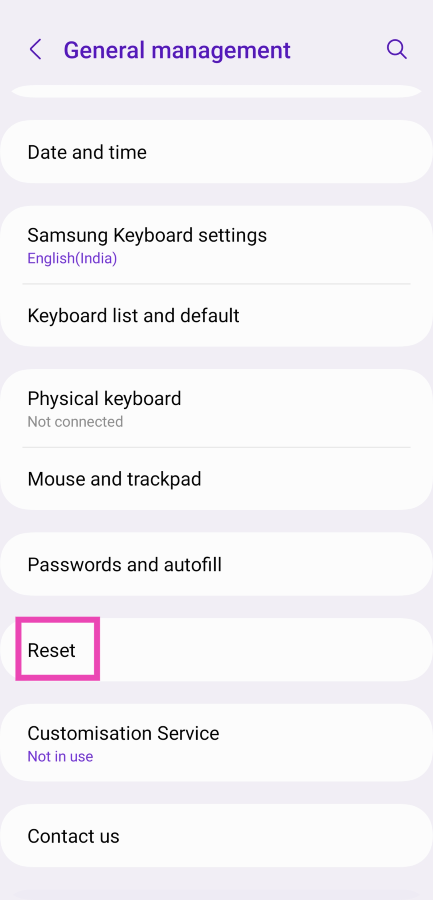
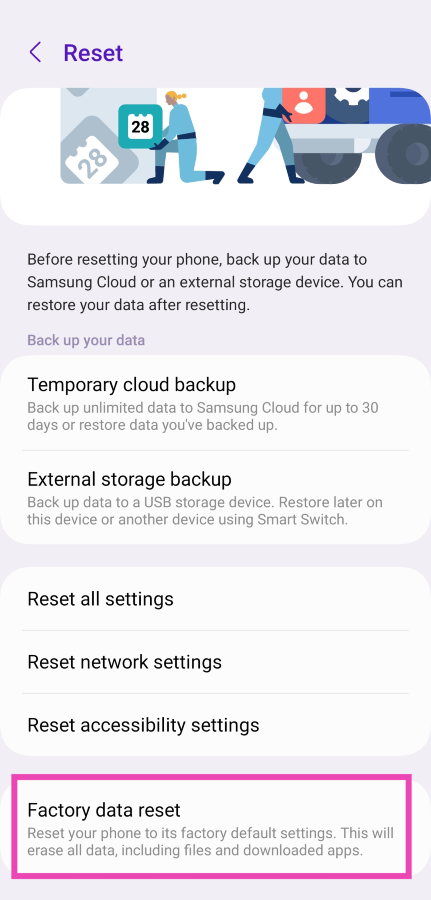
If the issue is strictly software-related, you can perform a factory reset of your device as a last-ditch measure to fix it. Make sure you have backed up all your personal data since a complete reset of your phone will permanently erase it.Step 1: Go to Settings, scroll down and select General management.Step 2: Tap on Reset.Step 3: Select Factory data reset.Step 4: Scroll down and tap on Reset.
Frequently Asked Questions (FAQs)
Why does my phone’s screen keep randomly turning on?
If your phone’s screen randomly lights up without pressing the side key, it could be due to the ‘raise to wake’ feature which activates the lock screen to give you a quick peek at the notifications every time you lift your phone. You can turn this feature off from advanced settings.
Can ghost touches cause my phone’s screen to light up randomly?
While it is super uncommon for ghost touches to affect your phone’s lock screen, it is not entirely impossible. If the ‘double tap to wake’ feature is enabled on your device, it can cause ghost touches to turn on the screen. To eliminate the ghost touches, wipe your phone’s screen thoroughly and replace the screen protector.
What is the main cause of ghost touch?
Water droplets, dust particles, or grime collecting under the screen protector are the main causes that lead to ghost touches on your phone.
How do I fix the ghost screen on my phone?
Inspect the phone’s screen for any physical damage and check the proximity sensor. Additionally, make sure your phone’s OS is updated to the latest version. Use a high-quality charger to power your device and not a knockoff that trickle charges it.
How do I find out if the proximity sensor on my phone is broken?
A faulty proximity sensor can trigger your phone’s lock screen randomly. Dial *#0*# and tap on ‘Sensor’ to run a diagnostic test on it.Read Also:5 best video players for Chromebooks
Conclusion
These are the top 10 ways to fix the ‘Android phone screen keeps turning on randomly’ issue. If these fixes don’t work out for you, chances are that your phone’s hardware is at fault. Take your device to a professional service centre to diagnose the problem. Got any more questions? Let us know in the comments!
Next generation of Apple laptop CPUs will also likely be showcased in these machines.
To our amazement, Apple is holding a 2nd event in October 2023. They dropped this bombshell on all of us that something from the Mac series etc (if we go by the images, and rumours) will be revealed at this event. Apple is all set to host the “Scary Fast” event today/tomorrow (depending on which side of the earth you are from). This will be the company’s second fall event after the iPhone 15 Series launch event. Apple has not fully revealed any details regarding today’s Apple Event but rumours are rife it is likely to announce the new generations of MacBooks and iMacs.
Where and when to watch Apple’s “Scary Fast” Event live?
Apple Event which the company has named “Scary Fast” will be hosted today in some regions and tomorrow in some others. October 30 today is the set date but in India, it will be October 31. The event times are 5 PM PT and 5.30 AM IST. So in India, Apple fans have to wake up early morning on Tuesday to catch the event live. The Apple Event will be live-streamed via the company’s website, official YouTube channel and Apple TV app.
As we said earlier the event timing may differ so that you don’t miss out on today’s Apple event we have listed down the timing for your regions as per date. The live stream will begin at:
In addition to this, the company may also present a revamped 24-inch iMac. While it might not get any design modification but M3 Chip is expected to power it.
Get ready for a thrilling evening. Tune in for a special nighttime #AppleEvent on October 30 at 5 p.m. PT.
Similar to the new Apple iPhone 15, AirPods, Watch Series 9 and Watch Ultra the next generation of MacBook may now ditch the Lightning port for a USB port for charging and data transfer. Not just that revamped Magic Keyboard, Magic Mouse, and Magic Trackpad are also expected to debut alongside the new Mac.Mac Mini is also expected to launch at today’s event powered by an M1X chip. It might not receive any substantial changes but the Mini is likely to have a plexiglass top with an aluminium enclosure and a magnetic power port similar to the 24-inch iMac.
The festive season in India has arrived. If you are one of those people who are attracted by Hindu culture and its heritage and want to know the significance of the upcoming festivals then Google will help you with this. In this article, we will be highlighting some Google Search Tips that will help you learn about the Hindu Heritage, virtually explore, shop and learn more.In India festivities begin with the start of Navratri and last until Guru Purnima. Indian festivals usually fall between the months of October and November and Diwali is the biggest festival in the Hindu culture that is not only celebrated in the nation but across the globe. The vibrant colourful culture of India is what draws people the most from outside of the country. Now, Google is helping its users across the globe to know about the expansive and rich culture of Hinduism. Ahead of Diwali, it is educating people about the thousands-year-old rich cultural, intellectual, and spiritual legacy of Hinduism.Also Read:How to add your email to your Instagram account, bio, or story? Top 3 waysWith the help of Google search users can virtually visit and explore temples in India, know about the history and significance of Diwali, shop with photos and learn more about Hindu heritage.Click on this link to take a virtual tour of Hindu temples throughout India. To get you in the festive spirit before Diwali Google Arts & Culture will help you with knowing about the history of Diwali and many of its legends. Not just this, users can make their own artwork by scrolling through a Diwali colouring book and solving some Diwali-themed puzzles on the platform.For those who are unaware Hinduism is one of the oldest and most diverse religions in the world. To learn about the Hindu tradition and its rituals one must know the history and its significance. Google Books will help you find hundreds of texts on all aspects of Hindu heritage. One can “search for Sanskrit literature like Kālidāsa’s Kumārasambhava and Rtusamhara, books on ancient Hindu contributions to science, spiritual texts like Bhagavad Gita, stories for young children, or books about the basics of Hinduism and its tenets.”Colourful rangolis, bright diyas, lanterns, posters and idols of Hindu deities whatever you come across just use Google Lens to learn about it in detail. All you have to do is open the Google app, take a photo and Lens will search for the exact item so you can learn more or even shop for it online.Hindu Artis, Gita, Ramayana and many holy books were written in Sanskrit language. If you don’t know the meaning of it or want to translate it to Hindi or any other language Google Translate will do it for you. The app supports Sanskrit and many other Indian languages that will help you express your feelings and send understanding greetings this Diwali.You will now see a golden diya, a traditional oil lamp typically made from clay when you search for Diwali on Google. You can click on it and get an Easter egg that brightens your screen, signifying enlightenment and prosperity.Over that, to get in the celebratory mood ahead of Diwali try out a new Diwali background before starting a Meeting on Google Meet. You will see yourself in a living room decorated for Diwali in your background and then even get a virtual sparkler in your hand.
Garena Free Fire is a battle royale game with regular awards and tournaments to keep players interested. If you play Garena Free Fire, you should be aware of the redeem codes that are released on a daily basis. However, because the battle royale game is banned in India, players from other countries can use the Free Fire Redeem codes daily. If you’re unfamiliar with the Garena Free Fire redeem codes or don’t know how to get them, we’ve put together a step-by-step guide to help you redeem them. Check out Garena Free Fire Redeem Codes for 30 October 2023.The Free Fire redeem codes are a great way to get free stuff. These are 12-digit codes that contain alphabets and numbers, as well as an expiration date and time. Because the Garena FF redeem codes cannot be used more than once, you should hurry to the redemption page to claim your free reward before someone else does. To get a free reward, all you have to do is go to reward.ff.garena.com/en, which is the official redemption page. Also, keep an eye on this space for daily updates on Garena Free Fire redemption codes and rewards.
Garena Free Fire Redeem Codes Today 30 October2023
Have you ever downloaded a new game only to delete it out of boredom the following day? Then this list of gaming apps with unrivalled variety is for you!
In the fast-paced world of mobile gaming, diversity is the key to keeping players engaged and entertained. A gaming app with variety provides a range of experiences to its users.
This encompasses everything from different genres, playstyles, challenges, and customization options available to the player. When an app boasts a rich variety, it significantly enhances the player’s overall experience, and here’s why:
Enhanced Engagement and Longevity
Diverse Game Genres and Playstyles: A game that explores a variety of genres can cater to a broader audience. Action-packed adventures can include brain-teasing puzzles while other titles might explore the possibility of mini-games, giving players the freedom to explore different virtual possibilities.
Adaptability to Player Preferences
Customization Options: Variety often extends to personalization features, allowing players to tailor their gaming experience. This might look like character customization, skill points that can be spent on upgrades or even aesthetic alterations to the game itself.
Difficulty Levels: A well-rounded game provides a range of difficulty levels. This makes the game approachable for both beginners and seasoned players alike. The former can ease themselves into the experience while they learn the basics, and the latter can face a more formidable challenge, ensuring everyone finds their sweet spot.
Preventing Burnout and Monotony
Fresh Content Updates: Regular updates introducing new challenges, levels or game modes breathe fresh life into any gaming experience. This prevents staleness and keeps players eager to return.
Rotating Events and Challenges: Variety can also be seen in time-limited events or special challenges. These add an element of surprise and immediacy to ensure there’s always something new around the corner.
Our Top 5 Gaming Apps with Unbeatable Variety
1. Clash Royale
Clash Royale from Finnish mobile gaming giants Supercell has been around since 2016. It’s an amalgam of several gaming genres and styles: tower defence, collectable card game and online multiplayer battle arena. Because of this, replayability levels are extremely high.
Players face off against other human players over the internet and try to destroy the opposing team’s towers. Destruction of the King’s tower results in an automatic win, so protecting your own is crucial. The company is renowned for providing regular updates and expansion possibilities to their titles so there’s always something new to aim for.
2. Jackpot Party Casino Slots
The world of slots has undergone a dazzling evolution since the inception of the app era. Software developers have strived to create unique and interesting twists on the classic slot mechanic that millions of players already love.
A perfect example of this can be seen at Jackpot Party Slots, they deliver an unrivalled selection of some of the best slots titles available. There are themes and styles available for every player, with high volatile machines for those that want to see regular returns, and less forthcoming games that offer big cash prizes for players who opt for longer gaming sessions.
3. Call of Duty: Mobile
The blockbuster smash franchise from console and PC makes its welcome appearance on the smartphone. If you’ve not played a game on your smartphone since the first instalment of Angry Birds, you’re sure to be blown away by what Activision have achieved with Call of Duty: Mobile.
The diminutive counterpart more than gives its full-fledged companions a run for its money, with crisp graphics and animations and a control system optimised for use on tablets and phones. Human opponents provide a unique experience every time you head into battle.
4. Stardew Valley
At the less frenetic end of the gaming spectrum, like Nintendo’s Animal Crossing, Stardew Valley is a relaxing farm life sim developed by Eric “ConcernedApe” Barone. It’s an impressive undertaking for an indie game and has been well-rewarded with awards and accolades that prove this.
Stardew Valley began its life on Windows machines only but has since received ports to Mac, consoles, Android and iOS. The game plays particularly well on smartphones enabling players to take small steps of progression whenever they have a spare moment. There are countless tasks and challenges to complete, making this app one that’s sure to linger on your home screen for years to come.
5. Among Us
The social deduction party game from Innersloth existed for some time before it was picked up by Twitch streamers and went viral. Now nobody can get enough of the intergalactic game of deception and detective work.
Work together with your crewmates to complete tasks onboard your space station, all the while trying to uncover the one or more imposters that live among you. It’s a unique experience each time you play, especially nail-biting when you have to disguise your imposter identity.
These five gaming apps excel in providing a diverse gaming experience, each offering a unique blend of genres, playstyles, and customization options. These apps not only keep players engaged for the long haul but also cater to a wide spectrum of gaming preferences.


 However, pricing may deter some gamers from choosing the iPhone over traditional platforms. Why pay full price for a game on your iPhone when you can get it cheaper on a console with over 1 TB storage or PC. Apple might need to explore solutions like offering exclusive games through Apple Arcade+ or a Pro subscription.


 Step 1: Launch
 Step 2:
 Step 3: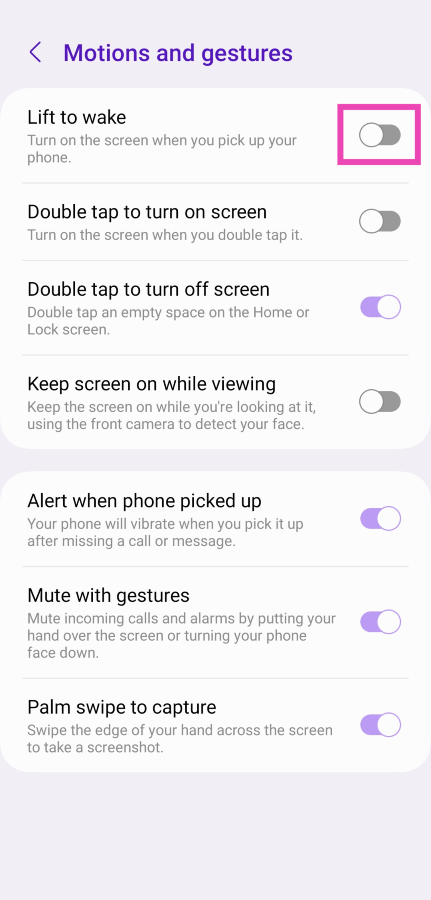
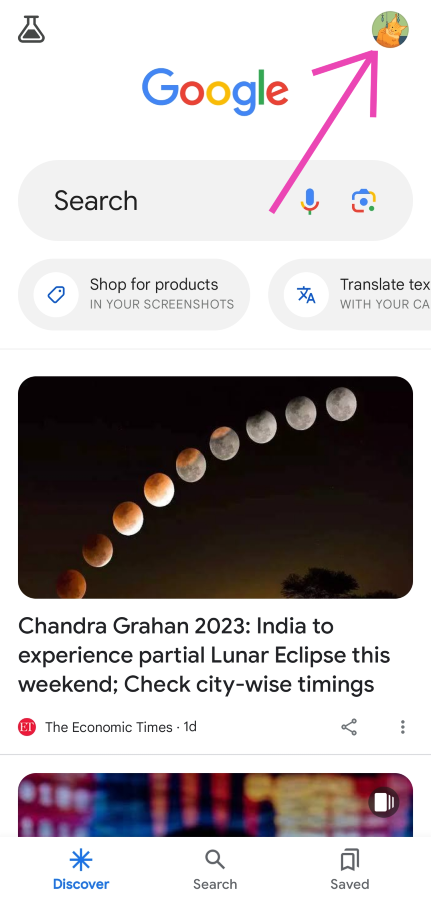 Step 3:
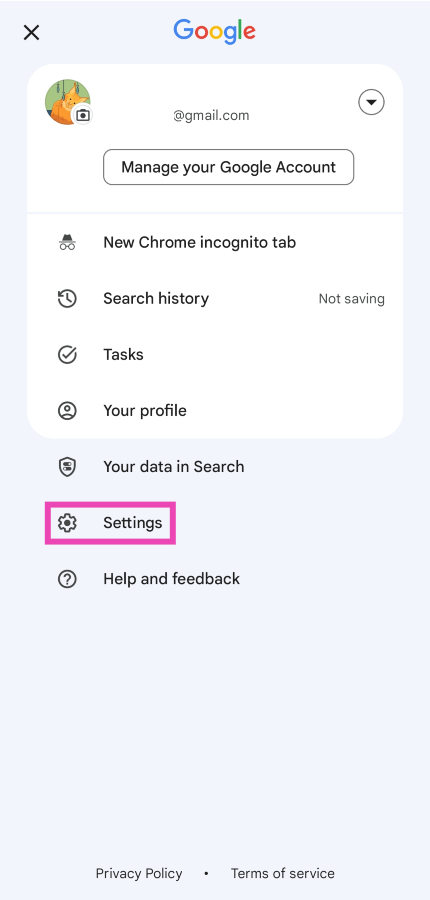 Step 4:
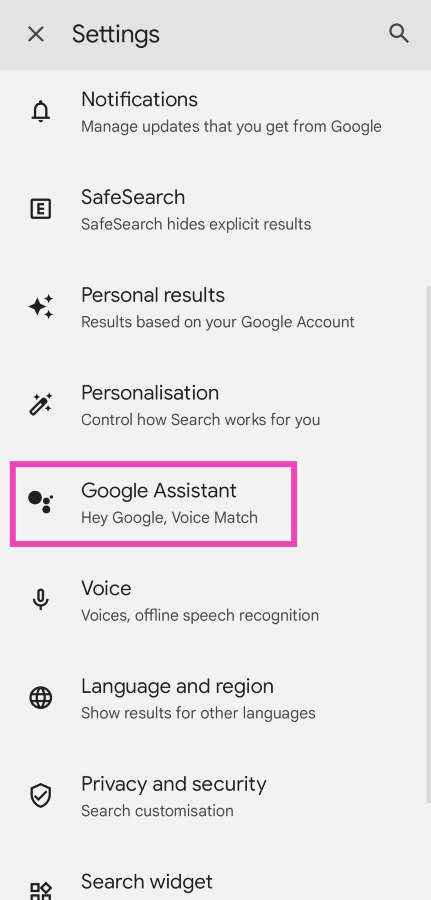 Step 5:
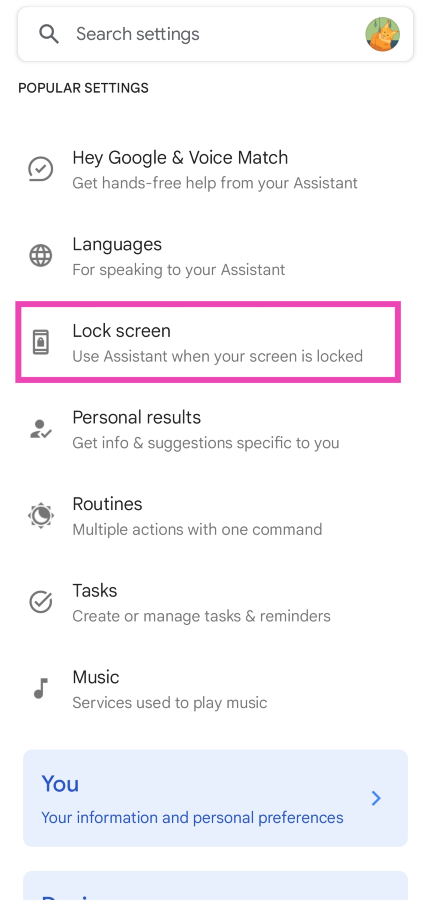 Step 6: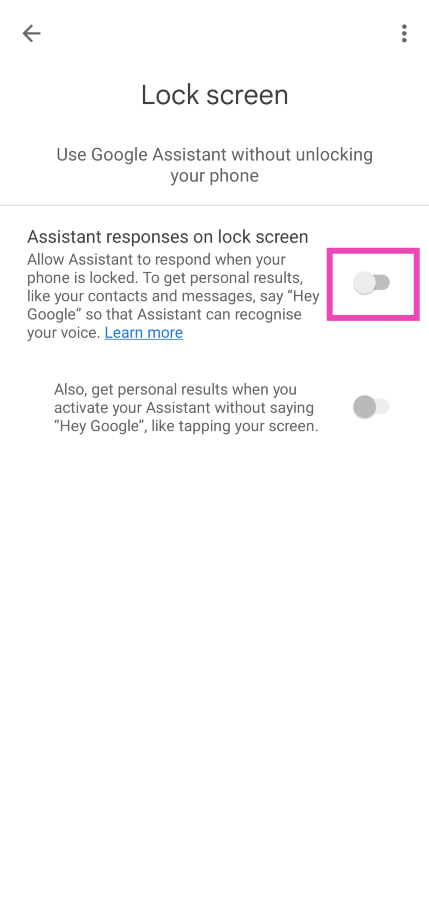
 Step 3: Tap on More settings.
 Step 4: Select Notification history.
 Step 5: This is where you can see the log of all the notifications that your phone has received. The most recent notification will be at the top of the list.
 Step 3:
 Step 4:
 Step 2:
 Step 3:
 Step 4: