Amazon Quiz Answers Today 29 January 2025: Participate to win Up To Rs 500 Amazon Pay Balance

29 January 2025: New Amazon Quiz is now available. Customers from different parts of the country are participating in the daily quiz. The quiz starts at midnight today and will be live until 11:59 PM tonight. By successfully answering every question, participants in the quiz have the chance to win wonderful rewards. Up to Rs 500 Amazon Pay Balance is up for grabs to participants today.

One wrong answer could eliminate you from the quiz. You have a chance to win up to Rs 500 Amazon Pay Balance if you successfully answer every question. Users of the app only have the opportunity to take the quiz. Check Out 29 January 2025 Amazon Quiz Answers.

Are you not able to find Amazon FunZone? Click below and participate.

Click here to enter the Amazon FunZone Quiz and play today.

Amazon Quiz Today Prize: Rs 500 Amazon Pay Balance

Quiz Date: 29 January 2025

Daily Timing: 12 AM to 11:59 PM

Previous Amazon Quiz Winners Announcement: Today 12 PM Noon

Amazon Quiz Answers Today 29 January 2025: Win Up To ₹ 500 Amazon Pay Balance

Question 1: Who was the top scorer for India in the T20 World Cup final 2024?

Answer: Virat Kohli

Question 2: The Last Dance’ is the tagline of the 3rd of a series of movies with whom as the central character?

Answer: Venom

Question 3: British Shorthair, Ragdoll and Abyssinian are types of what animal?

Answer: Cat

Question 4: Which famous place in the UK is shown here?

Answer: Trafalgar Square

Question 5: Which famous person is depicted in this statue?

Answer: Napoleon Bonaparte

How To Play Amazon Quiz Today

Only app users are eligible to play the Amazon quiz every morning from 12 AM to 11:59 PM. The quiz is not available on the desktop. For those who are unaware of how to play the Amazon quiz, below are the steps, you can follow to take the quiz.

  • First, download the Amazon app from the Google Play Store or App Store or go here to download the Amazon App
  • Now fill in the required information through the Sign-Up option.
  • To find the Amazon Quiz banner, log in to the Amazon app and scroll down to the home screen.
  • Tap on the Amazon Quiz banner and tap on the Start button to start the Quiz.
  • Now you will get 5 questions and you need to answer them correctly. One wrong answer will eliminate you from the Quiz.
  • After answering all the questions correctly you are now eligible for a Lucky Draw.
  • The previous winner’s name will be announced today at 12 PM.

Amazon Daily Quiz Answers from the previous few days.

Here are all the answers from the previous 5 days of the Amazon Daily Quiz and Contest.

Amazon Quiz Answers Today 28 January 2025: Win Up To ₹ 500 Amazon Pay Balance

Question 1: Who beat Novak Djokovic in the final to win his 2nd consecutive Wimbledon men’s singles title?

Answer: Carlos Alcaraz

Question 2: In ‘Captain America” Brave New World’ scheduled to be released in 2025, which legendary actor plays the role of Thaddeus ‘Thunderbolt’ Ross?

Answer: Harrison Ford

Question 3: Which place in South India is also known as the ‘Scotland of India’?

Answer: Coorg

Question 4: This is a picture taken in which African country?

Answer: Morocco

Question 5: What is the name given to the profession of the man in the picture?

Answer: Gondoliere

Amazon Quiz Answers Today 27 January 2025: Win Up To ₹ 500 Amazon Pay Balance

Question 1: Achanta Sharath Kamal represents India in which sport?

Answer: Table tennis

Question 2: Which date is to be celebrated as Hyderabad Liberation Day?

Answer: 17-Sep

Question 3: In which sport did India win its first two medals at the 2024 Paris Olympics?

Answer: Shooting

Question 4: This painting was created in which historical period?

Answer: Renaissance

Question 5: Where is the headquarter of this brand in USA?

Answer: Atlanta

Amazon Quiz Answers Today 26 January 2025: Win Up To ₹ 500 Amazon Pay Balance

Question 1: Achanta Sharath Kamal represents India in which sport?

Answer: Table tennis

Question 2: Which date is to be celebrated as Hyderabad Liberation Day?

Answer: 17-Sep

Question 3: In which sport did India win its first two medals at the 2024 Paris Olympics?

Answer: Shooting

Question 4: This painting was created in which historical period?

Answer: Renaissance

Question 5: Where is the headquarter of this brand in USA?

Answer: Atlanta

Amazon Quiz Answers Today 25 January 2025: Win Up To ₹ 500 Amazon Pay Balance

Question 1: In 2024, who became the youngest person to win two Oscars?

Answer: Billie Eilish

Question 2: The D. B. Patil International Airport is located in which place?

Answer: Navi Mumbai

Question 3: Which country had the first-ever married couple to serve as flag bearers at the Paris Olympic Opening Ceremony?

Answer: Romania

Question 4: When was this app launched?

Answer: 2011

Question 5: Which is the smallest monkey in the world?

Answer: Pygmy marmoset

Amazon Quiz Answers Today 24 January 2025: Win Up To ₹ 500 Amazon Pay Balance

Question 1: Complete the title of this 2024 film: “Chhota Bheem and the Curse of ________”.

Answer: Damyaan

Question 2: What regal title does Yaduveer Krishnadatta hold?

Answer: Maharaja of Mysore

Question 3: Which John Lennon and Yoko Ono song has been sung at six Olympic Opening Ceremonies, including Paris 2024?

Answer: Imagine

Question 4: Who is the architect of this cathedral?

Answer: Filippo Brunelleschi

Question 5: In the English edition of this game, how many word tiles are there?

Answer: 100

Amazon Quiz Answers Frequently Asked Questions (FAQs)

Where can I check the previous winners? Did I win how to check?

You can head over to this link on your mobile or desktop to check the winners of the Amazon Daily Quiz Contest.

How to Play Amazon Daily Quiz or Contest?

We have written an explainer above, you can refer to that.

When are the winners of the Amazon Quiz and contest announced or declared?

The announcement of today’s Amazon quiz winner will take place Tomorrow. As for the Special Quiz and “Spin & Win” Contest, the winners will be declared once the Quiz Contest comes to an end. To find out who the lucky winner is, you can refer to the Amazon Quiz Winners List or visit the Amazon Winners tab in the Amazon App.

How to participate in the Daily Amazon Quiz?

That is very easy, just got to the Amazon app and scroll to the bottom of the page and you will find the Quiz section. Click on it (usually it is called the fun zone) and you can enter the Amazon Today Quiz Contest. 

Are there any other quizzes or contests running on Amazon daily?

Yes, there are many running on a daily basis. These range from spinning the wheel to answering the questions correctly. All are located in the Fun Zone. 

What are the criteria for selecting a winner in the Daily Amazon Quiz?

When a qualified player submits correct answers to all the questions, they will automatically be entered into a lucky draw. This draw will include all participants who answered all the questions correctly. Amazon randomly selects the final winners from the pool of eligible participants who gave the right answers.

Which Types of Questions are asked within Amazon Daily Quiz?

These are very simple and straightforward questions. These are mainly related to general knowledge. 

Where should I look for Amazon Daily Quiz answers?

You can bookmark our website www.gadgetbridge.com as we will help you every day with the Amazon Daily Quiz. We bring you fresh answers every day for the Amazon Daily Quiz and Contest. 

What time does Amazon Announce previous winners?

The previous winner’s name will be announced today at 12 PM (noon).
How to filter notifications on your Samsung phone? (One UI 7)

0

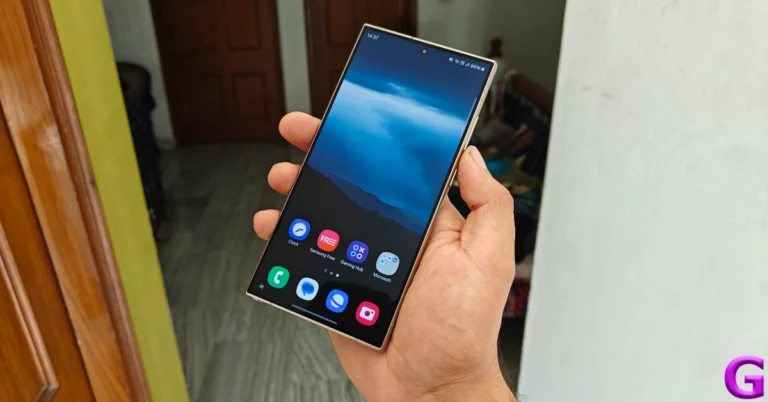
Notification spam is one of the biggest pet peeves of Android users. Luckily, there’s good news for Samsung users. In its newest One UI iteration, Samsung has introduced the option to filter notifications that aren’t important and don’t require your immediate attention. This feature will be available on your Samsung phone once it is updated to One UI 7. Samsung’s new Android-15-based OS will be rolled out once its S25 Series starts reaching customers. Here’s how you can filter notifications on your One UI 7 Samsung phone.

Read Also: Meta rolls out new Memory feature for Meta AI to personalise future responses

How does notification filtering work?

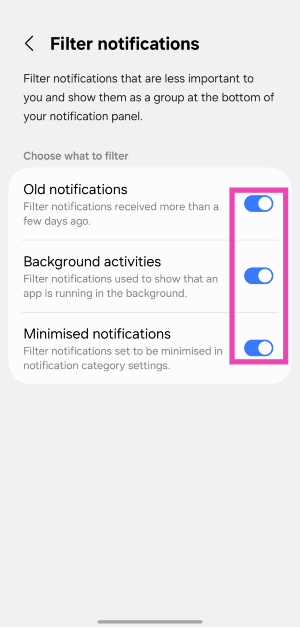
Samsung’s notification filtering system is a much more practical way of keeping the notification shade clean than blanket muting certain apps. Once you find this feature in the device settings, it will give you three options to manage notifications:

Old notifications: Turning on this filter will hide all notifications that are a few days old. If you haven’t tended to these notifications, they will be removed from immediate view. This reduces the hassle of going through spam and clearing it manually.

Background activities: Your smartphone routinely pushes notifications about apps running in the background. If you don’t like receiving these alerts, you can now hide them in the notification shade.

Minimised notifications: Apart from the two categories mentioned above, you can minimise the notifications from a certain app. This requires manually going into the app’s settings and minimising its alerts.

All the filtered notifications can be viewed by tapping on the ‘More notifications’ options at the bottom of the notification shade.

Filter notifications on your One UI 7 Samsung phone

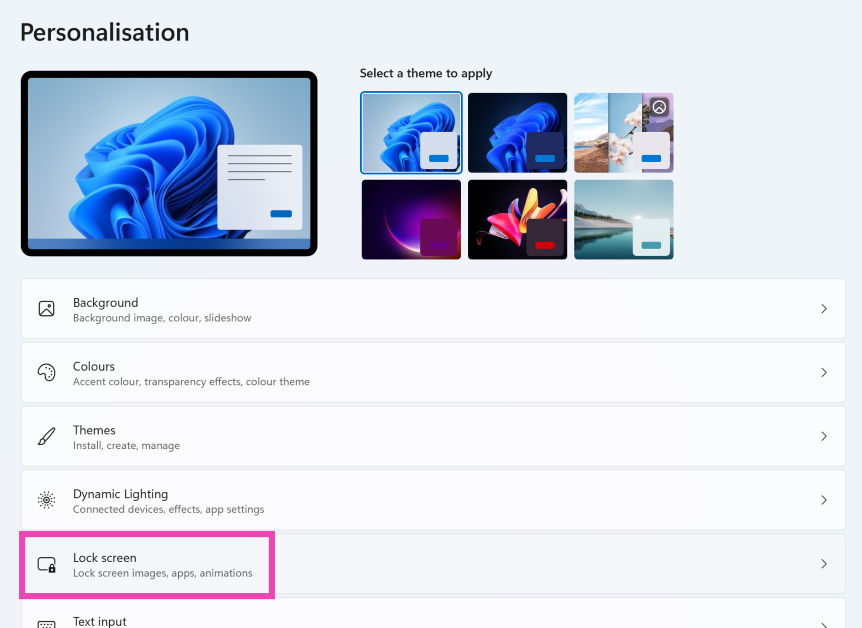
Step 1: Update your Samsung phone to One UI 7.

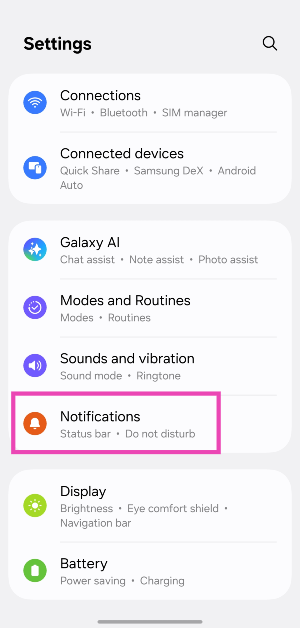
Step 2: Go to Settings.

Step 3: Tap on Notifications.

Step 3: Tap on Notifications.

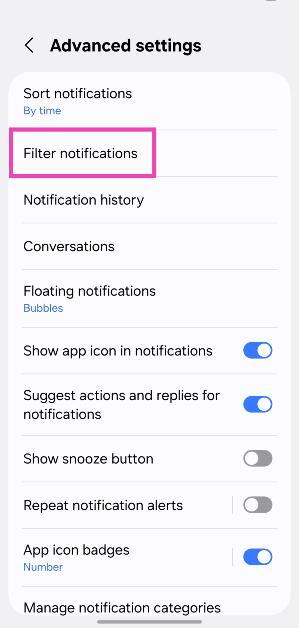
Step 4: Scroll down and hit Advanced settings.

Step 4: Scroll down and hit Advanced settings. How to filter notifications on your Samsung phone? (One UI 7)

Step 5: Tap on Filter notifications.

Step 5: Tap on Filter notifications. How to filter notifications on your Samsung phone? (One UI 7)

Step 6: Turn on the toggle switches next to Old notifications, Background activities, and Minimised notifications.

Step 6: Turn on the toggle switches next to Old notifications, Background activities, and Minimised notifications. How to filter notifications on your Samsung phone? (One UI 7)

Frequently Asked Questions (FAQs)

How do I filter notifications on Samsung?

If your Samsung phone is updated to One UI 7, you can filter notifications by going to Settings>Notifications>Advanced settings>Filter notifications and turning on the toggle-switches next to your preferred categories.

How do I mute notifications for an app on Android?

Go to Settings>Apps, select the app, tap notifications, and turn off the toggle switch at the top of the page to mute notifications.

Which is the latest One UI version?

The Android 15-based One UI 7 is the latest version of Samsung’s custom Android skin. It made its debut alongside the Samsung Galaxy S25 series.

When will One UI 7 come out?

Samsung will launch One UI 7 for older devices once it starts delivering the new Galaxy S25 series. Until then, you can install One UI 7 Beta on your Galaxy S24 series smartphone.

Will One UI 7 come to S24?

The Samsung Galaxy S24 will be one of the first smartphones to get the One UI 7 update after its launch.

Read Also: How to remove Copilot from your Microsoft 365 plan?

Final Thoughts

This is how you can filter notifications on your One UI 7 Samsung phone. While you’re here, check out how you can hide app and widget labels on One UI 7. If you have any questions, let us know in the comments!

Meta rolls out new Memory feature for Meta AI to personalise future responses

Like Google’s Gemini and OpenAI’s ChatGPT, Meta is improving its AI chatbot with a new Memory feature. It remembers personal information given to the Meta AI for personalised responses on Facebook, Messenger, and WhatsApp. The function, which aims to improve personalisation, is now available to iOS and Android users exclusively in the US and Canada.

Meta via its blog post said, “While Meta AI is on track to become the most used AI assistant, our vision is to make it one of the most personalized AI assistant experiences ever created. One of the areas we’re starting to focus on is new features that provide information and recommendations tailored to individuals.”

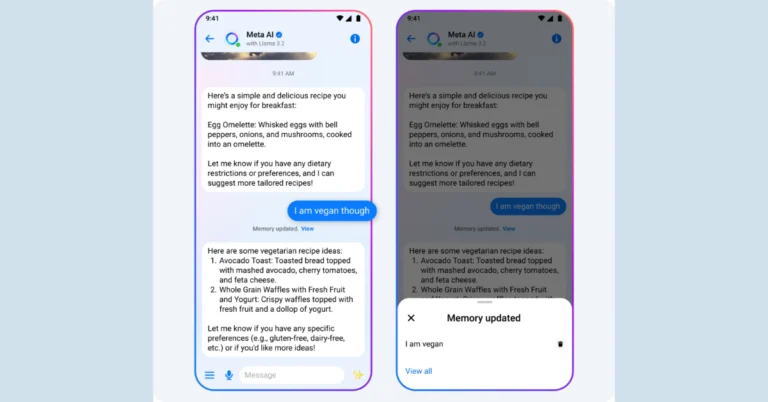
With the help of a new Memory feature, Meta AI will be able to remember certain information exchanged in one-on-one conversations on Messenger and WhatsApp. Through context-based recognition of important details, this feature seeks to personalise future responses. Users can indicate their preferences, including their interests in travel or language learning skills, and Meta AI can also infer contextually relevant information. For example, Meta AI can remember a user’s request for a vegan breakfast recipe and use that information to inform future recipe recommendations.

Also Read: Google Chrome for Windows and Mac users data at RISK, CERT-In warns

Meta AI continues to enhance its Instagram, Messenger, and Facebook personalisation features. To offer relevant information and personalised recommendations, Meta’s AI assistant may access user data from Instagram and Facebook profiles. For example, it can recommend outdoor activities based on the user’s home location on Facebook.

“Let’s say you’re looking for something fun to do with your family this weekend and you ask Meta AI to suggest something. Based on the home location you’ve listed as part of your Facebook profile, recent views of reels featuring live performances by various country artists and its memory that you have a partner and two young kids, Meta AI might suggest tickets for that weekend’s country music show at your local arena and reservations at a local brunch spot.”

Also Read: Lava Yuva Smart budget smartphone launched in India

The new Meta AI features are now available to Meta AI on Facebook, Messenger, and WhatsApp for iOS and Android in the US and Canada, retaining only specific information from 1:1 conversations and allowing users to delete their memories at any time.

Google Chrome for Windows and Mac users data at RISK, CERT-In warns

CERT-In has released a serious warning for Google Chrome users on Mac, Windows, and Chromebooks, pointing out a number of flaws that might let hackers access private information, run arbitrary code, or disrupt the system. It is recommended that users upgrade their operating systems and browsers right away.

The Indian Computer Emergency Response Team (CERT-In) has issued a warning after identifying two vulnerabilities in Google Chrome that allow attackers to compromise user data and devices. The vulnerability is present in Google Chrome versions before 132.0.6834.83/8r on Windows/Mac, 132.0.6834.110/111 on Windows and Macs, and 132.0.6834.110 on Linux.

CERT-In found two significant vulnerabilities in Google Chrome for Mac, CIVN-2025-0007 and CIVN-2025-0008, that could allow attackers to execute arbitrary code, create a DoS, or bypass security restrictions. The issues are classified as quite severe and are reported to affect Chrome versions prior to 132.0.6834.83/8r. Out-of-bounds memory access, incorrect navigation implementation, and insufficient data validation allow attackers to execute arbitrary code, cause DoS, or overcome security restrictions.

Also Read: Lava Yuva Smart budget smartphone launched in India

Because of bugs in stack buffer overflow, integer overflow, and out-of-bounds memory access, ChromeOS, the operating system that powers Chromebooks, is susceptible to spoofing, cross-site scripting, and remote code execution. These flaws could be used by remote attackers to run malicious web pages and possibly acquire private information. Because desktops, laptops, and Chromebooks are more vulnerable than smartphones, CERT-In advises users of outdated Chrome or ChromeOS versions to exercise caution.

Chrome versions prior to 132.0.6834.110/111 include vulnerabilities that put Windows users and organisations at risk. By sending carefully crafted requests, hackers can take advantage of these vulnerabilities, which could result in data exfiltration, system failures, or illegal access to private data.

Also Read: Titan Valerie Review: Should you buy this watch?

As hackers take advantage of these issues, ignoring warnings can result in data breaches, unstable systems, and illegal access to private data. Update ChromeOS and Google Chrome to the most recent versions, check for updates frequently, and enable automatic updates to protect your device.

How to remove Copilot from your Microsoft 365 plan?

0

Microsoft 365 subscribers have noticed the Copilot button on their essential Microsoft applications recently. The tech giant is rolling out its AI assistant across its major applications. If you’re not a fan of AI assistants being shoved in your face, you may not like this new integration. The worst part of it all is that Microsoft will start charging you an additional $3 per month ($30 annually) for its AI assistant. If you don’t want these features and wish to go back to your original plan, you must take action before the next renewal cycle. Here’s how you can remove Copilot from your Microsoft 365 plan.

Read Also: Lava Yuva Smart budget smartphone launched in India

How does the Copilot integration work on Microsoft 365?

Copilot integration in Microsoft 365 comes with a price hike for its personal and family plans. If you’re a subscriber, you will be charged more for your plan in the next renewal cycle. However, you can stop the extra charge by opting out of Copilot. It remains to be seen how long this option will be available.

Currently, Microsoft offers 2 Home plans for 365 – Personal and Family. Here are the updated prices for the 2 plans.

Microsoft 365 Personal: Monthly – $9.99 (previously $6.99) | Yearly – $99.99 (previously $69.99)

Microsoft 365 Family: Monthly – $12.99 (previously $9.99) | Yearly – $129.99 (previously $99.99)

You can keep your original plan by switching to a ‘Classic’ membership before the renewal cycle kicks in. If you have an existing Family plan, you can only choose a Family Classic plan. Similarly, current Personal subscribers can only opt for the Personal Classic subscription.

Remove Copilot from your Microsoft 365 plan


4 Ways to Check SSD Read/Write Speed on Windows 11

Step 1: Go to the Microsoft account management page and log in using your Microsoft account.

Step 2: Switch to the Subscription tab from the sidebar.

Step 3: Expand the Manage subscription and select Cancel subscription.

Step 4: On the following page, choose the Microsoft 365 Classic plan. This package contains all the benefits of your current plan minus Coplit.

Step 5: Make the purchase. You will be moved to the Classic plan without Copilot in the next renewal cycle.

Bonus Tip: Disable Copilot on Office applications

If you don’t want to see any Copilot features on your Microsoft application, you can disable them from every application individually. Here’s how.

Step 1: Open the Microsoft application. For this example, we’ll use Microsoft Word.

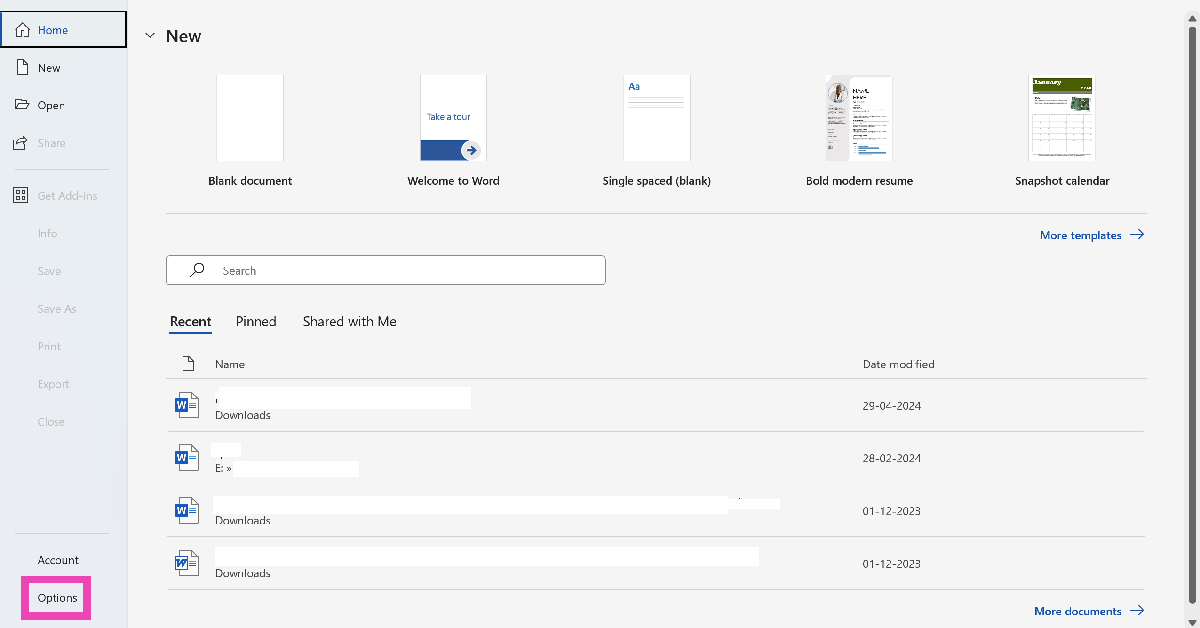
Step 2: Go to File and select Options.

Step 2: Go to File and select Options.

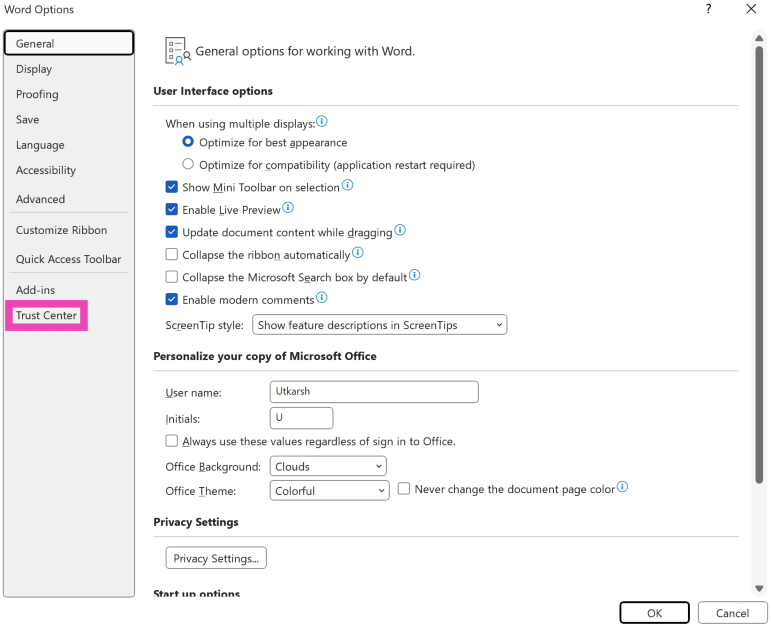
Step 3: Click on Trust Center in the sidebar.

Step 3: Click on Trust Center in the sidebar.

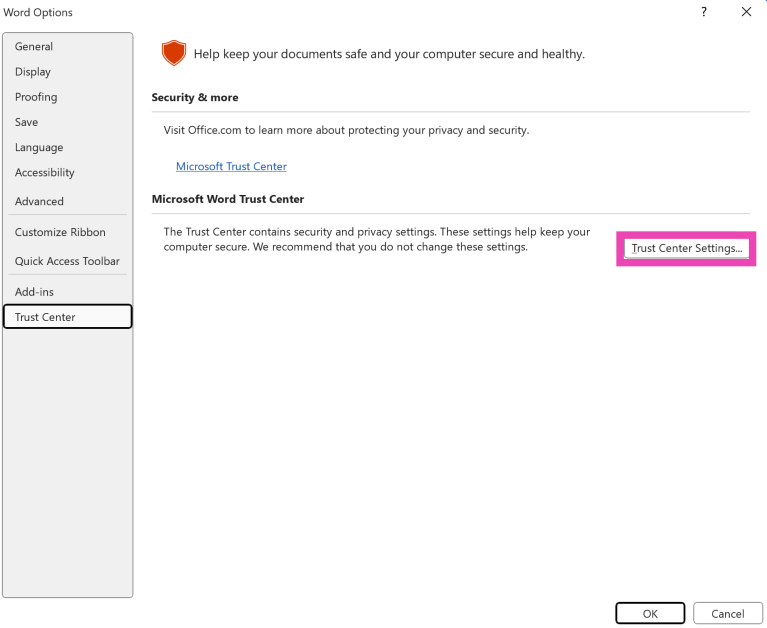
Step 4: Select Trust Center Settings.

Step 4: Select Trust Center Settings. How to remove Copilot from your Microsoft 365 plan?

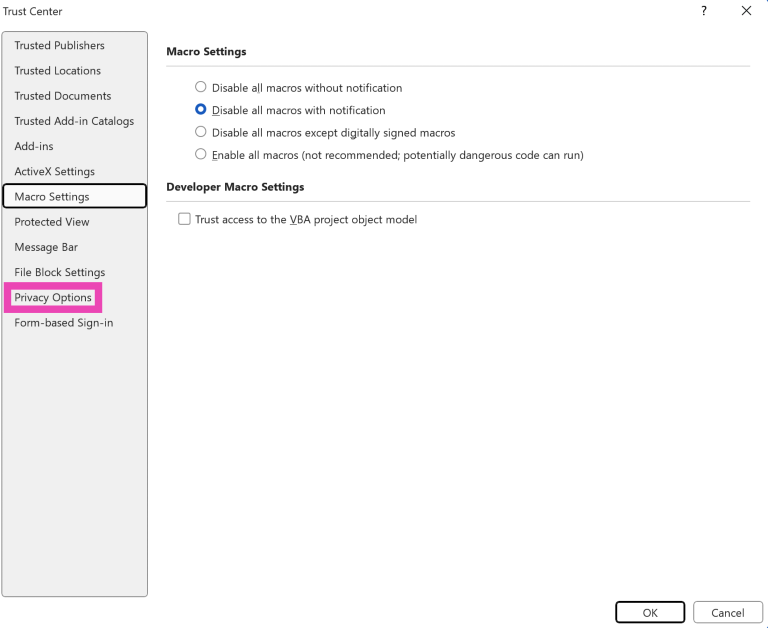
Step 5: Click on Privacy Options in the sidebar.

Step 5: Click on Privacy Options in the sidebar. How to remove Copilot from your Microsoft 365 plan?

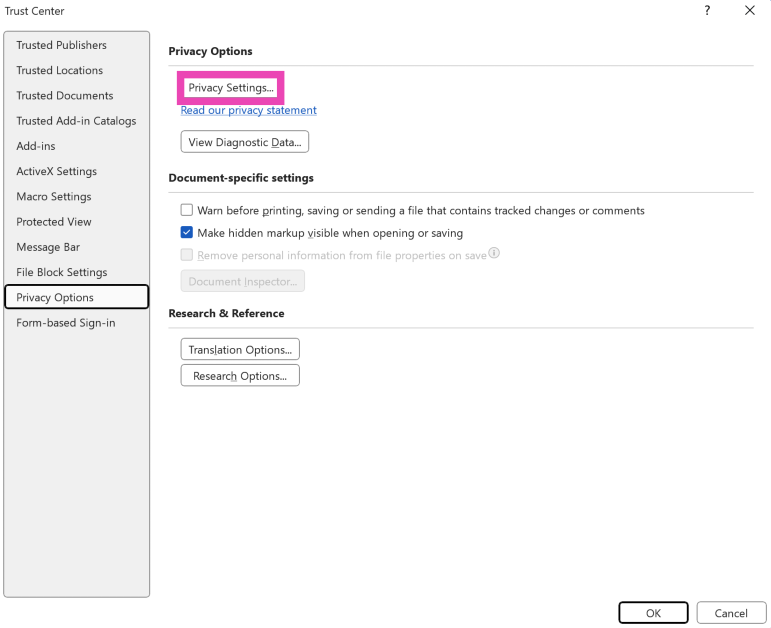
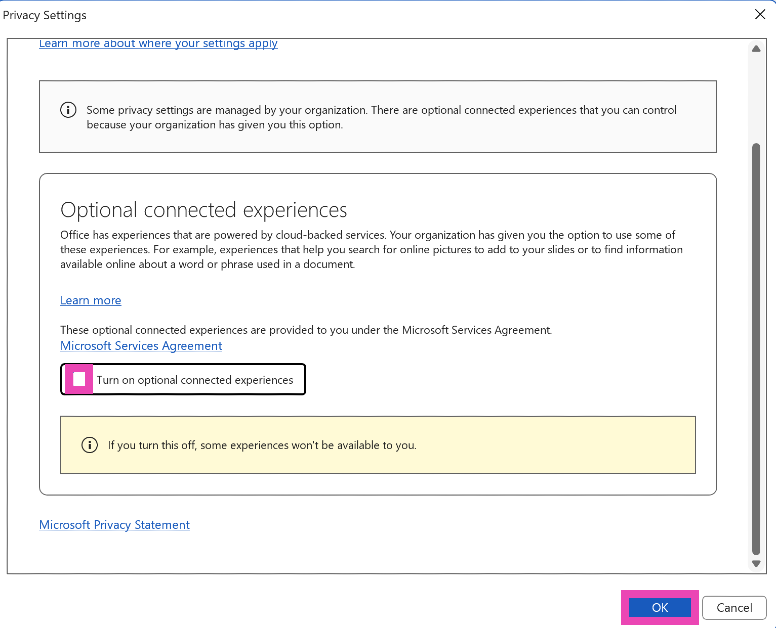
Step 6: Select Privacy Settings.

Step 6: Select Privacy Settings. How to remove Copilot from your Microsoft 365 plan?

Step 7: Uncheck the box next to ‘Turn on experiences that analyze your content’. Hit OK.

Step 7: Uncheck the box next to ‘Turn on experiences that analyze your content’. Hit OK. How to remove Copilot from your Microsoft 365 plan?

Frequently Asked Questions (FAQs)

Is Copilot available in Microsoft 365?

The Personal and Family plans for Microsoft 365 now come with Copilot. However, in the Family plan, only the plan owner gets access to Copilot features. The account owner for both plans gets 60 tokens per month. Every time an AI feature is used on the account, 1 token is deducted from the balance.

Is Microsoft 365 Copilot free or paid?

Microsoft has hiked the plans for the Personal and Family 365 plans that come with Copilot. The prices have been hiked by $3 per month and $30 per year.

How can I access Copilot on Microsoft 365?

You can access Copilot across all Microsoft applications by subscribing to Microsoft 365. A personal plan costs $9.99 per month and $99.99 per year.

How do I disable Copilot on Microsoft 365?

If your Microsoft 365 subscription got auto-updated to a Copilot plan, go to your Microsoft account management page, switch to the Subscription tab, go to Manage Subscription>Cancel Subscription, and switch to the Microsoft 365 Classic plan.

How do I disable Copilot on Microsoft Word?

Go to File>Options>Trust Center>Trust Center Settings>Privacy Options>Privacy Settings and uncheck the box next to ‘Turn on experiences that analyze your content’.

Read Also: Best Gadgets For Your Living Room

Final Thoughts

This is how you can remove Copilot from your Microsoft 365 subscription and save up to $30 annually. Don’t find much use for the Copilot key on your Windows PC or laptop? You can always remap it to something else. If you have any questions, let us know in the comments!

Lava Yuva Smart budget smartphone launched in India

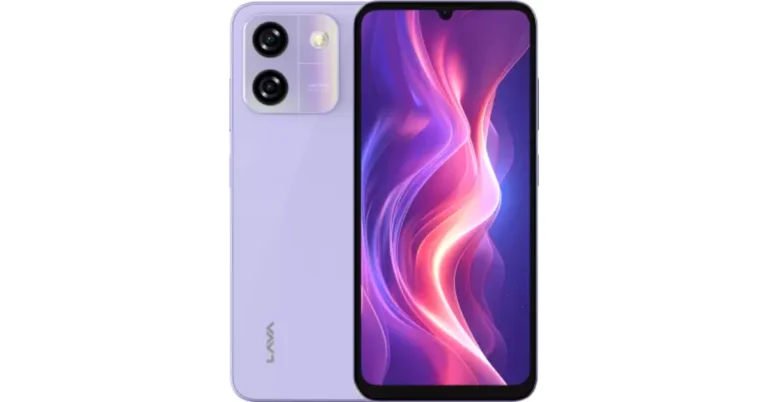
Lava Yuva Smart has debuted in India. The device is priced under 10k and features a dual rear camera setup with AI support. The phone runs on Android 14 Go and has a 5,000mAh battery. Additionally, it comes with a 6.75-inch HD+ Notch Display with a 60Hz refresh rate and is powered by UNISOC 9863A Octa-core Processor.

Lava Yuva Smart Specifications

The Lava Yuva Smart features a 6.75-inch HD+ Notch Display with a resolution of 720×1600 pixels. The screen supports a 60Hz refresh rate, 260 PPI, and a 20:9 aspect ratio. The device runs on Android 14 Go edition and is equipped with a Unisoc 9863A octa-core processor, 3GB+3GB virtual RAM, and 64GB internal storage, expandable up to 512GB.

In terms of photos and videos, the budget smartphone by Lava has a 13MP AI Dual Rear Camera with LED flash and camera modes such as HDR, Portrait, and Night. For selfies, it includes a 5MP front-facing camera with Screen Flash.

Also Read: Titan Valerie Review: Should you buy this watch?

Lava Yuva Smart budget smartphone launched in India

Yuva Smart supports dual 4G VoLTE and includes Wi-Fi 802.11 b/g/n/ac, Bluetooth 4.2, and OTG support. The smartphone has a side fingerprint sensor and face unlock for further security. Numerous more capabilities, such as slow-motion video, AI modes, QR scanning, and battery-saving mode, are included in the gadget.

Yuva Smart offers a 1-year warranty, regular security updates, and free home service, providing customers with peace of mind and excellent post-purchase support.

Lava Yuva Smart Price in India, Availability

In India, the Lava Yuva Smart is now available for a special price of Rs 6,000. Yuva Smart is available in three premium glossy finishes: Glossy Blue, Glossy White, and Glossy Lavender. The device is being sold in the country via Amazon and Flipkart.

Also Read: Nothing’s new phone arriving on March 4, likely Nothing Phone 3

Commenting on the launch, Mr. Sumit Singh, Head-Product, Lava International Ltd., said, “The Yuva series remains at the heart of our product strategy, embodying our commitment to innovation in the sub-10k segment. With Yuva Smart, we are setting a new standard for entry-level smartphones by combining powerful performance, sleek design, and exceptional battery life. This device is designed for first-time buyers who seek both functionality and seamless experience at an affordable price. We are confident that the Yuva Smart will redefine the entry-level smartphone experience, offering unmatched value and performance for the price-conscious consumer.”

Best Gadgets For Your Living Room

Your living room should be the focal point of all group activities, be it movie binging sessions or family gatherings. This means that it should be well-equipped to handle a wide range of tasks. You don’t want to be searching for a speaker when your friends are gathered in the room for a karaoke session. Luckily, there are tons of devices that will make sure your living room can handle whatever you throw at it. Here is our list of the best gadgets for your living room.

Read Also: Titan Valerie Review: Should you buy this watch?

Philips Hue E27 Smart Light

Philips Hue E27 Smart Light

Mood lighting is an essential aspect of every living room. Philips Hue E27 smart lights make the process of changing the ambience very simple. The smart bulbs connect to the Hue bridge, which acts as a central hub for all the smart functions. You can automate the lights to turn on or off at a certain time, create a scene with different colours, control the lights remotely, and more. The Hue bridge links up with Amazon Echo, Google Assistant, Samsung SmartThings, and other home interfaces. Using the right connections, you can change the behaviour of the lights. For example, you can set them to change the colour when you score in a game or when the smoke alarm goes off.

Pros

  • Can be programmed in a lot of ways
  • Smart controls

Buy on Amazon for Rs 11,900

Amazon Echo Dot (5th-gen)

Amazon Echo Dot 5 review

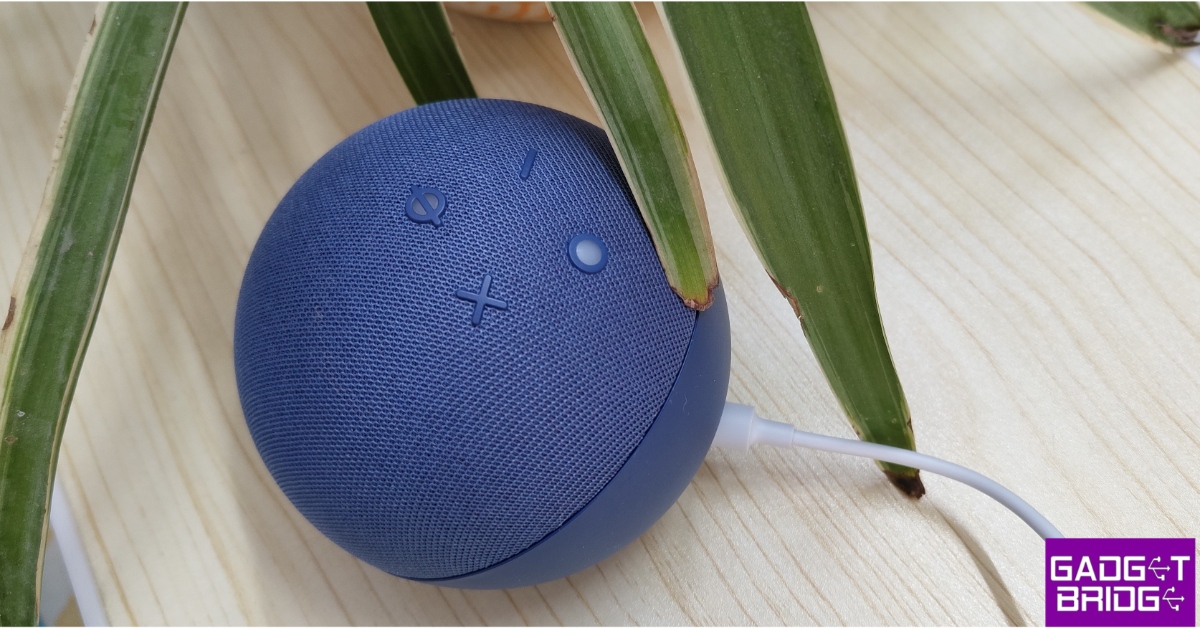
The 5-gen Echo Dot is one of the best-sounding smart speakers from Amazon yet. Apart from producing a great audio output, the Echo Dot acts as a central hub for all the smart devices in your living room. You can use it to turn on the lights, change the temperature of the AC, play a song on Spotify, and more. Its built-in motion sensors can trigger to automatically turn the lights and AC on or off, depending on your movement. On top of that, you can get Alexa to take care of routine tasks like setting up alarms, reminders, to-do lists and more with simple voice commands. Check out our review of the 5th-gen Echo Dot.

Pros

  • Central hub for smart devices
  • Affordable

Buy on Amazon for Rs 5,499

Qubo Q1000 Smart Air Purifier

Qubo Q1000 Smart Air Purifier

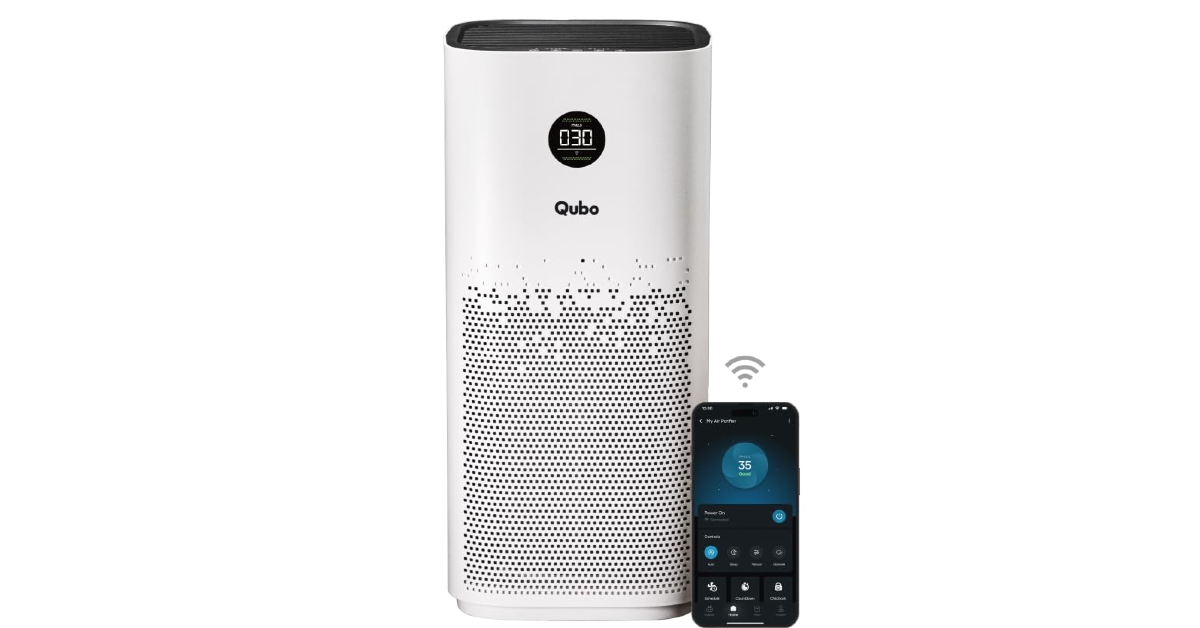
If you live in an area with a high Air Quality Index (AQI), an air purifier is a non-negotiable device for your living room. We would also recommend it to pet owners looking for a solution to pet dander. The Qubo Q1000 air purifier has a functional range of 1,000 sq ft and a Clean Air Delivery Rate (CADR) of up to 600 m³/h. It has a 4-in-1 filtration system consisting of a PP pre-filter, an anti-bacterial filter, an H13 HEPA filter, and an activated carbon filter. Using QSenseAI Technology, the air purifier turns on automatically when it detects PM2.5 level pollutants in the surrounding air. At maximum operation, it can hit a sound level of 57 dB/A. The device can be controlled via the Qubo app and has support for Amazon Echo and Google Assistant.

Pros

  • Large coverage area
  • Alexa and OK Google support

Buy on Quboworld.com for Rs 19,990 

Samsung Frame TV (55-inches)

Samsung Frame TV (55-inches)

The Samsung Frame TV is one of the best devices you can buy for your living room. When it is not in use, the TV acts as a literal frame, with its matte display showcasing different artworks. The 55-inch display has a 4K Ultra HD (3,840 x 2,160) resolution and a 100Hz refresh rate. There are 4 HDMI ports onboard to connect the device to a set-top box, Blu-ray speakers, gaming console, or laptop. Powering this TV is the Neo Quantum Processor 4K. It is capable of upscaling images to a 4K resolution using AI. The frame of the TV is customisable and can be changed according to the vibe of the room.

Pros

  • Matte display
  • Great way to showcase art

Buy on Amazon for Rs 92,990

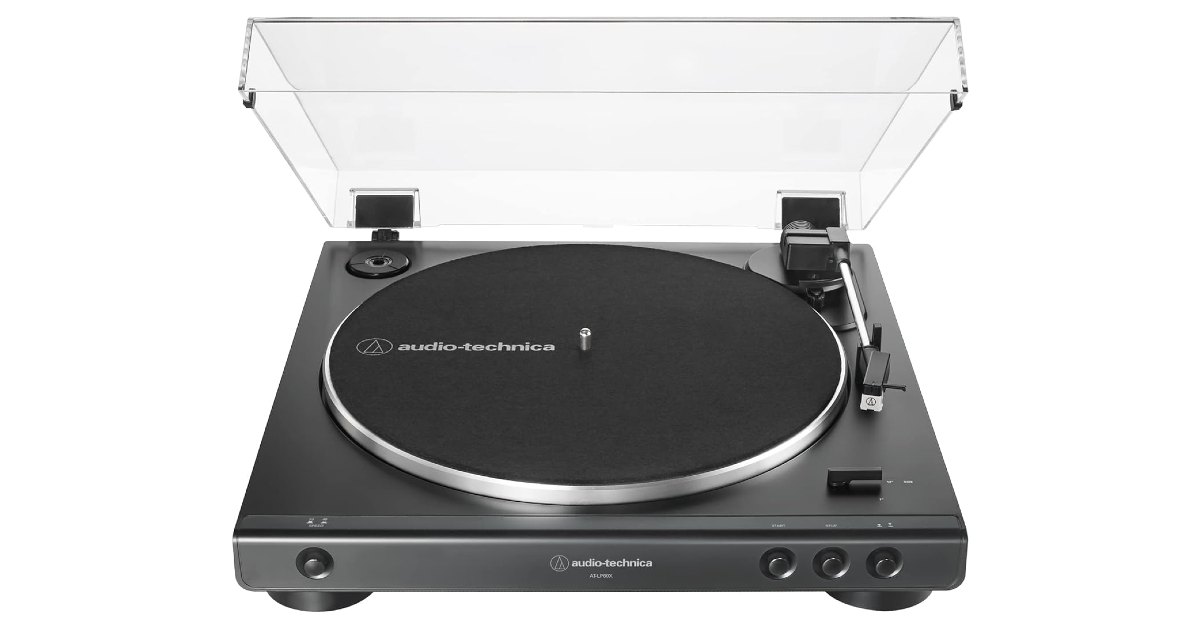
Audio-Technica AT-LP60X

Audio-Technica AT-LP60X

Adding a turntable to your living room not only makes it a great gathering place to listen to records but also uplifts its aesthetic appeal. The Audio-Technica AT-LP60X is one of the finest record players around that doesn’t cost a small fortune. Its fully automated belt-drive turntable operation has 2 speeds – 33-⅓ and 45 RPM. The diamond stylus on this record player is completely replaceable. The tonearm base and headshell are designed for improved tracking and reduced resonance. The turntable comes with a detachable RCA output cable, a 45RPM adapter, and a removable hinged dust cover.

Pros

  • Looks good
  • Affordable

Buy on Amazon for Rs 19,990

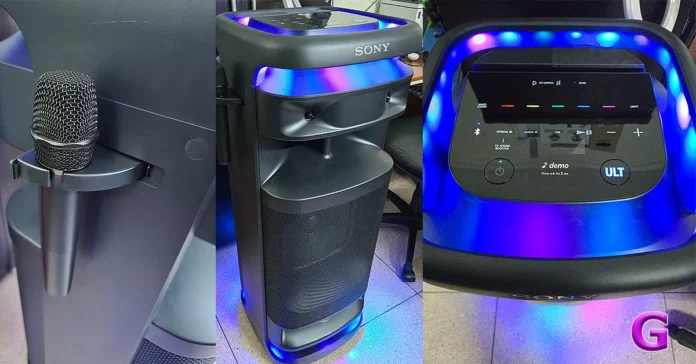
Sony ULT Tower 10

Sony ULT Tower 10 Review Check out our list of the top 10 devices and gadgets for your living room.

Last year, Sony launched its massive party speaker, Tower 10, as a part of its new ‘ULT’ series. This device can bring your living room to life. With 4 tweeters onboard, this party speaker offers a 360-degree surround sound. Decorated with RGB lighting, the Tower 10 can flash colours and control the vibe of the party. The dedicated ULT button unlocks 2 bass modes to boost the low-end frequencies in the audio output. The speaker tower comes with a wireless microphone, making it karaoke-ready. You can connect a second mic or a guitar to elevate the mood of your party with live music. The wheels at the bottom of the speaker make it easy to transport around the house. Read our Sony ULT Tower 10 review to learn more about the device.

Pros

  • Powerful output
  • Exciting lighting

Buy on Amazon for Rs 89,900

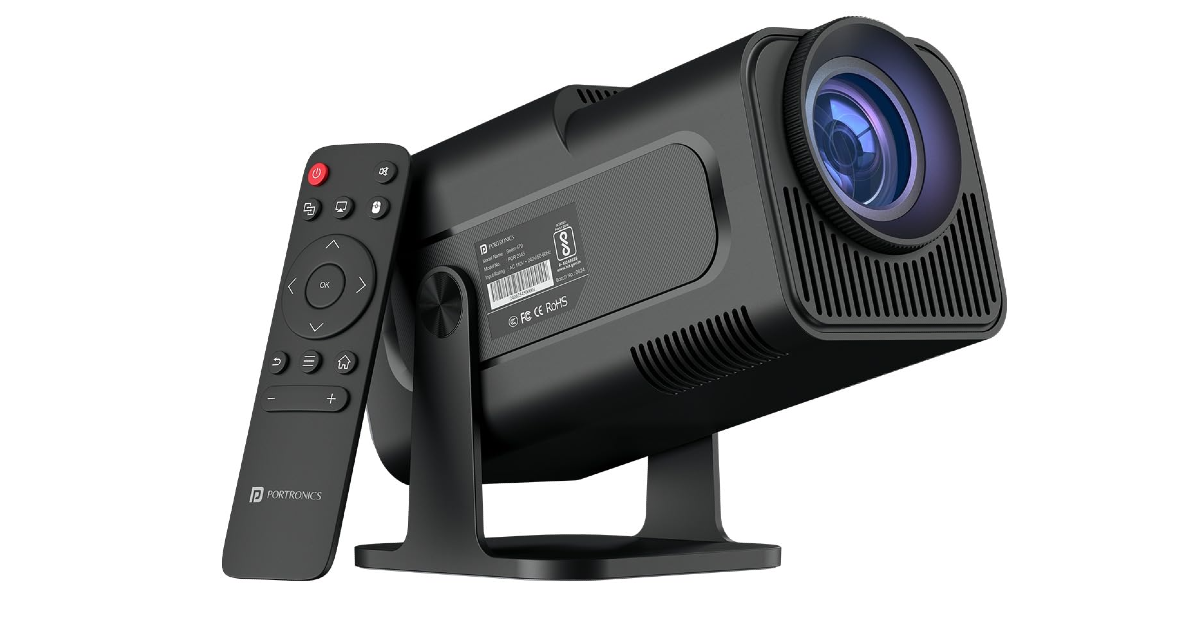
Portronics Beem 470 Smart LED Projector

Portronics Beem 470 Smart LED Projector Check out our list of the top 10 devices and gadgets for your living room.

A portable projector is the gadget you need to take the entertainment experience of your living room to another level. The Portronics Beem 470 Smart LED projector is the perfect blend of form and function. The best part is that it does not cost an exorbitant amount of money. This projector has a 1,920 x 1,080p resolution, which means it is capable of displaying HD footage. If your living room gets a lot of sunlight, the Beem 470’s 4,500 lumens of brightness will overcome it with ease. The screen size can be adjusted between 40-150 inches. The projector runs Android 11 OS and comes with streaming apps like Netflix, Prime Video, Disney+ Hotstar, and more.

Pros

  • Bright and clear images
  • Affordable

Buy on Amazon for Rs 10,299

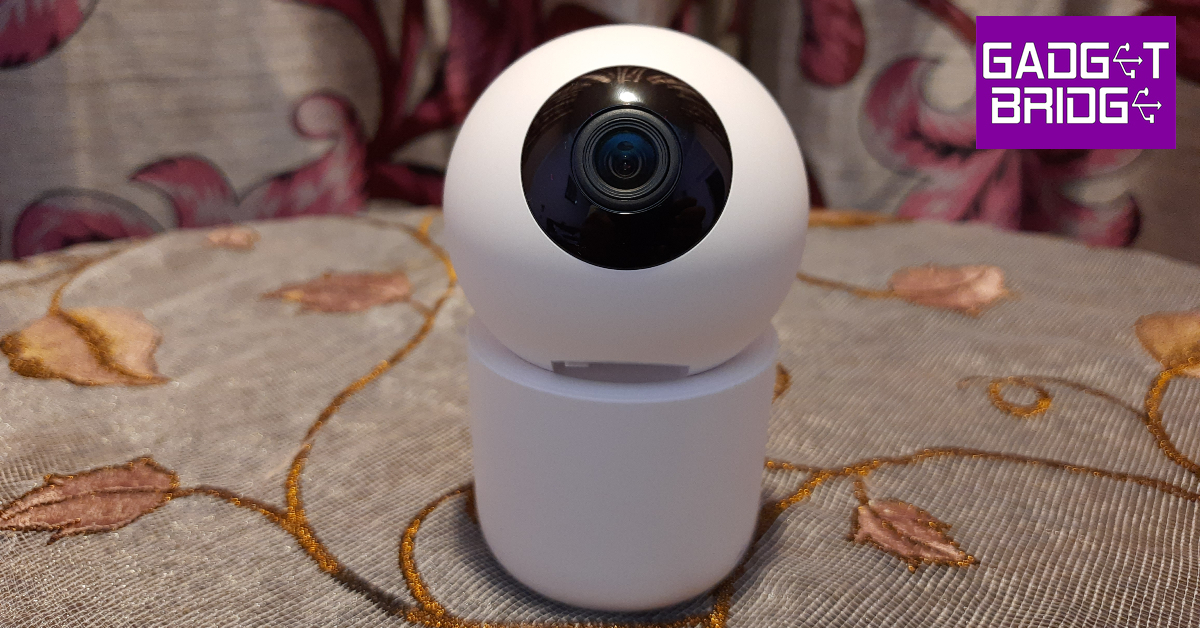
Philips HSP3500 Indoor Security Camera

Check out our list of the top 10 devices and gadgets for your living room.

We reviewed the Philips HSP3500 indoor security camera soon after it was launched and were very impressed by its clear footage and wide range of features. To begin with, you can place this camera on a flat surface or hang it upside-down from the ceiling. The camera orb has a speaker at the back to facilitate 2-way communication. The 3MP image sensor can record videos in 2304 x 1296p resolution. The camera can move horizontally and vertically. It is quick to notice movements and sends alerts on the Philips Home Safety app. With a 360-degree field of view, this gadget will keep an eye on every part of your living room.

Pros

  • 360-degree surveillance
  • Great app support

Buy on Amazon for Rs 2,799

Dreame F9 Pro Robot Vacuum Cleaner

Dreame F9 Pro Robot Vacuum Cleaner Check out our list of the top 10 devices and gadgets for your living room.

Entertainment and aesthetic needs aside, you need a gadget to efficiently clean your living room. The Dreame F9 Pro Robot Vacuum Cleaner is cut out for the job. Using LiDAR navigation, this device creates efficient cleaning routes that can get the cleaning done in the least amount of time. The LiDAR also helps it avoid obstacles and wires on the ground. The F9 Pro has a 570ml dust box to contain the dust and a 236ml water tank to help it mop. The Nidec brushless motor creates a powerful suction force that helps the robot clear the challenging dust and grime particles from the floor. You can choose from 4 suction levels and several cleaning modes using the Dreamehouse app. The robot packs a 3,200mAh battery and cleans up to 160 m² on a single charge.

Pros

  • Efficient cleaning modes
  • Big battery

Buy on Amazon for Rs 14,999

Asakuki Essential Oil Diffuser

Asakuki Essential Oil Diffuser Check out our list of the top 10 devices and gadgets for your living room.

The Asakuli essential oil diffuser is the perfect gadget to aromatise your living room. The diffuser lights up in 7 different colours to add to the ambience of the room. Apart from diffusing aromas, this device also serves as a humidifier. It combats dry air, allergens, dust, and bad smells all day. Its elegant design makes it an attractive fixture on coffee tables and bookshelves. You don’t need to stash it away in a corner to do its job.

Pros

  • Also serves as a humidifier
  • Elegant design

Buy on Amazon for Rs 1,999

Read Also: How to hide the app and widget labels on Samsung phones (One UI 7)

Final Thoughts

These are the top 10 gadgets and devices that we highly recommend buying for your living room. If you don’t want to buy a smart speaker or an expensive tower for your living room, you might want to take a look at the best portable Bluetooth speakers right now. If you have any questions, let us know in the comments!

Titan Valerie Review: Should you buy this watch?

For the festive season, Titan has unveiled the Crown Collection, a high-end smartwatch line for men and women in India. The range is made to go well with everyday workwear and festive and fashionable outfits. The Titan Maestro and Heritage are for men, and the Titan Elixir and Valerie are for women. This review will focus on the Titan Valerie for women, which we enjoy and wear often. Is purchasing this smartwatch a good idea? Let’s find out in this review:

Titan Valerie Review: Design

The Valerie’s starting price is Rs 9,995, and Titan’s Crown collection prices start at Rs 9,995 in India. This stunning Titan smartwatch features an 18mm mesh band and a round dial embellished with crystals. The firm also provides a spare silicone strap that may be replaced. The mesh stainless steel strap matched formal workwear and our traditional outfits. On the other hand, the silicone strap offers durability and goes well with both professional and casual outfits. However, the round shape and huge screen may appear oversized for some with thin wrists.

Titan Valerie Review: Design

It is the crown design that is most noticeable. It doesn’t look like the other smartwatches on the market.

There is a push-button clasp lock mechanism on the mesh strap. The case is 42.4 mm in length and 10.3 mm in thickness. The heart rate monitoring sensors are located on the back of the smartwatch, along with a charging connector. A speaker on the left side of the watch facilitates Bluetooth calling. With your watch, you can make and receive calls. Among many other things, you can reject calls, mute calls, change the volume, and view your favourite contacts.

Titan Valerie Review: Design

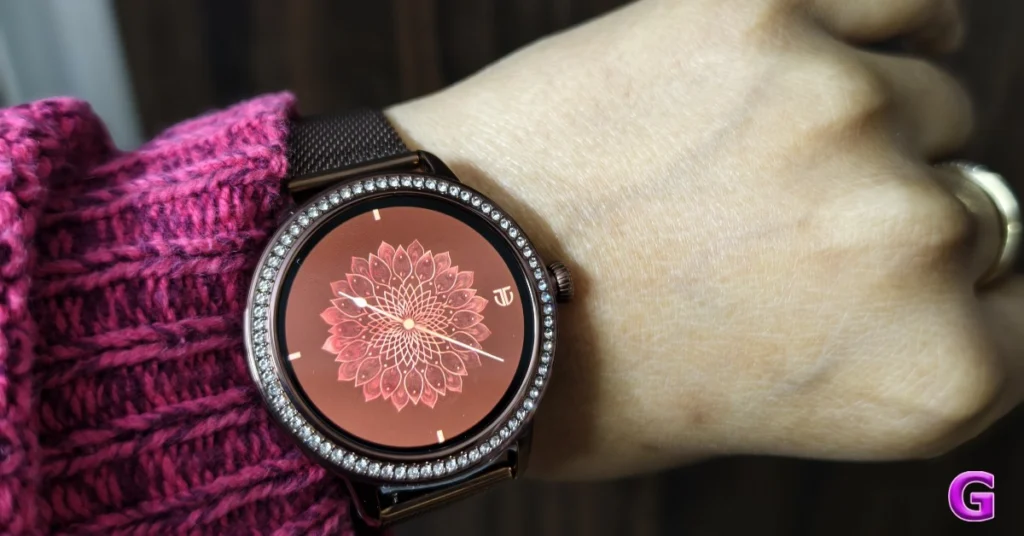
The Titan Valerie Premium Smartwatch has a premium, bright 3.04 cm AMOLED display and a stylish SS 316L stainless steel body. The AMOLED screen on the smartwatch also allows for an always-on display. The Titan smartwatch’s design is genuinely unique, and its premium appearance is enhanced by its stainless steel construction. It comes in two colour options: brown and rose gold. We were given the former for the review. It’s ideal for everyday wear because of its stylish design, metal bezel, and comfortable fit.

Review of Titan Valerie

The display has enough brightness and is tidy. There are no problems viewing the display because the brightness is good enough for daylight conditions. The absence of any apparent bezels on the display was the feature that most impressed us. The screen is clear and colourful. The content on the screen looks sharp and is free of pixelation. Additionally striking are the colours and contrast.

Titan Valerie Review: Design

The Titan watch’s dial crown does not work when rotated, but the touch can access the display. Pressing the rotatable crown activates the watch and displays the main menu. Swiping left or right on the main screen brings up the quick menu. The smartwatch’s navigation is less seamless than expected, with stutters and lags. Swipe down to quickly access settings. Sliding up opens the Notifications panel, swiping left to right opens the main menu, and scrolling right to left shows shortcuts.

Titan Valerie Review: Design

The quick menu allows you to easily access the fitness tracker, heart rate monitor, SpO2 monitor, sleep monitor, music settings, weather, and other features. Nonetheless, the display looks beautiful and provides adequate brightness in outdoor lighting settings. It also changes the face design of the present watch. There are six watch faces, and the Titan Smart World application provides plenty of alternatives. Furthermore, Titan branding will appear on the always-on and watch faces, making it stand out from the rest of the smartwatch lineup.

Review of Titan Valerie

Titan Valerie Review: Performance

The ‘Titan Smart World’ app is compatible with Android 12.0 and above, as well as iOS 11.0 and above. Download the app to your device and let it install.

The companion app’s user interface is quite simple and quick to navigate. The app’s dashboard provides your current day’s sleep, step, and multisport activity data. Your app’s dashboard allows you to view your ongoing tasks and your health summary, including sleep and heart rate.

A Community tab also allows you to compete against other Titan smartwatch users.

Review of Titan Valerie

With support for over 100 multisports, this Titan Valerie provides complete details on duration, calories burnt, and other activity parameters specific to your sport. The application’s “Edit Multisport” feature allows you to add certain sports.

Select ‘Heart Rate’ from the Main Menu to view and measure your heart rate. Additionally, this function shows complete information such as heart rate changes throughout the day. Additionally, you may see your heart rate patterns directly within your app.

Review of Titan Valerie

Tap on SpO2 from the Main Menu to see your oxygen saturation level. On your app, you can see the readings you’ve taken throughout the past 24 hours. Tap “Blood Pressure” from the Main Menu to get your blood pressure reading. The app allows you to view your readings from the last 24 hours.

Review of Titan Valerie

The watch has a “Stress” feature to assess and monitor your stress levels. You can view your detailed stress level trend on your app. You can track your sleep with the sleep monitoring feature on your watch. Your watch displays many metrics related to your sleep. On your smartphone, you can also see comprehensive sleep trends and scores.

Furthermore, women can use the Titan Smart World app to monitor their menstrual cycle and create a profile by registering as “female.” From the Health Suite, select “MyCycle” and accurately enter your information to receive alerts and full results.

Also Read: CMF Watch Pro 2 by Nothing Review: An efficient fitness tracker that doesn’t compromise on aesthetics

Additionally, this smartwatch has a voice assistant capability. Ask your inquiry by tapping on the watch screen, and your phone will show the answer.

On your watch, you also have complete control over your music. Simple taps can play, pause, or go to the next or previous music. You don’t have to look for your phone to change the volume.

Review of Titan Valerie

Furthermore, using your phone’s integrated camera, you may use your Titan Valerie watch to take pictures. To save your captured memories to your phone’s gallery, tap the camera icon on your watch.

One of the most crucial things that most of us monitor is the accuracy of step counts. While doing this, we actually counted steps and found that it was accurate. With exact step monitoring, this smartwatch is among the best available.

With the watch’s sleep monitoring capability, users may evaluate the quality of their sleep and set up sleep schedules according to their sleep habits. Accurate sleep pattern data is another feature of the watch. The monitoring is precise and offers insightful information on exercises and SpO2 levels.

Review of Titan Valerie

Additionally, you may measure your stress levels by selecting Stress from the Main Menu and logging stress by tapping your watch’s play/measure button. Alternatively, you can enable automatic stress monitoring in the app’s settings. In addition to your app, your watch would display your 24-hour stress readings. A reading would be taken by your watch every ten minutes.

Along with giving you all the information you need, the Titan Valerie lets you view your heart rate monitoring data over a day, week, or month. Regarding tracking, the smartwatch lets you keep an eye on your heart rate, which is reasonably accurate.

The Tital Valerie had a full week of battery life before running out of juice. Battery life was around two days when AOD was on. The best feature is that the battery only lost a few percentiles after being used for the entire day.

It takes roughly two hours for the gadget to charge with the magnetic adapter fully.

Also Read: Redmi Watch 5 Active Review: Back with a bang!

Verdict

Because of the AMOLED display, the colours are vivid and the blacks are deep. Titan Valerie is quite comfortable to wear, even while running or walking. It’s great that we didn’t experience any allergic reactions or skin discomfort while using it. The battery life is decent.

You may take calls straight from your smartwatch thanks to the call feature. Because the smartwatch has a reliable Bluetooth connection, you can receive notifications from many apps. The companion app is straightforward to use, and you won’t have any problems navigating it.

Review of Titan Valerie

Additionally, the new wristwatch allows you to make calls right from the watch without having to swipe through your phone and keep your favourite contacts.

To sum up, the Titan Valerie offers a compelling feature set for Rs 9,995. Samsung, Noise, and other companies will be fierce rivals of this Titan smartwatch given its price range.

Buy Here

Pros

  • Vibrant, bright display
  • Luxurious design
  • Comfortable
  • Almost accurate readings

Cons

  • Average battery life
  • Pricing is on the higher side. Popular brands like Amazfit, Noise, and others offer smartwatches at much lower prices.

Garena Free Fire Max Redeem Codes Today 28 January 2025: Here is how to claim them

Garena Free Fire Max is a battle royale game with regular awards and tournaments to keep players interested. If you play Garena Free Fire, you should be aware of the redeem codes that are released on a daily basis. However, because the battle royale game is banned in India, players from other countries can use the Free Fire Redeem codes daily. If you’re unfamiliar with the Garena Free Fire redeem codes or don’t know how to get them, we’ve put together a step-by-step guide to help you redeem them. Check out Garena Free Fire Max Redeem Codes for 28 January 2025.

The Free Fire Max redeem codes are a great way to get free stuff. These are 12-digit codes that contain alphabets and numbers, as well as an expiration date and time. Because the Garena FF redeem codes cannot be used more than once, you should hurry to the redemption page to claim your free reward before someone else does. To get a free reward, all you have to do is go to reward.ff.garena.com/en, which is the official redemption page. Also, keep an eye on this space for daily updates on Garena Free Fire Max redemption codes and rewards.

Also Read: Sennheiser Accentum Plus wireless headphones with Hybrid Adaptive Noise Cancellation launched

Garena Free Fire Max Redeem Codes Today 28 January 2025

ZRW3J4N8VX56

TFX9J3Z2RP64

FF9MJ31CXKRG

VNY3MQWNKEGU

U8S47JGJH5MG

FFIC33NTEUKA

ZZATXB24QES8

HFNSJ6W74Z48

RD3TZK7WME65

F8YC4TN6VKQ9

V44ZX8Y7GJ52

XN7TP5RM3K49

FFIC33NTEUKA

ZZATXB24QES8

WD2ATK3ZEA55

How to Get Free Fire Max Redeem Codes for Garena on 28 January 2025?

  • Visit the Garena Free Fire Max game’s official website at reward.ff.garena.com.
  • Use your Facebook, Google, VK, Apple ID, Huawei ID, or Twitter account to log in.
  • You’ll be taken to a valid redemption code (s)
  • Copy and paste the 12-digit redemption code into the text box.
  • On the screen, a dialogue box will appear.
  • ‘Ok’ should be selected.

For the latest gadget and tech news, and gadget reviews, follow us on Twitter, Facebook and Instagram. For newest tech & gadget videos subscribe to our YouTube Channel. You can also stay up to date using the Gadget Bridge Android App. You can find the latest car and bike news here.

NYT Wordle Answer and Hints Today (January 28)

Are you looking for today’s Wordle for January 28, 2025? The problem is difficult to solve, so if you need assistance, we’ve included hints and the answer to the January 28 Wordle.

Hints and Answers for Today’s Wordle January 28

Before answering directly, please check the January 28 Wordle Hints first.

Hint 1: Today’s Wordle answer includes one vowel.
Hint 2: The answer for today has a repeating letter.
Hint 3: To move a railway train from one track to another.

What word does today’s Wordle begin with?

Do you need help with today’s Wordle answer’s initial letter?

The first letter in today’s Wordle is “F”

Today’s Wordle Answer January 28 #1319

The answer to Wordle #1319 on January 28, 2025, is — FEVER

Also Read: Ranveer Allahbadia got his YouTube Channels back, videos restored

What is Wordle?

Wordle: A Five-Letter Word Guessing Game
• The game allows six guesses of a five-letter word.
• Provide feedback on guessed letters’ placement in the puzzle.
• The New York Times purchased the game in 2022.
• Created by Josh Wardle for his partner, narrowing down 12,000 English words to 2,500.
• Named after the word “word.”

How To Play Wordle?

Wordle is a New York Times word puzzle game that allows users to guess a five-letter word in six attempts. The letters are highlighted in Yellow and Green, indicating whether the word is present in the answer or not, and Green letters indicate the correct guess.

Also Read: Samsung Galaxy Tab S10+, Galaxy Tab S10 Ultra with Galaxy AI launched in India

Wordle Tips and Tricks

  • Select a powerful starting word: Avoid using unusual words, as they frequently do not match common letters. A good opening word has plenty of benefits.
  • Repeating letters: Don’t be afraid of repeating letters; they appear frequently in words. The answer may contain one or two repeated letters.
  • Use the Wordlebot: The NYT’s Wordlebot analyses and compares replies to itself. This challenge can assist you enhance guessing skills and highlight areas for development.

Amazon Quiz Answers Today 28 January 2025: Participate to win Up To Rs 500 Amazon Pay Balance

28 January 2025: New Amazon Quiz is now available. Customers from different parts of the country are participating in the daily quiz. The quiz starts at midnight today and will be live until 11:59 PM tonight. By successfully answering every question, participants in the quiz have the chance to win wonderful rewards. Up to Rs 500 Amazon Pay Balance is up for grabs to participants today.

One wrong answer could eliminate you from the quiz. You have a chance to win up to Rs 500 Amazon Pay Balance if you successfully answer every question. Users of the app only have the opportunity to take the quiz. Check Out 28 January 2025 Amazon Quiz Answers.

In This Article

Are you not able to find Amazon FunZone? Click below and participate.

Click here to enter the Amazon FunZone Quiz and play today.

Amazon Quiz Today Prize: Rs 500 Amazon Pay Balance

Quiz Date: 28 January 2025

Daily Timing: 12 AM to 11:59 PM

Previous Amazon Quiz Winners Announcement: Today 12 PM Noon

Amazon Quiz Answers Today 28 January 2025: Win Up To ₹ 500 Amazon Pay Balance

Question 1: Who beat Novak Djokovic in the final to win his 2nd consecutive Wimbledon men’s singles title?

Answer: Carlos Alcaraz

Question 2: In ‘Captain America” Brave New World’ scheduled to be released in 2025, which legendary actor plays the role of Thaddeus ‘Thunderbolt’ Ross?

Answer: Harrison Ford

Question 3: Which place in South India is also known as the ‘Scotland of India’?

Answer: Coorg

Question 4: This is a picture taken in which African country?

Answer: Morocco

Question 5: What is the name given to the profession of the man in the picture?

Answer: Gondoliere

How To Play Amazon Quiz Today

Only app users are eligible to play the Amazon quiz every morning from 12 AM to 11:59 PM. The quiz is not available on the desktop. For those who are unaware of how to play the Amazon quiz, below are the steps, you can follow to take the quiz.

  • First, download the Amazon app from the Google Play Store or App Store or go here to download the Amazon App
  • Now fill in the required information through the Sign-Up option.
  • To find the Amazon Quiz banner, log in to the Amazon app and scroll down to the home screen.
  • Tap on the Amazon Quiz banner and tap on the Start button to start the Quiz.
  • Now you will get 5 questions and you need to answer them correctly. One wrong answer will eliminate you from the Quiz.
  • After answering all the questions correctly you are now eligible for a Lucky Draw.
  • The previous winner’s name will be announced today at 12 PM.

Amazon Daily Quiz Answers from the previous few days.

Here are all the answers from the previous 5 days of the Amazon Daily Quiz and Contest.

Amazon Quiz Answers Today 27 January 2025: Win Up To ₹ 500 Amazon Pay Balance

Question 1: Achanta Sharath Kamal represents India in which sport?

Answer: Table tennis

Question 2: Which date is to be celebrated as Hyderabad Liberation Day?

Answer: 17-Sep

Question 3: In which sport did India win its first two medals at the 2024 Paris Olympics?

Answer: Shooting

Question 4: This painting was created in which historical period?

Answer: Renaissance

Question 5: Where is the headquarter of this brand in USA?

Answer: Atlanta

Amazon Quiz Answers Today 26 January 2025: Win Up To ₹ 500 Amazon Pay Balance

Question 1: Achanta Sharath Kamal represents India in which sport?

Answer: Table tennis

Question 2: Which date is to be celebrated as Hyderabad Liberation Day?

Answer: 17-Sep

Question 3: In which sport did India win its first two medals at the 2024 Paris Olympics?

Answer: Shooting

Question 4: This painting was created in which historical period?

Answer: Renaissance

Question 5: Where is the headquarter of this brand in USA?

Answer: Atlanta

Amazon Quiz Answers Today 25 January 2025: Win Up To ₹ 500 Amazon Pay Balance

Question 1: In 2024, who became the youngest person to win two Oscars?

Answer: Billie Eilish

Question 2: The D. B. Patil International Airport is located in which place?

Answer: Navi Mumbai

Question 3: Which country had the first-ever married couple to serve as flag bearers at the Paris Olympic Opening Ceremony?

Answer: Romania

Question 4: When was this app launched?

Answer: 2011

Question 5: Which is the smallest monkey in the world?

Answer: Pygmy marmoset

Amazon Quiz Answers Today 24 January 2025: Win Up To ₹ 500 Amazon Pay Balance

Question 1: Complete the title of this 2024 film: “Chhota Bheem and the Curse of ________”.

Answer: Damyaan

Question 2: What regal title does Yaduveer Krishnadatta hold?

Answer: Maharaja of Mysore

Question 3: Which John Lennon and Yoko Ono song has been sung at six Olympic Opening Ceremonies, including Paris 2024?

Answer: Imagine

Question 4: Who is the architect of this cathedral?

Answer: Filippo Brunelleschi

Question 5: In the English edition of this game, how many word tiles are there?

Answer: 100

Amazon Quiz Answers Today 23 January 2025: Win Up To ₹ 500 Amazon Pay Balance

Question 1: As per Guinness World Records, which national flag is the world’s oldest and longest-running flag?

Answer: Denmark

Question 2: Name this largest and most powerful rocket ever flown.

Answer: Starship

Question 3: Which of the major planets of our solar system is named for a Greek god, not Roman?

Answer: Uranus

Question 4: Which candy brand was the first to go to space?

Answer: M&M

Question 5: The character of Spock in Star Trek is from which planet?

Answer: Vulcan

Amazon Quiz Answers Today 22 January 2025: Win Up To ₹ 500 Amazon Pay Balance

Question 1: The iconic Air India building at Nariman Point was handed over to which state government?

Answer: Maharashtra

Question 2: Which country topped the list of UN’s Human Development Index?

Answer: Switzerland

Question 3: Which Hollywood superstar portrays the role of MMA legend Matt Kerr in the biopic ‘The Smashing Machine’?

Answer: Dwayne Johnson

Question 4: Which sport first appeared in the Winter Olympics in 1936?

Answer: Alpine skiing

Question 5: This brand is the largest sportswear manufacturer in which continent?

Answer: Europe

Amazon Quiz Answers Today 21 January 2025: Win Up To ₹ 500 Amazon Pay Balance

Question 1: Which film is based on Mstyslav Chernov’s daily news dispatches and personal footage of his own country at war?

Answer: 20 Days in Mariupol

Question 2: Ae Watan Mere Watan’ is inspired by which freedom fighter, instrumental in founding the underground Congress Radio?

Answer: Usha Mehta

Question 3: Which Indian musician’s biography, written by Oliver Craske, is titled Indian Sun?

Answer: Ravi Shankar

Question 4: Which Roman Emperor was fond of this fruit?

Answer: Tiberius

Question 5: In the beginning, what was this system called?

Answer: Navstar

Amazon Quiz Answers Today 20 January 2025: Win Up To ₹ 500 Amazon Pay Balance

Question 1: Which director won his first directing Oscar in 2024?

Answer: Christopher Nolan

Question 2: Jane Fraser is the current CEO of which bank?

Answer: Citigroup

Question 3: Which Asian country’s passport has been rated the most ‘powerful’ in the world for 2024, according to the Henley Index?

Answer: Singapore

Question 4: Which state is the largest producer of this?

Answer: Maharashtra

Question 5: Which was the first country to make this drink?

Answer: France

Amazon Quiz Answers Today 18 January 2025: Win Up To ₹ 500 Amazon Pay Balance

Question 1: The Tata Steel Chess tournament played in the classical format is being held in which country?

Answer: Netherlands

Question 2:

The show ‘Criminal Justice’ stars which actor in the central character of lawyer Madhav Mishra?

Answer: Pankaj Tripathi

Question 3: The Amroha Dholak is a musical instrument from which state that got a GI tag in 2023?

Answer: Uttar Pradesh

Question 4: This ancient temple is located in which country?

Answer: Egypt

Question 5: This statue is located at which famous educational institution?

Answer: IISC Bangalore

Amazon Quiz Answers Today 17 January 2025: Win Up To ₹ 500 Amazon Pay Balance

Question 1: Which of these West Indies bowlers took the wicket of Steve Smith with his first ball in Test cricket?

Answer: Shamar Joseph

Question 2: At the 2024 Emmy Awards which series won the award for Best Drama Series?

Answer: Succession

Question 3: Sharmistha Mukherjee has recently written a book titled ‘_____ My Father: A Daughter Remembers’. Fill in the blanks

Answer: Pranab

Question 4: Name the famous freedom fighter, whose statue is in the middle

Answer: Bhagat Singh

Question 5: Name this famous person who had cameos in several Marvel movies

Answer: Stan Lee

Amazon Quiz Answers Today 16 January 2025: Win Up To ₹ 500 Amazon Pay Balance

Question 1: Which former champion did Caroline Garcia knock out in the first round of the 2024 Australian Open?

Answer: Naomi Osaka

Question 2: Lily Gladstone won the ‘Best female actor in a film- drama’ at the 2024 Golden Globes for which film?

Answer: Killers of the Flower Moon

Question 3: Nigar Shahji is the project director of which ISRO mission that was launched on 2nd September, 2023?

Answer: Aditya- L1

Question 4: In which city is this famous museum located?

Answer: Bilbao

Question 5: This famous shoe brand was founded in which country?

Answer: Germany

Amazon Quiz Answers Frequently Asked Questions (FAQs)

Where can I check the previous winners? Did I win how to check?

You can head over to this link on your mobile or desktop to check the winners of the Amazon Daily Quiz Contest.

How to Play Amazon Daily Quiz or Contest?

We have written an explainer above, you can refer to that.

When are the winners of the Amazon Quiz and contest announced or declared?

The announcement of today’s Amazon quiz winner will take place Tomorrow. As for the Special Quiz and “Spin & Win” Contest, the winners will be declared once the Quiz Contest comes to an end. To find out who the lucky winner is, you can refer to the Amazon Quiz Winners List or visit the Amazon Winners tab in the Amazon App.

How to participate in the Daily Amazon Quiz?

That is very easy, just got to the Amazon app and scroll to the bottom of the page and you will find the Quiz section. Click on it (usually it is called the fun zone) and you can enter the Amazon Today Quiz Contest. 

Are there any other quizzes or contests running on Amazon daily?

Yes, there are many running on a daily basis. These range from spinning the wheel to answering the questions correctly. All are located in the Fun Zone. 

What are the criteria for selecting a winner in the Daily Amazon Quiz?

When a qualified player submits correct answers to all the questions, they will automatically be entered into a lucky draw. This draw will include all participants who answered all the questions correctly. Amazon randomly selects the final winners from the pool of eligible participants who gave the right answers.

Which Types of Questions are asked within Amazon Daily Quiz?

These are very simple and straightforward questions. These are mainly related to general knowledge. 

Where should I look for Amazon Daily Quiz answers?

You can bookmark our website www.gadgetbridge.com as we will help you every day with the Amazon Daily Quiz. We bring you fresh answers every day for the Amazon Daily Quiz and Contest. 

What time does Amazon Announce previous winners?

The previous winner’s name will be announced today at 12 PM (noon).
How to Use AI Paraphrasing Tools for Improved Writing and Creativity?

As a writer, I have discovered that AI paraphrasing tools greatly enhance my work and foster my originality. These tools are a terrific method to reword concepts and improve the sound of my writing, whether I am working on emails, blog pieces, or even creative writing. Allow me to explain how I utilize them to improve the impact and appeal of my work.

What is an AI Paraphrasing Tool?

To put it simply, an artificial intelligence (AI) paraphrase tool assists in rewriting sentences and paragraphs while preserving their meaning. Artificial intelligence is used as a tool to comprehend context and recommend different words. For me, it is perfect when I want to avoid repetition or when I am struggling to express a thought clearly. I have even used them to give my writing a fresh twist.

I remember struggling with a blog post about technology once. My ideas were there – but the writing felt stiff. Using a paraphrasing tool helped me reword sentences, making the blog flow better and sound more natural.

Why I Use AI Paraphrasing Tools

Over time, I realized that AI paraphrasing tools aren’t just for fixing awkward sentences—they are a great way to spark creativity. When writing about a familiar topic – the tool helps me think of new ways to present my ideas. Instead of sticking to my first draft, I can use the AI to suggest new phrasing, giving me a wider range of expression.

Another reason I love using paraphrasing tools is the time they save. When I am on a tight deadline – they help me quickly generate alternatives for a sentence or paragraph. This way, I can keep the momentum going without getting stuck on one line for too long.

How to Use AI Paraphrasing Tools Effectively

I have learned that using these tools wisely is key.

First, I write a rough draft. Once I have got my ideas down – I run my sentences through the paraphrasing tool. If something feels awkward or too formal, the AI suggests alternative ways to phrase it. The AI detector can also spot areas where the rewording needs adjustment to ensure the content remains natural.

The best part of using AI paraphrasing tools is that they do not just replace words—they can also simplify complicated sentences, making my writing clearer and more readable. For example – if I am explaining a technical concept – the tool can suggest simpler ways to get the point across.

AI Paraphrasing Tools for Creativity

Sometimes, when I face a roadblock – the AI paraphrasing tool acts as a brainstorming partner. I will input a sentence or paragraph, and the tool provides several options. Some of these are great – while others need tweaking – but they help me think in new directions.

I recall once working on a marketing campaign and struggling to find the right catchy phrase. I used the paraphrasing tool – and within minutes – I had a few creative suggestions that were better than what I had initially thought.

Caution – AI Detector and Authenticity

Of course, it is important to use these tools in moderation. Relying too much on AI can make your writing sound mechanical. AI detectors can sometimes identify when a sentence has been rewritten by a tool. That’s why I always review the paraphrased text to make sure it still sounds like me and conveys my message authentically.

Final Thoughts

AI paraphrasing tools are now a vital part of my writing process. They help me improve clarity, save time, and spark creativity. Whether you are a professional writer or just starting out, these tools can be incredibly helpful. Just remember to use them as a supplement to your own ideas – not a replacement for them. With the right balance – they can make your writing more efficient and creative.

How to hide the app and widget labels on Samsung phones (One UI 7)

0

Samsung’s One UI 7 was launched alongside the Galaxy S25 series last week. The mobile operating system is now being rolled out on eligible devices in a phased manner. While AI features are bound to grab the headlines, One UI 7’s design tweaks have flown under the radar. The OS gives users more control over the aesthetic of their device. Let’s take a look at how you can hide the app and widget labels on Samsung phones updated to One UI 7.

Read Also: iQOO Neo 10R confirmed to arrive in India soon: Expected price and specs

Before you begin

Last year, Apple introduced the feature to hide app names on iOS 18. If you want to hide the app names from your iPhone’s home screen, you will need to increase the size of the app icons. On Samsung phones, you don’t need to do any such thing. One UI 7 has a dedicated option to remove the app labels without changing the icon size. Earlier, this was only possible through third-party launchers like Nova or Samsung’s customisation app, Good Lock.

One UI 7 also brings new changes to the Quick Settings Menu. The new layout is inspired by the Control Centre on iPhone. Swiping down on the status bar now reveals the notification shade. The Quick Settings Menu can only be accessed by swiping from the top right corner of the screen. If you don’t like this change, you can also restore the Quick Settings Menu to its previous layout.

Hide app and widget labels on Samsung (One UI 7)

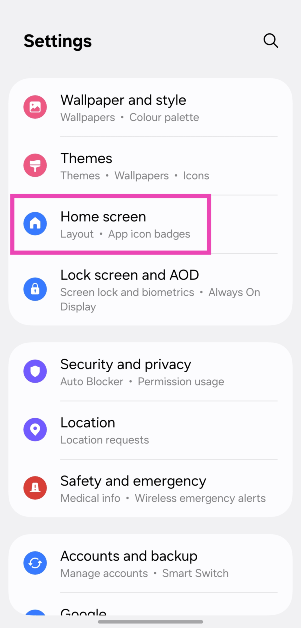
Step 1: Go to Settings.

Step 2: Tap on Home screen.

Step 2: Tap on Home screen.

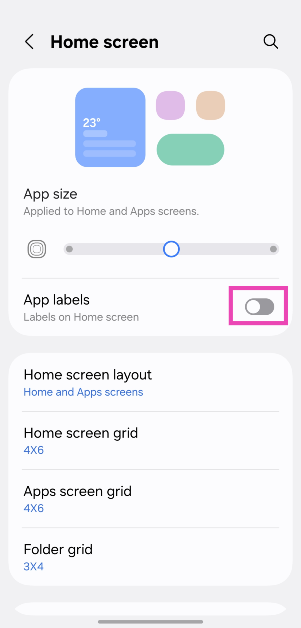
Step 3: Turn off the toggle switches next to App labels and Widget labels.

Step 3: Turn off the toggle switches next to App labels and Widget labels.

Bonus Tip: Hide app labels on an iPhone (iOS 18)

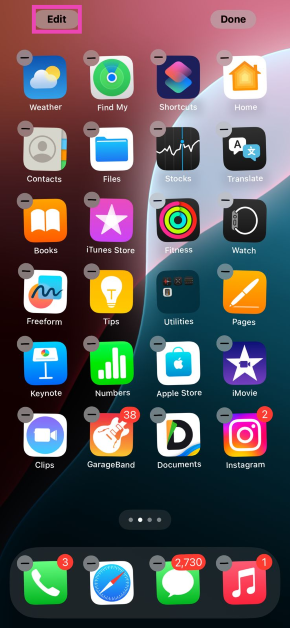
Step 1: Long-press an empty spot home screen until you see the shaking icons.

Step 2: Hit Edit on the top left corner of the screen.

Step 3: Hit the Edit option in the top left corner of the screen. How to hide the app and widget labels on Samsung phones (One UI 7)

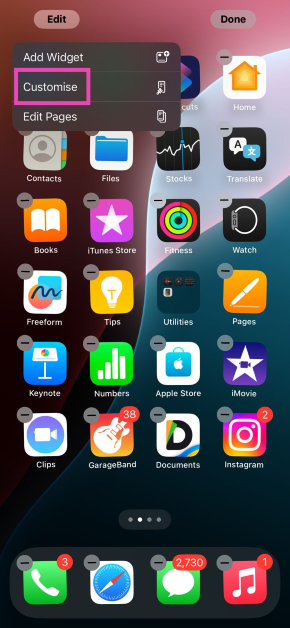
Step 3: Tap on Customise.

Step 4: Tap on Customise. How to hide the app and widget labels on Samsung phones (One UI 7)

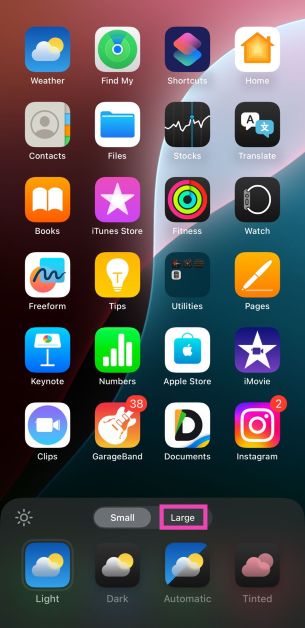
Step 4: Select Large.

Step 5: Select Large. How to hide the app and widget labels on Samsung phones (One UI 7)

Step 5: Tap anywhere on the screen.

Frequently Asked Questions (FAQs)

How do I remove app titles in Android?

Apart from Samsung, no Android OEM offers the option to remove app titles. You will need to use a third-party launcher like Nova to hide the app names.

How do I hide app labels on Samsung?

Go to Settings>Home screen and turn off the toggle switch next to App labels.

How do I hide the app names on my iPhone?

iOS 18 hides the name of the apps on the home screen if you increase the icon size. Long-press any empty spot on the home screen, tap ‘Edit’, and hit ‘Large’ to hide the app names.

Has the One UI 7 been released?

Samsung launched the Android 15-based One UI 7 alongside the new Samsung Galaxy S25 series. The OS is being rolled out on older Samsung smartphones, starting from the flagship S24 series.

Will the S23 Ultra get One UI 7?

Yes, One UI 7 will be rolled out for the Samsung Galaxy S23 series (including the S23 Ultra) in the coming days.

Read Also: Xiaomi Pad 7 Review: A relentless workhorse

Final Thoughts

This is how you can hide the app and widget labels on your One UI 7-running Samsung phone. Not fond of the vertical app drawer on One UI 7? Check out how you can restore it to its previous version. If you have any questions regarding One UI 7, let us know in the comments!

Nothing’s new phone arriving on March 4, likely Nothing Phone 3

Nothing plans to launch a new device in the first week of March, maybe the Nothing Phone 3 or Phone 3a. The company has released a teaser video revealing the rear panel of the new smartphone, which is likely to be available in India through Flipkart. The gadget could launch with Nothing OS 3.1, which is based on Android 15.

Nothing has announced to launch a brand new product on March 4. The event, called “Power in Perspective,” is scheduled to begin at 10 AM GMT (3:30 PM IST). Additionally, to hint at the release of a new Nothing product, the company has made a special landing page on Flipkart.

The Glyph interface’s rear camera is shown in the teaser video; it will probably be presented during the 2025 Mobile World Congress.

Nothing has shared a number of smartphone design sketches on X recently, with the term “WIP” possibly denoting work in progress. A phone with a transparent back panel and screws is partially shown in the first sketch; it appears to have a dual rear camera unit and a transparent design, which has come to represent the brand in recent years.

Also Read: iQOO Neo 10R confirmed to arrive in India soon: Expected price and specs

The back cameras of the upcoming phone are suggested by a sketch that shows two circles in a horizontal pill-shaped structure that resembles the camera unit of Nothing Phone 2a versions. It is unclear, meanwhile, if the gadget will use the company’s iconic Glyph interface because the complete rear cover is not visible.

According to a leaked email from a company official in the UK, the Nothing Phone 3 would be available in the first quarter of 2025. This follows speculations that the British OEM will release three smartphones in 2025.

Also Read: Comparison: Samsung Galaxy S25 Ultra Vs Galaxy S24 Ultra

Evan Blass shared an alleged email from Nothing’s CEO, Carl Pei, describing the company’s 2025 successes and patents. The email claims to have four billion global users and to be the fastest-growing brand in the audio and smartphone industries. Pei claims to have boosted its software and camera teams by half. The email also mentions a “landmark” launch and the confirmation of Nothing’s next flagship phone, the Nothing Phone 3, which is scheduled to replace the Nothing Phone 2 and launch in the first quarter of 2025.

iQOO Neo 10R confirmed to arrive in India soon: Expected price and specs

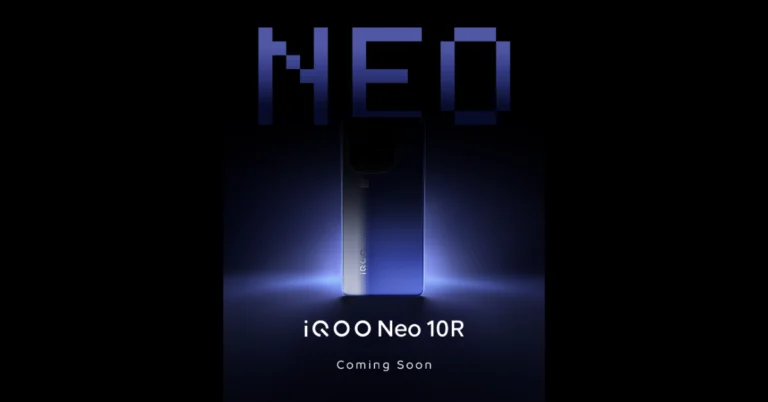
In India, iQoo is prepared to introduce the iQOO Neo 10R, a new smartphone. However, the company has not yet revealed when the upcoming smartphone will be arriving in India. Just so you know, the iQoo will be the first smartphone in the latest ‘R’ series.

iQOO Neo 10R is soon arriving in the Indian market. The launch date and specs of the upcoming phone is yet to be confirmed. It’s interesting to note that the company’s impending launch will offer the nation’s first R-series smartphone. The device is said to come with “major upgrades in processor and battery—delivering the ultimate power-packed experience you’ve come to expect.” It is slated to be aimed at students looking to make a statement with their smartphones. Moreover, the device will bring “unmatched performance, enduring battery life, and a design that turns heads.”

Also Read: Comparison: Samsung Galaxy S25 Ultra Vs Galaxy S24 Ultra

It is anticipated that the iQOO Neo 10R would have a 1.5K AMOLED screen with a fast refresh rate of 144 Hz, enabling 4K binge-watching. With a 6,400mAh battery and support for 80W fast charging, the iQOO Neo 10R is anticipated to be a major upgrade over the iQOO Neo 9 series.

The iQOO Neo 10R will be priced under Rs 30,000 and will be powered by the Qualcomm Snapdragon 8s Gen 3 CPU, according to Amazon.

Previous leaks indicate that the iQOO Neo 10R, model number I2221, with a 6.78-inch AMOLED display, 8/12GB RAM, and 256/512GB storage, will be released in India.
It is predicted that the iQOO Neo 10R will have a 16MP front camera, an 8MP ultra-wide angle lens, and a 50MP Sony LYT 600 primary camera. It is going to be offered in Lunar Titanium and Blue White Slice.

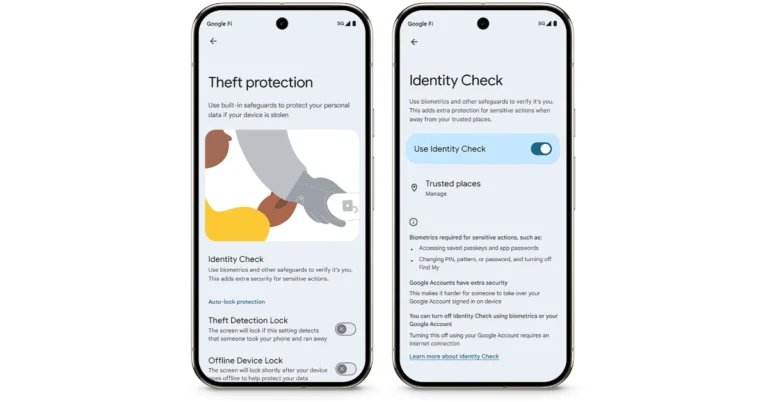
Also Read: Google rolls out theft protection with identity check features for Pixel and Samsung One UI 7 devices

The remaining features and specifications are still unknown. It’s unclear if the iQOO device will be the lone one or if it will be a part of the Neo 10 series when it launches in India next month. The iQOO Neo 10 and Neo 10 Pro were rumoured to be released at the same time. They made their debut in China last year.

Xiaomi Pad 7 Review: A relentless workhorse

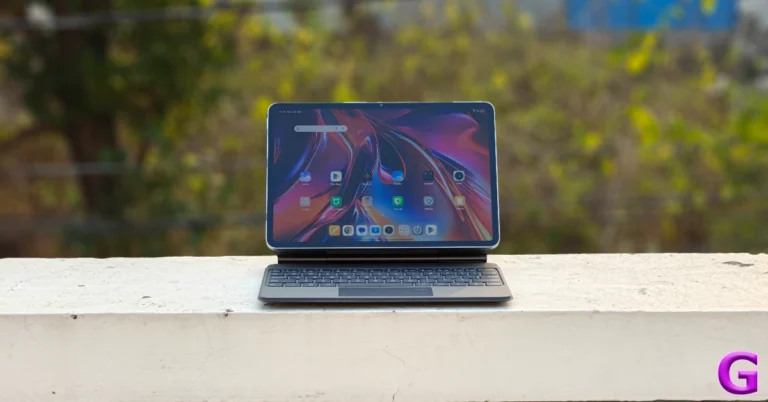
2024 was a relatively quiet year for Xiaomi when it came to tablet releases. While its subsidiary brand, Redmi, came out with the Pad Pro and Pad SE, the parent company rode the high of the 2023 Pad 6. In the current landscape, if you don’t refresh your product annually, it runs the risk of being forgotten. While we enjoyed the Xiaomi Pad 6 back in 2023, it felt dated in the very next year as Xiaomi offerings shifted to the next-gen HyperOS soon after. The new Pad 7 puts Xiaomi back on top of the midrange Android tablet segment. It gets a slightly bigger and brighter display along with a more powerful chipset. We got our hands on the tablet earlier this month and have been using it for work and entertainment (but mostly the latter) ever since. Here is our in-depth review of the Xiaomi Pad 7.

Read Also: Western Digital Unveils the WD Blue SN5000 NVMe SSD in India

Xiaomi Pad 7 Review: Design and Display

Here’s what you get inside the Xiaomi Pad 7’s retail box:

  • Tablet
  • 45W power adapter
  • USB Type-A to Type-C cable
  • Quick start guide

Xiaomi Pad 7 Review: Design and Display

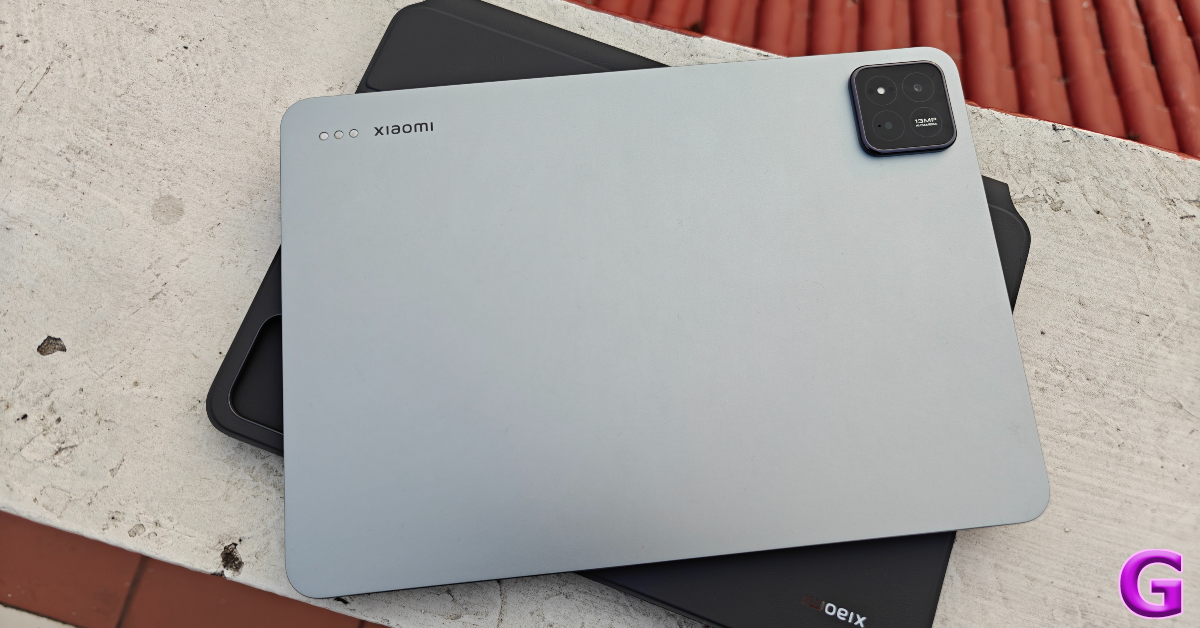
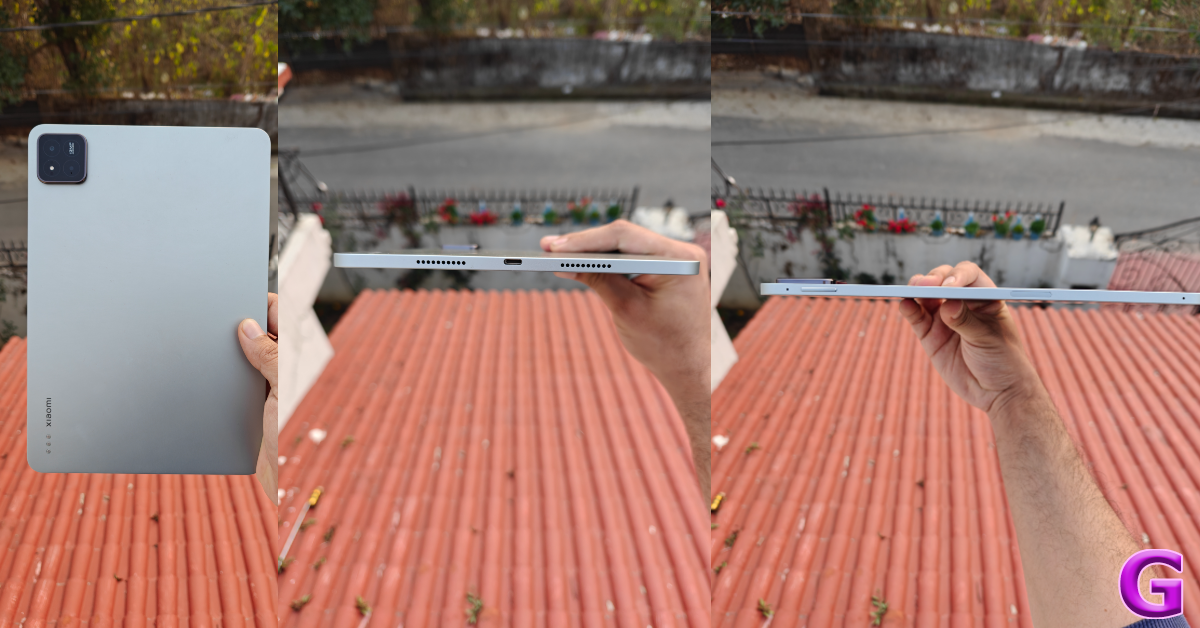
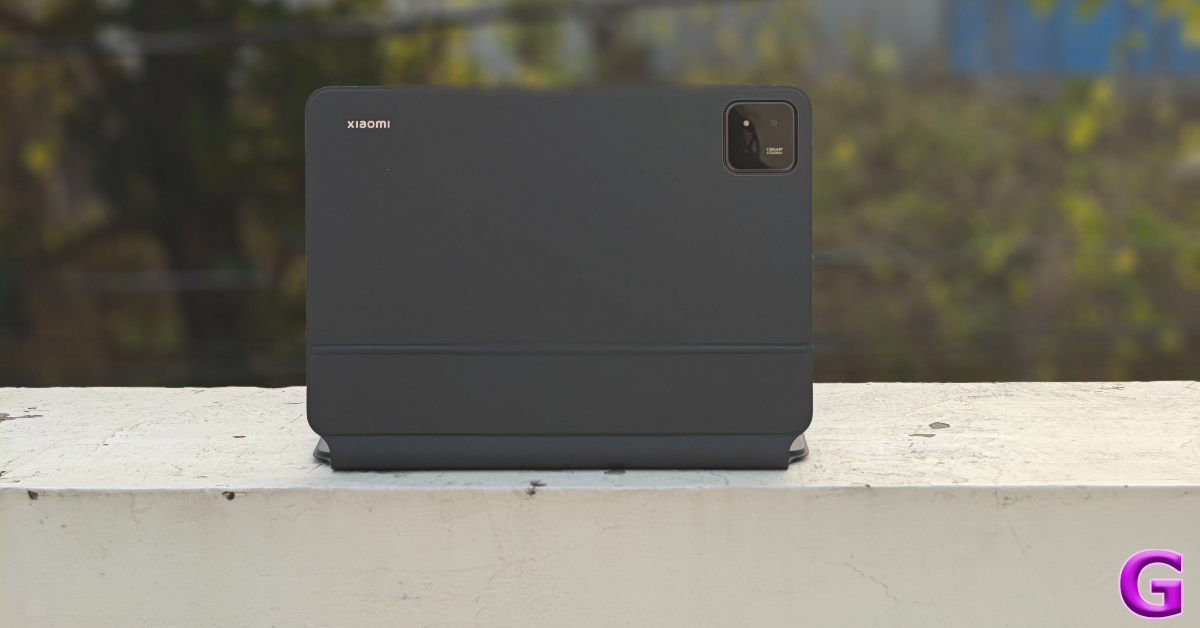
Xiaomi Pad 7 follows the design language of its predecessor. There are minor tweaks on the rear camera island as it looks more like the array on Xiaomi 14. There is only one camera sensor on the tablet’s camera island, even though it is designed to look like it holds multiple lenses. The metal back panel feels very premium, just like the Pad 6. The magnetic pogo pins are positioned on the top-left corner of the panel.

design

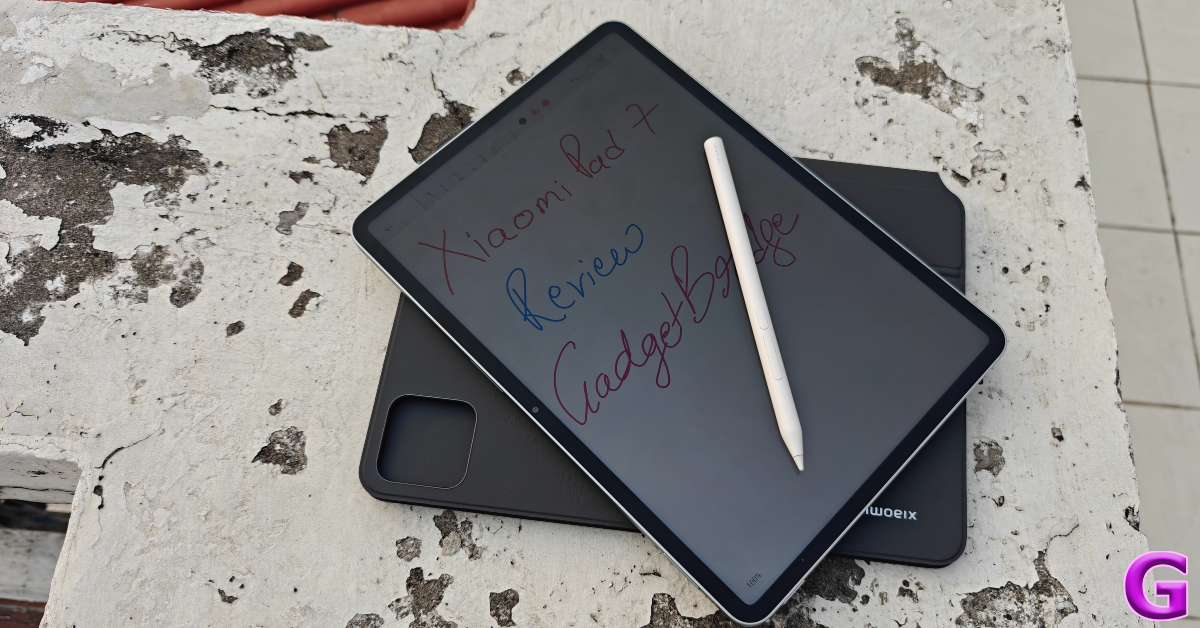
The flat aluminium frame holds a total of 4 speaker outlets on its side edges. The side key is placed on the left edge while the USB port sits between the speaker grilles on the right edge. The volume rocker keys along with the magnetic strip for the Focus Pen make their way to the top rail. There is still no fingerprint sensor (even a side-mounted one) on Xiaomi’s midrange tablet.

Xiaomi Pad 7 Review: Design and Display

The Pad 7’s display is slightly larger than the previous model, spanning 11.2 inches diagonally. The IPS LCD panel has a 144Hz refresh rate and can reach 800 nits of brightness. The display reaches an optimum brightness in indoor settings but struggles under intense sunlight. However, the response rate of this panel is phenomenal.

display

We streamed TV and movie titles across major OTT apps like Netflix and Prime Video on the Xiaomi Pad 7 during the review period. For an LCD panel, the display produces rich and detailed images. While you will miss the deep blacks from AMOLED panels, this display makes up for it with punchy colours and sharp images. The quad-speaker setup produces a loud audio output that’s enough to fill the room. There’s a nice low-end to the audio which gives a fuller texture.

Xiaomi Pad 7 Review: Performance and Cameras

Xiaomi Pad 7 is powered by the midrange Snapdragon 7+ Gen 3 SoC. This chipset is built on a 4nm process. The tablet is available in 2 RAM + Storage variants:

8GB (LPDDR5X) + 128GB (UFS 3.1): Rs 27,999

12GB (LPDDR5X) + 256GB (UFS 4.0): Rs 30,999

The higher RAM and storage variant is also available with a Nano Texture Display at a premium of Rs 2,000.

geekbench

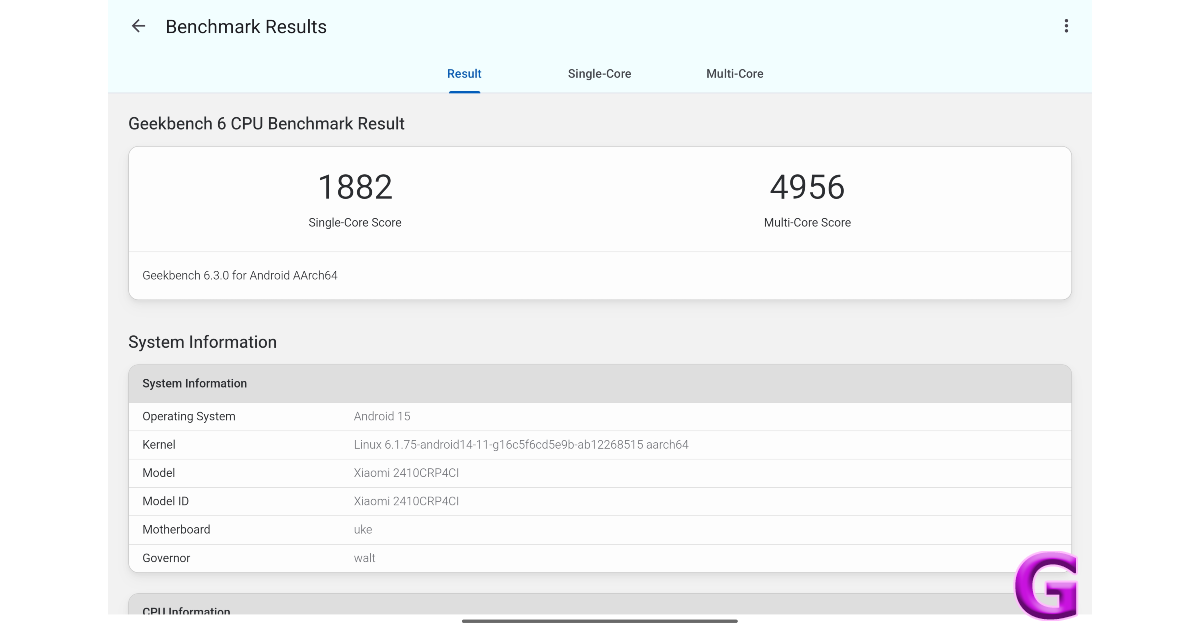
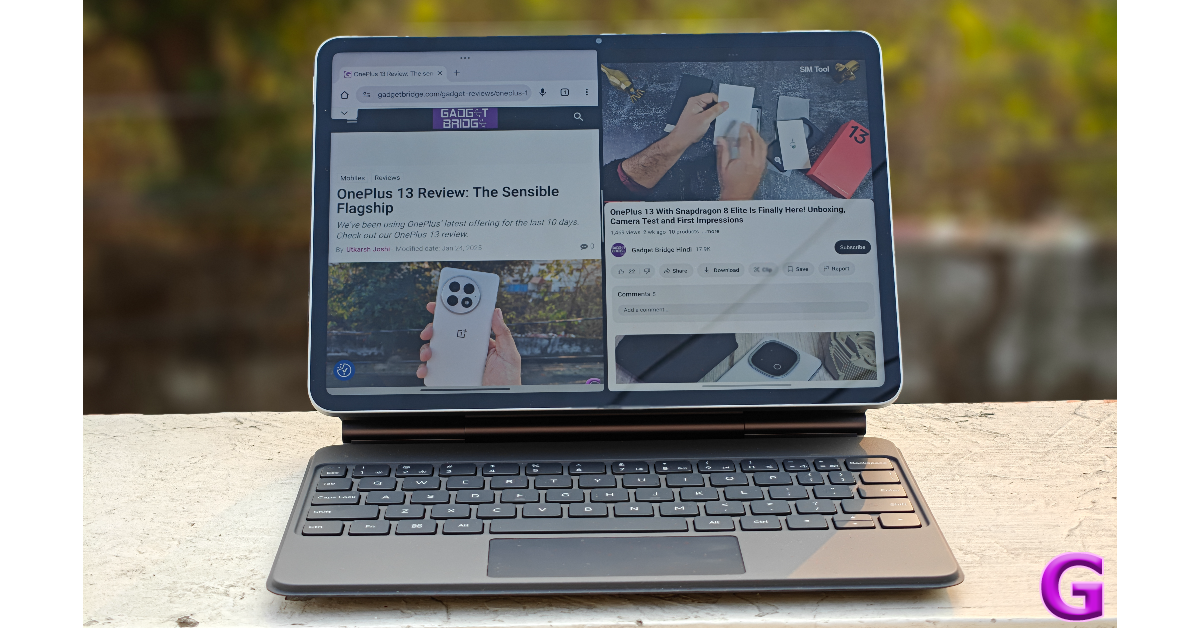
On the Geekbench 6 app, the tablet scored 1,882 points in the single-core test and 4,956 points in the multi-core test. It does a good job of handling routine tasks like media streaming, video calling, social media browsing, navigation, and more. However, power-demanding tasks like photo and video editing can hit the odd snag. Sharing the screen with multiple apps presents no hassles whatsoever. Streaming live football on Hotstar and keeping up with the match thread on Reddit was an enjoyable experience on the Xiaomi Pad 7.

Xiaomi Pad 7 Review: Performance and Cameras

The Xiaomi Pad 7’s gaming experience is fine when you stick to medium graphics and a 60fps frame rate. The tablet does a good job of managing its internal temperature and limiting throttling. However, most gaming titles on Android tablets are still not optimised well enough for the larger screen. They are essentially smartphone apps stretched out to fill the screen. We’d like to see developers design in-game touch controls that are more suited to a tablet’s form factor.

software

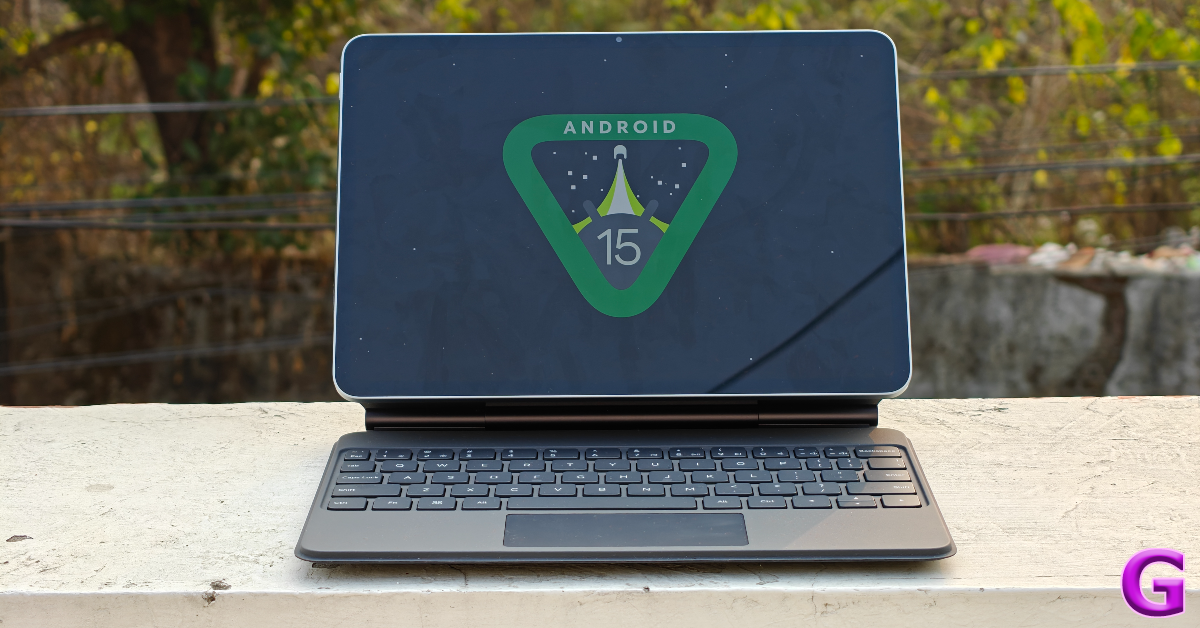
Xiaomi Pad 7 runs the Android 15-based HyperOS 2 out of the box. The HyperOS experience on the tablet is similar to its smartphone version. Xiaomi has added a new ‘Workstation’ feature for tablets that allows the user to open up to 4 apps in floating windows to boost productivity. Traditional features like split-screen and picture-in-picture modes work seamlessly on this device. There is a good range of customisation options for the lock screen, home screen, and app drawer. The lack of bloatware ensures a ‘clean’ software experience out of the box.

keyboard folio case

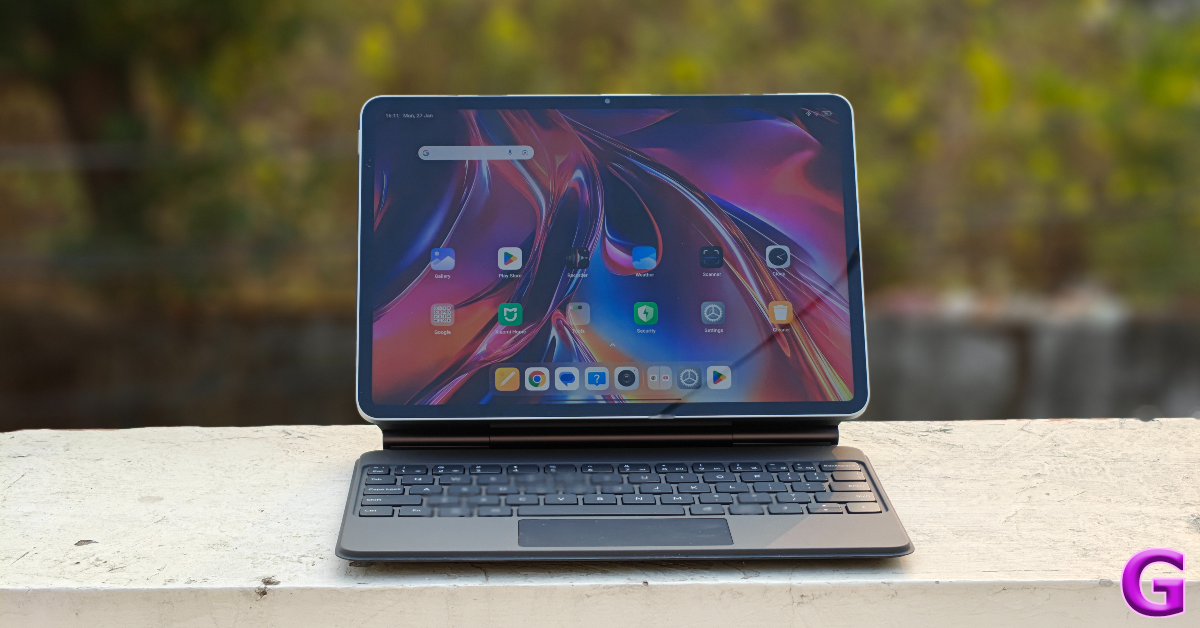
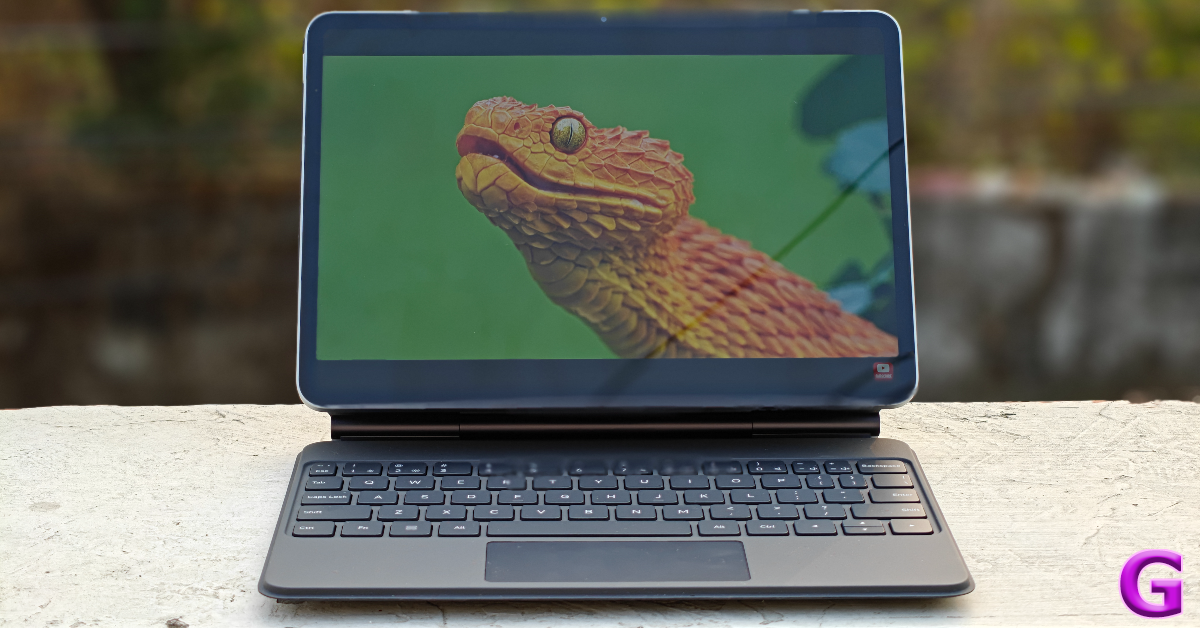
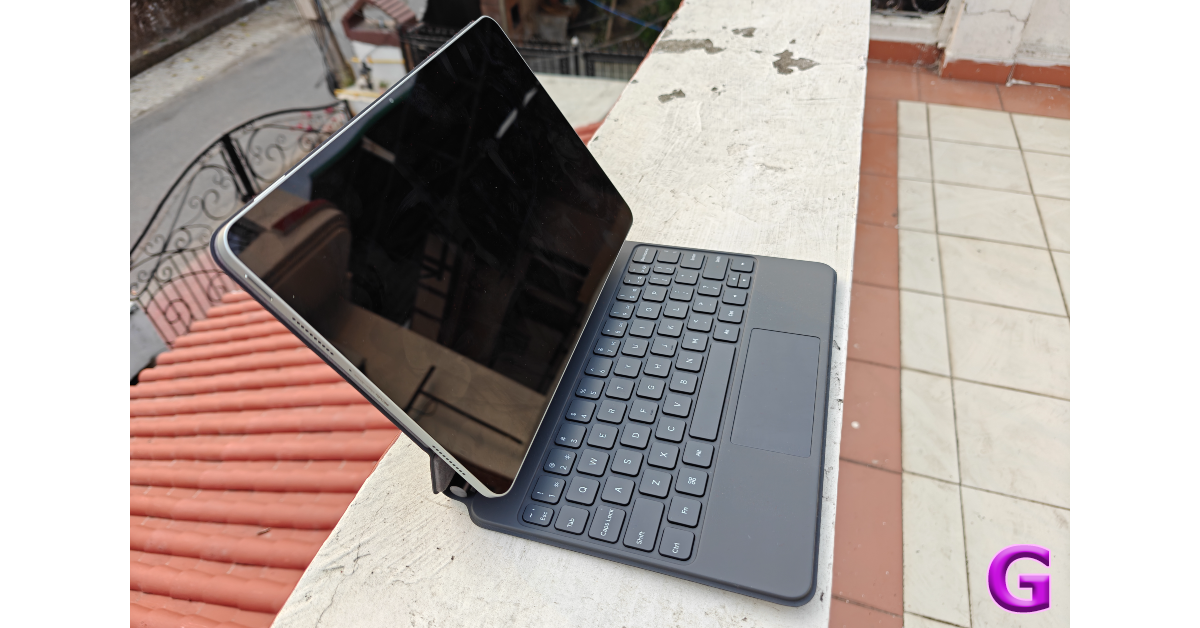
If you want the full tablet experience or perhaps want to use it as an alternative to your laptop, the Focus Keyboard for the Pad 7 fetches Rs 8,999. This keyboard case snaps onto the magnetic pogo pins on the Pad 7’s back panel. The backlit keys ensure that you can get work done even while using the tablet in a dimly lit environment. We wrote a couple of articles on the tablet and were satisfied with the typing experience, but the lack of prominent tactile feedback was very noticeable. On the bright side, its compact form factor makes it an excellent travel companion when you’re on the go. The quick gestures on the trackpad for app-switching, page navigation, and quick screenshots, are a nice touch.

Xiaomi Pad 7 Review: Performance and Cameras

The case can move from 0° to 124° seamlessly. This immediately bumps up its versatility for media consumption. However, the case starts wobbling slightly in the bottom left corner when the tablet is adjusted to the maximum angle. This is our biggest gripe with the case and it seems weird to face this issue on a first-party accessory.

Xiaomi Pad 7 Review: Performance and Cameras

The Focus Pen for the Xiaomi Pad 7 is priced at Rs 5,999. Its ultra-low 3ms latency makes doodling and writing a fun experience on the tablet. The 8,192 pressure sensitivity levels make it easy to adjust the width of the strokes by altering the pressure on the pen. The ergonomic design makes sure that your fingers don’t feel fatigued after using the pen for hours on end. The ‘Spotlight’ button on the pen can be used to control the cursor on the screen in presentation mode. It can also be used as a remote shutter in the camera app.

camera

The 8,850mAh battery pack supports 45W wired charging. It took us 90 minutes to fully charge the device. During the review period, we were able to get 2 days’ worth of battery life out of the Xiaomi Pad 7. Our daily usage included 2-3 hours of media streaming along with other routine tasks.

camera

The 13MP primary shooter on the rear camera panel takes good pictures in outdoor daylight conditions. The images are sharp and balanced, and we were particularly impressed by the colour richness showcased in them. For a tablet, the Pad 7 has a very good primary shooter. The 8MP front-facing camera does a good job on video calls but tends to smoothen the skin tone on selfies.

Read Also: How to change your login picture on a PC and Mac?

Verdict

The Xiaomi Pad 7 is one of the most versatile tablets in its price category. Its bright display offers a delightful media-watching experience and the Snapdragon 7+ Gen 3 chipset under its hood handles multitasking with ease. If you add the keyboard folio case to the device, you can easily whip up a presentation or write an article without missing your laptop. The Focus Pen is the cherry on top – offering a very intuitive way to create digital art. If you’re on a budget and can’t splurge on an iPad, the Xiaomi Pad 7 is easily one of the better alternatives.

Xiaomi Pad 7: Pros

  • Metal body
  • Powerful processor
  • Nice media streaming experience
  • Good cameras

Xiaomi Pad 7: Cons

  • No fingerprint sensor
  • The focus keyboard case needs to be more balanced

BOULT Trail Pro Smartwatch Debuts With A Sleek Design

If you’re on the hunt for advanced smartwatch features that blend style, performance, and practicality, you might want to pay close attention. BOULT, a rapidly growing name in the wearable scene, has introduced its new Trail Pro Smartwatch. This device aims to deliver a blend of next-level health tracking, intuitive connectivity, and modern design – all packaged in a sleek exterior that won’t weigh you down.

A Curved AMOLED to Rival Your Smartphone

At the heart of the Boult Trail Pro is a premium AMOLED display that measures 2.01 inches. Not just any screen, but a 3D Curved AMOLED panel designed to create a wraparound viewing experience. The curvature isn’t just about looking flashy; it’s meant to make apps, watch faces, and notifications pop in a way traditional flat displays can’t match.

Read Also: Boult Curve Max Neckband Review: ‘Max’ features for a neckband priced

Calling Made Simple with Bluetooth 5.3

Smartwatches have come a long way from basic step counters, and the Trail Pro continues this trend. BOULT has integrated Bluetooth 5.3 calling, which translates to more stable connections, quicker pairing times, and better audio fidelity. Need to take a quick call from your wrist? No problem. The smartwatch includes a speaker and microphone that streamline the entire process, so you’re not fumbling for your phone every time it rings.

Health Tracking Options That Go Beyond Basics

From SpO2 (Blood Oxygen) Monitoring to Blood Pressure readings, and even a Female Menstrual Cycle Tracker, the Trail Pro emphasizes well-rounded wellness. There’s also a 24×7 Heart Rate Monitor, alongside Stress Monitoring and Calorie Tracking. Whether you’re into running, swimming, cycling, or dabbling in lesser-known sports, this watch covers more than 123 activity modes to ensure you’re keeping track of every move.

Personalization Meets Practicality

The Trail Pro’s array of 260+ cloud-based watch faces (plus custom design capabilities) means you can switch up the vibe on a whim. A built-in working crown helps you seamlessly scroll through menus or choose the perfect watch face to match your mood. Meanwhile, quick shortcuts like AI Voice Assistance, Remote Camera Control, and the ever-useful Flashlight ensure you stay productive on the go.

Variants, Pricing, and Availability

The watch is IP68 water-resistant, so a little rainfall or an accidental splash shouldn’t ruin your day. For those who like variety, BOULT offers three variants:

  • Black with silicone strap: Rs 1,499
  • Jet Black with stainless-steel strap: Rs 1,699
  • Silver with stainless-steel strap: Rs 1,699

You can snag the Trail Pro on BOULT’s official website, as well as through major e-commerce platforms—an ideal scenario if you’re scouting the best smartwatch deals.

All in all, the Trail Pro could shake things up in the wearable tech trends arena if it lives up to its promises. It has the looks, the specs, and a wallet-friendly price tag, making it an intriguing option for anyone keen on staying fit and connected.

Western Digital Unveils the WD Blue SN5000 NVMe SSD in India

If you’ve ever tried editing a 4K video on a laptop that groans like an ancient pirate ship, you’ll understand the desperate need for a high-performance NVMe SSD for creators. Fortunately, Western Digital has just dropped the WD Blue SN5000 NVMe SSD in India, aimed squarely at creative pros who juggle high-resolution videos, intricate photo projects, and demanding audio edits. In this news update, we’ll explore what’s new about this storage wizard, how it addresses AI-enabled creative workflows, and why it might be the next must-have for professionals.

Faster, Bigger, and Smarter Storage

A Drive for the Demanding
The WD Blue SN5000 NVMe SSD is designed for those who frequently push their systems to the limit. Whether you’re dabbling in 4K video editing essentials or managing AI-enabled creative workflows, this SSD promises to keep your files accessible at lightning speeds. Pair that with impressive read speeds up to 5,500MB/s—24% faster than the previous generation—and you can say goodbye to endless loading bars.

Read Also: WD My Passport SSD with up to 2TB capacity launched in India

Engineered for Workflow Efficiency

  • High Capacity: Available in sizes up to 4TB, it provides 2x more storage than its predecessor.
  • Speed Boost: PCIe Gen4 enables professional-grade SSD performance, helping you fly through 4K video timelines and large-scale graphic edits.
  • Western Digital nCache 4.0: This advanced data storage technology ensures swift folder and file copies, making multitasking effortless.
  • Impressive Endurance: With up to 1,200 TBW, it stands strong through repeated renderings and data-intensive tasks.

Beyond raw performance, the SN5000 is said to align with Stages 4 and 6 of the AI Data Cycle, emphasizing efficient workflow solutions and robust digital content creation within AI-driven projects.

Read Also: WD My Passport Go external SSD review: Quick and rugged

Pricing and Availability

For anyone seeking efficient workflow solutions, the WD Blue SN5000 NVMe SSD might be appealing. Capacities begin at 500GB for Rs 3,199, stretching up to a 4TB variant priced at Rs 26,999. They’re available on Amazon India and through various IT retail stores, offering options for different budgets and storage needs.

On balance, the WD Blue SN5000 NVMe SSD seems well-positioned to tackle today’s creative challenges. With speeds that cater to advanced editing and AI-driven tasks, it feels like a worthwhile contender in the competitive SSD market, especially for content creators who refuse to compromise on performance.

How to change your login picture on a PC and Mac?

0

If you’re bored of seeing the same lock screen on your laptop every day, you can mix it up using personalisation settings. MacBooks and Windows laptops offer a bunch of customisation options for the lock screen background and display picture. You can set up a slideshow for the background pictures and put up a monogram or Memoji as your profile picture. Here’s how you can change the login picture on your Windows PC and Mac.

Read Also: How to send HD pictures on Instagram DMs?

Before you begin

Your Windows PC and MacBook are linked to your Outlook account and Apple ID respectively. If you set up a new profile picture, the changes will be reflected across all devices where you’re logged in using your account. There is no way to change to change the login picture locally.

MacBook users get a range of exciting options for their login pictures.

Memoji: If you don’t want to put up a picture of yourself on your account, you can choose your Memoji. A Memoji is an animated avatar for Apple users that can be used across different apps and services.

Emoji: If you haven’t created a Memoji yet, your MacBook gives you the option of setting up a plain emoji as your profile picture.

Monogram: Your initials will be stylised and displayed as your profile picture.

Camera: Don’t have a picture of yourself saved on your MacBook? Select this option to quickly take one using the webcam.

Photos: This is the option you should select if you want to set up a photo from your Mac’s gallery as your display picture. 

Suggestions: This is where Apple suggests a bunch of default images to put up as your profile picture.

In contrast, Windows PCs offer only 2 options for your profile picture – clicking an image using the webcam or uploading one from the PC’s gallery.

Change your login picture on a Windows 11 PC

Step 1: Hit the Windows icon on the taskbar and select Settings.

Step 2: Click your profile picture in the top left corner of the screen.

Step 2: Click your profile picture in the top left corner of the screen.

Step 3: Select Your info.

Step 3: Select Your info.

Step 4: Click on Open Camera if you want to take a picture using the webcam. Select Browse files if you want to choose a picture from your PC’s storage.

Step 4: Click on Open Camera if you want to take a picture using the webcam. Select Browse files if you want to choose a picture from your PC’s storage.

Change your login picture on a Mac

Macbook keyboard

Step 1: Hit the Apple logo in the top left corner of the screen and select System Preferences.

Step 2: Switch to the Users & Groups tab on the sidebar.

Step 3: Click on your profile picture.

Step 4: You will be provided with a list of options for your new profile picture. Select Photos to upload a picture from your Mac’s storage.

Step 5: Customise the picture from its preview panel in the bottom left corner of the screen. Hit Save when you’re done.

Bonus Tip: Change the lock screen picture on a Windows 11 PC

Step 1: Hit the Windows icon on the taskbar and select Settings.

Step 2: Switch to the Personalisation tab in the taskbar.

Step 2: Switch to the Personalisation tab in the taskbar.

Step 3: Click on Lockscreen.

Step 3: Click on Lockscreen. How to change your login picture on a PC and Mac?

Step 4: Click the dropdown menu next to Personalise your lock screen.

Step 4: Click the dropdown menu next to Personalise your lock screen. How to change your login picture on a PC and Mac?

Step 5: Select Picture and choose a lock screen image from the default options provided to you. Hit Browse photos to upload a picture from your PC’s storage. Alternatively, you can select Slideshow and upload multiple photos from your PC.

Step 5: Select Picture and choose a lock screen image from the default options provided to you. Hit Browse photos to upload a picture from your PC’s storage. Alternatively, you can select Slideshow and upload multiple photos from your PC. How to change your login picture on a PC and Mac?

Frequently Asked Questions (FAQs)

How do I change the lock screen picture on my Mac?

Go to Apple Menu>System Preferences>Wallpaper and pick an image from the list of options.

How do I change the login background image on Mac?

Go to Apple Menu>System Preferences>Users & Groups and click your profile picture. If you want to upload a picture of yourself, click Photos and choose an image from the gallery. Other options include putting up a Memoji, emoji, monogram, or a default image.

How do I change the account picture on my Windows PC?

Go to Settings, click your profile picture in the top right corner of the screen, select ‘Your Info’, then click ‘Open Camera’ to take a login picture using the webcam or ‘Browse files’ to upload one from your phone’s gallery.

How do I change my login name on Mac?

You can only change the name of your user account when you’re logged into another (administrator) account. Click on the menu bar in Finder, then navigate to Go>Go to Folder. Type /users and hit Return. Select the user account for which you wish to change the name. Hit Return and enter the new name.

How do I change the lock screen picture in Windows 11?

Go to Settings>Personalisation>Lockscreen, click on Windows Spotlight next to ‘Customise your lock screen’ and select Picture or Slideshow. Upload the picture(s) from your PC’s gallery.

Read Also: 11 Ways to Fix ‘WiFi Authentication Error’ on Android

Final Thoughts

This is how you can change your login picture on a PC and Mac. You do not need administrator privilege to change your user account’s display picture. If you have any questions, let us know in the comments!

Comparison: Samsung Galaxy S25 Ultra Vs Galaxy S24 Ultra

The brand-new Samsung Galaxy S25 Series was unveiled by South Korean smartphone manufacturer Samsung during this year’s first Galaxy Unpacked event. The portfolio consists of three models: the Galaxy S25, Galaxy S25+, and Galaxy S25 Ultra. Among smartphones, the Ultra is the priciest model. Although all of the smartphones have many intriguing features, we will focus on the Ultra, the best smartphone, in our comparison. For the purpose of guiding you in deciding which smartphone is better to purchase, we compared the Galaxy S25 Ultra against the Galaxy S24 Ultra.

Here’s a spec-by-spec comparison of the Samsung Galaxy S25 Ultra and the Galaxy S24 Ultra.

Samsung Galaxy S25 Ultra Vs Galaxy S24 Ultra

Display

Samsung Galaxy S25 Ultra: 6.9-inch Dynamic AMOLED 2X screen

Samsung Galaxy S24 Ultra: 6.8-inch Edge QHD+ Dynamic AMOLED 2X

Processor

Samsung Galaxy S25 Ultra: Qualcomm Snapdragon 8 Elite processor

Samsung Galaxy S24 Ultra: Qualcomm Snapdragon 8 Gen 3 SoC

Rear camera(s)

Samsung Galaxy S25 Ultra: For the photos and videos, the Galaxy S25 Ultra packs a Quad-Camera Module having a 200MP with OIS: Optical Image Stabilisation, a 50MP 120-degree Ultra Wide sensor, a 10MP Telephoto lens (3x Optical Zoom, OIS F2.4, FOV 36˚) and a 50MP Periscope lens (5x Optical Zoom, OIS F3.4, FOV 22˚).

Samsung Galaxy S24 Ultra: Quad rear camera setup includes a 12MP Ultra-Wide Camera (F2.2 aperture, FOV-120˚), 200MP Wide Camera (OIS, F1.7 Aperture, and FOV-85˚), 50MP Telephoto Camera (5x Optical Zoom, OIS, F3.4 aperture, and FOV of 22˚) and a 10MP Telephoto Camera (3x Optical Zoom, OIS, F2.4 aperture, and FOV 36˚).

Selfie camera

Samsung Galaxy S25 Ultra: 12MP front camera

Samsung Galaxy S24 Ultra: 12MP selfie camera (F2.2, FOV 80˚)

RAM and storage

Samsung Galaxy S25 Ultra: 12GB RAM with 1TB storage/12GB RAM with 512GB storage/12GB RAM with 256GB storage

Samsung Galaxy S24 Ultra: 12GB RAM + 256GB storage,12GB RAM + 512GB storage and 12GB RAM + 1TB storage

Also Read: Google rolls out theft protection with identity check features for Pixel and Samsung One UI 7 devices

Battery

Samsung Galaxy S25 Ultra: 5,000mAh battery

Samsung Galaxy S24 Ultra: 5,000mAh battery

Operating system

Samsung Galaxy S25 Ultra: One UI 7 interface on top of Android 15

Samsung Galaxy S24 Ultra: Android 14 with UI 6.1

Price

Samsung Galaxy S25 Ultra: Rs 1,65,999

Samsung Galaxy S24 Ultra: Rs 1,21,999

Our Take

The Samsung Galaxy S24 Ultra has an IP68 rating, a titanium frame, and a Corning Gorilla Armor 2. Under different lighting conditions, its optically improved Corning Gorilla Armor may give up to 75%. Titanium Grey, Titanium Black, Titanium Violet, and Titanium Yellow are the available colours for the phone. The Galaxy S25 Ultra also has a titanium frame, Corning Gorilla Armour 2, and ceramic anti-reflective coating. It is the first smartphone to have a ceramic anti-reflective coating and comes in Titanium Silver blue, Titanium Black, Titanium White Silver, Titanium Grey, Titanium Pink gold, Titanium Jet black, and Titanium Jade green colours.

Both the Samsung Galaxy S24 Ultra and S25 Ultra have a 6.8-inch Quad HD+ Infinity-O-Edge Dynamic AMOLED screen with a resolution of 3120 x 1440 pixels, a variable refresh rate of 120 Hz, and a maximum brightness of 2,600 nits. Protection with Corning Gorilla Glass Armor 2 is available on both devices.

As the S25 Ultra is powered by the Snapdragon 8 Elite for Galaxy devices, the Samsung Galaxy S24 Ultra is equipped with the exclusive Qualcomm Snapdragon 8 Gen 3 CPU. While the S25 runs Android 15 and has One UI 7 installed, the S24 runs OneUI 6.1, which is based on the Android 14 operating system.

There will be seven major Android OS updates for the Galaxy S25 Ultra, including an enhanced Gemini assistant, personalised briefing, better circle-to-search capabilities, and an audio eraser. By late February or early March, these functionalities should be available on the Galaxy S24 Ultra with the OneUI 7 update.

Also Read: Nothing teased upcoming smartphone sketches, likely Nothing Phone 3

The Galaxy S24 Ultra’s quad-camera array has been tweaked by Samsung, which swapped out the 12 MP ultra-wide-angle sensor for a 50 MP one. The Galaxy S25 Ultra offers slightly superior images and videos thanks to enhanced software optimisation, while the other cameras stay the same.

A 5,000mAh battery, 45W fast wired charging, 10W Qi wireless charging, and wireless power share are features of both models.

With its strong internals and superb design language, the Samsung Galaxy S25 Ultra 5G provides top-tier features and specifications. The CPU has also changed significantly and is now of a higher calibre. Since both phones have advanced capabilities, we would choose the S24 Ultra because it is significantly less expensive and has most of the same specifications as the Galaxy S25 Ultra. Therefore, we suggest the Samsung Galaxy S24 Ultra if you’re content with its specifications and have a modest budget. Better offers on the S24 Ultra might also be available during an upcoming sale.

Google rolls out theft protection with identity check features for Pixel and Samsung One UI 7 devices

In order to prevent identity theft, financial fraud, and privacy violations, Google is implementing Android’s Identity Check function on a limited number of Pixel and Samsung Galaxy handsets. Other OEMs will thereafter be allowed to use this feature as well. The feature is anticipated to prevent data and personal handsets from being stolen by using biometric authentication to secure devices.

Android has introduced Android Theft Protection, a set of tools intended to safeguard users and their data prior to, during, and following device theft. The company keeps adding new features and improving existing ones so that more customers throughout the world can benefit from even stronger protection.

Identity Check

On Pixel and Samsung Galaxy devices that are compatible with One UI 7, Identity Check is now available, offering improved security for critical account and device settings. Users can employ explicit biometric authentication to access sensitive resources outside trusted locations by turning on Identity Check. Making it more difficult for unauthorised attackers to take over accounts, this innovation further improves Samsung Account security on One UI 7 eligible Galaxy devices and Google Account security on all supported devices.

Also Read: Nothing teased upcoming smartphone sketches, likely Nothing Phone 3

By turning on Identity Check, users can specify trustworthy locations where they can change important account and device settings, like the device’s PIN or biometrics, and turn off theft protection, or access passkeys, when outside these trusted locations.

Identity Check is a security feature that, even in the event that an attacker figures out the device PIN, shields private device assets from unwanted access. It is currently available on Pixel devices running Android 15, and in the upcoming weeks, it will be accessible on Galaxy devices that support One UI 7 as well as later this year on Android devices from other manufacturers.

One UI 7 is presently available for Samsung’s Galaxy S25 series, which includes the S25, S25+, and Ultra variants, whereas Android 15 is currently available for Google Pixel devices, which include the Pixel Fold smartphone and the Pixel 6, 7, 8, and 9 series.

Also Read: Acer unveiled Aspire 3 compact and lightweight laptop in India

Theft Detection Lock

Introduced last year, Theft Detection Lock, an AI-powered feature, is a theft security feature available for Android 10+ phones globally. In order to keep thieves away from the device, it employs an on-device algorithm to identify possible theft attempts and locks the screen if it is found.

Garena Free Fire Max Redeem Codes Today 27 January 2025: Here is how to claim them

Garena Free Fire Max is a battle royale game with regular awards and tournaments to keep players interested. If you play Garena Free Fire, you should be aware of the redeem codes that are released on a daily basis. However, because the battle royale game is banned in India, players from other countries can use the Free Fire Redeem codes daily. If you’re unfamiliar with the Garena Free Fire redeem codes or don’t know how to get them, we’ve put together a step-by-step guide to help you redeem them. Check out Garena Free Fire Max Redeem Codes for 27 January 2025.

The Free Fire Max redeem codes are a great way to get free stuff. These are 12-digit codes that contain alphabets and numbers, as well as an expiration date and time. Because the Garena FF redeem codes cannot be used more than once, you should hurry to the redemption page to claim your free reward before someone else does. To get a free reward, all you have to do is go to reward.ff.garena.com/en, which is the official redemption page. Also, keep an eye on this space for daily updates on Garena Free Fire Max redemption codes and rewards.

Also Read: Sennheiser Accentum Plus wireless headphones with Hybrid Adaptive Noise Cancellation launched

Garena Free Fire Max Redeem Codes Today 27 January 2025

FF9MJ31CXKRG

FG4TY7NQFV9S

HFNSJ6W74Z48

ZZATXB24QES8

FCSP9XQ2TNZK

F8YC4TN6VKQ9

V44ZX8Y7GJ52

ZRW3J4N8VX56

FF4MTXQPFDZ9

FFBD24JANRTG

U8S47JGJH5MG

NRFFQ2CKFDZ9

How to Get Free Fire Max Redeem Codes for Garena on 27 January 2025?

  • Visit the Garena Free Fire Max game’s official website at reward.ff.garena.com.
  • Use your Facebook, Google, VK, Apple ID, Huawei ID, or Twitter account to log in.
  • You’ll be taken to a valid redemption code (s)
  • Copy and paste the 12-digit redemption code into the text box.
  • On the screen, a dialogue box will appear.
  • ‘Ok’ should be selected.

For the latest gadget and tech news, and gadget reviews, follow us on Twitter, Facebook and Instagram. For newest tech & gadget videos subscribe to our YouTube Channel. You can also stay up to date using the Gadget Bridge Android App. You can find the latest car and bike news here.

NYT Wordle Answer and Hints Today (January 27)

Are you looking for today’s Wordle for January 27, 2025? The problem is difficult to solve, so if you need assistance, we’ve included hints and the answer to the January 27 Wordle.

Hints and Answers for Today’s Wordle January 27

Before answering directly, please check the January 27 Wordle Hints first.

Hint 1: Today’s Wordle answer includes one vowel.
Hint 2: The answer for today has no repeating letter.
Hint 3: To move a railway train from one track to another.

What word does today’s Wordle begin with?

Do you need help with today’s Wordle answer’s initial letter?

The first letter in today’s Wordle is “S”

Today’s Wordle Answer January 27 #1318

The answer to Wordle #1318 on January 27, 2025, is — SHUNT

Also Read: Ranveer Allahbadia got his YouTube Channels back, videos restored

What is Wordle?

Wordle: A Five-Letter Word Guessing Game
• The game allows six guesses of a five-letter word.
• Provide feedback on guessed letters’ placement in the puzzle.
• The New York Times purchased the game in 2022.
• Created by Josh Wardle for his partner, narrowing down 12,000 English words to 2,500.
• Named after the word “word.”

How To Play Wordle?

Wordle is a New York Times word puzzle game that allows users to guess a five-letter word in six attempts. The letters are highlighted in Yellow and Green, indicating whether the word is present in the answer or not, and Green letters indicate the correct guess.

Also Read: Samsung Galaxy Tab S10+, Galaxy Tab S10 Ultra with Galaxy AI launched in India

Wordle Tips and Tricks

  • Select a powerful starting word: Avoid using unusual words, as they frequently do not match common letters. A good opening word has plenty of benefits.
  • Repeating letters: Don’t be afraid of repeating letters; they appear frequently in words. The answer may contain one or two repeated letters.
  • Use the Wordlebot: The NYT’s Wordlebot analyses and compares replies to itself. This challenge can assist you enhance guessing skills and highlight areas for development.

Amazon Quiz Answers Today 27 January 2025: Participate to win Up To Rs 500 Amazon Pay Balance

27 January 2025: New Amazon Quiz is now available. Customers from different parts of the country are participating in the daily quiz. The quiz starts at midnight today and will be live until 11:59 PM tonight. By successfully answering every question, participants in the quiz have the chance to win wonderful rewards. Up to Rs 500 Amazon Pay Balance is up for grabs to participants today.

One wrong answer could eliminate you from the quiz. You have a chance to win up to Rs 500 Amazon Pay Balance if you successfully answer every question. Users of the app only have the opportunity to take the quiz. Check Out 27 January 2025 Amazon Quiz Answers.

In This Article

Are you not able to find Amazon FunZone? Click below and participate.

Click here to enter the Amazon FunZone Quiz and play today.

Amazon Quiz Today Prize: Rs 500 Amazon Pay Balance

Quiz Date: 27 January 2025

Daily Timing: 12 AM to 11:59 PM

Previous Amazon Quiz Winners Announcement: Today 12 PM Noon

Amazon Quiz Answers Today 27 January 2025: Win Up To ₹ 500 Amazon Pay Balance

Question 1: Achanta Sharath Kamal represents India in which sport?

Answer: Table tennis

Question 2: Which date is to be celebrated as Hyderabad Liberation Day?

Answer: 17-Sep

Question 3: In which sport did India win its first two medals at the 2024 Paris Olympics?

Answer: Shooting

Question 4: This painting was created in which historical period?

Answer: Renaissance

Question 5: Where is the headquarter of this brand in USA?

Answer: Atlanta

How To Play Amazon Quiz Today

Only app users are eligible to play the Amazon quiz every morning from 12 AM to 11:59 PM. The quiz is not available on the desktop. For those who are unaware of how to play the Amazon quiz, below are the steps, you can follow to take the quiz.

  • First, download the Amazon app from the Google Play Store or App Store or go here to download the Amazon App
  • Now fill in the required information through the Sign-Up option.
  • To find the Amazon Quiz banner, log in to the Amazon app and scroll down to the home screen.
  • Tap on the Amazon Quiz banner and tap on the Start button to start the Quiz.
  • Now you will get 5 questions and you need to answer them correctly. One wrong answer will eliminate you from the Quiz.
  • After answering all the questions correctly you are now eligible for a Lucky Draw.
  • The previous winner’s name will be announced today at 12 PM.

Amazon Daily Quiz Answers from the previous few days.

Here are all the answers from the previous 5 days of the Amazon Daily Quiz and Contest.

Amazon Quiz Answers Today 26 January 2025: Win Up To ₹ 500 Amazon Pay Balance

Question 1: Achanta Sharath Kamal represents India in which sport?

Answer: Table tennis

Question 2: Which date is to be celebrated as Hyderabad Liberation Day?

Answer: 17-Sep

Question 3: In which sport did India win its first two medals at the 2024 Paris Olympics?

Answer: Shooting

Question 4: This painting was created in which historical period?

Answer: Renaissance

Question 5: Where is the headquarter of this brand in USA?

Answer: Atlanta

Amazon Quiz Answers Today 25 January 2025: Win Up To ₹ 500 Amazon Pay Balance

Question 1: In 2024, who became the youngest person to win two Oscars?

Answer: Billie Eilish

Question 2: The D. B. Patil International Airport is located in which place?

Answer: Navi Mumbai

Question 3: Which country had the first-ever married couple to serve as flag bearers at the Paris Olympic Opening Ceremony?

Answer: Romania

Question 4: When was this app launched?

Answer: 2011

Question 5: Which is the smallest monkey in the world?

Answer: Pygmy marmoset

Amazon Quiz Answers Today 24 January 2025: Win Up To ₹ 500 Amazon Pay Balance

Question 1: Complete the title of this 2024 film: “Chhota Bheem and the Curse of ________”.

Answer: Damyaan

Question 2: What regal title does Yaduveer Krishnadatta hold?

Answer: Maharaja of Mysore

Question 3: Which John Lennon and Yoko Ono song has been sung at six Olympic Opening Ceremonies, including Paris 2024?

Answer: Imagine

Question 4: Who is the architect of this cathedral?

Answer: Filippo Brunelleschi

Question 5: In the English edition of this game, how many word tiles are there?

Answer: 100

Amazon Quiz Answers Today 23 January 2025: Win Up To ₹ 500 Amazon Pay Balance

Question 1: As per Guinness World Records, which national flag is the world’s oldest and longest-running flag?

Answer: Denmark

Question 2: Name this largest and most powerful rocket ever flown.

Answer: Starship

Question 3: Which of the major planets of our solar system is named for a Greek god, not Roman?

Answer: Uranus

Question 4: Which candy brand was the first to go to space?

Answer: M&M

Question 5: The character of Spock in Star Trek is from which planet?

Answer: Vulcan

Amazon Quiz Answers Today 22 January 2025: Win Up To ₹ 500 Amazon Pay Balance

Question 1: The iconic Air India building at Nariman Point was handed over to which state government?

Answer: Maharashtra

Question 2: Which country topped the list of UN’s Human Development Index?

Answer: Switzerland

Question 3: Which Hollywood superstar portrays the role of MMA legend Matt Kerr in the biopic ‘The Smashing Machine’?

Answer: Dwayne Johnson

Question 4: Which sport first appeared in the Winter Olympics in 1936?

Answer: Alpine skiing

Question 5: This brand is the largest sportswear manufacturer in which continent?

Answer: Europe

Amazon Quiz Answers Today 21 January 2025: Win Up To ₹ 500 Amazon Pay Balance

Question 1: Which film is based on Mstyslav Chernov’s daily news dispatches and personal footage of his own country at war?

Answer: 20 Days in Mariupol

Question 2: Ae Watan Mere Watan’ is inspired by which freedom fighter, instrumental in founding the underground Congress Radio?

Answer: Usha Mehta

Question 3: Which Indian musician’s biography, written by Oliver Craske, is titled Indian Sun?

Answer: Ravi Shankar

Question 4: Which Roman Emperor was fond of this fruit?

Answer: Tiberius

Question 5: In the beginning, what was this system called?

Answer: Navstar

Amazon Quiz Answers Today 20 January 2025: Win Up To ₹ 500 Amazon Pay Balance

Question 1: Which director won his first directing Oscar in 2024?

Answer: Christopher Nolan

Question 2: Jane Fraser is the current CEO of which bank?

Answer: Citigroup

Question 3: Which Asian country’s passport has been rated the most ‘powerful’ in the world for 2024, according to the Henley Index?

Answer: Singapore

Question 4: Which state is the largest producer of this?

Answer: Maharashtra

Question 5: Which was the first country to make this drink?

Answer: France

Amazon Quiz Answers Today 18 January 2025: Win Up To ₹ 500 Amazon Pay Balance

Question 1: The Tata Steel Chess tournament played in the classical format is being held in which country?

Answer: Netherlands

Question 2:

The show ‘Criminal Justice’ stars which actor in the central character of lawyer Madhav Mishra?

Answer: Pankaj Tripathi

Question 3: The Amroha Dholak is a musical instrument from which state that got a GI tag in 2023?

Answer: Uttar Pradesh

Question 4: This ancient temple is located in which country?

Answer: Egypt

Question 5: This statue is located at which famous educational institution?

Answer: IISC Bangalore

Amazon Quiz Answers Today 17 January 2025: Win Up To ₹ 500 Amazon Pay Balance

Question 1: Which of these West Indies bowlers took the wicket of Steve Smith with his first ball in Test cricket?

Answer: Shamar Joseph

Question 2: At the 2024 Emmy Awards which series won the award for Best Drama Series?

Answer: Succession

Question 3: Sharmistha Mukherjee has recently written a book titled ‘_____ My Father: A Daughter Remembers’. Fill in the blanks

Answer: Pranab

Question 4: Name the famous freedom fighter, whose statue is in the middle

Answer: Bhagat Singh

Question 5: Name this famous person who had cameos in several Marvel movies

Answer: Stan Lee

Amazon Quiz Answers Today 16 January 2025: Win Up To ₹ 500 Amazon Pay Balance

Question 1: Which former champion did Caroline Garcia knock out in the first round of the 2024 Australian Open?

Answer: Naomi Osaka

Question 2: Lily Gladstone won the ‘Best female actor in a film- drama’ at the 2024 Golden Globes for which film?

Answer: Killers of the Flower Moon

Question 3: Nigar Shahji is the project director of which ISRO mission that was launched on 2nd September, 2023?

Answer: Aditya- L1

Question 4: In which city is this famous museum located?

Answer: Bilbao

Question 5: This famous shoe brand was founded in which country?

Answer: Germany

Amazon Quiz Answers Frequently Asked Questions (FAQs)

Where can I check the previous winners? Did I win how to check?

You can head over to this link on your mobile or desktop to check the winners of the Amazon Daily Quiz Contest.

How to Play Amazon Daily Quiz or Contest?

We have written an explainer above, you can refer to that.

When are the winners of the Amazon Quiz and contest announced or declared?

The announcement of today’s Amazon quiz winner will take place Tomorrow. As for the Special Quiz and “Spin & Win” Contest, the winners will be declared once the Quiz Contest comes to an end. To find out who the lucky winner is, you can refer to the Amazon Quiz Winners List or visit the Amazon Winners tab in the Amazon App.

How to participate in the Daily Amazon Quiz?

That is very easy, just got to the Amazon app and scroll to the bottom of the page and you will find the Quiz section. Click on it (usually it is called the fun zone) and you can enter the Amazon Today Quiz Contest. 

Are there any other quizzes or contests running on Amazon daily?

Yes, there are many running on a daily basis. These range from spinning the wheel to answering the questions correctly. All are located in the Fun Zone. 

What are the criteria for selecting a winner in the Daily Amazon Quiz?

When a qualified player submits correct answers to all the questions, they will automatically be entered into a lucky draw. This draw will include all participants who answered all the questions correctly. Amazon randomly selects the final winners from the pool of eligible participants who gave the right answers.

Which Types of Questions are asked within Amazon Daily Quiz?

These are very simple and straightforward questions. These are mainly related to general knowledge. 

Where should I look for Amazon Daily Quiz answers?

You can bookmark our website www.gadgetbridge.com as we will help you every day with the Amazon Daily Quiz. We bring you fresh answers every day for the Amazon Daily Quiz and Contest. 

What time does Amazon Announce previous winners?

The previous winner’s name will be announced today at 12 PM (noon).
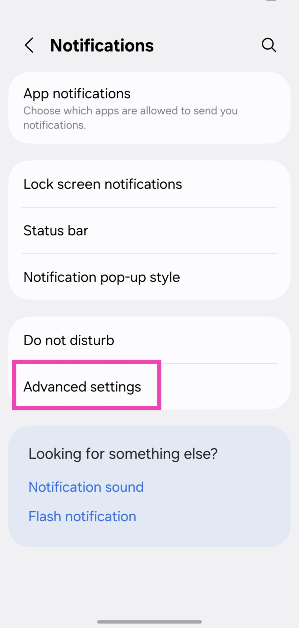
AI Detectors vs. Human Review: Which Is Better for Content Authenticity?

These days, it is hard to ignore how much content is being created by AI. You see articles, blogs, and essays popping up everywhere, and it is not always easy to tell if it is from a human or a machine.

Personally, I have found myself in this situation many times – wondering if the piece I am reading or writing is authentic. I have used AI detectors and had human reviews to check for authenticity, but which one’s actually better?

That’s what I want to get into here.

What Are AI Detectors Anyway?

So, let’s start with AI detectors.

These are tools that are supposed to help you figure out if an AI wrote a piece of content. They search for patterns, structures, and specific word choices commonly associated with AI writing. I have used them on my own stuff a few times just to make sure I haven’t accidentally let AI slip into my work.

For instance – when I have been using a paraphrasing tool to help me reword some sentences – I will run the text through an AI detector to be sure nothing too obvious sneaks in. It is comforting, in a way. But, honestly, it is not always perfect.

The Problems with AI Detectors

AI detectors are cool, but they are not flawless. Sometimes, they will flag content that I know was written by me, a human. That’s frustrating – especially when I have made sure my writing is 100% original. I have even had cases where the detector didn’t catch content that I knew was AI-generated.

One time, I ran a piece through an AI detector that I was sure had AI influence, and it passed without a problem. So yeah, while these tools can help, they are not always right. And that’s something to keep in mind when using them.

Human Review – The Good Stuff

Now, let’s talk about human review. I think this is where things get a little more reliable. When I have someone else read my work—whether it is a friend, a colleague, or an editor—they can catch things an AI detector just wouldn’t.

Humans can understand tone, voice, and the overall flow in a way that an algorithm simply can’t. I have had reviews where people pointed out that a sentence did not quite sound right or that the phrasing was too awkward. A machine wouldn’t have caught that. Human reviewers also understand context – which is something an AI detector often misses.

But Human Review Isn’t Perfect, Either

But let’s not pretend human review is without issues, either. For one – it takes time. If I need to get feedback on something fast, waiting around for a human reviewer can slow everything down. Plus, human reviewers can be subjective.

One person might think a piece is fine – while another might have a completely different opinion. I have had feedback where one reviewer loved the content – and another felt it wasn’t good enough. It can be confusing at times – but it is just the nature of human judgment, I guess.

So, Which Is Better? AI Detectors or Human Review?

In my experience, both AI detectors and human reviews have their pros and cons. The AI detectors can quickly tell you if something looks machine-generated, but they are not perfect. On the other hand, human reviews are thorough and insightful but can be slow and subjective. It is really hard to say one is better than the other—they both have their place.

The Best Approach – Use Both

For me, the best thing to do is to use both. I will first run my content through an AI detector just to see if anything stands out. It is a quick check. Then, I will have a human review it. This way, I get the benefits of both worlds.

The AI detector might catch anything too obvious – while the human reviewer will make sure the content sounds natural and engaging. This combination has worked the best for me, and it gives me the confidence that my content is both original and authentic. If you are using AI for writing, make sure you use a paraphrasing tool as well.

Conclusion

To wrap it up, I don’t think there is a clear winner between AI detectors and human reviews. Both have their strengths – but they also have flaws. What works best for me is using both methods together. The AI detector is a great starting point, and the human review helps make sure everything feels right.