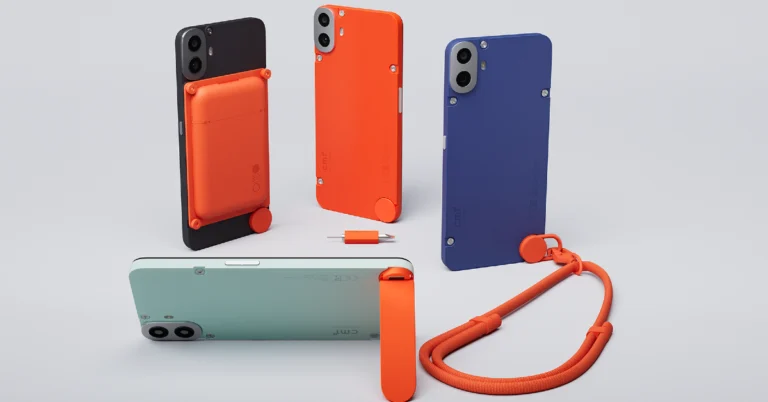
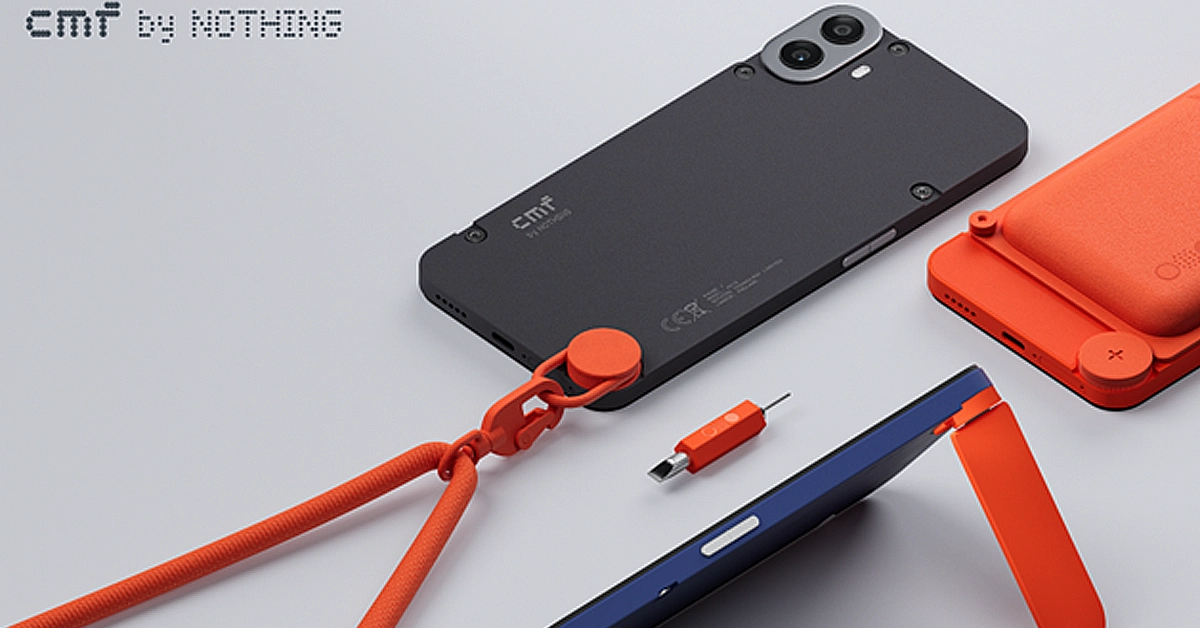
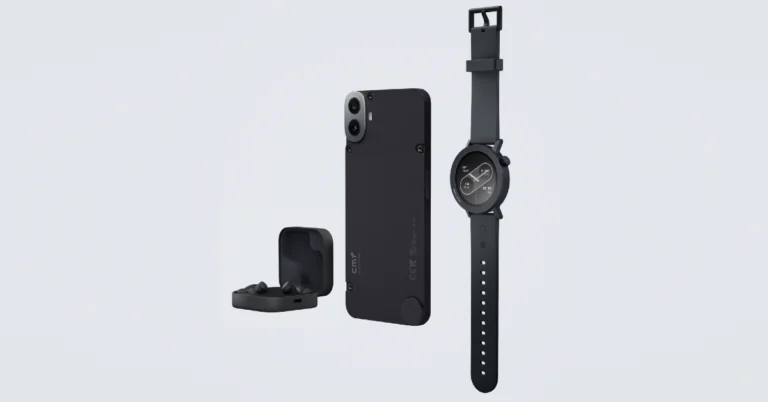
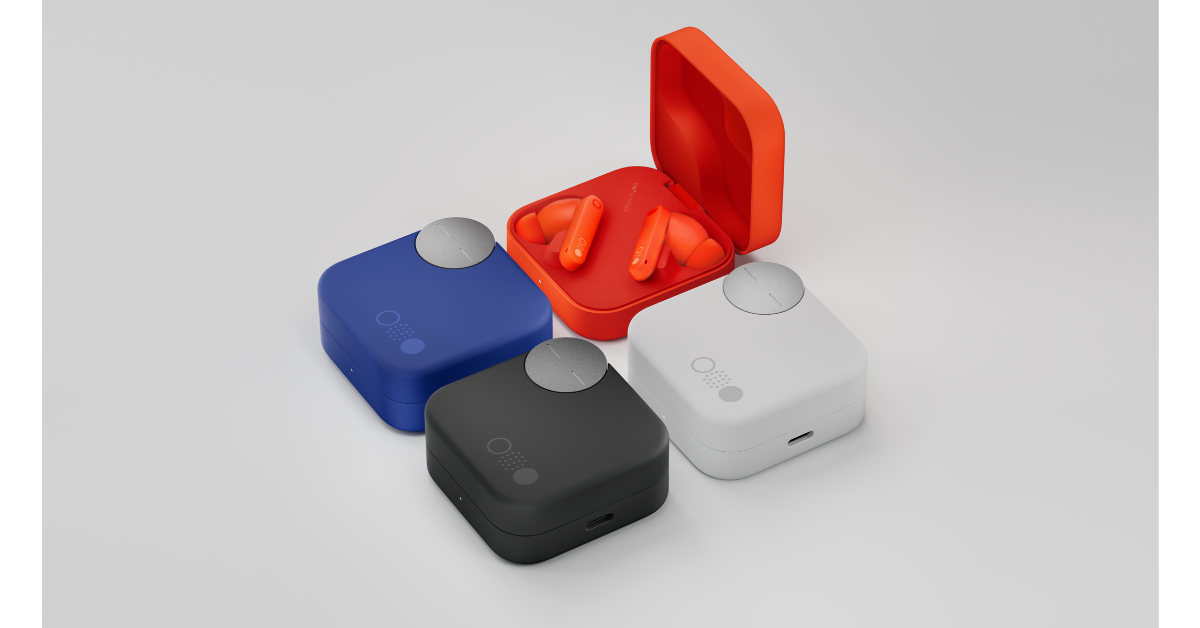
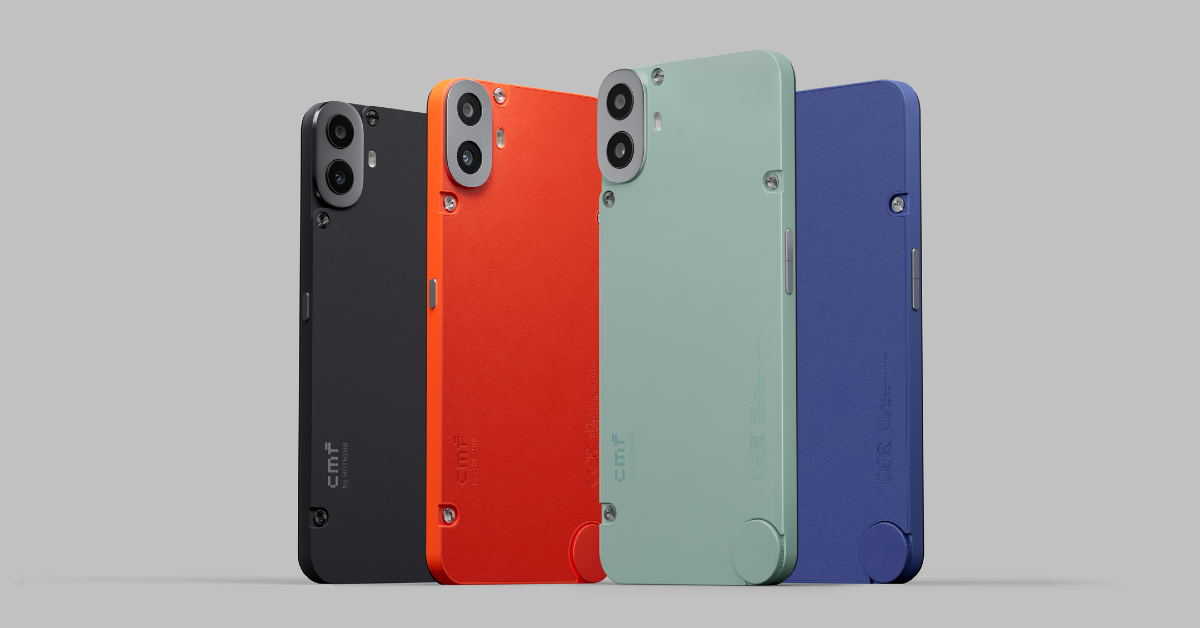
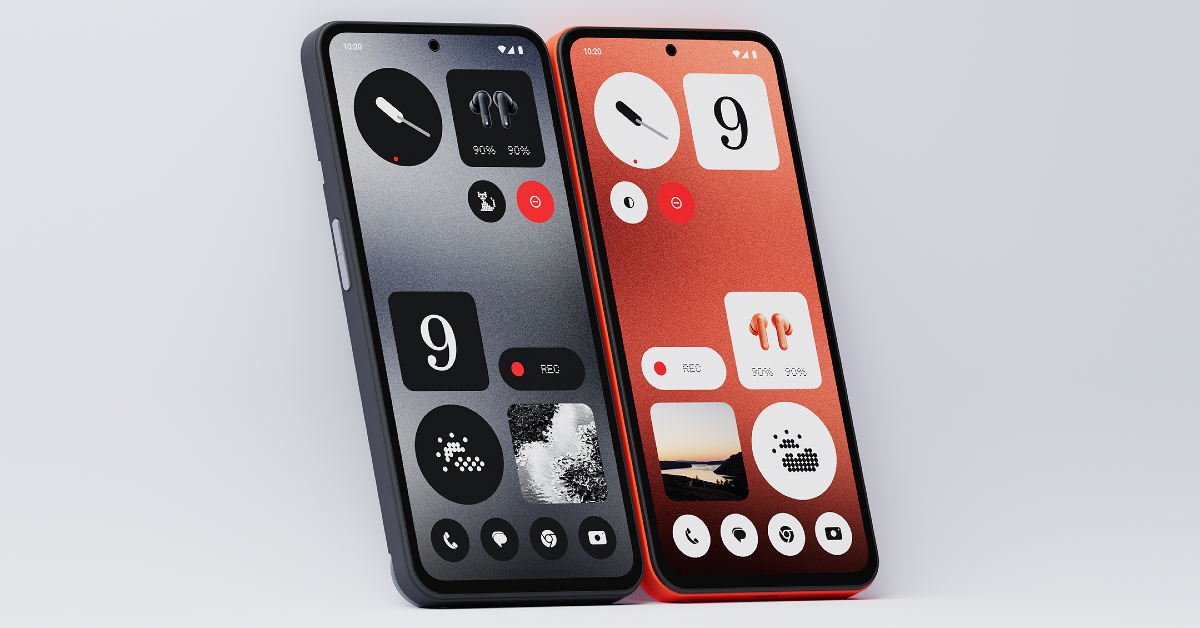
The newly launched CMF Phone 1 has created a lot of buzz for itself in the budget phone segment. This is mostly due to its modular design approach. The back panel of the device has visible screws which can be unfastened to attach a bunch of accessories. These accessories come at an additional price. Prices for the smartphone start at Rs 16,000 in India. If you’re thinking of buying the CMF Phone 1, you may want to take a look at its official accessories. Here are the 5 accessories available with the smartphone.
Perhaps the most important accessory for the CMF Phone 1 is its customisable back panel. Using the mini screwdriver, you can easily detach the smartphone’s back panel and slap on a new case with a different colour. Not only does it keep things fresh, but also eliminates the need to put on a protective cover on your phone. In case you damage the back panel, you can easily replace it with a new one at a very affordable cost. There are four colour options on offer – Black, Blue, Light Green, and Orange.
CMF Kickstand
The CMF kickstand attaches to the bottom of the back panel once you remove the rotating dial. This kickstand folds against the case when it is not in use. It is made entirely out of plastic but it can easily handle the weight of the smartphone. What we like about this kickstand is that it can hold the phone in portrait as well as landscape orientation. You can use it while the cardholder is attached to the back panel as well.
CMF Card Holder
The CMF Card Holder is a magnetic attachment that easily snaps onto the back of the smartphone and can hold up to three credit/debit cards. You may be wondering how a magnetic accessory is compatible with the CMF Phone 1 when the device does not have any magnets inside it. Well, this is where CMF’s unique engineering comes into play. Before attaching the cardholder, you need to fasten a magnetic plate on the CMF Phone’s back panel. Once that’s done, the cardholder can be easily attached to it. The magnetic plate leaves the door open for all kinds of accessories in the future.
CMF Lanyard
While not as flashy or interesting as other accessories on this list, the lanyard serves a functional purpose. It attaches to the rotary dial at the bottom of the phone and can be used to hang the phone around your neck or tie it to a backpack. The length of the lanyard is adjustable.
CMF 33W Fast Charger
The 33W CMF charger is not included in Phone 1’s retail box. This charger can power the smartphone from 1-50% in 30 minutes. A complete charge takes almost an hour. This charger is not to be confused with the more powerful 65W GaN charger that CMF launched last year. You can read our review of the GaN charger here.
These are all the accessories you get with the CMF Phone 1. These accessories will be available to buy in the next few days. What do you think about the CMF Phone 1’s design and engineering? Does it serve enough purpose to avoid the ‘gimmick’ tag? Let us know in the comments!
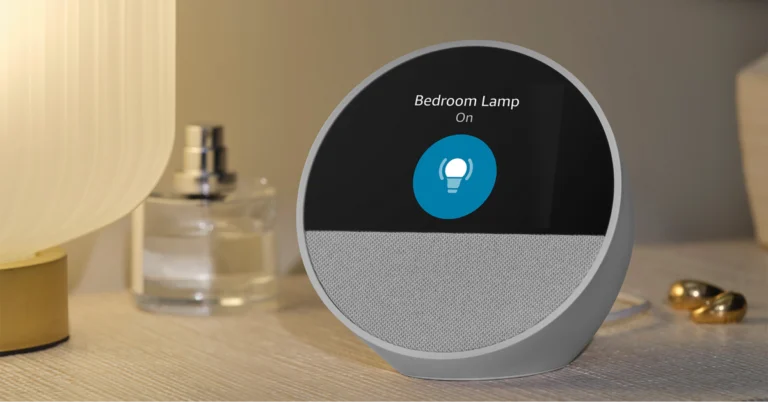
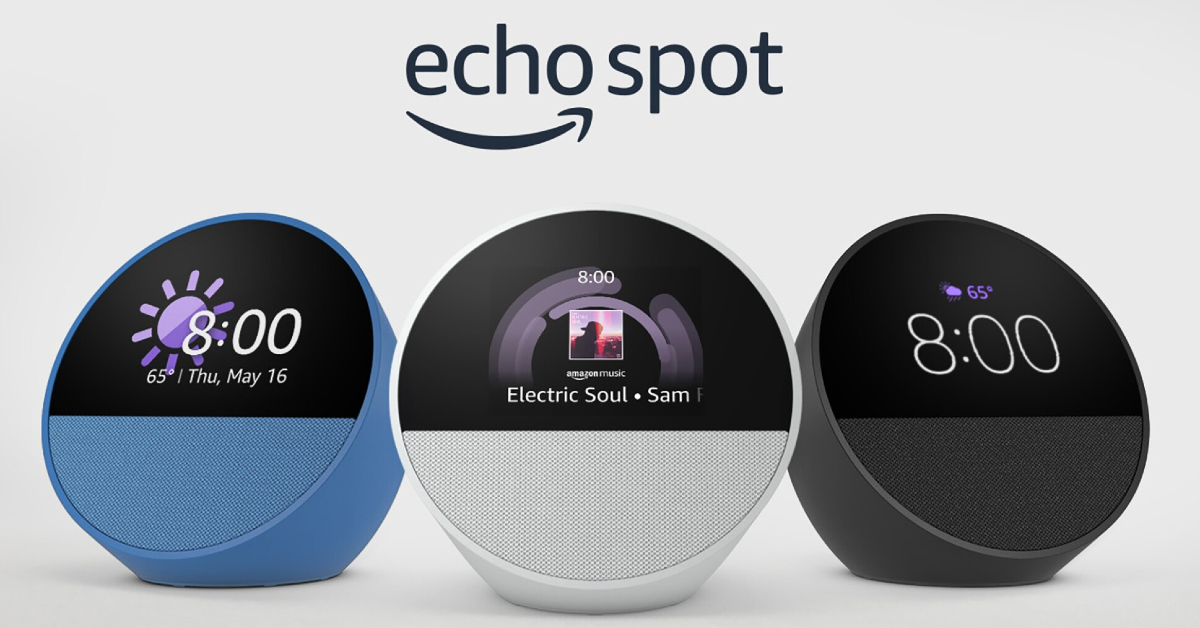
Amazon has officially launched the all-new Echo Spot, the latest addition to Amazon’s lineup of Alexa-enabled devices. It is a customizable smart alarm clock with customizable clock faces and colours. It’s designed for nightstands and offers a display for alarms, time, weather, and song titles. Here is everything about it from pricing to specs.
The stylish new customisable smart alarm clock Echo Spot comes in a range of exciting colours and personalised clock faces. It has a semi-spherical form, access to Alexa, and a tiny and brilliant display. Built for the nightstand, it features a directional speaker that produces bright sound, an easy-to-set and view display for the time, weather, song names, and more.
With six colours and multiple clock faces, Echo Spot’s display can be tailored to your bedroom’s decor, letting you match your taste. Alexa may choose from four bespoke alarm sounds—Aurora, Daybreak, Endeavour, and Flutter—or set the alarm using commands like “Alexa, set a weekday alarm for 7 am with soft jazz” on the Echo Spot. To extend your sleep, press the Echo Spot button.
The Echo Spot 1.73-inch also has a front-firing directional speaker. With Alexa’s vibrant visual animation, users may play their favourite tunes and skip songs by asking her questions or tapping the screen. Alexa responds to several queries, such as those for the weather, alarms, and reminders. Requests for weather updates are even more interesting with Echo Spot because it shows the temperature and images of suns, rain clouds, or snowfall.
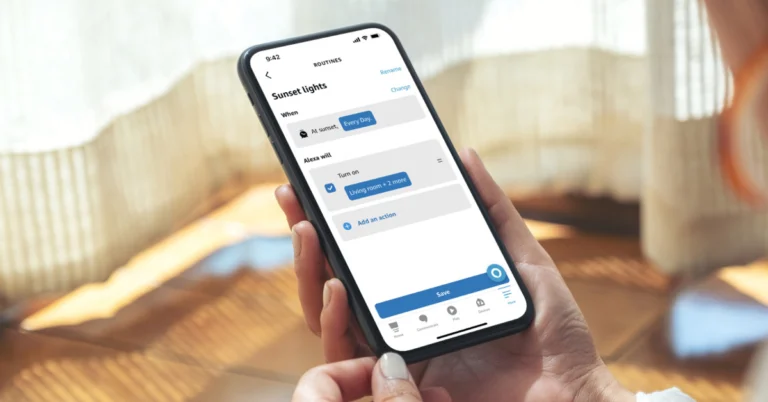
With the help of Alexa Routines, Echo Spot users will be able to automate daily tasks by connecting them to smart home devices. You can set up a nighttime routine that triggers porch lights, lowers the thermostat, and plays music, or a morning routine that switches on the kitchen coffee maker activates bedroom smart lighting, and plays morning news.
Ask Alexa to call loved ones, make household announcements, audibly Drop In on other Alexa-enabled devices in your household, or get alerts and audio from your compatible smart doorbell.
Advanced privacy features on Echo Spot include the option to review and remove recordings of conversations in addition to a mic-off button.
In terms of pricing, Echo Spot is currently available for Prime members for just $44.99 through Prime Day. Whereas, non-Prime members can purchase it for $79.99.
Garena Free Fire Max is a battle royale game with regular awards and tournaments to keep players interested. If you play Garena Free Fire, you should be aware of the redeem codes that are released on a daily basis. However, because the battle royale game is banned in India, players from other countries can use the Free Fire Redeem codes daily. If you’re unfamiliar with the Garena Free Fire redeem codes or don’t know how to get them, we’ve put together a step-by-step guide to help you redeem them. Check out Garena Free Fire Max Redeem Codes for 10 July 2024.
The Free Fire Max redeem codes are a great way to get free stuff. These are 12-digit codes that contain alphabets and numbers, as well as an expiration date and time. Because the Garena FF redeem codes cannot be used more than once, you should hurry to the redemption page to claim your free reward before someone else does. To get a free reward, all you have to do is go to reward.ff.garena.com/en, which is the official redemption page. Also, keep an eye on this space for daily updates on Garena Free Fire Max redemption codes and rewards.
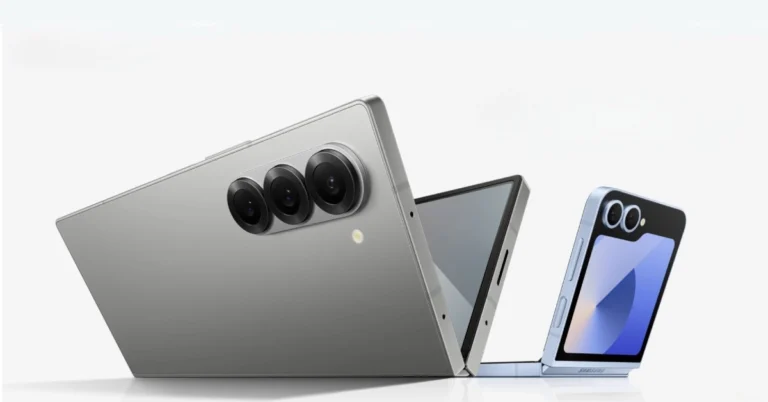
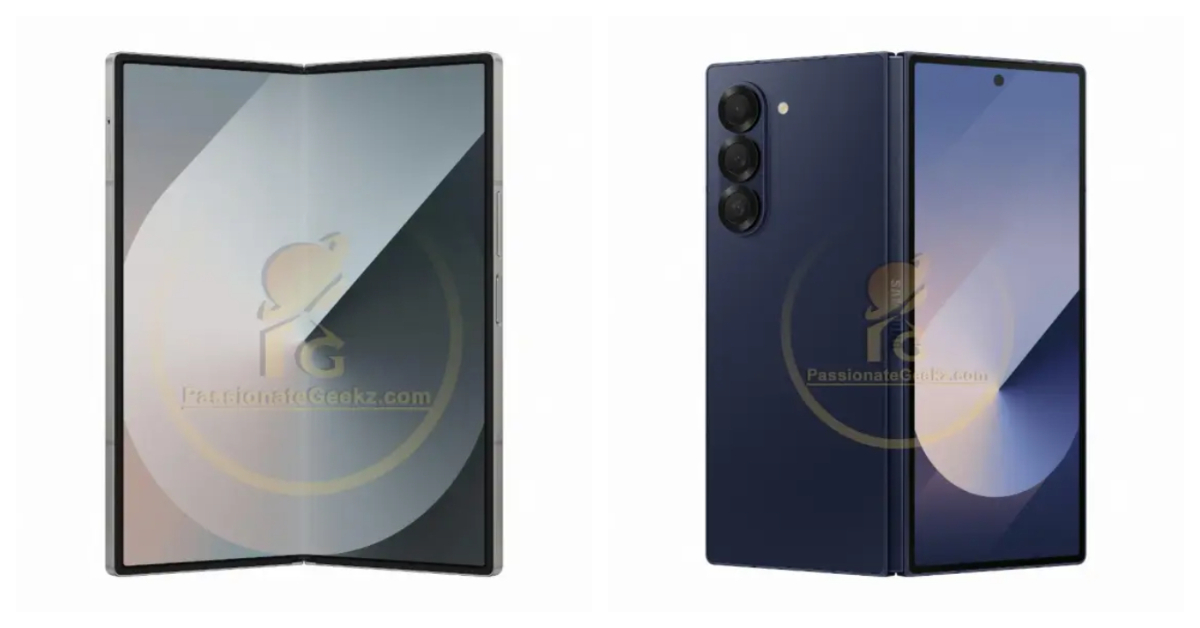
The new Samsung Galaxy Z Fold 6 is finally here and it continues to impress with its sublime hardware and loaded specs. While there’s been fresh competition from Google and OnePlus in the foldable category, Samsung has quickly reminded us why it is considered to be the best in this genre. The Fold 6 packs the latest Snapdragon 8 Gen 3 SoC, a 7.6-inch Dynamic AMOLED 2X inner display, and a 6.3-inch cover display. If you want to get the most out of this device, you need the right apps. So, without further ado, here are the top 10 apps for the Samsung Galaxy Z Fold 6.
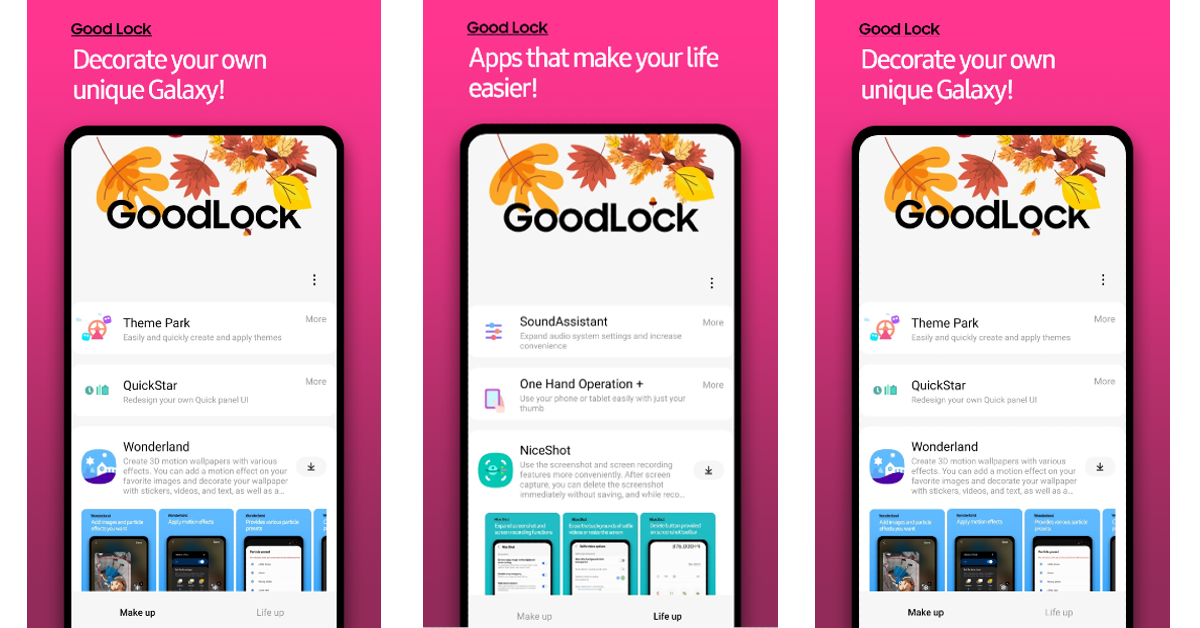
If you own a Samsung smartphone, Good Lock is one of the first apps you should download on it. Available on the Galaxy Store, Good Lock is developed by Samsung to provide better customisation options for its phones. Using Good Lock, you can tap into one-handed controls, redesign the Quick Settings Menu, customise the S Pen, create 3D motion wallpapers, apply new themes, and a lot more. The more time you spend on Good Lock, the more unique your phone will look.
Kindle utilises the screen real estate on your Samsung Galaxy Z Fold 6 and delivers a remarkable reading experience. Not to mention, its UI is far ahead of other e-readers for Android. The larger aspect ratio of the Fold 6 and its two-pane design come very close to recreating the experience of reading from a book. If you own a Kindle device, this app will sync your progress between your phone and the e-reader.
Not only does Spotify have an impressive library of songs, but it is also very well-optimised for folding devices. We like that the mini-player gets more space on the screen while you’re browsing the music library. The general UI of the app is similar to its tablet version, but the latter is so well done that we’re glad to see it on a smartphone.
Todoist is one of our favourite productivity apps for Android. This app simplifies your tasks and creates a clean, easy-to-follow layout to streamline them. The app’s language recognition picks up the dates from the text you’ve entered. You can enter something like ‘Remind me to pick up groceries on Thursday’, and the app will recognise the date with ease. You can link Todoist with over 60 apps like Outlook, Slack, and more. If you’re working on a project with other people, you can collaborate with them on Todoist and leave instructions and voice notes every step along the way.
Microsoft Outlook makes good use of the inner display on your Samsung Galaxy Z Fold 6, making it one of the best apps you can download on the device. The app’s layout allows you to go through your inbox on the left pane while opening individual emails on the right pane. Once you’re used to this meticulous design, it will be very hard to go back to the non-foldable version of the app. The tab at the bottom is another nice touch in the app’s layout. It makes it easy for the user to jump from the inbox to the calendar, feed, and other options.
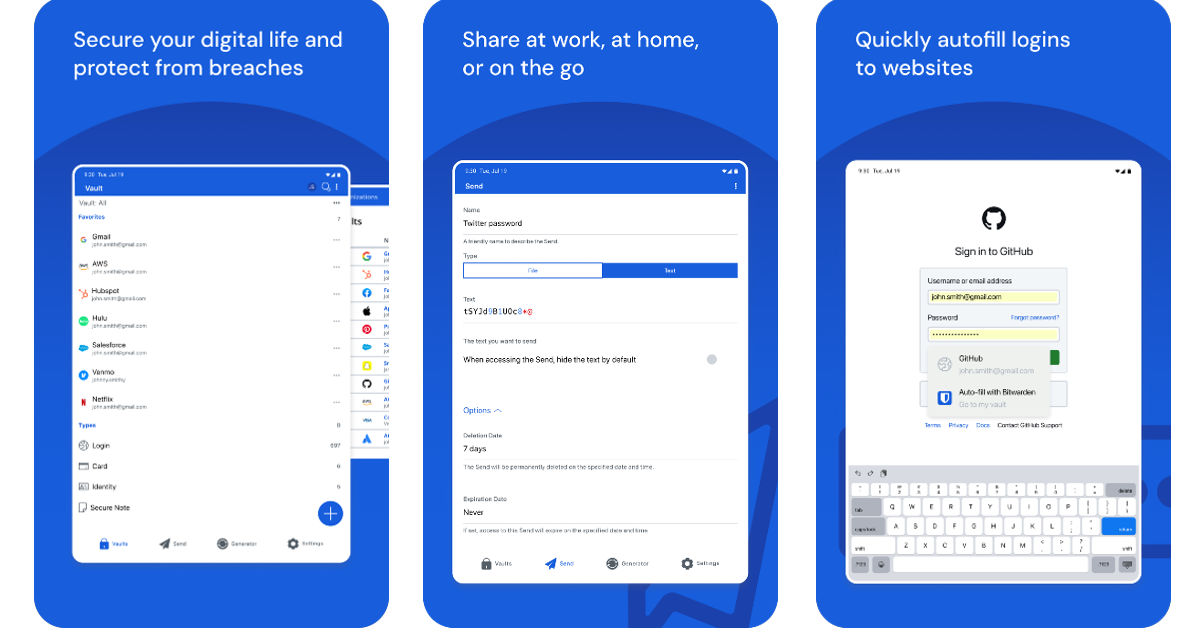
If you don’t have an app to manage your passwords, it is about time you got one. Bitwarden is one of the best around. Not only does it autofill your passwords wherever necessary, but it also offers a wide range of functions that will change how you go about password security. Since the app takes care of auto-filling your passwords, you don’t need to remember them anymore. Using Bitwarden, you can generate a complex string as a password and save it on your device. The app syncs your passwords across all your devices. Bitwarden notifies you when your password is found in a data leak, prompting you to change it immediately.
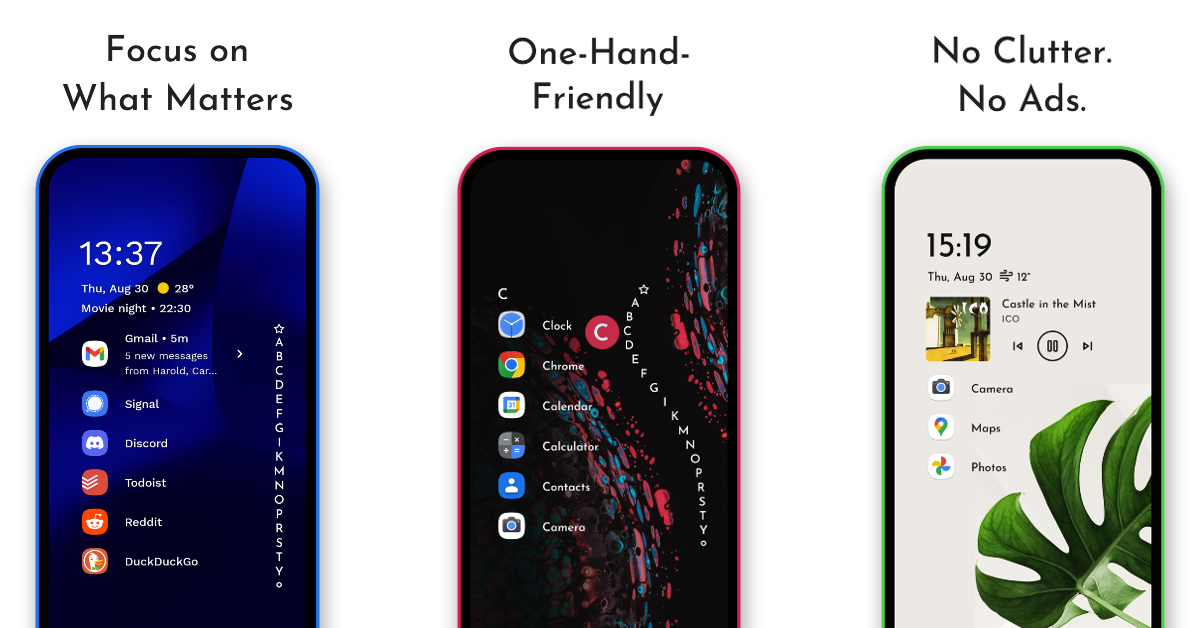
If you like your smartphone to stand apart from the rest, Niagara Launcher is the app you’re looking for. This app redesigns your home screen and gives it a unique, eye-grabbing look. If you’re a fan of minimal themes, you will enjoy Niagara. This app is also suited for large foldable devices. The best part is that it does not plague your device with invasive ads. If you like spending time customising your phone, we could not recommend this app more.
Hearthstone is one of the most popular strategy card games around and it looks even better on a bigger screen. Hearthstone is set in the Warcraft universe and utilises spells and characters from that franchise. You can curate an impressive deck by collecting battle cards within the game. The game allows you to challenge other players or go on your solo adventure. With a special focus on strategy, Hearthstone ensures that players are always enticed by the nuance of the gameplay.
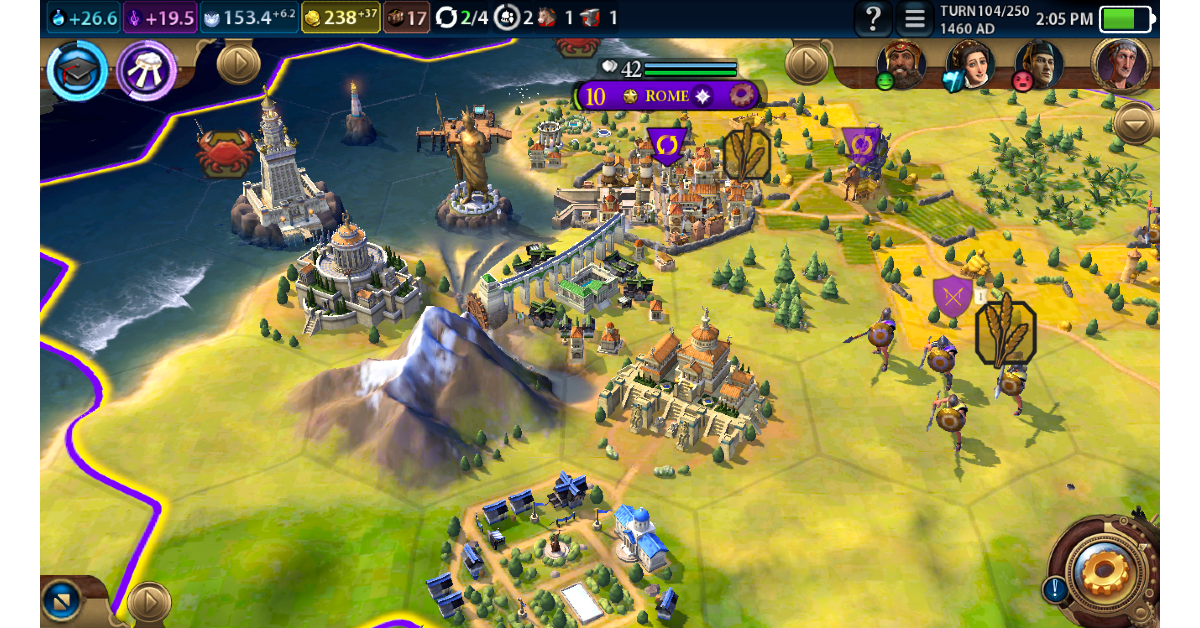
Civilization VI is another strategy-based game that looks much better on a larger display. In this game, players are supposed to build a civilisation from scratch, grow their empire, and conquer the world. Managing resources, building armies, and keeping your citizens happy takes a lot of skill and strategy. Every action comes with its consequences that can make or break your civilisation. If you’re into games that require time, strategy, and effort, Civ 6 should be your first pick.
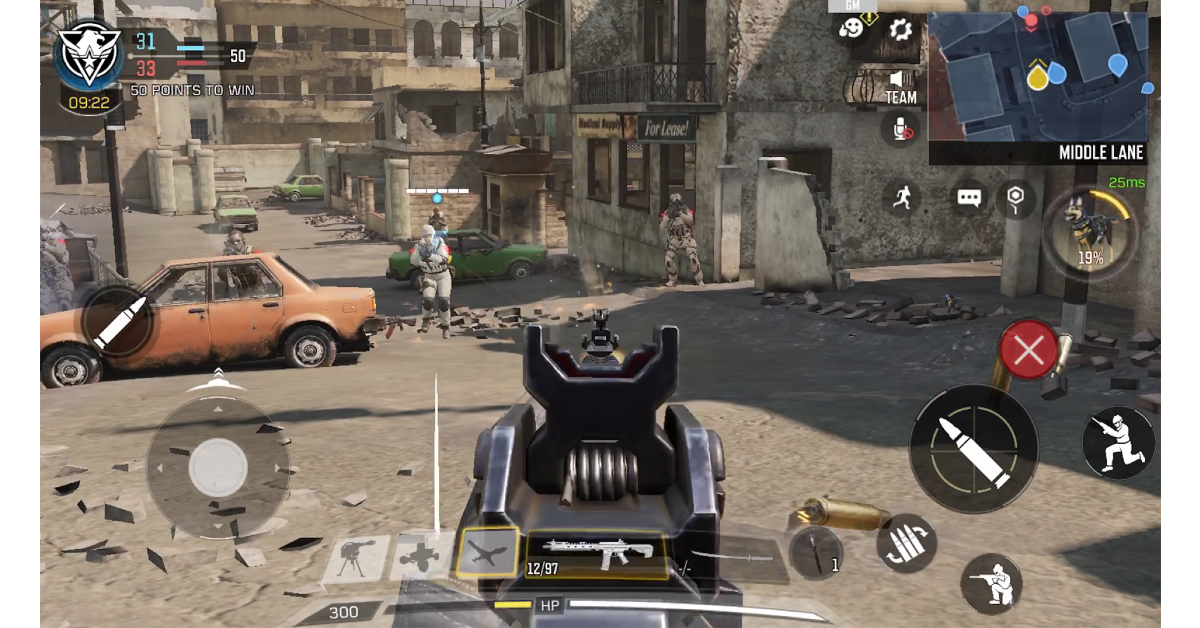
COD Mobile is one of our favourite FPS games to play on the Android platform. On a larger aspect ratio, players get a small advantage of having a more comfortable field of view. The game’s touch controls are mapped and aligned perfectly for the Fold 6, but we would recommend playing the game with an external controller to maximise the experience. Your Samsung Galaxy Z Fold 6 can handle this game at its highest graphics with absolute ease.
These are the top 10 apps you should download first on your new Samsung Galaxy Z Fold 6. These apps get the most out of the large inner display and can function just as well on the cover display. If you think there’s an app that deserves to be on this list, let us know in the comments!
10 July 2024: New Amazon Quiz is now available. Customers from different parts of the country are participating in the daily quiz. The quiz starts at midnight today and will be live until 11:59 PM tonight. By successfully answering every question, participants in the quiz have the chance to win wonderful rewards. A Rs 500 Amazon Pay Balance is up for grabs to participants today.
One wrong answer could eliminate you from the quiz. You have a chance to win Rs 500 Amazon Pay Balance if you successfully answer every question. Users of the app only have the opportunity to take the quiz. Check Out 10 July 2024 Amazon Quiz Answers.
Only app users are eligible to play the Amazon quiz every morning from 12 AM to 11:59 PM. The quiz is not available on the desktop. For those who are unaware of how to play the Amazon quiz, below are the steps, you can follow to take the quiz.
We have written an explainer above, you can refer to that.
When are the winners of the Amazon Quiz and contest announced or declared?
The announcement of today’s Amazon quiz winner will take place Tomorrow. As for the Special Quiz and “Spin & Win” Contest, the winners will be declared once the Quiz Contest comes to an end. To find out who the lucky winner is, you can refer to the Amazon Quiz Winners List or visit the Amazon Winners tab in the Amazon App.
How to participate in the Daily Amazon Quiz?
That is very easy, just got to the Amazon app and scroll to the bottom of the page and you will find the Quiz section. Click on it (usually it is called the fun zone) and you can enter the Amazon Today Quiz Contest.
Are there any other quizzes or contests running on Amazon daily?
Yes, there are many running on a daily basis. These range from spinning the wheel to answering the questions correctly. All are located in the Fun Zone.
What are the criteria for selecting a winner in the Daily Amazon Quiz?
When a qualified player submits correct answers to all the questions, they will automatically be entered into a lucky draw. This draw will include all participants who answered all the questions correctly. Amazon randomly selects the final winners from the pool of eligible participants who gave the right answers.
Which Types of Questions are asked within Amazon Daily Quiz?
These are very simple and straightforward questions. These are mainly related to general knowledge.
Where should I look for Amazon Daily Quiz answers?
You can bookmark this page as we will help you every day with the Amazon Daily Quiz. We bring you fresh answers every day for the Amazon Daily Quiz and Contest.
What time does Amazon Announce previous winners?
The previous winner’s name will be announced today at 12 PM (noon).
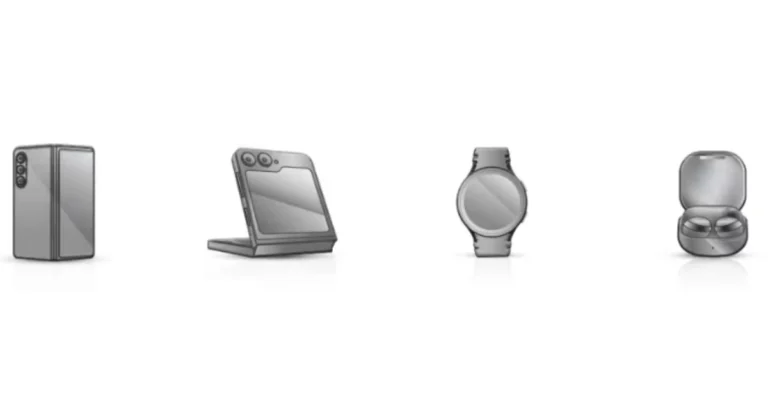
Samsung will unveil its next generation of foldable smartphones at its annual Galaxy Unpacked event in Paris today. The event will showcase the Galaxy Z Fold 6 and Z Flip 6 smartphones, as well as the Galaxy Watch 7 and Buds 3. Another anticipated release today is Galaxy Ring. This post covers all the essential facts for readers who are not familiar with Samsung’s 2024 Galaxy Unpacked event, including the live stream and key details about the upcoming products.
In This Article
How to watch the Galaxy Unpacked Event today?
Samsung will be hosting its next Galaxy Unpacked event today. Unlike previous Galaxy Unpacked events, this one will take place in Paris, France. Starting at 6.30 PM IST (3 p.m. CEST, 6 a.m. PDT, 9 a.m. and EDT), the event will be streamed live on the company’s website, Samsung Newsroom and the company’s official YouTube channel. It can also be watched live on our website, we have embedded the watch link below.
What to Expect from today’s Galaxy Unpacked Event?
Samsung Galaxy Z Fold 6
The key highlights and features of the Samsung Galaxy Z Fold 6 and Z Flip 6 foldable phones have been made public thanks to a fresh leak from Evan Blass. Official marketing photos of the gadgets, showcasing their features, designs, and technical details, are leaked.
The upcoming Galaxy Z Fold 6 is rumoured to have an Armor Aluminium frame, Gorilla Glass Victus 2 on both sides, an IP48 water resistance up to 1.5m, and two displays: a 7.6-inch QXGA+ Dynamic AMOLED 2X 120Hz main display and a 6.3-inch Dynamic AMOLED 2X cover display. Both displays offer 2,600 nits of peak brightness.
Five cameras total—a 12 MP ultra-wide camera, a 50 MP wide camera with 2x optical zoom, a 10 MP telephoto camera with 3x optical zoom at the back, a 10 MP front camera on the cover display, and a 4 MP under-display camera—are featured on the Galaxy Z Fold 6. The processor likely to be used is an octa-core Qualcomm Snapdragon 8 Gen 3 chip.
According the Blass, in comparison to the Galaxy Z Fold 5, which weighs 253g, the Galaxy Z Fold 6 will be lighter at 239g and has a 4,400mAh battery, 12GB RAM, 512GB storage, Ultra Wideband, USB Type-C connection, NFC, and support for the S Pen. At launch, more variations should be available.
Samsung Galaxy Z Flip 6
On the other hand, similar to the Galaxy Z Flip 5, the Galaxy Z Flip 6 has a 3.4-inch FHD IPS cover display and a 6.6-inch FHD+ Dynamic AMOLED 2X main display with a 120Hz refresh rate. It may include a 4,000mAh battery, which is an improvement over the 3,700mAh one seen in the previous edition, and is expected to be powered by the Snapdragon 8 Gen 3 engine.
The Galaxy Z Flip 6 may come with a 12MP ultra-wide camera on the cover display in addition to a 50MP primary camera with 2X digital zoom. It also features 12GB RAM and a 10MP front camera. The cover display functions as a viewfinder and the rear cameras can also be used for selfies. It is said to have 256GB of storage as well.
Samsung Galaxy Ring
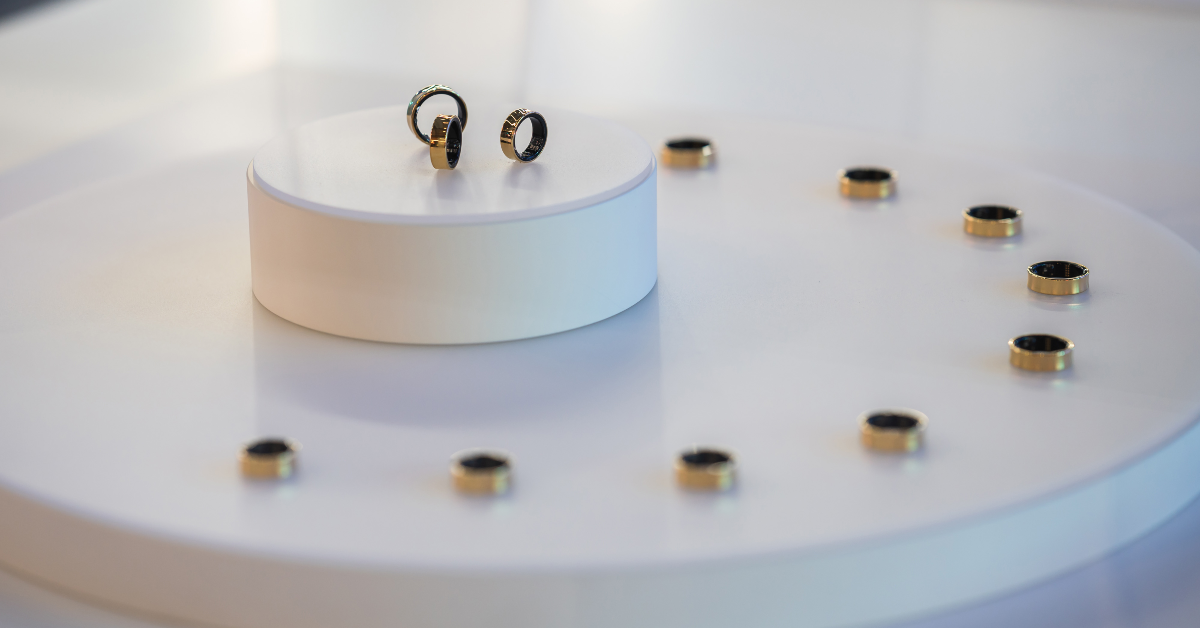
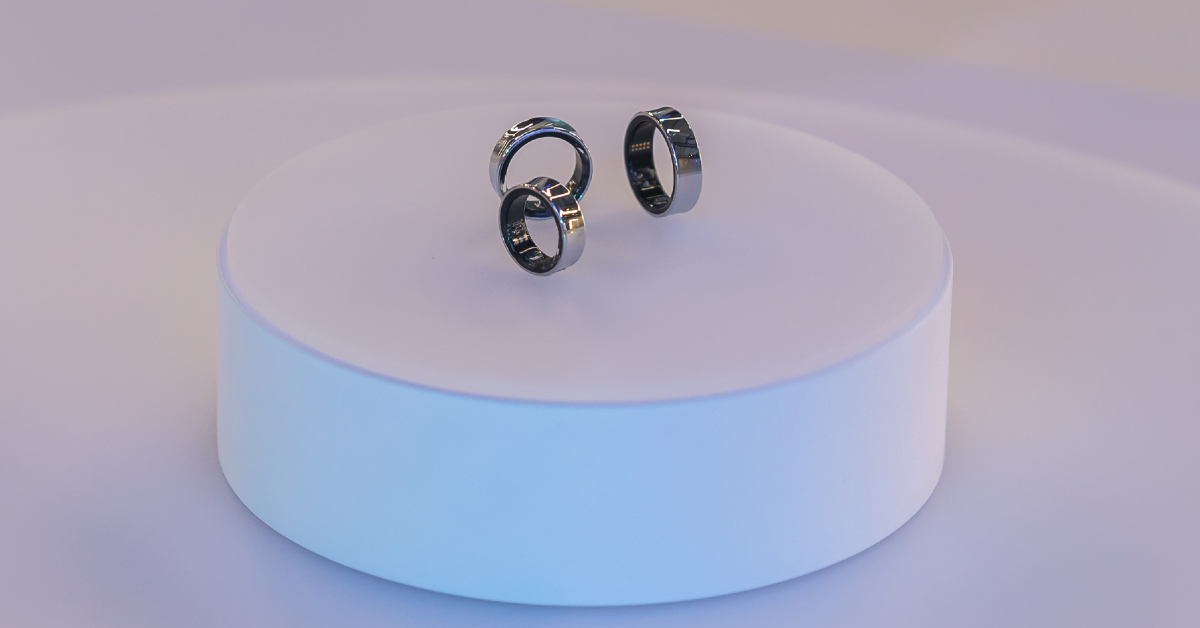
The Samsung Galaxy Ring is said to retail for EUR 449, or Rs 40,000, in France. This price is comparable to that of the Galaxy Watch 6 Classic 47mm Bluetooth model. Nine sizes, ranging from 5 to 13, will be available, as originally planned. Last but not least, France will also have three colours—silver, gold, and black. It is anticipated to be more reasonably priced in the US and India, though. It may cost as much as Rs. 35,000 in India and between $300 and $350 in the US.
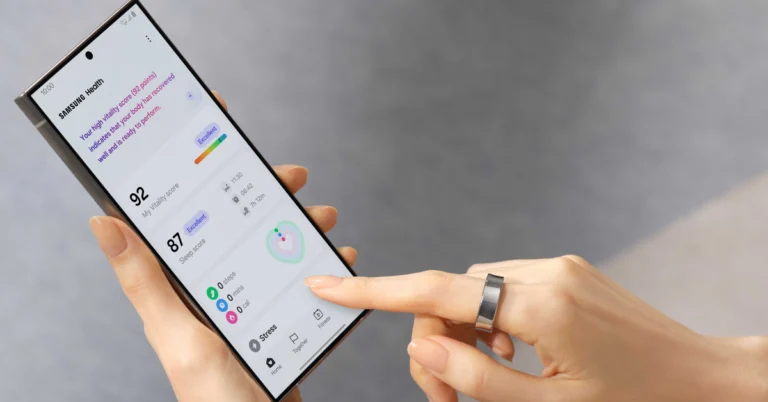
The Galaxy Ring is said to feature an ECG sensor, SpO2 sensor, and PPG sensor, potentially similar to Samsung’s BioActive sensors on its smartwatches. The wearable will offer features such as stress and heart rate measurement, period prediction, snore detection, and skin temperature measurement. It will also provide comprehensive sleep analysis, tracking movements, heart rate, respiratory rate, and sleep latency. The Samsung Health app will assign a ‘Vitality’ score to users based on workouts and sleep performance, with the possibility of comparing scores with friends and maintaining a leaderboard.
Samsung’s ring will have varying battery capacities, with smaller versions featuring 17mAh, highest-size units with 22mAh, and middle variants with 18.5mAh. The ring can last up to 9 days on a full charge and is expected to come with a TWS-like charging case.
Samsung is expected to introduce its first wristwatch under the Ultra brand with the Galaxy Watch Ultra during the Galaxy Unpacked event. The upcoming device is likely to compete with the Apple Watch Ultra/Ultra 2. The wearable could come in a single Titanium Gray shade. In terms of specifications, the Galaxy Watch 7 series from Samsung is rumoured to use a 3nm processor rather than the 5nm chipset found in the Galaxy Watch 6. They will likely provide 32GB of storage. The company may pit the Ultra variant against the Watch Ultra 2 from Apple, as said earlier.
It is rumoured that a titanium body and 47mm dial size will be offered for the Galaxy Watch 7 Ultra. It might come with a display that is predicted to produce 3,000 nits of peak brightness. According to reports, the wearable is IP58 rated, MIL-STD-810H durable, and certified to withstand 10ATM water pressure. A 590mAh battery, similar to the one found in the Galaxy Watch 5 Pro, may be included. There is only a single LTE and Bluetooth version reportedly available.
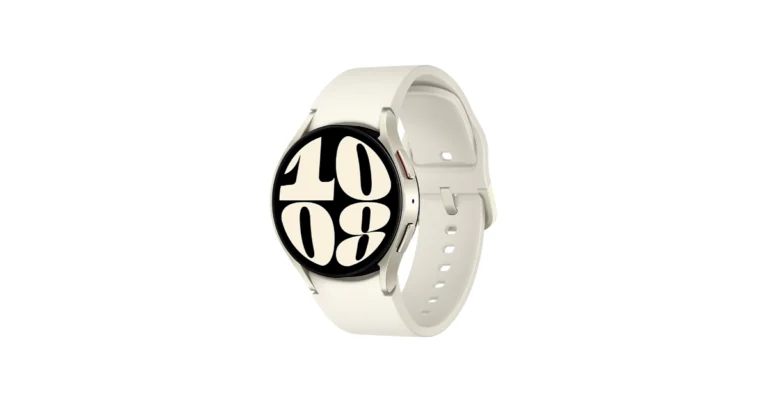
The rumour states that the 40mm and 44mm versions of the Galaxy Watch 7 would be available in cream and green colour options. An alleged 300mAh battery powers the 40mm model, and a possible 425mAh battery powers the 44mm model. The maximum brightness display it may have is 2,000 nits.
A new CPU, quicker charging times, and improved heart rate, sleep, fitness, ECG, and blood oxygen monitoring are all expected to be features of the Galaxy Watch 7 series. In addition, it will have 4G and Bluetooth connectivity, enabling users to send and receive messages and make calls without their phones being out of reach.
It is claimed that the smartwatch glass is composed of sapphire crystal, while the case is reportedly built of Samsung’s Armour Aluminium 2. Reportedly, it maintains the 5 ATM, IP68, and MIL-STD-810H approved.
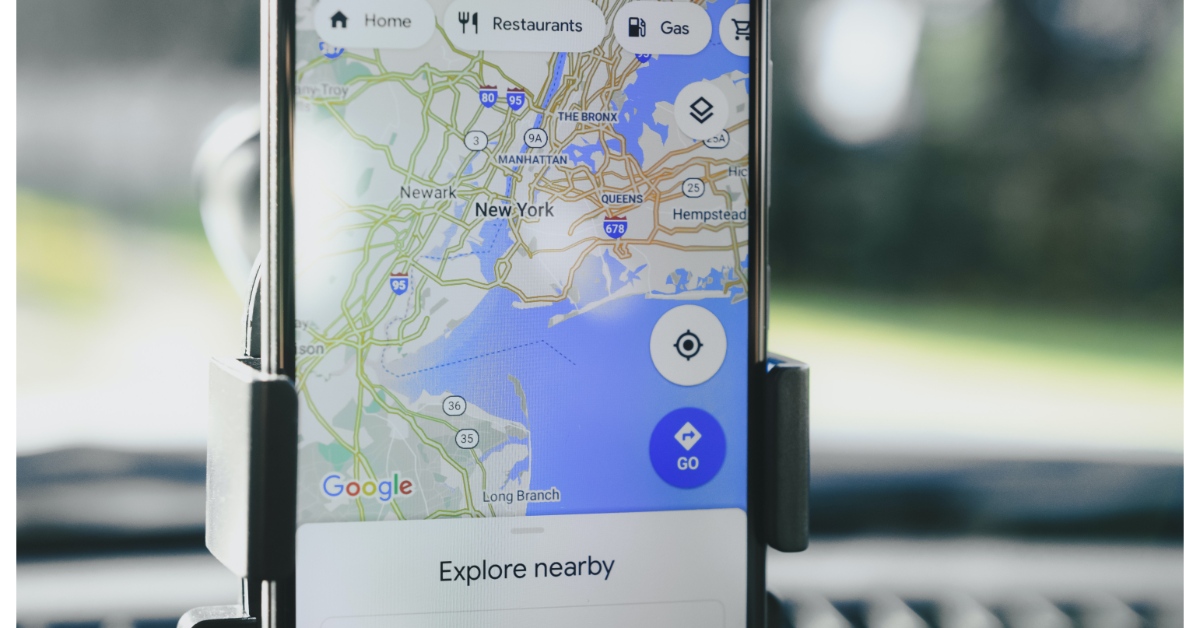
If you’re driving around at night, your phone’s shining display can be quite distracting for everyone inside the car. Luckily, Google Maps has a very handy dark mode to facilitate easier navigation at night. This mode kicks in automatically at sunset. In the odd case that it doesn’t, there are some methods you can use to remedy the situation. Here are the top 9 ways to fix the ‘Dark mode not working’ issue in Google Maps.
Google Maps is programmed to switch to dark mode automatically at night. If it doesn’t, it could be due to the following reasons:
You accidentally turned off automatic dark mode in the app settings
Your phone’s dark mode settings are getting in the way
You are using an older version of the Google Maps app
The app cache is corrupted
Location services are turned off on your phone
Set the Colour Scheme to Night
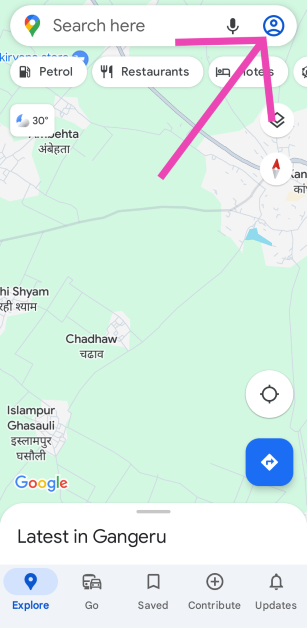
Step 1:Launch the Google Maps app on your phone and tap your profile picture at the top right corner of the screen.
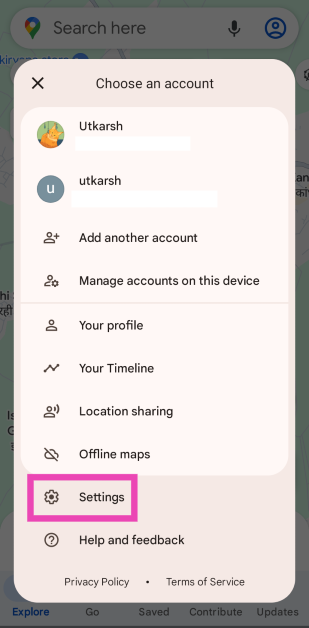
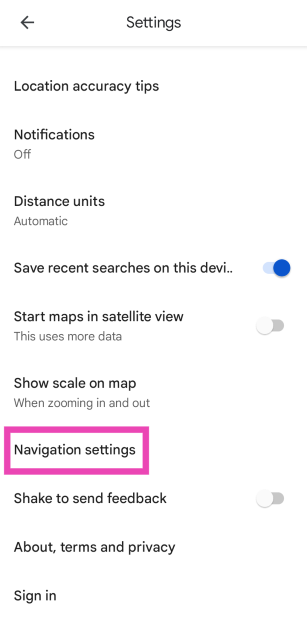
Step 2: Hit Settings.
Step 3: Tap on Navigation settings.
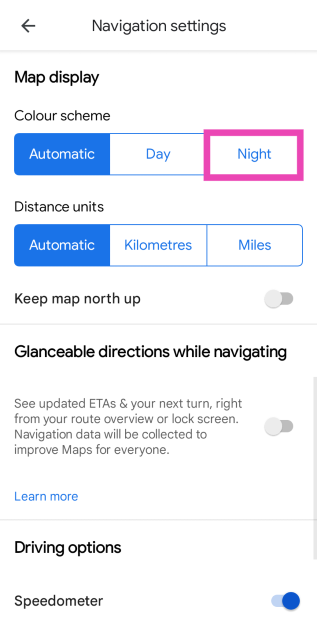
Step 4: Select Night in the Colour Scheme settings.
Select Night Mode in System Settings
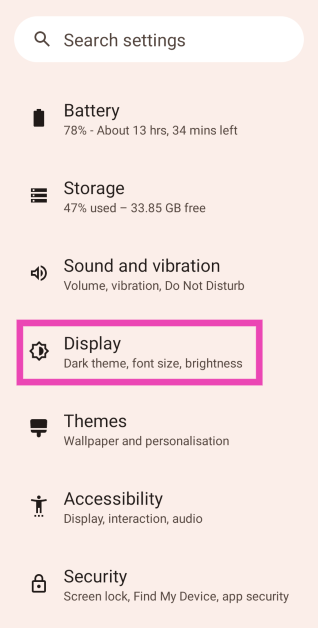
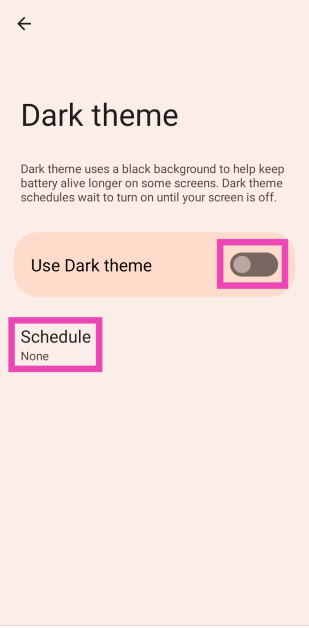
Step 1: Go to Settings and select Display.
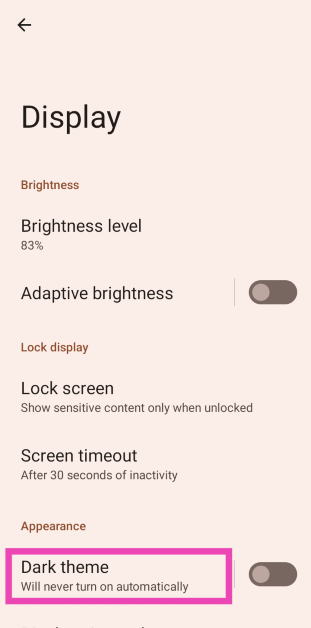
Step 2: Tap on Dark Theme.
Step 3: Turn on the toggle switch for Use Dark theme and set the Schedule.
Check the location permission
Depending on your local time, the Google Maps app automatically switches to dark mode. If the app does not have access to your current location, this will not happen. Go to Settings>Apps>Google Maps, tap on ‘Permissions’, and give the app access to location permissions.
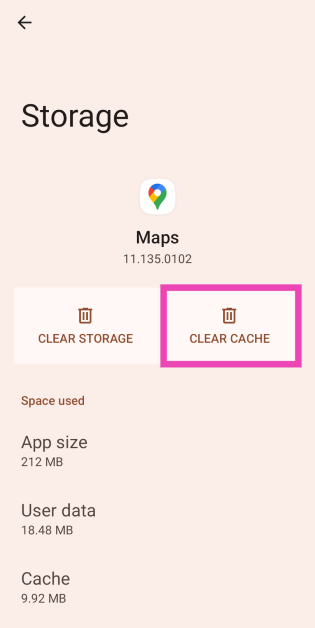
Clear cache
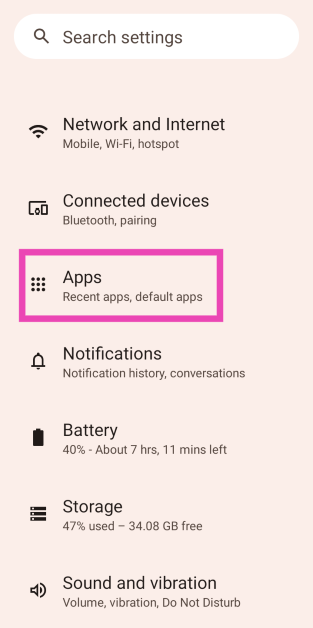
Step 1: Go to Settings and select Apps.
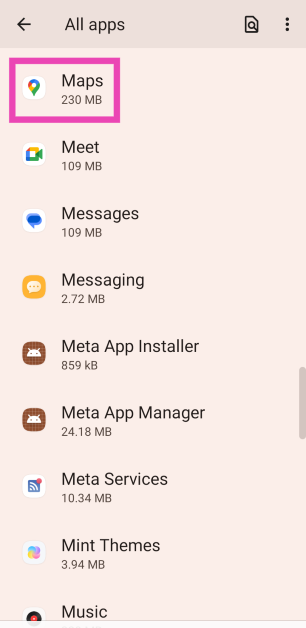
Step 2: Tap on Google Maps.
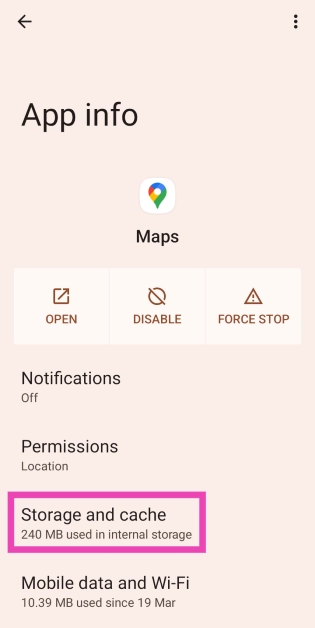
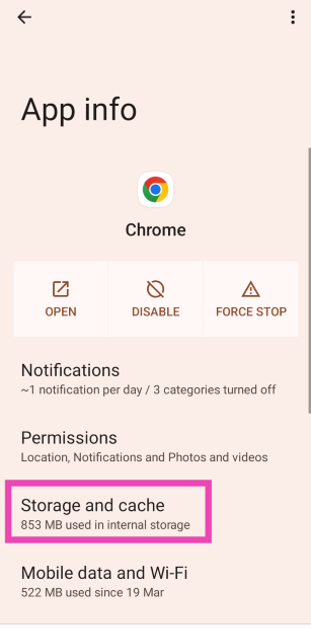
Step 3: Select Storage and cache.
Step 4: Tap on Clear cache.
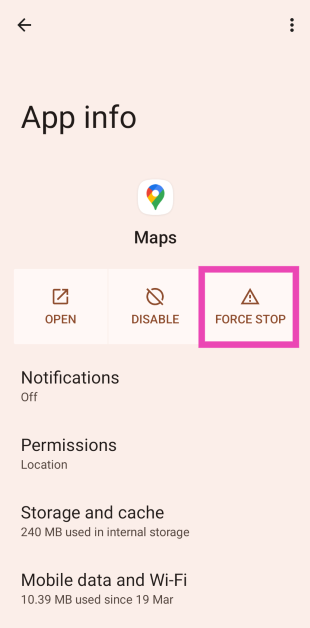
Force Quit Google Maps
Step 1: Go to Settings and select Apps.
Step 2: Tap on Google Maps.
Step 3: Hit Force stop.
Log out and log back into Google Maps
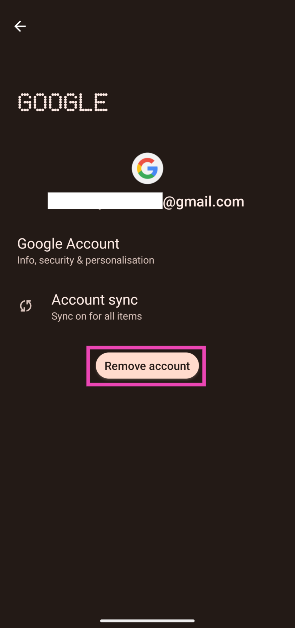
If the issue is related to your Google account, you will need to log out and then log back into Google Maps to restore Dark Mode. Since you can’t log out of Google apps and services individually, you will need to remove your Google account from your phone and then re-add it. Here’s how you can go about it.
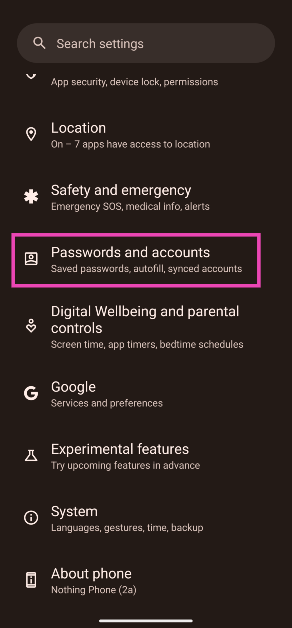
Step 1: Go to Settings and select Passwords and accounts.
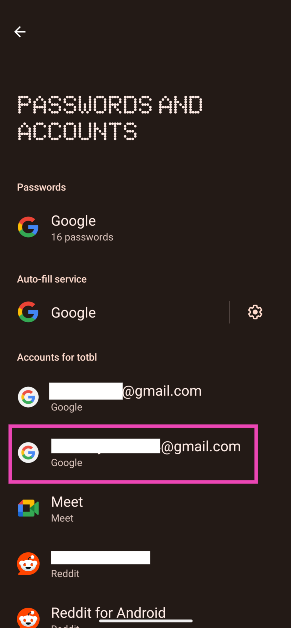
Step 2: Tap on the Gmail account you want to remove from the device.
Step 3: Tap on Remove account.
Step 4: Confirm your selection in the pop-up box.
Step 5: Go to Passwords and accounts and tap on Add account. Log in to your Google account using the proper credentials.
Restart your smartphone
It is possible that a background software issue is keeping the Google Maps app on your phone from switching to Dark Mode. Luckily, most background issues can be resolved by a quick restart. Press the side button and the volume up button simultaneously to go to the power menu. Once you’re in the power menu, hit ‘Restart’.
Update the Google Maps app
If you’re using an older version of the Google Maps app on your phone, it may start glitching due to bug-related issues. To fix this, update the app to its latest version. Go to the Google Play Store and search for the Google Maps app. Go to the app’s page and hit the ‘Update’ button.
Update your phone’s OS
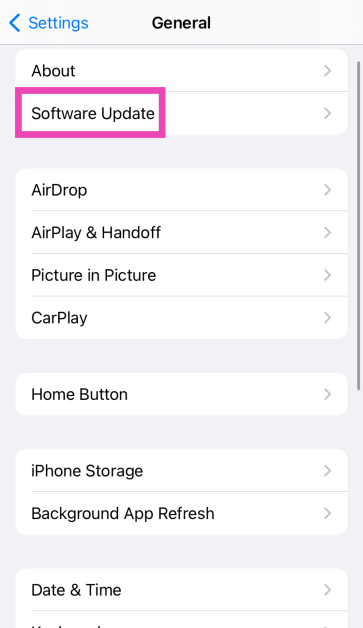
Step 1: Go to Settings and select Software update.
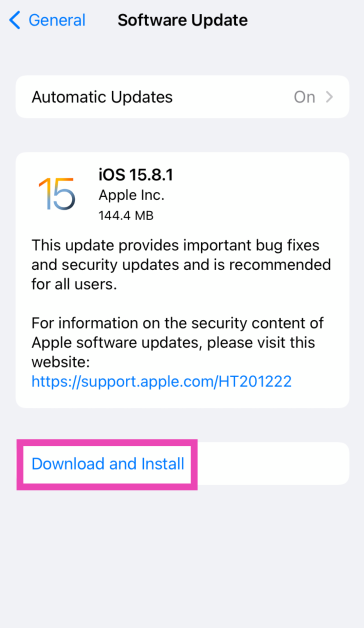
Step 2: Tap on Download and install.
Step 3: Select Install now.
Frequently Asked Questions (FAQs)
How do I enable dark mode within the Google Maps app?
Launch the Google Maps app, tap on your profile picture, go to Settings, hit ‘Navigation’, then select ‘Night’ in the ‘Colour Scheme’ category.
How do I enable dark mode on my Android phone?
Go to Settings>Display and turn on the toggle switch for ‘Dark Mode’. Tap on dark mode if you want to set its schedule.
Does dark mode consume less battery on my phone?
The Dark Mode consumes less power on your phone, but the difference is not enough to create a significant impact on battery life.
Why is the Google Maps app not switching to Dark Mode?
Google Maps automatically switches to Dark Mode at sunset. If it does not have access to your location, it won’t be able to make this switch.
How do I get Dark Mode back on Google Maps?
Clear Google Maps’ app cache and re-login using your Google Account to get the Dark Mode option back.
These are the top 9 ways to fix the ‘Dark Mode not working’ issue on Google Maps. Check out this article if you want to remove business ads in Google Maps. Got any other fixes for the dark mode issue? Let us know in the comments!
If you own a bunch of smart devices that support Alexa, you can use the Amazon Alexa app to control them. Most of the devices do not require an Echo Dot speaker as the hub. You can download the Alexa app from the Google Play Store, add the device, and carry out a range of functions from your phone itself. If the Amazon Alexa app is not working on your Android phone, here are 10 ways to fix it.
Why is the Amazon Alexa app not working on my phone?
If you can’t get the Alexa app to work on your phone, it could be due to one of the following reasons:
Faulty Voice ID
Alexa app’s cache is corrupted
Device was not registered properly
App is malfunctioning due to background issues
Your Amazon Account is suspended
You are using a VPN connection
Clear app cache
A corrupt cache can keep the Amazon Alexa app from working on your Android phone. Here’s how you can clear it.
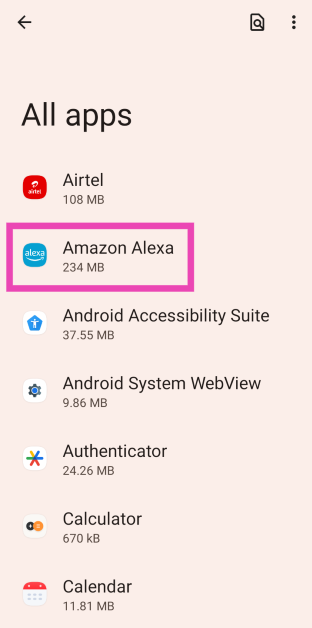
Step 1: Go to Settings and select Apps.
Step 2: Tap on Amazon Alexa.
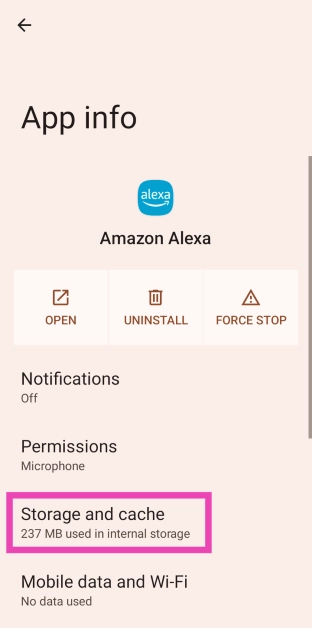
Step 3: Select Storage and cache.
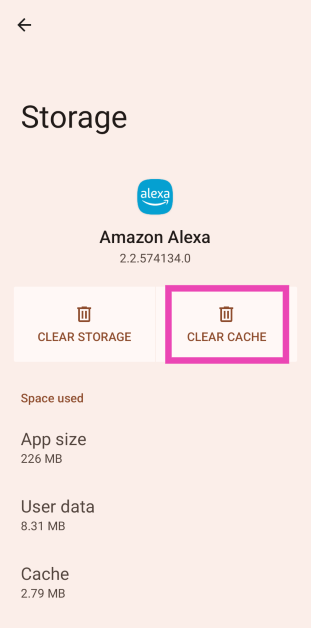
Step 4: Tap on Clear cache.
Check permissions
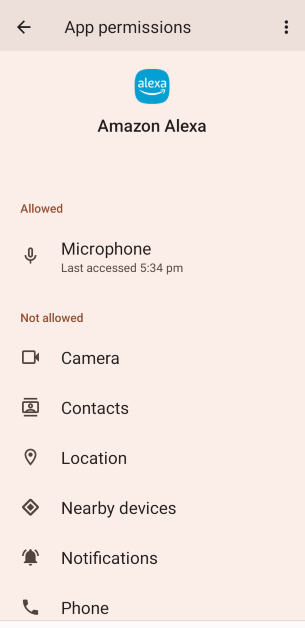
Revoking essential permissions from the Amazon Alexa app can give rise to functional issues. Make sure the app has access to the essential permissions.
Step 1: Go to Settings and select Apps.
Step 2: Tap on Amazon Alexa.
Step 3: Select Permissions.
Step 4:Allow all the permissions required for the app to function.
Force quit the Alexa app
Force quitting the app can give it a quick refresh and resolve the glitches and malfunctions.
Step 1: Go to Settings and select Apps.
Step 2: Tap on Amazon Alexa.
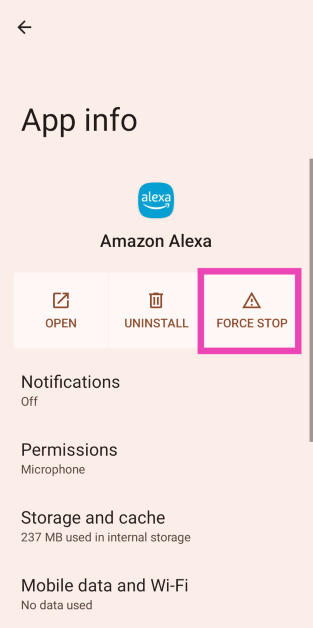
Step 3: Hit Force stop.
Update the app
An outdated version of the Amazon Alexa app may no longer be compatible with your device. In this case, the app will refuse to function. Go to the Google Play Store, search for Amazon Alexa, tap on the app’s page, and hit ‘Update’. You can also enable automatic updates for the app from this page. Simply hit the ellipses at the top right corner of the screen and select ‘Enable auto-updates’.
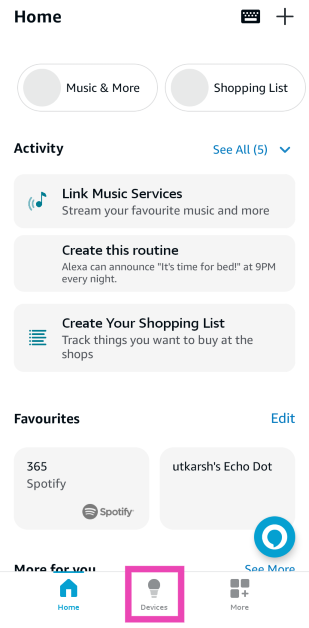
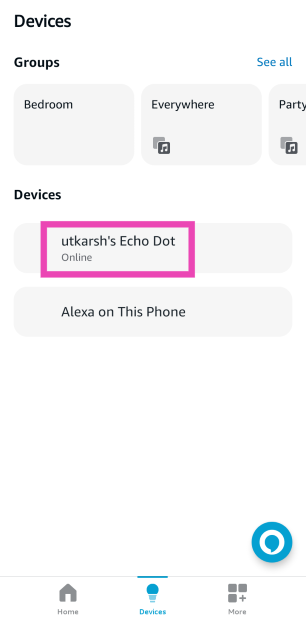
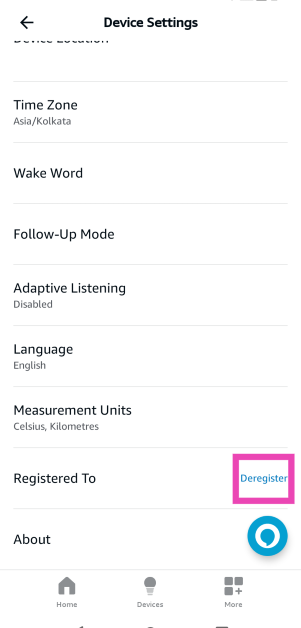
Step 4: Hit the Delete icon at the top right corner of the screen. If it’s an Echo Dot speaker, tap on Deregister.
Step 5:Add the device again.
Log out and log into your Amazon account
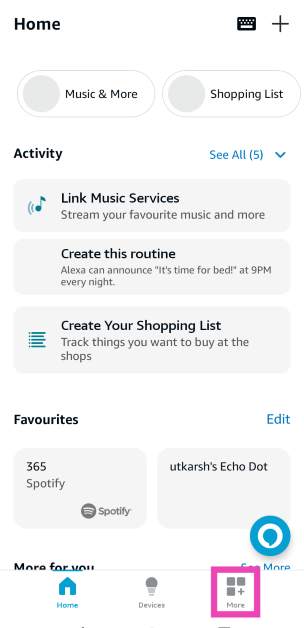
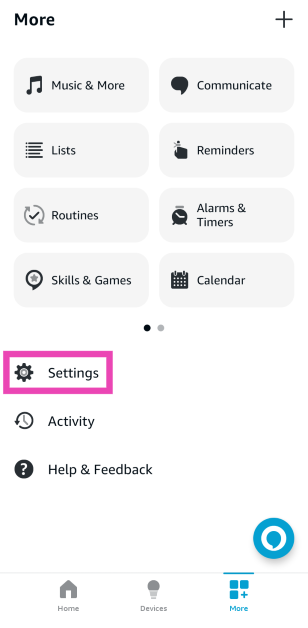
Step 1: Launch the Amazon Alexa app on your phone and switch to the More tab.
Step 2: Tap on Settings.
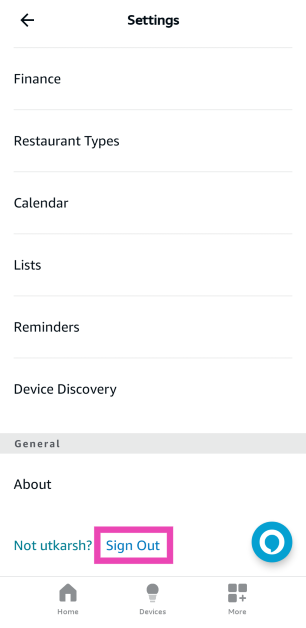
Step 3: Scroll down and hit Sign Out.
Step 4: Log in using your Amazon account.
Disable VPN
If you’re using a VPN connection on your phone, it can keep you from connecting to the Alexa-enabled devices in your network. Go to the VPN app and disable the connection to connect to your devices again. You can also disable the connection by going to Settings>Network and Internet>VPN.
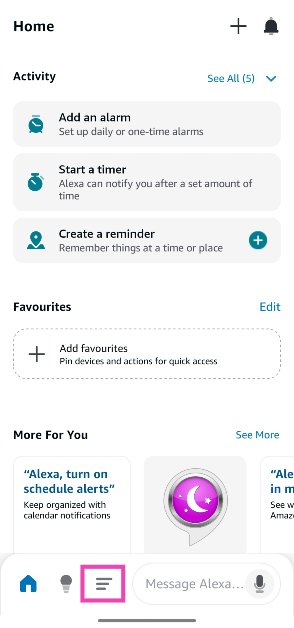
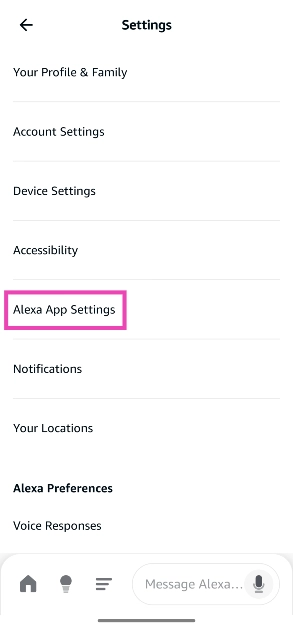
Step 2: Tap the menu icon at the bottom of the screen.
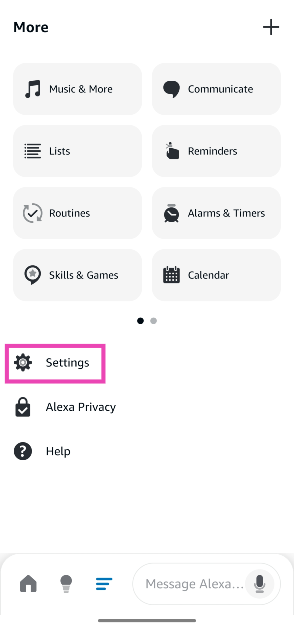
Step 3: Go to Settings.
Step 4: Tap on Alexa App Settings.
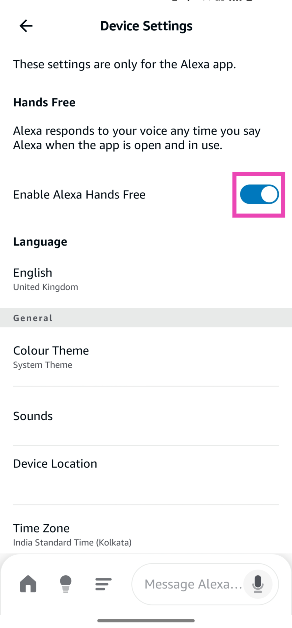
Step 5: Turn on the toggle switch next to Alexa Hands Free.
Restart your phone
Oftentimes, some background software issues on your phone can interfere with the functioning of the Amazon Alexa app. Luckily, you can sort this out with a quick restart. Press the side button and volume up key to access the power menu. Once you’re in the menu, hit ‘Restart’.
Update your phone’s OS
Step 1: Go to Settings and select Software update.
Step 2: Tap on Download and install.
Step 3: Select Install now.
Frequently Asked Questions (FAQs)
How do I add a smart device to the Amazon Alexa app?
Launch the Alexa app on your phone, switch to the Devices tab, hit the plus icon, select ‘Add Device’, select the type of device and the OEM, and follow the on-screen instructions to pair it with the app.
How do I remove a device from the Alexa app?
Launch the Alexa app on your phone, go to the Devices tab, select the device, and hit the delete icon in the top right corner of the screen.
Why is the Amazon Alexa app not working on my Android phone?
The Amazon Alexa app could be malfunctioning due to a faulty network, corrupted cache, improperly added devices, and issues with the Amazon account, among other reasons.
How do I enable the hands-free mode in the Amazon Alexa app on my phone?
Launch the app, go to Menu>Settings>Alexa App Settings and turn on the toggle switch next to Alexa Hands Free.
How do I remove microphone access from the Amazon Alexa app?
Go to Settings>App>Amazon Alexa>Permissions>Microphone and tap on ‘Don’t Allow’.
These are the top 10 ways to fix the Amazon Alexa app if it isn’t working on your Android phone. If you know of any other ways to fix this issue, let us know in the comments! Thinking of buying an Amazon Echo Dot? Make sure you read our review first.
Xiaomi India is commemorating its 10-year anniversary with the release of the Redmi 13 5G smartphone, Redmi Bud 5C wireless headphones, Powerbanks, and the Robot Vacuum Cleaner X10, which runs on LDS. Including 25 crore smartphones, the company has sold 35 crore products in India since 2014. With the shipment of 70 crore devices in all categories to India, it hopes to double its influence in the following ten years.
In This Article
Xiaomi Robot Vacuum Cleaner X10
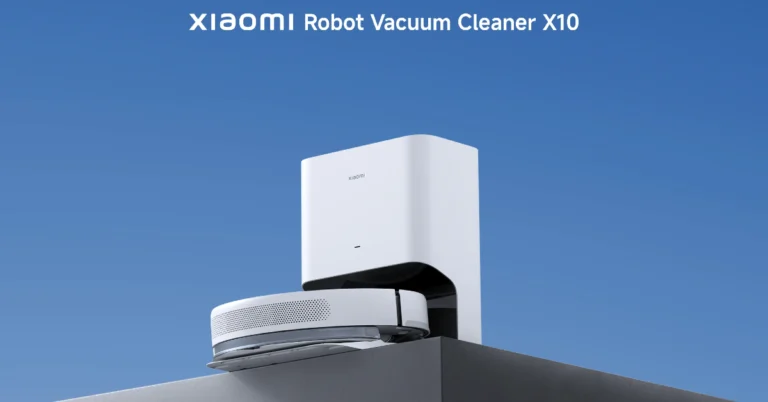
The Xiaomi Robot Vacuum Cleaner X10 is a smart home appliance that the company just released in India. Xiaomi Robot Vacuum Cleaner X10 will be available at Rs 29,999 including bank offers with additional exciting offers worth Rs 5,000.
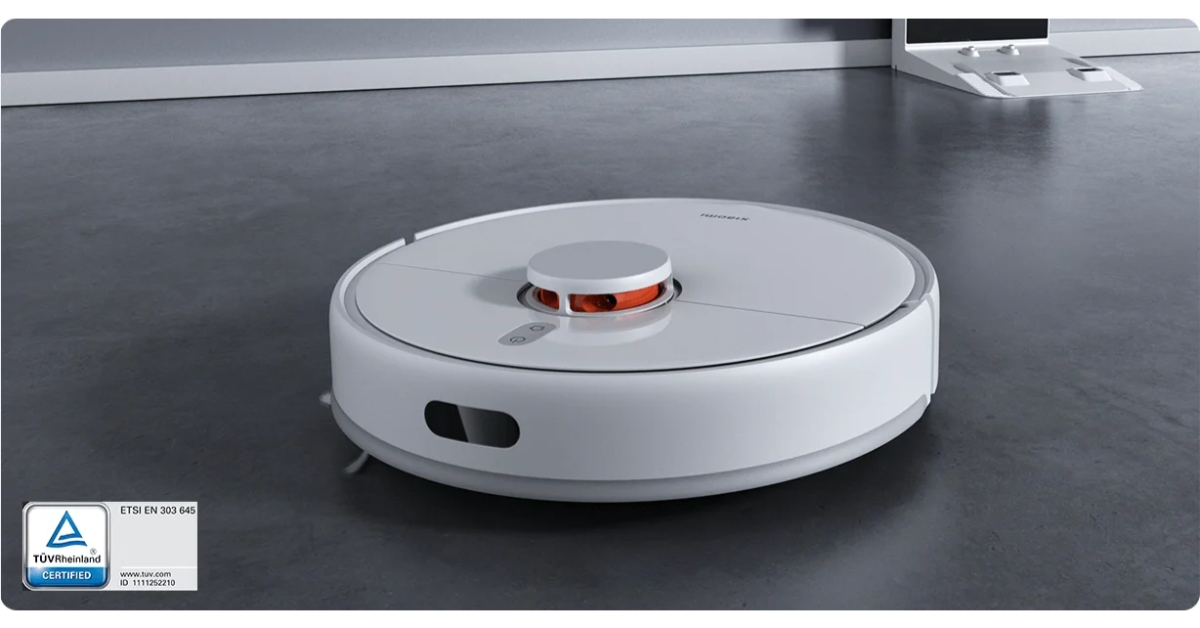
The cleaner has a 2.5L disposable bag, two auto-emptying vents and a storage capacity of up to 60 full cleans. It provides accurate mapping for cleaning coverage because of its LDS Laser Navigation system. According to the company, the cleaning device’s strong 4000Pa suction power efficiently gets rid of dirt and debris, and an automatic cleaning station with 17000Pa suction power makes sure that everything is cleaned thoroughly.
The vacuum cleaner has a 5200mAh battery that lasts for up to 240 minutes of cleaning. Moreover, Xiaomi Home App, which offers scheduled cleaning options and customisable mapping functions, is used by users to control the gadget. The device can also be controlled through voice commands. All accessories and parts are covered by the warranty.
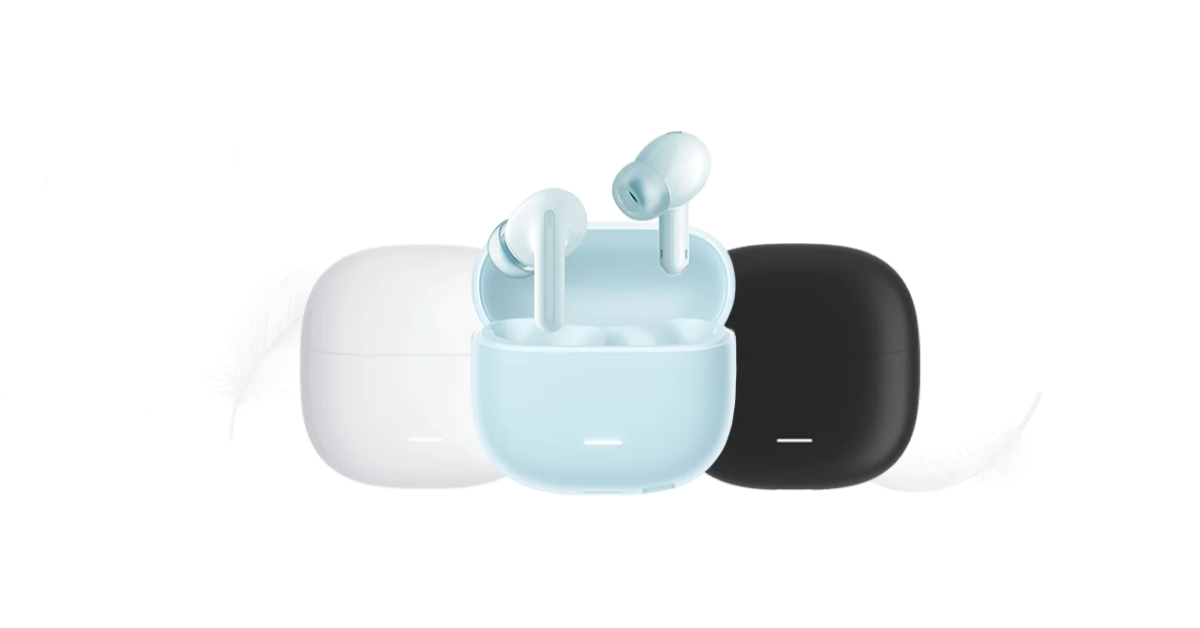
With 40dB Hybrid Active Noise Cancellation, the Redmi Buds 5C‘s 12.4mm Dynamic Titanium Drivers effectively filter out background noise to deliver a focused and immersive listening experience. Perfect for outdoor use, the Quad-Mic Setup with AI ENC effectively reduces noise and manages wind speeds to ensure clear communication. With Bluetooth 5.3, the Xiaomi Earbuds provide reliable connectivity with minimal latency. Touch controls, ANC modes, and EQ settings may all be customised with the Xiaomi Earbuds app. These earbuds are ideal for prolonged usage, offering up to 36 hours of playback and up to 7 hours of playback on a single charge. The Redmi Buds 5C will be available at Rs 1,999. Three colour options for the Redmi 5C are Acoustic Black, Symphony Blue, and Bass White.
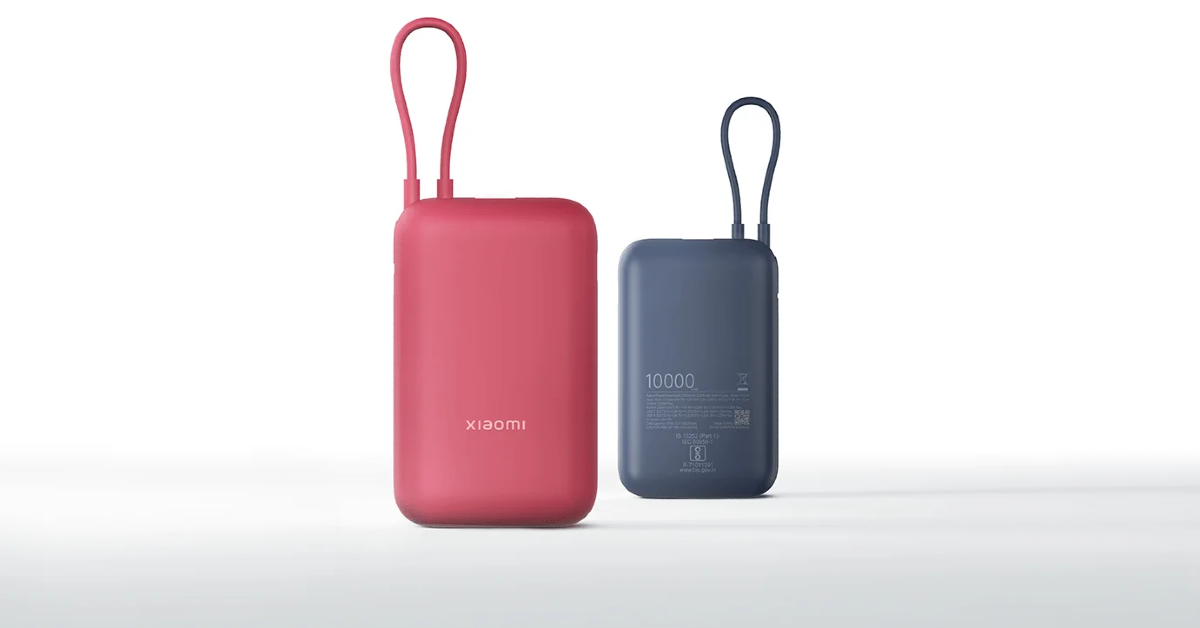
Xiaomi Pocket Power Bank 10000 mAh and Xiaomi Power Bank 4i 10000 mAh
The Pocket Power Bank and the Power Bank 4i are the two new portable charging options that Xiaomi has released. With a 10000mAh capacity, the Pocket Power Bank provides two-way quick charging and multi-port access, while the Power Bank 4i has the ability to charge three devices at once. Both power banks enable Power Delivery, Quick Charge 3.0, 22.5W fast charging, and a 12-layer protective mechanism.
The Xiaomi Power Bank 4i 10000mAh 22.5W Fast Charge and Xiaomi Pocket Power Bank 10000mAh 22.5W with Built-in Cable will retail for Rs 1,299 and Rs 1,699, respectively.
The Chinese tech brand Xiaomi today celebrated its 10th anniversary in India with the launch of a new product range. The firm introduced Redmi 13 5G, Redmi Buds 5C, Xiaomi RVC X10, Xiaomi Pocket Power Bank 10000mAh and Xiaomi Power Bank 4i 10000mAh. Redmi 13 5G runs on Android 14 with HyperOS. It is powered by the Snapdragon 4 Gen 2 AE SoC. The device features a 108-megapixel camera with a Samsung ISOCELL HM6 sensor and a 13-megapixel selfie camera.
In This Article
Redmi 13 5G Price in India, Sale details
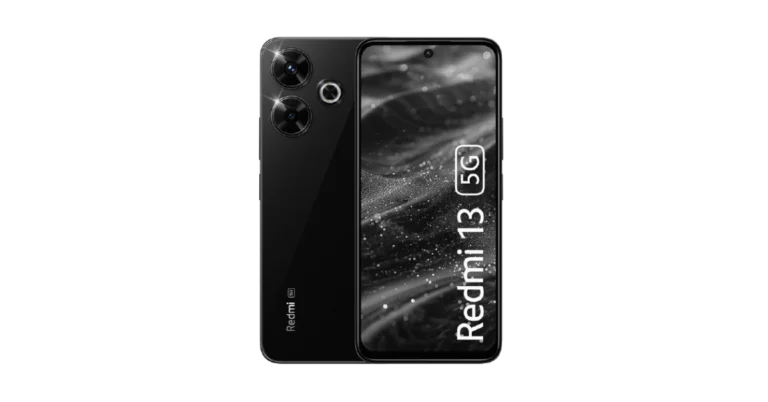
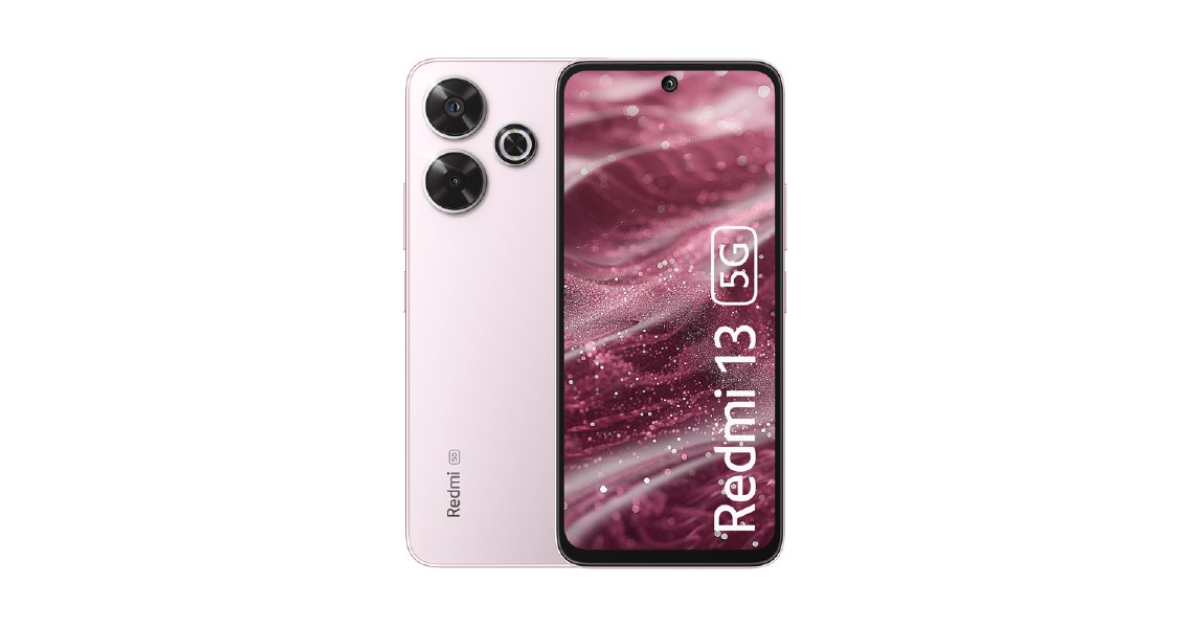
Redmi 13 5G has been launched in India at a starting price of Rs 13,999 for the base 6GB RAM with a 128GB storage option. There is another 8GB RAM with a 128GB storage model priced at Rs 15,499. The device will come in three colourways- Hawaiian Blue, Black Diamond, and Orchid Pink.
The phone will go on sale via mi.com, amazon.in and Xiaomi retail partners starting July 12 in the country.
Redmi 13 5G specs and features
Redmi 13 5G sports a 6.79-inch Full-HD+ IPS LCD display with 1,080×2,400 pixels of resolution. The panel has 120Hz AdaptiveSync refresh rate support and Gorilla Glass 3 protection. The phone runs on Android 14-based HyperOS out of the box, along with commitments to two major Android updates and four years of security updates. Under the hood, there is a Qualcomm Snapdragon 4 Gen 2 AE SoC with up to 8GB of RAM and 128GB of storage.
In terms of optics, the Redmi 13 5G features a dual rear camera with Ring Flash Design, reducing red-eye occurrence in photos and helping users track their notifications for calls and alarms. The camera unit equips a 108-megapixel Samsung ISOCELL HM6 sensor with an f/1.75 aperture and 3x in-sensor zoom along with a 2-megapixel macro lens. Upfront there is a 13-megapixel selfie camera.
The phone has a 3.5mm headphone jack, GPS, Bluetooth 5.4, dual-band Wi-Fi, 5G, and 4G LTE and a USB Type-C port as connectivity options. Additionally, the phone has an infrared (IR) transmitter, a fingerprint scanner installed on the side, an accelerometer, gyroscope, e-compass, proximity sensor, and ambient light sensor, among other sensors.
Samsung’s new BioActive Sensor offers unprecedented accuracy in health tracking.
The advanced sensor includes additional LED colours for comprehensive health insights.
The Galaxy Watch will feature an AGEs index for metabolic health and biological aging monitoring.
Samsung continues to lead digital health innovation by enhancing health and wellness through advanced technology. The latest development in this mission is the introduction of the new BioActive Sensor in the upcoming Samsung Galaxy Watch, which promises to revolutionize preventative wellness with unprecedented accuracy and features.
In This Article
Samsung’s BioActive Sensor: Enhanced Precision for Better Health
Samsung’s new BioActive Sensor is designed to deliver more precise health insights, thanks to significant improvements in its design. Engineers focused on upgrading the performance of light-receiving photodiodes, adding additional colours of light-emitting diodes (LEDs), and optimizing their arrangement. These changes have doubled the performance of each photodiode, allowing for a reduction in number while maintaining capacity, and have expanded the variety of LEDs to include Blue, Yellow, Violet, and Ultraviolet alongside more Green, Red, and Infrared LEDs.
Unlocking New Possibilities for Preventative Wellness
The optimal arrangement of these LEDs improves the accuracy of health metrics like heart rate, sleep quality, blood pressure, blood oxygen levels, and stress levels. The advanced sensor even enhances heart rate measurement during intensive workouts by 30% compared to previous models. The diverse LED colours and newly designed photodiodes enable new predictive and preventative wellness features, such as the advanced glycation end products (AGEs) index. This index serves as an insightful biomarker for metabolic health and biological ageing, influenced by lifestyle and dietary habits, providing a snapshot of biological age to inform wellness decisions.
The new Galaxy Watch, equipped with this advanced BioActive Sensor, will offer sophisticated and intelligent health and wellness tools, helping users achieve their goals more effectively. Samsung’s commitment to innovation ensures that this device will set new standards in wearable health technology.
Clearing the DNS cache is one of the quick fixes that always comes up while troubleshooting solutions for a website not loading on your phone or PC. The DNS cache keeps a record of the websites you visited in the past to cut down the load time when you visit them again. If this cached memory gets corrupted, you may not be able to load the website on your browser. So, here are the top 6 ways to clear or flush the DNS cache on your Android phone.
Before you go about clearing the DNS cache, it is a good idea to learn how the DNS server works. When you enter the address of a website on your web browser, it contacts the DNS server for the website’s IP address. This address is fed to your browser by the DNS, leading to the website appearing on your screen. This of DNS as a phonebook for IP addresses.
If you visit some websites frequently, their IP addresses are stored in the DNS cache so as to bypass visiting the server entirely. This cuts down on the load time. If this cache becomes outdated or corrupted, your web browser will fail to load the website you requested. In this situation, you must flush the DNS cache.
Use Google Chrome to clear DNS cache
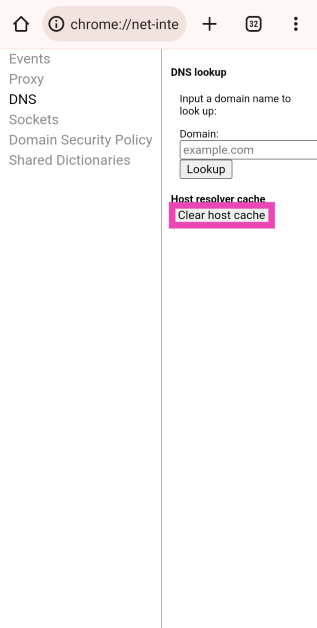
Step 1:Launch Google Chrome on your Android phone and type the following command in the address box:
chrome://net-internals/#dns
Step 2: Tap on Clear host cache.
Clear DNS cache from Chrome’s settings
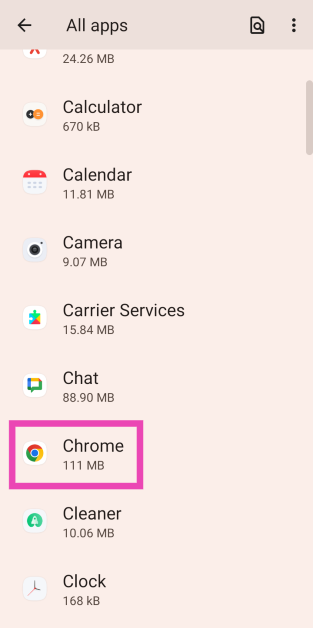
Step 1: Go to Settings and select Apps.
Step 2: Tap on Google Chrome.
Step 3: Select Storage.
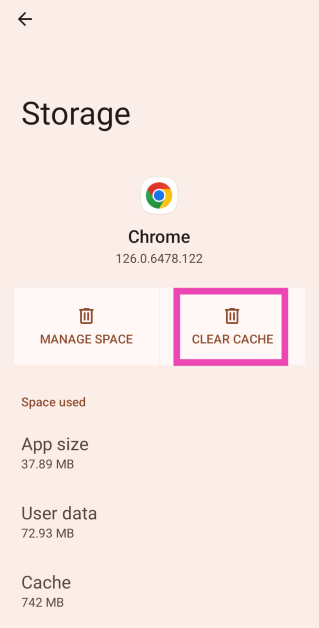
Step 4: Tap on Clear cache.
Change the DNS server
Changing the DNS server on your Android phone flushes its existing cache. Here’s the step-by-step process.
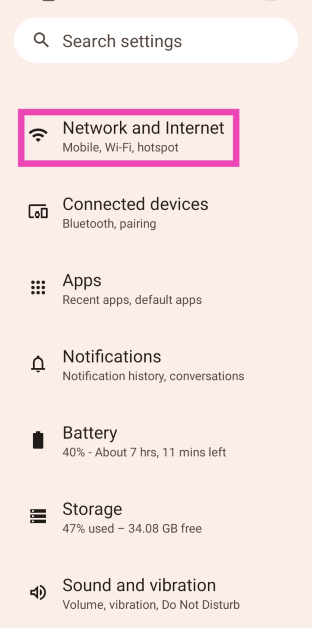
Step 1: Go to Settings and select Network and Internet.
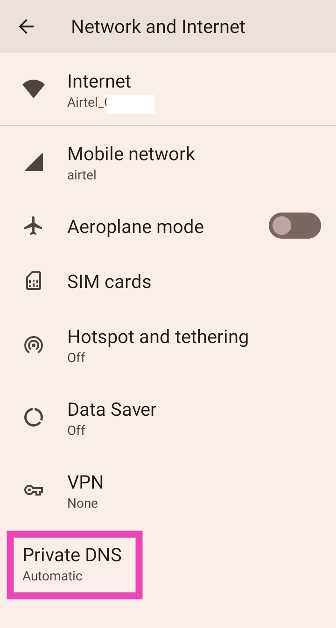
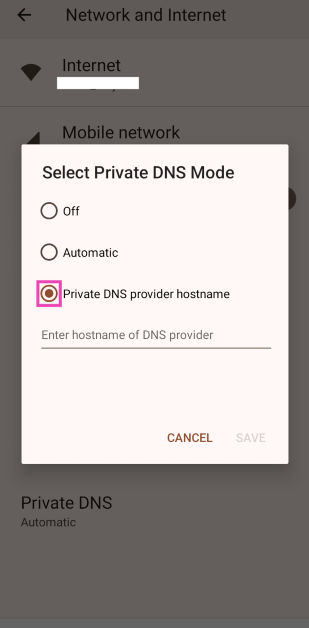
Step 2: Tap on Private DNS.
Step 3: Select Private DNS provider hostname.
Step 4: Type the DNS providerhostname.
Step 5: Tap on Save.
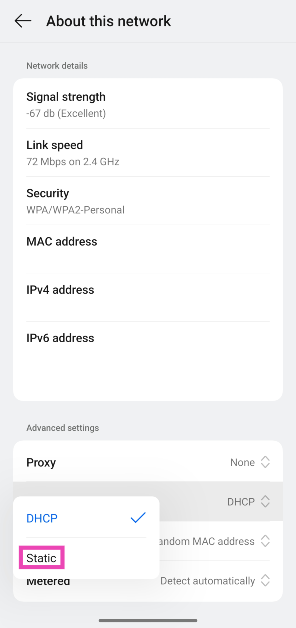
Change the WiFi IP Setting to Static
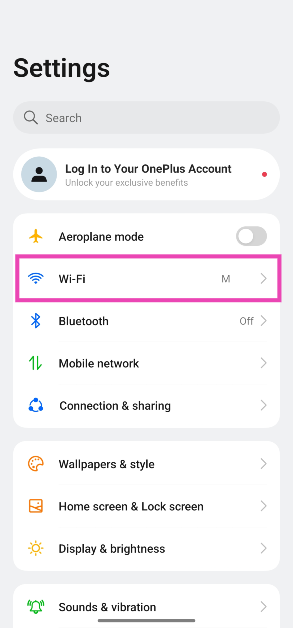
Step 1: Go to Settings and tap on WiFi.
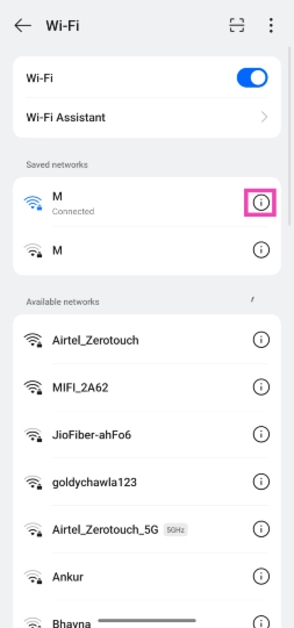
Step 2: Hit the i icon next to the connected network.
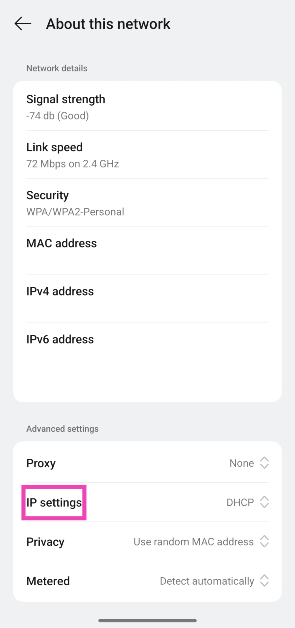
Step 3: Scroll down and tap on IP Settings.
Step 4: Select Static.
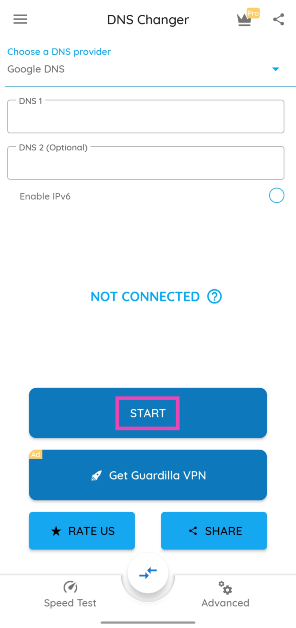
Use a third-party app (DNS Changer)
Step 1: Download and install the DNS Changer app from the Google Play Store.
Step 2:Launch the app and hit Start.
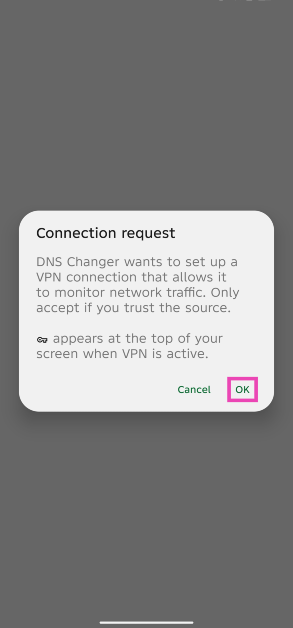
Step 3:Approve the connection request.
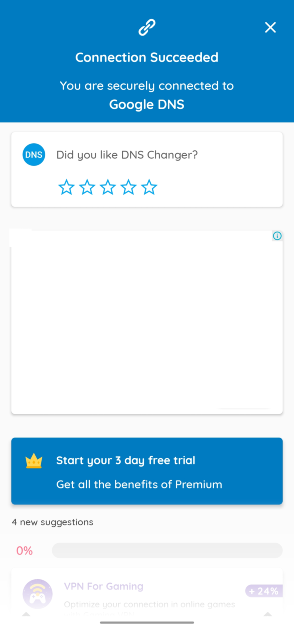
Step 4: Your current DNS will be flushed out and changed.
Reset network settings
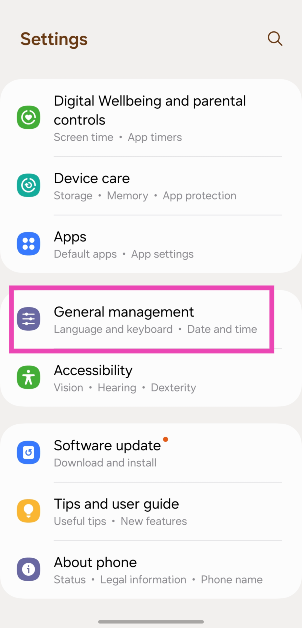
Step 1: Go to Settings and select General management.
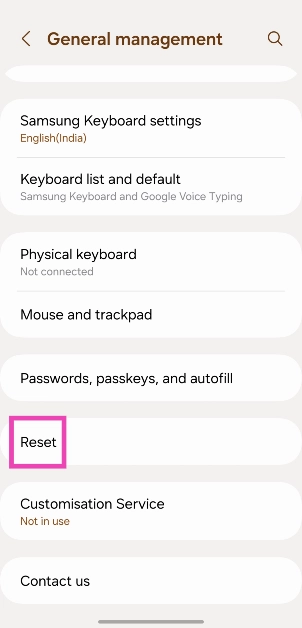
Step 2: Scroll down and select Reset.
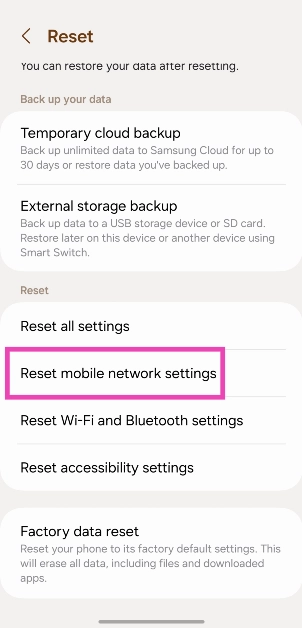
Step 3: Tap on Reset mobile network settings.
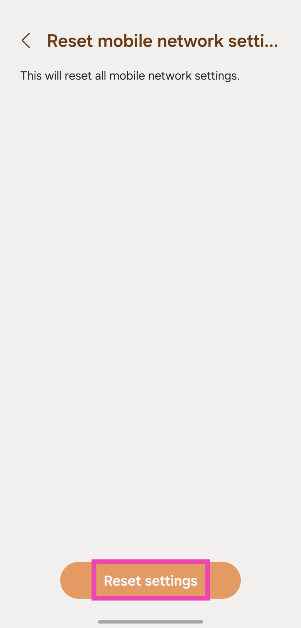
Step 4: Select Reset settings.
Step 5: Enter your PIN to confirm your selection.
Frequently Asked Questions (FAQs)
When should I flush the DNS cache on my Android phone?
If you’re unable to load a website on your web browser even when there’s nothing wrong with your internet connection, clearing the DNS cache will help.
How do I clear the DNS cache on my Android phone?
Launch Google Chrome, type chrome://net-internals/#dns in the address box, hit ‘Enter’, then select ‘Clear host cache’.
How do I flush the DNS cache on a Windows PC?
Go to Command Prompt (Windows + R followed by Enter) and ipconfig /flushDNS.
How do I change the DNS server on Android?
Go to Settings>Network and Internet>Private DNS>Private DNS provider hostname, enter the hostname, and hit ‘Save’.
How do I reset the network settings on my Android phone?
Go to Settings>General Management>Reset>Reset mobile network settings, and hit ‘Reset settings’.
These are the top 6 ways to clear or flush the DNS cache on Android. While you’re here, check out how you can flush the DNS cache on a Mac. If you have any questions, let us know in the comments!
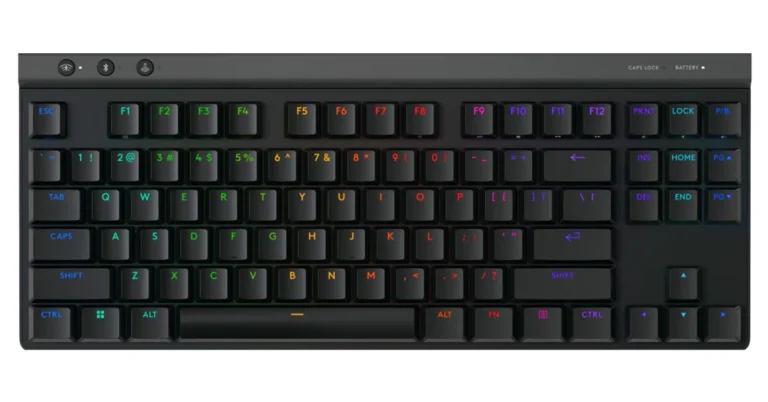
Logitech G515 features a sleek, low-profile design for high-performance gaming.
The keyboard offers advanced customization with KEYCONTROL technology.
Available in India for Rs 14,195 in Black and White.
Logitech G, a leading innovator in gaming technologies and gear, has announced the launch of the G515 LIGHTSPEED TKL Wireless Gaming Keyboard in India. This next-generation keyboard combines advanced technologies and high-performance features in a sleek, low-profile design.
The G515 is designed to deliver a superior typing experience with low-profile switches that activate with minimal distance. At just 22 mm high, the keyboard offers a slim and comfortable design, eliminating the need for a wrist rest. It features LIGHTSPEED wireless technology, LIGHTSYNC RGB lighting, and KEYCONTROL for extensive customization.
The inclusion of sound-dampening foam, pre-lubricated switches, integrated stabilizers, and premium PBT keycaps, the Logitech G515 ensures a smooth and refined typing experience. The KEYCONTROL technology allows each key to perform up to 15 actions, providing gamers with unparalleled personalization and control.
The G515 also offers versatile tri-mode connectivity, enabling users to switch between LIGHTSPEED wireless, Bluetooth, and USB-C wired data modes. Additionally, it provides up to 36 hours of continuous gameplay, ensuring uninterrupted gaming sessions.
The Logitech G515 LIGHTSPEED TKL Wireless Gaming Keyboard is available in Black and White colour options at Rs 14,195.
Just ahead of the July 10 Galaxy Unpacked Event, a report has surfaced on the web claiming that the Samsung Galaxy Ring might cost the same in France as the Galaxy Watch 6 Classic. Earlier, a report claimed that it might include capabilities like temperature measurement and snore detection. The smart ring was introduced at the Mobile World Congress (MWC) this year.
The Samsung Galaxy Ring is said to retail for EUR 449, or Rs 40,000, in France. This price is comparable to that of the Galaxy Watch 6 Classic 47mm Bluetooth model.
Nine sizes, ranging from 5 to 13, will be available, as originally planned. Last but not least, France will also have three colours—silver, gold, and black.
It is anticipated to be more reasonably priced in the US and India, though. It may cost as much as Rs. 35,000 in India and between $300 and $350 in the US.
Here’s everything we know about the Samsung Galaxy Ring
The Galaxy Ring is said to feature an ECG sensor, SpO2 sensor, and PPG sensor, potentially similar to Samsung’s BioActive sensors on its smartwatches. The wearable will offer features such as stress and heart rate measurement, period prediction, snore detection, and skin temperature measurement. It will also provide comprehensive sleep analysis, tracking movements, heart rate, respiratory rate, and sleep latency. The Samsung Health app will assign a ‘Vitality’ score to users based on workouts and sleep performance, with the possibility of comparing scores with friends and maintaining a leaderboard.
Samsung’s ring will have varying battery capacities, with smaller versions featuring 17mAh, highest-size units with 22mAh, and middle variants with 18.5mAh. The ring can last up to 9 days on a full charge and is expected to come with a TWS-like charging case.
According to the company, it will provide people with more personalised and seamless health experiences across more devices, thanks to the revolutionary power of AI. Samsung’s latest smart ring, the Galaxy Ring, will simplify daily wellness and enable smarter, better living through a more connected digital wellness platform known as Samsung Health. The business withheld additional information about the Galaxy Ring, including its specifications.
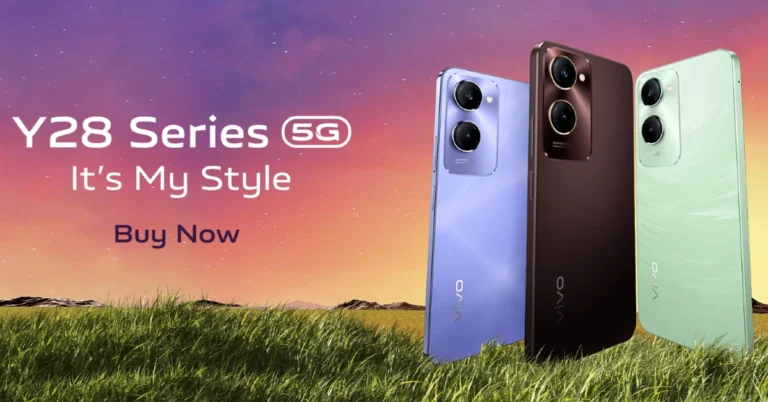
Vivo has expanded its Y-Series portfolio in India by launching two new smartphones- Vivo Y28s, and Vivo Y28e. Both smartphones come with MediaTek Dimensity 6100+ 5G SoCs. The devices come with a 90Hz LCD display with TUV Rheinland Low Blue Light certification. In addition to this, they run on Android 14-based Funtouch OS 14.
In This Article
Vivo Y28s, Vivo Y28e price in India and sale details
The 6.56-inch LCD screen of the Vivo Y28s and Y28e, the only difference is that Y28s supports HD+ resolution whereas the latter one is outfitted with an HD display. However, both of them have a refresh rate of 90Hz. The display offers a maximum brightness of 840 nits and is certified by TUV Rheinland Low Blue Light.
Their 6nm octa-core MediaTek Dimensity 6100 5G processor, which comes with up to 8GB of LPDDR4X RAM on the Y28s, powers them. You can increase the inbuilt memory to a maximum of 16GB. The handsets run on Funtouch OS 14, which is based on Android 14.
In terms of photography and videography, Vivo Y28s sports two rear cameras, one of which is a 50-megapixel Sony IMX852 main sensor. It has a 5-megapixel portrait camera on the front for selfies and video calling. The dual camera setup on the Vivo Y28e boasts a 13-megapixel primary sensor. Additionally, it sports a 5-megapixel selfie camera.
A 5,000mAh battery with 15W fast charging backs the smartphones. Both mobile phones include several sensors on board, such as a fingerprint scanner positioned on the side, proximity sensor, e-compass, accelerometer, and motor. In terms of connectivity, they include 5G, Bluetooth 5.4, GPS, Wi-Fi, and a USB Type-C port for charging. Their construction is water and dust-resistant, with an IP64 rating.
Garena Free Fire Max is a battle royale game with regular awards and tournaments to keep players interested. If you play Garena Free Fire, you should be aware of the redeem codes that are released on a daily basis. However, because the battle royale game is banned in India, players from other countries can use the Free Fire Redeem codes daily. If you’re unfamiliar with the Garena Free Fire redeem codes or don’t know how to get them, we’ve put together a step-by-step guide to help you redeem them. Check out Garena Free Fire Max Redeem Codes for 9 July 2024.
The Free Fire Max redeem codes are a great way to get free stuff. These are 12-digit codes that contain alphabets and numbers, as well as an expiration date and time. Because the Garena FF redeem codes cannot be used more than once, you should hurry to the redemption page to claim your free reward before someone else does. To get a free reward, all you have to do is go to reward.ff.garena.com/en, which is the official redemption page. Also, keep an eye on this space for daily updates on Garena Free Fire Max redemption codes and rewards.
9 July 2024: New Amazon Quiz is now available. Customers from different parts of the country are participating in the daily quiz. The quiz starts at midnight today and will be live until 11:59 PM tonight. By successfully answering every question, participants in the quiz have the chance to win wonderful rewards. A Rs 500 Amazon Pay Balance is up for grabs to participants today.
One wrong answer could eliminate you from the quiz. You have a chance to win Rs 500 Amazon Pay Balance if you successfully answer every question. Users of the app only have the opportunity to take the quiz. Check Out 9 July 2024 Amazon Quiz Answers.
Only app users are eligible to play the Amazon quiz every morning from 12 AM to 11:59 PM. The quiz is not available on the desktop. For those who are unaware of how to play the Amazon quiz, below are the steps, you can follow to take the quiz.
We have written an explainer above, you can refer to that.
When are the winners of the Amazon Quiz and contest announced or declared?
The announcement of today’s Amazon quiz winner will take place Tomorrow. As for the Special Quiz and “Spin & Win” Contest, the winners will be declared once the Quiz Contest comes to an end. To find out who the lucky winner is, you can refer to the Amazon Quiz Winners List or visit the Amazon Winners tab in the Amazon App.
How to participate in the Daily Amazon Quiz?
That is very easy, just got to the Amazon app and scroll to the bottom of the page and you will find the Quiz section. Click on it (usually it is called the fun zone) and you can enter the Amazon Today Quiz Contest.
Are there any other quizzes or contests running on Amazon daily?
Yes, there are many running on a daily basis. These range from spinning the wheel to answering the questions correctly. All are located in the Fun Zone.
What are the criteria for selecting a winner in the Daily Amazon Quiz?
When a qualified player submits correct answers to all the questions, they will automatically be entered into a lucky draw. This draw will include all participants who answered all the questions correctly. Amazon randomly selects the final winners from the pool of eligible participants who gave the right answers.
Which Types of Questions are asked within Amazon Daily Quiz?
These are very simple and straightforward questions. These are mainly related to general knowledge.
Where should I look for Amazon Daily Quiz answers?
You can bookmark this page as we will help you every day with the Amazon Daily Quiz. We bring you fresh answers every day for the Amazon Daily Quiz and Contest.
What time does Amazon Announce previous winners?
The previous winner’s name will be announced today at 12 PM (noon).
If you’re not connected to a WiFi network, you should be more mindful about your internet usage. Mobile data can drain away pretty quickly even when you’re doing something as trivial as browsing Twitter. The images on your feed use a significant chunk of data to load. Playing videos only adds to the heavy usage. Luckily, your smartphone has a native tool that lets you track your usage. Here’s how you can check the mobile data usage on your Android phone.
Different Android OEMs have different ways of accessing the data tracking tool. If you go to Settings and tap the category related to Internet and Connectivity, you will find this tool. For this feature to work, you need to have an active mobile data plan. If you’re out of data or haven’t used your mobile internet connection in the last few days, you will not be able to see any metrics.
If you’re using a budget smartphone with the Android GO OS, you will not be able to access this native tool. In this case, you will have to rely on third-party apps to track your data usage. Of course, a data tracking app will ask for usage access and permission to constantly run in the background. This can end up reducing your phone’s battery life by a considerable factor.
Check data usage on your Android phone from Settings
Step 1: Go to Settings and select Network and Internet.
Step 2: Tap on SIM cards.
Step 3: Select App data usage.
Step 4: Select a time window from the menu at the top of the page.
The data usage will be displayed on the screen.
Use a third-party app (My Data Manager)
Budget smartphones that run Android GO may not have a native data usage tool. In this case, install the ‘My Data Manager’ app on the device to check data usage.
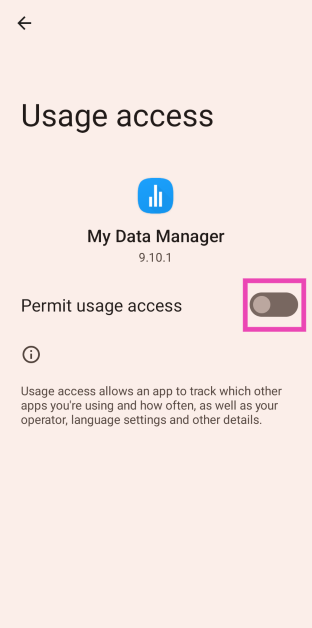
Step 2:Launch the app and allow usage access to the app.
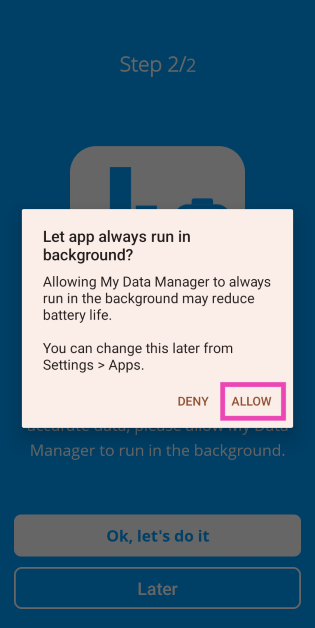
Step 3: Allow My Data Manager to run in the background.
Step 4: Go to Settings and disable hibernation for the app by turning off the toggle switch for Pause app activity if unused.
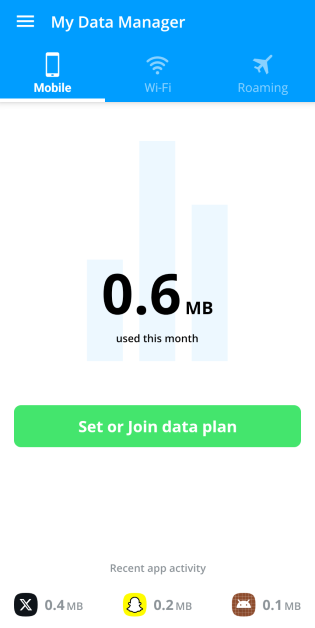
Step 5: The app will display your data usage in the mobile and WiFi tabs. Switch between the two tabs to view how much data you have used on your mobile and WiFi connection.
Frequently Asked Questions (FAQs)
How do I check mobile data usage on my Android phone?
Go to Settings>Network and Internet>SIM cards>App data usage and select your preferred time window.
How do I turn on the data saver on my Android phone?
Go to Settings>Network and Internet>Data Saver and turn on its toggle switch. You can green-light some apps to bypass this limit.
What is the USSD code to view the amount of data I’ve consumed?
The USSD code to check mobile data balance on Airtel is *121#. Jio users can dial *333*1*3# to view the amount of data they’ve consumed.
These are the top 2 ways to check mobile data usage on an Android smartphone. To conserve your mobile data balance, you can turn on the native Data Saver feature on your phone. If you have any other questions, let us know in the comments!
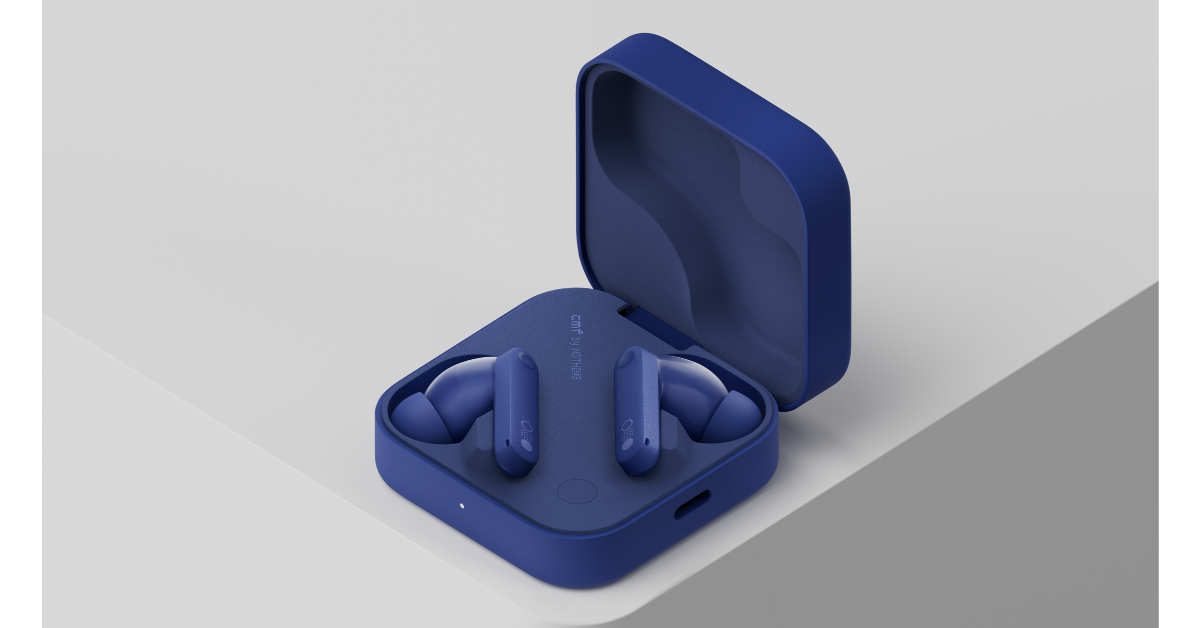
CMF, a sub-brand of London-based technology company Nothing, has launched three new products: CMF Phone 1, CMF Watch Pro 2, and CMF Buds Pro 2. All of the newly introduced products have an adaptable design and essential smart functions. The CMF Buds Pro 2 has a Smart Dial, 50 dB Hybrid ANC, multiple drivers, LDAC technology, and a 43-hour battery life. The CMF Watch Pro 2 features a 1.32-inch AMOLED display, auto-brightness, changeable bezels and straps, over 120 sports modes, and IP68 water and dust protection.
In This Article
CMF Buds Pro 2, CMF Watch Pro 2 price in India, sale details
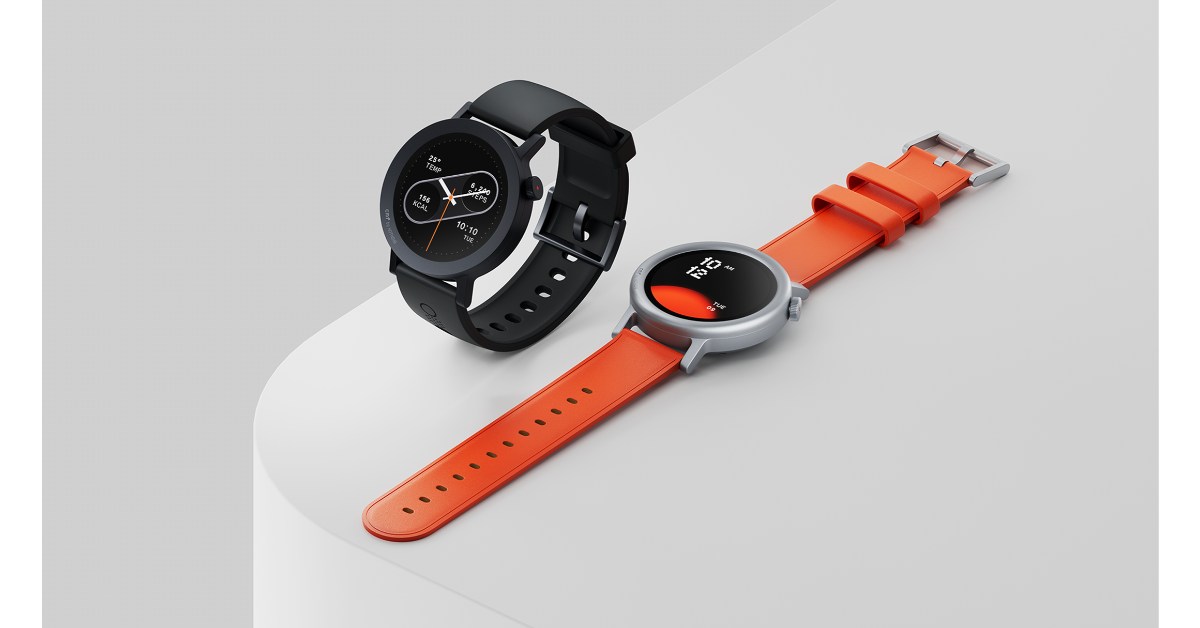
The CMF Watch Pro 2 comes in four colour options priced differently:
Ash Grey and Dark Grey: Rs 4,999
Blue and orange vegan leather: Rs 5,499
One can also purchase a second set of straps and bezels for Rs 749.
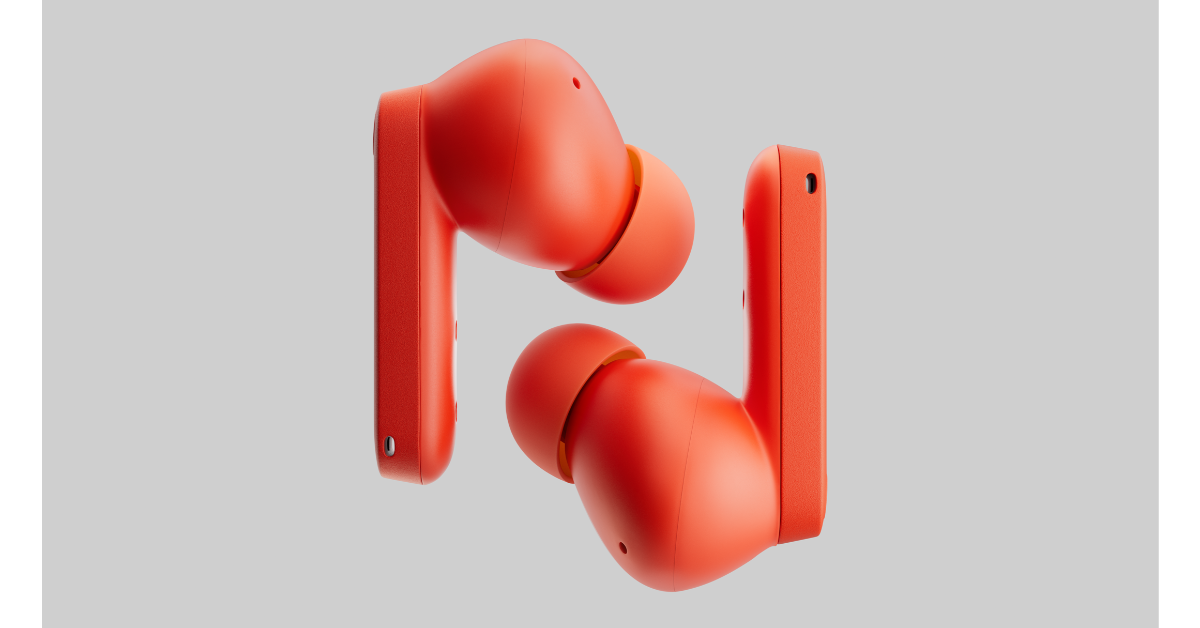
On the other hand, the CMF Buds Pro 2 is available in Blue, Dark Grey, Light Grey, and Orange hues and costs Rs. 4,299 in India.
Flipkart will be selling the devices in the country starting on July 12 at 12 p.m. IST.
Additional Offer: Rs 1000 discount for consumers purchasing CMF Phone 1 on Flipkart.
CMF Buds Pro 2
The casing of the CMF Buds Pro 2 has a customisable Smart Dial. It has dual drivers: a 6mm micro planar tweeter and an 11mm bass driver. With an extensive frequency range of up to 5000 Hz and a Hybrid Active Noise Cancellation of up to 50 dB, it gives immersive HiFi sound. It is approved for Hi-Res Audio Wireless and Dirac Opteo and comes with LDAC technology. Additionally, it has six HD microphones with Wind-Noise Reduction 2.0 and Clear Voice Technology 2.0 for clear calls in any setting.
The charging case has a 460mAh battery, while the earphones have 60mAh batteries apiece. The device has a 43-hour maximum playback duration. Using a USB Type-C connector the earphones can be fully charged in 70 minutes.
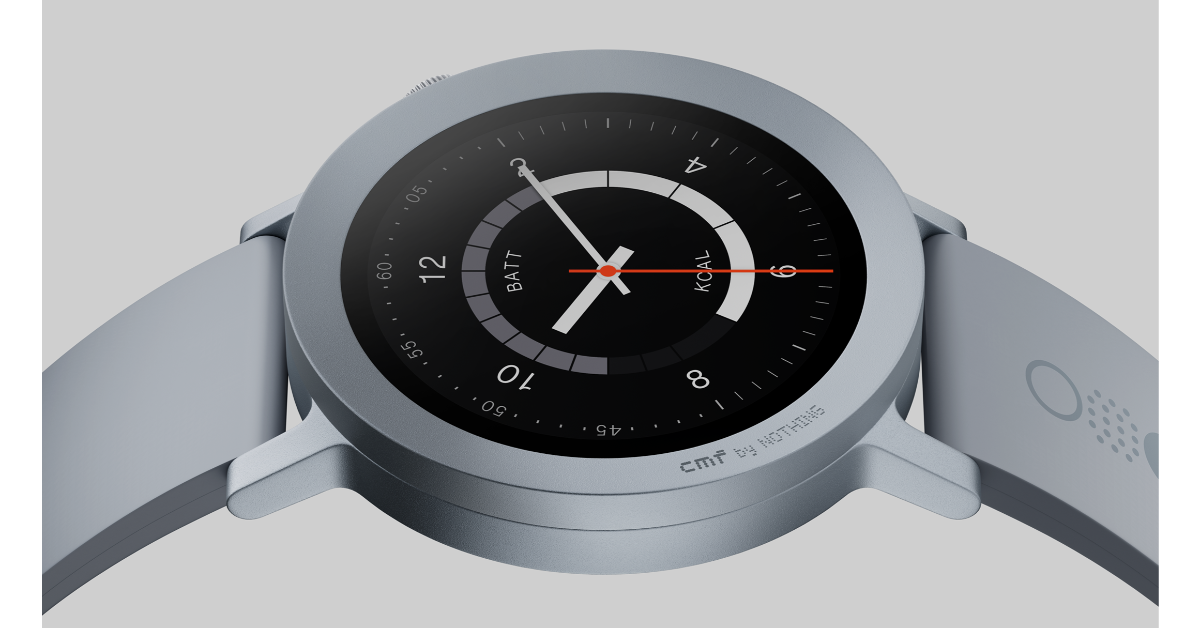
The CMF Watch Pro 2 is a versatile everyday companion with an interchangeable bezel design, a 1.32-inch AMOLED always-on display with a 466 x 466 resolution and a 60Hz refresh rate. It offers 620 nits of peak brightness and a pixel density of 353 ppi. There are over 100 watch faces and support for over 120 sports modes and automatic recognition of 5 sports on the smartwatch. It also provides round-the-clock monitoring of heart rate, blood oxygen saturation (SpO₂), and stress levels.
Users can make Bluetooth calls, control music, and utilise intelligent features like receiving notifications, remotely controlling the camera, and checking the weather.
With normal use, the 305mAh battery powering the CMF Watch Pro 2 is said to provide up to 11 days of battery life.
Additionally, it has connectivity for Bluetooth 5.3, GPS, GLONASS, Galileo, QZSS, and Beidou. Additionally, the watch has an IP68 dust and splash resistance rating.
To celebrate its 10th anniversary Xiaomi has scheduled a launch event on July 9 to unveil its new range of products. Along with Redmi 13 5G, the company will also introduce four new devices- Redmi Buds 5C, Xiaomi RVC X10, Xiaomi Pocket Power Bank 10000mAh and Xiaomi Power Bank 4i 10000mAh. Here is everything about the upcoming products.
In This Article
Redmi 13 5G
According to the company, The Redmi 13 5G will be available in three vibrant colours—Hawaiian Blue, Orchid Pink, and Black Diamond. The Redmi 13 5G smartphone has a flat display with notable bezels, a thicker chin, and a punch-hole camera cutout. The brand says that it will sport the segment’s largest display and Gorilla Glass 3 protection. The device will sport a 6.7-inch FHD+ display and a smooth 120Hz AdaptiveSync refresh rate. The Redmi 13 5G will include a 108 MP primary camera in a dual-camera arrangement at the back. It’s said to have a 2MP macro camera and an 8MP selfie camera. It will be powered by the Qualcomm Snapdragon 4 Generation 2 chipset. The Redmi 13 5G will use Xiaomi HyperOS as its operating system. The smartphone will reportedly include a 5,030mAh battery with 33W fast charging capabilities.
The company has revealed that the Redmi Buds 5C boasts a 12.4mm Dynamic Titanium Drivers which will provide 40dB Hybrid Active Noise Cancellation that effectively blocks out ambient noise to provide a focused and immersive listening experience. There is a Quad-Mic Setup with AI ENC on the earphones that offers clear communication even in windy circumstances. The Redmi 5C will be offered in three colours: Acoustic Black, Symphony Blue, and Bass White.
Xiaomi RVC X10
On July 9 Xiaomi will also introduce a new home cleaning device RVC 10 which comes with an LDS Laser Navigation and 4000Pa suction power. The Automatic Cleaning Station’s powerful 17000Pa suction ensures effective dustbin emptying, and its 2.5L high-capacity disposable bag can hold up to 60 complete cleaning sessions. The RVC X10 is powered by a 5200mAh battery, offering up to 180 minutes of continuous cleaning on a single charge.
Xiaomi Power Bank 4i 22.5W Fast Charge & Pocket Power Bank 10000mAh
Pocket Power Bank and 4i 22.5W Fast Charge are portable chargers with 9-layer safety protection, 22.5W rapid charging, Power Delivery, and Quick Charge 3.0.
A new report by Symantec reveals that iPhone users are being targeted by a new phishing scam operating over text messages. Users are sent text messages that are made to look like they’re from Apple. The SMS asks the users to verify their iCloud account and contains a link that redirects them to a phishing website. Once the user enters their login credentials into the website, the malicious actors operating the scam get access to it. Use these 5 methods to protect your iPhone against such SMS phishing scams.
Phishing scams are very common these days, but a keen eye can easily spot them. Here’s what you need to look for.
Closely observe the number that sent you the text message
Check the link for any spelling error
Check the text body for typos
The website you land on looks older or its layout seems off
The website asks you to disable two-factor authentication
Install an antivirus app
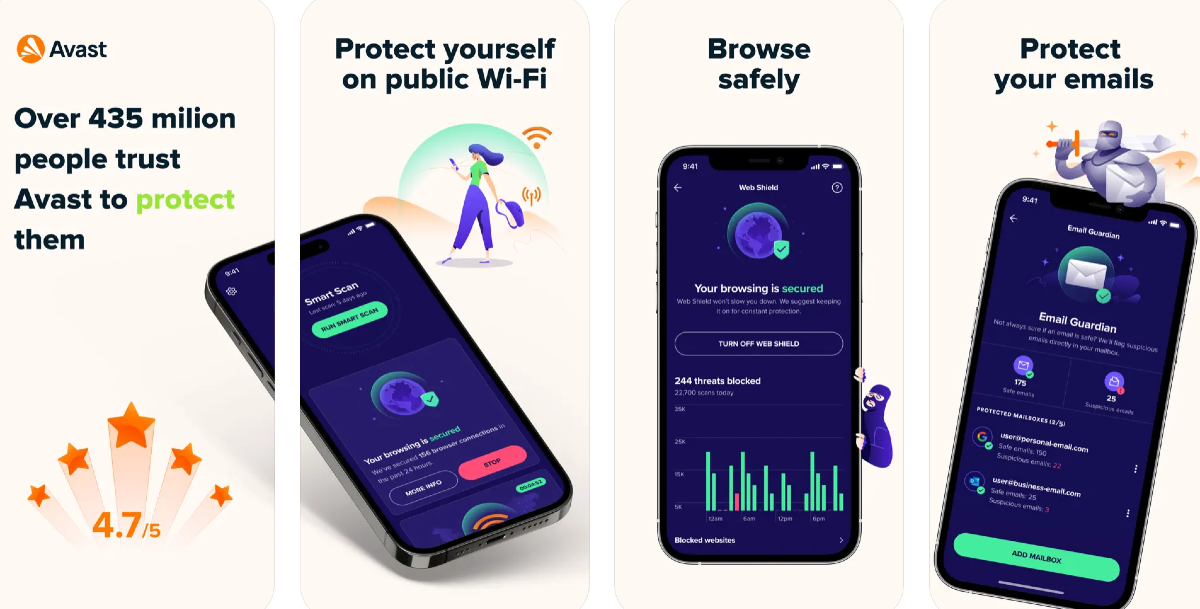
To ensure round-the-clock security, install a reliable antivirus app on your iPhone. Avast, AVG, and Bitdefender are good options. An anti-virus app will instantly remind you of possible malicious activity as soon as you open a phishing website. Apart from your web browser, the antivirus app will also prevent threats from the other apps on your phone.
Inspect the validity of the SMS before clicking on the link
Before clicking on any link sent to you via text message, always check the validity of the source. If it is from a service you do not recognise, don’t click on the link. Do not respond to messages from unknown numbers. Additionally, look for typos or grammatical errors within the message. If something seems off, delete the text message and do not respond to any queries.
Enable two-factor authentication
Two-factor authentication is the best way of securing your Apple ID. It adds an extra level of security to ensure that no one is able to access your account without your consent. When you log into your Apple ID, 2FA demands a code that is only sent to your trusted devices. Apple never asks you to disable two-factor authentication. If you receive a text message asking you to wave off the security measure, report that phone number.
Routinely change your passwords
Phishing scams primarily target your login credentials to gain access to your accounts. It is a good idea to routinely change your passwords and stay on top of things. If you have the same password for every service, a single phishing scam can affect all of your accounts. Changing your password every couple of months ensures that the credentials obtained by scammers are worthless.
Step 1: Make sure your iPhone is connected to a WiFi network and plug in its charger.
Step 2: Go to Settings and select General.
Step 3: Select Software Update.
Step 4: Tap on Download and Install.
Frequently Asked Questions (FAQs)
How do I enable two-factor authentication for my Apple ID?
Go to Settings, tap on your name, and select ‘Sign In and Security’. Tap on ‘Turn on Two-Factor Authentication’, select ‘Continue’, enter your phone number, hit ‘Next’, and enter the verification code sent to the number to make it a trusted device.
How do I protect my iPhone against phishing scams?
Install an antivirus app on your phone to be alerted every time you land on a suspicious website. Make sure two-factor authentication is enabled for all your major accounts to ensure no one gains illegitimate access to them.
How do I update my iPhone?
Go to Settings>General>Software Update and select ‘Download and Install’.
These are the top 5 ways to protect your iPhone against SMS phishing scams. Check out this article to learn how to find out if your password was leaked in a data breach. If you found this article helpful, let us know in the comments!
CMF by Nothing has officially announced the introduction of their new smartphone, CMF Phone 1, in India as well as globally. It has a 120Hz AMOLED display and a dual camera configuration using a 50-megapixel sensor. The gadget is powered by a MediaTek Dimensity 7300 5G SoC and comes preloaded with Nothing OS 2.6, which is based on Android 14. The most notable feature of the recently released phone is its adaptable design. It has removable backs and other accessories like a lanyard, kickstand, and more.
In This Article
CMF Phone 1 design, specs and features
The CMF Phone 1 is available in four colours: blue, light green, orange, and black, and comes with a removable back plate with visible screws. A small screwdriver included with the device can undo these screws and serve as a SIM ejector tool. Users can customise the back panel with attachments like a lanyard or kickstand.
The phone is IP52-rated for dust and splash resistance.
The newly launched phone 1 by CMF is the first smartphone in India to come with an octa-core MediaTek Dimensity 7300 5G processor. It is available with up to 8GB of RAM and up to 256GB of storage. The RAM Booster feature allows for virtual memory expansion on the CMF Phone 1, bringing its available memory up to 16GB. Whereas the internal storage can be expanded up to 2TB using a microSD card.
Phone 1 by CMF flaunts a 6.7-inch full-HD+ AMOLED LTPS display with 1,080×2,400 pixels of resolution. The screen supports up to 120Hz adaptive refresh rate and 240Hz touch sampling rate. The panel also comes with 2000 nits peak brightness and 395ppi pixel density. The screen also includes an optical in-display fingerprint sensor for phone unlock. For taking photos and videos, there is a dual 50-megapixel main and portrait sensor with EIS support. For selfies, it includes a 16-megapixel front-facing camera.
The Phone 1 has a 5,000mAh battery that supports 33W fast and 5W reverse wired charging, allowing it up to two days of battery life on a single charge and a 50% charge in 20 minutes.
The CMF Phone 1 will be available in India with the following pricing.
6GB + 128GB – Rs 15,999
8GB + 128GB – Rs 17,999
A limited amount of Phone 1 will be available in an exclusive pop-up drop on Tuesday, July 9th, 2024, at 7:00 PM at Lulu Mall in Bengaluru. The first 100 consumers to purchase the CMF Phone 1 will receive CMF Buds for free. On the first day of the sale, buyers will be able to take advantage of special bank deals through the Day 1 Sale Day offer. Customers may get the Phone 1 6GB + 128GB for Rs 14,999 and the 8GB + 128GB for Rs 16,999. It will go on sale on Flipkart on July 12 at noon.
Sony India recently added the BZ53L 98 (248.92 cm) display to the Pro BRAVIA portfolio. Sony’s unique Deep Black Non-Glare Coating technology is featured on this display, suited for corporate, educational, and retail applications. The display has low glare, outstanding picture quality, and high brightness. The 98 cm model joins Sony’s existing Deep Black Non-Glare offerings, which include 55, 65, 75, and 85-inch sizes.
Sony’s BZ53L 98 display has been launched in India at Rs 20,00,000. The Pro Bravia display is scheduled to go on sale in the country on July 15.
The new professional Bravia display Sony BZ53L 98 features Sony’s Deep Black Non-Glare Coating technology, which provides low reflection, great contrast, and perfect image quality. The technique is said to address the challenges with digital signage in high ambient or direct lighting situations, improving content quality. The new Bravia display comes with a 4K panel with a high refresh rate of 120 Hz. It further includes the XR TRILUMINOS Pro effect and a brightness of 780 nits. It has portrait and tilt orientations, handles for convenient transportation, and a discreet logo placement.
Furthermore, there is a Full Array Local Dimming backlight and 24-hour operating support. The display also supports Pro Mode, simplifying custom settings and improving usability, installation flexibility, and sustainability.
The BZ53L model has a user-friendly interface and supports Apple AirPlay2, Google Chromecast, and Google Meet. It also includes a Software API for connecting devices directly to the display. The BRAVIA Signage Free app can be quickly loaded on a USB flash drive to gain access to the free digital signage player. The BZ53L uses recycled plastic materials and packaging, and it incorporates Power-Saving Mode, which allows the displays to turn off when not in use.
Tomohiro Nakashima, Deputy Managing Director, Sony India said, “For last few years, our Pro BRAVIA displays have been instrumental in meeting the needs of our customers and their audiences, continually evolving to address their demands. The introduction of our series with Deep Black Non-Glare Coating has received excellent feedback, with customers praising the improved visibility, reduced reflections, and overall performance. With the addition of 98 (248.92 cm) model, the series now offers a comprehensive range of sizes, ensuring versatile installation options that accommodate various lighting conditions and spaces.”
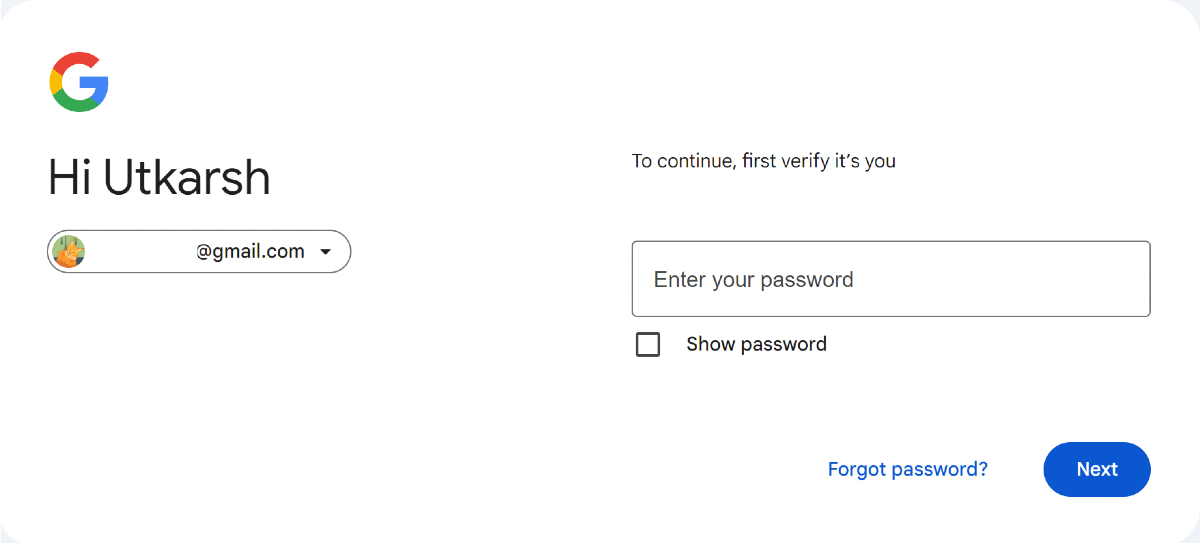
A collection of almost 10 billion passwords was posted to a hacking forum recently. Posted by user ‘ObamaCare’ on a popular hacking website called ‘BreachForums’, the database of leaked passwords, RockYou2024, contains 9,948,575,739 unique passwords. Some of these passwords have been compiled from previous data breaches (like RockYou2021). Data breaches like this can jeopardise your online security if your password falls into the hands of malicious actors. Here’s how you can check if your password was leaked in a data breach.
What can be done to minimise the impact of data breaches?
There is nothing you can do about your password getting leaked from the servers of a website or service you use. Even the most popular and seemingly safe websites have a history of data breaches. To reduce the impact of such breaches, you need to routinely check if your passwords have been compromised and then immediately change them.
To stay ahead of things, it is recommended that you change your passwords after every few months. When one password gets leaked, malicious entities may use it to gain access to other services you use. For example, your Facebook password may be used to gain access to your bank accounts. This is why it is important that you don’t repeat your password for multiple services. A password manager app can help you keep track of all your passwords and auto-fill them wherever necessary. While there’s no way to avoid data breaches, you can ensure no one gains access to your private accounts by turning on two-factor authentication.
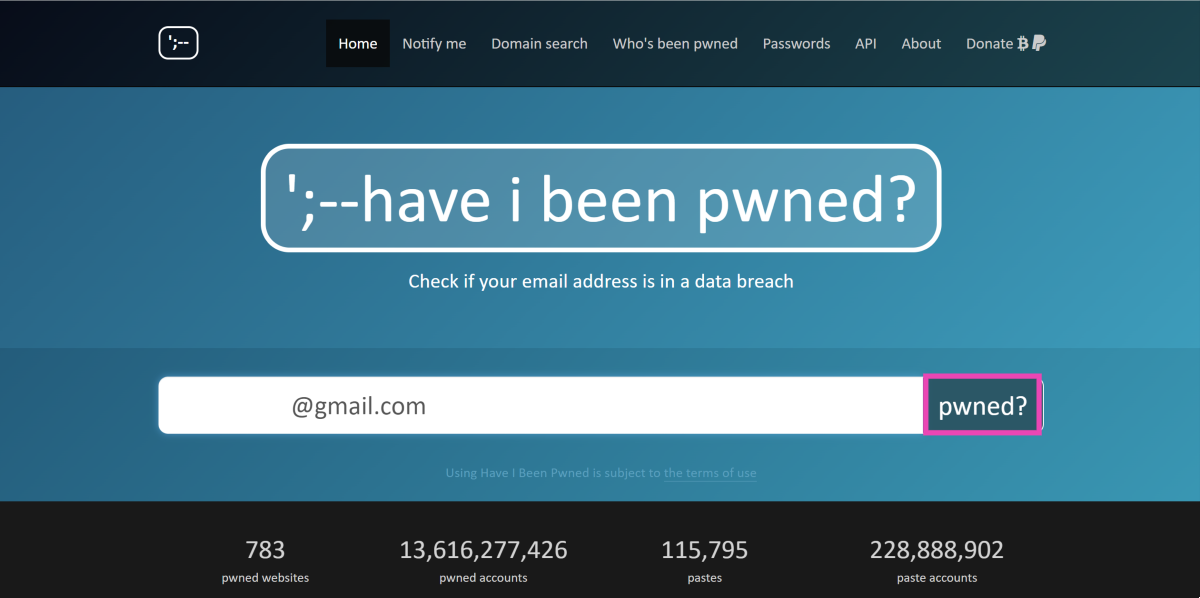
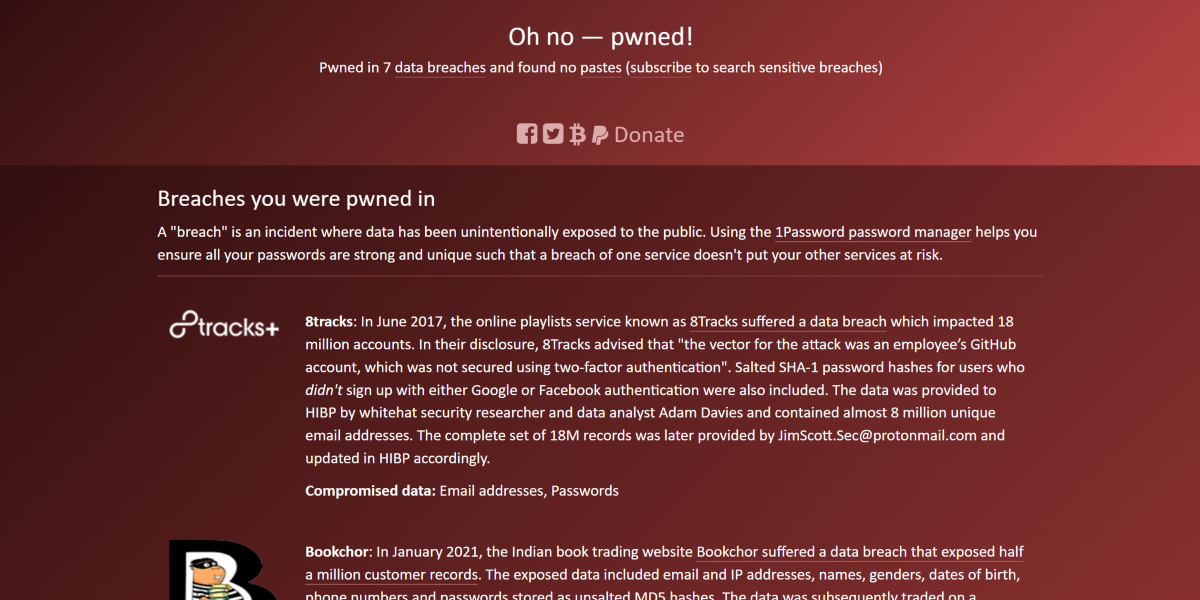
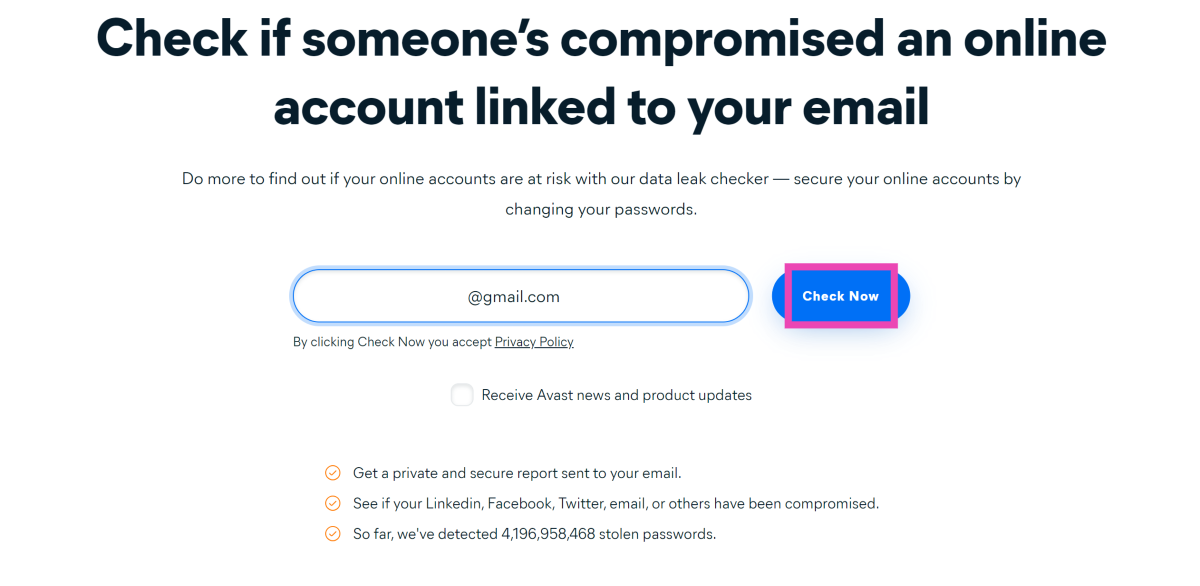
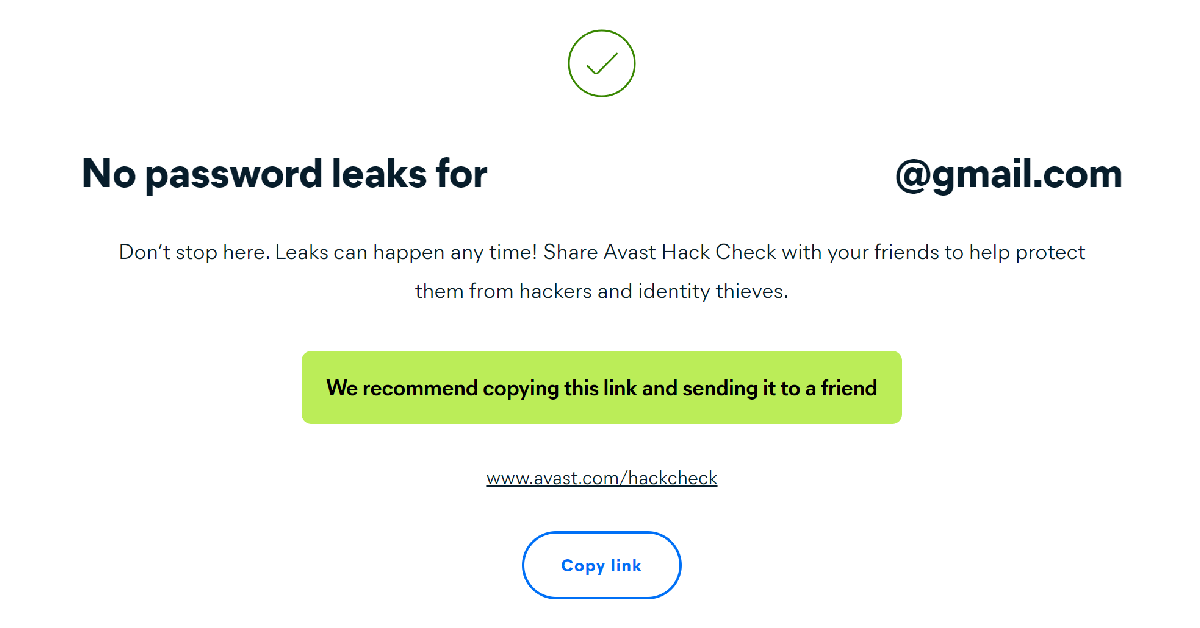
Step 3: The website will let you know if your email was found in a data breach. Scroll down to see which service breached your data. You can also check which credentials were leaked alongside your email (password, phone number, etc.).
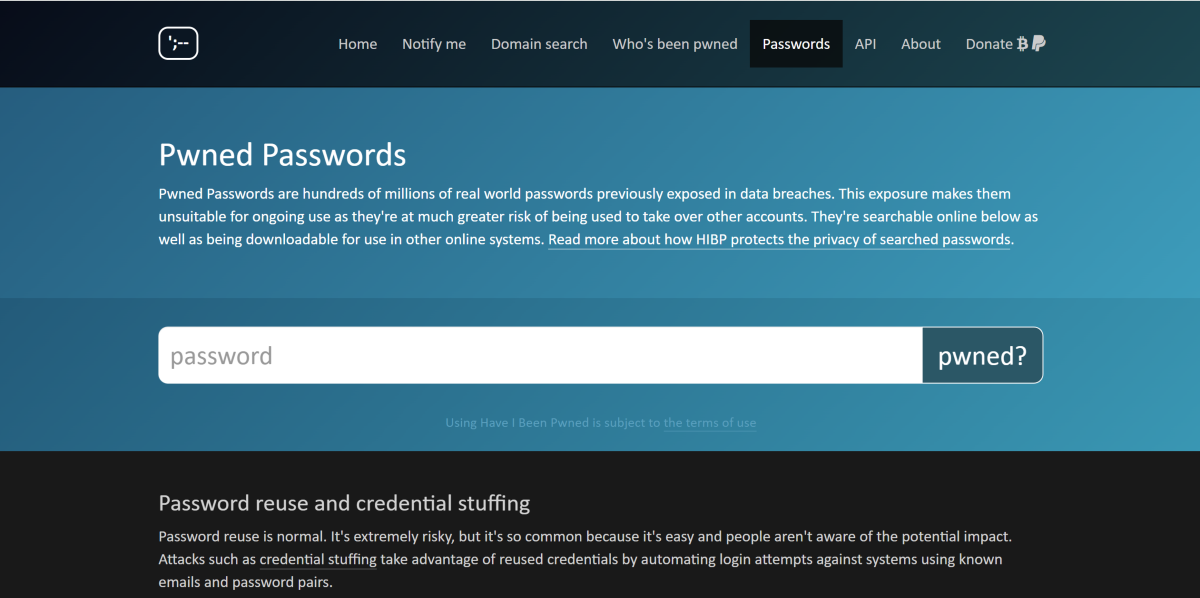
Step 4: To directly search for your password, go back to the home page and click on Passwords.
Step 5: Enter your password and click on ‘Pwned?’
Step 6: The website will let you know if your password was found in a data breach.
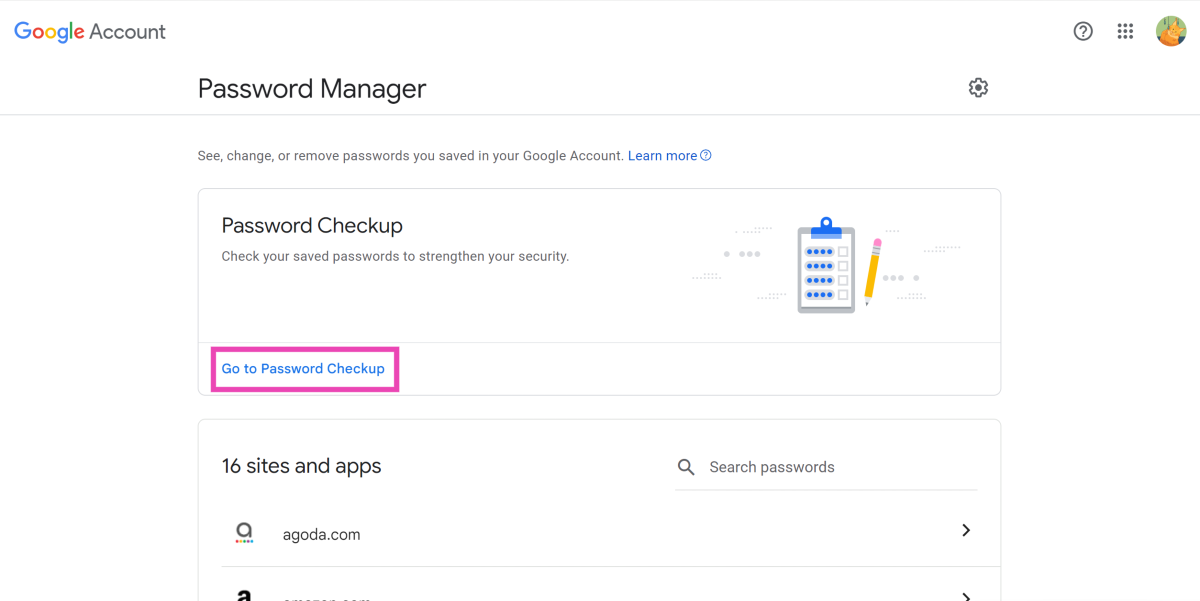
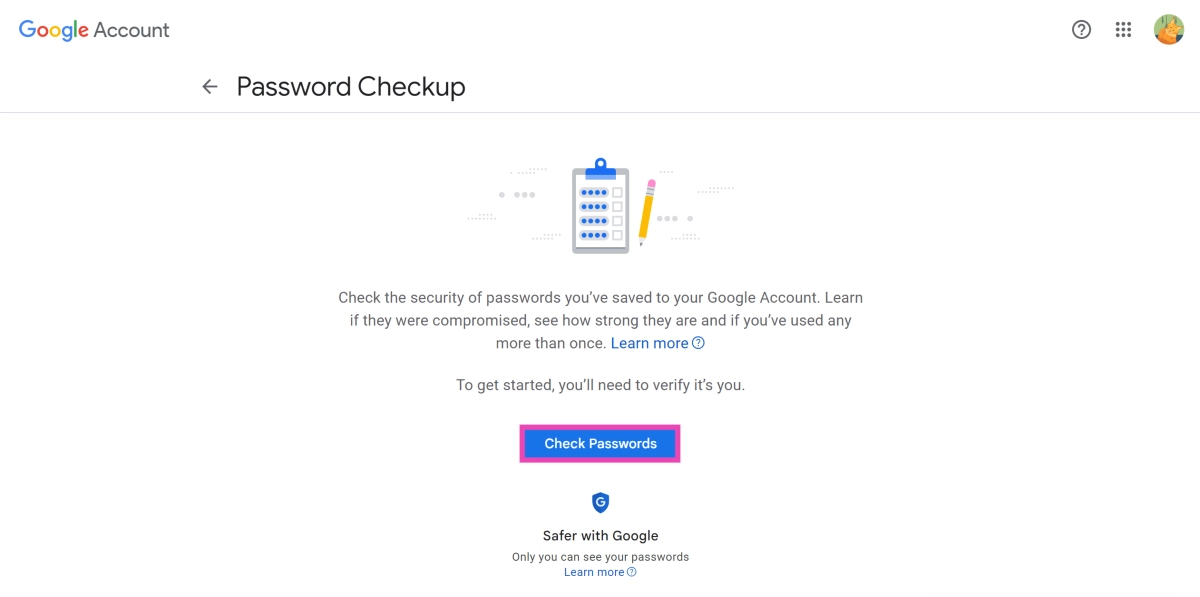
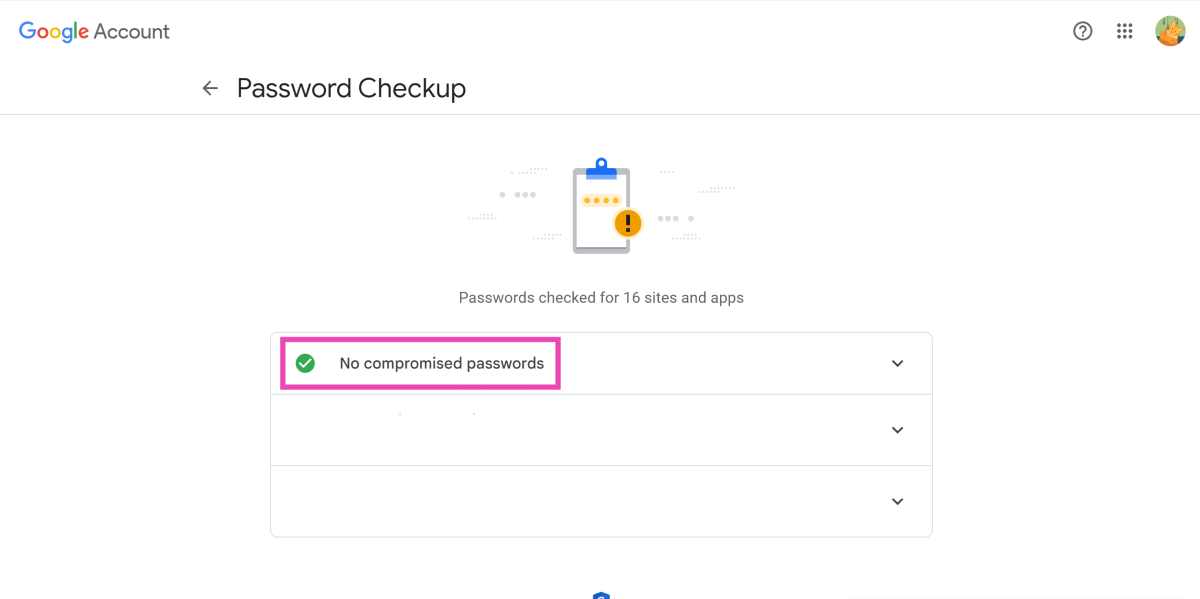
Step 5: Google will run a check for all your saved passwords. If a password was exposed in a data breach, Google will flag it as a ‘compromised’ password.
Enable notifications for password breaches in Chrome
Step 1:Launch Google Chrome on your PC and click the ellipses at the top right corner of the screen.
Step 2: Click on Settings.
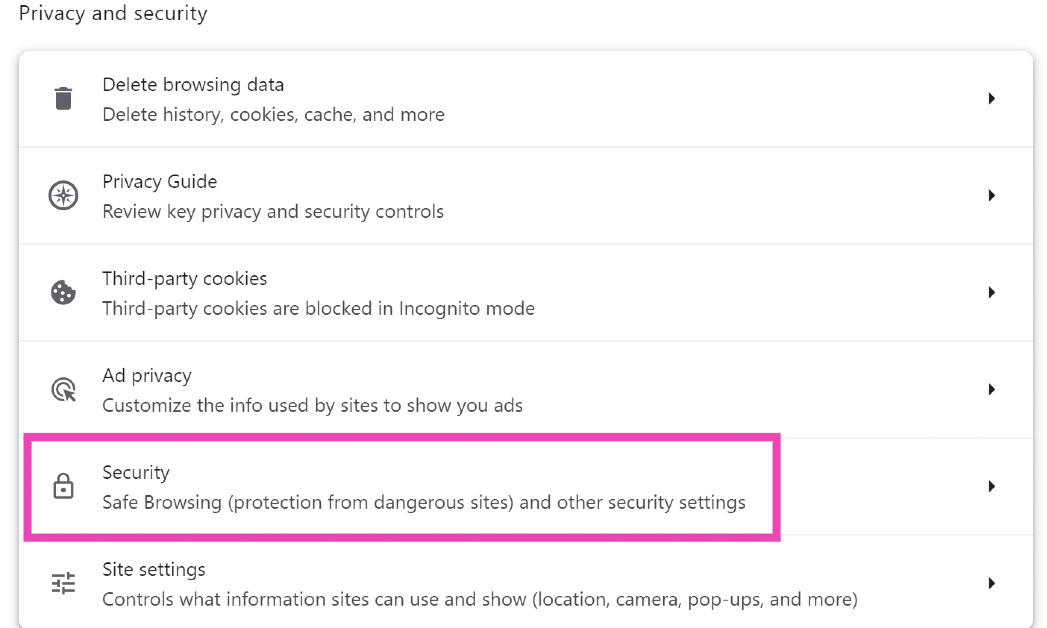
Step 3: Switch to the Privacy and security tab.
Step 4: Click on Security.
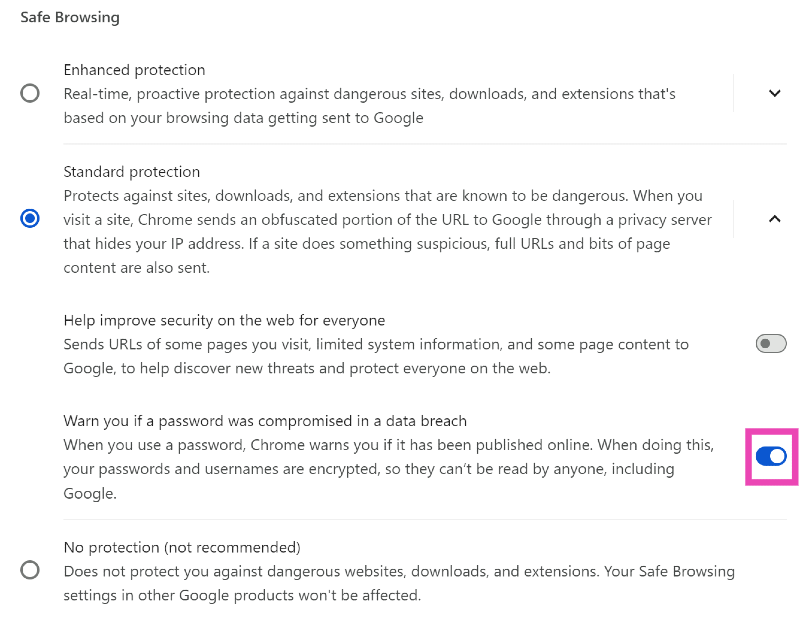
Step 5: Turn on the toggle switch for ‘Warn you if a password was compromised in a data breach’.
Frequently Asked Questions (FAQs)
How do I find out if my password or email was leaked in a data breach?
Go to https://haveibeenpwned.com/, enter your email and hit Enter. The website will search for your email across all major data breaches and return the results. You can view which services exposed your email and password.
Does Google Password Manager notify you of password breaches?
Google Chrome notifies you if your password was found in a data breach. Go to Settings>Privacy and security>Security and select ‘Warn you if a password was compromised in a data breach’.
How do I use Google Password Manager to check if any of my saved passwords were breached?
Go to Google Password Manager>Password Checkup and enter your password to check if your password is compromised.
How do I share a saved password using Chrome?
Go to Chrome Settings>Google Password Manager, select the password, verify your identity, hit the Share icon, and select the contact with whom you want to share the password.
Which are the best password manager apps for Android?
These are the top 4 ways to check if your email or password was leaked in a data breach. If you don’t use Google Password Manager, third-party password manager apps like 1Password and Dashlane can also check for your password in major data breaches.
Garena Free Fire Max is a battle royale game with regular awards and tournaments to keep players interested. If you play Garena Free Fire, you should be aware of the redeem codes that are released on a daily basis. However, because the battle royale game is banned in India, players from other countries can use the Free Fire Redeem codes daily. If you’re unfamiliar with the Garena Free Fire redeem codes or don’t know how to get them, we’ve put together a step-by-step guide to help you redeem them. Check out Garena Free Fire Max Redeem Codes for 8 July 2024.
The Free Fire Max redeem codes are a great way to get free stuff. These are 12-digit codes that contain alphabets and numbers, as well as an expiration date and time. Because the Garena FF redeem codes cannot be used more than once, you should hurry to the redemption page to claim your free reward before someone else does. To get a free reward, all you have to do is go to reward.ff.garena.com/en, which is the official redemption page. Also, keep an eye on this space for daily updates on Garena Free Fire Max redemption codes and rewards.