Airtel has launched in-flight services comprising voice, data and SMS services to enhance the on-board travel experience.
Airtel in-flight roaming plans will be available for both prepaid and postpaid customers.
The Airtel in-flight roaming packs will start at Rs 195.
To help its customers stay connected when on a flight, telecom service provider Airtel has brought new prepaid and postpaid plans for customers. The company has introduced in-flight roaming packs with tariffs starting as low as Rs. 195. Please find details of prepaid and postpaid plans on which it can be availed below.
Telecommunications service provider Bharti Airtel has introduced in-flight roaming plans for customers that will allow them to stay connected while on-board Airtel customers will be able to take advantage of a variety of activities, including high-speed internet browsing and talking to loved ones. Consumers who purchase roaming packs priced at Rs 3999 for postpaid and above or Rs 2997 for prepaid would immediately be eligible for free in-flight roaming.
Commenting on the launch, Amit Tripathi – Director – Customer Experience and Marketing, Bharti Airtel, said, “Airtel has been at the forefront of providing seamless mobile connectivity to customers across the country. Today, we are thrilled to bring the same service on board a flight through our in-flight roaming packs that will allow customers to enjoy high-speed internet and seamless voice calling that will help them stay connected with their loved ones while on a flight.”
As mentioned earlier, Airtel in-flight roaming packs start at Rs 195 for both postpaid and prepaid users and will receive 250MB of data, 100 minutes of outgoing talk time and 100 outgoing SMS.
For Rs 295, you may upgrade to get 500MB of data. The inflight roaming pack will include 100 minutes of free talking and 100 outgoing SMS.
At Rs 595 the customers will receive 1GB of data together with 100 minutes of outgoing talk time, and 100 outgoing SMS. Note that all the inflight packs come with a validity of 24 hours. Also, there is no need to buy an additional recharge pack in its roaming packs as Bharti Airtel already includes the same prepaid and postpaid advantages.
Prepaid plans priced at Rs 2,997 and more come with 100 SMS, 250MB of Internet, and 100 minutes of free outgoing talktime. In the same way, postpaid users can also get in-flight roaming plans benefits for Rs 3,999.
Additionally, to provide a seamless travel experience Airtel and Aeromobile have partnered to provide the best in-flight connectivity across 19 airlines flying across different international sectors.
Samsung has announced the availability of Galaxy AI features on more Galaxy devices.
AI-supported models will be able to access features such as Circle to Search, Note Assist, Browsing Assist, Transcript Assist, Chat Assist, Live Assist and more.
South Korean electronics giant Samsung will be rolling out a new OS upgrade, which is based on Android 14. The company has said to release the One UI 6.1 update for more Galaxy devices including Galaxy S23 series, S23 FE, Z Fold5, Z Flip5 and Tab S9 series. The upcoming software update will land on your devices by the end of March.
Samsung’s One UI 6.1 update is planned for the Galaxy S23 series, S23 FE, Z Fold5, Z Flip5 and Tab S9 series. The much-discussed AI features on the S24 series will be included in the One UI 6.1 upgrade.
With AI-supported models, even more Galaxy users will now be able to benefit from the communication-enhancing Galaxy AI capabilities. As per the company starting at the end of March, the update will be available for the Galaxy S23 series, S23 FE, Z Fold5, Z Flip5, and Tab S9 series.
“The broader integration of Galaxy AI across the Galaxy ecosystem also enables a seamless user experience in day-to-day tasks on AI-supported models, driving new levels of efficiency” the company noted in its announcement.
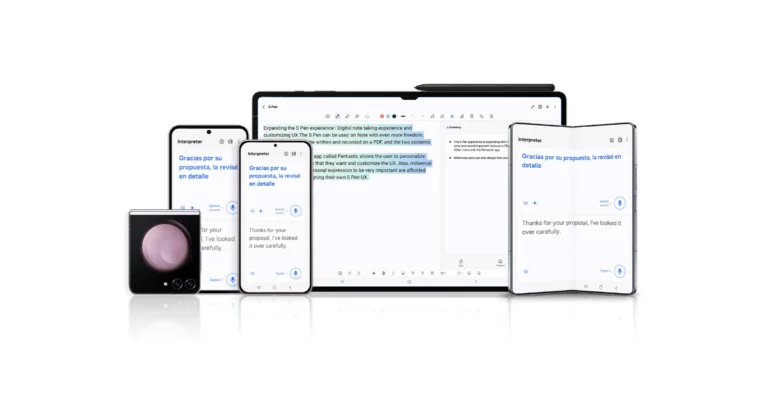
Among the features is the option to use Chat Assist to translate messages into 13 other languages and change the tone of messages. Users of the Galaxy can take advantage of Live Translate, which offers text and voice translations during phone calls, to fully engage in real-time conversations. Because Interpreter’s split-screen capability creates text translations for live chats, users can even strike up impromptu talks with locals while travelling.
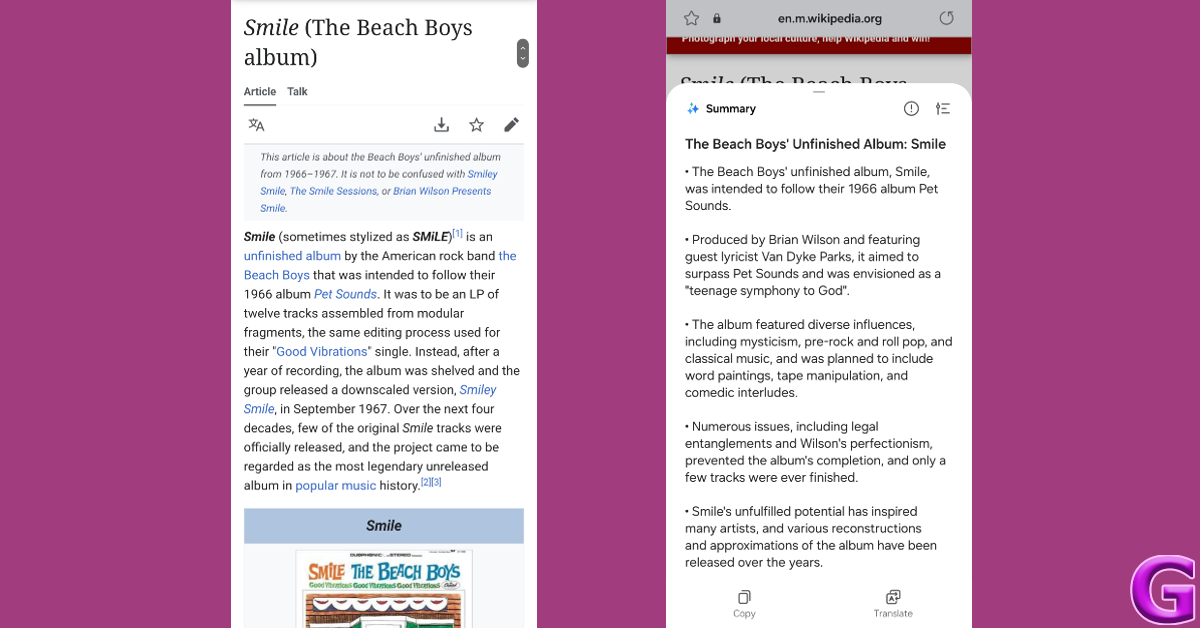
Circle to Search with Google enhanced search capabilities by producing clear search results with a quick circle motion. Note Assist, which lets users make formats, summarise, and translate notes; Browsing Assist, on the other hand, helps people generate comprehensive summaries of news articles. Moreover, Transcript Assist makes summaries and translations with ease while transcribing meeting recordings.
TM Roh, President and Head of Mobile eXperience Business at Samsung Electronics said, “Our goal with Galaxy AI is not only to pioneer a new era of mobile AI but also to empower users by making AI more accessible. This is only the beginning of Galaxy AI, as we plan to bring the experience to over 100 million Galaxy users within 2024 and continue to innovate ways to harness the unlimited possibilities of mobile AI.”
Samsung’s One UI 6.1 update will also step up user’s creative potential using Galaxy AI. The most recent version of Galaxy offers a collection of Galaxy AI tools that support creative freedom even after a photo is taken. Through Generative Edit, AI-supported devices can easily resize, reposition or re-align objects in photos to perfect a great shot. Users can also polish any photo faster and easier than ever with Edit Suggestion. Edit Suggestion makes it quicker and simpler for users to edit any photo. Instant Slow-mo can generate additional frames for slow-motion videos to capture action-packed moments, negating the need for several retakes.
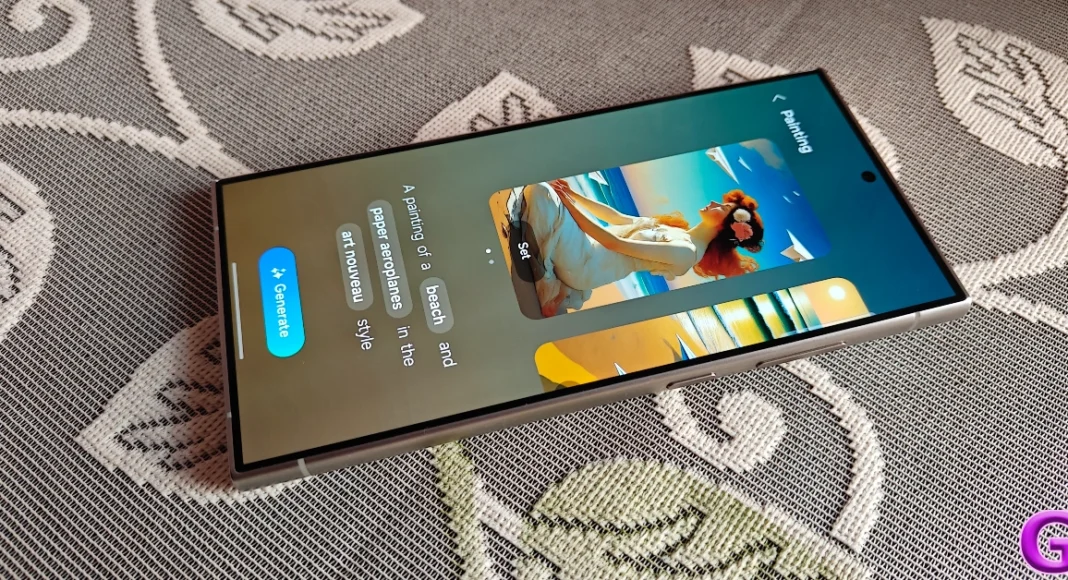
Customizing Galaxy devices is even easier than before through AI-generated wallpapers, enabling AI-supported devices to bring users’ creativity to life.
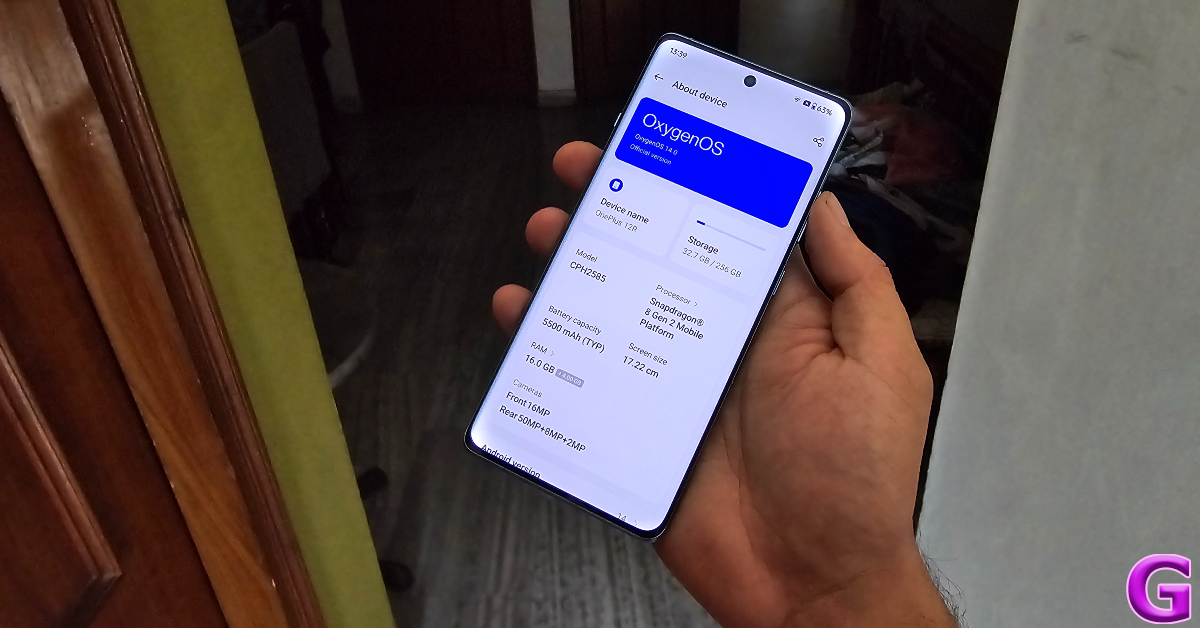
Back in January, OnePlus released its flagship smartphone for 2024 (our review here) at a starting price of Rs 65,000. Released alongside the flagship was the OnePlus 12R, a powerful mid-ranger that punches well above its weight. The 12R continues OnePlus’ tradition of offering flagship-level performance at a relatively affordable price. In true R Series fashion, it gets rid of the bell and whistles to appeal to an audience that wants a powerhouse in their hands without splurging an exorbitant amount of money. In India, the smartphone is priced at Rs 40,000. Unlike the OnePlus 11R, its successor gets a US release this year, where it costs $500. We’ve been using the smartphone for a week and have been really impressed by it. Could it be the flagship killer of the year? Find out in our OnePlus 12R review.
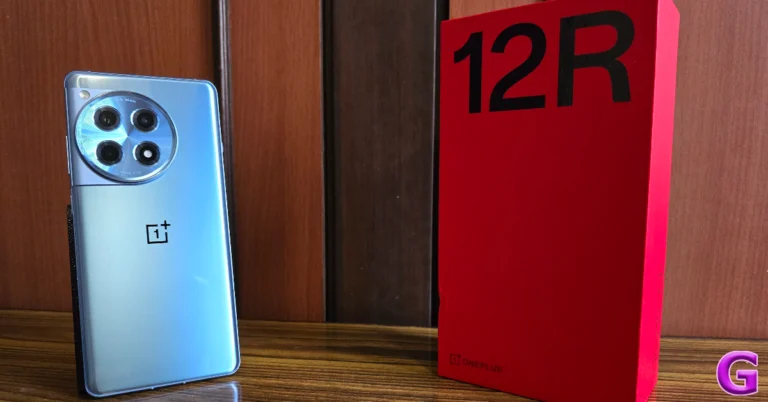
One of the better things about buying a OnePlus smartphone is the set of accessories you get inside the box. The OnePlus 12R retail package contains the smartphone, a 100W power adapter, a USB Type-A to Type-C charging cable, a body-coloured silicone cover, a SIM ejector tool, some stickers, a Red Cable Club membership card, phone hole seal stickers (for installing the screen protector), a safety guide, and a quick start guide. The smartphone is available in two colour variants – Cool Blue and Iron Gray.
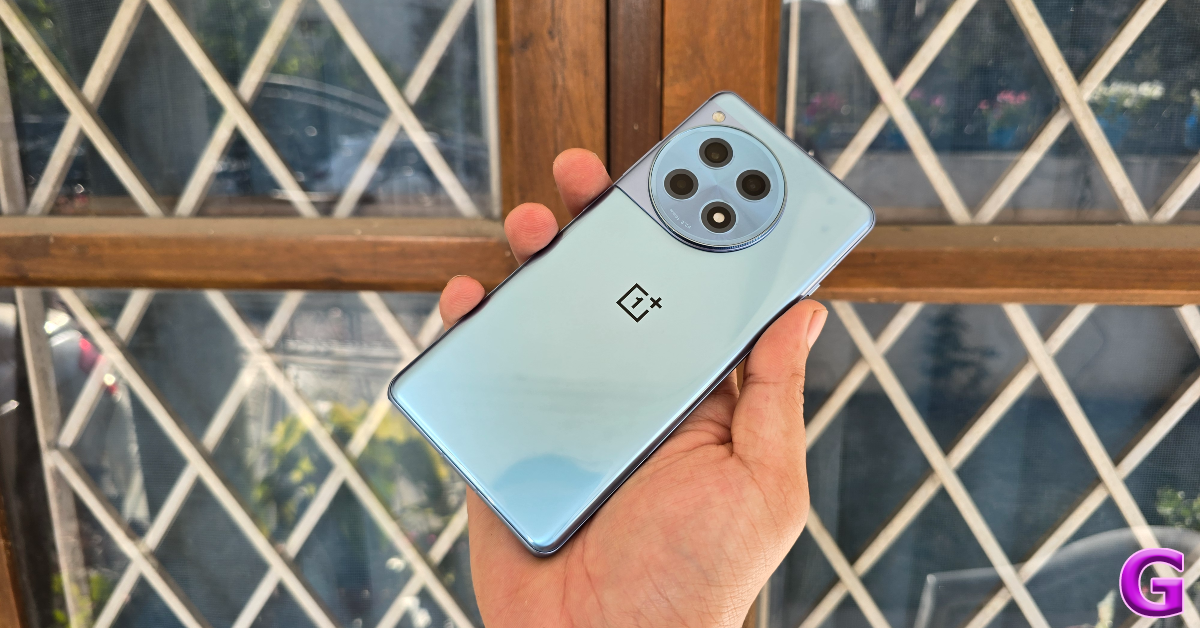
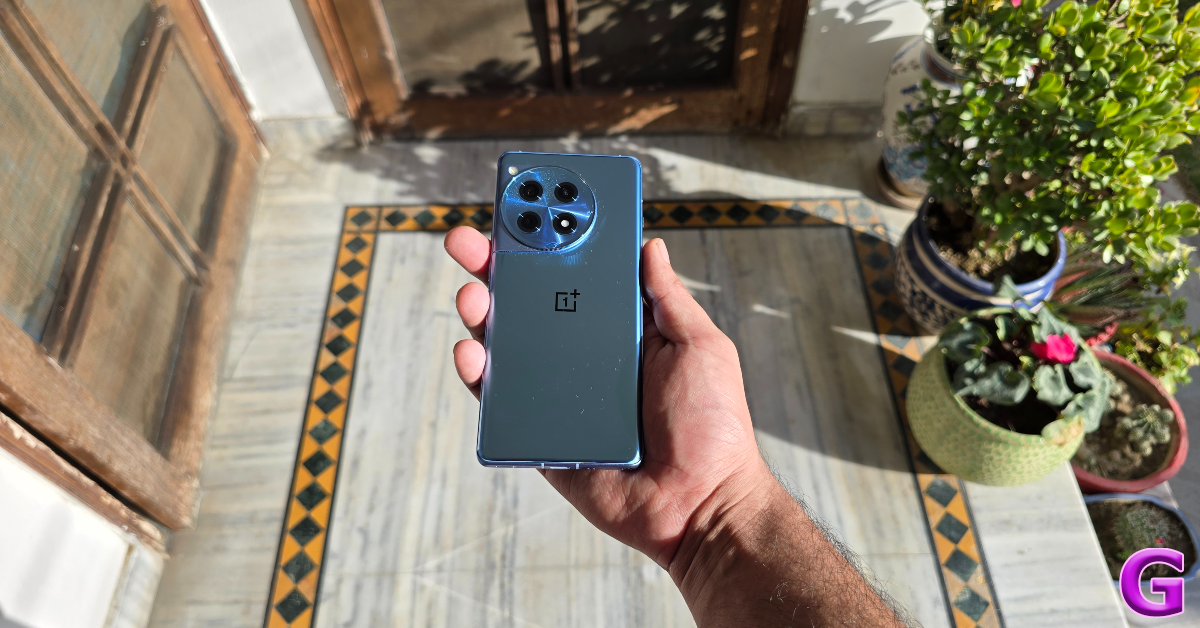
Our ‘Cool Blue’ OnePlus 12R review unit came with a blue silicone cover, which we used quite a bit to prevent the glossy back panel from accumulating fingerprints. If you don’t prefer using a case with your phone, we’d suggest getting the Iron Gray colour variant for its frosted glass back panel with a matte-like finish. It needs to be said that the quality of the silicone case provided in the box was very good, something you don’t see quite often in this price category.
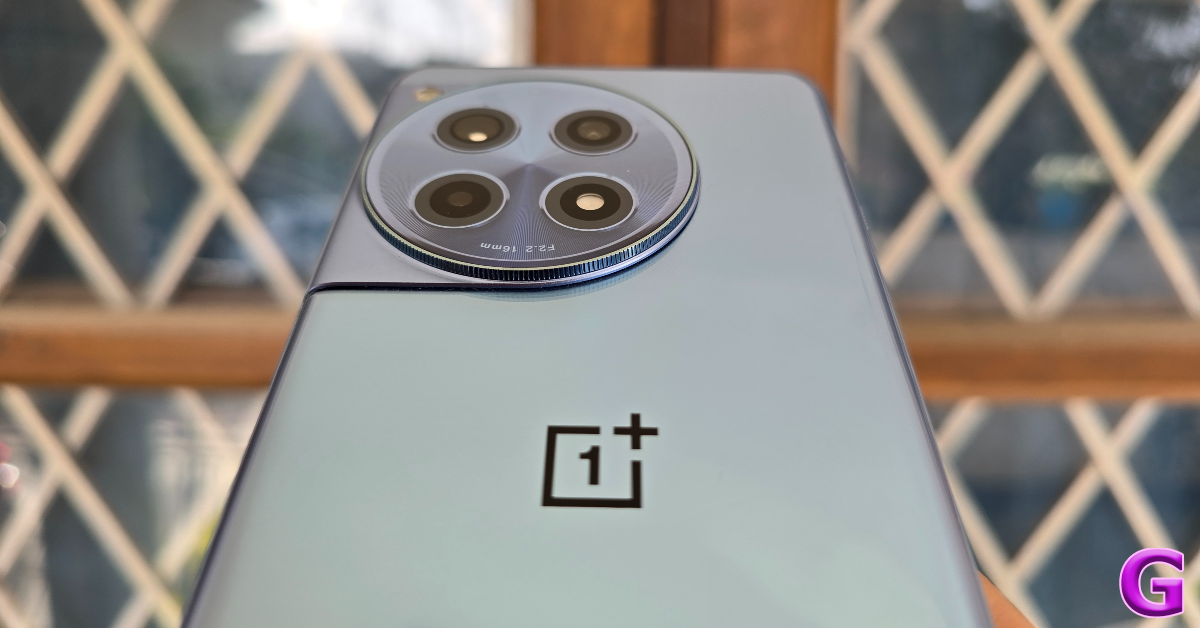
The design language of the OnePlus 12R is similar to its flagship counterpart. The two-step camera module at the back is aligned to the left and blends into the frame of the smartphone. The ‘Hasselblad’ tuning is reserved for the flagship device, which is why you won’t find its branding on 12R’s camera island. The OnePlus branding is present in the familiar central position on the curved glass back panel.
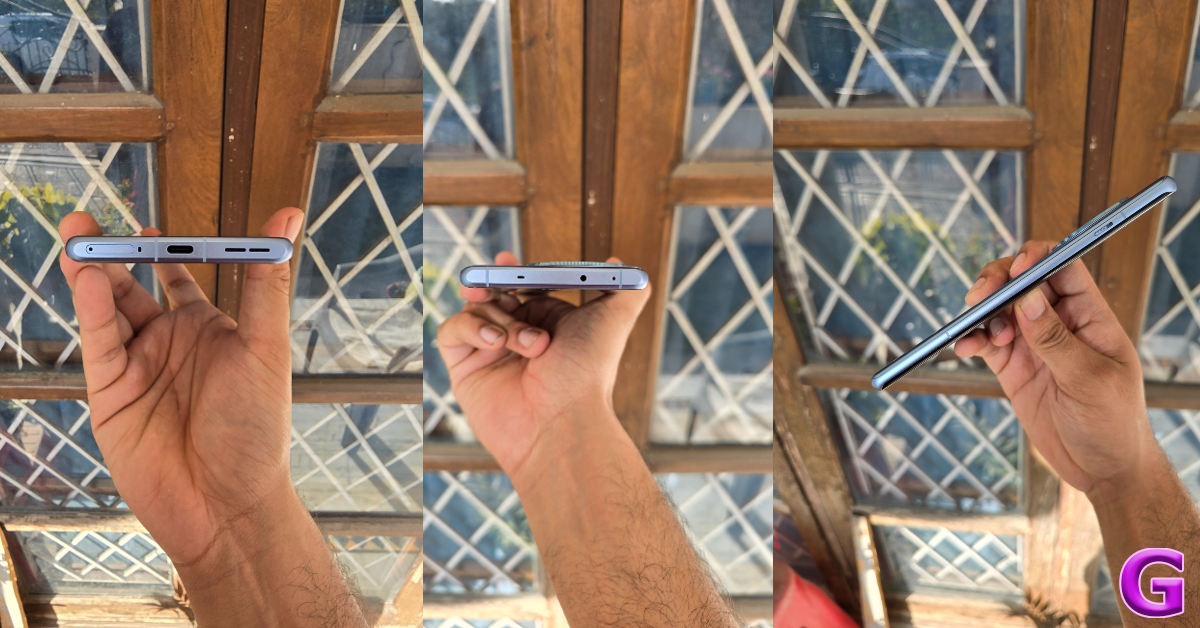
The aluminium frame of the smartphone holds the volume rocker keys and the power button on its right edge. On the left lies the iconic alert slider. The SIM card tray, USB Type-C port, primary microphone, and speaker grille are positioned at the bottom edge of the frame. Up top, lie the secondary speaker, IR blaster, and the secondary microphone.
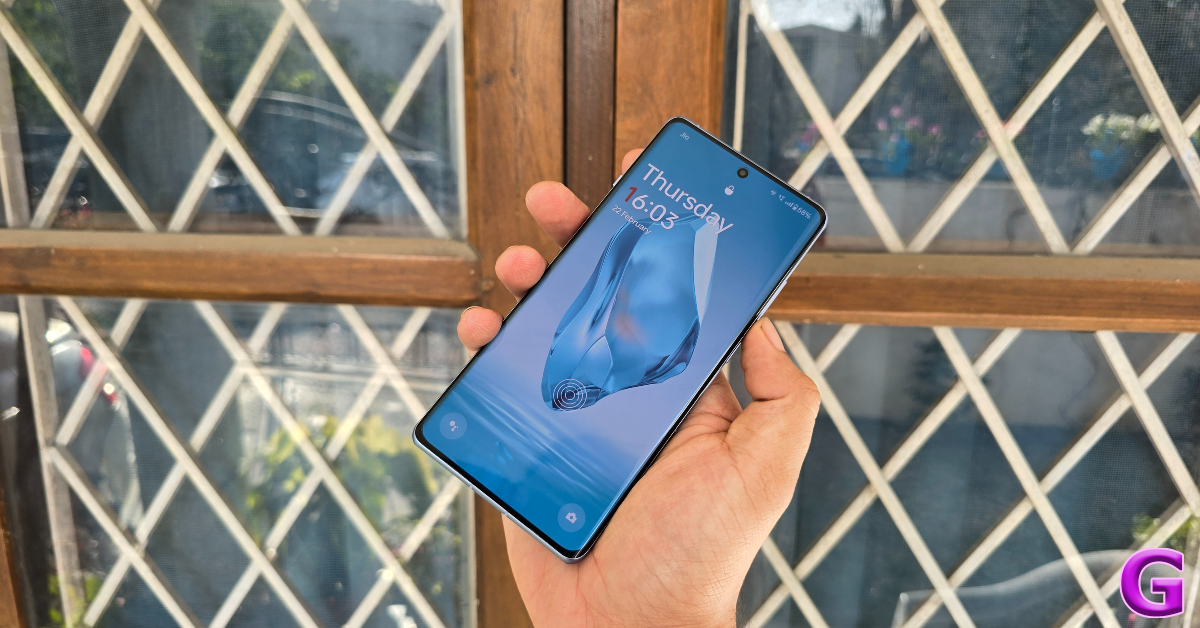
The 6.78-inch LTPO4 AMOLED display on this smartphone can go as bright as 4,500 nits, which is simply astounding. The display doesn’t lose any legibility under direct sunlight. Being a curved panel, the bezels along the sides of the display are minimal and OnePlus has kept a good job of keeping their size in check along the vertical borders too. The smartphone has a 90.9% screen-to-body ratio. A refresh rate of 120Hz ensures a smooth browsing and gaming experience (more on that later). The touch response is snappy and fun. OnePlus has also fixed the position of the in-display fingerprint scanner. The OnePlus 11R (our review here) had it at the bottom of the screen. It is now aligned with the natural movement of the thumb.
The colours produced by this LTPO4 AMOLED panel are punchy and vivid. There are 4 colour modes on offer – Vivid, Natural, Cinematic, and Brilliant. On top of that, you can use the Image Sharpner and Video Colour Boost to enhance the quality of the images on the screen. Watching video content on the OnePlus 12R is a delightful experience. The smartphone has Widevine L1 support, which means you can play HD content across all streaming platforms. The stereo speaker is loud but produces a slightly boxy output.
OnePlus needs to pull up its socks when it comes to dust and water resistance. The OnePlus 12R has an IP64 rating which protects it against minor water splashes. Even the flagship OnePlus 12 does not offer flagship-grade water resistance with its limited IP65 rating.
OnePlus 12R review: Performance and Cameras
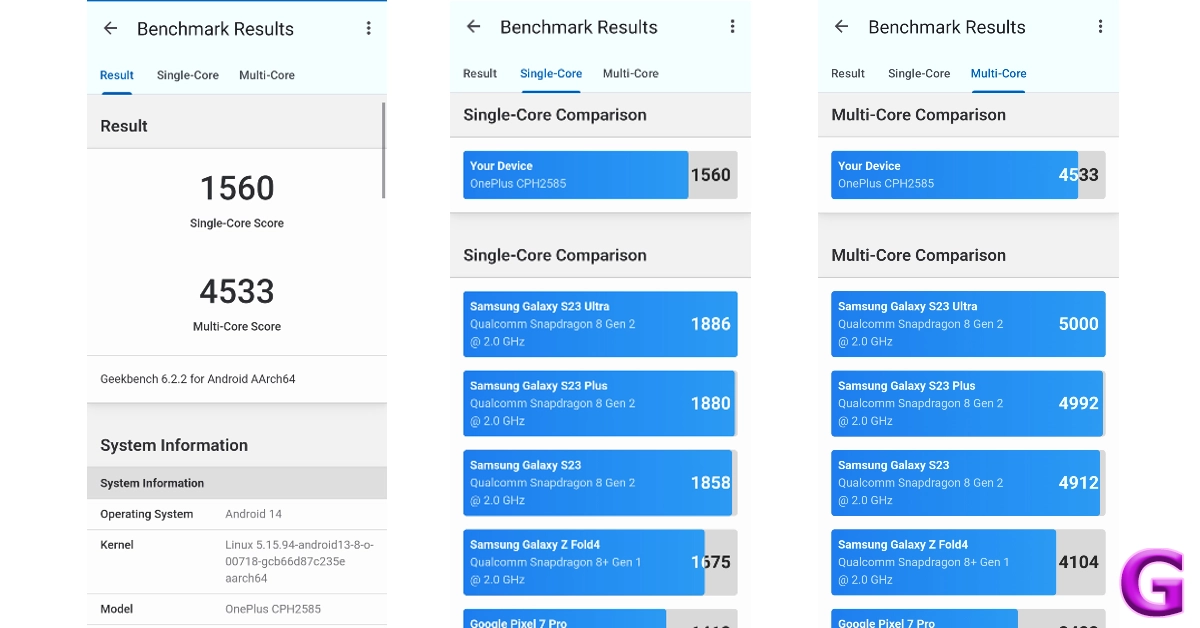
Powering the OnePlus 12R is the Snapdragon 8 Gen 2 SoC, which was the flagship chipset from Qualcomm last year. The smartphone is available in two RAM and storage variants – 8GB + 128GB (Rs 40,000) and 16GB + 256GB (Rs 46,000). On the Geekbench 6 app, the 12R scored 1,560 points in the single-core test and 4,533 points in the multi-core test.
Snapdragon 8 Gen 2 is a rock-solid processor. After an impressive showing in last year’s flagship smartphones like the Samsung Galaxy S23 Ultra, Xiaomi 13 Pro, OnePlus 11, iQOO 11 and more, it upholds its reputation on the OnePlus 12R. We did not experience any lags or delays while using the smartphone. General, everyday tasks like web browsing, instant messaging, video calling, navigation, and media playback were handled expertly. Multitasking on this device is a seamless experience. If you’re looking for a reliable performer, this smartphone is it.
Its versatile performance continues in the gaming department as well. This is where the display’s 120Hz refresh rate came in clutch as the OnePlus 12R managed to run titles like Call of Duty Mobile, BGMI, and Asphalt 9 in high settings. The cooling chamber within the smartphone does a good job of heat dissipation. Even after extended gaming sessions, the smartphone’s internal temperature remained at an acceptable level. There were no jitters or frame drops to be seen either.
Android 14-based Oxygen OS 14 provides a clean software experience on the OnePlus 12R. There is no bloatware on the device apart from the Netflix app, which can be easily uninstalled. We like the range of customisation options offered by OnePlus. You can personalise the AOD screen with your Bitmoji, a canvas of your face, or even a text and image of your choice.
We also like the privacy features offered by Oxygen OS 14. Our favourite is the ‘System Cloner’ which lets you set up a different password for a fresh system interface. The app lock and private safe are easily accessible as well. One of the underrated features of OnePlus smartphones is the ‘IR Remote’ app which lets you control household devices like the TV, AC, and music system with your smartphone.
The battery performance of this smartphone is phenomenal. It packs a massive 5,500 mAh battery, which lasts more than a day on moderate usage. If you use the smartphone conservatively, you can push its battery backup to two days. During the review period, we used the OnePlus 12R for watching video content, instant messaging, video calling, and a range of other tasks. You can get between 6-7 hours of Screen On Time on a single charge. The 100W SuperVOOC power adapter charges the phone in just over 30 minutes. There is no support for wireless charging, which is one of the tradeoffs that OnePlus has made to keep the cost down.
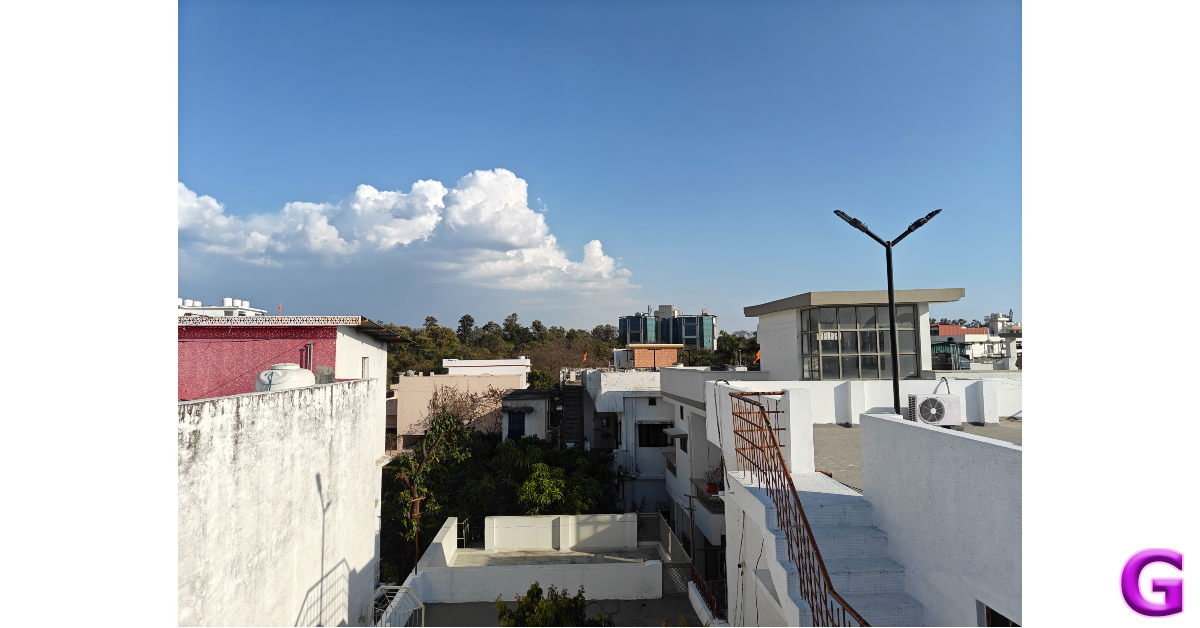
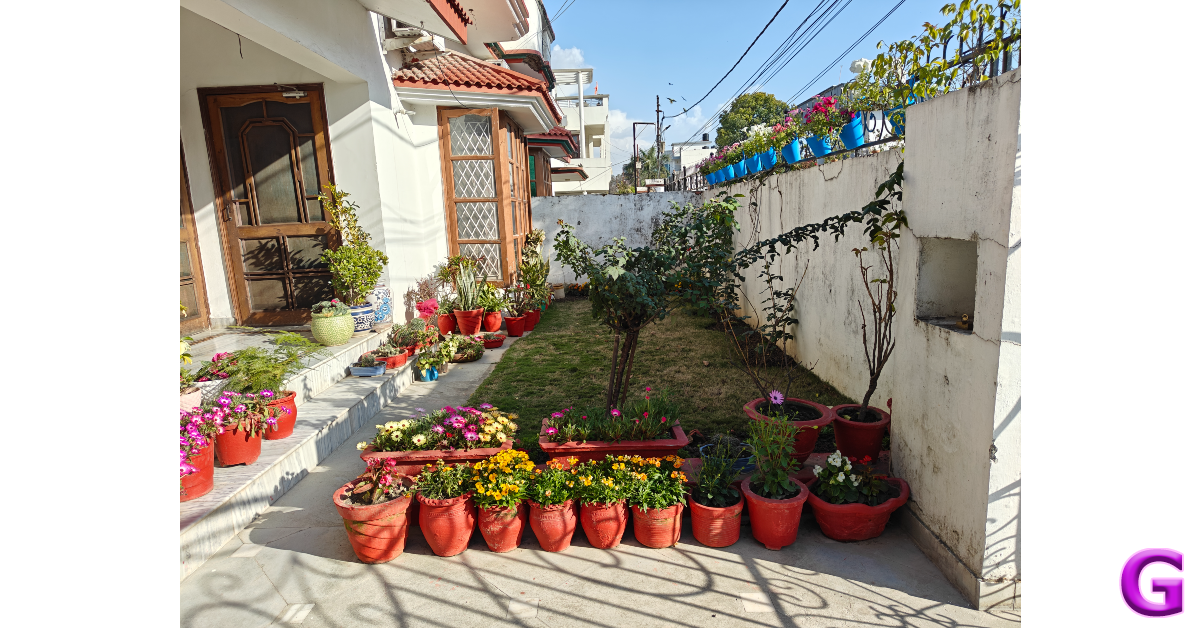
The rear camera module on the 12R comprises a 50MP primary shooter, an 8MP ultrawide lens, and a 2MP macro sensor. The 50MP main camera is delightful to use, no matter the lighting condition. The outdoor shots taken in ample daylight displayed vivid colours and a superb dynamic range. The pictures were detailed and well-exposed. The lack of Hasselblad tuning is visible if you compare the results with the flagship OnePlus 12, but it does not amount to being a dealbreaker.
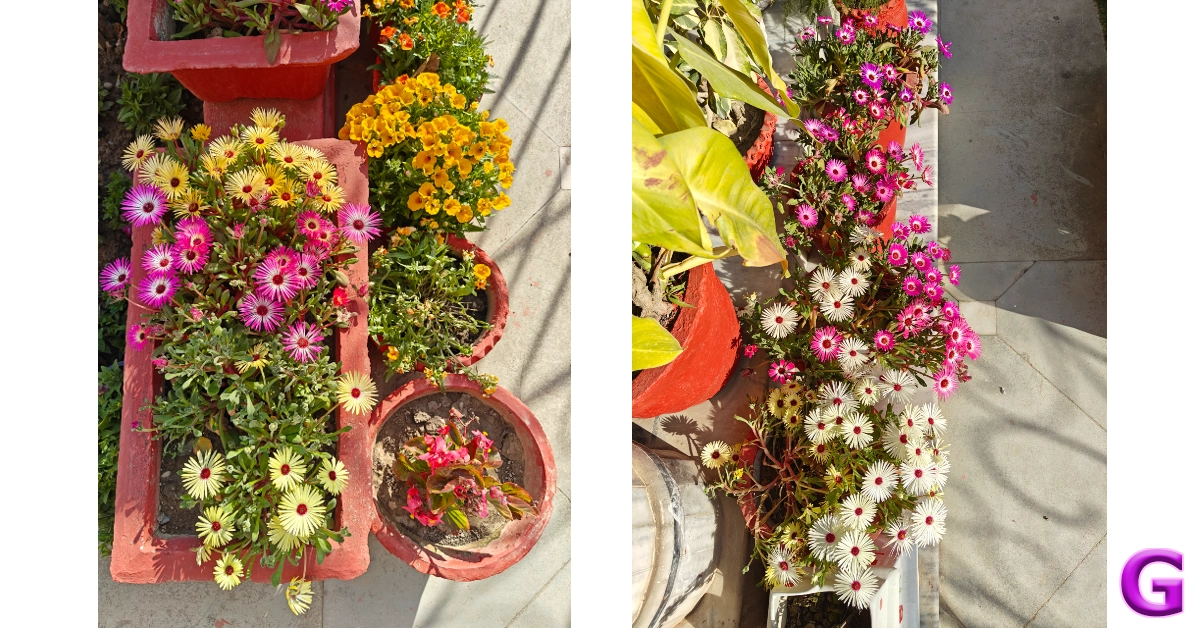
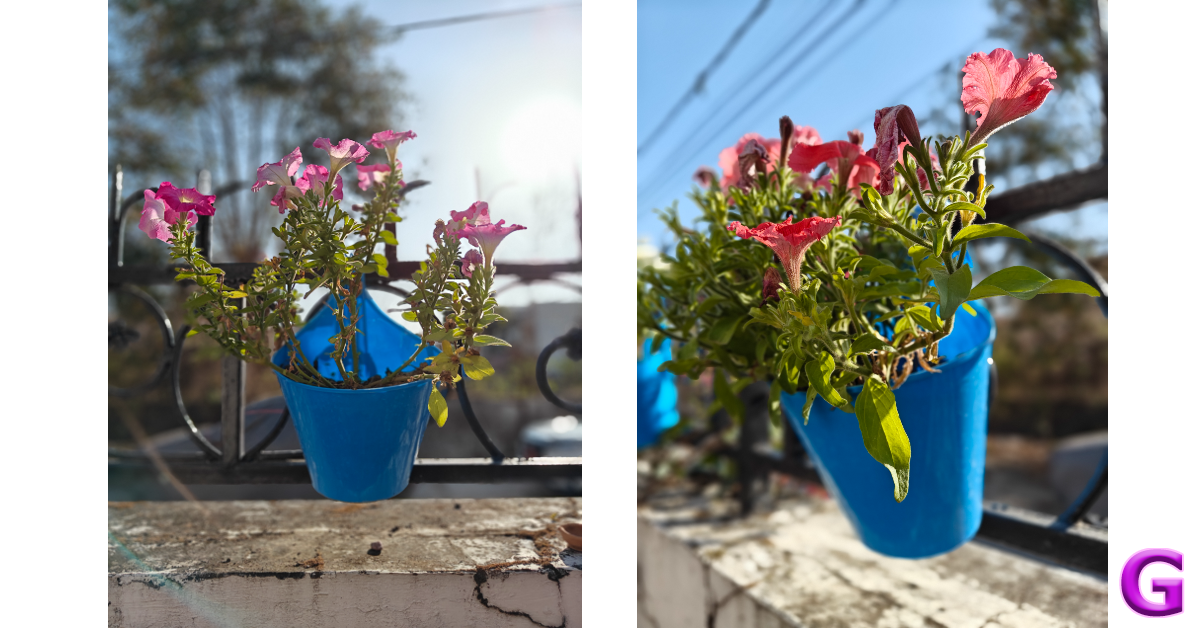
The 8MP ultrawide lens does a good job of maintaining the colour composition in the images. Granted, it is a step behind its flagship counterparts, but the images taken with it are not soft at all. We found ourselves using this camera a lot. We were even impressed by how well it exposed the sky and maintained the colour richness. You can see the results for yourself down below.
Ultrawide ShotPrimary Shooter vs Ultrawide Lens
The Night Mode kicks in automatically when you take images in limited lighting conditions. It does a good job of brightening the subject and minimising the grain in the images. OnePlus’ photoprocessing ability deserves all the credit here. We were surprised with how well the Night Mode functioned while taking pictures with the ultrawide camera.
Night Mode: Primary Shooter vs Ultrawide Lens
Portrait shots taken with the OnePlus 12R are focused and detailed. The camera does a good job of separating the subject from the background and applying the correct degree of blur. The 2MP macro camera doesn’t find much use in this camera module, and it is baffling that OnePlus continues to shoehorn it in there. An entry-level telephoto lens would have been ideal.
Portrait Mode
Selfies taken with the 12MP front-facing camera are certainly ‘social media ready’, but don’t come across as overprocessed. This camera can take 1080p videos at 30 fps while the rear camera can record 4K videos at 30/60 fps.
We’re still only a couple of months into 2024, but we can already see the OnePlus 12R being the bargain of the year. At Rs 40,000 you get an excellent processor, a vivid display, delightful cameras, and a clean software experience. The 12R is a solid package that performs well across the board. An IP67 rating and a telephoto lens would certainly have been ideal, but given the price of the smartphone, we aren’t too fussed about missing those premium features. OnePlus 12R is an easy recommendation from us.
One of the best things about owning an Android phone is the diverse range of customisation options that come along with it. You can change the layout of your home screen, use a custom icon for an app, and even change its name. If you want your smartphone’s home screen to look different from other Android devices, you should change the way the app icons look. In this article, we bring you the top 6 ways to change app icons and names on Android.
The process to change the app icon and name on Android devices differs vastly among manufacturers. While OnePlus smartphones offer a native way to change the name of an app, this option is not present on Samsung devices. However, every manufacturer has a diverse library of icon packs for its native apps. These icon packs can be downloaded from the ‘Themes’ section on your phone.
You can also choose to go with a monochromatic look for the app icons on your device. Your smartphone draws the major colour from the home screen wallpaper and applies it to the app icons. Most of the third-party Android apps are also covered by this thematic option. Lastly, if you want full control over how an app looks on your phone, there are certain apps that let you upload an image from your phone’s gallery as the app icon. Read along to find out how you can do that.
Change the app icon and name on a OnePlus smartphone
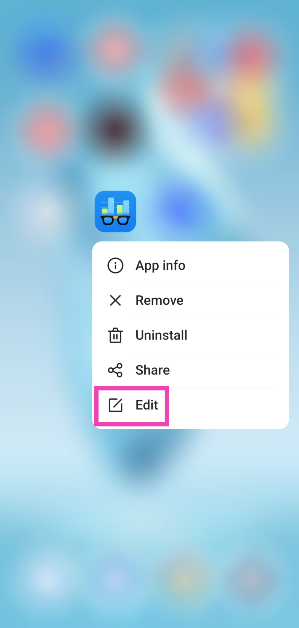
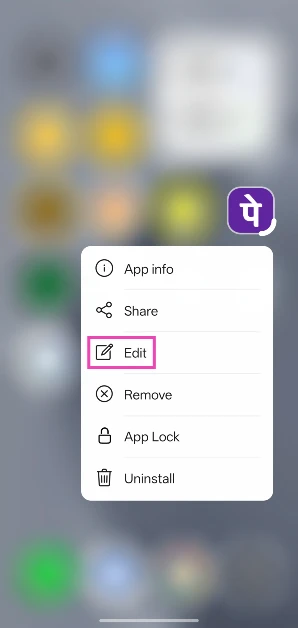
Step 1:Long-press the app you want to customise.
Step 2: Tap on Edit.
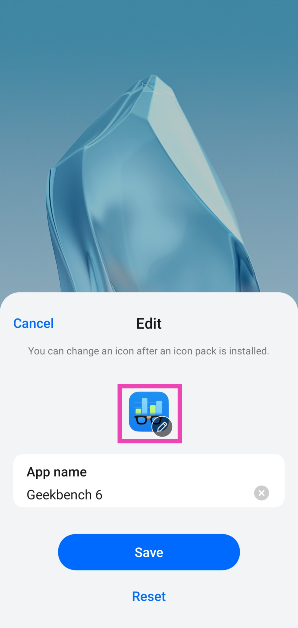
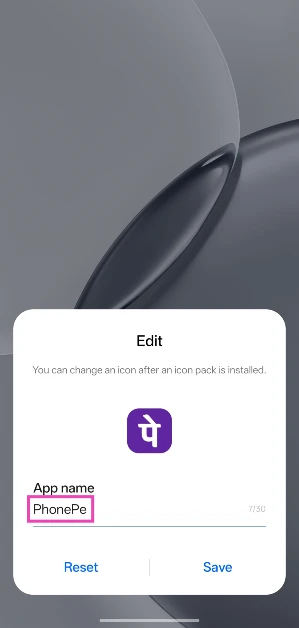
Step 3: Hit the app icon to select a different one from another icon pack.
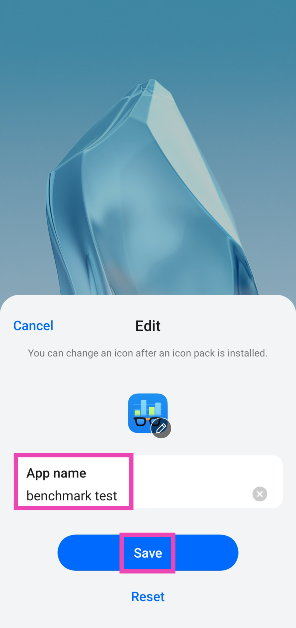
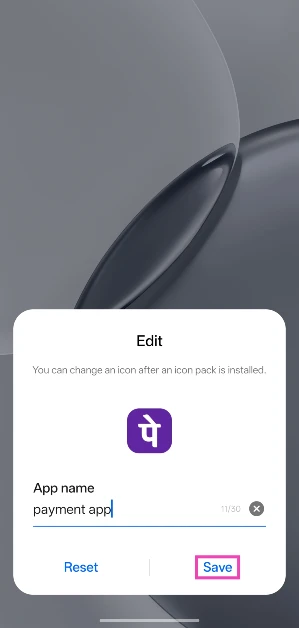
Step 4: Tap on the App name section and type a new name.
Step 5: Hit Save.
Change the Icon Pack on OnePlus
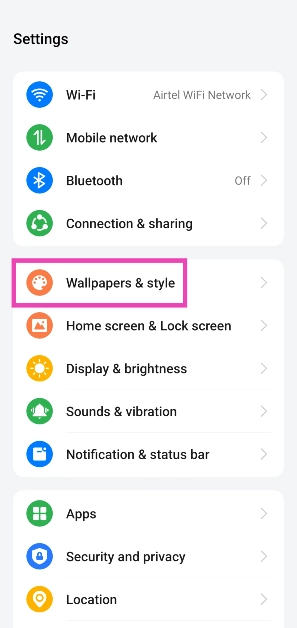
Step 1: Go to Settings and select Wallpapers & style.
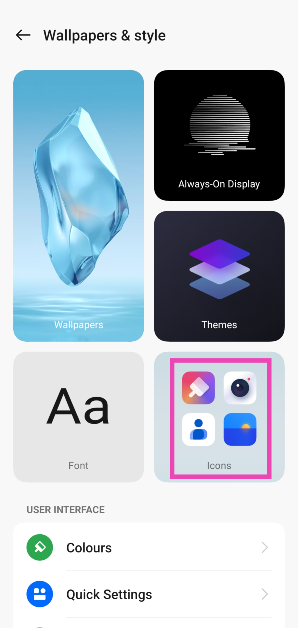
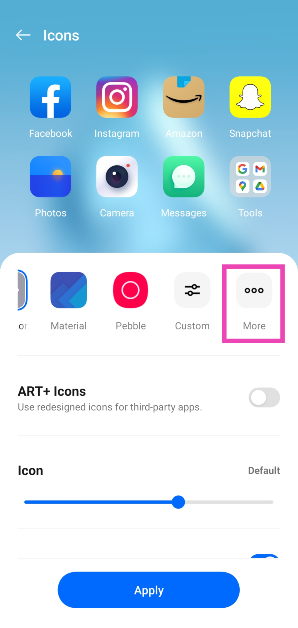
Step 2: Tap on Icons.
Step 3: This is where you can choose the shape and size of app icons. Hit More.
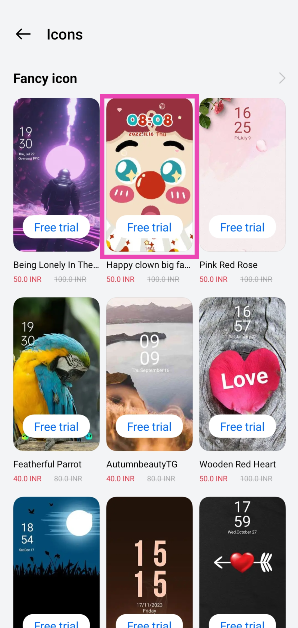
Step 4: Select an icon pack from the list. Some of the options may require a small payment.
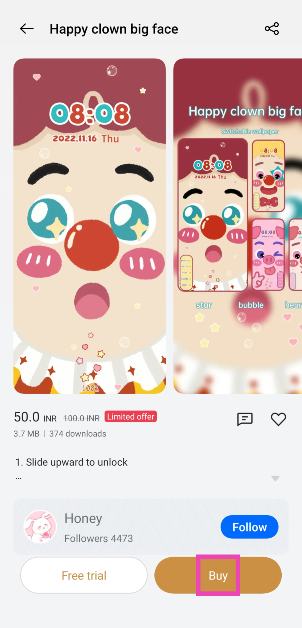
Step 5: Select Buy or Free Trial (5 minutes).
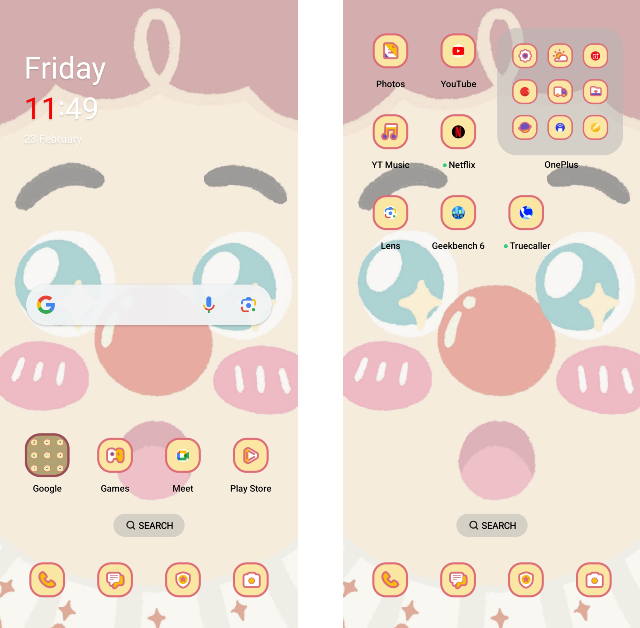
The icon pack will be applied to all the native OnePlus apps on your phone.
Change the app name on a Realme phone
Step 1: Long-press the app you wish to edit.
Step 2: Tap on Edit.
Step 3: Tap the text box and enter the new name.
Step 4: Hit Save.
Change the app icon on a Samsung smartphone
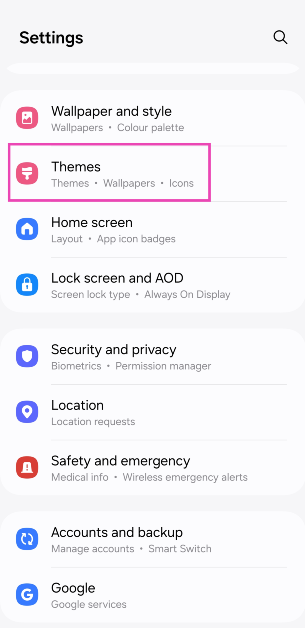
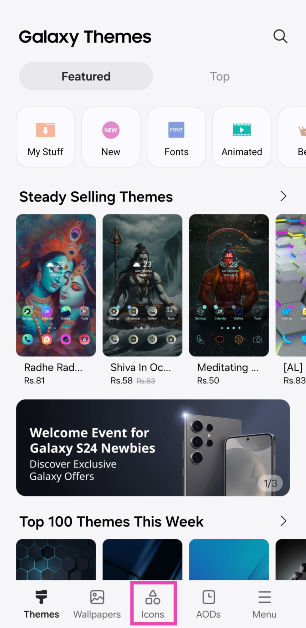
Step 1: Go to Settings and select Themes.
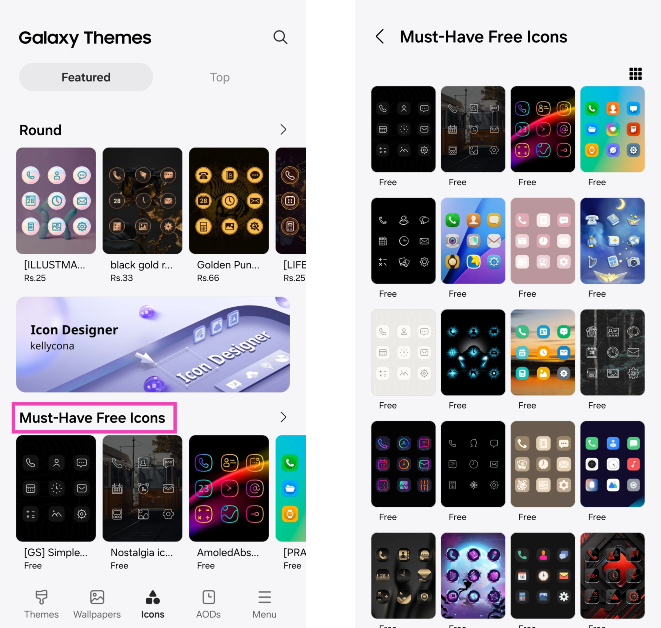
Step 2: Switch to the Icons tab.
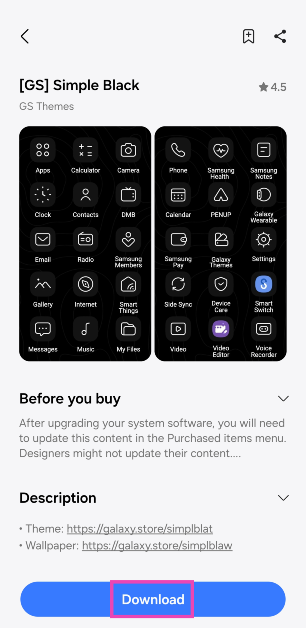
Step 3: Select an app icon pack from the list. You will find some free icon packs at the bottom of the list.
Step 4: Hit Download.
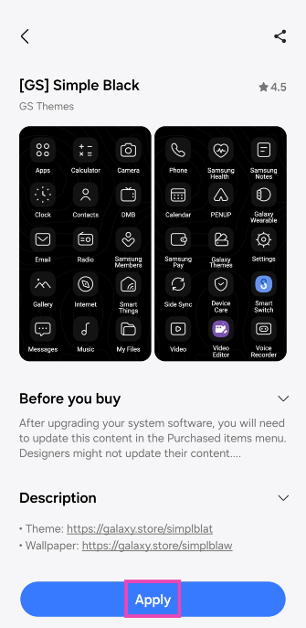
Step 5: Select Apply.
The app icon pack will be applied to all the native Samsung apps on your phone.
Make app icons monochromatic on Android
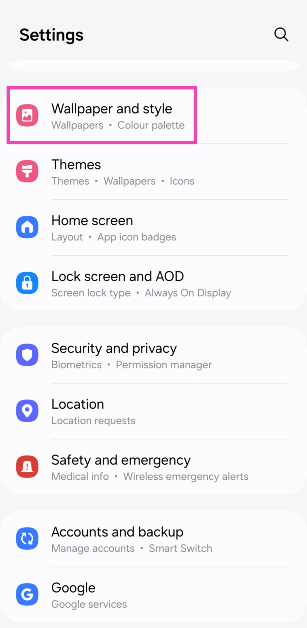
Step 1: Go to Settings and select Wallpaper and style.
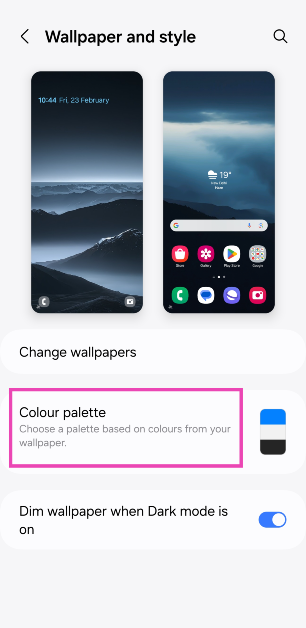
Step 2: Tap on Colour palette.
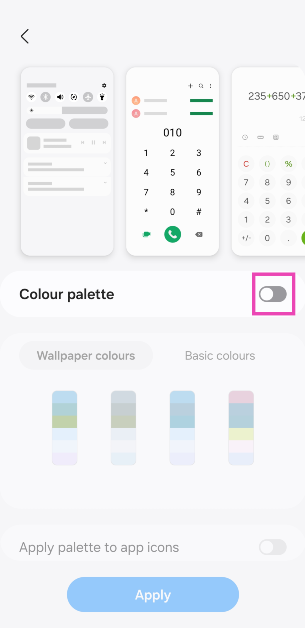
Step 3: Turn on the toggle switch for Colour palette.
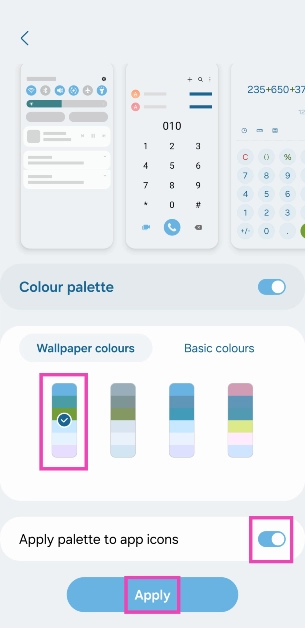
Step 4: Select a colour for the system and app icons.
Step 5: Turn on the toggle switch for ‘Apply palette to app icons’ and hit Apply.
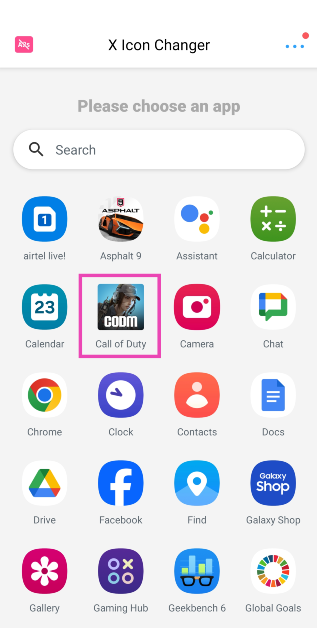
Step 2: Launch the app and select the app you wish to customise.
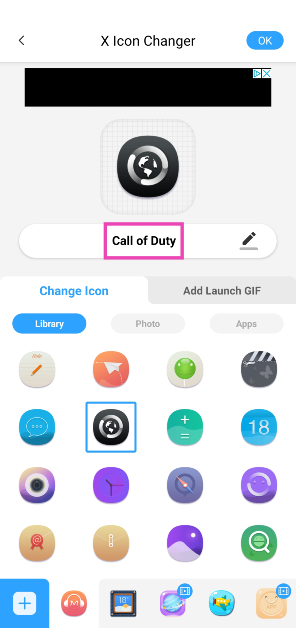
Step 3: Select an icon for the app from the list. You can even choose to upload a thumbnail from your phone’s gallery.
Step 4: Tap the name of the app to change it.
Step 5: Hit OK at the top right corner of the screen.
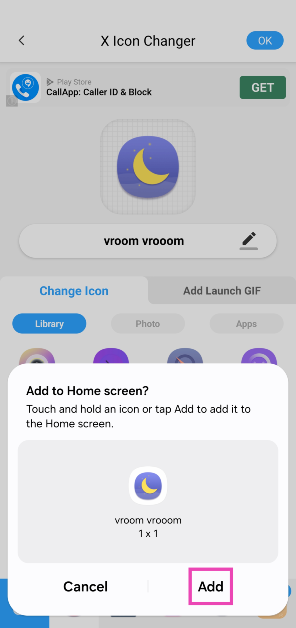
Step 6: Add the app icon to the home screen. No changes will be made to the app icon in the app drawer.
Your changes will be saved.
Frequently Asked Questions (FAQs)
How do I make the app icons on my Android phone monochromatic?
Go to Settings>Wallpaper and style>Colour palette and turn on the toggle switches for ‘Colour palette’ and ‘Apply palette to app icons’. Choose a colour from the list.
How do I change the app icon and name on an Android phone?
Download the X Icon Changer app and select the app you want to customise from the list. You can choose a picture from your phone’s gallery for the app icon or select from the X Icon Changer’s library. Tap the name of the app to change it.
How do I change the app icon and name on a OnePlus smartphone?
Long-press the app icon and hit ‘Edit’. Tap the app icon to edit it. Tap the name of the change and enter a new one. Hit ‘Save’.
This is how you can change app icons and names on your Android phone. Downloading a launcher like Nova or Niagara can also help you accomplish this task, but if you want to keep things simple, use X Icon Changer. If you know any other methods to go about this task, let us know in the comments!
Vivo has launched a new smartphone Vivo Y200e 5G in India.
The smartphone runs on Android 14-based FuntouchOS 14 out of the box.
The device features a 50-megapixel dual rear camera setup.
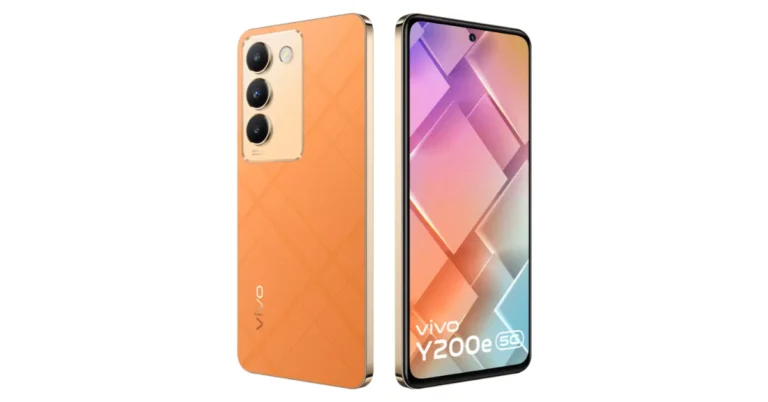
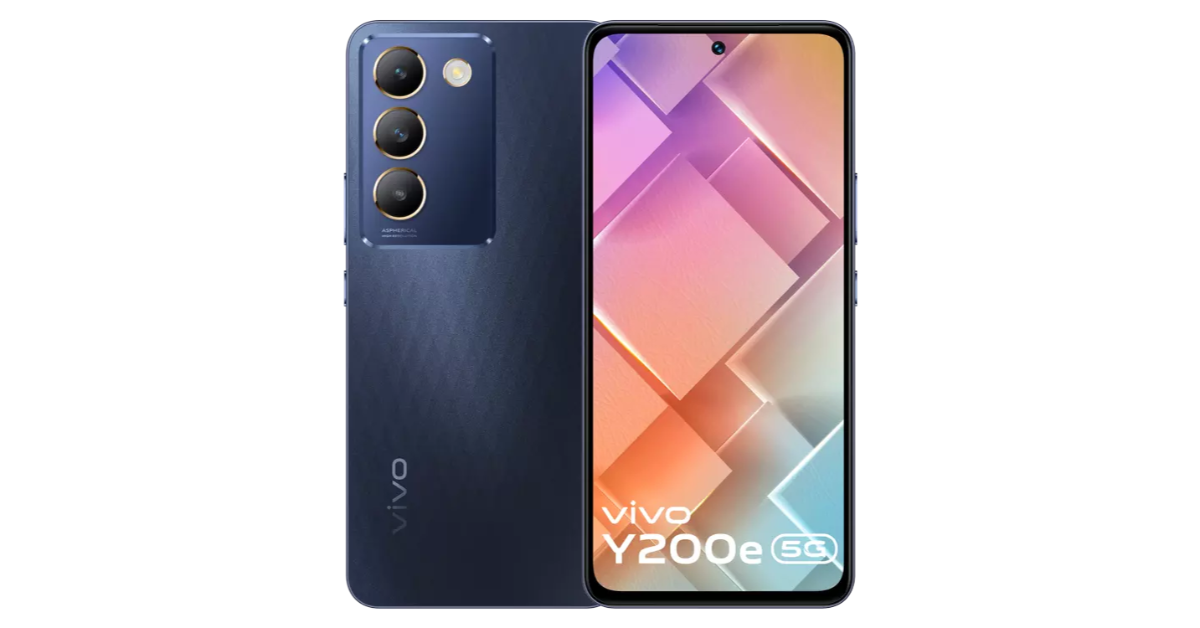
Vivo Y200e 5G has officially made its debut in the Indian market. The smartphone is available in two different design variations: one has a textured plastic back and intersecting lines, while the other has a vegan leather finish. The handset features a 120Hz refresh rate display. Under the hood, there is Qualcomm’s Snapdragon 4 Gen 2 SoC. There is a rectangle camera module on the rear consisting of three camera sensors alongside a tiny LED flashlight.
In This Article
Vivo Y200e 5G price in India, sale details
Vivo Y200e 5G has launched in India with a starting price of Rs 19,999 for the base 6GB RAM with 128GB storage option. The price of the 8GB RAM with 128GB storage option comes with a price tag of Rs 20,999. The phone is available in two colour options Black Diamond and Saffron Delight.
The handset is presently up for pre-order on the Vivo India website. The device is likely to go on sale on March 1 via Flipkart in the country. The buyers can receive an instant discount of Rs 1,000 in full or an EMI payment if the transaction is made through HDFC and ICICI Bank cards. a no-cost EMI for up to six months is also available to select bank customers.
The 6.67-inch full-HD+ AMOLED display on the Vivo Y200e offers 2,400 x 1,080 pixels of resolution. The screen has a peak brightness of 1,800 nits and supports a 120Hz refresh rate. It has an IP54 certification for dust and splash resistance.
The device is powered by a Qualcomm Snapdragon 4 Gen 2 SoC, 128GB of UFS 2.2 internal storage, and up to 8GB of LPDDR4x RAM. The RAM can be virtually enlarged to hold an extra 8GB. Additionally, the storage can be expanded using a microSD card to hold up to 1 TB. In terms of software, the mobile phone comes preinstalled with FuntouchOS 14, an Android 14 overlay.
The Vivo Y200e 5G sports a dual rear camera unit with a 50-megapixel main sensor and a 2-megapixel secondary sensor. The 16-megapixel front camera is located within a hole-punch slot that is centrally located at the top of the display. It also boasts a 5,000mAh battery with 44W wired fast charging support. In addition, the phone has USB Type-C, Bluetooth 5.0, GPS, Wi-Fi, 5G, and 4G connection.
Garena Free Fire is a battle royale game with regular awards and tournaments to keep players interested. If you play Garena Free Fire, you should be aware of the redeem codes that are released on a daily basis. However, because the battle royale game is banned in India, players from other countries can use the Free Fire Redeem codes daily. If you’re unfamiliar with the Garena Free Fire redeem codes or don’t know how to get them, we’ve put together a step-by-step guide to help you redeem them. Check out Garena Free Fire Redeem Codes for 23 February 2024.
The Free Fire redeem codes are a great way to get free stuff. These are 12-digit codes that contain alphabets and numbers, as well as an expiration date and time. Because the Garena FF redeem codes cannot be used more than once, you should hurry to the redemption page to claim your free reward before someone else does. To get a free reward, all you have to do is go to reward.ff.garena.com/en, which is the official redemption page. Also, keep an eye on this space for daily updates on Garena Free Fire redemption codes and rewards.
Instagram’s creator marketplace helps brands find the right creators and helps creators get discovered by brands.
This service will offer even more ways for brands and creators to connect, partner, and grow.
Instagram announced today that it is bringing its Creator Marketplace to 8 new markets with features to connect thousands of brands and creators. As per the social media platform, this will allow brands and creators to engage in sponsored collaborations or advertisements. India is among the eight countries where marketplace service will be available.
This Instagram’s Creator Marketplace will be available to new markets in the UK, Australia, New Zealand, Canada, Japan, India, and Brazil. While expanding the service Meta said, “From branded content to partnership ads, Instagram is one of the best places for brands and creators to collaborate — and today, we’re excited to announce how we’re making it easier to work together. In 2022, we began testing the creator marketplace in the US, a new destination where brands and creators can more easily connect and collaborate around partnership opportunities. Since then, we’ve introduced new features and onboarded thousands of creators and brands in the US to the creator marketplace.”
The company will be inviting creators and brands based in Canada, Australia, New Zealand, UK, Japan, India and Brazil to join Instagram’s creator marketplace. Chinese export brands will also be invited to connect with onboarded creators in countries outside of China.
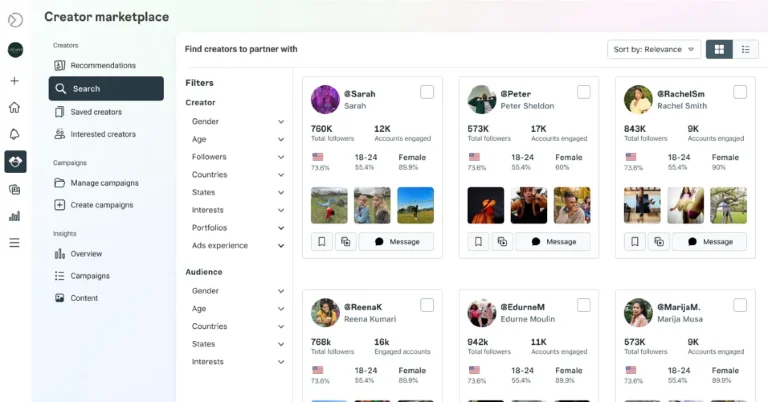
Instagram’s creator marketplace makes it simple for brands to find relevant creators for any type of partnership for collaboration. In order to expand their collaborations, advertisers can amplify content using a creator or other partner’s handle through partnership ads, formerly known as branded content ads. Partnership ads are the most transparent and effective approach for advertisers and creators to run ads together and Instagram’s creator marketplace helps brands discover creators to partner with.
According to Instagram, it has started testing a new feature in the US called machine learning-based recommendations. This feature leverages Instagram data to help brands more easily discover creators who are the best fit for their campaigns. Over the next few months, eligible brands will get access to these recommendations on Instagram’s creator marketplace in Meta Business Suite.
How Instagram’s Creator Marketplace Works
Firstly Brands sign up for the Meta Business Suite creator marketplace on Instagram. Creators join from their professional dashboards in the Instagram app. There, creators can indicate brands and interests relevant to them. A portfolio is another tool available to creators to showcase their talent.
Brands can communicate with creators through a special Partnership Messages folder located at the Primary tab’s top.
Brands have two options when interacting with creators: they may either build a project and submit it to several creators, explaining the possibilities for branded content or partnership ads. Within the Instagram app, creators have access to the opportunity’s specifics, requirements, and rates.
Advertisers can boost organic Instagram content as partnership ads, including branded content with the paid partnership label, or they can create new partnership ads in Ads Manager.
CMF Neckband Pro and CMF Buds are set to launch in India on March 5.
Both the devices support ANC.
The devices are compatible with the Nothing X app.
Nothing’s sub-brand CMF is bringing new products to India. The company has announced to introduce two devices- CMF Neckband Pro and CMF Buds on March 5. The audio devices will debut alongside Nothing Phone 2a same day at Nothing Event: Fresh Eyes.
The newest audio products from Nothing’s sub-brand, CMF Neckband Pro and CMF Buds are set to launch in India on March 5. These two gadgets will be unveiled together with the forthcoming Nothing Phone 2a. The launch event Fresh Eyes will be live-streamed at 5:00 PM IST.
Similar to the company’s previous offerings, these products will be sold in the nation through Flipkart.
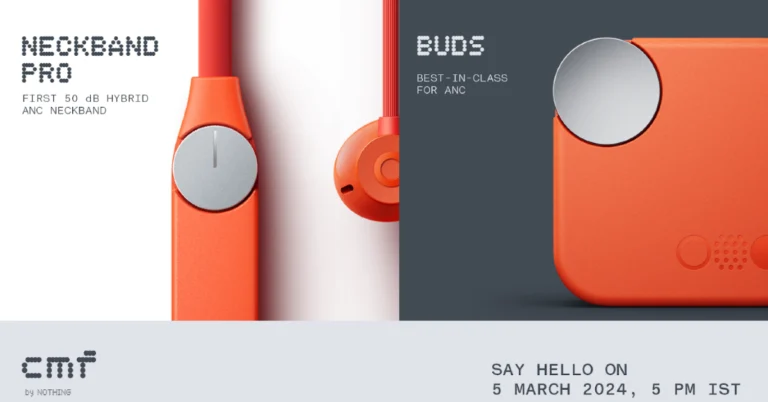
In terms of design, the CMF Neckband Pro and CMF Buds are teased to come in orange, silver and white colourways.
CMF by Nothing has also started to disclose some of the details of these products ahead of their arrival. As per the company CMF Neckband Pro, the first 50 dB Hybrid ANC device in this category, will be available for purchase in India and select markets.
However, according to information released by the company, the CMF Neckband Pro, would have five microphones for AI-assisted noise reduction during calls. Whereas, MF Buds will have a 12.4mm driver with biofibre and custom TPU materials. The Truly Wireless earphones are said to support ANC. Additionally, the company has disclosed that the CMF Neckband Pro and CMF Buds will both be compatible with the Nothing X app. This will provide five bass levels using a slider as part of the company’s Ultra Bass Technology 2.0.
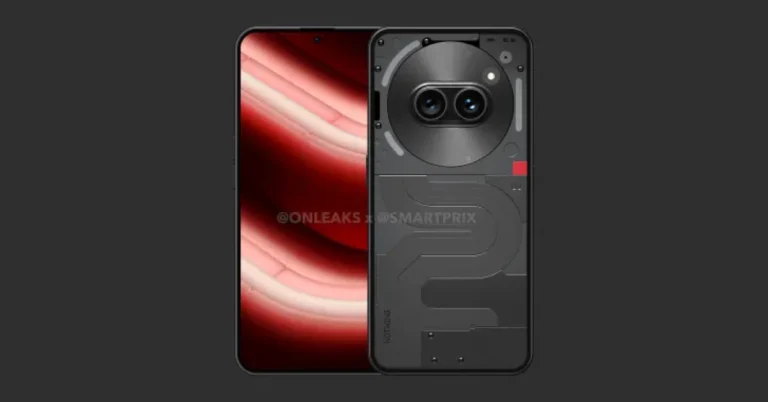
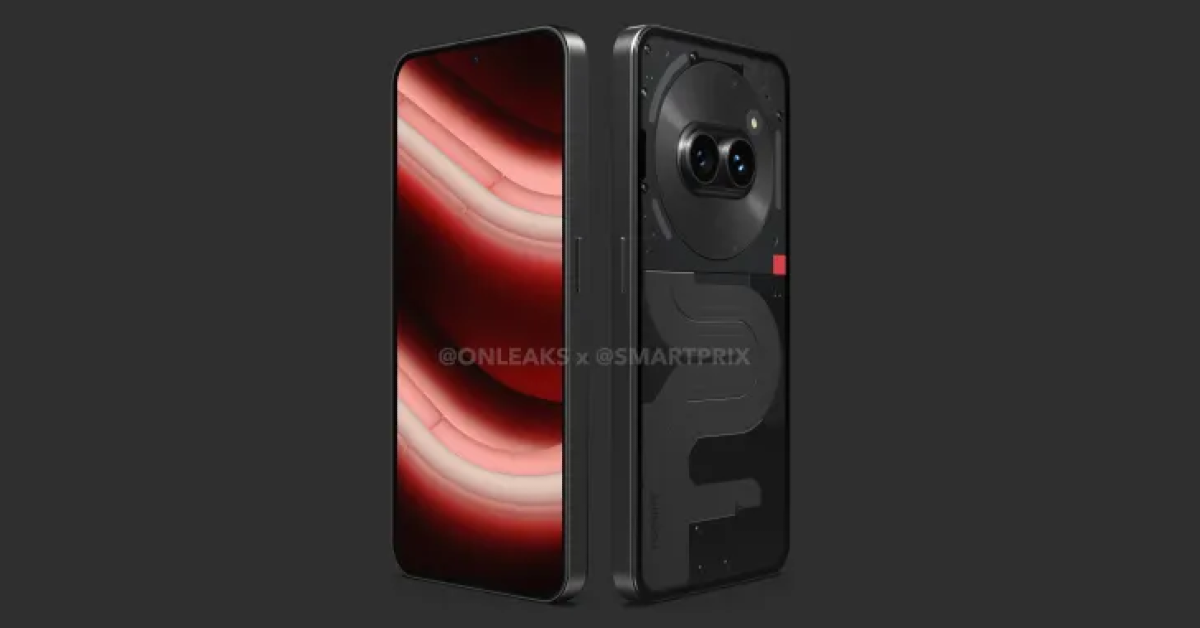
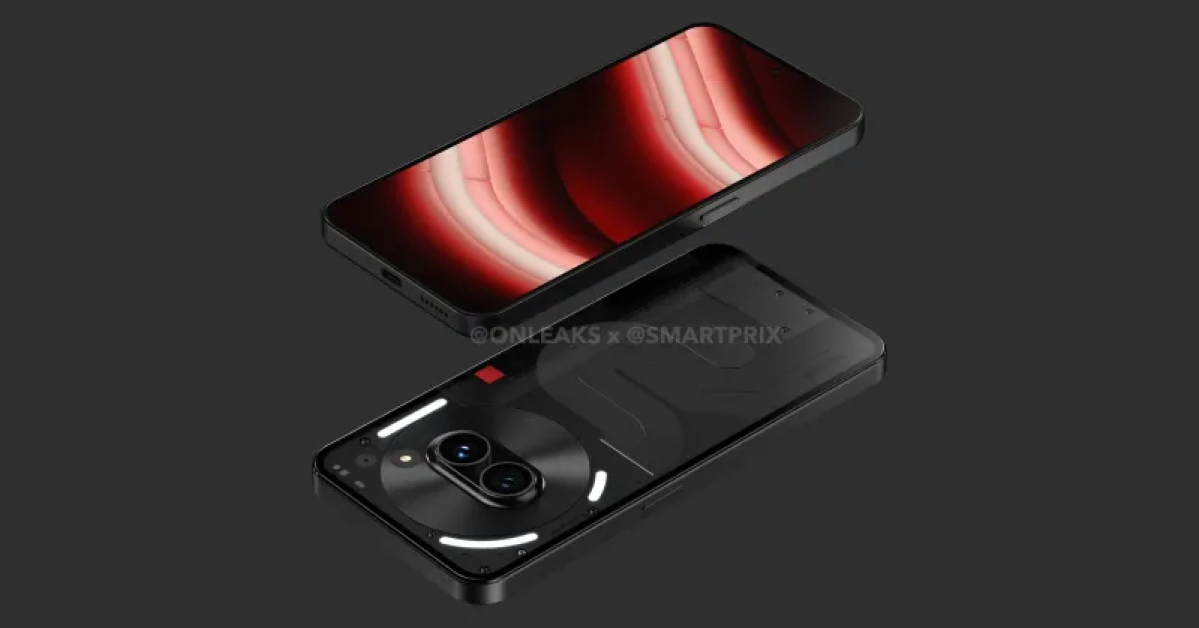
As we mentioned earlier, Nothing Phone 2a will also launch along with CMF audio products on March 5. The smartphone is the company’s affordable version of Nothing Phone 2 which launched last year. The company has not yet revealed but the upcoming phone is tipped to feature a dual pill-shaped rear camera setup placed horizontally. Just like the previous module, Glyph lights are supposed to be arranged around the camera module. As per the leaks, it will be surrounded by three LED strips. Two of them appear to be curled and positioned on the left. Also, there will be a vertically straight strip positioned on the right. The vertically oriented company branding is visible towards the bottom-left corner.
Nothing has confirmed that MediaTek Dimensity 7200 SoC will power the Nothing Phone 2a. The chipset is said to be specially co-engineered by MediaTek for the upcoming device.
iQoo Neo 9 Pro will go on sale via Amazon in the country.
The smartphone features an LTPO AMOLED screen with up to 144Hz refresh rate.
The handset includes a dual rear camera setup.
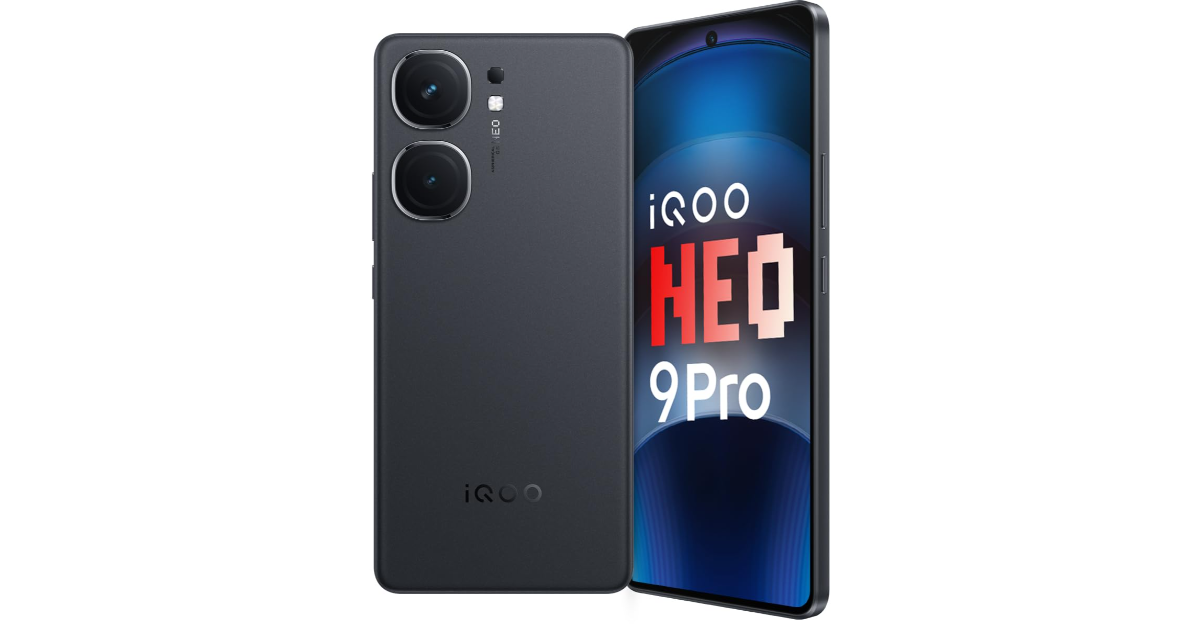
iQoo today officially unveiled a brand new smartphone iQoo Neo 9 Pro in the Indian market. The gaming smartphone is powered by Qualcomm Snapdragon 8 Gen 2 mobile chipset. It runs on Funtouch OS 14 with Android 14. The device features a 6.78-inch LTPO AMOLED display and packs a 5,160mAh battery. In addition to this, there is a dual rear camera led by a 50-megapixel primary sensor.
In This Article
iQoo Neo 9 Pro specifications
iQoo Neo 9 Pro features a 6.78-inch 1.5K LTPO AMOLED display with 1,260×2,800 pixels of resolution. When gaming, the screen’s refresh rate increases to 144Hz from 120Hz in everyday use. Additionally, the screen has iQoo’s Wet Touch technology, which enables users to carry out specific operations with damp fingertips. The device has an IP54 rating for dust and splash resistance.
Qualcomm’s Snapdragon 8 Gen 2 mobile processor, up to 12GB of LPDDR5X RAM and up to 256GB of UFS 4.0 storage powers the device. The smartphone operated on Android 14-based Funtouch OS 14 out-of-the-box. The company is promising to provide 3 years of software updates and 4 years of security fixes.
iQoo Neo 9 Pro comes with a dual rear camera setup that includes a 50-megapixel 1/1.49-inch Sony IMX920 sensor (optical image stabilisation (OIS) and an f/1.88 aperture) and an 8-megapixel OmniVision OV08D10 ultrawide-angle camera with f/2.2 aperture. In terms of selfies, there is a 16-megapixel Samsung S5K3P9SP04-FGX9 sensor with f/2.5 aperture.
The gaming phone by iQoo packs a 5,160mAh battery with support for 120W SuperVOOC charging. The sensors onboard include an optical fingerprint scanner, accelerometer, ambient light sensor, e-compass, proximity sensor, and gyroscope. For connectivity, there is 5G, 4G LTE, Wi-Fi 7, Bluetooth 5.3, GPS, and a USB Type-C port.
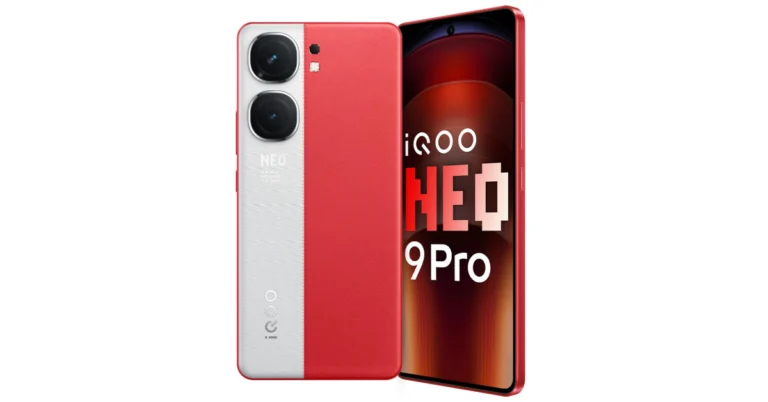
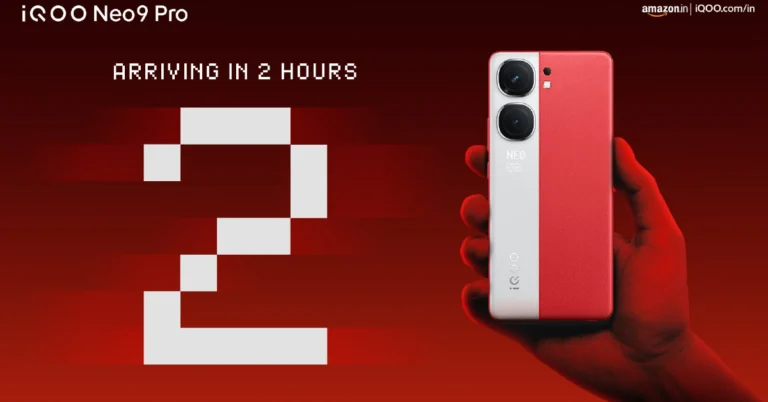
iQoo Neo 9 Pro has been launched with a starting price of Rs 37,999 for the 8GB RAM with 256GB storage variant. There is another 12GB RAM with 256GB storage option priced at Rs 39,999. The smartphone comes with a unique dual-tone rear panel design. It is being offered in Conqueror Black and Fiery Red. The handset is scheduled to go on sale on February 22 at 1 PM via Amazon in the country.
Also note that there is a third 8GB RAM with 128GB storage variant priced at Rs 35,999 that will be available for purchase starting March 21.
Launch offers
Customers may also take advantage of HDFC Bank and ICICI Bank discounts, which lower the cost of the phone by Rs 2,000. There’s a deal that ends on February 26 that will knock an extra Rs 1,000 off the price.
Have you ever wondered what it would be like if your pets could speak? Or maybe you want to see an old Renaissance painting come to life. While these tasks may have required hours of editing in the past, more recent AI tools can deliver the results within seconds. The great thing is that these apps are getting better every passing day. Today, we bring you the top 5 AI apps to make your photos sing on your iPhone.
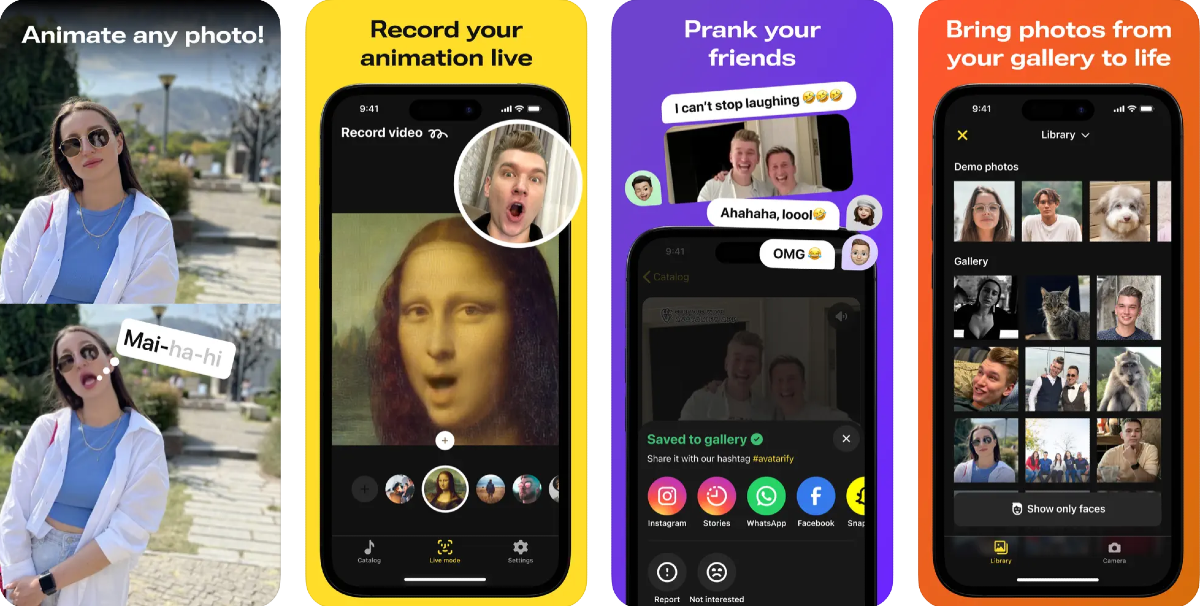
Available on Android and iOS platforms, Avatarify is one of the best apps to make your photos sing. It does this by processing the image through a neural network and syncing the facial movements with the rhythm of the song. You can feed the image of any celebrity or fictional character and have them say anything you like. Apart from pictures of people, Avatarify also works on images of pets and toddlers. You can also feed an artwork into the app and have it come up with stunning animations.
With the Revive app, you can make pictures break into a melody and create hilarious short videos. It is one of the rare AI apps that lets you create duet videos as well. Apart from songs, you can add voice to images and apply funny face filters on them. The singing videos are perfectly synced with the music. The photo generator tool in the app lets you make amazing AI avatars for yourself and your friends. If you don’t want to upload images from your phone’s photo gallery, you can use Revive’s extensive gallery of famous celebrities through the decades.
As the name suggests, Face Dance brings your still pictures to life with amazing animations that are perfectly in tune with the background music. Face Dance pays special attention to the minute facial movements, making the image move like it would in reality. The detail on the eyelid and lip movements is surreal. You can also upload old, black-and-white images on this app and rejuvenate them with an injection of colour. The AI avatar tool on the app creates amazing animated avatars using your pictures.
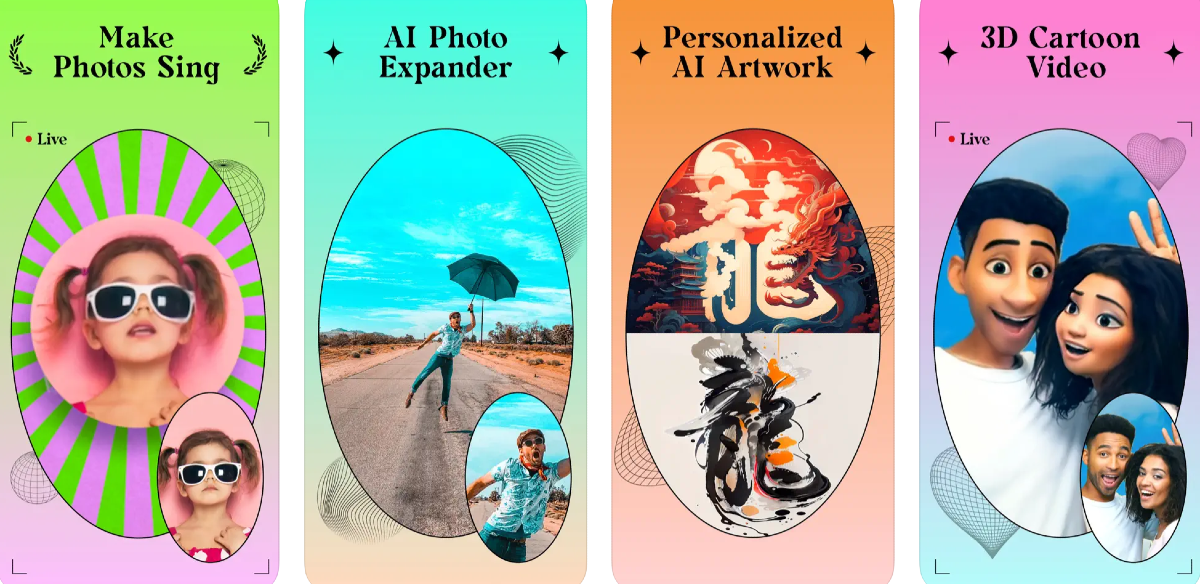
Ending this list is the ‘Ritmo Video: Make Photos Sing’ app for iPhone. Apart from making still images sing, Ritmo also lets you expand your images using AI. If you have a close-up image which you would like to see against a wider background, upload it on Ritmo and let AI do the magic. The results are surprisingly accurate and the app does a good job of extracting the key details from the image and applying them to the wider background. You can also use this app to produce 3D cartoon videos using your images.
The Face Swing app for iPhone has hundreds of animations in its library that you can use to make your photos sing. You will find hundreds of trending songs on the app. If you don’t want to use your images, you can choose from the portraits of popular celebrities and historical figures from the app itself. The audio library on Face Swing gets updated every day, so you don’t have to worry about missing any of the new trends.
These are the top 5 AI apps to make your photos sing on your iPhone. These apps are great to play a prank on your friends and kill some time. Check out this list of Android apps that can carry out the same task. If we missed out on an app that you like to use, let us know in the comments!
iQoo Neo 9 Pro will be available for purchase via Amazon in India.
The smartphone is confirmed to come with a Snapdragon 8 Gen 2 SoC.
It will feature a dual-tone rear panel.
Vivo’s sub-brand iQoo is all prepped up to launch a brand new smartphone in India today. iQoo Neo 9 Pro will make its way to the Indian market after it made its debut in China in December last year. The device is confirmed to be powered by a Qualcomm Snapdragon 8 Gen 2 SoC. The handset will come with a dual-tone rear panel. The firm has not officially disclosed but ahead of the official release, the price of the upcoming phone surfaced on the web. The company will also be hosting a livestream of the launch event checkout details below on how to watch iQoo Neo 9 Pro launch.
In This Article
How to watch live stream of the iQoo Neo 9 Pro launch
iQoo Neo 9 Pro is going to launch in India today. The launch event will kick off at noon. Fans and interested people can watch the event live on the company’s official YouTube channel and social media platforms. We have embedded the watch link below for your convenience.
iQoo Neo 9 Pro price in India expected
The company has not officially revealed the price of the iQoo Neo 9 Pro but according to a tipster the device is likely to launch at Rs 34,999 for the 8GB RAM with 256GB storage. The tipster shared a screenshot of the product page which also mentions a bank offer of Rs 3,000. The upcoming smartphone is also tipped to come in a 12GB RAM with 256GB storage option which is expected to be priced around Rs 40,000.
According to the company, the Qualcomm Snapdragon 8 Gen 2 SoC has been used for the iQoo Neo 9 Pro in India instead of the MediaTek Dimensity chipset used for the Chinese variant. Yes, under the hood of the Neo 9 Pro in China is a MediaTek Dimensity 9300 SoC. It is likely to come with a 6.78-inch LTPO AMOLED display with a 144Hz refresh rate. The display will offer 3,000 nits of peak brightness. It is expected to house a 5,160mAh battery with 120W wired fast charging support.
Neo 9 Pro will be featuring a dual-tone rear panel. The back of the phone is confirmed to sport a leather finish in shades of grey and vibrant red. In addition, there is a dual camera on the back panel which is expected to include a 50-megapixel IMX920 primary sensor with OIS and an 8-megapixel ultra-wide lens.
As per the official listing, the device will come in two colour options of Conqueror Black with a shiny finish and Fiery Red with a dual-tone faux leather finish.
Garena Free Fire is a battle royale game with regular awards and tournaments to keep players interested. If you play Garena Free Fire, you should be aware of the redeem codes that are released on a daily basis. However, because the battle royale game is banned in India, players from other countries can use the Free Fire Redeem codes daily. If you’re unfamiliar with the Garena Free Fire redeem codes or don’t know how to get them, we’ve put together a step-by-step guide to help you redeem them. Check out Garena Free Fire Redeem Codes for 22 February 2024.
The Free Fire redeem codes are a great way to get free stuff. These are 12-digit codes that contain alphabets and numbers, as well as an expiration date and time. Because the Garena FF redeem codes cannot be used more than once, you should hurry to the redemption page to claim your free reward before someone else does. To get a free reward, all you have to do is go to reward.ff.garena.com/en, which is the official redemption page. Also, keep an eye on this space for daily updates on Garena Free Fire redemption codes and rewards.
The company has revealed the design of the upcoming smartwatch.
The device is now also available for pre-booking.
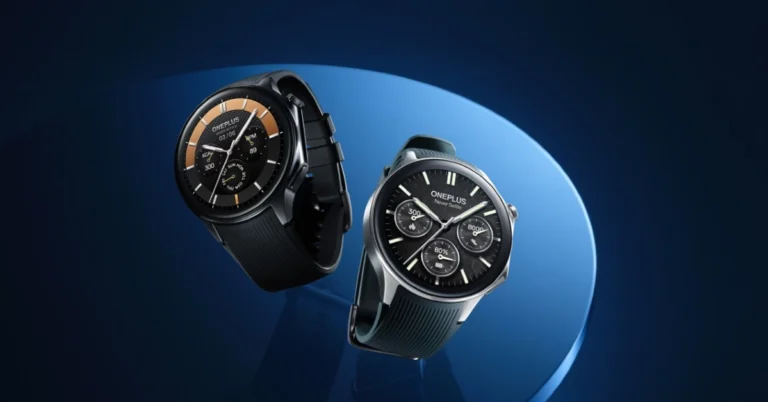
OnePlus is all set to launch a new smartwatch in the Indian market. The company has confirmed to introduce the OnePlus Watch 2 in the Indian market next week. To recall, the device is a successor of the OnePlus Watch which was launched around three years ago. Since then the company has not yet introduced any new smartwatch or tracker. The company has revealed the design and battery life details of the upcoming watch the Pre-booking has also opened. Check out the OnePlus Watch 2 pre-reserve details.
OnePlus Watch 2 is set to launch in India on February 26. The smart wearable will make its debut at the Mobile World Congress (MWC) in Barcelona at 4:00 pm CET (8:30 pm IST).
Kinder Liu, the COO and President of OnePlus said, “After a three-year hiatus and a reflective pause following the OnePlus Watch 1, the Watch 2 re-emerged, and we are more confident than ever about this product. This confidence is not unfounded, it’s built on a foundation of substantial advancements in our technological ecosystem and capabilities. Watch 2 indicates our determination to transform from “Flagship Killer” to “Ecosystem builder”. It will provide you with experience that’s not just improved, but transformed.”
OnePlus did disclose some information regarding its design and battery life, but not key specifications. OnePlus Watch 2 is said to deliver up to 100-hour battery life in Smart Mode.
The smartwatch will come with a stainless-steel chassis and a sapphire crystal watch face that offers both timeless elegance and resilience against the trials of daily life. The OnePlus Watch 2 draws inspiration from the distinctive K-shaped curves of the OnePlus 12 series, the OnePlus Watch 2 features a round watch face which mirrors the camera design of the series. The device is said to be made available in two colour options Black Steel and Radiant Steel.
“With its avant-garde features and exceptional design, the OnePlus Watch 2 is more than just a comeback—it’s a revolution in the smartwatch market. OnePlus is not just returning; it’s redefining what a flagship smartwatch can be,” the company said.
The pre-booking window for the OnePlus Watch 2 is also open now. The users will be able to purchase a pre-reserve pass at just INR 99 exclusively on OnePlus.in. The pass guarantees a discount of Rs 1000 on the purchase of the OnePlus Watch 2 along with a free OnePlus Bullets Wireless Z2 ANC.
The base variants of the iPhone 16 Series will be powered by the Apple A17 Pro chipset from last year’s Pro models.
The new Pro models are expected to get bigger displays and a new ‘Capture’ button.
Expect the new iPhone lineup to demand a small premium.
It has only been half a year since the launch of the iPhone 15 Series, but the Internet is already abuzz with rumours about the new iPhone 16. As is tradition, Apple will reveal its latest flagship smartphone at its annual fall event in September. Leading up to the launch, more rumours are expected to surface online. If you’ve been holding out on upgrading from your older iPhone, you may want to see what Apple has in store for you this year. Here is everything we know about the upcoming iPhone 16 Series.
Apple’s strategy since 2022 has been to introduce premium features of the ‘Pro’ iPhone models to the base variants in the following year. The iPhone 14 and 14 Plus carried forward the A15 Bionic processor from the iPhone 13 Series while the Pro Models were equipped with the updated A16 Bionic chipset. In 2023, the base variants of the iPhone 15 Series were finally updated with the A16 Bionic chipset while the Pro models were powered by the latest Apple A17 Pro. The camera upgrades and Dynamic Island also took a year to arrive on the base models.
Following this pattern, the iPhone 16 and 16 Plus will inherit the new Apple A17 Pro chipset from the Pro models in the iPhone 15 Series. They will also receive the Grade 5 Titanium frame and the ‘Action’ button. The mute switch will finally be replaced by the Action button which can customised to carry out a range of actions. You can read about it here. Rumours also suggest that Apple will finally upgrade the refresh rate of the base model displays to 120Hz.
Leaked renders suggest that Apple may also go back to the vertical layout pattern for the rear cameras, which will now be packed inside a smaller two-step panel. This panel will likely be pill-shaped to accommodate the vertical layout. If this is the case, the LED flash will be placed outside the new panel.
iPhone 16 Pro and iPhone 16 Pro Max
iPhone 15 Pro
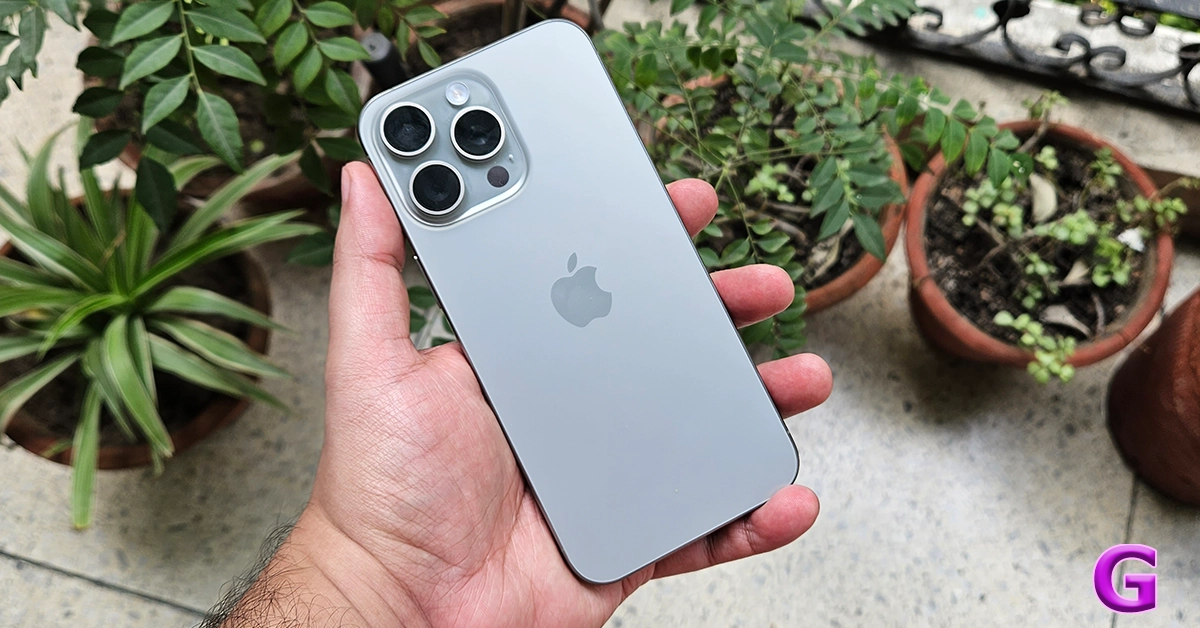
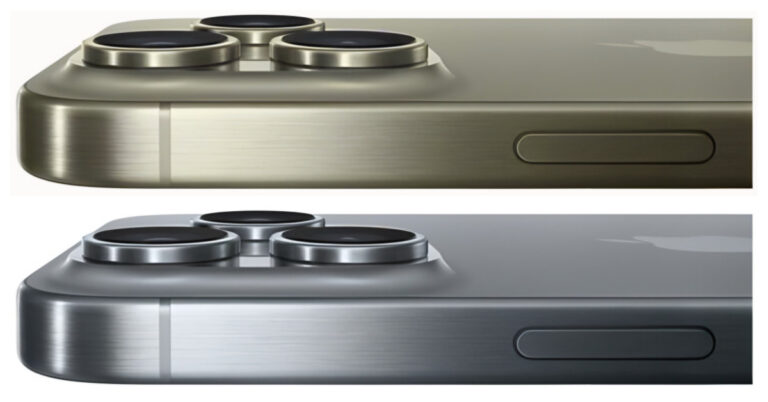
Last year’s Pro models (our review here) saw Apple switch to a Grade 5 Titanium frame. The new frame rocked a new ‘Action’ button. This year, the iPhone 16 Pro models are rumoured to get a new ‘Capture’ button which will lie on the lower end of the left side of the frame. To accommodate this change, the mmWave 5G cutout will be moved to the right edge of the frame, alongside the volume rocker. The Capture button will act as a traditional shutter button to click pictures. It may have different pressure levels for focus adjustment.
The iPhone 16 Pro models are set to get bigger this year. The iPhone 16 Pro will have a 6.27-inch display while the iPhone 16 Pro Max will feature a 6.85-inch panel. The current Pro models have 6.1-inch and 6.7-inch displays respectively. The larger displays will allow for a bigger battery inside both the Pro models. With Samsung introducing an anti-reflective display on the latest Galaxy S24 Ultra (our review here), Apple could also bring the technology to its upcoming iPhone 16 Pro Models.
The Apple A18 Pro chipset will make its debut in the new Pro models of the upcoming iPhone series. Apple is expected to equip the two smartphones with WiFi 7 tech which provides 2.4x faster speeds than the outgoing WiFi 6. Not much is known about the camera specs of the upcoming iPhone Pro models, but we wouldn’t be surprised if the camera module remains unchanged. Some rumours suggest that the telephoto lens on the iPhone 16 Pro will support 5x zoom, which is a feature that is limited to the Pro Max model on the iPhone 15 Series. More details are expected to emerge as we get closer to launch.
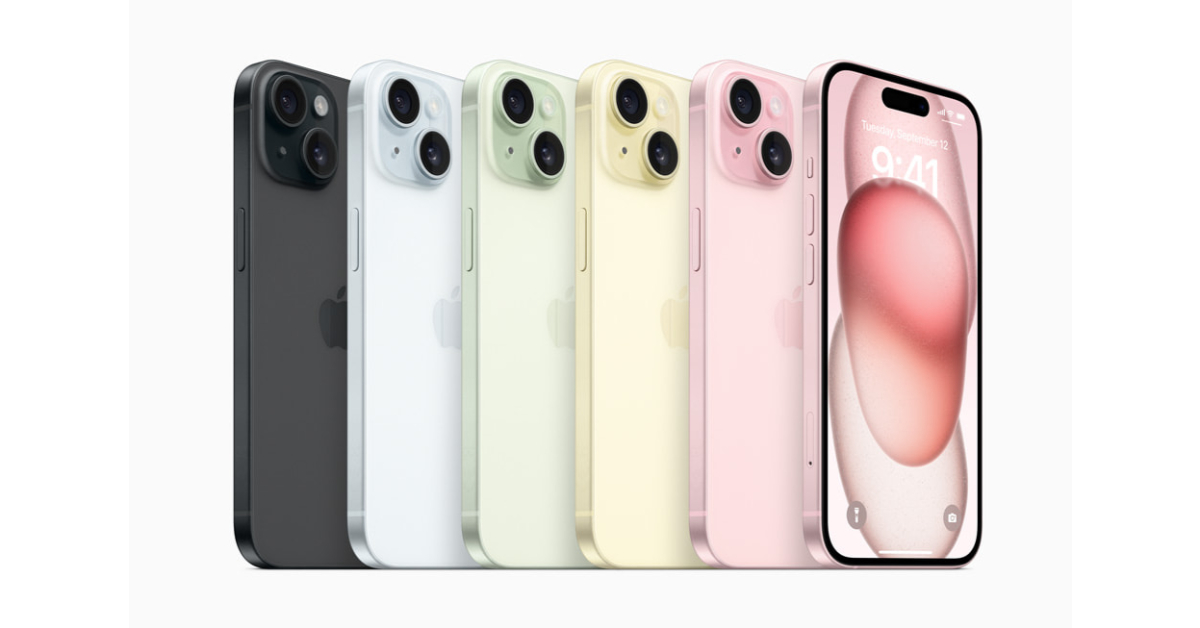
Apple usually plays it safe with colour options for the iPhone and isn’t known to experiment a lot. We don’t expect any outrageous colour schemes for the 2024 iPhone 16 series. However, the Cupertino tech giant may introduce two new colours for the Pro models of its flagship smartphone – Desert Titanium (Deep Yellow) and Titanium Gray.
Apple has kept a tight lid on the pricing of the iPhone 16 so far. No leaks have emerged about what the new iPhones may cost. However, if previous trends are to be believed, all four iPhone models will demand a small premium over the outgoing models. This means the base iPhone 16 model will finally cross the $800 barrier while the iPhone 16 Pro will cost upwards of $1,000.
If you’re new to playing Minecraft, making a potion is something you need to learn right away. Consuming the Potion of Weakness reduces your attack damage by 4x for 1 minute 30 seconds. Now, you may be wondering why you should brew a potion that reduces the strength of your attack. Well, by itself the potion does not have much use, but it can be used to make other potions that can be used on others. Here are some of the best ways to make a Potion of Weakness on Minecraft.
Items and Ingredients needed to make a Potion of Weakness on Minecraft
Crafting Table: Requires 4 Wood Planks
Brewing Stand: Requires 1 Blaze Rod and 3 Cobblestone Blocks
Water Bottle: Can be made with Glass Blocks
Fermented Spider Eye: Harvest sugar and brown mushrooms. Kill spiders for spider eyes. Use the three ingredients to make a Fermented Spider Eye.
Blaze Powder: Add 1 Blaze Rod to the crafting bench to get 2 Blaze Powders.
Make a Potion of Weakness on Minecraft (1:30)
Step 1: Open the Brewing Stand.
Image courtesy: DigMinecraft
Step 2: Add the Blaze Powder to the box on the left. This activates the Brewing Stand.
Step 3: Place a Water Bottle in one of the boxes at the bottom of the Brewing Stand. You can make up to 3 potions at once by placing 3 Water Bottles.
Step 4: Pick the Fermented Spider Eye from the inventory and place it in the topmost box on the Brewing Stand.
Step 5:Wait for the brewing to finish. When it is done, the potion will appear in one of the bottom boxes.
Make a Potion of Weakness on Minecraft that lasts longer (3:00)
Step 1: Place Redstone in the top box of the Brewing Stand.
Step 2: Add the Potion of Weakness to the bottom box. Your new, longer-lasting (3:00) Potion will be ready.
Make a Splash Potion of Weakness on Minecraft
Step 1: Place the Potion of Weakness in the bottom box of the Brewing Stand.
Step 2: Add Gunpowder to the top box.
Step 3: Wait for the process to complete. Your Potion will be ready.
Make a Lingering Potion of Weakness on Minecraft
Step 1: Place Dragon’s Breath in the top box of the Brewing Stand.
Step 2: Add a Splash Potion to the bottom box.
After the process is over, the Lingering Potion will be ready.
Frequently Asked Questions (FAQs)
What does a Potion of Weakness do?
Using a Potion of Weakness on yourself reduces your attack damage by 4x for 1 minute and 30 seconds. However, you can use it to create a splash potion of weakness to use on others.
How do I make a Potion of Weakness on Minecraft?
Open the Brewing Stand and add the Blaze Powder to the left box. Place a Water Bottle in the bottom box and a Fermented Spider Eye in the topmost box to create the potion.
How do I make a Potion of Weakness that lasts for 3 minutes?
On the Brewing Stand, add the Redstone in the top box and the regular potion in the bottom box to make a potion that lasts for 3 minutes.
This is how you can make a Potion of Weakness on Minecraft. You can deploy this potion by simply tapping and holding it on your phone. PC players right-click and hold the potion to use it. If you have any questions related to brewing this potion, let us know in the comments!
iPhone 16 Pro and iPhone 16 Pro Max images leaked suggesting two new colour options.
The phones are said to be available in Grey and Gold options.
Pricing and design details of the iPhone 16 line have also been tipped before.
Recently we came across iPhone 16 renders which suggested a revamped camera setup. Now more images have surfaced on the web regarding colour options for the iPhone 16 Pro and iPhone 16 Pro Max. The alleged devices are seen in leaked renders with new grey and gold finishes. The new iPhone series is expected to arrive by the second half of 2024.
Based on information provided by a tipster via X, Apple might launch two new colorways for iPhone 16 Pro and iPhone 16 Pro Max in the second half of 2024. The gold colourway is unavailable for Apple’s current line of iPhone 15 Pro models. But as per the leaked renders the upcoming Pro model might be offered in a new Cement Gray and Desert Yellow finishes.
The current iPhones are available in four colour options- Black Titanium, Blue Titanium, Natural, and White Titanium. As per the tipster the new colour options will be called Titanium Grey and Desert Titanium.
While sharing the renders he said, “Based on the information I was able to find, the new colours of the iPhone 16 Pro could be Desert Yellow (Desert Titanium) similar to the gold of the iPhone 14 Pro but deeper and heavier Cement Gray (Titanium Gray) a shade of space gray similar to that used on iPhone 6. Other possible colours are also discussed, however they seem to be less plausible and I preferred to avoid reporting them. Do not take this information as 100% accurate or real, it is just a rumour”
Some days ago iPhone 15 Series renders appeared on the web suggesting a redesigned rear camera layout. It is claimed to feature a vertical rear camera module. To support the claim the tipster also posted an image of the alleged iPhone 16 camera module featuring a pill-shaped dual rear camera setup.
The iPhone 16 lineup is also tipped to include five models- iPhone 16 SE, iPhone 16 Plus SE, iPhone 16, iPhone 16 Pro, and iPhone 16 Pro Max.
Similar to iPhone X the renders depict a single pill-shaped rear camera module with a flash for the iPhone 16 SE and iPhone 16 Plus SE. Whereas the iPhone 16 camera module has a dual rear camera setup. The iPhone 16 Pro and iPhone 16 Pro Max, on the other hand, can be seen featuring a triple rear camera setup similar to that of the Samsung Galaxy S24 and S24 Plus.
Pricing of iPhone 16 has also been tipped before. The iPhone 16 SE 128GB model is likely to retail at $699. Whereas the iPhone 6 SE Plus may cost $799 for the 256GB variant. The 256GB version of the vanilla iPhone 16 may retail for $699.
The 256GB models of the iPhone 16 Pro and iPhone 16 Pro Max are rumoured to be priced at $999 and $1099 respectively.
Truecaller started out as a Caller ID app for identifying unknown callers. Over the years, the app has not only introduced helpful spam filters but also evolved to become a well-rounded dialer and texting app. The messages in your Truecaller inbox are filtered from spam, leading to a clean, clutter-free texting experience. The app recently introduced a new feature which allows you to access your Truecaller inbox on your PC. Interested? Here is how you can use Truecaller on your PC.
Keeping up with major instant messaging apps like WhatsApp and Telegram, Truecaller has launched a web portal which allows users to link their accounts to their PCs. Once the devices have been linked, users can access their text messages from their PC’s web browser without needing to pick up and unlock their phones. The messages displayed on your PC’s web browser are filtered from spam and blocked contacts. The process is simple and isn’t different from apps like WhatsApp and Telegram.
Since device linking is still a beta feature, it is not available for all Truecaller users yet. Currently, it is available for beta testers of the app. Once the feature has been officially launched, it will be rolled out to larger audiences in a phased manner. In the meantime, you can use Google Messages to access your text messages on your PC. You can read about it here.
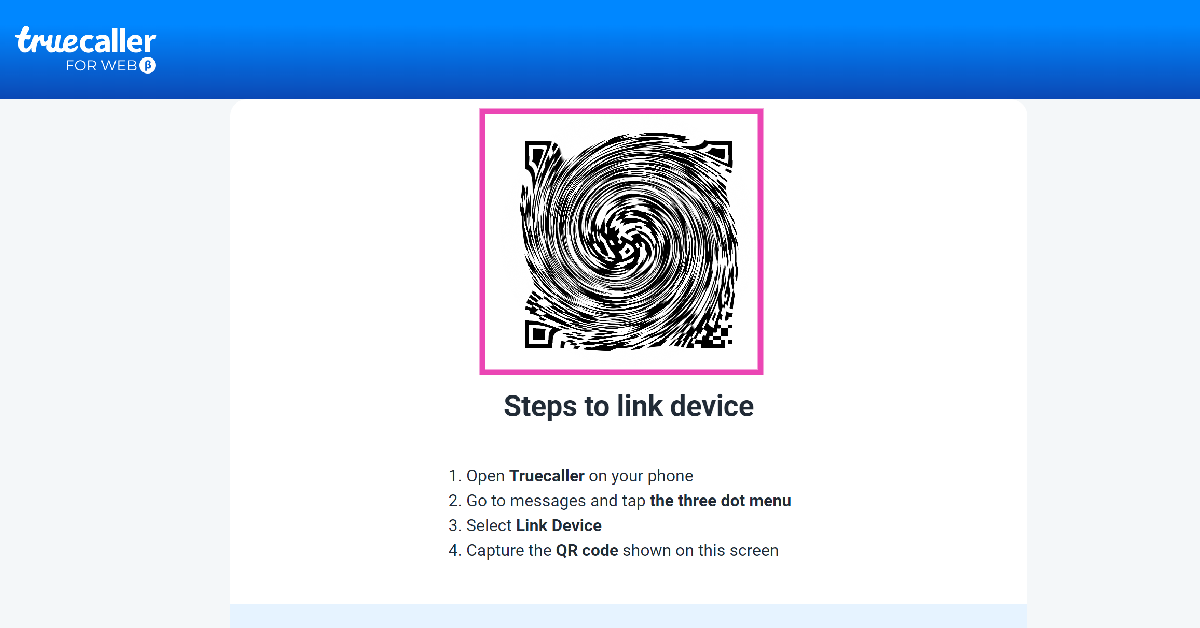
Link your device to Truecaller Web to start texting on a PC
Step 5: Scan the QR Code on your PC using your phone.
Step 6: Your device will be linked to Truecaller’s web portal. All your messages will appear on your PC.
Frequently Asked Questions (FAQs)
How do I link my Truecaller account to my PC?
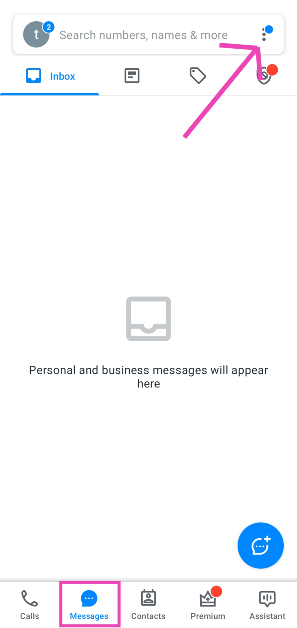
Launch the Truecaller app on your phone and go to Messages>Ellipses>Link Device. Then, go to https://web.truecaller.com/linkdevice on your PC and scan the QR code using your phone.
How do I access Google Messages on my PC?
Launch the Google Messages app on your phone, tap your profile picture, and select ‘Device Pairing’. On your PC, go to https://messages.google.com/web/ and log in using your Google Account. Match the emojis on the two devices to link them.
Can I send messages using Truecaller?
Settings Truecaller as your default messaging app allows you to send text messages from your phone. You can now link your Truecaller account to your PC and start sending texts from there as well.
This is how you can link your Truecaller account to your PC. Since this feature is being rolled out in a phased manner, you may not be able to see it on your device yet. Make sure the Truecaller app on your device is updated in order to receive the feature in time. If you have any queries regarding this feature, let us know in the comments!
This will enable users to operate some of its features using simple voice commands.
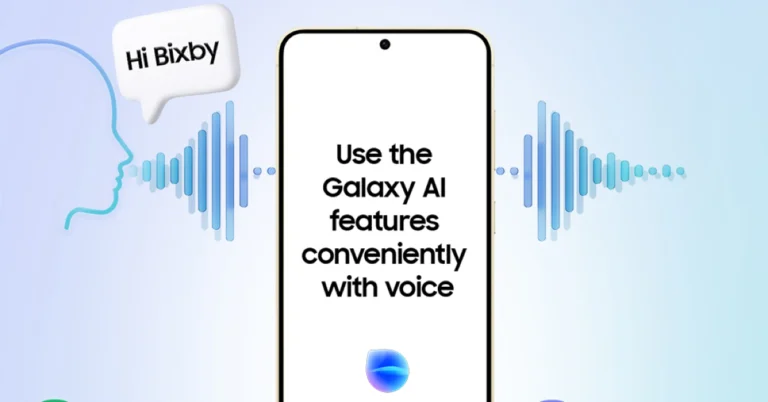
South Korean electronics giant Samsung during the launch of Galaxy S24 Series unveiled Galaxy AI, a range of AI-powered capabilities like Call Assist, Interpreter mode, Transcript Assist, and more. In a new development, the company has announced that it has merged its AI capabilities with its built-in virtual assistant Bixby. This will quickly activate Galaxy AI features on the devices for hands-free operations through simple voice commands.
Samsung stated in a statement released through a blog post, “In a world increasingly supported by artificial intelligence, Samsung is taking steps to enable easy and seamless AI usability in Galaxy users’ day-to-day lives with its voice assistant Bixby.”
With the integration of Galaxy AI to Bixby, users will be able to quickly activate Bixby’s voice activation capabilities just by speaking. This will immediately quickly bring up and activate Galaxy AI features hands-free. So there is no need to search through your device to find the feature of your choice.
As per Samsung using Bixby it will be easier to use Galaxy’s intuitive voice-oriented features, like Live Translate. Users will also be able to explore features such as real-time translation, spelling correction, and creation of web page summaries and automated note covers.
“Let’s take Interpreter as an example. Next time you find yourself in conversation with someone who speaks another language, no longer do you need to take a moment to find and click into the Interpreter feature – simply say, “Hi Bixby, turn on Interpreter,” and you’re off.”
You won’t have to slow down to access the feature you require. With just a single voice command, you may take advantage of these new possibilities, which include increased productivity along with barrier-free communication.
As per the company, Bixby activation of Galaxy AI will be applied to all supporting languages: Chinese, English (US, UK, and India), French, German, Italian, Korean, Portuguese (Brazil), Spanish (Spain) and Spanish (Latin America).
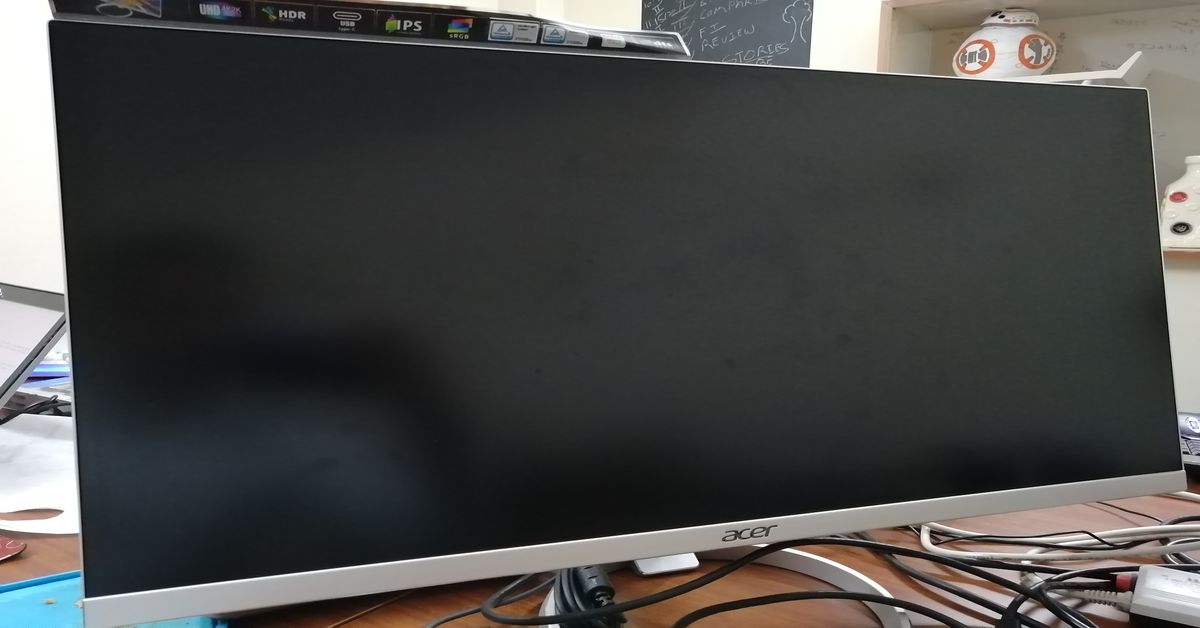
Random glitches on your PC’s monitor can initially seem scary, but they are rather easy to fix. The main part of the resolution process is to determine the cause of the issue. Once the problem has been diagnosed, the fixes are relatively easy. If your computer screen mysteriously starts showing horizontal lines, try these 11 easy fixes.
Why is my computer screen showing horizontal lines?
This malfunction could be caused by one of the reasons mentioned below.
Overheating: If you have been gaming on your PC for a while, causing it to overheat, it may cause some mysterious horizontal lines to appear on the display. This is a temporary problem which goes away as soon as your PC cools down.
Connection issues: Nine times out of ten, the horizontal lines appearing on your computer screen are caused by connection issues. Faulty cables and loosely fitted wired connections can create all sorts of problems on your PC’s display.
Screen resolution and refresh rate: Your monitor may support multiple resolutions and refresh rates, but if the PC’s video card does not support them, some malfunctions are bound to occur.
Hardware issues: Are you using an old monitor for your PC? The hardware of any PC component deteriorates over time. If you suspect that is the case, it may be time to get a new monitor.
Restart your computer
If the horizontal lines on your computer screen are originating due to a software glitch, a simple restart will fix the issue. Hit the Windows icon on the taskbar followed by the power button. Select ‘Restart’ from the list of options in the power menu. A quick restart resolves the background glitches and reboots the drivers as well. If this doesn’t work, move on to the other fixes in the list.
Check if your monitor is at fault
If restarting your PC didn’t help, your next course of action should be to check the monitor for any hardware issues. Press the power switch on the monitor and look out for any flickering lines. This is a tell-tale sign of a damaged monitor. Replace the monitor with a different unit. If the horizontal lines do not appear on the screen, your original monitor is surely at fault.
Check the cables
A faulty connection can sometimes cause your monitor to malfunction. Check its cables for any damage and make sure they are properly connected to the PC. This includes the video cable and the ribbon cables. A loose connection can cause flickering and mysterious horizontal lines to appear on the screen. If you have a new set of cables lying around, use them for your monitor.
Update the graphics card driver
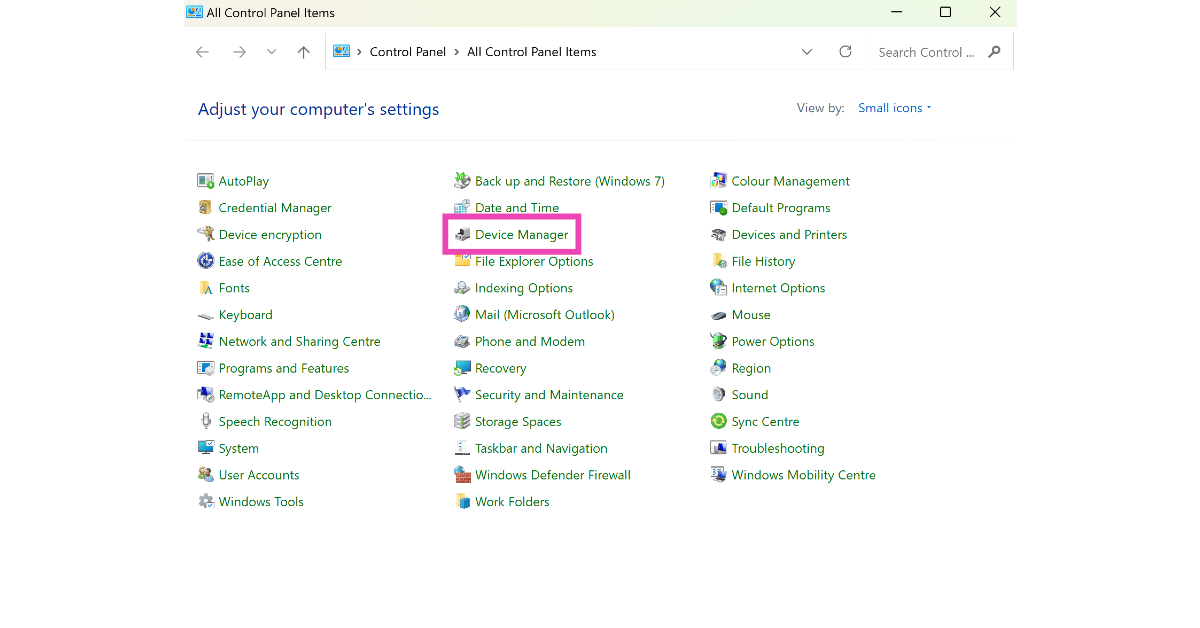
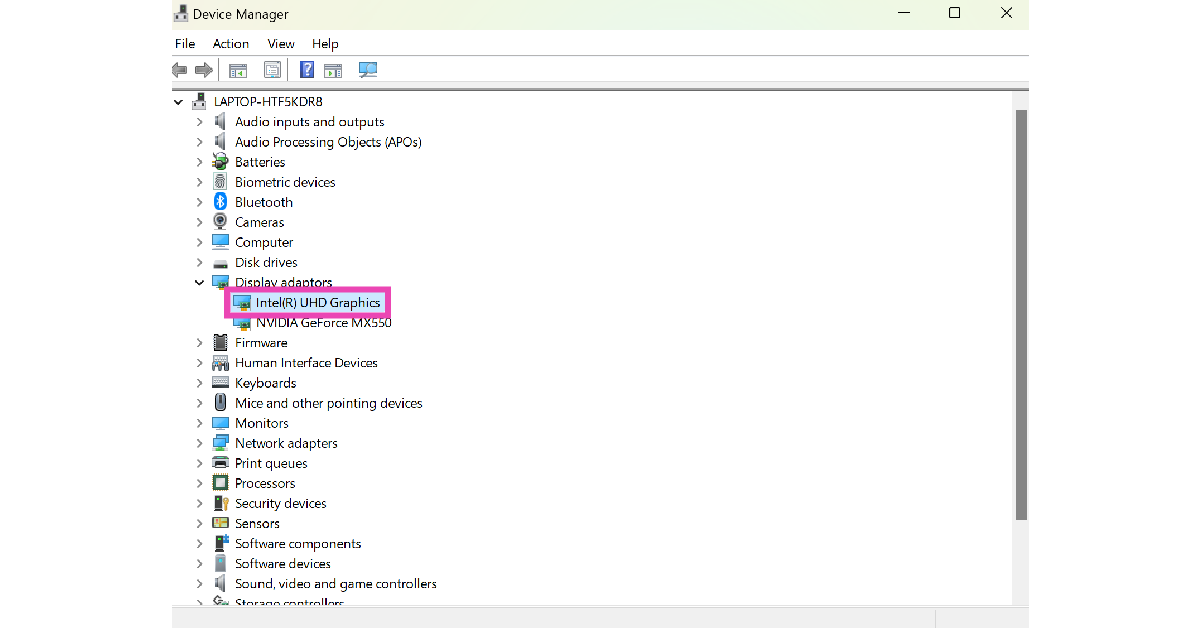
Step 1: Go to Control Panel and select Device Manager.
If the problem arose after updating the display driver, roll it back to the previous version. Here’s how.
Step 1: Go to the Control Panel and select Device Manager.
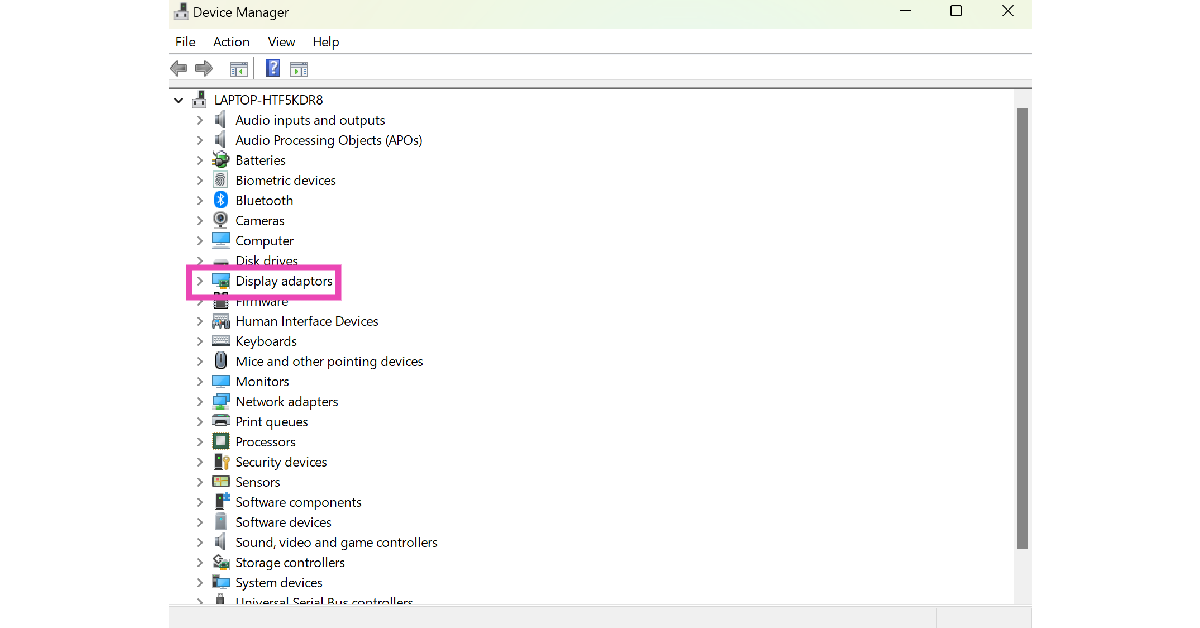
Step 2: Click on Display adaptors.
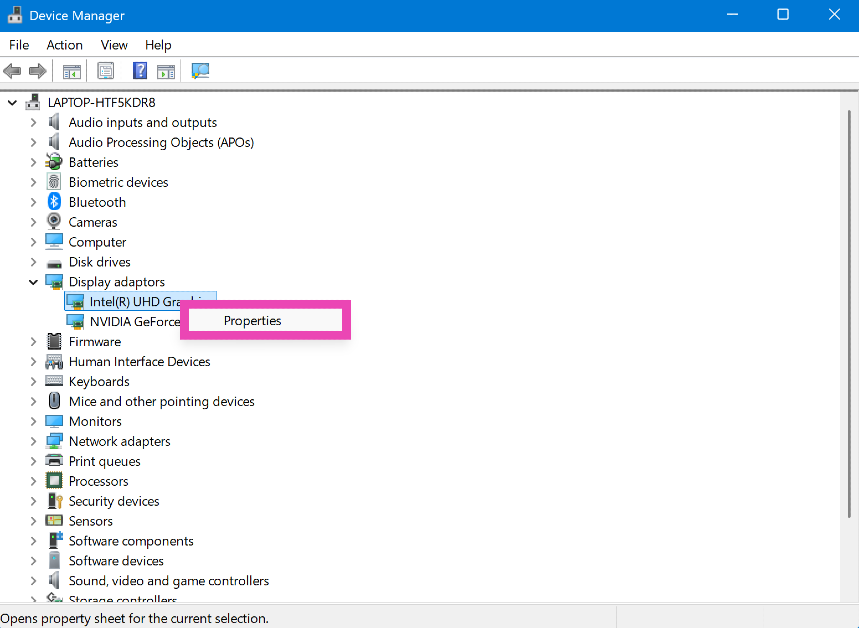
Step 3: Right-click the display driver and select Properties.
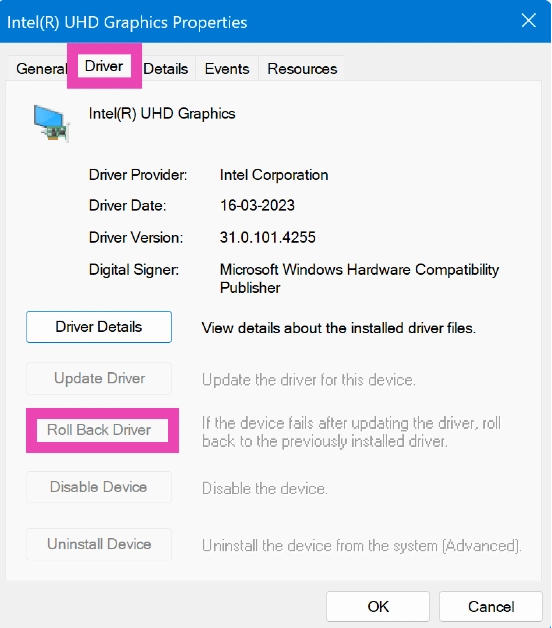
Step 4: Go to the Driver tab and select Roll Back Driver.
Change the screen resolution
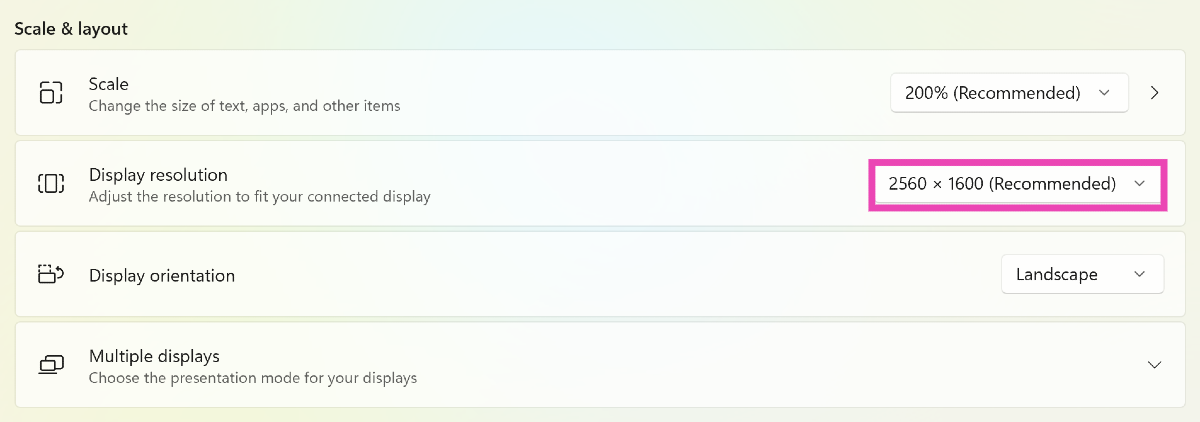
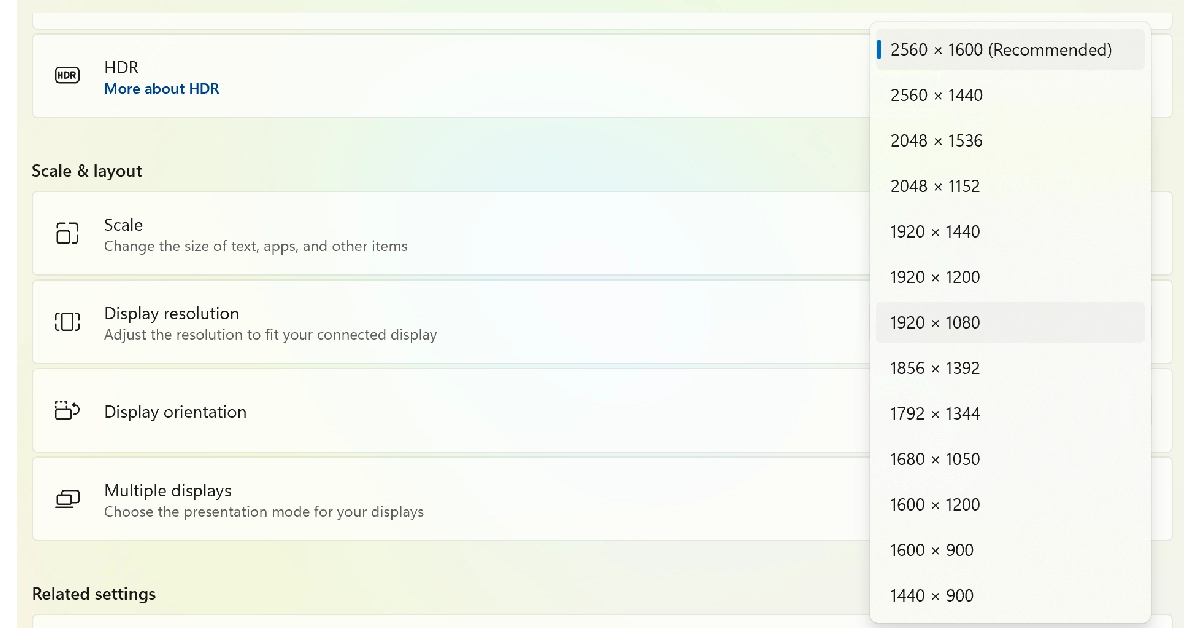
If your monitor’s screen resolution doesn’t match its size, it may lead to horizontal lines appearing on the display. Here’s how you can change the screen resolution.
Step 1: Go to Settings and select System.
Step 2: Select Display.
Step 3: Click on the dropdown menu for display resolution.
Step 4: Select a fitting resolution from the list.
Fix the refresh rate of the monitor
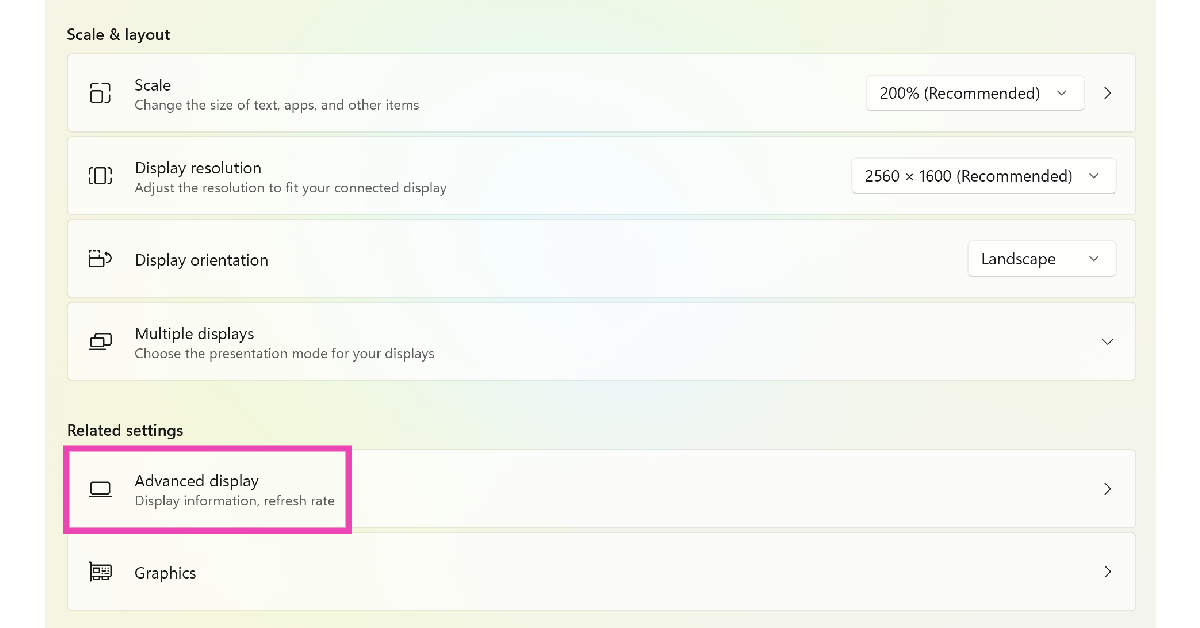
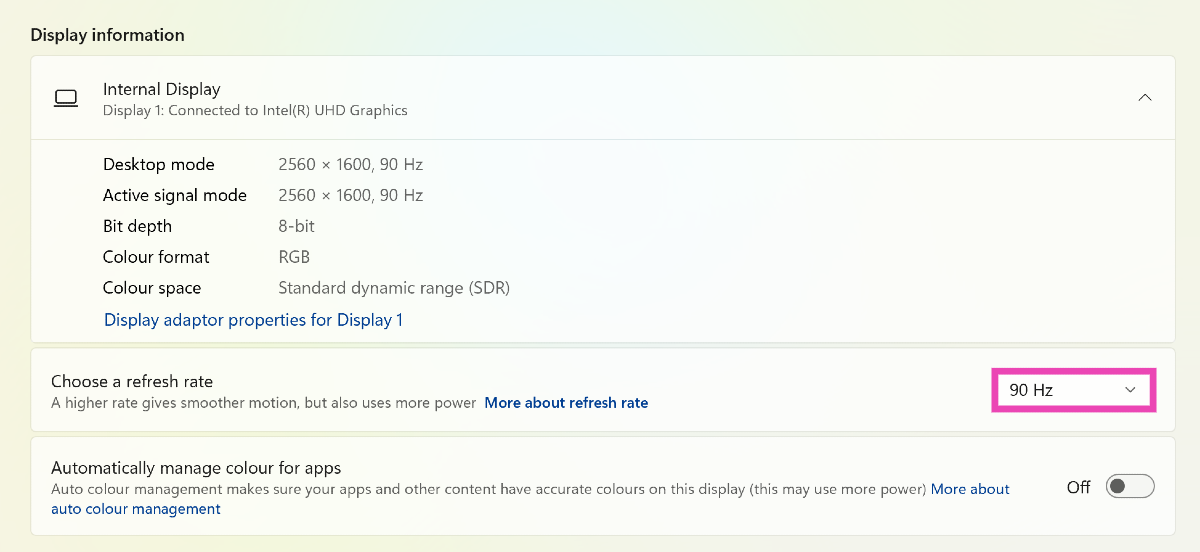
If your monitor’s refresh rate isn’t in sync with the video card, it can cause some unexpected errors. Here’s how you can change it.
Step 1: Go to Settings and select System.
Step 2: Select Display.
Step 3: Click on Advanced display.
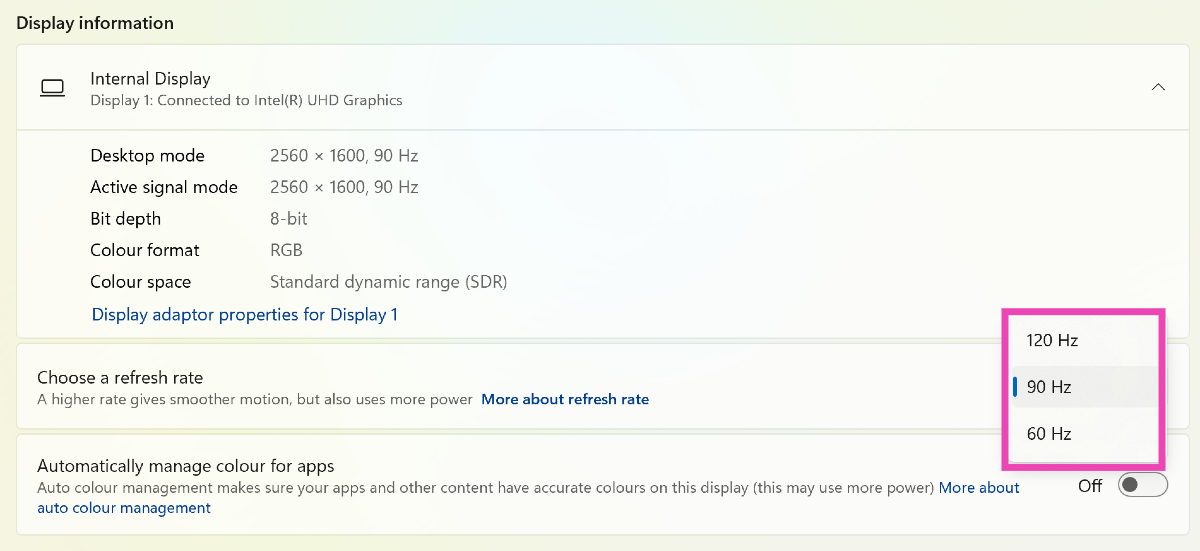
Step 4: Click on the dropdown menu for the refresh rate.
Step 5: Choose an appropriate refresh rate.
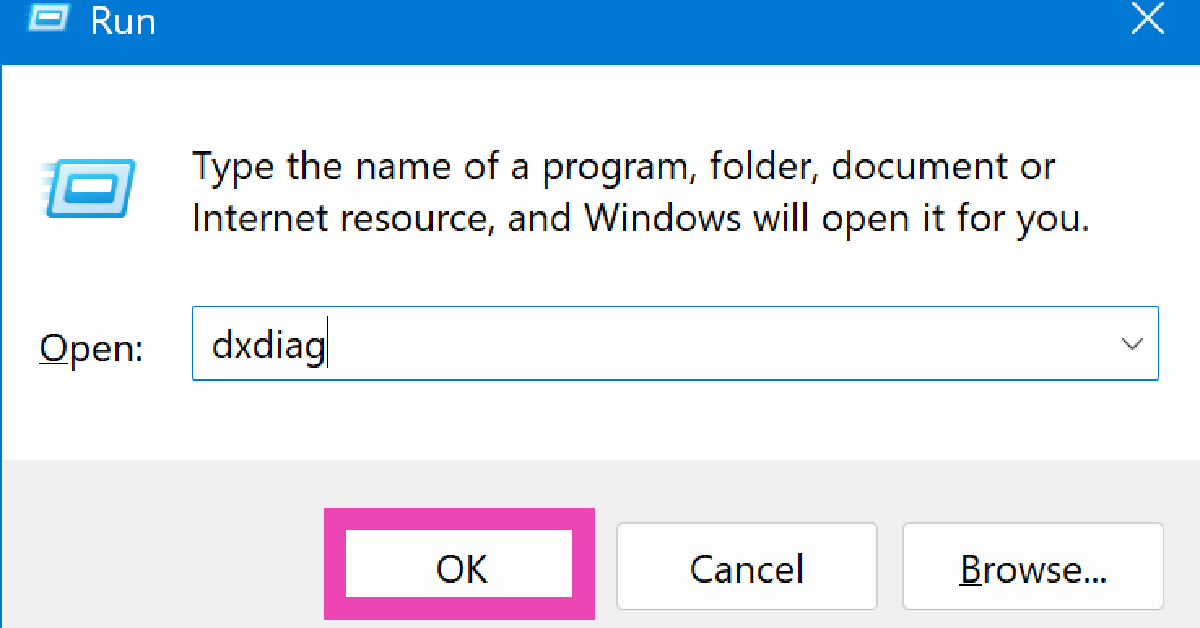
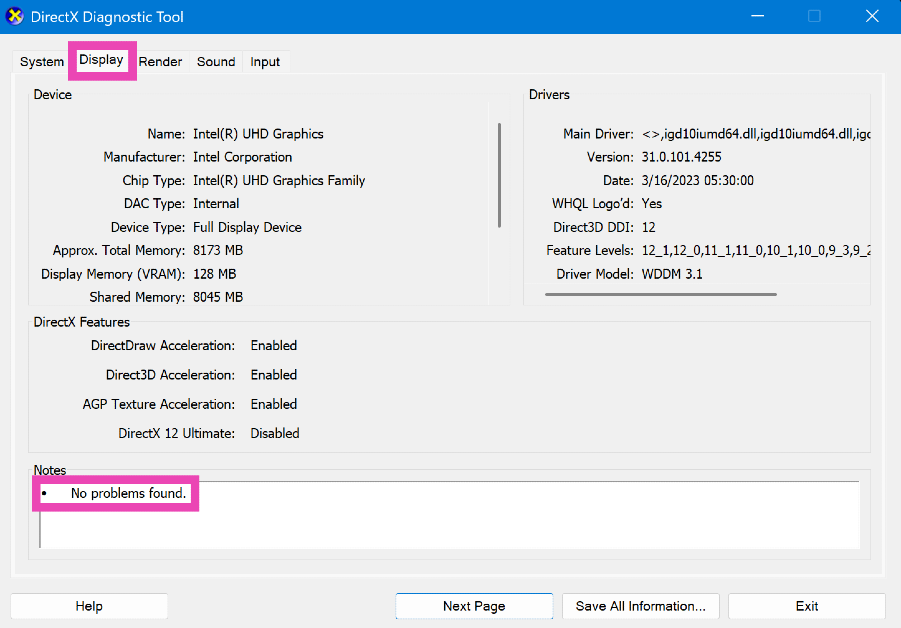
Run a diagnostic test (DirectX)
Step 1: Press Windows + R to launch the Run command box.
Step 2: Type dxdiag and hit Enter.
Step 3: Switch to the Display tab to find out what’s causing the vertical lines on your monitor.
Use your laptop on a hard surface
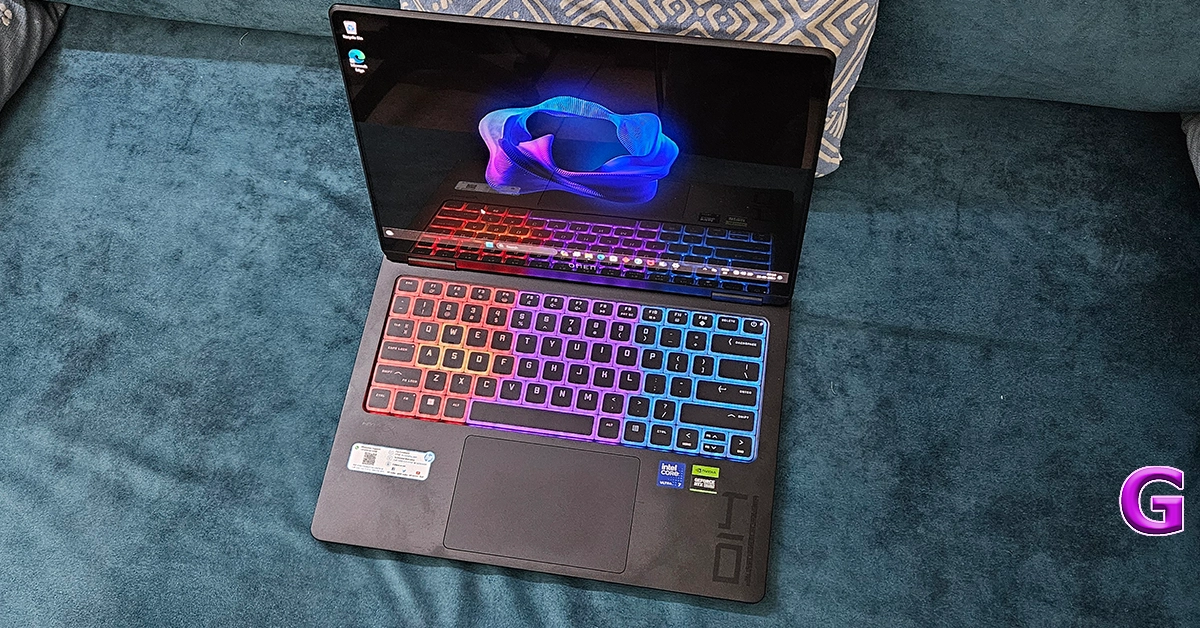
If you’re facing this issue on a laptop, make sure you’re using it on a hard surface. Surfaces like beds and blankets can cover the air vents and cause the device to overheat. This overheating often results in screen flickering and horizontal lines on the display. Move your laptop to a table and let it cool down before you resume using it.
Remove magnets and other electronic devices
If there are magnets and electronic devices near your PC’s monitor, remove them to fix the horizontal lines. These objects are known to cause interference. If they’re present near your PC’s monitor, they can induce horizontal lines on it. Eliminate any source of interference to fix this issue.
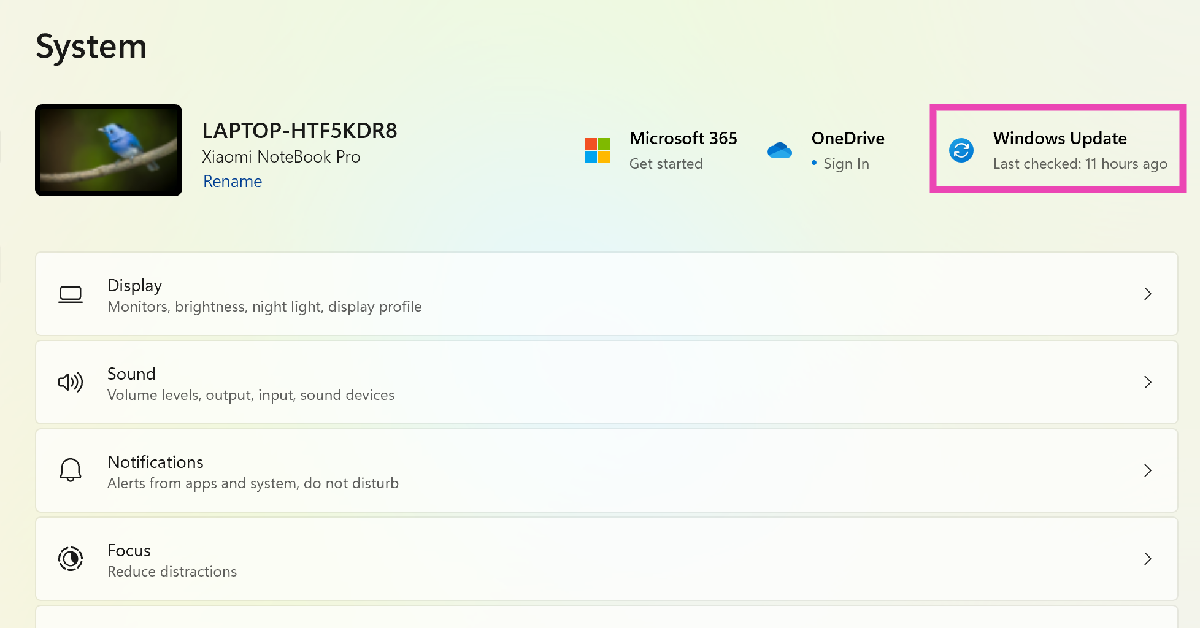
Update your PC’s OS
Developers are quick to fix the bug-related issues on your PC by pushing a new OS update. Here’s how you can update the OS.
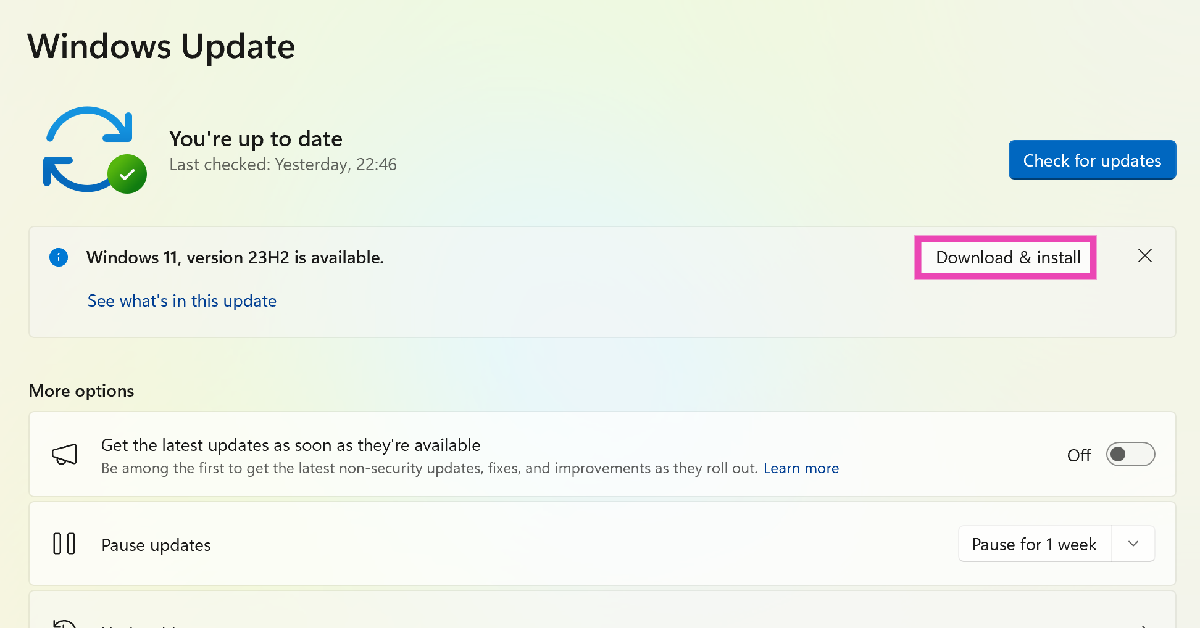
Step 1: Go to Settings and select System.
Step 2: Click on Windows Update.
Step 3: Select the Download and install option next to a pending update. If you don’t see a pending update, click on Check for updates.
Frequently Asked Questions (FAQs)
Why am I seeing horizontal lines on my computer screen?
Your computer screen may show horizontal lines when the monitor starts overheating or if its screen resolution and refresh rate are not set appropriately. An outdated graphics card driver can also cause this to happen.
How do I fix the horizontal lines on my computer screen?
You can fix the horizontal lines by securing the monitor connection, removing interference, updating the drivers, selecting the appropriate refresh rate and resolution, and updating the PC to the latest Windows version.
How do I update my PC’s graphics card driver?
Go to Settings>Device Manager>Display Adapters and right-click on the graphics card driver. Select ‘Update driver’ from the list of options. Follow the onscreen instructions to update the driver.
How do I roll back my PC’s graphics card driver to a previous version?
Go to Settings>Device Manager>Display Adapters and right-click the graphics card driver. Select Properties>Drivers and click on ‘Roll back driver’.
How do I change my laptop or computer’s refresh rate?
Go to Settings>System>Display>Advanced display, and hit the dropdown menu next to ‘Refresh rate’ to select the appropriate option.
This is how you can fix the horizontal lines appearing on your computer or laptop’s screen. If the issue is caused by overheating, turn off your PC and let it cool down. If the issue persists after trying the fixes mentioned in the list, take your PC to an authorised service centre for further diagnosis.
Bitcoin halving events unfold every four years, i.e., every 210,000 blocks, and will continue in this manner until 2140, when all of the 21 million coins will have been mined. The halving reduces the issuance rate of tokens by half – it’s pre-programmed by the Bitcoin algorithm. A certain number of new coins are minted in each block as compensation for those who contribute computing power and energy to the network. The fourth Bitcoin halving, which is expected in April 2024, will affect the market value of the cryptocurrency, not to mention the broader dynamics of the ecosystem.
A tightening in Bitcoin’s supply is slowly but surely developing, reaching extraordinary levels. With 19 million Bitcoins being mined, there are roughly 2 million left to be mined. Nevertheless, the number of tokens available for buying and selling is much lower because increasingly more Bitcoins are moving to wallets controlled by illiquid owners. The market appears to be in a period of accumulation, which indicates an undercurrent of demand. Liquidity is one of the most important factors when it comes to trading cryptocurrencies, apart from market capitalization. If you really want to learn how to buy Bitcoin, be humble because it’s impossible to begin to understand what you think you already know.
In This Article
More Bitcoins Are Being Stored Away in Illiquid Wallets
Liquidity refers to the ease with which Bitcoin can be converted to cash or other assets without impacting market price. It determines how much of a position you can take in the investment, that is, if you can enter and exit trades at the desired positions. A liquid cryptocurrency market is regarded as being more steady and less volatile owing to significant trading activity that aligns buy and sell forces. Ultimately, it depends on you and your risk appetite if you think a liquid or illiquid market is bad. Getting back on topic, illiquid wallets control most of the Bitcoin supply, meaning that HODLers expect an increase in the value of Bitcoin from now on.
Illiquid wallets, as they’re commonly referred to, are wallets under the control of network participants with minimal spending history. Over the past months, illiquid owners have amassed unprecedented amounts of cryptocurrency, a trend that’s never seen before. Simply put, more Bitcoins are moving to private custody. It’s similar to storing cash in a wallet or safe. The real problem is that the tradable supply diminishes by the minute as the number of purchases increases, and Bitcoin becomes a store of value. HODLers take advantage of Bitcoin as a safe haven to store wealth, and if many tokens are illiquid, a supply-side crisis might emerge.
Investors Continue to Move Further Away from Altcoins and Closer to Bitcoin
Bitcoin is held in some form or another by people from all over the world who could possibly become millionaires or billionaires. Interestingly, altcoins are no longer popular in terms of investment, with money moving away from this economic sector. Investing in alternative digital currencies entails some risks, of which mention can be made of market volatility and technological risks. They’re not as widely accepted as Bitcoin, so it’s challenging to buy and sell altcoins at reasonable prices because there are fewer investors and less activity. If you have your mind set on investing in altcoins, research the project’s leadership, whitepaper, and reputation to figure out if you’re comfortable with the risks.
There’s currently a rotation of money out of altcoins and into the largest and most popular cryptocurrency by market capitalization. If the market for Bitcoin is illiquid, it becomes more expensive to transact because there’s a wider bid-ask spread. Platforms don’t have enough cash during a liquidity crisis to meet demand without causing market values to plunge. Low liquidity points to market instability, which in turn causes Bitcoin prices to increase and early investors to make profits. To avoid congestion in the cryptocurrency market, exchanges have cash-to-cash equivalents along the lines of assets to move liquidity into the system.
The Inflation Rate of Bitcoin Decreases After the Halving, So Fewer Coins Will Enter the Market
The available Bitcoin supply is no doubt declining while the stored supply is increasing. Investors are actively accumulating coins on-chain, holding onto their assets more tightly than ever. More than half of Bitcoin’s supply has been stationary for more than a year. Bitcoin accumulation is consistent with the substantial withdrawals from exchanges as more and more investors transfer their holdings to self-custody. Accumulation addresses have at least two incoming non-dust transfers and have never spent funds. If things go as expected, Bitcoin will reach $100,000 by the end of 2024. Indeed, it might seem a lofty expectation, but it’s a completely reasonable outlook.
As the halvings continue, the Bitcoin network will progressively reach its maximum supply. No additional tokens will be generated when the supply reaches its upper limit, so miners will no longer receive block rewards. The price and purchasing power of the cryptocurrency will have no choice but to adjust to the lack of new supply. Formerly, Bitcoin halvings have brought about increases in price, with considerable upward momentum before. As a rule, the peak occurs 18 months after the halving. The fourth Bitcoin halving happens at or near the same time of the potential approval of a spot Bitcoin ETF in the United States, so it could start a new bull run.
Closing Remarks
To sum up, there’s a substantial reduction in Bitcoin’s supply as we’re getting closer to the halving event. The tightening in the daily supply of new coins goes against the current attempts of the fiat market to control inflation via quantitative tightening (balance sheet normalization). While Bitcoin narrows its supply, real-world economies might need to augment their money supply to maintain economic stability. Long-term Bitcoin investors keep their holdings locked in a self-custody wallet to avoid risk and short-term market volatility, not to mention enjoy long-term price appreciation. Their Bitcoins are basically removed from the liquid portion of the supply in circulation and accessible for trading. There’s a bull case for 2024.
Garena Free Fire is a battle royale game with regular awards and tournaments to keep players interested. If you play Garena Free Fire, you should be aware of the redeem codes that are released on a daily basis. However, because the battle royale game is banned in India, players from other countries can use the Free Fire Redeem codes daily. If you’re unfamiliar with the Garena Free Fire redeem codes or don’t know how to get them, we’ve put together a step-by-step guide to help you redeem them. Check out Garena Free Fire Redeem Codes for 21 February 2024.
The Free Fire redeem codes are a great way to get free stuff. These are 12-digit codes that contain alphabets and numbers, as well as an expiration date and time. Because the Garena FF redeem codes cannot be used more than once, you should hurry to the redemption page to claim your free reward before someone else does. To get a free reward, all you have to do is go to reward.ff.garena.com/en, which is the official redemption page. Also, keep an eye on this space for daily updates on Garena Free Fire redemption codes and rewards.
With the launch of its S Series early in the year, Samsung sets the bar for flagship releases across the board. This year’s Galaxy S24 Series is no different. Rocking the latest Snapdragon 8 Gen 3 SoC and an impeccable set of cameras, the Galaxy S24 series is yet again the one to beat. Its ‘Ultra’ variant holds the reputation for being the ‘everything smartphone’ – a term that isn’t thrown around a lot. This reputation does come with the burden of not only pushing the boundaries of performance every year but also grabbing the headlines with unique software advancements. But when you’ve been leading the charge for multiple years, things are bound to plateau at some point. On the surface, the Samsung Galaxy S24 Ultra looks and feels like its previous two variations. However, on close inspection, the uniqueness of the device becomes more apparent.
The Samsung Galaxy S24 Series marks the debut of Galaxy AI – Samsung’s suite of AI features that touches upon a range of functionalities. The form factor of the Ultra variant has been upgraded as well. The smartphone’s frame is now reinforced with Grade 2 Titanium (wonder where Samsung got that idea from). The periscope telephoto lens in the rear camera setup has also been upgraded to a 50MP sensor. We’ve been using the smartphone for the last two weeks, putting it through a series of tests. Here is our in-depth review of the Samsung Galaxy S24 Ultra.
Samsung Galaxy S24 Ultra review: Design and Performance
Here’s what you get inside the Samsung S24 Ultra retail box:
Smartphone
Type-C to Type-C USB cable
Quick Start Guide
For a smartphone that retails for Rs 1.30 lakh, the S24 Ultra’s unboxing experience leaves a lot more to be desired. At the very least, Samsung could have thrown in a power adapter. There are three colour variants on offer – Titanium Gray, Titanium Black, and Titanium Violet. The more exciting Titanium Blue, Titanium Green, and Titanium Orange colour schemes are exclusive to buyers who order from Samsung’s official website.
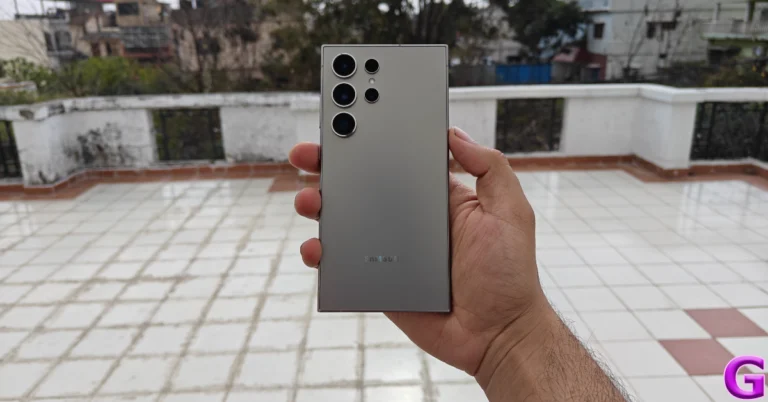
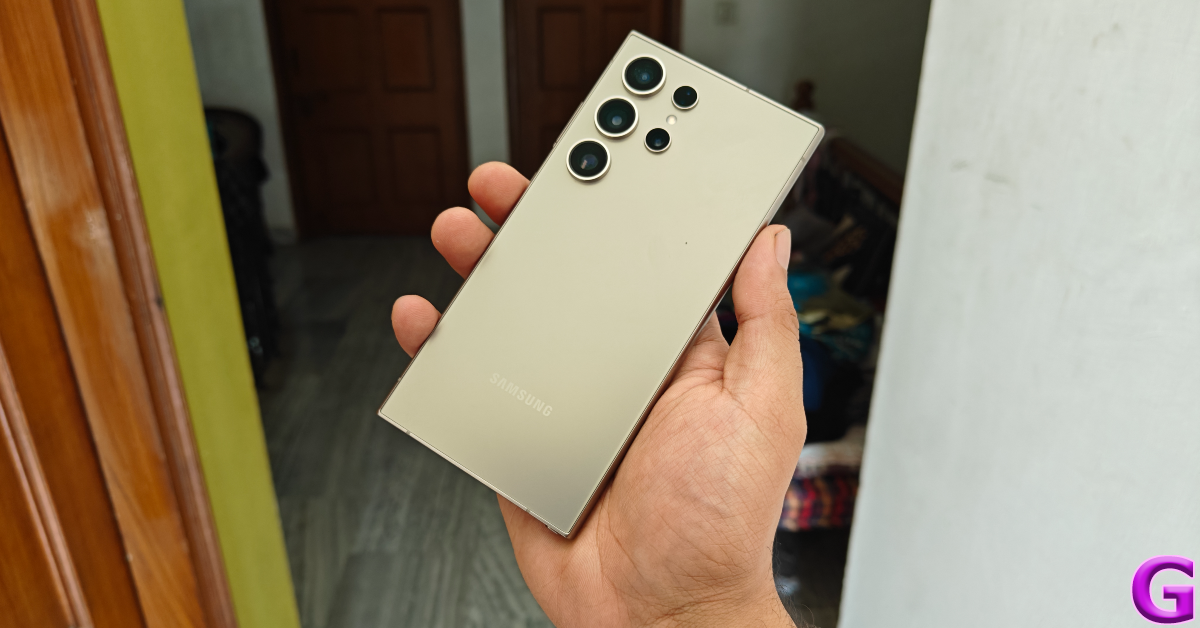
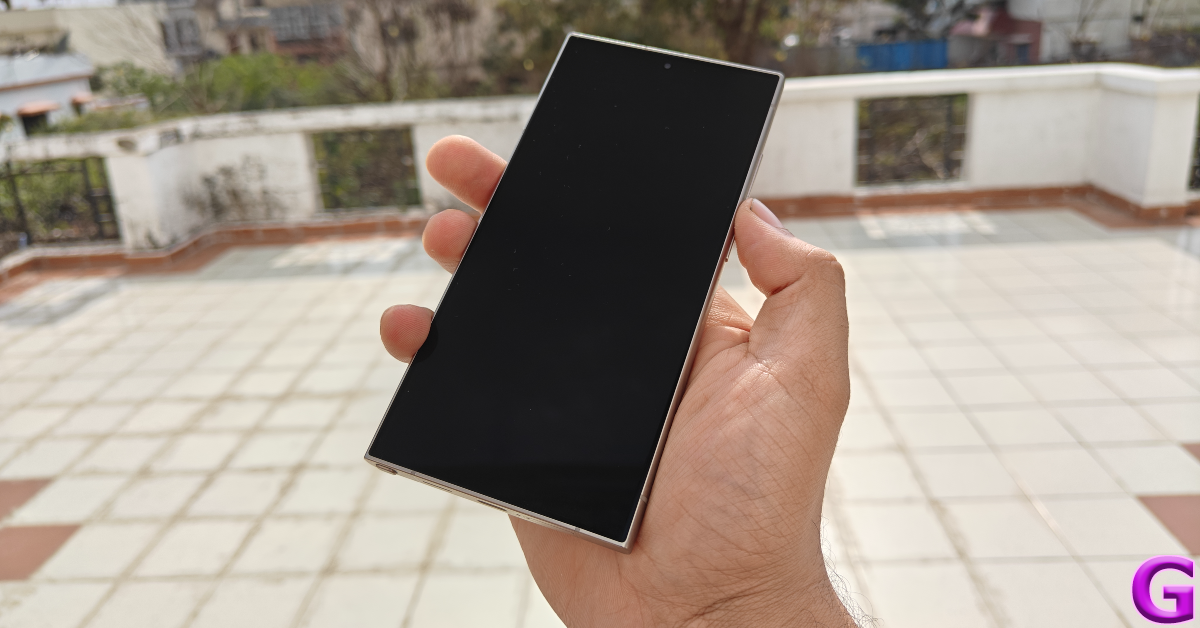
Samsung has made a couple of key changes to the Galaxy S24 Ultra’s form factor. The curved screen display has been replaced by a completely flat unit. This is a welcome change as it enhances the phone’s grip and eliminates any accidental touches on the display. The metal frame is infused with Grade 2 Titanium (much like the Pro models of the iPhone 15 Series) and is slightly curved along the sides. The matte-like texture of the frame elevates its in-hand feel and does not attract any fingerprints. The sharp corners of the frame lend to the unique personality of the smartphone. At a time when most smartphones are unrecognisable from the front, the Samsung Galaxy S24 Ultra easily sets itself apart.
Galaxy S24 Utlra’s rear panel follows the design language of its predecessor. The camera sensors are arranged in a vertical orientation. Corning Gorilla Armor protection for the glass back ensures that it is resistant to scuffs and scratches. We used the smartphone without any protective covering while keeping it in pockets with loose change and keys. After two weeks of use, there were no scratches to be found. The smartphone weighs 233g, which is divided evenly across its body.
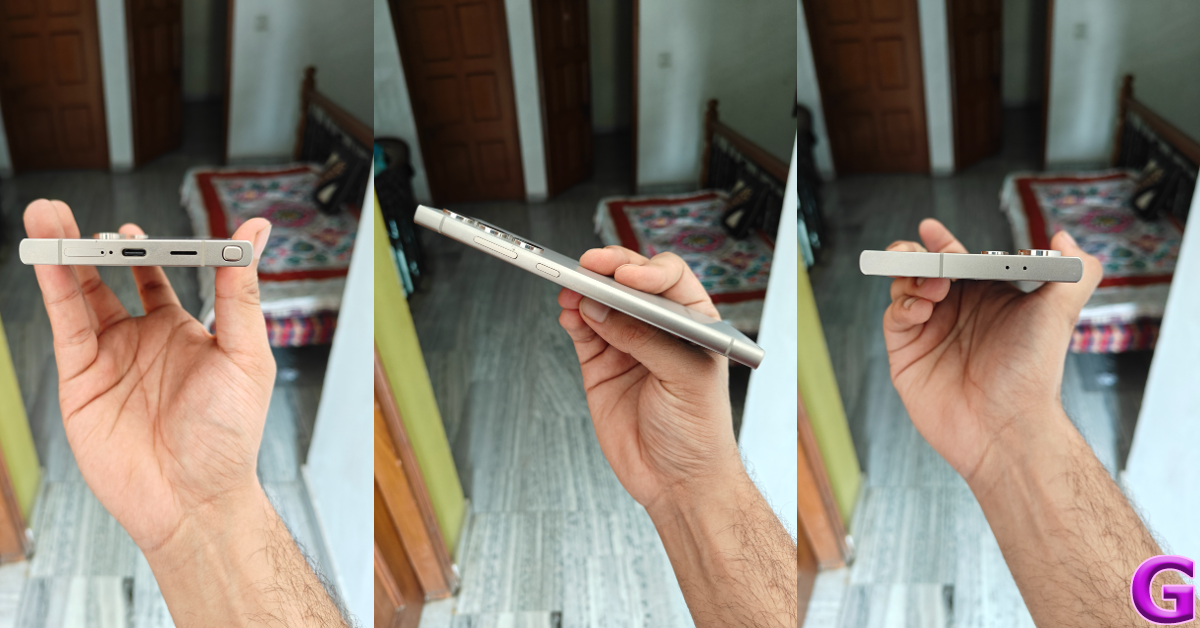
The right edge of the frame houses the volume rocker and the side key. The S Pen, primary speaker, USB Type-C port, primary microphone, and SIM tray make their way to the bottom edge. The secondary microphone and speaker are positioned on the top edge of the frame. There is no IR blaster to be found, which is always a sore miss for people who don’t like to rely on physical remotes to control household appliances. The left edge of the frame has been left keyless. An IP68 rating ensures that you don’t have to worry about water damage to your S24 Ultra.
Let’s talk about the display specs. The Samsung Galaxy S24 Ultra has a massive 6.8-inch Dynamic LTPO AMOLED 2X display with a maximum refresh rate of 120Hz and 2,600 nits of peak brightness. While the OnePlus 12 (our review here) may have it beat for peak brightness with an astonishing 4,500 nits, Samsung’s new anti-reflective coating on the Galaxy S24 Ultra makes all the difference while viewing the display under direct sunlight. The seems to absorb the reflections falling on it by a considerable degree.
Minimal bezels surround the stunning Dynamic AMOLED display. The bezels are uniform and easy to ignore. There are three screen resolution options to choose from – HD+ (1,560 x 720p), FHD+ (2,340 x 1,080p), and QHD+ (3,120 x 1,440p). It goes without saying that sharper visuals utilise more battery. Watching video content on the S24 Ultra is an absolute delight. The images produced on the screen are detailed with punchy colours. The deep, rich blacks offer the perfect contrast to the vibrant colours. The stereo speaker produces good audio output, incorporating the lower frequencies which are so often absent on other flagship smartphones.
The ultrasonic in-display fingerprint scanner leaves behind its optical peers with super quick detection and lightning speed. A gentle tap on an inactive lock screen is enough to unlock the smartphone. However, using facial recognition in pitch-dark conditions can sometimes throw an odd error.
Samsung Galaxy S24 Ultra review: Performance and Cameras
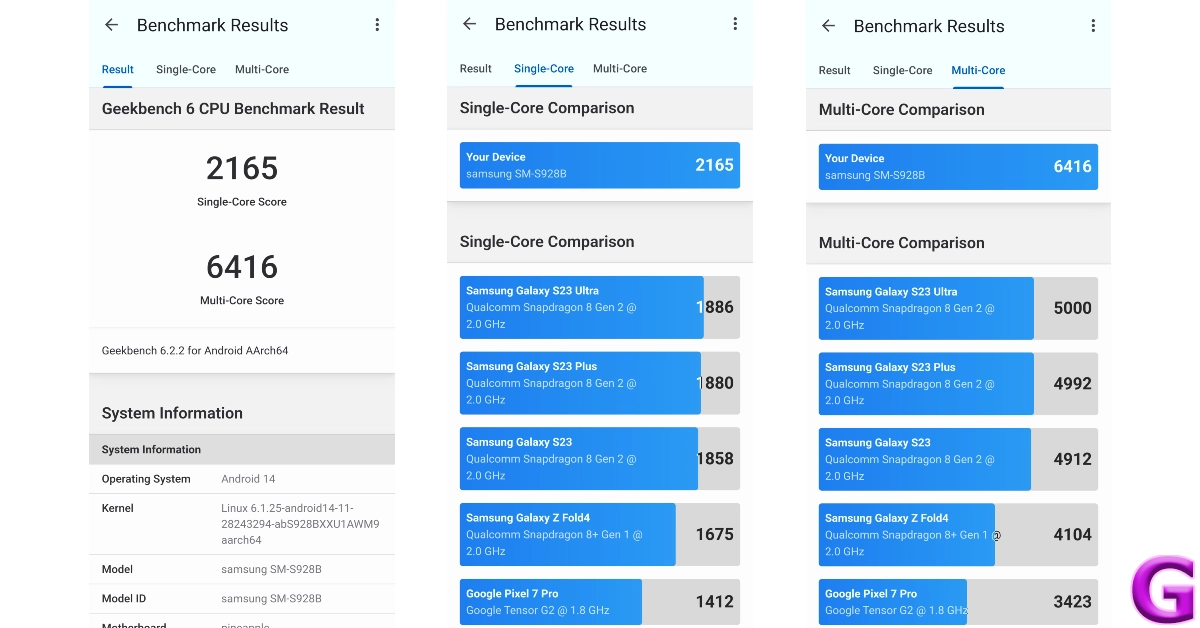
Powering 2023’s Samsung Galaxy S24 Ultra is the flagship Snapdragon 8 Gen 3 SoC from Qualcomm. There are three storage variants on offer – 256GB (Rs 1.30 lakh), 512GB (Rs 1.40 lakh) and 1TB (Rs 1.60 lakh). All three storage variants are equipped with 12GB of RAM. On the Geekbench 6 app, the smartphone scored 2,165 points in the single-core test and 6,416 points in the multi-core test.
As expected, the Samsung Galaxy S24 Ultra crushes everyday tasks with ease. We threw the kitchen sink at it, loading a dozen apps at once, and the smartphone did not break a sweat. The 120Hz Dynamic AMOLED display responds to even the most subtle gestures, loading apps at lightning-fast speeds and seamlessly switching between them. Even demanding tasks like video editing and multi-window browsing are handled expertly.
Gaming performance on the S24 Ultra remains top-notch as well. We played games like Call of Duty Mobile, BGMI, and Asphalt 9 at maximum settings and did not experience any lags or frame drops. The vapour chamber inside the smartphone does a phenomenal job of keeping its internal temperature in check. Even after an hour of continuous gaming, the S24 Ultra did not get egregiously hot. This performance is comparable to the high-end gaming smartphones in the market.
One of the things that make the S24 Ultra an ‘everything’ phone is the S Pen. A remnant of the now-discontinued Note Series, this stylus may not find its use in everyday tasks, but it is a neat little accessory to have. Be it signing documents or taking pictures without a timer, the S Pen finds a lot of use on this smartphone. If you want to kill some time, the Pen Up app has a library of fun colouring pages which you can fill with the S Pen. Digital artists can use this app to create artwork on the go.
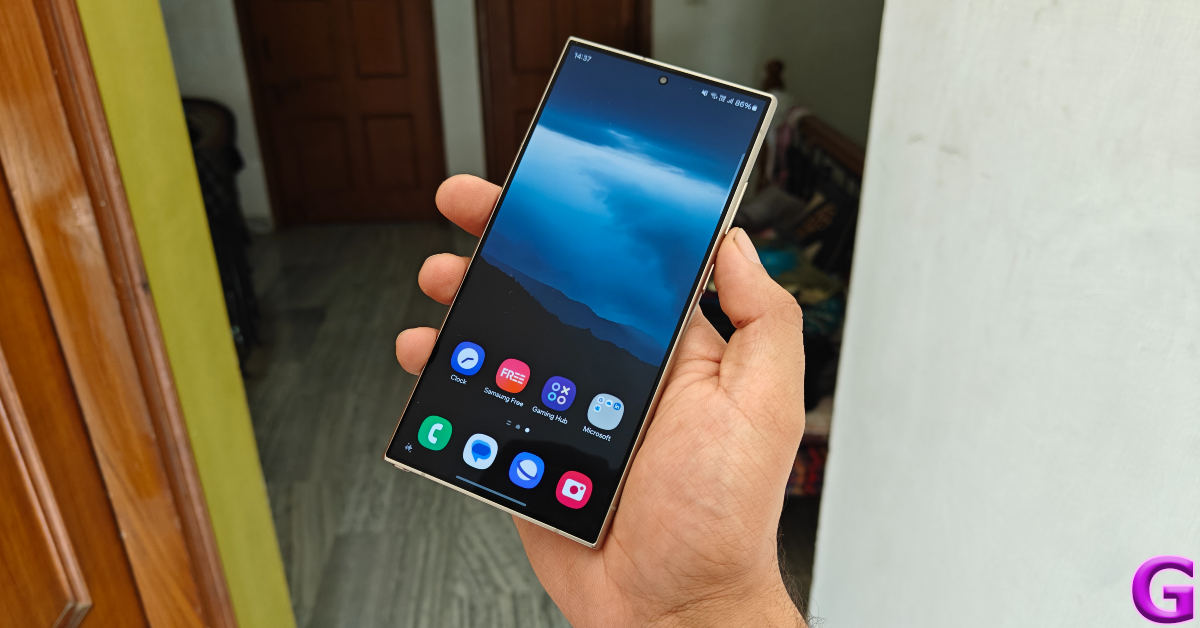
OS duties on the Samsung Galaxy S24 Ultra are handled by the Android 14-based One UI 6. Other than Netflix and Facebook, there is no bloatware on the device. Premium connectivity features like Samsung DeX, Multi Control, and Camera Sharing can be found on the S24 Ultra. Samsung DeX provides a clean desktop interface for your smartphone when you connect it to a PC. Features like Camera Sharing and Multi Control are a part of Samsung’s developing ecosystem and can only be used with Samsung tablets and notebooks.
What sets the Samsung Galaxy S24 Ultra (and the rest of the series) apart from its predecessors is the Galaxy AI suite of features. Before we dive into it, we must mention that Samsung has intelligently woven these features into the interface. While Galaxy AI influences a range of tasks, it doesn’t feel like it is shoehorned into the OS. If AI is not your thing, you can turn these features off from the device settings.
Samsung’s native photo editor gains a useful Generative AI tool that lets you move the objects on a picture and fills the voids with relevant details. You’d think this would be a hit or miss, but it works remarkably most of the time. If you look at the pictures below, you can notice that the Galaxy AI regenerated the artwork and furniture in the space left behind by the displaced subject. To put the cherry on top, it also fills in the key shadows while replicating the hanging lamp on the right side of the image and placing it at the correct vacant spot on the wall. The accuracy of the result is dependent on the size of the object and the area it leaves behind when it’s moved. You can use this tool on pictures that aren’t taken using the smartphone as well.
Galaxy AI can also come up with helpful editing suggestions for the pictures in your device’s gallery. If it notices shadows and reflections in the shot, the suggestion to remove them will pop up once you hit the ‘i’ icon on the image. For close-up shots, the AI applies the blur effect on the background. These suggestions keep changing depending on the nature of the shot. What’s constant is the ‘Remaster’ tool, which brightens up the images and makes them ‘social media ready’.
The summarization AI tool finds its way into the web browser, notes, and voice recorder apps. Tapping the sparkling Galaxy AI icon generates standard and detailed summaries for a webpage, note, or transcript of a voice recording. If you like to record lectures in school, you’ll like how the voice recorder app adds important keywords at the top of every transcription. Tapping a keyword brings up the content in the transcript associated with it.
Galaxy AI’s translation features may not find much use in everyday usage of the smartphone, but they are impressive nonetheless. With just one tap you can translate any WhatsApp conversation into your desired language. Got a call from a person who doesn’t speak your language? Galaxy AI will live-translate the call for you. If you’re travelling to a different country, the ‘Interpreter’ tool nestled in the Quick Settings Menu can translate your conversation with another person in real time.
Circle to Search and Generative wallpapers are not exclusive to the Galaxy S24 Series and will likely be seen on other major Android devices this year. The former is a rebrand of Google Lens’ ‘Search Screen’ tool. Search screen can be summoned anywhere on your smartphone using the ‘OK Google’ voice command, while the Circle to Search can be triggered by long-pressing the home button or the navigation handle. Using your finger or S Pen, drawing a circle around an object or scribbling on it produces relevant results for it within a few seconds. You can supplement the image search with a text query as well.
Generative wallpapers can be hit or miss, depending on where you stand on AI art. While it is genuinely cool to watch your smartphone come up with a bunch of wallpapers based on a prompt, the final results rarely ever live up to the wallpaper libraries of some of the leading customisation apps for Android.
Samsung has announced that Galaxy AI is only free to use until the end of 2025. The tech giant will likely introduce a subscription model for the entire package after that. Is it worth paying an extra amount of money over the Rs 1.30 lakh you splurged on the smartphone? That depends on whether the niche tasks that Galaxy AI caters to are your thing.
Moving on, the battery life of this smartphone is surprisingly versatile. It took the smartphone a couple of days to gauge our usage pattern, after which we got a steady day-and-a-half worth of battery life out of the device on moderate usage. Our daily usage during the review consisted of using the Samsung Galaxy S24 Ultra for tasks like web browsing, video calling, emailing, instant messaging, video recording, and even a bit of gaming. If you’re more conservative with your usage, you can push the 5,000 mAh battery to two days. The lack of fast charging is the only downside to the overall experience. At a time when other Android flagships have switched to 100W fast charging, the Samsung S24 Ultra is stuck with 45W wired charging. It takes a little over an hour to fully charge the smartphone.
Samsung Galaxy S24 Ultra’s quad camera module gets an important upgrade in the form of a new 50MP sensor for the periscope telephoto camera. This camera now shoots images at 5x optical zoom instead of 10x. Images taken with 10x zoom are still claimed to be ‘optical quality’. The rest of the camera module remains unchanged, with a 200MP sensor for the primary shooter, a 12MP ultrawide lens, and a 10MP 3x telephoto lens.
The 200MP primary shooter delivers a rock-solid performance. The pictures taken in bright daylight are super detailed with punchy colours. Samsung’s photoprocessing does tend to boost the colour and contrast of the images, but not to the point where they seem artificial. The details captured by this camera are phenomenal. The camera does a brilliant job of capturing crisp and detailed shadows without messing with the illuminated parts of the shot. However, the shutter speed of the camera still remains an issue as it produces blurry results for moving objects.
In limited lighting, the 200MP sensor lets in a lot of light and produces great results with minimal noise and grain. The subjects in the images were lit up appropriately and rendered in fine detail. Turning on the Night Mode brightened up the subjects some more and smoothened the images. We mostly found ourselves using the Night Mode for the ultrawide lens as the primary sensor did well to manage the limited lighting to its advantage.
Primary Camera: Without Night Mode vs Night ModeUltrawide Camera: Without Night Mode vs Night Mode
The ultrawide camera does a stellar job of maintaining the colour richness produced by the primary shooter. The drop-off in details is not noticeable, which is perhaps the biggest compliment we can give to the ultrawide shooter. It does a good job of correctly exposing the sky and replicating the accurate colours – something that not all ultrawide sensors can do. In daylight conditions, this sensor is extremely reliable for taking scenic shots.
Ultrawide ShotUltrawide Shot
Galaxy S24 Ultra’s telephoto and periscope telephoto lenses are the arguably best in class. The images retained their composition with 3x and 5x zoom. Some would argue that the Samsung Galaxy S23 Ultra (our review here) performs better at 10x zoom, but the S24 Ultra’s photo processing chops easily bridge that divide. We pushed the zoom to its 100x limit and were pleased when the resulting image got the lettering on a very distant board right.
1x vs 5x10x vs 100x
Portrait shots taken with the Galaxy S24 Ultra can be zoomed up to 5x in the native camera app. The portrait shots were clean and focused, with ample blur in the background. Not much to complain about here. The 12MP selfie camera also takes good-quality pictures without applying unnecessary and over-the-top skin smoothening and brightening effects. The rear camera can record 8K videos at 30fps while the selfie camera can record 4K videos at 30/60fps.
The Samsung Galaxy S24 Ultra upholds its reputation for being the ‘everything’ phone. And if everything is what you’re after then it’s going to cost you Rs 1.30 lakh. On the bright side, Samsung has promised 7 years of major OS upgrades for the S24 Series, which makes it quite a good investment. The Ultra variant of the series stays on top of the camera performance with its amazing 200MP primary sensor and powerful telephoto lenses. The Snapdragon 8 Gen 3 SoC ensures the S24 Ultra can match any gaming phone on the market. If you’re looking for the ‘X Factor’, the Galaxy AI scratches that itch with its magical generative photo editing tool, seamless translation capabilities, and more.
Samsung Galaxy S24 Ultra: Pros
Amazing flat-screen display
Great form factor
Helpful Galaxy AI suite of features
Superb camera performance
S Pen
Versatile battery life
7 years of major OS upgrades
Samsung Galaxy S24 Ultra: Cons
Pricey
Galaxy AI is free to use only until the end of 2025
Nothing Phone 2a renders have been leaked ahead of the March 5 launch.
The device’s chipset has been confirmed by the company.
The smartphone will be an affordable variant of Nothing Phone 2.
Nothing’s CEO Carl Pei recently confirmed that its upcoming phone Nothing Phone 2a will be manufactured in India. Not many details related to design and key specs have been made public but pricing details and renders were leaked ahead of the March 5 official launch. But new design renders that speculate on the potential appearance of the smartphone have been leaked ahead of its unveiling. The phone’s chipset specifications have also been officially disclosed by the manufacturer.
Image Courtesy: Smartprix/onLeaks
According to a fresh renders leak, Nothing Phone 2a might have a twin camera configuration with a completely new camera module. Both the sensors will be placed inside a pill-shaped camera module at the back. With the aid of computer-aided design, or CAD, the representations were produced in 5K quality. The camera module can be seen arranged horizontally. Just like the previous module Glyph lights are supposed to be arranged around the camera module.
As per the leaks, it will be surrounded by three LED strips. Two of them appear to be curled and positioned on the left. Also, there will be a vertically straight strip positioned on the right. The vertically oriented company branding is visible towards the bottom-left corner.
It is anticipated that the Nothing Phone 2a will provide notable improvements over the Nothing Phone 1 and will be more reasonably priced than the Nothing Phone 2. The MediaTek Dimensity 7200 SoC, a specially designed chipset that was solely co-engineered by MediaTek and the smartphone manufacturer, will power the Nothing Phone 2a, the company has officially confirmed.
Phone (2a) is home to a powerhouse: the custom-built MediaTek Dimensity 7200 Pro.
Exclusively co-engineered with Nothing to deliver a seamless performance with remarkable power efficiency. pic.twitter.com/JwSVtgGCRP
Recently a tipster also shared the India pricing and key specs of Nothing Phone 2a ahead of launch. Nothing Phone 2a is likely to cost Rs 30,000 in India. The tipster further revealed that the device is expected to get a limited distribution in the US, where it will probably cost $400.
As said earlier the Key specs of the Nothing Phone 2a were also tipped alongside. The device is expected to run on Android 14 with NothingOS 2.5 out of the box. Lastly, the device is expected to come with a 6.7-inch full-HD+ OLED display that will support a 120Hz refresh rate.
Nothing Phone 2a is likely to feature a dual rear camera setup including a 50-megapixel primary and a 50-megapixel ultra-wide angle lens. Moreover, for selfies, it might include a 32-megapixel front-facing camera. The battery capacity is unknown but it may charge at 45W wired fast charging.
Alienware 32 4K QD-OLED Gaming Monitor (AW3225QF) is the world’s first 4K QD-OLED gaming monitor with Dolby Vision HDR.
Alienware 27 360Hz QDOLED Gaming Monitor (AW2725DF) boasts of being the world’s first 360Hz QD-OLED gaming monitor.
Dell today announced the launch of new Alienware Series gaming monitors in India. The company launched Alienware 32 4K QD-OLED Gaming Monitor (AW3225QF) and Alienware 27 360Hz QDOLED Gaming Monitor (AW2725DF). Both the gaming monitors were first presented at CES 2024 last month. The Alienware 32 4K QD-OLED Gaming Monitor (AW3225QF) is the World’s first 4K QD-OLED gaming monitor that supports a 240Hz refresh rate. Whereas, Alienware 27 360Hz QDOLED Gaming Monitor (AW2725DF) comes with a 360Hz refresh rate.
The Alienware 32 4K QD-OLED Gaming Monitor is 32 inches in size. The display has a refresh rate of 240Hz and a grey-to-grey response time of 0.03ms. It also provides 99% and 99.3% of DCI-P3 gamut respectively and Delta E < 2 color accuracy. Additionally, Dolby Vision HDR and VESA DisplayHDR True Black 400 compatibility are included. It is claimed that Dolby Vision HDR produces realistic images with amazing brightness, better colours, and more contrast. VESA AdaptiveSync and NVIDIA G-SYNC G-SYNC are supported and validated by NVIDIA to provide smoother gameplay free from screen tearing and stuttering.
With the latest next-generation gaming consoles supporting 4K resolution, gamers will be able to achieve a 120Hz performance thanks to the HDMI 2.1 FRL (Fixed Rate Link) which comes complete with VRR compatibility and auto low-latency for greater controller responsiveness. Moreover, any soundbar that has an eARC connector, such as Dolby Atmos speakers, can be used with eARC compatibility.
Alienware 27 360Hz QDOLED Gaming monitor (AW2725DF), boasts a 360Hz refresh rate and QD-OLED infinite contrast in QHD resolution (2560×1440). The screen supports 99% and 99.3% of DCI-P3 gamut respectively and Delta E < 2 color accuracy. Its 0.03 ms gray-to-gray response time allows for almost immediate pixel responsiveness and crisp motion. It comes integrated with AMD FreeSync Premium Pro and VESA AdaptiveSync technology.
Noise ColorFit Macro smartwatch features a 2-inch TFT Display and 220+ watch faces.
The smartwatch comes in seven colour options.
It is available for purchase via Amazon in the country.
Indian lifestyle brand Noise has officially introduced a new smartwatch Noise ColorFit Macro. The new device comes with a 2-inch TFT Display and supports more than 220 watch faces. In addition to this, the wearable is IP67 rated for protection against water and dust. Moreover, it is claimed to provide up to 7 days of battery life.
In This Article
Noise ColorFit Macro price in India, availability details
Noise ColorFit Macro has been launched in India with a price tag of s 1499. The smartwatch will be offered in distinct colour options of Jet Black, Space Blue, Mist Grey, Classic Brown, Classic Black, Black Link and Silver Link. It will be available for purchase via Amazon and via the company’s official website in the country.
Noise ColorFit Macro specifications
Noise ColorFit Macro features a 2-inch TFT and 2.5D curved display. The device has a metallic finish and is accompanied by a functional crown, the smartwatch offers users effortless navigation and control over its array of features. The device gets support for over 220 cloud-based creative watch faces, which can be customised by the users according to their preferences.
Noise ColorFit Macro comes with voice assistant support allowing users to seamlessly interact with Siri and Google Voice Assistant for quick access to information and commands. It makes use of Try Sync to improve the Bluetooth calling experience, offers a hassle-free mobile phone connection, and employs Bluetooth 5.3 to give users the most advanced calling experience available.
The Noisefit smartwatch comes with an array of features for both productivity and health monitoring. With the Noise Health Suite users can effectively monitor essential health metrics such as heart rate, SpO2, sleep patterns, and stress levels, among others. According to the company, it will deliver up to 7 days of battery life. The wearable is IP67 rated for water and dust resistance. It also provides daily reminders and weather forecasts. With Noise Buzz users can call from the watch dial-pad which can save up to 8 contact details on the smartwatch.