Garena Free Fire is a battle royale game with regular awards and tournaments to keep players interested. If you play Garena Free Fire, you should be aware of the redeem codes that are released on a daily basis. However, because the battle royale game is banned in India, players from other countries can use the Free Fire Redeem codes daily. If you’re unfamiliar with the Garena Free Fire redeem codes or don’t know how to get them, we’ve put together a step-by-step guide to help you redeem them. Check out Garena Free Fire Redeem Codes for 16 February 2024.
The Free Fire redeem codes are a great way to get free stuff. These are 12-digit codes that contain alphabets and numbers, as well as an expiration date and time. Because the Garena FF redeem codes cannot be used more than once, you should hurry to the redemption page to claim your free reward before someone else does. To get a free reward, all you have to do is go to reward.ff.garena.com/en, which is the official redemption page. Also, keep an eye on this space for daily updates on Garena Free Fire redemption codes and rewards.
Nothing Phone 2a is tipped to be powered by MediaTek Dimensity 7200 Ultra SoC.
The upcoming phone will be a toned-down variant of Nothing Phone 2 launched last year.
The handset is likely to feature a dual rear camera setup.
Nothing Phone 2a is set to launch globally on March 5 and before the official announcement its price in India and key specifications have surfaced on the internet. In addition to this the renders of the phone suggesting the design were also leaked before. However, the company has not yet revealed any specific information regarding design, specs and pricing. In India, the upcoming smartphone is confirmed to be available for purchase on Flipkart in the country.
According to tipster Yogesh Brar, Nothing Phone 2a might cost Rs 30,000 in India. He took to X aka Twitter where he further revealed that the device is expected to get a limited distribution in the US, where it will probably cost $400.
A previous leak also suggested that the Nothing Phone 2a will be listed at $400.
Furthermore, the tipster also shared the key specs of Nothing Phone 2a. As per his tweet, the MediaTek Dimensity 7200 Ultra SoC is likely to power the phone. It may run on Android 14 with NothingOS 2.5 out of the box. Lastly, the device is expected to come with a 6.7-inch full-HD+ OLED display that will support a 120Hz refresh rate. For the photos and videos, the upcoming smartphone could feature a dual rear camera setup including a 50-megapixel primary and a 50-megapixel ultra-wide angle lens. Moreover, for selfies, it might include a 32-megapixel front-facing camera. The battery capacity is unknown but it may charge at 45W wired fast charging.
Besides this, Nothing Phone 2a is expected to be available in Black and White colour options. Tipster Roland Quandt revealed this information and he further goes on to say that the 8GB of RAM and 128GB storage model is likely to come with a price tag of EUR 400. There will be another 12GB RAM with 256GB storage but the price is not known.
In addition to this, it is speculated to feature a 6.7-inch AMOLED display manufactured by BOE and Visionox under the product number rm692h5. The screen is expected to have 1,084 x 2,412 pixels of resolution. The display may also support a refresh rate of 120Hz. The phone is slated to be powered by a MediaTek Dimensity 7200 chipset.
Nothing Phone 2a is rumoured to come with a dual rear camera setup that may include a 50-megapixel Samsung S5KNG9 1/1.5-inch main sensor and the 50-megapixel Samsung S5KJN1 1/2.76-inch ultrawide lens. The phone is anticipated to feature a 32-megapixel Sony IMX615 sensor on the front.
Moto G04 was launched alongside Moto G24 last month.
A Unisoc chipset powers the smartphone.
The device runs on Android 14 out of the box.
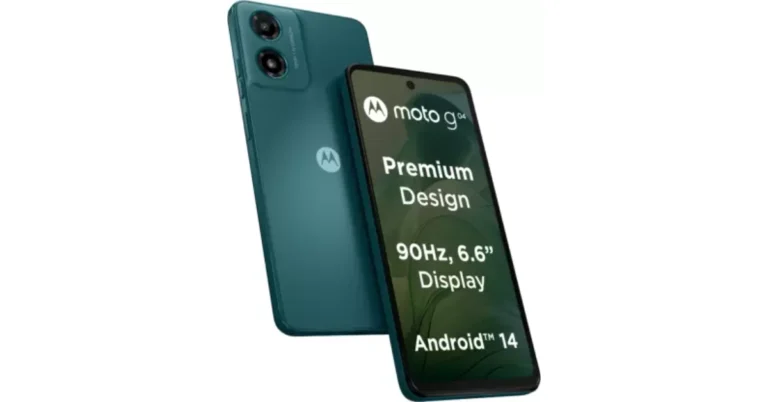
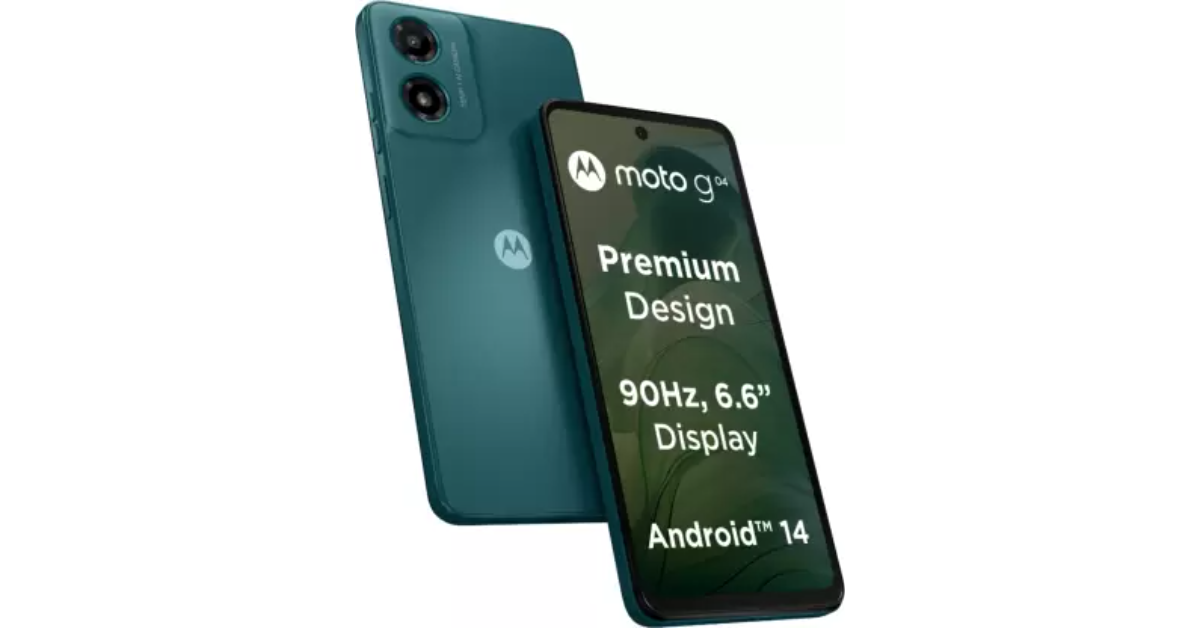
Lenovo-owned smartphone brand Motorola today launched a new entry-level smartphone – Moto G04 in India. Unisoc T606 SoC powers the smartphone. It packs a 5,000mAh battery with 10W fast charging support. In addition to this, the device includes a 6.6-inch display with a 90Hz refresh rate. The budget phone has a single rear camera and supports a virtual RAM feature.
In This Article
Moto G04 price in India and sale details
Moto G04 price in India has been set at Rs 6,999 for the 4GB RAM with 64GB storage model whereas the 8GB RAM with 128GB storage variant comes with a price tag of Rs 7,999. The device will be available in four colour options: Concord Black, Sea Green, Satin Blue, and Sunrise Orange.
The company will also offer an additional Rs 750 off on exchange as part of the launch offer in the 4GB + 64GB variant, making the effective price of the device just Rs 6,249 and Rs. 7,999 respectively. Moto g04 is scheduled to go on sale via Flipkart, Motorola.in and leading retail stores across India, starting February 22 at noon.
Moto G04 specifications
Moto G04 has a 6.6-inch HD+ IPS LCD screen with 720×1,600 pixels of resolution. The display has a 269ppi pixel density and a 20:9 aspect ratio. It supports a refresh rate of 90 Hz. Under the hood, there is a UniSoC T606 SoC paired with Mali G57 GPU and up to 8GB of RAM. The device also supports virtual RAM expansion of up to 16GB. The device comes with up to 128GB of UFS 2.2 storage that can also be further expanded up to 1TB using a microSD card. The phone runs on Android 14-based My UX.
The smartphone has an IP52 rating for dust and splash resistance. It also includes an acrylic glass (PMMA) finish with a matte texture that makes it scratch-resistant. Another feature is the flash notifications that alert the users by turning on the flash and screen light for incoming calls, so they don’t miss a notification.
Moto G04 features an AI-powered 16-megapixel rear camera sensor and a 5-megapixel front-facing camera for selfies. The rear camera system includes features like HDR and Portrait mode, to generate professional-looking shots automatically. Whereas the selfie camera has Timelapse, Night Vision, Portrait Mode, and Leveller.
Additionally, the Health Connect feature acts as a central way to connect and sync all the data from various fitness apps in one place, for a more holistic view. The Moto G04 comes with a massive 5000mAh battery with 15W fast charging support.
Commenting on the launch, Mr. T.M. Narasimhan, Managing Director, Mobile Business Group – India, said “We are pleased to announce yet another addition to our g series smartphones – the Moto g04. This device is a true embodiment of our commitment to providing users with attractive design, and disruptive features at outstanding price points. As India’s most affordable Android 14 smartphone, Moto G04 enables users to experience cutting-edge technology without compromising on essential features. With this launch, we continue to make significant strides in our pursuit to democratise technology by empowering individuals to explore, connect and experience like never before.”
Poco M6 5G, and Poco C65 were launched in India a few months ago.
Both phones feature a dual rear camera setup.
The camera setup includes a 50-megapixel primary sensor.
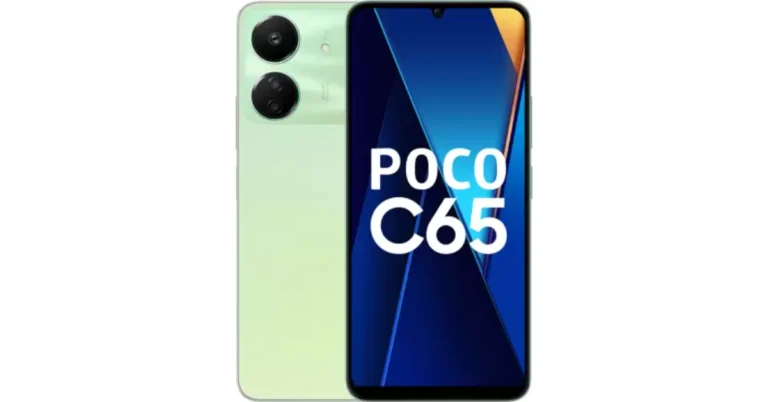
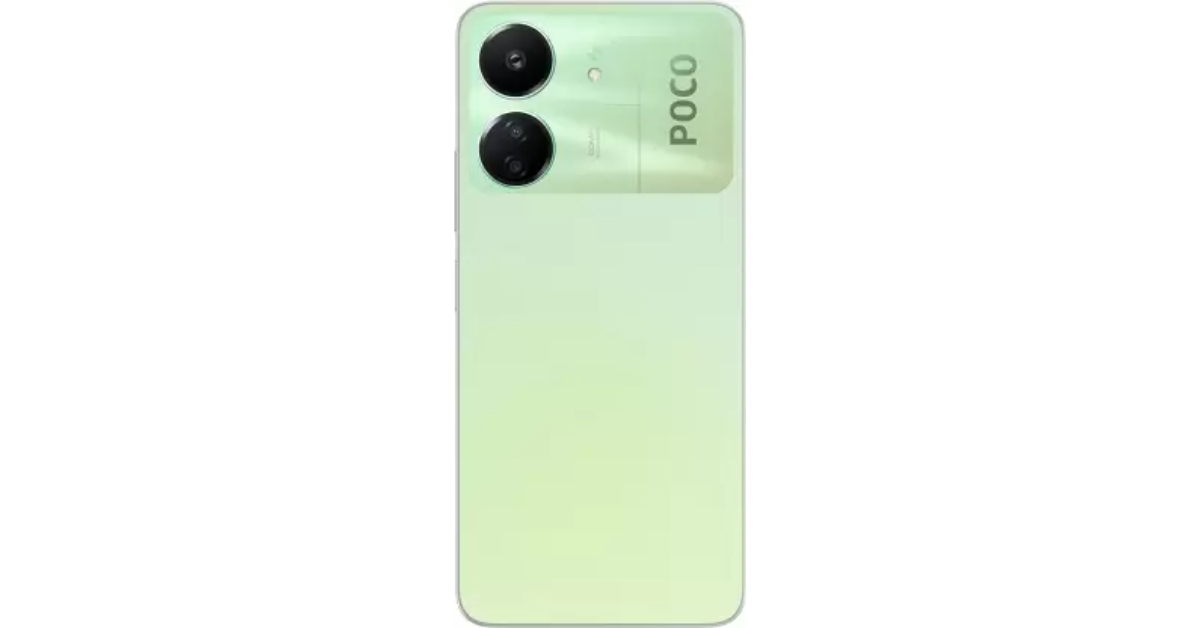
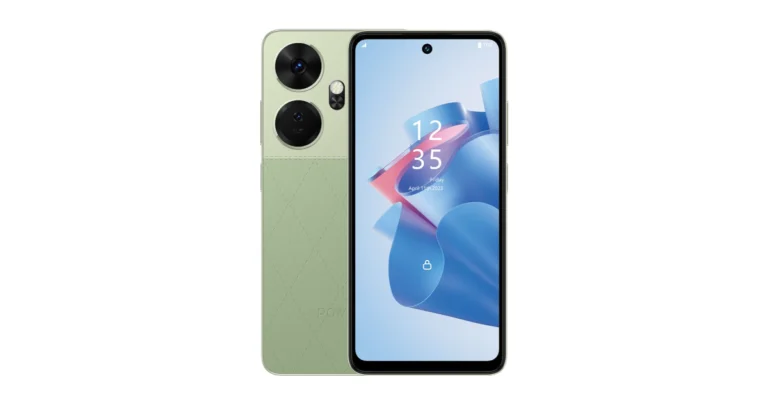
Poco M6 5G and Poco C65 are now available in a new colour variant. Both the phones will come in a Green colour option. The devices were launched in India in December last year. Poco M6 5G has a 6.74-inch HD+ display. The phone includes a 5,000mAh battery. The device is powered by MediaTek Dimensity 6100+ SoC. Whereas the Poco C65 is a successor of the Poco C55. MediaTek Helio G85 SoC powers the smartphone. It comes with a 50-megapixel dual rear camera setup.
Poco M6 5G was launched in two colour options Galactic Black and Orion Blue. On the other hand, the Poco C65 made its debut in India in Blue and Black colourways. Now both the phones will be available in a new colour option namely Polaris Green and Pastel Green respectively. The price of both phones will remain unchanged but they are scheduled to go on sale soon via Flipkart in the country.
The price of Poco M6 5G starts at Rs 10,499 for 4GB RAM with 128GB storage, 6GB RAM with 128GB storage priced at Rs 11,499 and 8GB RAM with 256GB storage at Rs 13,499.
The Poco C65 price in India begins at Rs 8,499 for the base 4GB RAM with 128GB storage. The 6GB RAM with 128GB storage variant comes with a price tag of Rs 9,499 while the 8GB RAM with 256GB internal storage model costs Rs 10,999.
In This Article
Poco M6 5G specifications
Poco M6 5G features a 6.74-inch HD+ display with a 1,600 x 720 pixels resolution. It supports a 90Hz refresh rate and a 180Hz touch sampling rate. The screen comes with a peak brightness of 600 nits, and 260ppi pixel density and is TÜV low blue light and flicker-free certified. The phone runs on MIUI 14 with Android 13 and is powered by MediaTek Dimensity 6100+ SoC with a Mali-G57 MC2 GPU. For photos and videos, Poco M6 5G features a dual rear camera setup that includes an AI-powered 50-megapixel main sensor and another camera lens. There is a front-facing 5-megapixel selfie camera. The device is backed by a 5,000mAh battery with 18W wired charging.
Poco C65 comes with a 6.74-inch HD+ display, with 1,600 x 720 pixels of resolution. The device supports a refresh rate of 90Hz. The smartphone runs on MIUI 14 for Poco on top of Android 13. Under its hood, there is a MediaTek Helio G85 SoC paired with an ARM Mali-G52 2EEMC2 GPU. The handset boasts a dual rear camera setup that includes a 50-megapixel primary sensor with an aperture of f/1.8. Additionally, it includes a 2-megapixel macro sensor with an aperture of f/2.4. Upfront there is an 8-megapixel selfie camera with an aperture of f/2.0. The phone includes a 5,000mAh battery that supports 18W wired fast charging.
The budget smartphone will go on sale on February 23.
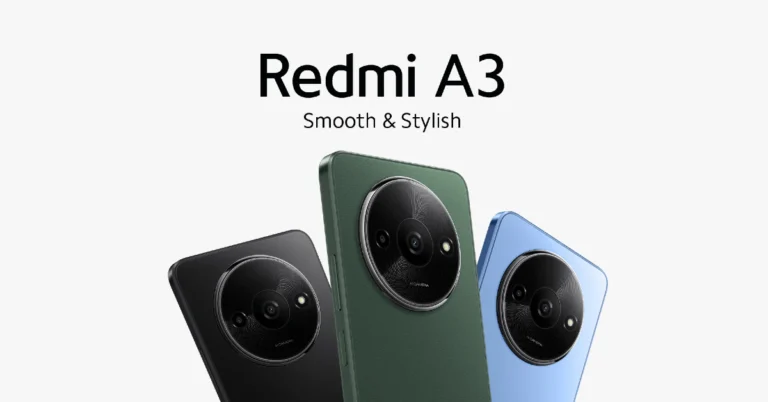
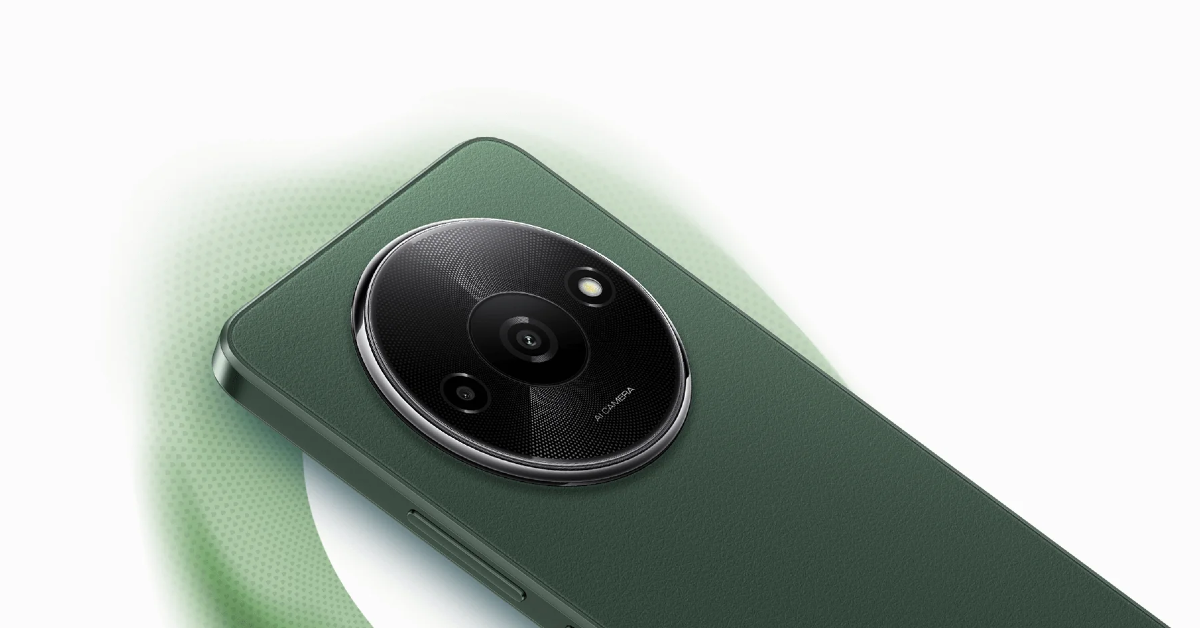
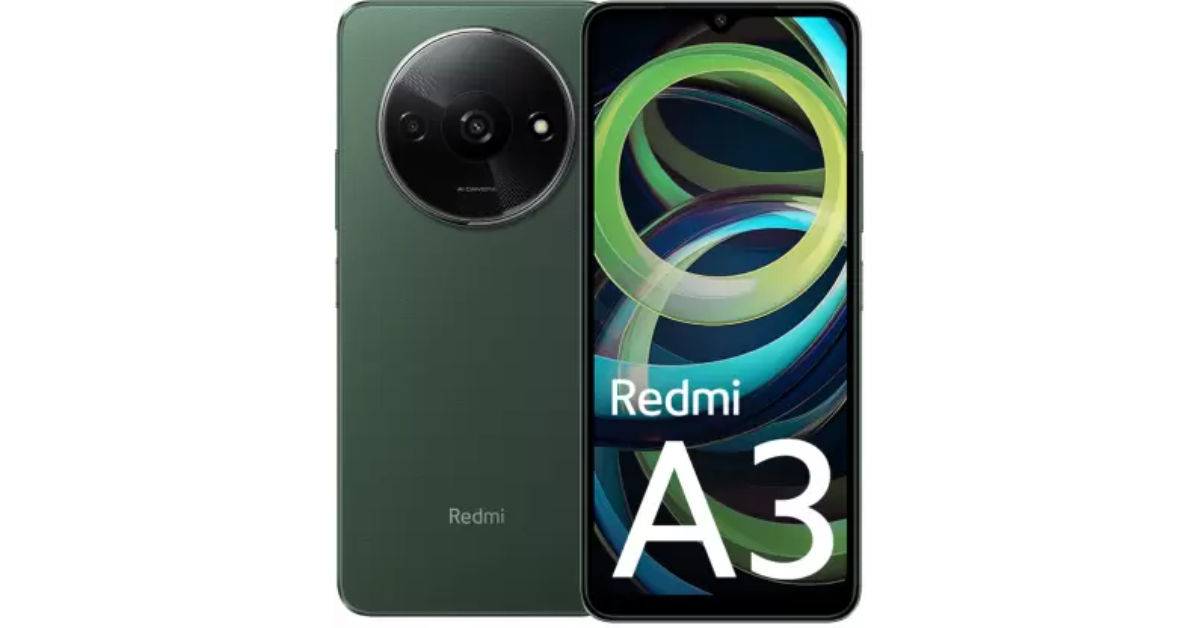
Xiaomi’s sub-brand Redmi has announced a new entry-level smartphone in the Indian market. The company introduced the Redmi A3 powered by MediaTek Helio G36 SoC. The budget phone runs on Android 13 (Go Edition). It features an AI-powered dual rear camera setup. Additionally, it is fuelled by a 5,000mAh battery with 10W charging support.
In This Article
Redmi A3 price in India, sale details
Redmi A3 has launched in India with a starting price of Rs 7,299 for the 3GB RAM with 64GB storage option. On the other hand, the price of the 4GB RAM with 128GB storage is set at Rs 8,299. There is another 6GB RAM with a 128GB storage model priced at Rs 9,299. The device will come in three different colour options: Midnight Black, Lake Blue and Olive Green.
The new entry-level smartphone is scheduled to go on sale from February 23 via Flipkart, Mi.com, and retail partners in the country.
Redmi A3 is highlighted with a 6.71-inch HD+ display with 1,600×700 pixels of resolution. The screen supports a refresh rate of 90 Hz and a 120Hz touch sampling rate. The display is protected with Corning Gorilla Glass 3. Under its hood, there is an octa-core MediaTek Helio G36 SoC paired with up to 6GB of LPDDR4x RAM which can be further expanded to up to 12GB, thanks to the virtual RAM feature. In terms of software the device runs on Android 13 (Go Edition) with MIUI 14 custom skin on top. The phone also comes with up to 128GB of eMMC 5.1 storage which is also expandable up to 1TB via microSD card.
For photos and videos, the Redmi A3 features an AI-powered dual rear camera setup that includes an 8-megapixel primary sensor and a 0.08-megapixel secondary sensor. For taking selfies and video calling the device has a 5-megapixel front-facing camera.
In terms of connectivity, there is 4G, Wi-Fi, Bluetooth 5.0, GPS/ A-GPS, micro-USB port, Glonass, a 3.5mm audio jack and BeiDou. The sensors on board include an accelerometer, e-compass and a side-mounted fingerprint sensor for phone unlocking.
The handset is backed by a 5,000mAh battery which comes with 10W fast charging support.
Garena Free Fire is a battle royale game with regular awards and tournaments to keep players interested. If you play Garena Free Fire, you should be aware of the redeem codes that are released on a daily basis. However, because the battle royale game is banned in India, players from other countries can use the Free Fire Redeem codes daily. If you’re unfamiliar with the Garena Free Fire redeem codes or don’t know how to get them, we’ve put together a step-by-step guide to help you redeem them. Check out Garena Free Fire Redeem Codes for 15 February 2024.
The Free Fire redeem codes are a great way to get free stuff. These are 12-digit codes that contain alphabets and numbers, as well as an expiration date and time. Because the Garena FF redeem codes cannot be used more than once, you should hurry to the redemption page to claim your free reward before someone else does. To get a free reward, all you have to do is go to reward.ff.garena.com/en, which is the official redemption page. Also, keep an eye on this space for daily updates on Garena Free Fire redemption codes and rewards.
Germany, a leader in many aspects of European society, has been making steady ground in the realm of online entertainment. Due to the country’s constant inclination for re-invention, recreational past-times have evolved dramatically over the years. During this transformation, online gaming and casinos have been gradually positioning themselves as dominant factors in the entertainment industry. The latest chapter in this unfolding saga is the arrival of Casino Kingdom’s German wave.
In This Article
The (R)Evolution of Gaming in Germany
It is no secret that Germany boasts a robust economy. And within this prosperous environment, the entertainment industry, particularly online gaming, has flourished substantially. The world of online gaming grew exponentially following the federal government’s decision to regulate the industry in July 2021. The decision opened doors for various operators in this sector. Yet, amid this swell of change, one particular development has caught the eye of analysts and gamers alike: the German wave of Casino Kingdom (Casino Kingdom’s German wave. This novel venture has caught the attention of many due to its multifaceted offerings and seamless online gaming experience.
Casino Kingdom’s German Wave
Casino Kingdom established its strong presence in the international gaming sphere before deciding to ride the wave into Germany. Recognizing the considerable potential in the German market, Casino Kingdom expanded its services and translated its platform for a more localized experience. This strategic move marked the arrival of Casino Kingdom’s German wave, a remarkable venture that has sparked attention across the country and beyond.
A Trailblazer in The Industry
Casino Kingdom’s German wave sets the bar high with its broad array of games, including classic slot machines, poker, roulette, blackjack, and many more. Moreover, the platform prides itself on offering easy-to-use interfaces, high-quality graphics, and a safe gaming environment. What makes Casino Kingdom stand out, however, is its commitment to a responsible gaming culture.
Emphasizing on Responsible Gaming
Casino Kingdom’s German wave emphasizes the importance of responsible gaming, underscoring the company’s commitment to its gamers’ well-being. This move comes with the recognition of public concerns regarding addictive gaming behavior. As a result, Casino Kingdom has implemented measures to help players regulate their gaming activities and ensure a healthier, balanced gaming experience.
Regulations Loosening – A Blessing in Disguise
While the gaming culture was always popular in Germany, it was previously thwarted by a stringent regulatory framework. However, the rules governing online gaming have been relaxed over recent years. Casino operators have quickly seized the opportunity to establish and broaden their online presence, which, in turn, gives more variety and options for users. Casino Kingdom’s German wave is a manifestation of this paradigm shift. The platform arrived at a time when Germans are looking for high-quality online gaming experiences within a secure environment. Casino Kingdom’s broad gaming choices, user-friendly interface, and trust-inducing safety regulations merge flawlessly to cater to this need.
The Future of Online Gaming in Germany
Casino Kingdom’s move into Germany underlines its strategy of integrating into the market and its commitment to providing superior gaming services. This venture is another feather in the cap of Germany’s online entertainment revolution – a revolution that shows no signs of slowing down. Yet, it is important to remember that every industry’s growth should be hinged on responsible habits – a principle Casino Kingdom continues to emphasize.
Conclusion
In conclusion, the swift evolution of the online gaming scene in Germany, as highlighted by the arrival of Casino Kingdom’s German wave, is shaping a new landscape for entertainment and recreation. While projections suggest only growth and progress in the coming years, they also emphasizes the importance of constant vigilance and responsible gaming to ensure a healthy balance between entertainment and its potential pitfalls.
Caller IDs have been an integral part of the calling experience long before smartphones even existed. As phones have evolved over the years, Caller ID is one aspect that remains unchanged. It is unlikely that it will be changed in the future either. If you’re looking to go the extra mile, you can download apps like TrueCaller and Mr Number to know the name of the person calling you. If you’re on the other side of things, using *67 hides your number over a cellular phone call. Here’s how.
The process behind hiding your Caller ID is very simple. Once you dial a number preceded by *67, it alerts your network carrier to hide your phone number over the call. Your Caller ID Number (CNUM) is not transmitted to the network carrier of the call recipient. This does not mean that the network carrier does not know the number you’re calling from. While it does not have access to CNUM (which is used to display your number on the call recipient’s phone), it still gets your information through Automatic Number Identification (ANI). With access to ANI, the network provider can identify your billing number and the type of facility that the call is originating from.
If you’re unable to place a call using *67, it means the caller has blocked all anonymous calls on their phone number. You may have to resort to other methods to place an anonymous call. Your best option is to use a virtual calling number. Apps like Google Voice and Dingtone offer free local calls when you sign up for their services.
Use *67 to hide your number while calling someone (Android and iOS)
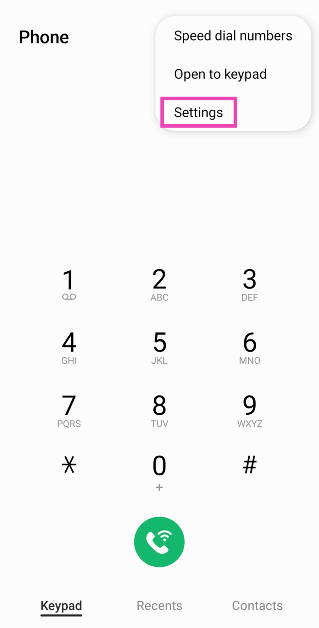
Launch the default ‘Phone’ app on your smartphone and switch to the ‘Keypad’ tab. This is where you can access the dialer. Dial *67 followed by the contact’s phone number to place a call with your phone number hidden. Even if the recipient has your number saved on their phone as a contact, your Caller ID won’t be displayed on their device. Instead of your phone number, the call recipient’s number will display ‘Anonymous’, ‘Private Number’, ‘Restricted’, or something along those lines.
This is how you can hide your phone number by using *67 on Android and iOS devices. If you’re using this dialer code for a number that has blocked incoming calls from hidden numbers, your call will not go through. Dial *77 to turn on anonymous call rejection on your smartphone. If you know any other way to hide your Caller ID on Android or iOS, let us know in the comments!
Last year, WhatsApp introduced several new features to its platform, hoping to cement its position as the most popular messaging app in the world. When it comes to hosting video meetings online, clients like Google Meet, Zoom, and Microsoft Teams are unanimously preferred over WhatsApp. However, that may change with the introduction of features like screen-sharing in the Meta-owned messaging app. Another advantage that apps like Google Meet have over WhatsApp is the option to apply special effects on video calls. While there is no native option for this on WhatsApp, you may be able to access these effects on a Samsung device. Here’s how you can change the WhatsApp video call background on your Samsung phone.
This feature is exclusively offered by Samsung’s One UI. To use these video call effects, your Samsung smartphone must be running the full One UI version and not the Core variant. One UI Core is a staple in Samsung’s budget offerings. The video call effects can be enabled from ‘Advanced features’ in the device settings. Once enabled, they can be applied while video calling on all the major communication apps.
Infinix is another OEM that has some special features related to WhatsApp, but neither of them allows users to change the video call background on the app. On Infinix smartphones, you can peep into WhatsApp messages without sending read receipts. XOS also allows you to change your voice on audio calls hosted on WhatsApp.
Turn on video call effects from Settings
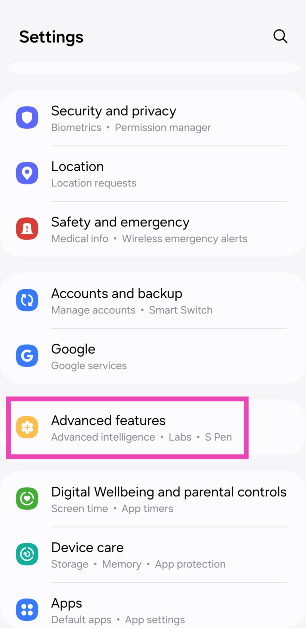
Step 1: Go to Settings and select Advanced features.
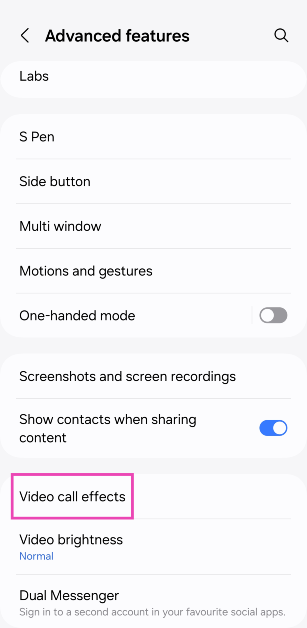
Step 2: Tap on Video call effects.
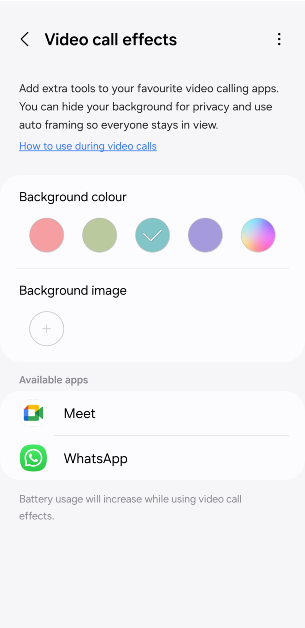
Step 3: Turn on the toggle switch and make sure WhatsApp is in the app list. If it isn’t, you may need to reinstall the app.
Use video call effects and change call background on WhatsApp
Step 1: Launch WhatsApp and make a video call.
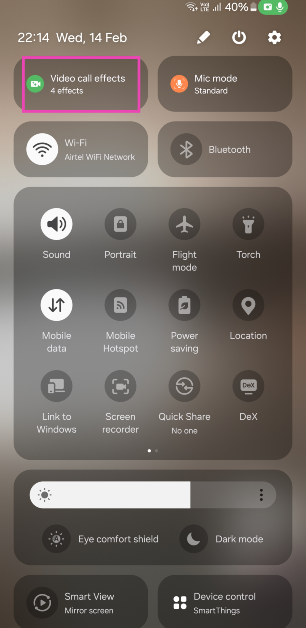
Step 2: Scroll down and tap on Video call effects.
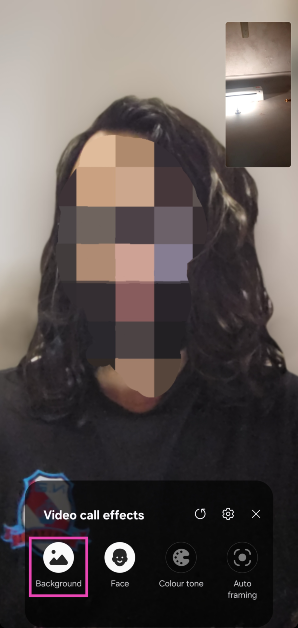
Step 3: Tap on Background.
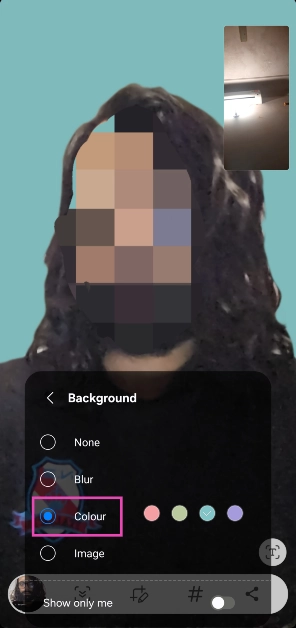
Step 4: Select a colour or picture to set as your background. You can also choose to apply a blur effect on your current background.
Step 5: You can also choose from other effects like face smoothening, colour tone and auto-framing.
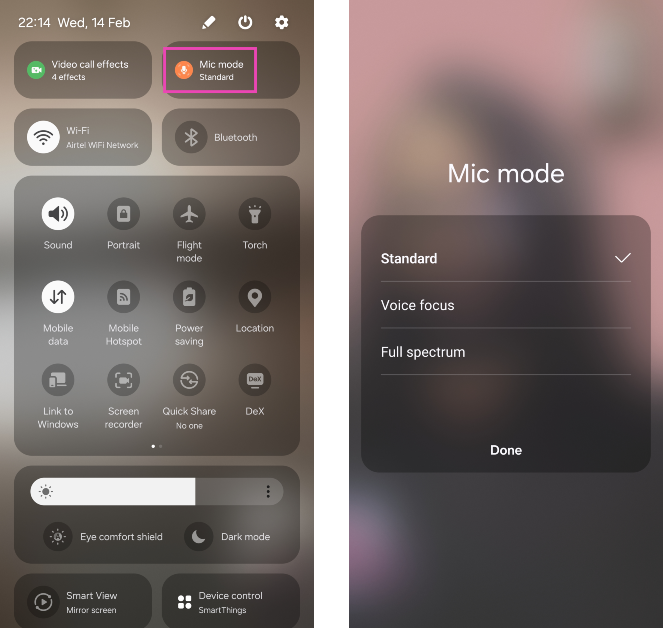
Step 6: Swipe down from the status bar again and tap on Mic mode. You can choose to cancel out the background voice by selecting Voice focus or relay all the surrounding sounds by tapping on Full spectrum.
Use WhatsApp’s native call effects
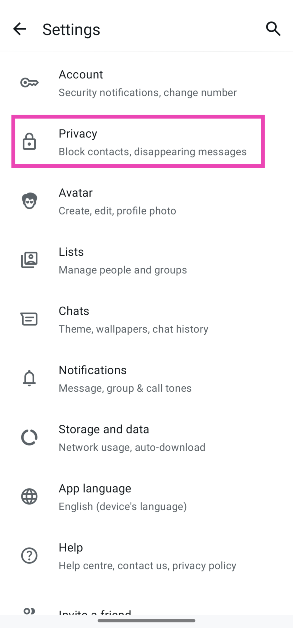
Step 1: Launch WhatsApp and hit the ellipses in the top right corner of the screen.
Step 2: Go to Settings.
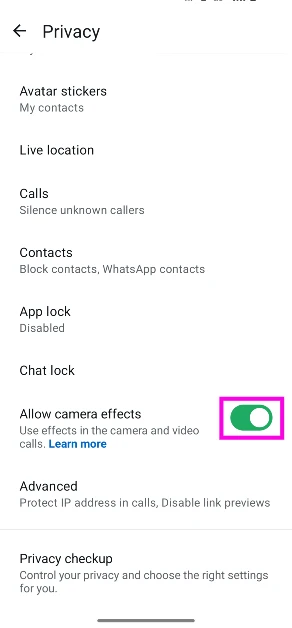
Step 3: Tap on Privacy.
Step 4: Turn on the toggle switch next to Allow camera effects.
Step 5: Join a video call and hit the wand icon to use the call effects.
Frequently Asked Questions (FAQs)
Can I change my video call background on WhatsApp?
WhatsApp doesn’t offer the option to change your call background. However, if you own a Samsung phone, you can use the ‘Video call effects’ feature in ‘Advanced Settings’ to add any picture or colour to your call background.
Where can I find the video call effect button on my Samsung phone?
Once you’re on a video call, swipe down from the status bar and tap on ‘Video call effects’ in the Quick Settings Menu to change the background or apply smoothing filters to your face.
Are video calls on WhatsApp 100% safe?
WhatsApp video calls are end-to-end encrypted, meaning only you and other call participants have access to the contents of the call.
This is how you can change the WhatsApp video call background and apply other effects on a Samsung phone. As mentioned earlier, this version is only available on Samsung phones running the full version of One UI and not the ‘Core’ variant. If you know any other way to change the video call background on WhatsApp, let us know in the comments!
Instagram has introduced a number of special hidden features to celebrate Valentine’s Day.
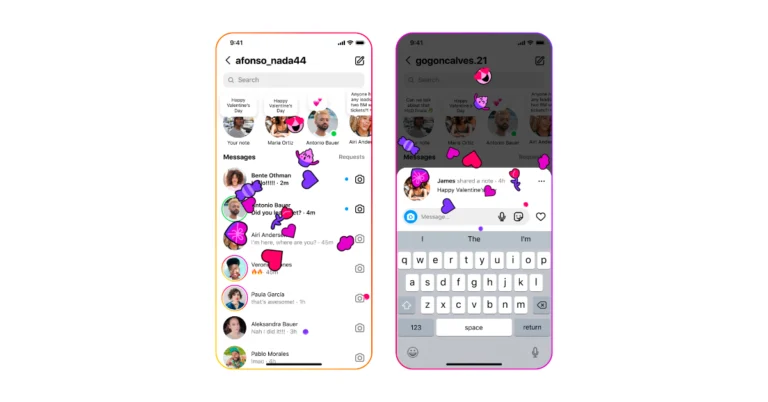
Posting or tapping Notes with Valentine’s Day-related keywords or emojis will trigger an “exploding heart/emoji” animation in your DM inbox.
Users now see floating hearts when they post or tap a @mention in their Stories.
To enhance the romantic vibe of Instagram Meta owned social media platform Instagram has rolled out several features on the occasion of Valentine’s Day. Insta users will be able to access these new features for the next two days beginning on February 14. Note that the company has added these special features to Notes as well as Stories. Posting or tapping an @mention in Stories will trigger floating hearts in your Stories.
Instagram said in the press release that over the next two days, Instagram users will be able to use a number of unique features on the platform to celebrate Valentine’s Day. These functions are going to be accessible as of right now across Stories and Notes till February 15th.
Instagram users now have the ability to post or tap Notes containing Valentine’s Day-related keywords or emojis to cause an “exploding heart/emoji”. The animation is said to appear in their Direct Message (DM) inbox.
According to the company users now see floating hearts fill their visual narrative when they publish or tap a @mention in their Stories. There will also be hearts added to the @mention sticker in your Stories sticker tray.
Besides this Instagram has been working on artificial intelligence (AI) after its parent company introduced Meta AI. According to a leak photo sharing app is developing AI message-writing capability. This feature is said to be accessible to rewrite, paraphrase, and edit a message. Mobile developer Alessandro Paluzzi leaked details of the development on X aka Twitter. He also shared a screenshot of a chat box with selected text that can be seen when the Write With AI option is activated. According to him “It will probably paraphrase your message in different styles, similar to how #Google’s Magic Compose works.”
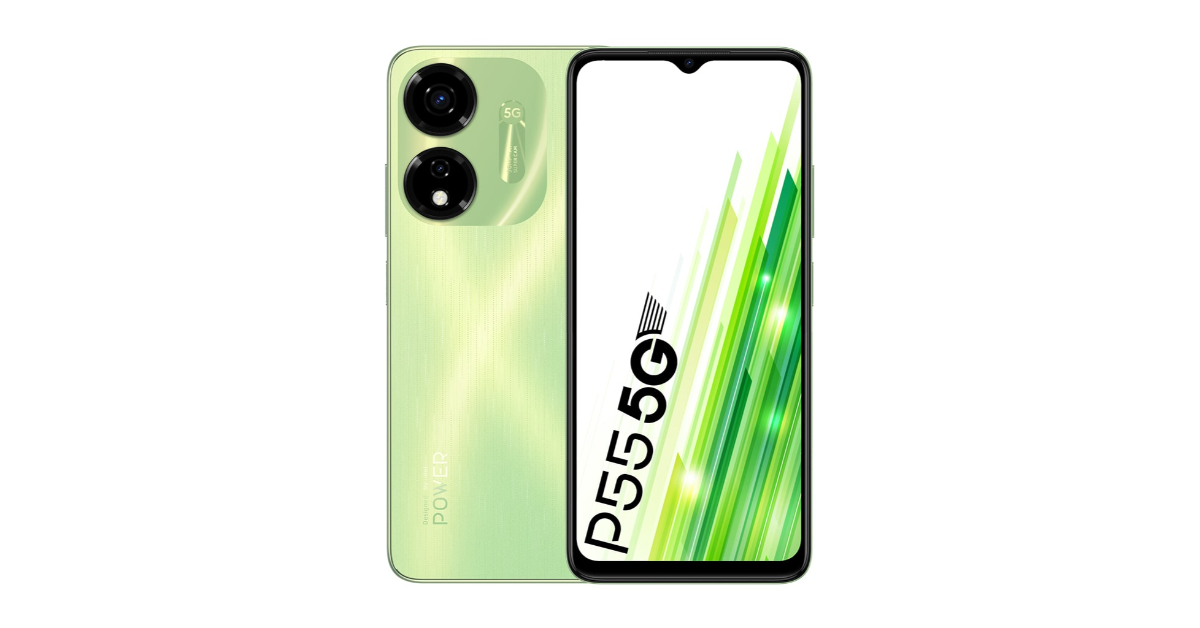
The itel P55 and itel P55+ houses a 5,000mAh battery.
Both the phones are powered by Unisoc T606 SoC.
The devices feature an AI Dual Camera setup.
itel recently launched two new smartphones in the country- itel P55 and itel P55+. Both smartphones are now up for sale. The phones can be purchased via Amazon along with exciting bank offers. The handsets feature a 50MP AI Dual Camera system. The devices come with a 6.6 HD+ display and are powered by Unisoc T606 SoC with support for Memory Fusion technology. The new smartphones are backed by a 5,000mAh battery with 45W fast charging support.
In This Article
itel P55, P55+ price in India, launch offers
itel P55 can be purchased for 4GB RAM and a 128GB storage option priced at Rs 6,999. On the other hand, the 8+16GB RAM with 128GB variant will be available offline for Rs 8,999. It comes in three colour options of Aurora Blue, Moonlit Black and Brilliant Gold.
Whereas, P55+ comes with a price tag of Rs 9,499 for 16GB RAM with 256GB storage. It will be available in two Meteor Black and Royal Green (Vegan Leather finish) options.
The devices can be purchased via Amazon in the country. Also, the firm is offering a Rs 500 discount on both the itel P55 and P55+ models with bank offers.
itel P55 and itel P55+ come with a 6.6-inch HD+ display with 720 x 1,640 pixels of resolution and a refresh rate of 90Hz. The display features a Dynamic Bar feature that shows notifications and more. The devices run on Android 13 and are powered by an octa-core Unisoc T606 SoC with Memory Fusion technology.
itel P55 and P55+ features an AI-powered 50-megapixel dual rear camera setup. The handset also includes an 8-megapixel front-facing camera for taking selfies. Both phones have a 5,000mAh battery. The P55 comes with 18W charging support while the P55+ includes 45W fast charging support which takes from 0 to 100% in just 72 minutes, or 70% in just 30 minutes.
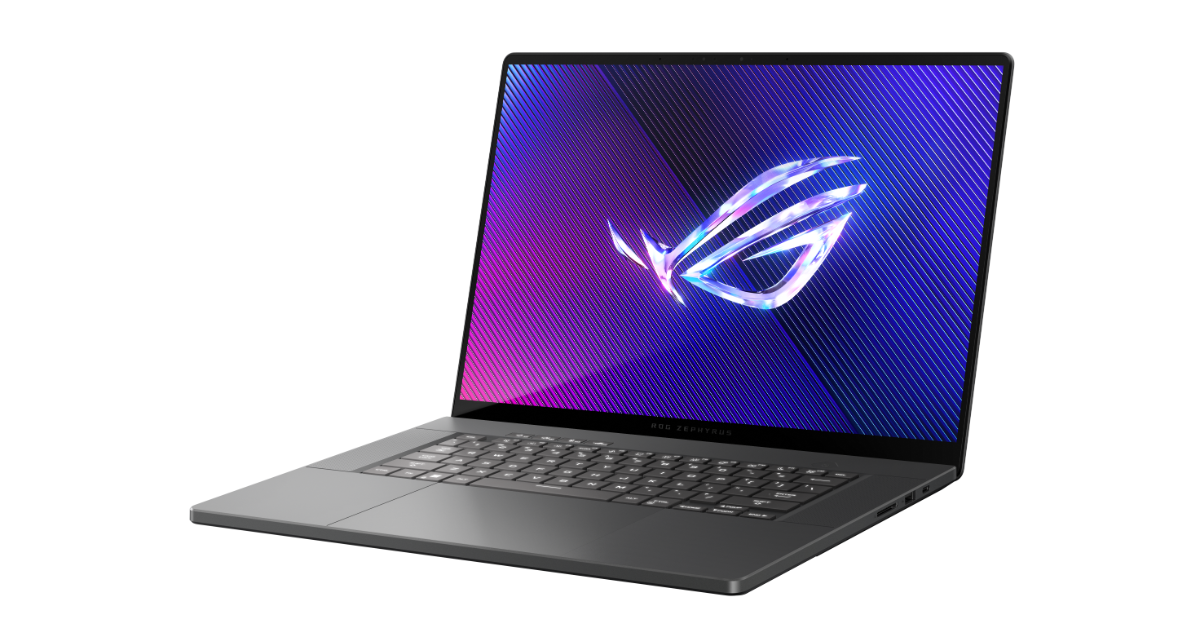
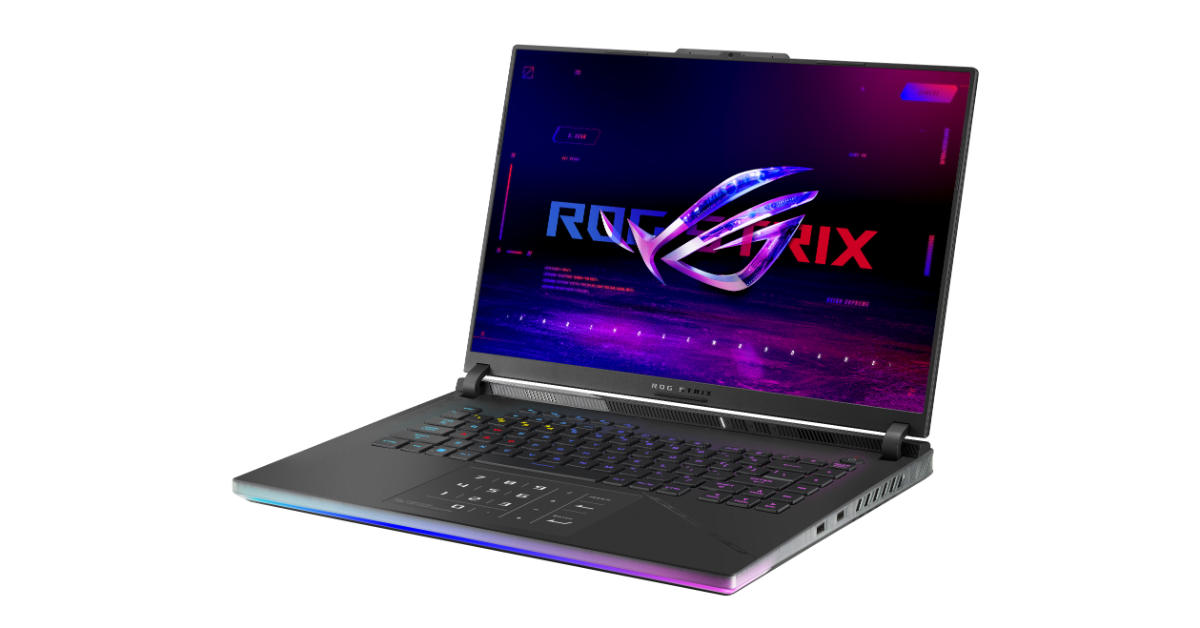
The ASUS ROG Zephyrus G16 is the first-ever ROG laptop by the brand in the Indian market to feature an OLED panel with VRR support.
The ROG Zephyrus G16 and ROG Strix Scar 16/ Scar 18 were introduced at CES 2024.
The ASUS ROG Zephyrus G16 comes integrated with the NVIDIA RTX 4000 Series.
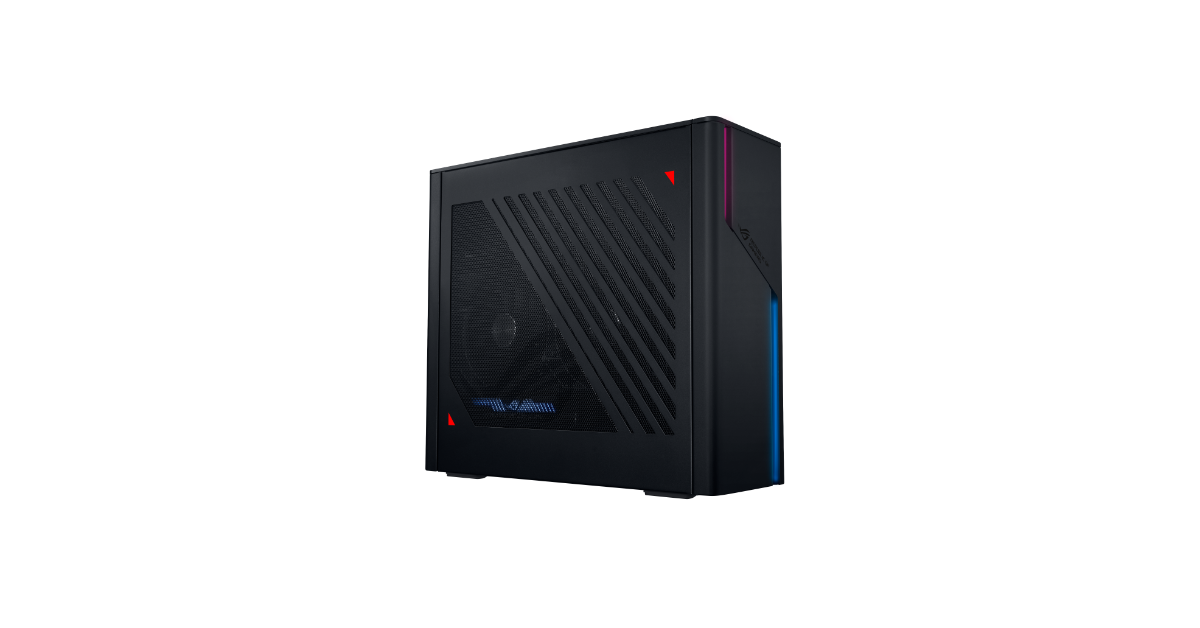
Asus today introduced Zephyrus G16 in India. The laptop is the first-ever ROG laptop by the brand in the Indian market to feature an OLED panel with VRR support. It comes with the latest AI-Ready Intel Core Ultra 9 processor paired with NVIDIA RTX 4000 Series. In addition to this, the firm has also refreshed Strix Scar 16/ Scar 18 and ROG G22 gaming desktop with the latest 14th gen Intel Core processor.
In This Article
Asus Zephyrus G16, ROG Strix Scar 16/ Scar 18 price in India
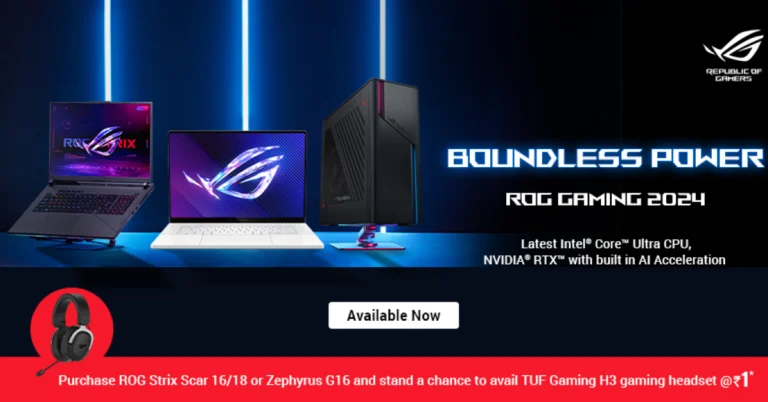
The price of the Asus Zephyrus G16 starts at Rs 189,990. On the other hand, ROG Strix Scar 16/ Scar 18 comes with a starting price of Rs 289,990. As per the company, the first 50 customers who purchase the ROG Strix Scar 16/ Scar 18 and Zephyrus G16 from the ASUS e-shop or ASUS Stores will get a complimentary TUF Gaming H3 Gaming Headset at an additional charge of just INR 1 by registering the device on the MyASUS App. This offer is valid from February 14 to February 20. To redeem this offer, customers can visit asuspromo.in within three days of purchase.
Asus Zephyrus G16 specifications
Asus Zephyrus G16 features a 16-inch OLED panel with 2.5K resolution. The screen supports a 240Hz refresh rate with a 0.2ms response time. The gaming laptop is powered by an Intel Core Ultra 9 processor and an NVIDIA RTX 4090 GPU. It also supports Advanced Optimus and a MUX Switch.
The laptop features some of ROG’s best cooling technologies, including 2nd Generation Arc Flow Fans and a redesigned high-efficiency air outlet. In addition to this, the machine houses a 90Wh battery that supports fast charging from 0-50% in just 30 minutes.
Asus ROG Strix Scar 16/ Scar 18
The Asus ROG Strix Scar 16/ Scar 18 supports Dolby Vision, 100% DCI-P3 coverage, and the panels boast a peak brightness of 1100 nits and a refresh rate of 240 Hz.
The laptops are outfitted with the most recent Intel Core i9 CPU 14900HX and up to NVIDIA GeForce RTX 4090 GPU with a max TGP of 175W. For improved gaming, NVIDIA Advanced Optimus support is included. There are two model variants available: RTX 4090 and RTX 4080. During extended gaming sessions, the ROG TriFan technology keeps the CPU, GPU, VRMs, and VRAM cool, and the Scar 16/Scar 18 with its 90Wh battery.
Asus ROG Gaming G22 Desktop
The Asus ROG Gaming G22 Desktop has several side panel options and complete Aura Sync RGB compatibility, the chassis is made to be small enough for a boutique experience. The G22 also has indirect RGB lighting throughout the front panel. Together with the lighting management that Aura Sync offers, you have complete control over the appearance and feel of your machine.
The ROG Gaming G22 Desktop has an Intel Core i7-14700F CPU and an NVIDIA GeForce RTX 4070 graphics. It is offered with up to 32GB DDR5 RAM making it easy to stream, chat, and record action. Additionally, the desktop has Dolby Atmos support and two-way AI noise cancellation.
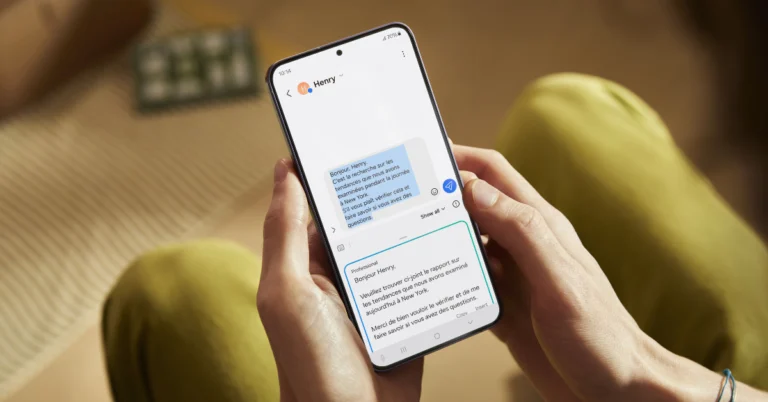
Samsung’s Galaxy AI influences a lot of key aspects of the new Galaxy S24 Series. From generative photo editing to live translating phone calls, Samsung’s suite of AI features can accomplish a range of tasks effortlessly. Galaxy AI has breathed new life into multiple native Samsung apps, including the keyboard. With just a couple of touches, you can now translate your messages, change your writing style, and even perform a basic grammar and spell check. Here’s how you can use Galaxy AI on the Samsung Keyboard.
Galaxy AI for Samsung Keyboard takes inspiration from Microsoft’s SwiftKey Keyboard
Microsoft SwiftKey was one of the first onscreen keyboard apps to incorporate AI features into its platform. Back in April 2023, the tech giant integrated Bing AI into its mobile keyboard app. This allowed users to make basic internet searches, interact with Bing AI, and change the tone of their texts. Here’s an article explaining these features.
Samsung’s native keyboard app derives a lot of inspiration from Microsoft’s Keyboard. Using Galaxy AI, users can change the tone of their texts, translate them into another language, and even fix the grammatical and spelling errors in their messages. Unlike SwiftKey, the AI features on Samsung Keyboard are much more accessible to use. They can be found simply by tapping the Galaxy AI button on the keyboard. If you don’t want anything to do with AI, Samsung gives you the option to turn off these features from device settings.
Turn on Galaxy AI features for the Samsung Keyboard
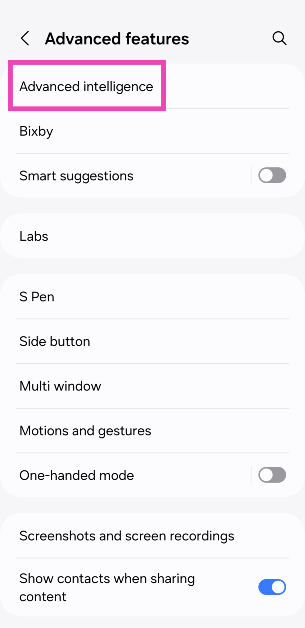
Step 1: Go to Settings and select Advanced features.
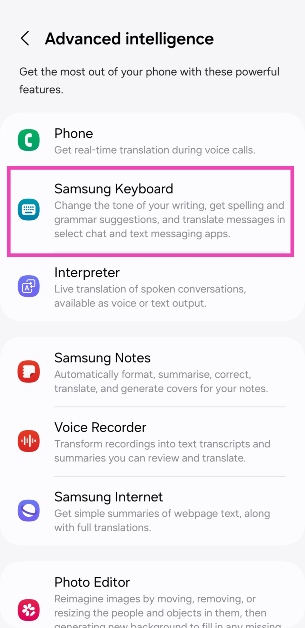
Step 2: Tap on Advanced intelligence.
Step 3: Select Samsung Keyboard.
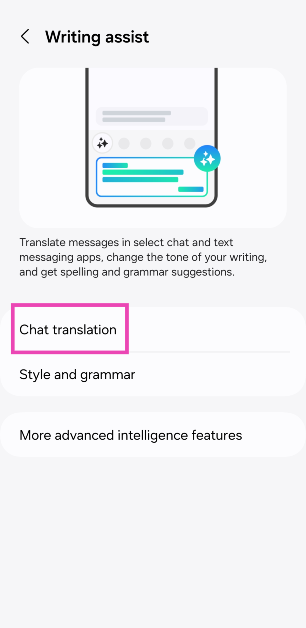
Step 4: Tap on Chat translation.
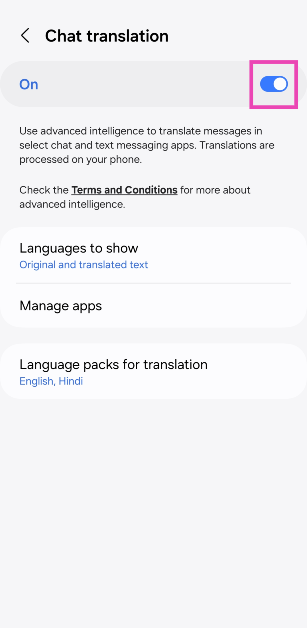
Step 5: Turn on the toggle switch.
Step 6: Tap on Language packs for translation and select the languages you want to use.
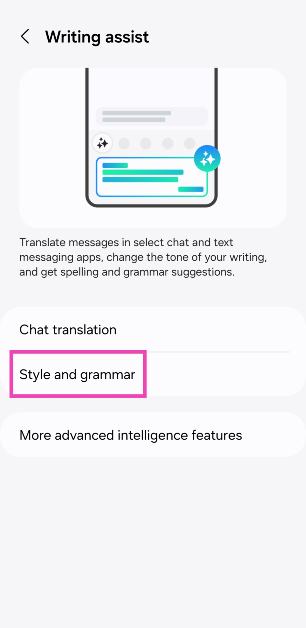
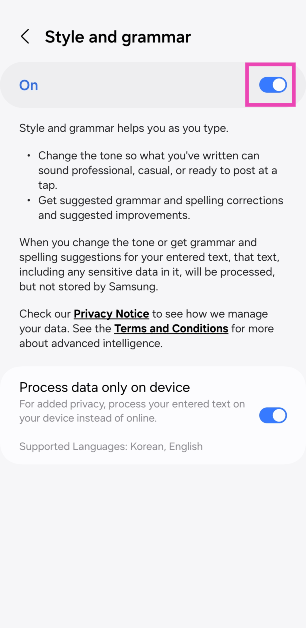
Step 7: Go back and select Style and grammar.
Step 8: Turn on the toggle switch.
Use Galaxy AI to translate messages
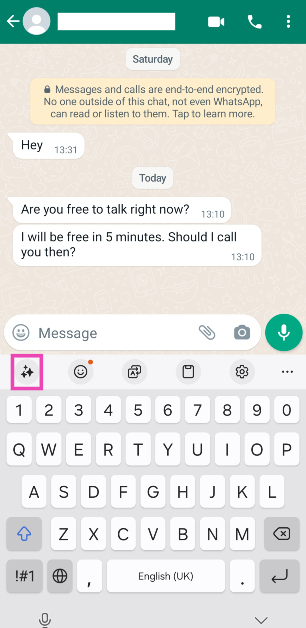
Step 1: Tap the message box on any messaging app to trigger the Samsung Keyboard.
Step 2: Hit the Galaxy AI button on the keyboard.
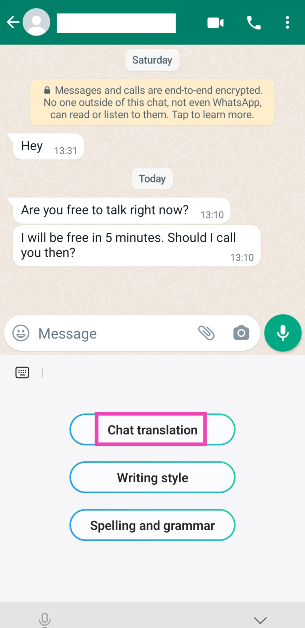
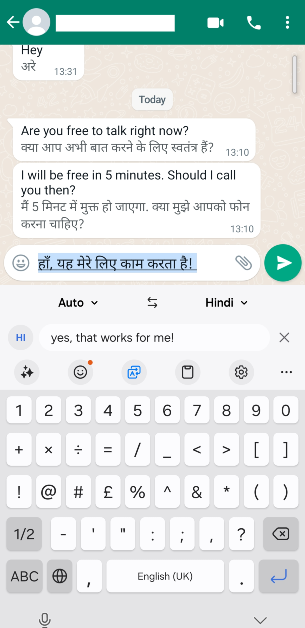
Step 3: Tap on Chat translation.
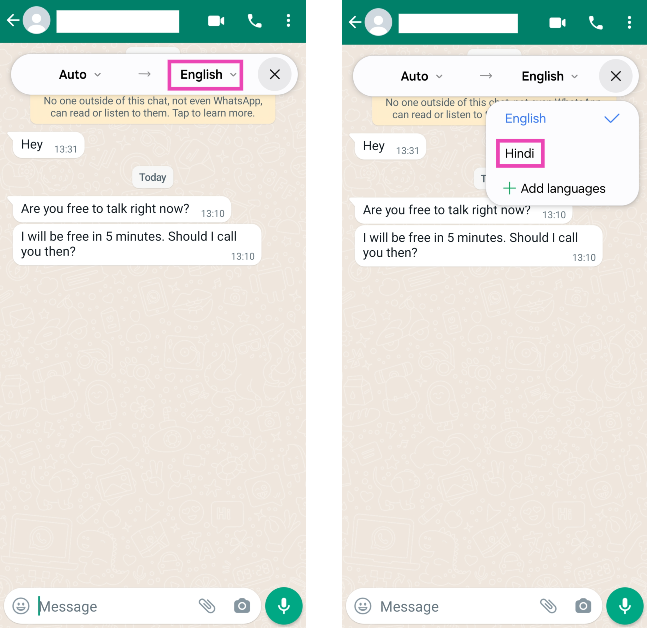
Step 4: Tap on the target language and select your desired language from the list of options.
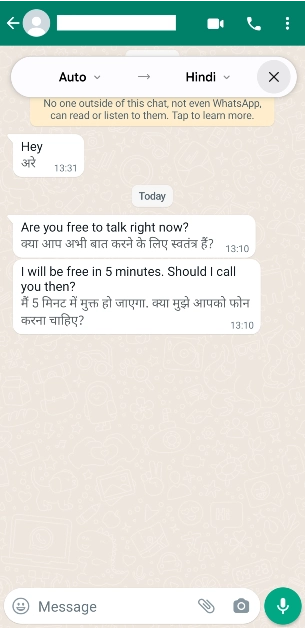
Step 5: The messages in the chat will be translated to your desired language.
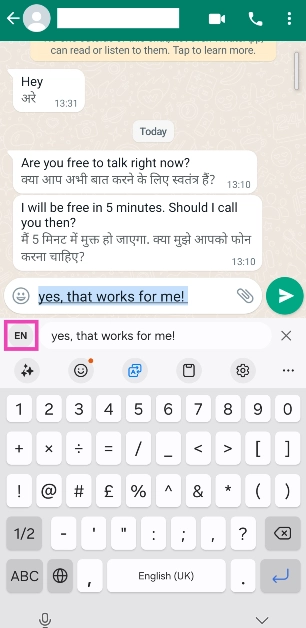
Step 6: To send an auto-translated message, tap the message box and enter your message. Hit the language icon.
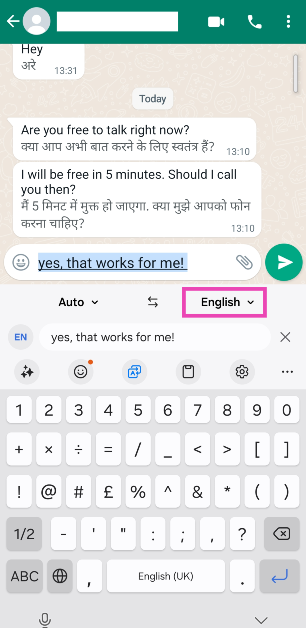
Step 7: Tap on the target language to change it.
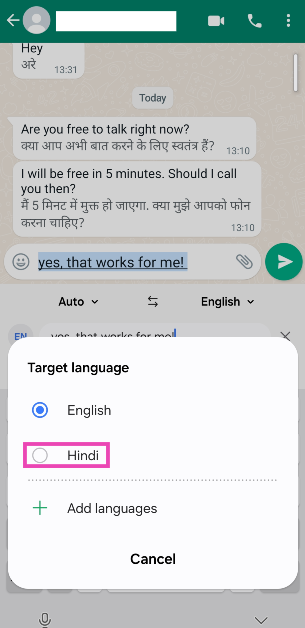
Step 8: Select a language from the list.
Step 9: The message will be translated into your desired language. Hit the Send button.
Change your writing style using Galaxy AI on the Samsung Keyboard
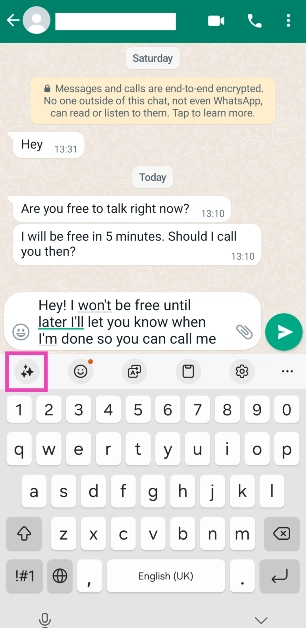
Step 1: Launch a messaging app and hit the text box to trigger the Samsung Keyboard.
Step 2: Type the message you want to send.
Step 3: Hit the Galaxy AI button on the keyboard.
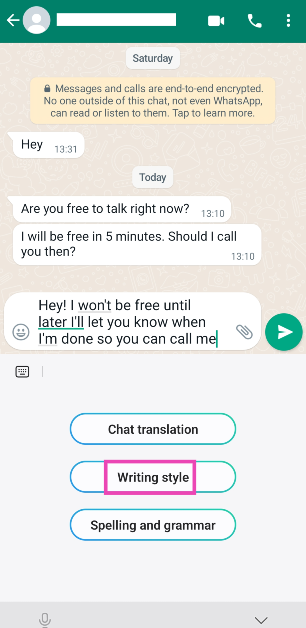
Step 4: Tap on Writing Style.
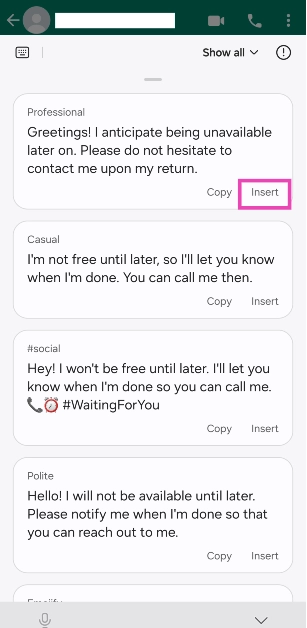
Step 5: Galaxy AI will change your text and suggest different styles. These include Professional, Casual, Social, Polite, and Emojify.
Step 6: Tap on Insert next to the text you wish to send and hit the Send button.
Fix grammar and spelling errors in your texts using Galaxy AI
Step 1: Launch a messaging app and hit the text box to trigger the Samsung Keyboard.
Step 2: Type the message you want to send.
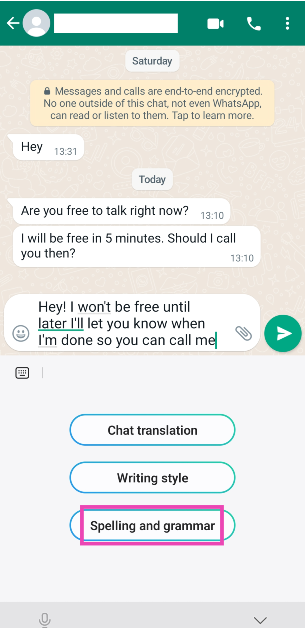
Step 3: Hit the Galaxy AI button on the keyboard.
Step 4: Tap on Spelling and grammar.
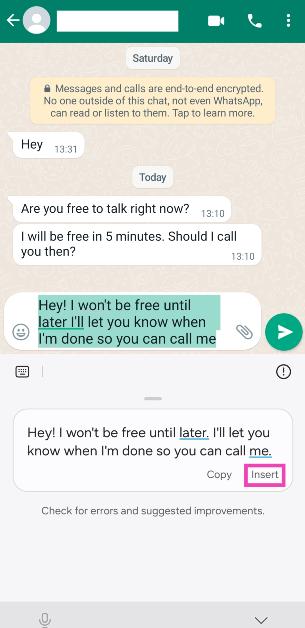
Step 5: Galaxy AI will fix the grammar and perform a basic spell check on your text.
Step 6: Tap on Insert to substitute the original text with the corrected version and hit Enter.
Frequently Asked Questions (FAQs)
Which phones will get Galaxy AI?
Samsung’s Galaxy AI is currently available on the Galaxy S24 Series. The tech outfit will roll out the AI suite for the Galaxy S23 Series (including S23 FE) and 2023’s Galaxy Z Series next.
How much does Samsung’s Galaxy AI cost?
Galaxy AI is free to use until the end of 2025. Samsung plans on introducing a subscription model for its AI suite of features after that.
How do I turn on Galaxy AI on Samsung Keyboard?
Go to Settings>Advanced features>Advanced intelligence>Samsung Keyboard and turn on the toggle switches for ‘Chat translation’ and ‘Style and grammar’.
This is how you can use Galaxy AI features on the Samsung Keyboard. To keep your privacy intact, you can select the ‘Process data only on device’ option in the ‘Style and grammar’ options. This ensures that all AI computing while processing your texts takes place on your device without being exported to an online server. Check out this article to learn how to use Galaxy AI to summarise web pages, notes, and voice notes.
Samsung’s new Galaxy AI suite of features on the recently launched Galaxy S24 Series has been nothing short of a revelation. The AI tech has been integrated nicely into the software. It is super accessible to the average user without being shoehorned into places where it doesn’t belong. Previously, we talked about the new Generative Photo Editing and Summarisation features of Galaxy AI. Now, let’s take a quick look at how you can live translate your phone calls using Galaxy AI on the Samsung Galaxy S24 Series.
Galaxy AI can live translate your phone calls in a seamless manner
Talking to someone on the phone and having their speech translated in real-time without any human mediation sounds like something right out of a sci-fi book. Samsung’s Galaxy AI carries out this task seamlessly, without so much as a hiccup. Sure, some minor errors are bound to creep in (as is the case with every other translator tool), but it doesn’t dampen the experience in any way.
One of the better aspects of Galaxy AI’s translation features is that they don’t require an internet connection. All the computing processes take place on your device. Of course, you will need to download the appropriate language pack first. At the time of writing this article, Galaxy AI supports 15 languages, including Hindi, English, Chinese, Thai, French, and more.
Turn on Live Translate on your Samsung Galaxy S24
Step 1: Go to Settings and select Advanced features.
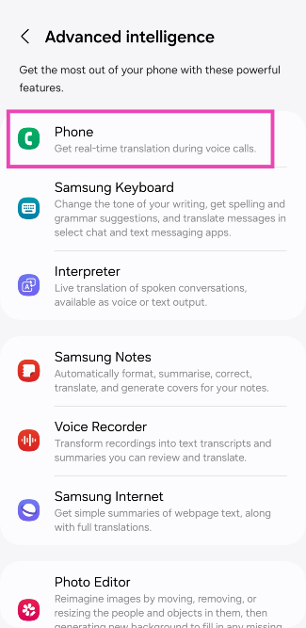
Step 2: Tap on Advanced intelligence.
Step 3: Select Phone.
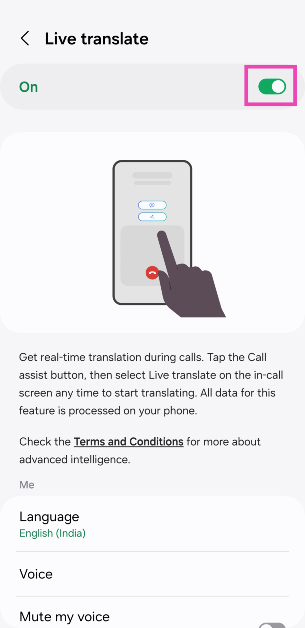
Step 4: Turn on the toggle switch for Live Translate.
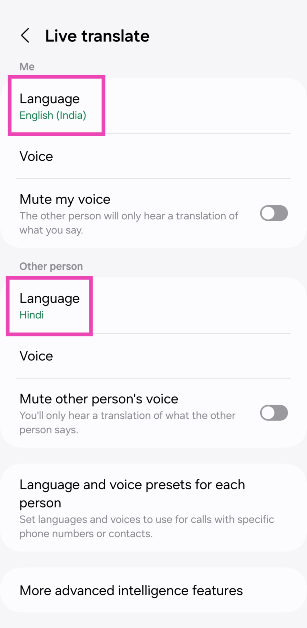
Step 5: Select your language in the ‘Me’ section and the caller’s language in the ‘Other person’ section. You can also choose to mute the caller’s voice so you only hear the translation and vice-versa.
Step 6: If you want to set different languages for different contacts, tap on Language and voice presets for each person and make your selections.
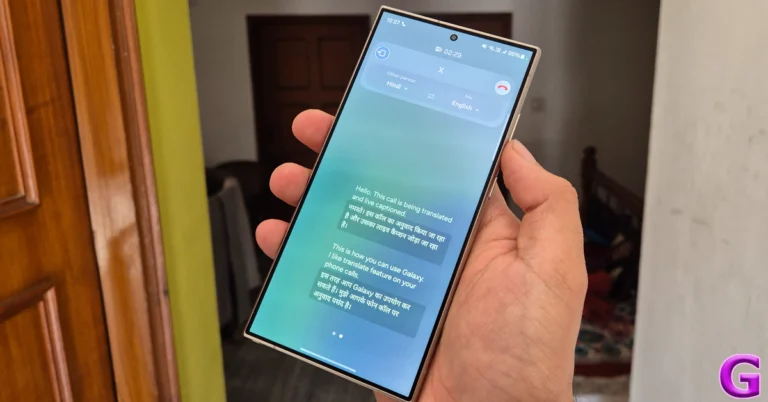
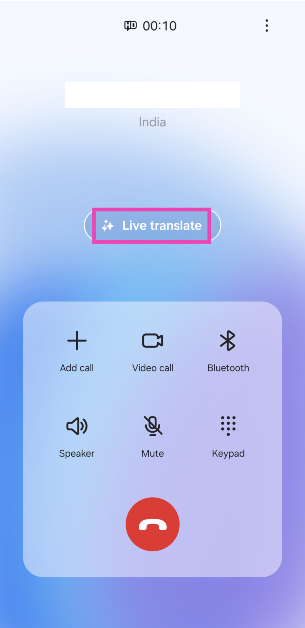
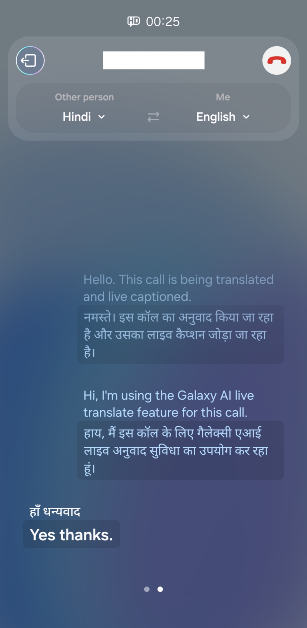
Step 4: As soon as you hit Live translate, the caller will get a pre-recorded message letting them know that the call is being translated and live captioned. Anything you say will be live-translated and relayed to the caller, and vice-versa. You can change the languages from the top of the screen as well.
Frequently Asked Questions (FAQs)
How do I live translate my phone calls using Galaxy AI?
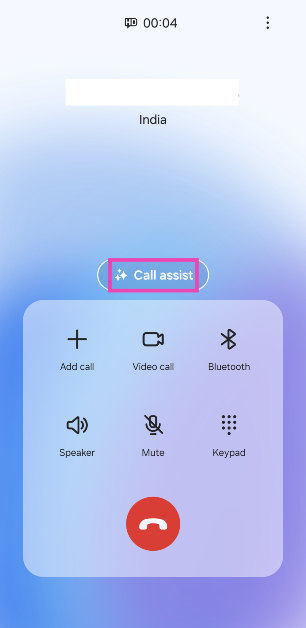
Go to Settings>Advanced features>Advanced intelligence>Phone and turn on the toggle switch for Live translate. Scroll down and select the target languages for you and the caller. Now, make a call and hit Call assist>Live translate.
Is Galaxy AI’s Live Translate feature free to use?
Live translate, along with other Galaxy AI features, is free to use until the end of 2025. Samsung will likely include a subscription model for Galaxy AI after that.
Which Samsung smartphones support Galaxy AI?
Galaxy AI made its debut on the Samsung Galaxy S24 Series. The tech giant will roll out its AI features for the Galaxy S23 Series (including S23 FE) and 2023’s Galaxy Z Series soon.
This is how you can live translate your phone calls using Galaxy AI on the Samsung Galaxy S24 Series. You can also screen your calls using Bixby’s ‘text call’ feature on your Samsung Galaxy smartphone. Here’s an article explaining how you can set it up. To learn how to edit your pictures using Galaxy AI, read this article.
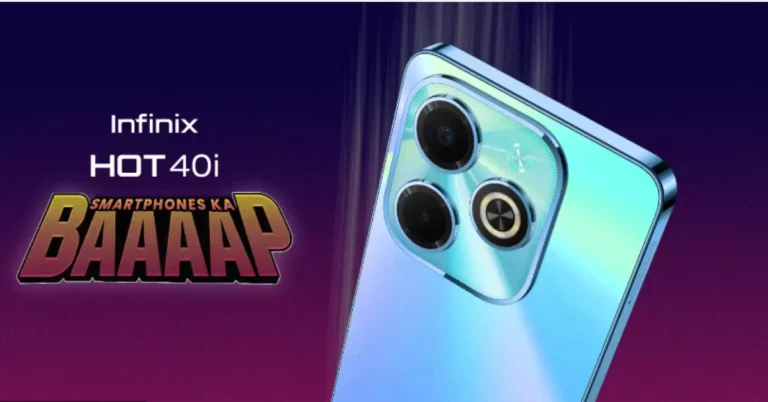
Infinix Hot40i is confirmed to launch in India on February 16.
The smartphone will go on sale via Flipkart in the country.
The phone will come with a 5,000mAh battery.
Infinix is all set to launch a new smartphone in the Indian market. The company is coming to the country with its brand new product- Infinix Hot40i. The launch is scheduled to take place on February 16. Ahead of the official announcement the company has also listed the phone on Flipkart to tease its availability. In addition to this Infinix has also revealed the key details of the upcoming smartphone. Check out the details below. Infinix Hot40i is going to launch in India on February 16, the company has confirmed. Alongside confirming the exact launch date the firm has also disclosed the availability and key features of the upcoming device. A dedicated microsite on its website and Flipkart has been created before the official announcement.
The device will be on sale on February 16 at 12:00 PM IST, according to the listing. It will undoubtedly make its debut in the sub-Rs 10,000 range.
It is claimed to include 256GB of storage and 16GB of RAM (8GB of virtual memory, and 8GB of RAM on board). Additionally, a dedicated microSD card slot on the phone will support microSD cards up to 2TB.
Infinix has also disclosed that the Hot40i will come equipped with two rear cameras and an LED flash. Additionally, the upcoming phone will also include a 32-megapixel selfie camera. The device is said to house a 5,000mAh battery with 18W Type C fast charge and a reverse charging feature.
Before coming to India Infinix launched Hot40i alongside other models in the International market in December of last year. It is expected that the specification of the forthcoming device will be similar to that of the global variant. It will feature a 6.56-inch HD+ LCD with an adaptive refresh rate of 60Hz to 90Hz. The display will come with a peak brightness of 480 nits. It could also be driven by Unisoc T606 SoC with up to 256GB of inbuilt storage and up to 8GB of RAM. A microSD card can be used to increase the storage capacity to 1TB.
The dual rear camera setup is likely to feature an AI-powered sensor. The 32-megapixel selfie camera is already confirmed to come on the device. Along with a 5,000mAh battery, the smartphone may equip a side-mounted fingerprint sensor.
Garena Free Fire is a battle royale game with regular awards and tournaments to keep players interested. If you play Garena Free Fire, you should be aware of the redeem codes that are released on a daily basis. However, because the battle royale game is banned in India, players from other countries can use the Free Fire Redeem codes daily. If you’re unfamiliar with the Garena Free Fire redeem codes or don’t know how to get them, we’ve put together a step-by-step guide to help you redeem them. Check out Garena Free Fire Redeem Codes for 14 February 2024.
The Free Fire redeem codes are a great way to get free stuff. These are 12-digit codes that contain alphabets and numbers, as well as an expiration date and time. Because the Garena FF redeem codes cannot be used more than once, you should hurry to the redemption page to claim your free reward before someone else does. To get a free reward, all you have to do is go to reward.ff.garena.com/en, which is the official redemption page. Also, keep an eye on this space for daily updates on Garena Free Fire redemption codes and rewards.
Horse racing is an ancient sport that has been around for a very long time. It started in old times and is now popular all over the world. This sport is about more than just fast horse racing; it involves smart planning and a unique bond between the horse and its rider. Today, with more technology being used every day, horse racing is beginning to change. New devices and tools are making it easier to train horses, allowing fans to watch races and place bets on their favorite horses from anywhere. These advancements are blending traditional horse racing with new, exciting changes.
In This Article
The Digital Transformation of Horse Racing
Horse racing is changing a lot because of technology, especially in how people bet on races. Now, thanks to platforms like 1xbe offers betting on horse race, fans don’t have to go to the race track to place a bet; they can do it online from anywhere in the world. This change is significant because it makes betting easier and allows more people to join in on the fun. Additionally, there are now mobile apps for horse racing that let fans see updates about races, choose their bets, and learn lots of details about the races right from their hands. The shift to online betting and the availability of these apps make the betting process simpler and more exciting for fans, giving them the feeling of being part of the action even if they’re not physically on the track.
Data Analytics and Machine Learning in Horse Racing
Data analytics and machine learning are changing the game in horse racing, making it easier to guess who will win and helping horses get ready to perform their best by looking at a lot of information, like how the track is or the weather, and even how a horse has done before or how healthy it is, these tools can predict which horse might win. This helps people who are betting to choose smarter and also helps trainers and horse owners make better plans to help their horses do well. Machine learning, a kind of smart computer program, helps spot details that people might miss, giving everyone a deeper understanding of what might affect a race. This isn’t just about making better bets; it’s also about taking care of the horses, making sure they’re healthy and trained just right for them.
Wearable Technology for Horses
Wearable technology for horses includes things like sensors, GPS, and health monitors. These gadgets help us know how a horse is feeling and how well it’s doing by checking its heart rate, how warm it is, and how it moves. This information is super helpful for people who take care of and train horses. For example, GPS can track how far and fast a horse runs, helping trainers make better workout plans. If a horse starts feeling sick or shows signs of not being okay, these devices let the caretakers know right away so they can help the horse. There are many stories where this technology has helped horses run better in races and stay healthy. One story is about a place where horses are trained, and they use these gadgets to make their training even better. This helped the horses do better in races and not get hurt as much. Another time, a device found out a horse was getting really sick, which could have stopped it from racing ever again, but because they found out early, they were able to treat the horse, and it got back to racing.
Virtual Reality and Augmented Reality in Fan Experience
Image: World Wide Web
Virtual Reality (VR) and Augmented Reality (AR) are changing how people watch horse racing, making it feel like you’re right there on the track. With VR, you can wear a headset and feel like you’re standing next to the track or even riding a horse in the race. It makes watching the races more exciting because you can see everything up close, just like you’re really there. AR makes things even better by putting extra information about the race right on your phone or computer screen while you’re watching. It can tell you more about the horses, the people riding them, and the track. There are also VR games about horse racing where you can pretend to be in a race, take care of your own stable of horses, or train them.
Blockchain and Betting Security
Blockchain technology is like a super smart notebook that keeps track of horse racing bets in a way that’s safe and clear so that everyone can trust it. This notebook is special because once something is written in it, nobody can change it or make it disappear. That’s really important for making sure bets on horse races are fair, and nobody cheats. With blockchain, every bet is written down carefully so that the people who win get their money correctly. It’s also great because it stops people from trying to trick the system since everyone can check the bets to make sure they’re right.
The Role of Social Media and Streaming Services
Social media and streaming services have made horse racing more popular and brought fans worldwide closer together. Now, people can use websites like Facebook or Twitter to talk about the races, share who they think will win, and celebrate when their favorite horse crosses the finish line first. This helps fans feel like they’re part of a big group, no matter where they live. Also, with streaming services, anyone with a phone or computer can watch horse races live without needing a TV. This means that even races happening far away can have fans from different places watching.
The Future of Horse Racing Events
Horse racing events are about to change a lot because of new technology. Now, people can use drones to see the races from the sky, allowing everyone to see every part of the race like never before. There’s also talk about using artificial intelligence, or AI, to help train horses and even make decisions during a race, which could make races safer and more fair. Soon, we might even see jockeys who are controlled by AI, making decisions in a flash by looking at a lot of data. And for fans who can’t be at the race, virtual reality might let them feel like they’re right there in the middle of the action, no matter where they are. It’s a big step into a new time for horse racing, making it easier for everyone to enjoy and safer for those participating.
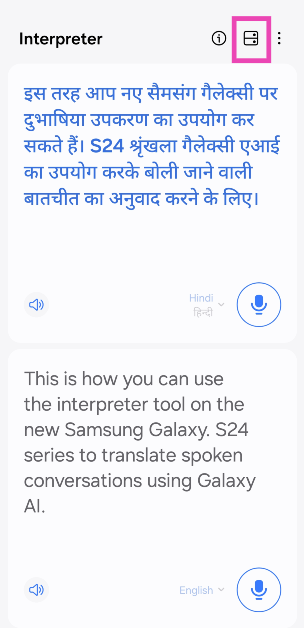
If you like to travel, the new Samsung Galaxy S24 has just the feature for you! As a part of its new Galaxy AI suite of features, Samsung Galaxy S24 lets you translate spoken conversations in real time. At the time of writing this article, this feature supports 15 languages including English, Hindi, French, Chinese, Italian, and more. All the computing required to carry out the translation takes place on the device itself. Here’s how you can use the Galaxy AI Interpreter tool to translate spoken conversations.
As we mentioned earlier, the computing required to translate spoken conversations takes place on your device. This means you don’t need to be connected to the Internet to use the Interpreter tool on your Galaxy device. If you’re travelling overseas and don’t want to splurge on an expensive mobile data plan, this feature will still work on your device.
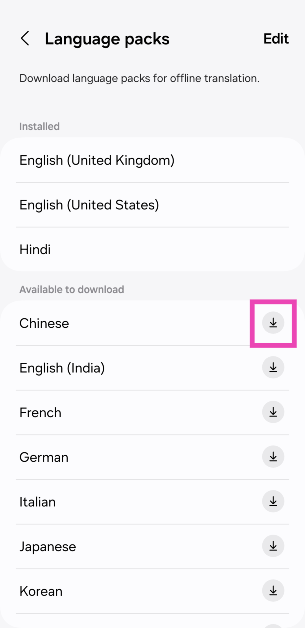
Before you begin, you need to download the language packs for the source and target languages. This does require an internet connection. An average language pack is around 200-400MB in size. Make sure you are connected to the WiFi or you will end up spending the bulk of your mobile data plan.
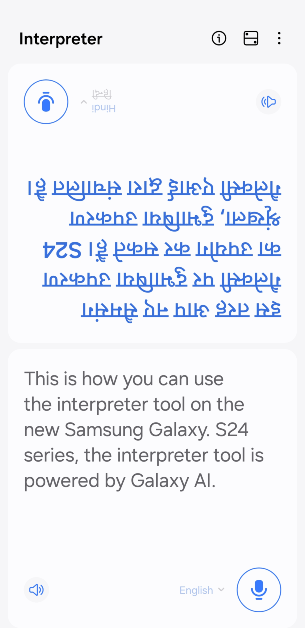
You can also change the voice of the speaker for the Interpreter tool. As of now, there are 2 voice styles on offer – one male and one female. You can also select the pace at which the speaker voices the translated text. You can also flip the panel showing the translated text upside down, making it easier for the other person to view it.
Translate spoken conversations using Galaxy AI
Step 1: Go to Settings and select Advanced features.
Step 2: Tap on Advanced intelligence.
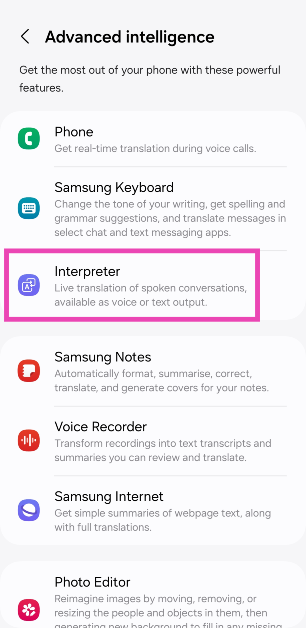
Step 3: Tap on Interpreter.
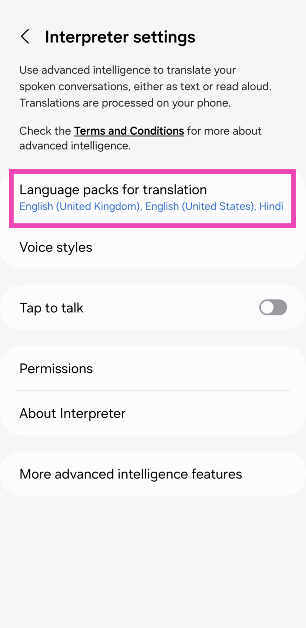
Step 4: Tap on Language packs for translation.
Step 5: Download your desired languages. There are 15 languages to choose from.
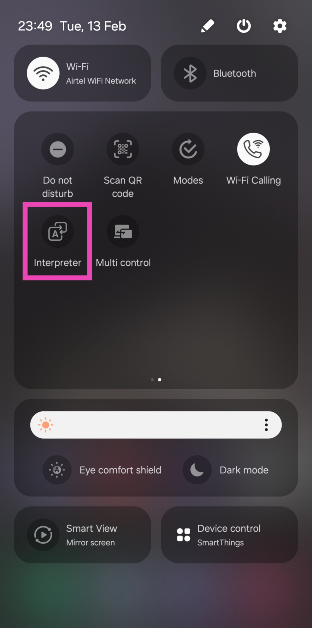
Step 6: Go back to the home page and swipe down from the status bar to access the Quick Settings Menu.
Step 7: Tap on Interpreter.
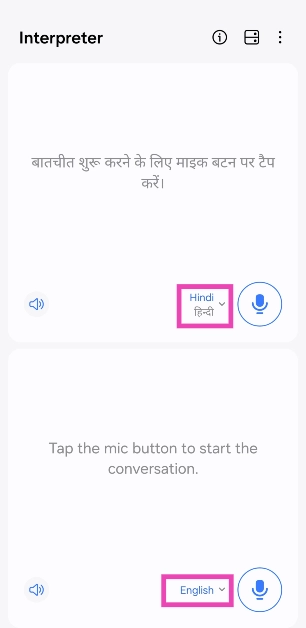
Step 8: Select the source language on the bottom panel and the target language on the top panel.
Step 9: Hit the microphone button in the bottom panel and start speaking.
Step 10: Once you stop speaking, Galaxy AI will translate your speech into the target language.
Step 11: Hit the layout icon at the top of the screen to flip the top panel. This makes it easier for the other person to read the translated text.
Frequently Asked Questions (FAQs)
Where can I find the Interpreter tool in the Samsung Galaxy S24 Series smartphones?
Swipe down from the status bar and tap on the ‘Interpreter’ tile in the Quick Settings Menu.
Does Galaxy AI require an internet connection to translate spoken conversations?
No, you can translate spoken conversations using Galaxy AI without access to the internet. However, you will need to download the language packs first.
Is Galaxy AI free to use?
Galaxy AI is free to use until the end of 2025, after which Samsung will likely introduce a subscription model for the service.
This is how you can use Galaxy AI on the new Samsung Galaxy S24 Series to translate spoken conversations. All the computing required to translate spoken conversations takes place on your Galaxy device. This means you don’t need to be connected to the internet to use the Interpreter tool. Read this article to learn how you can use the generative photo editing feature on the new Galaxy S24 smartphones.
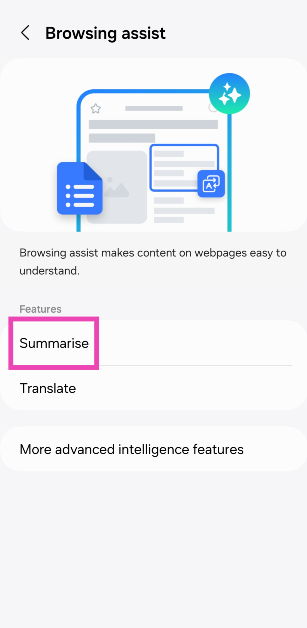
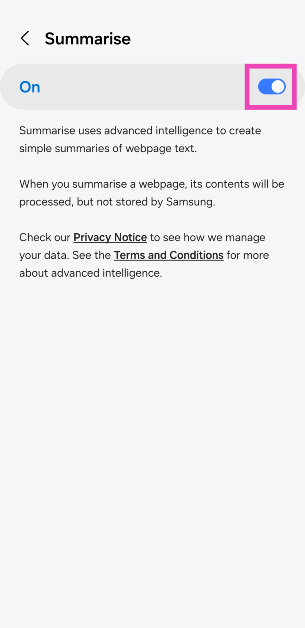
Samsung’s newest Galaxy S24 Series feels like a landmark device for AI tech. While there have been a few AI features on Pixel smartphones over the years, Samsung’s Galaxy AI on the S24 Series breathes new life into several different native apps. While some of these features may cater to a niche audience, it doesn’t make them any less cool. One of our favourite uses of Galaxy AI is in Samsung’s web browser. With just a couple of taps, you can summarise the article you’re reading and translate it into any language you like. Here’s how you can use Samsung Galaxy S24’s AI tech to summarise web pages, notes, and voice notes.
The new Galaxy S24 Series is all about its AI features. While it carries forward its exceptional performance (owing to the Snapdragon 8 Gen 3 SoC) and a powerful set of cameras, the integrated AI tech is where it breaks new ground and sets itself apart from the Galaxy S Series of the past. We’ve talked about the generative photo editing features of the Galaxy AI, so let’s turn our focus to its summarization features.
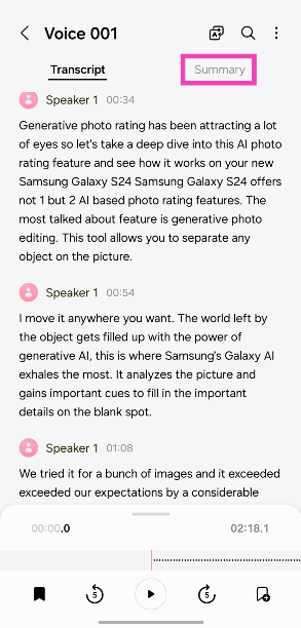
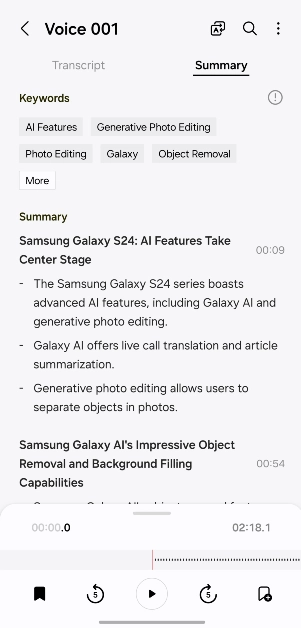
Like the newer Pixel smartphones, Samsung’s native voice recorder app can now transcribe the voice notes for you. If there are multiple speakers on the voice recording, they will be classified accordingly. Galaxy AI does its best to ensure there are no redundancies and grammatical errors in the transcribed text. However, if the speech isn’t overtly clear, a few errors will manage to creep in. Thankfully, these errors are easy to ignore. Galaxy AI summarises the transcribed text for you and formats it in a manner that is easy to read. It generates keywords related to topics that it deems important. Tapping on a keyword takes you to the part where it is mentioned in the text.
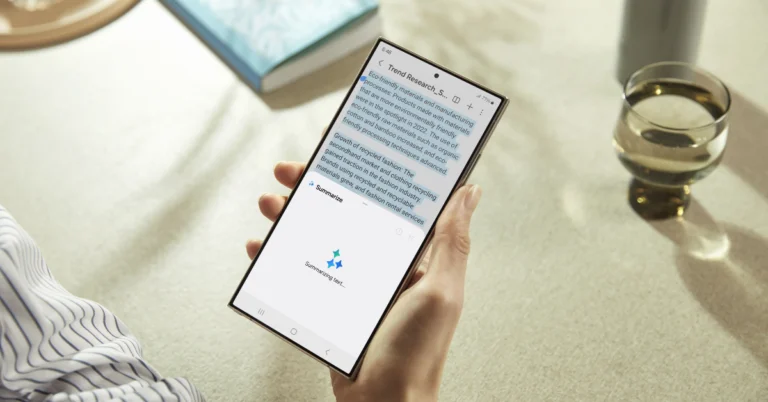
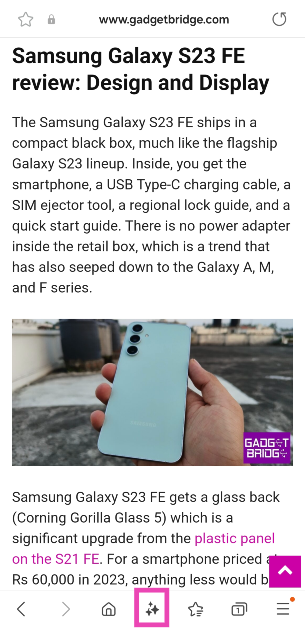
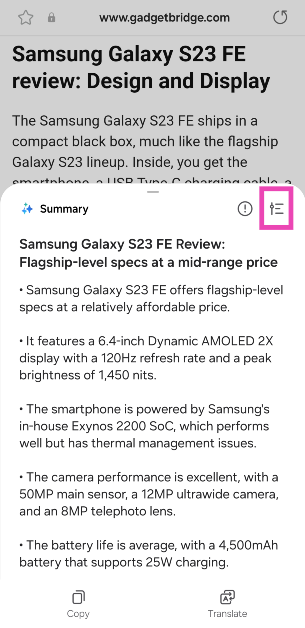
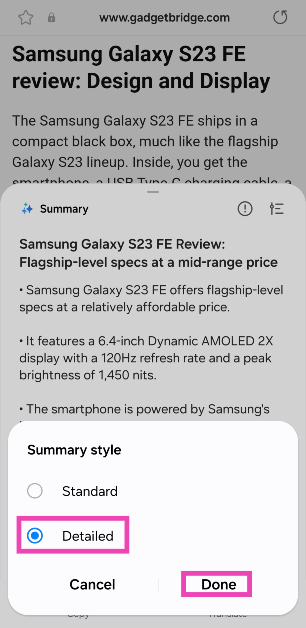
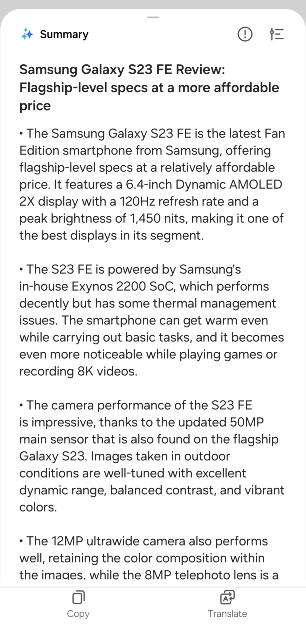
Another cool Galaxy AI feature is web page summarisation. If you don’t have enough time to read a lengthy article, you can hit the AI icon and generate a summary of the webpage. The browser app gives you the option to generate a detailed summary as well. You can translate this summary into any language you like.
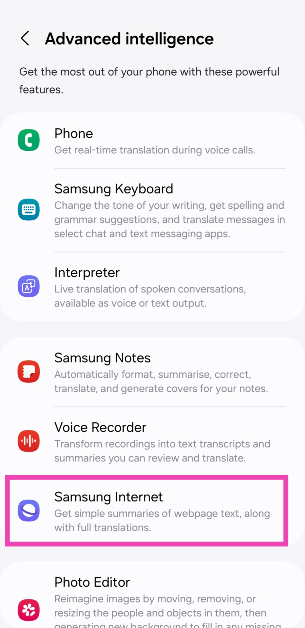
Use Galaxy AI to summarise web pages
Step 1: Go to Settings and select Advanced features.
Step 3: Hit the Galaxy AI icon at the bottom of the screen.
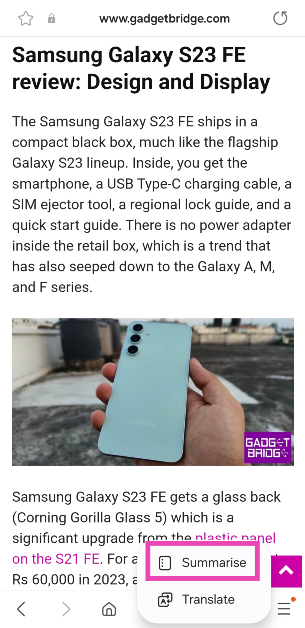
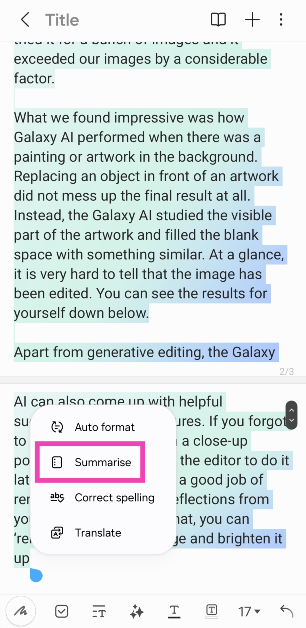
Step 4: Tap on Summarise. You can also use Galaxy AI to auto-format, spell-check, and translate the text. There is a word limit for the summarisation feature.
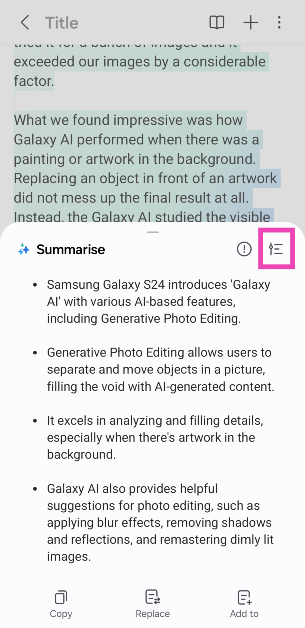
Step 5: Galaxy AI will generate a summary of the text.
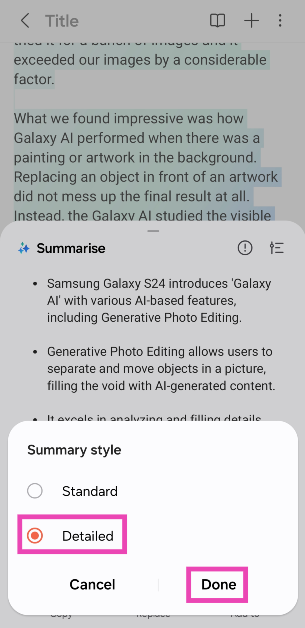
Step 6: To create a detailed summary, hit the options icon.
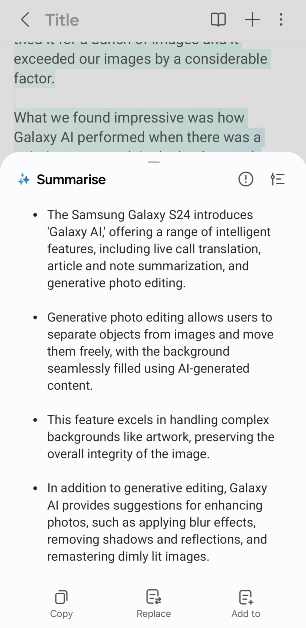
Step 7: Tap on Detailed and hit Done.
Use Galaxy AI to transcribe and summarise a voice note
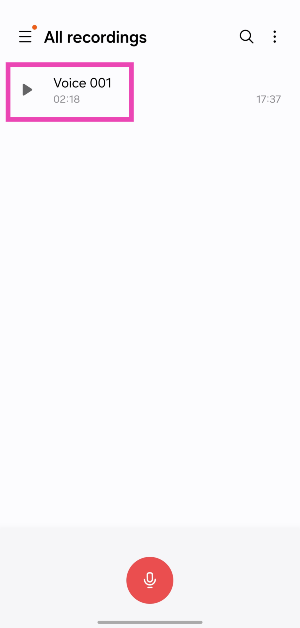
Step 1: Go to the native Samsung voice recorder app and select a voice note.
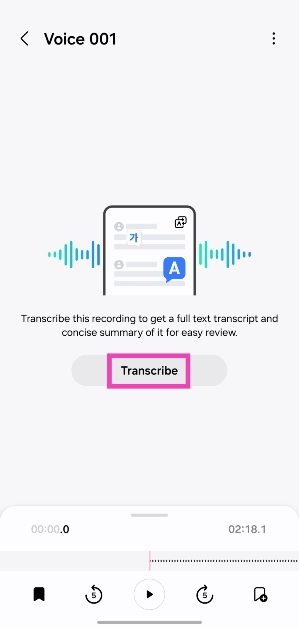
Step 2: Hit the Transcribe button.
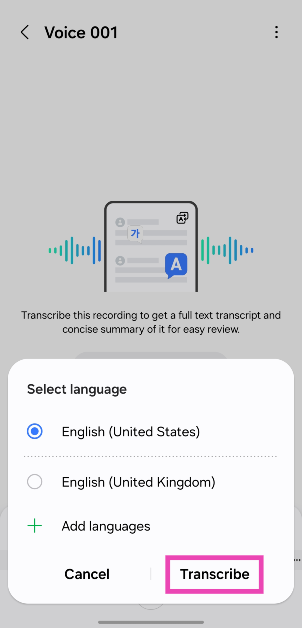
Step 3: Select the language and hit Transcribe. You may need to download a language pack for this.
Step 4: Once the recording has been transcribed, switch to the Summary tab.
Step 4: This is where you will find the formatted summary along with the relevant keywords. Tap on a keyword to view the content associated with it.
Frequently Asked Questions (FAQs)
Which phones will get the Galaxy AI?
Samsung Galaxy is currently available on the latest Galaxy S24 Series. The tech outfit will also bring its AI features to the Galaxy S23 Series (including S23 FE) and 2023’s Z Series in a future update.
Is Galaxy AI free to use?
According to Samsung, all Galaxy AI features will be free to use until the end of 2025. After that, the company may introduce a subscription model for the service.
How do I summarise a news article using Galaxy AI?
Open the news article in Samsung’s native browser, hit the Galaxy AI icon at the bottom of the screen, and tap on ‘Summarise’.
This is how you can use Galaxy AI on the Samsung Galaxy S24 Series to summarise web pages, notes, and voice notes. You can also use it to auto-format, spell-check, and translate the summarised text. The native Notes app lets you generate attractive covers for your notes as well. Read this article to learn how to use AI photo-editing features on your new Galaxy S24 smartphone.
The India launch is also confirmed to take place on the same day.
Finally, Nothing has officially revealed the launch date of Nothing Phone 2a. The upcoming phone is set to arrive next month. This is going to be the company’s third smartphone and an affordable toned-down variant of Nothing Phone 2 that launched last year. The device is likely to feature a dual rear camera setup. It is expected to be powered by MediaTek Dimensity 7200 SoC.
Nothing Phone 2a launch is scheduled to take place on March 5. The phone is anticipated to be released as a less expensive variant of the Nothing Phone 2, which debuted the previous year. The company took to Twitter to make the announcement where it also shared a short video. As per the announcement the Nothing Phone 2a will launch at 11:30 GMT (5:30 pm IST). Note that the India launch will also take place on the same day. The company’s X account for India and Flipkart have officially confirmed the March 5 event.
Fresh. Eyes.
The official Phone (2a) launch event is happening on 5 March 2024, 11:30 GMT. pic.twitter.com/eE6hPjXOeB
As we mentioned earlier, Nothing has also shared a short video on its X account. However, it has not revealed much about Phone 2a it shows two white dots resembling eyes blinking with a black background.
Just before the official announcement, Nothing Phone 2a was spotted listed on the TUV certification website with model number A142. The listing suggests, that the Nothing Phone 2a will come with a 45W charging speed. It will also get USB Power Delivery (PD) standard support, which means that the Nothing Phone 2a should be able to be charged using any USB PD-compliant charger. Earlier the upcoming handset also appeared listed on the Bureau of Indian Standards(BIS) site.
As per a leak, the Phone 2a is likely to come in Black and White colour options and in two different configurations: 8GB of RAM with 128GB storage and 12GB RAM with 256GB of storage. The phone’s price is speculated below EUR 400 (approx Rs 36,800).
In addition to this, it is speculated to feature a 6.7-inch AMOLED display manufactured by BOE and Visionox under the product number rm692h5. The screen is expected to have 1,084 x 2,412 pixels of resolution. The display may also support a refresh rate of 120Hz. The phone is slated to be powered by a MediaTek Dimensity 7200 chipset.
Moreover, the mobile is rumoured to come with a dual rear camera setup that may include a 50-megapixel Samsung S5KNG9 1/1.5-inch main sensor and the 50-megapixel Samsung S5KJN1 1/2.76-inch ultrawide lens. The phone is anticipated to feature a 32-megapixel Sony IMX615 sensor on the front.
While the Samsung Galaxy S24 Series may look like its predecessor, it takes a big leap forward when it comes to the AI features onboard the device. Marking the debut of ‘Galaxy AI’, the Galaxy S24 can intelligently accomplish a range of tasks for you. From translating live calls to creating simple summaries of articles and notes, the Galaxy AI makes its presence felt on the new device. Among all the new AI-based features, Generative Photo Editing has been attracting a lot of eyes. So, let’s take a deep dive into this AI photo-editing feature and see how it works on your new Samsung Galaxy S24.
Here are the new Galaxy AI photo-editing features on the Samsung Galaxy S24 Series
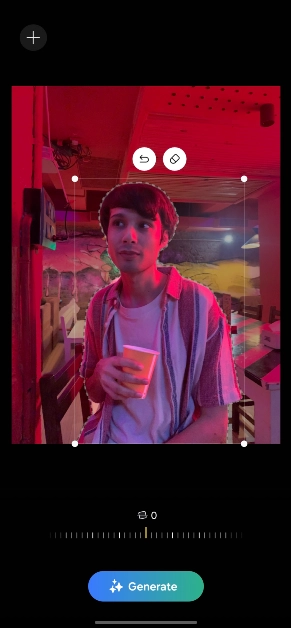
Samsung Galaxy S24 offers not one but two AI-based photo editing features. The most talked about feature is ‘generative photo editing’. This tool allows you to separate any object from the picture and move it anywhere you want. The void left by the object gets filled up with the power of Generative AI. This is where Samsung’s Galaxy AI excels the most. It analyses the picture and gains important cues to fill in the important details in the blank spot. We tried it for a bunch of images and it exceeded our expectations by a considerable factor.
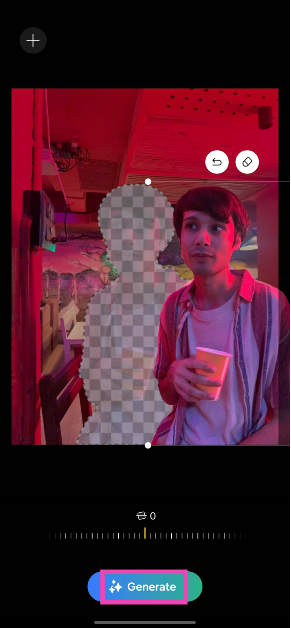
What we found impressive was how Galaxy AI performed when there was a painting or artwork in the background. Shifting an object in front of an artwork did not mess up the final result at all. Instead, Galaxy AI studied the visible part of the artwork and filled the blank space with something similar. Other objects in the background were filled in accordingly. Here’s one example.
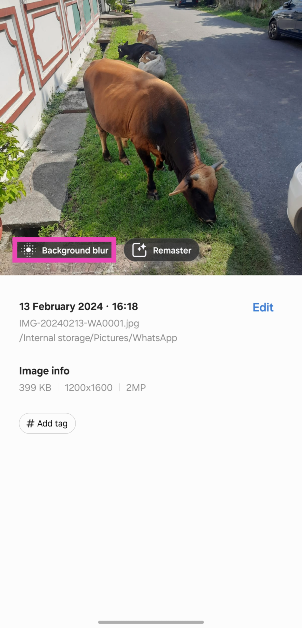
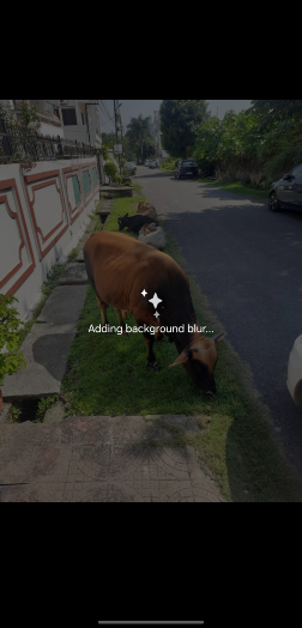
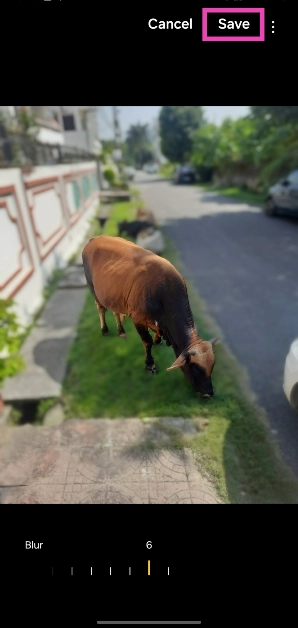
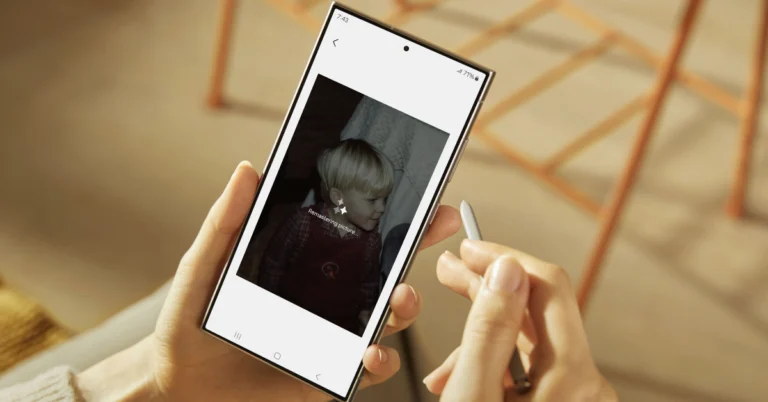
Apart from generative editing, the Galaxy AI can also come up with helpful suggestions for your pictures. If you forgot to apply the blur effect on a close-up portrait shot, you can use the editor to do it later. It also does a good job of removing shadows and reflections from your pictures. On top of that, you can ‘remaster’ a dimly lit image and brighten it up.
Use Generative AI on the Samsung Galaxy S24 Series to edit your pictures
Step 1: Launch the Gallery app on your smartphone and open the image you want to edit.
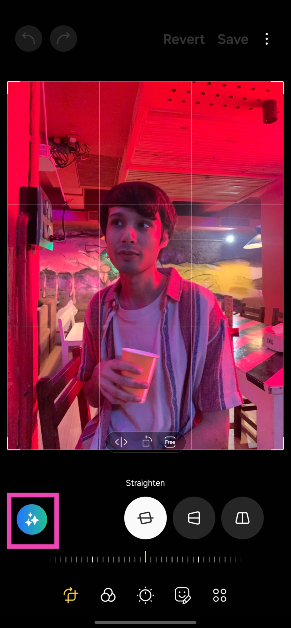
Step 2: Hit the pencil icon at the bottom of the screen to launch the photo editor.
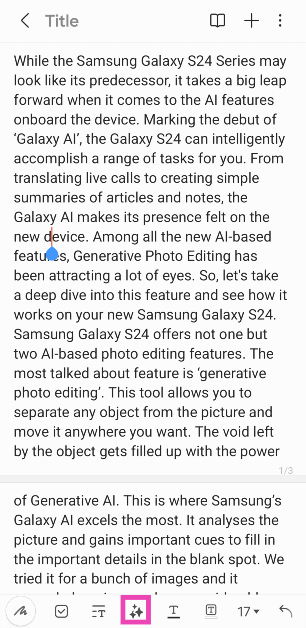
Step 3: Tap the blue icon with stars on the left side of the screen to access Galaxy AI.
Step 4:Long press the object you wish to move or delete from the picture. You can also draw something around the object to select it.
Step 5: Once the object has been selected, you can resize it by dragging its corners. To shift the object, long press it and move it around.
Step 6: Hit Generate. Galaxy AI will take a few seconds to fill in the blank spots created by shifting or removing the object.
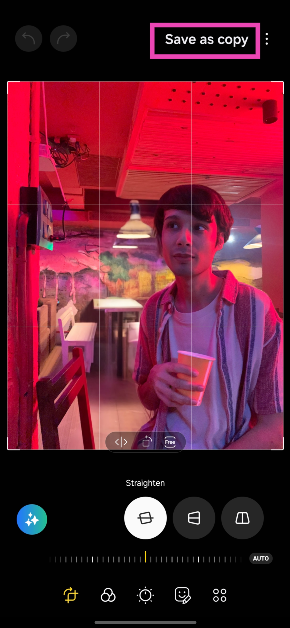
Step 7: Once the new image has been rendered, hit Done.
Step 8: Hit Save as copy at the top right corner of the screen.
Use Galaxy AI for editing suggestions
Galaxy AI can also come up with helpful editing suggestions to spruce up your pictures. For every picture you choose, it will come up with relevant suggestions. If you select a close-up picture, the editor will help you add the appropriate amount of blur to the background. Images with distracting shadows and reflections can also be fixed using this tool. Here’s how.
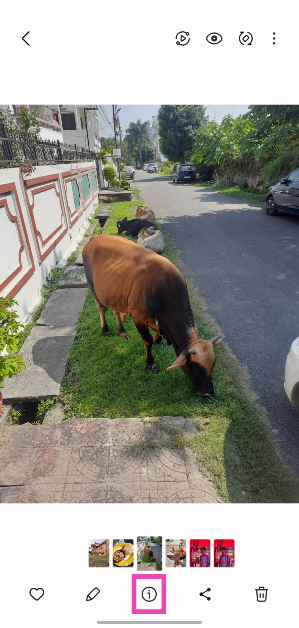
Step 1: Select a picture from the Gallery app on your phone.
Step 2: Hit the ‘i’ icon at the bottom of the screen.
Step 3: Galaxy AI will come up with the relevant editing suggestions for the picture.
Step 4: Tap on a suggestion to apply the changes.
Step 5: Hit Save and select Save as a copy (if you want to keep the original).
Frequently Asked Questions (FAQs)
Is Galaxy AI free to use on the Samsung Galaxy S24 Series?
Samsung’s Galaxy AI features will be provided for free until the end of 2025 on supported devices. The tech giant plans on introducing a subscription model for its AI services after that.
Can I use Galaxy AI’s generative editing feature on any picture?
Yes, Galaxy AI’s generative editing feature works on all images, even the ones that haven’t been shot using your Samsung Galaxy smartphone.
Where can I find the Galaxy AI editing feature on my smartphone?
If your smartphone supports Galaxy AI, open the picture you wish to edit, tap the pencil icon at the bottom of the screen, and then hit the blue icon with the stars to access the generative editing feature.
This is how you can use the AI photo-editing features on your Samsung Galaxy S24 Series smartphone. The ‘Generative photo editing’ editing feature requires an internet connection to work as its computing process does not take place on your device. However, remastering a picture using Galaxy AI does not require the internet. Go to Settings>Advanced features>Advanced intelligence and turn on the toggle switch for ‘Process data only on device’ to disable online processing.
Samsung Galaxy S23 FE has received a price cut of Rs 5,000.
Along with the price revision, the company also offers additional bank offers on the device.
Samsung Galaxy S23 FE, which debuted in India last October, is now available at a lower price. The device has currently received a price cut. The handset is currently available in two different configurations and both models are discounted in the country. The details of the price reduction and other details for the smartphone are listed below.
Samsung has dropped the price of Galaxy S23 FE in India by Rs 5,000. After the price cut the 8GB RAM with 256GB storage is selling at Rs 54,990. On the other hand, the 8GB RAM with 256GB storage will be available at a reduced price of Rs 59,990.
Along with the price cut, Samsung is also providing additional discount offers on the purchase of smartphones. The HDFC Credit or Debit card customers will get a discount of Rs 10,000 on the purchase of Samsung Galaxy S23 FE which will bring down the price of both variants to Rs 44,990 and Rs 49,990 respectively.
Samsung Galaxy S23 FE features a 6.4-inch FHD+ Dynamic AMOLED display with 2340 x 1080 pixels resolution. The screen supports a variable refresh rate of 60 to 120Hz. The front panel is protected with Corning Gorilla Glass 5. The device is powered by a Samsung Exynos 2200 4nm processor with Samsung Xclipse 920 GPU. The phone runs on Android 13 with One UI 5 out of the box.
For photography and videography, the handset features a triple rear camera set-up that includes a 50-megapixel main camera with f/1.8 aperture and OIS, a 12-megapixel ultra-wide-angle sensor, and an 8-megapixel telephoto lens with OIS and 3X Optical Zoom. For selfies, there will be a 10-megapixel front-facing camera.
In terms of connectivity, there is 5G SA/NSA, 4G VoLTE, Wi-Fi 6E, Bluetooth 5.3, GPS + GLONASS, NFC, and a USB 3.1 port for charging. The S23 FE also includes an in-display fingerprint sensor for biometrics. The handset packs a 4500mAh battery with 25W wired fast charging and support for wireless charging, and wireless power share. It comes with an IP68 rating for water resistance and the stereo speakers on the phone support Dolby Atmos.
While many big players in the Indian market provide exceptional cleaning abilities from makers such as Philips and Dyson, there is a new entrant here called Dreame, which launched its set of Vacuum cleaners in India in Jan 2024. We got our hands on one of the devices to check it out. This is the Dreame U10 (cordless) Vacuum Cleaner Review, with which we have been tinkering around for over 10 days. Let’s see if it is worth the price.
In This Article
Dreame U10 Vacuum Cleaner Review: Design
First up, this cordless Vacuum Cleaner is packed well within a small-ish cardboard case. That is also because it does not come with a lot of attachments like the mightier Dyson or Philips. However, it does come with a few attachments that are great for day-to-day use and cleaning out the home.
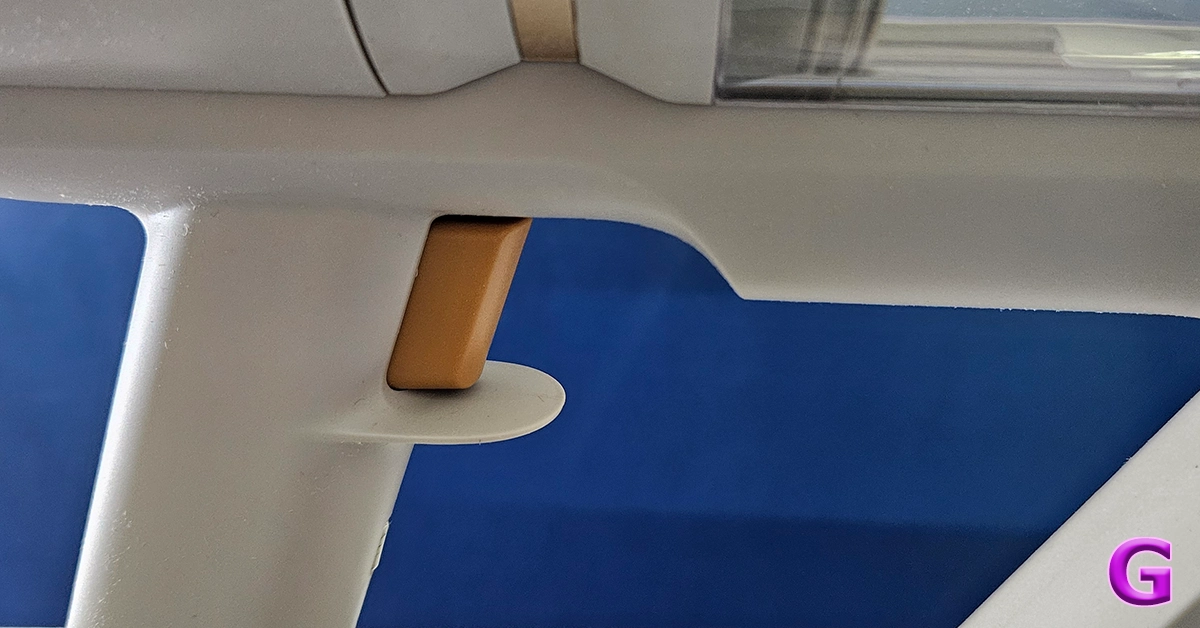
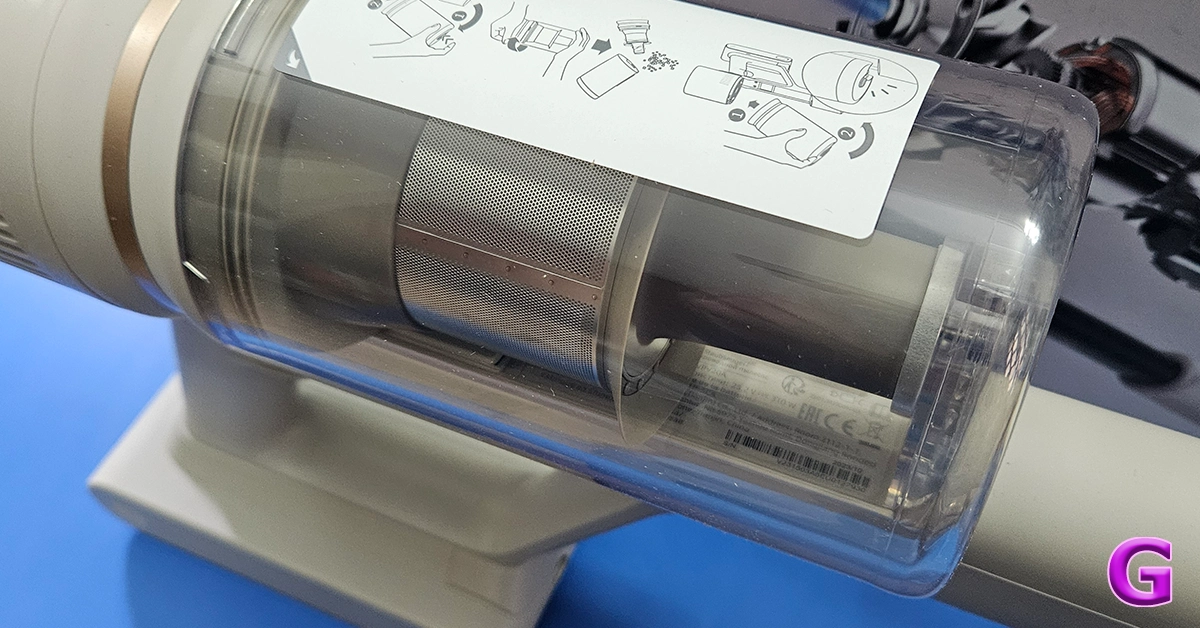
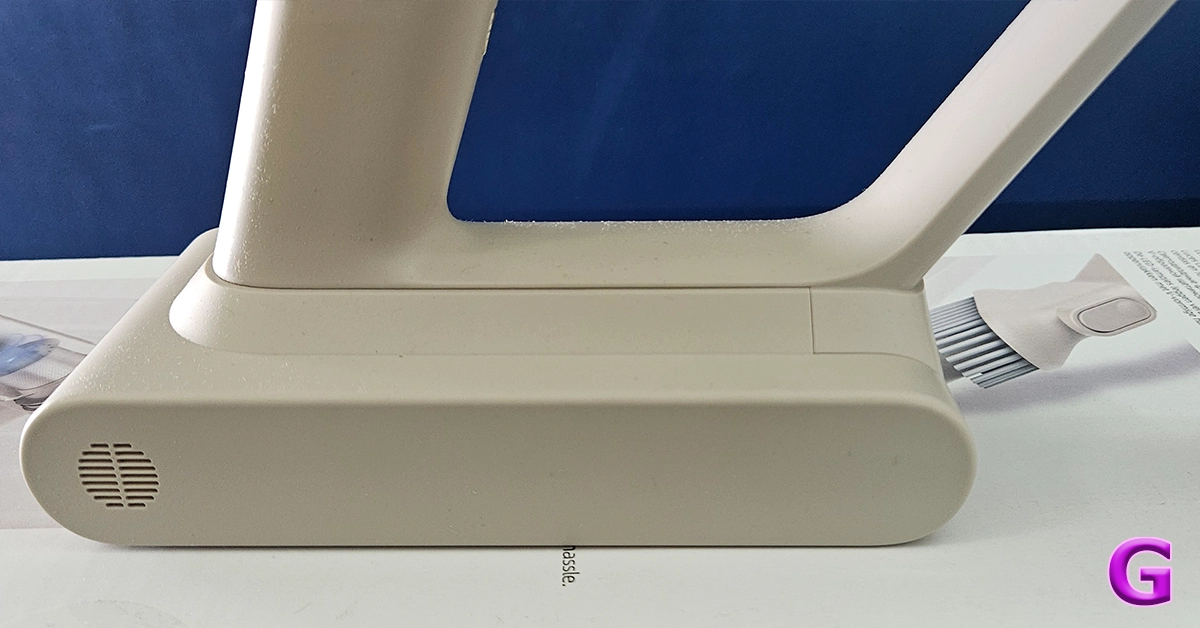
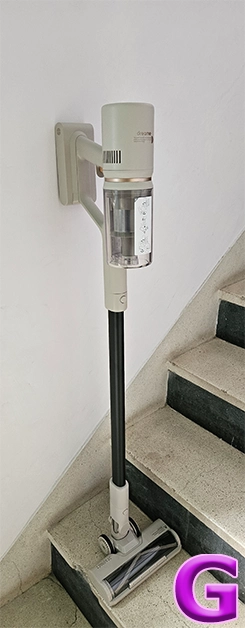
Out of the box, the Dreame U10 Vacuum Cleaner also looks like the rest of the pack. In fact, it seems a bit inspired by the Dyson series. However, it does have its distinct features. It is a trigger-style Vacuum Cleaner that when pressed sucks the dust at quite a rapid pace. The main enclosure consists of the rechargeable battery, the suction motor and also the transparent enclosure to trap all the dust and gunk.
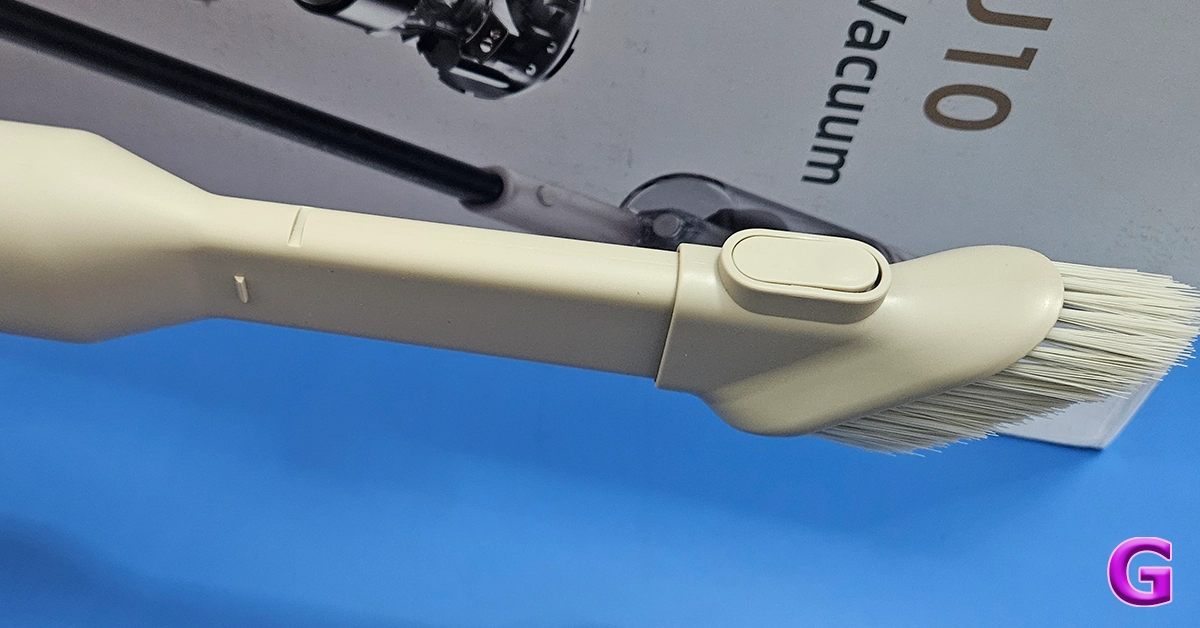
In the box, you also get two attachments and one long neck to connect the primary brush roller addon to clean hard as well carpeted floors. This also has an LED light in front of it for the user to easily see the debris and dust in front. The other one is a smaller stick-tip head which can be used for cleaning the keyboard, nooks and corners of the sofa, and also windows and blinds. With it, there is also a wall attachment on which you can hang the cleaner for easy storage.
Now here is the fun part. Indian homes get dusty very quickly as there is a lot of construction everywhere and a lot of dust seeps in. We found the Dreame U10 Vacuum Cleaner to be a very good assistant in taking care of the day-to-day sweeping needs. It charges fully in under 1 hour and the 2,500mAh battery lasted us for about 30 minutes. This is based on the fact that a 150-250 square yard area can be cleaned very easily in that much time. For larger areas, you would need to charge it once again.
There is a speed button at the back of the Dreame U10 Vacuum Cleaner, which can run the cleaner at three suction levels – slow, medium and fast. We used it to clean a lot of things and its suction power is great. 99% of the time it was able to pick up things like dust, larger particles and even hair with ease. Things like ribbons and tough threads got stuck in the floor head, but we were able to remove them easily.
The smaller attachment for sofas works better in our opinion and removed dust and slop from our living room sofas in a jiffy. There was dust stuck to it for years and with the Dreame U10 Vacuum Cleaner’s powerful motor, we were able to remove it quite rapidly.
It all boils down to the price for this one. Since it is a very new product in the market we were hoping to see a price tag of under Rs 10,000 to compete with the likes of Kent and a few others. However, the company is selling it for a little higher (Rs 11,999) in eComm places like Amazon. Is it worth the price? Since the pros outweigh the cons we will recommend it. However, there is stiff competition out there and for a few thousand more you will get extra attachments and even longer-lasting batteries from makers like Philips and even Xiaomi with its Vacuum robos. All in all, if you are just looking to clean hard floors and a little bit of sofas on a lesser budget, you can definitely pick this one up.
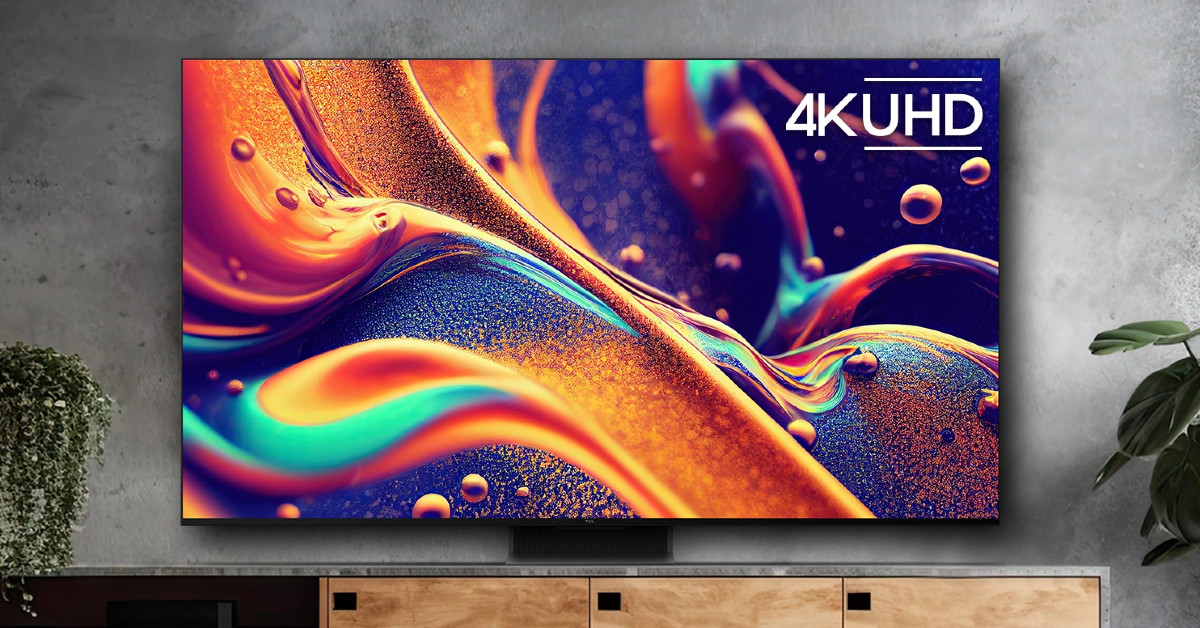
TV shopping can be an arduous task. Apart from deciding the specs you want for your TV, you also need to take into account the size of the display along with the lighting condition in your living room. There is also the question of deciding which TV fits your budget. If you’re stuck in a similar conundrum and are seeking an easy resolution, you’ve landed on the right page. Here are our picks for the top 10 4K TVs in the USA across all price segments.
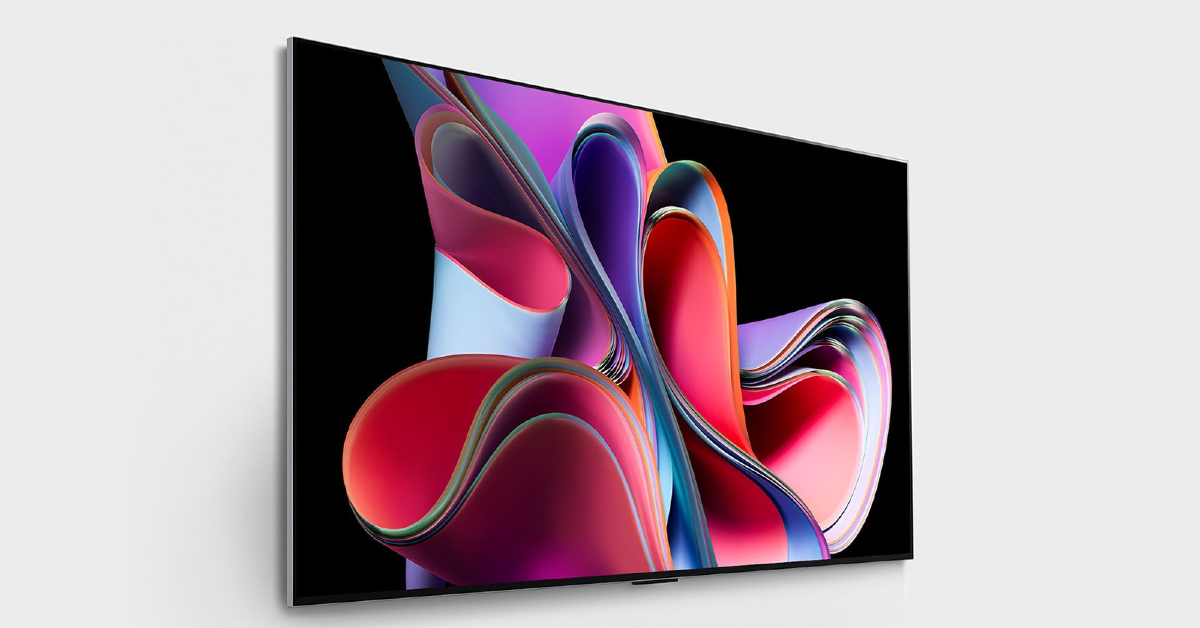
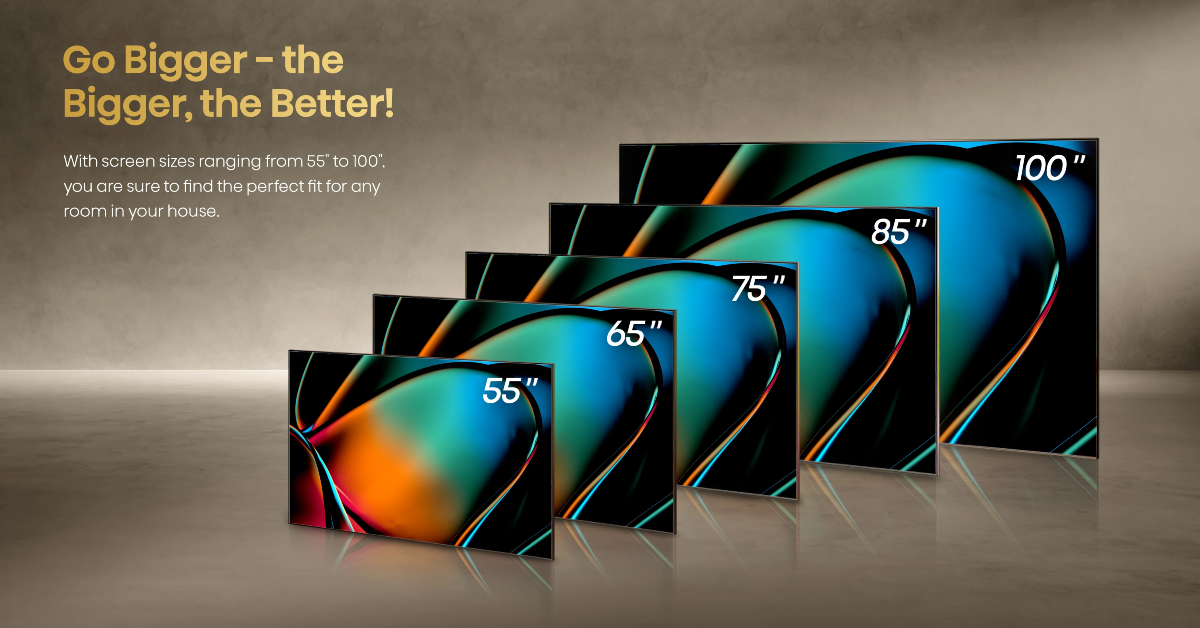
LG OLED G3 was one of the best 4K Smart TVs launched in 2023. Available in four size variants, the 55-inch G3 OLED costs $1,899 while the 83-inch variant fetches $5,299. Powered by the α9 AI Processor Gen6 chip, the LG OLED G3 produces some of the best images we’ve seen on a high-end OLED TV. The Micro Lens Display along with Brightness Booster Max tech produces up to 70% brighter images. The AI tech can sense what you’re watching and select the best picture and sound settings to maximise your viewing experience. You can hang the TV like a frame on the wall using the bracket included in the box, leaving minimal space between the TV and the wall.
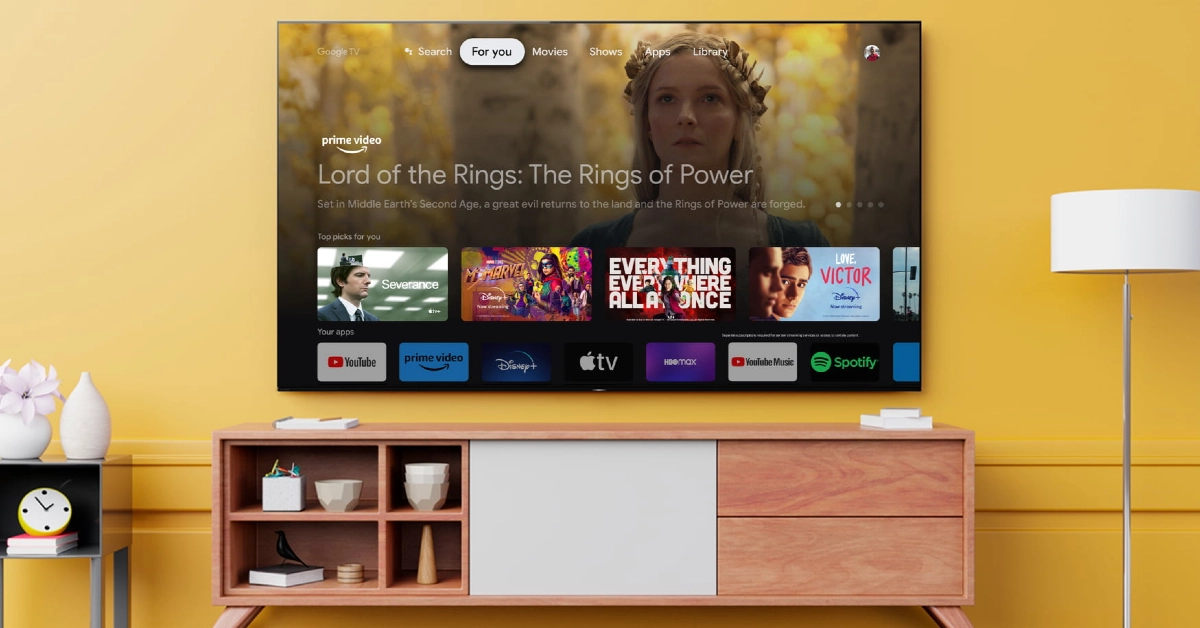
Sony’s A95L Quantum Dot OLED TV made a lot of waves last year. Considered by many to be the best 4K Smart TV in the USA now, the Sony A95L delivers stunning images with rich colours and perceptible texture. These pictures are produced with the help of the Cognitive Processor XR. The A95L applies 4K upscaling to non-4K content. The luminance is kept constant for colours from all viewing angles. The QD-OLED panel minimises the glare and reflection on the display, which makes the TV very versatile in different lighting conditions. Google TV support makes the A95L very accessible to users and brings a superior OS experience to the Smart TV.
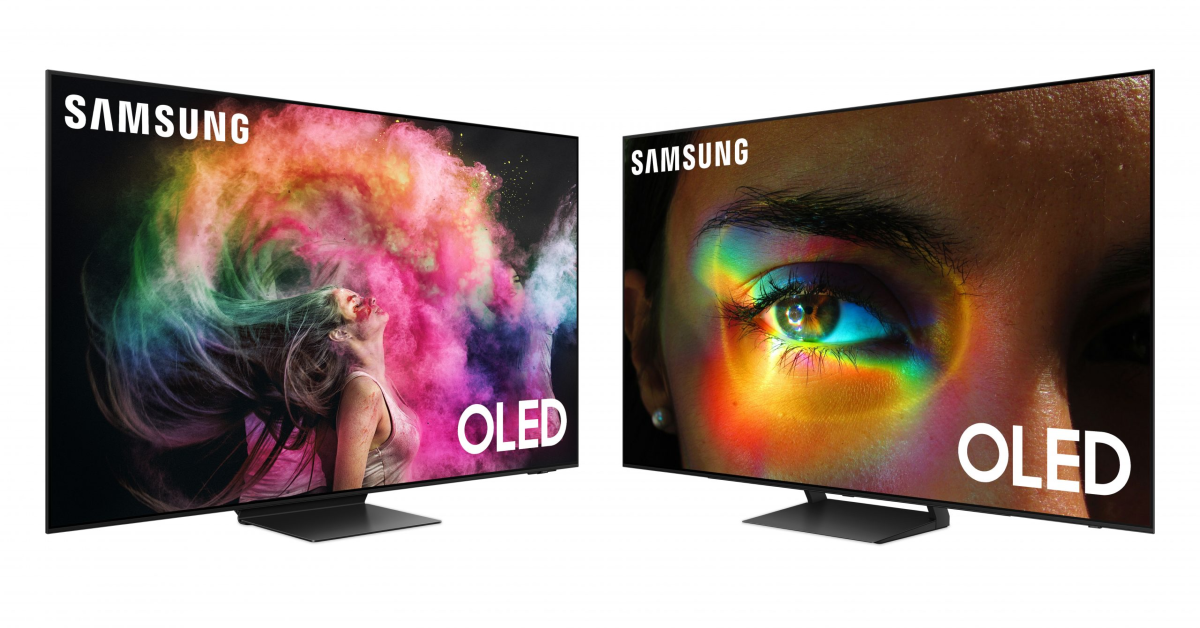
Samsung S95C is available in three size variants – 55 inches ($,1899), 65 inches ($2,699), and 77 inches ($3,899). Powering the S95C is the Neural Quantum Processor 4K which employs 20 different neural networks to produce stunning 4K images on the display. Like the Sony A95L, the Samsung S95C also rocks the QD-OLED display. The tiny Quantum Dots deliver 30% brighter visuals. Dolby Atmos and Object Tracking Sound+ tech fill the room with enveloping surround sound, centring the viewer and elevating the audio experience. The Samsung One Connect box that comes with the TV reduces the mess created by wires. You can connect all the input wires to this box which then connects to the TV.
Here is the price breakdown for all size variants of the Sony A80L.
55 inches: $1,699
65 inches: $,1999
77 inches: $2,999
83 inches: $4,799
The OLED panel on the A80L produces stunning, deep blacks and vivid, punchy colours. It is powered by Cognitive Processor XR, the same engine as its Quantum Dot cousin (Sony A95L). Apart from being a visual delight, the Sony A80L is also a brilliant TV for gaming. Being a Sony product, the A80L is perfect for your PS5. The TV automatically switches to Game Mode when you load a gaming title. While watching movies, the A80L reverts to Standard Mode. The display supports 4K/120fps and has a variable refresh rate along with an Auto Low Latency Mode.
TCL’s flagship QM8 Series starts at $1,699 for the 55-inch and goes up to $11,999 for the 98-inch variant. For a QLED TV, the TCL QM8 is priced very aggressively. This Smart TV supports 4K resolution and reaches up to 2,000 nits of peak brightness. A refresh rate of 120Hz ensures smooth motion on the display, ideal for everything from gaming to live sports. The 2,300 local dimming zones adapt to the content displayed on the screen, producing rich and deep blacks without image blooming. Handling the OS duties on this TV is the Google TV Smart OS.
Prices for Samsung S90C start at $1,599 for the 55-inch variant and go up to $3,499 for the 83-inch display. The Neural Quantum Processor powering the S90C can non-4K content to 4K resolution with ease. This is carried out using 20 specialized neural networks. The AI deep learning tech is also used to analyse every scene and detect the level of brightness required by the different areas on the screen. Samsung S90C also has a unique gaming hub that categorises all your titles, apps, and gaming devices in one place.
Hisense U8K is our value-for-money pick for this list. It is available in four size variants – 55 inches ($749.99), 65 inches ($999.99), 75 inches ($1,299.99), and 85 inches ($1,999.99). Equipped with the Mini-LED Pro tech, the Hisense U8K can deliver bright, lucid, and detailed images. The TV’s precise local dimming helps in controlling the backlight and brings forth an elevated HDR experience. Producing the audio output on the Hisense U8K is a 5-speaker 2.1.2 multi-channel surround system. It delivers a peak sound output of 50W.
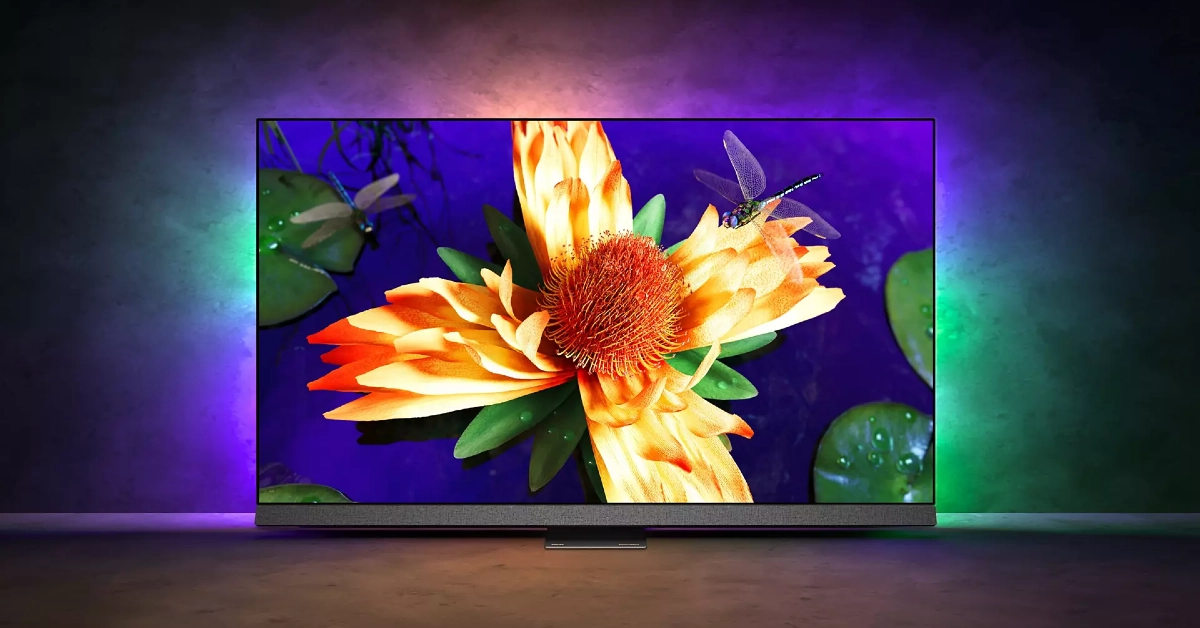
Philips OLED 907 sports a 4K resolution and 120Hz refresh rate. Delivering the ultra HD images on this display is the P5 AI Perfect Picture Engine. One of our favourite visual aspects of this TV is the IMAX Enhanced Mode which creates a special cinematic experience for movies that were originally made to play in IMAX theatres. Handling the OS duties on the Philips OLED 907 is Android TV 11. A 16GB internal memory capacity is optimum for downloading all your favourite streaming apps along with other lifestyle content. The audio output on this TV is provided by Bowers & Wilkins. The 3.1 channel delivers a peak audio output of 80 Watts.
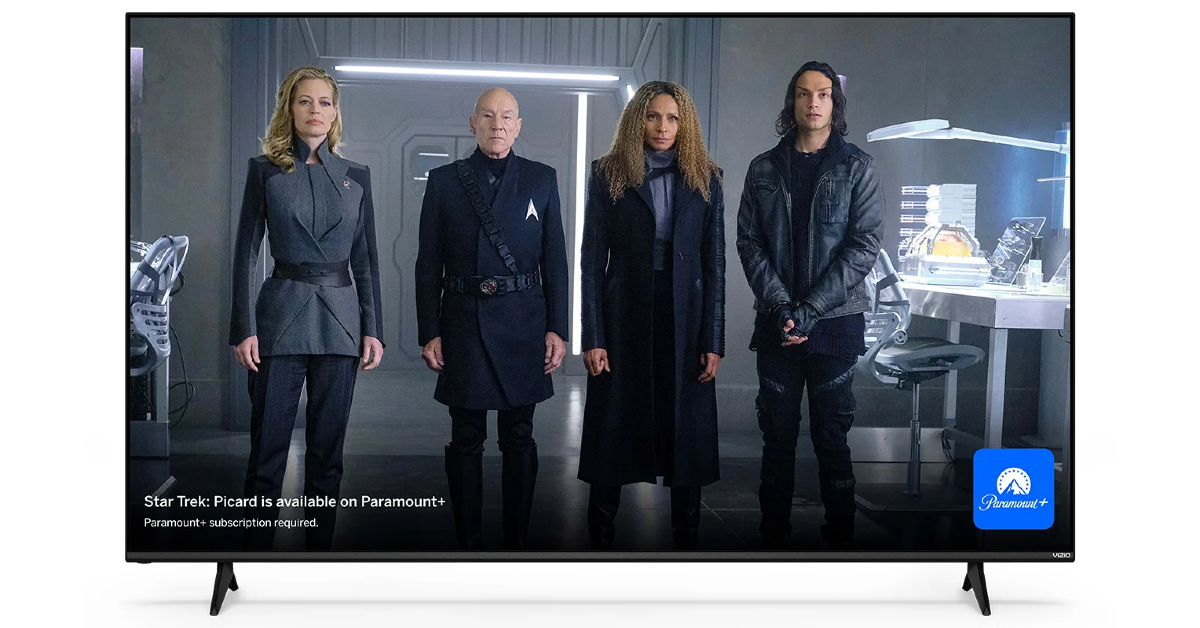
Vizio V Series is one of the most affordable 4K Smart TVs you can buy in the USA right now. Prices for this Smart TV start at $248 for the 43-inch variant and go up to $628 for the 70-inch unit. The 4K panel on this TV supports Dolby Vision HDR. The 60Hz refresh rate is optimum for watching content across all the major OTT platforms. There are 3 2.1 HDMI ports on this TV. Talking about connectivity, the V Series also supports WiFi 6E. There is one Ethernet at the back of the TV and one USB port to the side. The sound output on this TV is delivered by two 10W digital audio amplifiers.
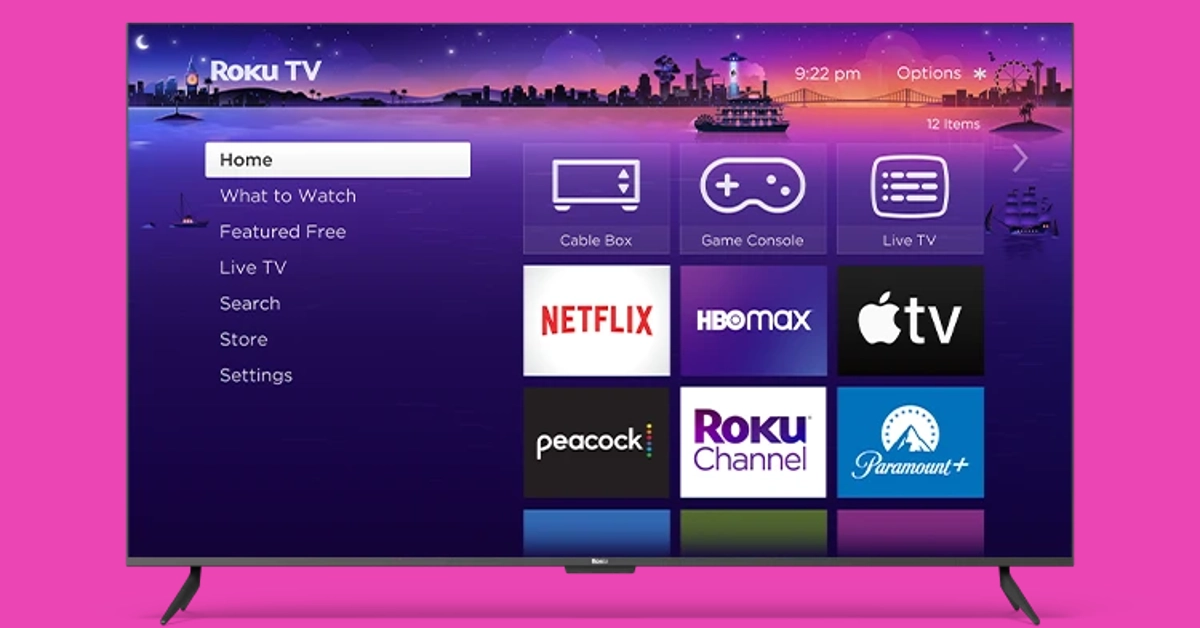
Ending this list is another budget pick under $300. The Roku Select Series starts at S229 for the 43-inch model and goes up to $649 for the 75-inch unit. If you’re on a tight budget, this is one of the best deals you can get right now on a 4K Smart TV in the USA. The 4K panel on Roku’s Select line of TV supports HDR10+, bringing a vivid colour palette and superior viewing experience to your living room. With automatic onboard, Roku’s Smart TV can adjust itself to the lighting of the room. This TV works with AirPlay, Apple Home, Alexa, and Google Home. One of the cooler features of the Roku Select Series is the headphone port on its remote, which allows for discreet viewing sessions without disturbing anyone around you.
These are our picks for the top 10 4K TVs you can buy in the USA right now. These picks cover all the major categories and price points. If you think we missed out on a TV that deserves a spot on this list, let us know in the comments!
Poco X6 5G 12GB RAM with 256GB storage is currently up for sale in India.
The new variant went on sale after it was launched last month.
The handset includes a triple rear camera setup and a 120Hz display.
Poco X6 5G which launched in India earlier last month was only made available in India in two different configurations. One month after its release the company brought another 12GB RAM with a 256GB storage option to the market, which is currently available for purchase. Poco X6 5G is powered by the Snapdragon 7s Gen 2 chip. It runs on new HyperOS software and supports 67W fast charging.
In This Article
Poco X6 5G 12GB RAM with 256GB storage price in India
Poco X6 5G 12GB RAM with 256GB storage variant can be purchased at Rs 23,999 in India. The company is also offering a discount of Rs 3,000 if it is purchased via ICICI, HDFC, Axis and SBI bank cards or EMI transactions. The phone comes in two colour options Mirror Black and Snowstorm White.
Poco X6 also comes with 8GB RAM with 256GB storage at Rs 21,999. Whereas the top of the line 12GB RAM with 512GB storage option comes with a price tag of Rs 24,999.
The Poco X6 5G features a 6.67-inch AMOLED display with a resolution of 1.5K – 2712 x 1220. The display panel has a screen-to-body ratio of 94.27% and a pixel density of 446 PPI. It has a colour gamut of 100% DCI-P3 (typ), showcasing a colour depth of over 68.7 Billion+ colours. The display also features a refresh rate of 120Hz and supports Dolby Vision. The device runs on the new HyperOS on top of Android 14 and is powered by Snapdragon 7s Gen 2 SoC with up to 12GB RAM and 512GB storage.
The handset comes with a triple rear camera setup that includes a 64-megapixel main camera lens with OIS, an 8-megapixel ultra-wide-angle lens and a 2-megapixel macro camera. For selfies, the handset includes a 16-megapixel front-facing camera.
The Poco X6 5G is backed by a 5,100mAh battery with 67W fast charging support. For connectivity, there is 5G, 4G LTE, Bluetooth, NFC, GPS, and a USB Type-C port for charging. The 3.5mm jack is missing on the pro model whereas the standard model has. The sensors on the phones include an accelerometer, gyroscope, proximity sensor and e-compass.

















 Step 4: Long press