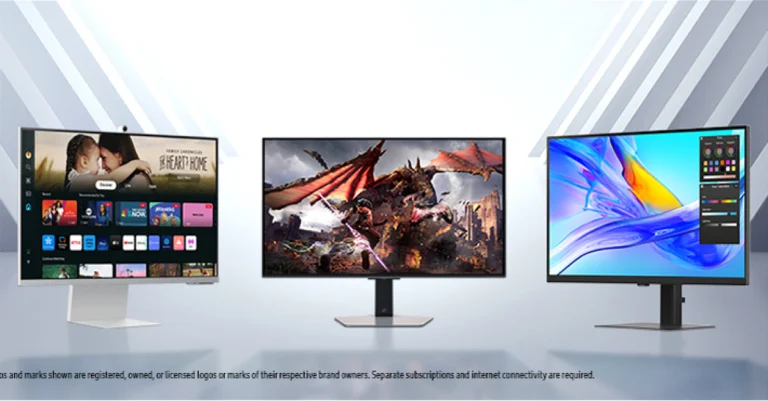
Samsung has announced their Odyssey OLED gaming monitors, ViewFinity monitors, and Smart monitors for 2024. These monitors come with AI capabilities and improved entertainment options. All of the Odyssey OLED G6, Smart Monitor M8, and ViewFinity devices in the Smart Monitor family are AI-powered for improved connectivity and entertainment. Next-generation OLED experiences are guaranteed by Samsung OLED Safeguard+, a new proprietary technology. It also prevents burn-in.
Samsung Odyssey OLED Series
Odyssey OLED G6
The Odyssey OLED G6, a 27-inch QHD monitor with a 16:9 aspect ratio and a 360Hz refresh rate, was introduced by Samsung. The monitor has Samsung’s own OLED Safeguard+ burn-in prevention technology, which applies a pulsating heat pipe to the display to stop burn-in. Core temperature is lowered via the Dynamic Cooling System, which disperses heat five times more efficiently than the previous graphite sheet method. In order to avoid burn-in, the display additionally recognises static images and automatically lowers their brightness. With a brightness of 250 nits, the monitor offers unrivalled OLED picture quality, while FreeSync Premium Pro maintains GPU and display panel synchronisation to prevent screen tearing. The immersive viewing experience is guaranteed by Samsung’s OLED Glare Free technology, which maintains colour integrity and minimises reflections without sacrificing image clarity. Core Lighting+ and the monitor’s sleek aluminium design improve gaming and entertainment. Extended periods of time are more comfortable with the ergonomic stand.
The Odyssey OLED G6 in Black colour will be available starting at INR 92399.
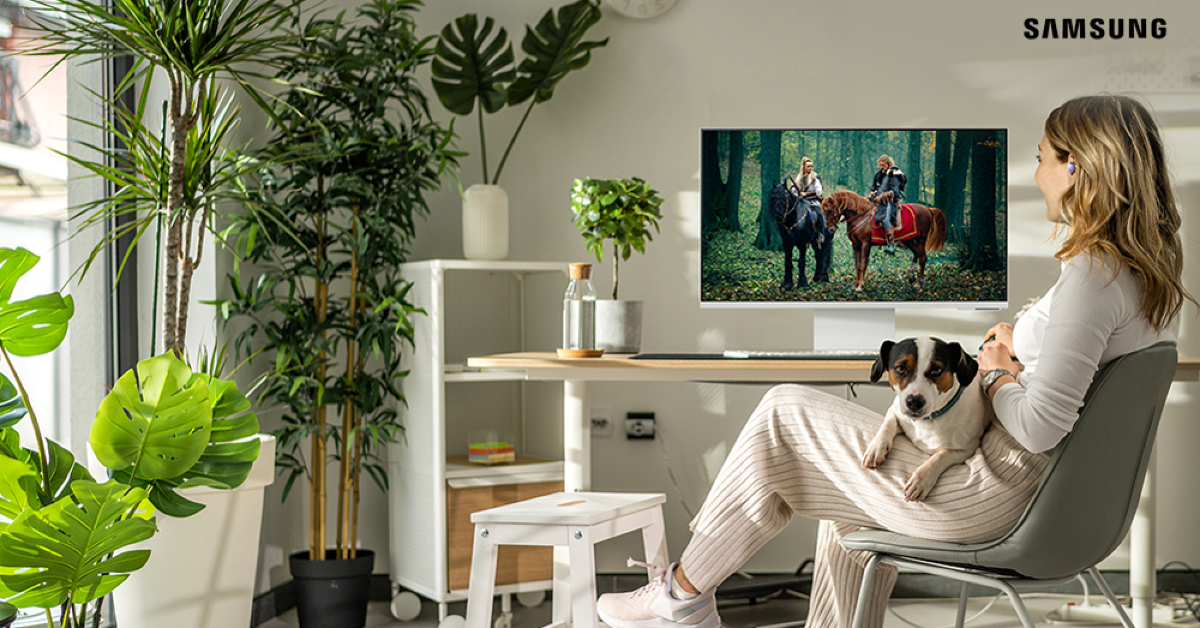
The updated Smart Monitor lineup includes the M8, M7, and M5 models, offering a comprehensive multi-device experience for smarter entertainment and productivity. The M5 versions have FHD resolution and a brightness of 250 nits and a GtG response time of 4ms, while the M7 models have 4K UHD resolution and a brightness of 300 nits and a GtG response time of 4ms. M7 is available in 32-inch and 43-inch sizes whereas M5 is available in 27-inch and 32-inch screen sizes.
The M8 has Active Voice Amplifier Pro, which analyses background noise to optimise dialogue, and AI-powered upscaling, which lets lower-quality video reach nearly 4K. In addition, the M8 has 360 Audio Mode, which creates an immersive audio experience when used with Galaxy Buds. With Samsung Dex, video calls may be made via mobile applications thanks to the integrated SlimFit Camera. Without requiring the use of a PC or other connections, smart TV apps and Samsung TV Plus offer immediate access to live content and streaming services.
The Smart Monitor series will be available at a starting price of INR 15399
ViewFinity Series
ViewFinity Series
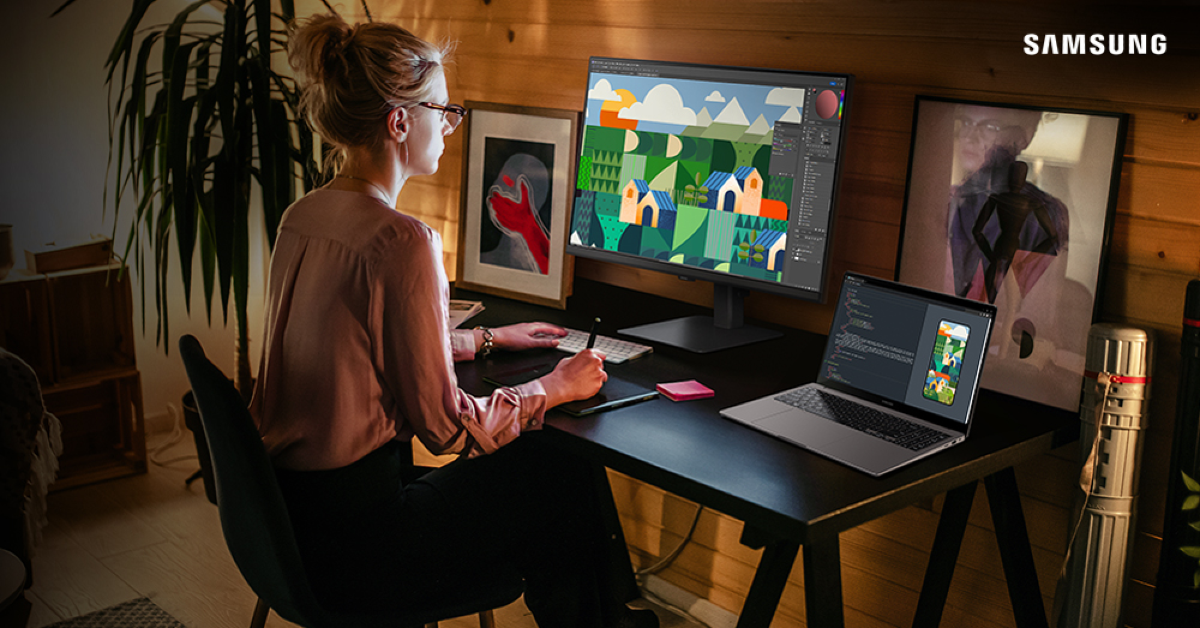
The ViewFinity lineup, including the ViewFinity S8, S7, and S6 models, is designed for creators and professionals. These monitors support HDR10 and 1 billion colors, ensuring accurate color representation. They also incorporate TÜV-Rheinland-certified Intelligent Eye Care features to alleviate eye strain during extended work periods. The S8 offers 27″ and 32″ screens with 4K UHD resolution, 60Hz refresh rate, and 350 nits brightness. The S80UD model features a KVM switch for easy connection and charging, while the S7 offers 27″ and 32″ screens with UHD resolution, 350 nits brightness, and a 60Hz refresh rate. The S6 offers 24″, 27″, and 32″ options with QHD resolution, 100Hz refresh rate, and 350 nits brightness. The S60UD model includes a built-in KVM switch and a USB-C port for up to 90W charging.
The Viewfinity range of monitors will be available at a starting price of INR 21449
According to Samsung, all the monitors are available on Samsung e-store. It can also be purchased through Amazon, Flipkart and all leading retail stores. When bought from the Samsung e-store between June 5 and June 11, the Odyssey OLED G6 and Smart Monitor series will be offered at no cost EMI with an instant cart discount of up to INR 2750. Customers who purchase the Smart Monitor M8 from the Samsung e-store will receive a guaranteed Samsung Sound Bar, and those who purchase the OLED G6 will receive a guaranteed Samsung Galaxy Buds 2 Pro.
These models are discounted by up to INR 11100 on Amazon and Flipkart.
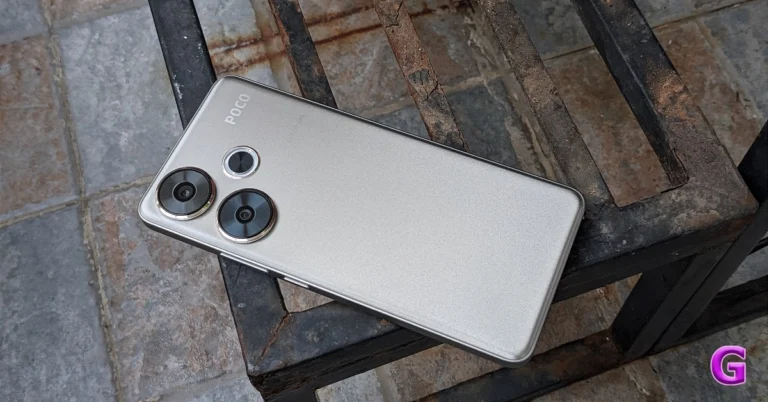
Poco, a subsidiary of Xiaomi, recently introduced the Poco F6 5G in India. We have been using the smartphone for over a week as our everyday driver. A point to note here is that it is one of the first smartphones to come with the Snapdragon 8s Gen 3 chipset. Given that it starts at Rs 27,999, it can compete with its rival in this price bracket and has some of the greatest specs available on the market right now. Furthermore, Poco F6 5G has a 5,000mAh battery with support for 90W fast charging, a 50-megapixel dual rear camera configuration, a 20-megapixel OV20B front camera, and a 1.5K OLED display with a refresh rate of 120Hz, among many other features. It is recommended that you read this review before purchasing since we took into account both positive and not-so-great experiences.
Poco F6 5G Review: Design and Display
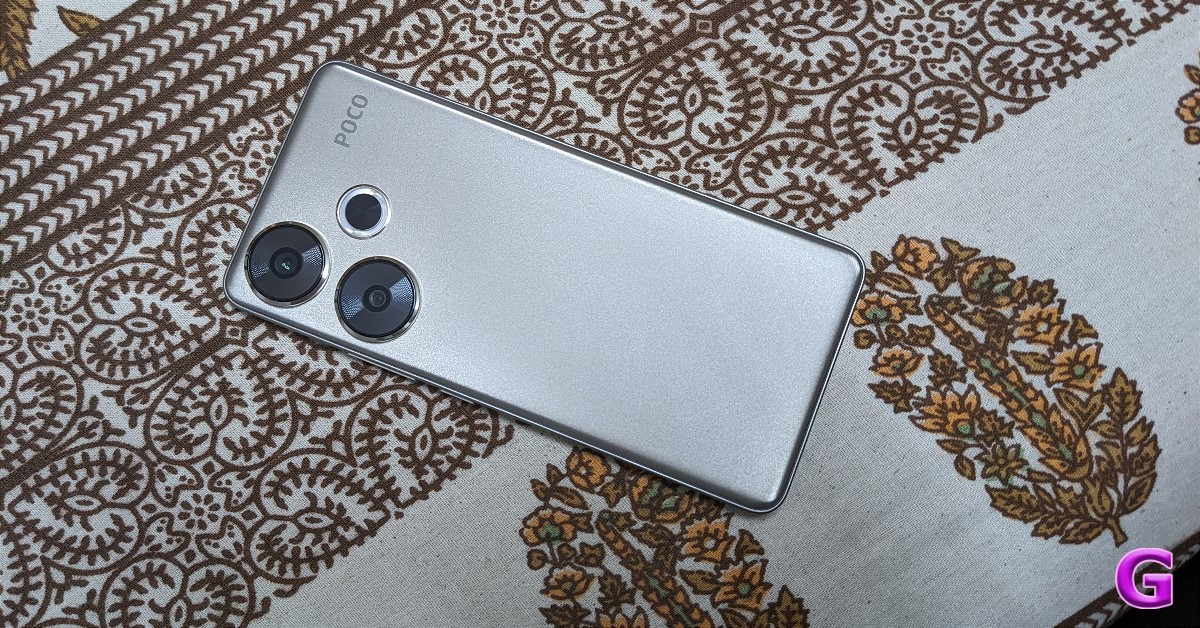
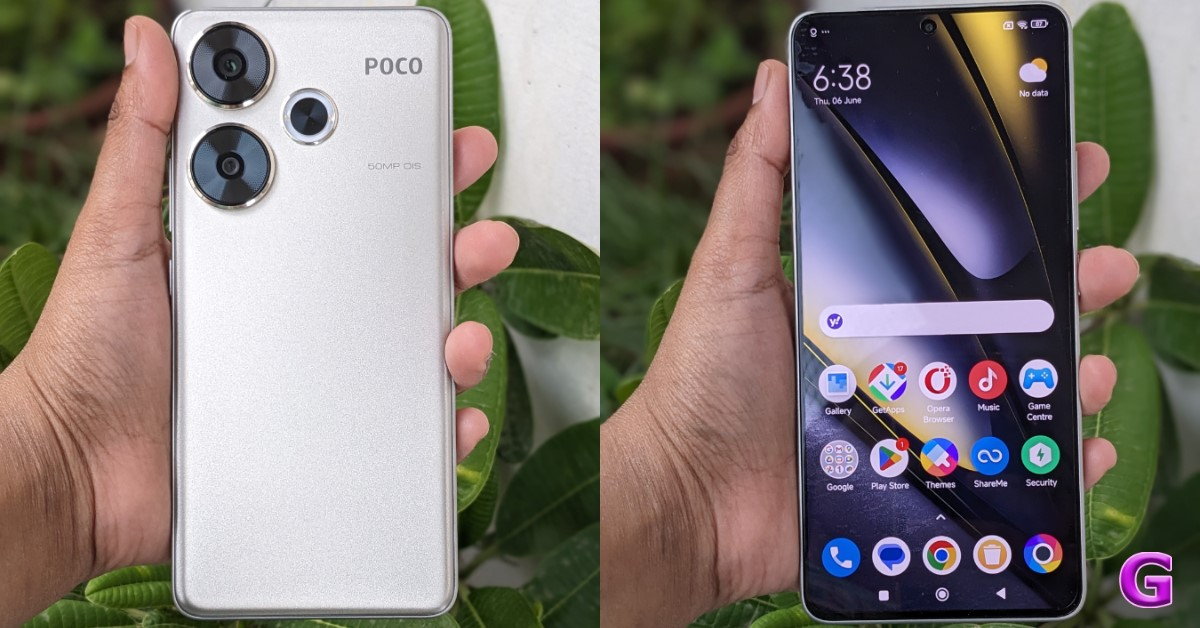
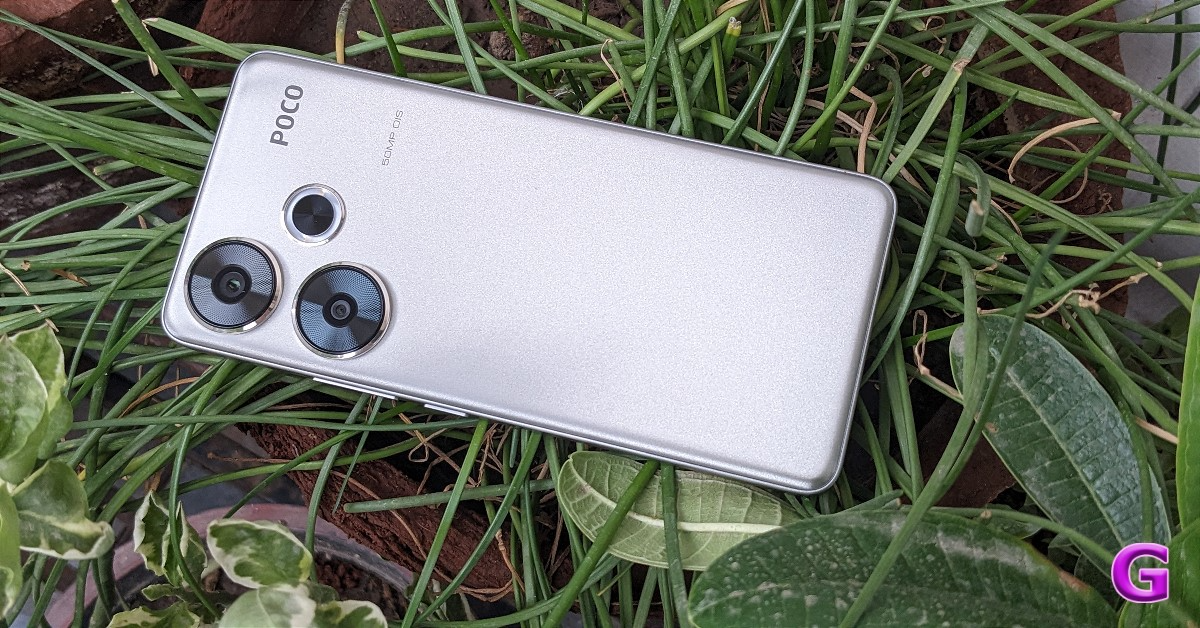
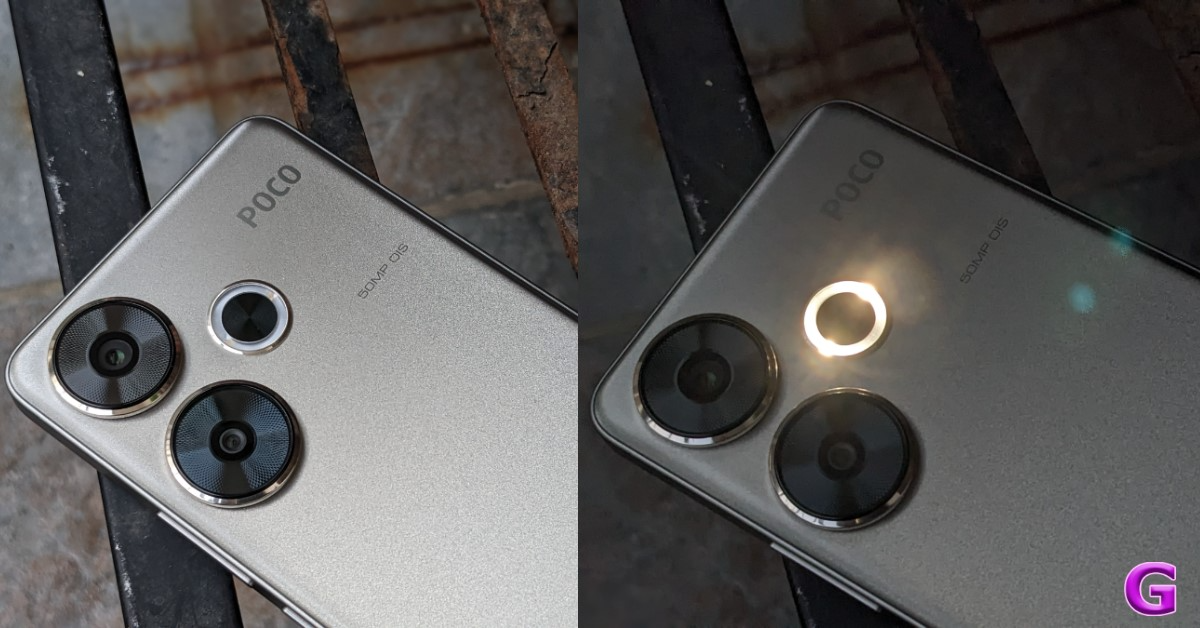
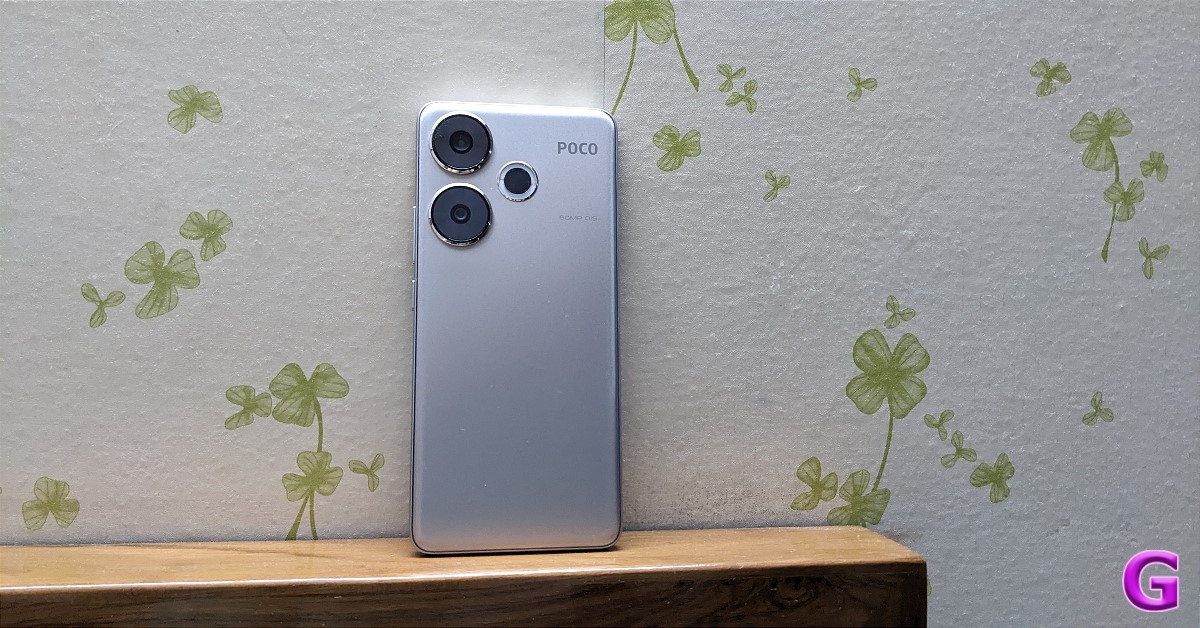
The Poco F6 5G is available in titanium and black colour options. We have the gorgeous-looking titanium colour option for this review. Fingerprints and smudges are not attracted to the matte finish. However, the plastic rear panel and the black frame don’t feel particularly high-end. We wish Poco had chosen glass or metal, but the advantage of the polycarbonate is how light in weight the device is. It is also incredibly ergonomic and feels feathery in the hands. The phone’s dual camera arrangement is located on its back; each camera has huge rings around it and the array is accompanied by a flash.
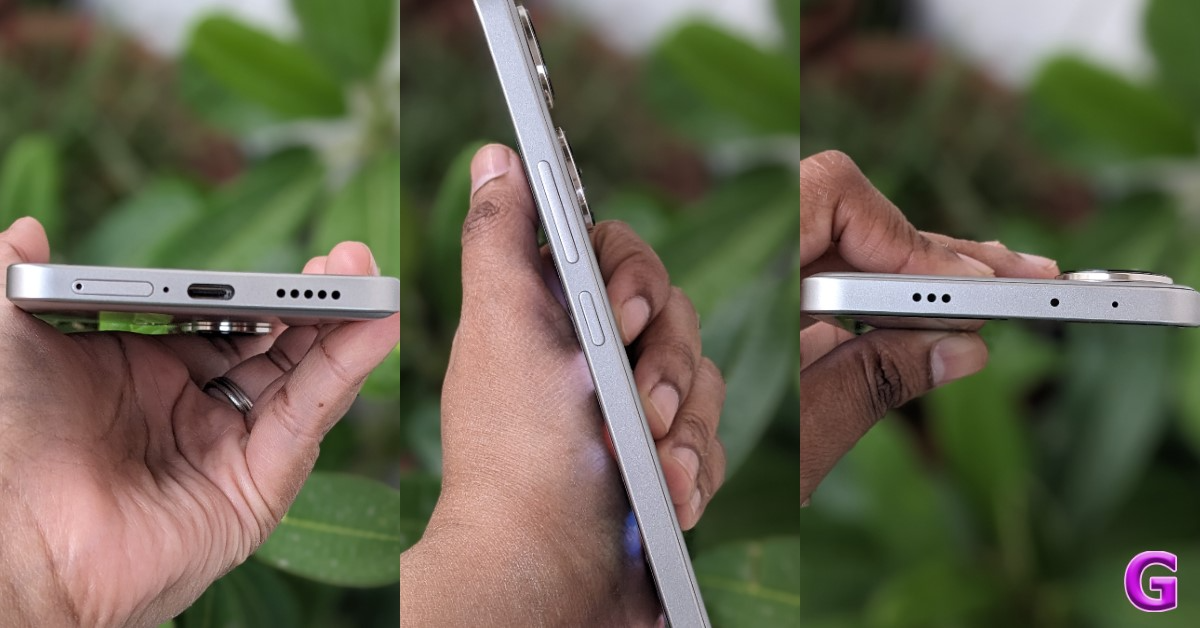
The smartphone has an IR blaster and a speaker on top of the frame. Power and volume rockers are on the right side. Then, a SIM tray, a USB Type C port, a microphone, and a secondary down-firing speaker are located at the bottom. The slot can accommodate two nano SIM cards; unfortunately, SD card expansion is not supported, thus if at all possible, we strongly advise choosing the larger memory option. The best part is that 256GB of storage is included with even the most basic phone model. Well done, Poco.
It should be noted that the Poco F6 5G lacks the 3.5mm audio connector and triple rear camera system found on the Poco F5(Review).
The phone is also certified IP64, meaning it is resistant to dust and water. With a slightly thicker chin, the front panel’s bezels are generally very narrow.
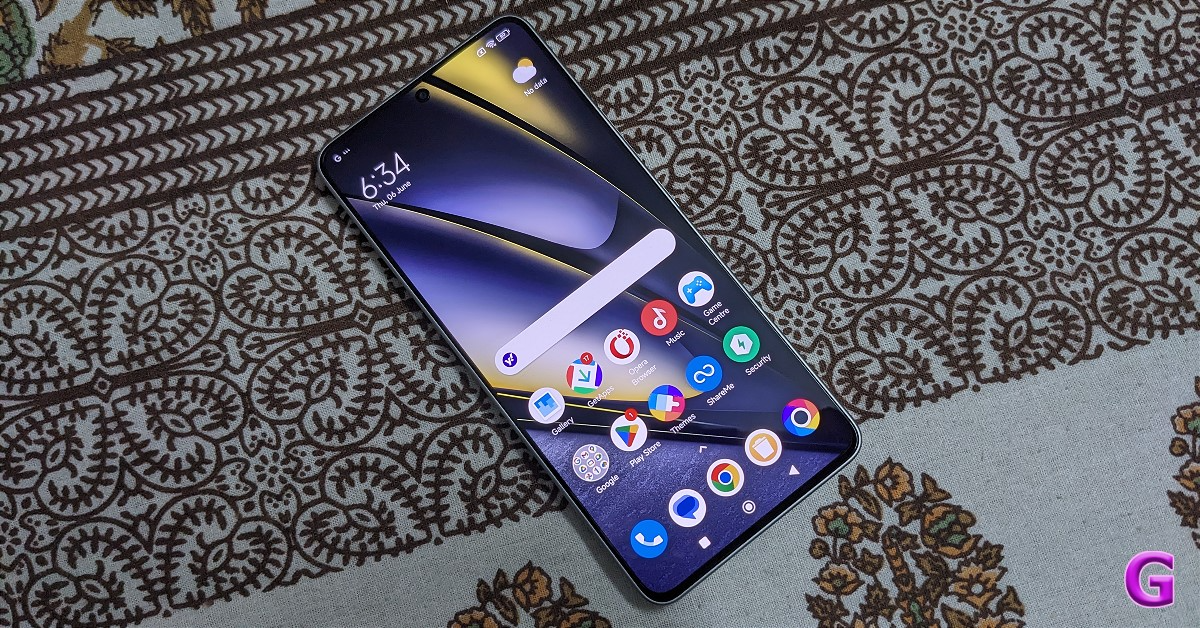
A 6.67-inch 1.5K AMOLED display with 1,220×2,712 pixel resolution is included with the Poco F6 5G. The panel can support 446 ppi pixel density and a refresh rate of 120Hz out of the box. It has a 100% DCIP3 colour gamut and can produce 68 billion colours. The screen supports Widevine L1, HDR10+, Dolby Vision, and a maximum brightness of 2,400 nits. Additionally, Corning Gorilla Glass Victus Protection is included, which is a fairly reliable way to guard against unintentional damages like cracking and scratching.
The user experience is exceptionally fluid because of the 120 Hz refresh rate. It is incredibly user-friendly and highly optimised. Although the phone has a max brightness of 2,400 nits, we tested it outdoors as well, and it is not as bright as we would like it to be. Though functional and passable, we still wish it had been a bit brighter.
Next, it has an in-display fingerprint sensor, which is accurate and dependable but, again, we won’t say it is the fastest because it takes a few extra mili-seconds to unlock.
It is a complete joy to watch TV shows and movies with hardly any side bezels obstructing the view. The content is cutting-edge and visually stunning. It also has Dolby Vision compatibility, so you can watch high-definition content on Netflix and Prime Video without any issues. The content also looks amazing because HDR support is there. The brightness of the panel is at its best here. Everything appears amazing.
The audio quality is fantastic, and the two stereo speaker setup supports Dolby Atmos. The audio quality is very clear and loud even at super high volumes. You can enjoy a surround sound experience when watching movies thanks to Dolby Atmos support.
Getting to the performance now. The Poco F6 5G is the nation’s first smartphone equipped with a Snapdragon 8s Gen 3 CPU. It’s been great so far in the few days we’ve used it. One of the most potent phones in its class, the chipset takes its architectural cues from the flagship Snapdragon 8 Gen 3 SoC, which is far more powerful. In terms of daily use, it is extremely responsive.
The device we have has 512GB of UFS 4.0 storage and 12GB of LPPDDR5x RAM. It makes it easier to launch apps almost swiftly; multitasking is a delight, and the performance is wonderfully smooth.
In terms of gaming performance, the Snapdragon 8s Gen 3 is exceptional. We played BGMI on this and at roughly 90 frames per second, it performed incredibly well. Every action and movement was extremely flawless. Also, remember to activate Game Turbo from the sidebar menu. This will significantly improve your gaming experience.
The phone did heat up on some counts. However, the liquid cool tech 4.0—basically, good thermals—ensures that it doesn’t get too hot and doesn’t have any throttling problems. As soon as you shut down the game or app, the phone cools down rapidly.
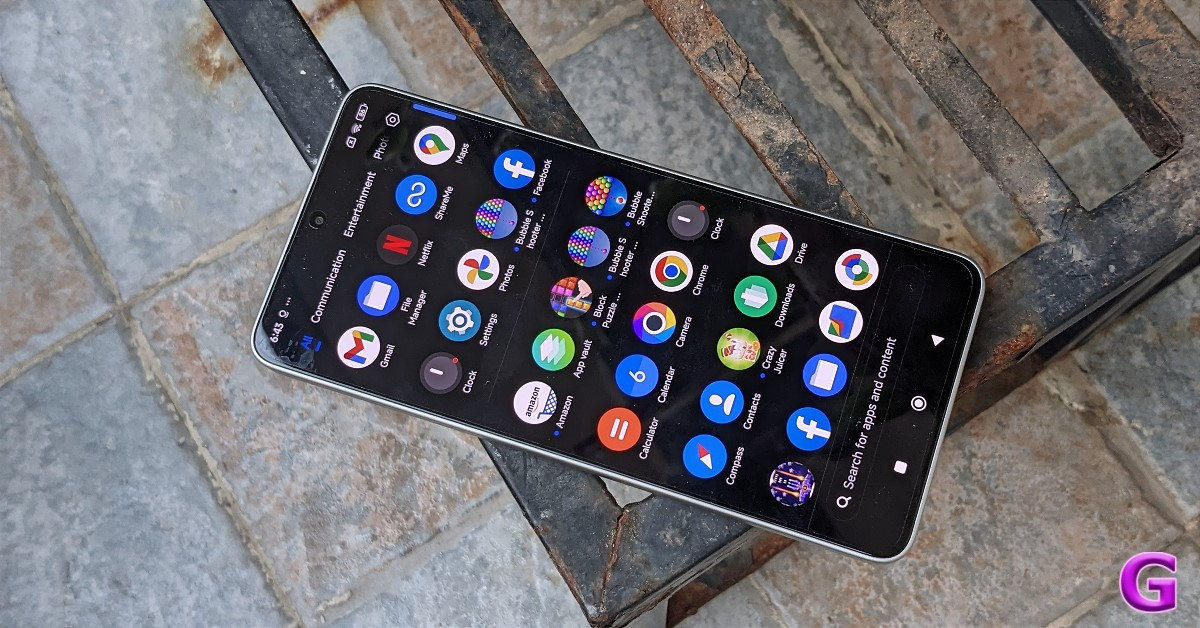
The phone is expected to come with three years of software upgrades and four years of security fixes. It ships with HyperOS with Android 14. Everything is quick and responsive on HyperOS since it is so well optimised. The Mi UI dialer lets you record calls without making any announcements and you have plenty of lock screen settings. However, the app launch is crammed with bloatware games and apps as usual, giving the impression that it is extremely congested. The good news is that you can get rid of any apps you don’t require by simply uninstalling.
The IR blaster lets you control your smart home devices directly from the Mi remote app, including AC, TV, lights, etc.
Poco has also improved the camera configuration. Poco claims that even though there is now one less back camera, the two that are available are superior to its predecessor Poco F5. The Poco F6 thus has two cameras on its back: an 8-megapixel Sony IMX355 ultra-wide-angle camera with a 119-degree field of view and a 50-megapixel 1/1.9-inch Sony IMX882 sensor with OIS and EIS capability. For selfies and making video calls, there is a 20-megapixel OV20B front-facing camera.
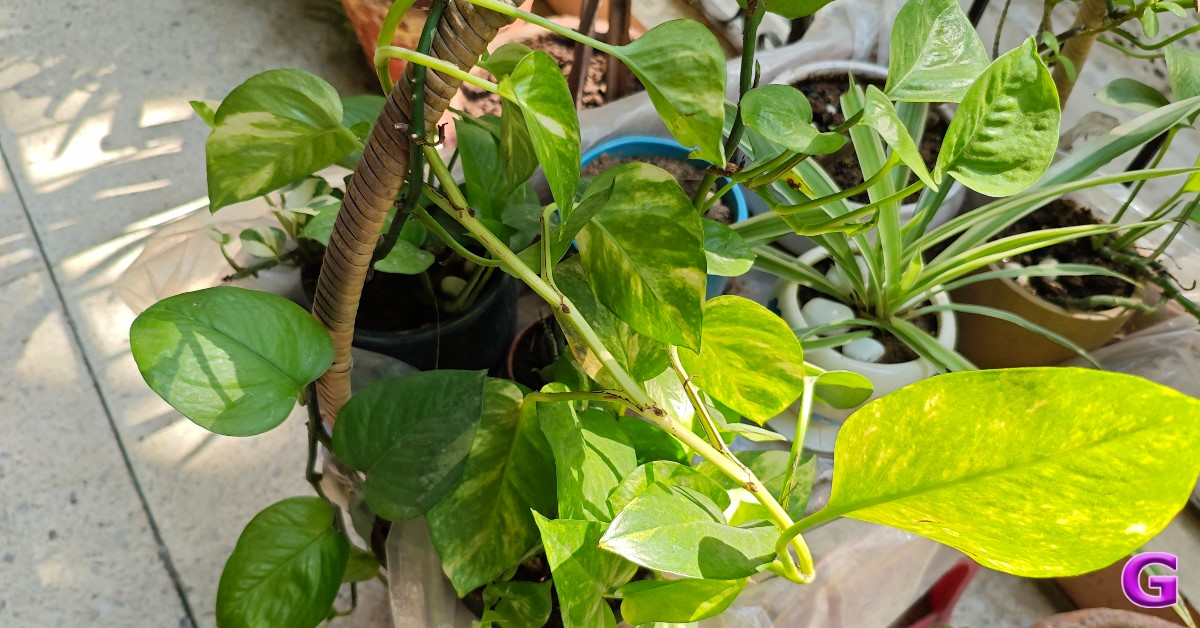
OIS support helped to produce sharp photos, which is why the primary sensor’s images looked so beautiful. This phone can take some really good pictures when the lighting is right. The images feature crisp details in the shadows and a great dynamic range. The photographs look amazing, even though the colour tones are warmer than usual. We also shot a few photos in low light and indoor lighting. Without using the night mode, we found that the OIS’s photos had enough details and a balanced exposure, which proves that it has been a useful tool for low-light shooting.
portrait
Then, there are numerous preset filters available. We are very happy with the ultra-wide photos. The detail levels and colour reproductions are generally good. This has a very clear dynamic range with good clarity.
The 20-megapixel front camera produces clear selfies with good colour reproduction. It is ideal for group selfies because it can capture wide images. The portraits had room for improvement. The edge detection is accurate, though.
With the back camera, 4K videos may be recorded at 30 frames per second. The videos are stable and of an acceptable standard because of the outstanding work of the OIS. It kept an adequate amount of dynamic range and detail as well. Video recording in Full HD at 30 frames per second is possible with the front camera. We were hoping for a 4K video recording feature, but alas, none exists. That being said, the FHD@30fps recording is also fairly nice.
When it comes to the battery, we have a 5,000mAh one that will easily last you through a full day of intensive use. It’s great that a 120W charger is included with the Poco F6 5G, but it is limited to 90W and takes 35 to 40 minutes to fully charge, which is great if you are in a rush and want full charge in a jiffy. Saying that, having support for full 120W charging would have been the icing on the cake. We are not whining, but 90-watt charging proves useful to all of us.
Verdict
We can assure you that this Poco F-series phone will live up to the hype when it comes to gaming. Incredible experience playing games! Everything you could desire in a premium flagship phone is included in the Poco F6 5G. Whether it comes to games, cameras, displays, designs, ergonomics, or just being flawless, the device is excellent in every area. But toughness could have been achieved with slightly better-built material. Though its absence can be attributed to the competitive pricing, an aluminium frame would have improved things significantly.
In terms of camera quality, we often don’t suggest Poco phones, but the Poco F6 does a good job.
If we were forced to pick faults, we would prefer if 4K video recording was supported by the front camera. Despite its few shortcomings, the Poco F6 5G is a fantastic device considering its pricing.
Garena Free Fire Max is a battle royale game with regular awards and tournaments to keep players interested. If you play Garena Free Fire, you should be aware of the redeem codes that are released on a daily basis. However, because the battle royale game is banned in India, players from other countries can use the Free Fire Redeem codes daily. If you’re unfamiliar with the Garena Free Fire redeem codes or don’t know how to get them, we’ve put together a step-by-step guide to help you redeem them. Check out Garena Free Fire Max Redeem Codes for 7 June 2024.
The Free Fire Max redeem codes are a great way to get free stuff. These are 12-digit codes that contain alphabets and numbers, as well as an expiration date and time. Because the Garena FF redeem codes cannot be used more than once, you should hurry to the redemption page to claim your free reward before someone else does. To get a free reward, all you have to do is go to reward.ff.garena.com/en, which is the official redemption page. Also, keep an eye on this space for daily updates on Garena Free Fire Max redemption codes and rewards.
7 June 2024: New Amazon Quiz is now available. Customers from different parts of the country are participating in the daily quiz. The quiz starts at midnight today and will be live until 11:59 PM tonight. By successfully answering every question, participants in the quiz have the chance to win wonderful rewards. A Rs 500 Amazon Pay Balance is up for grabs to participants today.
One wrong answer could eliminate you from the quiz. You have a chance to win Rs 500 Amazon Pay Balance if you successfully answer every question. Users of the app only have the opportunity to take the quiz. Check Out 7 June 2024 Amazon Quiz Answers.
Only app users are eligible to play the Amazon quiz every morning from 12 AM to 11:59 PM. The quiz is not available on the desktop. For those who are unaware of how to play the Amazon quiz, below are the steps, you can follow to take the quiz.
We have written an explainer above, you can refer to that.
When are the winners of the Amazon Quiz and contest announced or declared?
The announcement of today’s Amazon quiz winner will take place Tomorrow. As for the Special Quiz and “Spin & Win” Contest, the winners will be declared once the Quiz Contest comes to an end. To find out who the lucky winner is, you can refer to the Amazon Quiz Winners List or visit the Amazon Winners tab in the Amazon App.
How to participate in the Daily Amazon Quiz?
That is very easy, just got to the Amazon app and scroll to the bottom of the page and you will find the Quiz section. Click on it (usually it is called the fun zone) and you can enter the Amazon Today Quiz Contest.
Are there any other quizzes or contests running on Amazon daily?
Yes, there are many running on a daily basis. These range from spinning the wheel to answering the questions correctly. All are located in the Fun Zone.
What are the criteria for selecting a winner in the Daily Amazon Quiz?
When a qualified player submits correct answers to all the questions, they will automatically be entered into a lucky draw. This draw will include all participants who answered all the questions correctly. Amazon randomly selects the final winners from the pool of eligible participants who gave the right answers.
Which Types of Questions are asked within Amazon Daily Quiz?
These are very simple and straightforward questions. These are mainly related to general knowledge.
Where should I look for Amazon Daily Quiz answers?
You can bookmark this page as we will help you every day with the Amazon Daily Quiz. We bring you fresh answers every day for the Amazon Daily Quiz and Contest.
What time does Amazon Announce previous winners?
The previous winner’s name will be announced today at 12 PM (noon).
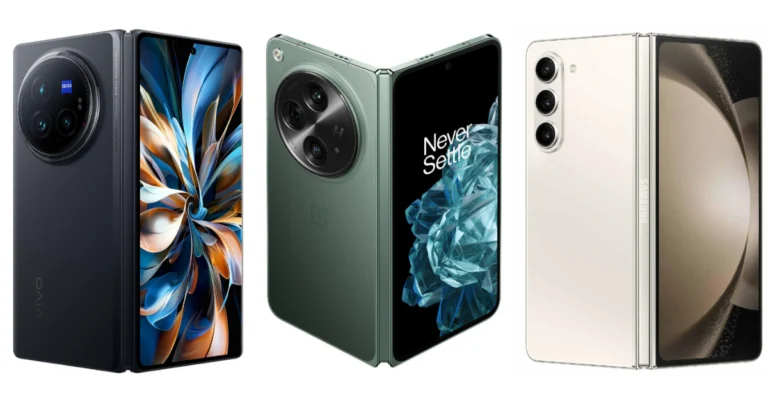
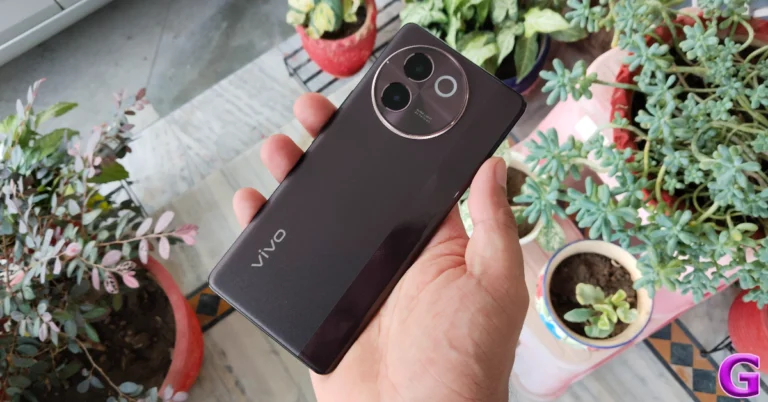
Vivo brought its first foldable phone Vivo X FOld 3 in India today. This latest product from the firm has all the features one would anticipate from a foldable design to rival the OnePlus Open and the Samsung Galaxy Z Fold 5. We have carefully examined the specs of all three phones to assist you make an informed choice when switching to a foldable phone. Here is our Vivo X Fold 3 Pro vs OnePlus Open vs Samsung Galaxy Z Fold 5 comparison.
Display
Vivo X Fold 3 Pro: Inner- 8.03-inch primary 2K E7 AMOLED display Outside- 6.53-inch AMOLED cover display
Vivo X Fold 3 Pro: A triple camera arrangement for images and videos, including a 50MP primary sensor with (OIS) VCS, a 50MP wide-angle AF and a 64MP Telephoto (OIS) 3x Optical Zoom lens.
OnePlus Open: A triple rear camera setup tuned by Hasselblad includes a 1/1.43” 48MP Sony LYTIA-T808 “Pixel Stacked” CMOS primary sensor with Autofocus (1.12 μm, f/1.7 aperture, 85° FoV and OIS). There is a 1/2” 48MP Ultra-Wide lens (0.8 μm, 114° FoV, f/2.2 and EIS) and OmniVision OV64B 64MP Telephoto with OIS, 3X optical (0.7 μm, f/2.6, Up to 120X digital zoom).
Samsung Z Fold 5: Rear: A 50MP Wide-angle Camera (Dual Pixel AF, OIS, F1.8, Pixel size: 1.0μm, FOV: 85˚), 10MP Telephoto Camera (PDAF, F2.4, OIS, Pixel size: 1.0μm, FOV: 36˚, 3X optical zoom), 12MP Ultra Wide Camera (F2.2, Pixel size: 1.12μm, FOV: 123˚), 12MP Ultra Wide Camera (F2.2, Pixel size: 1.12μm, FOV: 123˚).
Selfie camera
Vivo X Fold 3 Pro: Two 32-megapixel sensors on the outer and primary screens
OnePlus Open: The company has provided two cameras for selfies 20MP primary (inner) and 32MP secondary (outer).
Samsung Z Fold 5: There is a 10MP Selfie Camera (F2.2, Pixel size: 1.22μm, FOV: 85˚) on the cover, and a 4MP Under Display Camera (F1.8, Pixel size: 2.0μm, FOV: 80˚).
RAM and storage
Vivo X Fold 3 Pro: 16GB RAM with 512GB storage
OnePlus Open: 16GB RAM with 512GB storage
Samsung Z Fold 5: 12GB RAM with 256GB storage, 12GB RAM with 512GB storage, 12GB RAM with 1TB storage
Battery
Vivo X Fold 3 Pro: 5,700mAh battery
OnePlus Open: 4,805mAh battery
Samsung Z Fold 5: 4,400mAh battery
Operating system
Vivo X Fold 3 Pro: Funtouch OS 14, which is based on Android 14
OnePlus Open: OxygenOS 13.2 based on Android 13
Samsung Z Fold 5: One UI 5.1.1, which is based on Android 13
A larger 8-inch LTPO OLED display with a maximum refresh rate of 120Hz is included on the Vivo phone, while the cover display is just 6.5 inches however larger than the OnePlus and Samsung’s foldables. The newest Snapdragon 8 Gen 3 chipset is used in this flagship phone, which will come in 2024. The most recent Funtouch OS 14, which is based on Android 14, is installed on the Vivo foldable in contrast to its competitors. Unlike the OnePlus Open and Samsung Galaxy Z Fold 5, Vivo has stuffed in a larger 5,700mAh battery coupled with a quicker 100W wire charging support
The X Fold 3 Pro is being offered by Vivo for Rs 1,59,999. On the other hand, Rs 1,54,999 is the starting price of the Samsung Galaxy Z Fold 5. In contrast, the OnePlus Open costs Rs 1,39,999. Vivo’s foldable is more expensive than that of OnePlus and Samsung when we compare prices. Hold out on purchasing a foldable phone if any of these models caught your attention because the Galaxy Z Fold 6 is also expected to be released soon.
Even while the Vivo gadget is well-liked for its design and camera capabilities, it finds it difficult to compete with the Galaxy Z Fold 5 and OnePlus Open, which both provide all the features and characteristics at a cost that is far less than the Vivo device.
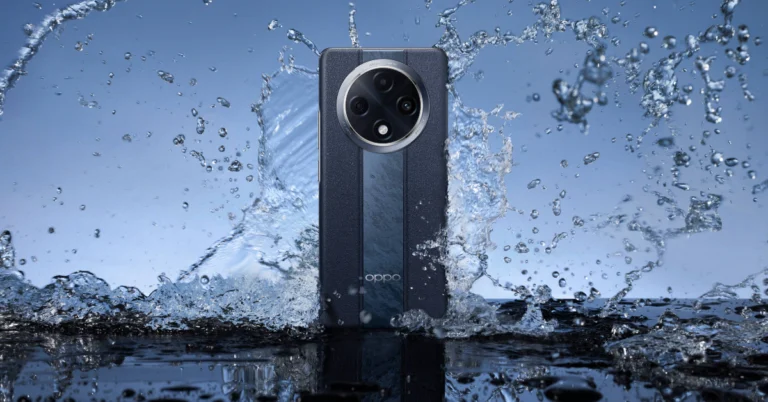
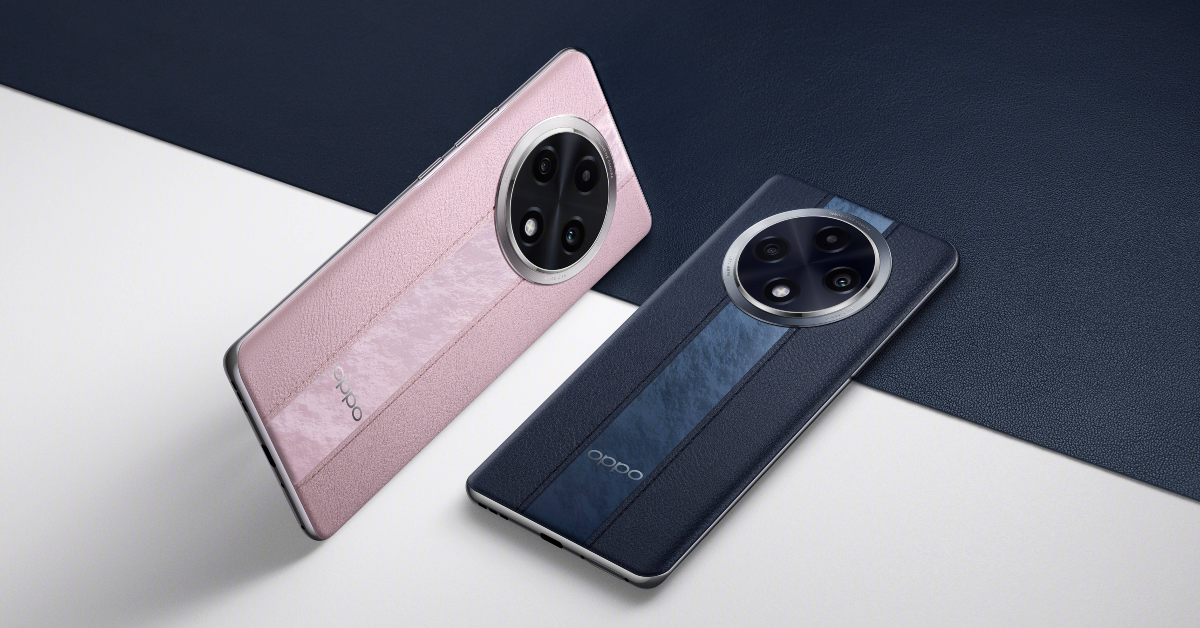
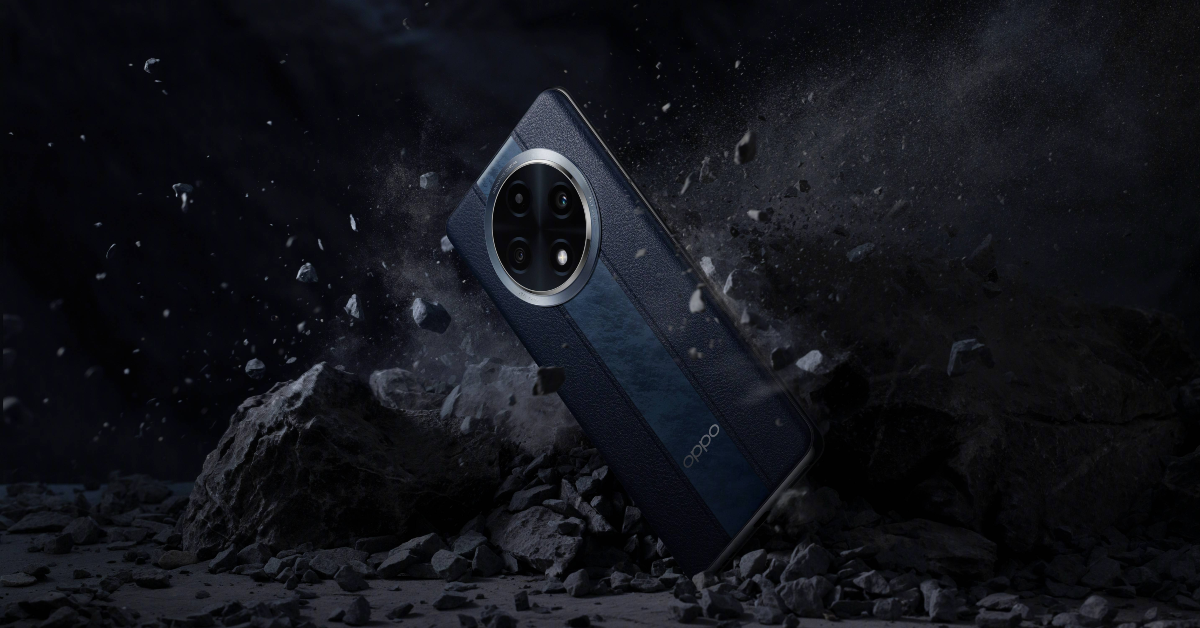
Oppo has officially announced that its first super-rugged smartphone Oppo F27 Pro+ is set to launch in India on June 13. The upcoming phone will come with IP69, IP68 and IP66 ratings for dust and water resistance. In addition to this, it carries the Swiss SGS Premium Performance 5 Stars Drop Resistance and the MIL-STD-810H Method 516.8 certification for its rugged build. In addition to this, the front panel is protected with Corning Gorilla Glass Victus 2.
The company said that it conducted a survey on Instagram, LinkedIn, and X in May and discovered that 42% of the more than 6000 respondents said they needed a water-resistant smartphone for the monsoon, 30% wanted a waterproof device for use at the beach or by the pool, 19% preferred drop-proof protection for awkward situations, and 9% valued a toughened glass that would not scratch against coins and keys in their pockets or purses. In response to this expressed need, Oppo F27 Pro+ the nation’s first very durable smartphone fit for the monsoon, will be unveiled by the company on June 13.
Oppo F27 Pro+ features
The Oppo F27 Pro+, which features a 3D curved AMOLED display and an impressive leather back, will be available in Midnight Navy and Dusk Pink colour variants. For increased stain resistance, siloxane is applied to the leatherback of the item. The round camera module has a symmetrical design, and it feels light and comfortable in the hand thanks to its 7.89mm thin profile and 177g weight.
With a waterproof screen, microphone, speaker holes, SIM card slot pinhole, and USB port, the Oppo F27 Pro+ is a water-resistant smartphone. Its earpiece speaker and microphone openings are shielded by a waterproof film, and the USB unit is water-tight thanks to a silicone sealing ring. A new waterproof circuit design on the F27 Pro+ 5G addresses the major problem of water jets damaging the phone during monsoon downpours. Since 35% of consumers reported experiencing water damage within the first two years of using a smartphone, the device solves the issue of water damage. Additionally, it enables users to touch and slide their phone with “Splash Touch” accuracy, even when their hands are wet.
The new device has earned three Ingress Protection (IP) certifications: IP66, IP68, and IP69, making it the first smartphone in India to do so. Additionally, its 360° Armour Body protects it against external and internal impacts, and its four corners join the back cover to reduce distortion and separation following drops.
AM03, a high-strength, high-thermal conductivity aluminium alloy, and cushioning materials are used in the motherboard’s front cover to improve drop resistance. The Oppo F27 Pro+ is put through a battery of internal durability tests, which include 42,000 micro-drops, 2,000 phone button pushes, and 20,000 plugs and unplugging. It has been certified to meet MIL-STD-810H Method 516.8 and Swiss SGS Premium Performance 5 Stars Drop Resistance standards. Corning Gorilla Glass Victus 2 is used on the front display to improve scratch and drop resistance. Additionally, the Corning Gorilla Glass Victus 2 display of the Oppo F27 Pro+ ensures that the screen won’t scratch or shatter even after a fall.
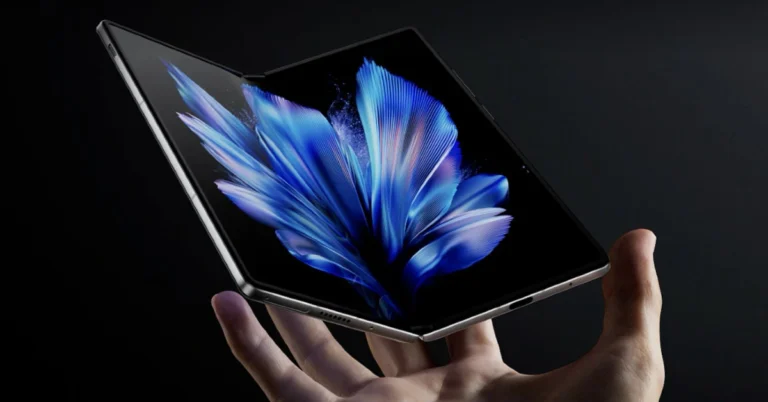
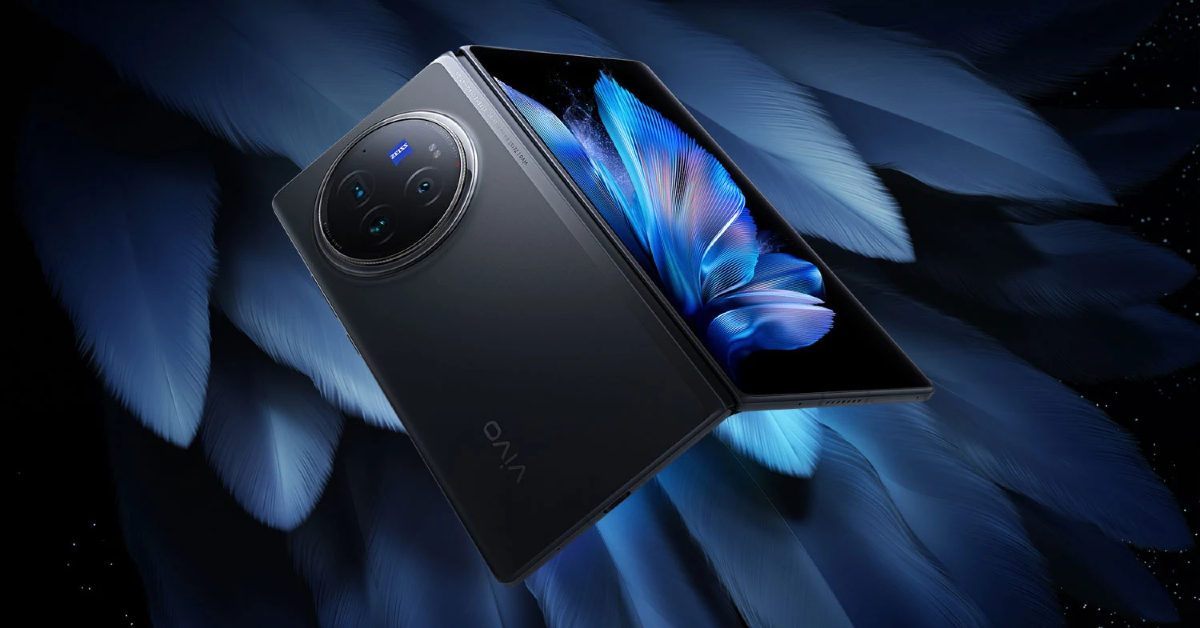
Vivo X Fold 3 Pro has officially debuted in India today. This is the company’s first foldable phone to arrive in the country after its launch in China last year. The handset runs on Funtouch OS 14 and is powered by Qualcomm’s Snapdragon 8 Gen 3 SoC. The foldable features an 8.03-inch 2K AMOLED display and a 6.53-inch AMOLED outer display. The handset comes with a triple rear camera setup led by a 50MP sensor with OIS. In terms of selfies, there are 32MP sensors provided on the outer and main display.
Vivo X Fold 3 Pro price in India, sale details
Vivo X Fold 3 Pro has launched in India in a single 16GB RAM with 512GB storage option priced at Rs 1,59,999. The book-style foldable is made available in a single Celestial Black colour option.
The device will be available for purchase via the Vivo India website, Amazon and Flipkart. The pre-booking window is now open for the smartphone.
Vivo X Fold 3 Pro spec, features
The Vivo X Fold 3 Pro flaunts an 8.03-inch primary 2K E7 AMOLED display with 2,200×2,480 pixels of resolution. The main foldable screen supports 4,500 nits peak brightness, Dolby Vision support, and HDR10. Whereas, the 6.53-inch AMOLED cover display has 1,172×2,748 pixels of resolution. Both outer and inside display comes with up to 120Hz refresh rate support and Ultra-Thin Glass (UTG) protection. The device has a carbon fibre hinge armor glass coating. It comes preloaded with Funtouch OS 14, which is based on Android 14. Under the hood, there is a Snapdragon 8 Gen 3 SoC with 16GB of LPDDR5X RAM and 512GB of UFS4.0 storage.
The X Fold 3 Pro features a triple camera arrangement for images and videos, including a 50MP primary sensor with (OIS) VCS, a 50MP wide-angle AF and a 64MP Telephoto (OIS) 3x Optical Zoom lens. There are two 32-megapixel sensors on the outer and primary screens for selfies with f/2.4 aperture. The camera app includes Snapshot, Night, Portrait, Photo, Video, High Resolution, Pano, Ultra HD Document, Slo-mo, Long Exposure, Time-Lapse, Supermoon, Astro, Landsc. & Archit., Pro, Food, Live Photo, Cinematic Portrait modes.
The phone has a 5,700mAh battery with 100W wired and 50W wireless charging capabilities. In terms of connectivity, there is 5G, Wi-Fi 7, Bluetooth 5.4, NFC, GPS, BeiDou, GLONASS, Galileo, QZSS, NavIC, A-GPS, cellular positioning, Wi-Fi positioning, OTG, and a USB Type-C port. The sensors on Vivo’s foldable phone include a Laser focus sensor, Infrared Blaster, Flicker Sensor, Air Pressure Sensor, Multispectral Sensor, electronic compass, proximity sensor, gyro, accelerometer and ambient light sensor. It also supports 2 nano SIMs (SIM1 + SIM2).
The Chinese smartphone manufacturer Vivo is all set to launch its first foldable phone Vivo X Fold 3 Pro in the Indian market today. The book-style foldable smartphone was first launched in China in March. The device is going to compete with other foldable available in the Indian market like Galaxy Z Fold 5, OnePlus Open, and others. The Indian variant of the Vivo X Fold 3 Pro may have similar specs to the international version. The phone features an 8.03-inch 2K AMOLED display and a 6.53-inch AMOLED external display. The device is powered by Qualcomm’s Snapdragon 8 Gen 3 SoC and runs Android 14 with OriginOS 4 and happens to come with Funtouch OS in India. It comes with an 8-inch inner foldable screen and a 5,700mAh battery.
Vivo X Fold 3 will launch in India today. The company will be hosting a launch event that will kick off at noon. The live stream can be watched via Vivo’s official YouTube channel and social media channels. For your convenience, we have also embedded a watch link below.
Vivo X Fold 3 Pro specifications
Vivo X Fold 3 Pro features an 8.03-inch primary 2K resolution E7 AMOLED display, a 6.53-inch AMOLED cover display, and a carbon fibre hinge. It comes preloaded with OriginOS 4, which is based on Android 14. The Snapdragon 8 Gen 3 SoC has a Vivo V3 photography chip. It includes up to 16GB of LPDDR5X RAM and up to 1TB of UFS4.0 storage.
The X Fold 3 Pro features a triple camera arrangement for images and videos, including a 50-megapixel primary sensor and a 32-megapixel sensor on the outer and primary screens for selfies. The phone has a 5,700mAh battery with 100W wired and 50W wireless charging capabilities.
The X Fold3 Pro costs CNY 9,999 in China which is equal to Rs 1,15,145 in Indian rupees. The Indian pricing is likely to be between Rs 1,40,000 to Rs 1,50,000.
Garena Free Fire Max is a battle royale game with regular awards and tournaments to keep players interested. If you play Garena Free Fire, you should be aware of the redeem codes that are released on a daily basis. However, because the battle royale game is banned in India, players from other countries can use the Free Fire Redeem codes daily. If you’re unfamiliar with the Garena Free Fire redeem codes or don’t know how to get them, we’ve put together a step-by-step guide to help you redeem them. Check out Garena Free Fire Max Redeem Codes for 6 June 2024.
The Free Fire Max redeem codes are a great way to get free stuff. These are 12-digit codes that contain alphabets and numbers, as well as an expiration date and time. Because the Garena FF redeem codes cannot be used more than once, you should hurry to the redemption page to claim your free reward before someone else does. To get a free reward, all you have to do is go to reward.ff.garena.com/en, which is the official redemption page. Also, keep an eye on this space for daily updates on Garena Free Fire Max redemption codes and rewards.
6 June 2024: New Amazon Quiz is now available. Customers from different parts of the country are participating in the daily quiz. The quiz starts at midnight today and will be live until 11:59 PM tonight. By successfully answering every question, participants in the quiz have the chance to win wonderful rewards. A Rs 500 Amazon Pay Balance is up for grabs to participants today.
One wrong answer could eliminate you from the quiz. You have a chance to win Rs 500 Amazon Pay Balance if you successfully answer every question. Users of the app only have the opportunity to take the quiz. Check Out 6 June 2024 Amazon Quiz Answers.
Only app users are eligible to play the Amazon quiz every morning from 12 AM to 11:59 PM. The quiz is not available on the desktop. For those who are unaware of how to play the Amazon quiz, below are the steps, you can follow to take the quiz.
We have written an explainer above, you can refer to that.
When are the winners of the Amazon Quiz and contest announced or declared?
The announcement of today’s Amazon quiz winner will take place Tomorrow. As for the Special Quiz and “Spin & Win” Contest, the winners will be declared once the Quiz Contest comes to an end. To find out who the lucky winner is, you can refer to the Amazon Quiz Winners List or visit the Amazon Winners tab in the Amazon App.
How to participate in the Daily Amazon Quiz?
That is very easy, just got to the Amazon app and scroll to the bottom of the page and you will find the Quiz section. Click on it (usually it is called the fun zone) and you can enter the Amazon Today Quiz Contest.
Are there any other quizzes or contests running on Amazon daily?
Yes, there are many running on a daily basis. These range from spinning the wheel to answering the questions correctly. All are located in the Fun Zone.
What are the criteria for selecting a winner in the Daily Amazon Quiz?
When a qualified player submits correct answers to all the questions, they will automatically be entered into a lucky draw. This draw will include all participants who answered all the questions correctly. Amazon randomly selects the final winners from the pool of eligible participants who gave the right answers.
Which Types of Questions are asked within Amazon Daily Quiz?
These are very simple and straightforward questions. These are mainly related to general knowledge.
Where should I look for Amazon Daily Quiz answers?
You can bookmark this page as we will help you every day with the Amazon Daily Quiz. We bring you fresh answers every day for the Amazon Daily Quiz and Contest.
What time does Amazon Announce previous winners?
The previous winner’s name will be announced today at 12 PM (noon).
MMI Codes serve an important role in your phone. You can use them to toggle certain functions, find out the status of your current data plan, and perform other tasks. Users often report encountering the ‘Connection Problem or Invalid MMI Code’ error on their Android phones. While it may seem there are no workarounds to this issue, there are some things you can do to resolve this error. Here are some of the fixes.
A Man Machine Interface (MMI) Code starts with an asterisk or pound sign and can be used to execute certain actions to find out key information about your device. There are four main types of MMI Codes:
Supplementary Service (SS) Codes
Unstructured Supplementary Service Data (USSD) Codes
Manufacture Man-Machine Interface (MMI) Codes
SIM Control Codes
Every kind of MMI Code serves a unique purpose. While SS codes take care of tasks like call forwarding, voicemail, etc., USSD codes can be used to check the talk time, data balance, and other network provider-related inquiries.
Check the MMI code
MMI Codes vary among different models and network providers. If you encounter the ‘Connection Problem or Invalid MMI Code’ error on your Android smartphone, double-check the code and try again. Always use the MMI Codes that are specific to your OEM. While some codes (like *#06# for IMEI number) may be universal, others are unique to the manufacturer of the device.
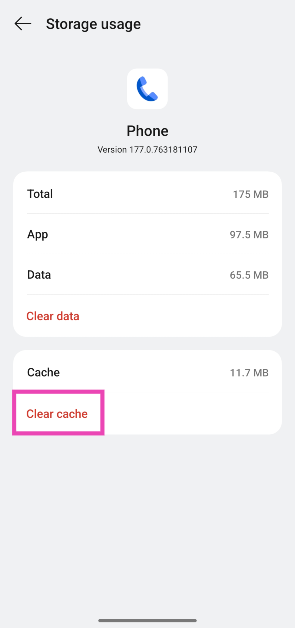
Clear the dialer’s cache
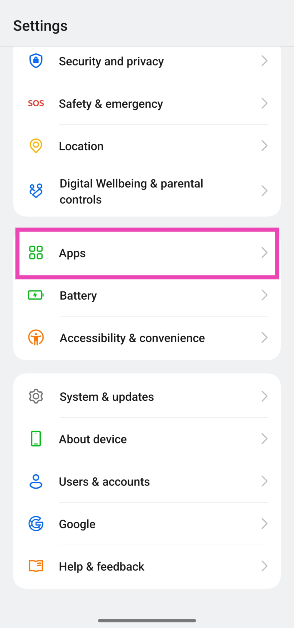
Step 1: Go to Settings and select Apps.
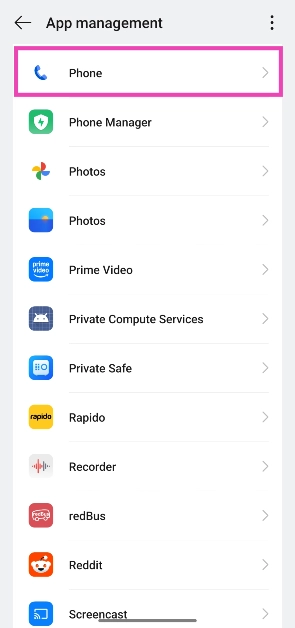
Step 2: Select the dialer app.
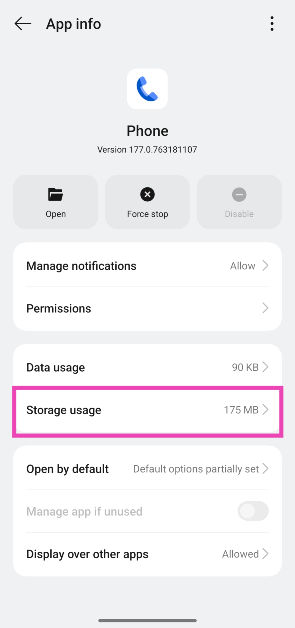
Step 3: Tap on Storage.
Step 4: Hit Clear cache.
Restart your device
A quick restart can fix the background issues that may be causing the MMI Code error on your Android device. Long-press the side key and select ‘Restart’ from the power menu. If the side key triggers the voice assistant, press it along with the volume-up key to access the power menu.
Toggle the Airplane Mode
Toggle the Airplane Mode on your phone on and off to refresh the network. Swipe down from the status bar to access the Quick Settings Menu and tap on the tile with the airplane icon. Wait for a few seconds and tap it again to turn off Airplane Mode.
Dial the MMI Code in Safe Mode
The third-party apps on your smartphone are known to go rogue and interfere with its functioning. If you don’t know which app is causing problems in the background, simply put your phone in Safe Mode. Long-press the ‘Power off’ tile in the power menu, then tap on the Safe Mode pop-up. Once your phone is in Safe Mode, turn off the Airplane Mode and dial the MMI code again.
Add a comma at the end of the MMI code
If your smartphone is not processing an MMI code that you know is valid, add a comma at the end and run it again. A comma bypasses any error message presented by your phone and forces it to process the code. For example, if you can’t get your phone to run the *#9900# code, use *#9900# instead.
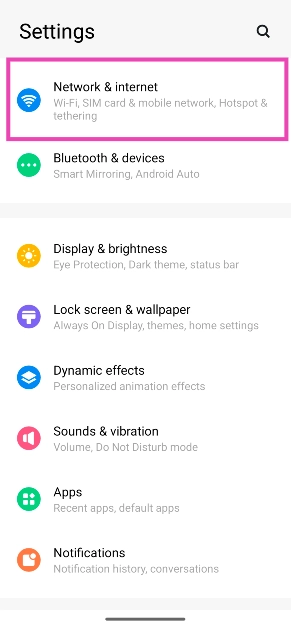
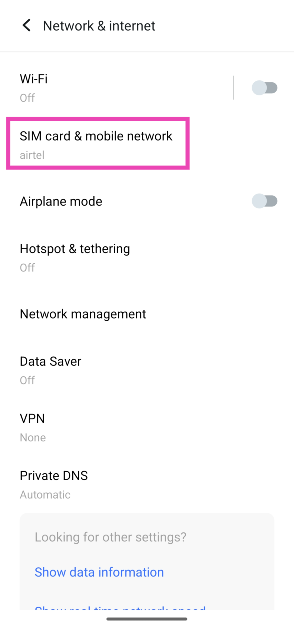
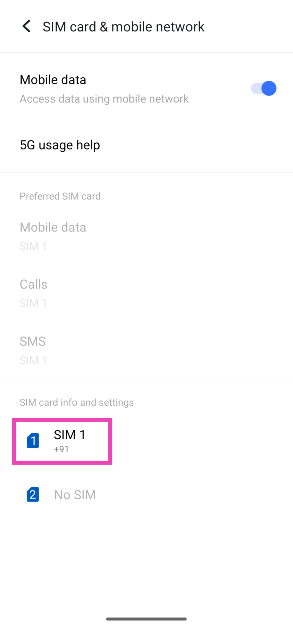
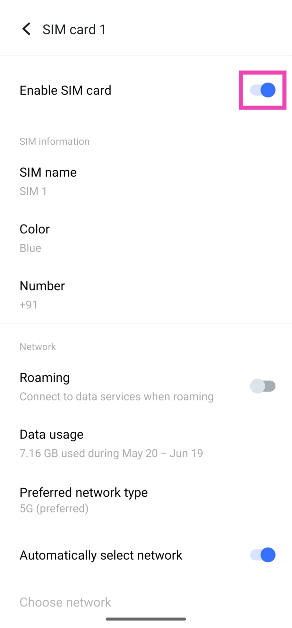
Toggle the SIM off and on
Step 1: Go to Settings and select Network & internet.
Step 2: Tap on SIM card & mobile network.
Step 3: Select your SIM card.
Step 4: Turn off the toggle switch for Enable SIM card. Wait for a few seconds, then turn it back on.
Check your SIM card
If your SIM card is physically damaged, the MMI codes won’t work on your phone. Use a SIM ejector to pull out the SIM tray. Inspect the SIM card for any kind of physical damage. If you notice any wear, request your network provider to issue you a duplicate SIM card. If there’s no physical damage, clean the card thoroughly and reinsert it in its correct position.
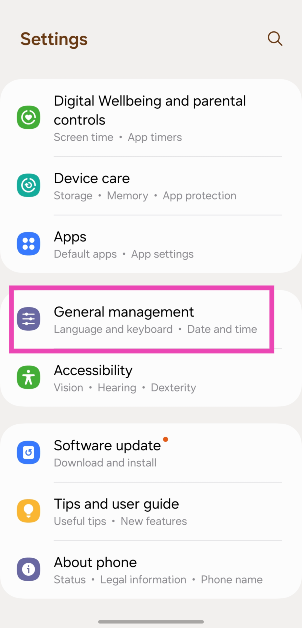
Step 1: Go to Settings and select Software update.
Step 2: Tap on Download and install.
Step 3: Select Install now.
Frequently Asked Questions (FAQs)
Why is my Android phone showing the ‘Invalid MMI code’ error?
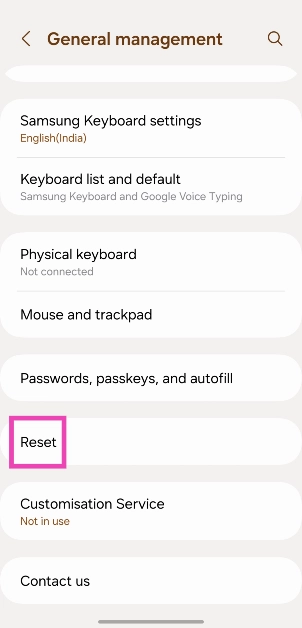
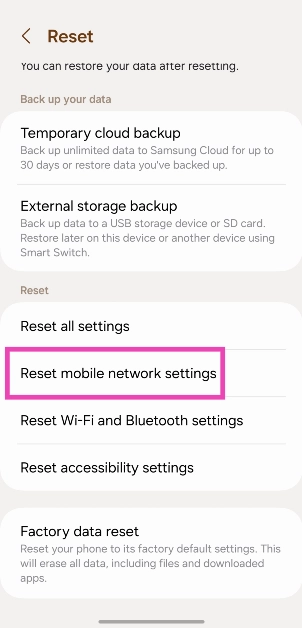
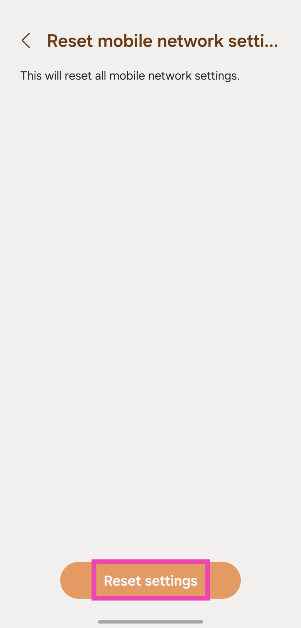
This error message usually pops up when you enter the wrong MMI code on your phone’s dialer. Double-check the code and try again. If the problem is network-related, restart the phone and reset the network settings.
What is the MMI code for finding out the IMEI number of my phone?
Dial *#06# on your phone to find out its IMEI code.
What do MMI Codes do?
MMI Codes are used to execute certain commands or find out more information about your device.
What is the *#21# MMI code used for?
If you want to stop your phone calls from being forwarded to another number, dial *#21#.
How do I check which number my calls are being forwarded to?
The *#67 MMI code lets you know if your phone calls are forwarded to another number when your line is busy. It also lists the number to which the calls are being forwarded.
These are the top 11 ways to fix the ‘Connection Problem or Invalid MMI Code’ error on your Android smartphone. Check out these MMI Codes for your Samsung smartphone. Which MMI Codes do you use regularly? Let us know in the comments!
QR codes are everywhere. From accessing restaurant menus to making online payments, QR codes help with a lot of tasks. Most Android OEMs design their camera apps to support QR codes. Things can come to a head when your Android phone is unable to scan a QR code. Luckily, there are a few quick fixes to this annoying problem.
If you can’t get your phone to scan a QR code, it could be due to one of the following reasons.
The QR code is damaged
Your phone’s camera is dirty
QR code no longer exists
Bad lighting around the QR code
Software issues with the camera app
Inspect the QR Code
If the QR Code is damaged, blurred, faded, or obfuscated, your Android phone will be unable to scan it. Try removing any objects that may be obstructing the code or ask the retailer for a better copy of the QR code. If the QR sticker has any smudges on it, wipe it clean and try scanning it again.
Clean your phone’s lens
It is possible that the fault lies with your phone’s camera and not the physical QR code. If the camera lens on your phone is dirty, it will fail to read the code in front of it. Most camera apps display a warning to let the user know they need to wipe the lens for a clearer picture.
Check the lighting
Bad lighting is another hindrance that you need to overcome to scan a QR code. Use the flashlight on your phone to scan the code if your surroundings are pitch dark. Most UPI apps automatically trigger the flashlight while scanning a QR code in limited lighting.
Adjust your camera’s focus
The QR code needs to be in your camera’s focus for your phone to scan it. Locking the focus can be tricky when your phone is placed too close to the code. Take a few steps back, tap the QR code on the viewfinder to lock the focus, and wait for your phone to scan it. This process may require a couple of attempts before you get it right.
Use the Scan QR tile/Google Lens
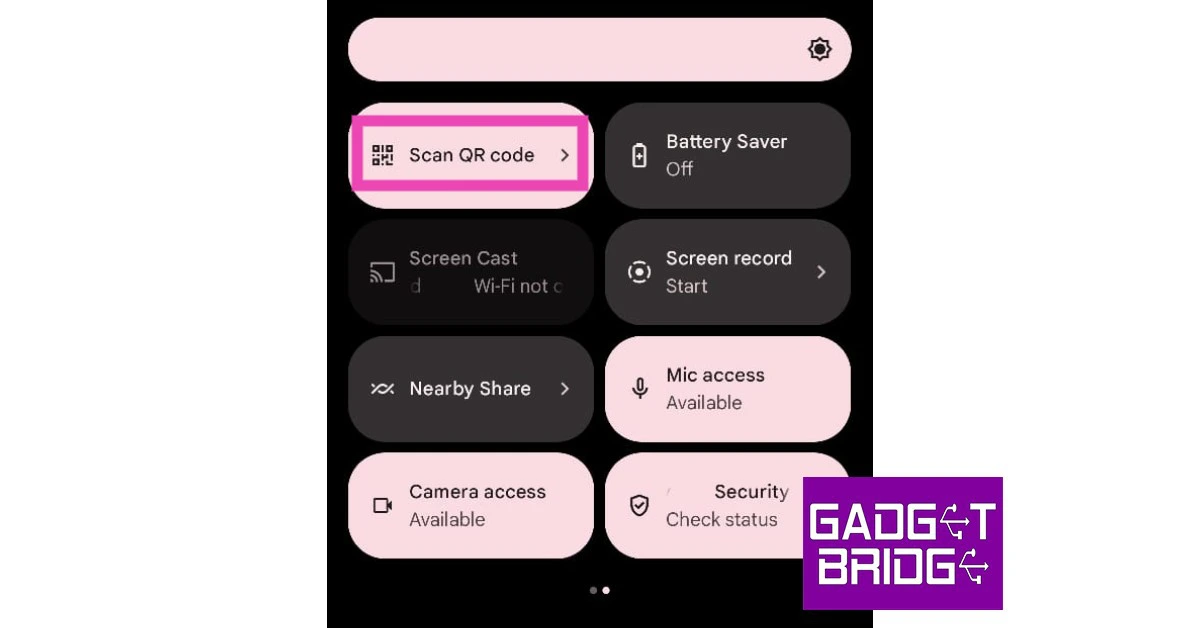
If the native camera app on your phone is unable to scan QR codes, use Google Lens instead. You can trigger Google Lens by tapping the ‘Scan’ tile in the Quick Settings Menu or going to the Google app and tapping the camera icon. Once you’re in Google Lens, tap the ‘Search with your camera’ option to scan the code.
Turn on Google Lens suggestions
Stock Android users can auto-scan QR codes by turning on Google Lens suggestions in the native camera app. Here’s how.
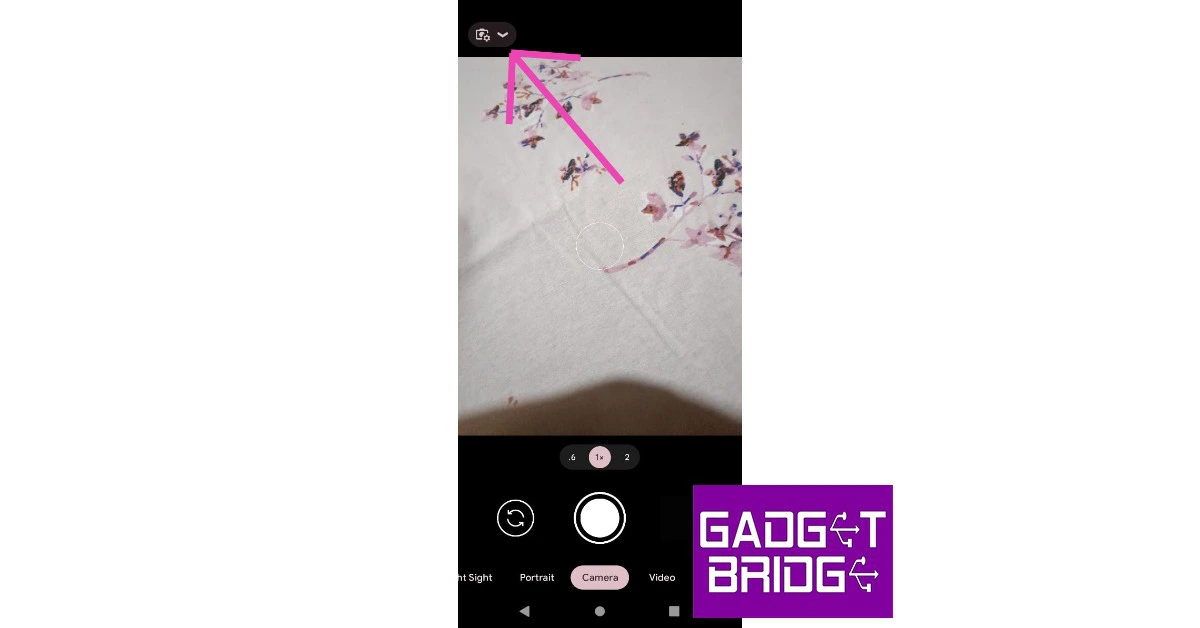
Step 1:Launch the Camera app and tap the settings icon.
Step 2: Tap on More settings.
Step 3: Turn on the toggle switch for Google Lens suggestions.
Enable QR code scanning
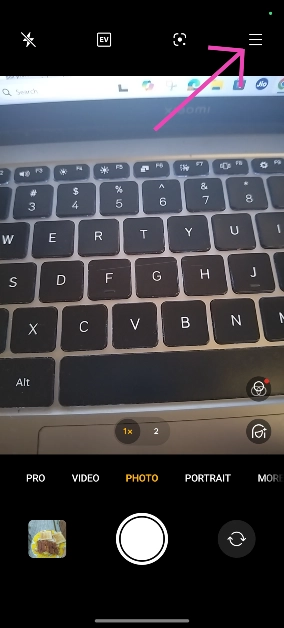
Step 1: Launch the native Camera app on your phone.
Step 2: Hit the hamburger menu in the top right corner of the screen.
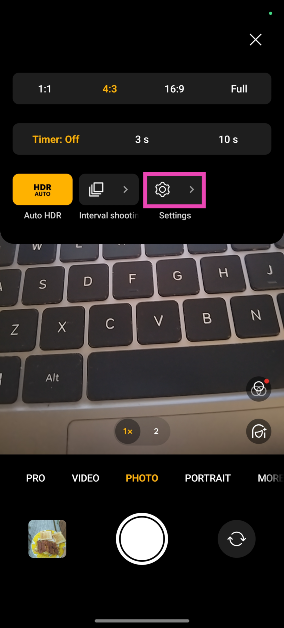
Step 3: Go to Settings.
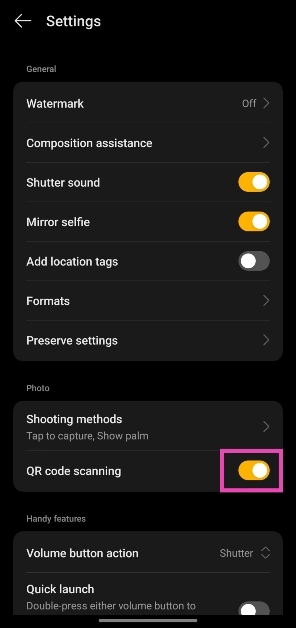
Step 4: Turn on the toggle switch next to QR code scanning.
Save the QR code as an image
If your phone’s camera is not able to scan a QR code, simply take a picture of it and scan it using Google Lens in the Photos app. This is also how you can scan QR codes which are sent to you through WhatsApp. Open the image in the Google Photos app, and tap the Lens icon in the bottom toolbar. The Google Lens app will scan the QR code in the image.
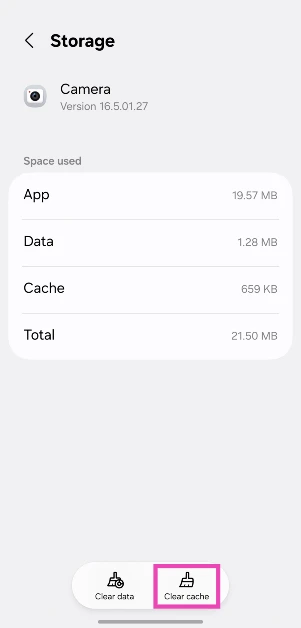
Clear the Camera app’s cache
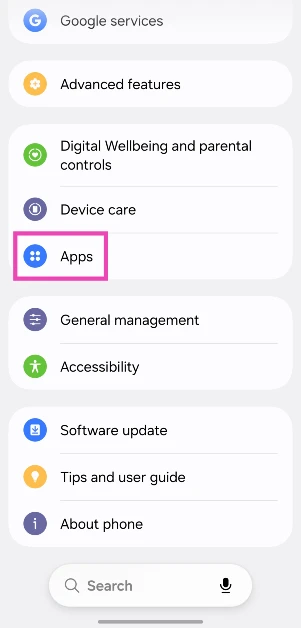
Step 1: Go to Settings and select Apps.
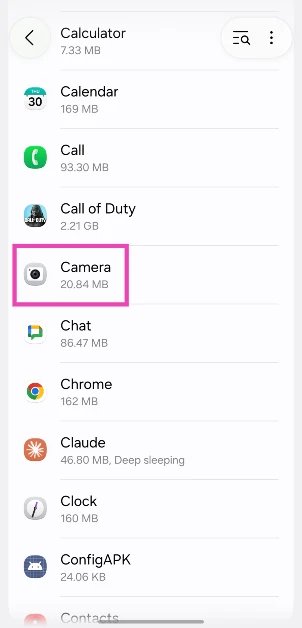
Step 2: Select Camera.
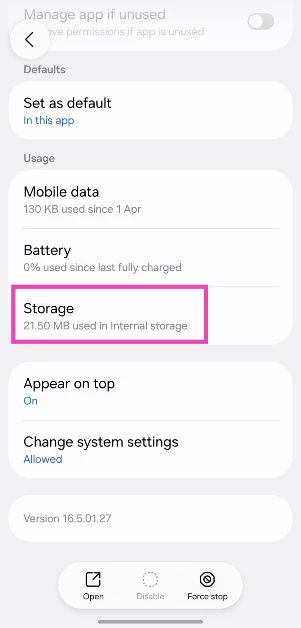
Step 3: Go to Storage.
Step 4: Tap on Clear Cache.
Use a third-party app
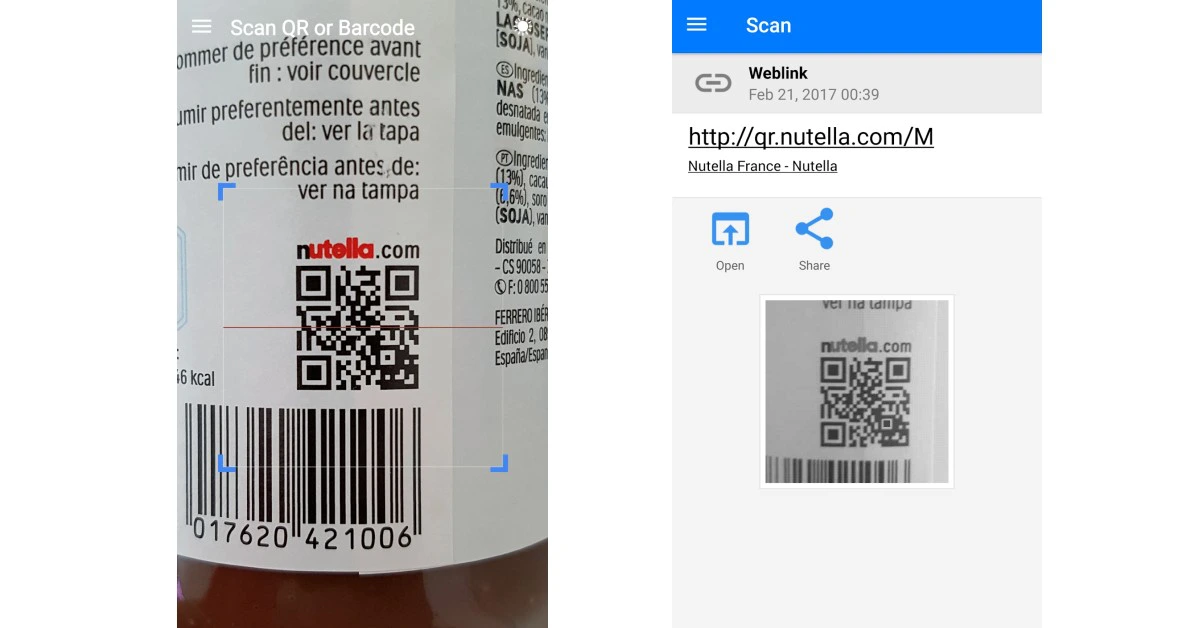
If everything else fails, use a third-party app to scan the QR code. There are a plethora of scanning apps on the Google Play Store. Our favourite out of the lot is the QR and Barcode Scanner app. Launch the app and give it the appropriate permissions to function as required. When the app triggers the rear camera, use the viewfinder to point your phone at the QR code.
Update your phone’s OS
Step 1: Go to Settings and select Software update.
Step 2: Tap on Download and install.
Step 3: Select Install now.
Frequently Asked Questions (FAQs)
How do I scan a QR code without an app?
Turn on the option to scan QR codes in your phone’s native camera app. Point the camera at a QR code to scan it.
Why is my Android phone not scanning QR codes?
Your Android phone may struggle to scan QR codes if its camera resolution is low or the lens is dirty. You also need to make sure that the QR code is in focus and is well lit.
How do I scan a QR code from my phone’s gallery?
Open the image of the QR code in the Google Photos app and tap the lens icon at the bottom of the screen to scan it.
Are there any good third-party apps that can scan QR codes?
Use apps like QR and Barcode Scanner, FreeScan, and Orca Scan to read QR codes using your smartphone.
How do I create a QR code?
You can create a QR code using online tools like ME-QR and QRCode Monkey.
These are the top 11 ways to fix the ‘Android phone not scanning QR code’ problem on your device. Read this article to learn how to scan a QR code without using an app. If you have any other tips, share them with us in the comments!
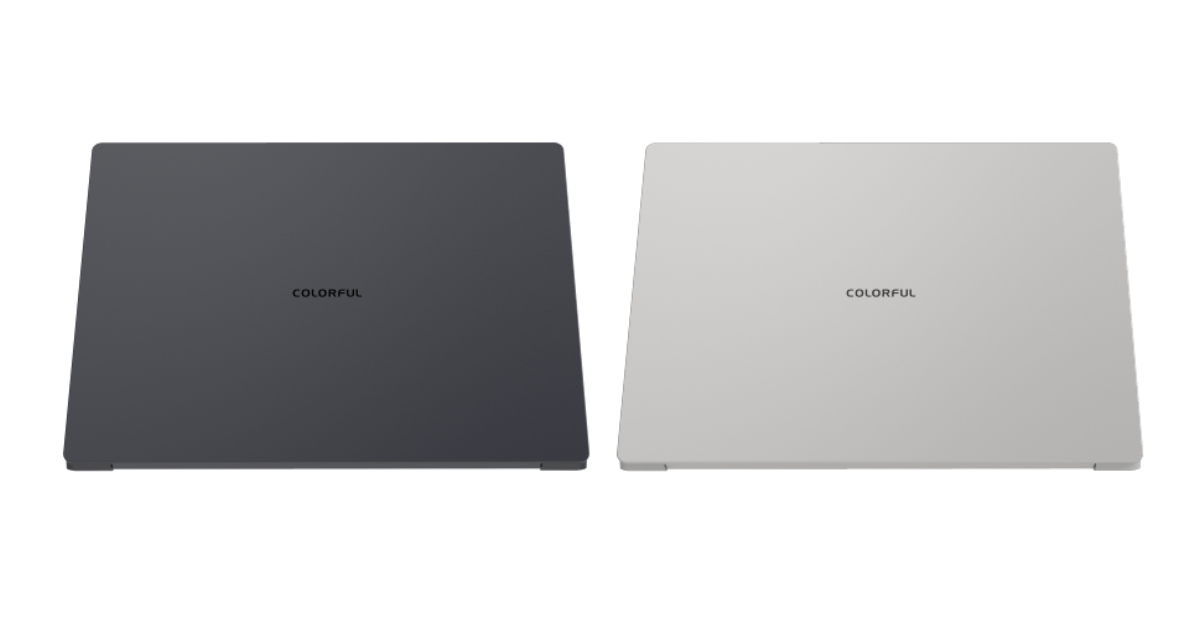
Colorful Technology Company Limited today unveiled the new EPOCH Series laptops. The new EPOCH Series is aimed at business and content creation with its slim and lightweight design. Powered by a 13th Gen Core i9 processor and NVIDIA GeForce RTX 4070 Laptop GPU the notebook is designed to enhance your computing experience with AI in gaming, creative work, business, and more.
The chassis of the EPOCH 14 is made entirely of metal, and it weighs only 1.5 kg. It is 17.9 mm thick. The laptop features a white LED-lit keyboard with three brightness settings, a tempered glass touchpad, and an aluminium unibody chassis that has been CNC-machined. With an NVIDIA GeForce RTX 4070 laptop GPU and a potent Intel 13th Gen Core i9 processor, the EPOCH Series is built for creative workloads improved by AI experiences. With Tensor Cores—a specialised AI hardware that leverages TensorRT software to further accelerate performance—the laptop offers up to 686 AI TOPS. It has NVMe PCIe Gen 4×4 1TB storage and 16GB/32GB LPDDR5 RAM.
The EPOCH N14 has a 14-inch QHD display with DCI-P3 100% coverage and a maximum brightness of 500 nits. It comes in Deep Ocean Blue and Silvery White colours. It is preconfigured to run on Windows 11. Additionally, the laptop has a high-speed USB-C connector with support for 100W PD fast charging and HDMI output for multi-monitor setups. It features Bluetooth 5.2 and WiFi 6E for wireless connectivity. The laptop comes with a 150W adaptor and a 58Wh+ battery.
The COLOURFUL EPOCH Series is a line of robust, thin notebooks made to improve AI computing experiences for a variety of uses, including gaming, creative work, business, and more.
A 1.0 MP HD video camera is also included for video conferences.
EPOCH Series laptops price
The starting price for the colourful EPOCH 14 is USD 1359 which translates to Rs 1,13,315.
According to the company, it is currently developing its own AI software to be revealed sometime in the future.
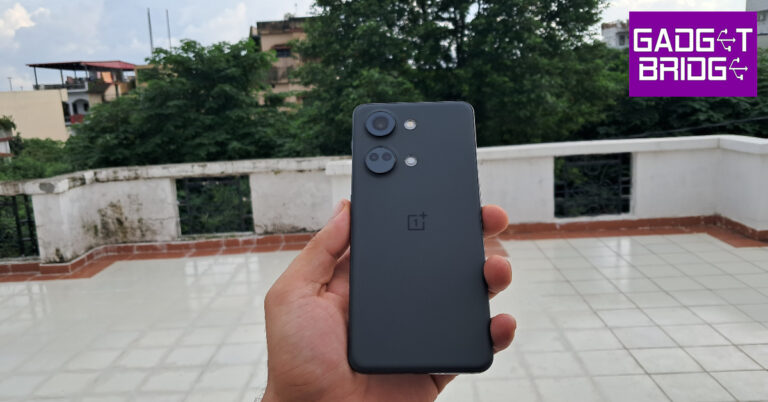
Soon new Nord phones by OnePlus will arrive in India but before their launches, several existing ones are already on sale in India. The OnePlus Nord 3 is now considerably less expensive. The cost of the gadget has been lowered by Rs 13,000 on Amazon. The smartphone was launched in India in July of last year. The Nord 3 comes with a 6.74-inch AMOLED display. The device also includes a 50-megapixel Sony IMX890 triple back camera and a 5,000mAh battery.
Right now, Amazon India has the OnePlus Nord 3 5G for the lowest price ever. There is a 38% reduction on the device’s original price. The price has been reduced to Rs 13,000. After the discount is up for sale at Rs 20,999. Over that, Amazon is offering a Rs 1,000 coupon discount that will further bring down the pricing to Rs 19,999. The OnePlus Nord 3 was previously selling at an initial price of Rs 33,999.
OnePlus Nord 3 features a 6.74-inch AMOLED screen with a dynamic refresh rate that may vary between 40Hz and 120Hz and has a 450ppi pixel density. It runs on OxygenOS 13 with Android 13. Under its hood is an octa-core MediaTek Dimensity 9000 SoC with up to 16GB of LPDDR5X RAM and up to 256GB of internal UFS 3.1 storage.
The device has a triple rear camera setup for photos and videos, including a 50-megapixel Sony IMX890 sensor with OIS support. Additionally, there is an 8-megapixel ultra-wide angle Sony IMX355 sensor with a 112-degree FoV and a 2-megapixel macro lens. The phone has a 16-megapixel front-facing camera for selfies and video chats. Also, there is a 5,000mAh battery that supports 80W SuperVOOC charging.
Flagship smartphones are getting pricier every year. Instead of splurging upwards of Rs 1,00,000 on a premium device, you’re bound to get more value by spending almost half that amount on an older flagship. The trend of minimal upgrades on flagship devices across OEMs ensures that your refurbished device’s performance won’t be that far from its current-year counterpart. However, there are certain things that must be kept in mind when buying a refurbished smartphone. Let’s take a look.
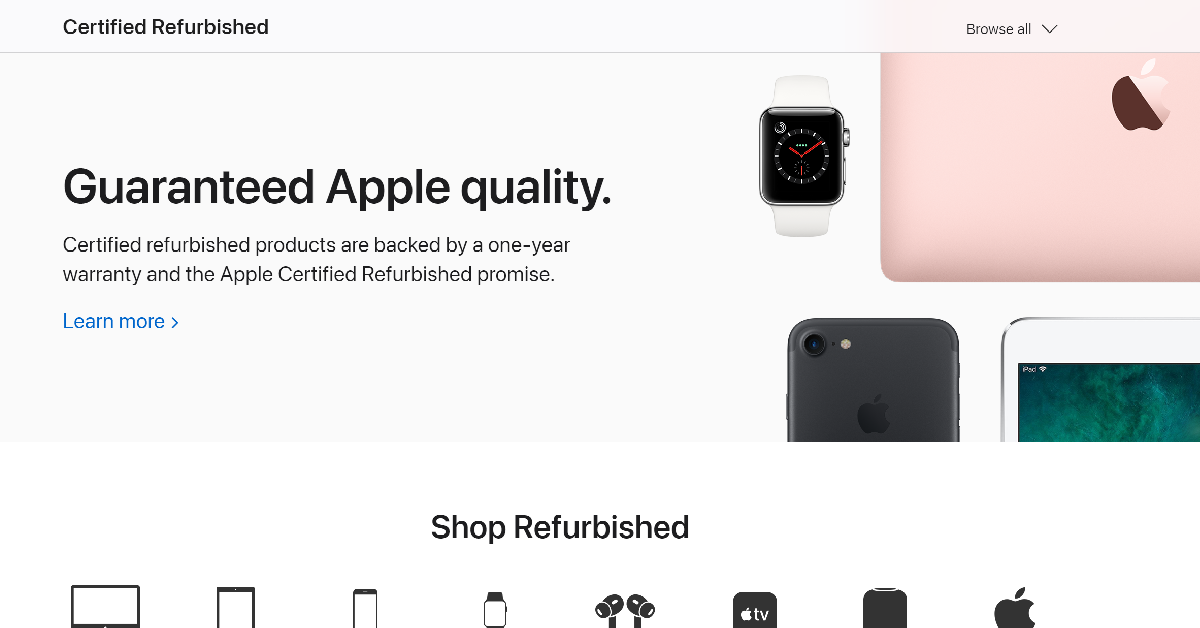
The internet is rife with fraudulent e-sellers that routinely push stolen and fake products as ‘refurbished’ smartphones. As a general rule, stick to established sellers that conduct business transparently. Before buying the device, perform a quick Google Search for the seller’s name and check if any buyers have had a bad experience dealing with them in the past. If you’re thinking of buying a refurbished iPhone, we would recommend checking out Apple’s certified refurbished store.
Check the warranty
Renowned sellers of refurbished goods typically offer a warranty on their products. A small premium for the warranty is a good investment to make when buying a refurbished smartphone. Apple offers a 1-year warranty on its refurbished products. If you’re purchasing the device from an independent seller, it is a good idea to check the manufacturer’s warranty coverage.
Ask for the invoice and verify the IMEI number
As we mentioned earlier, malicious entities on the internet are constantly peddling stolen smartphones as ‘refurbished devices’. To confirm that you’re buying a legitimate device, always demand the invoice or bill from the seller. Additionally, use the IMEI number to check the phone’s authentication status on the CEIR website. To find out the IMEI number of the device, launch the phone app and dial *#06#.
Check the battery health
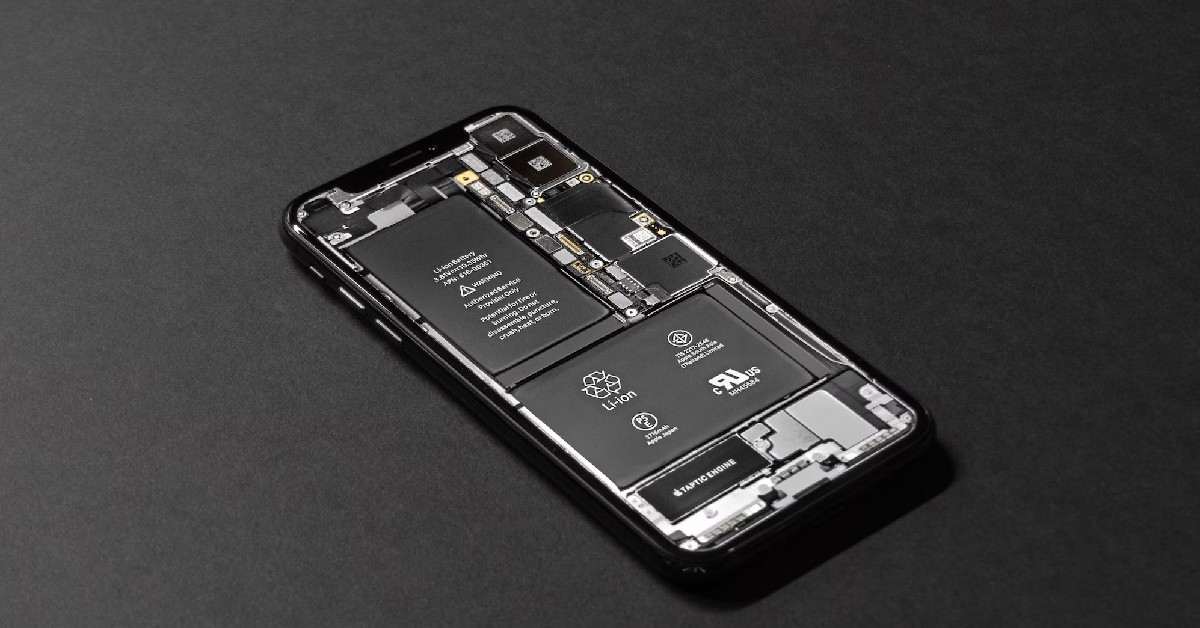
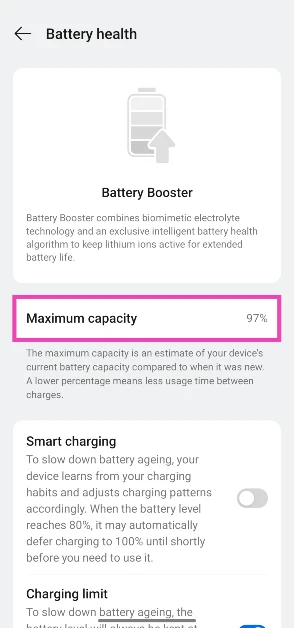
The battery life of a smartphone is crucial to its performance. Credible sellers equip their refurbished devices with new batteries to enhance their performance and add more years to their lives. If the refurbished smartphone you’ve selected does not have a new battery pack, go to its settings and check its battery health. If the device has been put through multiple years of use, you should ask the seller to replace its battery or go for a relatively newer unit.
Check the battery capacity
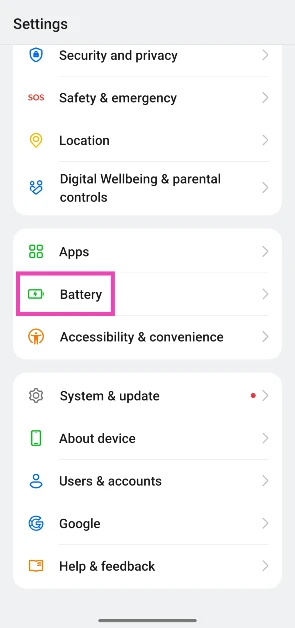
You can check a device’s current battery capacity compared to when it was new. Here’s how.
Step 1: Go to Settings and select Battery.
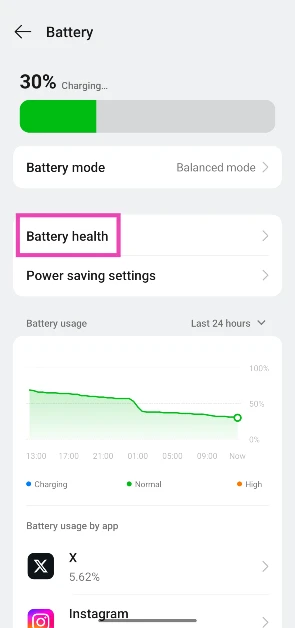
Step 2: Tap on Battery health.
Step 3: Check the Maximum capacity.
Software updates and security patches
The software and security coverage promised by the OEM often go under the radar while shopping for refurbished devices, but it is a very important parameter that should not be overlooked. A device that routinely receives security updates is more resistant to malware and other malicious threats. Software updates are equally important as they usher in new features and make the device future-proof.
Check the accessories
Smartphone manufacturers like OnePlus, Oppo, Xiaomi, and Vivo supplement their devices with essential accessories like the power adapter, charging cable, and phone cover. If the phone you’re buying comes with accessories, make sure that they’re present in the retail box. If you’re buying a device that does not come with accessories in the box, make sure the compatible add-ons are available online.
Assess the hardware
If you’re buying a refurbished smartphone, you will have to make some compromises on the hardware front. This includes minor scuffs and scratches. Apart from hardware damage on the surface, you should also check the device’s headphone jack, SIM slot, microSD slot, and physical buttons for any damage. If there are any functional issues with the device, notify the seller and ask for a better unit.
Pricing
Using the parameters mentioned above, try to get the right price for the product. If the smartphone is expected to receive OS upgrades and security patches in future, a small premium on its price is justified. A healthy battery pack warrants a higher price, too. Cross-check the prices with online retailers before making a decision.
Frequently Asked Questions (FAQs)
Where can I buy a refurbished iPhone in India?
Apple’s refurbished store is the best place to buy refurbished iPhones in India. Sahi Value, Electronics Bazaar, ShopClues, and Amazon also deal in refurbished goods.
Do refurbished smartphones come with a warranty?
Warranty coverage for refurbished smartphones is decided by the seller. While most reputable dealers offer a warranty on their refurbished devices, it may not be the case when buying smartphones from independent sellers.
How do I find the IMEI number of a used smartphone?
What should I check in a refurbished smartphone before buying it?
Before buying a used or refurbished smartphone, check its warranty coverage, promised OS upgrades, physical condition, and battery health. Additionally, run its IMEI number on the CEIR website to make sure it’s not a stolen product.
Are refurbished phones worth buying?
Refurbished phones from verified retailers are a good alternative to expensive smartphones. If the retailer has replaced the battery with a new unit, a refurbished phone can last a long time.
These are the 9 things you must look out for when buying a refurbished smartphone. Online platforms like Blynk, Sahi Value, and Amazon offer a good variety of refurbished smartphones at competitive prices. You may also want to check out the prices at your local sellers before making a purchase. If you have any questions, let us know in the comments!
The OnePlus Nord CE 4 Lite 5G, likely to launch soon, will be the follow-up to the OnePlus Nord CE 3 Lite 5G, which debuted in April 2023 in India. The certification websites, such as the NBTC, and Bluetooth SIG website, have both the OnePlus Nord 4 5G and CE 4 Lite 5G listed. The important features, price range, and launch schedule for the CE 4 Lite 5G have been leaked by a tipster. Neither handset’s debut date has been officially confirmed by the business. But both the phones are anticipated to arrive together.
With the CPH2621 product number, the OnePlus Nord CE 4 Lite 5G has been seen on the NBTC certification website, suggesting that it may soon be available in Thailand and other nations around the world.
The upcoming smartphone’s name and 5G capability are verified on the certification page. With the identical model number, the Nord CE 4 Lite 5G was recently discovered on the IMDA and Geekbench certification websites, suggesting an upcoming release. Nothing more has come to light.
Tipster Sanju Choudhary has stated that the CE 4 Lite 5G will be available in June. According to him, the device may cost less than Rs 20,000 in India. The suggested pricing is comparable to the Rs 19,999 launch price of the OnePlus Nord CE 3 Lite 5G. further revealed the OnePlus Nord 4 5G is likely to be priced at Rs 31,999. It may launch in July next month.
Prior to the device’s official release, the tipster also disclosed the OnePlus Nord CE 4 Lite 5G’s specifications. A 6.67-inch 120Hz full-HD+ AMOLED screen is probably what it will have. The handset is said to come equipped with Snapdragon 6 Gen 1 SoC. The phone is expected to come pre-installed with Android 14. Along with three years of security patches, it might receive two years of OS updates.
The dual back camera unit on the CE 4 Lite 5G is supposed to be included. The camera setup is expected to sport a 50-megapixel primary sensor and a -megapixel depth sensor. Probably a 16-megapixel sensor will be found in the front camera. It is likely to house a 5,500mAh battery. It is anticipated to include an in-display fingerprint sensor.
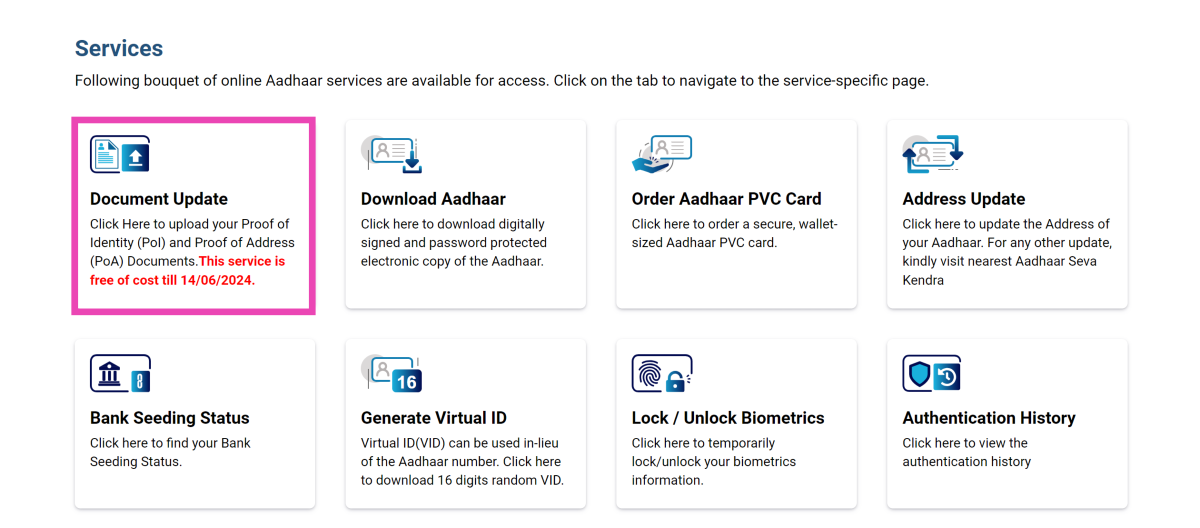
Your Aadhaar Card is crucial for accessing government services and aid as well as making financial transactions using your bank account. Apart from your name, DOB, and gender, your Aadhaar Card also displays your address. Unlike the first three categories, changes to the address are much more common. If you recently changed your residence, you should update your Aadhaar as soon as you can. Additionally, UIDAI has extended the window to update your Proof of Address and Proof of Identity for free until June 14, 2024. So, let’s take you through the process of changing the address on your Aadhaar Card online and updating your documents.
Which documents do you need to change the address on your Aadhaar Card?
Changing or updating your address on your Aadhaar Card requires a Proof of Address (PoA). The MyAadhaar portal accepts a diverse range of documents as PoA. Here are some of the major ones.
Ration Card
Voter Card
Passport
Bank Statement
Insurance policy
Water/Electricity/Gas/Landline telephone bill (Not older than 3 months)
Change AADHAR Card address online
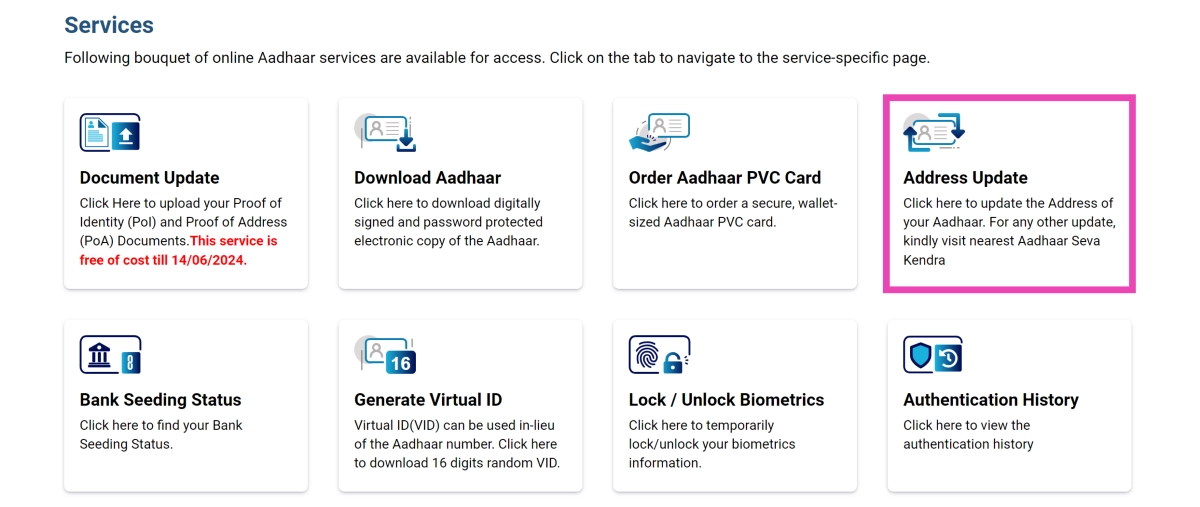
Step 1: Log into the MyAadhaar portal using your AADHAaR number.
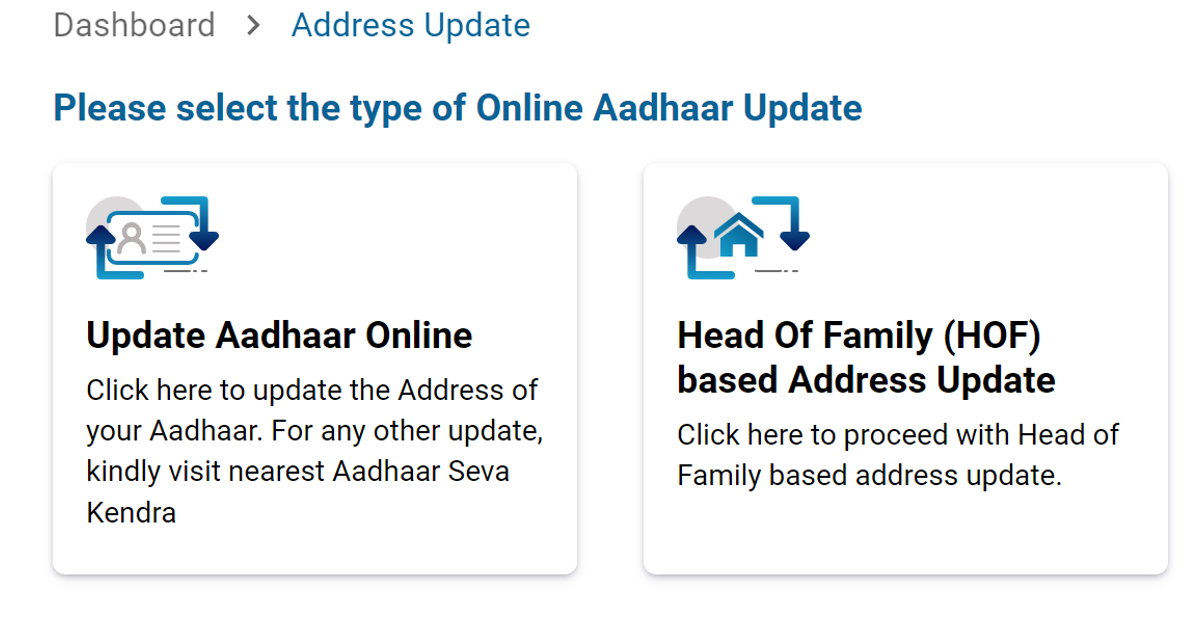
Step 2: Click on Address Update.
Step 3: Select Update Aadhaar online.
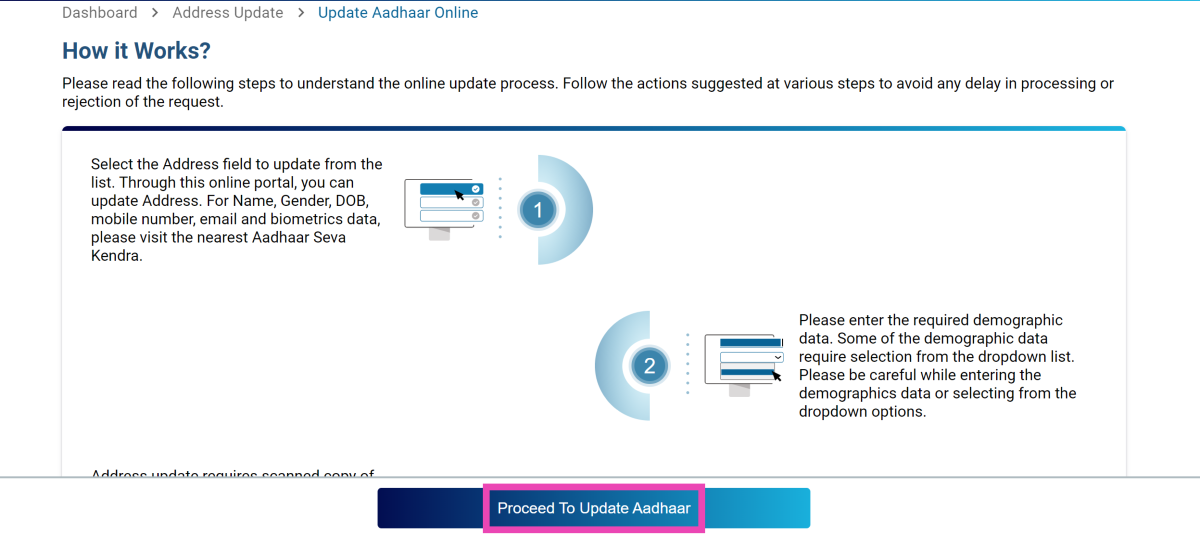
Step 4: Click on Proceed To Update Aadhaar.
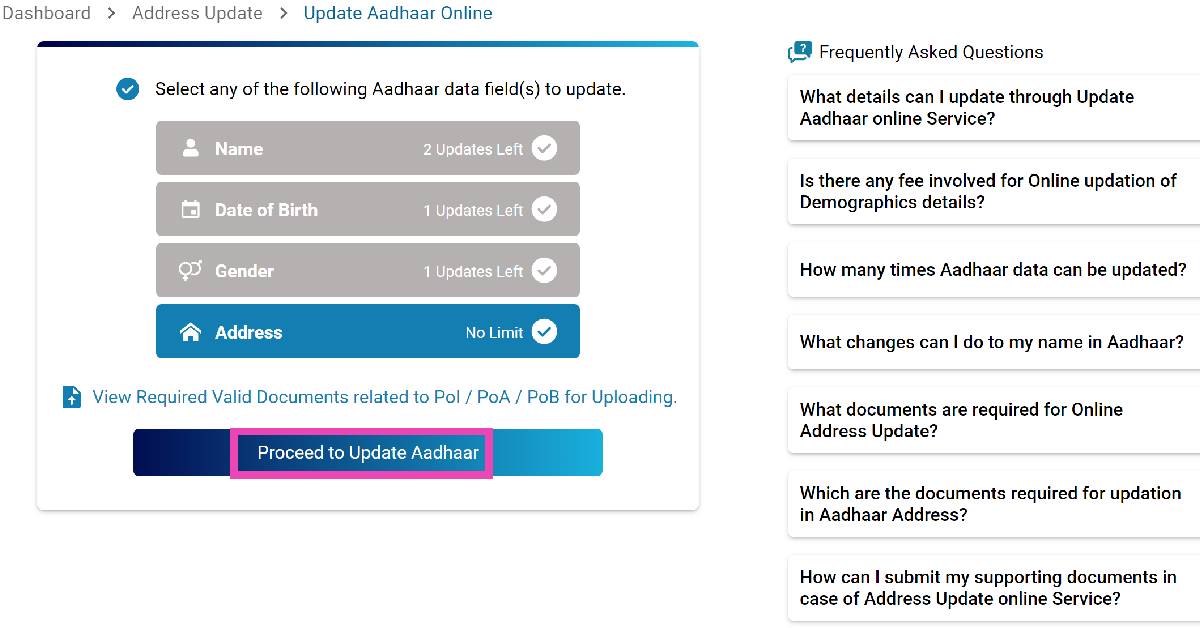
Step 5: Select the field you wish to update (in this case, address).
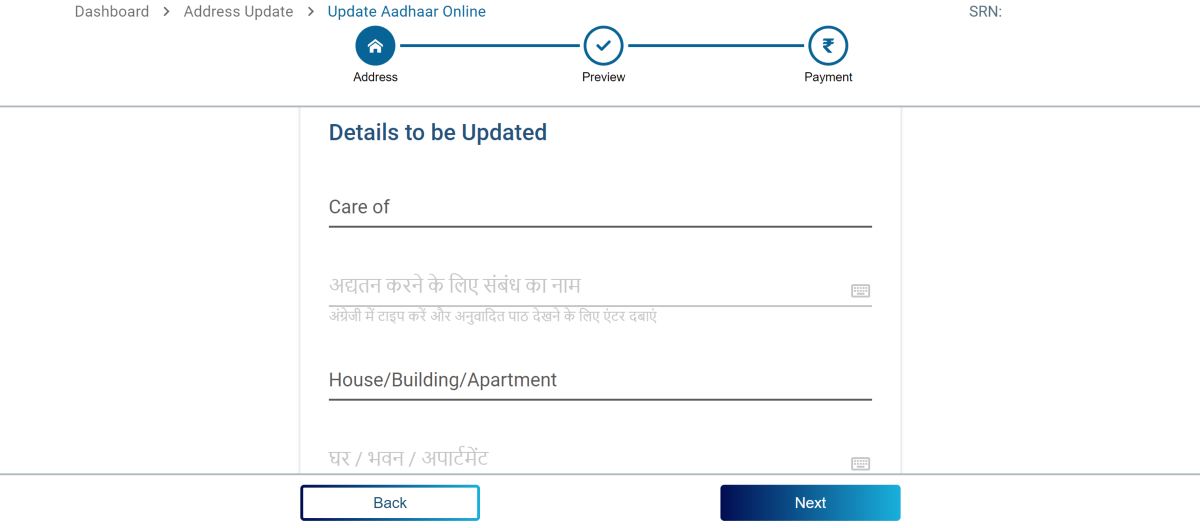
Step 6: Enter your new address along with the relevant supplementary information and proof of address.
Step 7: Double-check the details and pay the Rs 50 fee.
Step 8: Save the Service Request Number to track the update progress.
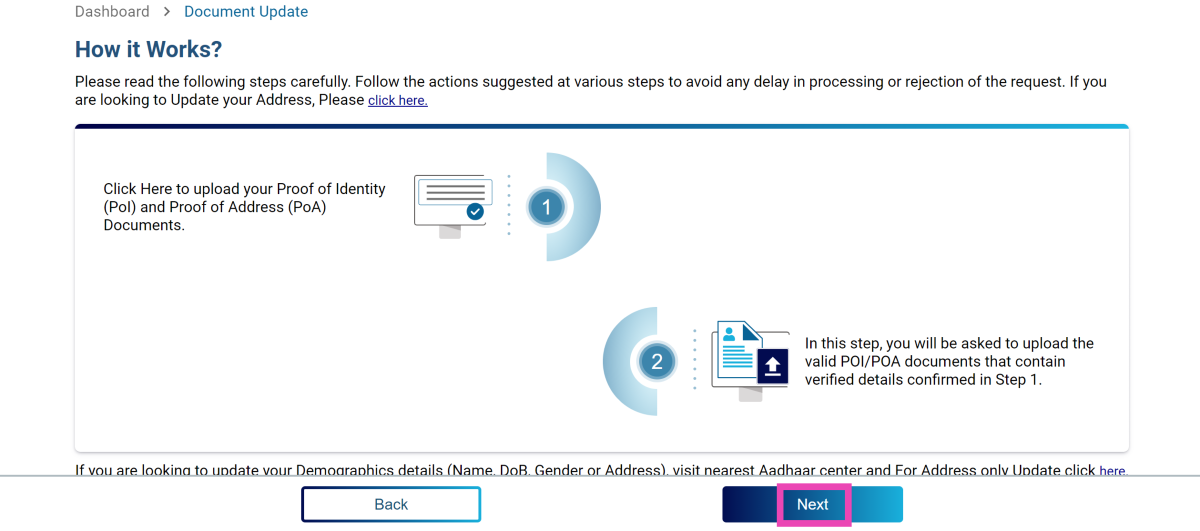
Update Aadhar Card documents
Step 1: Log into the MyAadhaar portal using your AADHAAR number.
Step 2: Click on Update Documents.
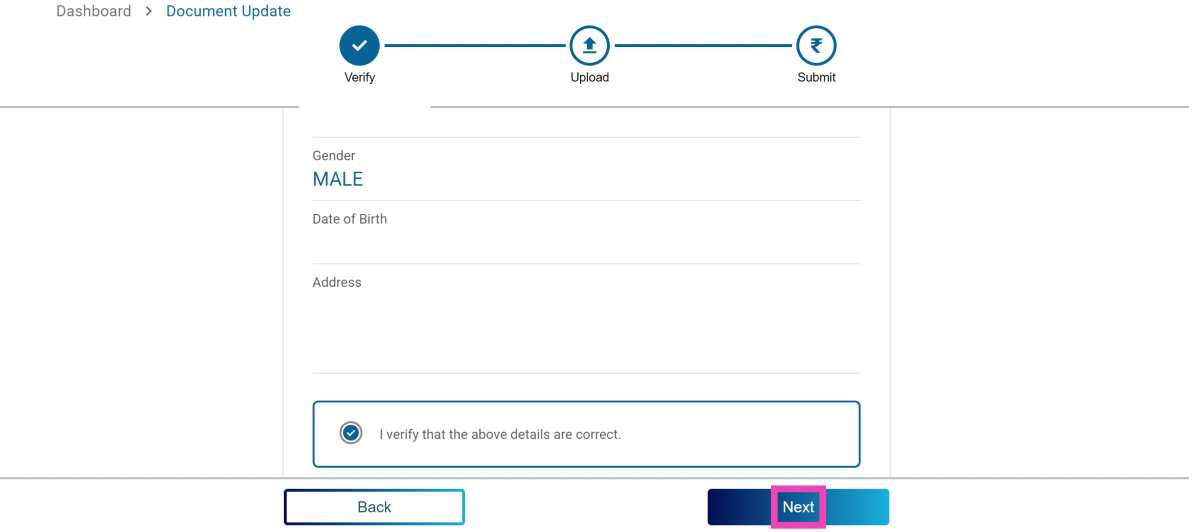
Step 3: Verify your demographic details and hit Next.
Step 4: Upload the valid documents and hit Next.
Step 5:Submit the request.
Frequently Asked Questions (FAQs)
What is the cost of changing the address on my Aadhaar Card online?
You can change the address on your Aadhaar Card online after paying a Rs 50 fee.
How many times can I change the address on my Aadhaar Card?
There is no limit on changing the address on your Aadhaar card. However, you can change your name on your Aadhaar twice in your lifetime and your gender only once.
What is the last date to link Proof of Identity and Address documents to my Aadhar Card?
You can link your Proof of Identity (PoI) and Proof of Address (PoA) documents to your Aadhaar Card for free until June 14, 2024.
This is how you can update details and change the address on your Aadhaar Card online. You can also visit your nearest Aadhaar Enrolment Center to update the address or other details on the card. If you know any other way to update the details on your Aadhaar, let us know in the comments!
Garena Free Fire Max is a battle royale game with regular awards and tournaments to keep players interested. If you play Garena Free Fire, you should be aware of the redeem codes that are released on a daily basis. However, because the battle royale game is banned in India, players from other countries can use the Free Fire Redeem codes daily. If you’re unfamiliar with the Garena Free Fire redeem codes or don’t know how to get them, we’ve put together a step-by-step guide to help you redeem them. Check out Garena Free Fire Max Redeem Codes for 5 June 2024.
The Free Fire Max redeem codes are a great way to get free stuff. These are 12-digit codes that contain alphabets and numbers, as well as an expiration date and time. Because the Garena FF redeem codes cannot be used more than once, you should hurry to the redemption page to claim your free reward before someone else does. To get a free reward, all you have to do is go to reward.ff.garena.com/en, which is the official redemption page. Also, keep an eye on this space for daily updates on Garena Free Fire Max redemption codes and rewards.
Samsung will likely unveil the Galaxy Watch FE soon; support pages for the wearable have been discovered on websites in the UK and Latin America. Like the previous Galaxy Watch 4 model, the forthcoming wristwatch is anticipated to have a 1.2-inch Super AMOLED screen, 1.5GB RAM, and 16GB storage.
Although Samsung is keeping quiet about the impending smartwatch, the official Galaxy Watch FE support page surfaced in the UK and other regions.
MySmartPrice noticed that Samsung’s official websites display a Galaxy Watch with the model number SM-R861. A while ago, the Galaxy Watch FE showed up on the TDRA certification page.
Rumour has it that Samsung will introduce the Galaxy Watch FE on July 10th at the Galaxy Unpacked event in Paris. Alongside the Galaxy Watch 7 and the Galaxy Watch 7 Ultra, the device is anticipated to be released in the UK and North America. Samsung is anticipated to release other next-generation gadgets, such as tablets, the Galaxy Ring, flip and foldable phones, and more.
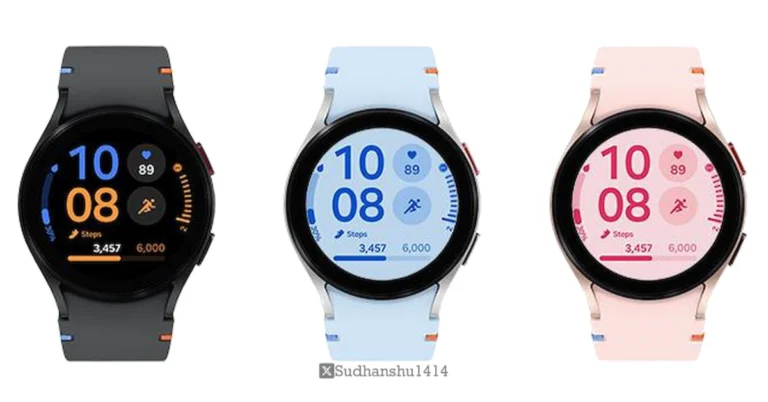
A 1.2-inch Super AMOLED screen, 1.5GB of RAM, and 16GB of storage are among the features and characteristics of the rumoured Galaxy Watch FE that are revealed in the images leaked by a popular tipster. The Galaxy Watch FE shares many internal parts with the previous generation Galaxy Watch 4, which was released in 2021.
The device, which is similar to the Galaxy Watch 6 series, appears in the renders in the colours pink, blue, and black with a circular dial. It is visible with pronounced bezels. It is rumoured to have an aluminium body with a 5 ATM water-resistant construction and IP68 certification.
Leaks indicate that the Galaxy Watch FE’s 1.2-inch Super AMOLED display has a resolution of 396×396 pixels. It might be powered by Samsung’s Exynos W920 chipset, which has 16GB of storage and 1.5GB of RAM. Wear OS, based on One UI Watch 5, is rumoured to come pre-installed.
This source also disclosed that a 247mAh battery will be included in the Galaxy Watch FE. It is said to provide a battery life of up to 30 hours. The smartwatch will probably enable magnetic wireless charging. Wi-Fi, Bluetooth 5.0, NFC, and GPS connectivity options are rumoured to be included. It could include a geomagnetic sensor, gyroscope, barometer, accelerometer, and more.
5 June 2024: New Amazon Quiz is now available. Customers from different parts of the country are participating in the daily quiz. The quiz starts at midnight today and will be live until 11:59 PM tonight. By successfully answering every question, participants in the quiz have the chance to win wonderful rewards. A Rs 500 Amazon Pay Balance is up for grabs to participants today.
One wrong answer could eliminate you from the quiz. You have a chance to win Rs 500 Amazon Pay Balance if you successfully answer every question. Users of the app only have the opportunity to take the quiz. Check Out 5 June 2024 Amazon Quiz Answers.
Only app users are eligible to play the Amazon quiz every morning from 12 AM to 11:59 PM. The quiz is not available on the desktop. For those who are unaware of how to play the Amazon quiz, below are the steps, you can follow to take the quiz.
We have written an explainer above, you can refer to that.
When are the winners of the Amazon Quiz and contest announced or declared?
The announcement of today’s Amazon quiz winner will take place Tomorrow. As for the Special Quiz and “Spin & Win” Contest, the winners will be declared once the Quiz Contest comes to an end. To find out who the lucky winner is, you can refer to the Amazon Quiz Winners List or visit the Amazon Winners tab in the Amazon App.
How to participate in the Daily Amazon Quiz?
That is very easy, just got to the Amazon app and scroll to the bottom of the page and you will find the Quiz section. Click on it (usually it is called the fun zone) and you can enter the Amazon Today Quiz Contest.
Are there any other quizzes or contests running on Amazon daily?
Yes, there are many running on a daily basis. These range from spinning the wheel to answering the questions correctly. All are located in the Fun Zone.
What are the criteria for selecting a winner in the Daily Amazon Quiz?
When a qualified player submits correct answers to all the questions, they will automatically be entered into a lucky draw. This draw will include all participants who answered all the questions correctly. Amazon randomly selects the final winners from the pool of eligible participants who gave the right answers.
Which Types of Questions are asked within Amazon Daily Quiz?
These are very simple and straightforward questions. These are mainly related to general knowledge.
Where should I look for Amazon Daily Quiz answers?
You can bookmark this page as we will help you every day with the Amazon Daily Quiz. We bring you fresh answers every day for the Amazon Daily Quiz and Contest.
What time does Amazon Announce previous winners?
The previous winner’s name will be announced today at 12 PM (noon).
The latest Windows 11 update has ushered in some changes that haven’t gone down well among a lot of core users. The recent introduction of ‘Recall’, a feature that takes regular screenshots of your PC, was quite unpopular among Windows users. The slew of new updates also includes widgets for the lock screen. While this may not be as unpopular as the other new features, some people may prefer the clean background over a cluttered lock screen. If you fall in that camp, here’s how you can remove the widgets from your Windows 11 lock screen.
If you’re not a fan of widgets on your lock screen, Windows 11 has the option to remove them (for now). However, there are a couple of widgets that you may want to try out before dismissing the idea for good. By default, your lock screen displays the weather and stock market infographic. You can change this to Mail, Quick Share, Calendar, and Dev Home.
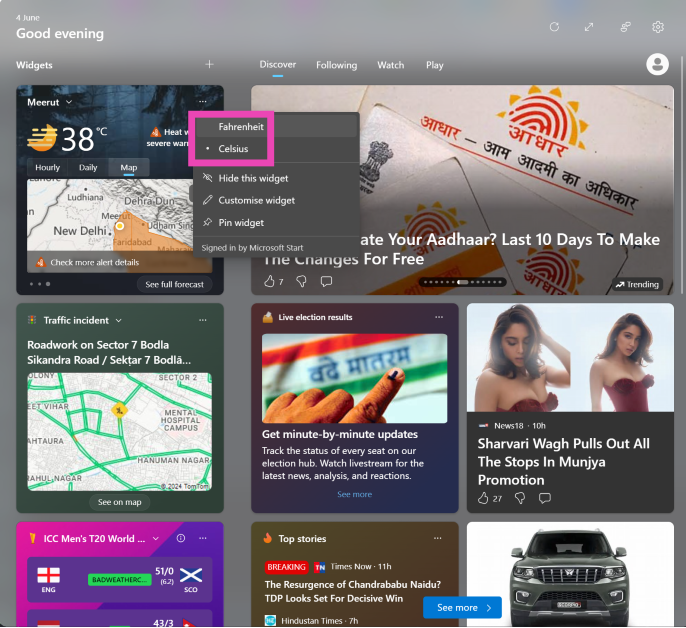
If you want to stick to the weather widget, you may want to customise it for more relevant forecasts. You can change the unit of measurement (Fahrenheit or Celcius) and set an accurate location. You can also follow and track the weather of multiple locations on this widget.
Remove widgets from your Windows 11 lock screen
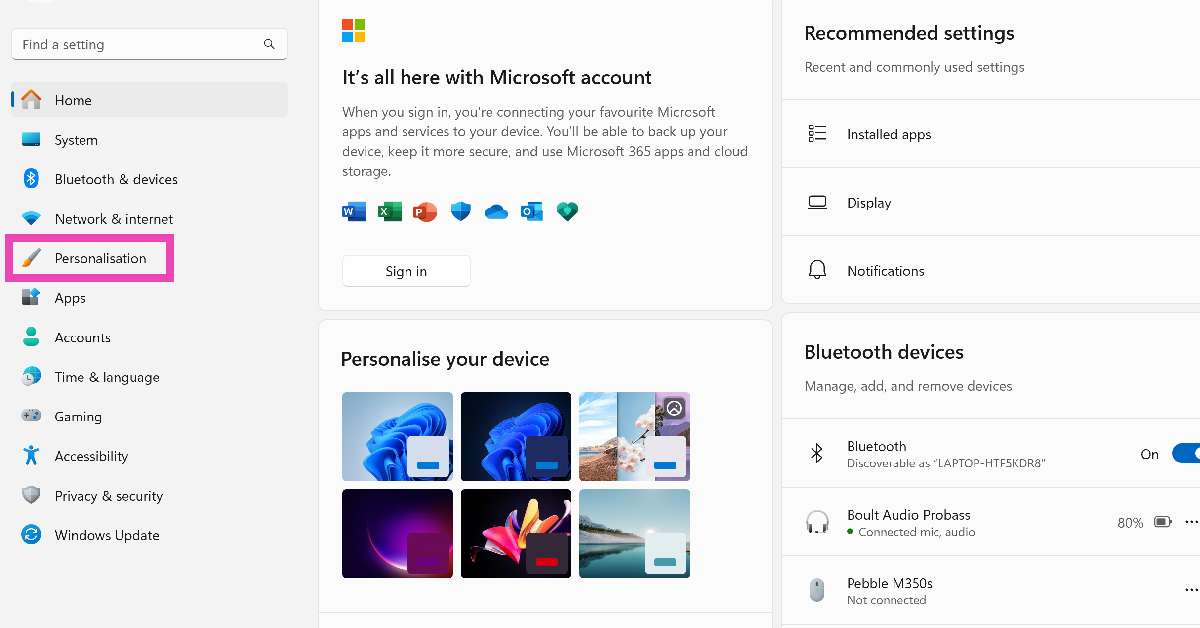
Step 1: Go to Settings and switch to the Personalisation tab.
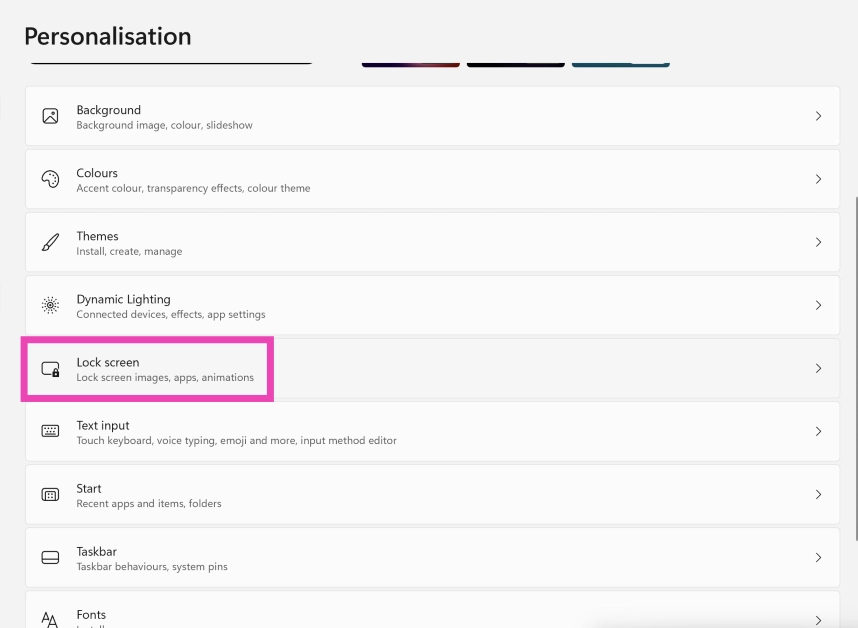
Step 2: Select Lock Screen.
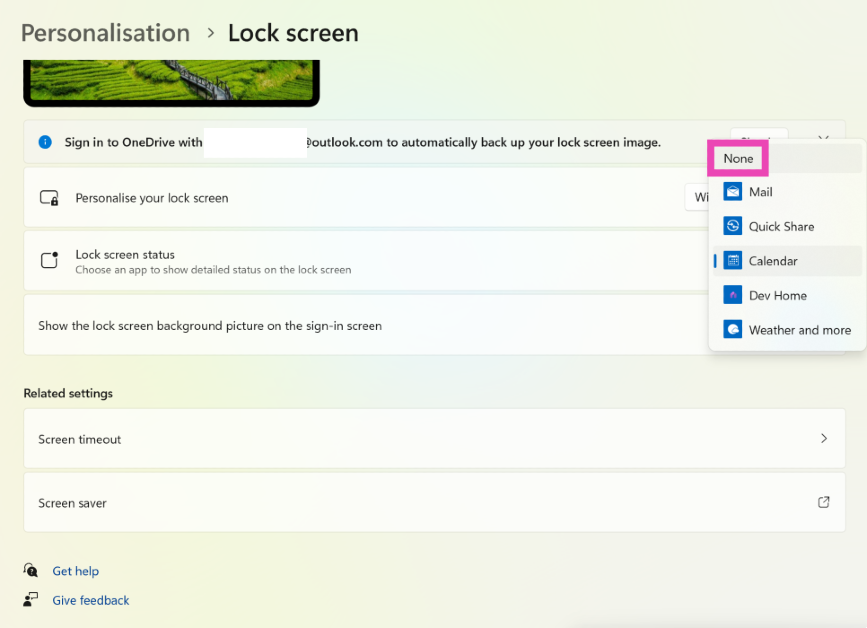
Step 3: Click on the dropdown menu next to Lock screen status and select None.
Customise the weather widget on Windows 11
Unlike the stock market updates, traffic incidents, and ads masquerading as Microsoft Store app recommendations, the weather widget enjoys a lot of popularity among Windows 11 users. If you don’t want to do away with this helpful widget, here are a few customisation tips that will make it better.
Step 1: Click on the bottom left corner of the screen to launch the widget board.
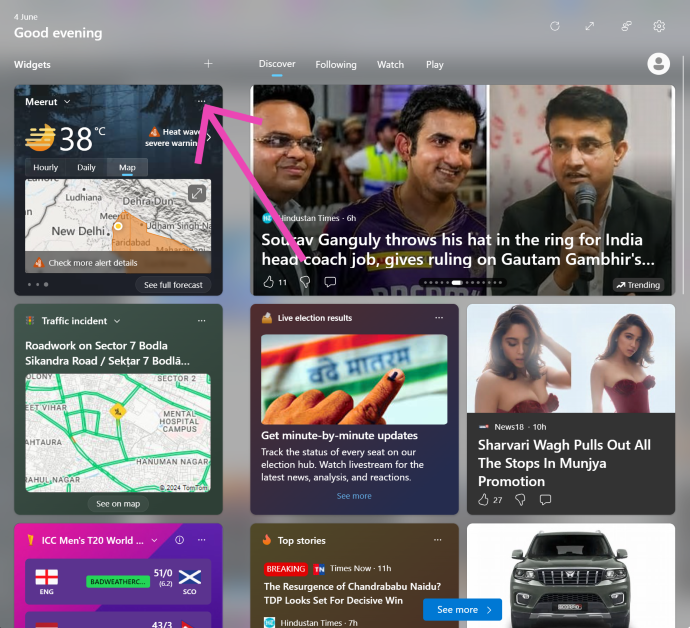
Step 2: Hit the ellipses on the top right corner of the weather widget.
Step 3: Select your preferred unit of measurement (Fahrenheit or Celcius).
Step 4: Click on Customise widget and enter your exact location to get more relevant updates.
Frequently Asked Questions (FAQs)
How do I remove the widgets from my Windows 11 lock screen?
Go to Settings>Personalisation>Lock Screen>Lock screen status and select None.
How do I change the unit of measurement in the weather widget from Celcius to Fahrenheit?
Click on the widget board at the bottom right corner of the screen, hit the ellipses on the weather widget, and select Fahrenheit.
How do I disable Recall on Windows 11?
Go to Settings>Privacy & security>Recall & snapshots and turn off the toggle switch for ‘Save snapshots’.
This is how you can remove the widgets from your Windows 11 lock screen. Read this article to learn how to disable Copilot and Recall on your Windows 11 PC. Got a widget that you like using on your PC? Tell us what it is in the comments!
The iPad Air 2024, which made its debut at Apple’s “Let Loose” event on May 7, now has revised specs. Instead of a 10-core GPU, the tablet now has a 9-core GPU; the number of CPU cores and Neural Engine cores is the same. For the first time, Apple is offering a device with a 9-core GPU; additionally, there have been rumours that this GPU is a reworked version of the 10-core one that powers other Apple products.
Apple stealthily downgraded the iPad Air 2024’s technical specifications. The tablet with the M2 SoC now has a 9-core GPU instead of a 10-core one, according to an updated specifications page on the Apple website.
When the iPad Air 2024 was launched last month, its processor had a 16-core Neural Engine, an 8-core CPU, and 8GB of RAM. Although Apple originally said that the GPU has 10 cores, they have now amended the iPad’s technical specifications page which now states that the iPad Air (2024) is powered by a 9-core GPU.
As said earlier, there are rumours that the GPU is a reworked version of the 10-core model that drives other Apple products, like the MacBook Air (2022).
The all-new iPad Air 2024 sports a 10.9-inch and 13-inch Liquid Retina (LCD) display. An octa-core M2 processor with a Neural Engine for on-device AI workloads powers it. The tablet comes pre-installed with iPadOS 17.
It has a 12-megapixel ultra-wide angle forward-facing camera with a landscape orientation. A 12-megapixel wide-angle camera with image stabilisation and support for Smart HDR is also located on the back. Additionally, the camera can capture videos in 4K quality at up to 60 frames per second or in slow motion at up to 1080p at up to 240 frames per second. The device supports Apple’s Centre Stage technology, which automatically changes the camera angle as you walk, in addition to FaceTime.
The price of the iPad Air 2024 with Wi-Fi connectivity and 128GB of storage in India is Rs 59,900. For Rs 79,990, you can also buy it in the Wi-Fi + Cellular version. Whereas, the 13.9-inch iPad Air model’s Wi-Fi and Wi-Fi + Cellular versions cost Rs 74,900 and Rs 94,900 respectively.
Creating multiple Google/Gmail accounts has a lot of benefits. To begin with, you get up to 15GB of free cloud storage with every account. Signing up for services and apps with a burner account makes your primary account’s inbox more manageable. While using multiple accounts sounds good in theory, there is one small catch. Google asks you to register your phone number every time you create a new account. Some users may not be okay with linking their number to a burner account. So, here is how you can create a Gmail account without using a phone number.
There are a lot of obvious solutions that pop up in mind for the resolution of this problem. However, not all of them are bound to work. Off late, a lot of temporary phone number apps (like Doosra, Hushed, and CoverMe) have gained popularity. These apps are great for creating an account on instant messaging apps but do not work on Gmail. Google is quick to recognise and crack down on temporary numbers.
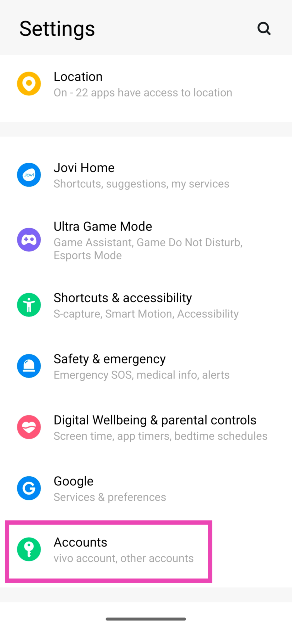
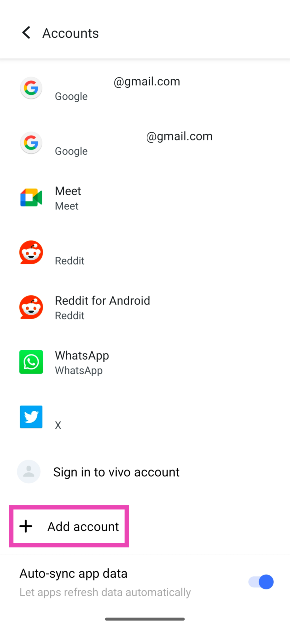
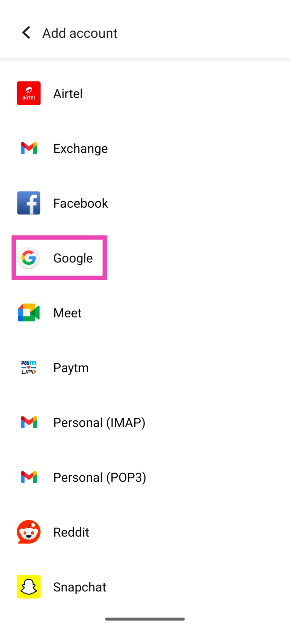
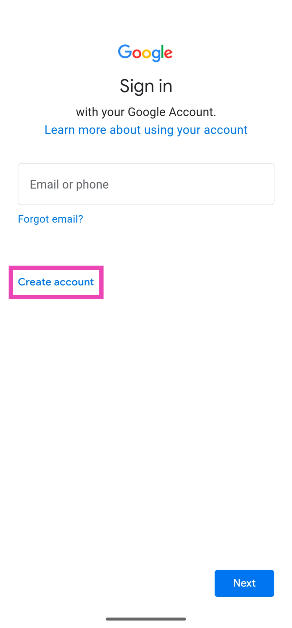
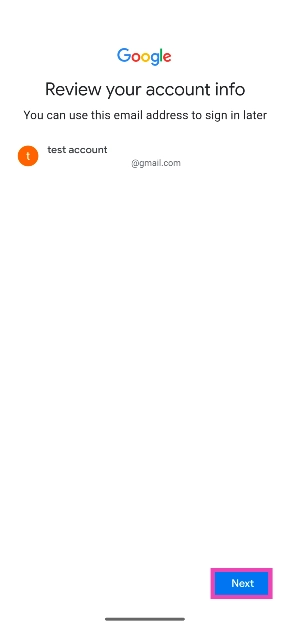
The only proven way to create a Gmail account without registering your phone number is through your smartphone’s settings. The ‘Accounts’ tab in device settings, gives you the option to add multiple Google accounts on your phone. Selecting the option to create a new account on the sign-in page bypasses the phone number registration step.
While denying Google access to your phone number is justified, you should secure your new account by adding a backup email account. This will come in handy in case you forget your login credentials and need help verifying your identity.
Create a Gmail account without using a phone number
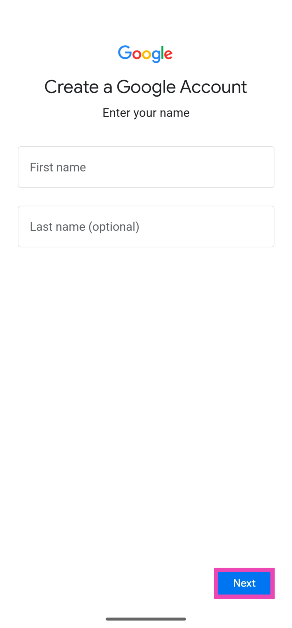
Step 5: Enter your first name and last name. Hit Next.
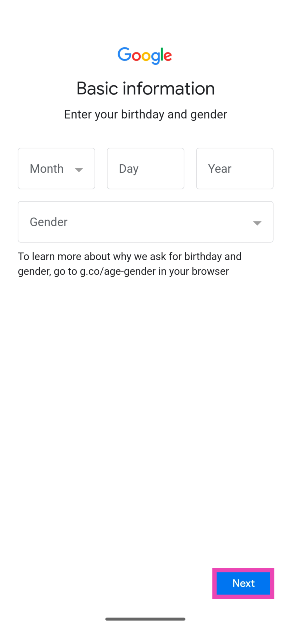
Step 6: Enter your birth date and gender. Hit Next.
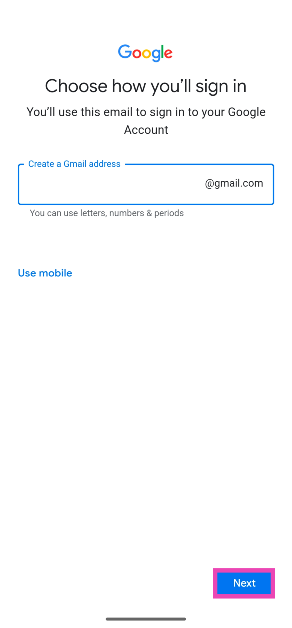
Step 7: Create a username and password and hit Next.
Step 8: Review your account details and hit Next.
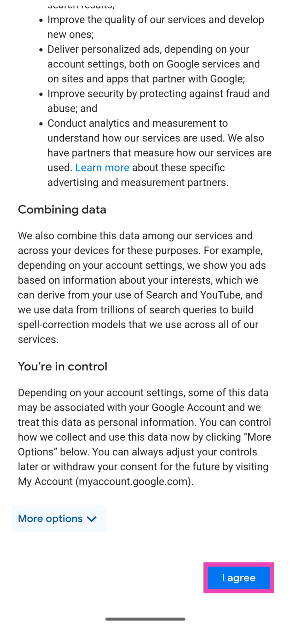
Step 9: Scroll down and Agree to the T&C.
Your Google/Gmail account will be created and added to your phone.
Frequently Asked Questions (FAQs)
Why does Gmail need to verify my phone number before creating an account?
In order to curb bot accounts and add a two-step verification method, Gmail requires you to register your phone number while creating your account.
Can I create a Gmail account without registering my phone number?
Creating a new account through your phone’s settings bypasses the phone number verification process. Go to Settings>Accounts>Add account>Google>Create account to get started with the process.
How many Gmail accounts can I create with one phone number?
While Google does not reveal this information, you can make 4-5 Gmail accounts using one phone number. This figure may vary among different users.
This is how you can create a Gmail account without registering your phone number with Google. Some users also find success with using Bluestacks or other Android simulators, although it is not a proven workaround. If you know of any other ways to complete this task, let us know in the comments!
The metadata of an image records when and where it was clicked. Looking up the details of an image in the gallery app reveals its date, time, and location. However, if you want the date and time to appear on the image, you need to tweak its watermark settings. In case your Android smartphone does not have this feature, there are other tricks you can use. So, let’s take a quick look at the top 3 ways to add a time stamp to your photos on Android.
Most native camera apps on Android smartphones allow users to add a watermark to their images. This watermark can be tweaked to integrate the date and time as well. Some OEMs like Vivo let the user change the watermark design, background image, font, and size as well.
If your Android smartphone does not have customisation options for the watermark in its native camera app, you will need to download a third-party camera app that specialises in time stamps.
Of course, you can also design a watermark using a photo-editing app and manually add it to your photos, but this process takes a lot of time. Instead, it is much better to let the camera app on your phone automatically apply the time stamp on the images you click.
Add a time stamp to photos on Android
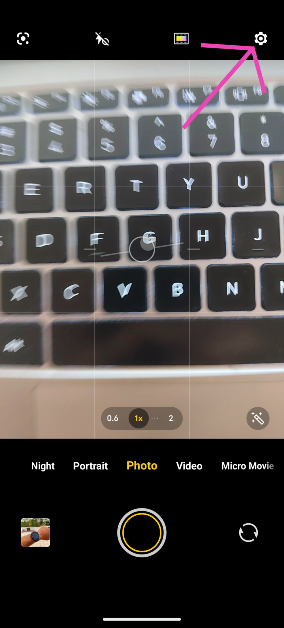
Step 1:Launch the Camera app on your phone.
Step 2: Hit the Settings icon at the top right corner of the screen.
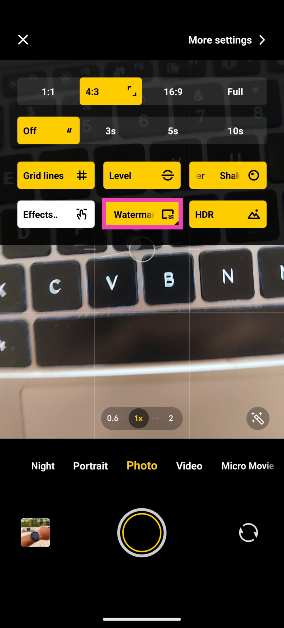
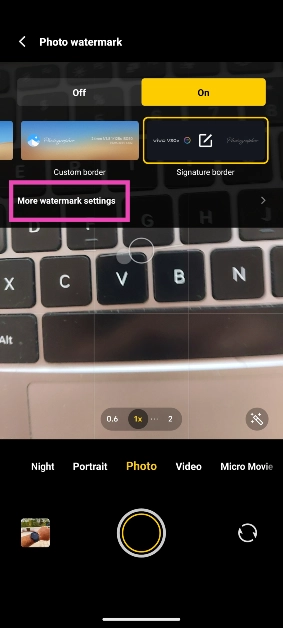
Step 3: Tap on Watermark and select On.
Step 4: Tap on More watermark settings.
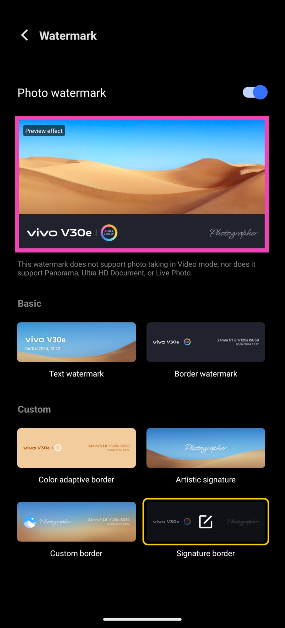
Step 5: Tap on the preview image for the watermark.
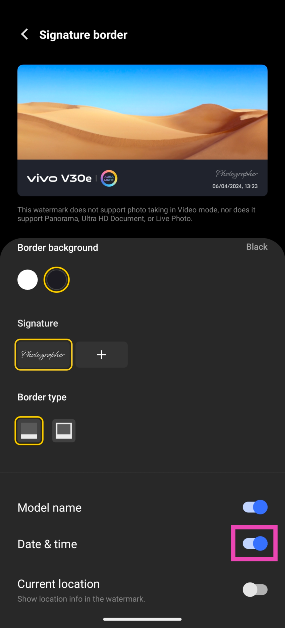
Step 6: Turn on the toggle switch for date and time.
Use a third-party app (Timestamp Camera)
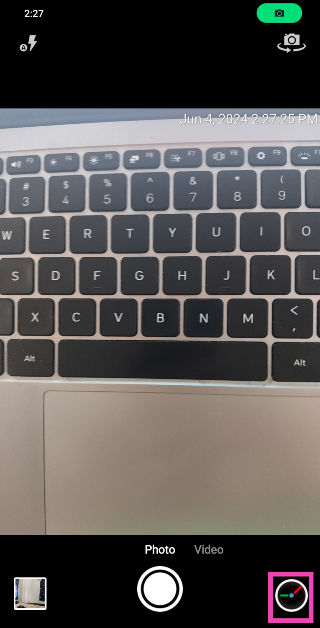
If the native camera app on your Android phone does not support timestamps, download the Timestamp Camera app from the Google Play Store for this task.
Step 2:Launch the app and tap the settings icon at the bottom right corner of the screen.
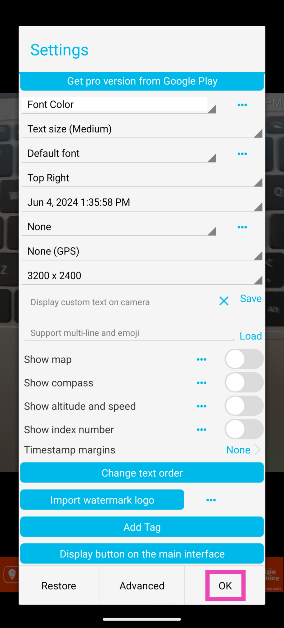
Step 3: Select the onscreen position of the time stamp along with the size, font, colour, and format. Hit OK when you’re done.
Pictures taken with the Timestamp Camera app will appear in the camera folder in the Gallery app on your phone.
Add a timestamp using your phone’s photo editor
This method will come in handy when you want to add a watermark or timestamp to an existing picture on your phone. Here’s how you can go about it.
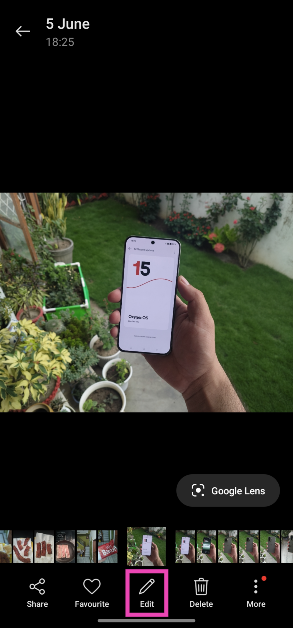
Step 1: Open the image in your phone’s native gallery app.
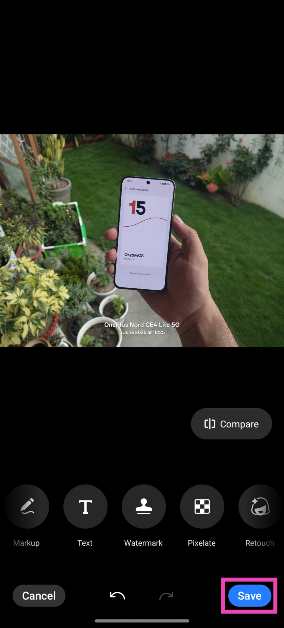
Step 2: Hit the Edit button at the bottom of the screen.
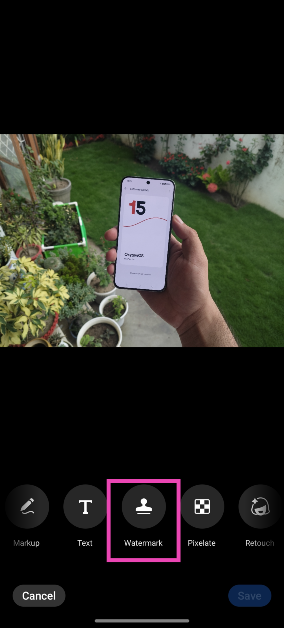
Step 3: Scroll through the tiles and select Watermark.
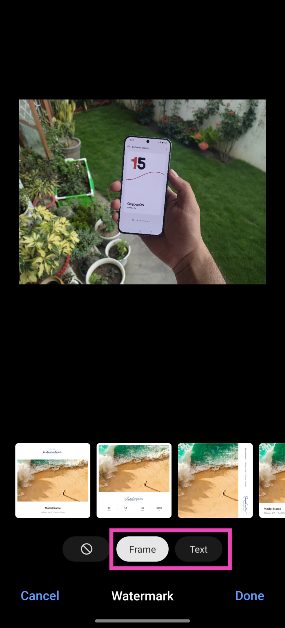
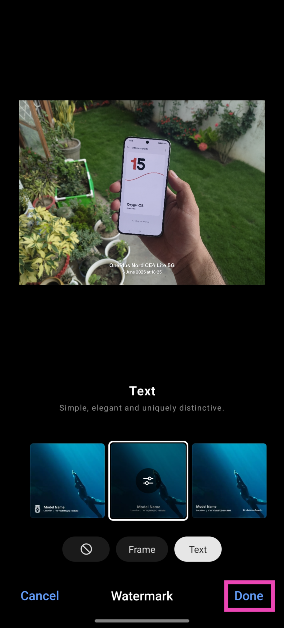
Step 4: Choose whether you want to add a frame to the photograph or simply want to overlay text on it.
Step 5: Select an option that displays the time and date.
Step 6: Hit Done.
Step 7: Tap on Save.
Frequently Asked Questions (FAQs)
How do I add time stamps to pictures on my Android phone?
Launch the Camera app, go to Settings>Watermark>Preview Watermark, and turn on the toggle switch for date and time.
How do I find out the date and time when an image was taken?
Go to your phone’s gallery app, open an image, hit the ellipses, and select ‘Details’. The image metadata, which includes the date and time when it was clicked, will appear on the next page.
Can I change the date and time of an image after it has been captured?
You can edit the metadata of an image after it has been captured and saved to your phone’s gallery. This includes its date and time.
Can I add a timestamp to an image in my phone’s gallery?
Open the image in your phone’s gallery, access the photo editor, go to the Watermark section, and choose an option with the date and time.
Is there a good third-party to take images with timestamps?
You can use the Timestamp Camera and Open Camera apps to take images with timestamps.
These are the top 3 ways to add a time stamp to your photos on Android. If your phone’s native photo editor does not offer the option to add a timestamp, use a photo editing app like Canva, Snapseed, or Picsart. Read this article to learn how you can change the photo date and time on your Android phone.
Xiaomi 14 Civi India launch is scheduled for June 12. It is anticipated that the phone will be a rebranded variant of the Xiaomi Civi 4 Pro, which made its debut in China in March. Ahead of the official announcement the firm has confirmed its key specifications, including colour possibilities. Although, the price and design of the upcoming phone have already been teased by the company.
The Xiaomi 14 Civi, a rebranded Xiaomi Civi 4 Pro, is scheduled to debut in India on June 12. The key specifications of the phone have now been listed on its microsite. The phone will include a 1.5K AMOLED screen with a refresh rate of 120Hz, powered by HyperOS, an Android 14 operating system, and Qualcomm’s Snapdragon 8s Gen 3 processor.
It will have two 32-megapixel front camera sensors and a triple rear camera configuration supported by Leica. A 4,700mAh battery that can withstand up to 1,600 charge cycles and 67W of wired fast charging will power the phone. The Cruise Blue, Matcha Green, and Shadow Black colour options are available for the upcoming phone. It is confirmed that the phone’s frame is made of metal and that its thickness is 7.4 mm.
Previously an image of the Xiaomi 14 Civi was leaked online, providing a detailed look at its bank offers and sale date. The tipster Sudhanshu also disclosed the device’s anticipated price range. The smartphone will launch on June 20th, according to an offline advertisement that tipster Sudhanshu snapped off a banner outside of an electronics store. The phone will probably cost about Rs 50,000 in India.
In addition to this, the poster offers a Rs 3,000 instant cashback with certain bank cards. Buyers may also receive a Rs 3,000 exchange incentive when they purchase the Xiaomi 14 Civi. Whereas the EMIs will begin at Rs 2,389 per month, and customers have the option to use Xiaomi Easy Finance.
There are rumours that the Xiaomi 14 Civi is a rebranded version of the Xiaomi Civi 4 Pro, which was released in March of this year. If speculations regarding the device are to be believed then along with Snapdragon 8s Gen 3 CPU the device will include up to 512GB of UFS 4.0 storage. It will have a 6.55-inch full-HD+ OLED display with a refresh rate of 120Hz and Gorilla Glass 2 protection.
Given that the Xiaomi Civi 4 Pro has three back cameras, it is expected that the Xiaomi 14 Civi will also contain a camera module with three lenses, the primary one being a 50-megapixel Leica Summilux lens with optical image stabilisation (OIS). In addition, a 12-megapixel ultra-wide-angle sensor and a 50-megapixel portrait sensor.