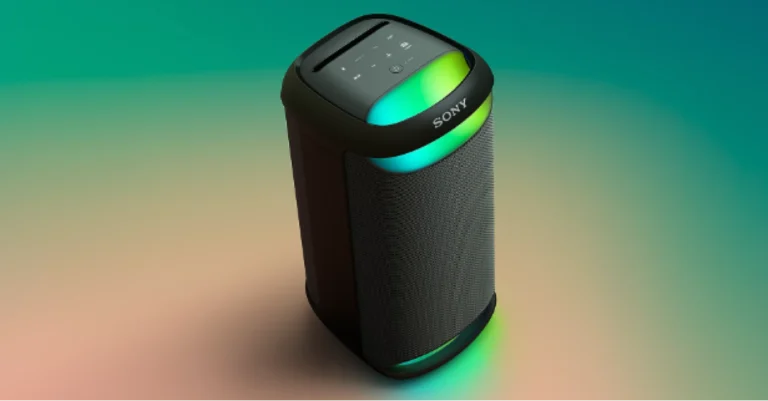
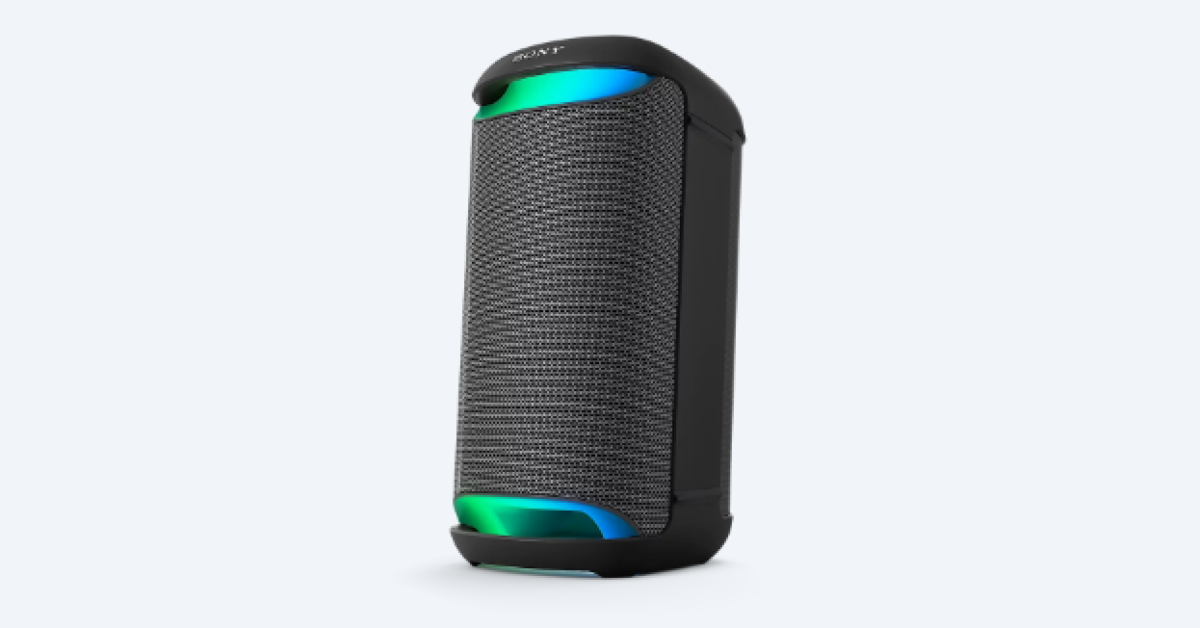
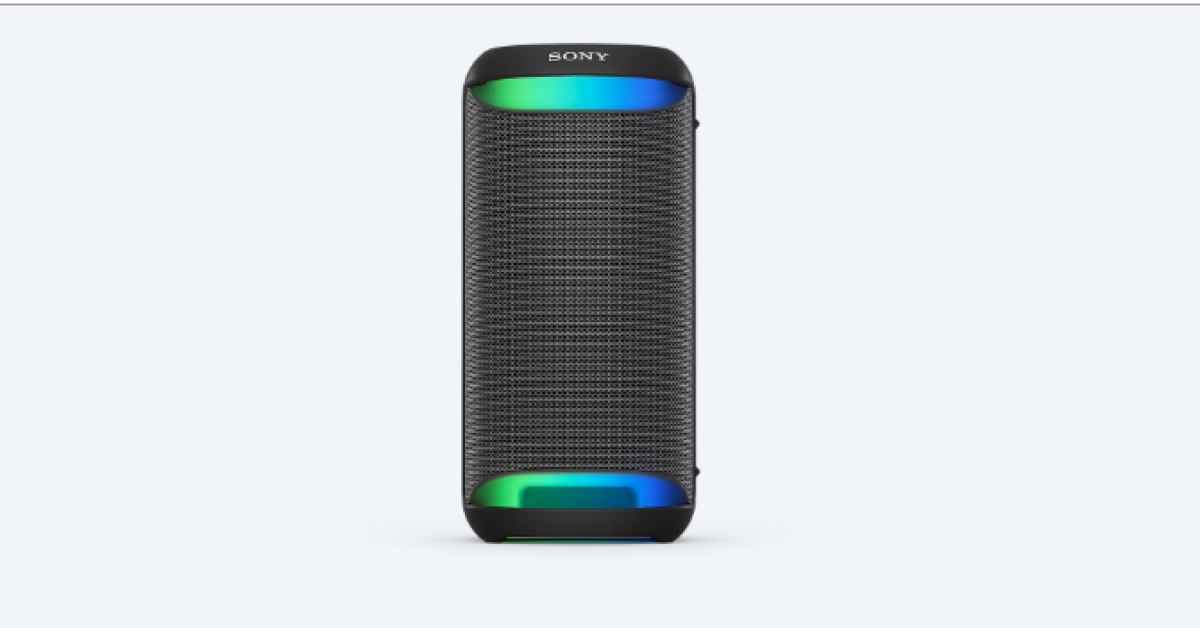
Sony SRS-XV500 portable party speaker with up to 25 hours of battery life launched in India

Key Highlights
  • Sony SRS-XV500 features X-Balanced Speaker Units.
  • The device comes with a handle for portability.
  • The device supports karaoke and guitar input.
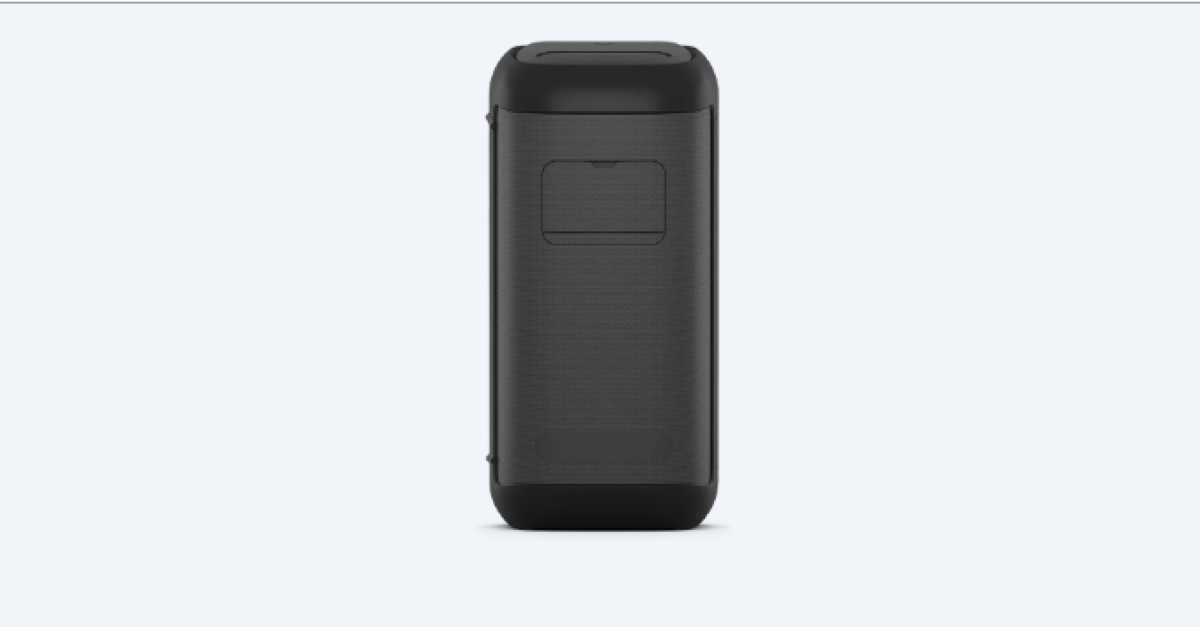
Sony India today announced the launch of a new portable party speaker in India. Sony SRS-XV500 has debuted in the country and has been specially tuned for India. The speaker is claimed to offer up to 25 hours of battery life. The device features ambient lighting that can be customised. Moreover, it is IPX4 rated (splashproof) with karaoke and guitar input along with echo and key control on the rear panel. Additionally, the party speaker includes two X-Balanced speaker units and two tweeters. Sony SRS-XV500 price in India, sale details

Sony SRS-XV500 price in India, sale details

Sony SRS-XV500 has been launched in India at Rs 31,990. The party speaker will go on sale from February 24 via Sony retail stores (Sony Center and Sony Exclusive), the www.ShopatSC.com portal, major electronic stores, and other e-commerce websites in India.

Sony SRS-XV500 specifications

In terms of build, Sony’s recycled plastic is used in the body of the SRS-XV500. The ambient light feature of the SRS-XV500 contributes to the party mood. You can customise the illumination with the Fiestable mobile app. With an IPX4 water resistance rating, the SRS-XV500 can be carried outdoors and is safe to use even if a few raindrops fall. The speaker is easy to travel thanks to its integrated handle. Furthermore, the SRS-XV500’s ability to be positioned vertically or horizontally allows it to adapt to any setting. In addition to maximising speaker diaphragm size, the non-circular diaphragm boosts sound pressure for punchier, deeper bass, reduced distortion, and improved vocal clarity. Sony SRS-XV500 specifications Sony SRS-XV500 features X-Balanced Speaker Units, which produce deep, punchy bass with less distortion and two tweeters that offer crisp vocals and a wider soundstage. You can easily insert a karaoke microphone. With a second input, you can increase the intensity of your performance by playing a guitar or doing a duet on a second microphone with a friend. There is individual mixing for both inputs. One can also customise the sound of the device with the Echo and Key Control located on the back panel. Also Read: Airtel launched in-flight roaming packs, starting at Rs 195 Sony SRS-XV500 specifications Also Read: Samsung to roll out One UI 6.1 update next month, to bring Galaxy AI feature to more devices The Sony SRS-XV500 portable party speaker has an easy-to-use touch panel to adjust your lighting, modes, and settings. With USB connectivity, you may plug in and listen to music. You can also use the SRS-XV500 to charge other devices, such as smartphones. The new SRS-XV500 is compatible with both Sony | Music Center and Fiestable apps. With Sony | Music Center, you can select playlists, and change lighting patterns and sound modes all from the dance floor. From a distance, you may control the centre’s lighting, sound, and playlist options. Fiestable gives you access to entertaining features like making a playlist, karaoke functions including Voice Changer and Echo, plus DJ control to add sound effects.

Airtel launched in-flight roaming packs, starting at Rs 195

Key Highlights
  • Airtel has launched in-flight services comprising voice, data and SMS services to enhance the on-board travel experience.
  • Airtel in-flight roaming plans will be available for both prepaid and postpaid customers.
  • The Airtel in-flight roaming packs will start at Rs 195.
To help its customers stay connected when on a flight, telecom service provider Airtel has brought new prepaid and postpaid plans for customers. The company has introduced in-flight roaming packs with tariffs starting as low as Rs. 195. Please find details of prepaid and postpaid plans on which it can be availed below. Telecommunications service provider Bharti Airtel has introduced in-flight roaming plans for customers that will allow them to stay connected while on-board Airtel customers will be able to take advantage of a variety of activities, including high-speed internet browsing and talking to loved ones. Consumers who purchase roaming packs priced at Rs 3999 for postpaid and above or Rs 2997 for prepaid would immediately be eligible for free in-flight roaming. Commenting on the launch, Amit Tripathi – Director – Customer Experience and Marketing, Bharti Airtel, said, “Airtel has been at the forefront of providing seamless mobile connectivity to customers across the country. Today, we are thrilled to bring the same service on board a flight through our in-flight roaming packs that will allow customers to enjoy high-speed internet and seamless voice calling that will help them stay connected with their loved ones while on a flight.” As mentioned earlier, Airtel in-flight roaming packs start at Rs 195 for both postpaid and prepaid users and will receive 250MB of data, 100 minutes of outgoing talk time and 100 outgoing SMS. Also Read: Samsung to roll out One UI 6.1 update next month, to bring Galaxy AI feature to more devices For Rs 295, you may upgrade to get 500MB of data. The inflight roaming pack will include 100 minutes of free talking and 100 outgoing SMS. At Rs 595 the customers will receive 1GB of data together with 100 minutes of outgoing talk time, and 100 outgoing SMS. Note that all the inflight packs come with a validity of 24 hours. Also, there is no need to buy an additional recharge pack in its roaming packs as Bharti Airtel already includes the same prepaid and postpaid advantages. Also Read: Vivo Y200e 5G powered by Qualcomm Snapdragon 4 Gen 2 SoC launched in India Prepaid plans priced at Rs 2,997 and more come with 100 SMS, 250MB of Internet, and 100 minutes of free outgoing talktime. In the same way, postpaid users can also get in-flight roaming plans benefits for Rs 3,999. Additionally, to provide a seamless travel experience Airtel and Aeromobile have partnered to provide the best in-flight connectivity across 19 airlines flying across different international sectors.

Samsung to roll out One UI 6.1 update next month, to bring Galaxy AI feature to more devices

Key Highlights
  • Samsung has announced the availability of Galaxy AI features on more Galaxy devices.
  • AI-supported models will be able to access features such as Circle to Search, Note Assist, Browsing Assist, Transcript Assist, Chat Assist, Live Assist and more.
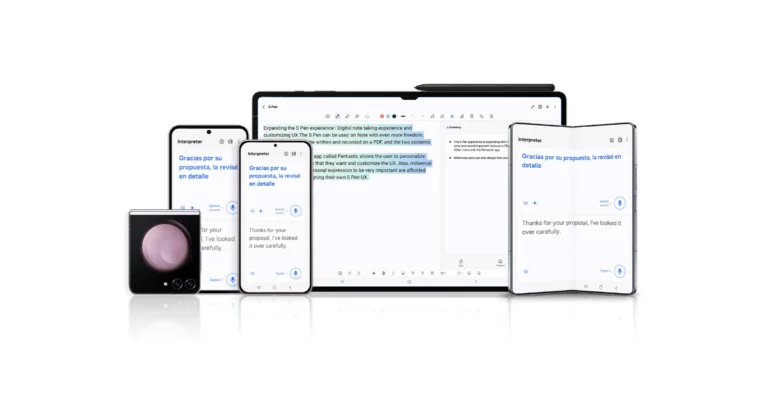
South Korean electronics giant Samsung will be rolling out a new OS upgrade, which is based on Android 14. The company has said to release the One UI 6.1 update for more Galaxy devices including Galaxy S23 series, S23 FE, Z Fold5, Z Flip5 and Tab S9 series. The upcoming software update will land on your devices by the end of March. Samsung’s One UI 6.1 update is planned for the Galaxy S23 series, S23 FE, Z Fold5, Z Flip5 and Tab S9 series. The much-discussed AI features on the S24 series will be included in the One UI 6.1 upgrade. With AI-supported models, even more Galaxy users will now be able to benefit from the communication-enhancing Galaxy AI capabilities. As per the company starting at the end of March, the update will be available for the Galaxy S23 series, S23 FE, Z Fold5, Z Flip5, and Tab S9 series. “The broader integration of Galaxy AI across the Galaxy ecosystem also enables a seamless user experience in day-to-day tasks on AI-supported models, driving new levels of efficiency” the company noted in its announcement. Among the features is the option to use Chat Assist to translate messages into 13 other languages and change the tone of messages. Users of the Galaxy can take advantage of Live Translate, which offers text and voice translations during phone calls, to fully engage in real-time conversations. Because Interpreter’s split-screen capability creates text translations for live chats, users can even strike up impromptu talks with locals while travelling. Circle to Search with Google enhanced search capabilities by producing clear search results with a quick circle motion. Note Assist, which lets users make formats, summarise, and translate notes; Browsing Assist, on the other hand, helps people generate comprehensive summaries of news articles. Moreover, Transcript Assist makes summaries and translations with ease while transcribing meeting recordings. Also Read: Vivo Y200e 5G powered by Qualcomm Snapdragon 4 Gen 2 SoC launched in India TM Roh, President and Head of Mobile eXperience Business at Samsung Electronics said, “Our goal with Galaxy AI is not only to pioneer a new era of mobile AI but also to empower users by making AI more accessible. This is only the beginning of Galaxy AI, as we plan to bring the experience to over 100 million Galaxy users within 2024 and continue to innovate ways to harness the unlimited possibilities of mobile AI.” Also Read: Meta launched Instagram’s Creator Marketplace where brands and creators can connect Samsung’s One UI 6.1 update will also step up user’s creative potential using Galaxy AI. The most recent version of Galaxy offers a collection of Galaxy AI tools that support creative freedom even after a photo is taken. Through Generative Edit, AI-supported devices can easily resize, reposition or re-align objects in photos to perfect a great shot. Users can also polish any photo faster and easier than ever with Edit Suggestion. Edit Suggestion makes it quicker and simpler for users to edit any photo. Instant Slow-mo can generate additional frames for slow-motion videos to capture action-packed moments, negating the need for several retakes. Customizing Galaxy devices is even easier than before through AI-generated wallpapers, enabling AI-supported devices to bring users’ creativity to life.

OnePlus 12R Review: Flagship-grade performance at a mid-range price

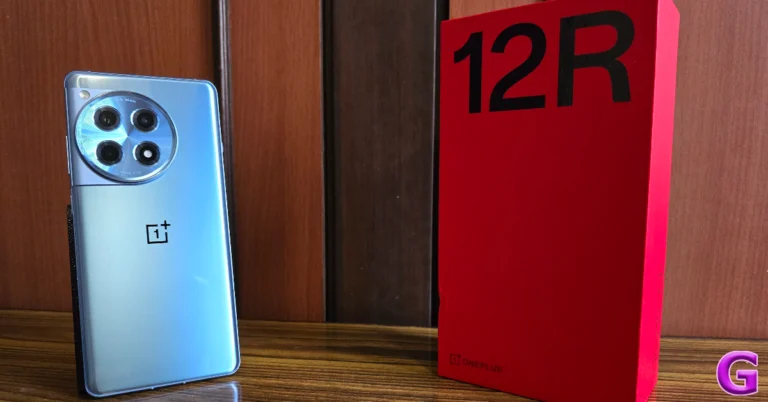
Back in January, OnePlus released its flagship smartphone for 2024 (our review here) at a starting price of Rs 65,000. Released alongside the flagship was the OnePlus 12R, a powerful mid-ranger that punches well above its weight. The 12R continues OnePlus’ tradition of offering flagship-level performance at a relatively affordable price. In true R Series fashion, it gets rid of the bell and whistles to appeal to an audience that wants a powerhouse in their hands without splurging an exorbitant amount of money. In India, the smartphone is priced at Rs 40,000. Unlike the OnePlus 11R, its successor gets a US release this year, where it costs $500. We’ve been using the smartphone for a week and have been really impressed by it. Could it be the flagship killer of the year? Find out in our OnePlus 12R review. Read Also: Top 5 Ways to Change App Icon and Name on Android

OnePlus 12R review: Design and Display

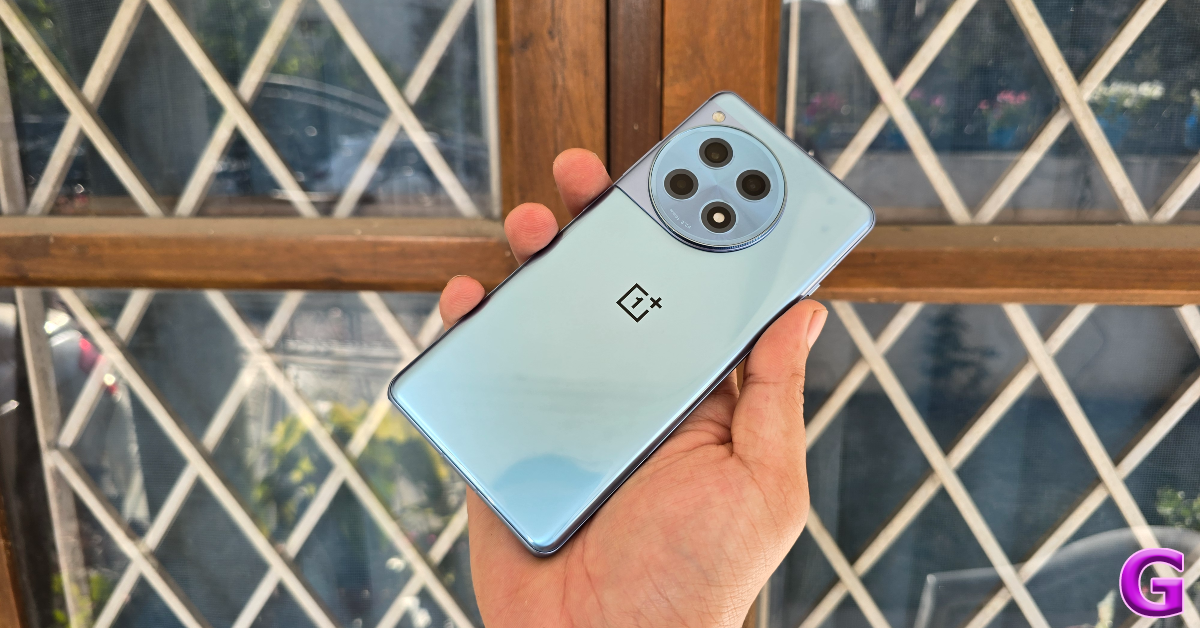
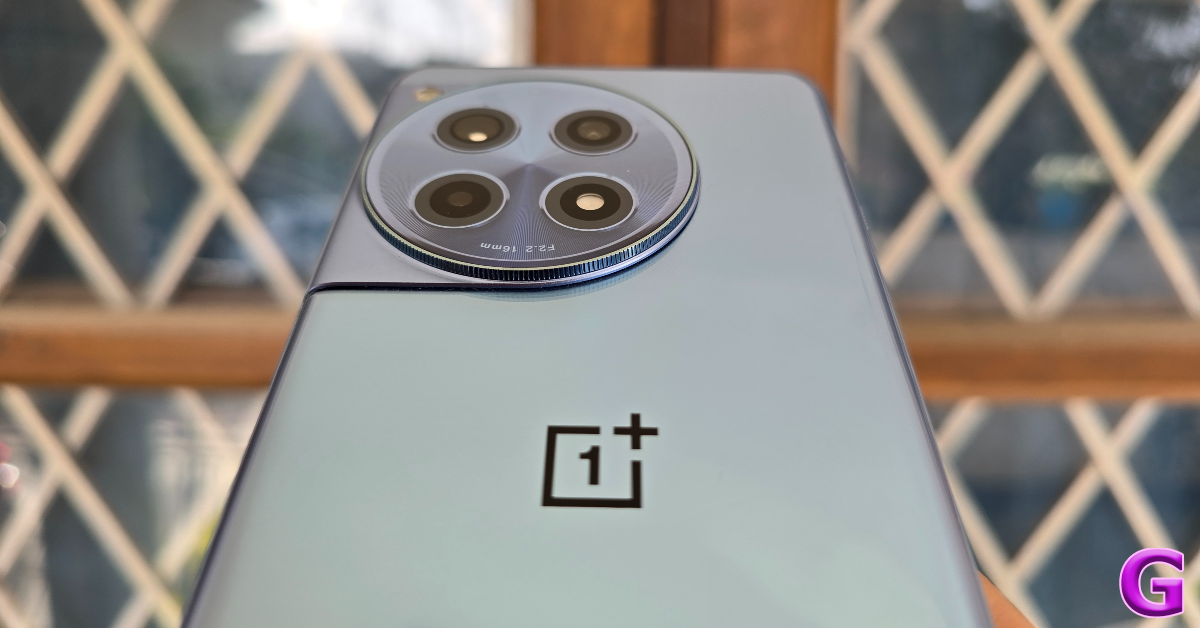
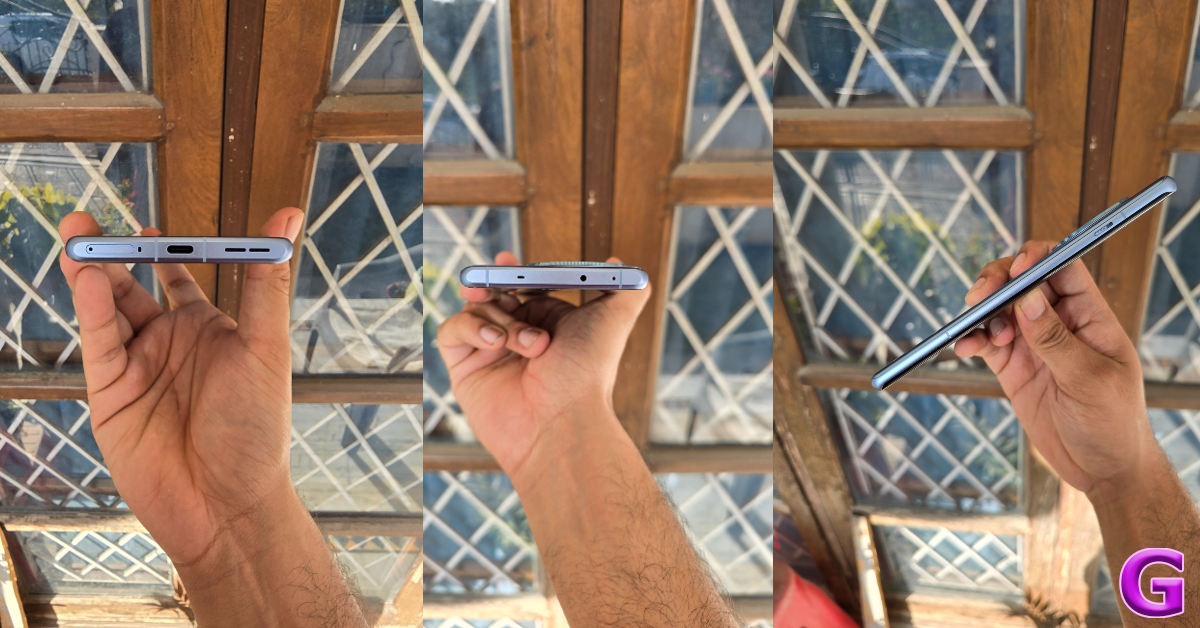
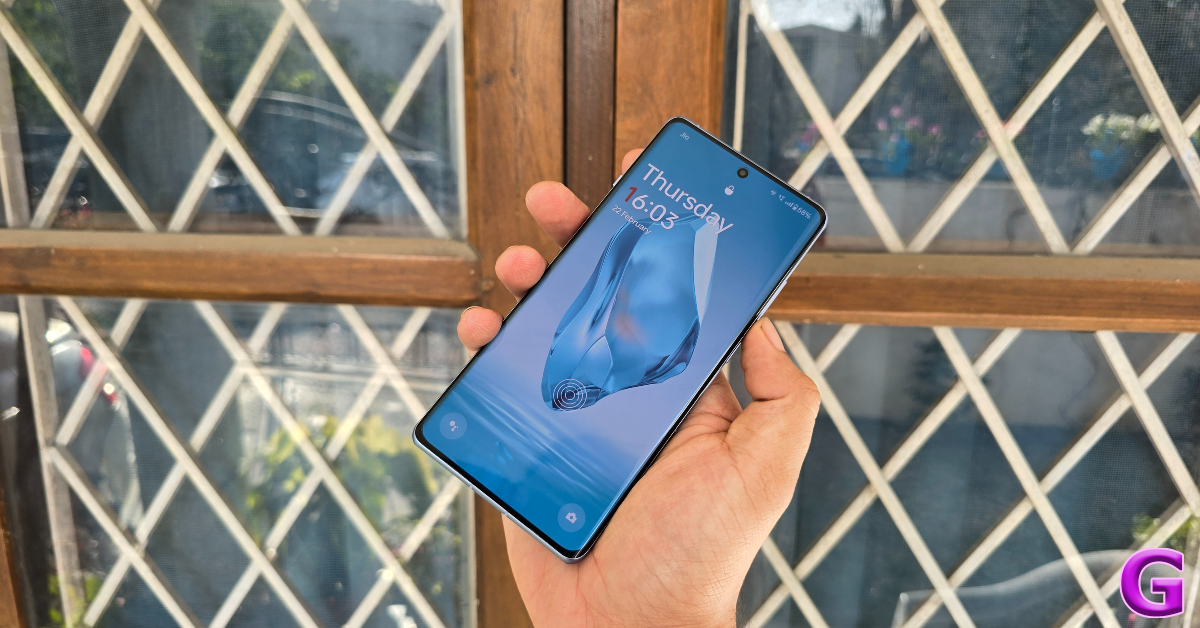
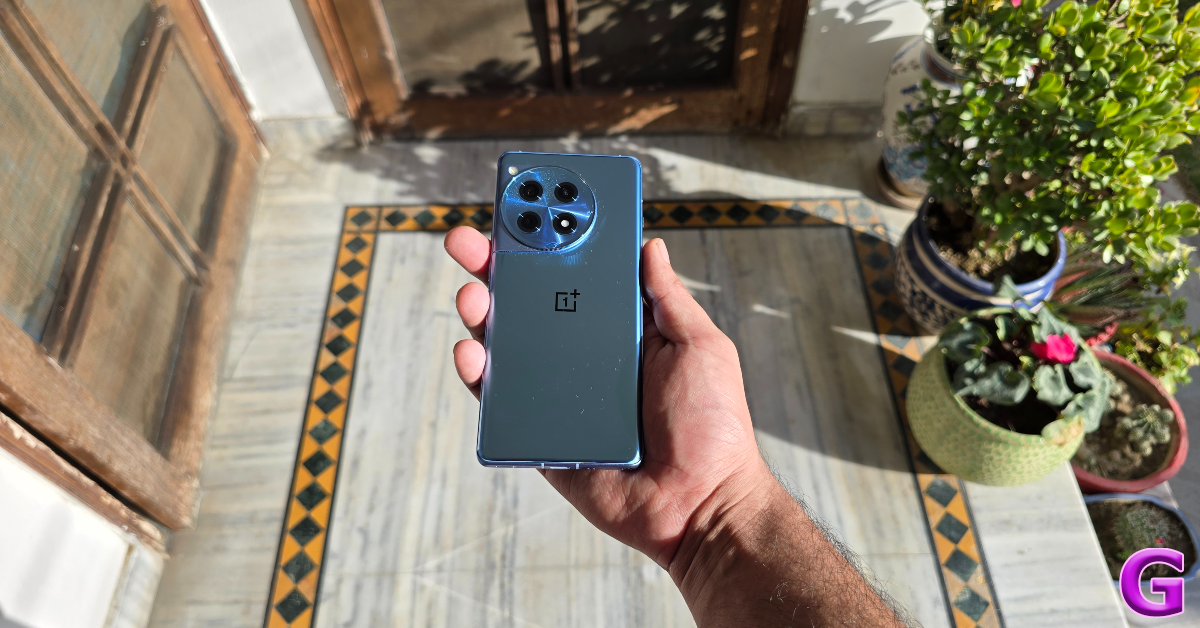
One of the better things about buying a OnePlus smartphone is the set of accessories you get inside the box. The OnePlus 12R retail package contains the smartphone, a 100W power adapter, a USB Type-A to Type-C charging cable, a body-coloured silicone cover, a SIM ejector tool, some stickers, a Red Cable Club membership card, phone hole seal stickers (for installing the screen protector), a safety guide, and a quick start guide. The smartphone is available in two colour variants – Cool Blue and Iron Gray. OnePlus 12R review: Design and Display Our ‘Cool Blue’ OnePlus 12R review unit came with a blue silicone cover, which we used quite a bit to prevent the glossy back panel from accumulating fingerprints. If you don’t prefer using a case with your phone, we’d suggest getting the Iron Gray colour variant for its frosted glass back panel with a matte-like finish. It needs to be said that the quality of the silicone case provided in the box was very good, something you don’t see quite often in this price category. design The design language of the OnePlus 12R is similar to its flagship counterpart. The two-step camera module at the back is aligned to the left and blends into the frame of the smartphone. The ‘Hasselblad’ tuning is reserved for the flagship device, which is why you won’t find its branding on 12R’s camera island. The OnePlus branding is present in the familiar central position on the curved glass back panel. The aluminium frame of the smartphone holds the volume rocker keys and the power button on its right edge. On the left lies the iconic alert slider. The SIM card tray, USB Type-C port, primary microphone, and speaker grille are positioned at the bottom edge of the frame. Up top, lie the secondary speaker, IR blaster, and the secondary microphone. OnePlus 12R review: Design and Display The 6.78-inch LTPO4 AMOLED display on this smartphone can go as bright as 4,500 nits, which is simply astounding. The display doesn’t lose any legibility under direct sunlight. Being a curved panel, the bezels along the sides of the display are minimal and OnePlus has kept a good job of keeping their size in check along the vertical borders too. The smartphone has a 90.9% screen-to-body ratio. A refresh rate of 120Hz ensures a smooth browsing and gaming experience (more on that later). The touch response is snappy and fun. OnePlus has also fixed the position of the in-display fingerprint scanner. The OnePlus 11R (our review here) had it at the bottom of the screen. It is now aligned with the natural movement of the thumb. display The colours produced by this LTPO4 AMOLED panel are punchy and vivid. There are 4 colour modes on offer – Vivid, Natural, Cinematic, and Brilliant. On top of that, you can use the Image Sharpner and Video Colour Boost to enhance the quality of the images on the screen. Watching video content on the OnePlus 12R is a delightful experience. The smartphone has Widevine L1 support, which means you can play HD content across all streaming platforms. The stereo speaker is loud but produces a slightly boxy output. OnePlus needs to pull up its socks when it comes to dust and water resistance. The OnePlus 12R has an IP64 rating which protects it against minor water splashes. Even the flagship OnePlus 12 does not offer flagship-grade water resistance with its limited IP65 rating.

OnePlus 12R review: Performance and Cameras

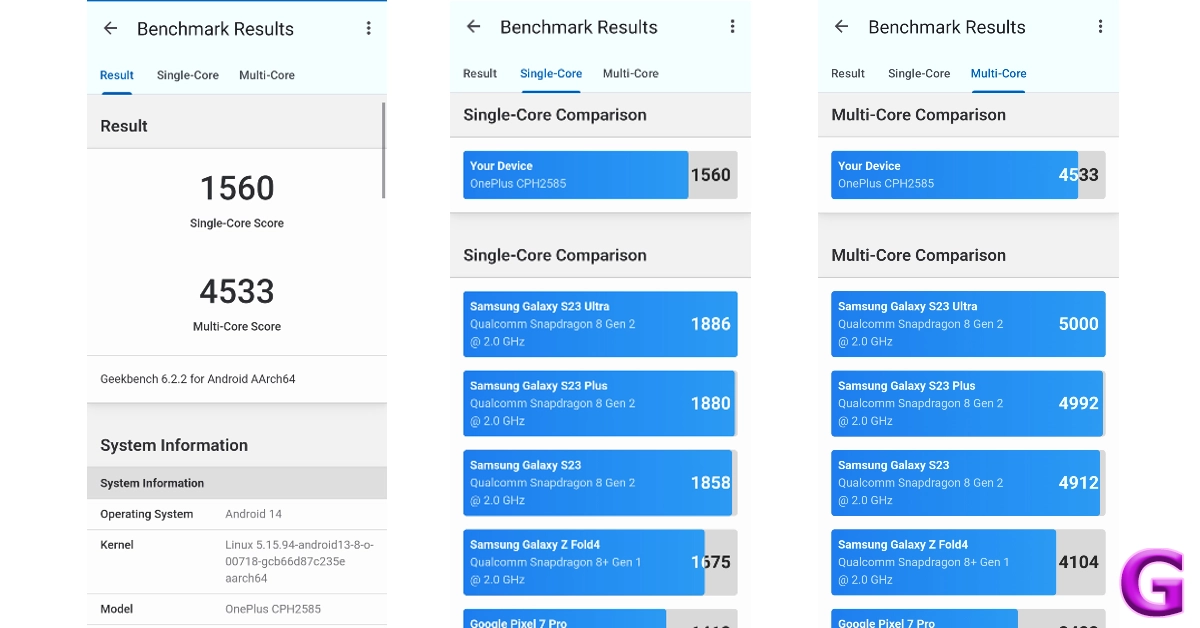
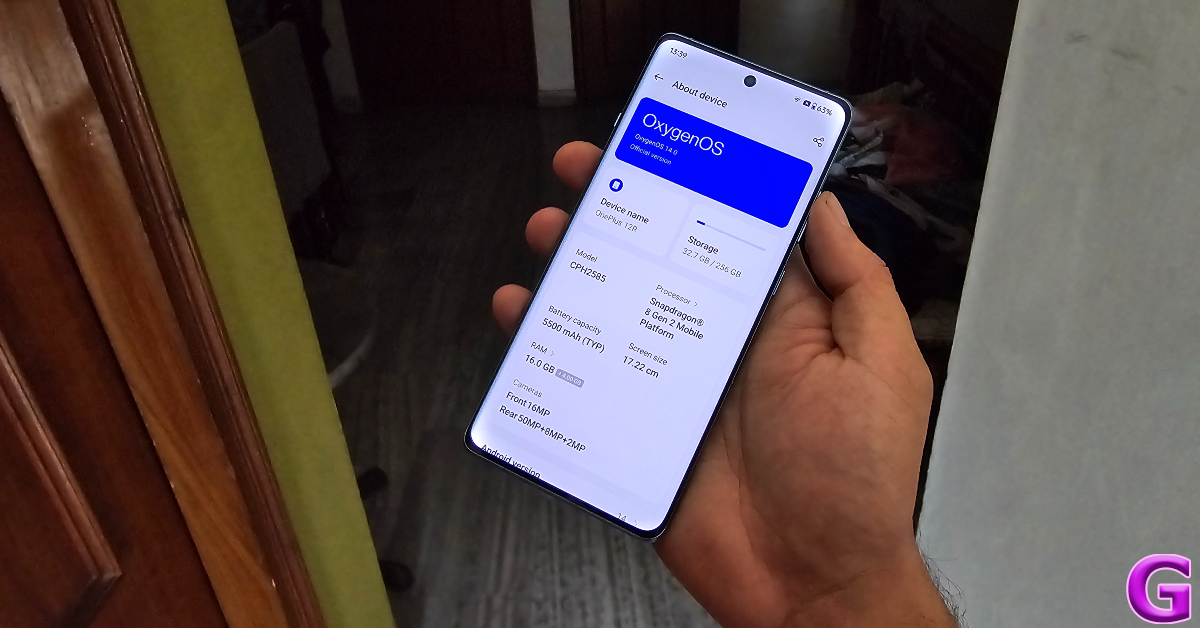
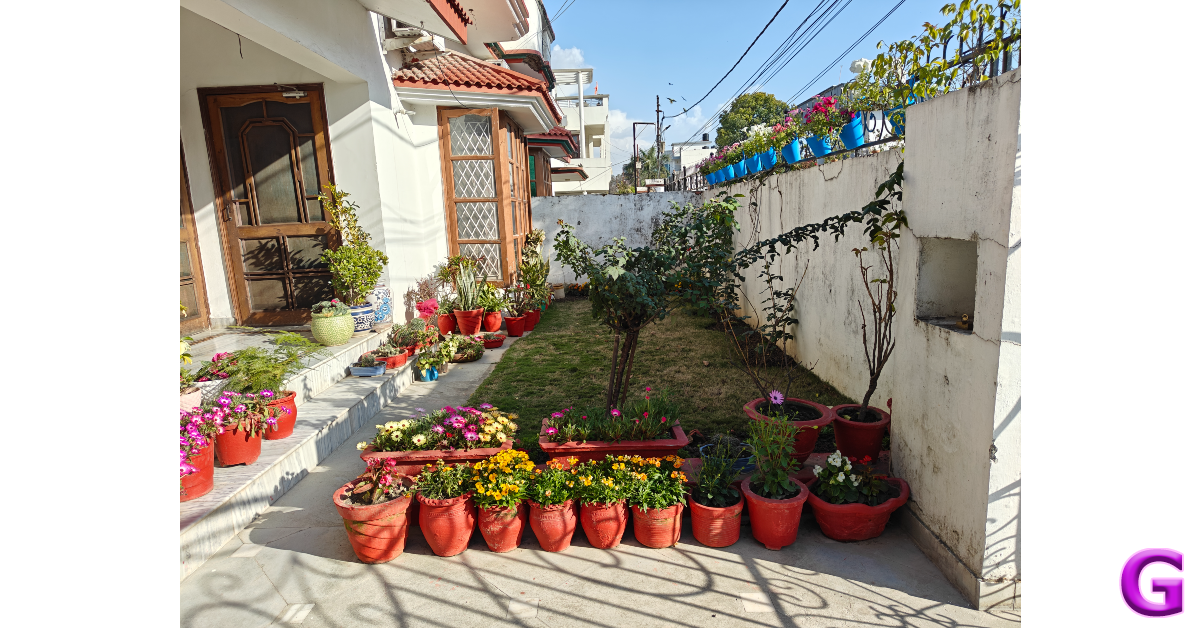
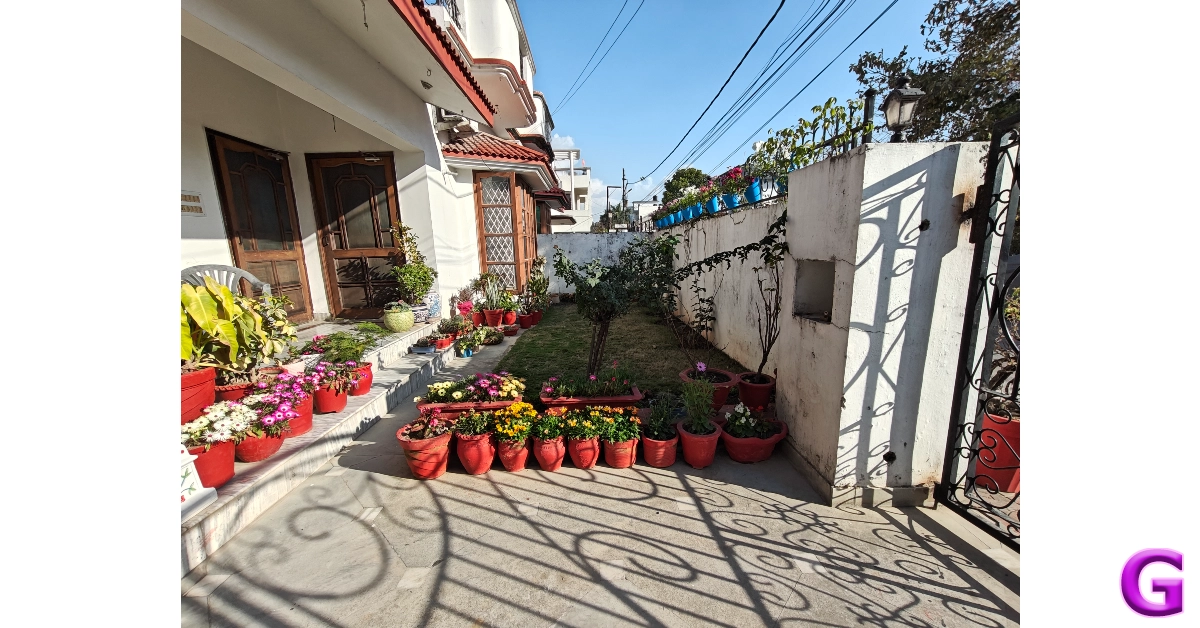
Powering the OnePlus 12R is the Snapdragon 8 Gen 2 SoC, which was the flagship chipset from Qualcomm last year. The smartphone is available in two RAM and storage variants – 8GB + 128GB (Rs 40,000) and 16GB + 256GB (Rs 46,000). On the Geekbench 6 app, the 12R scored 1,560 points in the single-core test and 4,533 points in the multi-core test. OnePlus 12R review: Performance and Cameras Snapdragon 8 Gen 2 is a rock-solid processor. After an impressive showing in last year’s flagship smartphones like the Samsung Galaxy S23 Ultra, Xiaomi 13 Pro, OnePlus 11, iQOO 11 and more, it upholds its reputation on the OnePlus 12R. We did not experience any lags or delays while using the smartphone. General, everyday tasks like web browsing, instant messaging, video calling, navigation, and media playback were handled expertly. Multitasking on this device is a seamless experience. If you’re looking for a reliable performer, this smartphone is it. Its versatile performance continues in the gaming department as well. This is where the display’s 120Hz refresh rate came in clutch as the OnePlus 12R managed to run titles like Call of Duty Mobile, BGMI, and Asphalt 9 in high settings. The cooling chamber within the smartphone does a good job of heat dissipation. Even after extended gaming sessions, the smartphone’s internal temperature remained at an acceptable level. There were no jitters or frame drops to be seen either. 12r Android 14-based Oxygen OS 14 provides a clean software experience on the OnePlus 12R. There is no bloatware on the device apart from the Netflix app, which can be easily uninstalled. We like the range of customisation options offered by OnePlus. You can personalise the AOD screen with your Bitmoji, a canvas of your face, or even a text and image of your choice. We also like the privacy features offered by Oxygen OS 14. Our favourite is the ‘System Cloner’ which lets you set up a different password for a fresh system interface. The app lock and private safe are easily accessible as well. One of the underrated features of OnePlus smartphones is the ‘IR Remote’ app which lets you control household devices like the TV, AC, and music system with your smartphone. oneplus 12r refunds The battery performance of this smartphone is phenomenal. It packs a massive 5,500 mAh battery, which lasts more than a day on moderate usage. If you use the smartphone conservatively, you can push its battery backup to two days. During the review period, we used the OnePlus 12R for watching video content, instant messaging, video calling, and a range of other tasks. You can get between 6-7 hours of Screen On Time on a single charge. The 100W SuperVOOC power adapter charges the phone in just over 30 minutes. There is no support for wireless charging, which is one of the tradeoffs that OnePlus has made to keep the cost down. primary camera The rear camera module on the 12R comprises a 50MP primary shooter, an 8MP ultrawide lens, and a 2MP macro sensor. The 50MP main camera is delightful to use, no matter the lighting condition. The outdoor shots taken in ample daylight displayed vivid colours and a superb dynamic range. The pictures were detailed and well-exposed. The lack of Hasselblad tuning is visible if you compare the results with the flagship OnePlus 12, but it does not amount to being a dealbreaker. OnePlus 12R review: Performance and Cameras camera The 8MP ultrawide lens does a good job of maintaining the colour composition in the images. Granted, it is a step behind its flagship counterparts, but the images taken with it are not soft at all. We found ourselves using this camera a lot. We were even impressed by how well it exposed the sky and maintained the colour richness. You can see the results for yourself down below.
ultrawide
Ultrawide Shot
OnePlus 12R review: Performance and Cameras
Primary Shooter vs Ultrawide Lens
The Night Mode kicks in automatically when you take images in limited lighting conditions. It does a good job of brightening the subject and minimising the grain in the images. OnePlus’ photoprocessing ability deserves all the credit here. We were surprised with how well the Night Mode functioned while taking pictures with the ultrawide camera.
night mode
Night Mode: Primary Shooter vs Ultrawide Lens
Portrait shots taken with the OnePlus 12R are focused and detailed. The camera does a good job of separating the subject from the background and applying the correct degree of blur. The 2MP macro camera doesn’t find much use in this camera module, and it is baffling that OnePlus continues to shoehorn it in there. An entry-level telephoto lens would have been ideal.
portrai
Portrait Mode
Selfies taken with the 12MP front-facing camera are certainly ‘social media ready’, but don’t come across as overprocessed. This camera can take 1080p videos at 30 fps while the rear camera can record 4K videos at 30/60 fps. Read Also: Vivo Y200e 5G powered by Qualcomm Snapdragon 4 Gen 2 SoC launched in India

Verdict

We’re still only a couple of months into 2024, but we can already see the OnePlus 12R being the bargain of the year. At Rs 40,000 you get an excellent processor, a vivid display, delightful cameras, and a clean software experience. The 12R is a solid package that performs well across the board. An IP67 rating and a telephoto lens would certainly have been ideal, but given the price of the smartphone, we aren’t too fussed about missing those premium features. OnePlus 12R is an easy recommendation from us.

OnePlus 12R: Pros

  • Super bright display
  • Clean software experience
  • Great primary camera
  • Excellent chipset
  • Affordable

OnePlus 12R: Cons

  • Macro lens doesn’t need to be there
  • Does not have an IP67 rating

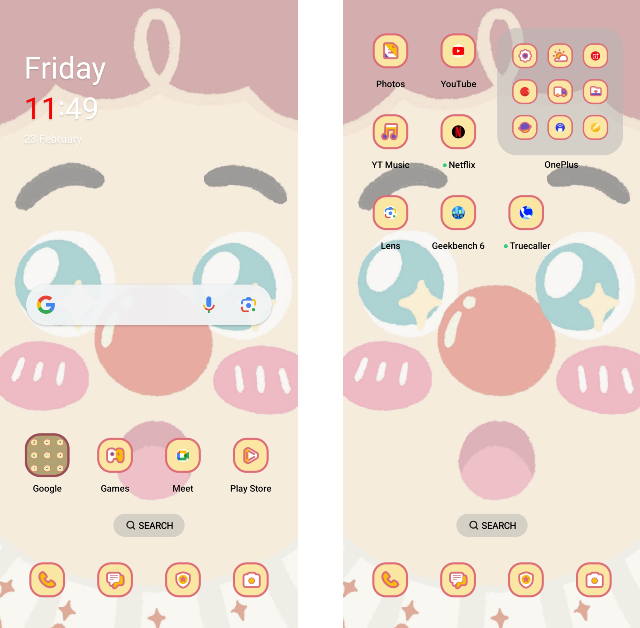
Top 6 Ways to Change App Icon and Name on Android

0
One of the best things about owning an Android phone is the diverse range of customisation options that come along with it. You can change the layout of your home screen, use a custom icon for an app, and even change its name. If you want your smartphone’s home screen to look different from other Android devices, you should change the way the app icons look. In this article, we bring you the top 6 ways to change app icons and names on Android. Read Also: Meta launched Instagram’s Creator Marketplace where brands and creators can connect

Before you begin

The process to change the app icon and name on Android devices differs vastly among manufacturers. While OnePlus smartphones offer a native way to change the name of an app, this option is not present on Samsung devices. However, every manufacturer has a diverse library of icon packs for its native apps. These icon packs can be downloaded from the ‘Themes’ section on your phone. You can also choose to go with a monochromatic look for the app icons on your device. Your smartphone draws the major colour from the home screen wallpaper and applies it to the app icons. Most of the third-party Android apps are also covered by this thematic option. Lastly, if you want full control over how an app looks on your phone, there are certain apps that let you upload an image from your phone’s gallery as the app icon. Read along to find out how you can do that.

Change the app icon and name on a OnePlus smartphone

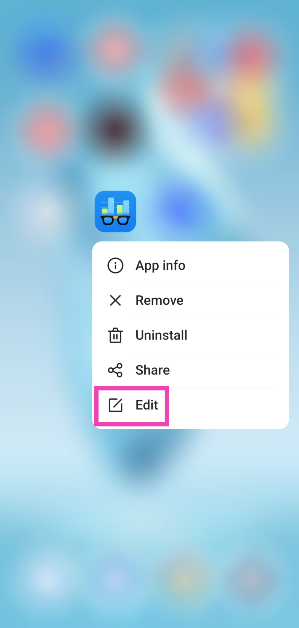
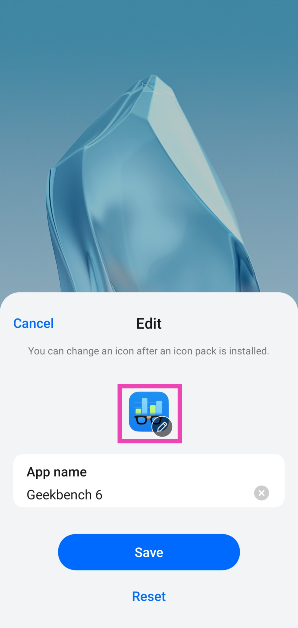
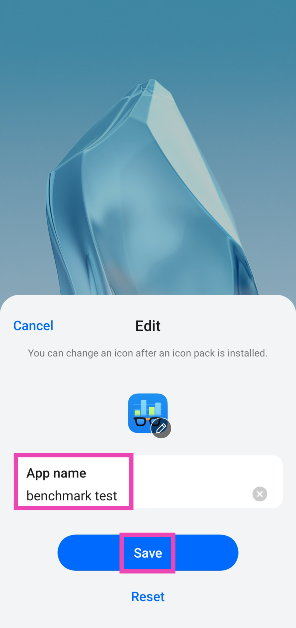
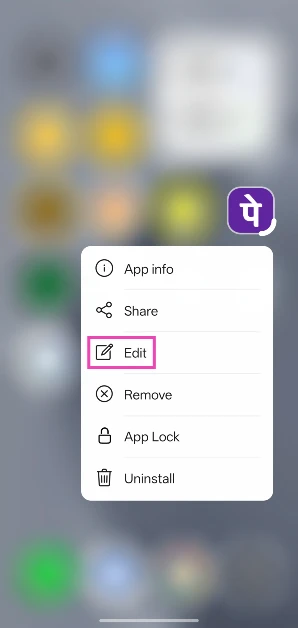
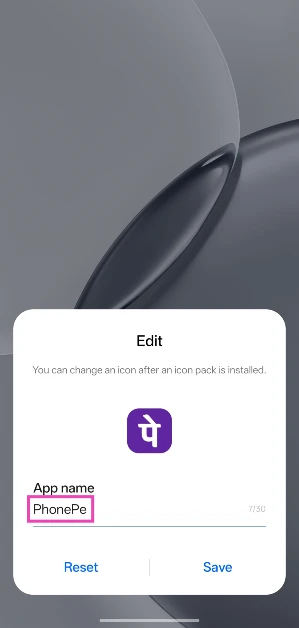
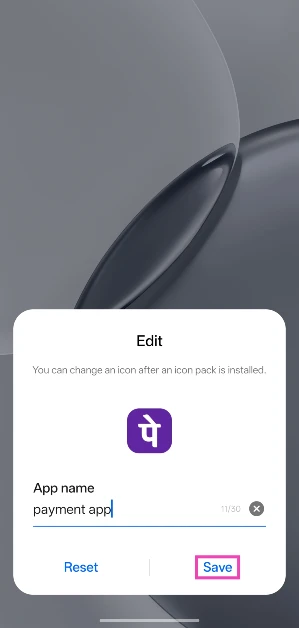
Step 1: Long-press the app you want to customise. Step 2: Tap on Edit. Step 2: Tap on Edit. Step 3: Hit the app icon to select a different one from another icon pack. Step 3: Hit the app icon to select a different one from another icon pack. Step 4: Tap on the App name section and type a new name. Step 4: Tap on the App name section and type a new name. Step 5: Hit Save.

Change the Icon Pack on OnePlus

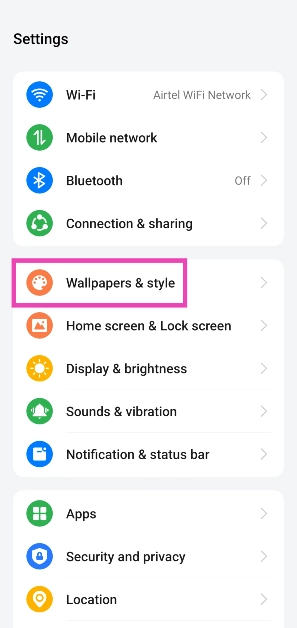
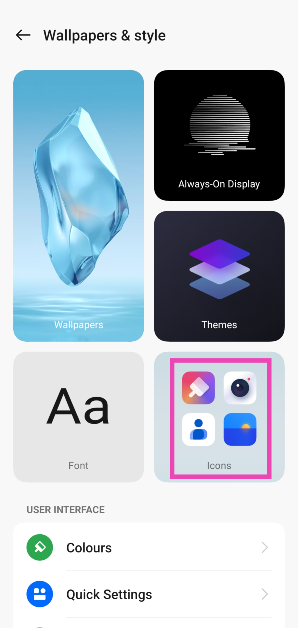
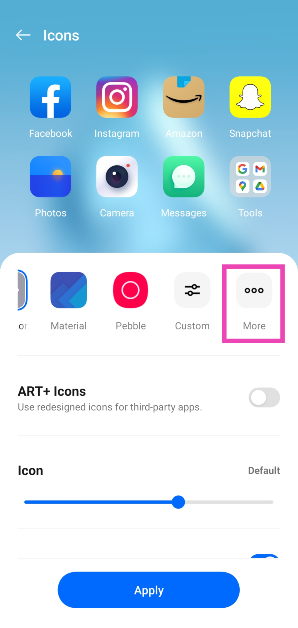
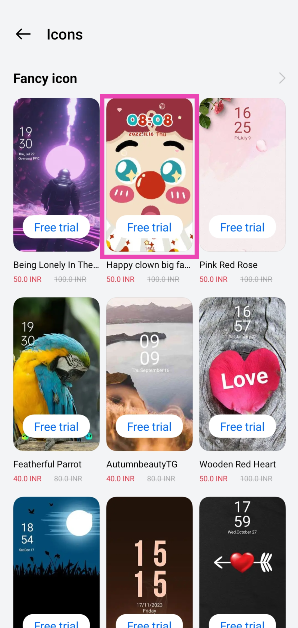
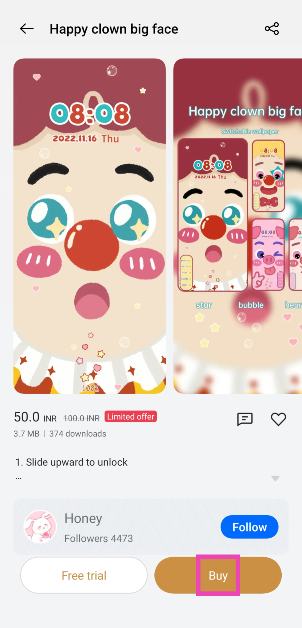
Step 1: Go to Settings and select Wallpapers & style. Step 1: Go to Settings and select Wallpapers & style. Step 2: Tap on Icons. Step 2: Tap on Icons. Step 3: This is where you can choose the shape and size of app icons. Hit More. Step 3: This is where you can choose the shape and size of app icons. Hit More. Step 4: Select an icon pack from the list. Some of the options may require a small payment. Step 4: Select an icon pack from the list. Some of the options may require a small payment. Step 5: Select Buy or Free Trial (5 minutes). Step 5: Select Buy or Free Trial (5 minutes). The icon pack will be applied to all the native OnePlus apps on your phone. The icon pack will be applied to all the native OnePlus apps on your phone.

Change the app name on a Realme phone

Step 1: Long-press the app you wish to edit. Step 2: Tap on Edit. Step 2: Tap on Edit. Step 3: Tap the text box and enter the new name. Step 3: Tap the text box and enter the new name. Step 4: Hit Save. Step 4: Hit Save.

Change the app icon on a Samsung smartphone

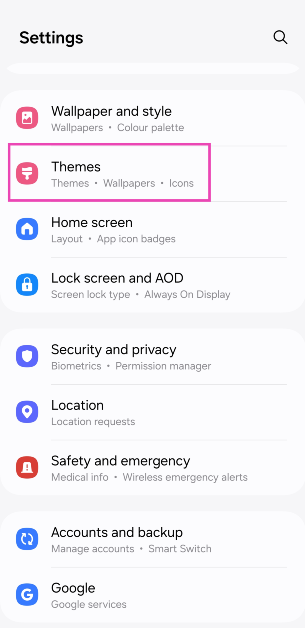
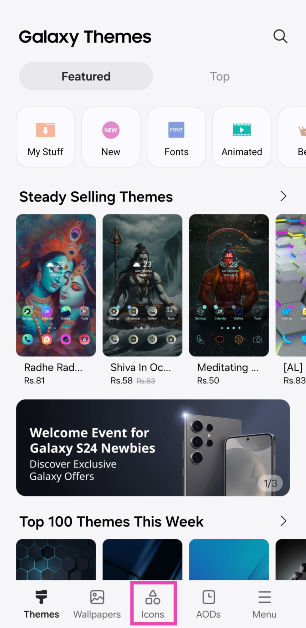
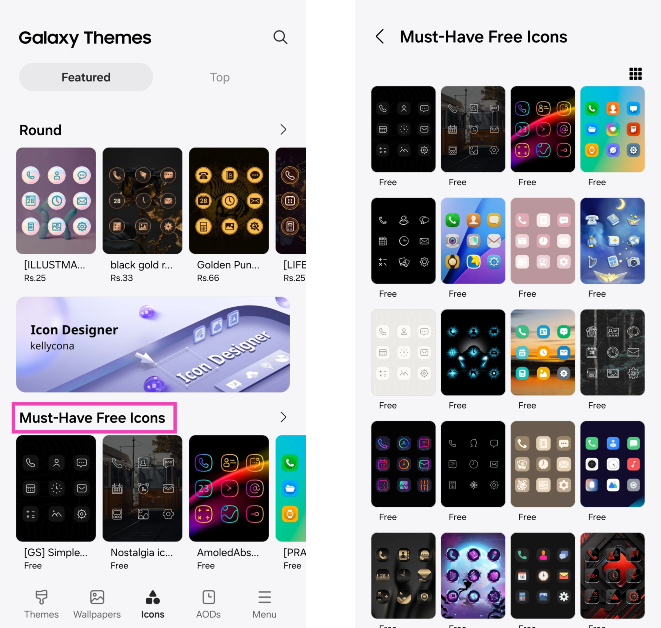
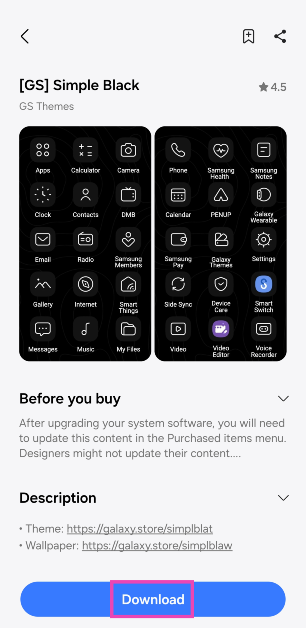
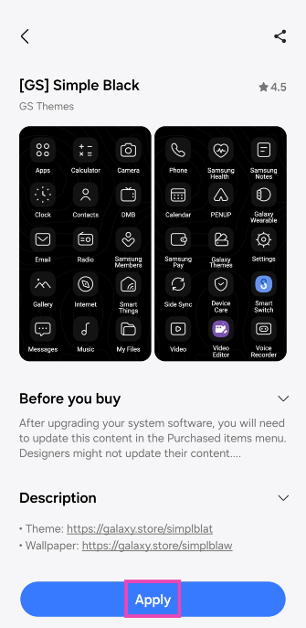
Step 1: Go to Settings and select Themes. Step 1: Go to Settings and select Themes. Step 2: Switch to the Icons tab. Step 2: Switch to the Icons tab. Step 3: Select an app icon pack from the list. You will find some free icon packs at the bottom of the list. Step 3: Select an app icon pack from the list. You will find some free icon packs at the bottom of the list. Step 4: Hit Download. Step 4: Hit Download. Step 5: Select Apply. Step 5: Select Apply. The app icon pack will be applied to all the native Samsung apps on your phone.

Make app icons monochromatic on Android

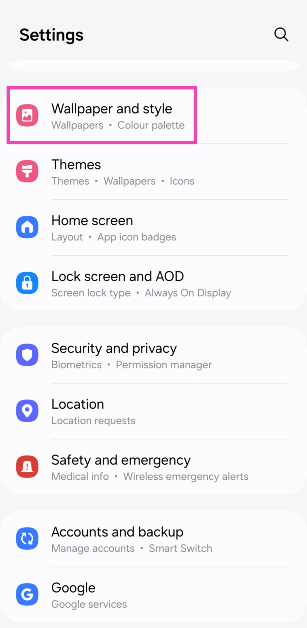
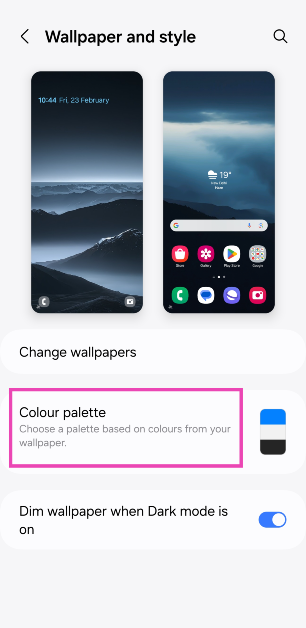
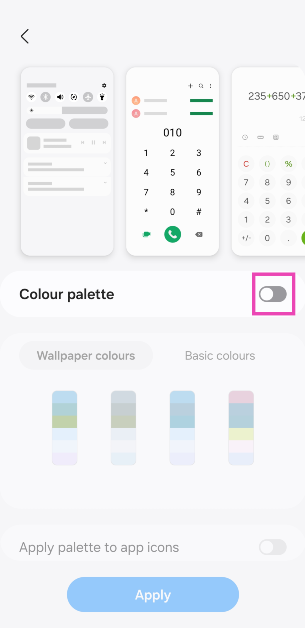
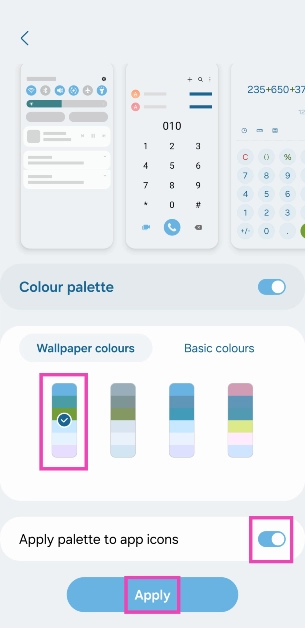
Step 1: Go to Settings and select Wallpaper and style. Step 1: Go to Settings and select Wallpaper and style. Step 2: Tap on Colour palette. Step 2: Tap on Colour palette. Step 3: Turn on the toggle switch for Colour palette. Step 3: Turn on the toggle switch for Colour palette. Step 4: Select a colour for the system and app icons. Step 4: Select a colour for the system and app icons. Step 5: Turn on the toggle switch for ‘Apply palette to app icons’ and hit Apply.

Use a third-party app (X Icon Changer)

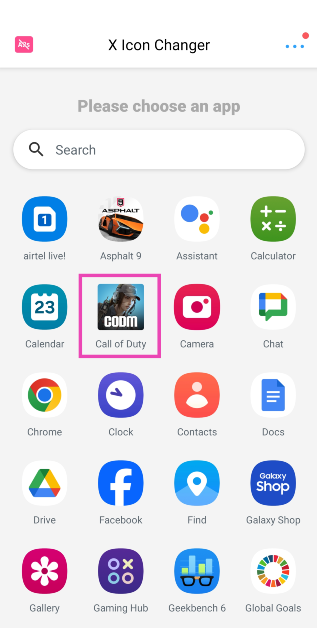
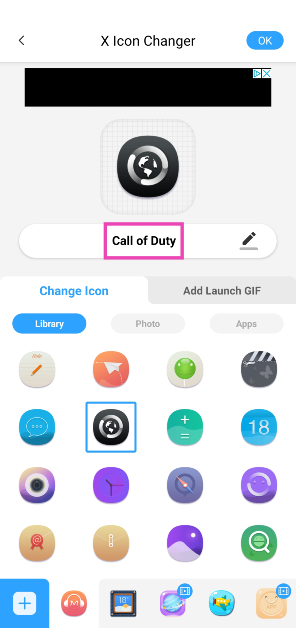
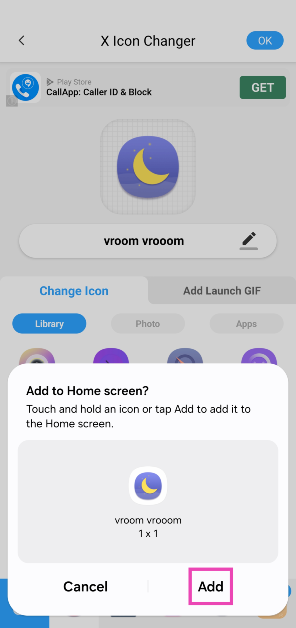
Step 1: Download the X Icon Changer app from the Google Play Store. Step 2: Launch the app and select the app you wish to customise. Step 2: Launch the app and select the app you wish to customise. Step 3: Select an icon for the app from the list. You can even choose to upload a thumbnail from your phone’s gallery. Step 3: Select an icon for the app from the list. You can even choose to upload a thumbnail from your phone’s gallery. Step 4: Tap the name of the app to change it. Step 4: Tap the name of the app to change it. Step 5: Hit OK at the top right corner of the screen. Step 6: Add the app icon to the home screen. No changes will be made to the app icon in the app drawer. Step 6: Add the app icon to the home screen. No changes will be made to the app icon in the app drawer. Your changes will be saved.

Frequently Asked Questions (FAQs)

How do I make the app icons on my Android phone monochromatic?

Go to Settings>Wallpaper and style>Colour palette and turn on the toggle switches for ‘Colour palette’ and ‘Apply palette to app icons’. Choose a colour from the list.

How do I change the app icon and name on an Android phone?

Download the X Icon Changer app and select the app you want to customise from the list. You can choose a picture from your phone’s gallery for the app icon or select from the X Icon Changer’s library. Tap the name of the app to change it.

How do I change the app icon and name on a OnePlus smartphone?

Long-press the app icon and hit ‘Edit’. Tap the app icon to edit it. Tap the name of the change and enter a new one. Hit ‘Save’. Read Also: CMF Neckband Pro and CMF Buds to launch in India next month: Here is when

Conclusion

This is how you can change app icons and names on your Android phone. Downloading a launcher like Nova or Niagara can also help you accomplish this task, but if you want to keep things simple, use X Icon Changer. If you know any other methods to go about this task, let us know in the comments!

Vivo Y200e 5G powered by Qualcomm Snapdragon 4 Gen 2 SoC launched in India

Key highlights
  • Vivo has launched a new smartphone Vivo Y200e 5G in India.
  • The smartphone runs on Android 14-based FuntouchOS 14 out of the box.
  • The device features a 50-megapixel dual rear camera setup.
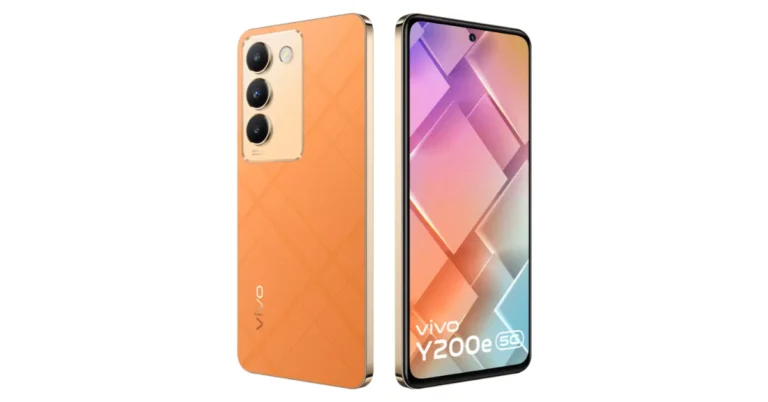
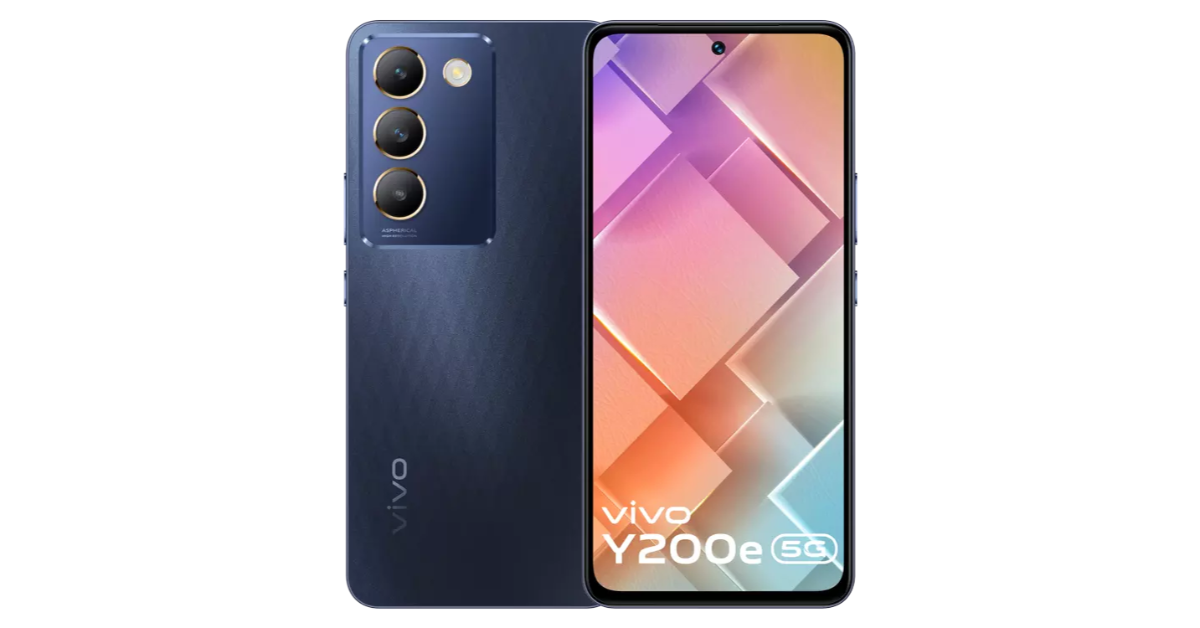
Vivo Y200e 5G has officially made its debut in the Indian market. The smartphone is available in two different design variations: one has a textured plastic back and intersecting lines, while the other has a vegan leather finish. The handset features a 120Hz refresh rate display. Under the hood, there is Qualcomm’s Snapdragon 4 Gen 2 SoC. There is a rectangle camera module on the rear consisting of three camera sensors alongside a tiny LED flashlight.

Vivo Y200e 5G price in India, sale details

Vivo Y200e 5G has launched in India with a starting price of Rs 19,999 for the base 6GB RAM with 128GB storage option. The price of the 8GB RAM with 128GB storage option comes with a price tag of Rs 20,999. The phone is available in two colour options Black Diamond and Saffron Delight. Vivo Y200e 5G price in India, sale details The handset is presently up for pre-order on the Vivo India website. The device is likely to go on sale on March 1 via Flipkart in the country. The buyers can receive an instant discount of Rs 1,000 in full or an EMI payment if the transaction is made through HDFC and ICICI Bank cards. a no-cost EMI for up to six months is also available to select bank customers. Also Read: Meta launched Instagram’s Creator Marketplace where brands and creators can connect

Vivo Y200e 5G specifications

The 6.67-inch full-HD+ AMOLED display on the Vivo Y200e offers 2,400 x 1,080 pixels of resolution. The screen has a peak brightness of 1,800 nits and supports a 120Hz refresh rate. It has an IP54 certification for dust and splash resistance. The device is powered by a Qualcomm Snapdragon 4 Gen 2 SoC, 128GB of UFS 2.2 internal storage, and up to 8GB of LPDDR4x RAM. The RAM can be virtually enlarged to hold an extra 8GB. Additionally, the storage can be expanded using a microSD card to hold up to 1 TB. In terms of software, the mobile phone comes preinstalled with FuntouchOS 14, an Android 14 overlay. Also Read: CMF Neckband Pro and CMF Buds to launch in India next month: Here is when The Vivo Y200e 5G sports a dual rear camera unit with a 50-megapixel main sensor and a 2-megapixel secondary sensor. The 16-megapixel front camera is located within a hole-punch slot that is centrally located at the top of the display. It also boasts a 5,000mAh battery with 44W wired fast charging support. In addition, the phone has USB Type-C, Bluetooth 5.0, GPS, Wi-Fi, 5G, and 4G connection. 

Garena Free Fire Redeem Codes Today 23 February 2024: Here is how to claim them

Garena Free Fire is a battle royale game with regular awards and tournaments to keep players interested. If you play Garena Free Fire, you should be aware of the redeem codes that are released on a daily basis. However, because the battle royale game is banned in India, players from other countries can use the Free Fire Redeem codes daily. If you’re unfamiliar with the Garena Free Fire redeem codes or don’t know how to get them, we’ve put together a step-by-step guide to help you redeem them. Check out Garena Free Fire Redeem Codes for 23 February 2024. The Free Fire redeem codes are a great way to get free stuff. These are 12-digit codes that contain alphabets and numbers, as well as an expiration date and time. Because the Garena FF redeem codes cannot be used more than once, you should hurry to the redemption page to claim your free reward before someone else does. To get a free reward, all you have to do is go to reward.ff.garena.com/en, which is the official redemption page. Also, keep an eye on this space for daily updates on Garena Free Fire redemption codes and rewards. Also Read: Sennheiser Accentum Plus wireless headphones with Hybrid Adaptive Noise Cancellation launched

Garena Free Fire Redeem Codes Today 23 February 2024

FLKDLO98UAY64QE FDTHYR56U6UY44Y FGBDENKIR8GU7YH FJ8FG7BSJU6YT3R FFEVDBHUA7Q6TGH FERTY9IHKBOV98U FOYIH8U7YTG8DBE FKIY8OIR76UJT6H FCAKI7W63T4FVR5 FBTFJVI8C7Y6SFE FBRTJKGUVHYRGRT FGBVTYGHU76T4RE FNDMEO4956UYHTG FNMKOID8S7W6T3F FG4HN5KT6LYUOPO FZ7YTA5Q4RED2C3 FVBERFJUVYTSRF4 FB5TGIVUYTSRFVB F45NJTKYOHJV7HN

How to Get Free Fire Redeem Codes for Garena on 23 February 2024?

  • Visit the Garena Free Fire game’s official website at reward.ff.garena.com.
  • Use your Facebook, Google, VK, Apple ID, Huawei ID, or Twitter account to log in.
  • You’ll be taken to a valid redemption code (s)
  • Copy and paste the 12-digit redemption code into the text box.
  • On the screen, a dialogue box will appear.
  • ‘Ok’ should be selected.
For the latest gadget and tech news, and gadget reviews, follow us on TwitterFacebook and Instagram. For newest tech & gadget videos subscribe to our YouTube Channel. You can also stay up to date using the Gadget Bridge Android App. You can find the latest car and bike news here.

Meta launched Instagram’s Creator Marketplace where brands and creators can connect

Key Highlights
  • Instagram’s creator marketplace helps brands find the right creators and helps creators get discovered by brands.
  • This service will offer even more ways for brands and creators to connect, partner, and grow.
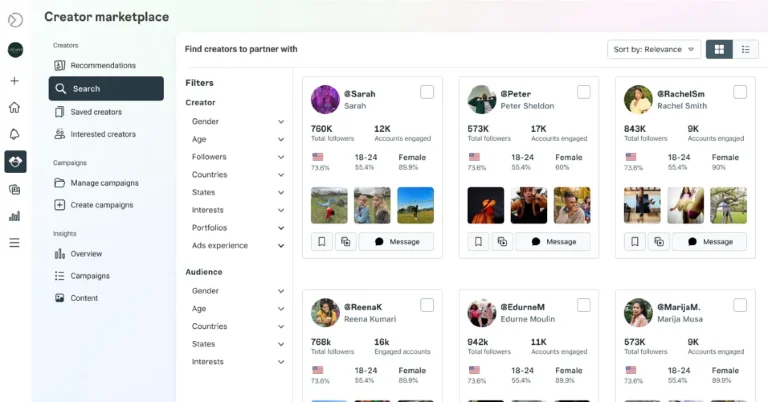
Instagram announced today that it is bringing its Creator Marketplace to 8 new markets with features to connect thousands of brands and creators. As per the social media platform, this will allow brands and creators to engage in sponsored collaborations or advertisements. India is among the eight countries where marketplace service will be available. This Instagram’s Creator Marketplace will be available to new markets in the UK, Australia, New Zealand, Canada, Japan, India, and Brazil. While expanding the service Meta said, “From branded content to partnership ads, Instagram is one of the best places for brands and creators to collaborate — and today, we’re excited to announce how we’re making it easier to work together. In 2022, we began testing the creator marketplace in the US, a new destination where brands and creators can more easily connect and collaborate around partnership opportunities. Since then, we’ve introduced new features and onboarded thousands of creators and brands in the US to the creator marketplace.” The company will be inviting creators and brands based in Canada, Australia, New Zealand, UK, Japan, India and Brazil to join Instagram’s creator marketplace. Chinese export brands will also be invited to connect with onboarded creators in countries outside of China. Meta launched Instagram’s Creator Marketplace where brands and creators can connect Instagram’s creator marketplace makes it simple for brands to find relevant creators for any type of partnership for collaboration. In order to expand their collaborations, advertisers can amplify content using a creator or other partner’s handle through partnership ads, formerly known as branded content ads. Partnership ads are the most transparent and effective approach for advertisers and creators to run ads together and Instagram’s creator marketplace helps brands discover creators to partner with. According to Instagram, it has started testing a new feature in the US called machine learning-based recommendations. This feature leverages Instagram data to help brands more easily discover creators who are the best fit for their campaigns. Over the next few months, eligible brands will get access to these recommendations on Instagram’s creator marketplace in Meta Business Suite.

How Instagram’s Creator Marketplace Works

Firstly Brands sign up for the Meta Business Suite creator marketplace on Instagram. Creators join from their professional dashboards in the Instagram app. There, creators can indicate brands and interests relevant to them. A portfolio is another tool available to creators to showcase their talent. Brands can communicate with creators through a special Partnership Messages folder located at the Primary tab’s top. Also Read: CMF Neckband Pro and CMF Buds to launch in India next month: Here is when Brands have two options when interacting with creators: they may either build a project and submit it to several creators, explaining the possibilities for branded content or partnership ads. Within the Instagram app, creators have access to the opportunity’s specifics, requirements, and rates. Advertisers can boost organic Instagram content as partnership ads, including branded content with the paid partnership label, or they can create new partnership ads in Ads Manager. 

CMF Neckband Pro and CMF Buds to launch in India next month: Here is when

Key Highlights
  • CMF Neckband Pro and CMF Buds are set to launch in India on March 5.
  • Both the devices support ANC.
  • The devices are compatible with the Nothing X app.
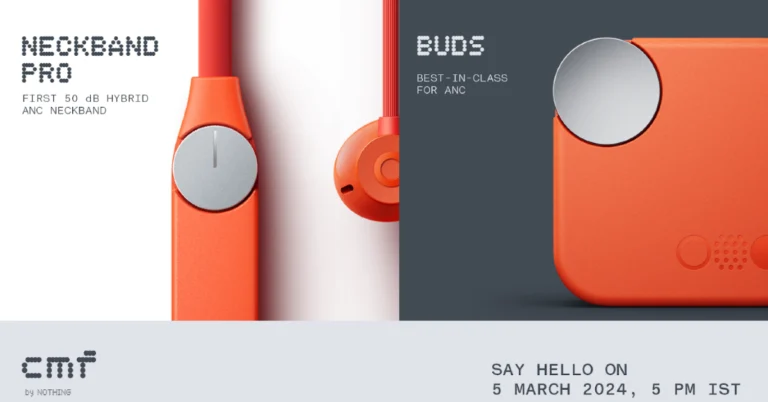
Nothing’s sub-brand CMF is bringing new products to India. The company has announced to introduce two devices- CMF Neckband Pro and CMF Buds on March 5. The audio devices will debut alongside Nothing Phone 2a same day at Nothing Event: Fresh Eyes. The newest audio products from Nothing’s sub-brand, CMF Neckband Pro and CMF Buds are set to launch in India on March 5. These two gadgets will be unveiled together with the forthcoming Nothing Phone 2a. The launch event Fresh Eyes will be live-streamed at 5:00 PM IST. Similar to the company’s previous offerings, these products will be sold in the nation through Flipkart. In terms of design, the CMF Neckband Pro and CMF Buds are teased to come in orange, silver and white colourways. CMF by Nothing has also started to disclose some of the details of these products ahead of their arrival. As per the company CMF Neckband Pro, the first 50 dB Hybrid ANC device in this category, will be available for purchase in India and select markets. Also Read: iQoo Neo 9 Pro powered by Qualcomm Snapdragon 8 Gen 2 SoC launched in India However, according to information released by the company, the CMF Neckband Pro, would have five microphones for AI-assisted noise reduction during calls. Whereas, MF Buds will have a 12.4mm driver with biofibre and custom TPU materials. The Truly Wireless earphones are said to support ANC. Additionally, the company has disclosed that the CMF Neckband Pro and CMF Buds will both be compatible with the Nothing X app. This will provide five bass levels using a slider as part of the company’s Ultra Bass Technology 2.0. As we mentioned earlier, Nothing Phone 2a will also launch along with CMF audio products on March 5. The smartphone is the company’s affordable version of Nothing Phone 2 which launched last year. The company has not yet revealed but the upcoming phone is tipped to feature a dual pill-shaped rear camera setup placed horizontally. Just like the previous module, Glyph lights are supposed to be arranged around the camera module. As per the leaks, it will be surrounded by three LED strips. Two of them appear to be curled and positioned on the left. Also, there will be a vertically straight strip positioned on the right. The vertically oriented company branding is visible towards the bottom-left corner. Nothing has confirmed that MediaTek Dimensity 7200 SoC will power the Nothing Phone 2a. The chipset is said to be specially co-engineered by MediaTek for the upcoming device.

iQoo Neo 9 Pro powered by Qualcomm Snapdragon 8 Gen 2 SoC launched in India

Key Highlights
  • iQoo Neo 9 Pro will go on sale via Amazon in the country.
  • The smartphone features an LTPO AMOLED screen with up to 144Hz refresh rate.
  • The handset includes a dual rear camera setup.
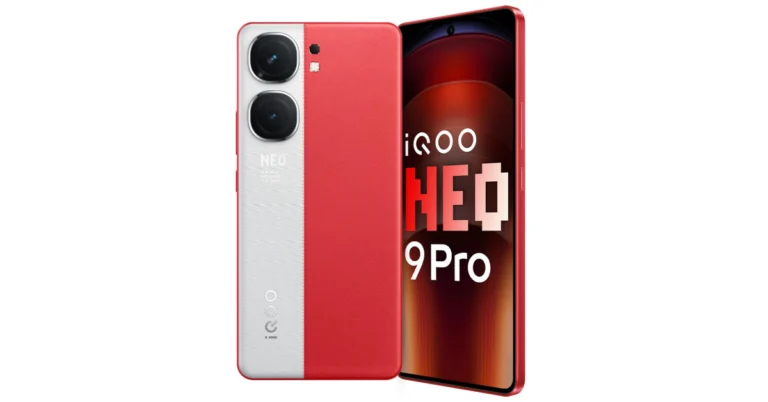
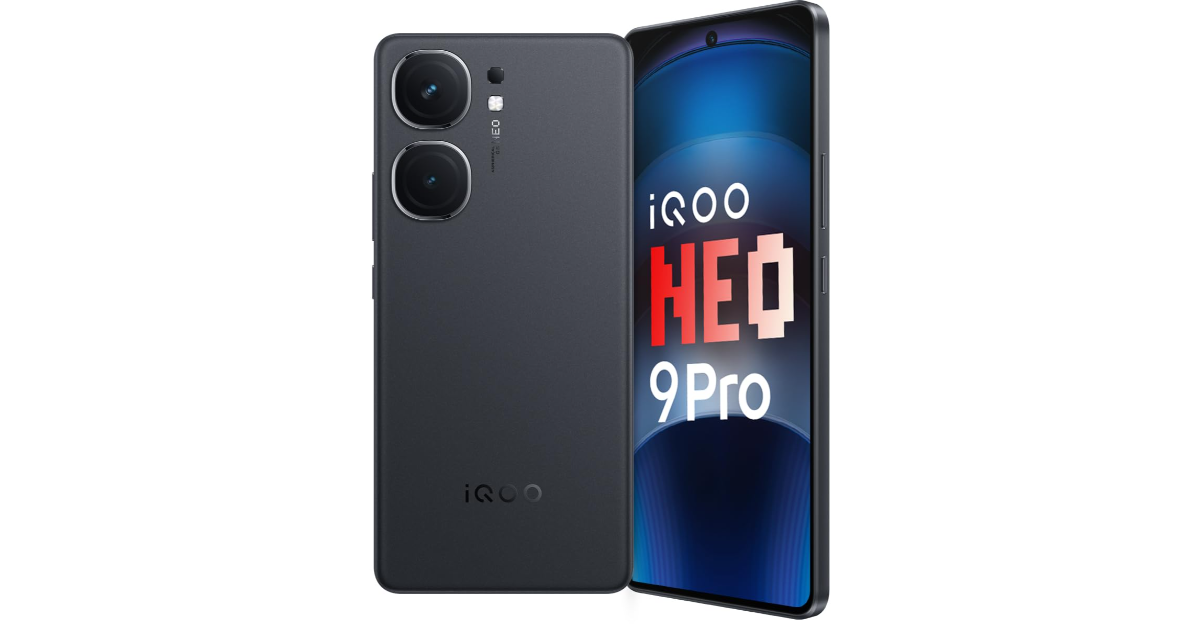
iQoo today officially unveiled a brand new smartphone iQoo Neo 9 Pro in the Indian market. The gaming smartphone is powered by Qualcomm Snapdragon 8 Gen 2 mobile chipset. It runs on Funtouch OS 14 with Android 14. The device features a 6.78-inch LTPO AMOLED display and packs a 5,160mAh battery. In addition to this, there is a dual rear camera led by a 50-megapixel primary sensor.

iQoo Neo 9 Pro specifications

iQoo Neo 9 Pro features a 6.78-inch 1.5K LTPO AMOLED display with 1,260×2,800 pixels of resolution. When gaming, the screen’s refresh rate increases to 144Hz from 120Hz in everyday use. Additionally, the screen has iQoo’s Wet Touch technology, which enables users to carry out specific operations with damp fingertips. The device has an IP54 rating for dust and splash resistance. Qualcomm’s Snapdragon 8 Gen 2 mobile processor, up to 12GB of LPDDR5X RAM and up to 256GB of UFS 4.0 storage powers the device. The smartphone operated on Android 14-based Funtouch OS 14 out-of-the-box. The company is promising to provide 3 years of software updates and 4 years of security fixes. iQoo Neo 9 Pro specifications iQoo Neo 9 Pro comes with a dual rear camera setup that includes a 50-megapixel 1/1.49-inch Sony IMX920 sensor (optical image stabilisation (OIS) and an f/1.88 aperture) and an 8-megapixel OmniVision OV08D10 ultrawide-angle camera with f/2.2 aperture. In terms of selfies, there is a 16-megapixel Samsung S5K3P9SP04-FGX9 sensor with f/2.5 aperture. The gaming phone by iQoo packs a 5,160mAh battery with support for 120W SuperVOOC charging. The sensors onboard include an optical fingerprint scanner, accelerometer, ambient light sensor, e-compass, proximity sensor, and gyroscope. For connectivity, there is 5G, 4G LTE, Wi-Fi 7, Bluetooth 5.3, GPS, and a USB Type-C port. Also Read: OnePlus Watch 2 India launch date announced, pre-booking open

iQoo Neo 9 Pro price in India, sale details

iQoo Neo 9 Pro has been launched with a starting price of Rs 37,999 for the 8GB RAM with 256GB storage variant. There is another 12GB RAM with 256GB storage option priced at Rs 39,999. The smartphone comes with a unique dual-tone rear panel design. It is being offered in Conqueror Black and Fiery Red. The handset is scheduled to go on sale on February 22 at 1 PM via Amazon in the country. Also note that there is a third 8GB RAM with 128GB storage variant priced at Rs 35,999 that will be available for purchase starting March 21. Launch offers Customers may also take advantage of HDFC Bank and ICICI Bank discounts, which lower the cost of the phone by Rs 2,000. There’s a deal that ends on February 26 that will knock an extra Rs 1,000 off the price.