While many big players in the Indian market provide exceptional cleaning abilities from makers such as Philips and Dyson, there is a new entrant here called Dreame, which launched its set of Vacuum cleaners in India in Jan 2024. We got our hands on one of the devices to check it out. This is the Dreame U10 (cordless) Vacuum Cleaner Review, with which we have been tinkering around for over 10 days. Let’s see if it is worth the price.
Dreame U10 Vacuum Cleaner Review: Design
First up, this cordless Vacuum Cleaner is packed well within a small-ish cardboard case. That is also because it does not come with a lot of attachments like the mightier Dyson or Philips. However, it does come with a few attachments that are great for day-to-day use and cleaning out the home.
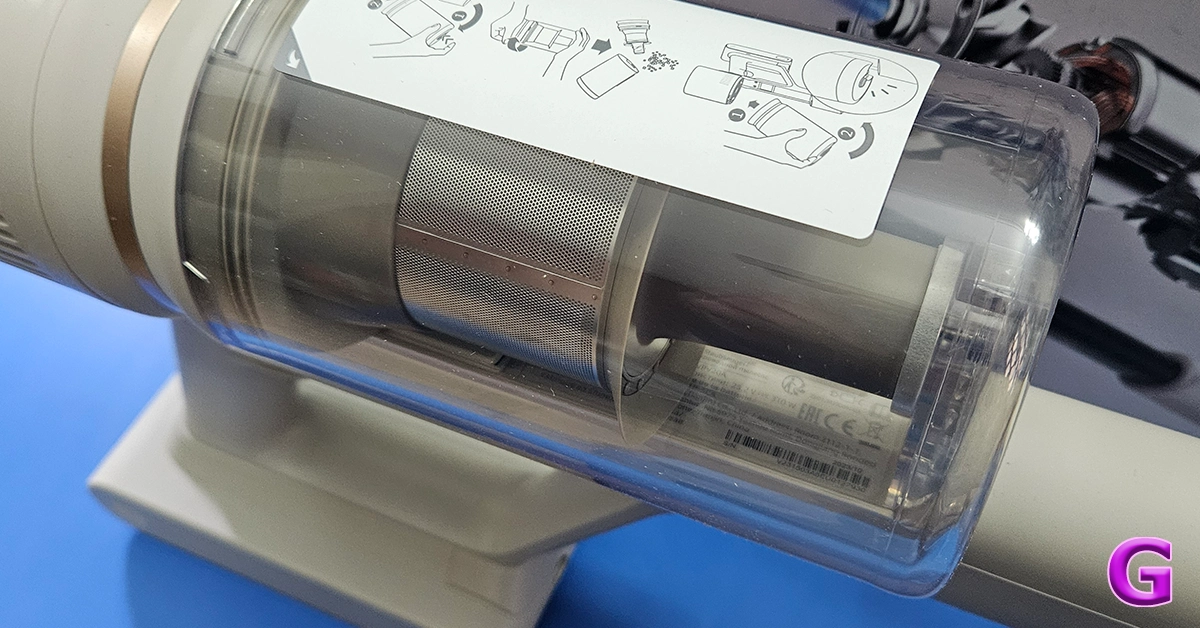
Out of the box, the Dreame U10 Vacuum Cleaner also looks like the rest of the pack. In fact, it seems a bit inspired by the Dyson series. However, it does have its distinct features. It is a trigger-style Vacuum Cleaner that when pressed sucks the dust at quite a rapid pace. The main enclosure consists of the rechargeable battery, the suction motor and also the transparent enclosure to trap all the dust and gunk.
In the box, you also get two attachments and one long neck to connect the primary brush roller addon to clean hard as well carpeted floors. This also has an LED light in front of it for the user to easily see the debris and dust in front. The other one is a smaller stick-tip head which can be used for cleaning the keyboard, nooks and corners of the sofa, and also windows and blinds. With it, there is also a wall attachment on which you can hang the cleaner for easy storage.
Read Also:Samsung launches Bespoke Jet and Robotic Vacuum Cleaner lineup starting at Rs 65,900
Dreame U10 Vacuum Cleaner Review: Performance
Now here is the fun part. Indian homes get dusty very quickly as there is a lot of construction everywhere and a lot of dust seeps in. We found the Dreame U10 Vacuum Cleaner to be a very good assistant in taking care of the day-to-day sweeping needs. It charges fully in under 1 hour and the 2,500mAh battery lasted us for about 30 minutes. This is based on the fact that a 150-250 square yard area can be cleaned very easily in that much time. For larger areas, you would need to charge it once again.
There is a speed button at the back of the Dreame U10 Vacuum Cleaner, which can run the cleaner at three suction levels – slow, medium and fast. We used it to clean a lot of things and its suction power is great. 99% of the time it was able to pick up things like dust, larger particles and even hair with ease. Things like ribbons and tough threads got stuck in the floor head, but we were able to remove them easily.
The smaller attachment for sofas works better in our opinion and removed dust and slop from our living room sofas in a jiffy. There was dust stuck to it for years and with the Dreame U10 Vacuum Cleaner’s powerful motor, we were able to remove it quite rapidly.
Read Also: Xiaomi Robot Vacuum Mop 2i review: A must for a clean home
Verdict
It all boils down to the price for this one. Since it is a very new product in the market we were hoping to see a price tag of under Rs 10,000 to compete with the likes of Kent and a few others. However, the company is selling it for a little higher (Rs 11,999) in eComm places like Amazon. Is it worth the price? Since the pros outweigh the cons we will recommend it. However, there is stiff competition out there and for a few thousand more you will get extra attachments and even longer-lasting batteries from makers like Philips and even Xiaomi with its Vacuum robos. All in all, if you are just looking to clean hard floors and a little bit of sofas on a lesser budget, you can definitely pick this one up.
Dreame U10 Vacuum Cleaner Pros
Decent design
Good Suction levels
Led front light on the floor head
Dreame U10 Vacuum Cleaner Cons
The price could have been lesser
Bigger dust collector would have been great
TV shopping can be an arduous task. Apart from deciding the specs you want for your TV, you also need to take into account the size of the display along with the lighting condition in your living room. There is also the question of deciding which TV fits your budget. If you’re stuck in a similar conundrum and are seeking an easy resolution, you’ve landed on the right page. Here are our picks for the top 10 4K TVs in the USA across all price segments.Read Also:Poco X6 5G 12GB RAM with 256GB storage variant goes on sale in India
LG OLED G3
Price: $1,899 on LG.comLG OLED G3 was one of the best 4K Smart TVs launched in 2023. Available in four size variants, the 55-inch G3 OLED costs $1,899 while the 83-inch variant fetches $5,299. Powered by the α9 AI Processor Gen6 chip, the LG OLED G3 produces some of the best images we’ve seen on a high-end OLED TV. The Micro Lens Display along with Brightness Booster Max tech produces up to 70% brighter images. The AI tech can sense what you’re watching and select the best picture and sound settings to maximise your viewing experience. You can hang the TV like a frame on the wall using the bracket included in the box, leaving minimal space between the TV and the wall.
Sony A95L
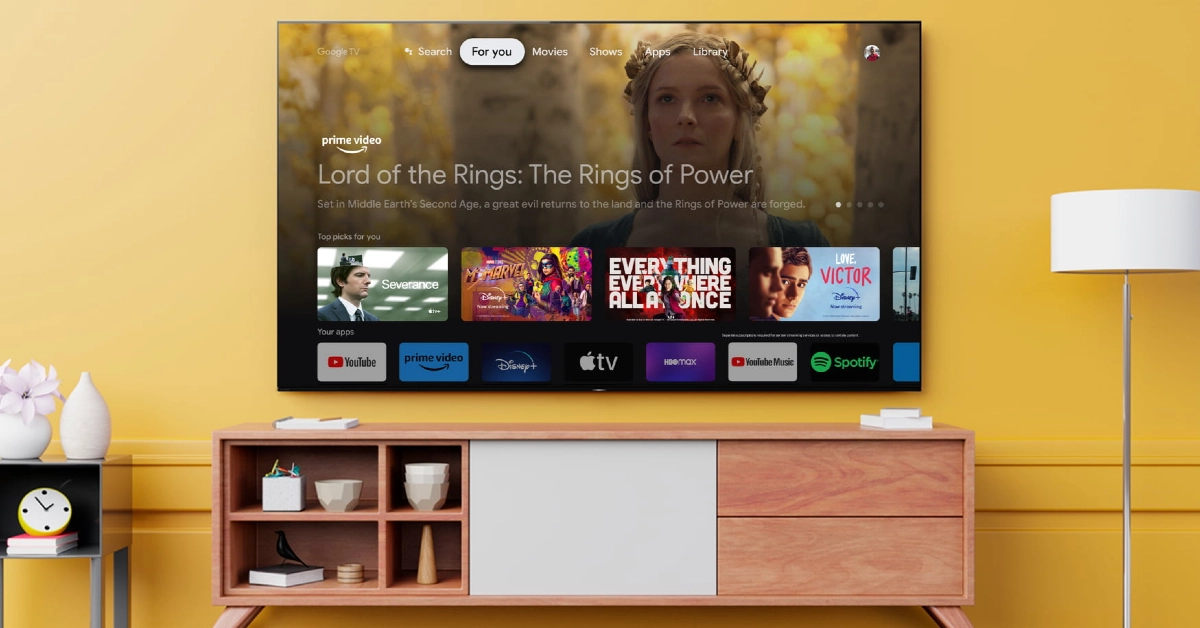
Price: $2,799 on Sony.comSony’s A95L Quantum Dot OLED TV made a lot of waves last year. Considered by many to be the best 4K Smart TV in the USA now, the Sony A95L delivers stunning images with rich colours and perceptible texture. These pictures are produced with the help of the Cognitive Processor XR. The A95L applies 4K upscaling to non-4K content. The luminance is kept constant for colours from all viewing angles. The QD-OLED panel minimises the glare and reflection on the display, which makes the TV very versatile in different lighting conditions. Google TV support makes the A95L very accessible to users and brings a superior OS experience to the Smart TV.
Samsung S95C
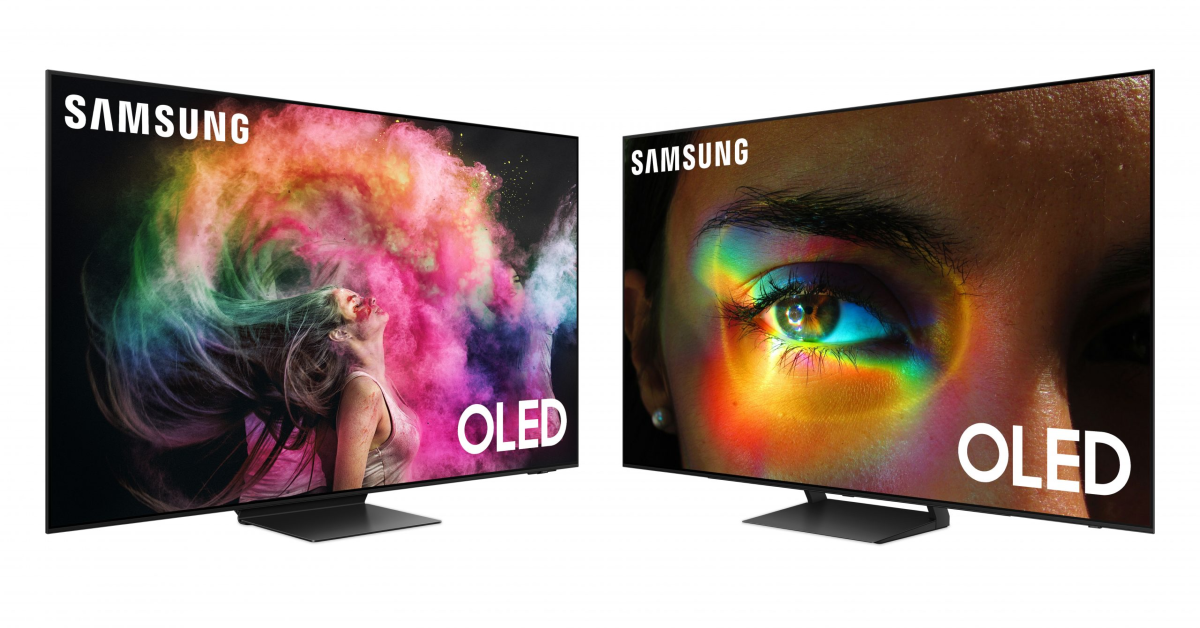
Price: $1,899 on Samsung.comSamsung S95C is available in three size variants – 55 inches ($,1899), 65 inches ($2,699), and 77 inches ($3,899). Powering the S95C is the Neural Quantum Processor 4K which employs 20 different neural networks to produce stunning 4K images on the display. Like the Sony A95L, the Samsung S95C also rocks the QD-OLED display. The tiny Quantum Dots deliver 30% brighter visuals. Dolby Atmos and Object Tracking Sound+ tech fill the room with enveloping surround sound, centring the viewer and elevating the audio experience. The Samsung One Connect box that comes with the TV reduces the mess created by wires. You can connect all the input wires to this box which then connects to the TV.
Sony A80L
Price: $1,699 on Sony.comHere is the price breakdown for all size variants of the Sony A80L.55 inches: $1,69965 inches: $,199977 inches: $2,99983 inches: $4,799The OLED panel on the A80L produces stunning, deep blacks and vivid, punchy colours. It is powered by Cognitive Processor XR, the same engine as its Quantum Dot cousin (Sony A95L). Apart from being a visual delight, the Sony A80L is also a brilliant TV for gaming. Being a Sony product, the A80L is perfect for your PS5. The TV automatically switches to Game Mode when you load a gaming title. While watching movies, the A80L reverts to Standard Mode. The display supports 4K/120fps and has a variable refresh rate along with an Auto Low Latency Mode.Read Also:Xiaomi Unveils Redmi Buds 5 With Noise Cancelling Features
TCL QM8 Mini-LED QLED
Price: $1,699 on TCL.comTCL’s flagship QM8 Series starts at $1,699 for the 55-inch and goes up to $11,999 for the 98-inch variant. For a QLED TV, the TCL QM8 is priced very aggressively. This Smart TV supports 4K resolution and reaches up to 2,000 nits of peak brightness. A refresh rate of 120Hz ensures smooth motion on the display, ideal for everything from gaming to live sports. The 2,300 local dimming zones adapt to the content displayed on the screen, producing rich and deep blacks without image blooming. Handling the OS duties on this TV is the Google TV Smart OS.
Samsung S90C
Price: $1,599 on Samsung.comPrices for Samsung S90C start at $1,599 for the 55-inch variant and go up to $3,499 for the 83-inch display. The Neural Quantum Processor powering the S90C can non-4K content to 4K resolution with ease. This is carried out using 20 specialized neural networks. The AI deep learning tech is also used to analyse every scene and detect the level of brightness required by the different areas on the screen. Samsung S90C also has a unique gaming hub that categorises all your titles, apps, and gaming devices in one place.
Hisense U8K
Price: $749.99 on Best BuyHisense U8K is our value-for-money pick for this list. It is available in four size variants – 55 inches ($749.99), 65 inches ($999.99), 75 inches ($1,299.99), and 85 inches ($1,999.99). Equipped with the Mini-LED Pro tech, the Hisense U8K can deliver bright, lucid, and detailed images. The TV’s precise local dimming helps in controlling the backlight and brings forth an elevated HDR experience. Producing the audio output on the Hisense U8K is a 5-speaker 2.1.2 multi-channel surround system. It delivers a peak sound output of 50W.
Philips OLED 907
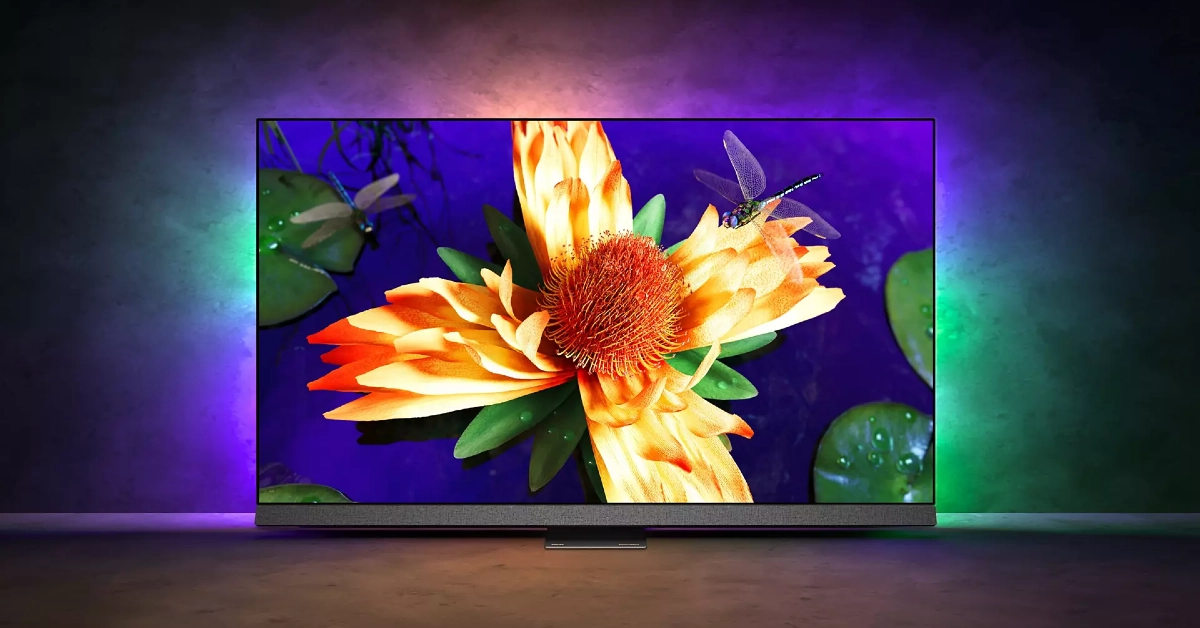
Buy on AmazonPhilips OLED 907 sports a 4K resolution and 120Hz refresh rate. Delivering the ultra HD images on this display is the P5 AI Perfect Picture Engine. One of our favourite visual aspects of this TV is the IMAX Enhanced Mode which creates a special cinematic experience for movies that were originally made to play in IMAX theatres. Handling the OS duties on the Philips OLED 907 is Android TV 11. A 16GB internal memory capacity is optimum for downloading all your favourite streaming apps along with other lifestyle content. The audio output on this TV is provided by Bowers & Wilkins. The 3.1 channel delivers a peak audio output of 80 Watts.
Vizio V Series
Price: $248 on WalmartVizio V Series is one of the most affordable 4K Smart TVs you can buy in the USA right now. Prices for this Smart TV start at $248 for the 43-inch variant and go up to $628 for the 70-inch unit. The 4K panel on this TV supports Dolby Vision HDR. The 60Hz refresh rate is optimum for watching content across all the major OTT platforms. There are 3 2.1 HDMI ports on this TV. Talking about connectivity, the V Series also supports WiFi 6E. There is one Ethernet at the back of the TV and one USB port to the side. The sound output on this TV is delivered by two 10W digital audio amplifiers.
Roku Select Series
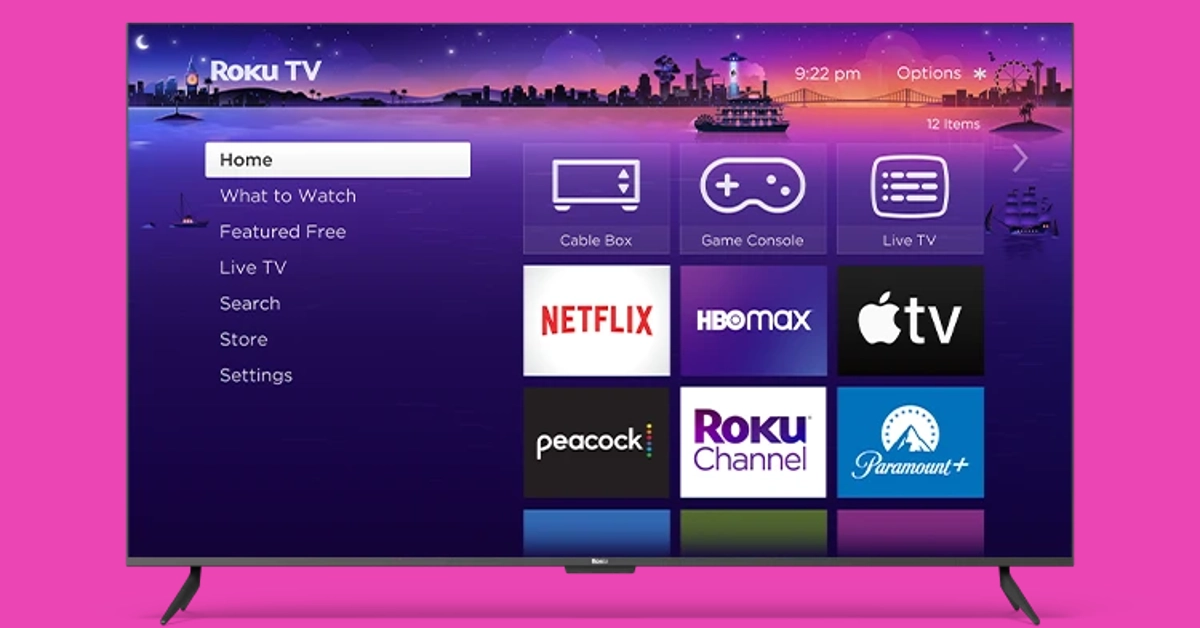
Price: $229 on Best BuyEnding this list is another budget pick under $300. The Roku Select Series starts at S229 for the 43-inch model and goes up to $649 for the 75-inch unit. If you’re on a tight budget, this is one of the best deals you can get right now on a 4K Smart TV in the USA. The 4K panel on Roku’s Select line of TV supports HDR10+, bringing a vivid colour palette and superior viewing experience to your living room. With automatic onboard, Roku’s Smart TV can adjust itself to the lighting of the room. This TV works with AirPlay, Apple Home, Alexa, and Google Home. One of the cooler features of the Roku Select Series is the headphone port on its remote, which allows for discreet viewing sessions without disturbing anyone around you.Read Also:Top 6 Methods to Share Videos on X (formerly Twitter) Without Retweeting (2024)
Conclusion
These are our picks for the top 10 4K TVs you can buy in the USA right now. These picks cover all the major categories and price points. If you think we missed out on a TV that deserves a spot on this list, let us know in the comments!
Poco X6 5G 12GB RAM with 256GB storage is currently up for sale in India.
The new variant went on sale after it was launched last month.
The handset includes a triple rear camera setup and a 120Hz display.
Poco X6 5G which launched in India earlier last month was only made available in India in two different configurations. One month after its release the company brought another 12GB RAM with a 256GB storage option to the market, which is currently available for purchase. Poco X6 5G is powered by the Snapdragon 7s Gen 2 chip. It runs on new HyperOS software and supports 67W fast charging.
Poco X6 5G 12GB RAM with 256GB storage price in India
Poco X6 5G 12GB RAM with 256GB storage variant can be purchased at Rs 23,999 in India. The company is also offering a discount of Rs 3,000 if it is purchased via ICICI, HDFC, Axis and SBI bank cards or EMI transactions. The phone comes in two colour options Mirror Black and Snowstorm White.Poco X6 also comes with 8GB RAM with 256GB storage at Rs 21,999. Whereas the top of the line 12GB RAM with 512GB storage option comes with a price tag of Rs 24,999.Also Read:Poco X6 Review: Does it have the X factor?
Poco X6 5G specifications
The Poco X6 5G features a 6.67-inch AMOLED display with a resolution of 1.5K – 2712 x 1220. The display panel has a screen-to-body ratio of 94.27% and a pixel density of 446 PPI. It has a colour gamut of 100% DCI-P3 (typ), showcasing a colour depth of over 68.7 Billion+ colours. The display also features a refresh rate of 120Hz and supports Dolby Vision. The device runs on the new HyperOS on top of Android 14 and is powered by Snapdragon 7s Gen 2 SoC with up to 12GB RAM and 512GB storage.Also Read:Redmi A3 gets listed on Flipkart, key details revealedThe handset comes with a triple rear camera setup that includes a 64-megapixel main camera lens with OIS, an 8-megapixel ultra-wide-angle lens and a 2-megapixel macro camera. For selfies, the handset includes a 16-megapixel front-facing camera.The Poco X6 5G is backed by a 5,100mAh battery with 67W fast charging support. For connectivity, there is 5G, 4G LTE, Bluetooth, NFC, GPS, and a USB Type-C port for charging. The 3.5mm jack is missing on the pro model whereas the standard model has. The sensors on the phones include an accelerometer, gyroscope, proximity sensor and e-compass.
Garena Free Fire is a battle royale game with regular awards and tournaments to keep players interested. If you play Garena Free Fire, you should be aware of the redeem codes that are released on a daily basis. However, because the battle royale game is banned in India, players from other countries can use the Free Fire Redeem codes daily. If you’re unfamiliar with the Garena Free Fire redeem codes or don’t know how to get them, we’ve put together a step-by-step guide to help you redeem them. Check out Garena Free Fire Redeem Codes for 13 February 2024.The Free Fire redeem codes are a great way to get free stuff. These are 12-digit codes that contain alphabets and numbers, as well as an expiration date and time. Because the Garena FF redeem codes cannot be used more than once, you should hurry to the redemption page to claim your free reward before someone else does. To get a free reward, all you have to do is go to reward.ff.garena.com/en, which is the official redemption page. Also, keep an eye on this space for daily updates on Garena Free Fire redemption codes and rewards.Also Read: Sennheiser Accentum Plus wireless headphones with Hybrid Adaptive Noise Cancellation launched
Garena Free Fire Redeem Codes Today 13 February 2024
Garena Free Fire is a battle royale game with regular awards and tournaments to keep players interested. If you play Garena Free Fire, you should be aware of the redeem codes that are released daily. However, because the battle royale game is banned in India, players from other countries can use the Free Fire Redeem codes daily. If you’re unfamiliar with the Garena Free Fire redeem codes or don’t know how to get them, we’ve put together a step-by-step guide to help you redeem them. Check out Garena Free Fire Redeem Codes for 11 February 2024.
The Free Fire redeem codes are a great way to get free stuff. These are 12-digit codes that contain alphabets and numbers, as well as an expiration date and time. Because the Garena FF redeem codes cannot be used more than once, you should hurry to the redemption page to claim your free reward before someone else does. To get a free reward, all you have to do is go to reward.ff.garena.com/en, which is the official redemption page. Also, keep an eye on this space for daily updates on Garena Free Fire redemption codes and rewards.
Garena Free Fire Redeem Codes Today 12 February 2024
Immersive Noise Cancellation: The Redmi Buds 5 comes equipped with 46dB Hybrid Noise Cancellation, effectively blocking out 99.5% of background noise, ensuring users enjoy a distraction-free audio experience.
Crystal-Clear Communication: With dual-mic AI voice enhancement technology, the Redmi Buds 5 ensures crystal-clear communication for calls, voice commands, and everyday use, enhancing user convenience.
Exceptional Sound Quality: Featuring 12.4mm dynamic titanium drivers, they deliver exceptional sound quality across all frequencies, providing users with a balanced and precise audio experience.
Unmatched Call Quality: Xiaomi‘s proprietary dual-channel AI algorithm enables these to deliver unmatched call quality, even in challenging conditions such as windy environments.
Xiaomi has announced the launch of its latest innovation, the Redmi Buds 5, aiming to redefine the audio experience for consumers in India. With advanced features like Hybrid Noise Cancellation, AI voice enhancement, and dynamic titanium drivers, the Redmi Buds 5 promises to deliver an immersive audio experience like never before. Let’s dive into the details of this exciting new product and explore how it’s set to make waves in the Indian market.
Read Also:Samsung Initiates Pre-Reservation for Galaxy Book4 Series in India
Redmi Buds 5 Features
Customizable Audio Experience: Users can personalize their audio experience with various audio effects, including Standard, Enhanced Treble, Enhanced Bass, and Enhanced Voice, catering to individual preferences.
Fast-Charging Feature: These offer a fast-charging feature, providing up to 2 hours of playtime with just 5 minutes of charging and a total playtime of 38 hours with the case, ensuring uninterrupted music on the go.
Redmi Buds 5 Pricing and Availability
Xiaomi has announced that the Redmi Buds 5 will be available in three stunning colors – Fusion Purple, Fusion Black, and Fusion White, starting from 20th February 2024. Consumers can purchase the Redmi Buds 5 for INR 2,999 across various platforms, including Mi.com, and Amazon.in, Flipkart, Mi Homes, and Xiaomi retail partners. Additionally, Xiaomi is offering a limited period offer wherein customers can avail the Redmi Buds 5 at a discounted price of Rs. 2,499 with the purchase of any Redmi Note 13 Smartphone Series or Xiaomi and Redmi Pad, making it an attractive deal for audio enthusiasts across India.
Read Also:Redmi Buds 3 Lite review: Great performance for the price
Conclusion
Xiaomi’s launch marks another milestone in its commitment to delivering cutting-edge technology to consumers worldwide. With its impressive features, competitive pricing, and limited-period offer, the Redmi Buds 5 is set to become a game-changer in the premium earbuds segment in India. Stay tuned for the official release of the Redmi Buds 5 on 20th February 2024, and experience the next level of audio excellence with Xiaomi.
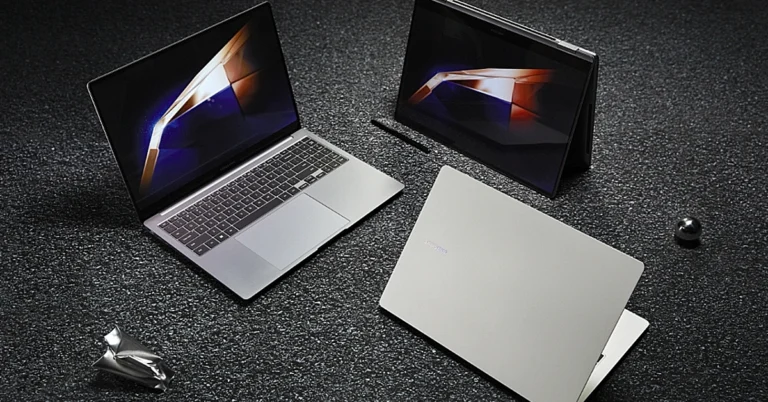
In a groundbreaking move that marks the next stage of technological advancement, Samsung, the premier consumer electronics brand in India, has revealed that pre-reservations are now open for their highly-anticipated Galaxy Book4 series in the Indian market. This significant achievement is set to revolutionize the personal computing industry, ushering in a new era of increased productivity, mobility, and connectivity for users nationwide.
Read Also:Samsung Galaxy Book 3 Pro 360 review: Out of the Galaxy performance
Get ready to be at the forefront of innovation with the Galaxy Book4 series by pre-reserving your spot today. For just a token payment of INR 1999, you can secure early access to this revolutionary lineup of devices that will transform the way we engage with technology. But this offer is more than just a simple reservation.
By taking part in this journey, you’ll be rewarded with a plethora of exclusive benefits worth INR 5000, enhancing your ownership experience of the Galaxy Book4 devices with unmatched value and utility. Trust us, you won’t want to miss out on this gesture of appreciation from Samsung.
Read Also:Samsung Galaxy Book 3 Series: Price in India, availability details
The Galaxy Book4 series is a masterpiece of cutting-edge technology, carefully designed to provide users with an unparalleled experience. It boasts a powerful processor that enhances its computing capabilities and a stunning display that offers vibrant colors and immersive interaction. Together, these advancements push the boundaries of traditional computing.
Have you ever wanted to share a video on X (formerly Twitter) without the caption attached to it? Quote-tweeting the post does not have the same effect as it retains the original caption and doesn’t autoplay the video when it appears on other people’s feeds. Twitter users are also more likely to click on a video if it is embedded into your post instead of being quoted. Don’t know how to share a video on X (Twitter) without retweeting it? Check out these 6 methods.Read Also:Top 2 Ways to Hide Tabs in Google Chrome
When should you share a video on your X (formerly Twitter) feed without quote-tweeting it?
If you’re new to X (Twitter), you’re probably wondering why the platform allows different ways to share videos on your profile. That’s because each mode of sharing has its unique purpose. A retweet simply shares the original poster to your feed without any input from you. If you want to add your commentary to the post, you can choose to quote-tweet it. Finally, X also gives you the option to strip the caption from the video and share it with a new title.You can use this option to share a video as a reaction to something. Meaning, you can respond to another post with that video. You can add your title to the video but the name of the original poster always appears underneath it. The new interactions are also added to the original post. Apart from responding to other posts, you can use this method to quote a tweet with a video as well.
Share someone’s video on X (Twitter) without retweeting
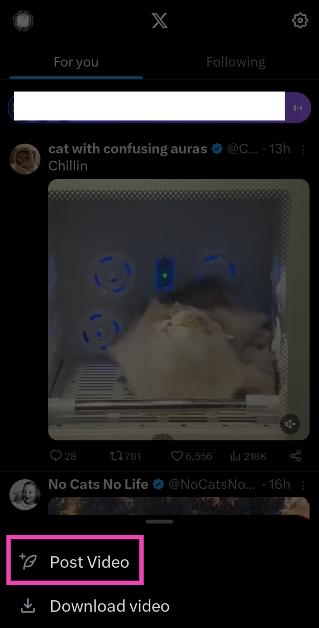
Step 1: Go to the post containing the video.Step 2: Long-press the video and select Post Video.Step 3: The shortened link will appear in the tweet drafter. Step 4: Add a caption for the video. This step is voluntary.Step 5: Hit Post at the top right corner of the screen.
Share a video without retweeting by copying its link
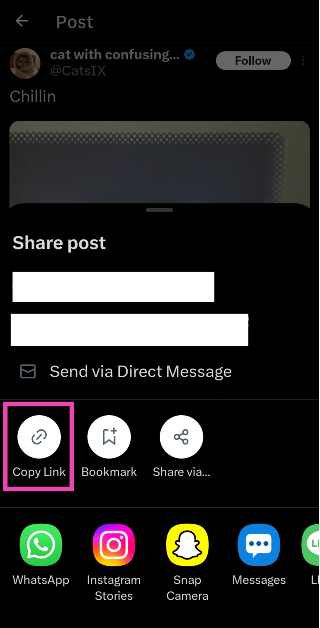
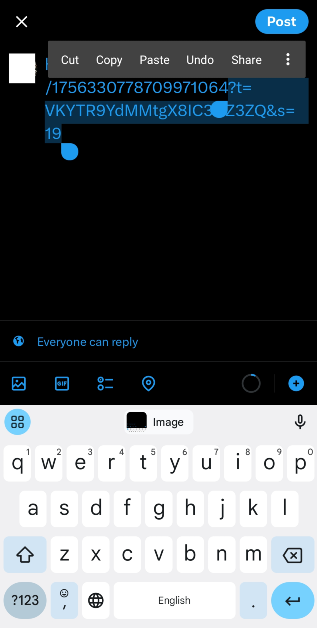
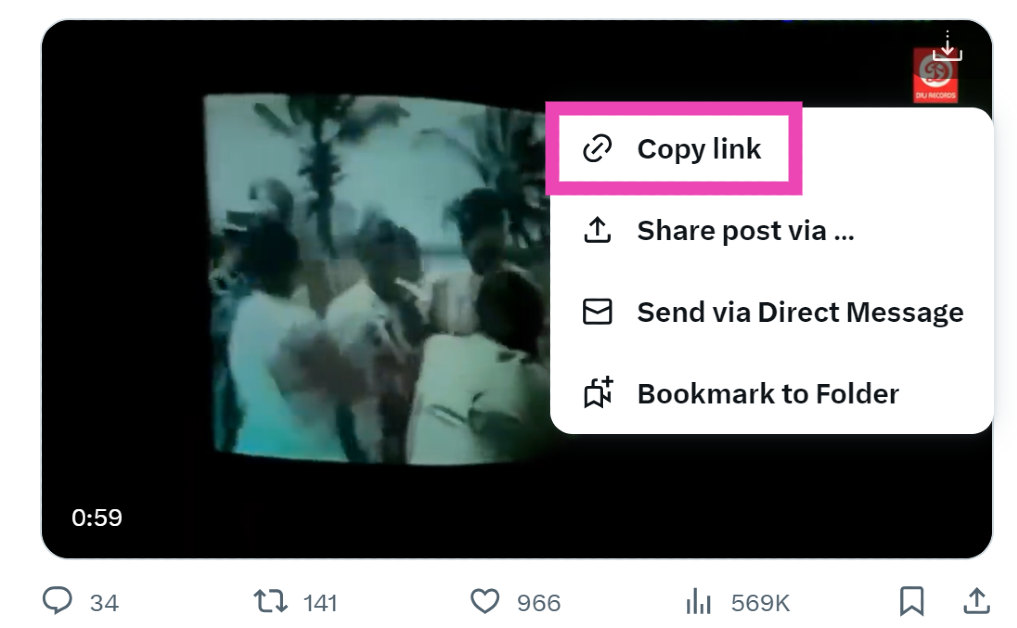
Step 1: Go to the post containing the video.Step 2: Hit the Share icon.Step 3: Tap on Copy Link.Step 4: Go back to the home page and tap the blue plus icon. Hit Post.Step 5: Paste the link in the box.Step 6: Shorten the link manually. You can do this by deleting everything from the link after the status ID, starting from the ‘?’ sign.Step 7: Enter a caption for the video and hit Post.
Share someone’s video on X (Twitter) without retweeting (PC)
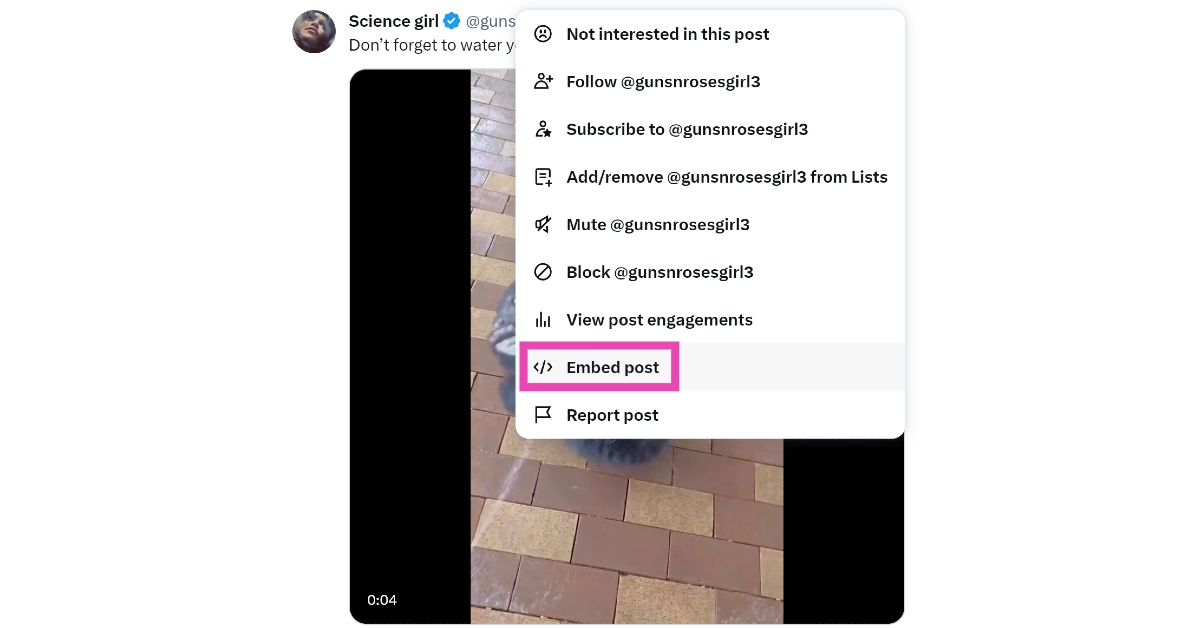
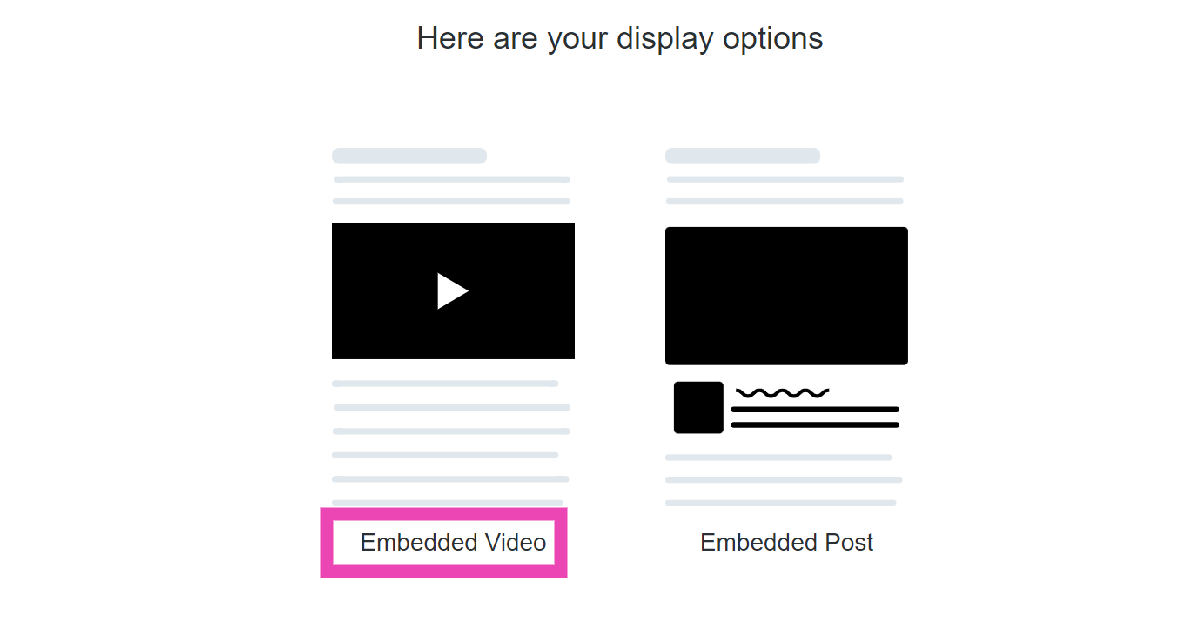
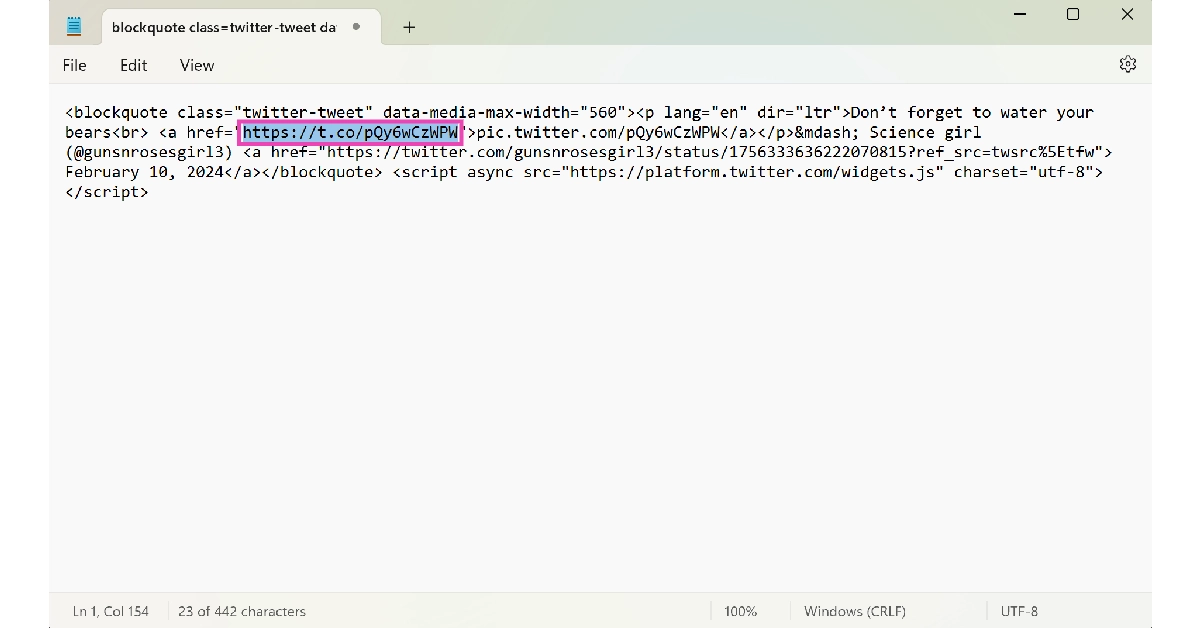
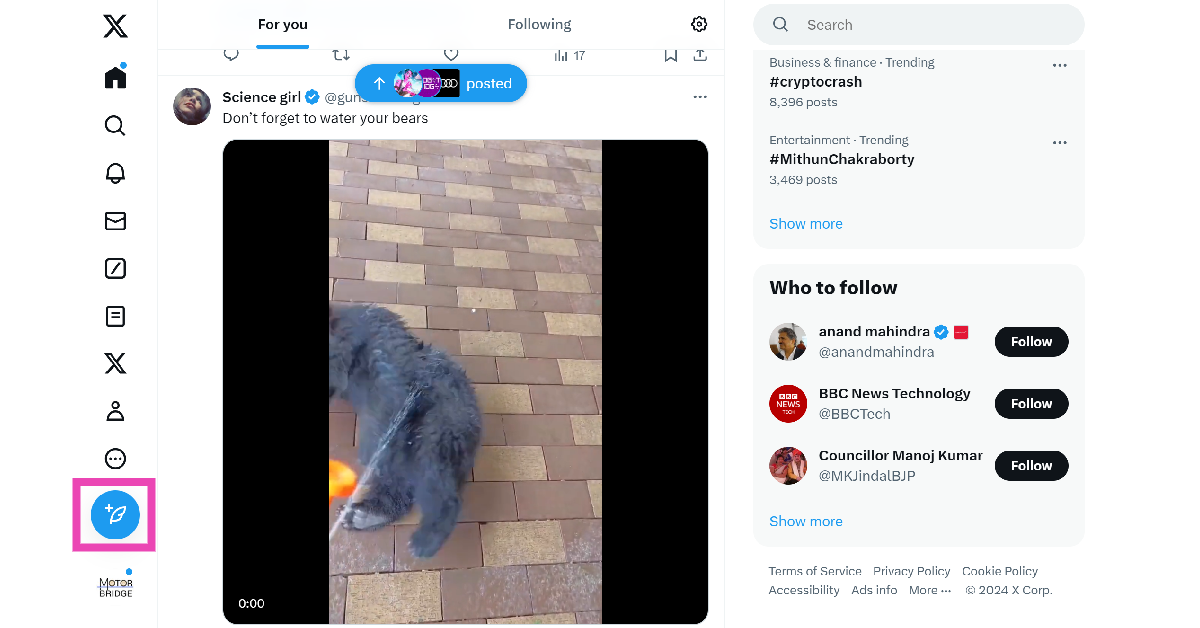
Step 1: Go to the post containing the video.Step 2: Hit the ellipses and select Embed post.Step 3: Select Embedded Post.Step 4: Click on Copy Code.Step 5: Launch Notepad (or any text editor) on your PC and paste the code.Step 6: Copy the firsthyperlink from the code.Step 7: Go back to your Twitter home page and click on the Create Tweet icon.Step 8: Paste the link.Step 9: Add text to the post (voluntary) and hit Post.
Download the video and post it from your account
The methods mentioned above give credit to the original poster of the video. If you don’t want the OP’s name under the video, download it as a file on your device and post it from your profile. Twitter Blue subscribers can natively download videos on the app. Here’s how.Step 1: Launch the X app on your smartphone and select the video you want to download.Step 2: Make sure the video is in full screen.Step 3: Hit the ellipses at the top-right corner of the screen.Step 4: Select Download video.Step 5: Go back to the home page and hit the blue plus icon followed by Post.Step 6: Select the video from your device’s gallery.Step 7: Hit Post.
Download the video and post it from your account (PC)
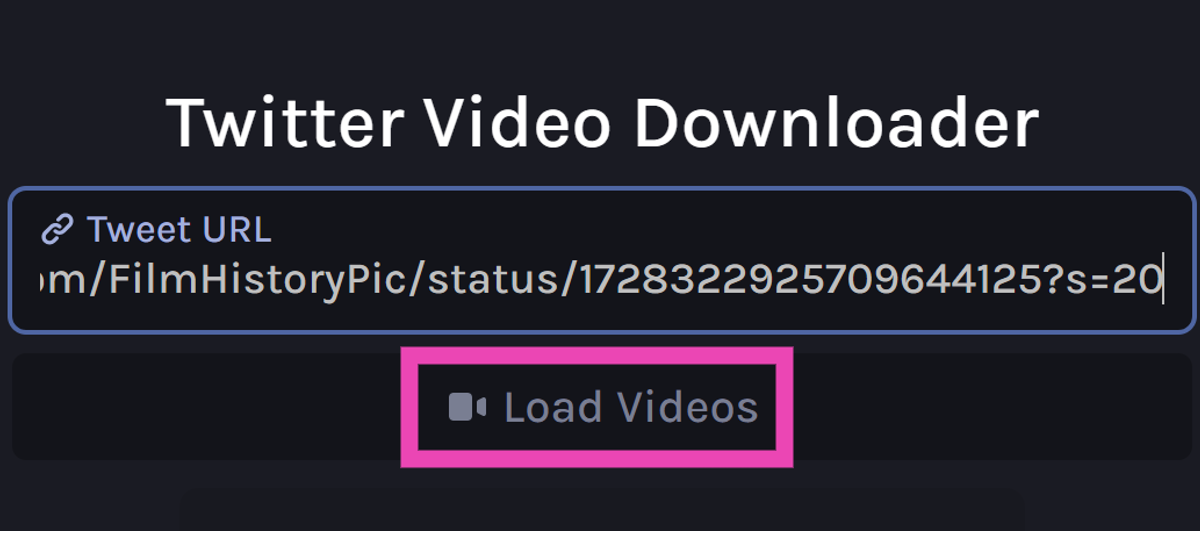
Step 1: On your PC, go to https://twittervid.com/.Step 2: Open Twitter in another tab and go to the video you want to download.Step 3: Hit the Share icon at the bottom of the post.Step 4: Click on Copy Link.Step 5: Go back to the third-party tool and paste the link into the ‘Tweet URL’ box.Step 6: Click on Load Videos.Step 7: Select the resolution you want for the video.Step 8: Once the video has been downloaded to your PC, post it on X from your account.
Use an extension to download the video (PC)
Step 1: On your PC, go to https://twittervid.com/.Step 2: Click on Chrome Extension at the top of the screen. This will redirect you to the Chrome Webstore.Step 3: Select Add to Chrome.Step 4: Hit the Download icon at the top right corner of any video to save it on your device.Step 5: Now, post the video from your X account.
Frequently Asked Questions (FAQs)
How do I download a video from X (Twitter)?
Copy the link to the video, go to https://twittervid.com/, and paste it into the box. Click on ‘Load Videos’ and select a video resolution. The video will be downloaded to your device.
How do I share a video on X (Twitter) without retweeting the source?
Long press the video and select ‘Post Video’ to share it without the original tweet. The name of the original poster of the video will appear under the video in your post.
What is the video time and file size limit for Twitter Blue subscribers?
These are the top 6 ways to share a video on X (Twitter) without retweeting it. The only way you can share a video without crediting the OP is by downloading it as a file on your device. If you know any other way to go about this task, let us know in the comments!
Garena Free Fire is a battle royale game with regular awards and tournaments to keep players interested. If you play Garena Free Fire, you should be aware of the redeem codes that are released on a daily basis. However, because the battle royale game is banned in India, players from other countries can use the Free Fire Redeem codes daily. If you’re unfamiliar with the Garena Free Fire redeem codes or don’t know how to get them, we’ve put together a step-by-step guide to help you redeem them. Check out Garena Free Fire Redeem Codes for 11 February 2024.The Free Fire redeem codes are a great way to get free stuff. These are 12-digit codes that contain alphabets and numbers, as well as an expiration date and time. Because the Garena FF redeem codes cannot be used more than once, you should hurry to the redemption page to claim your free reward before someone else does. To get a free reward, all you have to do is go to reward.ff.garena.com/en, which is the official redemption page. Also, keep an eye on this space for daily updates on Garena Free Fire redemption codes and rewards.Also Read: Sennheiser Accentum Plus wireless headphones with Hybrid Adaptive Noise Cancellation launched
Garena Free Fire Redeem Codes Today 11 February 2024
Do you feel uncomfortable when people around you are constantly glancing at your laptop? Whether you’re on a flight or working from a shared workplace, your laptop’s screen is bound to attract eyeballs. Luckily, if you are working on Chrome, you can do something about keeping your active tabs from prying eyes. While Google Chrome does not have a dedicated feature for hiding tabs on the browser, there are a couple of workarounds that will serve you well. So, let’s jump right into it.Read Also:Top 4 Ways to Block Spam on WhatsApp? (2024)
Which method should you use?
There is no direct way to hide tabs on Google Chrome. There are a couple of extensions that claim to hide tabs on the browser, but they close all tabs and wipe your profile settings instead. Once all tabs are closed, these extensions do not offer a way to retrieve them. We would highly suggest steering clear of these misleading extensions.Now that we’re not going down the extensions route, it leaves us with two options. You can either hide the tab bar entirely by going full screen or pin a tab to shorten it. The latter hides the title of the tab but not the thumbnail. You can also choose to open the tabs you wish to hide in another Chrome window altogether. You can switch between the two browser windows by swiping up on the touchpad of your laptop with three fingers. If you don’t want the websites you visit to be recorded in the browser history, use the incognito tab instead. You can trigger it by pressing Ctrl + Shift + N.
Hide tabs on Google Chrome by going full-screen
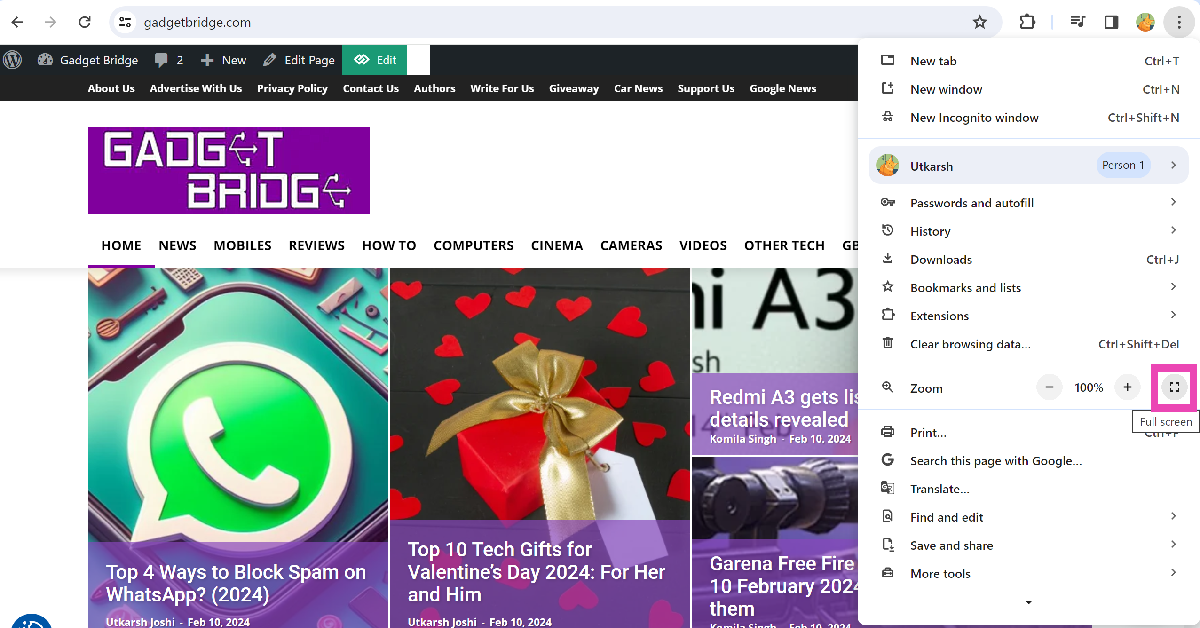
Did you know that you can expand the current tab on your web browser and make it go full screen? Not only does it curb distractions, but it also hides all your tabs from the screen. To go full screen on Google Chrome, simply press F11 on your keyboard. If pressing the F11 key triggers a shortcut, press Fn + F11 to use the web browser in full-screen mode. You can also click on the ellipses and hit the expand icon next to the zoom functions to make your current tab cover the entire screen. To go back to regular mode press F11 (or Fn + F11) again or simply move your cursor to the top of the screen and hit the cross icon.
Pin the tab
Pinning a tab moves it to the extreme left of the tab bar. Once you pin a tab, you can’t see its title. The only way to recognise a pinned tab is by its thumbnail. To pin a tab, right-click on it and select ‘Pin’. This will permanently lock the tab in the first position. Any tabs pinned after that will be queued behind it. To unpin a tab, right-click on it and hit ‘Unpin’.
Use a third-party extension (Hide Tabs)
Step 1:Install the Hide Tabs (Panic Button) extension from the Chrome Web Store.
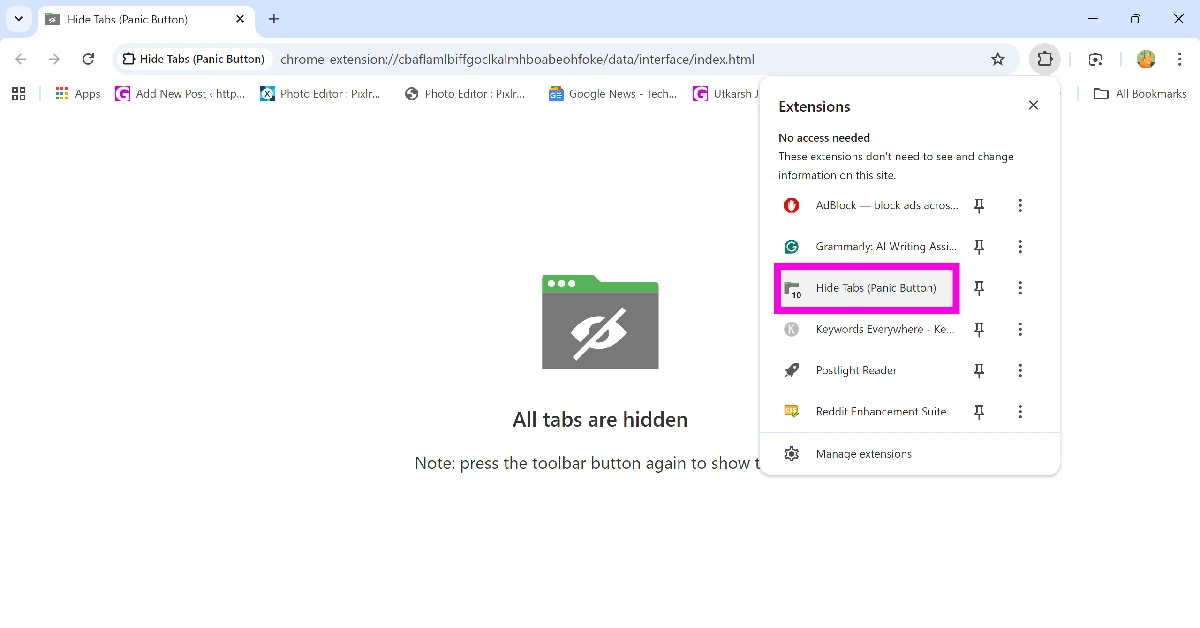
Step 2: Click the Extensions icon on the toolbar.
Step 3: Select the Hide Tabs extension. This will hide all your current tabs instantly.
Step 4: Click the Hide Tabs extension again to restore all hidden tabs.
Create a tab group
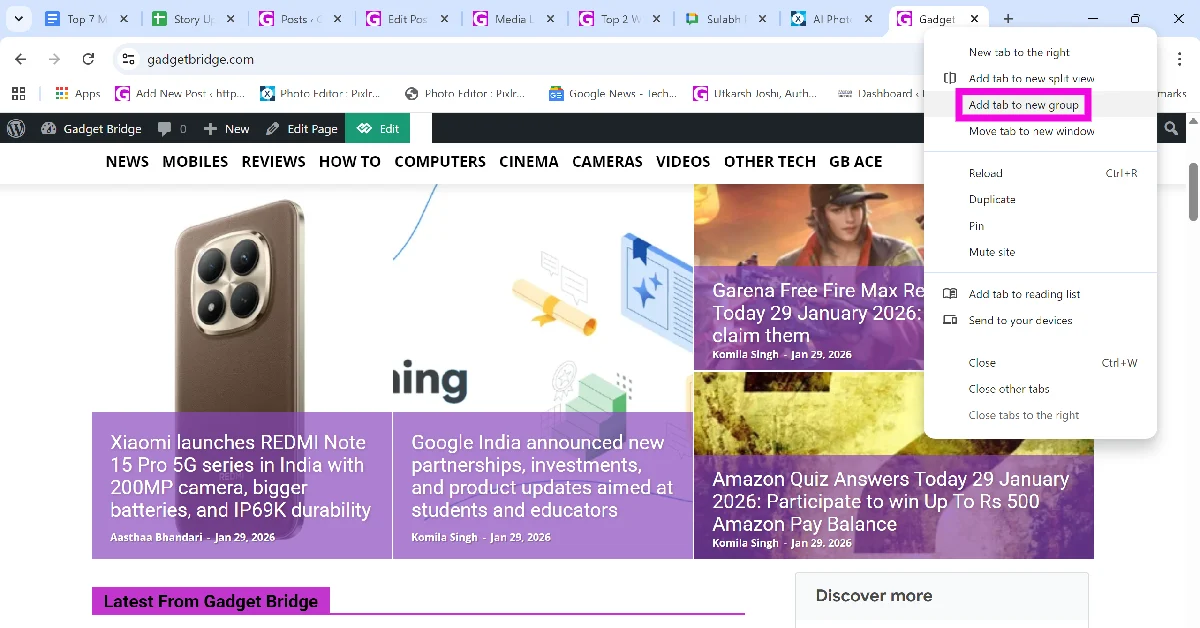
Google Chrome lets you bunch different tabs into a group. Once a group is created, you can minimise it with a single click, effectively hiding it from the tab bar. Here’s how you can go about it.
Step 1:Right-click the tab you want to hide and select Add tab to new group.
Step 2: Give the group a name. This step is optional.
Step 3: Once the group is created, click its icon to hide the tab(s) in it.
Frequently Asked Questions (FAQs)
Is there a Google Chrome extension to hide tabs in the web browser?
While there are a couple of ‘Panic Button’ extensions that claim to hide tabs on Google Chrome, they simply close all your tabs and wipe your Chrome profile from the browser without giving you the option to restore them.
How do I use Google Chrome in fullscreen?
Press F11 (or Fn + F11) on your keyboard to use Google Chrome in full screen. This will hide the tab bar entirely. You can also hit the expand icon next to the zoom option in Chrome’s menu to go full screen.
How do I open multiple tabs at once on Google Chrome?
These are the top 4 ways to hide your active tabs on Google Chrome. If you know of any other way to accomplish this task, let us know in the comments! Use the incognito window to visit websites that you don’t want to be recorded in your browser history. While you’re here, read this article to learn how to use the new Reading Mode on Chrome.



 Out of the box, the Dreame U10 Vacuum Cleaner also looks like the rest of the pack. In fact, it seems a bit inspired by the Dyson series. However, it does have its distinct features. It is a trigger-style Vacuum Cleaner that when pressed sucks the dust at quite a rapid pace. The main enclosure consists of the rechargeable battery, the suction motor and also the transparent enclosure to trap all the dust and gunk.
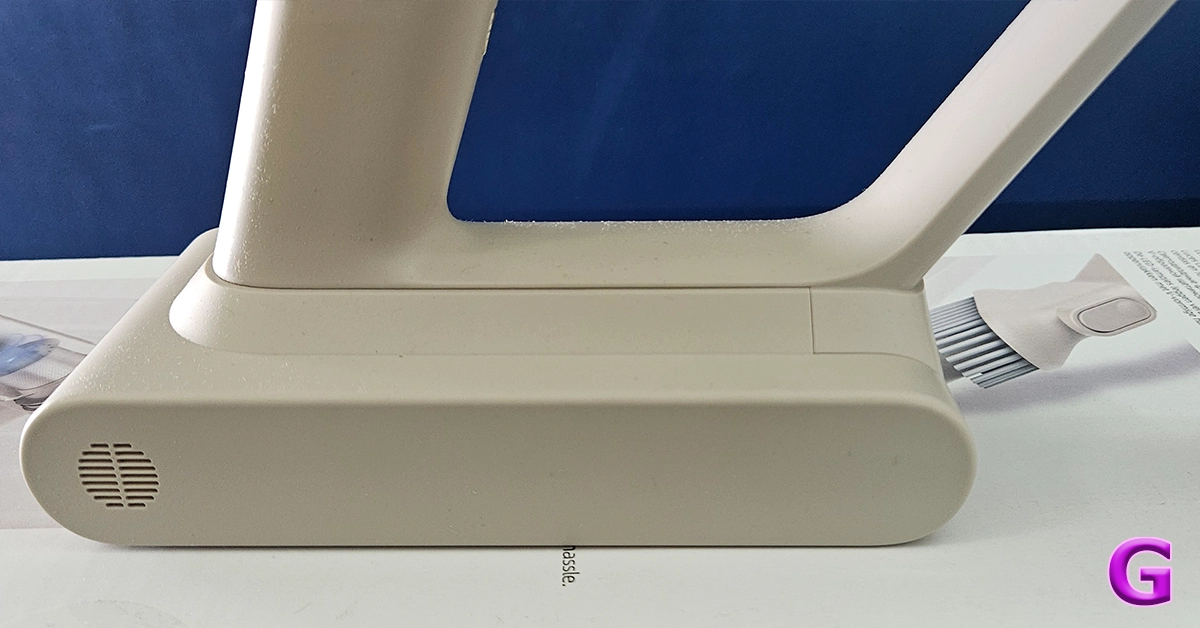


 In the box, you also get two attachments and one long neck to connect the primary brush roller addon to clean hard as well carpeted floors. This also has an LED light in front of it for the user to easily see the debris and dust in front. The other one is a smaller stick-tip head which can be used for cleaning the keyboard, nooks and corners of the sofa, and also windows and blinds. With it, there is also a wall attachment on which you can hang the cleaner for easy storage.
 Read Also: Samsung launches Bespoke Jet and Robotic Vacuum Cleaner lineup starting at Rs 65,900












 Step 3:
 Step 3:
 Step 4:
 Step 5:
 Step 7:
 Step 3:
 Step 4:
 Step 5:
 Step 6:
 Step 8:
 Step 4:
 Step 5:
 Step 4:
 Step 5:
 Step 7:
 Step 8:
 Step 5:


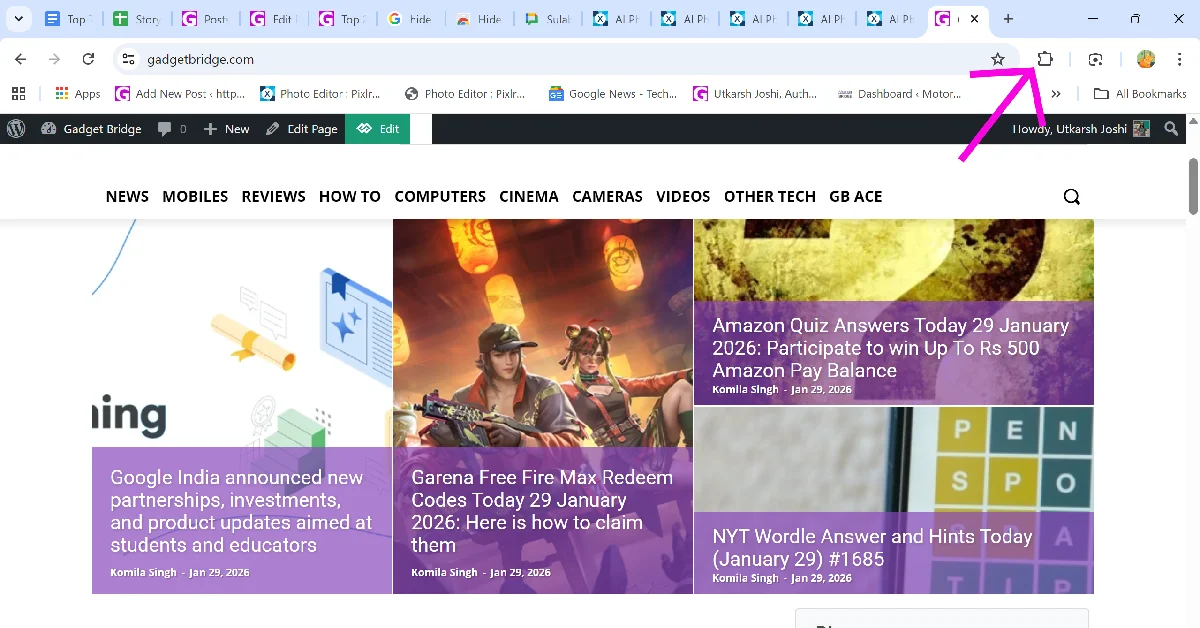 Step 3: Select the Hide Tabs extension. This will hide all your current tabs instantly.
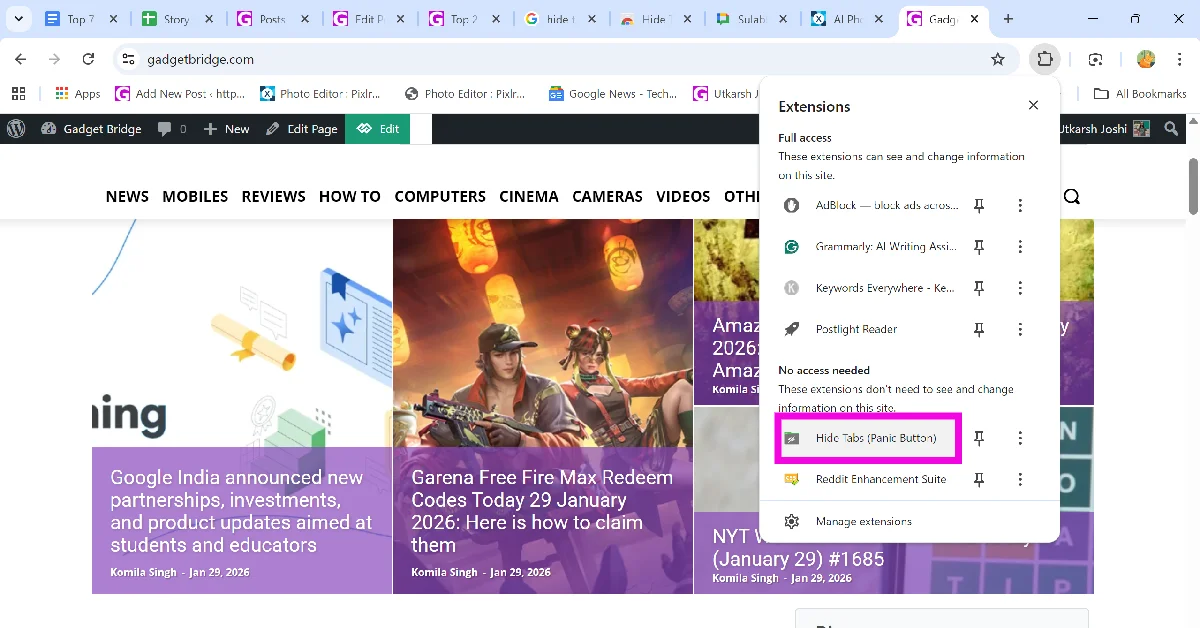 Step 4: Click the Hide Tabs extension again to restore all hidden tabs.
 Step 2: Give the group a name. This step is optional.
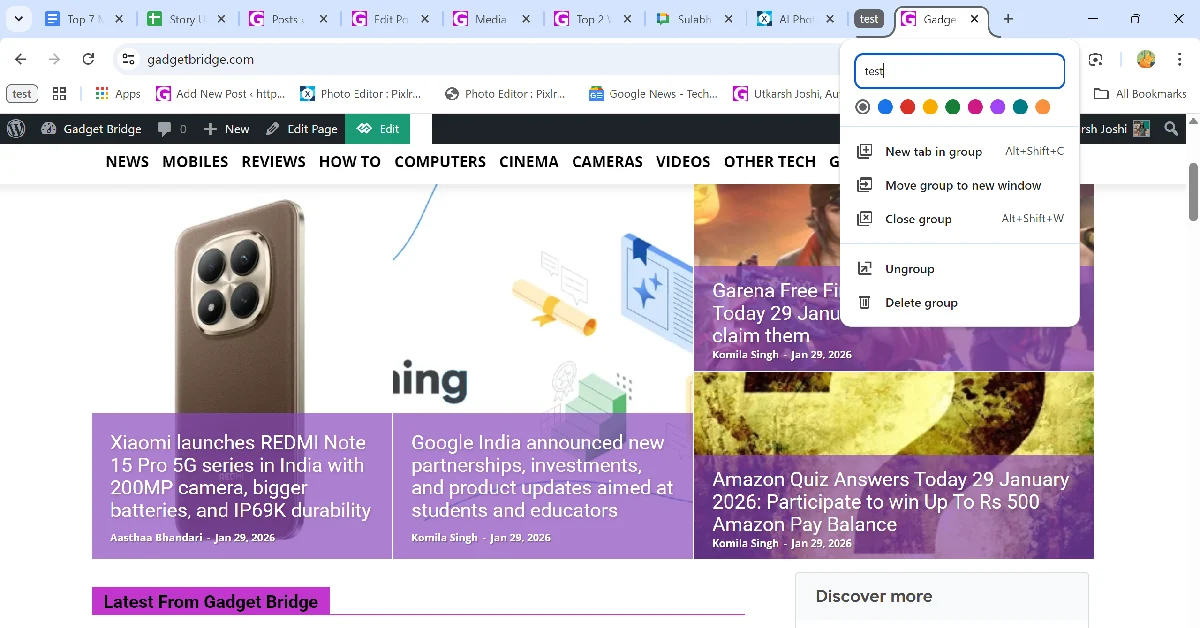 Step 3: Once the group is created, click its icon to hide the tab(s) in it.